TG Risk Service Manager MT5

Introducing "TG Risk Service Manager" — your comprehensive toolkit for swift and precise risk management and lot size calculations in the dynamic world of trading. Designed to streamline development processes and enhance trading strategies, this indispensable library equips developers with essential tools for optimizing risk assessment and trade profitability.

Key Features:


  1. Efficient Lot Size Calculation: Harness the power of precise lot size computation for optimal risk management. With "TG Risk Service Manager," developers can effortlessly determine the appropriate lot size based on specified risk amounts and stop loss sizes, empowering them to execute strategies with confidence and precision.

  2. Unified Interface: TG Trade Service Manager" provides a unified interface for MQL4 and MQL5, streamlining trade management processes across platforms.

  3. Target Price Calculation: Seamlessly calculate target prices to achieve desired profit objectives. Whether aiming to attain a specific monetary goal with a given lot size or strategizing for profit targets, this feature equips developers with invaluable insights to guide their trading decisions effectively.

  4. Averaging Strategies Optimization: Unlock the potential of averaging strategies with advanced computation capabilities. From computing averaging open prices for designated magic numbers or instruments to determining optimal averaging take profit levels for batch trades, "TG Risk Service Manager" empowers developers to maximize profitability and mitigate risks with ease.

Experience the efficiency, accuracy, and versatility of "TG Risk Service Manager" — your indispensable companion for mastering risk management and optimizing trading strategies in the competitive world of financial markets.


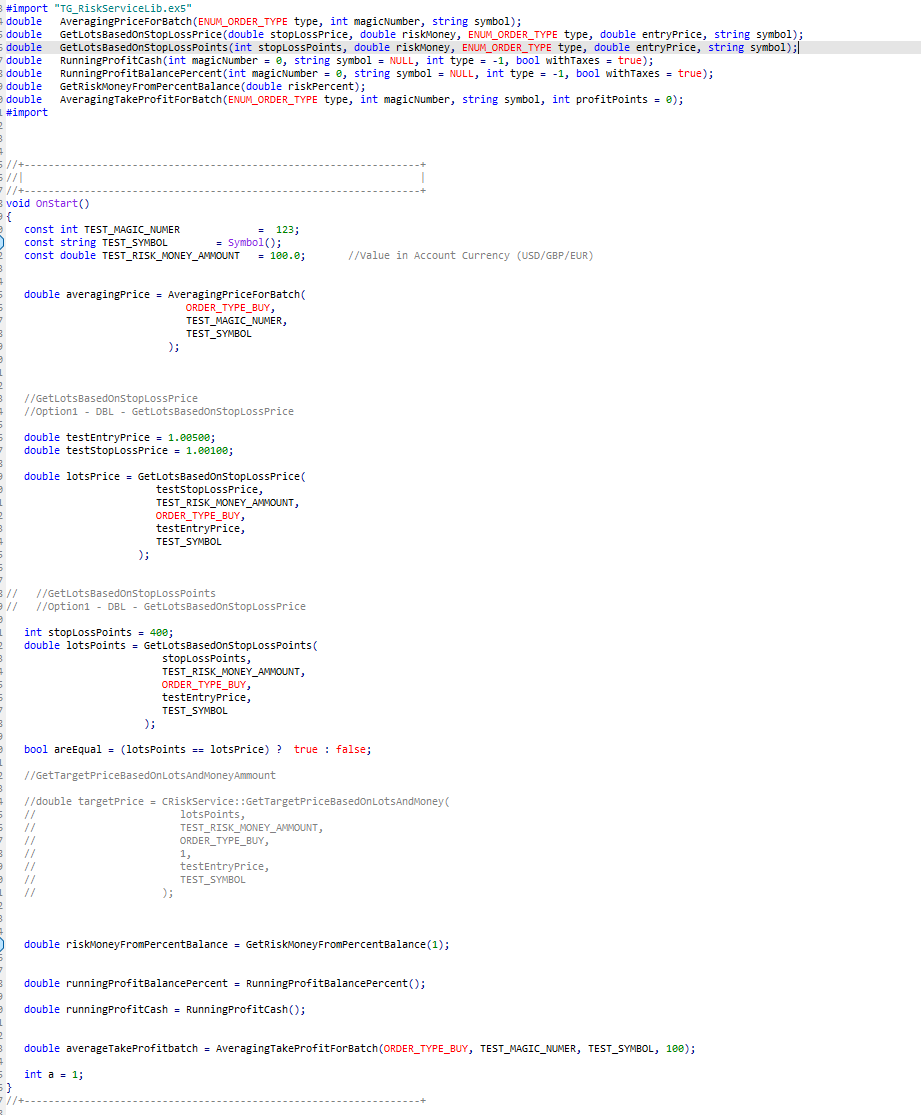
#import "TG_RiskServiceLib.ex5"
double   AveragingPriceForBatch(ENUM_ORDER_TYPE type, int profitPoints, int magicNumber, string symbol);
double   GetLotsBasedOnStopLossPrice(double stopLossPrice, double riskMoney, ENUM_ORDER_TYPE type, double entryPrice, string symbol);
double   GetLotsBasedOnStopLossPoints(int stopLossPoints, double riskMoney, ENUM_ORDER_TYPE type, double entryPrice, string symbol);
double   GetTargetPriceBasedOnLotsAndMoneyAmmount(double positionSize, double moneyAmmount, ENUM_ORDER_TYPE type, int targetType = 0, double entryPrice = 0, string symbol = NULL);
double   RunningProfitCash(int magicNumber = 0, string symbol = NULL, int type = -1, bool withTaxes = true);
double   RunningProfitBalancePercent(int magicNumber = 0, string symbol = NULL, int type = -1, bool withTaxes = true);
double   GetRiskMoneyFromPercentBalance(double riskPercent);
double   AveragingTakeProfitForBatch(ENUM_ORDER_TYPE type, int magicNumber, string symbol, int profitPoints = 0);
#import
BEFORE USING YOU HAVE TO IMPORT THE LIBRARY LIKE MY EXAMPLE ABOVE


How to use Examples:

   const int TEST_MAGIC_NUMER             =  123;
   const string TEST_SYMBOL               = "EURUSD";
   const double TEST_RISK_MONEY_AMMOUNT   = 100.0;       //Value in Account Currency (USD/GBP/EUR)


   //Returns the average open price of a transaction batch
   double averagingPrice = AveragingPriceForBatch(
                              ORDER_TYPE_BUY,
                              TEST_MAGIC_NUMER,
                              TEST_SYMBOL
                           );


   //GetLotsBasedOnStopLossPrice
   //Option1 - DBL - GetLotsBasedOnStopLossPrice

   double testEntryPrice = 1.00500;
   double testStopLossPrice = 1.00100;

   //Returns lotSize based on stop loss PRICE
   double lotsPrice = GetLotsBasedOnStopLossPrice(
                         testStopLossPrice,
                         TEST_RISK_MONEY_AMMOUNT,
                         ORDER_TYPE_BUY,
                         testEntryPrice,
                         TEST_SYMBOL
                      );


//   //GetLotsBasedOnStopLossPoints
//   //Option1 - INT - GetLotsBasedOnStopLossPrice

   //Returns lotSize based on stop loss size in POINTS
   int stopLossPoints = 400;
   double lotsPoints = GetLotsBasedOnStopLossPoints(
                          stopLossPoints,
                          TEST_RISK_MONEY_AMMOUNT,
                          ORDER_TYPE_BUY,
                          testEntryPrice,
                          TEST_SYMBOL
                       );

   //Both methods return same lot if the parameters are the same
   // in this case testEntryPrice(1.00500) - testStopLossPrice(1.00100) = stopLossPoints(400)
   bool areEqual = (lotsPoints == lotsPrice) ?  true : false;


   // in this case returns 1/100 * Balance
   double riskMoneyFromPercentBalance = GetRiskMoneyFromPercentBalance(1);

   //returns the running profit as a percentage
   //if Balance is 10.000USD and RunningProfit is -1000 then  RunningProfitBalancePercent() will return 10.0 (%)
   //this can be customized to work with magic number,symbol, orderType
   double runningProfitBalancePercent = RunningProfitBalancePercent();


   //returns the running profit as absolute value
   //this can be customized to work with magic number,symbol, orderType
   double runningProfitCash = RunningProfitCash();

   
   //Computes the take profit for a batch of trades
   //last parameter is "points" which specifies how many points should the batch be in profit
   //in this example AveragingTakeProfitForBatch returns a price where the whole batch of transactions will be 100 points in profit
   double averageTakeProfitbatch = AveragingTakeProfitForBatch(ORDER_TYPE_BUY, TEST_MAGIC_NUMER, TEST_SYMBOL, 100);

推荐产品
Important: This product is a Library for developers . It is suitable only for users who can write/modify MQL5 code and integrate a compiled library into their own EA/Script. It is not a “drag & run” notifier. Telegram SDK helps you send Telegram messages and photos from MetaTrader 5 in a simple and reliable way. Use it when you want Telegram notifications inside your own automation tools. If you need the MetaTrader 4 version, it is available separately in the Market:   Telegram SDK M T4 . Main f
用于 MetaTrader 5 的 DhanHQ v2 API 桥接程序 将 MetaTrader 5 连接到您的 DhanHQ 交易账户,直接通过 MQL5 管理订单、 持仓、资金和投资组合。该库封装了官方 DhanHQ v2 REST API(支持 NSE、BSE、MCX), 让您能够在 Dhan 平台上构建自己的 EA(智能交易系统)、脚本和自动化策略。 功能特性 - 完整的订单生命周期管理:下单、修改、取消、拆单、查询订单簿、按 ID 查询订单、 按关联 ID 查询订单、查询成交记录及按订单查询成交明细。 - 订单辅助功能:市价单、限价单、止损单(Stop-Loss)和止损市价单(Stop-Loss-Market)。 - 超级订单(区间/Bracket 订单):下单、修改子单、取消子单、查询列表。 - 投资组合:持仓资产、持仓明细、转换持仓、平掉所有仓位。 - 资金管理:资金限额查询及保证金计算器。 - 交易控制:紧急停止(Kill Switch)功能。 - 身份验证:使用 access-token 标头(header)及 Dhan 客户 ID。 - 静态 IP 白名单(设
BitMEX Trading API
Romeu Bertho
5 (1)
Cryptocurrency analysis has never been easier with Crypto Charts for MetaTrader 5. Now, trading on BitMEX has never been easier with BitMEX Trading API for MetaTrader 5. BitMEX Trading API library was built to be as easy to use as possible. Just include the library into your Expert Advisor or Script, call the corresponding methods and start trading! Features Trade on BitMEX and BitMEX Testnet. Build and automate your strategies. Concern more with the trading strategy logic and less with the co
Binance Library
Hadil Mutaqin SE
5 (1)
The library is used to develop automatic trading on Binance Spot Market from MT5 platform. Support all order types: Limit, Market, StopLimit and StopMarket Support Testnet mode Automatically display the chart on the screen Usage: 1. Open MQL5 demo account 2. Download Header   file and EA sample   https://drive.google.com/uc?export=download&id=1kjUX7Hyy02EiwTLgVi8qdaCNvNzazjln Copy Binance.mqh to folder \MQL5\Include Copy  BinanceEA-Sample.mq5 to folder \MQL5\Experts 3. Allow WebRequest from MT5
MyTradingHistory
Max Timur Soenmez
一个易于使用的库,为开发者提供关键交易统计数据的便捷访问,适用于其MQL5 EA。 库中的可用方法: 账户数据和收益: GetAccountBalance() : 返回当前账户余额。 GetProfit() : 返回所有交易的净利润。 GetDeposit() : 返回总存款金额。 GetWithdrawal() : 返回总取款金额。 交易分析: GetProfitTrades() : 返回盈利交易的数量。 GetLossTrades() : 返回亏损交易的数量。 GetTotalTrades() : 返回执行的总交易数。 GetShortTrades() : 返回卖空交易的数量。 GetLongTrades() : 返回多头交易的数量。 GetWinLossRatio() : 返回盈利与亏损交易的比例。 GetAverageProfitTrade() : 返回每笔盈利交易的平均利润。 GetAverageLossTrade() : 返回每笔亏损交易的平均亏损。 GetROI() : 计算投资回报率。 GetLargestProfitTrade() : 返回单笔交易的最大利润。 Get
NATS (Niguru Automatic Trailing Stop) will help you achieve more profits, by setting the trailing stop automatically. Pair this NATS application with EA, or can also be used as a complement to manual trading. A trailing stop is a powerful tool in trading that combines risk management and profit optimization.  A trailing stop is a type of market order that sets a stop-loss at a percentage below the market price of an asset, rather than a fixed number. It dynamically adjusts as the asset’s pric
FREE
Static Text display
Muhammad Saad Khan
静态文本显示 是一个轻量且用户友好的 MetaTrader 5 专家顾问(EA),旨在通过在您的图表上直接显示激励性交易提示来启发和教育交易者。凭借优雅的居中黑色背景和等宽字体白色文本,该 EA 以轮换片段形式提供简洁、可操作的建议,帮助您专注于纪律交易。适合初学者和经验丰富的交易者,它倡导风险管理、耐心和策略开发等关键原则。 主要功能: 动态提示显示 :将用户定义的交易提示分割为 50-60 个字符的可读片段,每隔几秒轮换一次(持续时间可自定义)。 专业设计 :在图表顶部中心显示提示,带有黑色背景,确保可读性和均匀填充。 响应式定位 :在图表大小调整或切换时自动调整文本和背景对齐。 可自定义设置 :根据您的偏好调整字体大小、文本颜色、背景颜色和显示持续时间。 开关控制 :无需移除 EA 即可轻松启用或禁用显示。 轻量高效 :资源占用极低,不影响平台性能。 为什么选择静态文本显示? 无论您是想提升交易纪律还是寻求每日动力,此 EA 始终将核心交易智慧置于显眼位置。默认提示强调风险管理、策略测试和情绪控制,但您可以自定义文本以匹配您的交易理念。适合重视教育和一致性的交易者。 输入参数:
FREE
TeleSignal
Vincent Jean Robert Trolard
TeleSignal EA is an intelligent Expert Advisor designed to automatically send Telegram notifications whenever a position is opened, closed, or modified in MetaTrader 5 . It allows you to monitor your trades in real time , wherever you are — no need to keep your trading platform open. Through its direct integration with the Telegram API, you’ll receive clear and instant messages showing: Trade opened (symbol, lot size, order type, entry price) Trade closed (exit price, profit/loss, trade du
这是一个可以定时自动交易的EA。根据你设定的时间,精确到秒,可以设置最多下几单。下单buy或者Sell.可以设置值止盈止损点。并且可以设定在下单后多久平仓。一般都是用来做事件。祝你好运。 请看图片自己根据设定来使用。每一次使用请重新加载EA。不用的时候记得关闭EA按钮。 我来举个例子。比如英国央行利率决议。你在最后两秒下单(设置的是你本机的时间)。因为可能瞬间点差扩大,你可能不敢直接下最大手数,所以你可以选择小手分批从最后5秒开始进场。我相信做过的人知道我说的意思。因为我专业做这个已经十年。最近才做出了这个自动化EA。并且这里面有个检测就是你点击开始之后如果超过了你设定的时间十秒他就不会执行了。保证你的安全。你自己用DEMO账户测试几次你就知道我这个有多好用了!
The library is dedicated to help manage your trades, calculate lot, trailing, partial close and other functions. Lot Calculation Mode 0: Fixed Lot. Mode 1: Martingale Lot (1,3,5,8,13) you can use it in different way calculate when loss=1 ,when profit=0. Mode 2: Multiplier Lot (1,2,4,8,16) you can use it in different way calculate when loss=1 ,when profit=0. Mode 3: Plus Lot (1,2,3,4,5) you can use it in different way calculate when loss=1 ,when profit=0. Mode 4: SL/Risk Lot calculate based on s
OpenAI Library MT5
VitalDefender Inc.
该库旨在提供一种尽可能简单的方法,直接在MetaTrader上使用OpenAI的API。 要深入了解库的潜力,请阅读以下文章: https://www.mql5.com/en/blogs/post/756098 The files needed to use the library can be found here: Manual 重要提示:要使用EA,需要添加以下URL以允许访问OpenAI API  如附图所示 要使用该库,需要包含以下Header,您可以在以下链接找到:  https://www.mql5.com/en/blogs/post/756108 #import "StormWaveOpenAI.ex5" COpenAI *iOpenAI(string); CMessages *iMessages(void); CTools *iTools(void); #import 这就是您需要的所有信息,以便轻松使用该库。 以下是如何轻松使用该库并与OpenAI的API交互的示例 #include <StormWaveOpenAI.mqh>       //--- 包含用于AP


Nexus Quant Matrix
Syarief Azman Bin Rosli
Nexus Quant Matrix MT5 Nexus Quant Matrix   是专为 MetaTrader 5 原生打造的机构级量化计算与流式统计分析库。专为量化交易开发者、系统化对冲基金与程序化策略架构师设计,无需依赖任何外部 Python、C++ 或 DLL 动态链接库,直接在 MQL5 原生运行环境中提供极速数值计算支持。 该库具备严格的 O(1) 计算复杂度,依托预分配环形缓冲区与 Welford 增量算法原理,彻底消除了动态内存重新分配带来的性能开销。系统整合了自适应一维卡尔曼滤波(Kalman Filter)、滚动双变量皮尔逊相关系数(Pearson Correlation)、最小二乘法线性回归(OLS)、经厚尾修正的 Cornish-Fisher 在险价值(VaR)、预期亏损(CVaR / Expected Shortfall)以及受保证金严格约束的凯利公式(Kelly Criterion)头寸管理。 核心功能架构 流式统计矩引擎 (CStreamingStats)   实时计算滑动窗口内的均值、样本方差、标准差、偏度(Skewness)与峰度(Kurtosis
Lib5 EAPadPRO for MT5
Vladislav Andruschenko
4.5 (6)
EAPADPRO Library for MetaTrader 5 是一个免费的专业界面库,用于为您的 Expert Advisor 添加现代化的信息面板。 该库专为 MQL5 开发者设计,适合希望让自己的交易程序在 MetaTrader 5 图表上拥有更清晰、更专业、更有信息价值的视觉呈现。 MetaTrader 5 的 Expert Advisors 通常包含更复杂的逻辑、多组设置、Magic number 过滤、订单执行规则以及内部策略数值。EAPADPRO 可以将这些信息整理到一个结构化面板中,让用户更快、更直观地理解程序当前状态。 EAPADPRO for MT5 是一个免费库。 您可以使用它来提升 Expert Advisor 的界面、信息输出和整体视觉质量。 完整的分步集成说明: LIB - EAPADPRO 分步集成教程 EAPADPRO 面板详细说明: EAPADPRO 信息面板 MetaTrader 4 版本: EAPADPRO Library for MT4 MQL5   Channel  https://www.mql5.com/en/channels/expf
FREE
TrendCore Adaptive FX — Smart Expert Advisor for Confident and Adaptive Forex Trading TrendCore Adaptive FX   is a powerful, fully automated trading robot designed for consistent performance in the Forex market. It combines trend-based technical analysis, adaptive lot management, and solid capital protection strategies to ensure robust and efficient trading under real market conditions. Whether you're a professional trader or a long-term investor, this EA offers an intelligent solution to a
该产品已经开发了 3 年,它是 MQL5 编程语言中最先进的人工智能和机器学习代码库。它已被用于创建多个基于 AI 的交易机器人和指标,适用于 MetaTrader 5。 这是一个高级版,基于免费开源的 MQL5 机器学习项目,链接如下:  https://github.com/MegaJoctan/MALE5 。免费版本功能较少,文档较少,维护不足,仅适用于小型 AI 模型。 该高级版包含您编写 AI 交易机器人的所有必需工具。 为什么要购买此库? 非常易于使用,代码语法友好,类似于 Python 的流行 AI 库,如 Scikit-learn、TensorFlow 和 Keras。 文档齐全,提供丰富的视频、示例和文档,帮助您快速上手。 计算优化,性能优越,运行方式类似普通 EA。  无需额外依赖,无需 DLL 文件,所有内容可编译为单一 .EX5 文件,便于测试和分发。 全天候技术支持,我将提供帮助,确保您正确使用,并在问题出现时协助修复。  谁适合使用此库? 具有基本机器学习和 AI 知识的用户。 机器学习爱好者,特别是来自 Python ML 社区的开发者。 MQL5 中级
Ajuste BRA50
Claudio Rodrigues Alexandre
4.33 (6)
Este script marca no gráfico do ativo BRA50 da active trades o ponto de ajuste do contrato futuro do Mini Índice Brasileiro (WIN), ***ATENÇÃO***  para este script funcionar é necessário autorizar a URL da BMF Bovespa no Meta Trader. passo a passo: MetaTrader 5 -> Ferramentas -> Opções -> Expert Adivisors * Marque a opção "Relacione no quadro abaixo as URL que deseja permitir a função WebRequest" e no quadro abaixo adicione a URL: https://www2.bmf.com.br/ este indicador usa a seguinte página par
FREE
Gamma Edge Pro MT5 — GexBot Classic API Integration Gamma Edge Pro brings institutional-grade Gamma Exposure (GEX) data directly onto your MetaTrader 5 chart — the same data used by professional options traders to anticipate price magnets, hedging flows, and dealer positioning. Powered by the GexBot Classic API, this indicator automatically maps options market data from US-listed instruments onto any MT5 CFD instrument — Forex pairs, Gold, indices, and more — with intelligent price conversion bu
This simple logging library is designed to provide clear and contextual log output with minimal hassle. It exposes five  methods: LogError Message (message) LogWarn Message (message) LogInfo Message (message) LogDebug Message (message) LogTrace Message (message) Each method prints the provided message to the console only if the severity level meets or exceeds the current threshold set by a global variable logLevel. This means you control the verbosity of your application's logs by adjusting logL
FREE
Auto trading so strong mt5 trading script so rich and running amazing auto trading trades with so high quality performance and results Look that is the best trading script that will help you to make good results like in screenshots i built that strategy depend on Envelopes indicator to make that script trading in that area excellent scalping trades and gain maximum good results per trade so i built that strategy manually then I make it auto trading  so to start use that script add to scripts aft
Correlation Master
Agus Santoso
3.67 (3)
博客: https://www.mql5.com/en/blogs/post/761835 MT4 版本: https://www.mql5.com/en/market/product/122732 MT5 版本: https://www.mql5.com/en/market/product/122733 CORRELATION MASTER:双倍货币对,一半风险 智能负相关性和自动对冲EA Correlation Master是一款自动化EA,利用货币对之间的负相关性策略。通过对相反货币对开立反向仓位(例如,买入欧元/美元,卖出美元/瑞郎),该EA旨在最大化利润,同时最小化风险。 凭借灵活的风险管理和多货币对设置,该EA非常适合需要智能自动对冲策略的交易者。 主要功能 自动负相关策略 针对反向波动的货币对建立买入和卖出仓位。 示例:欧元/美元(买入)↔ 美元/瑞士法郎(卖出) 多货币对支持 最多可同时支持 13 个货币对,包括: 欧元/美元/瑞士法郎、英镑/美元/日元、澳元/美元/加元等。 动态风险管理 盈利目标可设置: 全局 每套 每层 可固定交易手数
News Clock
Victor Klenov
The professional browser of News and Trading Sessions is now available in MetaTrader 5. Now all the most important market information is collected on one dial! News located on the Time scale. Planning your working time has never been so easy and convenient ... The news scale can be switched a day, two, a week, a month forward or backward (see the details in the short video). All news updates in real time. Thanks to the built-in filters, you can configure the display of news by importance, cou
專為 MetaTrader 環境設計的性能評估解決方案 工具功能概述 這款專業測試工具能夠評估您的 MetaTrader 環境性能,提供對交易執行有實際影響的洞察。不同於一般系統基準測試,本工具專門針對 MetaTrader 運行環境進行評估。 專業交易者與開發者功能: 性能指標測量 :評估計算吞吐量和記憶體效率 交易相關測試 :模擬 EA 運行和基本訂單執行的測試 比較分析 :使用標準評分系統比較不同主機解決方案 技術洞察 :反映 MetaTrader 資源使用情況的測試方法 決策支持 :為 VPS 選擇和配置提供有用數據 新手交易者功能: 簡化評分系統 :易於理解的整體性能評分 視覺化性能報告 :在圖表上清晰展示測試結果 簡單操作流程 :最少配置的簡易測試程序 基本建議 :改善交易環境的建議 教育元素 :了解系統性能如何影響交易 全面測試套件: 1. CPU 性能 (總分的 25%) 使用數學函數的計算測試 測量交易計算的處理能力 實際影響 :影響 EA 處理市場數據的速度 2. 記憶體管理 (總分的 20%) 記憶體分配和使用測試 基本記憶體效率測量 實際影響 :影響您可以同時運
LSTM Library
Thalles Nascimento De Carvalho
LSTM Library - MetaTrader 5的高级神经网络 专业算法交易神经网络库 LSTM Library为您的MQL5交易策略带来递归神经网络的强大功能。这个专业级实现包括LSTM、BiLSTM和GRU网络,具有通常只在专业机器学习框架中才能找到的高级功能。 "交易机器学习成功的秘诀在于正确的数据处理。 垃圾进,垃圾出 –您的预测质量永远不会超过您的训练数据质量。" — 马科斯·洛佩兹·德·普拉多博士, 金融机器学习进展 主要特点 完整实现LSTM、BiLSTM和GRU 递归Dropout实现更好的泛化 多种优化算法(Adam, AdamW, RAdam) 高级归一化技术 全面的指标评估系统 训练进度可视化 支持通过类权重处理不平衡数据 技术规格 纯MQL5实现 - 无外部依赖 为交易应用程序优化 全面的错误处理和验证 完全支持保存/加载训练模型 详尽的文档 集成说明 要将LSTM Library集成到您的Expert Advisor中,请按照以下步骤操作: 1. 完整库导入 #import "LSTM_Library.ex5"    // 库信息    void Get
TradeGate
Alex Amuyunzu Raymond
TradeGate – Product Description / Brand Story “The gatekeeper for your trading success.” Overview: TradeGate is a professional MT5 validation and environment guard library designed for serious traders and EA developers who demand safety, reliability, and market-ready performance . In today’s fast-moving markets, even a small misconfiguration can cause EAs to fail initialization, skip trades, or be rejected by MQL5 Market. TradeGate acts as a smart gatekeeper , ensuring your EA only operates un
停止猜测,开始用统计优势交易 股票指数的交易方式与外汇不同。它们有固定的交易时段,隔夜会出现跳空,并遵循可预测的统计模式。这个指标为您提供所需的概率数据,让您能够自信地交易DAX、标普500和道琼斯等指数。 与众不同之处 大多数指标向您展示已经发生的事情。而这个指标向您展示接下来可能发生什么。每个交易日,指标都会根据100天的历史数据分析您当前的设置。它会找到具有相似跳空、相似开盘位置的日子,并准确计算价格到达关键水平的频率。不再猜测跳空是否会回补,或者昨天的高点是否会被测试。您将获得基于真实数据的精确百分比。 完整手册及所有参数说明请访问: https://www.mql5.com/en/blogs/post/766370 帮助您找到优质设置的策略指南: https://www.mql5.com/en/blogs/post/766371 搭配风险回报计算 + 快速交易管理按钮EA,轻松进行股指日内交易 -   https://www.mql5.com/en/market/product/78020 MT4 Version:  https://www.mql5.com/en/marke
Goliath Mt5
Nicolokondwani Biscaldi
Goliath MT5 - scalper fully automated Expert Advisor for medium-volatile forex markets P roperties: The Library trades 10 currency pairs (USDCHF, EURCHF, EURGBP, AUDUSD, USDCAD, GBPUSD, EURUSD, NZDUSD, CADCHF, EURAUD, EURCAD, AUDJPY) The Library does not use martingale The Library sets a fixed stop loss and take profit for all orders The Library only trades a user input volume The Library can be installed on any currency pair and any timeframe Recommendations: Before using on a real account, t
Bos Choch Structure Detector
Segun Wonderfu Aladejana
BOS CHOCH STRUCTURE DETECTOR BOS CHOCH STRUCTURE DETECTOR 是一款适用于 MetaTrader 5 的市场结构指标,用于在图表上识别并直观显示 Break of Structure(BOS,结构突破)和 Change of Character(CHoCH,特征改变)事件。 该指标通过可调节的 Swing Lookback 周期识别摆动高点和摆动低点,并监测后续K线的收盘价是否突破这些结构水平。 当检测到结构突破时,指标会从被突破的摆动水平位置向突破K线绘制水平结构线,并在图表上显示 BOS 或 CHoCH 标签。 主要功能 • 检测看涨 BOS • 检测看跌 BOS • 检测看涨 CHoCH • 检测看跌 CHoCH • 可调节的摆动结构检测 • 看涨和看跌 BOS 使用独立颜色 • 看涨和看跌 CHoCH 使用独立颜色 • 可调节结构线宽度 • 可调节结构线样式 • 可调节标签字体大小 • 自动显示 BOS/CHoCH 标签 • 简洁的图表视觉显示 • 专为 MetaTrader 5 设计 工作原理 指标首先根据所选择的 Swi
指标摘要 指标信息面板显示值和交易操作,并提供基于11个内置指标的交易操作的汇总信息。 内置指标: RSI(相对强弱指数)   - 从上到下穿越超买区为卖出信号。从下到上穿越超卖区为买入信号。在超买和超卖区之间波动时,信号根据值相对于50的位置形成。大于50为买入,小于50为卖出。 随机指标(Stochastic)   - 主线值大于信号线为买入信号。主线值小于信号线为卖出信号。 随机RSI(Stochastic RSI)   - 主线值大于信号线为买入信号。主线值小于信号线为卖出信号。 MACD   - 主线值大于信号线为买入信号。主线值小于信号线为卖出信号。 ADX(平均方向运动指数)   - D+线值大于D-线为买入信号。D+线值小于D-线为卖出信号。 威廉指标(Williams %R)   - 从上到下穿越超买区为卖出信号。从下到上穿越超卖区为买入信号。在超买和超卖区之间波动时,信号根据值相对于-50的位置形成。大于-50为卖出,小于-50为买入。 CCI(商品通道指数)   - 从上到下穿越超买区为卖出信号。从下到上穿越超卖区为买入信号。在超买和超卖区之间波动时,信号根据值相
Delete Only Pending Orders
Muhammad Usman Siddique
适用于 MetaTrader 5 (MT5) 的 UZFX - 仅删除挂单脚本是一款简单而有效的工具,可自动删除交易账户中的所有挂单(限价买入、限价卖出、止损买入、止损卖出)。该脚本非常适合希望在不影响活跃市场头寸的情况下即时清除挂单的交易者。 查看我的所有其他 MT4/MT5 指标和 EA >> 这里 功能: 删除所有挂单(买入限价单、卖出限价单、买入止损单、卖出止损单)。 不影响未结市场头寸。 通过专家选项卡提供实时执行反馈。 帮助交易者快速重置挂单策略,无需手动干预。 使用方法: 将脚本附加到 MT5 图表。 脚本将自动扫描并删除所有挂单。 注意: 该脚本不会关闭有效交易,只会删除挂单。 运行脚本前,请确保您要删除所有挂单。 它适用于账户中的所有交易符号,而不仅仅是所附图表。 开发者: UZFX-LABS Version: 1.00 Year: 2025 下载 mt4 脚本 : 133840
FREE
PropGuard OS —— 你的 Prop 交易账户“安全气囊” Risk Manager | Trade Panel | Prop Firm EA | FTMO & Funding Pips Ready 说实话:你上一次 Challenge 真正输在什么上? 是策略吗?大概率不是。 而是那个 关键瞬间 : 小亏变成了报复性交易(revenge trade)的瞬间 你“就稍微”放松了规则的瞬间 你的大脑在喊“买入”,而你的计划在说“停手”的瞬间 你不会不开安全带就上路。 那为什么要在没有 PropGuard OS 的情况下,去冒险一个 $100,000 的账户? PropGuard OS 不是普通的交易面板插件。 它是你的安全系统。 它是你的数字风控经理,在你失控之前轻轻提醒你: “今天到此为止。” ……在你把账户撞毁之前。 交易者最常见的 3 种爆仓/违规方式(以及 PropGuard 如何救你) 我们分析了成千上万的交易者。最终,几乎所有人都栽在下面三种故事之一。 你属于哪一种? 故事 1:“红雾”时刻(纪律崩盘) 下午 15:30。你今天本来盈利不错。然后出现一个小亏。
该产品的买家也购买
MT5 to Delta Exchange API Bridge EA Connector allows your expert advisor with mq5 file to integrate and communicate with Delta Exchange using API Keys You can place order, check balance and other order managements using Delta Exchange API - Place Limit, SL Limit and Take Profit Limit Orders - Place Market, SL-Market, TP-Market orders - Cancel Order - Query Orders - Change Leverage, margin - Get Position info and many more, details available at demo script Script Documentation 
ModernUI Library
Levi Dane Benjamin
适用于 MetaTrader 5 的 ModernUI 库 ModernUI 是一个用于 MetaTrader 5 的图表内用户界面库。它可以帮助 MQL5 开发者在 MT5 图表环境中构建更清晰的 EA 面板、仪表盘、设置窗口、表单、表格、对话框、抽屉式面板以及紧凑型交易风格界面。 它适合希望获得比零散图表对象更专业的界面层,同时仍然完全掌控自己 EA、指标或工具逻辑的开发者。 Modern UI - 用户指南   | EA 示例演示 你可以构建什么 ModernUI 并不局限于某一种面板类型。它为你提供了一个可复用的界面层,几乎可以用于任何你想在 MetaTrader 5 图表中构建的工具。 你可以用它创建简单的设置界面、紧凑型交易面板、完整仪表盘、数据视图、控制面板、账户工具、流程界面、监控界面、实用工具窗口、商业 EA 前端界面等等。 随附的演示展示了几个实用示例,但它们只是起点。如果你的 MQL5 项目需要按钮、输入框、表格、对话框、标签页、抽屉面板、图表、状态区域,或需要一种更清晰的方式在图表上展示信息,ModernUI 都可以为你提供构建模块。 主要功能 适用于 Me
WalkForwardOptimizer MT5
Stanislav Korotky
3.78 (9)
WalkForwardOptimizer library allows you to perform rolling and cluster walk-forward optimization of expert advisers (EA) in MetaTrader 5. To use the library include its header file WalkForwardOptimizer.mqh into your EA source code, add call provided functions as appropriate. Once the library is embedded into EA, you may start optimization according to the procedure described in the User guide . When it's finished, intermediate results are saved into a CSV file and some special global variables.
Friends, join us! Ask questions and connect with like-minded traders: MetaCOT Public Group MetaCOT Information Channel: news, CFTC reports, and signals: MetaCOT Channel Here’s to successful trading and new profitable signals for us all! Attention! Recently, certain countries have been blocking access to the cftc.gov website. As a result, users in these countries are giving the product low ratings. MetaCOT has always adhered to the highest quality standards and is in no way associated with th
This is a simplified and effective version of the library for walk forward analysis of trading experts. It collects data about the expert's trade during the optimization process in the MetaTrader tester and stores them in intermediate files in the "MQL5\Files" directory. Then it uses these files to automatically build a cluster walk forward report and rolling walk forward reports that refine it (all of them in one HTML file). Using the WalkForwardBuilder MT5 auxiliary script allows building othe
The library is used to develop automatic trading on Binance Futures Market from MT5 platform. Support Binance Futures USD-M and COIN-M Support Testnet mode Support all order types: Limit, Market, StopLimit, StopMarket, StopLoss and TakeProfit Automatically display the chart on the screen Usage: 1. Open MQL5 demo account 2. Download Header file and EA sample https://drive.google.com/uc?export=download&id=17fWrZFeMZoSvH9-2iv4WDJhcyxG2eW17 Copy BinanceFutures.mqh to folder \MQL5\Include Copy  Bina
MT4/5通用交易库(  一份代码通用4和5 ) #ifdef __MQL5__      #define KOD_TICKET ulong      #define KOD_MAGIC   long #else        #define KOD_TICKET long      #define KOD_MAGIC   int #endif class ODLIST; #import "K Trade Lib Pro 5.ex5"       //祝有个美好开始,运行首行加入    void StartGood() ;    //简单开单    long OrderOpen( int type, double volume, int magic, string symbol= "" , string comment= "" , double opprice= 0 , double sl= 0 , double tp= 0 , int expiration= 0 , bool slsetmode= false , bool tpsetmode= false );    //复杂开单
Binance Library MetaTrader 5 connects your Expert Advisors, indicators, and scripts to Binance.com and Binance.US directly from MetaTrader 5. It is a developer library for building custom Binance integrations inside MT5, not a standalone trading robot or copier. The library helps you add Binance instruments to Market Watch, read symbol specifications, load current and historical market data, check wallet balances, manage orders, and track open positions. It supports Spot, USD-M futures, and COI
1. 这是什么 MT5系统自带的优化结果非常少,有时候我们需要研究更多的结果,这个库可以让你在回测优化时可以输出更多的结果。也支持在单次回测时打印更多的策略结果。 2. 产品特色 优化的输出的结果非常多。 可以自定义CustomMax。 输出结果在Common文件夹。 根据EA名称自动命名,且同一个EA多次回测会自动更新名称,不会覆盖上一次的结果。 函数非常简单,你一眼就可以看懂。 #import "More BackTest Results.ex5" // Libraries Folder, Download from the market. //---Set CustomMax void iSetCustomMax( string mode); //---Display multiple strategy results when backtesting alone (not opt). void iOnDeinit(); //--- void iOnTesterInit(); double iOnTester(); void iOnTesterPass( string lang
AO Core
Andrey Dik
3.67 (3)
AO Core is the core of the optimization algorithm, it is a library built on the author's HMA (hybrid metaheuristic algorithm) algorithm. Pay attention to the MT5 Optimization Booster product , which makes it very easy to manage the regular MT5 optimizer . An example of using AO Core is described in the article: https://www.mql5.com/ru/articles/14183 https://www.mql5.com/en/blogs/post/756510 This hybrid algorithm is based on a genetic algorithm and contains the best qualities and properties of p
EA Toolkit
Esteban Thevenon
EA Toolkit   is a library that allows any developer to quickly and easily program Advisor experts. It includes many functions and enumerations such as trailing stop, lot, stop loss management, market trading authorisations, price table updates, trading conditions and many more. Installation + Documentation : You will find all the information to install this library and the documentation of its functions on this GitHub : https://github.com/Venon282/Expert-Advisor-Toolkit WARNING : The installat
该库将允许您使用任何 EA 来管理交易,并且非常容易集成到任何 EA 上,您可以使用描述中提到的脚本代码以及显示完整过程的视频演示示例自行完成。 - 下限价、止损限价和止盈限价订单 - 下达市场订单、SL 市场订单、TP 市场订单 - 修改限价订单 - 取消订单 - 查询订单 - 更改杠杆、保证金 - 获取位置信息 和更多... 租赁加密货币图表是可选的,除非您的 MT5 上没有币安图表。 对于脚本演示:单击此处 如果您想与交易面板进行交易,您可能对此产品感兴趣 该产品是加密图表的插件 该库将允许您使用任何 EA 来管理交易,并且非常容易集成到任何 EA 上,您可以使用描述中提到的脚本代码以及显示完整过程的视频演示示例自行完成。 - 下限价、止损限价和止盈限价订单 - 下达市场订单、SL 市场订单、TP 市场订单 - 修改限价订单 - 取消订单 - 查询订单 - 更改杠杆、保证金 - 获取位置信息 和更多... 租赁加密货币图表是可选的,除非您的 MT5 上没有币安图表。 对于脚本演示: 单击此处 如果您想与交易面板进行交易, 您可能对
Hello everyone! I am a professional MQL programmer , Making EAs, Indicators and Trading Tools for my clients all over the world. I build 3-7 programs every week but I seldomly sell any ready-made Robots. Because I am fastidious and good strategy is so few...  this EA is the only one so far I think its good enough to be published here.  As we all know, the Ichimoku indicator has become world popular for decades, but still, only few people knows the right way of using it, and if we check the clo
Applying these methods, I managed to arrive at a nuanced conclusion that is crucial to understanding the importance of unique strategies in contemporary trading. Although the neural network advisor showed impressive efficiency in the initial stages, it proved to be highly unstable in the long run. Various factors such as market fluctuations, trend changes, external events, etc. cause its operation to be chaotic and eventually lead to instability. With these experiences, I accepted the challenge
Introducing "TG Trade Service Manager" — your all-in-one solution for seamless trade management in both MQL4 and MQL5 environments. With a focus on speed, reliability, and convenience, this powerful library simplifies the complexities of trade execution and management, empowering developers with a single interface for enhanced efficiency. Metatrader4 Version   |   All Products   |   Contact   Key Features: Unified Interface : TG Trade Service Manager" provides a unified interface for   MQL4   an
Molo kumalo
James Ngunyi Githemo
Trading Forex with our platform offers several key advantages and features: Real-time Data : Stay updated with live market data to make informed decisions. User-Friendly Interface : Easy-to-navigate design for both beginners and experienced traders. Advanced Charting Tools : Visualize trends with interactive charts and technical indicators. Risk Management : Set stop-loss and take-profit levels to manage your risk. Multiple Currency Pairs : Access a wide range of forex pairs to diversify your tr
Kaseki
Ben Mati Mulatya
The Hybrid Metaheuristic Algorithm (HMA) is a cutting-edge optimization approach that combines the strengths of genetic algorithms with the best features of population-based algorithms. Its high-speed computation ensures unparalleled accuracy and efficient search capabilities, significantly reducing the total time required for optimization while identifying optimal solutions in fewer iterations. HMA outperforms all known population optimization algorithms in both speed and accuracy. Use Cases AO
近段时间买家运行良好,但同时也有朋友担心: 1、EA测试回测数据的真实性; 2、回测效果好不代表实测效果好,而免费演示版的可测试时间太短,无法判断EA的实用性。 针对以上问题,现推出一个完美的解决方案,直接给到限定时间的测试版本,需要的可以私信留言,或者聊天窗口找我,看到后会发送测试版本过来。 此外,为了方便部分已购买源代码的客户熟悉了解代码,进一步优化和提升空间,并且让更多的有意向的客户了解这个EA的编辑逻辑,特将代码拆解,不定期的讲解基本思路,跟着走即便是小白也可以快速上手,以便后续购买源代码后快速上手优化! 知乎专栏: Day01:初始MQL5量化系统 - quanter的文章 - 知乎 https://zhuanlan.zhihu.com/p/1969031679428530490 Wordpress个人网站: https://quanter001.wordpress.com/ 如有任何问题,欢迎邮件沟通:quanter001@163.com ****************************************************************
Shawrie
Kevin Kipkoech
This Pine Script implements a Gaussian Channel + Stochastic RSI Strategy for TradingView . It calculates a Gaussian Weighted Moving Average (GWMA) and its standard deviation to form an upper and lower channel. A Stochastic RSI is also computed to determine momentum. A long position is entered when the price closes above the upper Gaussian band and the Stoch RSI K-line crosses above D-line . The position is exited when the price falls back below the upper band. The script includes commission, cap
Bookeepr
Marvellous Peace Kiragu
Bookeepr is an advanced MQL5 trading bookkeeping software that automates trade logging, tracks real-time P&L, and integrates a ledger-style financial system for deposits, withdrawals, and expenses. It supports multi-currency assets , generates detailed performance reports , and provides risk management tools to help traders optimize their strategies. With secure cloud storage, exportable reports, and seamless MetaTrader 5 integration , Bookeepr ensures accurate, transparent, and hassle-free fina
Ai Prediction MT5
Mochamad Alwy Fauzi
A free indicator for those who purchase the full version This indicator is created by this Ai, with your desired settings Artificial Intelligence at your service Have a complete artificial intelligence and use it in your codes This artificial intelligence is trained to tell you on each candle whether the market is moving up or down. In general, artificial intelligence can be used in all markets, all timeframes and all symbols However, due to the increasing complexity and decreasing accuracy of
快速关仓,无需任何操作。 当前版本的一键关仓主要针对的是来不及手动关仓的情况,目前是不分交易标的类别,是对所有的持仓进行关仓。 未来可能升级的方向: 1、分类别、分标的关仓。 适用场景:开了多个标的的仓位,并且波动不一,快速频繁的波动影响了整体的判断。 2、增加只关闭盈利仓位、只关闭亏损仓位。 适用场景:持仓较多,趋势发生变化。 个人建议:一般建议选择一键全部关仓,因为如果行情与持仓方向一致,只关闭盈利仓位无形就是扩大了亏损。如果行情方向与持仓方向相反,只关闭亏损仓位,当前已盈利的后面又会变为亏损,盈利无法变现。 3、按照仓位顺序由大到小关仓、按照仓位顺序由小到大关仓。 适用 场景:行情发生波动,对于未来行情判断把握不确定的,可根据自己需求选择仓位关仓顺序,由大到小关仓的话,可以避免亏损的进一步扩大。 4、减小仓位量,保持绝对的安全距离。 适用 场景:对未来趋势相对确定,不想错过当前行情,但是认为当前持仓体量又有点大,想降低仓位。
BlitzGeist Telegram Notifier – Stay Connected to Your Trades Anywhere! BlitzGeist Telegram Notifier is a powerful tool that instantly connects your MetaTrader 5 account with Telegram . No matter where you are – you will always receive real-time notifications about your trading activity directly on your phone, PC, or any device with Telegram installed. Perfect for traders who want professional trade reporting, transparency, and risk management monitoring . ️ Key Features Easy Configuratio
TupoT3
Li Guo Yin
突破交易策略:智能风控系统升级版‌ 当价格突破关键阻力位时,往往意味着趋势的质变时刻。我们的突破交易策略通过三重智能系统——‌动态阈值识别‌、‌量能验证机制‌和‌自适应止损算法‌,帮助交易者精准捕捉这些跃迁机会。 ‌核心优势‌: ‌智能预警‌:实时监测200+技术指标,自动标记潜在突破位 ‌风险对冲‌:突破失败时自动触发0.5秒内止损,保护本金安全 ‌多周期验证‌:结合日线/4小时/1小时数据过滤假信号 ‌实战案例‌: 2025年第二季度,该策略在现货黄金市场实现连续23次有效突破,平均持仓周期缩短至4.7小时,收益率达传统趋势策略的3.2倍。 ‌智能风控系统‌: ‌动态止盈‌:根据ATR指标自动调整止盈位,锁定利润的同时保留上行空间 ‌分级止损‌:首次突破失败后自动切换至1:1盈亏比保护模式,二次突破确认后恢复原策略 本EA依下图设置做黄金1小时图线,经长时期实盘验证年利润达到30多倍,修改参数可以用作比特币和纳斯达克指数都有很好的收益。
【黄金智能交易EA|风控稳守,盈利突围】 专为黄金波动特性定制的智能交易EA,以硬核交易系统为核心,每笔下单均源自量化模型对行情趋势、支撑压力的精准研判,杜绝主观干扰,让交易决策更客观高效。 搭载多维风控体系,动态止损止盈+仓位智能调控双保险,严格锁定单笔风险阈值,即便面对黄金跳空、黑天鹅行情,也能有效规避大幅回撤,守护本金安全。 更具备浮盈加仓智能算法,趋势明朗时自动放大盈利头寸,让利润在顺势中滚动增长,既不浪费单边行情红利,又通过阶梯式加仓策略平衡风险与收益,实现“风控打底,盈利上不封顶”的交易闭环! 本款EA历经38次修改与测试,每一次升级都境加了EA的稳定盈利能力,才最终确定此为终极版本发布。 本款EA目前只针对现货黄金 交易的长期回测和实盘验证,按照下图设置实现长期的稳定 盈利。如果需要交易期它品种,请根据实际情况更改设置。 本EA为阶梯定价,每卖出10份价格增加10%
SniperkickEA
Mohamed Maguini
Questo Expert Advisor (EA) è stato progettato per offrire un'esperienza di trading automatizzata di alto livello, adatta sia ai trader principianti che a quelli esperti. Utilizzando algoritmi avanzati e tecniche di analisi del mercato, l'EA è in grado di identificare opportunità di trading redditizie con precisione e velocità. L'EA è configurabile per operare su vari strumenti finanziari, tra cui forex, indici e materie prime, garantendo una flessibilità senza pari. Le caratteristiche princip
本 EA 专为震荡 / 横盘行情设计。 在设定区间内自动补单交易 EA 仅在 预先设定的价格区间内运行 。 当订单平仓、成交、取消后(单数量少了),EA 会自动补充新的订单,以维持交易策略的持续运行。 您以通过 Max Orders 来控制最大订单数量。 示例: 最大订单数(Max Orders):8 当前持仓订单:2 单 挂单 Buy Limit:6 单 在这种情况下,EA 不会继续下新单。 只有当订单 平仓、成交 、 取消 后,EA 才会 自动补单 ,持续捕捉 震荡行情 中的利润。 注意: Buy Limit 订单 只会挂在当前市场价格的下方 。 产品参数说明 Trade Symbol : 交易品种  XAUUSD、USDJPY、BTCUSD 等等... 区间设置 Zone Low :区间下边界 Zone High :区间上边界 说明: 例如,您将黄金的交易区间设定为: Zone Low :4420 Zone High :4455 EA 只会在该价格区间内挂单并自动交易。 当价格突破区间范围时,EA 将停止交易。 当价格回到区间内,EA 会自动恢复交易。 订单设置
本 EA 专为震荡 / 横盘行情设计。 在设定区间内自动补单交易 EA 仅在 预先设定的价格区间内运行 。 当订单平仓、成交、取消后(单数量少了),EA 会自动补充新的订单,以维持交易策略的持续运行。 您可以通过 Max Orders 来控制最大订单数量。 示例: 最大订单数(Max Orders):8 当前持仓订单:2 单 挂单 Sell Limit:6 单 在这种情况下,EA 不会继续下新单。 只有当订单 平仓、成交 、 取消 后,EA 才会 自动补单 ,持续捕捉 震荡行情 中的利润。 注意: Sell Limit   订单 只会挂在当前市场价格的上方 。 产品参数说明 Trade Symbol : 交易品种  XAUUSD、USDJPY、BTCUSD 等等... 区间设置 Zone Low :区间下边界 Zone High :区间上边界 说明: 例如,您将BTCUSD的交易区间设定为: Zone Low : 92000 Zone High : 94500 EA 只会在该价格区间内挂单并自动交易。 当价格突破区间范围时,EA 将停止交易。 当价格回到区间内,EA 会自动恢复
该库允许您使用任何 EA(智能交易系统)来管理交易,并且非常容易集成到任何 EA 中。您可以通过描述中提供的脚本代码自行完成集成,同时还有演示视频示例,完整展示了整个流程。 该产品允许通过 API 在 Bybit 交易所执行交易操作。 图表说明: 用于 OHLC 数据的加密货币图表租赁,或带有订单簿深度的加密货币 Tick 数据是可选的。 下限价单和市价单 修改限价单 根据订单 ID 取消单个订单或取消所有订单 查询订单 更改杠杆 获取持仓信息 创建 Bybit 交易品种 从任意自定义日期加载 K 线历史数据 以及更多功能…… 脚本文档 该库允许您使用任何 EA(智能交易系统)来管理交易,并且非常容易集成到任何 EA 中。您可以通过描述中提供的脚本代码自行完成集成,同时还有演示视频示例,完整展示了整个流程。 该产品允许通过 API 在 Bybit 交易所执行交易操作。 图表说明: 用于 OHLC 数据的加密货币图表租赁,或带有订单簿深度的加密货币 Tick 数据是可选的。 下限价单和市价单 修改限价单 根据订单 ID 取消单个订单或取消所有订单 查询订单 更改杠杆 获取持仓信息 创建
ShreeFx Trade Manager
Dhiraj Shivprabhu Pattewar
️ 1. Interactive User Interface (UI) Dual-Tab System: Cleanly separates execution tools (TRADE) from configuration (️ SETTINGS) to keep the chart clutter-free. Dark/Light Mode: Instantly switch between themes using the ️/ emoji button to match your chart background. Live P&L Dashboard: Real-time display of Account Balance, Equity, Floating Profit/Loss (in USD and %), Total Positions (Buys/Sells), Total Lot Exposure, and current Spread. On-Chart Direct Editing: Change any setting (Lot Size,
作者的更多信息
TG Macd 2 Line MT5
Daciana Elena Chirica
4.86 (7)
The MACD 2 Line Indicator is a powerful, upgraded version of the classic Moving Average Convergence Divergence (MACD) indicator. This tool is the embodiment of versatility and functionality, capable of delivering comprehensive market insights to both beginner and advanced traders. The MACD 2 Line Indicator for MQL4 offers a dynamic perspective of market momentum and direction, through clear, visually compelling charts and real-time analysis. Metatrader4 Version |  How-to Install Product | How-t
FREE
TG Multi Timeframe Moving Average MT5
Daciana Elena Chirica
4.75 (4)
TG MTF MA MT5   is designed to display a multi-timeframe moving average (MA) on any chart timeframe while allowing users to specify and view the MA values from a particular timeframe across all timeframes. This functionality enables users to focus on the moving average of a specific timeframe without switching charts. By isolating the moving average values of a specific timeframe across all timeframes, users can gain insights into the trend dynamics and potential trading opportunities without sw
FREE
TG Macd 2 Line MT4
Daciana Elena Chirica
The MACD 2 Line Indicator is a powerful, upgraded version of the classic Moving Average Convergence Divergence (MACD) indicator. This tool is the embodiment of versatility and functionality, capable of delivering comprehensive market insights to both beginner and advanced traders. The MACD 2 Line Indicator for MQL4 offers a dynamic perspective of market momentum and direction, through clear, visually compelling charts and real-time analysis. Metatrader5 Version |  How-to Install Product | How-to
FREE
TG MTF MA MT5     is designed to display a   multi-timeframe moving average (MA)   on   any   chart   timeframe   while allowing users to specify and view the MA values from a particular timeframe across all timeframes. This functionality enables users to focus on the moving average of a specific timeframe without switching charts.   By   isolating   the moving average values of a specific timeframe across all timeframes, users can gain insights into the trend dynamics and potential trading opp
FREE
Introducing "TG Risk Service Manager" — your comprehensive toolkit for swift and precise risk management and lot size calculations in the dynamic world of trading. Designed to streamline development processes and enhance trading strategies, this indispensable library equips developers with essential tools for optimizing risk assessment and trade profitability. Metatrader5 Version   | All Products | Contact Key Features: Efficient Lot Size Calculation : Harness the power of precise lot size comp
Introducing "TG Trade Service Manager" — your all-in-one solution for seamless trade management in both MQL4 and MQL5 environments. With a focus on speed, reliability, and convenience, this powerful library simplifies the complexities of trade execution and management, empowering developers with a single interface for enhanced efficiency. Metatrader5 Version |  All Products  |  Contact Key Features: Unified Interface : TG Trade Service Manager" provides a unified interface for   MQL4   and   MQ
TG AveraEdge MT4
Daciana Elena Chirica
Avera Edge  (EA) employs an   averaging strategy   designed for   long-term   profitability with low risk. It operates by initiating trades and setting take profit levels. If the market quickly reaches the take profit point, it opens another trade upon the next candle's opening.    Conversely, if the market moves against the trade, it employs an averaging technique to secure more favorable prices. Go to ->  Metatrader5 Version |  All Products  |  Contact
Introducing "TG Trade Service Manager" — your all-in-one solution for seamless trade management in both MQL4 and MQL5 environments. With a focus on speed, reliability, and convenience, this powerful library simplifies the complexities of trade execution and management, empowering developers with a single interface for enhanced efficiency. Metatrader4 Version   |   All Products   |   Contact   Key Features: Unified Interface : TG Trade Service Manager" provides a unified interface for   MQL4   an
TG AveraEdge MT5
Daciana Elena Chirica
Avera Edge  (EA) employs an   averaging strategy   designed for   long-term   profitability with low risk. It operates by initiating trades and setting take profit levels. If the market quickly reaches the take profit point, it opens another trade upon the next candle's opening.  Conversely, if the market moves against the trade, it employs an averaging technique to secure more favorable prices. Go to ->  Metatrader4 Version |  All Products  |  Contact
筛选:
无评论
回复评论