Trades Manager MT5

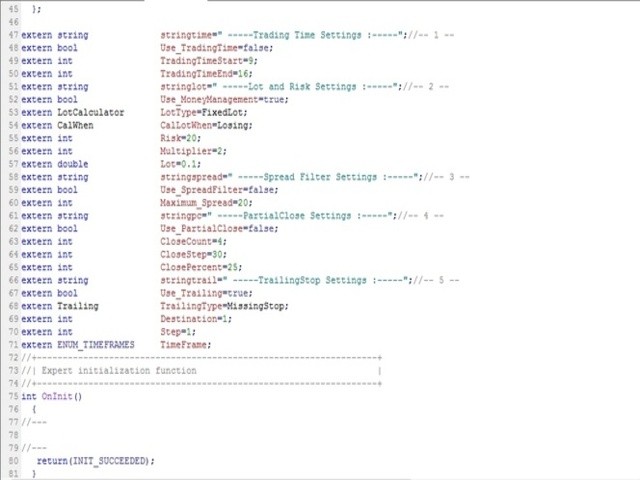
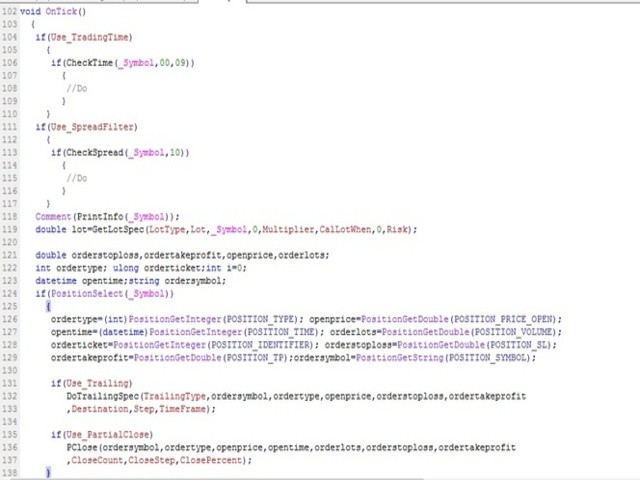
The library is dedicated to help manage your trades, calculate lot, trailing, partial close and other functions.


Lot Calculation

  • Mode 0: Fixed Lot.
  • Mode 1: Martingale Lot (1,3,5,8,13) you can use it in different way calculate when loss=1 ,when profit=0.
  • Mode 2: Multiplier Lot (1,2,4,8,16) you can use it in different way calculate when loss=1 ,when profit=0.
  • Mode 3: Plus Lot (1,2,3,4,5) you can use it in different way calculate when loss=1 ,when profit=0.
  • Mode 4: SL/Risk Lot calculate based on stop loss and risk ex balance=1000 -risk =10 -SL=20 then loss is 100$ lot will be 0.50.
  • Mode 5: Based On Balance Lot calculate based 0.01 for each 1000$.


Partial Close

  • close_count: apply partial close X times.
  • close_step: apply partial close each X pips in profit.
  • close_percent: close X% Percentage of the lot size is counted from initial lot size.


Trailing

  • Mode 0: Previous High/Low Trailing.
  • Mode 1: Break Even.
  • Mode 2: Normal Trailing Mode (Stop/Step).
  • Mode 3: Missing Stop place SL to all order if you miss that.
  • Mode 4: Missing TakeProfit place TP to all order if you miss that.


Other tools

  • CheckSpread: SpreadFilter return true / false.
  • PrintInfo: return simple information as string to use it in comment.
  • CheckTime: Time Filter return true / false with information on chart.
  • CloseAtPerProfit: close all order when x% profit reach.
  • CloseAtProfit: close all order when x$ profit reach.
  • CloseAtPerLoss: close all order when x% loss reach.
  • CloseAtLoss: close all order when x$ loss reach.

All functions allowed you to control, call any symbol not just chart symbol.

All functions design to detect any error while process and retrying until done.


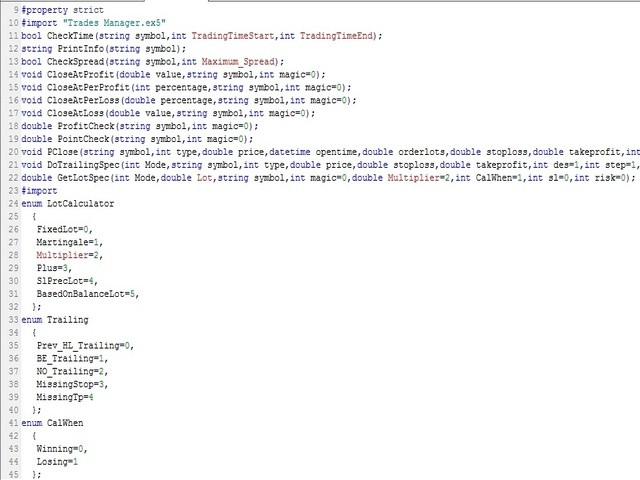
Usage

#import "\\Market\\Trades Manager.ex5"
bool CheckTime(string symbol,int TradingTimeStart,int TradingTimeEnd);
string PrintInfo(string symbol);
bool CheckSpread(string symbol,int Maximum_Spread);
void CloseAtProfit(double value,string symbol,int magic=0);
void CloseAtPerProfit(int percentage,string symbol,int magic=0);
void CloseAtPerLoss(double percentage,string symbol,int magic=0);
void CloseAtLoss(double value,string symbol,int magic=0);
double ProfitCheck(string symbol,int magic=0);
double PointCheck(string symbol,int magic=0);
void PClose(string symbol,int type,double price,datetime opentime,double orderlots,double stoploss,double takeprofit,int close_count,int close_step,int close_percent);
void DoTrailingSpec(int Mode,string symbol,int type,double price,double stoploss,double takeprofit,int des=1,int step=1,ENUM_TIMEFRAMES TF=PERIOD_CURRENT);
double GetLotSpec(int Mode,double Lot,string symbol,int magic=0,double Multiplier=2,int CalWhen=1,int sl=0,int risk=0);
#import

Feel free to give your opinion about the tool .... and please inform me of any improvements needed to be done.

Happy Trading (:
推荐产品
License Manager EA
Timothy Chuma Ifiora
License Panel Integration Guide This EA uses a license panel system to verify usage before running trading logic. File Placement Place LICENSE_SINGLE.mqh in the same folder as your EA .mq5 file. If using a subfolder, update the #include path in the EA file. Integration Steps Include the License File #include "LICENSE_SINGLE.mqh" Initialization (OnInit) Call the license check when the EA starts: VerifyLicense(); Deinitialization (OnDeinit) Clean up license resources when EA is removed: HandleLi

Pivot Hunter EA
Daniel Naranjo Morales
枢轴猎人EA (Pivot Hunter EA) 枢轴猎人EA 是一款专为   CADJPY (加元/日元)   货币对在   H1 时间周期 上开发的专业自动化交易程序(EA)。它的策略旨在通过分析价格行为和市场动量来识别潜在的市场转折点。 该EA的核心逻辑是一个多指标确认系统。它结合了多个经典指标的信号,包括抛物线转向指标 (SAR)、动量震荡指标 (AO)、相对强弱指数 (RSI) 和平均真实波幅 (ATR)。通过要求这些不同分析工具的信号达成一致,EA旨在过滤掉较弱的信号,并专注于更高可能性的交易设置。 这款EA是为那些偏好在特定交易品种上采用专注、“设置后无需干预”方法的交易者而设计的,因为其所有内部参数都已针对CADJPY的独特性质进行了仔细校准。 核心功能 专为CADJPY设计:   与通用型EA不同,枢轴猎人EA是完全为CADJPY H1图表从头开始构建的。其全部逻辑都针对该特定货币对的波动性和行为特征进行了定制。 多指标确认:   EA采用来自SAR、AO、RSI和ATR的信号汇合。这种全面的方法确保了只有在多个条件对齐时才考虑交易,从而提供了一个强大的过滤机制。 动
Goliath Mt5
Nicolokondwani Biscaldi
Goliath MT5 - scalper fully automated Expert Advisor for medium-volatile forex markets P roperties: The Library trades 10 currency pairs (USDCHF, EURCHF, EURGBP, AUDUSD, USDCAD, GBPUSD, EURUSD, NZDUSD, CADCHF, EURAUD, EURCAD, AUDJPY) The Library does not use martingale The Library sets a fixed stop loss and take profit for all orders The Library only trades a user input volume The Library can be installed on any currency pair and any timeframe Recommendations: Before using on a real account, t
Sarah green
Thabang John Wotsa
Sarah Green EA v3.5 - Technical Specifications General Information EA Name:   Sarah Green EA Version:   3.5 Platform:   MetaTrader 5 (MQL5) Trading Mode:   Fully automated Symbol Compatibility:   Any forex pair (configurable) Timeframes:   Configurable via input parameter Risk Management Features Position Sizing: Multiple risk level presets (20%, 40%, 60%, 80%, 100%) Dynamic lot calculation based on account balance Broker lot size normalization and validation Margin requirement checking Loss Pro
The Catalyst EA
Daniel Naranjo Morales
The Catalyst EA The Catalyst EA 是一款为 MetaTrader 5 平台设计的精密智能交易系统(EA)。它专为在   H1 时间周期 上交易   AUDUSD 货币对 而开发。该EA采用多指标策略,旨在识别并利用潜在的市场反转和回调行情。 其设计的核心重点是稳健的风险管理,具有动态手数计算和多层交易保护功能,可有效管理您的资金。 策略 The Catalyst EA 结合了多种广受认可的技术指标,从多个角度分析市场状况。 它利用 抛物线转向指标 (Parabolic SAR)   来识别潜在的入场和出场点,该指标也作为其动态追踪止损的基础。 动量震荡指标 (Awesome Oscillator)   用于衡量市场动能,并确认潜在走势背后的力量。 RSI 过滤器 帮助评估超买或超卖状况,增加一层额外的确认,以避免在市场极端位置入场。 最后,包含一个 基于ATR的波动率过滤器 ,以确保EA在合适的市场环境中运行,避免在波动性过低或过高的时期进行交易。 该策略的内部参数已针对 AUDUSD 货币对的特定行为进行了仔细校准,使其成为一个专用工具,而非“一刀切”的
Binance Library
Hadil Mutaqin SE
5 (1)
The library is used to develop automatic trading on Binance Spot Market from MT5 platform. Support all order types: Limit, Market, StopLimit and StopMarket Support Testnet mode Automatically display the chart on the screen Usage: 1. Open MQL5 demo account 2. Download Header   file and EA sample   https://drive.google.com/uc?export=download&id=1kjUX7Hyy02EiwTLgVi8qdaCNvNzazjln Copy Binance.mqh to folder \MQL5\Include Copy  BinanceEA-Sample.mq5 to folder \MQL5\Experts 3. Allow WebRequest from MT5
Introducing "TG Risk Service Manager" — your comprehensive toolkit for swift and precise risk management and lot size calculations in the dynamic world of trading. Designed to streamline development processes and enhance trading strategies, this indispensable library equips developers with essential tools for optimizing risk assessment and trade profitability. Metatrader4 Version |  All Products  |  Contact   Key Features: Efficient Lot Size Calculation : Harness the power of precise lot size c
Turn your manual trades into fully automated profit machines! This powerful MT5 EA takes over the moment you open a position — no delays, no stress. It instantly places Stop Loss and Take Profit, activates customizable trailing, and locks in profits while protecting your capital Perfect for scalpers: Every trade is immediately secured, giving you the freedom to focus on sniping the best entries while the EA handles all the management work in the background. Auto SL/TP Full trailin
本 EA 专为震荡 / 横盘行情设计。 在设定区间内自动补单交易 EA 仅在 预先设定的价格区间内运行 。 当订单平仓、成交、取消后(单数量少了),EA 会自动补充新的订单,以维持交易策略的持续运行。 您可以通过 Max Orders 来控制最大订单数量。 示例: 最大订单数(Max Orders):8 当前持仓订单:2 单 挂单 Sell Limit:6 单 在这种情况下,EA 不会继续下新单。 只有当订单 平仓、成交 、 取消 后,EA 才会 自动补单 ,持续捕捉 震荡行情 中的利润。 注意: Sell Limit   订单 只会挂在当前市场价格的上方 。 产品参数说明 Trade Symbol : 交易品种  XAUUSD、USDJPY、BTCUSD 等等... 区间设置 Zone Low :区间下边界 Zone High :区间上边界 说明: 例如,您将BTCUSD的交易区间设定为: Zone Low : 92000 Zone High : 94500 EA 只会在该价格区间内挂单并自动交易。 当价格突破区间范围时,EA 将停止交易。 当价格回到区间内,EA 会自动恢复
Advisor for hedging trading or pair trading. A convenient panel allows you to open positions on the necessary trading instruments and lots. Automatically determines the type of trading account - netting or hedging. Advisor can close all its positions upon reaching profit or loss (determined in the settings). A negative value is required to control losses (for example, -100, -500, etc.). If the corresponding fields are 0, the EA will not use this function.   Settings: Close profit (if 0 here
This trailing stop application will helping trader to set the trailing stop value for many open positions, that apply a grid or martingale strategy as a solution. So if you apply a grid or martingale strategy (either using an EA or trading manually), and you don't have an application to set a trailing stop, then this application is the solution. For EAs with a single shot strategy, just use the FREE trailing stop application which I have also shared on this forum.
Multiple Positions
Emanuel Reynard Phillips
需要同时开立多个头寸/交易吗?我们已经为您创建了简单的解决方案。您现在可以一次输入多个仓位。您可以设置手数、持仓数量、止盈和止损。 例如:您想要购买 3、5、10 或任意数量的具有一定手数的头寸。 您现在只需点击“购买”按钮即可完成此操作。 或者 例如:您想要出售 3、5、10 或任意数量的具有一定手数的头寸。 您只需单击“出售”按钮即可完成此操作。 Xūyào tóngshí kāi lì duō gè tóucùn/jiāoyì ma? Wǒmen yǐjīng wèi nín chuàngjiànle jiǎndān de jiějué fāng'àn. Nín xiànzài kěyǐ yīcì shūrù duō gè cāngwèi. Nín kěyǐ shèzhì shǒushù, chícāng shùliàng, zhǐ yíng hé zhǐ sǔn. Lìrú: Nín xiǎng yào gòumǎi 3,5,10 huò rènyì shùliàng de jùyǒu yīdìng shǒu shǔ de tóucùn. Nín xiànzài zhǐ xū
VeloxGrid AI
Jasser Bin Munir Bin Ayyad Bandakhil
How to Use It Open MetaEditor in MT5. Create a new EA ( File > New > Expert Advisor ). Name it something like SimpleGoldSELL . Paste the full code and compile. Attach it to the XAUUSD chart on any timeframe. ️ Tips This EA only sends one SELL order when attached. Test on a demo account first . Adjust LotSize , StopLoss , and TakeProfit based on your broker's gold settings. Let me know if you want to: Automatically re-enter a sell if the trade closes Add moving averages for signal confirmatio
ApexNexus
Hosni Hadj Taher
APEX NEXUS - Multi-Strategy Expert Advisor Where 5 Strategies Converge at Peak Performance **Version:** 8.3   **Category:** Expert Advisors / Multi-Strategy   **Compatibility:** MetaTrader 5 & MetaTrader 4   --- PRODUCT OVERVIEW **APEX NEXUS** is a professional multi-strategy trading system that combines 5 proven trading approaches into one intelligent, adaptive EA. The system automatically detects market regimes and selects the optimal strategy for current conditions. ### Core Philosop
本 EA 专为震荡 / 横盘行情设计。 在设定区间内自动补单交易 EA 仅在 预先设定的价格区间内运行 。 当订单平仓、成交、取消后(单数量少了),EA 会自动补充新的订单,以维持交易策略的持续运行。 您以通过 Max Orders 来控制最大订单数量。 示例: 最大订单数(Max Orders):8 当前持仓订单:2 单 挂单 Buy Limit:6 单 在这种情况下,EA 不会继续下新单。 只有当订单 平仓、成交 、 取消 后,EA 才会 自动补单 ,持续捕捉 震荡行情 中的利润。 注意: Buy Limit 订单 只会挂在当前市场价格的下方 。 产品参数说明 Trade Symbol : 交易品种  XAUUSD、USDJPY、BTCUSD 等等... 区间设置 Zone Low :区间下边界 Zone High :区间上边界 说明: 例如,您将黄金的交易区间设定为: Zone Low :4420 Zone High :4455 EA 只会在该价格区间内挂单并自动交易。 当价格突破区间范围时,EA 将停止交易。 当价格回到区间内,EA 会自动恢复交易。 订单设置
Quantum BTC AI
Napat Puangjunkum
QUANTUM BTC AI — The Deep Learning Crypto Algo "Don't trust the hype. Trust the Math. The Ultimate Local AI for Bitcoin." Why rely on external APIs like ChatGPT that can lag, crash, or expose your trading logic? **Quantum BTC AI** is the world's first Expert Advisor to feature an internal **Deep Learning Neural Matrix** designed specifically for the extreme volatility of the crypto market. It calculates a real-time Confidence Score (0-100%) and only executes trades when the mathematical pro
RS MTG Pro Gold
Kamon Khanluang
RS MTG Pro is a multi-layer trading system designed to manage positions intelligently in different market conditions. It combines Step Lot, Martingale, Reverse, and Recovery strategies to adapt dynamically as the market moves. The EA uses support and resistance logic to improve entry timing and avoid random trades. Built-in profit targets help secure gains and close baskets automatically. Advanced systems like Emergency and Rescue are included to handle deep drawdown scenarios. A Recovery mod
Just $10 for six months!!!. This will draw Supply & Demand zones just by clicking on a candle. It can also draw a 50% line on the zone. https://youtu.be/XeO_x7cpx8g As a drawing tool, it is not active all the time after adding it to the chart. Activate by pressing 's' twice on the keyboard within a second. If activated but then decided not to draw, deactivate by pressing 's' once.  Box color depends if candle is above or below current price. Features: Draw the box up to the last current candl
Martingale panel MT5
Mohammadbagher Ramezan Akbari
In this article, we would like to introduce the trade panel product with the Martingale panel. This panel is made in such a way that it can meet the needs of traders to a great extent. This trade panel actually consists of two trade panels at the same time, with the first one you can take positions with certain profit and loss limits, and with the second one, you can have positions with profit limits but without loss limits. When positions lose, a new position will be added based on the settings
AccMan
Manuel Marcel Simon
Good money/risk management is more than just position sizing, it's much more. Successful traders analyze your trading activities and keep an eye on your key figures. With the help of AccountMan you can also do this very conveniently, analyze your trading activities for the purpose of professional money / risk management. Evaluate your trades by trade symbol to see if trading is profitable overall with these. Would you like to keep an eye on your individual strategies? e.g. which strategy works b
EA Golden SIN-TIANG is a robust trading strategy designed for XAUUSD or GOLD and H4 time frame. The EA creates pending stop trade orders using indicators of the Highest-Lowest, Hight , Low parameters based on the market environment. It uses fixed SL, PT and exit from the position after time cut off. The EA was tested with several Monte Carlo robustness tests and optimized. Backtest was done on ticks data with a 15-year history 2007-20023. There is no need to set any parameters, all settings are
即时、专业级 Telegram 警报,每笔 MT5 交易 + 自动性能报告 这个 EA 做什么? 此专家顾问会在您的 MT5 账户上任何交易开仓或平仓的瞬间,向 Telegram(私人聊天、群组或频道)发送清晰、格式良好的消息。同时提供可选的每日、每周和每月性能报告。 主要功能 每笔交易开仓和平仓的实时通知 完整交易详情:方向、品种、手数、开/平仓价格、止损/止盈、票号 显示净盈亏,并可选择显示掉期 + 佣金明细 清晰的平仓原因(止损、止盈、EA、手动、手机、保证金调用等) 可选每日 / 每周 / 每月报告,包含胜率、最佳和最差交易、总手数以及账户余额/净值 EA 附加时的启动消息和移除时的关闭消息 可运行在任何图表上 — 监控整个账户 轻量级(仅在启用报告时使用一个定时器) 完全兼容对冲账户和 MT5 VPS 3 分钟完成设置 无需编程。只需创建 Telegram 机器人,获取您的 Chat ID,将两者粘贴到 EA 输入参数中,允许 WebRequest 访问 https://api. telegram. org 即可使用。 完整一步一步设置指南(含截图和故障排除): http
KAIROS — Trade the Right Moment Hello traders, Kairos (καιρός) means the right moment — the precise time when action makes sense. Kairos EA is built around this principle: Wait for statistically favorable conditions. Execute with precision. Control risk. It does not chase price. It does not overtrade. It does not rely on luck. It waits for opportunity — and acts when probabilities align. Designed Specifically for USDJPY Kairos is structured and optimized exclusively for USDJPY , one of the
VPS Sentinel MT5
Marti Castany
4.5 (2)
The VPS Sentinel Expert Advisor will be your ally to   protect your trading capital   and keep you updated of the status of your trading terminal (MT5) running on your remote VPS (Virtual Private Server). With the VPS Sentinel running on your terminal, you will have a first line of defence against any problem that could occur. You will also be able to: Define a  Global Stop  level (Stop-Out), decide if you want to receive notifications and also enable an automatic closing of working positions an
FREE
Chart Navigator Pro
ELITE FOREX TRADERS LLC
Introducing the   Elite Chart Navigator   — your ultimate MetaTrader 5 Expert Advisor designed to revolutionize multi-symbol trading with seamless chart navigation and superior usability. Product Overview The   Elite Chart Navigator EA   is a sophisticated trading utility enabling rapid switching between multiple trading pairs through an intuitive on-chart button interface. Built for professional traders managing numerous instruments, this EA dramatically improves workflow efficiency, ensuring
Cypher Cobra
Youssef Souih Hejjaji
Cypher Cobra is now available! Most bots cost thousands of dollars, boast perfect equity curves... and then fail. I’ve also bought bots that were marketed with flawless equity curves, supposedly infallible and almost loss-free—only to spend thousands and find out they don’t work. So, I built my own robots, have been using them for a while, and they really perform as expected. This robot is designed for USDJPY on the 1-hour timeframe, with a very good profit factor of 2.07. It does not use martin
KT STC Robot MT5
KEENBASE SOFTWARE SOLUTIONS
KT Schaff Trend Cycle Robot 是一款高效的自动交易系统,它结合了 STC 指标识别的超买/超卖周期与快速及慢速指数移动平均线(EMA)之间的关系,从而构建交易策略。 当预设的入场条件满足时,该 EA 会迅速在分析过去 10 根K线后的高点或低点设置挂单。 下载 设置文件 。 买入条件: STC 指标从超卖区离开,表示可能的反转或上涨动能。 快线 EMA 高于慢线 EMA,反映出市场处于多头趋势。 卖出条件 STC 指标从超买区离开,表明可能反转或下跌趋势。 快 EMA 低于慢 EMA,表明市场情绪偏空。 一旦这些条件被满足,EA 将执行买入或卖出操作,让您把握有利的市场时机。 功能特点 经纪商兼容性:  可适应多种账户和平台环境,适用于不同交易商的规则和执行方式。 风险控制: 每笔交易都设置了基于 ATR 的止损和止盈,帮助控制亏损并锁定盈利。 安全策略:  避免使用马丁策略、网格、加仓等高风险方法,保障交易资金安全。 用户友好:  界面简洁直观,参数易于理解与设置,适合新手使用。 独立运行: 无需额外文件或外部资源,所有功能均内嵌于 EA 内,
Quantum Sig
Maryna Shulzhenko
**Quantum Signal** is a professional Expert Advisor engineered for fully automated trading on Forex and cryptocurrency markets. Crafted to meet MQL5 Market standards, it combines cutting-edge algorithms, flexible risk controls and an intuitive settings interface to deliver consistent profits and minimal drawdown. A minimum deposit of **10 000 USD** unlocks trading on most major and minor currency pairs as well as crypto symbols. --- ## Overview & Purpose * Automates trade entries and exits u
RazorQuant AI
Steffen Schmidt
RAZORQUANT AI v3.7 (MT5 EA)  Purpose: Automated trading EA that combines classic technical filters with machine-learning signals and optional external AI (LLM) advice to decide BUY/SELL/HOLD and manage trades. Core trading + risk rules: Runs on a chosen timeframe (default M1 ), with MagicNumber , max trades per symbol/day , minimum minutes between trades , max spread , and daily loss limit (% of balance) . Position sizing supports fixed lot or risk-% . Technical filters (rule-based): Trend/MA s
Helios Alpha Funder
Carlos Baena Martinez
Helios Alpha - The Quantitative Protocol for Funder Passing. Description: Helios Alpha is a premium quantitative trading algorithm engineered for managing funded capital and passing Proprietary Firm evaluations. It specializes exclusively in XAUUSD (Gold) , utilizing a strict institutional methodology based on price action mechanics and institutional liquidity principles. The Strategy: Helios Alpha is designed to identify and capitalize on specific high-probability structural sweeps during the m
该产品的买家也购买
BitMEX Trading API
Romeu Bertho
5 (1)
Cryptocurrency analysis has never been easier with Crypto Charts for MetaTrader 5. Now, trading on BitMEX has never been easier with BitMEX Trading API for MetaTrader 5. BitMEX Trading API library was built to be as easy to use as possible. Just include the library into your Expert Advisor or Script, call the corresponding methods and start trading! Features Trade on BitMEX and BitMEX Testnet. Build and automate your strategies. Concern more with the trading strategy logic and less with the co
EA Toolkit
Esteban Thevenon
EA Toolkit   is a library that allows any developer to quickly and easily program Advisor experts. It includes many functions and enumerations such as trailing stop, lot, stop loss management, market trading authorisations, price table updates, trading conditions and many more. Installation + Documentation : You will find all the information to install this library and the documentation of its functions on this GitHub : https://github.com/Venon282/Expert-Advisor-Toolkit WARNING : The installat
Hello everyone! I am a professional MQL programmer , Making EAs, Indicators and Trading Tools for my clients all over the world. I build 3-7 programs every week but I seldomly sell any ready-made Robots. Because I am fastidious and good strategy is so few...  this EA is the only one so far I think its good enough to be published here.  As we all know, the Ichimoku indicator has become world popular for decades, but still, only few people knows the right way of using it, and if we check the clo
Applying these methods, I managed to arrive at a nuanced conclusion that is crucial to understanding the importance of unique strategies in contemporary trading. Although the neural network advisor showed impressive efficiency in the initial stages, it proved to be highly unstable in the long run. Various factors such as market fluctuations, trend changes, external events, etc. cause its operation to be chaotic and eventually lead to instability. With these experiences, I accepted the challenge
Kaseki
Ben Mati Mulatya
The Hybrid Metaheuristic Algorithm (HMA) is a cutting-edge optimization approach that combines the strengths of genetic algorithms with the best features of population-based algorithms. Its high-speed computation ensures unparalleled accuracy and efficient search capabilities, significantly reducing the total time required for optimization while identifying optimal solutions in fewer iterations. HMA outperforms all known population optimization algorithms in both speed and accuracy. Use Cases AO
Shawrie
Kevin Kipkoech
This Pine Script implements a Gaussian Channel + Stochastic RSI Strategy for TradingView . It calculates a Gaussian Weighted Moving Average (GWMA) and its standard deviation to form an upper and lower channel. A Stochastic RSI is also computed to determine momentum. A long position is entered when the price closes above the upper Gaussian band and the Stoch RSI K-line crosses above D-line . The position is exited when the price falls back below the upper band. The script includes commission, cap
Bookeepr
Marvellous Peace Kiragu
Bookeepr is an advanced MQL5 trading bookkeeping software that automates trade logging, tracks real-time P&L, and integrates a ledger-style financial system for deposits, withdrawals, and expenses. It supports multi-currency assets , generates detailed performance reports , and provides risk management tools to help traders optimize their strategies. With secure cloud storage, exportable reports, and seamless MetaTrader 5 integration , Bookeepr ensures accurate, transparent, and hassle-free fina
Ai Prediction MT5
Mochamad Alwy Fauzi
A free indicator for those who purchase the full version This indicator is created by this Ai, with your desired settings Artificial Intelligence at your service Have a complete artificial intelligence and use it in your codes This artificial intelligence is trained to tell you on each candle whether the market is moving up or down. In general, artificial intelligence can be used in all markets, all timeframes and all symbols However, due to the increasing complexity and decreasing accuracy of
快速关仓,无需任何操作。 当前版本的一键关仓主要针对的是来不及手动关仓的情况,目前是不分交易标的类别,是对所有的持仓进行关仓。 未来可能升级的方向: 1、分类别、分标的关仓。 适用场景:开了多个标的的仓位,并且波动不一,快速频繁的波动影响了整体的判断。 2、增加只关闭盈利仓位、只关闭亏损仓位。 适用场景:持仓较多,趋势发生变化。 个人建议:一般建议选择一键全部关仓,因为如果行情与持仓方向一致,只关闭盈利仓位无形就是扩大了亏损。如果行情方向与持仓方向相反,只关闭亏损仓位,当前已盈利的后面又会变为亏损,盈利无法变现。 3、按照仓位顺序由大到小关仓、按照仓位顺序由小到大关仓。 适用 场景:行情发生波动,对于未来行情判断把握不确定的,可根据自己需求选择仓位关仓顺序,由大到小关仓的话,可以避免亏损的进一步扩大。 4、减小仓位量,保持绝对的安全距离。 适用 场景:对未来趋势相对确定,不想错过当前行情,但是认为当前持仓体量又有点大,想降低仓位。
【黄金智能交易EA|风控稳守,盈利突围】 专为黄金波动特性定制的智能交易EA,以硬核交易系统为核心,每笔下单均源自量化模型对行情趋势、支撑压力的精准研判,杜绝主观干扰,让交易决策更客观高效。 搭载多维风控体系,动态止损止盈+仓位智能调控双保险,严格锁定单笔风险阈值,即便面对黄金跳空、黑天鹅行情,也能有效规避大幅回撤,守护本金安全。 更具备浮盈加仓智能算法,趋势明朗时自动放大盈利头寸,让利润在顺势中滚动增长,既不浪费单边行情红利,又通过阶梯式加仓策略平衡风险与收益,实现“风控打底,盈利上不封顶”的交易闭环! 本款EA历经38次修改与测试,每一次升级都境加了EA的稳定盈利能力,才最终确定此为终极版本发布。 本款EA目前只针对现货黄金 交易的长期回测和实盘验证,按照下图设置实现长期的稳定 盈利。如果需要交易期它品种,请根据实际情况更改设置。 本EA为阶梯定价,每卖出10份价格增加10%
SniperkickEA
Mohamed Maguini
Questo Expert Advisor (EA) è stato progettato per offrire un'esperienza di trading automatizzata di alto livello, adatta sia ai trader principianti che a quelli esperti. Utilizzando algoritmi avanzati e tecniche di analisi del mercato, l'EA è in grado di identificare opportunità di trading redditizie con precisione e velocità. L'EA è configurabile per operare su vari strumenti finanziari, tra cui forex, indici e materie prime, garantendo una flessibilità senza pari. Le caratteristiche princip
LSTM Library
Thalles Nascimento De Carvalho
LSTM Library - MetaTrader 5的高级神经网络 专业算法交易神经网络库 LSTM Library为您的MQL5交易策略带来递归神经网络的强大功能。这个专业级实现包括LSTM、BiLSTM和GRU网络,具有通常只在专业机器学习框架中才能找到的高级功能。 "交易机器学习成功的秘诀在于正确的数据处理。 垃圾进,垃圾出 –您的预测质量永远不会超过您的训练数据质量。" — 马科斯·洛佩兹·德·普拉多博士, 金融机器学习进展 主要特点 完整实现LSTM、BiLSTM和GRU 递归Dropout实现更好的泛化 多种优化算法(Adam, AdamW, RAdam) 高级归一化技术 全面的指标评估系统 训练进度可视化 支持通过类权重处理不平衡数据 技术规格 纯MQL5实现 - 无外部依赖 为交易应用程序优化 全面的错误处理和验证 完全支持保存/加载训练模型 详尽的文档 集成说明 要将LSTM Library集成到您的Expert Advisor中,请按照以下步骤操作: 1. 完整库导入 #import "LSTM_Library.ex5"    // 库信息    void Get
A complete PostgreSQL client implemented in pure MQL5 over native MetaTrader 5 TCP sockets. The library implements the PostgreSQL client with MD5 and SCRAM-SHA-256 authentication, SSL/TLS, the Simple Query Protocol, and explicit transactions. No DLLs, no external dependencies, no third-party services. Features Direct TCP connection to any PostgreSQL-compatible database MD5 and SCRAM-SHA-256 authentication, auto-detected SSL/TLS via PostgreSQL's SSLRequest flow Full transaction support Typed res
WalkForwardOptimizer MT5
Stanislav Korotky
3.78 (9)
WalkForwardOptimizer library allows you to perform rolling and cluster walk-forward optimization of expert advisers (EA) in MetaTrader 5. To use the library include its header file WalkForwardOptimizer.mqh into your EA source code, add call provided functions as appropriate. Once the library is embedded into EA, you may start optimization according to the procedure described in the User guide . When it's finished, intermediate results are saved into a CSV file and some special global variables.
If you're a trader looking to use Binance.com and Binance.us exchanges directly from your MetaTrader 5 terminal, you'll want to check out Binance Library MetaTrader 5. This powerful tool allows you to trade all asset classes on both exchanges, including Spot, USD-M   and COIN-M futures, and includes all the necessary functions for trading activity. Important: you need to have source code to properly implement the library. With Binance Library MetaTrader 5, you can easily add instruments from Bi
Native Websocket
Racheal Samson
5 (6)
An   easy to use, fast,  asynchronous   WebSocket library  for MQL5. It supports: ws://   and   wss://  (Secure "TLS" WebSocket) text   and   binary   data It handles: fragmented message  automatically (large data transfer) ping-pong   frames  automatically (keep-alive handshake) Benefits: No DLL required. No OpenSSL installation required. Up to 128 Web Socket Connections from a single program. Various Log Levels for error tracing Can be synchronized to MQL5 Virtual Hosting . Completely native t
本服务程序下载后,将作为 Dom BookHeatMAP Lightning Trading Panel 的服务支持程序使用。 Dom BookHeatMAP Lightning Trading Panel   下载地址: https://www.mql5.com/zh/market/product/159414?source=Site+Market+MT5+Search+Rating006%3aDom+BookHeatMAP+Lightning+Trading+Panel 请您先将下载的文件拖拽至 MT5 数据目录下的对应服务文件夹( `MQL5\Services`)内,并确认文件已成功放置。随后,双击运行启动服务,系统将自动加载相关组件并初始化服务环境。 具体操作位置详见截图:按照截图所示流程完成启动后,Dom BookHeatMAP Lightning Trading Panel 的主界面将正常显示,此时您即可启用其全部功能,体验高效、流畅的 DOM 闪电交易服务,包括实时深度图热力图监控和快速订单执行等核心特性。 请注意,为保障交易系统稳定运行,务必确保该服务程序中设置的交
该库将允许您使用任何 EA 来管理交易,并且非常容易集成到任何 EA 上,您可以使用描述中提到的脚本代码以及显示完整过程的视频演示示例自行完成。 - 下限价、止损限价和止盈限价订单 - 下达市场订单、SL 市场订单、TP 市场订单 - 修改限价订单 - 取消订单 - 查询订单 - 更改杠杆、保证金 - 获取位置信息 和更多... 租赁加密货币图表是可选的,除非您的 MT5 上没有币安图表。 对于脚本演示:单击此处 如果您想与交易面板进行交易,您可能对此产品感兴趣 该产品是加密图表的插件 该库将允许您使用任何 EA 来管理交易,并且非常容易集成到任何 EA 上,您可以使用描述中提到的脚本代码以及显示完整过程的视频演示示例自行完成。 - 下限价、止损限价和止盈限价订单 - 下达市场订单、SL 市场订单、TP 市场订单 - 修改限价订单 - 取消订单 - 查询订单 - 更改杠杆、保证金 - 获取位置信息 和更多... 租赁加密货币图表是可选的,除非您的 MT5 上没有币安图表。 对于脚本演示: 单击此处 如果您想与交易面板进行交易, 您可能对
TupoT3
Li Guo Yin
突破交易策略:智能风控系统升级版‌ 当价格突破关键阻力位时,往往意味着趋势的质变时刻。我们的突破交易策略通过三重智能系统——‌动态阈值识别‌、‌量能验证机制‌和‌自适应止损算法‌,帮助交易者精准捕捉这些跃迁机会。 ‌核心优势‌: ‌智能预警‌:实时监测200+技术指标,自动标记潜在突破位 ‌风险对冲‌:突破失败时自动触发0.5秒内止损,保护本金安全 ‌多周期验证‌:结合日线/4小时/1小时数据过滤假信号 ‌实战案例‌: 2025年第二季度,该策略在现货黄金市场实现连续23次有效突破,平均持仓周期缩短至4.7小时,收益率达传统趋势策略的3.2倍。 ‌智能风控系统‌: ‌动态止盈‌:根据ATR指标自动调整止盈位,锁定利润的同时保留上行空间 ‌分级止损‌:首次突破失败后自动切换至1:1盈亏比保护模式,二次突破确认后恢复原策略 本EA依下图设置做黄金1小时图线,经长时期实盘验证年利润达到30多倍,修改参数可以用作比特币和纳斯达克指数都有很好的收益。
GetFFEvents MT5 I tester capability
Hans Alexander Nolawon Djurberg
Want to get all events like Previous/Forecast/Actual values for each news to analyze/predict it? By this simple library you can do it easily,Just import/integrate the library into your system,then get all possible values for each news   Even In Strategy Tester   . Note: Please add the address " https://www.forexfactory.com/ " of news feed at your MT5 tab > Tools > Options > Expert Advisors > Check Allow web request for listed URL. Since the WebRequest() function can't be called from indicator ba
这是一个可以定时自动交易的EA。根据你设定的时间,精确到秒,可以设置最多下几单。下单buy或者Sell.可以设置值止盈止损点。并且可以设定在下单后多久平仓。一般都是用来做事件。祝你好运。 请看图片自己根据设定来使用。每一次使用请重新加载EA。不用的时候记得关闭EA按钮。 我来举个例子。比如英国央行利率决议。你在最后两秒下单(设置的是你本机的时间)。因为可能瞬间点差扩大,你可能不敢直接下最大手数,所以你可以选择小手分批从最后5秒开始进场。我相信做过的人知道我说的意思。因为我专业做这个已经十年。最近才做出了这个自动化EA。并且这里面有个检测就是你点击开始之后如果超过了你设定的时间十秒他就不会执行了。保证你的安全。你自己用DEMO账户测试几次你就知道我这个有多好用了!
The library is dedicated to help manage your trades, calculate lot, trailing, partial close and other functions. Lot Calculation Mode 0: Fixed Lot. Mode 1: Martingale Lot (1,3,5,8,13) you can use it in different way calculate when loss=1 ,when profit=0. Mode 2: Multiplier Lot (1,2,4,8,16) you can use it in different way calculate when loss=1 ,when profit=0. Mode 3: Plus Lot (1,2,3,4,5) you can use it in different way calculate when loss=1 ,when profit=0. Mode 4: SL/Risk Lot calculate based on s
Friends, join us! Ask questions and connect with like-minded traders: MetaCOT Public Group MetaCOT Information Channel: news, CFTC reports, and signals: MetaCOT Channel Here’s to successful trading and new profitable signals for us all! Attention! Recently, certain countries have been blocking access to the cftc.gov website. As a result, users in these countries are giving the product low ratings. MetaCOT has always adhered to the highest quality standards and is in no way associated with th
This is a simplified and effective version of the library for walk forward analysis of trading experts. It collects data about the expert's trade during the optimization process in the MetaTrader tester and stores them in intermediate files in the "MQL5\Files" directory. Then it uses these files to automatically build a cluster walk forward report and rolling walk forward reports that refine it (all of them in one HTML file). Using the WalkForwardBuilder MT5 auxiliary script allows building othe
OrderBook History Library
Stanislav Korotky
3 (2)
Order Book, known also as Market Book, market depth, Level 2, - is a dynamically updated table with current volumes of orders to buy and to sell specific financial instument at price levels near Bid and Ask. MetaTrader 5 provides the means for receiving market book from your broker, but in real time only, without access to its history. The library OrderBook History Library reads market book state in the past from archive files, created by OrderBook Recorder . The library can be embedded into you
BitMEX Trading API
Romeu Bertho
5 (1)
Cryptocurrency analysis has never been easier with Crypto Charts for MetaTrader 5. Now, trading on BitMEX has never been easier with BitMEX Trading API for MetaTrader 5. BitMEX Trading API library was built to be as easy to use as possible. Just include the library into your Expert Advisor or Script, call the corresponding methods and start trading! Features Trade on BitMEX and BitMEX Testnet. Build and automate your strategies. Concern more with the trading strategy logic and less with the co
Teclado trader, é uma BIBLIOTECA que você pode chamar no OnChartEvent para abrir posição de compra/venda/zerar, os botões padrões são: V = venda C = compra Z = zerar posições a mercado S = zerar posições opostas e depois a mercado X = zerar posições opostas Além da função de teclado, é possível mostrar os estados do ExpertAdvisor usando o MagicId, com informação de: lucro mensal, semanal, diario, e posição aberta, para isto use o OnTick, ou qualquer outro evento (OnTimer / OnTrade / OnBookEven
Gold plucking machine   Gold plucking machine   is an Expert Advisor designed specifically for trading gold. The operation is based on opening orders using the Fast and Slow lines indicator, thus the EA works according to the "Trend Follow" strategy, which means following the trend. Use grid strategy to place orders without stop loss operation, so please make sure the account has sufficient funds. magic number        -  is a special number that the EA assigns to its orders. Lot Multiplier     
The library is used to develop automatic trading on Binance Futures Market from MT5 platform. Support Binance Futures USD-M and COIN-M Support Testnet mode Support all order types: Limit, Market, StopLimit, StopMarket, StopLoss and TakeProfit Automatically display the chart on the screen Usage: 1. Open MQL5 demo account 2. Download Header file and EA sample https://drive.google.com/uc?export=download&id=17fWrZFeMZoSvH9-2iv4WDJhcyxG2eW17 Copy BinanceFutures.mqh to folder \MQL5\Include Copy  Bina
MT4/5通用交易库(  一份代码通用4和5 ) #ifdef __MQL5__      #define KOD_TICKET ulong      #define KOD_MAGIC   long #else        #define KOD_TICKET long      #define KOD_MAGIC   int #endif class ODLIST; #import "K Trade Lib Pro 5.ex5"       //祝有个美好开始,运行首行加入    void StartGood() ;    //简单开单    long OrderOpen( int type, double volume, int magic, string symbol= "" , string comment= "" , double opprice= 0 , double sl= 0 , double tp= 0 , int expiration= 0 , bool slsetmode= false , bool tpsetmode= false );    //复杂开单
作者的更多信息
发现信号很好,但提供商的信号太小?您需要更大的持仓量,但终端设置太差?信号手数管理器将通过所需交易量的重复订单来增加提供商的头寸交易量。 只需设置手数大小和用于复制订单的信号名称即可。 Signal Lot Manager 是一个批量乘数实用程序,用于在您的终端上复制订单。来源可以选择任何顾问、手动交易、单独的交易信号。它具有广泛的功能、简单的设置以及高速度和可靠性。 Signal Lot Manager 安装和输入指南 如果您想获取有关 EA 的通知,请将我们的 URL 添加到 MT4/MT5 终端(参见屏幕截图)。 MT4版本     https://www.mql5.com/en/market/product/34864 MT5版本     https://www.mql5.com/en/market/product/41610 一般输入: 信号标题:信号的名称(您可以从信号顺序注释中复制它)。 最大限度。滑点:开仓交易可接受的最大滑点。因此,如果当前价格超过最高价格。与信号订单的入场价格相比的滑点距离,交易不会被复制。这对于防止复制交易出现不必要的滑点非常有用,特别是在高波动
部分平仓专家 是一款将多种功能整合到一个自动化系统中的工具。该 EA 提供多种风险管理选项,并最大化潜在收益,从而帮助交易者更有效地管理仓位。 使用部分平仓专家,交易者可以设置   部分关闭   锁定利润的水平,     追踪止损   保护利润和限制损失的水平,     收支平衡   水平,以确保即使价格朝着不利于交易的方向变动,交易也能实现盈亏平衡,以及其他一些功能。 使用这款一体化智能交易系统,交易者可以节省时间和精力,因为他们无需时刻监控交易。相反,EA 会根据市场情况执行预设指令,从而为交易者提供更大的灵活性和对交易的控制力。 附加部分关闭专家,     按下键盘上的“p”   ,更改设置,然后就可以开始了。 部分关闭专家   安装和输入指南 如果您想收到有关 EA 的通知,请添加 URL(   http://www.betasoft.dev   )MT4/MT5 终端(见截图)。 MT4版本 https://www.mql5.com/en/market/product/14965 MT5版本 https://www.mql5.com/en/market/product/15
Elliott Wave Counter 是一个面板,用于快速和用户友好地手动标记 Elliott 波浪。可以选择一种颜色和一个级别的标记。还有用于删除最后一个标记和工具制作的整个标记的功能。一键制作标记。点击五次 - 有五波!艾略特波浪计数器对于艾略特波浪的初学者和专业分析师来说都是一个很好的工具。 艾略特波浪计数器安装和输入指南 如果你想得到   关于 EA 添加 URL (   http://autofxhub.com   ) MT5 终端的 通知 (见截图)。 MT4版本 https://www.mql5.com/en/market/product/14016 MT5版本 https://www.mql5.com/en/market/product/15081 一般输入: 波形类型按钮: 此按钮允许用户选择他们想要在图表上突出显示的波形类型。可用的选项包括推动波、调整波和其他自定义波模式。 波级按钮: 这个按钮   允许用户选择他们想要在图表上突出显示的波形级别。可用的选项包括初级、中级和次级波级别。 波浪颜色: 这个   按钮   允许用户选择他们想要在图表上突出显示的波浪图
If you wish to draw Support and Resistance lines, view: daily market opening, classical pivot levels, Fibonacci pivot levels, trend lines, Fibonacci levels, the remaining time to candle closing, and current spread. If you seek to place your orders with the exact lot that meets your desired stop loss risk. If you wish to do all this and more with just one click, then this is the perfect tool to use. This tool will allow you to feel more relaxed when deciding to open orders, as well as predicting
一键式分析工具是   基于键盘快捷键的对象创建   和 MetaTrader 的复制工具。只需单击一下,即可轻松使用 MetaTrader 中的分析工具。使用我们的工具,您可以在图表上快速绘制支撑和阻力位、斐波那契位、形状、通道、趋势线和所有其他对象。只需单击按钮,移动鼠标,一键式分析工具将为您完成剩下的工作。这可以节省您的时间并使您的图表分析更有效率,让您可以专注于根据您的分析做出明智的交易决策。 除了对象创建之外,一键式分析工具还包括   对象复制器 (   c   hart sync)   ,允许您轻松地将对象从一个图表复制到另一个图表。如果您打开了多个图表并且需要在它们之间复制对象,这会特别有用。 一键式分析工具允许您   对所有符号使用一个图表   在元交易者中。这意味着您可以在同一窗口中查看不同的图表,而无需在多个图表之间切换。当您切换到不同的符号时,一键式分析工具会自动从其他符号中隐藏对象,并在您返回第一个符号时再次显示它们。这可以帮助您节省时间并提高交易效率,让您可以轻松地在同一窗口上比较和分析不同的图表。 一键分析   安装和输入指南 如果您想获得有关 EA 添加 U
Draw Agent 被设计为以美观和创新的方式来创建和管理您所有的图表分析、涂鸦、笔记等。 本工具提供徒手画法,将图表空间当成黑板,徒手绘制。 此徒手绘图工具可让您在 MT4/MT5 图表上绘图,以便在图表上标记或突出显示事件。 如果您 想手动绘制艾略特波浪、在图表上画线或在图表上说明想法,它是一个 有用的工具,如果您正在为客户举办现场网络研讨会,或向人们分发屏幕截图或图表文件,它特别有用以及。 Draw Agent 安装和输入指南 如果您想获得有关 EA 添加 URL (   http://autofxhub.com   ) MT4/MT5 终端的通知(见屏幕截图)。 MT4版本 https://www.mql5.com/en/market/product/14929 MT5版本 https://www.mql5.com/en/market/product/14964 主要特点: 这个免费的手绘工具旨在确保您绘制的所有内容都将在您使用时保存   改变符号 。当您返回图表时,所有绘图都会重新出现。 您可以用钢笔或画笔在图表上绘图。 您可以更改颜色和大小,也可以在图表的背景或前景上绘
部分平仓专家 是一款将多种功能整合到一个自动化系统中的工具。该 EA 提供多种风险管理选项,并最大化潜在收益,从而帮助交易者更有效地管理仓位。 使用部分平仓专家,交易者可以设置   部分关闭   锁定利润的水平,     追踪止损   保护利润和限制损失的水平,     收支平衡   水平,以确保即使价格朝着不利于交易的方向变动,交易也能实现盈亏平衡,以及其他一些功能。 使用这款一体化智能交易系统,交易者可以节省时间和精力,因为他们无需时刻监控交易。相反,EA 会根据市场情况执行预设指令,从而为交易者提供更大的灵活性和对交易的控制力。 附加部分关闭专家,     按下键盘上的“p”   ,更改设置,然后就可以开始了。 部分关闭专家   安装和输入指南 如果您想收到有关 EA 的通知,请添加 URL(   http://www.betasoft.dev   )MT4/MT5 终端(见截图)。 MT4版本 https://www.mql5.com/en/market/product/14965 MT5版本 https://www.mql5.com/en/market/product/15
Trade Copier Agent 旨在复制多个 MetaTrader(4/5) 账户/终端之间的交易。 使用此工具,您可以充当提供者(源)或接收者(目的地)。所有交易行为都将立即从提供者复制到接收者。 该工具允许您在同一台计算机上的多个 MetaTrader 终端之间复制交易,复制速度快如闪电,不到 0.5 秒。 贸易复印机代理安装和输入指南 请在开始复制之前或没有订单时在提供商帐户上应用设置! 有订单时的任何更改都会影响收款人帐户。 例如:如果提供者账户应用买单然后禁用接收者账户上的所有买单将被关闭。 如果您想获得有关 EA 添加 URL (   http://autofxhub.com   ) MT4 终端的通知(请参阅屏幕截图)。 MT5版本 https://www.mql5.com/en/market/product/77134 以下是亮点功能: 在 MT4 和 MT5 账户之间复制。 在一个工具内切换提供者或接收者。 每个账户既可以作为Provider又可以作为Receiver,因此账户之间可以通过2种传输方式相互复制。这就像一个贸易共享网络。 一个提供者可以将交易
The library is dedicated to help manage your trades, calculate lot, trailing, partial close and other functions Orders CloseallSell CloseallBuy CloseallOpen DeletePending DeleteAll: Close All Market Orders and delete all pending orders. CheckOpenBuyOrders: return the count of buy orders. CheckOpenSellOrders: return the count of sell orders. CheckOpenOrders: return the count of market orders. ModifyOrder DeleteOrder CloseOrder OpenOrder Lot Calculation Mode 0: Fixed Lot. Mode 1: Martingale Lot
Telegram Publisher Agent 是一个附加组件,允许交易者实时向他们的 Telegram 频道和群组发送信号。通过可定制的消息、图表截图和其他功能,该工具可以帮助交易者与他们的追随者分享他们的交易见解和策略。该工具还具有亮暗主题切换的精美设计,为用户提供美观和功能性的交易体验。 Telegram Publisher Agent 旨在将您的所有交易作为信号发布在您的频道和群组中。您所要做的就是提供交易,然后 Telegram 发布商代理将为您完成所有繁重的工作,只需单击一个按钮即可将交易信号发送到您的交易渠道或群组。 电报发布代理   安装和输入指南 如果您想获得有关 EA 添加 URL ( http://autofxhub.com ) MT4/MT5 终端的通知(见屏幕截图)。 MT4版本 https://www.mql5.com/en/market/product/18985 MT5版本 https://www.mql5.com/en/market/product/23946 主要特点: 信号发送 - 将信号发送到用户的 Telegram 频道和组,带有可自定义的
发现信号很好,但提供商的信号太小?您需要更大的持仓量,但终端设置太差?信号手数管理器将通过所需交易量的重复订单来增加提供商的头寸交易量。 只需设置手数大小和用于复制订单的信号名称即可。 Signal Lot Manager 是一个批量乘数实用程序,用于在您的终端上复制订单。来源可以选择任何顾问、手动交易、单独的交易信号。它具有广泛的功能、简单的设置以及高速度和可靠性。 Signal Lot Manager 安装和输入指南 如果您想获取有关 EA 的通知,请将我们的 URL 添加到 MT4/MT5 终端(参见屏幕截图)。 MT4版本     https://www.mql5.com/en/market/product/34864 MT5版本     https://www.mql5.com/en/market/product/41610 一般输入: 信号标题:信号的名称(您可以从信号顺序注释中复制它)。 最大限度。滑点:开仓交易可接受的最大滑点。因此,如果当前价格超过最高价格。与信号订单的入场价格相比的滑点距离,交易不会被复制。这对于防止复制交易出现不必要的滑点非常有用,特别是在高波动
二元交易面板是一款非常有用的工具,用于在 MT4/MT5 平台上进行二元期权交易。不再需要在 MT4/MT5 之外设置插件。这是 MT4/MT5 图表上简单方便的面板。 二元交易面板对于使用 MT4/MT5 平台交易二元期权的交易者来说是一个有用的工具。它是一个简单方便的面板,允许交易者直接从 MT4/MT5 图表进行二元期权交易,无需设置外部插件或浏览多个屏幕和菜单。 二元交易面板专为与提供 MT4/MT5 交易平台的二元期权经纪商合作而设计。 话虽这么说,如果您更喜欢二元期权交易的工作方式并希望继续与常规经纪商以这种方式进行交易,二元交易面板旨在为交易者提供与二元期权交易类似的体验,即使所使用的经纪商不是二元期权经纪人。 二元交易面板安装和输入指南 如果您想获取有关 EA 的通知,请将我们的 URL 添加到 MT4/MT5 终端(参见屏幕截图)。 MT4版本     https://www.mql5.com/en/market/product/48886 MT5版本     https://www.mql5.com/en/market/product/91749 主要特点: 面
News Panel MT4
Omar Alkassar
1 (1)
MetaTrader 新闻面板是一款在 MetaTrader 交易平台内显示经济日历数据的工具。该工具从外部来源(例如财经新闻网站或数据提供商)获取经济新闻和数据发布,并以易于阅读的格式显示它们。 该工具允许交易者按来源、时区、影响级别、货币和通知方式过滤新闻发布。它还包括一个刷新按钮,使用户能够手动更新数据并确保他们拥有最新的可用信息。 新闻面板安装和输入指南 您必须将数据源的 URL 添加到选项 -> Expert Advisors ->“允许对列出的 URL 进行 WebRequest”,以便让新闻面板从源加载新闻数据  (参见屏幕截图)。 MT4版本     https://www.mql5.com/en/market/product/77300 MT5版本     https://www.mql5.com/en/market/product/77301 主要特点: 新闻载有完整的详细信息(解释、效果、频率等)。 随时手动刷新数据。 过滤要显示的新闻类型(影响、货币等)。 在即将发布的新闻发布之前发出警报。 在即将发布的新闻发布之前向您的手机和/或电子邮件发送通知。 该工具的特
使用革命性的交易时间管理器轻松控制您的交易程序。这个强大的工具可以在指定时间自动执行订单,从而改变您的交易方式。 为不同的交易行为(从购买到设置订单)制定个性化任务列表,所有这些都无需人工干预。 交易时间管理器安装和输入指南 如果您想获取有关 EA 的通知,请将我们的 URL 添加到 MT4/MT5 终端(参见屏幕截图)。 MT4版本     https://www.mql5.com/en/market/product/103716 MT5版本     https://www.mql5.com/en/market/product/103715 告别人工监控,拥抱精简效率。直观的界面允许您设置精确的参数,包括交易品种、执行时间、价格、止损 (SL)、止盈 (TP) 点和手数大小。 该工具的灵活性通过与市场行为相匹配的适应性重复选项来凸显。通过视觉主题个性化您的体验,并减少长时间交易期间的眼睛疲劳。 摆脱手动交易程序,拥抱“交易时间管理器”的强大功能。提高交易的准确性、组织性和自由度。简化您的日常工作并重新体验交易。 主要特点: 自动订单执行:按指定时间间隔无缝自动执行订单,从而节省您的
风险回报率管理器是一款可视化订单管理工具和头寸规模计算器,旨在支持严谨的交易和专业的风险管理。它允许交易者直接在图表上直观地设置入场、止损和止盈水平,并在下单前自动计算交易手数和风险回报率。该工具有助于标准化交易准备,并确保每个仓位都以预先设定且可控的风险水平开仓。 该工具适用于多种交易工具,包括货币对、指数、金属、大宗商品和加密货币。它既适合手动交易者,也适合注重策略、对每个仓位都应用风险管理规则的交易者。通过减少计算时间并避免手动错误,该工具可帮助交易者在执行过程中保持一致性和清晰度。 风险回报率经理   安装和输入指南 如果您想获取有关 EA 的通知,请添加 URL (       http://www.betasoft.dev   ) MT4/MT5 终端(见截图)。 MT4版本 https://www.mql5.com/en/market/product/110797 MT5版本 https://www.mql5.com/en/market/product/110798 主要特点 可视化交易规划:该工具在图表上显示入场点、止损点和止盈点。这种可视化方法可帮助交易者在执行前查看
一张图表,全面掌控。 无需再浪费时间分别管理每个图表上的对象、颜色和设置。有了   图表同步管理器 ,您可以   同步、复制和控制所有 MetaTrader 图表   立即使用一个面板和几个快捷方式。 一次绘制,随时随地更新。只需单击即可打开和关闭图表。使用   基于符号的对象管理 。并且不会错过重要细节   价差显示、倒计时器和蜡烛收盘警报。 节省时间,减少错误,更智能地交易。 图表同步管理器 安装和输入指南 如果您想收到有关 EA 的通知,请添加 URL(   http://www.betasoft.dev   )MT4/MT5 终端(见截图)。 MT4版本 https://www.mql5.com/en/market/product/148491 MT5版本 https://www.mql5.com/en/market/product/148492 主要特点: 克隆所有图表的图表属性(颜色、背景、网格、模板设置等)。 在图表之间立即同步所有绘图对象。 显示或隐藏对象信息(如价格水平或点)。 使用快捷方式删除、选择或复制图表对象。 轻松切换时间范围、打开/关闭图表和缩放图表
Draw Agent MT5
Omar Alkassar
5 (1)
Draw Agent 被设计为以美观和创新的方式来创建和管理您所有的图表分析、涂鸦、笔记等。 本工具提供徒手画法,将图表空间当成黑板,徒手绘制。 此徒手绘图工具可让您在 MT4/MT5 图表上绘图,以便在图表上标记或突出显示事件。 如果您 想手动绘制艾略特波浪、在图表上画线或在图表上说明想法,它是一个 有用的工具,如果您正在为客户举办现场网络研讨会,或向人们分发屏幕截图或图表文件,它特别有用以及。 Draw Agent 安装和输入指南 如果您想获得有关 EA 添加 URL (  http://autofxhub.com   ) MT4/MT5 终端的通知(见屏幕截图)。 MT4版本 https://www.mql5.com/en/market/product/14929 MT5版本 https://www.mql5.com/en/market/product/14964 主要特点: 这个免费的手绘工具旨在确保您绘制的所有内容都将在您使用时保存   改变符号 。当您返回图表时,所有绘图都会重新出现。 您可以用钢笔或画笔在图表上绘图。 您可以更改颜色和大小,也可以在图表的背景或前景上绘制
一键式分析工具是   基于键盘快捷键的对象创建   和 MetaTrader 的复制工具。只需单击一下,即可轻松使用 MetaTrader 中的分析工具。使用我们的工具,您可以在图表上快速绘制支撑和阻力位、斐波那契位、形状、通道、趋势线和所有其他对象。只需单击按钮,移动鼠标,一键式分析工具将为您完成剩下的工作。这可以节省您的时间并使您的图表分析更有效率,让您可以专注于根据您的分析做出明智的交易决策。 除了对象创建之外,一键式分析工具还包括   对象复制器 (   c   hart sync)   ,允许您轻松地将对象从一个图表复制到另一个图表。如果您打开了多个图表并且需要在它们之间复制对象,这会特别有用。 一键式分析工具允许您   对所有符号使用一个图表   在元交易者中。这意味着您可以在同一窗口中查看不同的图表,而无需在多个图表之间切换。当您切换到不同的符号时,一键式分析工具会自动从其他符号中隐藏对象,并在您返回第一个符号时再次显示它们。这可以帮助您节省时间并提高交易效率,让您可以轻松地在同一窗口上比较和分析不同的图表。 一键分析   安装和输入指南 如果您想获得有关 EA 添加 U
Elliott Wave Counter 是一个面板,用于快速和用户友好地手动标记 Elliott 波浪。可以选择一种颜色和一个级别的标记。还有用于删除最后一个标记和工具制作的整个标记的功能。一键制作标记。点击五次 - 有五波!艾略特波浪计数器对于艾略特波浪的初学者和专业分析师来说都是一个很好的工具。 艾略特波浪计数器安装和输入指南 如果你想得到   关于 EA 添加 URL (   http://autofxhub.com   ) MT5 终端的 通知 (见截图)。 MT4版本 https://www.mql5.com/en/market/product/14016 MT5版本 https://www.mql5.com/en/market/product/15081 一般输入: 波形类型按钮: 此按钮允许用户选择他们想要在图表上突出显示的波形类型。可用的选项包括推动波、调整波和其他自定义波模式。 波级按钮: 这个按钮   允许用户选择他们想要在图表上突出显示的波形级别。可用的选项包括初级、中级和次级波级别。 波浪颜色: 这个   按钮   允许用户选择他们想要在图表上突出显示的波浪图
If you wish to draw Support and Resistance lines, view: daily market opening, classical pivot levels, Fibonacci pivot levels, trend lines, Fibonacci levels, the remaining time to candle closing, and current spread. If you seek to place your orders with the exact lot that meets your desired stop loss risk. If you wish to do all this and more with just one click, then this is the perfect tool to use. This tool will allow you to feel more relaxed when deciding to open orders, as well as predicting
Telegram Publisher Agent 是一个附加组件,允许交易者实时向他们的 Telegram 频道和群组发送信号。通过可定制的消息、图表截图和其他功能,该工具可以帮助交易者与他们的追随者分享他们的交易见解和策略。该工具还具有亮暗主题切换的精美设计,为用户提供美观和功能性的交易体验。 Telegram Publisher Agent 旨在将您的所有交易作为信号发布在您的频道和群组中。您所要做的就是提供交易,然后 Telegram 发布商代理将为您完成所有繁重的工作,只需单击一个按钮即可将交易信号发送到您的交易渠道或群组。 电报发布代理   安装和输入指南 如果您想获得有关 EA 添加 URL (   http://autofxhub.com   ) MT4/MT5 终端的通知(见屏幕截图)。 MT4版本 https://www.mql5.com/en/market/product/18985 MT5版本 https://www.mql5.com/en/market/product/23946 主要特点: 信号发送 - 将信号发送到用户的 Telegram 频道和组,带有可
Trade Copier Agent 旨在复制多个 MetaTrader(4/5) 账户/终端之间的交易。 使用此工具,您可以充当提供者(源)或接收者(目的地)。所有交易行为都将立即从提供者复制到接收者。 该工具允许您在同一台计算机上的多个 MetaTrader 终端之间复制交易,复制速度快如闪电,不到 0.5 秒。 贸易复印机代理安装和输入指南 请在开始复制之前或没有订单时在提供商帐户上应用设置! 有订单时的任何更改都会影响收款人帐户。 例如:如果提供者账户应用买单然后禁用接收者账户上的所有买单将被关闭。 如果您想获得有关 EA 添加 URL (  http://autofxhub.com   ) MT4 终端的通知(请参阅屏幕截图)。 MT5版本 https://www.mql5.com/en/market/product/77134 以下是亮点功能: 在 MT4 和 MT5 账户之间复制。 在一个工具内切换提供者或接收者。 每个账户既可以作为Provider又可以作为Receiver,因此账户之间可以通过2种传输方式相互复制。这就像一个贸易共享网络。 一个提供者可以将交易复
MetaTrader 新闻面板是一款在 MetaTrader 交易平台内显示经济日历数据的工具。该工具从外部来源(例如财经新闻网站或数据提供商)获取经济新闻和数据发布,并以易于阅读的格式显示它们。 该工具允许交易者按来源、时区、影响级别、货币和通知方式过滤新闻发布。它还包括一个刷新按钮,使用户能够手动更新数据并确保他们拥有最新的可用信息。 新闻面板安装和输入指南 您必须将数据源的 URL 添加到选项 -> Expert Advisors ->“允许对列出的 URL 进行 WebRequest”,以便让新闻面板从源加载新闻数据  (参见屏幕截图)。 MT4版本     https://www.mql5.com/en/market/product/77300 MT5版本     https://www.mql5.com/en/market/product/77301 主要特点: 新闻载有完整的详细信息(解释、效果、频率等)。 随时手动刷新数据。 过滤要显示的新闻类型(影响、货币等)。 在即将发布的新闻发布之前发出警报。 在即将发布的新闻发布之前向您的手机和/或电子邮件发送通知。 该工具的
二元交易面板是一款非常有用的工具,用于在 MT4/MT5 平台上进行二元期权交易。不再需要在 MT4/MT5 之外设置插件。这是 MT4/MT5 图表上简单方便的面板。 二元交易面板对于使用 MT4/MT5 平台交易二元期权的交易者来说是一个有用的工具。它是一个简单方便的面板,允许交易者直接从 MT4/MT5 图表进行二元期权交易,无需设置外部插件或浏览多个屏幕和菜单。 二元交易面板专为与提供 MT4/MT5 交易平台的二元期权经纪商合作而设计。 话虽这么说,如果您更喜欢二元期权交易的工作方式并希望继续与常规经纪商以这种方式进行交易,二元交易面板旨在为交易者提供与二元期权交易类似的体验,即使所使用的经纪商不是二元期权经纪人。 二元交易面板安装和输入指南 如果您想获取有关 EA 的通知,请将我们的 URL 添加到 MT4/MT5 终端(参见屏幕截图)。 MT4版本     https://www.mql5.com/en/market/product/48886 MT5版本     https://www.mql5.com/en/market/product/91749 主要特点: 面
使用革命性的交易时间管理器轻松控制您的交易程序。这个强大的工具可以在指定时间自动执行订单,从而改变您的交易方式。 为不同的交易行为(从购买到设置订单)制定个性化任务列表,所有这些都无需人工干预。 交易时间管理器安装和输入指南 如果您想获取有关 EA 的通知,请将我们的 URL 添加到 MT4/MT5 终端(参见屏幕截图)。 MT4版本     https://www.mql5.com/en/market/product/103716 MT5版本     https://www.mql5.com/en/market/product/103715 告别人工监控,拥抱精简效率。直观的界面允许您设置精确的参数,包括交易品种、执行时间、价格、止损 (SL)、止盈 (TP) 点和手数大小。 该工具的灵活性通过与市场行为相匹配的适应性重复选项来凸显。通过视觉主题个性化您的体验,并减少长时间交易期间的眼睛疲劳。 摆脱手动交易程序,拥抱“交易时间管理器”的强大功能。提高交易的准确性、组织性和自由度。简化您的日常工作并重新体验交易。 主要特点: 自动订单执行:按指定时间间隔无缝自动执行订单,从而节省您的
风险回报率管理器是一款可视化订单管理工具和头寸规模计算器,旨在支持严谨的交易和专业的风险管理。它允许交易者直接在图表上直观地设置入场、止损和止盈水平,并在下单前自动计算交易手数和风险回报率。该工具有助于标准化交易准备,并确保每个仓位都以预先设定且可控的风险水平开仓。 该工具适用于多种交易工具,包括货币对、指数、金属、大宗商品和加密货币。它既适合手动交易者,也适合注重策略、对每个仓位都应用风险管理规则的交易者。通过减少计算时间并避免手动错误,该工具可帮助交易者在执行过程中保持一致性和清晰度。 风险回报率经理   安装和输入指南 如果您想获取有关 EA 的通知,请添加 URL (       http://www.betasoft.dev   ) MT4/MT5 终端(见截图)。 MT4版本 https://www.mql5.com/en/market/product/110797 MT5版本 https://www.mql5.com/en/market/product/110798 主要特点 可视化交易规划:该工具在图表上显示入场点、止损点和止盈点。这种可视化方法可帮助交易者在执行前查看
一张图表,全面掌控。 无需再浪费时间分别管理每个图表上的对象、颜色和设置。有了   图表同步管理器 ,您可以   同步、复制和控制所有 MetaTrader 图表   立即使用一个面板和几个快捷方式。 一次绘制,随时随地更新。只需单击即可打开和关闭图表。使用   基于符号的对象管理 。并且不会错过重要细节   价差显示、倒计时器和蜡烛收盘警报。 节省时间,减少错误,更智能地交易。 图表同步管理器 安装和输入指南 如果您想收到有关 EA 的通知,请添加 URL(   http://www.betasoft.dev   )MT4/MT5 终端(见截图)。 MT4版本 https://www.mql5.com/en/market/product/148491 MT5版本 https://www.mql5.com/en/market/product/148492 主要特点: 克隆所有图表的图表属性(颜色、背景、网格、模板设置等)。 在图表之间立即同步所有绘图对象。 显示或隐藏对象信息(如价格水平或点)。 使用快捷方式删除、选择或复制图表对象。 轻松切换时间范围、打开/关闭图表和缩放图表
筛选:
无评论
回复评论