GoldenLock

How to Read GoldenLock

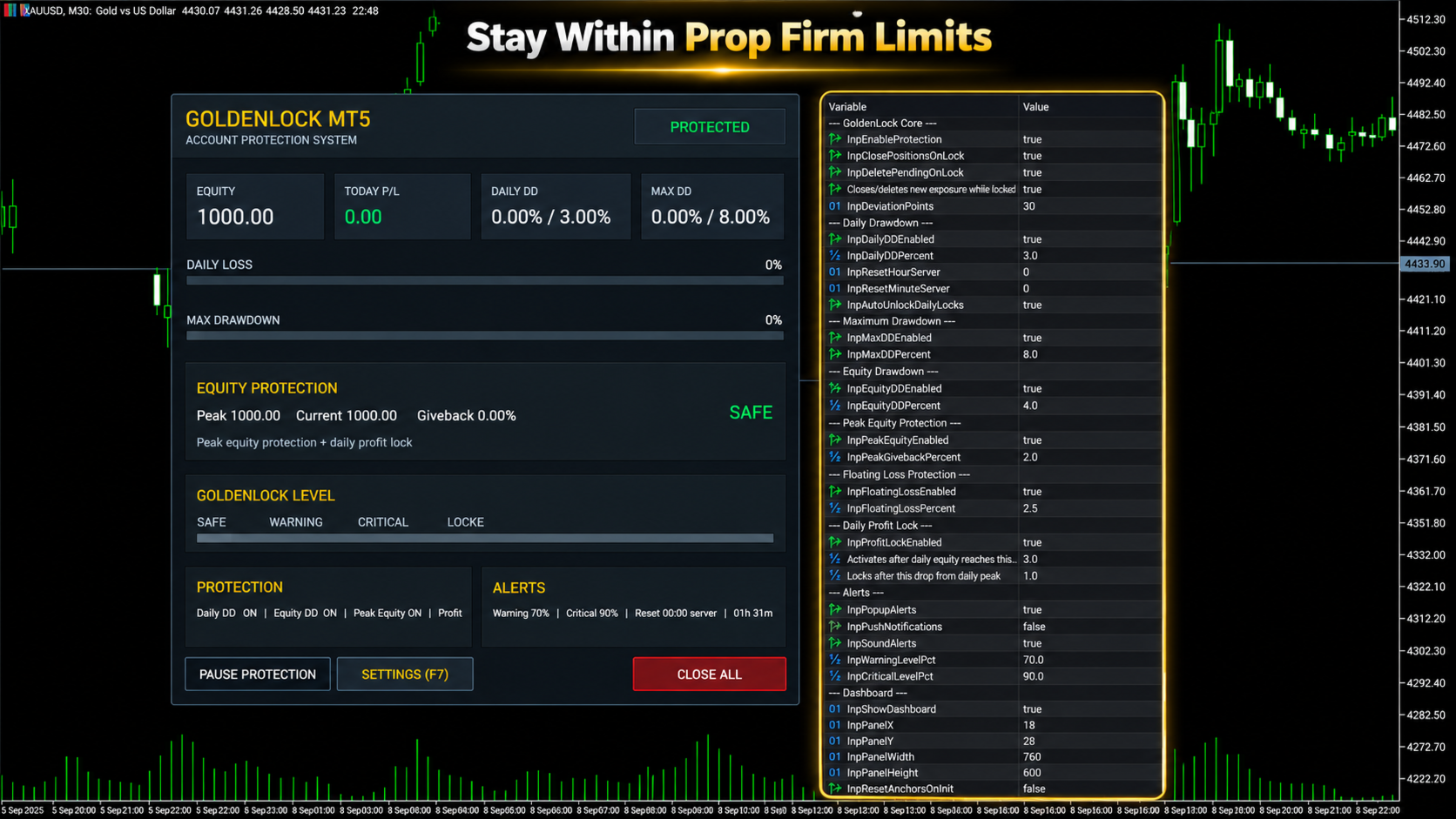
GoldenLock is designed to make the current account-risk state easy to understand from one dashboard.

The dashboard allows you to monitor important account information such as:

  • Current Equity

  • Today P/L

  • Daily Drawdown

  • Maximum Drawdown

  • Peak Equity

  • Equity Giveback

  • Current Protection Status

The Warning, Critical and Locked states make it easier to see how close the account is to the limits you have configured.

GoldenLock monitors the risk. Your trading strategy remains separate.

Three Protection Stages

GoldenLock can provide several stages before the final protection action is reached.

Warning Level

An early indication that the selected drawdown or risk measurement is approaching its configured limit.

Critical Level

A stronger warning that the account is moving closer to the protection threshold.

GoldenLock

When the configured limit is reached, GoldenLock can activate the selected protection actions.

Depending on your settings, this can include:

  • Closing open positions

  • Deleting pending orders

  • Blocking new exposure

  • Continuing to remove new exposure while the account remains locked

This creates a clear progression from monitoring to warning to active protection.

Multiple Drawdown Layers

Account risk cannot always be represented by one number.

GoldenLock therefore allows several protection methods to work as separate risk layers.

Daily Drawdown Protection focuses on losses during the current trading day.

Maximum Drawdown Protection monitors larger account-level loss limits.

Equity Drawdown Protection can include floating profit and loss from currently open positions.

Peak Equity Protection measures how much current equity has fallen from its recorded peak.

Floating Loss Protection can restrict the amount of unrealized loss currently open on the account.

Daily Profit Lock can help protect part of a profitable trading day after the configured profit condition has been reached.

Each protection layer can be configured according to the account and rules you are trading under.

Daily Profit Lock

Risk management is not only about limiting losses.

GoldenLock can also monitor how much profit has been given back after a profitable trading day reaches the configured activation level.

Once Daily Profit Lock becomes active, GoldenLock tracks the daily equity peak.

If equity then falls by the configured amount from that peak, the selected protection action can be triggered.

This allows the utility to monitor both downside risk and profit giveback during the trading day.

Entire Account or One EA

GoldenLock can be configured to protect different scopes of trading activity.

Entire Account

This mode can include manual trades and positions opened by other Expert Advisors.

It is generally the more complete option when the risk limit applies to the whole trading account.

Magic Number Matching

This mode limits GoldenLock's trade actions to positions associated with the selected Expert Advisor Magic Number.

This can be useful when you want GoldenLock to operate alongside one specific EA without applying the same trade actions to every position on the account.

Always confirm which mode matches the rules and protection you actually need.

Built to Work Beside Your Strategy

GoldenLock is not designed to replace your existing trading system.

Your Expert Advisor or manual strategy can continue handling:

  • Entries

  • Exits

  • Trade signals

  • Stop Loss and Take Profit logic

  • Strategy-specific trade management

GoldenLock independently focuses on the account-risk limits you configure.

This separation allows your trading logic and your protection logic to operate as two different layers.

Quick Dashboard Controls

The on-chart dashboard also provides direct access to important protection controls.

  • Pause Protection – Temporarily pause the active protection logic

  • Open Settings – Access the configured protection parameters

  • Close All – Close the positions covered by the selected trade-control mode

Before using manual dashboard controls on a live account, always confirm that the selected trade-control mode matches the positions you intend to manage.

Alerts and Notifications

GoldenLock can provide several types of alerts so you can monitor changes in account-risk status.

  • MT5 Popup Alerts

  • Sound Alerts

  • Push Notifications

  • Warning Level Alerts

  • Critical Level Alerts

This allows GoldenLock to provide information before the final protection threshold is reached.

Server-Time Reset

Daily drawdown rules do not always reset at your local midnight.

GoldenLock allows the daily reset time to be configured using broker server time.

Available controls include:

  • Reset Hour

  • Reset Minute

  • Automatic Daily Unlock

This is especially important when using GoldenLock with an account that defines its daily loss period according to a specific server-time reset.

Always verify the exact reset time required by your broker or trading program before enabling the protection.

What GoldenLock Does Not Do

  • Does not generate BUY or SELL signals

  • Does not decide when to enter the market

  • Does not replace your trading strategy

  • Does not guarantee that losses cannot exceed a configured threshold

  • Does not guarantee prop firm compliance

  • Does not guarantee that an account will pass a challenge

  • Does not guarantee that an account will remain funded

GoldenLock is an additional risk-management utility designed to react according to the protection rules you configure.

GoldenLock MT5 in Short

  • Daily Drawdown Protection

  • Maximum Drawdown Protection

  • Equity Protection

  • Peak Equity Protection

  • Floating Loss Protection

  • Daily Profit Lock

  • Warning & Critical Levels

  • Close Positions at Limit

  • Delete Pending Orders

  • Block New Exposure

  • Automatic Daily Reset

  • Custom Server Reset Time

  • Entire Account Protection

  • EA Magic Number Protection

  • Manual & EA Trading Support

  • On-Chart Risk Dashboard

YOUR STRATEGY TRADES. GOLDENLOCK WATCHES THE RISK.

Testing GoldenLock

Before using GoldenLock on a live or funded account, test the complete protection setup in a MetaTrader 5 demo environment.

Verify:

  • Daily Drawdown calculation

  • Maximum Drawdown calculation

  • Equity protection behaviour

  • Peak equity tracking

  • Floating loss protection

  • Daily Profit Lock behaviour

  • Warning and Critical levels

  • Position-closing behaviour

  • Pending-order deletion

  • Account or Magic Number mode

  • Daily server-time reset

  • Alerts and notifications

Also test what happens when another Expert Advisor attempts to create new exposure while GoldenLock is in a locked state.

The configuration should match the exact trading environment in which you intend to use it.

Important Information

GoldenLock MT5 is a risk-management utility.

It is not a trading strategy, trade signal service or guarantee against trading losses.

Actual account behaviour can be affected by execution speed, slippage, gaps, connection interruptions, broker conditions and other circumstances outside the utility's control.

Prop firm definitions of daily drawdown, maximum loss, equity, balance, reset time and permitted automated trading can differ.

Always configure GoldenLock according to the exact rules of your broker, prop firm or personal trading account.

Test the selected protection settings before relying on them with live funds.

Trading leveraged financial products involves substantial risk and can result in loss of capital.

Risk controls can help limit exposure, but they cannot eliminate trading risk.

For product questions or support, use the MQL5 product comments or MQL5 messaging system.

Önerilen ürünler
UZFX - MetaTrader 5 (MT5) için Sadece Bekleyen Emirleri Sil komut dosyası, bekleyen tüm emirleri (Alış Limiti, Satış Limiti, Alış Durdurma, Satış Durdurma) işlem hesabından otomatik olarak kaldıran basit ama etkili bir araçtır. Bu komut dosyası, aktif piyasa pozisyonlarını etkilemeden bekleyen emirlerini anında temizlemek isteyen tüccarlar için idealdir. Diğer tüm MT4 / MT5 göstergelerime ve EA'larıma göz atın >> BURAYA Özellikler: Bekleyen tüm emirleri siler (Alış Limiti, Satış Limiti, Alış
FREE
VTB High Watermark Drawdown INFO Indicator for MT5 Advanced Account Monitoring & Drawdown Information Dashboard VTB High Watermark Drawdown INFO is a professional account monitoring indicator designed to display drawdown statistics, account performance, and risk management information directly on the chart. Unlike Expert Advisors, this indicator does not interfere with trading activity. It does not open or close positions, modify orders, or block trading. Its sole purpose is to provide a clear a
FREE
Lib5 EAPadPRO for MT5
Vladislav Andruschenko
4.5 (6)
EAPADPRO Library for MetaTrader 5 , Expert Advisor’ınıza modern bir bilgi paneli eklemek için kullanılan ücretsiz ve profesyonel bir arayüz kütüphanesidir. Bu kütüphane, trading programlarını MetaTrader 5 grafiği üzerinde daha temiz, daha bilgilendirici ve daha profesyonel bir görsel sunuma taşımak isteyen MQL5 geliştiricileri için tasarlanmıştır. MetaTrader 5 Expert Advisors genellikle daha karmaşık mantık, çok sayıda ayar, Magic number filtreleri, emir yürütme kuralları ve dahili strateji değe
FREE
This indicator is fully user-adjustable, calculates corellation between all symbols, which you want. Indicator is real-time updated and fully automated.  You can adjust a lot of parameters. Calculation Parameters List of symbols: write all symbol, which you want to calculate, just separate them by comma Calculated bars: amount of bars from which will be calculated Time frame: time period of calculation Used price: used price - 0 (CLOSE), 1 (OPEN), 2 (HIGH), 3 (LOW), 4 (MEDIAN), 5 (TYPICAL), 6 (
The EA works directly on the main chart of MetaTrader 5. Visual order execution system with: trade panel visual OCO sending floating mini charts entry/stop/take lines mouse interaction graphic position management Main panel: Containing: asset selection lot field stop loss take profit trailing stop BUY and SELL buttons OCO button cancel orders button close all button BE (break even) button reverse button Panel is movable on the chart. 2. MINI CHARTS Create a floating mini chart system. U
Know your lot size before you click Buy or Sell. The Chart Mechanics Risk and Position Size is a free panel for MetaTrader 5. Set how much you want to risk and where your stop goes, and it shows the lot size to use and the money actually at risk in your account currency. It is an indicator, so it never opens, changes or closes trades. WHAT IT SHOWS - Lot size, rounded DOWN to your broker's lot step, so you never risk more than you set - Money at risk after rounding, in your account currency -
FREE
Chart Fixer
Renato Fiche Junior
5 (4)
Utility that allows you to set a specific date on the chart. You set a reference point through a vertical line and it is done! When changing timeframes, the reference point is always positioned at the center of the chart. That way you can analyze a specific date at different timeframes easily, without losing the reference point or scrolling the chart to it. This is a product developed by Renato Fiche Junior and available to all MetaTrader 5 users! Partners: "Águia Traders"  team ( Eagle Trader
FREE
UZFX - MetaTrader 5 (MT5) için Tüm Açık Alış ve Satış Emirlerini Anında Kapat komut dosyası, yatırımcıların tüm aktif piyasa pozisyonlarını tek bir işlemle hemen kapatmalarını sağlayan güçlü bir araçtır. Bu komut dosyası, acil ticaret yönetimi için idealdir ve yatırımcıların yüksek volatilite, haber olayları veya strateji ayarlamaları sırasında piyasadan hızla çıkmalarına yardımcı olur. Özellikler Tüm sembollerdeki tüm açık Alış ve Satış pozisyonlarını kapatır. Doğru uygulama için en son Alış
FREE
SessionSync   is a smart and elegant timing tool for MetaTrader 5, created to keep traders fully synchronized with the market. It shows the remaining time of the current candle in real time and displays the main trading clocks, including server time, local time, New York, and London. With a clean floating panel and an intuitive layout, SessionSync helps you track candle expiration and market sessions quickly and efficiently, without overloading your chart. Whether you trade price action, intrada
History On Chart is an indicator that shows the "trail" of all trades made in a specific period of time. It shows the entry and exit point with their respective dates and prices. It also shows the type of trades and the cash result. Open trades are also displayed, but only the entry point. The indicator is free and fully customizable. If you have any questions please contact us. Enjoy! This is a free indicator, but it took hours to develop. If you want to pay me a coffee, I appreciate a lot   <
FREE
The primary function of this script, Tick Data Exporter , is to efficiently extract historical tick data. Tick data represents the most granular level of market data, capturing every single price change. The script downloads this data from a broker and formats it into CSV files for external quantitative analysis. Five things tick data shows that bars permanently hide: Spread microstructure: Bars give you one spread number per period (typically the spread at bar close). Ticks show you the sprea
All-In-One Multi-Functional Dashboard is a comprehensive trading utility designed to streamline your workflow, enhance your technical analysis, and simplify trade management on MetaTrader 5. Instead of cluttering your charts with multiple indicators and scripts, this single Expert Advisor provides a unified control panel that handles everything from market structure analysis and supply/demand zones to risk management and trade execution. Built entirely in pure MQL5 without DLL dependencies , thi
Elliott Wave Helper
Siarhei Vashchylka
4.92 (13)
Elliott Wave Helper is a panel for constructing wave analysis. Manual (Be sure to read before purchasing) | Version for MT4 Advantages 1. Constructing wave analysis and wave structure in a few clicks 2. Availability of all wave analysis patterns, including triangles and combinations 3. All nine wave display styles, including a special circle font 4. Change colors and display styles of wave groups directly from the chart 5. Binding all elements to a set timeframe or timeframes 6. A template syste
Burst Trade Utility – Multi-Position Manager & One-Click Execution Burst Trade Utility is a powerful, fast, and intuitive assistant designed for MetaTrader 5 to simplify your daily trading. If you follow copy trading channels, signal groups, or scale into positions, this utility will completely transform your execution speed. Stop wasting time opening multiple orders manually. With a single click, you can open, manage, and close multiple positions simultaneously on any financial instrument.
FREE
Multi Strategy Risk Allocator is a strategy-budget dashboard organized by Magic Number and configured risk allocation. Key functions: - Per-strategy risk usage and remaining budget - Allocation comparison across multiple strategies - Runtime enable and disable state - Persistent strategy toggles - Exportable allocation snapshots - Clear dashboard for portfolio-level risk oversight The utility helps monitor and coordinate risk budgets configured by the user. It does not generate entry signals,
Introducing the "Auto Timed Close Operations", a useful utility for MetaTrader 5 traders! This utility has been developed to help traders of all levels automatically close their open positions at the exact moment they desire. With the "Auto Timed Close Operations", you gain the required control over your trades and can avoid unwanted surprises at the end of the day or at any other predefined time. We know how important it is to protect your profits and limit your losses, and that's exactly what
PropGuard OS — The Airbag for Your Prop-Trading Account Risk Manager | Trade Panel | Prop Firm EA | FTMO & Funding Pips Ready Be honest: How did you really lose your last challenge? Was it the strategy? Probably not. It was that one moment : The moment a small loss turned into a revenge trade. The moment you “just quickly” bent the rules. The moment your brain screamed “BUY” while your plan said “STOP”. You wouldn’t drive a car without a seatbelt. So why risk a $100,000 account without PropGuar
Çoklu Para Birimi Önceki Mum veya Önceki Çubuk Tarayıcı, gösterge ayarlarından seçtiğiniz herhangi bir özel zaman diliminde çoklu sembol grafiklerini taramanıza yardımcı olur. Ürün bazında: https://www.mql5.com/en/market/product/78657 Önceki Günün en yüksek en düşük, Önceki haftanın en yüksek en düşük, Önceki ayın En yüksek en düşük veya herhangi bir özel zaman dilimi için çoklu sembolleri taramak için kullanılabilir; Önceki 4 saatlik grafik yüksek düşük Gürültüyü filtreler ve fiyat Yüksek v
BOT'A SABIRLI OLUN, YANIT SÜRESİ SANİYELERCE OLABİLİR. YANIT VERECEKTİR. GÖNDER'E BASTIĞINIZDAN VE SONRA BEKLEYİN. MT5 VE MQL5 İÇİN BASİT BİR SOHBET GPT BOT'UDUR. Yorumlarda API Anahtarınızı girdilere ekleyin ve bunları Uzman Danışman sekmesindeki web isteğine ekleyin: MQL5 VE MT5'TE YAPAY ZEKA İLE SOHBET EDİN. İSTEM MQL5 VEYA MT5 İÇERMELİDİR, AKSİ TAKDİRDE YANIT VERMEZ. SADECE MT5 VE MQL4 ÜZERİNDE EĞİTİLMİŞTİR. SADECE GERÇEK ZAMANLI GRAFİKLERDE ÇALIŞACAĞINI, GERİYE DÖNÜK TESTLERDE ÇALIŞMAYACA
MT5 Chart Replay Rewind the Market. Replay Every Trade You Took. Review Every Decision . Have you ever wished you could rewind the candlesticks on your chart and the trades you took and watch the market unfold again ? Perhaps you wanted to see exactly where a trade started going wrong, identify the setup you missed, or revisit a period when your strategy was perfectly aligned with market structure. Introducing MT5 Chart Replay  — a professional MetaTrader 5 chart replay engine designed to help t
NATS (Niguru Automatic Trailing Stop) will help you achieve more profits, by setting the trailing stop automatically. Pair this NATS application with EA, or can also be used as a complement to manual trading. A trailing stop is a powerful tool in trading that combines risk management and profit optimization.  A trailing stop is a type of market order that sets a stop-loss at a percentage below the market price of an asset, rather than a fixed number. It dynamically adjusts as the asset’s pric
FREE
Open Risk Profit  shows your current risk or possible profit of all open positions. Total open risk is your loss if all positions run into the stop loss. Total open profit is your profit if all positions reach your take profit. Total float is your current profit or loss of all positions. The program also breaks down the information into the individual symbols. For example, you can monitor how much is your current profit and your potential risk in EURUSD, no matter how many individual positions
ProTrading Panel — Manuel İşlemler İçin En Gelişmiş Ticaret Yardımcısı ProTrading Panel ile manuel işlem deneyiminizi bir üst seviyeye taşıyın. Emirlerin yıldırım hızında iletilmesi için tasarlanan bu Uzman Danışman (EA), çalışma alanınızı daraltmadan grafiklerinize mükemmel şekilde uyum sağlayan şık ve gözü yormayan dikey bir arayüz sunar. İster ekrana fareyle tıklamayı tercih edin, ister klavye kısayollarını kullanarak işlemlerinizi ışık hızında gerçekleştirin; bu araç tamamen sizin için tasar
An algorithm that uses artificial intelligence (AI) to analyze the best entries in the market over the 24 hours generally works by following these steps: Real-Time Data Collection: The algorithm collects real-time information from various sources such as market prices, trading volumes, technical indicators, economic news, and fundamental analysis. Data Processing: It uses data processing techniques such as time series analysis, noise filtering, and extraction of relevant features that help pr
UZFX - Grafikteki Tüm Çizim ve Nesneleri Anında Sil, tüm çizim nesnelerini aktif grafikten anında kaldırmak için tasarlanmış basit ama güçlü bir MetaTrader 5 (MT5) komut dosyasıdır. Bu komut dosyası, grafiklerini teknik analiz çizimlerinden, trend çizgilerinden, Fibonacci araçlarından, metin etiketlerinden ve diğer nesnelerden tek tek manuel olarak silmeden hızlı bir şekilde temizlemesi gereken tüccarlar için kullanışlıdır. Özellikler: Aktif grafikteki tüm nesneleri ve çizimleri siler. Tek b
FREE
Bu komut dosyası, çeşitli pencere işlevlerinde ağırlıkları değerlendirmek için tasarlanmıştır. Bu pencere işlevleri üzerine kurulu bir gösterge   https://www.mql5.com/ru/market/product/72159   adresinden indirilebilir. Giriş parametreleri: iPeriod – gösterge dönemi. iDönem >= 2 iCenter, pencere işlevinin merkezinin bulunacağı referansın dizinidir. Varsayılan olarak, bu parametre 0'dır - pencerenin merkezi, göstergenin merkeziyle çakışır. 1 <= iCenter <= iPeriod ile, pencere işlevinin merkezi ka
FREE
Phone Notification Send Information from VPS direct to Phone No TradingOperation only MessageNotification Send Information to your selected Time-Window Configure Time when want to receive the Message  What will be send:-Bull/Bear Candle Bull: 0 Bear: 0 Level that get Touched by Price most Level: 00000.00 any Question or modification ex5 Code write me a Message 
FREE
Tenha a boleta do ProfitChart no seu Metatrader! ........................ Agora é possível ter a boleta do profit no seu Metatrader. Envie ordens de compra e venda, acompanhe o mercado e simule estratégias em momentos de mobilidade, diretamente do seu Metatrader5. Gestão de riscos e otimização de lucros são dois princípios básicos de qualquer operação bem-sucedida. Nesse sentido, utilize as ferramentas de  STOPMOVEL, TRAILING STOP, STOPGAIN E ORDENS PARCIAIS DE SAÍDA.       Funcionalidades do
Launch price $39 until 31 October, then $59 The trade panel that also backtests your setups on the chart. Aurum RR brings a clean, TradingView-style Risk:Reward tool to MetaTrader 5 - and goes further. Plan a trade visually, send it with the exact lot size in one click, manage it automatically once it is open, and backtest your setups on history with every box scoring itself. PLAN - Place a Risk:Reward box anywhere on the chart and drag the stop loss, take profit, entry and box length direct
No EA, no complex configuration – just run this script and see your professional trade setup instantly on the chart. The MTT   Breakout Trade Setup Pro   script is built for manual breakout traders who want   institutional‑grade risk management   without the overhead of an Expert Advisor. It uses a proprietary higher‑timeframe detection algorithm (calibrated for the 9:00 GMT+3 session) to identify the optimal breakout reference levels. Your Stop Loss distance is derived automatically from market
Bu ürünün alıcıları ayrıca şunları da satın alıyor
Trade Assistant MT5
Evgeniy Kravchenko
4.43 (216)
It helps to calculate the risk per trade, the easy installation of a new order, order management with partial closing functions, trailing stop of 7 types and other useful functions. Additional materials and instructions Installation instructions - Application instructions Line function -   shows on the chart the Opening line, Stop Loss, Take Profit. With this function it is easy to set a new order and see its additional characteristics before opening.   Risk management  - The risk calculation
Trade Manager EA’ye hoş geldiniz! Ticaretin daha sezgisel, hassas ve verimli hale gelmesi için tasarlanmış nihai risk yönetim aracı ile tanışın. Bu sadece bir emir verme aracı değil; ticaret planlaması, pozisyon yönetimi ve risk kontrolü için kapsamlı bir çözüm. İster yeni başlayan bir yatırımcı olun, ister deneyimli bir trader ya da hızlı emir gerektiren bir scalper, Trade Manager EA ihtiyaçlarınıza uyum sağlar ve forex, endeksler, emtialar ve kripto paralar dahil tüm piyasalarda esneklik sunar
Local Trade Copier EA MT5
Juvenille Emperor Limited
4.94 (149)
Local Trade Copier EA MT5, aynı Windows bilgisayarı veya Windows VPS üzerinde çalışan birden fazla MetaTrader 5 hesabı arasında işlemleri kopyalamak ve yönetmek için hızlı ve esnek bir işlem kopyalayıcıdır. Yerel işlem senkronizasyonunu, Receiver tarafında lot büyüklüğü, risk yönetimi, işlem filtreleme, sembol eşleştirme, işlem yönetimi ve hesap koruması kontrolleriyle birleştirir. Transmitter ve Receiver terminallerinizi yaklaşık 1 dakika içinde ayarlayın ve aynı veya farklı brokerlardaki hesa
Telegram to MT5 Multi-Channel Copier   , Telegram ve Discord kanallarınızdaki alım-satım sinyallerini doğrudan MetaTrader 5'e otomatik kopyalar. Bot yok, tarayıcı uzantısı yok, elle kopyalama yok. Sinyal Telegram'a veya Discord'a düşer ve EA birkaç saniye içinde terminalinizde işlemi açar. Ve bir kanalı kopyalamadan önce, yerleşik backtester o kanalın hesabınızda ne yapmış olacağını gösterir. Ürün iki bileşenden oluşur: Telegram kanallarınızı dinleyen bir Windows uygulaması ve sinyalleri MT5 ter
Farmed Hedge Yield Farming | All Markets (Manual - Hybrid - Semi/Automated EA) VERIFIED TRADING RESULTS - Farmed Hedge Yield Axi Copy:  https://www.mql5.com/en/signals/2356376 - Farmed Hedge Yield Exn Copy:   https://www.mql5.com/en/signals/2356404 - Farmed Hedge Yield V Copy:  https://www.mql5.com/en/signals/2357156 IMPORTANT NOTICE: FarmedHedge is a MANUAL-FOCUSED TRADING UTILITY ,not a fully automated EA. Results shown on this Signal include manual trades and overall strategic management.
Telegram sinyallerini kendi işlem kurallarınızla kopyalayın Telegram to MT5 Signal Trader , herkese açık ve özel Telegram kanallarındaki ve gruplarındaki metin tabanlı işlem sinyallerini otomatik olarak MetaTrader 5'e kopyalar. Tek bir masaüstü uygulamasından birden fazla sinyal sağlayıcısını ve MT5 hesabını yönetin; her sağlayıcı için ayrı risk ve işlem ayarları belirleyin. Sinyal kopyalamak için Telegram botu veya API kurulumu gerekmez. Kendi Telegram hesabınızla telefon numarası veya QR kod k
TradePanel MT5
Alfiya Fazylova
4.88 (170)
Trade Panel, çok işlevli bir ticaret asistanıdır. Uygulama, manuel ticaret için 50'den fazla ticaret fonksiyonu içerir ve çoğu ticaret görevini otomatikleştirmeyi mümkün kılar. Uygulama talimatları: https://www.mql5.com/en/blogs/post/756482 Demo hesabı için uygulamanın deneme sürümü: https://www.mql5.com/en/blogs/post/750865 Uygulamayı nasıl kurulur: https://www.mql5.com/en/blogs/post/756239 Uygulamayı görsel modda nasıl test edilir: https://www.mql5.com/en/blogs/post/770277 Uygulamayı VPS MetaT
Strategy Ledger Pro
Abdullah Uygar Tuna
5 (12)
Şimdi Türkçe dil desteği ile. Strategy Ledger Pro , MetaTrader 5 için salt okunur bir hesap analiz panelidir. Hesap sonuçlarını Uzman Danışman (EA), strateji, sembol ve magic numaraya göre ayırır; böylece her birinin gerçekte ne kattığını görürsünüz. Panel 11 dilde kullanılabilir: English, Français, Deutsch, Español, Italiano, Português, Русский, Türkçe, 中文, 日本語 ve 한국어. Demoyu indirmeden önce. Market, her ücretli ürünün demosunu yalnızca Strateji Test Cihazında çalıştırır. Bu panel kendi hesabı
================================================================================ POC BREAKOUT - V20.72. Full Professional Grade Toolkit ================================================================================ POC Breakout is a full MetaTrader 5 trading dashboard for discretionary traders who want breakout signals, Point of Control (POC) context, volume profiles, order flow, market structure, news, alerts, and advanced trade planning in one professional workspace. Attached directly to you
News Trade EA MT5
Konstantin Kulikov
4.55 (11)
Birkaç yıldır kullandığım çok yararlı bir robotu tanıtıyorum. Hem yarı otomatik hem de tam otomatik modlarda kullanılabilir. >>> Chat <<< Program, ekonomik takvim haberlerinde esnek ticaret ayarlarını içeriyor. Stratejiler test cihazında kontrol edilemez. Sadece gerçek bir iş. Terminal ayarlarında, haberler sitesini izin verilen URL'ler listesine eklemeniz gerekir. Servisler > Araçlar > Danışmanlar'a tıklayın. "Aşağıdaki URL'ler için WebRequest'e İzin Ver:" kutucuğunu işaretle. Aşağıdakini ekl
Master Your Trading Discipline   Stop losing your hard-earned gains to overtrading and emotional decisions. The Discipline Tool is your ultimate trading assistant, ensuring strict risk management in real-time. Key Protection Features: Advanced Drawdown Defense : Automatically halts trading if your daily drawdown exceeds a preset threshold (percentage or dollar amount). Real-Time Equity Lock : Safeguard profits by referencing peak equity, ensuring drawdown stays within control. Hard Profit Target
Dealer's Panel No signal decides anything here — a hand does. One click, and the panel calculates what's underneath: lot size from risk, target from a 30-step balance ladder that remembers exactly how far an account has climbed. Toggle between market and pending without touching an input field. Set a stop, and the take-profit can write itself — a fixed share of the balance, translated into price with no arithmetic left for the trader to get wrong. One trade live at a time; it won't let a seco
Exp COPYLOT CLIENT for MT5
Vladislav Andruschenko
3.97 (35)
MetaTrader 5 için profesyonel işlem kopyalayıcı MetaTrader için hızlı, profesyonel ve güvenilir bir işlem kopyalayıcı . COPYLOT , MT4 ve MT5 terminalleri arasında Forex işlemlerini kopyalamanıza olanak tanır ve Hedge ile Netting hesaplarını destekler. COPYLOT MT5 sürümü şunları destekler: - MT5 Hedge → MT5 Hedge - MT5 Hedge → MT5 Netting - MT5 Netting → MT5 Hedge - MT5 Netting → MT5 Netting - MT4 → MT5 Hedge - MT4 → MT5 Netting MT4 sürümü Tam açıklama + DEMO + PDF Nasıl satın alınır Nasıl kurul
HINN MAGIC ENTRY – the ultimate tool for entry and position management! SIMPLE. FASTEST. INTUITIVE. MAX AUTOMATED. Place orders by selecting a level directly on the chart! full description   ::  demo-version  :: 60-sec-video-description Key features: - Market, limit, and pending orders - Automatic lot size calculation - Automatic spread and commission accounting - Unlimited partitial take-profits  - Breakeven and trailing stop-loss and take-profit  functions - Invalidation leves - Intuitive, a
Get Ready for Major New Features in Our Next Update — Version 2.52 Coming Soon! [NEW]  We’re taking market analysis to the next level with 4   new features designed to meet your trading needs. Introducing: TRADE OVERVIEW DASHBOARD  CONFLUENCE AT ZONE  OTE   Strong & Weak High/Low  1. TRADE OVERVIEW DASHBOARD A dashboard that helps you see the overall market picture more easily, with key information from multiple timeframes and trading guidance to support your trading decisions, helping you an
The product will copy all telegram signal to MT5 ( which you are member) , also it can work as remote copier.  Easy to set up, copy order instant, can work with almost signal formats, image signal,  s upport to translate other language to English Work with all type of channel or group, even channel have "Restrict Saving Content", work with  multi channel, multi MT5 Work as remote copier: with signal have ticket number, it will copy exactly via ticket number. Support to backtest signal. How to s
EASY Insight AIO – Akıllı ve zahmetsiz yatırım için hepsi bir arada çözüm Genel Bakış Tüm piyasayı — Forex, Altın, Kripto, Endeksler ve hatta Hisseler — saniyeler içinde, manuel grafik incelemesi, gösterge kurulumu ya da karmaşık ayarlar olmadan analiz edebildiğinizi hayal edin. EASY Insight AIO , yapay zekâ destekli yatırım için nihai, kullanıma hazır dışa aktarma aracınızdır. Tüm piyasanın kapsamlı bir anlık görüntüsünü tek bir temiz CSV dosyasında sunar; bu dosya ChatGPT, Claude, Gemini, Pe
Telegram To MT5 — Sinyal Kopyalayıcı Telegram kanallarınızdaki işlem çağrılarını gerçek MT5 emirlerine dönüştürün — otomatik olarak, istediğiniz kadar hesapta ve risk ile kurallar tamamen sizin kontrolünüzde. Telegram To MT5, Telegram'da zaten takip ettiğiniz VIP / sinyal kanallarını MetaTrader 5 terminalinize bağlar. Ücretsiz bir eşlik eden masaüstü uygulaması mesajları okur (botlara izin vermeyen kanallardan bile), ve bu Expert Advisor bunları hesabınızda yürütür — kendi risk ayarlarınızı, sem
MT5 to Telegram Signal Provider , hesabınızı bir sinyal sağlayıcı haline getirerek belirtilen sinyalleri Telegram'ın sohbetine, kanalına veya grubuna göndermeyi sağlayan kullanımı kolay, tamamen özelleştirilebilir bir araçtır. Rakip ürünlerin çoğunun aksine, DLL içe aktarması yapmaz. [ Demo ] [ Kılavuz ] [ MT4 Versiyonu ] [ Discord Versiyonu ] [ Telegram Kanalı ]  New: [ Telegram To MT5 ] Kurulum Adım adım bir kullanıcı kılavuzu mevcuttur. Telegram API'si hakkında bilgi gerekmemektedir; ihtiyac
Power Candles Strateji Tarayıcısı - Kendi Kendini Optimize Eden Çoklu Sembol Kurulum Bulucu Power Candles Strateji Tarayıcısı , Power Candles göstergesini çalıştıran aynı kendinden optimize edici motoru, Piyasa İzleyicinizdeki her sembol üzerinde yan yana çalıştırır. Tek bir panel, şu anda istatistiksel olarak hangi sembollerin işlem yapılabilir olduğunu, her birinde hangi stratejinin kazandığını, en uygun Stop Loss / Take Profit çiftini gösterir ve yeni bir sinyal geldiği anda size bildirim gön
The Patch It never opens a trade. It walks behind the ones that did. Every open position, every pending order — checked twice a second for the one thing that's easy to forget: a stop, a target. Found bare, it doesn't ask. It writes the missing number in, measured in points from wherever the position began, and moves on to the next. No strategy, no opinion on direction. Just the quiet assumption that nothing should ever sit on the market unprotected — not because someone decided it shouldn't,
Grid Manual MT5
Alfiya Fazylova
4.73 (22)
Grid Manual, sipariş ızgarasıyla çalışmak için kullanılan bir ticaret yardımcı programıdır. Yardımcı program evrenseldir, esnek ayarlara ve sezgisel bir arayüze sahiptir. Sadece kayıpların ortalaması yönünde değil, aynı zamanda kazanç artışı yönünde de bir emir ızgarası ile çalışır. Tüccarın bir emir ızgarası oluşturmasına ve eşlik etmesine gerek yoktur, bu yardımcı programı yapacaktır. Emri açmanız yeterlidir ve Grid manual otomatik olarak ona bir emir ızgarası oluşturacak ve kapanana kadar ona
Signal TradingView to MT5 Pro Automator TradingView ve MetaTrader 5 arasında anında profesyonel uygulama TradingView alarmları ile MT5'teki gerçek uygulama arasındaki en güçlü iletişim köprüsüyle ticaret stratejinizi otomatikleştirin. Hız, esneklik ve kusursuz risk yönetimi talep eden yatırımcılar için tasarlanan bu Uzman Danışman (Expert Advisor), herhangi bir alarm mesajını hassas bir piyasa (market) veya limit emrine dönüştürür. GÜÇLÜ YÖNLER VE AVANTAJLAR Evrensel Ayrıştırma Motoru (Tescilli)
Desteğe mi ihtiyacınız var? Nasıl kurulur? Sorunuz mu var? Buradan kendi dilinizde sorun, hızlı yanıt: https://www.mql5.com/en/market/product/139088/comments Çalışan Demo İndir Copy Cat More (Taklitçi Kedi) — İşlem Kopyalayıcı (Trade Copier) MT5 , yerel bir işlem kopyalayıcı ve bugünün ticaret zorlukları için tasarlanmış eksiksiz bir risk yönetimi ve yürütme çerçevesidir. Prop firm challenge'larından kişisel portföy yönetimine kadar, sağlam yürütme, sermaye koruması, esnek yapılandırma ve geli
Your EAs cannot see each other, but Anchor can. Anchor gives you one place to coordinate your EAs, manage risk, and decide when trading is allowed. It works alongside the trading bots you already use without any changes to them. The Problem One EA opens a trade. Then another starts trading. The next thing you know, you wake up to multiple grids built across your account. Each EA may be doing exactly what it was designed to do, but together they can place far more risk on your account than you in
Trade copier MT5
Alfiya Fazylova
4.61 (57)
Trade Copier, ticaret hesapları arasındaki işlemleri kopyalamak ve senkronize etmek için tasarlanmış profesyonel bir yardımcı programdır. Kopyalama, tedarikçinin hesabından/terminalinden alıcının aynı bilgisayarda veya vps'de kurulu olan hesabına/terminaline gerçekleşir. Satın almadan önce demo sürümünü bir demo hesabında test edebilirsiniz. Demo versiyonu burada . Tüm talimatlar burada . Ana işlevler ve avantajlar: Emirlerin kopyalanmasını destekler: МТ5> МТ5, МТ4> МТ5, МТ5> МТ4. Emirlerin kopy
Telegram'dan MT5'e:   Nihai Sinyal Kopyalama Çözümü Telegram'dan MT5'e işlemlerinizi basitleştirin, DLL'lere ihtiyaç duymadan işlem sinyallerini doğrudan Telegram kanallarından ve sohbetlerinden MetaTrader 5 platformunuza kopyalayan modern araç. Bu güçlü çözüm hassas sinyal yürütme, kapsamlı özelleştirme seçenekleri sağlar, zamandan tasarruf sağlar ve verimliliğinizi artırır. [ Instructions and DEMO ] Temel Özellikler Doğrudan Telegram API Entegrasyonu Telefon numarası ve güvenli kod ile kimlik
Bu ürün, haber saatlerinde tüm uzman danışmanları ve manüel grafikleri filtreler, böylece manüel ticaret kurulumlarınızı veya diğer uzman danışmanlar tarafından girilen işlemleri yok edebilecek ani fiyat dalgalanmaları konusunda endişelenmenize gerek kalmaz. Bu ürün, herhangi bir haber yayınlanmadan önce açık pozisyonlarınızı ve bekleyen emirlerinizi yönetebilen tam bir sipariş yönetim sistemi ile birlikte gelir.   The News Filter'ı   satın aldığınızda, gelecekteki uzman danışmanlar için yerleşi
MetaTrader 5 için Trading Panel — grafik ve klavyeden profesyonel tek tıkla işlem kontrolü Aktif traderlar için geliştirilmiş güçlü bir Trading Panel; işlemleri standart MetaTrader arayüzüne göre çok daha hızlı açmanıza, yönetmenize ve kapatmanıza yardımcı olur. Bu çözüm; pozisyonları, bekleyen emirleri, toplam kârı ve işlem yürütmesini tek bir profesyonel çalışma alanında kontrol etmek isteyen kullanıcılar için tasarlanmıştır. Bu sadece sıradan bir yardımcı araç değildir. MetaTrader 5 için ger
Floor Watch
Syed Tauqeer Hussain Shah
Floor Watch One number, watched every thirty seconds: how far equity has fallen since the day began — or since its highest point, if it's told to trail the peak instead of the open. Cross the line and it doesn't argue. Every open position closes, every pending order vanishes, and anything that slips through afterward gets shut the moment it appears. Not asked. Removed. The floor holds until the clock turns 5 AM Pakistan time — then, and only then, does the day start over. One rule. No except
Yazarın diğer ürünleri
Space Scalper
Lasse Mathias Baagoe S Christensen
Space Scalper is the ultimate Flagship momentum scalper, engineered for Gold (XAU/USD), Indices (NASDAQ, DAX, US30, US500), and more on the MetaTrader 5 platform. It is designed for traders who value steady, consistent growth by minimizing risk and focusing on high-probability momentum opportunities. The core of the strategy is based on pure market momentum. Space Scalper uses a sophisticated multi-timeframe analysis to identify strong market trends and executes trades with precision to capture
FREE
Syncronix Gold
Lasse Mathias Baagoe S Christensen
Syncronix Gold is a specialized breakout scalping Expert Advisor engineered exclusively for Gold (XAU/USD) on the MetaTrader 5 platform. It is designed for traders who value steady, consistent growth by minimizing risk and focusing on clear, logical trading opportunities. The core of the strategy is based on pure price action. Syncronix identifies critical support and resistance levels and places pending orders to capture powerful breakout movements. This ensures that every trade is based on sol
FREE
Ninja Master
Lasse Mathias Baagoe S Christensen
3 (2)
Ninja Master: Powering Traders & Investors Worldwide. Ninja Master is an advanced and adaptable Gold Expert Advisor developed exclusively for Gold on the 5-minute timeframe . It is a complete trading solution that performs a range of tasks, including following the trend , analyzing the chart , smart TP system , and smart filters . It does not use neural learning or AI — instead, it uses an adaptable smart algorithm designed for traders who prioritize capital protection and steady growth . Create
FREE
Meta5 EA
Lasse Mathias Baagoe S Christensen
Meta5 EA is an advanced rule-based Expert Advisor built for XAUUSD, combining breakout and retest logic, Areas of Interest, and multi-timeframe market analysis. Instead of evaluating one chart in isolation, Meta5 monitors broader market structure across multiple timeframes. Higher-timeframe direction and context are used to filter setups before execution is handled on M30. Meta5 EA reads completed M30 candles and evaluates market direction, momentum, volatility, current trading conditions, highe
FREE
Gold Goat EA
Lasse Mathias Baagoe S Christensen
Gold Goat EA is a fully automated breakout trading system specifically designed for XAUUSD on the M5 timeframe. This  This expert advisor delivers consistent, profitable results in backtests while remaining fully customizable for your trading preferences. Key Features Breakout strategy with configurable lookback period detection Multiple lot size modes: Fixed or Risk % of Balance Fixed stop loss and take profit levels in pips Intelligent trailing stop with breakeven functionality RSI confirmatio
FREE
QuantGator MT5
Lasse Mathias Baagoe S Christensen
QUANTGATOR EA MT5 Trade the wildest moves on GOLD, NAS100 & DAX with one powerful, fully customizable MT5 Expert Advisor. QUANTGATOR EA is a high-performance trading robot designed for traders who want clean logic, professional risk management, and full control—without the need to code. Whether you are managing a live account or passing Prop Firm challenges, QUANTGATOR adapts to the current market volatility to protect your capital while scaling your profits. QUANTGATOR focuses on high-probabili
FREE
Paradise MT5
Lasse Mathias Baagoe S Christensen
2 (1)
Paradise EA is a sophisticated breakout trading Expert Advisor developed for the MetaTrader 5 platform. It is engineered for traders who prioritize capital protection and steady growth by focusing on high-probability price action movements. The core strategy is built on pure market dynamics. Paradise EA identifies key trading ranges and strategically places pending orders to capture momentum during significant breakouts. This approach ensures that trades are based on logical market structure, no
FREE
Prop Firm Titan EA
Lasse Mathias Baagoe S Christensen
Prop Firm Titan EA: Automated Gold Prop Firm Trader Prop Firm Titan EA is a Gold Expert Advisor, developed exclusively for Prop Firms , trading Gold (XAUUSD) on the 5-minute timeframe (M5) . It executes a comprehensive process, including technical analysis, trend alignment protocols, sophisticated entry filters, and an intelligent profit optimization system to maximize trade quality . It does not use neural learning or AI — instead, it prioritizes risk management and sustainable account growt
FREE
Eos AI
Lasse Mathias Baagoe S Christensen
How to Read EOS AI EOS AI is designed to make its current market assessment easy to understand from one compact dashboard. The panel gives you three main pieces of information: BUY Probability – the neural model's current bullish assessment SELL Probability – the neural model's current bearish assessment Signal – BUY, SELL or WAIT after the required confirmation rules are applied The probabilities provide context, while the final signal applies the additional confirmation logic. This means the
FREE
My Trade System MT5
Lasse Mathias Baagoe S Christensen
My Trade System MT5 is a trade management utility for MetaTrader 5 that lets you prepare and place trades directly from the chart. It combines adjustable Entry, Stop Loss and Take Profit levels with a compact dashboard. Orders can be prepared and adjusted directly from the chart without using the standard MetaTrader order window for every change. Trade Setup Stop Loss and Take Profit levels can be moved directly on the chart with the mouse. When using Limit or Stop orders, the Entry level can al
FREE
My Trends MT5
Lasse Mathias Baagoe S Christensen
How to Read My Trends My Trends is designed to help you quickly compare market direction across several symbols and timeframes from one dashboard. Each symbol can display one of three directional states on the selected timeframes: ↑ Bullish – The current trend conditions are bullish ↓ Bearish – The current trend conditions are bearish → Mixed – The selected timeframes are not clearly aligned The Trend Strength score then provides an additional summary of how strong the current multi-timeframe
FREE
QuantDragon MT5
Lasse Mathias Baagoe S Christensen
QUANTDRAGON EA MT5 — Adapt. Protect. Strike. Discounted price. The price will increase by $50 with every 20% growth! LIVE Signal | Low Risk: Click Here! IMPORTANT! After purchase, send me a private message to receive the installation manual and setup instructions. Hello, traders. I am QuantDragon — built to read the market before it moves, protect capital before it bleeds, and execute only when the moment is earned. For months, the architecture was forged in silence. Stress-tested across expl
FREE
Superwave MT5
Lasse Mathias Baagoe S Christensen
How to Read SUPERWAVE SUPERWAVE is designed to make the current trend state easy to understand at a glance. During bullish conditions: The adaptive trend line is displayed in blue The line follows underneath price The dashboard shows a bullish market bias A BUY signal is displayed when the detected trend changes into bullish conditions During bearish conditions: The adaptive trend line is displayed in red The line follows above price The dashboard shows a bearish market bias A SELL signal is dis
FREE
LittleBear EA
Lasse Mathias Baagoe S Christensen
LittleBear EA MT5 Support & Resistance Trading. Automated. LittleBear EA is a lightweight MT5 trading robot built around a clear support and resistance strategy. It trades Gold, Forex, and Indices by identifying key price levels and entering high-probability trades when price moves beyond those levels. No indicators. No complexity. Just structured price action trading. How the Strategy Works LittleBear EA: Identifies key support and resistance levels Waits for price to move beyond the level Ente
FREE
DeepEdge MT5
Lasse Mathias Baagoe S Christensen
How to Read DeepEdge DeepEdge is designed to make the current setup easy to understand directly from the chart. When a BUY setup is detected: A BUY arrow is displayed around price The current trend conditions support a bullish setup An ATR-based Stop Loss reference can be displayed below the setup An ATR-based Take Profit reference can be displayed above the setup When a SELL setup is detected: A SELL arrow is displayed around price The current trend conditions support a bearish setup An ATR-bas
FREE
HorizonMT5
Lasse Mathias Baagoe S Christensen
How to Read Horizon Horizon is designed to give you a structured overview of the market from one H1 chart. The multi-timeframe dashboard allows you to compare direction across: M5 M15 M30 H1 H4 D1 This makes it easier to see whether shorter and higher timeframes are generally aligned or showing mixed conditions. The two moving averages provide additional directional context directly on the chart, while Previous Day High and Previous Day Low provide important daily reference levels. The session d
FREE
Filtrele:
Değerlendirme yok
Değerlendirmeye yanıt