Multi Strategy Risk Allocator

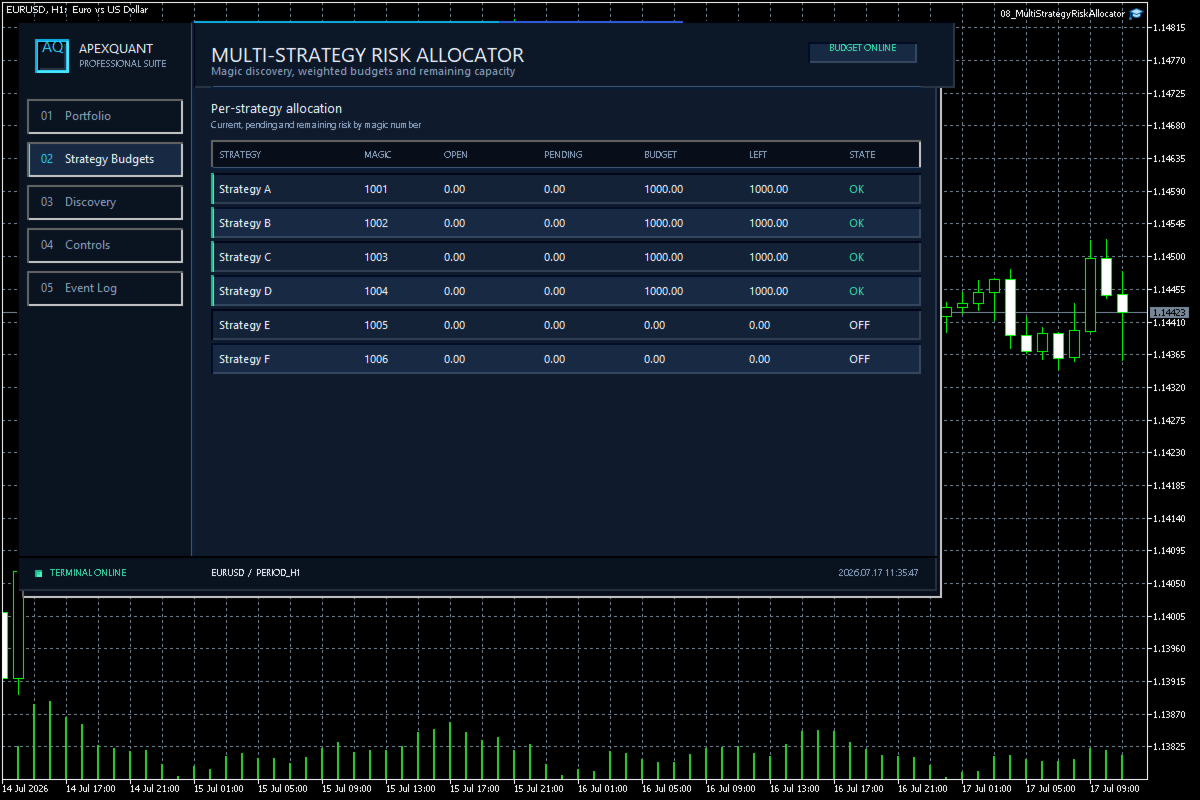
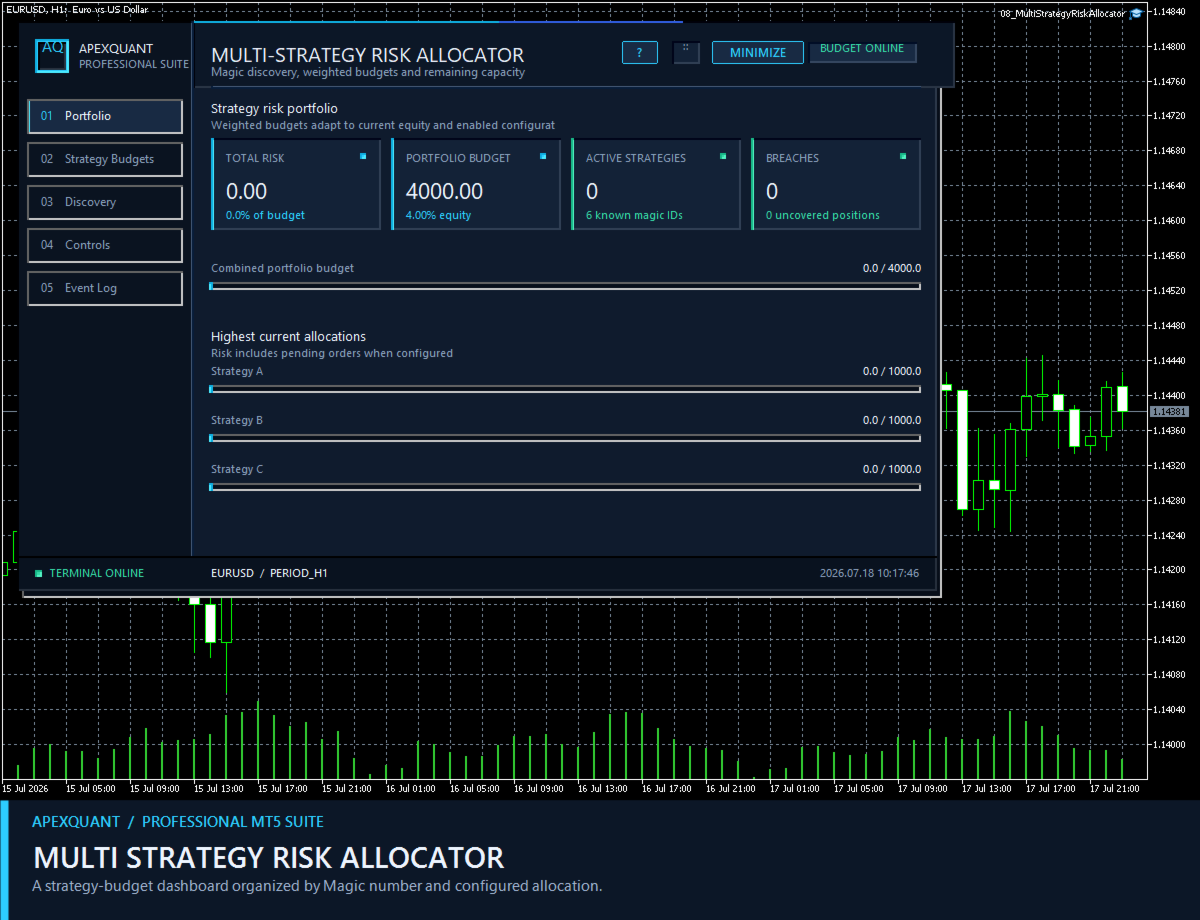
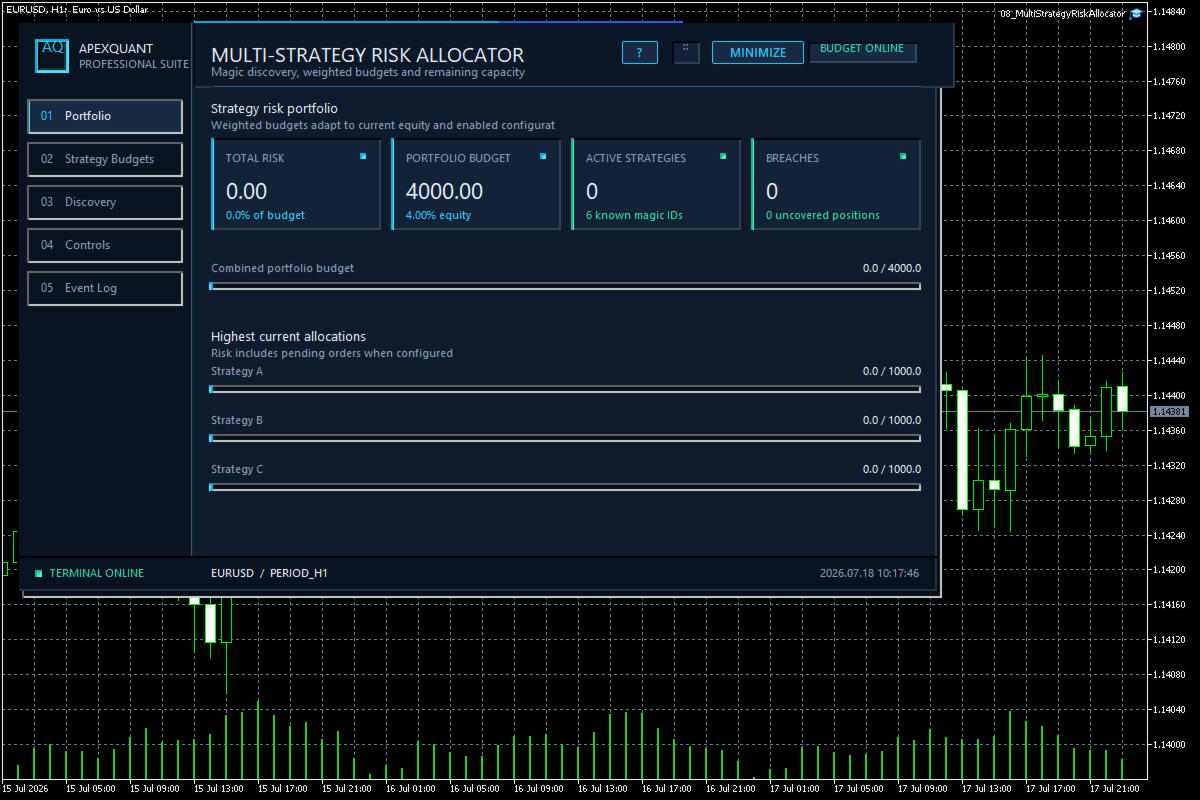
Multi Strategy Risk Allocator — Compare strategy risk budgets and usage in one allocation workspace.

Who it is for

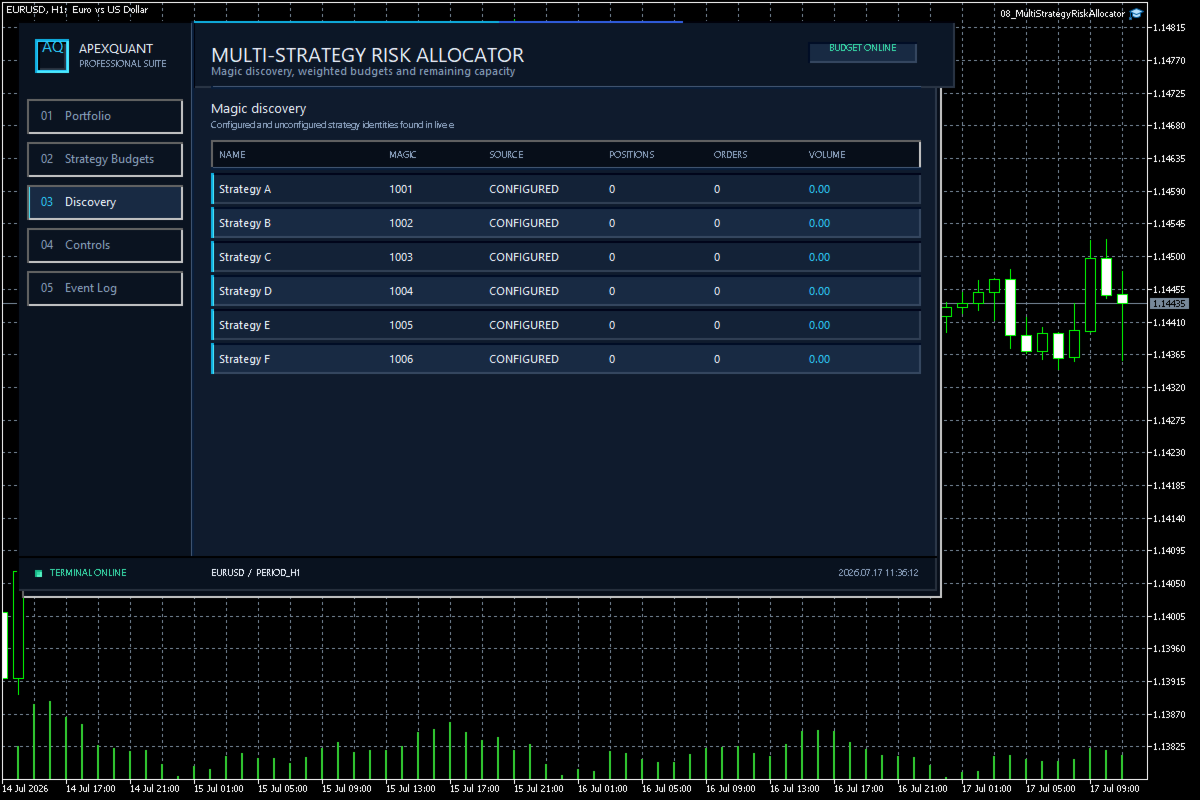
Designed for users running several Magic-number groups who need to review how risk is distributed.

Main functions

  • Per-strategy risk usage and remaining budget
  • Allocation comparison across multiple strategies
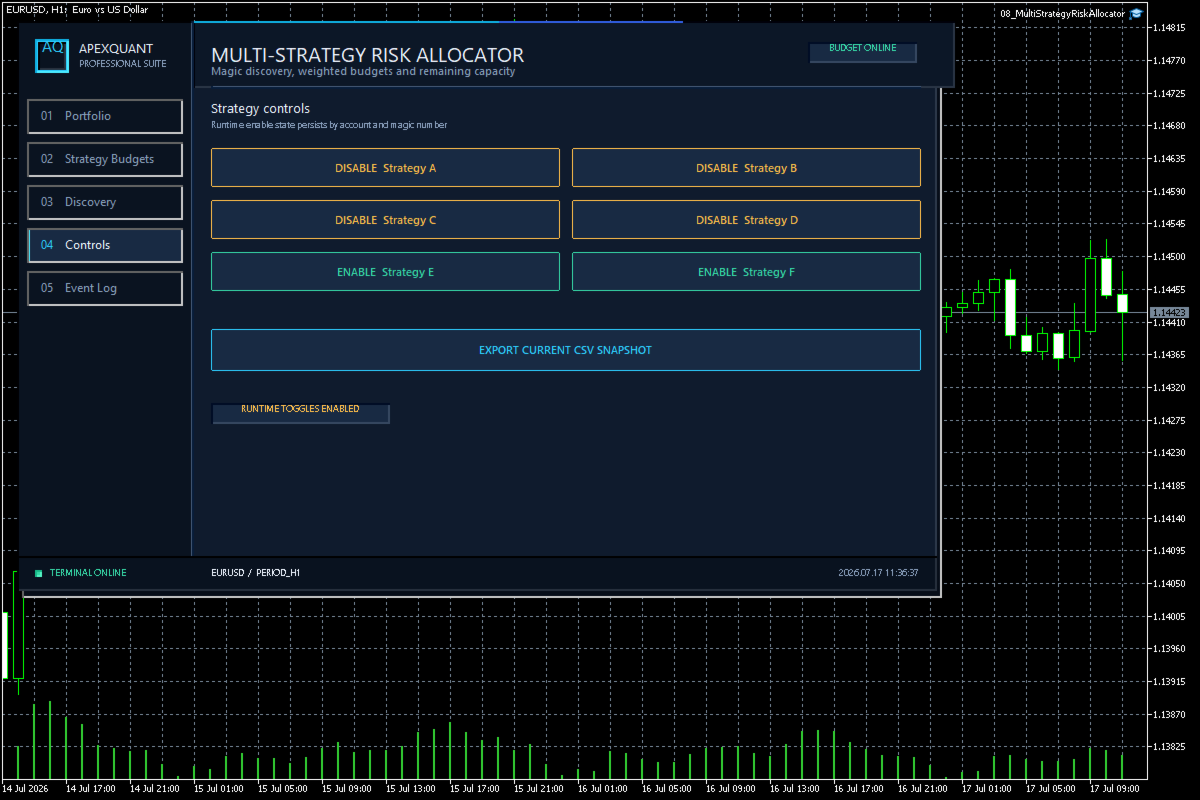
  • Runtime enable and disable state
  • Persistent strategy toggles
  • Exportable allocation snapshots
  • Clear dashboard for portfolio-level risk oversight

A practical setup workflow

Review the selected account, symbols, server time, available history and input settings. Compare the panel with the terminal before relying on its output. Use the readings to support your own review, not as a standalone instruction to buy or sell. Data availability and broker specifications can change displayed results.

Important limits

This is an analysis and monitoring workspace, not a profit prediction or execution-quality guarantee. Results depend on terminal data, broker reporting and the selected sample. Missing information must not be interpreted as zero risk. Historical statistics and examples do not predict future results. Check suitability for your own account and workflow before use.
Önerilen ürünler
MT5 to Telegram Signals This utility is simple to use and supports a wide variety of settings: Pick your desired Telegram group and enter the bot token and the chat id Get notified when orders are placed, modified, executed, closed… or any combination of states Connect your broker account with Telegram and stop missing important notifications. Would you like to receive Telegram notifications? Are you looking for a simple way to share trade signals with your followers? Do you need to start docume
FREE
"Manage multiple positions as a single unit with hidden targets." The Virtual Basket TP SL Manager is a professional MetaTrader 5 utility designed to automate the closing of positions based on the total profit or loss of a group of orders (a "basket"). By utilizing Virtual Levels , all Take Profit (TP) and Stop Loss (SL) targets are stored locally within the EA's memory and are not sent to the broker's server, keeping your strategy safe from stop-hunting and price manipulation. Key Features Virt
FREE
FOX WAVE EXPOSURE COMMAND CENTER MT5 See the Entire Account. Control Every Position. Act with Confidence. FOX WAVE Exposure Command Center MT5 is a premium account-monitoring and position-management utility designed for traders who need a clear, immediate overview of their total market exposure. Instead of switching between charts, searching through the terminal, and calculating exposure manually, the Command Center consolidates the most important account and position information into one profes
Introducing the "Auto Timed Close Operations", a useful utility for MetaTrader 5 traders! This utility has been developed to help traders of all levels automatically close their open positions at the exact moment they desire. With the "Auto Timed Close Operations", you gain the required control over your trades and can avoid unwanted surprises at the end of the day or at any other predefined time. We know how important it is to protect your profits and limit your losses, and that's exactly what
Bu ürün, kararını kendisi veren trader'ların zaten belirlemiş oldukları kapatma kurallarını uygulamalarına yardımcı olan bir otomatik kapatma destek EA'sıdır. Belirlenen bir saat, mum onayı veya MA kesişimi/yaklaşması temelinde kapatma koşulları belirleyebilir; TIME, CANDLE ve MA CROSS'u ayrı ayrı veya aynı anda kullanabilirsiniz. Ayrıca mevcut grafikte 1H, 4H, günlük, haftalık ve aylık MA'ları gösterebilir. Bu ürün, alım satım kararlarını veya pozisyon açmayı otomatikleştiren bir ürün değildir.
Symbol Spec Auditor, bir sembolün sözleşme spesifikasyonunun pozisyon büyüklüğünü ve işlem maliyetini belirleyen kısmını grafikte tek bir panelde toplar: puan değeri, spread maliyeti, teminat, swap, emir gerçekleştirme kuralları ve işlem seansları. Ham spesifikasyon değerleri hesap para biriminde 1,00 lot başına paraya çevrilir ve lot büyüklüğü kodunu sessizce bozan broker ayarları uyarı olarak listelenir. Tek bir düğme aynı denetimi Piyasa Gözlemi'ndeki her sembol için bir CSV dosyasına aktarır
FREE
Telegram Sender Osw MT5
William Oswaldo Mayorga Urduy
Kullanım Kılavuzu: Telegram Sender Osw Telegram Sender Osw, MetaTrader'dan Telegram'a işlem sinyallerinin otomatik olarak gönderilmesini sağlamak için tasarlanmış bir Uzman Asistanıdır (EA). Sinyal sağlayıcıları ve hesap yönetimi için ideal olan bu yazılım, kritik verileri (Fiyat, Zarar Durdurma, Kar Al, Hacim) anında ve profesyonelce gönderir. 1. Parametre Yapılandırması Genel ve Bağlantı EA'yı Etkinleştir: Sistemi etkinleştirir (true) veya duraklatır (false). Bot Token: @BotFather'dan alına
MT5toTLGRM
Fernando Morales
4.2 (5)
Do not use Windows 7 with this EA MT5toTLGRM EA only sends text messages to a Telegram group or channel of your choice. The messages are customizable to show information about any trading activity in the account. Also it shows a daily PnL report. Several instances of this EA can be used simultaneously in the same MT5 terminal for sending messages to different Telegram group/channel but ensure that each one has a different number in [B13] setting. Following are the features of MT5toTLGRM EA send
FREE
"Support or Resistance Alert Broken" is a simple and very intuitive tool that allows you to create or eliminate horizontal and trend supports and / or resistances with a simple click. When the support or resistance line is broken by the closing price at the end of the current candle, the "Support or Resistance Alert Broken" tool will send an alert with sound, as well as a notification to the MT4 or MT5 mobile application. This tool can send alerts from multiple pairs at the same time. Utility
Keyboard Trader   is a tool designed for ultra-fast trading in   MetaTrader 5 (MT5)   using   keyboard shortcuts . Here’s a concise description of its features: Swift Execution : Keyboard Trader allows you to execute orders rapidly without clicking. You can use keyboard shortcuts to efficiently open and close positions. Ideal for News Trading : Given the need for quick action during news events, this tool is particularly useful for trading during high volatility moments. Customizable Hotkeys : T
This tool will assist all those who trade the forex market manually. It will help them in a sense that it will calculate the required margin in order to initiate a trade. This calculator is so simple to use that a  that the user only inputs only 2 pieces of information. which are   Price   and   Lot size   the trader wishes to take. All other information needed to calculate the calculator will work it out by itself. It will run or calculate  on the current opened chart. As the name suggest it's
Apex Point
Marco Engstermann
Apex Point is a trend-following indicator for MetaTrader 5, transforming complex market data into signals for traders. It displays blue dots for uptrends, red dots for downtrends, and yellow crosses at potential reversals, helping users identify momentum shifts quickly. Key features include a confirmation system requiring multiple bars (default: 3) to validate changes, reducing false signals; dynamic ATR-based offsets for adaptive trailing, with instant ratcheting in the trend direction and smo
FREE
Robot Manual Order Manager is a tool that allows you to automatically include Stop Loss, Breakeven, Take Profit and partials in open trades. Be it a market order or a limit order. Besides, it automatically conducts your trade, moving your stop or ending trades, according to the parameters you choose. To make your operations more effective, the Manual Orders Manager Robot has several indicators that can be configured to work on your trade. Among the options you can count on the features: Conducti

RMT Visual Trade Planner is a lot size calculator, position size calculator and order planner for MetaTrader 5: you plan a trade with three lines on the chart. Drag the stop loss and take profit, and it shows the lot size for your risk, the money at risk, the reward and the margin. The order is sent only after you press SEND and then CONFIRM. The problem it solves Working out the lot size for a given stop and a given risk takes a calculator, and a mistake there costs more than a bad entry. The o

Start Display N Bars
Ricardo Almeida Branco
5 (1)
Do you already know Display N Bars? Do you already know the Start tool (from Midas indicators)? In this indicator, we unified the two tools, allowing you to define which candle will start counting, or use the automatic numbering that was already available in the previous version. Description of the utility follows: Display N Bars The Display N Bars utility is a simple tool that aims to help identify candles. If a trader tries to share the knowledge with a colleague but it is difficult t
Title : Trade Assistant Manager MT5 Trade Assistant Manager — See your risk before you click Visual Risk Manager is a MetaTrader 5 chart utility for discretionary traders who want a clear, visual way to size positions . Place your Entry, Stop Loss, and Take Profit directly on the chart. The panel shows the lot size, the money at risk, the profit target in money, and the reward-to-risk ratio — updated as you move the lines. What you gain   Faster decisions   : - Automatically calculate the volum
FREE
You can send MetaTrader screenshot easily to your identified telegram channel via press the send button that on the chart. TelegramBotToken: Telegram API credentials. You can create API credentials on my.telegram.org web page ChatId: Your telegram chatId. Secreenshots will be sending this channel - Please do not press the button repeatedly. This may cause your bot or ip address to be blocked. - You have to add telegram api address ( https://api.telegram.org ) in Option > Expert Advisors > Allow
FREE
Broker Environment Inspector MT5 — Check the terminal, account and symbol environment before deploying a trading workflow. Who it is for Designed for MT5 users comparing technical capabilities or preparing a support report about their broker environment. Main functions Terminal connection and trading-permission flags Quote freshness and current spread inspection Trading-session availability Contract size, tick size and tick value details Minimum, maximum and step volume rules Stops Level and Fre
The   Close script   is a simple tool that allows traders to close their trades by three methods. Just run the script and choose the close method. Closing methods Symbol  - Allows closing all open trades for a specific symbol. All_Trades  - Allows closing all open trades. Magic_Number  - Allows closing all open trades according to their magic number. Recommendation AutoTrading functions must be activated.  If the AutoTrading function is disabled, the script will not work. EA should be stopped.
FREE
Automated Timeframe cycling with Symbols centered.  Force every timeframe onto one clock window, so the story you see on Daily is the same story you are slicing on H4, H1, and M1.  Traders usually flip timeframes and lose the span. A Daily chart shows a few weeks, then M15 shows a few hours, and the eye treats them as different markets. This indicator locks the window to N bars of the highest enabled timeframe — default 10 Daily — and maps every lower timeframe to that same stretch. You stay ins
FREE
Trade Manager DashPlus
Henry Lyubomir Wallace
4.85 (13)
DashPlus , MetaTrader 5 platformunda işlem verimliliğinizi ve etkinliğinizi artırmak için tasarlanmış gelişmiş bir işlem yönetim aracıdır. Risk hesaplama, emir yönetimi, gelişmiş ızgara sistemleri, grafik tabanlı araçlar ve performans analitiği gibi kapsamlı bir özellik yelpazesi sunar. Temel Özellikler 1. Kurtarma Izgarası Olumsuz piyasa koşullarında işlemleri yönetmek için ortalama alma ve esnek bir ızgara sistemi uygular. İşlem kurtarma çabalarını optimize etmek için stratejik giriş ve çıkış
VTB High Watermark Drawdown INFO Indicator for MT5 Advanced Account Monitoring & Drawdown Information Dashboard VTB High Watermark Drawdown INFO is a professional account monitoring indicator designed to display drawdown statistics, account performance, and risk management information directly on the chart. Unlike Expert Advisors, this indicator does not interfere with trading activity. It does not open or close positions, modify orders, or block trading. Its sole purpose is to provide a clear a
FREE
MQL5 Blogları: https://www.mql5.com/en/blogs/post/761446 MT4 Sürümü: https://www.mql5.com/en/market/product/136790 MT5 Sürümü: https://www.mql5.com/en/market/product/136791 Time Wizard, hız, zamanlama ve işlem kontrolünü tek bir temiz kontrol panelinde bir araya getirmek isteyen yatırımcılar için tasarlanmış profesyonel bir işlem asistanıdır. Bu Uzman Danışman, olay bazlı işlem, planlı işlem ve hızlı yarı otomatik emir yönetimi için tasarlanmıştır. Emirlerinizi önceden hazırlamanıza, tam işle
Flight Recorder for MT5 Trade Execution Trade Lifecycle Forensics is a read-only monitoring utility. Attach one instance before the trading activity you want to observe. The utility watches account-wide trade transactions generated by manual trading and other Expert Advisors, then connects related request, order, deal, position, and pending-order evidence into reviewable records. The utility does not open, modify, cancel, or close trades. It has no trading buttons and does not control other
Ping-Monitor — Never Miss a Tick Again! Do you run EAs and worry about silent chart freezes or data feed stalls ?  This utility is your ultimate watchdog, alerting you the moment your charts stop receiving updates. Ping-Monitor is designed to detect when a chart freezes or the data feed stalls, even if MT5 still shows that the connection is active. It works by tracking the time of the last incoming tick. Every time the chart receives a new price update, the EA records the timestamp. Then, on a
# Ronin Copier - Tactical Prop Sync **Zero-Latency, Zero-DLL Local Trade Copier Built for Serious Prop Traders.** **EARLY ADOPTER PROMOTION (LIMITED COPIES):** - **First 10 copies:** **$59** (Current Stage) - **Next 10 copies:** **$99** - **Final Price:** **$199** *Price increases automatically as review milestones are reached.* --- Managing multiple MT5 accounts across prop firms (FTMO, FundedNext, Alpha Capital, etc.) or private brokers? **Ronin Copier** provides seamless, millisecond-
The analyzer makes it possible to quickly assess spread changes on historical data,   the magnitude and frequency of bursts, the dynamics and nature of the extensions by the days of the week, etc. The analyzer needs to be started in the tester (visualization mode) on the symbol and time interval required for analysis,   recommended TimeFrame H1, select "Every tick based on real ticks" mode.
Forget about enabling templates when you launch the window. Auto Template Master Service  is a professional utility tool that runs as a system service in MetaTrader 5, and it will do it for you. Unlike traditional indicators or expert advisors (EAs), the program runs in the background of the entire terminal and doesn't require you to add it to each window individually. As soon as you open a new chart of any instrument (Forex, Stocks, Crypto), the service immediately detects the new window and a
ProTrading Panel — Manuel İşlemler İçin En Gelişmiş Ticaret Yardımcısı ProTrading Panel ile manuel işlem deneyiminizi bir üst seviyeye taşıyın. Emirlerin yıldırım hızında iletilmesi için tasarlanan bu Uzman Danışman (EA), çalışma alanınızı daraltmadan grafiklerinize mükemmel şekilde uyum sağlayan şık ve gözü yormayan dikey bir arayüz sunar. İster ekrana fareyle tıklamayı tercih edin, ister klavye kısayollarını kullanarak işlemlerinizi ışık hızında gerçekleştirin; bu araç tamamen sizin için tasar
# Higher-Lower Pending Bot - Advanced Multi-Pending Orders System ## Revolutionize Your Trading with Smart Pending Order Automation Welcome to the **Higher-Lower Pending Bot** - the most sophisticated pending order management system available on MQL5. Designed for traders who want to maximize opportunities while minimizing manual effort, this EA combines intelligent order placement with comprehensive profit tracking in one powerful package. ## What Makes Our Bot Unique? ### Smart D
Bu ürünün alıcıları ayrıca şunları da satın alıyor
Trade Assistant MT5
Evgeniy Kravchenko
4.43 (216)
It helps to calculate the risk per trade, the easy installation of a new order, order management with partial closing functions, trailing stop of 7 types and other useful functions. Additional materials and instructions Installation instructions - Application instructions Line function -   shows on the chart the Opening line, Stop Loss, Take Profit. With this function it is easy to set a new order and see its additional characteristics before opening.   Risk management  - The risk calculation
Trade Manager EA’ye hoş geldiniz! Ticaretin daha sezgisel, hassas ve verimli hale gelmesi için tasarlanmış nihai risk yönetim aracı ile tanışın. Bu sadece bir emir verme aracı değil; ticaret planlaması, pozisyon yönetimi ve risk kontrolü için kapsamlı bir çözüm. İster yeni başlayan bir yatırımcı olun, ister deneyimli bir trader ya da hızlı emir gerektiren bir scalper, Trade Manager EA ihtiyaçlarınıza uyum sağlar ve forex, endeksler, emtialar ve kripto paralar dahil tüm piyasalarda esneklik sunar
Local Trade Copier EA MT5
Juvenille Emperor Limited
4.94 (149)
Local Trade Copier EA MT5, aynı Windows bilgisayarı veya Windows VPS üzerinde çalışan birden fazla MetaTrader 5 hesabı arasında işlemleri kopyalamak ve yönetmek için hızlı ve esnek bir işlem kopyalayıcıdır. Yerel işlem senkronizasyonunu, Receiver tarafında lot büyüklüğü, risk yönetimi, işlem filtreleme, sembol eşleştirme, işlem yönetimi ve hesap koruması kontrolleriyle birleştirir. Transmitter ve Receiver terminallerinizi yaklaşık 1 dakika içinde ayarlayın ve aynı veya farklı brokerlardaki hesa
Telegram to MT5 Multi-Channel Copier   , Telegram ve Discord kanallarınızdaki alım-satım sinyallerini doğrudan MetaTrader 5'e otomatik kopyalar. Bot yok, tarayıcı uzantısı yok, elle kopyalama yok. Sinyal Telegram'a veya Discord'a düşer ve EA birkaç saniye içinde terminalinizde işlemi açar. Ve bir kanalı kopyalamadan önce, yerleşik backtester o kanalın hesabınızda ne yapmış olacağını gösterir. Ürün iki bileşenden oluşur: Telegram kanallarınızı dinleyen bir Windows uygulaması ve sinyalleri MT5 ter
Strategy Ledger Pro
Abdullah Uygar Tuna
5 (14)
Şimdi Türkçe dil desteği ile. Strategy Ledger Pro , MetaTrader 5 için salt okunur bir hesap analiz panelidir. Hesap sonuçlarını Uzman Danışman (EA), strateji, sembol ve magic numaraya göre ayırır; böylece her birinin gerçekte ne kattığını görürsünüz. Panel 11 dilde kullanılabilir: English, Français, Deutsch, Español, Italiano, Português, Русский, Türkçe, 中文, 日本語 ve 한국어. Demoyu indirmeden önce. Market, her ücretli ürünün demosunu yalnızca Strateji Test Cihazında çalıştırır. Bu panel kendi hesabı
Telegram sinyallerini kendi işlem kurallarınızla kopyalayın Telegram to MT5 Signal Trader , herkese açık ve özel Telegram kanallarındaki ve gruplarındaki metin tabanlı işlem sinyallerini otomatik olarak MetaTrader 5'e kopyalar. Tek bir masaüstü uygulamasından birden fazla sinyal sağlayıcısını ve MT5 hesabını yönetin; her sağlayıcı için ayrı risk ve işlem ayarları belirleyin. Sinyal kopyalamak için Telegram botu veya API kurulumu gerekmez. Kendi Telegram hesabınızla telefon numarası veya QR kod k
TradePanel MT5
Alfiya Fazylova
4.88 (170)
Trade Panel, çok işlevli bir ticaret asistanıdır. Uygulama, manuel ticaret için 50'den fazla ticaret fonksiyonu içerir ve çoğu ticaret görevini otomatikleştirmeyi mümkün kılar. Uygulama talimatları: https://www.mql5.com/en/blogs/post/756482 Demo hesabı için uygulamanın deneme sürümü: https://www.mql5.com/en/blogs/post/750865 Uygulamayı nasıl kurulur: https://www.mql5.com/en/blogs/post/756239 Uygulamayı görsel modda nasıl test edilir: https://www.mql5.com/en/blogs/post/770277 Uygulamayı VPS MetaT
================================================================================ POC BREAKOUT - V20.72. Full Professional Grade Toolkit ================================================================================ POC Breakout is a full MetaTrader 5 trading dashboard for discretionary traders who want breakout signals, Point of Control (POC) context, volume profiles, order flow, market structure, news, alerts, and advanced trade planning in one professional workspace. Attached directly to you
Dealer's Panel No signal decides anything here — a hand does. One click, and the panel calculates what's underneath: lot size from risk, target from a 30-step balance ladder that remembers exactly how far an account has climbed. Toggle between market and pending without touching an input field. Set a stop, and the take-profit can write itself — a fixed share of the balance, translated into price with no arithmetic left for the trader to get wrong. One trade live at a time; it won't let a seco
Farmed Hedge Yield Farming | All Markets (Manual - Hybrid - Semi/Automated EA) VERIFIED TRADING RESULTS - Farmed Hedge Yield Axi Copy:  https://www.mql5.com/en/signals/2356376 - Farmed Hedge Yield Exn Copy:   https://www.mql5.com/en/signals/2356404 - Farmed Hedge Yield V Copy:  https://www.mql5.com/en/signals/2357156 IMPORTANT NOTICE: FarmedHedge is a MANUAL-FOCUSED TRADING UTILITY ,not a fully automated EA. Results shown on this Signal include manual trades and overall strategic management.
VirtualTradePad PRO SE MT5 — MetaTrader 5 için profesyonel işlem kontrol merkezi VirtualTradePad PRO SE , MetaTrader 5 için grafik tabanlı premium bir işlem paneli ve trade yönetim çalışma alanıdır. Daha hızlı emir yürütme, daha net pozisyon kontrolü, yapılandırılmış trade yönetimi, görsel seviye planlama ve doğrudan grafik üzerinden profesyonel bir çalışma akışı isteyen traderlar için tasarlanmıştır. Bu yalnızca basit bir BUY / SELL paneli değildir. PRO SE; manuel işlem, bekleyen emirler, pozis
Trade copier MT5
Alfiya Fazylova
4.61 (57)
Trade Copier, ticaret hesapları arasındaki işlemleri kopyalamak ve senkronize etmek için tasarlanmış profesyonel bir yardımcı programdır. Kopyalama, tedarikçinin hesabından/terminalinden alıcının aynı bilgisayarda veya vps'de kurulu olan hesabına/terminaline gerçekleşir. Satın almadan önce demo sürümünü bir demo hesabında test edebilirsiniz. Demo versiyonu burada . Tüm talimatlar burada . Ana işlevler ve avantajlar: Emirlerin kopyalanmasını destekler: МТ5> МТ5, МТ4> МТ5, МТ5> МТ4. Emirlerin kopy
MT5 to Telegram Signal Provider , hesabınızı bir sinyal sağlayıcı haline getirerek belirtilen sinyalleri Telegram'ın sohbetine, kanalına veya grubuna göndermeyi sağlayan kullanımı kolay, tamamen özelleştirilebilir bir araçtır. Rakip ürünlerin çoğunun aksine, DLL içe aktarması yapmaz. [ Demo ] [ Kılavuz ] [ MT4 Versiyonu ] [ Discord Versiyonu ] [ Telegram Kanalı ]  New: [ Telegram To MT5 ] Kurulum Adım adım bir kullanıcı kılavuzu mevcuttur. Telegram API'si hakkında bilgi gerekmemektedir; ihtiyac
RETAILBERG FOOTPRINT CHART PRO — Order-Flow Workspace for MetaTrader 5 Version 7.00  |  Professional System  |  31 tools  |  One chart A full 150-page illustrated User Manual is included. Please read the full manual to understand this feature packed footprint chart elements and ui. https://www.mql5.com/en/blogs/post/777982 DEMO / STRATEGY TESTER — PLEASE READ FIRST
News Trade EA MT5
Konstantin Kulikov
4.55 (11)
Birkaç yıldır kullandığım çok yararlı bir robotu tanıtıyorum. Hem yarı otomatik hem de tam otomatik modlarda kullanılabilir. >>> Chat <<< Program, ekonomik takvim haberlerinde esnek ticaret ayarlarını içeriyor. Stratejiler test cihazında kontrol edilemez. Sadece gerçek bir iş. Terminal ayarlarında, haberler sitesini izin verilen URL'ler listesine eklemeniz gerekir. Servisler > Araçlar > Danışmanlar'a tıklayın. "Aşağıdaki URL'ler için WebRequest'e İzin Ver:" kutucuğunu işaretle. Aşağıdakini ekl
The Patch It never opens a trade. It walks behind the ones that did. Every open position, every pending order — checked twice a second for the one thing that's easy to forget: a stop, a target. Found bare, it doesn't ask. It writes the missing number in, measured in points from wherever the position began, and moves on to the next. No strategy, no opinion on direction. Just the quiet assumption that nothing should ever sit on the market unprotected — not because someone decided it shouldn't,
Telegram To MT5 — Sinyal Kopyalayıcı Telegram kanallarınızdaki işlem çağrılarını gerçek MT5 emirlerine dönüştürün — otomatik olarak, istediğiniz kadar hesapta ve risk ile kurallar tamamen sizin kontrolünüzde. Telegram To MT5, Telegram'da zaten takip ettiğiniz VIP / sinyal kanallarını MetaTrader 5 terminalinize bağlar. Ücretsiz bir eşlik eden masaüstü uygulaması mesajları okur (botlara izin vermeyen kanallardan bile), ve bu Expert Advisor bunları hesabınızda yürütür — kendi risk ayarlarınızı, sem
RS Trade Copier - gerçek grafik arayüze sahip, ultra hızlı yerel işlem kopyalayıcı. Hesap numaralarını elle girmeyi bırakın. Artık 200'den fazla anlaşılmaz giriş parametresiyle uğraşmak yok. Birden fazla MT5 ve MT4 terminali arasında işlem operasyonlarını kopyalamak için güvenilir ve esnek bir araçtır. Hem profesyonel yatırımcılar, sinyal hizmetleri hem de bireysel yatırımcılar için uygundur. Bir veya birden fazla Sağlayıcıdan bir veya birden fazla Alıcıya ticareti senkronize eder ve bunu yüksek
Sonraki Güncelleme — Sürüm 2.52 Çok Yakında! [YENİ] Piyasa Analizinizi ve İşlem Sürecinizi Geliştirmek İçin Tasarlanmış 4 Büyük Yeni Özelliğe Hazır Olun İşlem ihtiyaçlarınızı karşılamak üzere tasarlanmış 4 yeni özellikle piyasa analizini bir üst seviyeye taşıyoruz. İşte yeni özellikler: TRADE OVERVIEW DASHBOARD CONFLUENCE AT ZONE STRONG & WEAK HIGH/LOW OTE 1. TRADE OVERVIEW DASHBOARD Piyasanın genel görünümünü daha kolay anlamanıza yardımcı olan, işlem kararlarınızı desteklemek için rehberlik s
Exp COPYLOT CLIENT for MT5
Vladislav Andruschenko
3.97 (35)
MetaTrader 5 için profesyonel işlem kopyalayıcı MetaTrader için hızlı, profesyonel ve güvenilir bir işlem kopyalayıcı . COPYLOT , MT4 ve MT5 terminalleri arasında Forex işlemlerini kopyalamanıza olanak tanır ve Hedge ile Netting hesaplarını destekler. COPYLOT MT5 sürümü şunları destekler: - MT5 Hedge → MT5 Hedge - MT5 Hedge → MT5 Netting - MT5 Netting → MT5 Hedge - MT5 Netting → MT5 Netting - MT4 → MT5 Hedge - MT4 → MT5 Netting MT4 sürümü Tam açıklama + DEMO + PDF Nasıl satın alınır Nasıl kurul
Your EAs cannot see each other, but Anchor can. Anchor gives you one place to coordinate your EAs, manage risk, and decide when trading is allowed. It works alongside the trading bots you already use without any changes to them. The Problem One EA opens a trade. Then another starts trading. The next thing you know, you wake up to multiple grids built across your account. Each EA may be doing exactly what it was designed to do, but together they can place far more risk on your account than you in
Trader Evolution
Siarhei Vashchylka
5 (7)
" Trader Evolution " - A utility designed for traders who use wave and technical analysis in their work. One tab of the utility is capable of money management and opening orders, and the other can help in making Elliott wave and technical analysis. Manual (Be sure to read before purchasing) | Version for MT4 Advantages 1. Trading in a few clicks. Immediate and pending orders are available in the panel 2. Money management. The program automatically selects the appropriate lot size 3. Simplifies
Grid Manual MT5
Alfiya Fazylova
4.73 (22)
Grid Manual, sipariş ızgarasıyla çalışmak için kullanılan bir ticaret yardımcı programıdır. Yardımcı program evrenseldir, esnek ayarlara ve sezgisel bir arayüze sahiptir. Sadece kayıpların ortalaması yönünde değil, aynı zamanda kazanç artışı yönünde de bir emir ızgarası ile çalışır. Tüccarın bir emir ızgarası oluşturmasına ve eşlik etmesine gerek yoktur, bu yardımcı programı yapacaktır. Emri açmanız yeterlidir ve Grid manual otomatik olarak ona bir emir ızgarası oluşturacak ve kapanana kadar ona
YuClusters
Yury Kulikov
4.93 (43)
Attention: You can view the program operation in the free version  YuClusters DEMO .  YuClusters is a professional market analysis system. The trader has unique opportunities to analyze the flow of orders, trade volumes, price movements using various charts, profiles, indicators, and graphical objects. YuClusters operates on data based on Time&Sales or ticks information, depending on what is available in the quotes of a financial instrument. YuClusters allows you to build graphs by combining da
The product will copy all telegram signal to MT5 ( which you are member) , also it can work as remote copier.  Easy to set up, copy order instant, can work with almost signal formats, image signal,  s upport to translate other language to English Work with all type of channel or group, even channel have "Restrict Saving Content", work with  multi channel, multi MT5 Work as remote copier: with signal have ticket number, it will copy exactly via ticket number. Support to backtest signal. How to s
Floor Watch
Syed Tauqeer Hussain Shah
Floor Watch One number, watched every thirty seconds: how far equity has fallen since the day began — or since its highest point, if it's told to trail the peak instead of the open. Cross the line and it doesn't argue. Every open position closes, every pending order vanishes, and anything that slips through afterward gets shut the moment it appears. Not asked. Removed. The floor holds until the clock turns 5 AM Pakistan time — then, and only then, does the day start over. One rule. No except
Power Candles Strateji Tarayıcısı - Kendi Kendini Optimize Eden Çoklu Sembol Kurulum Bulucu Power Candles Strateji Tarayıcısı , Power Candles göstergesini çalıştıran aynı kendinden optimize edici motoru, Piyasa İzleyicinizdeki her sembol üzerinde yan yana çalıştırır. Tek bir panel, şu anda istatistiksel olarak hangi sembollerin işlem yapılabilir olduğunu, her birinde hangi stratejinin kazandığını, en uygun Stop Loss / Take Profit çiftini gösterir ve yeni bir sinyal geldiği anda size bildirim gön
EA Auditor
Stephen J Martret
5 (6)
EA Auditor is an independent analysis tool for traders evaluating Expert Advisors and trading signals on MetaTrader 5. It audits backtest reports, reviews posted developer signals, and cross-verifies the two against each other to help traders assess strategies before committing capital. The MQL5 market offers a wide range of Expert Advisors from many developers, with varying approaches, quality, and transparency. EA Auditor provides a consistent, data-driven framework for reviewing them, answer
MT5 Professional Copy Trading System (MT5 Sürümü) MT5 Professional Copy Trading System, profesyonel traderlar, sinyal sağlayıcılar ve kurumsal düzeyde çoklu hesap yönetimi için tasarlanmış, endüstriyel seviyede ultra hızlı bir LOCAL işlem kopyalama sistemi dir. Tipik perakende veya bulut tabanlı kopyalama araçlarından farklı olarak, bu sistem aynı Windows ortamında çalışan birden fazla terminal için optimize edilmiş LOCAL bir mimari üzerine kurulmuştur. Endüstriyel LOCAL Mimari LOCAL tasarım sa
Telegram'dan MT5'e:   Nihai Sinyal Kopyalama Çözümü Telegram'dan MT5'e işlemlerinizi basitleştirin, DLL'lere ihtiyaç duymadan işlem sinyallerini doğrudan Telegram kanallarından ve sohbetlerinden MetaTrader 5 platformunuza kopyalayan modern araç. Bu güçlü çözüm hassas sinyal yürütme, kapsamlı özelleştirme seçenekleri sağlar, zamandan tasarruf sağlar ve verimliliğinizi artırır. [ Instructions and DEMO ] Temel Özellikler Doğrudan Telegram API Entegrasyonu Telefon numarası ve güvenli kod ile kimlik
Yazarın diğer ürünleri
Execution Quality Monitor MT5 — Review requested and reported execution with a consistent monitoring workspace. Who it is for Designed for traders investigating spreads, slippage, return codes and practical latency proxies in their environment. Main functions Requested-price versus filled-price comparison Spread and slippage measurement Execution latency proxy and return-code history Percentile and distribution summaries Aggregation by broker, session and symbol Clear filters for order type and
Global Session Map MT5 — See the major market sessions, upcoming transitions and overlaps in one broker-time workspace. Who it is for For discretionary traders who need time-of-day context without entry signals or automated trading. Main functions Sydney, Tokyo, London and New York session status Live countdown to the next session transition Overlap visualization Configurable session and kill-zone windows Historical session shading on the chart Broker-time based display Persisted visual preferen
FREE
Session Range Laboratory MT5 — Compare a session range with its historical distribution before interpreting a breakout. Who it is for Designed for traders researching session behaviour, weekday differences and historical breakout follow-through. Main functions Live session range with current high, low, total points and ADR share Historical distribution with average, P20, median P50 and P80 reference levels Breakout and post-breakout follow-through analysis Weekday comparison tables and session h
Volatility Regime Monitor MT5 — Put current volatility in context with ATR, range measurements and historical percentiles. Who it is for Designed for traders who want transparent market-environment readings before applying their own strategy. Main functions ATR and recent range context Historical volatility percentile state Compression, normal and expansion classification Historical regime table Transparent thresholds and calculation view Multi-page professional dashboard Persistent display sett
Multi Symbol Opportunity Scanner MT5 — Build a multi-symbol shortlist using visible trend, volatility, spread and session components. Who it is for Designed for users comparing several markets who want less chart switching without treating rankings as signals. Main functions Multi-symbol and multi-timeframe market rows Separate trend, volatility, spread and session component scores Configurable filters and transparent ranking logic Fast chart-open action for deeper inspection Clear missing-data,
Trade Condition Inspector MT5 — Inspect a hypothetical trade plan against current terminal and symbol constraints before execution. Who it is for Designed for traders checking planned entry, stop, target, volume and margin without submitting an order through this tool. Main functions Draggable Entry, Stop Loss and Take Profit levels Trading-permission and session checks Current spread, quote freshness and volume validation Stops Level and Freeze Level compliance checks Supported order and fillin
EA Risk Inspector MT5 — Inspect EA and position exposure by Magic-number group with attention to missing protection. Who it is for Designed for users running automated and manual positions together who need a read-only cross-strategy risk review. Main functions Position and EA grouping by Magic Number Stop Loss validity and uncovered-exposure checks Strategy-level risk and position summaries Symbol and directional concentration analysis Account-wide exposure totals Exception lists for missing or
Broker Environment Inspector MT5 — Check the terminal, account and symbol environment before deploying a trading workflow. Who it is for Designed for MT5 users comparing technical capabilities or preparing a support report about their broker environment. Main functions Terminal connection and trading-permission flags Quote freshness and current spread inspection Trading-session availability Contract size, tick size and tick value details Minimum, maximum and step volume rules Stops Level and Fre
Session Breakout Executor MT5 — Organise a session-range breakout plan around defined trading hours, visible checks and OCO pending-order management. Who it is for For traders who research session breakouts and want the range, entry readiness and order-management state in one MetaTrader 5 workspace. Main functions Configurable session range construction Guarded manual arming before order placement Broker-aware pending-order validation OCO sibling cancellation after one side activates Spread, per
Price Action Order Executor MT5 — Turn a price-action zone you define into a visible, one-shot execution workflow in MetaTrader 5. Who it is for For discretionary traders who choose their own zone and want a clear distinction between a candidate, a qualified setup and an armed execution state. Main functions Draggable price-action zone Transparent candidate and qualification phase Manual arming before execution Broker-aware order validation and safety gates One-shot lifecycle with persisted rear
Prop Challenge Executor MT5 is for traders who want a rules-based execution workflow alongside configurable prop-style account limits. It brings daily and total loss thresholds, target progress, permitted sessions and explicit arming into one operating dashboard. Automatic entry is disabled by default. Plan, check, then arm Review daily-loss and total-loss gates together with target and progress context. Set trading sessions and blackout periods, then inspect spread, quote and trading-permission
ApexQuant Gold Regime Executor is a MetaTrader 5 Expert Advisor for traders who want a structured XAUUSD workflow: market-state context, configurable entry families, risk sizing and managed exits in one dashboard. The interface supports English and Simplified Chinese. From market context to a trade plan Closed-bar expansion breakout, trend pullback and optional range-rejection entry families. ADX, ATR and liquidity context for trend, balanced-range, volatility-shock and data-lock states. Account
Prop Challenge Command Center — Keep prop-style account rules, progress and open-risk context together in a MetaTrader 5 command workspace. Who it is for For traders managing their own account limits who need a consolidated rule review before making trading decisions. Main functions Configurable rule profiles Persisted daily and peak-equity baselines Daily and overall drawdown monitoring Profit-target and minimum-day progress Consistency and exposure views Warning ladder with guarded lock, reset
Daily Drawdown Guardian — Track a daily-loss budget with explicit reference values, rollover context and configurable response settings. Who it is for Designed for traders reviewing daily risk consumption and the scope of optional protection actions. Main functions Broker-time daily rollover Configurable warning thresholds Persisted daily baseline Symbol and Magic Number scope Pending-order cancellation Optional scoped position flattening Guarded manual unlock and baseline reset Event history fo
Portfolio Risk Sentinel — See how positions and pending orders contribute to portfolio risk, concentrations and uncovered exposure. Who it is for Designed for multi-position or multi-strategy users who need a portfolio view beyond one trade. Main functions Total and remaining portfolio risk Concentration monitoring Uncovered-position detection Pending-order risk Strategy grouping ATR-based stress view Guarded mitigation controls A practical setup workflow Review the selected account, symbols, se
Currency Exposure Matrix — Translate a collection of FX positions into a clearer currency-exposure view. Who it is for Designed for FX traders comparing long, short, gross and net exposure across several pairs. Main functions Gross and net currency exposure Long and short decomposition Deposit-currency conversion Concentration warnings Transparent handling when conversion symbols are unavailable A practical setup workflow Review the selected account, symbols, server time, available history and i
Position Risk Architect — Build an entry, stop and target plan visually before deciding what volume fits your risk budget. Who it is for Designed for discretionary traders who want stop-distance-based planning instead of selecting lot size in isolation. Main functions Risk-based volume calculation Margin preview Reward-to-risk target planning Persisted chart geometry Broker stop-level and volume validation Guarded order execution A practical setup workflow Review the selected account, symbols, s
Equity Lock Manager — Organise an equity-lock plan around an initial or peak reference and clearly scoped response settings. Who it is for Designed for traders reviewing equity thresholds, arming state and optional account-management actions together. Main functions Initial-equity and peak-equity reference modes Configurable arming thresholds Clear lock and breach states Scoped pending-order cancellation Optional full or partial position close Persisted recovery state Confirmed baseline reset co
Trading Rules Enforcer — Make trading rules visible through configurable limits, status explanations and event review. Who it is for Designed for rule-driven traders comparing current activity with their own time, trade-count and exposure rules. Main functions Clear rule status dashboard Trading-session restrictions Overtrading controls Symbol and Magic Number scope Daily loss and exposure monitoring Clear blocking reasons Operational event history A practical setup workflow Review the selected
Precision Trade Console — Bring visual order planning, pre-request checks and position-management controls into one MT5 console. Who it is for Designed for active discretionary traders who want a structured workflow from entry planning to managed exit. Main functions Market, limit and stop order modes Percentage, cash and fixed-lot position sizing Margin and spread safety gates Three staged take-profit levels and partial exits Breakeven management Fixed-distance or ATR-based trailing stops Persi
Advanced Position Manager — Manage existing positions through a visible scope and configurable exit-management tools. Who it is for Designed for traders reviewing several open positions who need scope-aware management. Main functions Selected ticket, current symbol, Magic Number and all-position scopes Breakeven management Partial-close controls Fixed-distance, ATR-based and previous-bar trailing stops Close By support for hedging accounts Guarded bulk-close operations Optional keyboard workflow
Pending Order Architect — Plan pending-order structures with visual levels, risk allocation and a clear order inventory. Who it is for Designed for traders preparing ladder or OCO-style plans who want to inspect volume and broker constraints first. Main functions Draggable base-price and stop-loss lines Equal-risk distribution across pending orders Broker capability and symbol-rule checks Live pending-order inventory Optional sibling cancellation for OCO workflows Guarded order placement and can
Basket Trade Commander — Organise a multi-leg trade basket with visible symbols, directions, weights and margin context. Who it is for Designed for users with an existing basket plan who want to inspect each leg before execution or unwind. Main functions Configurable symbols, directions and allocation weights Per-leg and basket-level volume checks Margin and symbol-rule validation Persistent enable and disable toggles for each leg Guarded basket execution Scoped unwind controls Clear basket comp
Session Trade Controller — Keep session schedules, weekday permissions and current order or position context together. Who it is for Designed for traders whose operating workflow depends on broker-time windows and explicit session boundaries. Main functions User-configured trading windows Live countdown to the next session change Weekday permission rules Clear open, closed and transition states Position and pending-order visibility Explicit reasons when trading is outside the permitted schedule
Local Trade Synchronizer — Review a local source-and-follower workflow with explicit mapping, scaling and data-freshness context. Who it is for Designed for users managing their own local MT5 terminals who need to inspect account and symbol relationships. Main functions Master and follower operating modes Prefix and suffix symbol mapping Configurable volume scaling Snapshot freshness checks Deterministic queue reconstruction Rejection of malformed or stale snapshots Clear synchronization and rec
Performance Intelligence Dashboard — Turn available account history into a structured performance-review workspace. Who it is for Designed for traders reviewing net results, win rate, profit factor and drawdown alongside the underlying history. Main functions Net trading results Win rate and trade-count statistics Profit factor Drawdown monitoring Daily performance series Rolling-period comparison Detailed trade tables Clear account-history summary panels A practical setup workflow Review the se
Trade Excursion Laboratory — Study completed trades through adverse excursion, favourable excursion and exit-efficiency context. Who it is for Designed for traders investigating MAE and MFE to understand their own entry and exit behaviour. Main functions Maximum adverse excursion reconstruction Maximum favorable excursion reconstruction Trade-efficiency metrics Excursion distribution views Detailed completed-trade inspection CSV export for further analysis Clear account-history scope and process
Session Performance Analytics — Compare completed-trade results across trading sessions using consistent time boundaries. Who it is for Designed for traders investigating how their historical behaviour differs between session windows. Main functions Completed-trade counts by session Session win rate Net result by session Excursion statistics Comparative session tables Explicit time-boundary configuration Clear account-history and session scope A practical setup workflow Review the selected accou
Strategy Attribution Matrix — Separate account results into strategy groups for contribution and relationship review. Who it is for Designed for multi-strategy users examining Magic-number or comment-based groups instead of account totals alone. Main functions Strategy-level trading results Contribution analysis Drawdown by strategy group Correlation estimates between selected groups Detailed selected-group trade view Magic Number and comment-prefix grouping Clear account-history scope and statu
Trading Discipline Journal — Connect trade review with a structured journal of setup, discipline and decision notes. Who it is for Designed for traders building a repeatable review habit with searchable notes linked to their history. Main functions Setup classification Emotion and context fields Custom tags and notes Rule-adherence score Journal search and filtering Screenshot-reference field Clear trade-linked journal records A practical setup workflow Review the selected account, symbols, serv
Filtrele:
Değerlendirme yok
Değerlendirmeye yanıt