GoldenLock

How to Read GoldenLock

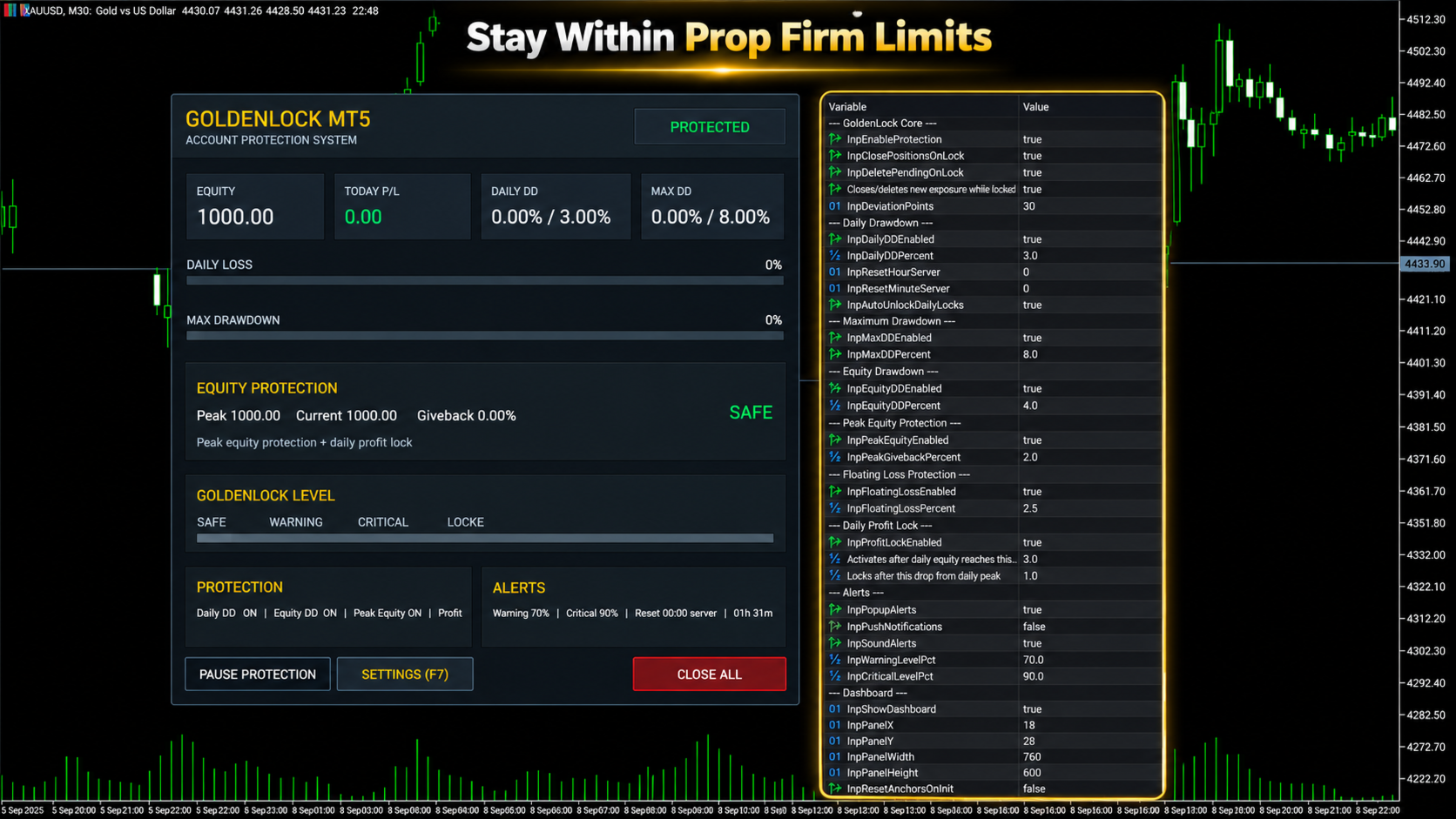
GoldenLock is designed to make the current account-risk state easy to understand from one dashboard.

The dashboard allows you to monitor important account information such as:

  • Current Equity

  • Today P/L

  • Daily Drawdown

  • Maximum Drawdown

  • Peak Equity

  • Equity Giveback

  • Current Protection Status

The Warning, Critical and Locked states make it easier to see how close the account is to the limits you have configured.

GoldenLock monitors the risk. Your trading strategy remains separate.

Three Protection Stages

GoldenLock can provide several stages before the final protection action is reached.

Warning Level

An early indication that the selected drawdown or risk measurement is approaching its configured limit.

Critical Level

A stronger warning that the account is moving closer to the protection threshold.

GoldenLock

When the configured limit is reached, GoldenLock can activate the selected protection actions.

Depending on your settings, this can include:

  • Closing open positions

  • Deleting pending orders

  • Blocking new exposure

  • Continuing to remove new exposure while the account remains locked

This creates a clear progression from monitoring to warning to active protection.

Multiple Drawdown Layers

Account risk cannot always be represented by one number.

GoldenLock therefore allows several protection methods to work as separate risk layers.

Daily Drawdown Protection focuses on losses during the current trading day.

Maximum Drawdown Protection monitors larger account-level loss limits.

Equity Drawdown Protection can include floating profit and loss from currently open positions.

Peak Equity Protection measures how much current equity has fallen from its recorded peak.

Floating Loss Protection can restrict the amount of unrealized loss currently open on the account.

Daily Profit Lock can help protect part of a profitable trading day after the configured profit condition has been reached.

Each protection layer can be configured according to the account and rules you are trading under.

Daily Profit Lock

Risk management is not only about limiting losses.

GoldenLock can also monitor how much profit has been given back after a profitable trading day reaches the configured activation level.

Once Daily Profit Lock becomes active, GoldenLock tracks the daily equity peak.

If equity then falls by the configured amount from that peak, the selected protection action can be triggered.

This allows the utility to monitor both downside risk and profit giveback during the trading day.

Entire Account or One EA

GoldenLock can be configured to protect different scopes of trading activity.

Entire Account

This mode can include manual trades and positions opened by other Expert Advisors.

It is generally the more complete option when the risk limit applies to the whole trading account.

Magic Number Matching

This mode limits GoldenLock's trade actions to positions associated with the selected Expert Advisor Magic Number.

This can be useful when you want GoldenLock to operate alongside one specific EA without applying the same trade actions to every position on the account.

Always confirm which mode matches the rules and protection you actually need.

Built to Work Beside Your Strategy

GoldenLock is not designed to replace your existing trading system.

Your Expert Advisor or manual strategy can continue handling:

  • Entries

  • Exits

  • Trade signals

  • Stop Loss and Take Profit logic

  • Strategy-specific trade management

GoldenLock independently focuses on the account-risk limits you configure.

This separation allows your trading logic and your protection logic to operate as two different layers.

Quick Dashboard Controls

The on-chart dashboard also provides direct access to important protection controls.

  • Pause Protection – Temporarily pause the active protection logic

  • Open Settings – Access the configured protection parameters

  • Close All – Close the positions covered by the selected trade-control mode

Before using manual dashboard controls on a live account, always confirm that the selected trade-control mode matches the positions you intend to manage.

Alerts and Notifications

GoldenLock can provide several types of alerts so you can monitor changes in account-risk status.

  • MT5 Popup Alerts

  • Sound Alerts

  • Push Notifications

  • Warning Level Alerts

  • Critical Level Alerts

This allows GoldenLock to provide information before the final protection threshold is reached.

Server-Time Reset

Daily drawdown rules do not always reset at your local midnight.

GoldenLock allows the daily reset time to be configured using broker server time.

Available controls include:

  • Reset Hour

  • Reset Minute

  • Automatic Daily Unlock

This is especially important when using GoldenLock with an account that defines its daily loss period according to a specific server-time reset.

Always verify the exact reset time required by your broker or trading program before enabling the protection.

What GoldenLock Does Not Do

  • Does not generate BUY or SELL signals

  • Does not decide when to enter the market

  • Does not replace your trading strategy

  • Does not guarantee that losses cannot exceed a configured threshold

  • Does not guarantee prop firm compliance

  • Does not guarantee that an account will pass a challenge

  • Does not guarantee that an account will remain funded

GoldenLock is an additional risk-management utility designed to react according to the protection rules you configure.

GoldenLock MT5 in Short

  • Daily Drawdown Protection

  • Maximum Drawdown Protection

  • Equity Protection

  • Peak Equity Protection

  • Floating Loss Protection

  • Daily Profit Lock

  • Warning & Critical Levels

  • Close Positions at Limit

  • Delete Pending Orders

  • Block New Exposure

  • Automatic Daily Reset

  • Custom Server Reset Time

  • Entire Account Protection

  • EA Magic Number Protection

  • Manual & EA Trading Support

  • On-Chart Risk Dashboard

YOUR STRATEGY TRADES. GOLDENLOCK WATCHES THE RISK.

Testing GoldenLock

Before using GoldenLock on a live or funded account, test the complete protection setup in a MetaTrader 5 demo environment.

Verify:

  • Daily Drawdown calculation

  • Maximum Drawdown calculation

  • Equity protection behaviour

  • Peak equity tracking

  • Floating loss protection

  • Daily Profit Lock behaviour

  • Warning and Critical levels

  • Position-closing behaviour

  • Pending-order deletion

  • Account or Magic Number mode

  • Daily server-time reset

  • Alerts and notifications

Also test what happens when another Expert Advisor attempts to create new exposure while GoldenLock is in a locked state.

The configuration should match the exact trading environment in which you intend to use it.

Important Information

GoldenLock MT5 is a risk-management utility.

It is not a trading strategy, trade signal service or guarantee against trading losses.

Actual account behaviour can be affected by execution speed, slippage, gaps, connection interruptions, broker conditions and other circumstances outside the utility's control.

Prop firm definitions of daily drawdown, maximum loss, equity, balance, reset time and permitted automated trading can differ.

Always configure GoldenLock according to the exact rules of your broker, prop firm or personal trading account.

Test the selected protection settings before relying on them with live funds.

Trading leveraged financial products involves substantial risk and can result in loss of capital.

Risk controls can help limit exposure, but they cannot eliminate trading risk.

For product questions or support, use the MQL5 product comments or MQL5 messaging system.

Рекомендуем также
Скрипт UZFX - Delete Only Pending Orders для MetaTrader 5 (MT5) - это простой, но эффективный инструмент, который автоматически удаляет все отложенные ордера (Buy Limit, Sell Limit, Buy Stop, Sell Stop) с торгового счета. Этот скрипт идеально подходит для трейдеров, которые хотят мгновенно удалить свои отложенные ордера, не затрагивая активные позиции на рынке. Смотрите все мои другие индикаторы и советники для MT4/MT5 >> ЗДЕСЬ Особенности: Удаляет все отложенные ордера (Buy Limit, Sell Limit
FREE
VTB High Watermark Drawdown INFO Indicator for MT5 Advanced Account Monitoring & Drawdown Information Dashboard VTB High Watermark Drawdown INFO is a professional account monitoring indicator designed to display drawdown statistics, account performance, and risk management information directly on the chart. Unlike Expert Advisors, this indicator does not interfere with trading activity. It does not open or close positions, modify orders, or block trading. Its sole purpose is to provide a clear a
FREE
Lib5 EAPadPRO for MT5
Vladislav Andruschenko
4.5 (6)
EAPADPRO Library for MetaTrader 5 — это бесплатная профессиональная библиотека интерфейса для добавления современной информационной панели в ваш Expert Advisor. Библиотека предназначена для MQL5-разработчиков, которые хотят дать своим торговым программам более чистую, информативную и профессиональную визуальную подачу прямо на графике MetaTrader 5. Expert Advisors для MetaTrader 5 часто содержат сложную логику, множество настроек, фильтры по Magic number, правила исполнения ордеров и внутренние
FREE
This indicator is fully user-adjustable, calculates corellation between all symbols, which you want. Indicator is real-time updated and fully automated.  You can adjust a lot of parameters. Calculation Parameters List of symbols: write all symbol, which you want to calculate, just separate them by comma Calculated bars: amount of bars from which will be calculated Time frame: time period of calculation Used price: used price - 0 (CLOSE), 1 (OPEN), 2 (HIGH), 3 (LOW), 4 (MEDIAN), 5 (TYPICAL), 6 (
The EA works directly on the main chart of MetaTrader 5. Visual order execution system with: trade panel visual OCO sending floating mini charts entry/stop/take lines mouse interaction graphic position management Main panel: Containing: asset selection lot field stop loss take profit trailing stop BUY and SELL buttons OCO button cancel orders button close all button BE (break even) button reverse button Panel is movable on the chart. 2. MINI CHARTS Create a floating mini chart system. U
Know your lot size before you click Buy or Sell. The Chart Mechanics Risk and Position Size is a free panel for MetaTrader 5. Set how much you want to risk and where your stop goes, and it shows the lot size to use and the money actually at risk in your account currency. It is an indicator, so it never opens, changes or closes trades. WHAT IT SHOWS - Lot size, rounded DOWN to your broker's lot step, so you never risk more than you set - Money at risk after rounding, in your account currency -
FREE
Chart Fixer
Renato Fiche Junior
5 (4)
Utility that allows you to set a specific date on the chart. You set a reference point through a vertical line and it is done! When changing timeframes, the reference point is always positioned at the center of the chart. That way you can analyze a specific date at different timeframes easily, without losing the reference point or scrolling the chart to it. This is a product developed by Renato Fiche Junior and available to all MetaTrader 5 users! Partners: "Águia Traders"  team ( Eagle Trader
FREE
Скрипт UZFX - Close All Open Buy & Sell Orders Instantly для MetaTrader 5 (MT5) - это мощный инструмент, позволяющий трейдерам немедленно закрыть все активные рыночные позиции одним исполнением. Этот скрипт идеально подходит для экстренного управления торговлей, помогая трейдерам быстро выйти из рынка во время высокой волатильности, новостных событий или корректировки стратегии. Функции: Закрывает все открытые позиции на покупку и продажу по всем символам. Использует последнюю цену Bid/Ask дл
FREE
SessionSync   is a smart and elegant timing tool for MetaTrader 5, created to keep traders fully synchronized with the market. It shows the remaining time of the current candle in real time and displays the main trading clocks, including server time, local time, New York, and London. With a clean floating panel and an intuitive layout, SessionSync helps you track candle expiration and market sessions quickly and efficiently, without overloading your chart. Whether you trade price action, intrada
History On Chart is an indicator that shows the "trail" of all trades made in a specific period of time. It shows the entry and exit point with their respective dates and prices. It also shows the type of trades and the cash result. Open trades are also displayed, but only the entry point. The indicator is free and fully customizable. If you have any questions please contact us. Enjoy! This is a free indicator, but it took hours to develop. If you want to pay me a coffee, I appreciate a lot   <
FREE
The primary function of this script, Tick Data Exporter , is to efficiently extract historical tick data. Tick data represents the most granular level of market data, capturing every single price change. The script downloads this data from a broker and formats it into CSV files for external quantitative analysis. Five things tick data shows that bars permanently hide: Spread microstructure: Bars give you one spread number per period (typically the spread at bar close). Ticks show you the sprea
Traders Choice
Israr Hussain Shah
All-In-One Multi-Functional Dashboard is a comprehensive trading utility designed to streamline your workflow, enhance your technical analysis, and simplify trade management on MetaTrader 5. Instead of cluttering your charts with multiple indicators and scripts, this single Expert Advisor provides a unified control panel that handles everything from market structure analysis and supply/demand zones to risk management and trade execution. Built entirely in pure MQL5 without DLL dependencies , thi
Elliott Wave Helper
Siarhei Vashchylka
4.92 (13)
Elliott Wave Helper - панель для построения волнового анализа.   Инструкция/Мануал ( Обязательно читайте перед приобретением ) | Версия для МТ4 Преимущества 1. Построение волнового анализа и волновой структуры в несколько кликов 2. Наличие всех паттернов волнового анализа, включая треугольник и комбинации 3. Все девять стилей отображения волн, включая специальный шрифт с кружочками 4. Изменение цветов и стилей отображения групп волны прямо с графика 5. Привязка всех элементов к установленному т
Burst Trade Utility
Corrado Argentino
2 (1)
Burst Trade Utility – Multi-Position Manager & One-Click Execution Burst Trade Utility is a powerful, fast, and intuitive assistant designed for MetaTrader 5 to simplify your daily trading. If you follow copy trading channels, signal groups, or scale into positions, this utility will completely transform your execution speed. Stop wasting time opening multiple orders manually. With a single click, you can open, manage, and close multiple positions simultaneously on any financial instrument.
FREE
Multi Strategy Risk Allocator is a strategy-budget dashboard organized by Magic Number and configured risk allocation. Key functions: - Per-strategy risk usage and remaining budget - Allocation comparison across multiple strategies - Runtime enable and disable state - Persistent strategy toggles - Exportable allocation snapshots - Clear dashboard for portfolio-level risk oversight The utility helps monitor and coordinate risk budgets configured by the user. It does not generate entry signals,
Introducing the "Auto Timed Close Operations", a useful utility for MetaTrader 5 traders! This utility has been developed to help traders of all levels automatically close their open positions at the exact moment they desire. With the "Auto Timed Close Operations", you gain the required control over your trades and can avoid unwanted surprises at the end of the day or at any other predefined time. We know how important it is to protect your profits and limit your losses, and that's exactly what
PropGuard OS — подушка безопасности для вашего проп-трейдинг счёта Risk Manager | Trade Panel | Prop Firm EA | FTMO & Funding Pips Ready Честно: как вы на самом деле провалили последнюю challenge? Это была стратегия? Скорее всего — нет. Это был один момент : момент, когда небольшой минус превратился в revenge-trade; момент, когда вы «всего на минутку» нарушили правила; момент, когда голова кричала «BUY», хотя план говорил «STOP». Вы бы не сели в машину без ремня безопасности. Почему тогда риску
Мультивалютный сканер предыдущей свечи или предыдущего бара позволяет сканировать многосимвольные графики с любым пользовательским таймфреймом, который вы выбираете в настройках индикатора. В зависимости от продукта: https://www.mql5.com/en/market/product/78657. Его можно использовать для сканирования нескольких символов для определения максимума-минимума предыдущего дня, максимума-минимума предыдущей недели, максимума-минимума предыдущего месяца или любого пользовательского таймфрейма, напри
MT5 AI Chatbot
Thomas Bradley Butler
БУДЬТЕ ТЕРПЕЛИВЫ С БОТОМ, ТАК КАК ВРЕМЯ ОТВЕТА МОЖЕТ СОСТАВЛЯТЬ СЕКУНДЫ. ОН ОТВЕТИТ. ОБЯЗАТЕЛЬНО НАЖМИТЕ ОТПРАВИТЬ И ЖДИТЕ. ЭТО ПРОСТОЙ ЧАТ-БОТ GPT ДЛЯ MT5 И MQL5. В комментариях добавьте свой ключ API во входные данные и добавьте их в веб-запрос на вкладке Expert Advisor: ЧАТ С ИИ НА MQL5 И MT5. ЗАПРОС ДОЛЖЕН СОДЕРЖАТЬ MQL5 ИЛИ MT5, В ПРОТИВНОМ СЛУЧАЕ ОН НЕ ОТВЕТИТ. ОН ОБУЧЕН ТОЛЬКО НА MT5 И MQL5. ОБРАТИТЕ ВНИМАНИЕ, ЧТО ОН БУДЕТ РАБОТАТЬ ТОЛЬКО НА ГРАФИКАХ В РЕАЛЬНОМ ВРЕМЕНИ, А НЕ НА ИСХОДНЫХ
MT5 Chart Replay
Hlomohang John Borotho
MT5 Chart Replay Rewind the Market. Replay Every Trade You Took. Review Every Decision . Have you ever wished you could rewind the candlesticks on your chart and the trades you took and watch the market unfold again ? Perhaps you wanted to see exactly where a trade started going wrong, identify the setup you missed, or revisit a period when your strategy was perfectly aligned with market structure. Introducing MT5 Chart Replay  — a professional MetaTrader 5 chart replay engine designed to help t
NATS (Niguru Automatic Trailing Stop) will help you achieve more profits, by setting the trailing stop automatically. Pair this NATS application with EA, or can also be used as a complement to manual trading. A trailing stop is a powerful tool in trading that combines risk management and profit optimization.  A trailing stop is a type of market order that sets a stop-loss at a percentage below the market price of an asset, rather than a fixed number. It dynamically adjusts as the asset’s pric
FREE
Open Risk Profit  shows your current risk or possible profit of all open positions. Total open risk is your loss if all positions run into the stop loss. Total open profit is your profit if all positions reach your take profit. Total float is your current profit or loss of all positions. The program also breaks down the information into the individual symbols. For example, you can monitor how much is your current profit and your potential risk in EURUSD, no matter how many individual positions
ProTrading Panel — идеальный помощник для ручной торговли Выведите свою ручную торговлю на новый уровень с помощью ProTrading Panel . Этот советник (EA) разработан для мгновенного исполнения ордеров и имеет элегантный, приятный для глаз вертикальный интерфейс, который идеально вписывается в график, не загромождая рабочее пространство. Предпочитаете ли вы кликать мышкой по экрану или совершать сделки с молниеносной скоростью с помощью горячих клавиш на клавиатуре — этот инструмент создан специаль
Nova Forex Traderr
Eduar Ulises Toro Daza
An algorithm that uses artificial intelligence (AI) to analyze the best entries in the market over the 24 hours generally works by following these steps: Real-Time Data Collection: The algorithm collects real-time information from various sources such as market prices, trading volumes, technical indicators, economic news, and fundamental analysis. Data Processing: It uses data processing techniques such as time series analysis, noise filtering, and extraction of relevant features that help pr
UZFX - Delete All Drawing and Objects on Chart Instantly - это простой, но мощный скрипт для MetaTrader 5 (MT5), предназначенный для мгновенного удаления всех объектов рисования с активного графика. Этот скрипт будет полезен трейдерам, которым необходимо быстро очистить график от рисунков технического анализа, линий тренда, инструментов Фибоначчи, текстовых меток и других объектов, не удаляя их вручную по одному. Функции: Удаляет все объекты и рисунки на активном графике. Работает мгновенно
FREE
Этот скрипт предназначен для оценки весовых коэффициентов в различных оконных функциях. Индикатор, построенный на этих оконных функциях можно скачать   https://www.mql5.com/ru/market/product/72159 Входные параметры: iPeriod – период индикатора. iPeriod >= 2 iCenter – индекс отсчета, на котором будет находиться центр оконной функции. По умолчанию этот параметр равен 0 – центр окна совпадает с центром индикатора. При 1 <= iCenter <= iPeriod центр оконной функции будет сдвинут, в результате чего и
FREE
Phone Notification Send Information from VPS direct to Phone No TradingOperation only MessageNotification Send Information to your selected Time-Window Configure Time when want to receive the Message  What will be send:-Bull/Bear Candle Bull: 0 Bear: 0 Level that get Touched by Price most Level: 00000.00 any Question or modification ex5 Code write me a Message 
FREE
Tenha a boleta do ProfitChart no seu Metatrader! ........................ Agora é possível ter a boleta do profit no seu Metatrader. Envie ordens de compra e venda, acompanhe o mercado e simule estratégias em momentos de mobilidade, diretamente do seu Metatrader5. Gestão de riscos e otimização de lucros são dois princípios básicos de qualquer operação bem-sucedida. Nesse sentido, utilize as ferramentas de  STOPMOVEL, TRAILING STOP, STOPGAIN E ORDENS PARCIAIS DE SAÍDA.       Funcionalidades do
Aurum RR - это аккуратный инструмент Риск:Прибыль в стиле TradingView для MetaTrader 5, и даже больше. Планируйте сделку наглядно, отправляйте её с точным лотом в один клик, автоматически сопровождайте открытую позицию и тестируйте свои сетапы на истории - каждый бокс сам считает свой результат. ПЛАНИРОВАНИЕ - Разместите бокс Риск:Прибыль в любом месте графика и перетаскивайте стоп-лосс, тейк-профит, вход и длину бокса прямо на графике. - Лот рассчитывается в реальном времени от вашего риска (п
No EA, no complex configuration – just run this script and see your professional trade setup instantly on the chart. The MTT   Breakout Trade Setup Pro   script is built for manual breakout traders who want   institutional‑grade risk management   without the overhead of an Expert Advisor. It uses a proprietary higher‑timeframe detection algorithm (calibrated for the 9:00 GMT+3 session) to identify the optimal breakout reference levels. Your Stop Loss distance is derived automatically from market
С этим продуктом покупают
Trade Assistant MT5
Evgeniy Kravchenko
4.43 (216)
Помогает рассчитать риск на сделку, простая установка нового ордера с помощью линий, управление ордерами с функциями частичного закрытия, 7 типов трейлинг-стопа и другие полезные функции. Дополнительные материалы и инструкции Инструкция по установке - Инструкция к приложению Функция Линии   - отображает на графике линию открытия, стоп-лосс, тейк-профит. С помощью этой функции легко установить новый ордер и увидеть его дополнительные характеристики перед открытием. Управление риском   -   функ
Добро пожаловать в Trade Manager EA — лучший инструмент для управления рисками, предназначенный для упрощения, точности и эффективности торговли. Это не просто инструмент для размещения ордеров; это комплексное решение для удобного планирования торгов, управления позициями и усиленного контроля над рисками. Независимо от того, начинающий вы трейдер, опытный специалист или скальпер, нуждающийся в быстром исполнении, Trade Manager EA адаптируется к вашим потребностям и работает с любыми активами:
Local Trade Copier EA MT5
Juvenille Emperor Limited
4.94 (149)
Local Trade Copier EA MT5 — это быстрый и гибкий копировщик сделок для копирования и управления сделками между несколькими счетами MetaTrader 5 на одном компьютере с Windows или Windows VPS. Он сочетает локальную синхронизацию сделок с настройками на стороне Receiver для управления размером лота, рисками, фильтрацией сделок, сопоставлением символов, управлением сделками и защитой счета. Настройте терминалы Transmitter и Receiver примерно за 1 минуту и копируйте ручные сделки или сделки, открыты
Telegram to MT5 Multi-Channel Copier   автоматически копирует торговые сигналы из ваших Telegram- и Discord -каналов прямо в MetaTrader 5. Без ботов, без браузерных расширений, без ручного копирования. Сигнал приходит в Telegram или Discord — и советник открывает сделку в вашем терминале за считанные секунды. А перед тем как копировать канал, встроенный бэктестер покажет, что этот канал сделал бы на вашем счёте. Продукт состоит из двух компонентов: приложения для Windows, которое слушает ваши Te
Farmed Hedge Yield Farming | All Markets (Manual - Hybrid - Semi/Automated EA) VERIFIED TRADING RESULTS - Farmed Hedge Yield Axi Copy:  https://www.mql5.com/en/signals/2356376 - Farmed Hedge Yield Exn Copy:   https://www.mql5.com/en/signals/2356404 - Farmed Hedge Yield V Copy:  https://www.mql5.com/en/signals/2357156 IMPORTANT NOTICE: FarmedHedge is a MANUAL-FOCUSED TRADING UTILITY ,not a fully automated EA. Results shown on this Signal include manual trades and overall strategic management.
Копируйте сигналы из Telegram по своим торговым правилам Telegram to MT5 Signal Trader автоматически копирует текстовые торговые сигналы из открытых и закрытых каналов и групп Telegram в MetaTrader 5. Управляйте несколькими поставщиками сигналов и счетами MT5 из одного приложения для компьютера, задавая индивидуальные параметры риска и торговли для каждого поставщика . Для копирования не нужны бот Telegram и настройка API. Просто войдите в свой аккаунт Telegram по номеру телефона или QR-коду и в
TradePanel MT5
Alfiya Fazylova
4.88 (170)
Trade Panel — это многофункциональный торговый помощник. Приложение содержит более 50 торговых функций для ручной торговли и позволяет автоматизировать большинство торговых операций. Инструкция к приложению: https://www.mql5.com/ru/blogs/post/756476 Пробная версия приложения для демо-счета: https://www.mql5.com/ru/blogs/post/750864 Как установить приложение: https://www.mql5.com/ru/blogs/post/750096 Как тестировать приложение в визуальном режиме: https://www.mql5.com/ru/blogs/post/770274 Как уст
================================================================================ POC BREAKOUT - V20.72. Full Professional Grade Toolkit ================================================================================ POC Breakout is a full MetaTrader 5 trading dashboard for discretionary traders who want breakout signals, Point of Control (POC) context, volume profiles, order flow, market structure, news, alerts, and advanced trade planning in one professional workspace. Attached directly to you
Strategy Ledger Pro
Abdullah Uygar Tuna
5 (11)
Теперь доступно на русском языке. Strategy Ledger Pro — панель анализа счёта для MetaTrader 5, работающая только на чтение. Она разделяет результаты счёта по советникам, стратегиям, символам и magic-номерам, чтобы было видно, что на самом деле вносит каждый из них. Панель доступна на 11 языках: English, Français, Deutsch, Español, Italiano, Português, Русский, Türkçe, 中文, 日本語 и 한국어. Перед загрузкой демоверсии. Маркет запускает демоверсию любого платного продукта только в тестере стратегий. Эта
News Trade EA MT5
Konstantin Kulikov
4.55 (11)
Представляю полезного робота, которым пользуюсь сам уже несколько лет. Может использоваться как в полуавтоматическом, так и в полностью автоматическом режиме. >>> Chat <<< Программа содержит гибкие настройки торговли на новостях экономического календаря. В тестере стратегий проверить нельзя. Только реальная работа. В настройках терминала необходимо добавить новостной сайт в список разрешенных URL. Кликните Сервис > Настройки > Советники. Поставьте галочку в "Разрешить WebRequest для следующих U
Master Your Trading Discipline   Stop losing your hard-earned gains to overtrading and emotional decisions. The Discipline Tool is your ultimate trading assistant, ensuring strict risk management in real-time. Key Protection Features: Advanced Drawdown Defense : Automatically halts trading if your daily drawdown exceeds a preset threshold (percentage or dollar amount). Real-Time Equity Lock : Safeguard profits by referencing peak equity, ensuring drawdown stays within control. Hard Profit Target
Entry In The Zone with SMC Multi Timeframe is a real-time market analysis tool based on Smart Money Concepts (SMC), designed to analyze market structure, price direction, and key trading zones. It supports both Single-Timeframe and Multi-Timeframe Analysis, providing a clearer view of overall market structure across multiple timeframes, with real-time BUY / SELL signals designed with a strict focus on No-Repaint principles.   The signals are designed to help filter unclear setups and evaluate tr
The product will copy all telegram signal to MT5 ( which you are member) , also it can work as remote copier.  Easy to set up, copy order instant, can work with almost signal formats, image signal,  s upport to translate other language to English Work with all type of channel or group, even channel have "Restrict Saving Content", work with  multi channel, multi MT5 Work as remote copier: with signal have ticket number, it will copy exactly via ticket number. Support to backtest signal. How to s
Exp COPYLOT CLIENT for MT5
Vladislav Andruschenko
3.97 (35)
Профессиональный копировщик сделок для MetaTrader 5 Быстрый, профессиональный и надежный копировщик сделок для MetaTrader . COPYLOT позволяет копировать сделки Forex между терминалами MT4 и MT5 с поддержкой счетов Hedge и Netting . Версия COPYLOT для MT5 поддерживает: - MT5 Hedge → MT5 Hedge - MT5 Hedge → MT5 Netting - MT5 Netting → MT5 Hedge - MT5 Netting → MT5 Netting - MT4 → MT5 Hedge - MT4 → MT5 Netting Версия MT4 Полное описание + DEMO + PDF Как купить Как установить Как получить файлы жур
HINN MAGIC ENTRY - лучший инструмент для входа и менеджмента позиций! ПРОСТО. БЫСТРО. ИНТУИТИВНО. МАКСИМАЛЬНО АВТОМАТИЗИРОВАНО. Выставляет ордера через выбор уровня на графике! полное описание    ::    demo-версия    ::   60-sec-video-description Основные функции: - Рыночные, лимитные и отложенные ордера -  Автоматический подсчет лоттажа  -  Автоматический учет спреда и комиссий -  Неограниченное количество промежуточных тейков для позиций - Перевод в безубыток и трейл стоп-лосса и тейк-проф
EasyInsight AIO MT5
Alain Verleyen
4.92 (12)
EASY Insight AIO – Всё-в-одном для умного и простого трейдинга Обзор Представьте, что вы можете просканировать весь рынок — Форекс, золото, криптовалюты, индексы и даже акции — всего за несколько секунд, без ручного просмотра графиков, сложной установки или настройки индикаторов. EASY Insight AIO — это ваш идеальный инструмент экспорта для трейдинга с поддержкой искусственного интеллекта. Он предоставляет полный снимок рынка в одном аккуратном CSV-файле — готовом к мгновенному анализу в ChatGP
Нужна поддержка? Как настроить? Есть вопросы? Спрашивайте здесь на своём языке, быстрый ответ: https://www.mql5.com/en/market/product/139088/comments Скачать рабочую демо-версию Copy Cat More (Копи Кэт Мор) — копировщик сделок (Trade Copier) MT5 — это локальный копировщик сделок и полноценная система управления рисками и исполнения, созданная для современных торговых задач. От челленджей проп-фирм (prop firm) до управления личным портфелем — он адаптируется к любой ситуации благодаря сочетанию
MT5 to Telegram Signal Provider — это простой в использовании полностью настраиваемый инструмент, который позволяет отправлять определённые сигналы в чат, канал или группу Telegram, превращая вашу учётную запись в провайдера сигналов . В отличие от большинства конкурирующих продуктов, он не использует импорт DLL. [ Демо ]   [ Руководство ] [ Версия MT4 ] [ Версия для Discord ] [ Канал в Telegram ]  New: [ Telegram To MT5 ] Настройка Доступно пошаговое руководство пользователя . Никаких знаний A
Telegram To MT5 Ultra
Mirel Daniel Gheonu
5 (5)
Telegram To MT5 — копировщик сигналов Превратите торговые сигналы из ваших Telegram-каналов в реальные ордера MT5 — автоматически, на любом количестве счетов, с полным контролем над риском и правилами. Telegram To MT5 связывает VIP / сигнальные каналы, на которые вы уже подписаны в Telegram, с вашим терминалом MetaTrader 5. Бесплатное приложение-компаньон для ПК читает сообщения (даже из каналов, которые не допускают ботов), а этот советник исполняет их на вашем счёте — применяя ваши настройки р
Signal TradingView to MT5 Pro Automator Мгновенное профессиональное исполнение между TradingView и MetaTrader 5 Автоматизируйте свою торговую стратегию с помощью самого надежного моста связи между алертами TradingView и реальным исполнением в MT5. Разработанный для трейдеров, которым требуются скорость, гибкость и безупречное управление рисками, этот советник (Expert Advisor) превращает любое сообщение с алертом в точный рыночный или лимитный ордер. ПРЕИМУЩЕСТВА И СИЛЬНЫЕ СТОРОНЫ Универсальный д
Power Candles Strategy Scanner — самооптимизирующийся инструмент для поиска настроек по нескольким инструментам Power Candles Strategy Scanner использует тот же самооптимизирующийся движок, что и индикатор Power Candles — для всех символов в вашем Market Watch, одновременно. На одной панели отображается информация о том, какие символы в данный момент являются статистически торгуемыми, какая стратегия выигрывает на каждом из них, оптимальная пара Stop Loss / Take Profit, а также отправляется увед
Trade copier MT5
Alfiya Fazylova
4.61 (57)
Trade Copier — это профессиональная утилита, предназначенная для копирования и синхронизации сделок между торговыми счетами. Копирование происходит от счета/терминала поставщика к счету/терминалу получателя, которые установлены на одном компьютере или vps. Перед покупкой вы можете протестировать демо-версию на демо-счете. Демо-версия здесь . Полная инструкция здесь . Основной функционал и преимущества: Русифицированный интерфейс, поддержка на русском языке. Поддерживает копирование МТ5 > МТ5, МТ
The Patch
Mian Rameez Ali
The Patch It never opens a trade. It walks behind the ones that did. Every open position, every pending order — checked twice a second for the one thing that's easy to forget: a stop, a target. Found bare, it doesn't ask. It writes the missing number in, measured in points from wherever the position began, and moves on to the next. No strategy, no opinion on direction. Just the quiet assumption that nothing should ever sit on the market unprotected — not because someone decided it shouldn't,
Торговая панель для MetaTrader 5 — профессиональная торговля в один клик с графика и клавиатуры Мощная торговая панель для активного ручного трейдинга, которая позволяет открывать, сопровождать и закрывать сделки значительно быстрее и удобнее, чем стандартными средствами MetaTrader. Панель создана для тех, кто хочет получить полный контроль над позициями, ордерами, прибылью и торговыми сценариями в одном рабочем пространстве. Это не просто вспомогательная утилита. Это полноценный торговый интер
Grid Manual MT5
Alfiya Fazylova
4.73 (22)
Grid Manual — это торговая панель для работы с сеточными стратегиями. Утилита универсальная, имеет гибкие настройки и понятный интерфейс. Работает с сеткой ордеров не только в сторону усреднения убытков, но и в сторону наращивания прибыли. Трейдеру не нужно создавать и сопровождать сетку ордеров, это сделает утилита. Достаточно открыть ордер и Grid manual автоматически создаст ему сетку ордеров и будет сопровождать его до самого закрытия. Полная инструкция и демо-версия здесь . Основные особенно
Anchor Trade Manager
Kalinskie Gilliam
5 (9)
Your EAs cannot see each other, but Anchor can. Anchor gives you one place to coordinate your EAs, manage risk, and decide when trading is allowed. It works alongside the trading bots you already use without any changes to them. The Problem One EA opens a trade. Then another starts trading. The next thing you know, you wake up to multiple grids built across your account. Each EA may be doing exactly what it was designed to do, but together they can place far more risk on your account than you in
RETAILBERG FOOTPRINT CHART PRO — Order-Flow Workspace for MetaTrader 5 Version 7.00  |  Professional System  |  31 tools  |  One chart A full 150-page illustrated User Manual is included. Please read the full manual to understand this feature packed footprint chart elements and ui. https://www.mql5.com/en/blogs/post/777982 DEMO / STRATEGY TESTER — PLEASE READ FIRST
Telegram to MT5 Coppy
Sergey Batudayev
5 (10)
Telegram to MT5: Идеальное решение для копирования сигналов Упростите свою торговлю с Telegram to MT5 — современным инструментом, который копирует торговые сигналы прямо из каналов и чатов Telegram на вашу платформу MetaTrader 5, без необходимости использования DLL. Это мощное решение обеспечивает точное исполнение сигналов, широкие возможности настройки, экономит время и повышает вашу эффективность. [ Instructions and DEMO ] [ FAQ ] [ How atach logs properly ] [ Settings descrition ] Ключевые
The News Filter MT5
Leolouiski Gan
4.79 (24)
Этот продукт фильтрует всех экспертных советников и ручные графики во время новостей, так что вам не нужно беспокоиться о внезапных скачках цены, которые могут разрушить ваши ручные торговые настройки или сделки, введенные другими экспертными советниками. Этот продукт также поставляется с полной системой управления ордерами, которая может обрабатывать ваши открытые позиции и ордера на ожидание перед выпуском новостей. После покупки   The News Filter   вам больше не придется полагаться на встроен
Trade Indicator Assistant   is a powerful MT5 utility designed to turn indicators into automated trading systems. Its main feature is the ability to automatically detect an indicator’s   BUY and SELL signal buffers , without requiring you to know the buffer numbers, search through indicator settings, or modify the indicator source code. Bonus Indicator:   After purchasing Trade Indicator Assistant, contact me to receive   Trade Signal Pro   completely free as a bonus indicator. [Download Demo V
Другие продукты этого автора
Space Scalper
Lasse Mathias Baagoe S Christensen
Space Scalper is the ultimate Flagship momentum scalper, engineered for Gold (XAU/USD), Indices (NASDAQ, DAX, US30, US500), and more on the MetaTrader 5 platform. It is designed for traders who value steady, consistent growth by minimizing risk and focusing on high-probability momentum opportunities. The core of the strategy is based on pure market momentum. Space Scalper uses a sophisticated multi-timeframe analysis to identify strong market trends and executes trades with precision to capture
FREE
Syncronix Gold
Lasse Mathias Baagoe S Christensen
Syncronix Gold is a specialized breakout scalping Expert Advisor engineered exclusively for Gold (XAU/USD) on the MetaTrader 5 platform. It is designed for traders who value steady, consistent growth by minimizing risk and focusing on clear, logical trading opportunities. The core of the strategy is based on pure price action. Syncronix identifies critical support and resistance levels and places pending orders to capture powerful breakout movements. This ensures that every trade is based on sol
FREE
Ninja Master
Lasse Mathias Baagoe S Christensen
3 (2)
Ninja Master: Powering Traders & Investors Worldwide. Ninja Master is an advanced and adaptable Gold Expert Advisor developed exclusively for Gold on the 5-minute timeframe . It is a complete trading solution that performs a range of tasks, including following the trend , analyzing the chart , smart TP system , and smart filters . It does not use neural learning or AI — instead, it uses an adaptable smart algorithm designed for traders who prioritize capital protection and steady growth . Create
FREE
Paradise MT5
Lasse Mathias Baagoe S Christensen
2 (1)
Paradise EA is a sophisticated breakout trading Expert Advisor developed for the MetaTrader 5 platform. It is engineered for traders who prioritize capital protection and steady growth by focusing on high-probability price action movements. The core strategy is built on pure market dynamics. Paradise EA identifies key trading ranges and strategically places pending orders to capture momentum during significant breakouts. This approach ensures that trades are based on logical market structure, no
FREE
Meta5 EA
Lasse Mathias Baagoe S Christensen
Meta5 EA is an advanced rule-based Expert Advisor built for XAUUSD, combining breakout and retest logic, Areas of Interest, and multi-timeframe market analysis. Instead of evaluating one chart in isolation, Meta5 monitors broader market structure across multiple timeframes. Higher-timeframe direction and context are used to filter setups before execution is handled on M30. Meta5 EA reads completed M30 candles and evaluates market direction, momentum, volatility, current trading conditions, highe
FREE
Gold Goat EA
Lasse Mathias Baagoe S Christensen
Gold Goat EA is a fully automated breakout trading system specifically designed for XAUUSD on the M5 timeframe. This  This expert advisor delivers consistent, profitable results in backtests while remaining fully customizable for your trading preferences. Key Features Breakout strategy with configurable lookback period detection Multiple lot size modes: Fixed or Risk % of Balance Fixed stop loss and take profit levels in pips Intelligent trailing stop with breakeven functionality RSI confirmatio
FREE
Eos AI
Lasse Mathias Baagoe S Christensen
How to Read EOS AI EOS AI is designed to make its current market assessment easy to understand from one compact dashboard. The panel gives you three main pieces of information: BUY Probability – the neural model's current bullish assessment SELL Probability – the neural model's current bearish assessment Signal – BUY, SELL or WAIT after the required confirmation rules are applied The probabilities provide context, while the final signal applies the additional confirmation logic. This means the
FREE
Prop Firm Titan EA
Lasse Mathias Baagoe S Christensen
Prop Firm Titan EA: Automated Gold Prop Firm Trader Prop Firm Titan EA is a Gold Expert Advisor, developed exclusively for Prop Firms , trading Gold (XAUUSD) on the 5-minute timeframe (M5) . It executes a comprehensive process, including technical analysis, trend alignment protocols, sophisticated entry filters, and an intelligent profit optimization system to maximize trade quality . It does not use neural learning or AI — instead, it prioritizes risk management and sustainable account growt
FREE
DeepEdge MT5
Lasse Mathias Baagoe S Christensen
How to Read DeepEdge DeepEdge is designed to make the current setup easy to understand directly from the chart. When a BUY setup is detected: A BUY arrow is displayed around price The current trend conditions support a bullish setup An ATR-based Stop Loss reference can be displayed below the setup An ATR-based Take Profit reference can be displayed above the setup When a SELL setup is detected: A SELL arrow is displayed around price The current trend conditions support a bearish setup An ATR-bas
FREE
QuantGator MT5
Lasse Mathias Baagoe S Christensen
QUANTGATOR EA MT5 Trade the wildest moves on GOLD, NAS100 & DAX with one powerful, fully customizable MT5 Expert Advisor. QUANTGATOR EA is a high-performance trading robot designed for traders who want clean logic, professional risk management, and full control—without the need to code. Whether you are managing a live account or passing Prop Firm challenges, QUANTGATOR adapts to the current market volatility to protect your capital while scaling your profits. QUANTGATOR focuses on high-probabili
FREE
My Trends MT5
Lasse Mathias Baagoe S Christensen
How to Read My Trends My Trends is designed to help you quickly compare market direction across several symbols and timeframes from one dashboard. Each symbol can display one of three directional states on the selected timeframes: ↑ Bullish – The current trend conditions are bullish ↓ Bearish – The current trend conditions are bearish → Mixed – The selected timeframes are not clearly aligned The Trend Strength score then provides an additional summary of how strong the current multi-timeframe
FREE
Superwave MT5
Lasse Mathias Baagoe S Christensen
How to Read SUPERWAVE SUPERWAVE is designed to make the current trend state easy to understand at a glance. During bullish conditions: The adaptive trend line is displayed in blue The line follows underneath price The dashboard shows a bullish market bias A BUY signal is displayed when the detected trend changes into bullish conditions During bearish conditions: The adaptive trend line is displayed in red The line follows above price The dashboard shows a bearish market bias A SELL signal is dis
FREE
My Trade System MT5
Lasse Mathias Baagoe S Christensen
My Trade System MT5 is a trade management utility for MetaTrader 5 that lets you prepare and place trades directly from the chart. It combines adjustable Entry, Stop Loss and Take Profit levels with a compact dashboard. Orders can be prepared and adjusted directly from the chart without using the standard MetaTrader order window for every change. Trade Setup Stop Loss and Take Profit levels can be moved directly on the chart with the mouse. When using Limit or Stop orders, the Entry level can al
FREE
QuantDragon MT5
Lasse Mathias Baagoe S Christensen
QUANTDRAGON EA MT5 — Adapt. Protect. Strike. Discounted price. The price will increase by $50 with every 20% growth! LIVE Signal | Low Risk: Click Here! IMPORTANT! After purchase, send me a private message to receive the installation manual and setup instructions. Hello, traders. I am QuantDragon — built to read the market before it moves, protect capital before it bleeds, and execute only when the moment is earned. For months, the architecture was forged in silence. Stress-tested across expl
FREE
LittleBear EA
Lasse Mathias Baagoe S Christensen
LittleBear EA MT5 Support & Resistance Trading. Automated. LittleBear EA is a lightweight MT5 trading robot built around a clear support and resistance strategy. It trades Gold, Forex, and Indices by identifying key price levels and entering high-probability trades when price moves beyond those levels. No indicators. No complexity. Just structured price action trading. How the Strategy Works LittleBear EA: Identifies key support and resistance levels Waits for price to move beyond the level Ente
FREE
HorizonMT5
Lasse Mathias Baagoe S Christensen
How to Read Horizon Horizon is designed to give you a structured overview of the market from one H1 chart. The multi-timeframe dashboard allows you to compare direction across: M5 M15 M30 H1 H4 D1 This makes it easier to see whether shorter and higher timeframes are generally aligned or showing mixed conditions. The two moving averages provide additional directional context directly on the chart, while Previous Day High and Previous Day Low provide important daily reference levels. The session d
FREE
Фильтр:
Нет отзывов
Ответ на отзыв