GoldenLock

How to Read GoldenLock

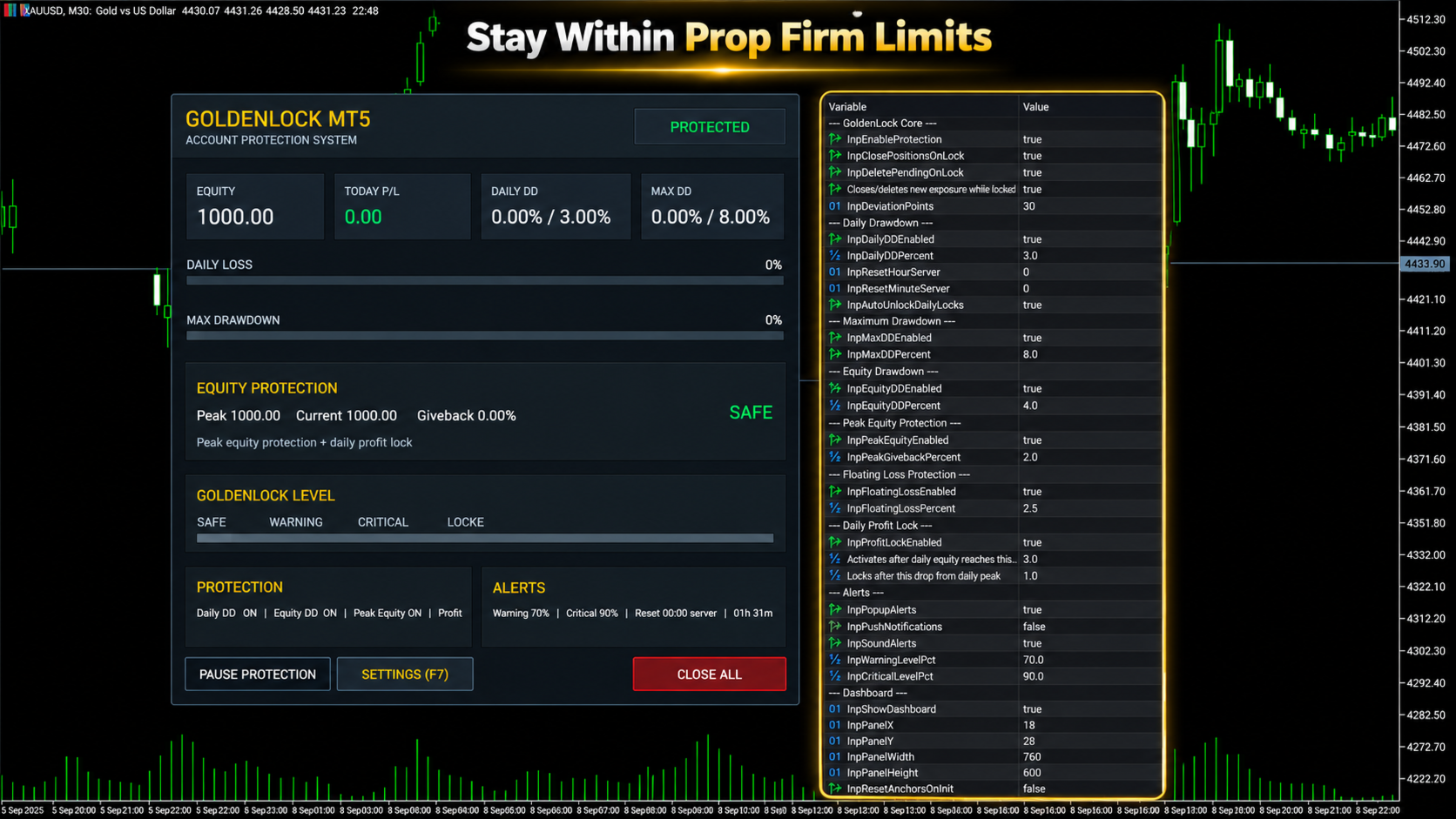
GoldenLock is designed to make the current account-risk state easy to understand from one dashboard.

The dashboard allows you to monitor important account information such as:

  • Current Equity

  • Today P/L

  • Daily Drawdown

  • Maximum Drawdown

  • Peak Equity

  • Equity Giveback

  • Current Protection Status

The Warning, Critical and Locked states make it easier to see how close the account is to the limits you have configured.

GoldenLock monitors the risk. Your trading strategy remains separate.

Three Protection Stages

GoldenLock can provide several stages before the final protection action is reached.

Warning Level

An early indication that the selected drawdown or risk measurement is approaching its configured limit.

Critical Level

A stronger warning that the account is moving closer to the protection threshold.

GoldenLock

When the configured limit is reached, GoldenLock can activate the selected protection actions.

Depending on your settings, this can include:

  • Closing open positions

  • Deleting pending orders

  • Blocking new exposure

  • Continuing to remove new exposure while the account remains locked

This creates a clear progression from monitoring to warning to active protection.

Multiple Drawdown Layers

Account risk cannot always be represented by one number.

GoldenLock therefore allows several protection methods to work as separate risk layers.

Daily Drawdown Protection focuses on losses during the current trading day.

Maximum Drawdown Protection monitors larger account-level loss limits.

Equity Drawdown Protection can include floating profit and loss from currently open positions.

Peak Equity Protection measures how much current equity has fallen from its recorded peak.

Floating Loss Protection can restrict the amount of unrealized loss currently open on the account.

Daily Profit Lock can help protect part of a profitable trading day after the configured profit condition has been reached.

Each protection layer can be configured according to the account and rules you are trading under.

Daily Profit Lock

Risk management is not only about limiting losses.

GoldenLock can also monitor how much profit has been given back after a profitable trading day reaches the configured activation level.

Once Daily Profit Lock becomes active, GoldenLock tracks the daily equity peak.

If equity then falls by the configured amount from that peak, the selected protection action can be triggered.

This allows the utility to monitor both downside risk and profit giveback during the trading day.

Entire Account or One EA

GoldenLock can be configured to protect different scopes of trading activity.

Entire Account

This mode can include manual trades and positions opened by other Expert Advisors.

It is generally the more complete option when the risk limit applies to the whole trading account.

Magic Number Matching

This mode limits GoldenLock's trade actions to positions associated with the selected Expert Advisor Magic Number.

This can be useful when you want GoldenLock to operate alongside one specific EA without applying the same trade actions to every position on the account.

Always confirm which mode matches the rules and protection you actually need.

Built to Work Beside Your Strategy

GoldenLock is not designed to replace your existing trading system.

Your Expert Advisor or manual strategy can continue handling:

  • Entries

  • Exits

  • Trade signals

  • Stop Loss and Take Profit logic

  • Strategy-specific trade management

GoldenLock independently focuses on the account-risk limits you configure.

This separation allows your trading logic and your protection logic to operate as two different layers.

Quick Dashboard Controls

The on-chart dashboard also provides direct access to important protection controls.

  • Pause Protection – Temporarily pause the active protection logic

  • Open Settings – Access the configured protection parameters

  • Close All – Close the positions covered by the selected trade-control mode

Before using manual dashboard controls on a live account, always confirm that the selected trade-control mode matches the positions you intend to manage.

Alerts and Notifications

GoldenLock can provide several types of alerts so you can monitor changes in account-risk status.

  • MT5 Popup Alerts

  • Sound Alerts

  • Push Notifications

  • Warning Level Alerts

  • Critical Level Alerts

This allows GoldenLock to provide information before the final protection threshold is reached.

Server-Time Reset

Daily drawdown rules do not always reset at your local midnight.

GoldenLock allows the daily reset time to be configured using broker server time.

Available controls include:

  • Reset Hour

  • Reset Minute

  • Automatic Daily Unlock

This is especially important when using GoldenLock with an account that defines its daily loss period according to a specific server-time reset.

Always verify the exact reset time required by your broker or trading program before enabling the protection.

What GoldenLock Does Not Do

  • Does not generate BUY or SELL signals

  • Does not decide when to enter the market

  • Does not replace your trading strategy

  • Does not guarantee that losses cannot exceed a configured threshold

  • Does not guarantee prop firm compliance

  • Does not guarantee that an account will pass a challenge

  • Does not guarantee that an account will remain funded

GoldenLock is an additional risk-management utility designed to react according to the protection rules you configure.

GoldenLock MT5 in Short

  • Daily Drawdown Protection

  • Maximum Drawdown Protection

  • Equity Protection

  • Peak Equity Protection

  • Floating Loss Protection

  • Daily Profit Lock

  • Warning & Critical Levels

  • Close Positions at Limit

  • Delete Pending Orders

  • Block New Exposure

  • Automatic Daily Reset

  • Custom Server Reset Time

  • Entire Account Protection

  • EA Magic Number Protection

  • Manual & EA Trading Support

  • On-Chart Risk Dashboard

YOUR STRATEGY TRADES. GOLDENLOCK WATCHES THE RISK.

Testing GoldenLock

Before using GoldenLock on a live or funded account, test the complete protection setup in a MetaTrader 5 demo environment.

Verify:

  • Daily Drawdown calculation

  • Maximum Drawdown calculation

  • Equity protection behaviour

  • Peak equity tracking

  • Floating loss protection

  • Daily Profit Lock behaviour

  • Warning and Critical levels

  • Position-closing behaviour

  • Pending-order deletion

  • Account or Magic Number mode

  • Daily server-time reset

  • Alerts and notifications

Also test what happens when another Expert Advisor attempts to create new exposure while GoldenLock is in a locked state.

The configuration should match the exact trading environment in which you intend to use it.

Important Information

GoldenLock MT5 is a risk-management utility.

It is not a trading strategy, trade signal service or guarantee against trading losses.

Actual account behaviour can be affected by execution speed, slippage, gaps, connection interruptions, broker conditions and other circumstances outside the utility's control.

Prop firm definitions of daily drawdown, maximum loss, equity, balance, reset time and permitted automated trading can differ.

Always configure GoldenLock according to the exact rules of your broker, prop firm or personal trading account.

Test the selected protection settings before relying on them with live funds.

Trading leveraged financial products involves substantial risk and can result in loss of capital.

Risk controls can help limit exposure, but they cannot eliminate trading risk.

For product questions or support, use the MQL5 product comments or MQL5 messaging system.

Produtos recomendados
O script UZFX - Delete Only Pending Orders para MetaTrader 5 (MT5) é uma ferramenta simples mas eficaz que remove automaticamente todas as ordens pendentes (Buy Limit, Sell Limit, Buy Stop, Sell Stop) da conta de negociação. Este script é ideal para os negociadores que querem limpar as suas ordens pendentes instantaneamente sem afetar as posições activas no mercado. Veja todos os meus outros indicadores MT4/MT5 e EAs >> AQUI Caraterísticas: Elimina todas as ordens pendentes (Buy Limit, Sell L
FREE
VTB High Watermark Drawdown INFO Indicator for MT5 Advanced Account Monitoring & Drawdown Information Dashboard VTB High Watermark Drawdown INFO is a professional account monitoring indicator designed to display drawdown statistics, account performance, and risk management information directly on the chart. Unlike Expert Advisors, this indicator does not interfere with trading activity. It does not open or close positions, modify orders, or block trading. Its sole purpose is to provide a clear a
FREE
Lib5 EAPadPRO for MT5
Vladislav Andruschenko
4.5 (6)
EAPADPRO Library for MetaTrader 5 é uma biblioteca profissional gratuita de interface para adicionar um painel informativo moderno ao seu Expert Advisor. A biblioteca foi pensada para desenvolvedores MQL5 que desejam dar aos seus programas de trading uma apresentação visual mais limpa, mais informativa e mais profissional diretamente no gráfico do MetaTrader 5. Expert Advisors para MetaTrader 5 frequentemente contêm lógica mais complexa, múltiplas configurações, filtros por Magic number, regras
FREE
This indicator is fully user-adjustable, calculates corellation between all symbols, which you want. Indicator is real-time updated and fully automated.  You can adjust a lot of parameters. Calculation Parameters List of symbols: write all symbol, which you want to calculate, just separate them by comma Calculated bars: amount of bars from which will be calculated Time frame: time period of calculation Used price: used price - 0 (CLOSE), 1 (OPEN), 2 (HIGH), 3 (LOW), 4 (MEDIAN), 5 (TYPICAL), 6 (
O EA funciona diretamente no gráfico principal do MetaTrader 5. Sistema visual de execução de ordens com: painel de trade envio OCO visual mini gráficos flutuantes linhas de entrada/stop/take interação via mouse gerenciamento gráfico das posições Painel principal: Contendo: seleção de ativo campo de lote stop loss take profit trailing stop botões BUY e SELL botão OCO botão cancelar ordens botão fechar tudo botão BE (break even) botão reverse Painel e movível no gráfico. 2. MINI CHARTS C
Know your lot size before you click Buy or Sell. The Chart Mechanics Risk and Position Size is a free panel for MetaTrader 5. Set how much you want to risk and where your stop goes, and it shows the lot size to use and the money actually at risk in your account currency. It is an indicator, so it never opens, changes or closes trades. WHAT IT SHOWS - Lot size, rounded DOWN to your broker's lot step, so you never risk more than you set - Money at risk after rounding, in your account currency -
FREE
Chart Fixer
Renato Fiche Junior
5 (4)
Utilitário que permite fixar uma data específica no gráfico. Você define um ponto de referência através de uma linha vertical e pronto! Ao trocar os tempos gráficos, o ponto de referência é posicionado sempre no centro do gráfico. Dessa forma, você pode analisar uma data específica em diferentes tempos gráficos facilmente, sem perder o ponto de referência ou ter que arrastar o gráfico até ele. Este é mais um produto desenvolvido por Renato Fiche Junior e disponível a todos os usuários do MetaTr
FREE
O script UZFX - Close All Open Buy & Sell Orders Instantly para MetaTrader 5 (MT5) é uma ferramenta poderosa que permite aos traders fechar imediatamente todas as posições de mercado ativas com uma única execução. Este script é ideal para gerenciamento de comércio de emergência, ajudando os comerciantes a sair rapidamente do mercado durante alta volatilidade, eventos de notícias ou ajustes de estratégia. Caraterísticas: Fecha todas as posições de compra e venda abertas em todos os símbolos. U
FREE
SL Line Lot Calculator answers one question before every trade: what lot size risks exactly the amount I chose? Drag the red SL line on the chart and the panel shows the lot immediately. An optional green TP line shows the reward and the reward-to-risk ratio. How it works Attach the indicator. A SL line and a TP line appear around the current price. Drag the SL line to your stop. Below the price means a BUY setup, above the price means a SELL setup. Read the lot size, the real money at risk afte
FREE
SessionSync é uma ferramenta moderna e leve para MetaTrader 5, desenvolvida para ajudar o trader a acompanhar com precisão o tempo dos candles e os principais horários do mercado. Visualize em tempo real o tempo restante para o fechamento do candle atual , além dos horários do servidor, computador local, Nova York e Londres , tudo em um painel compacto, elegante e fácil de consultar. Com uma interface flutuante que pode ser posicionada no gráfico, o SessionSync oferece as informações essenciais
History On Chart é um indicador que exibe o "rastro" das operações feitas num determinado período. Ele exibe o ponto de entrada e saída com suas respectivas datas e preços. Exibe também o tipo de operação e o resultado em dinheiro. As operações abertas também são mostradas, porém somente o ponto de entrada. O indicador é gratuito e todo personalizável. Se tiver alguma dúvida por favor nos contate. Faça bom uso! Este é um indicador gratuito, porém levou horas para desenvolvê-lo. Se desejar me pa
FREE
The primary function of this script, Tick Data Exporter , is to efficiently extract historical tick data. Tick data represents the most granular level of market data, capturing every single price change. The script downloads this data from a broker and formats it into CSV files for external quantitative analysis. Five things tick data shows that bars permanently hide: Spread microstructure: Bars give you one spread number per period (typically the spread at bar close). Ticks show you the sprea
Traders Choice
Israr Hussain Shah
All-In-One Multi-Functional Dashboard is a comprehensive trading utility designed to streamline your workflow, enhance your technical analysis, and simplify trade management on MetaTrader 5. Instead of cluttering your charts with multiple indicators and scripts, this single Expert Advisor provides a unified control panel that handles everything from market structure analysis and supply/demand zones to risk management and trade execution. Built entirely in pure MQL5 without DLL dependencies , thi
Elliott Wave Helper
Siarhei Vashchylka
4.92 (13)
Elliott Wave Helper is a panel for constructing wave analysis. Manual (Be sure to read before purchasing) | Version for MT4 Advantages 1. Constructing wave analysis and wave structure in a few clicks 2. Availability of all wave analysis patterns, including triangles and combinations 3. All nine wave display styles, including a special circle font 4. Change colors and display styles of wave groups directly from the chart 5. Binding all elements to a set timeframe or timeframes 6. A template syste
Burst Trade Utility
Corrado Argentino
2 (1)
Burst Trade Utility – Multi-Position Manager & One-Click Execution Burst Trade Utility is a powerful, fast, and intuitive assistant designed for MetaTrader 5 to simplify your daily trading. If you follow copy trading channels, signal groups, or scale into positions, this utility will completely transform your execution speed. Stop wasting time opening multiple orders manually. With a single click, you can open, manage, and close multiple positions simultaneously on any financial instrument.
FREE
Apresentamos o "Auto-Timed Close Operations", um utilitário importante para traders do MetaTrader 5! Este utilitário foi desenvolvido para ajudar traders de todos os níveis a fechar automaticamente suas posições abertas no momento exato que desejarem. Com o "Auto-Timed Close Operations ", você ganha o controle necessário sobre suas negociações e pode evitar surpresas indesejáveis ​​ao final do dia ou em qualquer outro momento predefinido. Sabemos como é importante proteger seus lucros e limitar

PropGuard OS — The Airbag for Your Prop-Trading Account Risk Manager | Trade Panel | Prop Firm EA | FTMO & Funding Pips Ready Be honest: How did you really lose your last challenge? Was it the strategy? Probably not. It was that one moment : The moment a small loss turned into a revenge trade. The moment you “just quickly” bent the rules. The moment your brain screamed “BUY” while your plan said “STOP”. You wouldn’t drive a car without a seatbelt. So why risk a $100,000 account without PropGuar
Vela Anterior Multi Moeda ou Scanner de Barra Anterior ajuda a digitalizar gráficos de vários símbolos com qualquer período de tempo personalizado que você selecionar nas configurações do indicador. Baseado no produto: https://www.mql5.com/en/market/product/78657 Ele pode ser usado para digitalizar vários símbolos para o máximo mínimo do dia anterior, o máximo mínimo da semana anterior, o máximo mínimo do mês anterior ou qualquer período de tempo personalizado, por exemplo. Máximo mínimo do g
MT5 AI Chatbot
Thomas Bradley Butler
TENHA PACIÊNCIA COM O BOT, POIS O TEMPO DE RESPOSTA PODE SER EM SEGUNDOS. ELE RESPONDERÁ. CERTIFIQUE-SE DE PRESSIONAR ENVIAR E DEPOIS ESPERAR. É UM BOT GPT DE CHAT SIMPLES PARA MT5 E MQL5. Nos comentários, adicione sua chave de API nas entradas e adicione-as à solicitação da web na guia Expert Advisor: BATE-PAPO COM IA NO MQL5 E MT5. O PROMPT DEVE CONTER MQL5 OU MT5, CASO CONTRÁRIO, NÃO RESPONDERÁ. ELE É TREINADO SOMENTE NO MT5 E MQL5. OBSERVE QUE ELE FUNCIONARÁ SOMENTE EM GRÁFICOS EM TEMPO RE
MT5 Chart Replay
Hlomohang John Borotho
MT5 Chart Replay Rewind the Market. Replay Every Trade You Took. Review Every Decision . Have you ever wished you could rewind the candlesticks on your chart and the trades you took and watch the market unfold again ? Perhaps you wanted to see exactly where a trade started going wrong, identify the setup you missed, or revisit a period when your strategy was perfectly aligned with market structure. Introducing MT5 Chart Replay  — a professional MetaTrader 5 chart replay engine designed to help t
NATS (Niguru Automatic Trailing Stop) will help you achieve more profits, by setting the trailing stop automatically. Pair this NATS application with EA, or can also be used as a complement to manual trading. A trailing stop is a powerful tool in trading that combines risk management and profit optimization.  A trailing stop is a type of market order that sets a stop-loss at a percentage below the market price of an asset, rather than a fixed number. It dynamically adjusts as the asset’s pric
FREE
Open Risk Profit  shows your current risk or possible profit of all open positions. Total open risk is your loss if all positions run into the stop loss. Total open profit is your profit if all positions reach your take profit. Total float is your current profit or loss of all positions. The program also breaks down the information into the individual symbols. For example, you can monitor how much is your current profit and your potential risk in EURUSD, no matter how many individual positions
ProTrading Panel — O assistente definitivo para trading manual Leve a sua experiência de trading manual para o próximo nível com o ProTrading Panel . Este Consultor Especialista (EA) foi desenvolvido para uma execução ultrarrápida de ordens e possui uma interface vertical elegante e visualmente confortável que se adapta perfeitamente aos seus gráficos, sem poluir o seu espaço de trabalho. Quer prefira clicar no ecrã ou executar operações à velocidade da luz através de atalhos de teclado, esta fe
Nova Forex Traderr
Eduar Ulises Toro Daza
An algorithm that uses artificial intelligence (AI) to analyze the best entries in the market over the 24 hours generally works by following these steps: Real-Time Data Collection: The algorithm collects real-time information from various sources such as market prices, trading volumes, technical indicators, economic news, and fundamental analysis. Data Processing: It uses data processing techniques such as time series analysis, noise filtering, and extraction of relevant features that help pr
The UZFX - Delete All Drawing and Objects on Chart Instantly is a simple yet powerful MetaTrader 5 (MT5) script designed to instantly remove all drawing objects from the active chart. This script is useful for traders who need to quickly clear their charts from technical analysis drawings, trend lines, Fibonacci tools, text labels, and other objects without manually deleting them one by one. If you are Looking Best indicators in Mql5 Market. Check these out! SSS Scalping Smart Signals MT5 Indi
FREE
Este script foi projetado para avaliar pesos em várias funções de janela. Um indicador construído nessas funções de janela pode ser baixado em   https://www.mql5.com/ru/market/product/72159 Parâmetros de entrada: iPeríodo – período do indicador. iPeríodo >= 2 iCenter é o índice da referência onde estará localizado o centro da função da janela. Por padrão, este parâmetro é 0 - o centro da janela coincide com o centro do indicador. Com 1 <= iCenter <= iPeriod, o centro da função da janela será de
FREE
Phone Notification Send Information from VPS direct to Phone No TradingOperation only MessageNotification Send Information to your selected Time-Window Configure Time when want to receive the Message  What will be send:-Bull/Bear Candle Bull: 0 Bear: 0 Level that get Touched by Price most Level: 00000.00 any Question or modification ex5 Code write me a Message 
FREE
Tenha a boleta do ProfitChart no seu Metatrader! ........................ Agora é possível ter a boleta do profit no seu Metatrader. Envie ordens de compra e venda, acompanhe o mercado e simule estratégias em momentos de mobilidade, diretamente do seu Metatrader5. Gestão de riscos e otimização de lucros são dois princípios básicos de qualquer operação bem-sucedida. Nesse sentido, utilize as ferramentas de  STOPMOVEL, TRAILING STOP, STOPGAIN E ORDENS PARCIAIS DE SAÍDA.       Funcionalidades do
No EA, no complex configuration – just run this script and see your professional trade setup instantly on the chart. The MTT   Breakout Trade Setup Pro   script is built for manual breakout traders who want   institutional‑grade risk management   without the overhead of an Expert Advisor. It uses a proprietary higher‑timeframe detection algorithm (calibrated for the 9:00 GMT+3 session) to identify the optimal breakout reference levels. Your Stop Loss distance is derived automatically from market
MAGIC PROTECTOR — Advanced Equity Protection EA Magic Protector   is a utility built for traders who want better control over daily, weekly, or monthly risk exposure. The EA continuously monitors trading performance based on your selected protection period and helps prevent further losses or overtrading once your defined limits are reached. It can work with either the entire account or only trades belonging to a specific Magic Number, making it suitable for traders running multiple Expert Ad
FREE
Os compradores deste produto também adquirem
Trade Assistant MT5
Evgeniy Kravchenko
4.43 (216)
Ajuda a calcular o risco por comércio, a fácil instalação de uma nova encomenda, gestão de encomendas com funções de fecho parcial, trailing stop de 7 tipos e outras funções úteis. Materiais e instruções adicionais Instruções de instalação   -   Instruções para a aplicação   Função de linha Mostra no gráfico a linha de Abertura, Stop Loss, Take Profit. Com esta função é fácil definir uma nova ordem e ver as suas características adicionais antes da abertura.   Gestão de risco A função de cálcul
Bem-vindo ao Trade Manager EA—uma ferramenta de gestão de risco criada para tornar o trading mais intuitivo, preciso e eficiente. Não é apenas uma ferramenta para executar ordens, mas uma solução abrangente para planejamento de operações, gerenciamento de posições e controle de risco. Seja você um iniciante, trader avançado ou scalper que precisa de execução rápida, o Trade Manager EA adapta-se às suas necessidades, oferecendo flexibilidade em todos os mercados, desde forex e índices até commodi
O Telegram to MT5 Multi-Channel Copier copia automaticamente os sinais de trading dos seus canais de Telegram e Discord diretamente para o MetaTrader 5. Sem bots, sem extensões de navegador, sem copiar à mão. O sinal chega ao Telegram ou ao Discord e o EA abre a operação no seu terminal em poucos segundos. E antes de copiar um canal, o backtester integrado mostra o que esse canal teria feito na sua conta. O produto inclui dois componentes: um aplicativo de Windows que escuta os seus canais de Te
Local Trade Copier EA MT5
Juvenille Emperor Limited
4.94 (149)
Local Trade Copier EA MT5 é um copiador de operações rápido e flexível para copiar e gerenciar operações entre várias contas MetaTrader 5 no mesmo computador Windows ou Windows VPS. Ele combina a sincronização local de operações com controles no lado do Receiver para tamanho de lote, gerenciamento de risco, filtragem de operações, mapeamento de símbolos, gerenciamento de operações e proteção da conta. Configure seus terminais Transmitter e Receiver em aproximadamente 1 minuto e copie operações
Farmed Hedge Yield Farming | All Markets (Manual - Hybrid - Semi/Automated EA) VERIFIED TRADING RESULTS - Farmed Hedge Yield Axi Copy:  https://www.mql5.com/en/signals/2356376 - Farmed Hedge Yield Exn Copy:   https://www.mql5.com/en/signals/2356404 - Farmed Hedge Yield V Copy:  https://www.mql5.com/en/signals/2357156 IMPORTANT NOTICE: FarmedHedge is a MANUAL-FOCUSED TRADING UTILITY ,not a fully automated EA. Results shown on this Signal include manual trades and overall strategic management.
Copie sinais do Telegram com suas próprias regras de negociação Telegram to MT5 Signal Trader copia automaticamente sinais de negociação em texto de canais e grupos públicos e privados do Telegram para o MetaTrader 5. Gerencie vários provedores e contas MT5 em um único aplicativo para desktop, com configurações individuais de risco e de negociação para cada provedor . Você não precisa de um bot do Telegram nem configurar uma API para copiar sinais. Basta entrar com sua própria conta do Telegram
Strategy Ledger Pro
Abdullah Uygar Tuna
5 (14)
Agora disponível em português. Strategy Ledger Pro é um painel de análise de conta somente leitura para o MetaTrader 5. Ele separa os resultados da conta por Expert Advisor, estratégia, símbolo e número mágico, para que você veja o que cada um realmente contribui. O painel está disponível em 11 idiomas: English, Français, Deutsch, Español, Italiano, Português, Русский, Türkçe, 中文, 日本語 e 한국어. Antes de baixar a demo. O Market executa a demo de qualquer produto pago somente no Testador de Estratég
TradePanel MT5
Alfiya Fazylova
4.88 (170)
Trade Panel é um assistente de negociação multifuncional. O aplicativo contém mais de 50 funções de negociação para trading manual e permite automatizar a maioria das tarefas de negociação. Instruções para o aplicativo: https://www.mql5.com/pt/blogs/post/762435 Versão de teste do aplicativo para conta demo: https://www.mql5.com/pt/blogs/post/762547 Como instalar o aplicativo: https://www.mql5.com/pt/blogs/post/762548 Como testar o aplicativo no modo visual: https://www.mql5.com/pt/blogs/post/770
================================================================================ POC BREAKOUT - V20.72. Full Professional Grade Toolkit ================================================================================ POC Breakout is a full MetaTrader 5 trading dashboard for discretionary traders who want breakout signals, Point of Control (POC) context, volume profiles, order flow, market structure, news, alerts, and advanced trade planning in one professional workspace. Attached directly to you
MT5 to Telegram Signal Provider é uma utilidade fácil de usar e totalmente personalizável que permite o envio de sinais especificados para o chat, canal ou grupo do Telegram, tornando sua conta um fornecedor de sinais . Ao contrário da maioria dos produtos concorrentes, ele não usa importações de DLL. [ Demonstração ] [ Manual ] [ Versão MT4 ] [ Versão Discord ] [ Canal do Telegram ]  New: [ Telegram To MT5 ] Configuração Um guia do usuário passo a passo está disponível. Não é necessário conhec
VirtualTradePad PRO SE MT5 — centro profissional de controle de trading para MetaTrader 5 VirtualTradePad PRO SE é um painel de trading premium baseado no gráfico e um ambiente de gerenciamento de operações para MetaTrader 5 . Ele foi desenvolvido para traders que desejam execução mais rápida, controle de posições mais claro, gerenciamento de trades estruturado, planejamento visual de níveis e um fluxo de trabalho profissional diretamente no gráfico. Não é apenas um painel de COMPRA / VENDA. O P
Trade copier MT5
Alfiya Fazylova
4.61 (57)
Trade Copier é um utilitário profissional projetado para copiar e sincronizar negociações entre contas de negociação. A cópia ocorre da conta / terminal do fornecedor para a conta / terminal do destinatário, instalada no mesmo computador ou vps. Antes de comprar, você pode testar a versão demo em uma conta demo. Versão de demonstração aqui . Instruções completas aqui . Principais funcionalidades e benefícios: Suporta a cópia de MT5> MT5, MT4> MT5, MT5> MT4, incluindo contas "MT5 netting". Os mod
Exp COPYLOT CLIENT for MT5
Vladislav Andruschenko
3.97 (35)
Copiador profissional de operações para MetaTrader 5 Um copiador de operações rápido, profissional e confiável para MetaTrader . COPYLOT permite copiar operações de Forex entre terminais MT4 e MT5 com suporte para contas Hedge e Netting . A versão MT5 do COPYLOT oferece suporte a: - MT5 Hedge → MT5 Hedge - MT5 Hedge → MT5 Netting - MT5 Netting → MT5 Hedge - MT5 Netting → MT5 Netting - MT4 → MT5 Hedge - MT4 → MT5 Netting Versão MT4 Descrição completa + DEMO + PDF Como comprar Como instalar Como
News Trade EA MT5
Konstantin Kulikov
4.55 (11)
Apresento um robô útil que eu mesmo uso há vários anos. Pode ser usado nos modos semiautomático e totalmente automático. >>> Chat <<< O programa contém configurações flexíveis para negociação nas notícias do calendário econômico. Não pode ser verificado no testador de estratégia. Somente trabalho real. Nas configurações do terminal, você precisa adicionar o site de notícias à lista de URLs permitidos. Clique em Serviço > Opções > Conselheiros. Marque com V a caixa "Permitir WebRequest para os
The Patch
Mian Rameez Ali
The Patch It never opens a trade. It walks behind the ones that did. Every open position, every pending order — checked twice a second for the one thing that's easy to forget: a stop, a target. Found bare, it doesn't ask. It writes the missing number in, measured in points from wherever the position began, and moves on to the next. No strategy, no opinion on direction. Just the quiet assumption that nothing should ever sit on the market unprotected — not because someone decided it shouldn't,
Telegram To MT5 Ultra
Mirel Daniel Gheonu
5 (5)
Telegram To MT5 — Copiador de sinais Transforme as chamadas de trading dos seus canais do Telegram em ordens reais no MT5 — automaticamente, em quantas contas quiser, com o risco e as regras totalmente sob o seu controlo. O Telegram To MT5 liga os canais VIP / de sinais que já segue no Telegram ao seu terminal MetaTrader 5. Um aplicativo de desktop complementar gratuito lê as mensagens (mesmo de canais que bloqueiam bots), e este Expert Advisor executa-as na sua conta — aplicando as suas própria
Próxima Atualização — Versão 2.52 em Breve! [NOVO] Prepare-se para 4 Grandes Novos Recursos Projetados para Aprimorar sua Análise de Mercado e seu Fluxo de Trabalho de Trading Estamos levando a análise de mercado a um novo nível com 4 novos recursos desenvolvidos para atender às suas necessidades de trading. Apresentamos: 1. TRADE OVERVIEW DASHBOARD 2. CONFLUENCE AT ZONE 3. STRONG & WEAK HIGH/LOW 4. OTE 1. TRADE OVERVIEW DASHBOARD Um painel que ajuda você a compreender mais facilmente o panoram
Anchor Trade Manager
Kalinskie Gilliam
5 (8)
Your EAs cannot see each other, but Anchor can. Anchor gives you one place to coordinate your EAs, manage risk, and decide when trading is allowed. It works alongside the trading bots you already use without any changes to them. The Problem One EA opens a trade. Then another starts trading. The next thing you know, you wake up to multiple grids built across your account. Each EA may be doing exactly what it was designed to do, but together they can place far more risk on your account than you in
Trader Evolution
Siarhei Vashchylka
5 (7)
" Trader Evolution " - A utility designed for traders who use wave and technical analysis in their work. One tab of the utility is capable of money management and opening orders, and the other can help in making Elliott wave and technical analysis. Manual (Be sure to read before purchasing) | Version for MT4 Advantages 1. Trading in a few clicks. Immediate and pending orders are available in the panel 2. Money management. The program automatically selects the appropriate lot size 3. Simplifies
Grid Manual MT5
Alfiya Fazylova
4.73 (22)
"Grid Manual" é um painel comercial para trabalhar com uma grade de ordens. O utilitário é universal, possui configurações flexíveis e uma interface intuitiva. Ele trabalha com uma grade de ordens não apenas na direção da média das perdas, mas também na direção do aumento dos lucros. O trader não precisa criar e manter uma grade de ordens, tudo será feito pelo ""Grid Manual". Basta abrir um orden e o "Grid manual" criará automaticamente uma grade de ordens para ele e trabalhará com ele até que s
HINN MagicEntry Extra
ALGOFLOW OÜ
4.74 (19)
HINN MAGIC ENTRY – the ultimate tool for entry and position management! SIMPLE. FASTEST. INTUITIVE. MAX AUTOMATED. Place orders by selecting a level directly on the chart! full description   ::  demo-version  :: 60-sec-video-description Key features: - Market, limit, and pending orders - Automatic lot size calculation - Automatic spread and commission accounting - Unlimited partitial take-profits  - Breakeven and trailing stop-loss and take-profit  functions - Invalidation leves - Intuitive, a
The product will copy all telegram signal to MT5 ( which you are member) , also it can work as remote copier.  Easy to set up, copy order instant, can work with almost signal formats, image signal,  s upport to translate other language to English Work with all type of channel or group, even channel have "Restrict Saving Content", work with  multi channel, multi MT5 Work as remote copier: with signal have ticket number, it will copy exactly via ticket number. Support to backtest signal. How to s
RETAILBERG FOOTPRINT CHART PRO — Order-Flow Workspace for MetaTrader 5 Version 7.00  |  Professional System  |  31 tools  |  One chart A full 150-page illustrated User Manual is included. Please read the full manual to understand this feature packed footprint chart elements and ui. https://www.mql5.com/en/blogs/post/777982 DEMO / STRATEGY TESTER — PLEASE READ FIRST
Timeless Charts
Samuel Manoel De Souza
5 (9)
Timeless Charts é um utilitário de trading tudo-em-um para traders profissionais. Ele combina tipos de gráficos personalizados, como Gráficos por Segundos e Renko , com análise avançada de fluxo de ordens utilizando Footprints , Clusters , Perfis de Volume , estudos VWAP e ferramentas de análise ancorada para uma visão mais profunda do mercado. O gerenciamento de ordens e posições é realizado diretamente no gráfico por meio de um painel integrado de gerenciamento de operações , enquanto o Market
Floor Watch
Syed Tauqeer Hussain Shah
Floor Watch One number, watched every thirty seconds: how far equity has fallen since the day began — or since its highest point, if it's told to trail the peak instead of the open. Cross the line and it doesn't argue. Every open position closes, every pending order vanishes, and anything that slips through afterward gets shut the moment it appears. Not asked. Removed. The floor holds until the clock turns 5 AM Pakistan time — then, and only then, does the day start over. One rule. No except
RS Trade Copier - o local trade copier ultrarrápido com uma interface gráfica verdadeira . Pare de digitar números de conta manualmente. Chega daquela lista enorme de 200+ parâmetros de entrada incompreensíveis. Uma ferramenta confiável e flexível para cópia de operações comerciais entre múltiplos terminais MT5 e MT4. Atende tanto traders experientes e serviços de sinais quanto investidores individuais. Permite sincronizar negociações de um ou múltiplos Provedores para um ou múltiplos Clientes c
Seconds Chart MT5
Boris Sedov
4.61 (18)
Seconds Chart - uma ferramenta exclusiva para criar gráficos de segundos no MetaTrader 5 . Com o Seconds Chart , você pode criar gráficos com períodos definidos em segundos, proporcionando flexibilidade e precisão ideais para análise, indisponíveis em gráficos padrão de minutos ou horas. Por exemplo, o período S15 indica um gráfico com velas de 15 segundos. Você pode usar qualquer indicador ou Expert Advisor com suporte a símbolos personalizados. Trabalhar com eles é tão conveniente quanto negoc
Power Candles Strategy Scanner - Localizador de configurações multissímbolo com auto-otimização O Power Candles Strategy Scanner utiliza o mesmo motor de auto-otimização que alimenta o indicador Power Candles — em todos os símbolos da sua lista de observação, lado a lado. Um painel indica-lhe quais os símbolos que são estatisticamente negociáveis neste momento, qual a estratégia vencedora para cada um, o par ideal de Stop Loss / Take Profit, e avisa-o assim que um novo sinal é emitido. Esta ferr
EA Auditor
Stephen J Martret
5 (6)
EA Auditor is an independent analysis tool for traders evaluating Expert Advisors and trading signals on MetaTrader 5. It audits backtest reports, reviews posted developer signals, and cross-verifies the two against each other to help traders assess strategies before committing capital. The MQL5 market offers a wide range of Expert Advisors from many developers, with varying approaches, quality, and transparency. EA Auditor provides a consistent, data-driven framework for reviewing them, answer
Astro Trade MT5
Indra Maulana
5 (8)
25% discount on the release of the tool: only for the next 3 buyers Send a message to receive a demo version. AstroTrade Trading Assistant AstroTrade is a comprehensive multi-functional trading utility developed for the MetaTrader 5 platform. It integrates essential tools for trade execution, risk management, and technical monitoring into a single unified interface. The application is designed to assist traders in managing their daily operations through a visual and structured environment. Vi
Mais do autor
Ninja Master
Lasse Mathias Baagoe S Christensen
3 (2)
Ninja Master: Powering Traders & Investors Worldwide. Ninja Master is an advanced and adaptable Gold Expert Advisor developed exclusively for Gold on the 5-minute timeframe . It is a complete trading solution that performs a range of tasks, including following the trend , analyzing the chart , smart TP system , and smart filters . It does not use neural learning or AI — instead, it uses an adaptable smart algorithm designed for traders who prioritize capital protection and steady growth . Create
FREE
Syncronix Gold
Lasse Mathias Baagoe S Christensen
Syncronix Gold is a specialized breakout scalping Expert Advisor engineered exclusively for Gold (XAU/USD) on the MetaTrader 5 platform. It is designed for traders who value steady, consistent growth by minimizing risk and focusing on clear, logical trading opportunities. The core of the strategy is based on pure price action. Syncronix identifies critical support and resistance levels and places pending orders to capture powerful breakout movements. This ensures that every trade is based on sol
FREE
Meta5 EA
Lasse Mathias Baagoe S Christensen
Meta5 EA is an advanced rule-based Expert Advisor built for XAUUSD, combining breakout and retest logic, Areas of Interest, and multi-timeframe market analysis. Instead of evaluating one chart in isolation, Meta5 monitors broader market structure across multiple timeframes. Higher-timeframe direction and context are used to filter setups before execution is handled on M30. Meta5 EA reads completed M30 candles and evaluates market direction, momentum, volatility, current trading conditions, highe
FREE
Space Scalper
Lasse Mathias Baagoe S Christensen
Space Scalper is the ultimate Flagship momentum scalper, engineered for Gold (XAU/USD), Indices (NASDAQ, DAX, US30, US500), and more on the MetaTrader 5 platform. It is designed for traders who value steady, consistent growth by minimizing risk and focusing on high-probability momentum opportunities. The core of the strategy is based on pure market momentum. Space Scalper uses a sophisticated multi-timeframe analysis to identify strong market trends and executes trades with precision to capture
FREE
Gold Goat EA
Lasse Mathias Baagoe S Christensen
Gold Goat EA is a fully automated breakout trading system specifically designed for XAUUSD on the M5 timeframe. This  This expert advisor delivers consistent, profitable results in backtests while remaining fully customizable for your trading preferences. Key Features Breakout strategy with configurable lookback period detection Multiple lot size modes: Fixed or Risk % of Balance Fixed stop loss and take profit levels in pips Intelligent trailing stop with breakeven functionality RSI confirmatio
FREE
Paradise MT5
Lasse Mathias Baagoe S Christensen
2 (1)
Paradise EA is a sophisticated breakout trading Expert Advisor developed for the MetaTrader 5 platform. It is engineered for traders who prioritize capital protection and steady growth by focusing on high-probability price action movements. The core strategy is built on pure market dynamics. Paradise EA identifies key trading ranges and strategically places pending orders to capture momentum during significant breakouts. This approach ensures that trades are based on logical market structure, no
FREE
Prop Firm Titan EA
Lasse Mathias Baagoe S Christensen
Prop Firm Titan EA: Automated Gold Prop Firm Trader Prop Firm Titan EA is a Gold Expert Advisor, developed exclusively for Prop Firms , trading Gold (XAUUSD) on the 5-minute timeframe (M5) . It executes a comprehensive process, including technical analysis, trend alignment protocols, sophisticated entry filters, and an intelligent profit optimization system to maximize trade quality . It does not use neural learning or AI — instead, it prioritizes risk management and sustainable account growt
FREE
DeepEdge MT5
Lasse Mathias Baagoe S Christensen
How to Read DeepEdge DeepEdge is designed to make the current setup easy to understand directly from the chart. When a BUY setup is detected: A BUY arrow is displayed around price The current trend conditions support a bullish setup An ATR-based Stop Loss reference can be displayed below the setup An ATR-based Take Profit reference can be displayed above the setup When a SELL setup is detected: A SELL arrow is displayed around price The current trend conditions support a bearish setup An ATR-bas
FREE
QuantGator MT5
Lasse Mathias Baagoe S Christensen
QUANTGATOR EA MT5 Trade the wildest moves on GOLD, NAS100 & DAX with one powerful, fully customizable MT5 Expert Advisor. QUANTGATOR EA is a high-performance trading robot designed for traders who want clean logic, professional risk management, and full control—without the need to code. Whether you are managing a live account or passing Prop Firm challenges, QUANTGATOR adapts to the current market volatility to protect your capital while scaling your profits. QUANTGATOR focuses on high-probabili
FREE
LittleBear EA
Lasse Mathias Baagoe S Christensen
LittleBear EA MT5 Support & Resistance Trading. Automated. LittleBear EA is a lightweight MT5 trading robot built around a clear support and resistance strategy. It trades Gold, Forex, and Indices by identifying key price levels and entering high-probability trades when price moves beyond those levels. No indicators. No complexity. Just structured price action trading. How the Strategy Works LittleBear EA: Identifies key support and resistance levels Waits for price to move beyond the level Ente
FREE
Superwave MT5
Lasse Mathias Baagoe S Christensen
How to Read SUPERWAVE SUPERWAVE is designed to make the current trend state easy to understand at a glance. During bullish conditions: The adaptive trend line is displayed in blue The line follows underneath price The dashboard shows a bullish market bias A BUY signal is displayed when the detected trend changes into bullish conditions During bearish conditions: The adaptive trend line is displayed in red The line follows above price The dashboard shows a bearish market bias A SELL signal is dis
FREE
QuantDragon MT5
Lasse Mathias Baagoe S Christensen
QUANTDRAGON EA MT5 — Adapt. Protect. Strike. Discounted price. The price will increase by $50 with every 20% growth! LIVE Signal | Low Risk: Click Here! IMPORTANT! After purchase, send me a private message to receive the installation manual and setup instructions. Hello, traders. I am QuantDragon — built to read the market before it moves, protect capital before it bleeds, and execute only when the moment is earned. For months, the architecture was forged in silence. Stress-tested across expl
FREE
My Trade System MT5
Lasse Mathias Baagoe S Christensen
My Trade System MT5 is a trade management utility for MetaTrader 5 that lets you prepare and place trades directly from the chart. It combines adjustable Entry, Stop Loss and Take Profit levels with a compact dashboard. Orders can be prepared and adjusted directly from the chart without using the standard MetaTrader order window for every change. Trade Setup Stop Loss and Take Profit levels can be moved directly on the chart with the mouse. When using Limit or Stop orders, the Entry level can al
FREE
Eos AI
Lasse Mathias Baagoe S Christensen
How to Read EOS AI EOS AI is designed to make its current market assessment easy to understand from one compact dashboard. The panel gives you three main pieces of information: BUY Probability – the neural model's current bullish assessment SELL Probability – the neural model's current bearish assessment Signal – BUY, SELL or WAIT after the required confirmation rules are applied The probabilities provide context, while the final signal applies the additional confirmation logic. This means the
FREE
My Trends MT5
Lasse Mathias Baagoe S Christensen
How to Read My Trends My Trends is designed to help you quickly compare market direction across several symbols and timeframes from one dashboard. Each symbol can display one of three directional states on the selected timeframes: ↑ Bullish – The current trend conditions are bullish ↓ Bearish – The current trend conditions are bearish → Mixed – The selected timeframes are not clearly aligned The Trend Strength score then provides an additional summary of how strong the current multi-timeframe
FREE
HorizonMT5
Lasse Mathias Baagoe S Christensen
How to Read Horizon Horizon is designed to give you a structured overview of the market from one H1 chart. The multi-timeframe dashboard allows you to compare direction across: M5 M15 M30 H1 H4 D1 This makes it easier to see whether shorter and higher timeframes are generally aligned or showing mixed conditions. The two moving averages provide additional directional context directly on the chart, while Previous Day High and Previous Day Low provide important daily reference levels. The session d
FREE
Filtro:
Sem comentários
Responder ao comentário