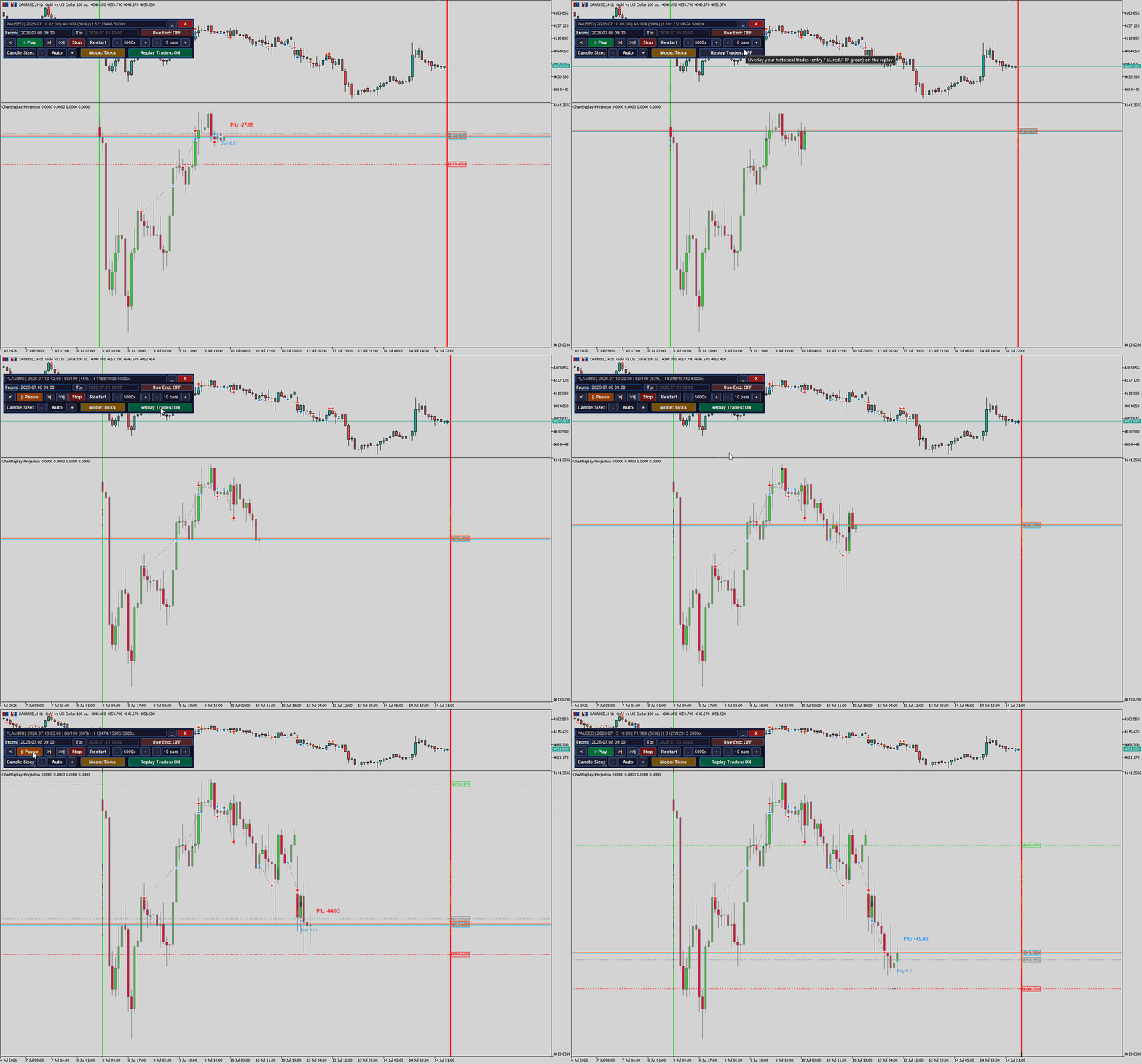
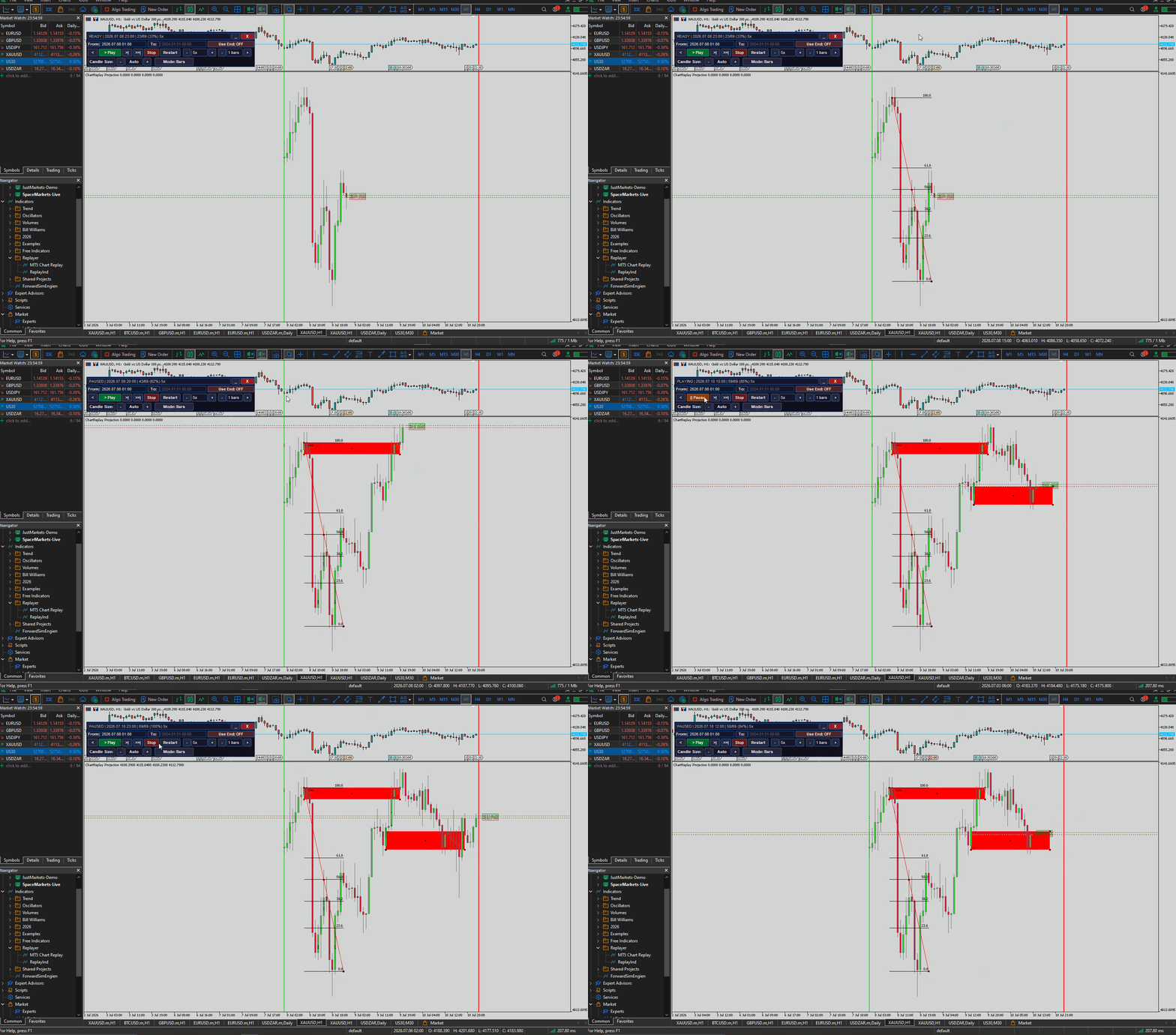
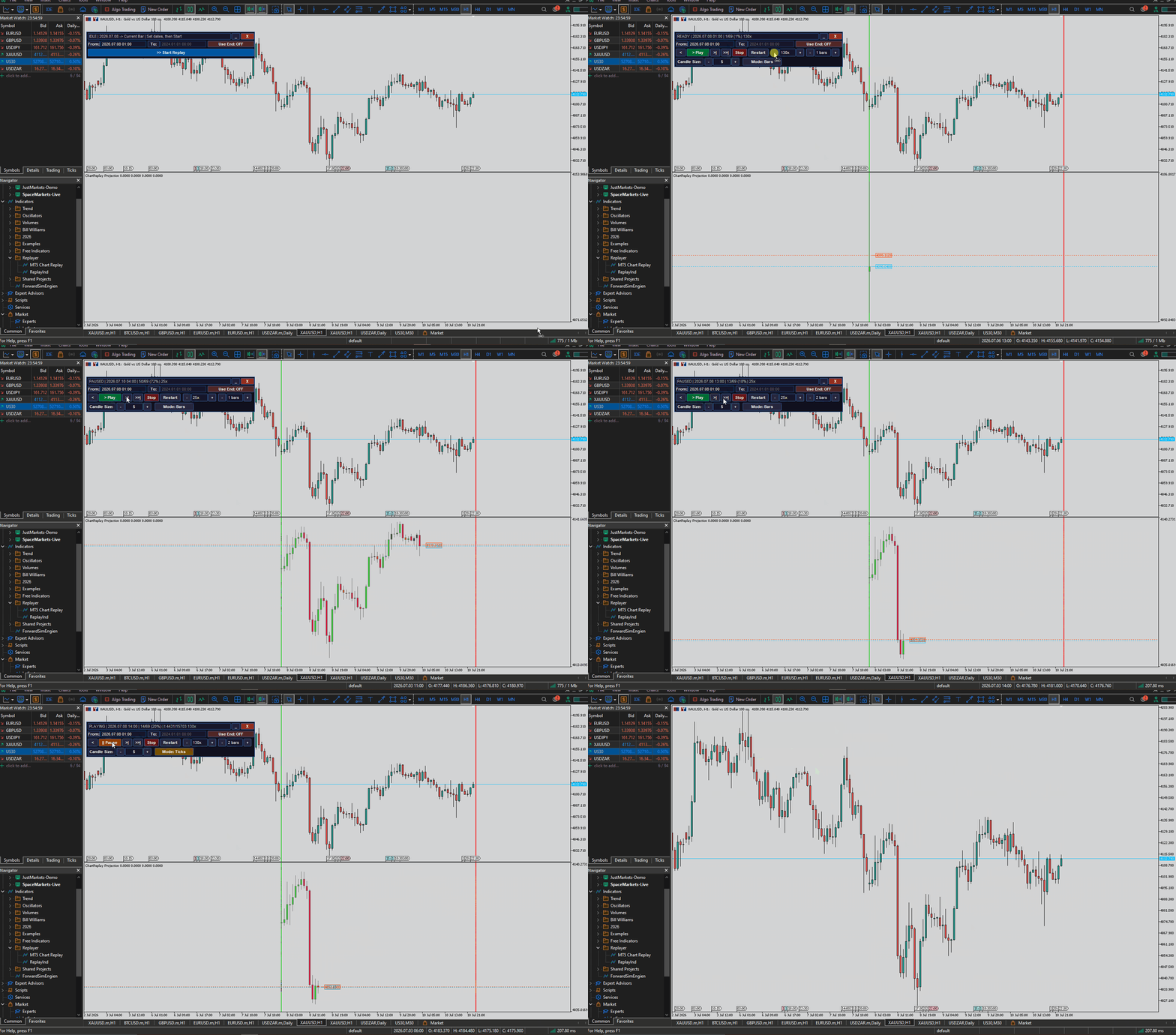
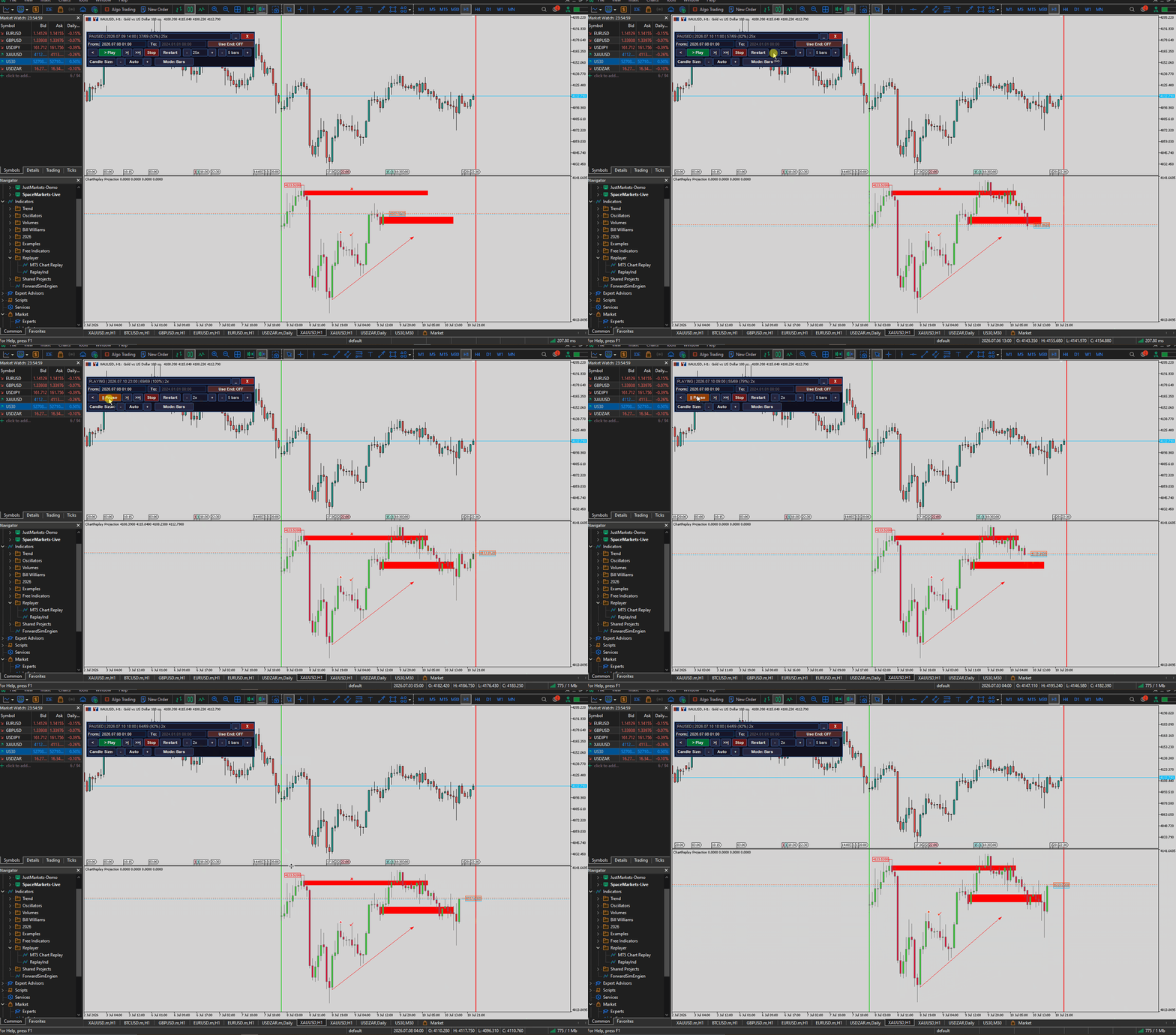
MT5 Chart Replay

MT5 Chart Replay

Rewind the Market. Replay Every Trade You Took. Review Every Decision.

Have you ever wished you could rewind the candlesticks on your chart and the trades you took and watch the market unfold again?

Perhaps you wanted to see exactly where a trade started going wrong, identify the setup you missed, or revisit a period when your strategy was perfectly aligned with market structure.

Introducing MT5 Chart Replay — a professional MetaTrader 5 chart replay engine designed to help traders relive historical market conditions directly inside their MT5 terminal.

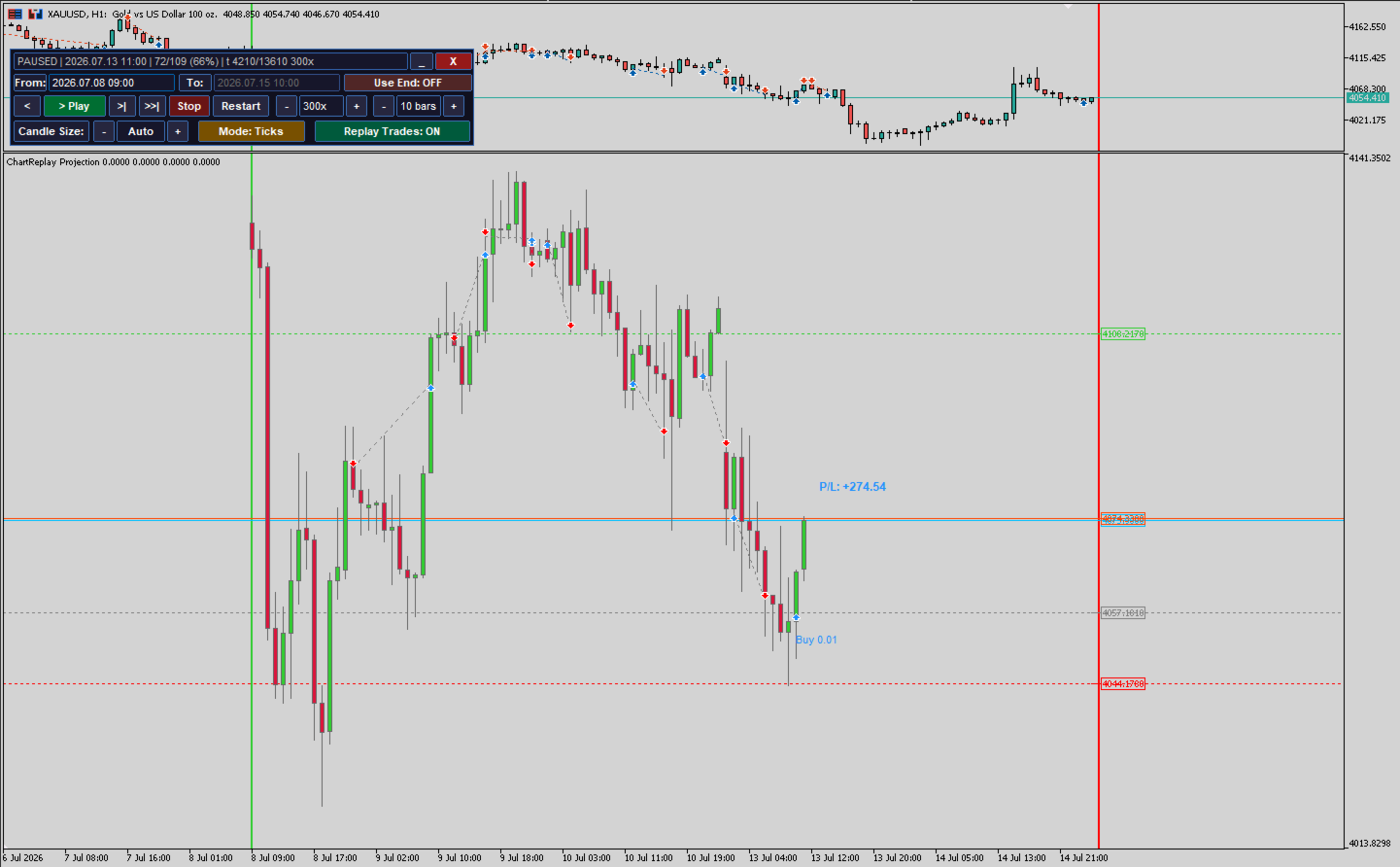
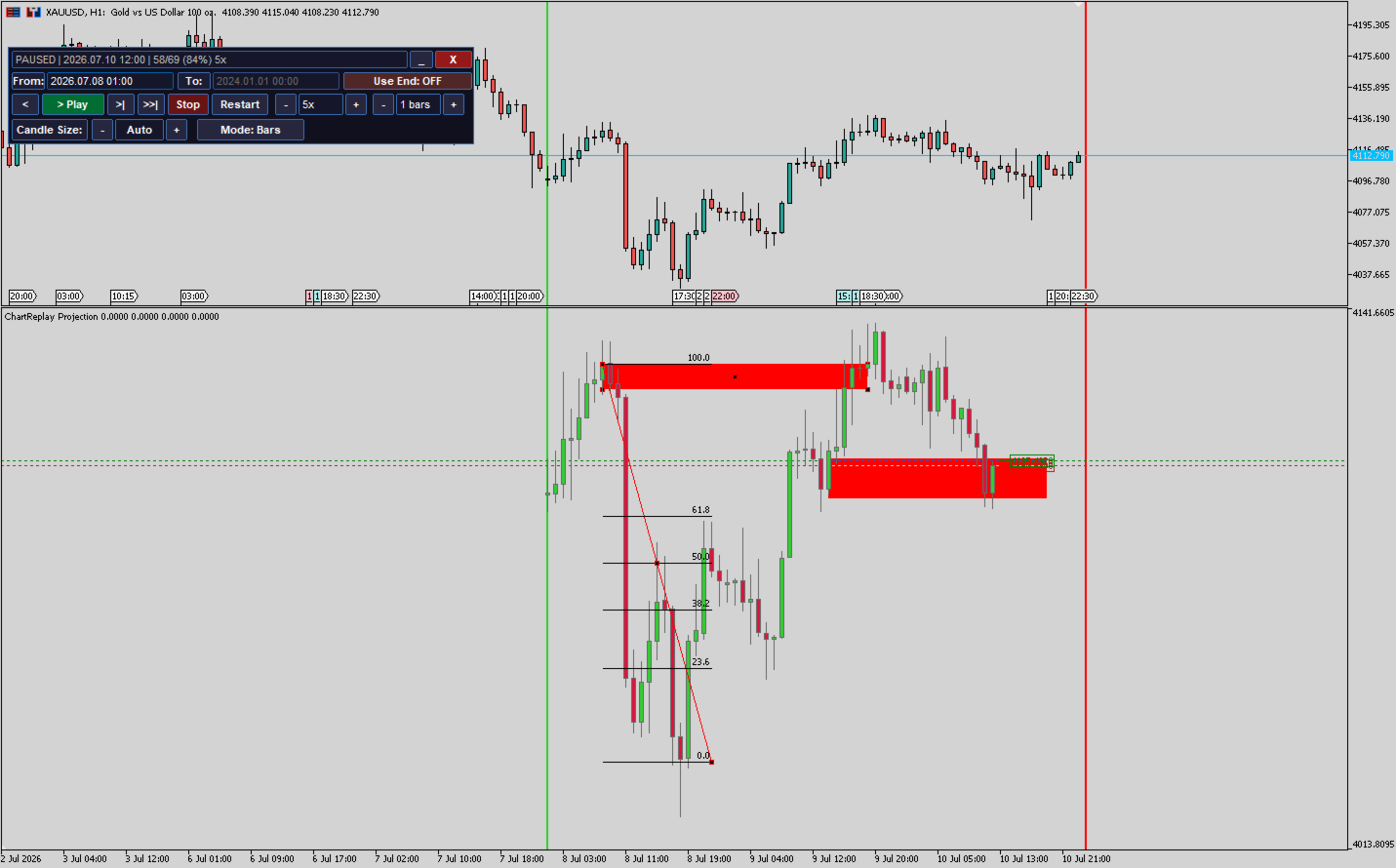
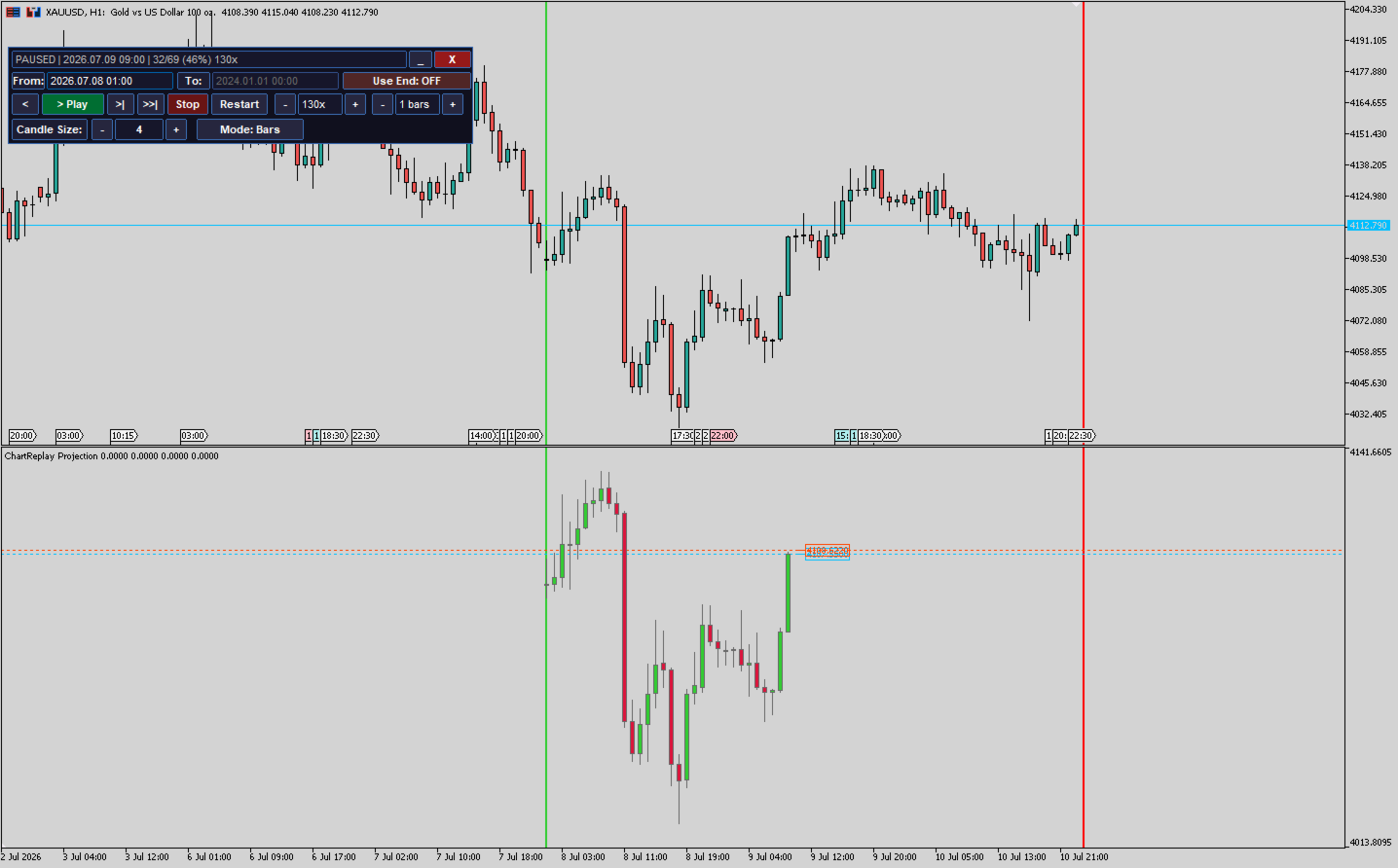
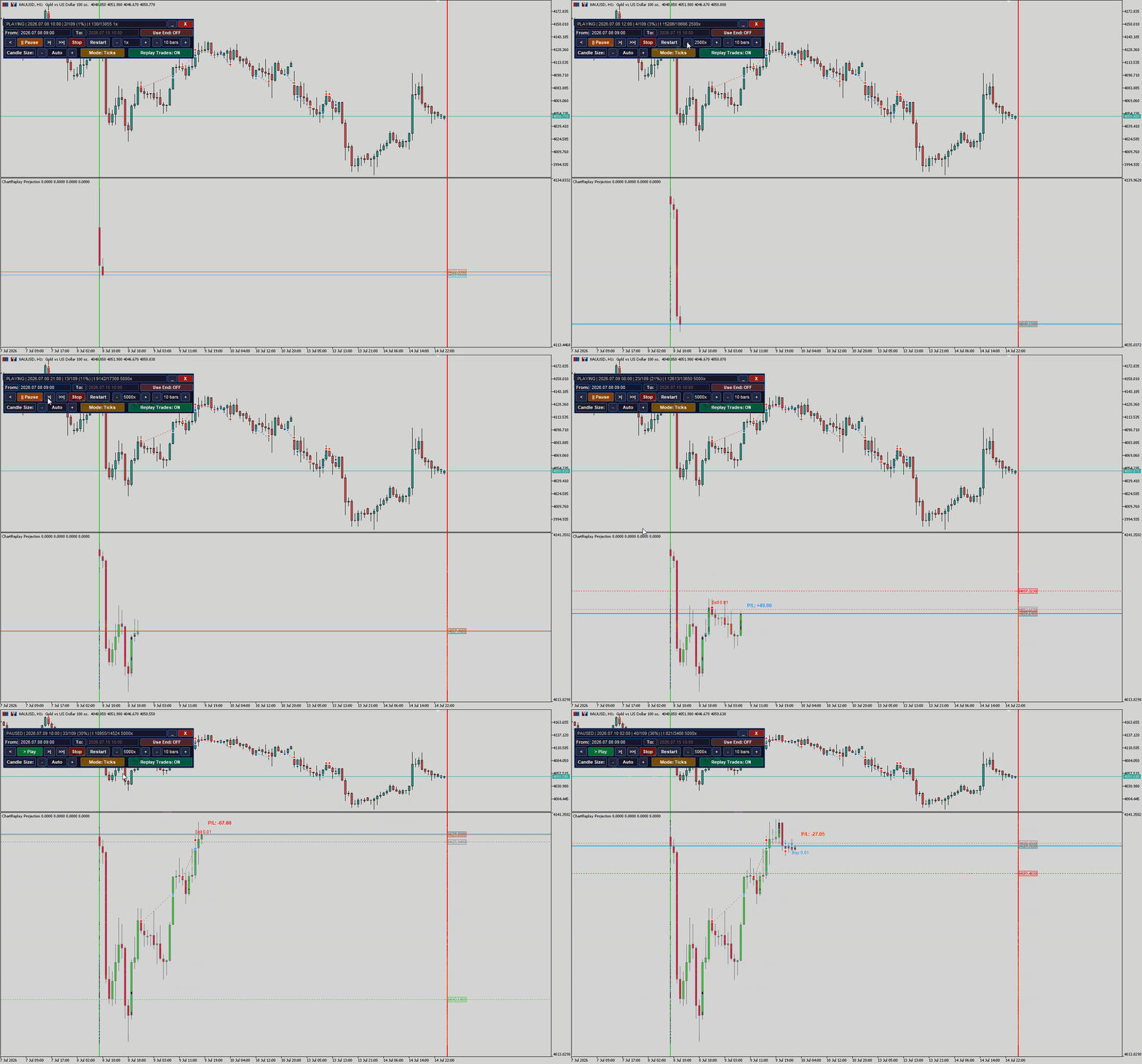
MT5 Chart Replay allows you to replay historical candlesticks from virtually any date and time, candle-by-candle, as if the market were happening live. Instead of scrolling through static charts and relying on hindsight, you can experience price action in real-time simulation mode, making your analysis, learning, and strategy development far more effective. Whether you're a discretionary trader, algorithmic trader, mentor, educator, or student of the markets, MT5 Chart Replay provides a practical way to study market behavior, validate trading ideas, and sharpen your decision-making skills.

Key Features
  • Replay historical price action directly inside MetaTrader 5
  • Select any historical date and begin replaying market movements
  • Control replay speed to match your preferred learning pace
  • Study market structure as it develops candle by candle
  • Analyze entries, exits, liquidity sweeps, breakouts, and reversals in real-time simulation
  • Review missed opportunities and trading mistakes
  • Compatible with multiple symbols and timeframes
  • Designed for traders, mentors, and trading communities
Why Use MT5 Chart Replay?
  1. Learn From Past Trades
  2. Improve Market Analysis Skills
  3. Conduct Detailed Market Recaps
  4. Practice Strategy Execution
  5. Perfect for Trading Education
  6. Build Confidence Without Market Pressure
Who Is MT5 Chart Replay For?
  • EVERYONE AND ANYONE

MT5 Chart Replay — User Manual1. Installation
  • Drag MT5 Chart Replay from the Navigator onto the chart.
  • Adjust the input settings if you wish (see Section 3), then click OK.
2. Quick Start (step by step)
  1. Click >><< — the sub-window expands and the panel appears.
  2. Set the From date — click the From: field, type a start date in YYYY.MM.DD HH:MM format, press Enter.
  3. (Optional) Set an end date — click Use End: OFF to turn it ON, then type a date into the To: field. Leave it OFF to replay all the way to the current bar.
  4. Click >> Start Replay — the first candle of the range is drawn, a green line marks the start and a red line marks the end of the range.
  5. Choose a mode — Mode: Bars reveals one whole candle per step; Mode: Ticks forms each candle live from its recorded ticks.
  6. Press > Play — playback runs at the selected speed. Use the speed - / + buttons to slow down or accelerate at any time.
  7. Pause, step, and study — || Pause freezes playback; >| advances one bar (or one tick in Tick mode); < steps backward.
  8. Finish — press Stop to end the session (panel returns to the landing), or the red X to remove the indicator from the chart.
3. Working with the chart during replay Scrolling. Drag the chart left or right at any time, including during playback. The moment you scroll manually, auto-follow suspends — the view stays exactly where you put it while candles keep forming in the background. Press any transport button (Play, Step, Back, Restart) to snap the view back to the replay head and resume following.
Zooming. Use the Candle Size control (or the terminal's own +/− zoom). Candles in the sub-window always render with the same width, gap, and centered wicks as the main chart, at every zoom level.

4. Tick mode — what to expect
  • Tick data comes from your broker's server and typically covers only the recent months. If your start date is older than the available tick history, the indicator tells you with a red status alert ("No tick data for set date - skipped N bars to …") and reveals the no-tick era instantly, then begins live tick formation at the boundary.
  • The first tick request of a session may pause briefly while the terminal downloads tick history from the server. This happens once.
  • The forming candle is built from bid ticks; when its ticks are exhausted it snaps to the bar's official recorded OHLC, so the finished chart is always exact.
  • The status bar shows ' t 1234/56789'— the tick position inside the forming candle.

Turn Historical Data Into Trading Experience

Replay it. Study it. Learn from it.

MT5 Chart Replay — Bringing Historical Markets Back to Life, One Candle at a Time.


Was $249
Önerilen ürünler
Description This is a Utility tool for MT5 which will make our chart analysis task quite more efficient and save large amount of time. As for chart analysis, some are watching out several symbol simultaneously with single timeframe and others are trading only one single pair with   multi timeframe analysis. For both, a common troublesome issue is “scroll chart to look back” or “draw chart objects” in multi charts at the same time.  Especially for those who are trading with multi timeframe soluti
Equity based Position Closure
POCKETSQUARE CONSULTING PRIVATE LIMITED
Our selling bot envisions a seamless and efficient selling experience for clients. We understand the importance of optimizing the selling process and maximizing sales potential. With our bot, clients can effortlessly list their products, services, or assets, and attract buyers through intelligent pricing strategies and targeted promotions. Our vision is to provide clients with a user-friendly interface where they can easily input all the necessary details for their listings. We aim to simplify t
TradingX Hotkeys
Johannes Stephanus Lombard
Inputs Available Lotsizes Partial Close % You can change lotsizes as you require On an open chart click once to select chart to be able to use hotkeys on specific chart. All Pairs can be used with this expert We created this expert to be able to still trade C300 with a 0.06 Lotsize If you enter a 0.6 lot and close 0.90% you can trade with 0.06 Lot Keys to be used: B -Buy S -Sell C -Close Profitable D -Breakeven (Note if stoploss is set it won't break even) P -Partial close X -Close all
Operative Management Pro – Advanced Trading Utility Operative Management Pro is a smart visual tool for traders who want to analyze and simulate their trades before placing them on the market. This panel displays in real-time the most important parameters of the current symbol: Current price and minimum lot size Required margin Spread cost in USD and pips Take Profit and Stop Loss value in USD Automatic risk and reward calculation With just a click on the chart, you can simulate BUY or SELL t
Hybrid Assisted Trading Engine Manual Trading. Machine Discipline. The Hybrid Assisted Trading Engine is an institutional-grade manual trade management system designed to protect traders from emotional mistakes — without taking control away from them. You decide when to enter . The engine decides how the trade is managed . What It Does This system continuously monitors your manual trades and enforces professional-level trade management rules in real time: Smart Breakeven logic R-based trai
NoBreach Prop Protector watches your account's daily loss and total   drawdown and de-risks gradually in three stages — instead of the usual   all-or-nothing "close everything at the limit".   What makes it different   1. Three-stage protection, not a binary kill switch. WARN notifies you,   SOFT reduces exposure, HARD closes everything and locks trading until the   daily reset. You get slowed down before the limit, not executed at it.   2. Broker-side backstop. The EA continuously maintains
25R - WASD Order is a visual risk management EA for MetaTrader 5 that combines gaming-style WASD keyboard controls with interactive chart drawing for precise order placement. Designed for active traders who value speed and accuracy, it lets you visually plan trades by dragging entry and stop-loss lines directly on the chart, while automatically calculating position size based on your risk percentage. The tool displays color-coded profit/loss zones with real-time risk metrics, supports automatic
ADAM for FTMO 5
Vyacheslav Izvarin
5 (1)
ADAM EA Special Version for FTMO Please find new Version here  https://www.mql5.com/en/market/product/113326 Our 1st EA created using ChatGPT technology Trade only GOOD and checked PROP FIRMS  Default parameters for Challenge $100,000 Tested on EURUSD and GBPUSD only  Use 15MIN Time Frame Close all deals and Auto-trading  before Weekend at 12:00 GMT+3  Friday For Prop Firms MUST use special Protector  https://www.mql5.com/en/market/product/94362 -------------------------------------------------
EQUITY DRAWDOWN MONITOR   This is a simple mt5 advisor that monitors the drawdon levels Features: Easy to use Useful for money managers How to Use  Load the EA once a single chart Type the maximum drawdown desired in inputs Leave the EA alone and never close that chart The EA monitors all trades and magic numbers in your account. Input Parameter Drawdown Percent:   Maximum drawdown in percentage terms allowable in the account. When the drawdown level is surpassed, the EA will close all trades
TradePilot Dashboard
Augusto Martins Lopes
TradePilot Dashboard Özet MT5 için grafik paneli: emir yönetim düğmeleri (Buy/Sell/Close/SL/TP), serbest marj kontrolü ve log yönetimi içerir. Kullanımı kolaydır, demo hesapta test edilebilir. Kâr garantisi verilmez. Açıklama TradePilot Dashboard, MetaTrader 5 üzerinde manuel ve yarı otomatik emir yönetimi için grafik arayüze (Controls) sahip bir Uzman Danışmandır (Expert Advisor). Grafik üzerinden doğrudan işlem yapmayı kolaylaştıran düğmeler, düzenlenebilir alanlar ve güvenlik kontrolleri (se
This Dashboard is very useful . That will help us analyzing graph. In this dashboard has some functions. such as  - Buy Stop - Sell Stop - Buy Limit Order - Sell Limit Order - Close All trade on this graph - Close All Profit - Delete Pending Order = Notify to enter an order - Percentage Calculation of chance to win an order On this strategy i calculated all Major EMA to find a higher chance and take more profits
Introducing the "Auto Timed Close Operations", a useful utility for MetaTrader 5 traders! This utility has been developed to help traders of all levels automatically close their open positions at the exact moment they desire. With the "Auto Timed Close Operations", you gain the required control over your trades and can avoid unwanted surprises at the end of the day or at any other predefined time. We know how important it is to protect your profits and limit your losses, and that's exactly what
Crystal Trade Manager – Advanced MT5 Risk and Trade Control Utility Overview Crystal Trade Manager (CTM) is a professional MetaTrader 5 utility designed for risk management, trade automation, and instant execution control. It provides traders with an integrated system for protecting equity, managing daily drawdowns, controlling lot sizes, and applying automation features such as automatic SL/TP, break-even, and trailing stop. The tool is suitable for manual traders, prop-firm challenge particip
DD Guardian Bot — User Guide Requirements MetaTrader 5 (any broker) A Telegram account Step 1 — Create your Telegram Bot Open Telegram and search for @BotFather Send /newbot and follow the prompts to set a name and username BotFather will reply with a Bot Token — copy and save it Send any message to your new bot (e.g. /start ) so it can detect your Chat ID Open the following URL in a browser to find your Chat ID: https://api.telegram.org/bot&lt ;YOUR_TOKEN>/getUpdates Look for "chat":{"id": 12
AKCAP Hotkey Tool
AK Capital Markets Limited
5 (3)
Special offer for the next 10 copies Are you tired of manually navigating through menus and inputting data every time you want to execute a trade or open an order on Meta Trader? Our hotkey tool is here to make your life easier and boost your trading efficiency. Our tool is natively coded for lightning-fast performance and comes loaded with all the features you could possibly want. From pending orders and OCO orders to trailing and multiple buckets, it has everything a scalper could need. And
SessionSync   is a smart and elegant timing tool for MetaTrader 5, created to keep traders fully synchronized with the market. It shows the remaining time of the current candle in real time and displays the main trading clocks, including server time, local time, New York, and London. With a clean floating panel and an intuitive layout, SessionSync helps you track candle expiration and market sessions quickly and efficiently, without overloading your chart. Whether you trade price action, intrada
BOT'A SABIRLI OLUN, YANIT SÜRESİ SANİYELERCE OLABİLİR. YANIT VERECEKTİR. GÖNDER'E BASTIĞINIZDAN VE SONRA BEKLEYİN. MT5 VE MQL5 İÇİN BASİT BİR SOHBET GPT BOT'UDUR. Yorumlarda API Anahtarınızı girdilere ekleyin ve bunları Uzman Danışman sekmesindeki web isteğine ekleyin: MQL5 VE MT5'TE YAPAY ZEKA İLE SOHBET EDİN. İSTEM MQL5 VEYA MT5 İÇERMELİDİR, AKSİ TAKDİRDE YANIT VERMEZ. SADECE MT5 VE MQL4 ÜZERİNDE EĞİTİLMİŞTİR. SADECE GERÇEK ZAMANLI GRAFİKLERDE ÇALIŞACAĞINI, GERİYE DÖNÜK TESTLERDE ÇALIŞMAYACA
The CLOSE concept: Like the thumb and index almost touching - it marks the moment when price is   this close   to reversal. Precision entry, not late. Inputs: Focus HTF/LTF, Donchian periods, ZZ Depth, Confirm Lookahead, EST Lookback, Dashboard position. Works on all symbols, all timeframes. What it does: ZZ Absolute   - Detects real Highs/Lows with depth 12 (absolute pivots, not repainting zigzag) Focus Engine H4/D1   - Confirms each ZZ with Donchian TLB logic. Score +3/+4 = BUY CONF, -3/-4 =
Bu, işlemlerinizi yönetmenize yardımcı olacak bir araçtır. Hedef 1, 2, 3'ü puan ve bu hedeflerde kapatmak istediğiniz lot büyüklüğünün yüzdelik oranı olarak belirleyebilirsiniz. Örneğin, 1, 2, 3 hedeflerini 5$, 10$ ve 15$ olarak %40, %30, %30 olarak belirlediniz. Şimdi, 4220'de XauUSD'ye 0,1 lotla giriş yaparsanız, 5$ hedefinde 0,04 lot, 10$ hedefinde 0,03 lot ve kalan miktar 15$ hedefinde kapanacaktır. Zaman olarak da zarar durdurucu belirleyebilirsiniz. Zaman durdurucu ve hedef, işlem yaptı
Discover the MSG Method: Master the Major Session Gap for Consistent Forex Profits Unlock the power of the MSG Method – our proprietary Major Session Gap strategy designed to capture high-probability trades during key market session transitions. Developed by the T1 FX Team, this innovative approach leverages algorithmic precision to identify and exploit price gaps between major trading sessions (London, New York, and Tokyo). Why Choose the MSG Method? High-Probability Setups : Focuses on session
Pending Orders Grid Complete System opens any combination of Buy Stop, Sell Stop, Buy Limit and Sell Limit pending orders and closes all existing pending orders. You will be able to Drag-and-Drop the Script on the chart and it will pick up the start price for the first position in the grid from the "Drop" point. Usually it should be in the area of Support/Resistance lines. Input Parameters Before placing all pending orders, the input window is opened allowing you to modify all input parameters:
Daha hızlı işlem yapın. Riski daha akıllıca yönetin. Güvenle işlem gerçekleştirin. Lansman kampanyası! Satılan her 10 kopya için fiyat artacak. Son fiyat: 100$. Benzer işlem yöneticilerinin fiyatı 100 ABD doları! Kullanım Kılavuzu  -  Demo hesabı için uygulamanın deneme sürümü Trading Terminal Pro, hassasiyet, hız ve tam kontrolü tek bir yerde isteyen yatırımcılar için tasarlanmış, MetaTrader 5 için gelişmiş bir işlem yönetim panelidir. Birden fazla pencere ve manuel hesaplamalarla uğraşmak yeri
Trading Reporter Dashboard MT5
Juergen Marcus Wolfgang Rosswinkel
5 (1)
Trading Reporter — Visual Performance Dashboard for MT5 A complete account performance dashboard rendered directly on your MT5 chart. No browser, no external tool, no subscription. Attach it once and resize it to fit your screen. Balance and Live Drawdown update every second, and closed-trade statistics refresh within about a second of a position closing, so there is no waiting for the next bar whatever timeframe the chart runs on. Free. No limitations. No trial period. Full source transparen
FREE
Scale & Trail Trade Manager (MT5) Your all-in-one solution for   precision trade execution and management . With just two clicks, you can size, place, and manage trades effortlessly—no calculators, no guesswork, no stress. Workflow Click 1:   Set your entry — instantly snaps to the live market price. Move Mouse:   Preview your stop-loss and four profit targets (1R–4R) in real time. Click 2:   Lock it in — the tool sizes your trade to your exact dollar risk (e.g., $3350) and manages it automatica
No EA, no complex configuration – just run this script and see your professional trade setup instantly on the chart. The MTT   Breakout Trade Setup Pro   script is built for manual breakout traders who want   institutional‑grade risk management   without the overhead of an Expert Advisor. It uses a proprietary higher‑timeframe detection algorithm (calibrated for the 9:00 GMT+3 session) to identify the optimal breakout reference levels. Your Stop Loss distance is derived automatically from market
Quant_Bot Studio Professional Expert Advisor for MetaTrader 5 Quant_Bot Studio is a professional-grade Expert Advisor designed for traders who require structured execution, disciplined risk control, and scalable trading operations. Built on Smart Money Concepts (SMC), it automates high-probability trade execution across forex, commodities, and indices while maintaining strict risk management at every stage. The system eliminates emotional decision-making and enables continuous, rule-based tradi
The Definitive Performance Testing Solution for MetaTrader Environments What This Tool Does This specialized benchmark utility measures the performance of your MetaTrader environment, providing insights that impact your trading execution. Unlike generic system benchmarks, this tool evaluates performance specifically within the MetaTrader runtime environment. For Professional Traders & Developers: Performance Metrics : Measurements of calculation throughput and memory efficiency Trading-Specific
Ping-Monitor — Never Miss a Tick Again! Do you run EAs and worry about silent chart freezes or data feed stalls ?  This utility is your ultimate watchdog, alerting you the moment your charts stop receiving updates. Ping-Monitor is designed to detect when a chart freezes or the data feed stalls, even if MT5 still shows that the connection is active. It works by tracking the time of the last incoming tick. Every time the chart receives a new price update, the EA records the timestamp. Then, on a
Keyboard Trader   is a tool designed for ultra-fast trading in   MetaTrader 5 (MT5)   using   keyboard shortcuts . Here’s a concise description of its features: Swift Execution : Keyboard Trader allows you to execute orders rapidly without clicking. You can use keyboard shortcuts to efficiently open and close positions. Ideal for News Trading : Given the need for quick action during news events, this tool is particularly useful for trading during high volatility moments. Customizable Hotkeys : T
The CLOSE concept: Like the thumb and index almost touching - it marks the moment when price is   this close   to reversal. Precision entry, not late. Inputs: Focus HTF/LTF, Donchian periods, ZZ Depth, Confirm Lookahead, EST Lookback, Dashboard position. Works on all symbols, all timeframes. What it does: ZZ Absolute   - Detects real Highs/Lows with depth 12 (absolute pivots, not repainting zigzag) Focus Engine H4/D1   - Confirms each ZZ with Donchian TLB logic. Score +3/+4 = BUY CONF, -3/-4 =
Bu ürünün alıcıları ayrıca şunları da satın alıyor
Global Investing FX Terminal , MetaTrader 5 için hepsi bir arada bir FX dashboard'udur — merkez bankası politika faizleri, CFTC COT pozisyonlanması, carry sıralamaları, ekonomik sürprizler, opsiyon skew'u, perakende duyarlılığı ve korelasyonlar, toplamda on üç panel — titremesiz tek bir canvas katmanında görüntülenir ve tek bir ekli EA'dan her 10 saniyede bir güncellenir. Harici yazılım gerekmez. Profesyonel FX analizi, normalde ayrı platformlarda bulunan verilere eş zamanlı erişim gerektirir: f
Trading Chaos Expert
Gennadiy Stanilevych
5 (11)
This software has no equals in the world and represents a universal trade "console" covering trading signals, automated market entry, setting of Stop Loss and Take Profit, as well as Trailing Profit for multiple trades at the same time in a single open window. Intuitive control of the Expert Advisor in "three clicks" ensures a comprehensive use of all its functions on different computers, including tablets PCs. Interacting with additional signal indicators that mark the chart to give a real mark
Farmed Hedge Yield Farming | All Markets (Manual - Hybrid - Semi/Automated EA) VERIFIED TRADING RESULTS - Farmed Hedge Yield Axi Copy:  https://www.mql5.com/en/signals/2356376 - Farmed Hedge Yield Exn Copy:   https://www.mql5.com/en/signals/2356404 - Farmed Hedge Yield V Copy:  https://www.mql5.com/en/signals/2357156 * Before purchasing, please feel free to send me a message if you have any questions about the product or setup. ** After purchase,  Contact me via private message to receive t
Quant AI Agents are independent trading Expert Advisors. Instead of trading using a fixed strategy like other conventional EAs, Quant AI Agents   is a   multi-agent AI trading framework   that turns natural-language strategy prompts into live.  WANT THE SAME RESULTS AS MY LIVE SIGNAL?   Use the exact same brokers I do:   IC MARKETS , IC TRADING   .  Unlike the centralized stock market, Forex has no single, unified price feed.  Every broker sources liquidity from different providers, creating un
YuClusters
Yury Kulikov
4.93 (43)
Attention: You can view the program operation in the free version  YuClusters DEMO .  YuClusters is a professional market analysis system. The trader has unique opportunities to analyze the flow of orders, trade volumes, price movements using various charts, profiles, indicators, and graphical objects. YuClusters operates on data based on Time&Sales or ticks information, depending on what is available in the quotes of a financial instrument. YuClusters allows you to build graphs by combining da
AI Agent Supervisor is NOT an Expert Advisor. AI Agent Supervisor   is a   multi-agent AI risk & portfolio supervisor   that watches every EA on your account and intervenes in real time.  WANT AN AI PORTFOLIO MANAGER WATCHING YOUR FLEET 24/7?   Run your fleet on the same brokers I do:   IC MARKETS , IC TRADING   .  Unlike the centralized stock market, Forex has no single, unified price feed.  Every broker sources liquidity from different providers, creating unique data streams. The Supervisor r
Check EA performance  https://www.mql5.com/en/signals/2376164?source=Site +Profile+Seller Spot vs Future Arbitrage EA for MT5 Spot vs Future Arbitrage EA is an automated Expert Advisor designed for MetaTrader 5 that operates using price differences between Gold spot and Gold futures instruments. The strategy opens positions on both instruments simultaneously to take advantage of temporary differences between spot and futures prices. Requirements The trading account must provide both Gold spot
Custom Alerts AIO: Tüm Piyasaları Takip Et — Hiçbir Kurulum Gerekmez Genel Bakış Custom Alerts AIO , hiçbir ek yapılandırma gerektirmeyen, kullanıma hazır bir piyasa izleme çözümüdür. Gerekli tüm göstergeler — FX Power, FX Volume, FX Dynamic, FX Levels, IX Power — iç yapısına gömülüdür. Grafik görüntülemesi olmadan çalışır, bu da onu sessiz ve verimli bir şekilde gerçek zamanlı alarm üretimi için mükemmel hale getirir. Brokerınızın sunduğu tüm varlık sınıflarını destekler: Forex, Metaller, End
Adam FTMO MT5
Vyacheslav Izvarin
5 (2)
ADAM EA Special Version for FTMO Please use ShowInfo= false for backtesting ! Our 1st EA created using ChatGPT technology Trade only GOOD and checked PROP FIRMS  Default parameters for Challenge $100,000 Tested on EURUSD and GBPUSD only  Use 15MIN Time Frame Close all deals and Auto-trading  before Weekend at 12:00 GMT+3  Friday For Prop Firms MUST use special Protector  https://www.mql5.com/en/market/product/94362 --------------------------------------------------------------------------------
Mt5 To InterativeBrokers Copier allows you to copy deals from MT5 account to Interactive Brokers. With this, you can run your EA strategy on a MT5 Demo/Real Account, then copy all the deals to Interactive Brokers account real time. Features: 1. Copy or Invert-Copy deals Realtime from MT5 to IB Account. 2. Synchronizing positions of both accounts periodicaly, in case any missing copying. 3. You can choose only Buy position or Sell position. Symbols Setup: General Format:  {MT Symbol} -> {IB S
EASY Insight AIO – Akıllı ve zahmetsiz yatırım için hepsi bir arada çözüm Genel Bakış Tüm piyasayı — Forex, Altın, Kripto, Endeksler ve hatta Hisseler — saniyeler içinde, manuel grafik incelemesi, gösterge kurulumu ya da karmaşık ayarlar olmadan analiz edebildiğinizi hayal edin. EASY Insight AIO , yapay zekâ destekli yatırım için nihai, kullanıma hazır dışa aktarma aracınızdır. Tüm piyasanın kapsamlı bir anlık görüntüsünü tek bir temiz CSV dosyasında sunar; bu dosya ChatGPT, Claude, Gemini, Pe
The product will copy all  Discord  signal   to MT5   ( which you are member  ) , also it can work as remote copier.  Easy to set up. Work with almost signal formats, support to translate other language to English Work with multi channel, multi MT5. Work with Image signal. Copy order instant, auto detect symbol. Work as remote copier: with signal have ticket number, it will copy exactly via ticket number. How to setup and guide: Let read all details about setup and download Discord To MetaTrader
FUTURES ORDERFLOW FOOTPRINT CHART Professional OrderFlow EA for MetaTrader 5 Version 1.01| Professional tool for real traders | Institutional-Grade Visualization STRATEGY TESTER USERS - PLEASE SELECT EVERY REAL TICK WHEN TESTING AND YOU HAVE DOWNLOADED HISTORICAL DATA. IF YOU SEE A WAITING SCREEN AND IT IS NOT DOWNLOADING, IT MEANS YOU HAVE LOW HISTORICAL DATA. TRY 1 MIN AND 5 MIN FIRST ON 1 DAY DATA. ONE DAY DATA SHOULD BE THE NEWEST AND MOST CURRENT DATE. PLEASE WAIT UNTIL THE MARKET HAS ROL
Features   With MT5 to Interactive Brokers(IB) Trader, you can: 1. Load chart data from IB to MT5, and Analyze with all standard or customer Indicators. 2. Place Orders to IB Account Directly in MT5. 3. Make your Own EAs upon IB Securities by only making minus changes of the trading function. Usage 1) Installation Copy the "Mt5ToIBTraderEn.ex4" and sample files to [MT5 Data Folder]->MQL5->Experts.  2)  MT5 Settings Add the IP Address to the MT5 Allowed URLs in 'Tools->Options->Expert Adviso
The core idea: using the user interface, you configure the parameters the chart must meet before entering a position (or positions), choose which entry models to use, and set the rules for when trading and planning should end. Lazy Trader  handles the rest: it  takes over all the routine chart watching and execution! full description  :: 3 key videos [1] ->  [2]   ->  [3] What can it do? - Understands Larry Williams market structure - Understands swing market structure by Michael Huddleston
Telegram to MT5 Pro — Advanced Telegram Signal Copier with Auto-Fix, Multi-TP, Risk Control and Full Trade Management Telegram to MT5 Pro — Profesyonel Telegram Sinyal Kopyalayıcı Telegram to MT5 Pro, Telegram’dan gelen sinyalleri MetaTrader 5 hesabına otomatik olarak doğrudan uygulayan yüksek performanslı bir trade kopyalayıcıdır ve risk, işlem yürütme ve trade yönetimi üzerinde tam kontrol sağlar. Sistem iki bileşenden oluşur: • MetaTrader 5 içinde çalışan Expert Advisor (EA) • Telegram’a bağ
Prop Firm Os
Gayathiri Gopalakrishnan
5 (1)
PROP FIRM OS Structured Trading Assistant for MetaTrader 5 PROP FIRM OS is a structured trading assistant designed for MetaTrader 5 users who prefer rule-based market analysis and organized trading workflows. The Expert Advisor combines market analysis tools, scanner functions, dashboard monitoring, alerts, risk-control settings, and trade management features inside one system. PROP FIRM OS is designed to help traders follow selected rules, filters, and monitoring conditions during trading activ
ManHedger MT5
Peter Mueller
4.83 (6)
THIS EA IS A SEMI-AUTO EA, IT NEEDS USER INPUT. Manual & Test Version Please TEST this product before BUYING  and watch my video about it. The price of the ManHedger will increase to 250$ after 20 copies sold. Contact me for user support or bug reports or if you want the MT4 version! MT4 Version  I do not guarantee any profits or financial success using this EA. With this Expert Advisor, you can: Implement your own Zone Recovery strategy to capitalize on trending markets. Create Grid trading s
Latency Arbitrage – Ultra Fast Execution & Price Inefficiency Capture Latency Arbitrage  utility tool is designed to exploit short-term price inefficiencies between fast and slow price feeds. Instead of predicting market direction, the EA focuses on execution speed and price deviation opportunities, allowing traders to capture micro-movements before the market fully adjusts. With built-in risk controls and smart filtering, it ensures precise and disciplined trading performance. Price increases b
DİKKAT : Ücretsiz deneme sürümü için web sitemi ziyaret edin. Kullanım Kılavuzu RiskGuard Management — Tavizsiz bir ticaret için nihai yardımcınız. Lot Calculator — Otomatik lot büyüklüğü hesaplama. Quantum — Kârı maksimize etmek ve drawdown'u azaltmak için otomatik risk. Automatic Journal — Dahil edilmiştir ve web sitemden ücretsiz indirilebilir. Automatic Screenshot — İki ekran görüntüsü: biri işlem açılışında, diğeri kapanışında. Partial Profit — Akıllı şekilde yönetilen kısmi çıkışlar. Sma
Forex Analyzer Pro MT5 İşlem Hesabı Analiz Paneli Forex Analyzer Pro, MetaTrader 5 kullanıcıları için geliştirilmiş web tabanlı bir işlem analiz platformudur. Forex Analyzer Pro, MetaTrader 5 hesap aktivitelerini senkronize eder ve işlem bilgilerini analiz, raporlama, izleme ve işlem günlüğü araçları halinde yapılandırılmış bir kontrol panelinde düzenler. Platform, kullanıcıların işlem panellerine desteklenen masaüstü ve mobil web tarayıcıları üzerinden erişmelerini sağlar. Forex Analyzer Pro, M
Unlimited Trade Copier Pro MT5 is a tool to copy trade remotely to multiple MT4, MT5 and cTrader accounts at different computers/locations over internet. This is an ideal solution for you if you are a signal provider and want to copy your trades to other receivers globally on your own rules. One provider can copy trades to multiple receivers and one receiver can get trade from multiple providers as well. The provider can even set the subscription expiry for each receiver, so that receiver will n
# If you have any other requirements or are interested in collaboration, please contact  dev.quantech.london@gmail.com . Flash Trade (FT) Most friendly manual trading tool. Easy operation to secure your funds. Features of FT Click the chart to trade fast FT supports market orders and pending orders Click twice to complete the order and set SL and TP Click trice to complete the pending order and set SL and TP Automatically set the stop-loss amount of each order to a fixed percentage of the bala
Royal Copier
Janet Abu Khalil
5 (1)
Royal Copier — Profesyonel MT5 Trade Copier Royal Copier, MetaTrader 5 için profesyonel, gerçek zamanlı yerel bir trade copier çözümüdür. Artık her iki işlev de tek bir MT5 Expert Advisor içinde yer almaktadır. Giriş ayarlarından EA’nın Master Modu veya Client Modu ile çalışmasını seçmeniz yeterlidir. Bu, aynı EA’nın kaynak hesapta da alıcı hesapta da kullanılabileceği ve orijinal copier davranışının korunacağı anlamına gelir. Royal Copier, hesaplar arasında en yaygın tüm kopyalama kombinasyonla
One button. One trade. MT5 Trading Deck is a hotkey trading panel for MetaTrader 5 that turns the platform into a keyboard-driven execution cockpit. Stop loss, take profit and lot size are pre-calculated for every key; the moment you press, a market order is live on the broker. A complete technical user manual is attached in the product Comments section. It documents every input parameter, the full hotkey map, the recommended Stream Deck XL layout, and the advanced workflows for Pre-Limit orders
The real‑time view of what is happening inside the market. Footprint Secrets brings detailed analysis directly into MetaTrader 5. It shows where volume is trading, how buyers and sellers are interacting, and how liquidity shifts as the market evolves. Designed for traders who want a precise, real‑time understanding of market behavior. Check out the free preview version here:  https://www.mql5.com/en/market/product/172398 Benefits for the Trader See the real activity behind price . Footprint ch
Gamma Edge Pro MT5 — GexBot Classic API Integration Gamma Edge Pro   brings institutional-grade   Gamma Exposure (GEX) data   directly onto your MetaTrader 5 chart — the same data used by professional options traders to anticipate price magnets, hedging flows, and dealer positioning. Powered by the   GexBot Classic API , this indicator automatically maps options market data from US-listed instruments onto any   MT5 CFD instrument   — Forex pairs, Gold, indices, and more — with intelligent price
QCML Assistant
Maxime Turcotte-lafreniere
QCML Assistant MT5 Your Trading. Our Assistant. Your Edge. Looking for a tool that completely transforms your experience on MetaTrader 5? QCML Assistant is the all-in-one solution built by traders, for traders. Just one tool installed on your chart, and you get access to an ultra-complete, ultra-fast, and ultra-simple trading platform. No more hours wasted setting up your workspace. No more complicated trade entries. With QCML Assistant, everything becomes simple, smooth, and efficient right fro
Hedge Trimmer & Roll-Over EA Managing a hedged position means carrying two opposing trades simultaneously. Over time, the losing side grows while the profitable side offsets it. The standard problem is that closing the loser costs money you may not have sitting in cash — it has to come from somewhere. Hedge Trimmer EA solves this by using the floating profit on your winning trades as the funding source to progressively close down the losing side. It identifies which trades are in profit, uses a
TradePad
Ruslan Khasanov
5 (1)
TradePad hem manuel hem de algoritmik ticaret için bir araçtır. Size hızlı ticaret işlemleri ve çeşitli ticaret enstrümanlarındaki pozisyonların kontrolü için basit bir çözüm sunuyoruz. Dikkat, uygulama strateji test cihazında çalışmıyor! Demo hesabı için uygulamanın deneme sürümü ve tüm araçların açıklaması Uygulama arayüzü yüksek çözünürlüklü monitörler için uyarlanmıştır, basit ve sezgiseldir. Rahat bir çalışma için, tüccara aşağıdaki araç seti sunulur: Ticaret işlemlerini yönetmek, ana grafi
Yazarın diğer ürünleri
GIT Chart SYNC
Hlomohang John Borotho
What is the Chart Sync Indicator? This custom MQL5 tool enables multi-timeframe chart synchronization, addressing a common pain point in technical analysis: the inconsistencies when switching between chart windows or timeframes. Instead of managing each chart separately, this indicator links them so actions such as panning, zooming, drawing objects, or changing symbols are mirrored across all synced charts of the same symbol. The result is a smoother, unified analysis experience. Key Advantages:
FREE
Indicator Description (based on AVPT EA ): This indicator visualizes a Volume Profile-based liquidity architecture on the chart by analyzing where trading volume is concentrated across price levels over a specified lookback period. It calculates key volume structures such as: Point of Control (POC): the price level with the highest traded volume. Value Area (VA): the range containing a configurable percentage of total volume (typically ~70%). High-Volume Nodes (HVNs): price levels with sign
FREE
Filtrele:
Değerlendirme yok
Değerlendirmeye yanıt