Episode Health Monitor
- Yardımcı programlar
- Sürüm: 1.20
- Güncellendi: 18 Eylül 2026
- Etkinleştirmeler: 20

You already have positions open. The question is whether the episode is still under control.
Floating P/L tells you the result. It does not tell you the condition.
| Current price: $39 - increases by $10 after every 20 purchases until reaching the final price of $79. Next price: $49. Complete Buyer Kit: 36 Professional Resources included at no additional cost. MT5 Presets, PDF Guides, Checklists, Mindmaps, Reference Cards, and Excel Workbooks - built from 8 years of developing structured XAUUSD trading workflows. After purchase, please message me via MQL5 inbox. Your complete Buyer Kit will be delivered within 24 hours. |
A position group can still show a small gain while inventory load, hold time, adverse drift, weakening recovery, and spread expansion are already building pressure in the background. By the time the P/L number turns negative, the episode is already stressed.
Episode Health Monitor was built to surface those conditions before they become obvious.
What this tool does
It reads your open positions in real time and turns the underlying pressure signals into a clean, readable on-chart dashboard. No prediction. No entry signals. No automation.
Just a clear picture of whether your current episode is healthy, stretched, or starting to break down.
The dashboard
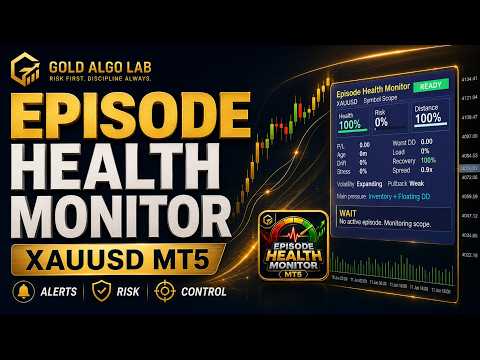
Three main numbers anchor the panel: Health, Risk, and Distance.
Health shows the overall condition of the active position structure. Risk shows the current level of accumulated pressure. Distance shows how much room remains before the episode enters a more difficult state. These three numbers update continuously and are color-coded so you can read the situation at a glance.
Below that, the panel breaks down the individual pressure signals: Age, Drift, Load, Recovery, Stress, and Spread. If one of these is driving the risk reading higher than the others, the Main Pressure line will identify it directly, so you know what the actual problem is rather than just that a problem exists.
Action states
The panel classifies the episode into one of six condition states: HOLD OK, WATCH, NO ADD, REDUCE, FREEZE, or EXIT.
These are not trading signals. They are condition labels for manual review. The difference matters.
HOLD OK means the episode is stable and pressure is contained. EXIT means the structure has deteriorated to a point where survival should come before anything else. The states in between reflect the gradual accumulation of pressure that most traders feel but rarely see clearly until it is too late.
Version 1.2 additions
The original version tracked the core pressure signals. Version 1.2 adds the practical details that matter when you are actually managing a live episode.
Live floating P/L is now shown directly on the panel. Worst DD tracks the deepest floating loss the episode has reached, which matters more than the current number when you are trying to assess actual exposure.
Main Pressure identification tells you which signal is doing the most damage. If inventory load and hold time are the combined driver, the panel says so. If drift is the issue, it says that instead.
Risk profiles and equity-adjusted inventory load make the readings more appropriate across different account sizes and lot sizes. A 0.10 lot position on a $1,000 account carries different weight than the same lot on a $20,000 account. Version 1.2 accounts for that.
Spread is now displayed as a ratio such as 1.0x rather than raw points. When spread doubles relative to normal, the ratio shows 2.0x. Cleaner and easier to read under pressure.
Alert support has been added for the conditions that matter most: REDUCE, FREEZE, EXIT, significant risk jumps, and distance collapse. Popup, sound, push, and email alerts are all available. A cooldown setting prevents the same alert from firing repeatedly during a sustained high-risk period.
Who this is for
Episode Health Monitor is most useful if you regularly manage more than one open position, trade Gold on MT5, use hedge-style or inventory-based approaches, or simply want a clearer read on whether a trade episode is in good shape before deciding to hold, add, or reduce.
It can monitor the current chart symbol, all open positions across symbols, manual trades only, or a specific magic number depending on your settings. Compact mode is available if panel size is a concern.
What this tool does not do
It does not open or close trades. It does not modify stop losses or take profits. It does not hedge positions automatically. It does not give buy or sell signals. It is not a grid system, martingale strategy, or recovery EA.
Different brokers and account types may produce slightly different readings because of tick flow, spread, commission, swap, contract size, and execution conditions. Testing on a demo account first is strongly recommended before using the tool on a live account.
A deeper explanation, input breakdown, and usage guide is available here: https://www.mql5.com/en/blogs/post/769009
Not sure where this tool fits in your trading process?
Each Gold Algo Lab tool is built to solve one specific part of the trading workflow. The Gold Algo Lab Tool Map shows how our MT5 tools connect across 6 practical stages for XAUUSD traders: market context, setup selection, risk planning, trade execution, position management and account protection.
→ Gold Algo Lab Tool Map: Where to Actually Start With MT5 Tools for XAUUSD
https://www.mql5.com/en/blogs/post/771930
You do not need every tool. Start with the stage where your process breaks down most often, then build your workflow one layer at a time.
Risk Disclaimer
Trading financial markets involves risk. Episode Health Monitor provides analytical information about active positions, but it cannot remove trading risk or guarantee any outcome. Past performance of any tool or strategy does not guarantee future results. Use this tool as part of your own risk management process, not as a substitute for it.
Gold Algo Lab builds practical, risk-first MT5 tools for serious XAUUSD traders, shaped by 8 years of developing and trading real systems to help traders identify clearer setups, manage risk with greater confidence and execute with more discipline.