Dynamic Trading Panel MT5
- Yardımcı programlar
- Sürüm: 1.40
- Etkinleştirmeler: 5

QuickTrade Panel — One-Click Buy/Sell with Live Risk & Reward Preview
Trade faster and smarter, directly from the chart — no order window required.
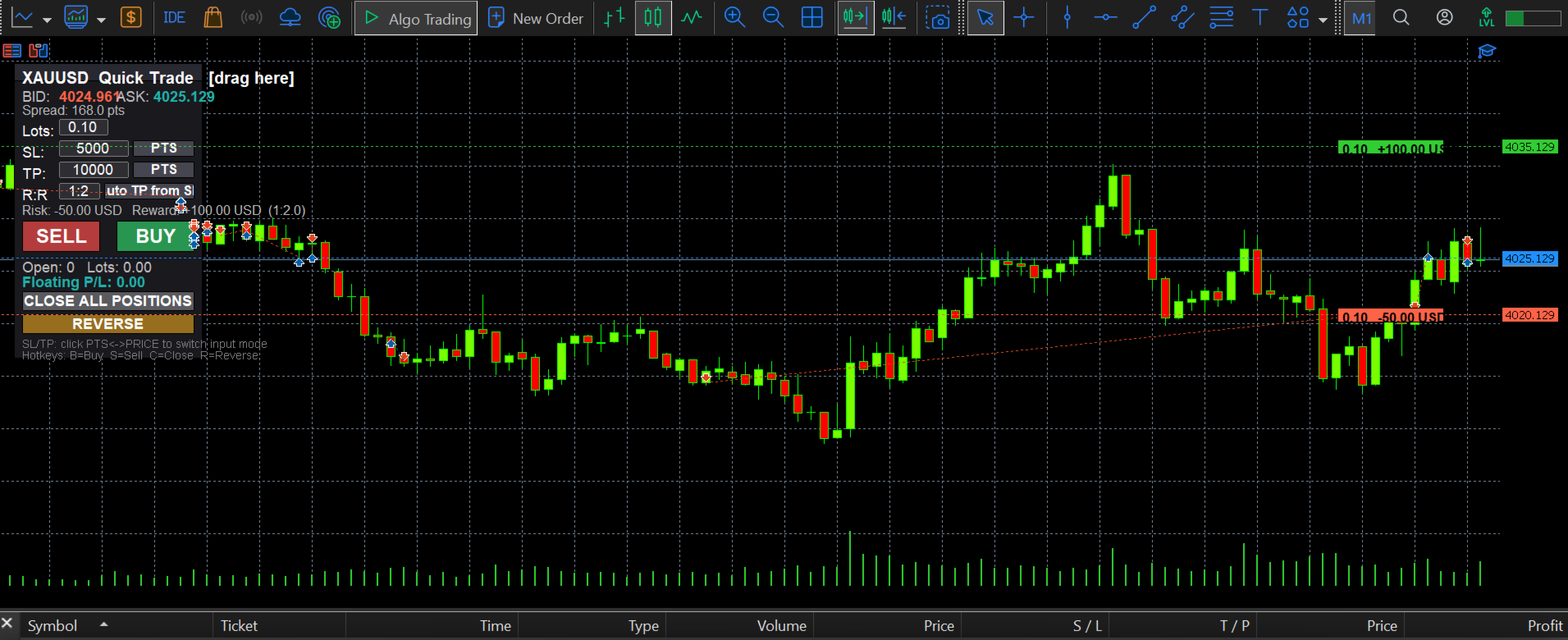
QuickTrade Panel is a lightweight, fully manual trading panel for MetaTrader 5. It sits on your chart as a draggable floating window, giving you instant Buy/Sell execution with full control over lot size, stop loss, take profit, and risk-to-reward — all visible before you click.
Key Features
One-click Buy / Sell execution Large, color-coded SELL and BUY buttons send market orders instantly using your specified lot size, SL, and TP.
Flexible SL/TP input — points or price Toggle each field between point-distance and absolute price with a single click. Enter your stop and target however you think, not however the platform forces you to.
Floating P/L and position tracking See your open position count, total lots, and live floating profit/loss directly on the panel — no need to check the terminal tab.
Close All & Reverse Flatten every open position on the symbol with one click, or instantly reverse your current position (close and re-enter opposite direction) for fast-moving conditions.
Hotkey support Optional keyboard shortcuts — B (Buy), S (Sell), C (Close All), R (Reverse) — for traders who want speed without touching the mouse.
Fully draggable, non-intrusive panel Click and drag the panel anywhere on your chart. It stays out of your way and doesn't interfere with chart objects or other indicators.
Who It's For
Manual and discretionary traders, scalpers, and anyone who wants a faster, cleaner alternative to MT5's native order ticket — with risk management built directly into the entry workflow instead of bolted on after.
Why Traders Use It
Most panels just place orders. QuickTrade Panel shows you what you stand to make or lose in real dollar terms before you commit — turning every trade into an informed, ratio-based decision rather than a guess.