Support Resistance Break Zones PRO
- Göstergeler
- Sürüm: 1.10
- Güncellendi: 22 Eylül 2026
- Etkinleştirmeler: 20

| Current price: $79 - increases by $10 after every 20 purchases until reaching the final price of $129. Next price: $89. Complete Buyer Kit: 42 Professional Resources included at no additional cost. MT5 Presets, PDF Guides, Checklists, Mindmaps, Reference Cards, and Excel Workbooks - built from 8 years of developing structured XAUUSD trading workflows. After purchase, please message me via MQL5 inbox. Your complete Buyer Kit will be delivered within 24 hours. |
This indicator focuses on one task: showing important support and resistance zones in a cleaner way, and helping the trader understand how price is reacting around those zones.
It is not designed to predict the market or generate automatic trades. The purpose is to make price structure easier to read directly on the MT5 chart.
What the indicator does
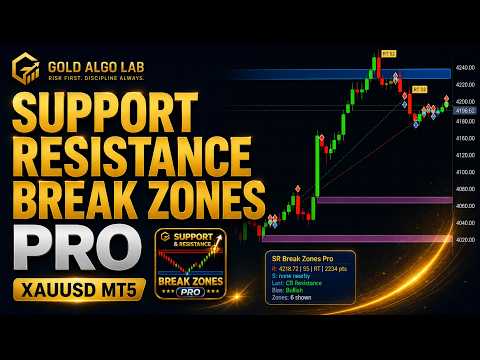
Support Resistance Break Zones PRO detects and displays support and resistance areas using pivot-based structure, zone width, strength ranking and price reaction logic.
Typical information shown on the chart includes:
- active support and resistance zones
- nearest resistance and support reference
- break, retest and false break events
- strength rank of the current zone
- bullish or bearish bias based on recent structure
- compact dashboard with the latest market context
Instead of drawing only thin horizontal lines, the tool uses visual zones. This makes it easier to see where price is reacting, especially on XAUUSD where wicks and fast moves can make simple lines less useful.
Core logic
The indicator combines several simple structure concepts:
- pivot-based support and resistance detection
- ATR or point-based zone width
- zone merging for nearby levels
- strength scoring based on touch, rejection, freshness and reaction
- volume filter support for break quality
- breakout, retest and false break classification
The goal is not to create too many signals. The goal is to reduce chart noise and show the most relevant areas where price is interacting with structure.
Break, retest and false break context
A common issue with support and resistance trading is entering too early when price only touches or briefly crosses a level.
Support Resistance Break Zones PRO separates different situations more clearly:
- price approaching a zone
- clean break through a zone
- confirmed break after price closes outside the area
- retest after a previous break
- false break when price fails to continue
This can help the trader avoid treating every level touch as the same type of event.
Dashboard and visual design
The indicator includes a compact left-side dashboard designed to stay readable without covering too much price action.
The dashboard shows:
- nearest resistance
- nearest support
- last event
- current bias
- number of visible zones
The latest visual version uses soft zones, pale event tags and a clean panel layout. Event labels such as RT, FB and BO are displayed near the related price reaction while trying to avoid candle overlap and panel overlap.
The visual style is intentionally simple. The chart should remain the main focus.
Alerts
The indicator includes alert options for important zone events.
Supported alert types include:
- price approaching a zone
- clean break
- confirmed break
- false break
- retest
Alert methods can include popup, push notification, email and sound depending on user settings in MetaTrader 5.
The alert system also includes cooldown and duplicate suppression options to reduce repeated notifications from the same area.
How it is typically used
Support Resistance Break Zones PRO is useful when the trader wants a cleaner structure view on:
- XAUUSD intraday charts
- M5 and M15 breakout or retest setups
- H1 and H4 structure review
- zones where price repeatedly reacts
- situations where normal support and resistance lines feel too thin or noisy
Example use:
- check the nearest support and resistance zone
- wait for a clean reaction, break, retest or failed break
- compare the event with your own trend or momentum filter
- avoid taking every touch as a trading signal
This indicator is best used as a structure and context tool, not as a standalone trading system.
Platform compatibility
Platform: MetaTrader 5
Works on:
- Gold/XAUUSD
- Forex pairs
- Indices
- Other broker-supported symbols
Recommended timeframes:
- M5 and M15 for intraday structure
- M30 and H1 for cleaner zone context
- H4 for broader market structure
The default settings were mainly adjusted with XAUUSD in mind, but the inputs can be changed for other symbols and broker conditions.
Important notes
Support Resistance Break Zones PRO does not execute trades.
It:
- does not open or close positions
- does not guarantee profitable trades
- does not replace risk management
- does not remove the need for trader judgment
Support and resistance zones can fail. Breakouts can reverse. Retests do not always continue. The tool is designed to make structure easier to read, not to remove market risk.
Please test the indicator on a demo account first and adjust the settings according to your symbol, timeframe and trading style.
Different results across brokers are often caused by execution differences rather than strategy logic.
Detailed explanation: https://www.mql5.com/en/blogs/post/769009
Related paid tools
If you use Support Resistance Break Zones PRO, you may also find these tools useful depending on your trading workflow:
- WaveTrend Clarity Pro: for momentum and overbought/oversold context
- Gold Market Structure PRO MT5: for broader structure and bias review
- Gold Candle Timer Pro: for timing candle close before reacting to a zone
- Gold Trade Manager PRO: for managing manual trades after entry
These tools are optional. Support Resistance Break Zones PRO can be used on its own, but it works best when combined with a clear trading plan and proper risk control.
Not sure where this tool fits in your trading process?
Each Gold Algo Lab tool is built to solve one specific part of the trading workflow. The Gold Algo Lab Tool Map shows how our MT5 tools connect across 6 practical stages for XAUUSD traders: market context, setup selection, risk planning, trade execution, position management and account protection.
→ Gold Algo Lab Tool Map: Where to Actually Start With MT5 Tools for XAUUSD
https://www.mql5.com/en/blogs/post/771930
You do not need every tool. Start with the stage where your process breaks down most often, then build your workflow one layer at a time.
Risk disclaimer
Trading financial markets involves risk.
Support Resistance Break Zones PRO provides technical chart information about support, resistance, breakout, retest and false break behavior. It does not provide financial advice and should not be considered a complete trading system.
Market conditions, spreads, execution speed and broker differences can affect real trading results. Always test carefully before using any tool on a live account.
Gold Algo Lab builds practical, risk-first MT5 tools for serious XAUUSD traders, shaped by 8 years of developing and trading real systems to help traders identify clearer setups, manage risk with greater confidence and execute with more discipline.