Ultimate MT5 to Telegram

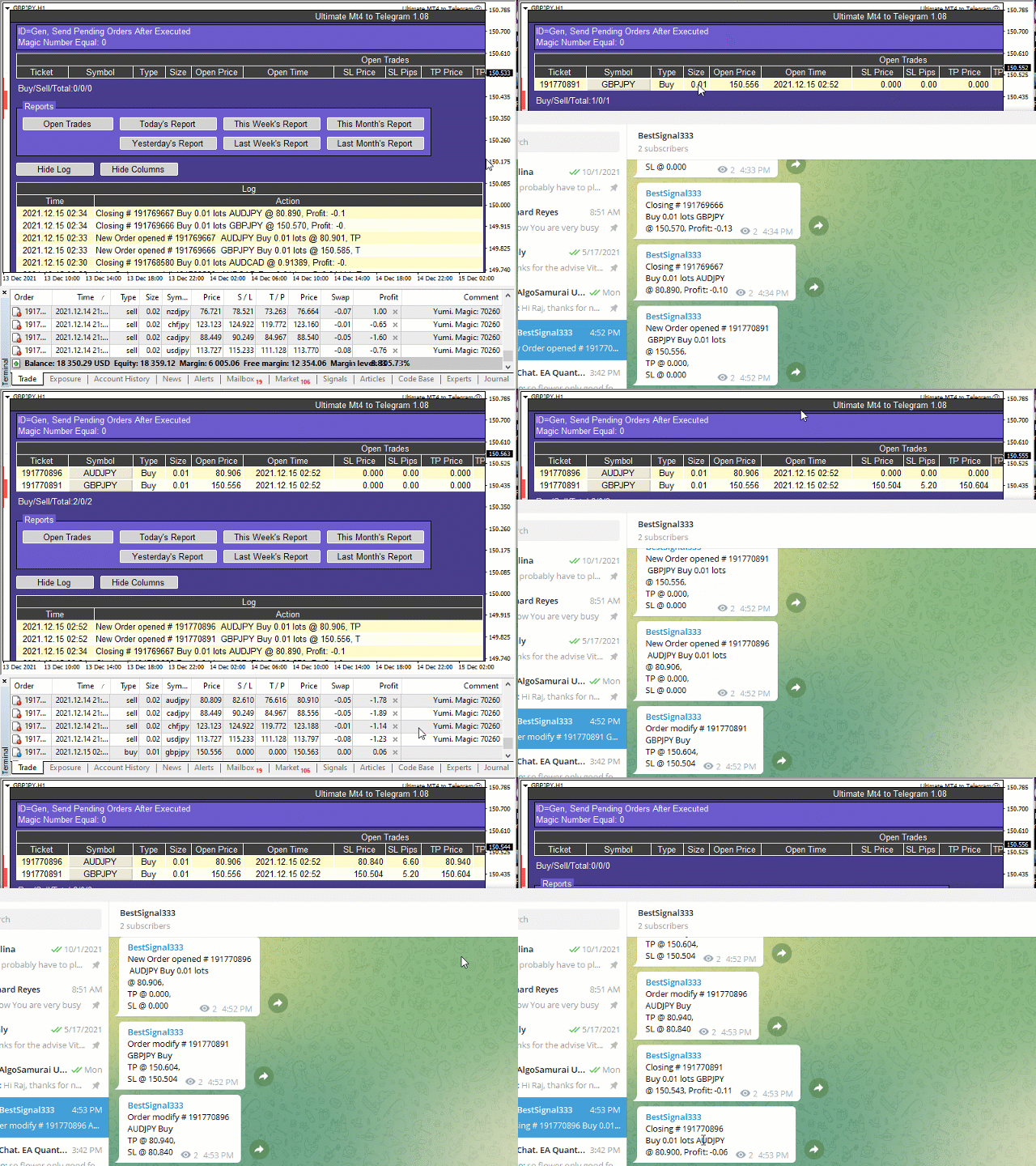
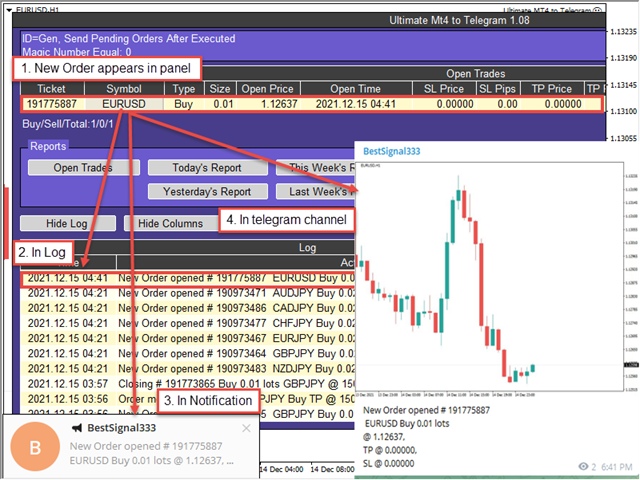
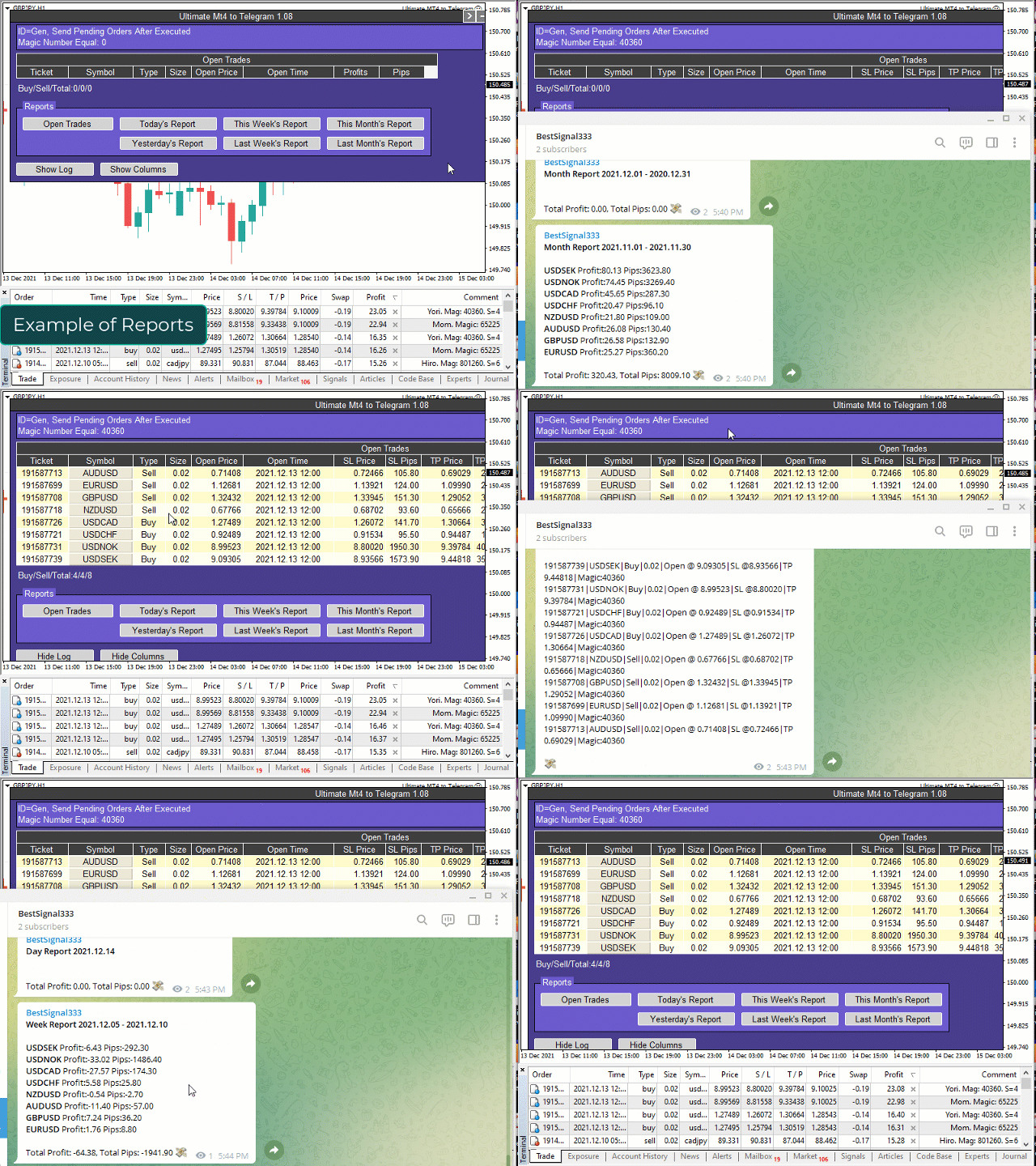
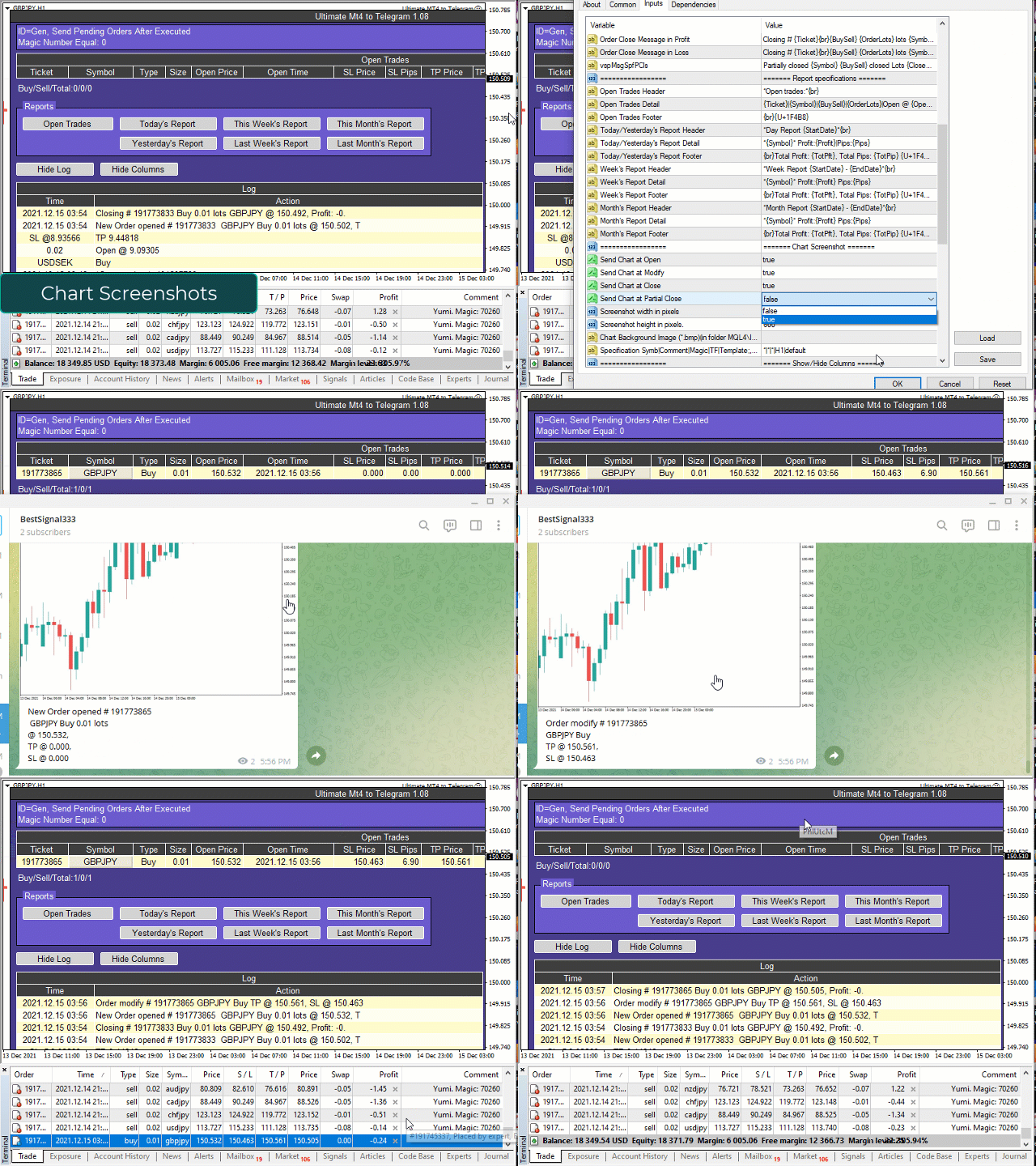
Ultimate MT5 to Telegram (UMT) sends controlled trades (via symbol, magic, comment) to your telegram channel. It sends open and closed trades, including pending orders and TP/SL modifications, along with chart screenshots, to any telegram channel. Additionally, you can send trade reports of open trades and summary profit/pip reports for day, week, or month. You can customize the design of the trade actions or reports with variables and emoticons. 

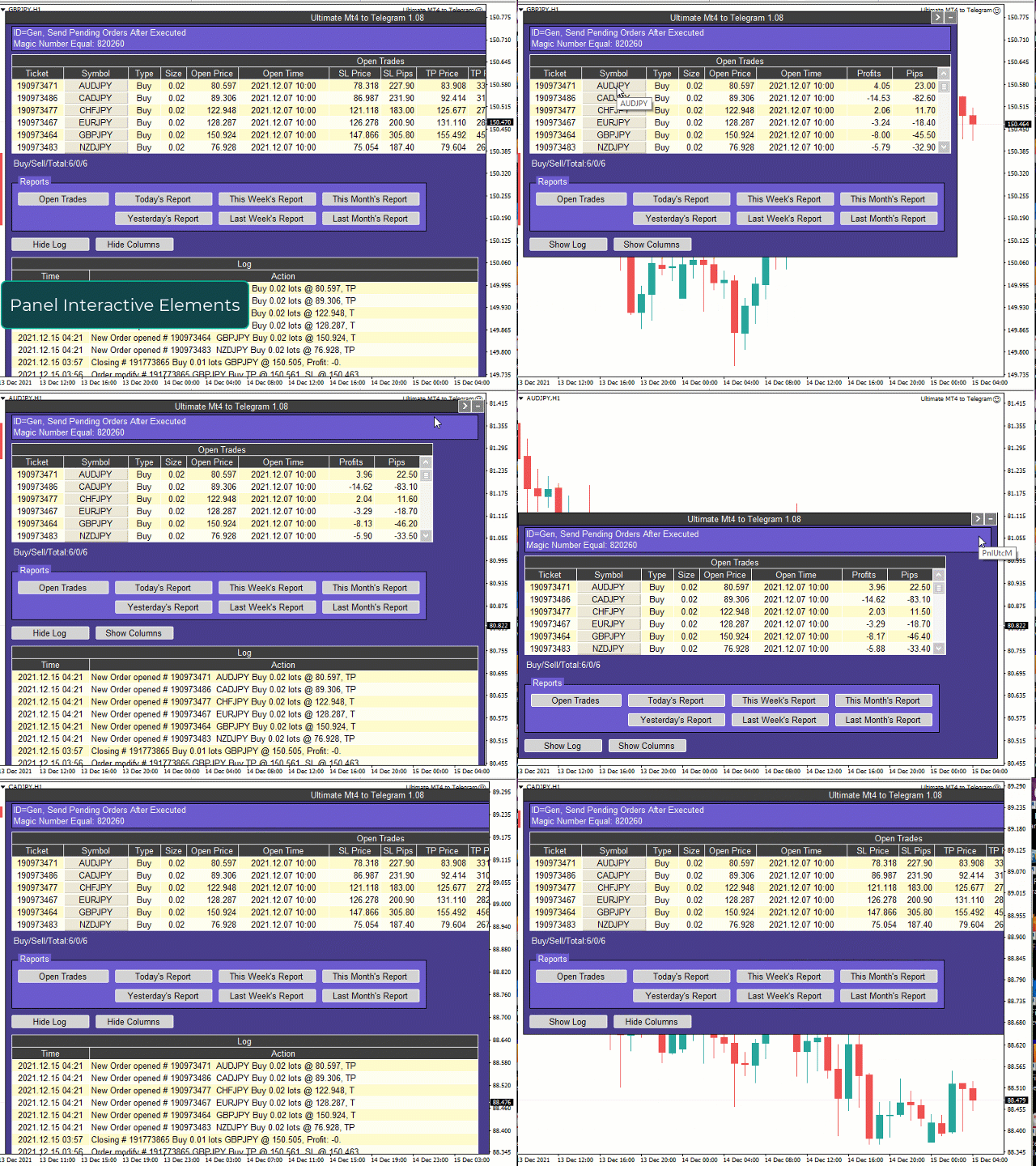
A beautiful panel allows you to visualize all the controlled open trades in useful trade information columns, along with a complete log, and ability to generate any type of report. 

MT4 version here. To test our public channel version, which doesn't need any telegram setup instructions so you can quickly see what the program can do, click here

For more detailed instructions, inputs and variables, click here

Setup Instructions: 

  1. Open your Telegram APP and search for "BotFather"
  2. Type /start and click/type /newbot to create a new bot
  3. Give your bot a nickname and username (e.g., nickname: Bestsignal and username: Bestsignalbot <-- username has to be ended by 'bot').
    Congratulations! You have created your Telegram bot
  4. Save your bot API token (e.g. 787517015:AAFnbcZYxx_iXAdRGrZD1W8bsSF5Xr_FmQ0) to your notepad. You will need it for step 8. 
  5. If you don't have it already, create the channel or group to where you will send your signals and reports
  6. Open the channel/group Info, then Manage, Add Administrators, type the bot username, and click Save
  7. In MT4, go to options/"Expert Advisors" and add the URL: https://api.telegram.org
  8. Add the EA to chart & At configuration paste the Telegram API Token, copied from step 4. After pasting number, make sure you press OK on the screen before continuing onto step 9. 
  9. Go to telegram channel and write "/ID" and send; if everything is ok, you should receive an answer with the Chat ID (a number). Copy that number.  
  10. In MT4, click on smiley face of EA, and paste the ID in the EA parameter, "List of Telegram Channel ID".  Press OK. 

General Options:

  • Telegram API Token (bot) - for token ID (step 5 above)
  • List of Telegram Channel ID - for channel ID (step 14 above)
  • Telegram User (optional) - telegram username without @ (e.g., Bestsignal333bot).  If set, the EA answers only to commands by this user. 
  • Id - Allows multiple instances of UMT to run on different charts
  • Send Pending Order After Executed (true/false) - self-explanatory
Symbol Name Options:
  • Ability to remove prefix or suffix characters and match symbols
SL/TP Options:
  • Ability to indicate default SL or TP in pips, if needed
Lot Options:
  • Lot Calculation - (dropdown: Original, Fixed, Multiplier)
  • Lot Fixed - if Fixed, then put in custom lot size here (e.g., 0.01)
  • Lot Multiplier - if Multiplier, then put in multiplier here (e.g., 1 is the original lot size, 2 is double, etc)  
Message Specifications: 
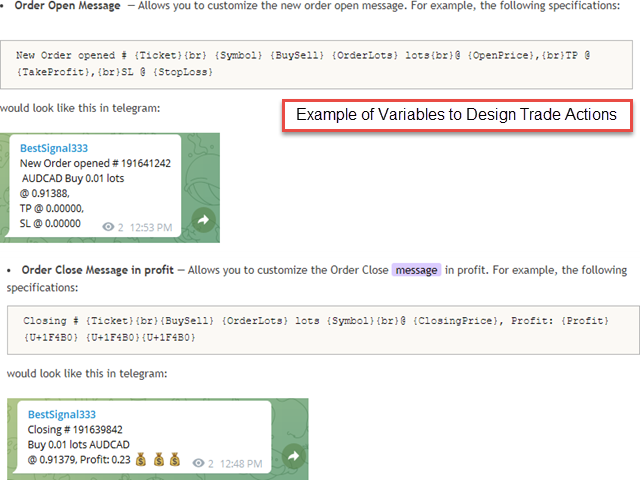
  • Allows you to indicate all the custom message specifications & variables* for the Order Open, Modify, Close in profit (lose) and partial close.
Report Specifications: 
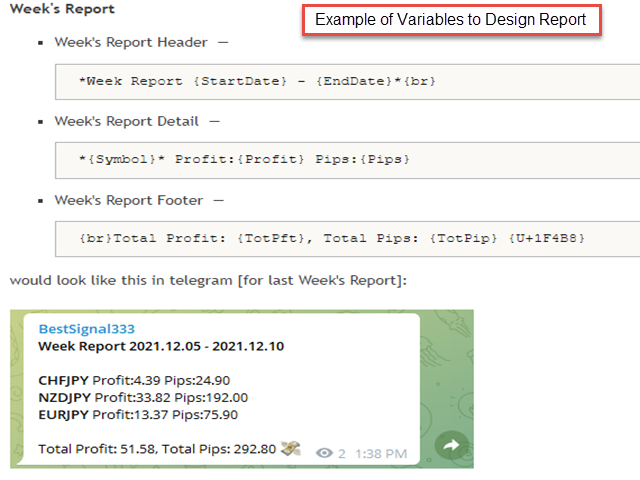
  • Allows you to indicate all the custom report specifications & variables* for Open Trades, Today/Yesterday’s Report, Week and Month Report.

Chart Screenshot: 

  • Allows you to indicate if screenshots will be sent at open, modify, or close; at what width and height in pixels; what chart background image will be included; and what symbols, comments, magic, timeframe, and template will be tagged with these screenshots.

Show/Hide Columns: 

  • Allows you to Show Always/Hide the various info columns of the controlled open trades panel. There are many useful columns, but this option allows you to hide any of them to narrow the panel. 
Filters:
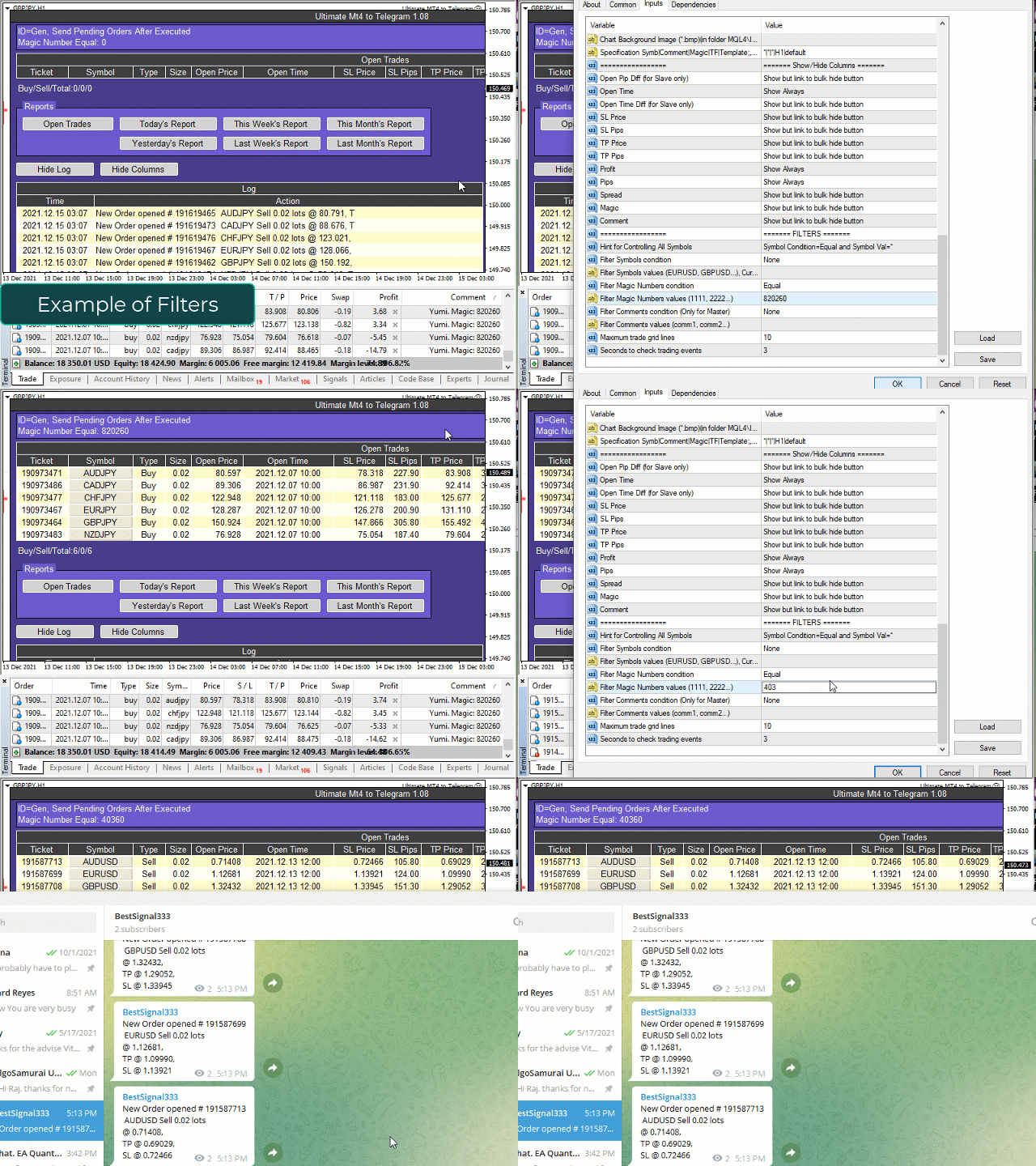
  • Filter (Symbol, Magic Number, Comment) — With dropdown menu: None, Equal, Not Equal, Contain, Not Contain. These filters allow you to include (exclude) specific symbols, magic numbers, comments, or parts of them. For example, if Symbol contains USD, you will control all USD based symbols. If Magic Number equals 80260, 40260, you will manage only these magic numbers.
For more detailed instructions, inputs and variables, click here
Рекомендуем также
One Click Trader  is a tool designed for MetaTrader 4 platform, which enables you to take your trading to the next level. It enables you to open, manage and close your trades in simple an efficient way by just one click of your mouse button. "-"   ,  "+"  change OCT window size  Up arrow minimizes the OCT panel Down arrow maximizes the OCT panel Right arrow displays the next panel with additional features Left arrow hides the panel with additional features Red  SELL  button enables you to open s
Trade Control Panel
Jerry Jilun Anak Liban
Trade Control Panel Function Normal One Click Function Close All Close All Profit Close All Loss Close All Pending Order Close All Sell Close All Buy Advance One Click Function 1.  Close Partial Lot Sell by Percent It will help you partial close for all open position by desire percent you wanted. No longer partial close one by one for every open position Manual input for desire percent 2. Close Partial Lot Buy by Percent It will help you partial close for all open position by desire percent
Утилита для управления открытыми позициями и отложенными ордерами. Встроенный трейлинг стоп имеет пять режимов и семь инструментов. Есть виртуальный стоп лосс и виртуальный тейк профит, которые можно свободно передвигать по графику. С помощью встроенного симулятора торговли, вы можете проверить, как работает советник в тестере стратегий. Руководство к советнику UTralVirtualMT5 можно найти в разделе "Обсуждение". В тестере МТ5, ручное передвижение виртуальных линий SL и TP по графику не работает
Добрый день, уважаемые трейдеры! Я ваш помощник в торговле. Кратко скажу, а затем расскажу о моих сильных сторонах: Я специализируюсь на управлении вашим портфелем, и независимо от того, с какой стороны вы открываете ордер, я могу немедленно добавить для вас разумные стоп-лоссы и скользящие стопы. 2. Я могу помочь вам избежать спекуляции и поспешных действий, устраняя с корня слабость человеческой природы, которая не позволяет придерживаться принципов. 3. Я отправлю вам уведомление на MT5 - кли
Pending Orders Grid Complete System   opens any combination of Buy Stop, Sell Stop, Buy Limit and Sell Limit pending orders and closes all existing pending orders. Only one time of the pending order at the same time!!! You will have a possibility to put a legitimate   Open Price   for the first position in the grid. Usually it should in the area of Support/Resistance lines. You just need to drop this script on the chart of a desired currency pair. Input Parameters Before placing all pending ord
Этот экспертный советник отслеживает все открытые позиции по всем символам в MetaTrader 5. Как только вручную устанавливается или изменяется уровень Stop Loss (SL) или Take Profit (TP) на любой позиции, советник автоматически применяет это значение ко всем другим открытым позициям , независимо от символа или типа ордера (Buy/Sell). Это обеспечивает синхронизацию уровней SL и TP по всему счёту. Идеально подходит для мобильного трейдинга с планшета или смартфона!
Talents ATR Scalper Utility (MT5) The Talents ATR Scalper Utility is a professional-grade trade execution and management tool built for MetaTrader 5. Inspired by the Biblical Parable of the Talents , this utility is designed to help traders multiply their potential with precision risk control, one-click simplicity, and advanced automation. Whether you’re scalping forex, gold, or indices, this tool delivers speed, consistency, and confidence. Key Features One-Click Trade Preview Click below price
This Expert Advisor (EA) for MetaTrader 5 (MT5) has been designed to automatically manage Stop Loss (SL) and Take Profit (TP). Main Features Automatic Detection of Manual Positions : Monitors new manual positions without SL/TP and applies the configured rules Multiple Orders : Opening of multiple orders under the same conditions as the original position Hidden SL/TP : The hidden mode allows creating SL/TP invisible to your broker  Equity Protection": Allows defining a threshold for the accou
T Manager, the ultimate trade management solution designed by traders for traders. If you are searching for a simple and efficient trade panel, trade manager, or trade assistant, you are at the right place.   The market contains a diverse number of those tools , but this one is designed by traders for traders . I designed this tool, and I am using it daily. Take my advice and stop buying tools blended with un-useful features that you will never use,   T Manager provides you with the essential y

AW Metatrader to Telegram MT5
AW Trading Software Limited
5 (1)
Автоматизированная система для отправки уведомлений, чтобы ни один из ваших подписчиков не пропустил события о вашей торговле из вашего торгового терминала. Утилита, которая отправляет уведомления в мессенджер Telegram о любых торговых операциях на вашем счете.   Пошаговая инструкция по подключению утилиты к каналу в Телеграм ->   ЗДЕСЬ  / MT4 -> ЗДЕСЬ Преимущества: Легкая настройка и подробная инструкция,  Возможность отправки регулируемых скриншотов, Настраиваемый текст уведомлений с использов
Копир->Удобное и быстрое взаимодействие с интерфейсом, пользователи могут использовать его сразу       ->>>> Рекомендуется использовать на компьютерах Windows или VPS Windows Функции: Разнообразные и персонализированные настройки копирования сделок: 1. Различные режимы лота могут быть установлены для различных источников сигналов. 2. Различные источники сигналов могут быть установлены для прямого и обратного копирования сделок. 3. Сигналы могут быть установлены с комментариями. 4. Следует ли ка
Chart Manager — органайзер рабочего пространства с несколькими графиками для MetaTrader 5. Он размещает открепляемые окна графиков вокруг терминала в гибкой сетке — позволяя отслеживать несколько символов и таймфреймов без ручного изменения размеров и позиционирования каждого окна. Настройте рабочее пространство один раз и сосредоточьтесь на рынке. Подробная статья со скриншотами: Chart Manager — полное руководство Для индикаторных сигналов и мультисимвольного скрининга смотрите Symbol Screener
Automatic TP and SL
Dushshantha Rajkumar Jayaraman
TradeGuard    by Chart Walker TradeGuard is a MT5 Expert Advisor (EA) designed to enhance your trading experience by automating key aspects of trade management. This EA excels in efficiently managing Take Profit (TP) and Stop Loss (SL) levels, offering a seamless and intelligent approach to trailing stops. One of TradeGuard's standout features is its Smart Trailing Stop, which dynamically adjusts the trailing distance based on market conditions. This adaptive approach helps maximize profits dur
Возможности: быстрое открытие/закрытие сделок автоматическое закрытие сделок по прибыли/убытку показывается количество сделок и общий профит по Инструменту Быстрое открытие сделок: указываем размер Лота указываем StopLoss/TakeProfit в пунктах (если указать 0, то не используется) указываем проскальзывание указываем Magic (если необходимо) указываем комментарий (если необходимо) Возможности быстрого открытия: быстро открыть Buy быстро открыть Sell быстро закрыть ВСЕ открытые ордера по текущему
[Target currency pair / time] [EURUSD/15M] Recommended. Variable lot MT5EA for compound interest operation! [About EA operation] After purchasing an EA, it is recommended to operate with a real account after operating with a demo account for a certain period of time. [About kikyo/logic overview] Kikyo is an EA that supports EURUSD/15M. Adopts a variable lot system that can easily realize compound interest operation according to the amount of funds (the default is a fixed lot. Please change
Don't want to risk or loose your personal trading account or prop trading firm account because of a simple Margin Call or exceeded Loss Limit? Then this Utility Expert Advisor is the solution for you! This Expert Advisor monitors your account Equity or Balance or even both! If the Equity and/ or Balance fall under your defined stop limits, the EA closes all of your positions and keeps you so on track. Options and Variables: Monitored Values: Choose which values should get monitored Equity: if
Копировщик сделок через   Telegram     канал.  Поможет моментально публиковать Вашу торговлю в   Телеграм   канал или копировать сделки из   Telegram     канала. Утилита может работать в двух направлениях на примем сигналов в МТ5 и передачу сигналов в   Телеграм . Больше никаких пропущенных сделок  Нет больше паники Управление капиталом Простота использования DEMO  https://www.mql5.com/ru/market/product/54083 Вы можете найти ей применение для: копирования собственных сделок через   Telegram    
Boost your forex profits with Blues Protector, an advanced MQL5 Expert Advisor designed for MetaTrader 5. This automated trading bot dynamically manages your stop-loss levels to secure gains and reduce risks. Blues Protector EA - User Manual   (For MT5 - Ready-to-Use EX5 File)   1. What This EA Does    The Blues Protector EA automatically secures your profits by smartly adjusting stop-loss levels when your trade reaches a predefined profit level. It works silently in the background, protecting
Time saving and fast execution Whether you’re traveling or sleeping, always know that Telegram To MT5 performs the trades for you. In other words, Our   Telegram MT5 Signal Trader  will analyze the trading signals you receive on your selected Telegram channels and execute them to your Telegram to MT5 account. Reduce The Risk Telegram To Mt5   defines the whole experience of copying signals from   Telegram signal copier to MT5 platforms. Users not only can follow all instructions from the signal
Утилита TELEGRAM BROADCAST помогает моментально публиковать Вашу торговлю в Телеграм-канал. Если Вы давно хотели создать свой Телеграм-канал с ФОРЕКС сигналами, то это то, что Вам нужно.  ВНИМАНИЕ. Это ДЕМО версия, она имеет ограничения - отправка сообщений не чаще чем 1 раз в 300 секунд  ПЛАТНАЯ версия:  https://www.mql5.com/en/market/product/46865 https://t.me/moneystrategy_mql TELEGRAM BROADCAST может отправлять сообщения: Открытие и закрытие сделок; Выставление и удаление отложенных орд
FREE
Close ALL OPEN TRADES on the dot! Set the exact day and time, click the START button and wait until it closes all trades. ========================================== INPUTS (Check screenshot for reference): Closing type:   Set to specify if you wanted to close all of the trades on your account or just the trades under the current chart symbol. Magic number:   Leave it to 0 if you want to close all trades. Set to specific magic number if you only want to close trades under that magic number. This
This utility sends notification to trader’s MT5 (for MT4 version, checkout this link ) mobile app, to remind traders about their open positions. Super useful for part time traders to keep track and not forget any positions. To turn on notification, please visit   this link   (https://www.metatrader4.com/en/trading-platform/help/setup/settings_notifications) Features Keep track on open orders (pending orders, running orders) Customize time to send notification Customize notification interval (se
Общие сведения Данная торговая панель предназначена для быстрой и удобной торговли в один клик. Создавался продукт для частичной автоматизации своей личной ручной торговли  https://www.mql5.com/ru/signals/1040299?source=Site+Profile+Seller Советник имеет ряд возможностей, а именно: Открытие BUY или SELL ордеров. SL выставляется ниже (выше)  минимальной (максимальной) цены, задаваемых в параметрах количества свечей. Размер TP рассчитывается в соотношении от размера SL (по умолчанию 0.618). Выстав
Этот инструмент поможет вам закрыть все открытые ордера одним щелчком мыши, просто нажмите «Закрыть все». Если вы хотите закрыть только прибыльные ордера, нажмите кнопку «Закрыть прибыльные», после нажатия все плавающие ордера будут закрыты; Если вы хотите закрыть только ордера с плавающими убытками, нажмите кнопку «Закрыть убыточные», после нажатия все ордера с плавающими убытками будут закрыты.
Утилита для ручной торговли с помощью "горячих клавиш". Позволяет моментально реагировать на текущую ситуацию на рынке. "Горячие клавиши" можно назначить на открытие/закрытие позиций по типу, открытие/закрытие всех позиций на текущем графике и удаление всех ордеров на текущем графике. Также можно задать "горячие клавиши" на пять предопределенных торговых объемов и переключаться между ними в зависимости от ситуации без необходимости периодически менять объем вручную. Также возможно задать автомат
Capture Spikes and hold for a long time. Let the Trailing stop follow the Price into profit. Not for Both Boom and Crash, Just for Boom Only.  Once it spots a Setup, the EA will enter and you do not need to worry much about drawdown, this EA was tested on a $100 account and maximum drawdown was 9%, with the maximum consecutive losses recorded of $36. Those who ever bought from me know that I provide support promptly if you want to set up or need a Customized approach.  Please note that the EA
HYT utility
Sergey Batudayev
HYT (Help Your Trading) — это инструмент, который поможет вам усреднить ваши убыточные позиции, используя две основные техники: Стандартное усреднение. Хеджирование с последующим открытием позиций в направлении тренда. Этот инструмент позволяет разрулить несколько позиций, открытых в разных направлениях как на покупку, так и на продажу. HYT позволяет автоматически рассчитать размер следующей позиции, цену ордера, направление для усреднения и закрытия позиции с заданным уровнем тейк-профита. Этот
Telegram Broadcast MT5
Volodymyr Hrybachov
3.67 (3)
Утилита TELEGRAM BROADCAST помогает моментально публиковать Вашу торговлю в Телеграм-канал. Если Вы давно хотели создать свой Телеграм-канал с ФОРЕКС сигналами, то это то, что Вам нужно.  TELEGRAM BROADCAST может отправлять сообщения: Открытие и закрытие сделок; Выставление и удаление отложенных ордеров; Модификация стоп-лосс и тейк-провит (последний ордер); Срабатывание стоп-лосс и тейк-провит; Активация и удаление отложенного ордера: Отправка отчетов о торговле; Отправка сообщения при пополнен
Торговая панель,Ручная торговля,Управление ордерами,Управление рисками,Торговый менеджер,Ассистент трейдера,Стоп лосс,Тейк профит,Трейлинг стоп,Скальпинг JoOrderTrade Plus – Продвинутая торговая панель для MT5 Два чрезвычайно важных уведомления Для корректной работы инструмента ОБЯЗАТЕЛЬНО необходимо включить опцию «Algo Trading» в настройках MetaTrader 5. Без этой активации панель работать не будет. Панель JoOrderTrade Plus может иметь некоторые небольшие баги на отдельных кнопках для определ
MultiChart Pro
Pablo Filipe Soares De Almeida
MultiChart Pro – Инструмент управления графиками для MetaTrader 5 Этот советник (EA) позволяет автоматизировать открытие и настройку графиков в MetaTrader 5. Поддерживает настройку до четырех графиков с указанными таймфреймами и шаблонами, включая офлайн-графики. Функциональность Открытие графиков: Открывает до трёх дополнительных графиков (например, D1, M1, M15) и один офлайн-график (например, 10 секунд), а также настраивает текущий график (например, M5). Применение шаблонов: Применяет пользова
С этим продуктом покупают
Farmed Hedge Yield Farming - Professional Pair Trading Dashboard (Manual - Hybrid - Semi/Automated EA) VERSION 3 - WILD HARVEST UPDATE Trading Approach: - Manual Trading: Primary focus - Auto Pilot: Optional supplementary feature - Full Automation: Not the main purpose Recommended Timeframe: H1-H4 DEMO VERSION Download the free demo to test functionality. Use Strategy Tester with Visual Mode to see how it works. VERSION 3 - NEW FEATURES Summary Dashboard (SRA Panel) - Quick pair selection w
YuClusters
Yury Kulikov
4.93 (43)
Внимание: Ознакомиться с работой программы можно с помощью бесплатной версии  YuClusters DEMO . YuClusters это профессиональная система анализа рынка. Для трейдера открываются уникальные возможности анализа потока ордеров, объемов торговли, движения цены используя различные графики, профили, индикаторы, графические объекты. YuClusters оперирует данными на основе ленты сделок или тиковой информации, в зависимости от того, что доступно в котировках финансового инструмента.  YuClusters позволяет с
Ultimate Extractor - Professional Trading Analytics for MT5 *****this is the local HTML version of Ultimate Extractor. Check out Ultimate Extractor Cloud on mql5 for the Cloud version****** Ultimate Extractor transforms your MetaTrader 5 trading history into actionable insights with comprehensive analytics, interactive charts, and real-time performance tracking. What It Does Automatically analyzes your MT5 trading history across all Expert Advisors and generates detailed HTML reports with inte
The product will copy all telegram signal to MT5 ( which you are member) , also it can work as remote copier.  Easy to set up, copy order instant, can work with almost signal formats, image signal,  s upport to translate other language to English Work with all type of channel or group, even channel have "Restrict Saving Content", work with  multi channel, multi MT5 Work as remote copier: with signal have ticket number, it will copy exactly via ticket number. Support to backtest signal. How to s
Custom Alerts AIO: Универсальный сканер рынка — Без настройки Обзор Custom Alerts AIO — это самый быстрый и простой способ отслеживать рыночные сигналы в реальном времени на множестве инструментов без дополнительной настройки и без необходимости покупать другие продукты. В состав входят все необходимые индикаторы от Stein Investments, что делает этот инструмент идеальным решением «всё в одном» для трейдеров, ценящих простоту и эффективность. Просто установите на график и сразу получайте сигнал
Telegram To MT5 Receiver
Levi Dane Benjamin
4.53 (15)
Копируйте сигналы из любого канала, участником которого вы являетесь (в том числе частного и ограниченного), прямо на свой MT5. Этот инструмент был разработан с учетом потребностей пользователей и предлагает множество функций, необходимых для управления и мониторинга сделок. Этот продукт представлен в простом в использовании и визуально привлекательном графическом интерфейсе. Настройте свои параметры и начните использовать продукт в течение нескольких минут! Руководство пользователя + Демо  |
Active Lines
Yury Kulikov
5 (2)
Внимание :  Демо-версию для ознакомления и тестирования можно скачать здесь .  Демо-версия не позволяет совершать торговые операции и может быть запущена только на одном графике. Active Lines - мощный профессиональный инструмент для работы с линиями на графике. Active Lines предоставляет широкий набор действий для событий, связанных с пересечением ценой линий. Например: оповестить, открыть/модифицировать/закрыть позицию, разместить/удалить отложенные ордера. Active Lines позволяет к одной линии
Footprint Chart Pro — Professional Order Flow EA for MetaTrader 5 Version 6.34 | Professional tool for real traders | Institutional-Grade Visualization DEMO USERS - PLEASE SELECT EVERY TICK / REAL TICK WHEN TESTING AND YOU HAVE DOWNLOADED HISTORICAL DATA. IF YOU SEE A WAITING SCREEN AND IT IS NOT DOWNLOADING, IT MEANS YOU HAVE LOW HISTORICAL DATA. TRY 1 MIN AND 5 MIN FIRST ON 1 DAY DATA. ONE DAY DATA SHOULD BE THE NEWEST AND MOST CURRENT DATE. PLEASE WAIT UNTIL THE MARKET HAS ROLLED OVER PERIOD
Представляем последнюю версию Dynamic Fibonacci Grid Dashboard для MT5. Теперь с множеством новых функций, этот обновлённый дашборд полностью меняет ваш торговый опыт и позволяет увидеть рынок и ценовое движение с совершенно иной перспективы. Откройте новые возможности благодаря одновременному анализу нескольких таймфреймов и множества инструментов. Удобный интерфейс для ручной торговли и управления позициями, а также расширенные возможности применения предопределённых автоматических стратегий.
The product will copy all  Discord  signal   to MT5   ( which you are member  ) , also it can work as remote copier.  Easy to set up. Work with almost signal formats, support to translate other language to English Work with multi channel, multi MT5. Work with Image signal. Copy order instant, auto detect symbol. Work as remote copier: with signal have ticket number, it will copy exactly via ticket number. How to setup and guide: Let read all details about setup and download Discord To MetaTrader
EasyInsight AIO MT5
Alain Verleyen
4.92 (12)
EASY Insight AIO – Всё-в-одном для умного и простого трейдинга Обзор Представьте, что вы можете просканировать весь рынок — Форекс, золото, криптовалюты, индексы и даже акции — всего за несколько секунд, без ручного просмотра графиков, сложной установки или настройки индикаторов. EASY Insight AIO — это ваш идеальный инструмент экспорта для трейдинга с поддержкой искусственного интеллекта. Он предоставляет полный снимок рынка в одном аккуратном CSV-файле — готовом к мгновенному анализу в ChatGP
GRat Crypto
Ivan Titov
4.5 (2)
Торгуйте на криптобиржах в МТ5! GRat_Crypto — это инструмент для ручной и автоматической торговли, в т.ч ЛЮБЫМИ имеющимися советниками, ЛЮБОЙ криптовалютой на самых популярных криптобиржах в привычной среде MT5 в режиме 24/7. Возможности 1. Доступны ВСЕ инструменты 9 наиболее популярных криптобирж: Binance, BingX, Bybit, Coinbase, CoinEx, Kraken, KuCoin, MEXC  и OKX . 2. Возможность выставлять ЛЮБЫЕ доступные в MT5 типы ордеров, как рыночные, так и отложенные, модифицировать ордера и позиции, у
SSFx Ultimate Hedge Manager EA Описание: SSFx Ultimate Hedge Manager EA — это вершина инструментов для управления сделками на платформе MT5. Объединяя расширенные функции управления сделками из SSFx Hedge Manager EA с комплексными возможностями тестирования стратегий из SSFx Manual Backtester, этот продукт предоставляет трейдерам неограниченные возможности для оптимизации и совершенствования своих торговых стратегий. Этот эксперт советник (EA) ориентирован на управление рисками с использованием
VOLUME BUBBLES ORDERFLOW FOOTPRINT PROFESSIONAL Expert Advisor for MetaTrader 5 Complete Feature Documentation Introduction: Volume Bubbles OrderFlow Footprint Professional is an advanced order flow visualization tool designed for the MetaTrader 5 platform. It provides institutional-grade market analysis through real-time volume bubbles visualization, volume profiling, and sophisticated order flow analysis. This Expert Advisor transforms raw market data into actionable trading intelligence, hel
Trade Copier for MT5   Supports multiple master and slave terminals   Local operation without DLL usage   Optional slow monitoring mode   Compatible with prop firm and personal accounts   IMPORTANT – SYMBOL SUFFIX & SYMBOL MAPPING If your Master and Slave accounts are on different brokers, symbol suffixes may differ (e.g. XAUUSD vs XAUUSD.m). In such cases, trades will NOT be copied unless Symbol Mapping is configured correctly in the Expert settings. Example: XAUUSD:XAUUSD.m MT5 to MT5
Trading Chaos Expert
Gennadiy Stanilevych
5 (11)
Этот программный продукт не имеет аналогов в мире, поскольку он является универсальным "пультом управления" торговых операций, начиная от получения торговых сигналов, автоматизации входа в позиции, установки стоп-лоссов и тейк-профитов, а также трейлинга прибыли одновременно по множеству сделок в одном открытом окне. Интуитивно понятное управление экспертом в "три клика" на экране монитора позволяет полноценно использовать все его функции на разного рода компьютерах, включая планшетные. Взаимоде
Lazy Trader — это ваш личный помощник по управлению рисками, который самостоятельно находит лучшие точки входа в рынок, управляет позициями и помогает извлечь максимальную прибыль из каждой торговой идеи! Он контролирует графики от   M1 до W1 , ищет оптимальные точки входа по заданным условиям, управляет позициями без вашего участия: -  Есть идея на дневке?   Не нужно ждать, когда младшие таймфреймы нарисует вход — Lazy Trader сам все проверит и откроет все нужные позиции пока вы занимаетесь жи
Mentfx Mmanage mt5
Anton Jere Calmes
4.25 (8)
The added video will showcase all functionality, effectiveness, and uses of the trade manager. Drag and Drop Trade Manager. Draw your entry and have the tool calculate the rest. Advanced targeting and close portions of a trade directly available in tool (manage trades while you sleep). Market order or limit order on either side with factored spread. Just draw the entry, the tool does the rest. Hotkey setup to make it simple. Draw where you want to enter, and the stop loss, the tool calculates al
ManHedger MT5
Peter Mueller
4.8 (5)
THIS EA IS A SEMI-AUTO EA, IT NEEDS USER INPUT. Manual & Test Version Please TEST this product before BUYING  and watch my video about it. The price of the ManHedger will increase to 250$ after 20 copies sold. Contact me for user support or bug reports or if you want the MT4 version! MT4 Version  I do not guarantee any profits or financial success using this EA. With this Expert Advisor, you can: Implement your own Zone Recovery strategy to capitalize on trending markets. Create Grid trading s
Unlimited Trade Copier Pro - это мощный инструмент для удаленного копирования сделок между несколькими счетами MetaTrader 4/MetaTrader 5, расположенными удаленно друг от друга, по сети интернет. Это идеальное решение для провайдеров сигналов, которые хотят поделиться своей торговлей с другими трейдерами по всему миру. Один поставщик может копировать сделки на неограниченное количество счетов-получателей, а один получатель также может копировать сделки неограниченного количества провайдеров. Пост
Partial Close Expert   — это инструмент, объединяющий множество функций в одну автоматизированную систему. Этот советник поможет трейдерам эффективнее управлять позициями, предлагая различные варианты управления рисками и максимизации потенциальной прибыли. С помощью Partial Close Expert трейдеры могут установить       частичное закрытие       уровень для фиксации прибыли,       трейлинг-стоп       уровень для защиты прибыли и ограничения убытков,       точка безубыточности       уровень, гаран
Spot vs Future Arbitrage EA  is a sophisticated, fully automated Expert Advisor engineered for MT5, delivering consistent profits through pure price arbitrage on Gold (XAUUSD). Spot vs Future Arbitrage EA  Requirement - Your Broker should provide SPOT and FUTURE for trading. This EA deploys a market-neutral hedge by simultaneously opening one long position in Gold spot and one short position in Gold futures. Risk is minimized via perfect offset—market swings affect both equally—while profits a
Mt5 To InterativeBrokers Copier allows you to copy deals from MT5 account to Interactive Brokers. With this, you can run your EA strategy on a MT5 Demo/Real Account, then copy all the deals to Interactive Brokers account real time. Features: 1. Copy or Invert-Copy deals Realtime from MT5 to IB Account. 2. Synchronizing positions of both accounts periodicaly, in case any missing copying. 3. You can choose only Buy position or Sell position. Symbols Setup: General Format:  {MT Symbol} -> {IB S
Crystal Trade Manager – Advanced MT5 Risk and Trade Control Utility Overview Crystal Trade Manager (CTM) is a professional MetaTrader 5 utility designed for risk management, trade automation, and instant execution control. It provides traders with an integrated system for protecting equity, managing daily drawdowns, controlling lot sizes, and applying automation features such as automatic SL/TP, break-even, and trailing stop. The tool is suitable for manual traders, prop-firm challenge particip
Crypto Charting
Rajesh Kumar Nait
5 (5)
Crypto Charting for MT5 – Интеграция криптовалютных графиков в MetaTrader 5 Обзор Crypto Charting for MT5 предоставляет графики OHLC в реальном времени для криптовалют через WebSocket. Поддерживается автоматическое обновление истории с различных бирж прямо в MetaTrader 5. Функции Графики в реальном времени через WebSocket Автоматическое обновление исторических данных Запланированные обновления при перебоях с интернетом Поддержка всех таймфреймов MT5 OHLCV данные (Открытие, Максимум, Минимум, За
Bots Builder Pro MT5
Andrey Barinov
4.17 (6)
Это визуальный конструктор стратегий. Единственный в своем роде. Превратите свои торговые стратегии и идеи в советники, не написав ни одной строчки кода. Создавайте файлы исходного кода mql в несколько кликов и получайте полнофункциональных советников, готовых к реальной работе, тестеру стратегий и облачной оптимизации. Вариантов для тех, кто не имеет навыков программирования и не может создавать свои торговые решения на языке MQL, очень мало. Теперь с помощью Bots Builder Pro каждый может созд
Professional Order & Risk Management EA for MT5 Профессиональный инструмент управления ордерами и рисками, разработанный для трейдеров, которые стремятся к точному контролю риска, размера позиции и управления сделками. Экспертный советник предназначен для систематической и дисциплинированной торговли, предоставляя расширенные функции управления ордерами, расчёта риска и сопровождения позиций. Функции Expert Advisor Автоматический расчёт размера лота Автоматически рассчитывает размер лота на о
The  Easy Strategy Builder (ESB)  is a " Do It Yourself " solution that allows you to create a wide range of the automated trading strategies without any line of codes. This is the world’s easiest method to automate your strategies that can be used in STP, ECN and FIFO brokers. No drag and drop is needed. Just by set conditions of your trading strategy and change settings on desired values and let it work in your account. ESB has hundreds of modules to define unlimited possibilities of strategi
HotkeyTrader
Leonardo Andriulli
5 (1)
HotkeyTrader V5 – Your Ultimate Fast Trading Ally! ️ Enter the market, exit in profit – all with one key! Ever dreamed of buying, selling, setting break-even, or closing all trades with a simple keyboard shortcut or Stream Deck button? With HotkeyTrader V5, it's reality. No clicks, no distractions. Just pure speed. Description HotkeyTrader V5 is an advanced utility for manual traders, designed to simplify and execute scaling IN/OUT strategies precisely, quickly, and in a structured way
CRT Pro Trading EA Ultimate v10 - Профессиональный Сканер Паттернов Обзор CRT Pro Trading EA Ultimate v10 - это продвинутый мультисимвольный Expert Advisor, разработанный Helios Technologies, который специализируется на обнаружении и торговле паттернами CRT (Консолидация-Манипуляция-Распределение) с интеллектуальным выравниванием тренда. Этот EA объединяет концепции институциональной торговли с умным управлением сигналами для предоставления высоковероятных торговых возможностей на различных ры
Другие продукты этого автора
Ultimate Trailing Stop EA MT5
BLAKE STEVEN RODGER
4.13 (8)
This EA Utility allows you to manage (with advanced filtering) unlimited open orders (manual or EA) with 16 trailing stop methods: fixed, percent, ATR Exit, Chandelier Exit, Moving Average, Candle High Low Exit, Bollinger Bands, Parabolic, Envelope, Fractal, Ichimoku Kijun-Sen, Alligator, Exit After X Minutes or Bars, RSI and Stochastic. The trailing stop can be either real or virtual, and you can exit fully or with a partial close percent on touch or bar close.  Moreover, you can add (override
EA Schedule Launcher
BLAKE STEVEN RODGER
5 (1)
It may be true that “Time waits for no one [human],” but at least now you can control the marching time of all your robots. EA Schedule Launcher (ESL) can launch and close any number of your EAs and/or indicators at custom beginning and ending times. You save your EA and/or indicator to a template and input when to open and close them. The power to control your EAs trading time window can improve both strategy performance and terminal/computer performance. Note: EA cannot be run with the visual
Developed by Chuck LeBeau, the Chandelier Exit indicator uses the highest high / lowest low -/+ a multiple of the ATR value to draw trailing stop lines (orange under buys, magenta over sells) that advance with the trend until the trend changes direction.The value of this trailing stop is that it rapidly moves upward in response to the market action. LeBeau chose the chandelier name because "just as a chandelier hangs down from the ceiling of a room, the chandelier exit hangs down from the high
FREE
This trade copy utility allows you to instantly and seamlessly replicate and synchronize unlimited orders from multiple master accounts to multiple slave accounts on your local machine. You can create custom channels (or portfolios) with advanced filtering capabilities to copy from multiple master accounts to multiple slave accounts. Moreover, you can tailor these channels with a range of lot sizing and trade condition options to ensure that copied trades outperform the original source. You can
ATR Exit MT5
BLAKE STEVEN RODGER
4.75 (4)
The ATR Exit indicator uses the candle close + ATR value to draw trailing stop lines (orange under buys, magenta over sells) that advance with the trend until the trend changes direction. It uses a multiple of the Average True Range (ATR), subtracting it’s value from the close on buy, adding its value to the close on sell. Moreover, the trailing stop lines are generated to support the order’s trend direction (long or short):  In an upward trend, the long trailing stop line (orange line under bu
FREE
Ultimate Partial Profit EA
BLAKE STEVEN RODGER
4.67 (3)
This EA Utility delivers a robust solution for managing an unlimited array of open orders, both manual and automated. It enables customizable partial profit levels utilizing metrics such as pips, ratios, ATR (Average True Range), and profit amounts for precise trade management. The utility features an advanced on-screen display, offering clear visualization of all orders and their profit levels to enhance strategic decision-making and control. To evaluate its performance and interface, the EA s
Ultimate Trailing Stop EA
BLAKE STEVEN RODGER
4.33 (15)
This EA Utility allows you to manage (with advanced filtering) unlimited open orders (manual or EA) with 16 trailing stop methods: fixed, percent, ATR Exit, Chandelier Exit, Moving Average, Candle High Low Exit, Bollinger Bands, Parabolic, Envelope, Fractal, Ichimoku Kijun-Sen, Alligator, Exit After X Minutes or Bars, RSI and Stochastic. The trailing stop can be either real or virtual, and you can exit fully or with a partial close percent on touch or bar close.  Moreover, you can add (overrid
Ultimate MT5 to Telegram Public Channel sends controlled trades (via symbol, magic, comment) to a public telegram channel. It sends open and closed trades, including pending orders and TP/SL modifications, along with chart screenshots, to this public telegram channel. Additionally, you can send trade reports of open trades and summary profit/pip reports for day, week, or month. You can customize the design of the trade actions or reports with variables and emoticons.  A beautiful panel allows
FREE
Chandelier Exit
BLAKE STEVEN RODGER
4 (4)
Developed by Chuck LeBeau, the Chandelier Exit indicator uses the highest high / lowest low -/+ a multiple of the ATR value to draw trailing stop lines (orange under buys, magenta over sells) that advance with the trend until the trend changes direction.The value of this trailing stop is that it rapidly moves upward in response to the market action. LeBeau chose the chandelier name because "just as a chandelier hangs down from the ceiling of a room, the chandelier exit hangs down from the high
FREE
The Candle High Low Exit indicator uses the highest high and the lowest low of a range to draw trailing stop lines (orange under buys, magenta over sells) that advance with the trend until the trend changes direction.  Moreover, the trailing stop lines are generated to support the order’s trend direction (long or short):  In an upward trend, the long trailing stop line (orange line under buy) appears and advances upward until the close crosses under the line.  In a downward trend, the short trai
FREE
Ultimate MT4 to Telegram (UMT) sends controlled trades (via symbol, magic, comment) to your telegram channel. It sends open and closed trades, including pending orders and TP/SL modifications, along with chart screenshots, to any telegram channel. Additionally, you can send trade reports of open trades and summary profit/pip reports for day, week, or month. You can customize the design of the trade actions or reports with variables and emoticons.  A beautiful panel allows you to visualize all t
Zone Guardian is an advanced Expert Advisor (EA) designed to automate trade management. This EA manages trades within specified risk parameters using automatic lot calculation and multi-layered trade activation. It supports up to 5 layers within the entry zone, each with customizable risk percentages. Visual aids on the chart display entry zones, stop loss (SL), and take profits (TP), ensuring easy level adjustments. The EA adapts to market conditions by closing trades at each TP and moving SLs
Ultimate MT4 to Telegram Public Channel sends controlled trades (via symbol, magic, comment) to a public telegram channel. It sends open and closed trades, including pending orders and TP/SL modifications, along with chart screenshots, to this public telegram channel. Additionally, you can send trade reports of open trades and summary profit/pip reports for day, week, or month. You can customize the design of the trade actions or reports with variables and emoticons.  A beautiful panel allows
FREE
ATR Exit
BLAKE STEVEN RODGER
4.63 (8)
The ATR Exit indicator uses the candle close + ATR value to draw trailing stop lines (orange under buys, magenta over sells) that advance with the trend until the trend changes direction. It uses a multiple of the Average True Range (ATR), subtracting it’s value from the close on buy, adding its value to the close on sell. Moreover, the trailing stop lines are generated to support the order’s trend direction (long or short):  In an upward trend, the long trailing stop line (orange line under bu
FREE
The Candle High Low Exit indicator uses the highest high and the lowest low of a range to draw trailing stop lines (orange under buys, magenta over sells) that advance with the trend until the trend changes direction.  Moreover, the trailing stop lines are generated to support the order’s trend direction (long or short):  In an upward trend, the long trailing stop line (orange line under buy) appears and advances upward until the close crosses under the line.  In a downward trend, the short trai
FREE
Visual Order Tracking
BLAKE STEVEN RODGER
5 (1)
The Visual Order Tracking (VOT) indicator makes trade history and performance metrics visible on the chart in three ways: 1) Draw History of closed and open trades with arrows, lines and trade result numbers (pips, $ profit, % profit, % change); 2) Summary Trade Panel to show open and closed trade summaries by symbol, lots, pips, profit and advanced stats; and 3)  Open Trades Panel to show open trades by Symbol Ticket, Type, Lots, Profit, pips, SL pips, StopLoss, TakeProfit, Spread, Magic, Comme
Visual Order Tracking EA
BLAKE STEVEN RODGER
5 (1)
The Visual Order Tracking (VOT) EA makes trade history and performance metrics visible on the chart in four ways: 1) Draw History of closed and open trades with arrows, lines and trade result numbers (pips, $ profit, % profit, % change); 2) Trade Manager to show Open, SL and TP levels as vivid horizontal lines with dynamic specs and partial closing options; 3)  Summary Trade Panel to show sortable table of open and closed trade summaries by symbol, lots, pips, profit and advanced stats; and 4) 
Ultimate Trade Copier
BLAKE STEVEN RODGER
5 (2)
This trade copy utility allows you to instantly and seamlessly replicate and synchronize unlimited orders from multiple master accounts to multiple slave accounts on your local machine. You can create custom channels (or portfolios) with advanced filtering capabilities to copy from multiple master accounts to multiple slave accounts. Moreover, you can tailor these channels with a range of lot sizing and trade condition options to ensure that copied trades outperform the original source. You can
Cutting-edge solution for Trend Trading with statistically robust signals! Kana Trend’s smart algorithm detects the trend on any instrument, any timeframe, and gives powerful entry signals with exit levels.  Its advanced statistics gives you deep insight as to success and profitability of its signals -- while being fully transparent on any potential for loss.  Because this is an indicator, not an EA, you cannot see it in action in visual tester if you download the Free Demo. Instead, please down
Promo price: $199 for the first 5 buyers.  Kana Trend EA is a short term, always-in-market trend trading system that shows great results on multiple symbols.  You can place this EA on any instrument without worry about missing out on a trend, for if there is one, it is bound to get it. It is always-in-market, trending and reversing into new trends, on small timeframes like H1, a difficult to accomplish feat in a noisy environment. You can place this EA on your account without worry about cat
Zone Guardian
BLAKE STEVEN RODGER
Zone Guardian is an advanced Expert Advisor (EA) designed to automate trade management. This EA manages trades within specified risk parameters using automatic lot calculation and multi-layered trade activation. It supports up to 5 layers within the entry zone, each with customizable risk percentages. Visual aids on the chart display entry zones, stop loss (SL), and take profits (TP), ensuring easy level adjustments. The EA adapts to market conditions by closing trades at each TP and moving SLs
EA Schedule Launcher MT5
BLAKE STEVEN RODGER
1 (1)
It may be true that “Time waits for no one [human],” but at least now you can control the marching time of all your robots. EA Schedule Launcher (ESL) can launch and close any number of your EAs and/or indicators at custom beginning and ending times. You save your EA and/or indicator to a template and input when to open and close them. The power to control your EAs trading time window can improve both strategy performance and terminal/computer performance. Note: EA cannot be run with the visual
Фильтр:
Нет отзывов
Ответ на отзыв