MT5 Trading Deck

5

One button. One trade. MT5 Trading Deck is a hotkey trading panel for MetaTrader 5 that turns the platform into a keyboard-driven execution cockpit. Stop loss, take profit and lot size are pre-calculated for every key; the moment you press, a market order is live on the broker.

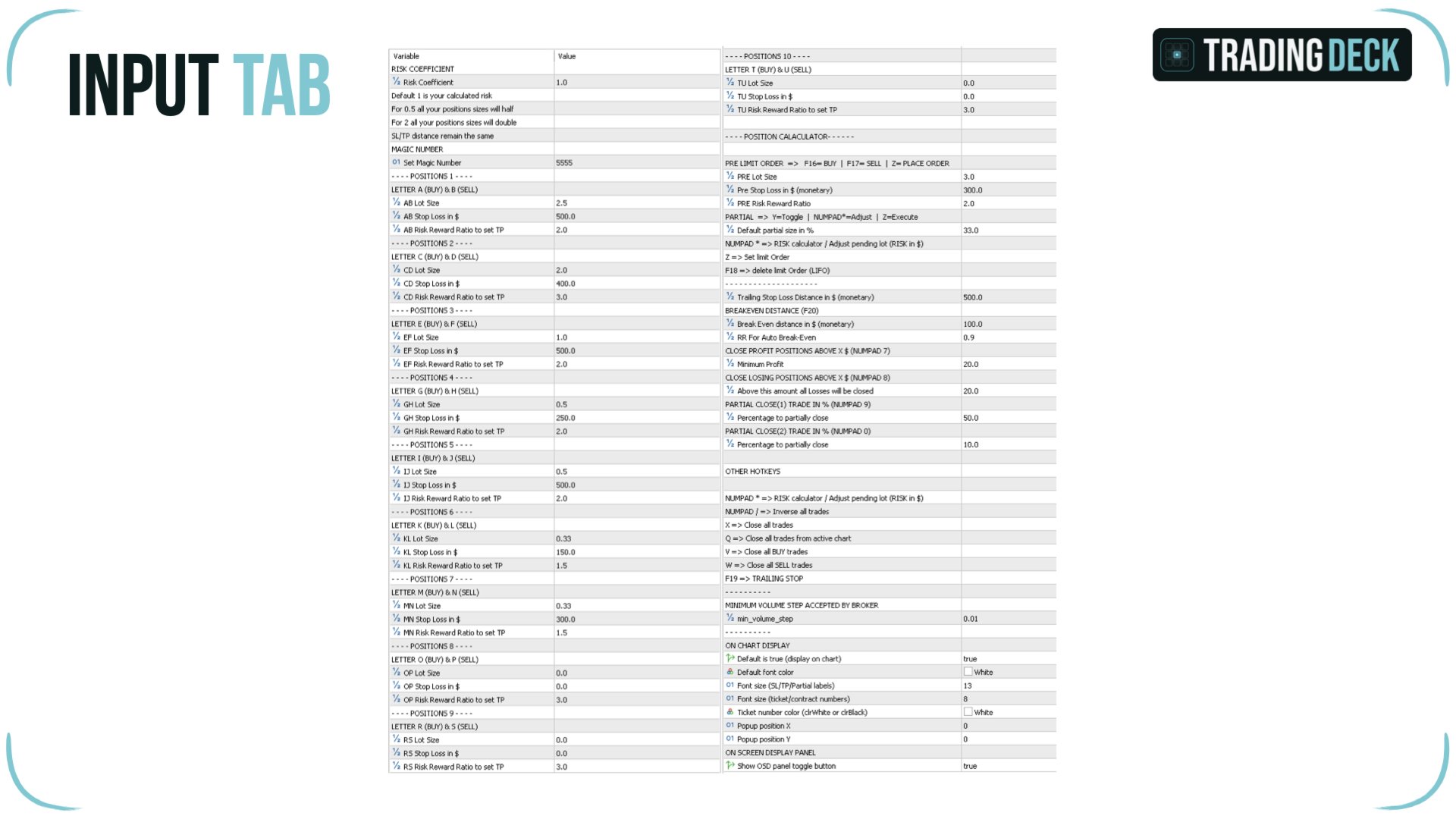
A complete technical user manual is attached in the product Comments section. It documents every input parameter, the full hotkey map, the recommended Stream Deck XL layout, and the advanced workflows for Pre-Limit orders, partial closes and the inverse-trade feature. Read it before purchase if you want the full technical picture.

Why Trading Deck stands apart

Two design choices separate this hotkey trading panel for MT5 from every other one-click EA and position size calculator on the MQL5 Market.

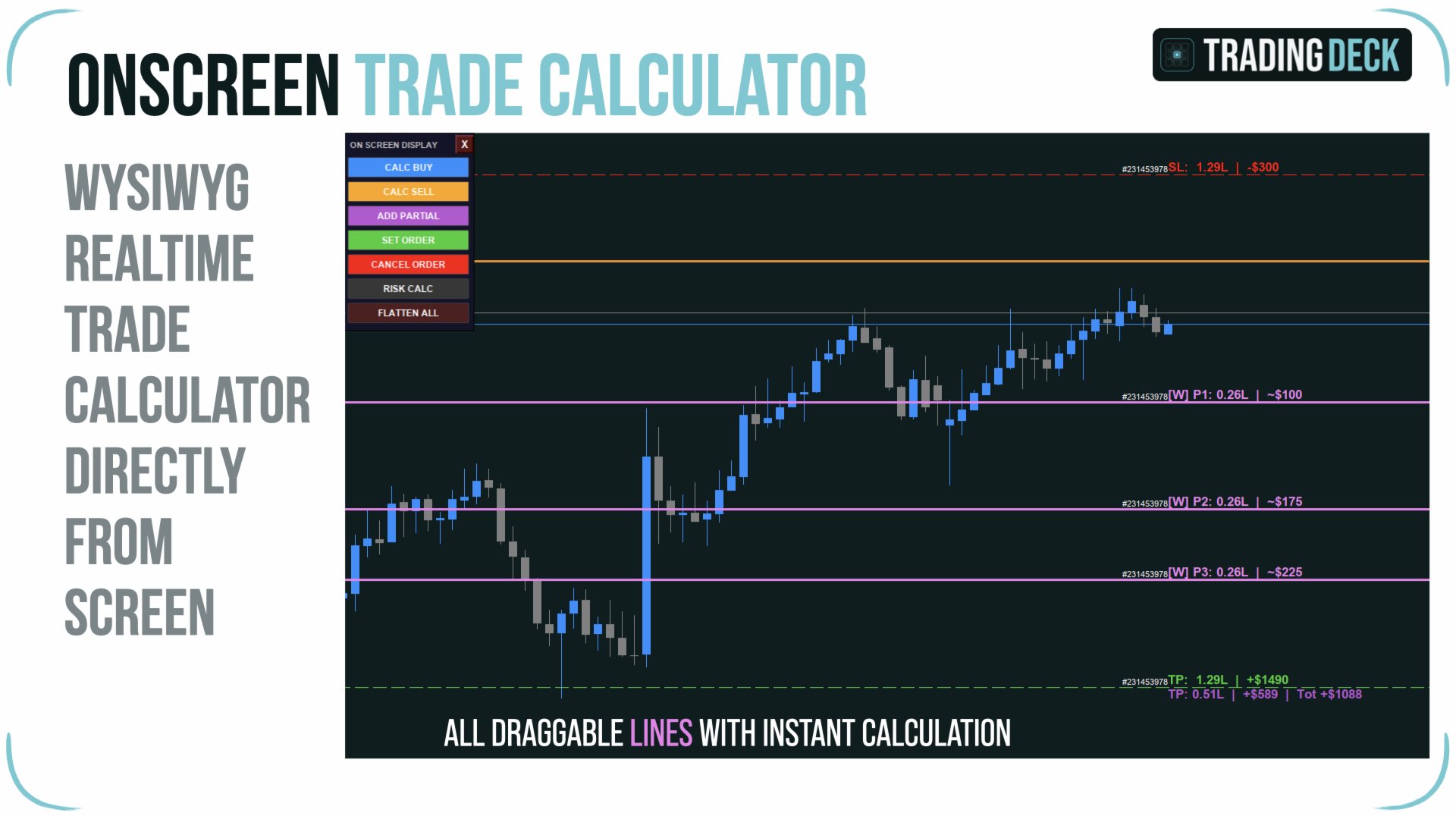
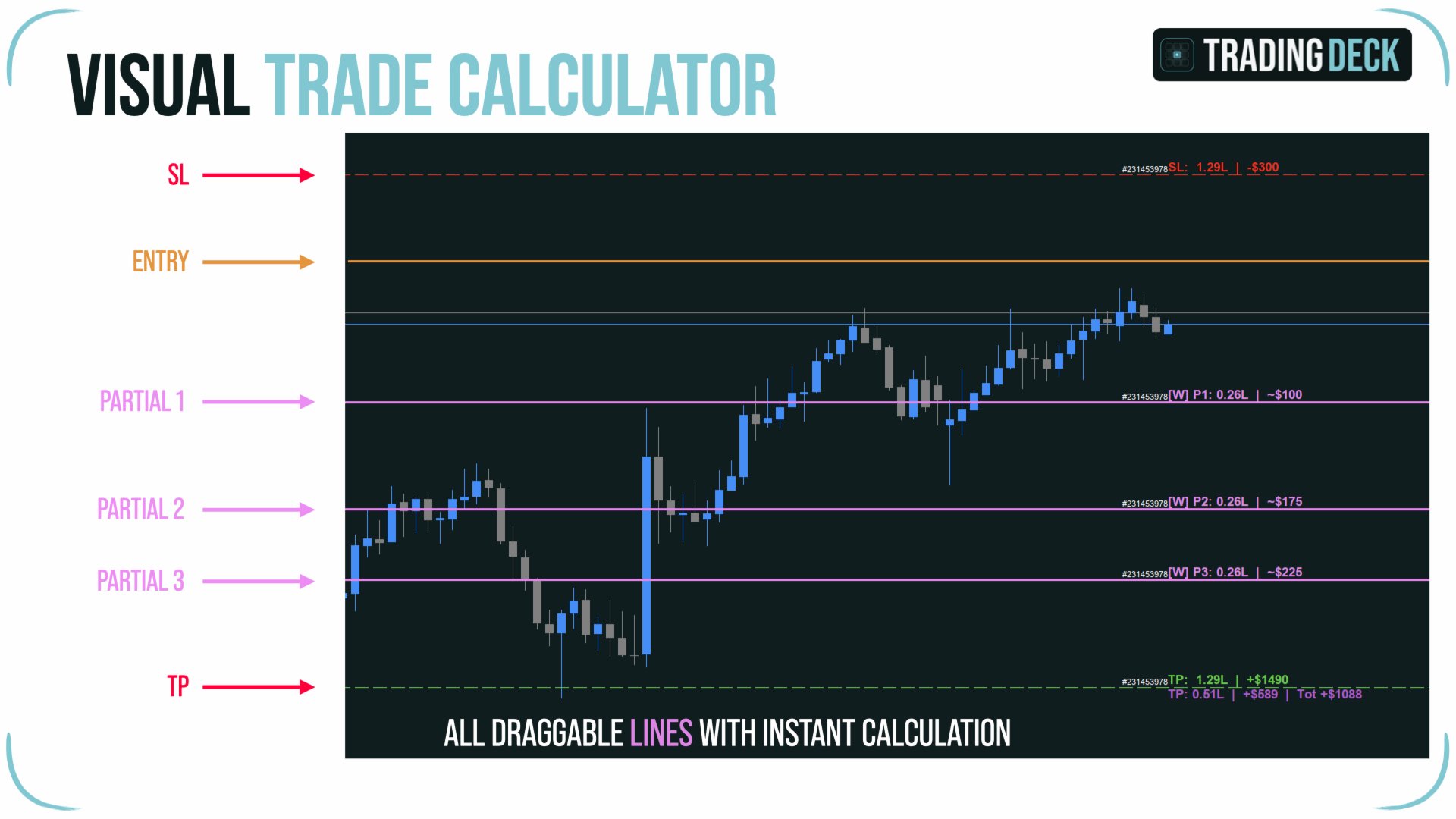
Your chart stays visible at all times. Conventional position size calculators overlay a floating panel on top of the price action. Trading Deck does the opposite: Entry, Stop Loss and Take Profit are three draggable lines drawn directly on the chart. Lot size, monetary risk and monetary reward update in real time as you slide each line, but the chart itself is never covered by a UI element. You read price structure and you plan the order on the same surface.

The Stream Deck is optional. Trading Deck is built around an Elgato Stream Deck workflow, but no hardware is required to use the EA. A built-in on-chart control panel exposes the essential functions as clickable buttons, and every action is bound to a standard keyboard shortcut. Start trading on any Windows or Mac MetaTrader 5 installation today; add a Stream Deck later when you want the physical cockpit experience.

Twenty instant order slots

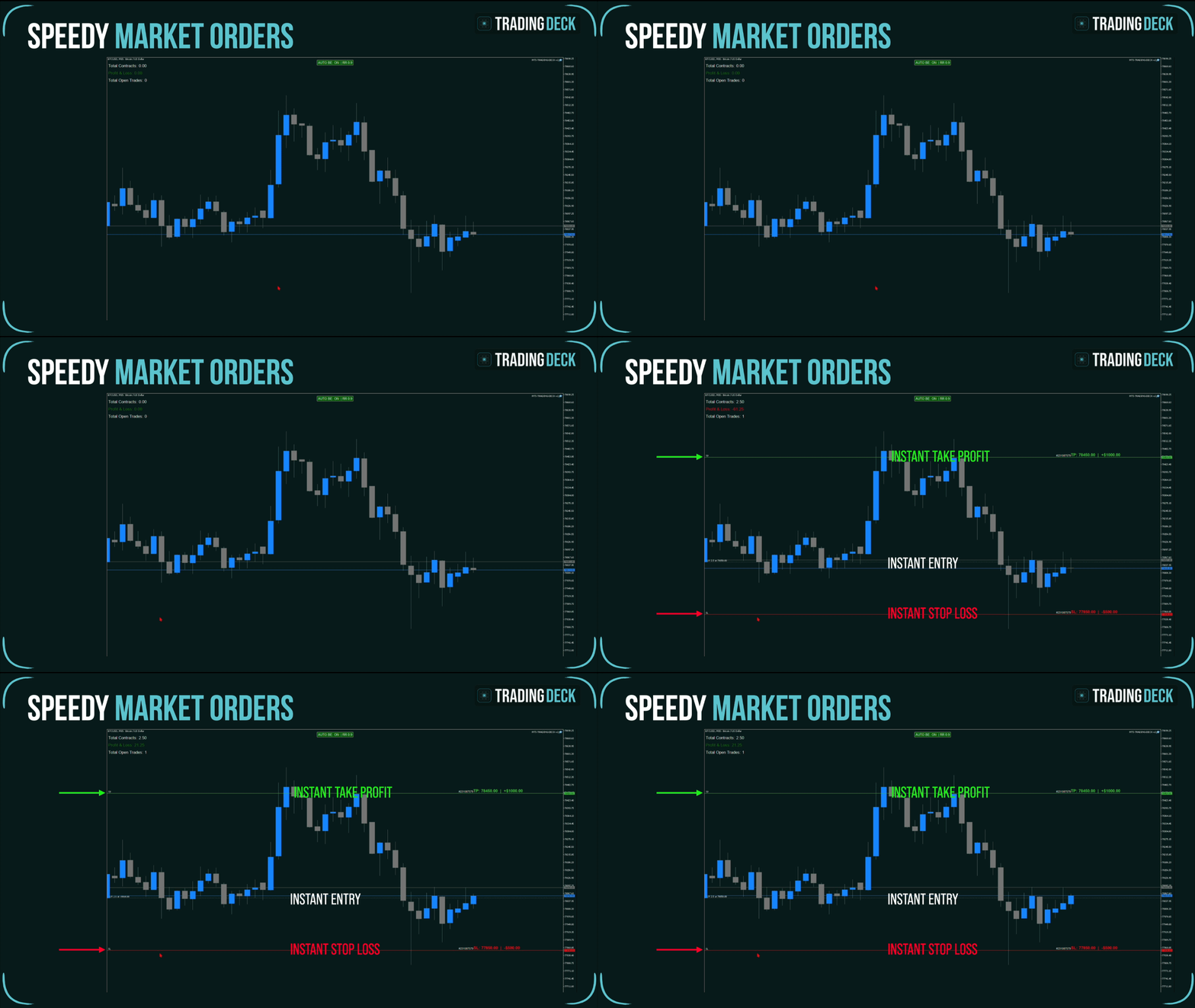
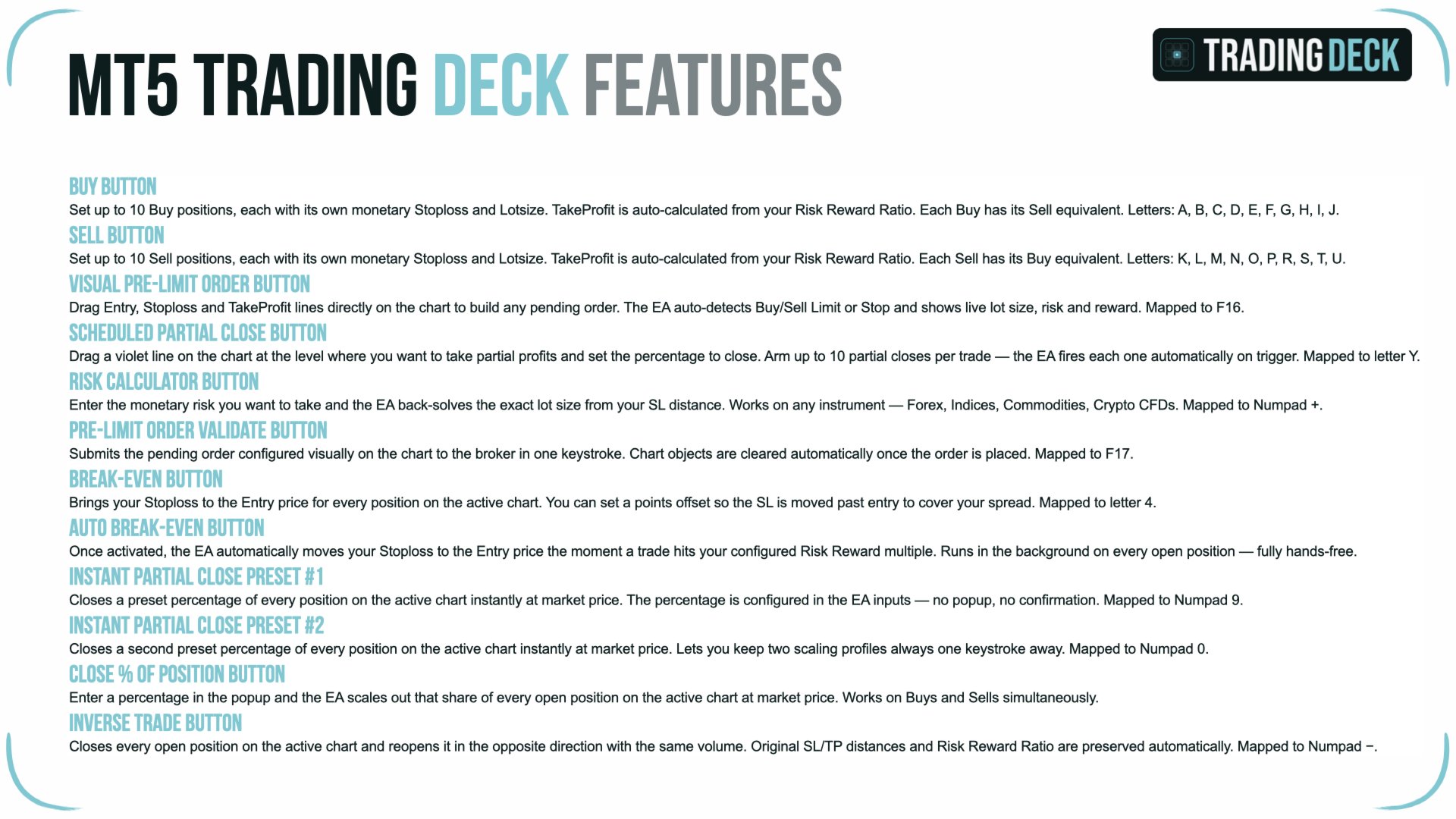
The core idea of Trading Deck is to remove every decision from the moment of execution. Twenty order slots are configured up front: 10 BUY slots on keys A, C, E, G, I, K, M, O, R, T and 10 SELL slots on keys B, D, F, H, J, L, N, P, S, U. Each slot carries its own pre-configured lot size, monetary stop loss and risk/reward ratio. Press the key and a market order is sent immediately, the stop is placed at the configured monetary distance, and the take profit is placed at the configured R/R multiple.

Stops and targets are defined in account currency, not in pips or points. If your stop is set at fifty units of your account currency, that is the actual loss you risk if the SL is hit. The EA reads the broker's tick value for the active symbol and converts the monetary amount to the correct number of points. The same slot configuration works on EURUSD, XAUUSD, US500 or BTCUSD without any retuning.

A global Risk Coefficient multiplier scales all twenty slots simultaneously. Set it to 0.5 before a high-impact news event to halve every position size at once. Set it to 1.5 on your highest-conviction setups. Set it to 0 to lock the EA into observation mode. One input parameter, twenty positions resized in a single move.

On-chart visual position calculator

For pre-planned trades, Trading Deck provides a visual lot size calculator MT5 traders can actually use without losing sight of the chart. Press F16 to arm a BUY plan or F17 to arm a SELL plan. Three horizontal lines appear directly on the price: a blue line for a BUY entry (or orange for a SELL), a red line for the stop loss and a green line for the take profit.

Drag any of the three lines to set your levels. The EA reads the geometry and auto-detects the correct MT5 order type — Buy Stop, Buy Limit, Sell Stop or Sell Limit are chosen automatically based on the position of the Entry line relative to the current market price. Labels next to the SL and TP lines display the exact stop price, the lot size that respects your monetary risk, and the resulting monetary loss and gain.

The Numpad * key opens the Risk Calculator panel. Enter the monetary risk you want to commit and the EA back-calculates the exact lot size that respects your stop loss distance, while honouring the broker's minimum lot, maximum lot and minimum lot increment. When the Entry line is moved, the SL and TP lines preserve their relative distance from it; your original risk-to-reward ratio is never accidentally distorted by a chart adjustment.

Press Z to submit the pending order. Press F18 to open the LIFO cancel popup that lists every pending order and every armed partial on the active symbol, most recent first, and lets you cancel any of them in one click.

Stream Deck integration

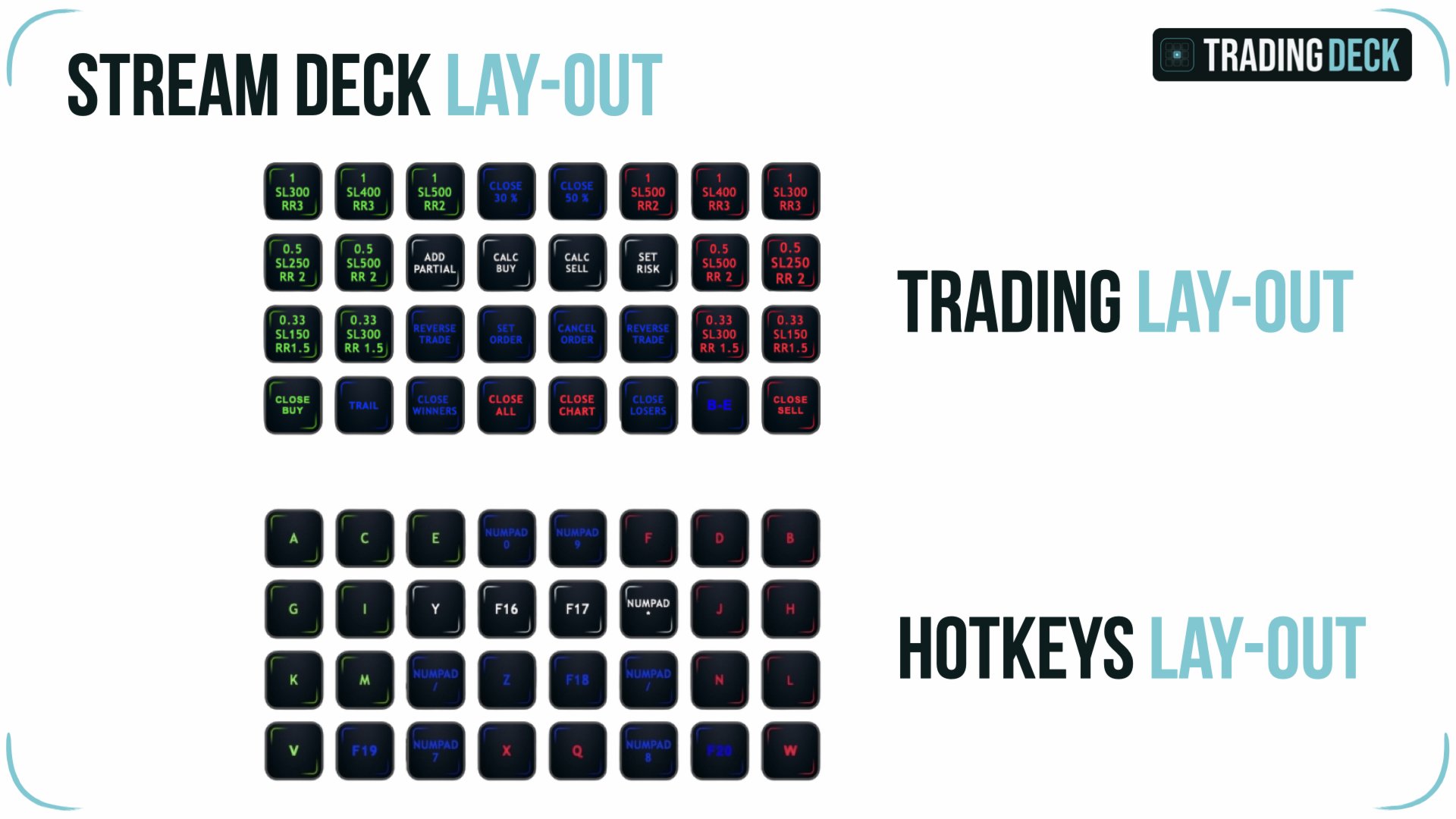
For traders who already own an Elgato Stream Deck, Trading Deck provides a documented Stream Deck XL button layout that maps every essential function to a backlit physical key. Order execution slots, Pre-Limit BUY and SELL, partial close presets, auto break-even toggle, trailing stop, inverse trade and the close-all hotkey all sit on the device in a logical grid. The mapping is done through the standard Stream Deck Hotkey action: each button sends the keystroke the EA expects, so the EA itself does not require any external integration.

The full layout file and a step-by-step setup guide are included in the user manual. You can also rebuild the layout from scratch and assign the functions to your own preferred buttons in a few minutes.

Full hotkey reference

Every action in Trading Deck is bound to a single, dedicated key. Below is the full reference. F-keys F13 to F20 and the full Numpad work on both Windows and macOS, which makes the panel fully usable on a MacBook keyboard.

Twenty instant order slots
A / B — slot 1 BUY / SELL
C / D — slot 2 BUY / SELL
E / F — slot 3 BUY / SELL
G / H — slot 4 BUY / SELL
I / J — slot 5 BUY / SELL
K / L — slot 6 BUY / SELL
M / N — slot 7 BUY / SELL
O / P — slot 8 BUY / SELL
R / S — slot 9 BUY / SELL
T / U — slot 10 BUY / SELL

Close and cancel
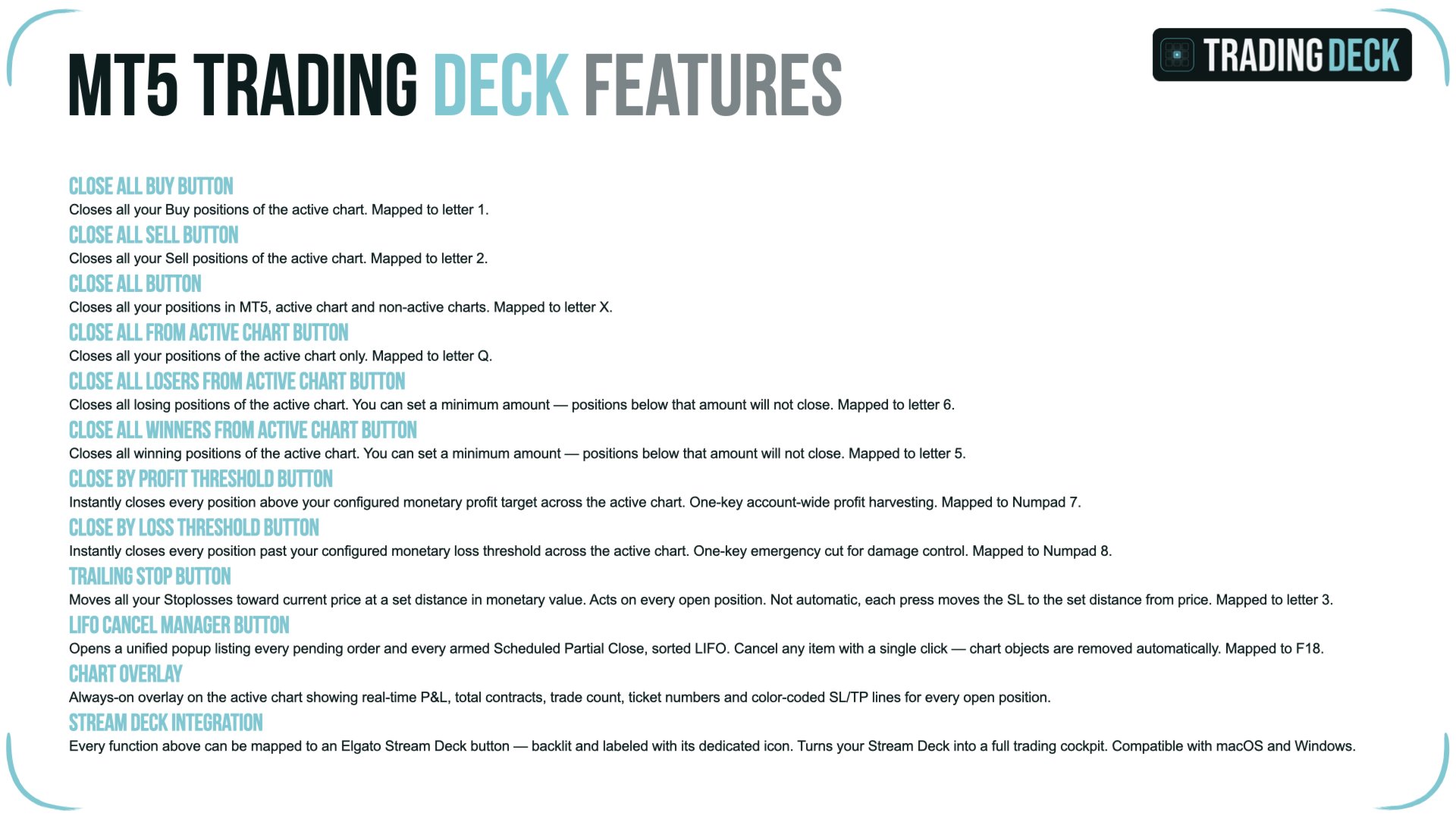
X — close every open position on every chart
Q — close every open position on the active symbol
V — close every open BUY on the active symbol
W — close every open SELL on the active symbol

Pre-Limit order workflow
F16 — toggle Pre-Limit BUY lines on the chart
F17 — toggle Pre-Limit SELL lines on the chart
Z — submit the pending order
F18 — open the LIFO cancel popup
Numpad * — open the Risk Calculator panel

Position management
F19 — trailing stop on every open position
F20 — manual break-even on eligible positions
Numpad 7 — close every position above a profit threshold
Numpad 8 — close every position below a loss threshold
Numpad 9 — partial close preset 1 (default 50%)
Numpad 0 — partial close preset 2 (default 30%)
Numpad / — inverse trade on every open position
Y — arm a price-triggered partial close on a position

Risk management built in

Trading Deck is designed as a risk management EA MT5 traders can rely on under pressure. Every protection is a single keystroke away.

Auto break-even. When a position reaches a configurable unrealised R/R threshold, the EA automatically moves the stop loss to the entry price. The on-chart AUTO BE toggle button shows the current state in green or red, and a single click flips it. A manual break-even key (F20) is also available for traders who prefer to trigger it themselves.

Trailing stop. F19 activates a monetary-distance trailing stop on every open position on the active chart. The trailing distance is configured in account currency, so the behaviour is consistent across instruments without any per-symbol tuning.

Partial closes. Two presets (Numpad 9 and Numpad 0) close a configurable percentage of every open position instantly. For more granular work, the advanced partial system lets you arm up to ten price-triggered partials per position, each closing a custom percentage at a specific level. Partials can also be attached to pending orders and are promoted to live positions automatically when the order fills.

Profit harvest and loss cutoff. Numpad 7 closes every position whose unrealised profit exceeds a configurable amount. Numpad 8 closes every position whose unrealised loss exceeds a configurable amount — a session-level emergency brake when the market turns against the open book.

Inverse trade. Numpad / closes every open position on the active chart and immediately reopens each one in the opposite direction at the current market price. Stop loss and take profit distances in points are preserved relative to the new entry, so the original risk-to-reward ratio survives the flip. If the broker's minimum stop distance is reached, the take profit is scaled proportionally rather than rejected.

Three workflows the panel was built for

Fast manual scalping. Pre-configure your favourite slot sizes and risk values up front. When a setup prints, press the slot key for the right size and direction. The order is live with stop loss and take profit before you would have finished clicking through the standard MetaTrader order dialog.

News and event-driven trading. Lower the global Risk Coefficient to 0.5 or 0.3 in the minutes before a release. After the release, your usual slot keys keep working, but every position size is automatically scaled down. Restore the coefficient when conditions normalise.

Pre-planned swing entries. Draw the Pre-Limit lines at your invalidation and target levels while you wait for price to reach the trigger. The EA submits the correct Buy Limit, Buy Stop, Sell Limit or Sell Stop automatically. Walk away from the screen knowing the lot size respects your monetary risk and the order will only execute on your level.

Compatibility and requirements

MetaTrader 5 on Windows or macOS. Works on any broker MT5 build that supports live trading from an Expert Advisor. Compatible with both hedging and netting account types. Symbol-agnostic and timeframe-agnostic; you can attach Trading Deck to any chart at any timeframe. The EA respects the broker's minimum lot, maximum lot and minimum lot increment, and queries the broker's tick value to convert monetary stops into instrument points.

AutoTrading must be enabled in the MetaTrader 5 toolbar. Each EA instance can carry a unique Magic Number to manage multiple instances on the same account, or zero to manage every trade on the symbol.

FAQ

Is a Stream Deck required?
No. Every function is also bound to a standard keyboard shortcut and to an on-chart control button. A Stream Deck adds physical, backlit buttons, but the EA is fully usable without one.

Does the EA take signals or place trades on its own?
No. Trading Deck is a discretionary execution and risk management tool. It never opens a position on its own initiative. You decide when and where to enter; the EA handles the mechanics, the sizing and the protections.

How is the stop loss defined?
In account currency. You specify the monetary amount you accept to lose on a slot or on a Pre-Limit order, and the EA converts it to the correct distance in points using the broker's tick value for the symbol.

Does the position calculator hide my chart?
No. Entry, Stop Loss and Take Profit are drawn as draggable horizontal lines on the price itself. The chart remains fully visible at all times. The Risk Calculator popup is a small, repositionable window that you can drag away from your analysis area.

Does it work on MetaTrader 4?
No. Trading Deck is sold exclusively for MetaTrader 5. The hedging-and-netting handling, the symbol tick conversion and the order workflow are all built on the MT5 trading API and would not transfer cleanly to MT4.

Can I run several instances on the same account?
Yes. Each instance carries its own Magic Number and operates only on the positions tagged with that number. You can attach Trading Deck to several charts and isolate each instance to its own set of trades.

About the project

Trading Deck is the result of a personal need: a hotkey trading panel for MT5 that respects monetary risk, never hides the chart, and works equally well with a Stream Deck or with a bare keyboard. Every feature in the panel exists because the workflow of a manual trader demands it. The product is maintained, updated, and supported through the MQL5 platform. Our goal is to grow Trading Deck alongside the traders who use it. We are actively listening for new workflows, risk tools and quality-of-life improvements to add in upcoming versions. If you have a feature request or a scenario you want the EA to handle, share it with us and we will consider it for a future update on the MQL5 platform.
Отзывы 2
Akara Saguanwongse
197
Akara Saguanwongse 2026.05.10 03:53 
 

Been looking for something like this to use with stream deck Neo, works great and responsive seller. Thank you. I recommend. AKARA

Mr.AB
20
Mr.AB 2024.10.02 08:32 
 

Great tool that would help traders creating quick orders with a press of a button. I am new to MT5 platform and I had some difficulties getting the EA to work on my Mac. Manuel was extremely helpful in solving the issue. Thank You very much

Рекомендуем также
This utility sends notification to trader’s MT5 (for MT4 version, checkout this link ) mobile app, to remind traders about their open positions. Super useful for part time traders to keep track and not forget any positions. To turn on notification, please visit   this link   (https://www.metatrader4.com/en/trading-platform/help/setup/settings_notifications) Features Keep track on open orders (pending orders, running orders) Customize time to send notification Customize notification interval (se
**MT5 → Telegram & Discord Auto Post Bot** Want to automate your trading and stop wasting time on manual posting? This bot is for you. **What does it do?** It connects directly to MetaTrader 5 and automatically posts to Telegram & Discord: ️ Open trades ️ Closed trades ️ SL / TP levels ️ Profit and loss ️ Real-time signals **Advantages:** • Fully automated process • No delay – posts in real time • Perfect for signal groups and channels • Increases trust and transparency • Works
One Click Trader  is a tool designed for MetaTrader 4 platform, which enables you to take your trading to the next level. It enables you to open, manage and close your trades in simple an efficient way by just one click of your mouse button. "-"   ,  "+"  change OCT window size  Up arrow minimizes the OCT panel Down arrow maximizes the OCT panel Right arrow displays the next panel with additional features Left arrow hides the panel with additional features Red  SELL  button enables you to open s
Этот инструмент поможет вам закрыть все открытые ордера одним щелчком мыши, просто нажмите «Закрыть все». Если вы хотите закрыть только прибыльные ордера, нажмите кнопку «Закрыть прибыльные», после нажатия все плавающие ордера будут закрыты; Если вы хотите закрыть только ордера с плавающими убытками, нажмите кнопку «Закрыть убыточные», после нажатия все ордера с плавающими убытками будут закрыты.
Expert was built on the basis of Trap . EA can trade in automatic and semi-automatic mode. In automatic mode, it will place pending orders. However, in semi-automatic mode, it will wait for the first manually opened order. It will then go into automatic mode. Before starting work, the expert will download 28 currency pairs:         "AUDCAD","AUDCHF","AUDJPY","AUDNZD","AUDUSD","CADCHF","CADJPY",         "CHFJPY","EURAUD","EURCAD","EURCHF","EURGBP","EURJPY","EURNZD",         "EURUSD","GBPAUD","GBP
Superior Telegram Signals Multi-Platform Trade Copier & Notification System   Available for MetaTrader 4 and MetaTrader 5 Superior Telegram Signals   is a utility that connects a trading terminal to the Telegram application. It is designed to send automated trade notifications, chart screenshots, and account status updates to a specified Telegram chat, channel, or group. Use Cases This tool can be used by: Signal Providers:   To automate the broadcasting of trade signals, modifications, and clos
Telegram ChartSnap MT5 is an utility tool to bridge your MetaTrader 5 activities to your Telegram chat/group/channel. It will screen shot your MetaTrader 5 chart and send it to your dedicated Telegram chat/group/channel through a Telegram bot. The whole process will keep repeating based on a time cycle that predetermined by the user. It is a convenient tool for those who like to get access to their favorite system/dashboard that only available at MetaTrader Desktop. Beside that, trader can easi
EA SB8 Panel Trade
Juan Manuel Bernal Martin
SB-8 – Manual Trading Panel with Fixed Risk & TradingView-Style Visualization for MT5 SB-8 is an advanced manual trading panel for MetaTrader 5 , designed to execute trades visually, quickly and without calculations . It is especially built for traders coming from TradingView , who often find MT5 confusing when it comes to risk management and trade visualization. With SB-8, you don’t calculate lot size, percentages or risk . You simply move the Stop Loss line , and the panel handles everything a
BuyLimit and SellLimit MQ5 buttons Продукт BuyLimit and SellLimit Buttons открывает любую комбинацию отложенных ордеров Buy Limit и Sell Limit и закрывает все имеющиеся отложенные ордера. Входные параметры DeleteAllPendings ; при true все отложенные ордера (для текущей валюты) могут быть удалены. BuyLimit ; при true могут быть открыты ордера Buy Stop. SellLimit ; при true могут быть открыты ордера Sell Stop. InitLot ; начальный размер лота. LotCoeff ; увеличить/уменьшить размер следующего лота
Перестаньте позволять брокерам охотиться за вашими стоп-лоссами! Вы устали от того, что цена задевает ваш Stop Loss точно в пике и сразу же разворачивается в вашу пользу? Часто это результат рыночного шума или так называемой "охоты за стопами" (Stop Hunting). TrailGuardian — это профессиональный "стелс" менеджер сделок, разработанный для защиты вашей прибыли без раскрытия уровней выхода рынку. Он создает виртуальную (невидимую) линию стоп-лосса внутри терминала, скрывая вашу стратегию от брок
# Universal Smart Manual Trade Manager MT5 v1.00 ## What the EA does Universal Smart Manual Trade Manager MT5 is a protective and management Expert Advisor for manually opened trades. It does not open new entries by itself. It only adopts already open positions that pass the selected filters, and can add missing SL/TP, manage break-even, profit lock, ATR trailing, send Telegram notifications, and display status information on the chart. The default setup is intentionally safe: the EA manages
Phoenix MT5 Telegram Notifier is a trading utility that integrates with both MetaTrader5 and Telegram. The utility publishes all your trades as signals in your channels or groups. This allows you to track in real time what is happening with your account via Telegram. Notifications for : Opened order Closed order Modified order Parameters : Telegram Bot Token - create a bot on Telegram and get a token Telegram Chat Id  - input your Telegram group/channel Id Notify for opened order - notifies wh
FxStrike999_SPT_bot  prop helper - это уникальный в своём роде бот,который разработан специально для тех,у кого проблемы с психологией,для тех, кто не ставит стопы и не фиксирует прибыль, и в итоге теряет свои депозиты. Но с нашим ботом все эти проблеммы будут решены !  С FxStrike999_SPT_bot вы выйдете на новый уровень торговли,где ваш депозит будет стабильно расти  и вы перестанете переживать за ваши позиции,бот сам выставит стоплосс и зафиксирует прибыль частями  (3 уровня фиксации прибыли с
G.X.L (GALAXY ELEGANCE) Product Overview G.X.L is an automated trading robot for MetaTrader 5 that operates based on price action analysis. The system processes real-time market data to identify trading opportunities. It provides information and recommendations aligned with user-defined trading preferences. Core Functionality The robot analyzes price movements without relying on traditional lagging indicators. It focuses on current market structure, including swing points and fractals, to determ
Инструмент для институциональной внутридневной торговли Продвинутый визуальный помощник для ручной торговли. Институциональный инструмент для внутридневной торговли — это профессиональный визуальный советник, разработанный для трейдеров, использующих Price Action, CRT, PO3, ICT/SMC и нуждающихся в институциональной ясности на графике. Институциональный инструмент для внутридневной торговли превращает ваш график в панель институционального анализа, обеспечивая трейдеру полный контроль над исп
Bober Real MT5
Arnold Bobrinskii
4.88 (16)
Bober Real MT5 — полностью автоматический советник для торговли на рынке Forex. Робот создан в 2014 году и за этот период сделал множество прибыльных сделок, показав более 7000% прироста депозита на моем личном счете. Было выпущено много обновлений, но версия 2019 года считается самой стабильной и прибыльной. Робот можно запускать на любых инструментах, но лучшие результаты достигаются на EURGBP , GBPUSD , таймфрейм M5 . Робот не покажет хорошие результаты в тестере или на реальном счете, если
Обзор советника KS Multiple Independent Strategies Auto Trading 1.9 Это профессиональный советник (EA) на языке MQL5, разработанный преимущественно для торговли золотом (XAUUSD) на платформе MetaTrader 5. Он поддерживает одновременное использование нескольких независимых торговых стратегий, обладает расширенными функциями управления рисками и включает различные фильтры для оптимизации торговых результатов. Основной акцент в советнике сделан на автоматизации процессов, защите полученной прибыли
1. Brief Description of Gina Panel Code Functionality for End User The "Gina Panel" is a customizable trading dashboard Expert Advisor (EA) for MetaTrader 5 (MT5). It provides a graphical user interface (GUI) overlay on your chart to simplify trading and account management. Key functionalities include: Account Monitoring : Displays real-time balance, equity, profit/loss, margin levels, and net positions in a compact panel. Trade Execution : Quick buttons for buying/selling at market, setting lot
Every panel tells you how much you're risking. This one tells you how much you have left. You didn't lose the challenge because your strategy failed. You lost it because one more trade pushed you past the daily limit while you were chasing the target. PropDesk is the desk that helps stop that from happening. 1. Size against your ROOM, not your equity. Every order shows "risk $X = Y% of your daily room left". You always know if the next trade fits inside what the firm allows today - before you
Chart Copilot
George Angelo Boutselis
Chart Copilot — это торговый ассистент, разработанный для того, чтобы помочь трейдерам быстрее размещать сделки, управлять открытыми позициями и устанавливать оповещения любого типа непосредственно с графика. Все эти функции доступны как через графическую панель, так и через чат-бота. Дополнительные материалы и инструкции: Пробная версия  - Инструкции по настройке Чат-бот Chart Copilot поставляется с выделенным сервером, работающим с большой языковой моделью — это означает, что нет необходимости
Risk Control Utility MT5 designed for manual trading. It helps to calculate and control your risks, transfer transactions to breakeven and accompany positions with trailing stop. Easy to set up and use. It can be used for calculating a trading lot, calculating stop loss and take profit levels. Works with currency pairs, CFDs, stocks, indices, futures, cryptocurrencies Displays   volume,   potential loss and profit before   placing an order Ability to set the expiration time of a pending order Tr
Telegram Services
Ramesh Maharjan
5 (1)
Telegram Services — это торговое приложение, обеспечивающее связь между этим советником и вашим Telegram-каналом. Приложение генерирует отчеты, оповещает об открытии, закрытии и изменении сделок, открывает новые сделки, закрывает открытые сделки, изменяет существующие сделки, отображает историю сделок, делает скриншоты графиков, определяет значения стоп-лосса и тейк-профита. Оно также отображает текущие рыночные условия, получает новости рынка, анализирует лог-файлы и, что наиболее важно, позвол
PropFirm Challenge Risk Control EA Introduction Close all positions when reaching maximum capital loss percentage/amount Close all positions when reaching daily maximum capital loss percentage/amount Close single orders when reaching single trade maximum loss percentage/amount Filter & close restricted symbols positions during high-impact economic news events(Support optional modes for FTMO / The 5%ers and other prop trading platforms) Liquidate positions upon reaching profit target percentage
Time saving and fast execution Whether you’re traveling or sleeping, always know that Telegram To MT5 performs the trades for you. In other words, Our   Telegram MT5 Signal Trader  will analyze the trading signals you receive on your selected Telegram channels and execute them to your Telegram to MT5 account. Reduce The Risk Telegram To Mt5   defines the whole experience of copying signals from   Telegram signal copier to MT5 platforms. Users not only can follow all instructions from the signal
Close All and Change Take Profit and Stop Loss All Orders. Main Features     Ability to Close All Orders the Symbol you put this EA.     Ability to Change Take Profit to All Order.     Ability to Change Stop Loss to All Order.     Show Order count.     Show Average price with info and Horizontal Line.     Show lot open.     Show Price diff from average to price now     Show broken price with info and Horizontal Line.     Easy to use . How to use Close All (Symbol) PC : you can click on CloseAl
C Evolution MT5
Antonis Michos
5 (1)
Join the Out of the Box Telegram Group search for "Out of the Box" on Telegram or contact me This is not just a simple copier program that ONLY allows you to locally copy transactions between different MetaTrader 4 a accounts in any direction and quantity as quickly and easily as possible .Of course it does that. This copier DOES MUCH MUCH MORE!!! PLEASE READ BELOW AND SEE SCREENSHOTS. Many of us have martingale EAs or none martingale that are good but some point you wish to had opened the
OneClick EA
Ching-hsiang Chen
OneClickEA Controller is a chart management utility designed to work with the OneClickEA Windows Manager. The controller receives local commands from the Windows manager and performs scheduled EA template changes in MetaTrader 5. It also reports the connected trading account, broker server, chart symbol, timeframe and controller status. Main functions Detects the connected MetaTrader 5 account Generates a controller ID based on the broker and trading account Receives local schedule commands from
Telegram to mt5 pro
Janet Abu Khalil
4 (4)
Telegram to MT5 Pro — Расширенный копировщик сигналов Telegram с Auto-Fix, Multi-TP, управлением риском и полным управлением сделками Telegram to MT5 Pro — профессиональный копировщик сигналов Telegram Telegram to MT5 Pro автоматически копирует торговые сигналы из Telegram прямо в ваш аккаунт MetaTrader 5 в реальном времени с полным контролем риска, исполнения и управления сделками. Система состоит из двух компонентов: • Expert Advisor (EA), работающий внутри MetaTrader 5 • Desktop bridge прило
Утилита для ручной торговли с помощью "горячих клавиш". Позволяет моментально реагировать на текущую ситуацию на рынке. "Горячие клавиши" можно назначить на открытие/закрытие позиций по типу, открытие/закрытие всех позиций на текущем графике и удаление всех ордеров на текущем графике. Также можно задать "горячие клавиши" на пять предопределенных торговых объемов и переключаться между ними в зависимости от ситуации без необходимости периодически менять объем вручную. Также возможно задать автомат
Этот советник представляет собой торговую панель для нескольких пар в один клик. Нажмите       ОТКРЫТЬ       кнопка для открытия ордеров по выбранным парам. Нажмите       ЗАКРЫВАТЬ       кнопка закрытия ордеров по выбранным парам. Лот ордера — это число, введенное пользователем. Положительное число соответствует ордеру на покупку, отрицательное — ордеру на продажу. Нажмите кнопку   ЗАКРЫТЬ   , чтобы закрыть весь ордер, а не частичное закрытие. Действие закрытия не имеет ничего общего с количест
С этим продуктом покупают
YuClusters
Yury Kulikov
4.93 (43)
Внимание: Ознакомиться с работой программы можно с помощью бесплатной версии  YuClusters DEMO . YuClusters это профессиональная система анализа рынка. Для трейдера открываются уникальные возможности анализа потока ордеров, объемов торговли, движения цены используя различные графики, профили, индикаторы, графические объекты. YuClusters оперирует данными на основе ленты сделок или тиковой информации, в зависимости от того, что доступно в котировках финансового инструмента.  YuClusters позволяет с
Farmed Hedge Yield Farming | All Markets (Manual - Hybrid - Semi/Automated EA) MULTI-ASSET SUPPORT Trade any asset available on your broker - Forex: Major, Minor, Exotic pairs - Crypto: BTC, ETH, XRP, SOL, BNB - Stocks: Apple, Tesla, Amazon, Google, etc. - Commodities: Gold, Silver, Oil, Gas - Indices: US30, NAS100, SPX500, DAX40 - Any CFD your broker offers VERIFIED TRADING RESULTS - Farmed Hedge Yield Axi Copy:  https://www.mql5.com/en/signals/2356376 - Farmed Hedge Yield Exn Copy:   https:/
Unlimited Trade Copier Pro - это мощный инструмент для удаленного копирования сделок между несколькими счетами MetaTrader 4/MetaTrader 5, расположенными удаленно друг от друга, по сети интернет. Это идеальное решение для провайдеров сигналов, которые хотят поделиться своей торговлей с другими трейдерами по всему миру. Один поставщик может копировать сделки на неограниченное количество счетов-получателей, а один получатель также может копировать сделки неограниченного количества провайдеров. Пост
ВРЕМЕННАЯ СКИДКА  -40% ! Всего  $470 вместо $790!  Максимальный реальный дисконт! ТОЛЬКО ДО 22.08 Суть: используя юзер-интерфейс вы настраиваете параметры, которым должен соответствовать график до входа в позицию(позиции), настраиваете какие входные модели использовать, настраиваете правила по которым надо завершать торговлю и планирование. А всю рутину по наблюдению за графиком и исполнению Lazy Trader берет на себя. полное описание  :: 3 ключевых видео [1] -> [2] -> [3]  :: [ ДЕМО-ВЕРСИЯ ] Чт
Quant AI Agents
Ho Tuan Thang
5 (1)
Quant AI Agents are independent trading Expert Advisors. Instead of trading using a fixed strategy like other conventional EAs, Quant AI Agents   is a   multi-agent AI trading framework   that turns natural-language strategy prompts into live.  WANT THE SAME RESULTS AS MY LIVE SIGNAL?   Use the exact same brokers I do:   IC MARKETS , IC TRADING   .  Unlike the centralized stock market, Forex has no single, unified price feed.  Every broker sources liquidity from different providers, creating un
AI Agent Supervisor is NOT an Expert Advisor. AI Agent Supervisor   is a   multi-agent AI risk & portfolio supervisor   that watches every EA on your account and intervenes in real time.  WANT AN AI PORTFOLIO MANAGER WATCHING YOUR FLEET 24/7?   Run your fleet on the same brokers I do:   IC MARKETS , IC TRADING   .  Unlike the centralized stock market, Forex has no single, unified price feed.  Every broker sources liquidity from different providers, creating unique data streams. The Supervisor r
QCML Assistant
Maxime Turcotte-lafreniere
QCML Assistant MT5 Your Trading. Our Assistant. Your Edge. Looking for a tool that completely transforms your experience on MetaTrader 5? QCML Assistant is the all-in-one solution built by traders, for traders. Just one tool installed on your chart, and you get access to an ultra-complete, ultra-fast, and ultra-simple trading platform. No more hours wasted setting up your workspace. No more complicated trade entries. With QCML Assistant, everything becomes simple, smooth, and efficient right fro

Discord Signal Notifications — это мощный инструмент для трейдеров, проповодов и управляющих счетами, который автоматически отправляет все ваши торговые события в канал или чат Discord. Главное преимущество — Глобальный мониторинг. Вам не нужно устанавливать советник на каждый график. Достаточно запустить одну копию утилиты на одном любом окне, и она будет отслеживать действия по всем инструментам и всем счетам в вашем терминале одновременно. Основные возможности Глобальный мониторинг счёта Ути
Gamma Edge Pro MT5 — GexBot Classic API Integration Gamma Edge Pro   brings institutional-grade   Gamma Exposure (GEX) data   directly onto your MetaTrader 5 chart — the same data used by professional options traders to anticipate price magnets, hedging flows, and dealer positioning. Powered by the   GexBot Classic API , this indicator automatically maps options market data from US-listed instruments onto any   MT5 CFD instrument   — Forex pairs, Gold, indices, and more — with intelligent price
# If you have any other requirements or are interested in collaboration, please contact  dev.quantech.london@gmail.com . Flash Trade (FT) Most friendly manual trading tool. Easy operation to secure your funds. Features of FT Click the chart to trade fast FT supports market orders and pending orders Click twice to complete the order and set SL and TP Click trice to complete the pending order and set SL and TP Automatically set the stop-loss amount of each order to a fixed percentage of the bala
Introduction Our system is more than just a tool—it’s your personal guide in the dynamic trading landscape. Expertly developed and optimized using advanced strategies, this groundbreaking predictor gives traders a powerful edge. It’s not just about the features; it’s about a trading journey that stands out from the crowd. Get ready for an enhanced trading experience like never before! What It Does Next Candle Prediction: Imagine gaining insights into the market’s next move before it happens. Our
Check EA performance  https://www.mql5.com/en/signals/2376164?source=Site +Profile+Seller Spot vs Future Arbitrage EA for MT5 Spot vs Future Arbitrage EA is an automated Expert Advisor designed for MetaTrader 5 that operates using price differences between Gold spot and Gold futures instruments. The strategy opens positions on both instruments simultaneously to take advantage of temporary differences between spot and futures prices. Requirements The trading account must provide both Gold spot
Reward Multiplier is a semi-automatic trade manager based on pyramid trading that opens additional orders with the running profit of your trades to maximize return exponentially without increasing the risk. Unlike other similar EAs, this tool shows potential profit/loss and reward to risk ratio before even entering the first trade! Download Demo here  (starting lot is fixed at 0.01) Contact me to get a 7 days trial version of the product with full functionality. Guide + tips here MT4 version  
TICK CHART SERVICE - Профессиональный сервис тиковых графиков для MT5 tg @eeevleee КРАТКОЕ ОПИСАНИЕ Tick Chart Service - это инновационный сервис для MetaTrader 5, который создает полноценные тиковые графики из любого инструмента в режиме реального времени. Система преобразует поток тиков в кастомный символ, позволяя торговать и ана
Trading Chaos Expert
Gennadiy Stanilevych
5 (11)
Этот программный продукт не имеет аналогов в мире, поскольку он является универсальным "пультом управления" торговых операций, начиная от получения торговых сигналов, автоматизации входа в позиции, установки стоп-лоссов и тейк-профитов, а также трейлинга прибыли одновременно по множеству сделок в одном открытом окне. Интуитивно понятное управление экспертом в "три клика" на экране монитора позволяет полноценно использовать все его функции на разного рода компьютерах, включая планшетные. Взаимоде
News Trader Pro - уникальный робот, позволяющий торговать на новостях по вашей стратегии. Он загружает все новости с нескольких популярных Forex-сайтов. Вы можете выбрать любую новость и настроить стратегию на торговлю по ней, а затем советник News Trader Pro будет торговать автоматически по выбранной стратегии на этой новости. Выход новости позволяет выиграть пипсы, так как в это время, как правило, происходит большое значение цены. Благодаря этому инструменту торговля на новостях стала проще,
Если вы хотите рисовать линии Поддержки и Сопротивления, просматривать: дневные уровни открытия рынка, классические уровни разворота, уровни разворота Фибоначчи, трендовые линии, уровни Фибоначчи, время до закрытия свечи, а также текущий спред. Если вы хотите выставлять ваши ордера с точным лотом, который отвечает вашему желаемому риску стоп-лосса. Если вы хотите делать все это и много другое всего одним кликом, тогда это идеальный инструмент для вас. Этот инструмент позволит вам чувствовать себ
The new version of  MirrorSoftware 2021  has been completely rewriten and optimized.  This version requires to be loaded only on a single chart because  it can detect all actions on every symbol and not only the actions of symbol where it is loaded. Even the  graphics and the configuration mode  have been completely redesigned. The MirrorSoftware is composed of two components (all components are required to work):  MirrorController  (free indicator): This component must be loaded into the MASTER
The  Easy Strategy Builder (ESB)  is a " Do It Yourself " solution that allows you to create a wide range of the automated trading strategies without any line of codes. This is the world’s easiest method to automate your strategies that can be used in STP, ECN and FIFO brokers. No drag and drop is needed. Just by set conditions of your trading strategy and change settings on desired values and let it work in your account. ESB has hundreds of modules to define unlimited possibilities of strategi
1. Фиксирую данные о ценах на каждую транзакцию. Контент файла данных: "время Tick", "цена ASK", "цена BID", "цена SPREAD", "количество предложений Tick". 2. В то же время, создается файл с цитируемыми данными на Один минутный цикл. Содержимое файла данных: "ASK time", "ASK OPEN цен", "ASK HIGH цен", "ASK CLOSE", "ASK CLOSE", "ASK CLOSE", "ASK CLOSE", "ASK CLOSE", "ASK CLOSE", "BID lose цен", "BID lose цен", "BID lose цен", "BID lose цен", "BID CLOSE цен", "BID CLOSE цен", "BID CLOSE цен", "BID
Mt5BridgeBinary
Leandro Sanchez Marino
Я автоматизировал их бизнес-стратегии для использования бинарных MT5 в Интернете и Mt5BridgeBinary наши заказы на ваш счет в Binary, и вы готовы начать работать так просто! Опытные консультанты просты в настройке, оптимизации и тестировании на прочность; Кроме того, в тесте мы можем прогнозировать долгосрочную рентабельность, поэтому мы создали механизмы для Mt5BridgeBinary своих лучших стратегий к Binary. Характеристики: -Вы можете использовать как можно больше стратегий. (Expert Advisor). -
Серия продуктов под маркой  FiboPlusWave Готовая торговая система на основе  волн Эллиотта и уровней Фибоначчи . Просто и доступно. Отображение разметки волн Эллиотта (основной или альтернативный вариант) на графике. Построение горизонтальных уровней, линий поддержек и сопротивления, канала. Наложение уровней Фибоначчи на волны 1, 3, 5, A Система алертов (на экран, E-Mail, Push уведомления).    Особенности: не вникая в волновую теорию Эллиотта, можно сразу открыть один из возможных вариантов вхо
Xrade EA
Yao Maxime Kayi
Xrade EA is an expert advisor as technical indicator. For short period trade it's the best for next previsions of the trend of the market. +--------------------------------------------------------------------------------------- Very Important Our robot(data anylizer) does'nt take a trade procedure. If using only our robot you must take positions by yoursels +--------------------------------------------------------------------------------------- The technical indiator provide for a given sma
News: IDEA 2.0 is out with lot of features, like telegram bot notifications and Limits order! Check the changelog at bottom of page (*). Hi all, here you can find my Expert Advisor, called IDEA  (Intelligent Detection & managEr Algorithm) . In short, with this software you can: Have   a clear view of market status , with an indication of current trend. Simply add symbols you want to monitor to your market watch, and IDEA will notify you if some of them are in trend; Have an   automatic lots ca
Oracle
Denis Sotnikov
5 (2)
Эксперт - торговый помощник, созданный по одноимённой торговой стратегии Оракул в сотрудничестве с ее автором Нео. Определяет на графиках в автоматическом режиме разворотные импульсные модели и строит по ним Вилки Нео - авторский инструмент, позволяющий определять циклы движения цены и указывающий на ожидаемую цель TakeProfit . Поиск ведется на всех заданных периодах графиков одновременно с фильтрацией совпадений. Осуществляется фильтрация неверных Вилок с указанием кода ошибки. Утилита имеет
SystemLiveMxPips
Harold Alonso Hernandez
Automatice sus estrategias comerciales con nuestra sencilla herramienta de creación de estrategias "similar a un rompecabezas".   Cree fácilmente estrategias que operen por usted en modo de piloto automático.   También puede cargar estrategias creadas por otras personas, como la clásica   Estrategia Martingala,   para usarla como muestra para su propia estrategia. Características clave Cree su estrategia a través de funciones simples de arrastrar y soltar, sin necesidad de conocimientos de pro
Binance Full Trader is developed for connection to your Binance account and get data, draw price charts and trade easily with any strategy by an indicator. A user-friendly interface has developed for it and has tried to give access to the necessary information such as open orders and wallet balances. ·        There are two sample indicators (one for trade signal and another for price) that you can download it from these links: https://drive.google.com/file/d/1w2CGuu3rArWKMhS9LkepT9zhVkGR1AO7/vie
As add-on to our professional divergence indicators we also created superb divergence scanners. These scanners give an overview of the different timeframes of the selected instruments and can save your tons of time. You can instantly see which instrument has a divergence on which timeframe. So no need to run through the charts manually anymore searching for good setups, with this scanner you see the whole market and you know where to look for a good trade opportunity. Even when you are not in fr
Фильтр:
Akara Saguanwongse
197
Akara Saguanwongse 2026.05.10 03:53 
 

Been looking for something like this to use with stream deck Neo, works great and responsive seller. Thank you. I recommend. AKARA

Mr.AB
20
Mr.AB 2024.10.02 08:32 
 

Great tool that would help traders creating quick orders with a press of a button. I am new to MT5 platform and I had some difficulties getting the EA to work on my Mac. Manuel was extremely helpful in solving the issue. Thank You very much

Ответ на отзыв