Ultimate MT5 to Telegram

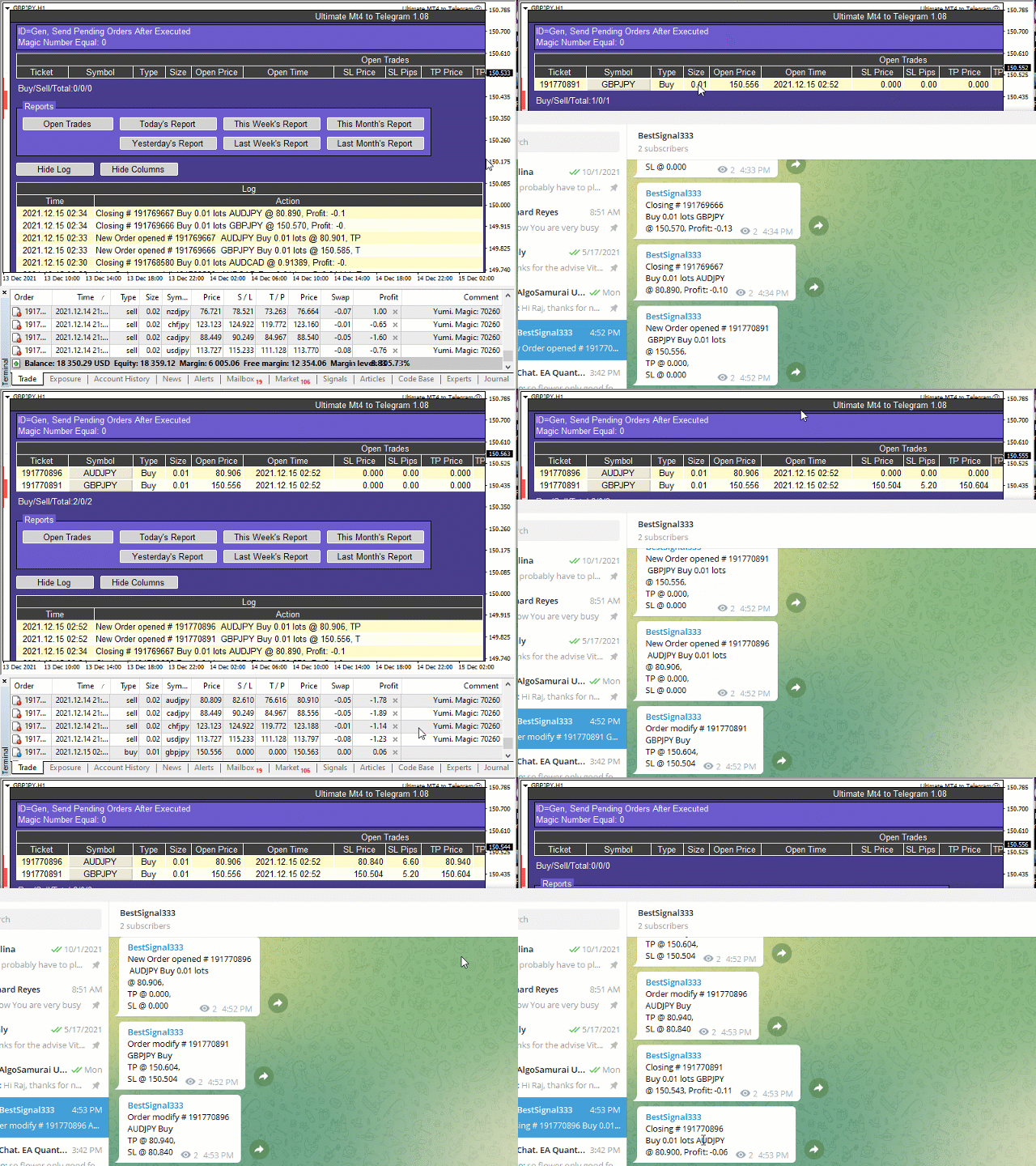
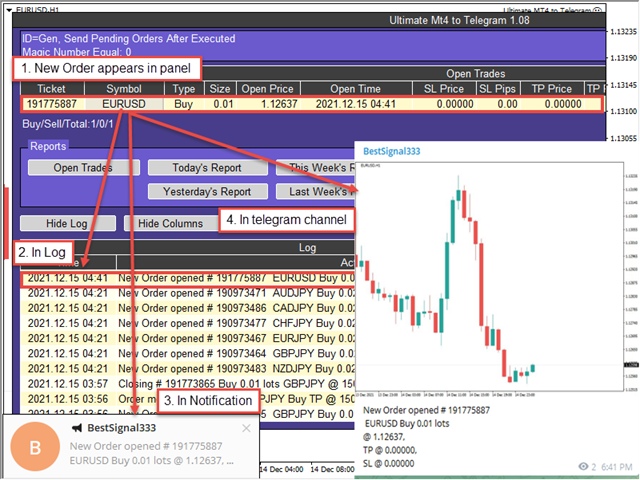
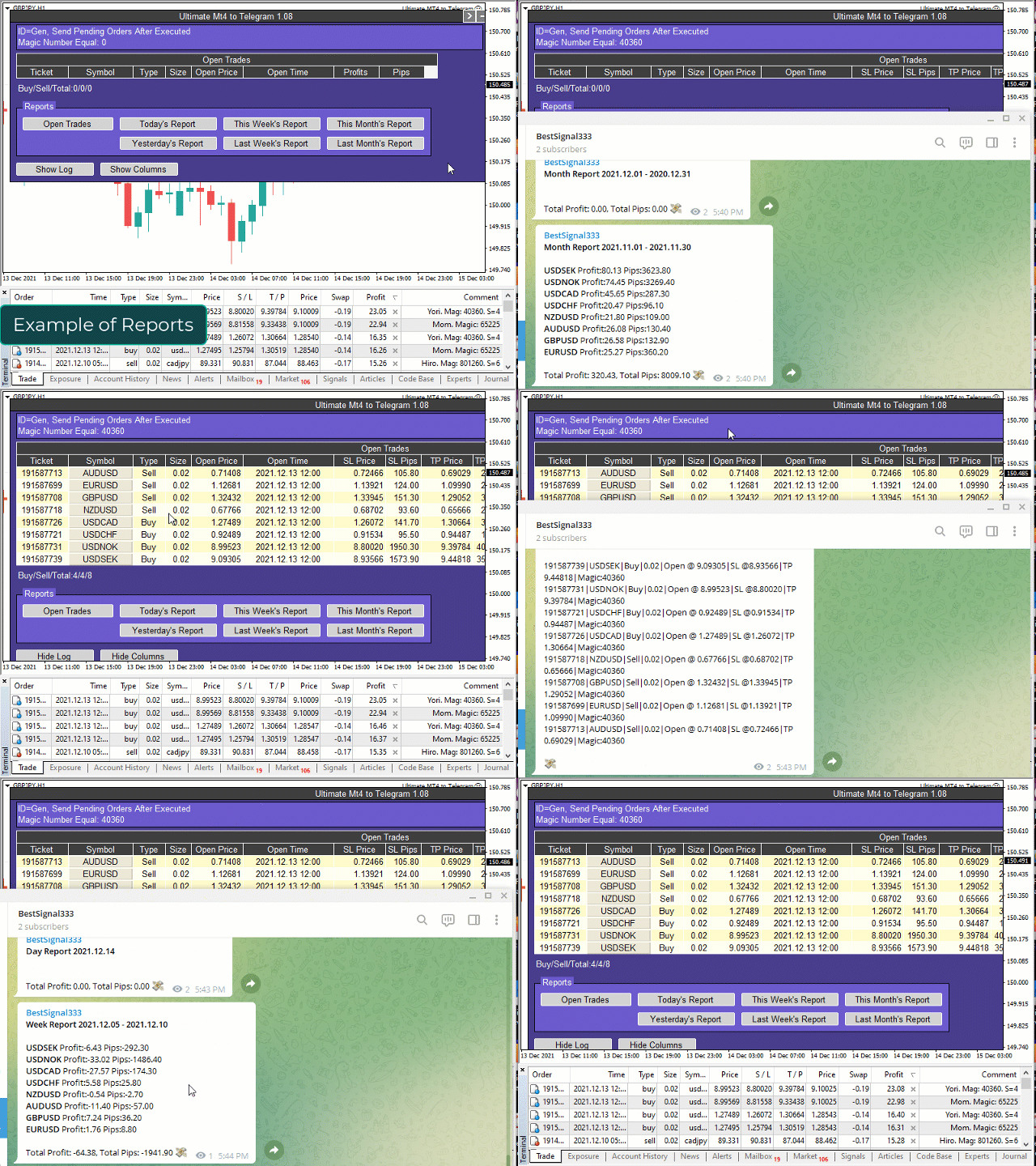
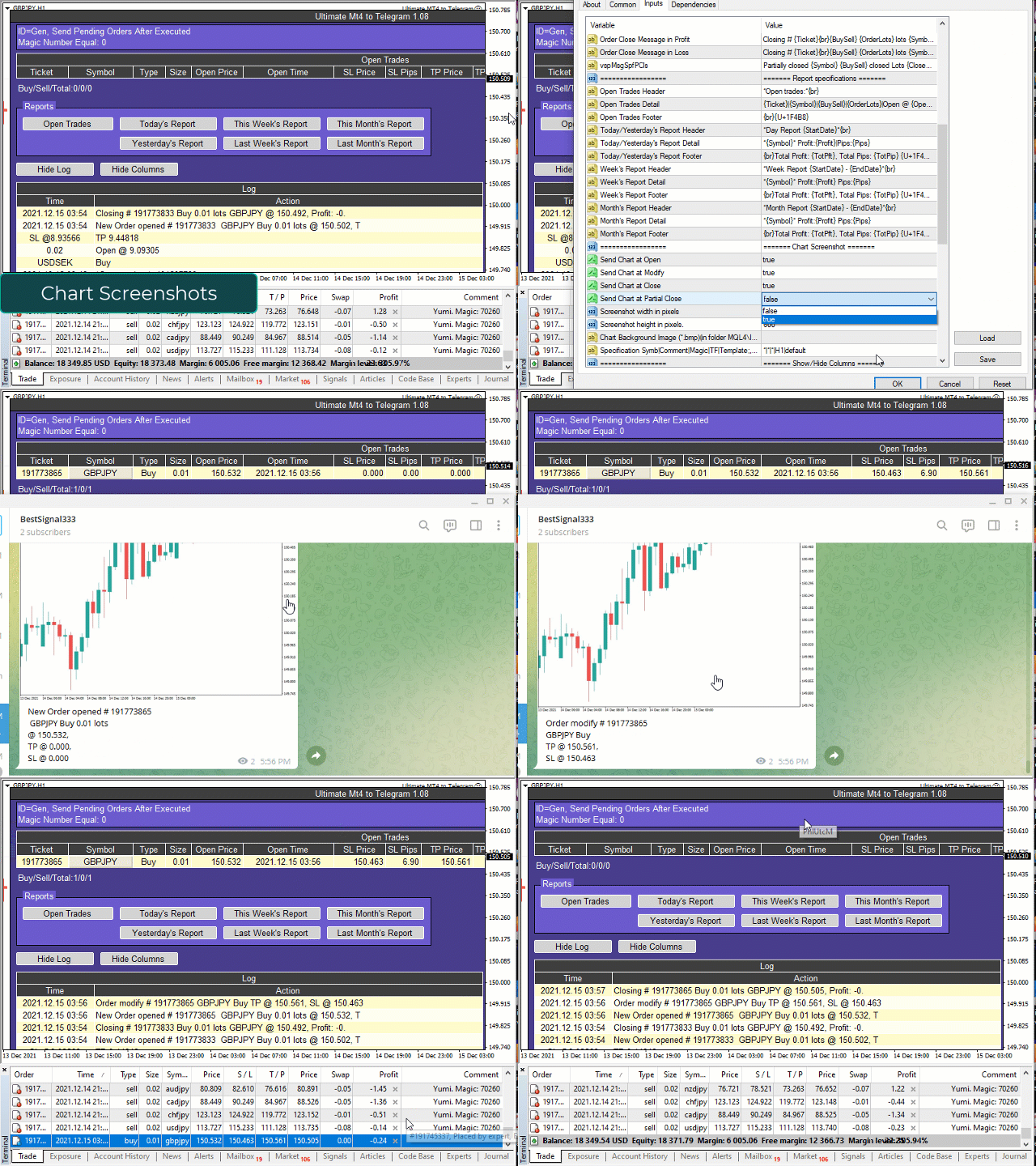
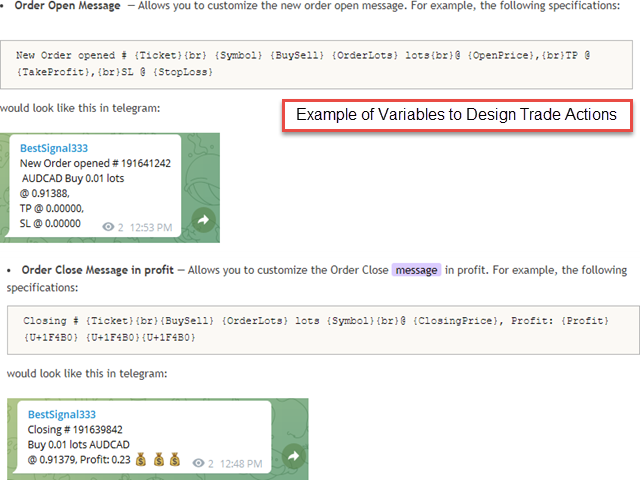
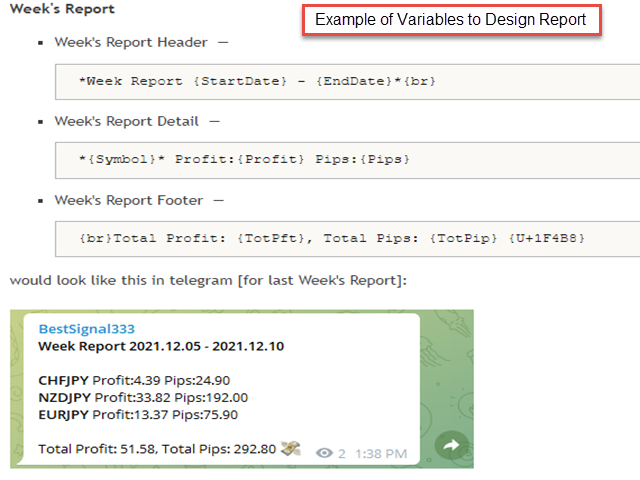
Ultimate MT5 to Telegram (UMT) sends controlled trades (via symbol, magic, comment) to your telegram channel. It sends open and closed trades, including pending orders and TP/SL modifications, along with chart screenshots, to any telegram channel. Additionally, you can send trade reports of open trades and summary profit/pip reports for day, week, or month. You can customize the design of the trade actions or reports with variables and emoticons. 

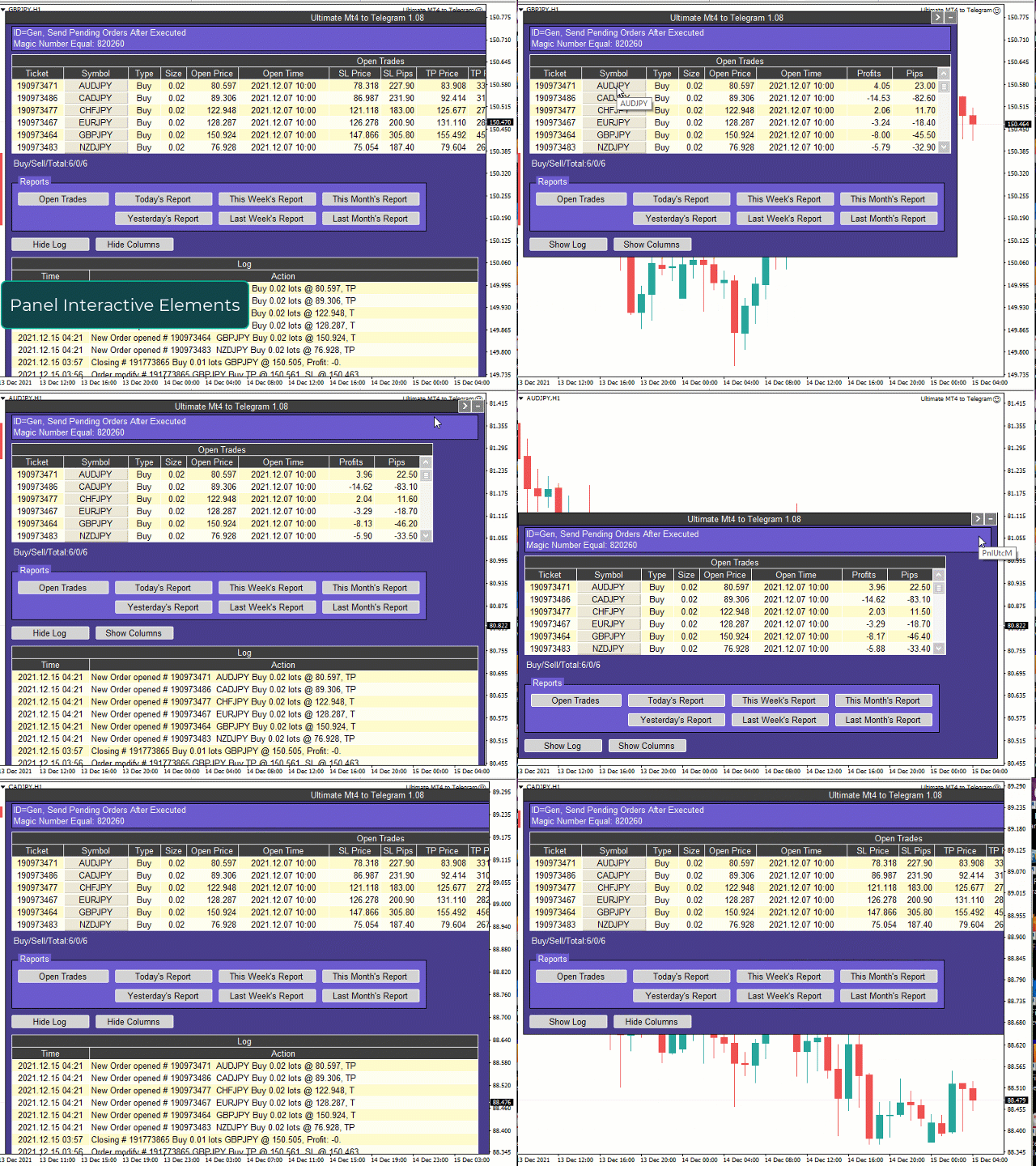
A beautiful panel allows you to visualize all the controlled open trades in useful trade information columns, along with a complete log, and ability to generate any type of report. 

MT4 version here. To test our public channel version, which doesn't need any telegram setup instructions so you can quickly see what the program can do, click here

For more detailed instructions, inputs and variables, click here

Setup Instructions: 

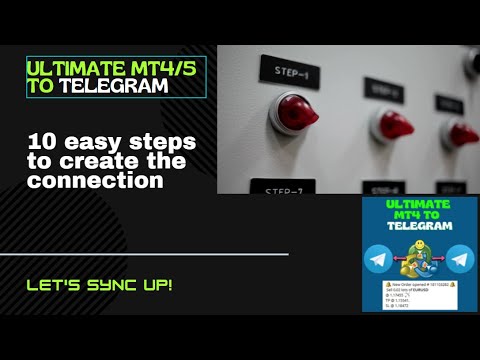
  1. Open your Telegram APP and search for "BotFather"
  2. Type /start and click/type /newbot to create a new bot
  3. Give your bot a nickname and username (e.g., nickname: Bestsignal and username: Bestsignalbot <-- username has to be ended by 'bot').
    Congratulations! You have created your Telegram bot
  4. Save your bot API token (e.g. 787517015:AAFnbcZYxx_iXAdRGrZD1W8bsSF5Xr_FmQ0) to your notepad. You will need it for step 8. 
  5. If you don't have it already, create the channel or group to where you will send your signals and reports
  6. Open the channel/group Info, then Manage, Add Administrators, type the bot username, and click Save
  7. In MT4, go to options/"Expert Advisors" and add the URL: https://api.telegram.org
  8. Add the EA to chart & At configuration paste the Telegram API Token, copied from step 4. After pasting number, make sure you press OK on the screen before continuing onto step 9. 
  9. Go to telegram channel and write "/ID" and send; if everything is ok, you should receive an answer with the Chat ID (a number). Copy that number.  
  10. In MT4, click on smiley face of EA, and paste the ID in the EA parameter, "List of Telegram Channel ID".  Press OK. 

General Options:

  • Telegram API Token (bot) - for token ID (step 5 above)
  • List of Telegram Channel ID - for channel ID (step 14 above)
  • Telegram User (optional) - telegram username without @ (e.g., Bestsignal333bot).  If set, the EA answers only to commands by this user. 
  • Id - Allows multiple instances of UMT to run on different charts
  • Send Pending Order After Executed (true/false) - self-explanatory
Symbol Name Options:
  • Ability to remove prefix or suffix characters and match symbols
SL/TP Options:
  • Ability to indicate default SL or TP in pips, if needed
Lot Options:
  • Lot Calculation - (dropdown: Original, Fixed, Multiplier)
  • Lot Fixed - if Fixed, then put in custom lot size here (e.g., 0.01)
  • Lot Multiplier - if Multiplier, then put in multiplier here (e.g., 1 is the original lot size, 2 is double, etc)  
Message Specifications: 
  • Allows you to indicate all the custom message specifications & variables* for the Order Open, Modify, Close in profit (lose) and partial close.
Report Specifications: 
  • Allows you to indicate all the custom report specifications & variables* for Open Trades, Today/Yesterday’s Report, Week and Month Report.

Chart Screenshot: 

  • Allows you to indicate if screenshots will be sent at open, modify, or close; at what width and height in pixels; what chart background image will be included; and what symbols, comments, magic, timeframe, and template will be tagged with these screenshots.

Show/Hide Columns: 

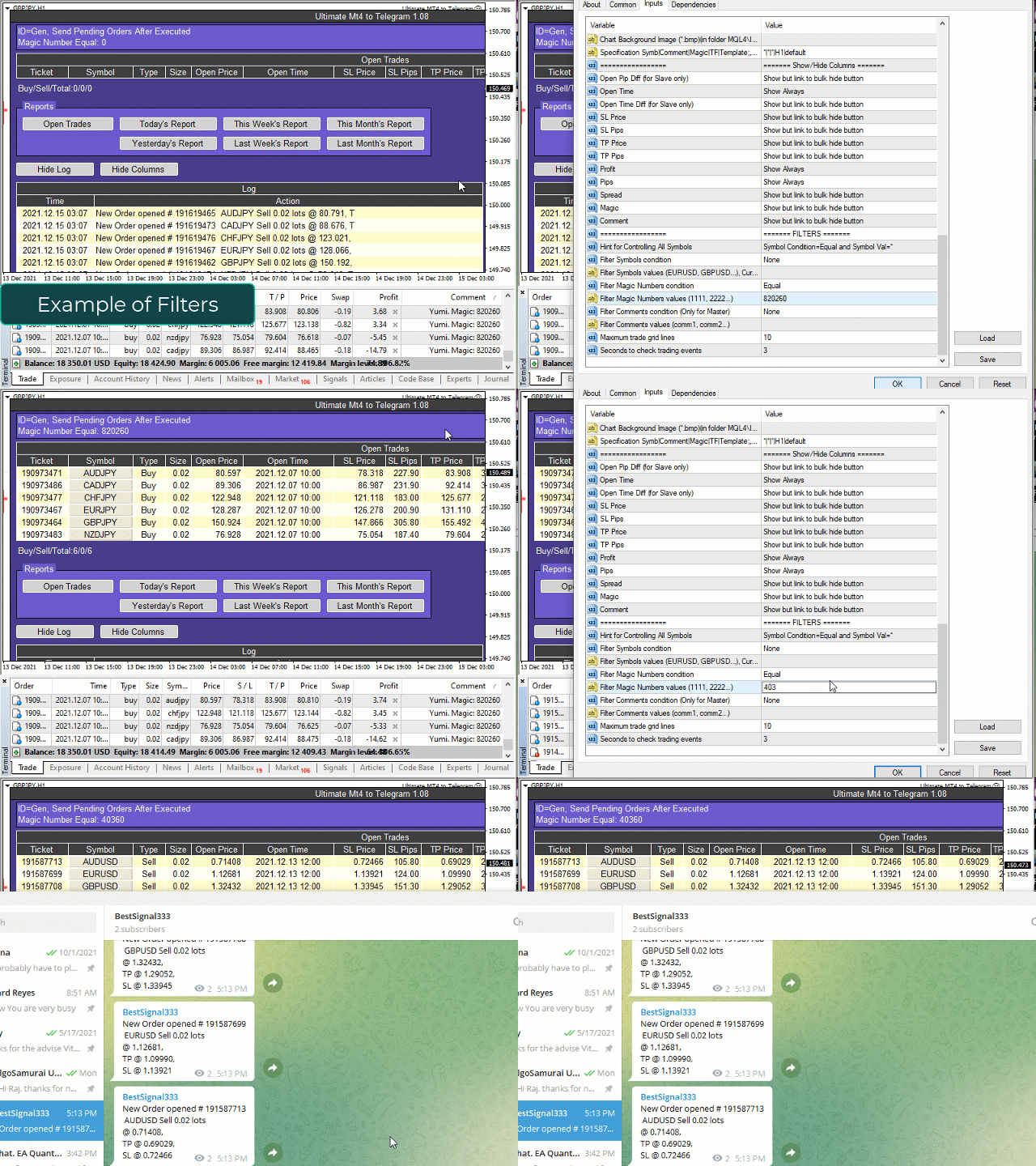
  • Allows you to Show Always/Hide the various info columns of the controlled open trades panel. There are many useful columns, but this option allows you to hide any of them to narrow the panel. 
Filters:
  • Filter (Symbol, Magic Number, Comment) — With dropdown menu: None, Equal, Not Equal, Contain, Not Contain. These filters allow you to include (exclude) specific symbols, magic numbers, comments, or parts of them. For example, if Symbol contains USD, you will control all USD based symbols. If Magic Number equals 80260, 40260, you will manage only these magic numbers.
For more detailed instructions, inputs and variables, click here
おすすめのプロダクト
One Click Trader  is a tool designed for MetaTrader 4 platform, which enables you to take your trading to the next level. It enables you to open, manage and close your trades in simple an efficient way by just one click of your mouse button. "-"   ,  "+"  change OCT window size  Up arrow minimizes the OCT panel Down arrow maximizes the OCT panel Right arrow displays the next panel with additional features Left arrow hides the panel with additional features Red  SELL  button enables you to open s
Excellent Multiplatform Copier of deals. I use it regularly on VPS (copy from Mt5 to Mt4). Multiplatform : copying from MetaTrader 4 to MetaTrader 4; copying from MetaTrader 4 to MetaTrader 5; copying from MetaTrader 5 to MetaTrader 4; copying from MetaTrader 5 to MetaTrader 5. Modes: master   - the current terminal is   source of trades (deals are copied from it); slave   - the current terminal is the receiver of trades (trades are copied to it). from myself  - mode "deals multiplier" (usefu
Trade Control Panel Function Normal One Click Function Close All Close All Profit Close All Loss Close All Pending Order Close All Sell Close All Buy Advance One Click Function 1.  Close Partial Lot Sell by Percent It will help you partial close for all open position by desire percent you wanted. No longer partial close one by one for every open position Manual input for desire percent 2. Close Partial Lot Buy by Percent It will help you partial close for all open position by desire percent
オープンポジションと指値注文を管理するためのユーティリティ。 組み込みのトレーリング ストップには、5 つのモードと 7 つのツールがあります。 バーチャル ストップ ロスとバーチャル テイク プロフィットがあり、チャート上を自由に移動できます。 組み込みの取引シミュレーターを使用して、EA がストラテジー テスターでどのように機能するかを確認できます。 UTralVirtualMT5 の詳細なガイドは、「コメント」セクションにあります。 MT5テスターでは、チャートに従って仮想SLとTPラインを手動で動かせません! 利点 5 つのトレーリング ストップ モード: 仮想、通常、合計、パーセンテージ、およびモバイル ストップ ロス。 7 つのオプション: ポイント、バーの極値、フラクタル、ボリューム、MA、パラボリック SAR、ATR。 仮想 TP および SL - グラフに従って手動で自由に移動します。 すべてのオープンポジションにストップロスとテイクプロフィットを追加する; ストップロスの設定: ポイント、フラクタル、ATR インジケーター、毎日の高値/安値; チャートで開かれたすべ
Pending Orders Grid Complete System   opens any combination of Buy Stop, Sell Stop, Buy Limit and Sell Limit pending orders and closes all existing pending orders. Only one time of the pending order at the same time!!! You will have a possibility to put a legitimate   Open Price   for the first position in the grid. Usually it should in the area of Support/Resistance lines. You just need to drop this script on the chart of a desired currency pair. Input Parameters Before placing all pending ord
This Expert Advisor monitors all open positions across all symbols in MetaTrader 5. Whenever a Stop Loss (SL) or Take Profit (TP) is manually set or adjusted on any position, the EA automatically applies that value to all other open positions , regardless of symbol or order type (Buy/Sell). This ensures consistent and synchronized SL and TP levels across your account. Perfect for mobile trading via tablet or smartphone!
Talents ATR Scalper Utility (MT5) The Talents ATR Scalper Utility is a professional-grade trade execution and management tool built for MetaTrader 5. Inspired by the Biblical Parable of the Talents , this utility is designed to help traders multiply their potential with precision risk control, one-click simplicity, and advanced automation. Whether you’re scalping forex, gold, or indices, this tool delivers speed, consistency, and confidence. Key Features One-Click Trade Preview Click below price
Apex StopLoss Manager
Muhammad Hassan Muhammad Ahmad Atiyah
️ Apex StopLoss Manager: Total Control Over Your Risk Tagline: Stop Losing to the Spread. Start Trading with Absolute Control. Overview: The Ultimate SL Command Center Are you tired of your "Breakeven" trades closing at a minor loss due to spread and commission? Do you sometimes need to instantly remove all safety nets to let a massive winner run? Apex StopLoss Manager is not just another utility—it's your finger on the panic button, your safeguard against hidden costs, and your master key
Automatic TP and SL
Dushshantha Rajkumar Jayaraman
TradeGuard    by Chart Walker TradeGuard is a MT5 Expert Advisor (EA) designed to enhance your trading experience by automating key aspects of trade management. This EA excels in efficiently managing Take Profit (TP) and Stop Loss (SL) levels, offering a seamless and intelligent approach to trailing stops. One of TradeGuard's standout features is its Smart Trailing Stop, which dynamically adjusts the trailing distance based on market conditions. This adaptive approach helps maximize profits dur
This Expert Advisor (EA) for MetaTrader 5 (MT5) has been designed to automatically manage Stop Loss (SL) and Take Profit (TP). Main Features Automatic Detection of Manual Positions : Monitors new manual positions without SL/TP and applies the configured rules Multiple Orders : Opening of multiple orders under the same conditions as the original position Hidden SL/TP : The hidden mode allows creating SL/TP invisible to your broker  Equity Protection": Allows defining a threshold for the accou
T Manager, the ultimate trade management solution designed by traders for traders. If you are searching for a simple and efficient trade panel, trade manager, or trade assistant, you are at the right place.   The market contains a diverse number of those tools , but this one is designed by traders for traders . I designed this tool, and I am using it daily. Take my advice and stop buying tools blended with un-useful features that you will never use,   T Manager provides you with the essential y

AW Metatrader to Telegram MT5
AW Trading Software Limited
5 (1)
通知を送信するための自動システム。これにより、サブスクライバーが取引端末からの取引イベントを見逃すことはありません。アカウントの取引操作に関する通知をTelegramメッセンジャーに送信するユーティリティ。 テレグラム->ここ/   MT4-   >   ここ でユーティリティをチャンネルに接続するためのステップバイステップの説明 利点: 簡単なセットアップと詳細な手順、 調整可能なスクリーンショットを送信する可能性、 絵文字を使用してカスタマイズ可能な通知テキスト、 完全または部分的な開始、終了、および注文の変更に関する通知の調整、 デフォルトで通知を送信する場合、テキストファイルは自動的にダウンロードされます。 保留中の注文の発注または削除に関する通知の調整、 記号とマジックナンバーによる便利なフィルタリング。 入力変数: TELEGRAM BOT AND CHAT SETTINGS Telegram bot token - Enter the token number received after registering the bot in "BotFather" Telegr
Торговая панель предназначена для установки сетки ордеров с различными параметрами. Предназначена для торговли акциями, где в одном лоте будет одна акция, на неттинговых видах счетов. Панель не дает дает открывать сетки на продажу, если уже стоят ордера на покупку и наоборот, есть возможность только управления текущей сеткой.  Имеет несколько основных функций по установке ордеров в заданном диапазоне и с заданным риском, закрытию части ордеров из сетки, переносом в безубыток, закрытие части по п
コピー機->便利で高速なインターフェースインタラクション、ユーザーはすぐに使用できます     ->>>> WindowsコンピュータまたはVPS Windowsでの使用を推奨 特徴: 多様でパーソナライズされたコピー取引設定:1. 異なるシグナルソースに異なるロットモードを設定できます。2. フォワードコピー取引とリバースコピー取引に異なるシグナルソースを設定できます。3. シグナルはコメントで設定できます。4. 契約ロットに応じてロットを調整するかどうか 多様でパーソナライズされたコピー注文設定2:1.品種ごとに異なるロットモードを設定できます2.順方向コピー注文と逆方向コピー注文に異なる品種を設定できます3.コメントでシグナルを設定できます4.契約ロットに応じてロットを調整するかどうか コメントフィルタリング、MAGICフィルタリング、シグナルロットフィルタリング、ローカル製品フィルタリング 勤務時間設定 逆同期SLAVE終了 注文バインド機能: 任意の注文を設定されたシグナルソース注文にバインドできます (テーブルをダブルクリックして編集します) アカウントリスク管理 基本
Features: fast opening / closing deals automatic closing of trades by profit / loss shows the number of deals and the total profit for the Symbol Fast open deals: set the Lot volume set  StopLoss / TakeProfit in points (if you set "0", then it is not used) set slippage set Magic (if necessary) set comment (if necessary) Fast open features: fast open Buy fast open Sell fast close ALL open orders for the current Symbol Auto close deals by profit / loss (analogue of virtual StopLoss / TakeProfi
[Target currency pair / time] [EURUSD/15M] Recommended. Variable lot MT5EA for compound interest operation! [About EA operation] After purchasing an EA, it is recommended to operate with a real account after operating with a demo account for a certain period of time. [About kikyo/logic overview] Kikyo is an EA that supports EURUSD/15M. Adopts a variable lot system that can easily realize compound interest operation according to the amount of funds (the default is a fixed lot. Please change
Don't want to risk or loose your personal trading account or prop trading firm account because of a simple Margin Call or exceeded Loss Limit? Then this Utility Expert Advisor is the solution for you! This Expert Advisor monitors your account Equity or Balance or even both! If the Equity and/ or Balance fall under your defined stop limits, the EA closes all of your positions and keeps you so on track. Options and Variables: Monitored Values: Choose which values should get monitored Equity: if
Telegramチャネルを介したトランザクションのコピー機。取引をTelegramチャネルに即座に公開したり、Telegramチャネルからトランザクションをコピーしたりするのに役立ちます。このユーティリティは、MT5で信号を受信することと、Telegramに信号を送信することの2つの方向で機能します。 これ以上の逃した取引はありません もうパニックはありません 資本管理 使いやすさ デモ https://www.mql5.com/ru/market/product/54083 あなたはそれの用途を見つけることができます: Telegramチャネル(インターネット経由)を介して独自のトランザクションをコピーする。 MT5からMT4へ、またはその逆にトレードをコピーします。 MT4バージョン https://www.mql5.com/ru/market/product/56142 クライアントのテレグラムチャネルを介した信号の配信。 使い方: ユーティリティがどのように機能するかは、テストチャネル https://t.me/moneystrategy_mqlで確認できます 。
Boost your forex profits with Blues Protector, an advanced MQL5 Expert Advisor designed for MetaTrader 5. This automated trading bot dynamically manages your stop-loss levels to secure gains and reduce risks. Blues Protector EA - User Manual   (For MT5 - Ready-to-Use EX5 File)   1. What This EA Does    The Blues Protector EA automatically secures your profits by smartly adjusting stop-loss levels when your trade reaches a predefined profit level. It works silently in the background, protecting
Time saving and fast execution Whether you’re traveling or sleeping, always know that Telegram To MT5 performs the trades for you. In other words, Our   Telegram MT5 Signal Trader  will analyze the trading signals you receive on your selected Telegram channels and execute them to your Telegram to MT5 account. Reduce The Risk Telegram To Mt5   defines the whole experience of copying signals from   Telegram signal copier to MT5 platforms. Users not only can follow all instructions from the signal
The TELEGRAM BROADCAST utility helps to instantly publish your trading in the Telegram channel. If you have long wanted to create your Telegram channel with FOREX signals, then this is what you need. ATTENTION. This is a DEMO version, it has limitations - sending messages no more than 1 time in 300 seconds PAID version:  https://www.mql5.com/en/market/product/46865 https://t.me/moneystrategy_mql TELEGRAM BROADCAST can send messages: Opening and closing deals; Placing and deleting pending o
FREE
Close ALL OPEN TRADES on the dot! Set the exact day and time, click the START button and wait until it closes all trades. ========================================== INPUTS (Check screenshot for reference): Closing type:   Set to specify if you wanted to close all of the trades on your account or just the trades under the current chart symbol. Magic number:   Leave it to 0 if you want to close all trades. Set to specific magic number if you only want to close trades under that magic number. This
This utility sends notification to trader’s MT5 (for MT4 version, checkout this link ) mobile app, to remind traders about their open positions. Super useful for part time traders to keep track and not forget any positions. To turn on notification, please visit   this link   (https://www.metatrader4.com/en/trading-platform/help/setup/settings_notifications) Features Keep track on open orders (pending orders, running orders) Customize time to send notification Customize notification interval (se
Общие сведения Данная торговая панель предназначена для быстрой и удобной торговли в один клик. Создавался продукт для частичной автоматизации своей личной ручной торговли  https://www.mql5.com/ru/signals/1040299?source=Site+Profile+Seller Советник имеет ряд возможностей, а именно: Открытие BUY или SELL ордеров. SL выставляется ниже (выше)  минимальной (максимальной) цены, задаваемых в параметрах количества свечей. Размер TP рассчитывается в соотношении от размера SL (по умолчанию 0.618). Выстав
このツールを使用すると、「すべて閉じる」をクリックするだけで、開いている注文をすべてワンクリックで閉じることができます。 収益性の高い注文のみをクローズしたい場合は、「収益性の高い注文をクローズする」ボタンをクリックすると、すべての変動注文がクローズされます。 変動損失のある注文のみを決済したい場合は、「損失可能注文を決済する」ボタンをクリックすると、変動損失のあるすべての注文が決済されます。 このツールは1年間テストされています. ワンクリックポジションクローズ機能は非常に完成しています. ポジションクローズはタイムリーであり、遅延範囲は小さいです. もちろん、遅延はあなたの地域やネットワーク環境にも関係します.ご注意ください。 履歴データのバックテスト プロセス中、このツールのパフォーマンスはさらに完璧になり、100 件の注文すべてを閉じるのに最長 0.495 秒しかかかりませんでした。 実際の取引プロセス中、私のポジション注文の最大数はわずか 26 で、すべてのポジションが決済されるまでにかかった時間は 1.28 秒でした。
This utility provides the ability to use hot keys in manual trading instantly responding to the current market situation. You can assign hot keys to open/close positions by their type, open/close all positions on the current chart and remove all orders on the current chart. You can also assign hot keys for five predefined trade volumes and switch between them if necessary with no need to change the volume manually from time to time. It is also possible to set the auto calculation of a trade volu
Capture Spikes and hold for a long time. Let the Trailing stop follow the Price into profit. Not for Both Boom and Crash, Just for Boom Only.  Once it spots a Setup, the EA will enter and you do not need to worry much about drawdown, this EA was tested on a $100 account and maximum drawdown was 9%, with the maximum consecutive losses recorded of $36. Those who ever bought from me know that I provide support promptly if you want to set up or need a Customized approach.  Please note that the EA
HYT (Help Your Trading) は、主に次の 2 つのテクニックを使用して、損失ポジション を平均化 できるように設計されたツールです。 標準平均化。 トレンドの方向に沿ってポジションをオープンすることでヘッジします。 このツールを使用すると、買いと売りの両方において、異なる方向に開かれた複数のポジションを管理できます。 HYT は、次のポジションのサイズ、注文価格、平均化の方向、指定された利益確定レベルでのポジションのクローズを自動的に計算します。 また、希望する利益確定レベルと初期ロットを指定して、「購入」ボタンと「販売」ボタンを使用してポジションを開くオプションも提供します。 使用を開始する には、ツールをチャートにドラッグし、利益確定レベルを設定して、「平均化を開始」ボタンをクリックするだけです。 初期ポジションが大きすぎない ことを確認し、平均を下げるときにツールによってポジション サイズが拡大されるため、追加費用が発生することを覚悟してください。 HYTは 自動取引 も可能です。自動取引を有効にすると、ツールは指定されたパラメータに従ってポジションを開閉しま
Telegram Broadcast MT5
Volodymyr Hrybachov
3.67 (3)
TELEGRAM BROADCASTユーティリティは、取引をTelegramチャネルに即座に公開するのに役立ちます。あなたが長い間FOREX信号であなた自身のテレグラムチャンネルを作りたいと思っていたなら、これはあなたが必要とするものです。 TELEGRAM BROADCASTはメッセージを送信できます: 取引の開始と終了。 保留中の注文の配置と削除。 ストップロスとテイクプロビジョニングの変更(ラストオーダー); 損失を止め、provをトリガーします。 保留中の注文のアクティブ化と削除: 取引レポートの送信; 入金と出金のメッセージを送信する。 ドローダウンまたは利益がN値に達したときにメッセージを送信します。 アカウントの監視-N分ごとに統計を送信します。 独自のテキストを追加して、各メッセージに分単位で遅延を投稿できます。すべてのメッセージは柔軟です。ユーティリティは1つのチャートにのみインストールされますが、すべてのシンボルからメッセージを送信します。設定で任意の記号を非表示にできます。 ユーティリティ構成: [サービス]-> [設定]-> [エキスパートアドバイザ
MultiChart Pro
Pablo Filipe Soares De Almeida
MultiChart Pro – MetaTrader 5用の高機能チャート管理ツール MultiChart Pro は、MetaTrader 5 で複数のチャートを自動的に開き、設定するためのエキスパートアドバイザー(EA)です。トレーダーが異なる時間足のチャートを効率的に管理できるように設計されており、わずか数秒で分析環境を整えることができます。 このツールは、最大4つのチャート(例:D1、M1、M15、および10秒のオフラインチャート)を自動で開き、現在のチャート(例:M5)も設定します。トレード戦略に合わせて時間足を自由に選択できるため、マルチタイムフレーム分析を行うトレーダーに最適です。 主な機能: チャートの自動生成: 複数の時間足を同時に開き、手動操作を省きます。 テンプレートの自動適用: 各チャートに指定されたテンプレートを適用し、存在を確認してから読み込みます。 オフラインチャート対応: 10秒などのカスタム時間足を利用でき、スキャルピングなど短期取引にも活用可能です。 設定の柔軟性: 入力パラメータを通じてすべての設定を簡単に変更可能。 MultiChart Pro
このプロダクトを購入した人は以下も購入しています
Ultimate Extractor - Professional Trading Analytics for MT5 Ultimate Extractor transforms your MetaTrader 5 trading history into actionable insights with comprehensive analytics, interactive charts, and real-time performance tracking. What It Does Automatically analyzes your MT5 trading history across all Expert Advisors and generates detailed HTML reports with interactive visualizations. Tracks live performance metrics including open positions, floating P/L, and drawdown in real-time. Supports
EASY Insight AIO – スマートで手間いらずな取引のオールインワンソリューション 概要 数秒で市場全体——FX、ゴールド、暗号資産、指数、さらには株式まで——を、手作業のチャート確認や複雑なセットアップ・インジケーター導入なしにスキャンできたらどうでしょうか? EASY Insight AIO はAIトレードのための究極のプラグ&プレイ型エクスポートツールです。市場全体のスナップショットを、クリーンなCSVファイルで一括出力。ChatGPT、Claude、Gemini、Perplexityなど、さまざまなAIプラットフォームで即座に解析できます。 ウィンドウの切り替えやグラフのごちゃごちゃしたオーバーレイはもう不要。自動エクスポートされる純粋で構造化されたインサイトだけで、無駄なチャート監視に悩まされず、スマートなデータ主導の判断に集中できます。 なぜEASY Insight AIOなのか? 本当のオールインワン • セットアップ不要、インジケーターのインストール不要、チャートへのオーバーレイ不要。インストールして起動し、エクスポートするだけです。 マルチアセット対
MT5 → Tradovate Bridge (Prop-Firm Ready) Mirror your MT5 trades into Tradovate in real time—perfect for running your favorite indices/gold EA on MT5 while meeting the rules of top prop firms like Apex , etc. What it does Live mirroring: Replicates MT5 market executions (open/close) to Tradovate as market orders. Symbol routing:  Map your chart (e.g., US100/USTEC) to the right futures contract (MNQ/NQ/MES/ES/…); roll-aware (quarterly/monthly). Position cap: Limit how many MT5 positions are mirro
The product will copy all telegram signal to MT5 ( which you are member) , also it can work as remote copier.  Easy to set up, copy order instant, can work with almost signal formats, image signal,  s upport to translate other language to English Work with all type of channel or group, even channel have "Restrict Saving Content", work with  multi channel, multi MT5 Work as remote copier: with signal have ticket number, it will copy exactly via ticket number. Support to backtest signal. How to s
Custom Alerts AIO:マルチマーケット監視を一括で実現 — 設定不要ですぐに使えるインテリジェントツール 概要 Custom Alerts AIO は、追加のインジケーター設定が不要で、インストール後すぐに利用できる高機能マーケットスキャナーです。FX Power、FX Volume、FX Dynamic、FX Levels、IX Power を内部にすべて統合し、主要なすべての資産クラス(為替、金属、指数、暗号資産)を一括監視できます。MetaTrader の仕様により、株式は個別のシンボルとして追加可能ですが、一般的には利用頻度は低めです。 1. なぜ Custom Alerts AIO を選ぶべきか 追加ライセンス不要 • 必要なすべての Stein Investments インジケーターが内蔵されており、すぐに使用可能です。 • チャートに表示されるグラフィックは省略されており、アラート生成に特化した構成です。 市場を広範囲にカバー • 為替、金属、暗号資産、株価指数に対応(株式は手動追加可能)。 • シンボル名を入力する必要はなく、プロパティで資産クラス
The  Easy Strategy Builder (ESB)  is a " Do It Yourself " solution that allows you to create a wide range of the automated trading strategies without any line of codes. This is the world’s easiest method to automate your strategies that can be used in STP, ECN and FIFO brokers. No drag and drop is needed. Just by set conditions of your trading strategy and change settings on desired values and let it work in your account. ESB has hundreds of modules to define unlimited possibilities of strategi
あなたがメンバーである任意のチャネルから(プライベートおよび制限されたものを含む)シグナルを直接あなたのMT5にコピーします。  このツールは、トレードを管理し監視するために必要な多くの機能を提供しながら、ユーザーを考慮して設計されています。 この製品は使いやすく、視覚的に魅力的なグラフィカルインターフェースで提供されています。設定をカスタマイズして、数分で製品を使用を開始できます! ユーザーガイド + デモ  | MT4版 | Discord版 デモを試してみたい場合は、ユーザーガイドにアクセスしてください。 Telegram To MT5 受信機は、ストラテジーテスターで動作しません! Telegram To MT5の特徴 複数のチャネルから一度にシグナルをコピー プライベートおよび制限されたチャネルからシグナルをコピー BotトークンまたはChat IDは必要ありません   (必要に応じて使用することができます) リスク%または固定ロットを使用して取引 特定のシンボルを除外 すべてのシグナルをコピーするか、コピーするシグナルをカスタマイズするかを選択 すべてのシグナルを認
YuClusters
Yury Kulikov
4.93 (42)
Attention: You can view the program operation in the free version  YuClusters DEMO .  YuClusters is a professional market analysis system. The trader has unique opportunities to analyze the flow of orders, trade volumes, price movements using various charts, profiles, indicators, and graphical objects. YuClusters operates on data based on Time&Sales or ticks information, depending on what is available in the quotes of a financial instrument. YuClusters allows you to build graphs by combining da
THIS EA IS A SEMI-AUTO EA, IT NEEDS USER INPUT. Manual & Test Version Please DON'T BUY this product before TESTING  and watching my video about it. The price of the ManHedger will increase to 250$ after 20 copies sold. Contact me for user support or bug reports or if you want the MT4 version! MT4 Version  I do not guarantee any profits or financial success using this EA. With this Expert Advisor, you can: Implement your own Zone Recovery strategy to capitalize on trending markets. Create Grid
This is exactly what the name says. Visual strategy builder . One of a kind. Turn your trading strategies and ideas into Expert Advisors without writing single line of code. Generate mql source code files with a few clicks and get your fully functional Expert Advisors, which are ready for live execution, strategy tester and cloud optimization. There are very few options for those who have no programming skills and can not create their trading solutions in the MQL language. Now, with Bots Builde
Mentfx Mmanage mt5
Anton Jere Calmes
4.25 (8)
The added video will showcase all functionality, effectiveness, and uses of the trade manager. Drag and Drop Trade Manager. Draw your entry and have the tool calculate the rest. Advanced targeting and close portions of a trade directly available in tool (manage trades while you sleep). Market order or limit order on either side with factored spread. Just draw the entry, the tool does the rest. Hotkey setup to make it simple. Draw where you want to enter, and the stop loss, the tool calculates al
The product will copy all  Discord  signal   to MT5   ( which you are member  ) , also it can work as remote copier.  Easy to set up. Work with almost signal formats, support to translate other language to English Work with multi channel, multi MT5. Work with Image signal. Copy order instant, auto detect symbol. Work as remote copier: with signal have ticket number, it will copy exactly via ticket number. How to setup and guide: Let read all details about setup and download Discord To MetaTrader
Crypto Charting for MT5 – MetaTrader 5 向け暗号資産チャートツール 概要 Crypto Charting for MT5 は、WebSocket を介して暗号資産の OHLC チャートデータをリアルタイムで提供します。複数の取引所に対応し、MT5 上で履歴データの自動更新が可能です。 機能 WebSocket によるリアルタイムデータ 自動履歴データ更新 接続障害時のスケジュール更新 全ての MT5 時間足に対応 OHLCV データ構成 ストラテジーテスターに対応 自動再接続機能付き 対応取引所 Binance、Bybit、OKX、KuCoin、MEXC、Gate.io、Bitget、XT.com 補足情報 ティックデータおよび板情報には、別製品の Crypto Ticks をご覧ください。 注意事項 DLL を使用していません。VPS に適しています。 Strategy Tester では WebRequest 機能は動作しません。 デモをご希望の場合は、MQL5 のプライベートメッセージでご連絡ください。 Full Documentati
Lazy Trader is your personal risk management assistant that independently finds the best market entries, manages positions, and helps you extract maximum profit from every trading idea! It monitors charts from M1 to W1 , finds optimal entry points based on your parameters, and manages trades without your involvement: - Got an idea on the daily chart? No need to wait for lower timeframes to form a signal — Lazy Trader will check everything and open all necessary positions while you live your lif
Trade Copier Pro MT5 is a tool to copy trade remotely to multiple MT4, MT5 and cTradfer accounts at different computers/locations over internet. This is an ideal solution for you if you are a signal provider and want to copy your trades to other receivers globally on your own rules. One provider can copy trades to multiple receivers and one receiver can get trade from multiple providers as well. The provider can even set the subscription expiry for each receiver, so that receiver will not be abl
What Exactly Is A Smart Trading Tool? Smart Trading Tool   was developed for fast and comfortable trading of the financial markets especially for   ORDER BLOCKS TRADERS .   It provides traders functionalities, such as: A Drawing Tool One-Click Trading Panel Automated Lot Sizes Calculation   based on your risk appetite & Money Management ( Watch this video , how this tool can help manage your risk per trade better!) Built in PRICE LEVELS (Fibonacci, Round Numbers, Daily hi-low, etc) Shows Trading
Partial Close Expertは 、多くの機能を1つの自動化システムに統合したツールです。このEAは、リスク管理と潜在的な利益の最大化のための複数のオプションを提供することで、トレーダーがポジションをより効果的に管理するのに役立ちます。 パーシャルクローズエキスパートを使用すると、トレーダーは   部分的な閉鎖   利益を確定するためのレベル、     トレーリングストップ   利益を守り損失を制限するレベル、     とんとん   価格が反対方向に動いた場合でも取引が損益ゼロになることを保証するレベル、およびその他のいくつかの機能。 このオールインワンのエキスパートアドバイザーを使用することで、トレーダーは取引を常に監視する必要がなく、時間と労力を節約できます。EAは市場の状況に基づいて事前に設定された指示を実行するため、トレーダーはより柔軟に取引をコントロールできます。 部分クローズエキスパートを添付し、     キーボードの「p」を押して 設定を変更すれば準備完了です。 部分クローズエキスパート   インストールと入力ガイド EA に関する通知を受け取りたい場合は、U
I present to your attention a powerful utility for predicting the future movement of an asset based on W.D. Ganna’s law of vibration. This utility analyzes the selected market model and provides codes for future possible market movement patterns. If you enter the selected code into the appropriate box, you will receive a forecast of the potential market movement. The utility has the ability to display several potential forecast models. The forecast is not yet tied to time and price and gives th
Trading Chaos Expert
Gennadiy Stanilevych
5 (11)
This software has no equals in the world and represents a universal trade "console" covering trading signals, automated market entry, setting of Stop Loss and Take Profit, as well as Trailing Profit for multiple trades at the same time in a single open window. Intuitive control of the Expert Advisor in "three clicks" ensures a comprehensive use of all its functions on different computers, including tablets PCs. Interacting with additional signal indicators that mark the chart to give a real mark
Remote Trade Copier is an advanced tool designed for efficiently copying trades between accounts in both local and remote modes. It allows for lightning-fast order replication from a master account to a slave account. In local mode, trades are copied instantly, while in remote mode, the copying process takes less than 1 second. MT4 Version (Only Local) MT5 Version (Only Local) MT4 Full Version (Local & Remote) Local mode refers to both MetaTrader platforms being installed on the same system,
Botonera MT5
Jose Antonio Soto Mendoza
5 (1)
トレーディングキーボード 金融市場における機敏かつ正確な取引を実現する高度なツールです。 DAX、XAU/USD、FX、その他市場(スキャルピング、デイトレード、スイングトレードなど)を取引するトレーダー向けに設計されたこのキーボードは、ワンクリックで取引を執行でき、複数の専門的な設定も使用できます。 「デイリースキャルピングキーボード」を使用すると、ワンクリックで取引の発注、決済、プロテクトが可能で、M1/M5での取引を時間をかけずに行うのに最適です。ヘッジ、損益分岐点、トータルクローズ、クイックロットコントロール用のボタンも搭載されています。貴重な時間を無駄にしたくないアクティブなトレーダー向けに設計されています。 主な機能: 直接注文とスケジュール注文:市場で売買注文を執行するか、売買指値または売買ストップを使用して取引をスケジュールできます。 ロットサイズ管理:ポジションサイズを設定し、ヘッジ戦略を自動化します。 自動ヘッジ:インテリジェントなヘッジシステムでリスクを最小限に抑えます。 ハイライトボタン: TSL(トレーディングストップロス):取引が利益確定した時点で
50% off. Original price: $375 Reward Multiplier is a semi-automatic trade manager based on pyramid trading that opens additional orders with the running profit of your trades to maximize return exponentially without increasing the risk. Unlike other similar EAs, this tool shows potential profit/loss and reward to risk ratio before even entering the first trade! Download Demo here  (starting lot is fixed at 0.01) Guide + tips here MT4 version   here You only open the first order. When your trade
Mt5 To InterativeBrokers Copier allows you to copy deals from MT5 account to Interactive Brokers. With this, you can run your EA strategy on a MT5 Demo/Real Account, then copy all the deals to Interactive Brokers account real time. Features: 1. Copy or Invert-Copy deals Realtime from MT5 to IB Account. 2. Synchronizing positions of both accounts periodicaly, in case any missing copying. 3. You can choose only Buy position or Sell position. Symbols Setup: General Format:  {MT Symbol} -> {IB S
Fly With Gold – Scenario Dashboard PRO Market Condition & Trend Analysis Dashboard for MT4 / MT5 Fly With Gold – Scenario Dashboard PRO is a professional market condition analysis indicator designed to help traders identify trend, range (lateral), and neutral market phases in real time. This product is an analysis and decision-support tool . It does not generate trading signals , does not open trades , and does not guarantee profits . What the Indicator Does Analyzes market conditions and classi
Trade on crypto exchanges in MT5! GRat_Crypto is a tool for manual and automated trading , including ANY available EA, ANY  cryptocurrency  on most popular crypto exchanges in the familiar MT5 environment 24/7. Features 1. ALL instruments of the 9 most popular crypto exchanges are available: Binance, BingX, Bybit, Coinbase, CoinEx, Kraken,   KuCoin, MEXC and OKX . 2. The ability to place ANY type of order available in MT5, both market and pending, to modify orders and positions, to delete order
PROTECT YOUR FTMO Account in a simplest way Must-Have Account Protector for any Prop-trading Account and Challenge MT4 / MT5 Expert Advisor that protects your Forex Prop Trading account from an unexpected drawdown! FTMO Protector  is a Tool that lets you manage trades and control your profit and loss across multiple Robots and currency pairs using a simple parameters and settings. Use as many EAs and Instruments you need, the Protector will: 1.   Calculate your midnight (01:00 System time) Balan
Professional-Grade Chart Analysis – AI-Powered & Visually Enhanced The AInalyzer is an Expert Advisor for MetaTrader 5 that leverages artificial intelligence to analyze market structures and automatically places visual objects directly on your charts. Instead of spending hours manually examining charts, you'll get a clear overview of support levels, resistance zones, trend structures, and potential trading opportunities in no time – all logically presented, visually marked, and available at you
MT5用Binance取引ツール 1. 本製品には、Websocketからのライブチャート、ヒストリカルチャート、そしてMT5ターミナルの再起動時に自動更新される機能が搭載されています。これにより、手動操作なしでスムーズにBinance取引を行うことができます。 スポットと先物で取引、ライブチャート、ヒストリカルデータが利用可能です。 チャート機能: 1. Websocket (wss) 経由のライブOHLCチャート 2. APIからの履歴更新 3. MT5を開くたびにチャートの履歴を自動更新 4. M1からMN1まで、すべての時間枠に対応 5. 利用可能なデータ:始値、高値、安値、終値、実出来高、ティック出来高 6. ストラテジーテスターを使用して、暗号資産データでエキスパートアドバイザーのあらゆる戦略をバックテストできます。 チャートと履歴に関する手順: 1. MT5オプションにURLを追加します。 2. 任意のチャートでユーティリティを起動し、モードをLIVEに設定し、取引所(例:Binance Spot)を選択します。初回実行時のみ「シンボルの作成」を「有効」にして、
Best Renko Chart Generator
Mohammad Taher Halimi Tabrizi
5 (1)
This is the Best Renko chart generator ever in the market you can set the box sizes based on ATR or Fixed Size: 1. Fixed Box Size 2. Current ATR Size 3. ATR size of the Chart Start Time. also you can set the Renko chart cut of date and time to start as reference of creating renko charts. you need to attach to a symbol chart that want the renko chart of it, then immediately a new chart will be opened which is based on renko, you can use this generated chart and attach your EA to trade on or you e
作者のその他のプロダクト
This trade copy utility allows you to instantly and seamlessly replicate and synchronize unlimited orders from multiple master accounts to multiple slave accounts on your local machine. You can create custom channels (or portfolios) with advanced filtering capabilities to copy from multiple master accounts to multiple slave accounts. Moreover, you can tailor these channels with a range of lot sizing and trade condition options to ensure that copied trades outperform the original source. You can
This EA Utility allows you to manage (with advanced filtering) unlimited open orders (manual or EA) with 16 trailing stop methods: fixed, percent, ATR Exit, Chandelier Exit, Moving Average, Candle High Low Exit, Bollinger Bands, Parabolic, Envelope, Fractal, Ichimoku Kijun-Sen, Alligator, Exit After X Minutes or Bars, RSI and Stochastic. The trailing stop can be either real or virtual, and you can exit fully or with a partial close percent on touch or bar close.  Moreover, you can add (override
This EA Utility allows you to manage (with advanced filtering) unlimited open orders (manual or EA) with 16 trailing stop methods: fixed, percent, ATR Exit, Chandelier Exit, Moving Average, Candle High Low Exit, Bollinger Bands, Parabolic, Envelope, Fractal, Ichimoku Kijun-Sen, Alligator, Exit After X Minutes or Bars, RSI and Stochastic. The trailing stop can be either real or virtual, and you can exit fully or with a partial close percent on touch or bar close.  Moreover, you can add (overrid
Developed by Chuck LeBeau, the Chandelier Exit indicator uses the highest high / lowest low -/+ a multiple of the ATR value to draw trailing stop lines (orange under buys, magenta over sells) that advance with the trend until the trend changes direction.The value of this trailing stop is that it rapidly moves upward in response to the market action. LeBeau chose the chandelier name because "just as a chandelier hangs down from the ceiling of a room, the chandelier exit hangs down from the high
FREE
Ultimate MT4 to Telegram (UMT) sends controlled trades (via symbol, magic, comment) to your telegram channel. It sends open and closed trades, including pending orders and TP/SL modifications, along with chart screenshots, to any telegram channel. Additionally, you can send trade reports of open trades and summary profit/pip reports for day, week, or month. You can customize the design of the trade actions or reports with variables and emoticons.  A beautiful panel allows you to visualize all t
ATR Exit MT5
BLAKE STEVEN RODGER
4.75 (4)
The ATR Exit indicator uses the candle close + ATR value to draw trailing stop lines (orange under buys, magenta over sells) that advance with the trend until the trend changes direction. It uses a multiple of the Average True Range (ATR), subtracting it’s value from the close on buy, adding its value to the close on sell. Moreover, the trailing stop lines are generated to support the order’s trend direction (long or short):  In an upward trend, the long trailing stop line (orange line under bu
FREE
Zone Guardian is an advanced Expert Advisor (EA) designed to automate trade management. This EA manages trades within specified risk parameters using automatic lot calculation and multi-layered trade activation. It supports up to 5 layers within the entry zone, each with customizable risk percentages. Visual aids on the chart display entry zones, stop loss (SL), and take profits (TP), ensuring easy level adjustments. The EA adapts to market conditions by closing trades at each TP and moving SLs
This trade copy utility allows you to instantly and seamlessly replicate and synchronize unlimited orders from multiple master accounts to multiple slave accounts on your local machine. You can create custom channels (or portfolios) with advanced filtering capabilities to copy from multiple master accounts to multiple slave accounts. Moreover, you can tailor these channels with a range of lot sizing and trade condition options to ensure that copied trades outperform the original source. You can
Zone Guardian is an advanced Expert Advisor (EA) designed to automate trade management. This EA manages trades within specified risk parameters using automatic lot calculation and multi-layered trade activation. It supports up to 5 layers within the entry zone, each with customizable risk percentages. Visual aids on the chart display entry zones, stop loss (SL), and take profits (TP), ensuring easy level adjustments. The EA adapts to market conditions by closing trades at each TP and moving SLs
This EA Utility delivers a robust solution for managing an unlimited array of open orders, both manual and automated. It enables customizable partial profit levels utilizing metrics such as pips, ratios, ATR (Average True Range), and profit amounts for precise trade management. The utility features an advanced on-screen display, offering clear visualization of all orders and their profit levels to enhance strategic decision-making and control. To evaluate its performance and interface, the EA s
Ultimate MT5 to Telegram Public Channel sends controlled trades (via symbol, magic, comment) to a public telegram channel. It sends open and closed trades, including pending orders and TP/SL modifications, along with chart screenshots, to this public telegram channel. Additionally, you can send trade reports of open trades and summary profit/pip reports for day, week, or month. You can customize the design of the trade actions or reports with variables and emoticons.  A beautiful panel allows
FREE
The Candle High Low Exit indicator uses the highest high and the lowest low of a range to draw trailing stop lines (orange under buys, magenta over sells) that advance with the trend until the trend changes direction.  Moreover, the trailing stop lines are generated to support the order’s trend direction (long or short):  In an upward trend, the long trailing stop line (orange line under buy) appears and advances upward until the close crosses under the line.  In a downward trend, the short trai
FREE
Chandelier Exit
BLAKE STEVEN RODGER
4 (4)
Developed by Chuck LeBeau, the Chandelier Exit indicator uses the highest high / lowest low -/+ a multiple of the ATR value to draw trailing stop lines (orange under buys, magenta over sells) that advance with the trend until the trend changes direction.The value of this trailing stop is that it rapidly moves upward in response to the market action. LeBeau chose the chandelier name because "just as a chandelier hangs down from the ceiling of a room, the chandelier exit hangs down from the high
FREE
ATR Exit
BLAKE STEVEN RODGER
4.63 (8)
The ATR Exit indicator uses the candle close + ATR value to draw trailing stop lines (orange under buys, magenta over sells) that advance with the trend until the trend changes direction. It uses a multiple of the Average True Range (ATR), subtracting it’s value from the close on buy, adding its value to the close on sell. Moreover, the trailing stop lines are generated to support the order’s trend direction (long or short):  In an upward trend, the long trailing stop line (orange line under bu
FREE
Ultimate MT4 to Telegram Public Channel sends controlled trades (via symbol, magic, comment) to a public telegram channel. It sends open and closed trades, including pending orders and TP/SL modifications, along with chart screenshots, to this public telegram channel. Additionally, you can send trade reports of open trades and summary profit/pip reports for day, week, or month. You can customize the design of the trade actions or reports with variables and emoticons.  A beautiful panel allows
FREE
The Candle High Low Exit indicator uses the highest high and the lowest low of a range to draw trailing stop lines (orange under buys, magenta over sells) that advance with the trend until the trend changes direction.  Moreover, the trailing stop lines are generated to support the order’s trend direction (long or short):  In an upward trend, the long trailing stop line (orange line under buy) appears and advances upward until the close crosses under the line.  In a downward trend, the short trai
FREE
The Visual Order Tracking (VOT) indicator makes trade history and performance metrics visible on the chart in three ways: 1) Draw History of closed and open trades with arrows, lines and trade result numbers (pips, $ profit, % profit, % change); 2) Summary Trade Panel to show open and closed trade summaries by symbol, lots, pips, profit and advanced stats; and 3)  Open Trades Panel to show open trades by Symbol Ticket, Type, Lots, Profit, pips, SL pips, StopLoss, TakeProfit, Spread, Magic, Comme
The Visual Order Tracking (VOT) EA makes trade history and performance metrics visible on the chart in four ways: 1) Draw History of closed and open trades with arrows, lines and trade result numbers (pips, $ profit, % profit, % change); 2) Trade Manager to show Open, SL and TP levels as vivid horizontal lines with dynamic specs and partial closing options; 3)  Summary Trade Panel to show sortable table of open and closed trade summaries by symbol, lots, pips, profit and advanced stats; and 4) 
It may be true that “Time waits for no one [human],” but at least now you can control the marching time of all your robots. EA Schedule Launcher (ESL) can launch and close any number of your EAs and/or indicators at custom beginning and ending times. You save your EA and/or indicator to a template and input when to open and close them. The power to control your EAs trading time window can improve both strategy performance and terminal/computer performance. Note: EA cannot be run with the visual
Cutting-edge solution for Trend Trading with statistically robust signals! Kana Trend’s smart algorithm detects the trend on any instrument, any timeframe, and gives powerful entry signals with exit levels.  Its advanced statistics gives you deep insight as to success and profitability of its signals -- while being fully transparent on any potential for loss.  Because this is an indicator, not an EA, you cannot see it in action in visual tester if you download the Free Demo. Instead, please down
Promo price: $199 for the first 5 buyers.  Kana Trend EA is a short term, always-in-market trend trading system that shows great results on multiple symbols.  You can place this EA on any instrument without worry about missing out on a trend, for if there is one, it is bound to get it. It is always-in-market, trending and reversing into new trends, on small timeframes like H1, a difficult to accomplish feat in a noisy environment. You can place this EA on your account without worry about cat
It may be true that “Time waits for no one [human],” but at least now you can control the marching time of all your robots. EA Schedule Launcher (ESL) can launch and close any number of your EAs and/or indicators at custom beginning and ending times. You save your EA and/or indicator to a template and input when to open and close them. The power to control your EAs trading time window can improve both strategy performance and terminal/computer performance. Note: EA cannot be run with the visual
フィルタ:
レビューなし
レビューに返信