MT5 To Interactivebrokers Copier

5

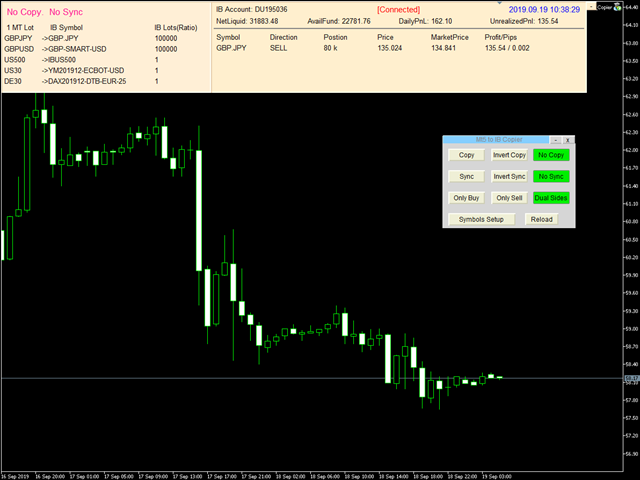
Mt5 To InterativeBrokers Copier allows you to copy deals from MT5 account to Interactive Brokers. With this, you can run your EA strategy on a MT5 Demo/Real Account, then copy all the deals to Interactive Brokers account real time.

Features:

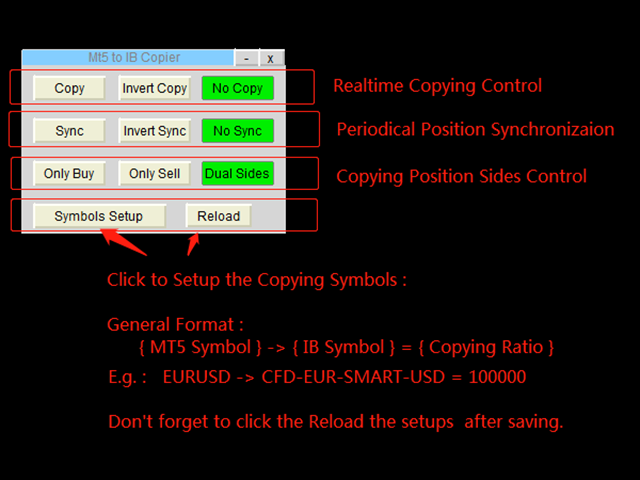
1. Copy or Invert-Copy deals Realtime from MT5 to IB Account.
2. Synchronizing positions of both accounts periodicaly, in case any missing copying.
3. You can choose only Buy position or Sell position.

Symbols Setup:

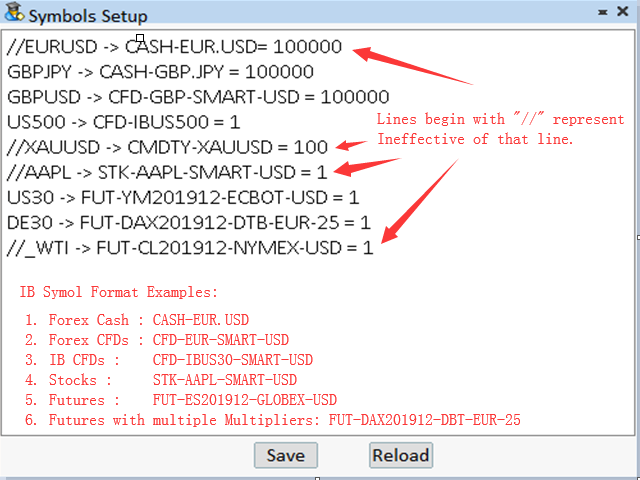
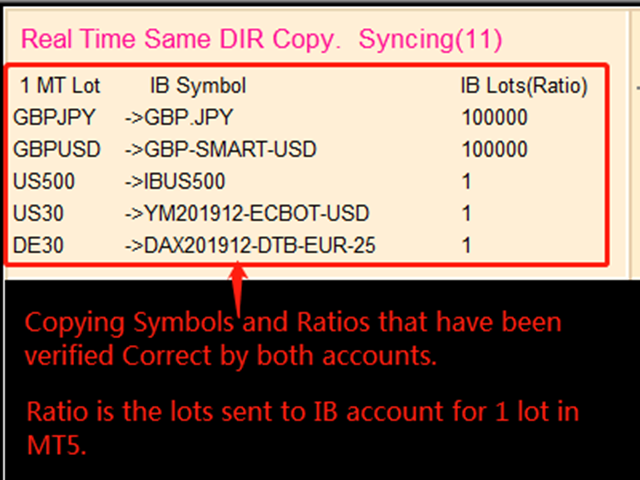
General Format:  {MT Symbol} -> {IB Symbol} = {Copying Ratio}

while IB Symbols should be formated as below: 

  1. Spot Forex: CASH - [Local Symbol], e.g. CASH - EUR.USD
  2. CFDs:          CFD - [Symbol] - [Exchange] - [Currency],  e.g.  CFD-GBP-SMART-USD,   CFD-IBUS30-SMART-USD
  3. Stocks:        STK - [Symbol] - [Exchange] - [Currency],  e.g.  STK-AAPL-SMART-USD
  4. Futures:      FUT - [Symbol][YearMonth] - [Exchange] - [Currency] - [Multiplier], while [Multiplier] is only used for symbols that have multiple Contract Multiplier.
    e.g.  FUT-MES201912-CME-USD,   FUT-DAX201912-EUREX-EUR-25

Besides, Copying Ratio is the lots sent to IB account for 1 lot of MT5 account
In the symbols setup editor, lines begin with "//" represent ineffective of that line.

Configuration

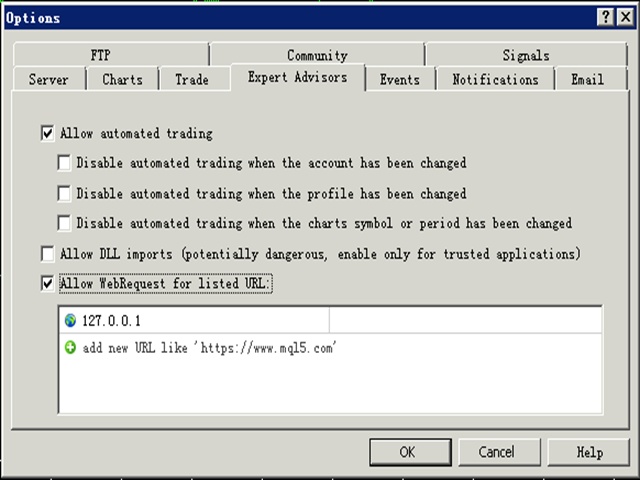
1. MT5 : Put the TWS Socket IP Address(Defaut: 127.0.0.1) to the allowed URLs in "Tools->Options->Expert Advisors". 

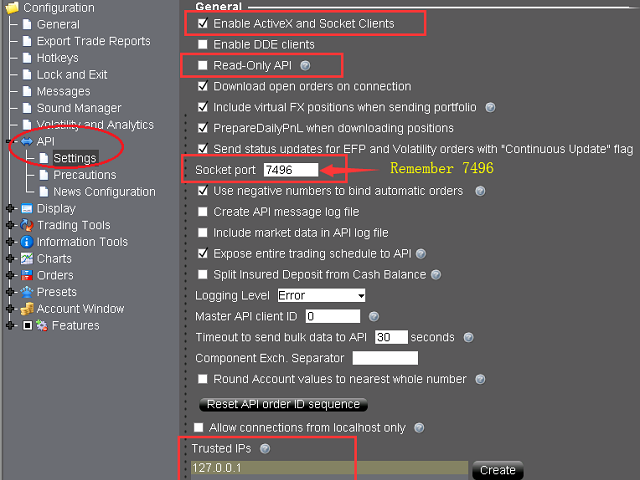
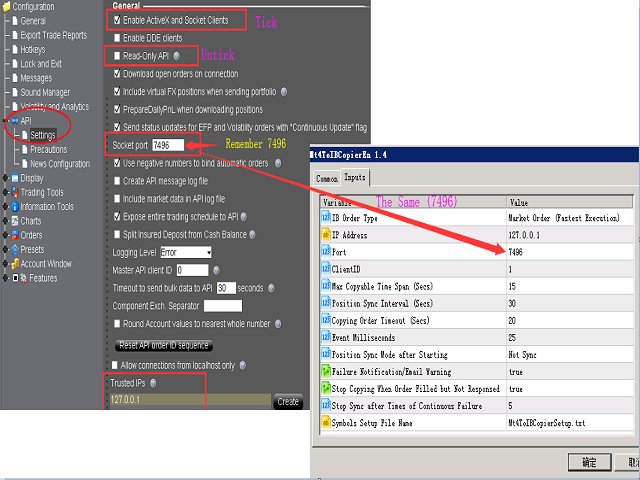
2. IB TWS : API should be enable in TWS. Open “Global Configuration” in file menu, find “API” -> “Setting”, Tick “Enable ActiveX and Socket Clients” and untick “Read-Only API”. Optionally, it is sugguested you add “127.0.0.1″  to “Trusted IPs” box, tha can avoid manually confirmation very time when connected via API.

Parameters

Parameter Explaination
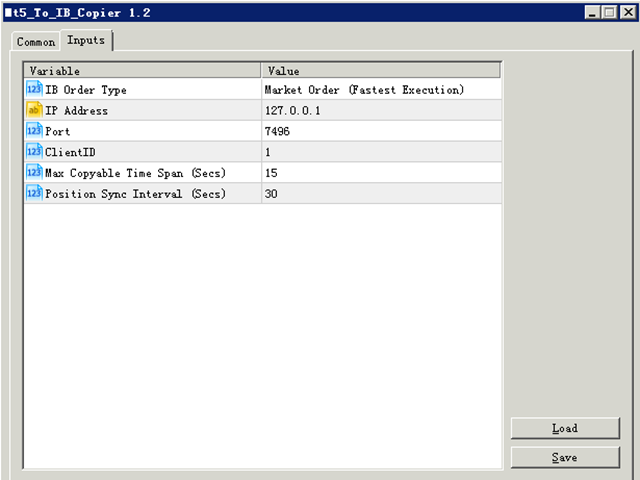
IB Order Type Order type of the order placed to Interacive Brokers(IB).
IP Address TWS  API services started IP address. “127.0.0.1″ should be filled if TWS run in local computer.
Port Socket port of TWS API. You can find in TWS at “Global Configuration” -> “API” -> “Setting”.
ClientID Client connection unique id. It can be any Integer.
Max Copyable Time Span(Secs) If trade copying failed, program will repeatedly try to copy until this time span slip. Default: 15 seconds
Position Sync Interval (Secs) Periodical time for both account to synchronize. Default: 30 seconds.
Copying Order Timeout (Secs) Time out seconds for sending orders to IB account
Event Milliseconds Periodical timer to process the program. It is used to set parameter of MT4 functoin "EventSetMillisecondTimer".
Please refer to https://www.mql5.com/en/docs/eventfunctions/eventsetmillisecondtimer
Position Sync Mode after Starting Set the sync feature whether to use last setting or not open when the bridge tool start.
Failure Notification/Email Warning Set to send specific Email Address or MT5 Notification when copying failure occurred.
Users can use setup the email address at the menu "Tools -> Option ->Email", and notifications at "Tools -> Options -> Notification".
Besides, users can set the trades SMS Alerts through Account management(from IBKR website).
Stop Copying When Order Filled but Not Responsed When an order filled but not responsed to client normally, it is probably abnormal for some connections.
Copying can be set stop in order to avoid repeated copying. Users should restart the bridge and TWS/IBGateway if this occurred. 

Besides, a global variable of MT4 named "IBTwsFilledAbnormal" will be set to "1" if this error occurrs.
Stop Sync after Times of Continuous Failure When sync sent, IB position should be changed afterwards. If continous sync-failure (may caused by internet problem, market closed, lack of liquidity, ect..) more than 5 (by defaut) times, Sync will can set to stop.
Symbols Setup File Name Users can set the bridge with different symbol mapping file if needed, such as copying to different to IB account simultanously.
Font Size  Change the font size if the controls in the chart screen can not be shown properly.


More information please download the MT5 To Interactivebrokers Copier User Manual.

Отзывы 2
hunterdawe
20
hunterdawe 2022.09.10 10:24 
 

Very good utility. Ver. 1.61 is very useful. I also recommend this utility to other traders. Thank you for this utility.

Рекомендуем также
Comprehensive on chart trade panel with the unique ability to be controllable from mobile as well. Plus has a library of downloadable configuration, e.g. exit rules, extra panel buttons, pending order setup and more. Please see our product video. Works with all symbols not just currency pairs. Features On chart panel plus controllable from free app for Windows, iPhone and Android Built-in script engine with library of downloadable configuration, e.g. add 'Close All Trades in Profit' button, exit
Этот экспертный советник отслеживает все открытые позиции по всем символам в MetaTrader 5. Как только вручную устанавливается или изменяется уровень Stop Loss (SL) или Take Profit (TP) на любой позиции, советник автоматически применяет это значение ко всем другим открытым позициям , независимо от символа или типа ордера (Buy/Sell). Это обеспечивает синхронизацию уровней SL и TP по всему счёту. Идеально подходит для мобильного трейдинга с планшета или смартфона!
Time saving and fast execution Whether you’re traveling or sleeping, always know that Telegram To MT5 performs the trades for you. In other words, Our   Telegram MT5 Signal Trader  will analyze the trading signals you receive on your selected Telegram channels and execute them to your Telegram to MT5 account. Reduce The Risk Telegram To Mt5   defines the whole experience of copying signals from   Telegram signal copier to MT5 platforms. Users not only can follow all instructions from the signal
️ EquityShield is your automated risk management guardian for MetaTrader 5. If you've ever exceeded your daily loss limit, struggled to enforce your own trading rules during volatile markets, or wanted to automatically lock in profits when you hit your targets, EquityShield is built for you. This is not a trading strategy - it's a safety system that watches your account 24/7, automatically closes positions when your risk limits are breached, and helps you maintain consistent trading discipline
Overview Breakout Meter is a price action tool that identifies key breakout zones based on recent daily price activity. It highlights areas where momentum is likely to trigger, helping traders anticipate breakouts or reversals with minimal configuration. How It Works The EA analyzes a user-defined number of recent daily candles and marks high and low zones where price has shown strong reactions. It automatically updates levels with new data and removes outdated zones to keep charts clear. Users
Telegram ChartSnap MT5 is an utility tool to bridge your MetaTrader 5 activities to your Telegram chat/group/channel. It will screen shot your MetaTrader 5 chart and send it to your dedicated Telegram chat/group/channel through a Telegram bot. The whole process will keep repeating based on a time cycle that predetermined by the user. It is a convenient tool for those who like to get access to their favorite system/dashboard that only available at MetaTrader Desktop. Beside that, trader can easi
TradingX Hotkeys
Johannes Stephanus Lombard
Inputs Available Lotsizes Partial Close % You can change lotsizes as you require On an open chart click once to select chart to be able to use hotkeys on specific chart. All Pairs can be used with this expert We created this expert to be able to still trade C300 with a 0.06 Lotsize If you enter a 0.6 lot and close 0.90% you can trade with 0.06 Lot Keys to be used: B -Buy S -Sell C -Close Profitable D -Breakeven (Note if stoploss is set it won't break even) P -Partial close X -Close all
This QuickClose help you to close all orders having profit immediately with only ONE CLICK, its work is very fast. You can choose which symbol you want or close all symbols so it will helpful for you in your trading to manage trading faster. This EA can quick close all Buy and Sell Orders by a selected symbol or total, And delete all pending orders. This SymbolButton is designed for closing orders. There is available Manual and Automatic closing functions. Automatic closing function will close t
One Click Trader  is a tool designed for MetaTrader 4 platform, which enables you to take your trading to the next level. It enables you to open, manage and close your trades in simple an efficient way by just one click of your mouse button. "-"   ,  "+"  change OCT window size  Up arrow minimizes the OCT panel Down arrow maximizes the OCT panel Right arrow displays the next panel with additional features Left arrow hides the panel with additional features Red  SELL  button enables you to open s
Flow – Hotkey Tool for Discretionary Traders Take full control of MT5 with your keyboard and mouse. Flow is a powerful hotkey-based assistant designed specifically for discretionary traders who want to place orders, draw tools, and operate charts with speed and precision. No more right-click menus or wasting time. Just trade. Key Features Order Execution Place pending Buy/Sell orders (limit or stop) instantly with just a mouse click. Stop Loss and Take Profit lines are automatically attac
EAs Manager
Abdeljalil El Kedmiri
5 (1)
The   Ultimate EAs Manager   is a professional risk management and trade assistance tool designed to monitor, control, and optimize all trading activities on your MT5 account. It acts as a   central command center   that oversees every trade - whether opened by other Expert Advisors or manually by you. How it's work with other EAs : Blog post  MT4 version:  https://www.mql5.com/en/market/product/167007 Only 10 copies will be sold at the early-bird price. After 10 copies, the price jumps directly
EA SB8 Panel Trade
Juan Manuel Bernal Martin
SB-8 – Manual Trading Panel with Fixed Risk & TradingView-Style Visualization for MT5 SB-8 is an advanced manual trading panel for MetaTrader 5 , designed to execute trades visually, quickly and without calculations . It is especially built for traders coming from TradingView , who often find MT5 confusing when it comes to risk management and trade visualization. With SB-8, you don’t calculate lot size, percentages or risk . You simply move the Stop Loss line , and the panel handles everything a
Общие сведения Данная торговая панель предназначена для быстрой и удобной торговли в один клик. Создавался продукт для частичной автоматизации своей личной ручной торговли  https://www.mql5.com/ru/signals/1040299?source=Site+Profile+Seller Советник имеет ряд возможностей, а именно: Открытие BUY или SELL ордеров. SL выставляется ниже (выше)  минимальной (максимальной) цены, задаваемых в параметрах количества свечей. Размер TP рассчитывается в соотношении от размера SL (по умолчанию 0.618). Выстав
Этот советник представляет собой торговую панель для нескольких пар в один клик. Нажмите       ОТКРЫТЬ       кнопка для открытия ордеров по выбранным парам. Нажмите       ЗАКРЫВАТЬ       кнопка закрытия ордеров по выбранным парам. Лот ордера — это число, введенное пользователем. Положительное число соответствует ордеру на покупку, отрицательное — ордеру на продажу. Нажмите кнопку   ЗАКРЫТЬ   , чтобы закрыть весь ордер, а не частичное закрытие. Действие закрытия не имеет ничего общего с количест
The Comeback Kid Manger is half EA and half trade manager. It's capable of keeping the trader profitable on complete auto-pilot. You can also use the onscreen buttons to intervene with the EA to achieve a creative manual/algo collaboration. It's also capable of recovering losing trades by managing them into a small profit or break even. The user has a lot of control on how and when they would like to increase profit on good trades and recovery bad or losing trades.  Highlights  Includes one of
Crosshair - это фантастический инструмент, который упрощает анализ наших графиков, приводя ценовые свечи в полное соответствие со значениями индикаторов в подокнах. Вы можете включать и выключать его одним нажатием клавиши "C" на клавиатуре, а для точных измерений в нем предусмотрен режим линейки, который можно включать и выключать клавишей "R" на клавиатуре. Пожалуйста, посмотрите наше короткое обучающее видео, встроенное ниже, чтобы увидеть, как это работает.
| Seamless portfolio of trading systems in your palm - Powered by ONNX Neural network | Built by a grid trader >> for grid traders.  This is MT5 version, click  here  for  Blue GAIA MT4  (settings and logics are same in both versions)     Real monitoring signal  --> Cosmic 2 | GAIA Intro Blue GAIA EA   (' GAIA ') - is the latest edition of BlueAlgos family, uniting all the best algos and features under one-roof. Its is the true 4xMulti Systems: +------------------------------------------------
Ultimate Risk Manager
Florian Leonhard Schaal
Ultimate Risk Manager – Professional Trading Assistant (EA) The all-in-one risk management tool trusted by serious traders. Take full control of your trades with automatic position sizing based on your chosen risk percentage (default 1%), dynamic ADR-based initial Stop-Loss, and intelligent trailing stop that can use either fixed points or a percentage of the Average Daily Range (ADR). Key features: One-click BUY/SELL buttons with instant market execution, the Risk Manager calculates the right
Hola Traders. By popular demand from my fellow traders, I am excited to announce the release of my newly developed tool for placing pending order grids. Many of you have already benefited from this tool, and several have requested a version for MT5. Now, it is available for everyone! This automatic grid trading placement tool is convenient, easy to use, and fast. It also includes quick action buttons for closing profits, losses, and pending orders. No matter how many pending orders you have, jus
Настройки управления рисками Автоматический расчёт объёма лота на основе заданного уровня риска Открытие позиций Buy и Sell одним кликом в соответствии с настройками Графическое открытие позиций (Buy Limit – Buy Stop – Sell Limit – Sell Stop) Риск-фри для открытых позиций Открытие новых сделок с TP и SL на основе предыдущих открытых сделок Закрытие всех открытых сделок одним кликом Настройка закрытия открытых позиций по типу (Sell или Buy) Сохранение 50% и 80% прибыли от открытых сделок Поиск з
Wolseley Panel MT5 FREE
Walter Wolseley Pessoa Batista De Lima
WOLSELEY's Trading Panel - BASIC - - Feel free to contact me at instagram   @walter_robos  or whatsapp/telegram +5592981173937 View your history in a structured and detailed manner, with efficiency rate and profit rate separated by day, week, month and total, as well as asset details, server time and positions&orders in progress. This panel was created looking on HEDGE-type accounts, but it can be used on NETTING-type accounts without any problems. In the PREMIUM version of this Panel you have
The Expert Advisor will send notifications via Discord when orders are opened/modified/closed on your MetaTrader 5 account. - Send message and screenshot to Discord group/channel.  - Easy to customize message.  - Support custom message for all languages - Support full Emoji.  Parameters - Discord url Webhook - create webhook on your Discord channel. - Magic number filter - default all, or input magic number to notify with comma, like: 111,222,333. - Symbol filter - default all, or input symbol
О советнике PowerTrend Institutional EA — это автоматический торговый робот, построенный на институциональной логике. Он комбинирует анализ тренда, волатильности, объемов и свечных моделей. Работает с любыми финансовыми инструментами (валюты, металлы, индексы), поддерживает типы счетов hedge и netting , и динамически адаптируется к параметрам символа, исключая ошибки объема, стопа или недостатка маржи. Советник включает встроенный механизм автоматической валидации, обеспечивающий корректную
Платформа UtilitarianPlatform предназначена для быстрого открытия позиции с установленными ордерами, а также возможностью автоматического хеджирования, или смещения ордера на закрытие позиции при остановки убытков. Автоматическое Увеличение ордера на взятие прибыли при хеджировании позиции. Есть возможность включения автоматического увеличения коридора при хеджировании позиции. Есть встроенная панель для установки ордеров на открытия позиций. Размеры ордеров, шаг слежения устанавливаются в пункт
MT5 to Telegram: Professional Signal Provider Bridge Take your MetaTrader 5 trading to the next level. MT5 to Telegram is a high-performance utility designed specifically for traders who want to broadcast their market execution to Telegram Channels, Groups, or Private Chats instantly. Whether you are scaling a Signal Service business or simply want to track your own trades remotely on your mobile device, this tool provides the most reliable and professional-looking bridge for the MT5 platform.
Торговый помощник,  предназначен для ручной торговли. Помогает рассчитывать и контролировать свои риски, переводить сделки в безубыток и сопровождать позиции треейлинг-стопом. Простой в настройке и использовании. Может быть использован для расчета торгового лота, расчета уровней стоп-лосс и тейк-профит. Работает с валютными парами, CFD, акциями, индексами, фьючерсами, криптовалютами Отображает   объем,  потенциальный убыток и прибыль перед   установкой ордера Возможность установки времени истече
TradePulse MT5 Real-Time MT5 → Telegram Trade Automation TradePulse MT5 is a powerful automation tool that connects your MetaTrader 5 account directly to Telegram , sending instant trade alerts the moment a trade is opened or closed. No more screenshots. No more manually typing signals. Everything is fully automated. Whether you are running manual trades, EAs, or managing a trading community , TradePulse keeps your audience updated with clean, professional trade notifications in real time. ___
Advanced Trailing Stop & Break-Even Expert Advisor with Partial Profit Taking Overview Unlock the full potential of your trading strategy with this Expert Advisor that automates trade management to maximize profits and minimize losses. Designed for both novice and experienced traders, this EA offers precise control over your trades with customizable trailing stops, break-even protection, and partial profit taking — all working seamlessly to protect your capital and lock in gains. Key Features Dy
提供专业的EA编程服务,推出特色仪表盘EA编程,将您的交易策略自动化,可视化,一个图表管理多个交易货币对,详情查看: http://www.ex4gzs.com   Providing quick Developments and Conversion of MT4/MT5 EAs, Indicators, Scripts, and Tools. If you are looking for an Dashboard EA to turn your trading strategy into auto trading algo and to manage multi trades in one chart with visualizing tool, come and visit http://www.ex4gzs.com/en for more details. 如果产品有任何问题或者您需要在此产品上添加功能,请联系我 Contact/message me if you encounter any issue using the product or need extra feat
Features 1️⃣ Flexible Grid Order Configuration Set price levels and spacing between orders. Customize order sizes and maximum number of positions for better risk control. 2️⃣ Hedge and Netting Modes Hedge Mode : Allows simultaneous long and short positions , ideal for advanced strategies. Netting Mode : Consolidates positions for easier balance management. 3️⃣ Supported Order Types Limit Orders : Buy and sell at predetermined prices. Market Orders : Instant execution. Integrated Take-Profit : Wi
С этим продуктом покупают
VERIFIED TRADING RESULTS - Farmed Hedge Yield Axi Copy:  https://www.mql5.com/en/signals/2356376 - Farmed Hedge Yield Exn Copy:   https://www.mql5.com/en/signals/2356404 - Farmed Hedge Yield V Copy:  https://www.mql5.com/en/signals/2357156 Contact me via private message to receive the User Manual and Setup. * Thai Lauguage Support Available Farmed Hedge Yield Farming - Professional Pair Trading Dashboard (Manual - Hybrid - Semi/Automated EA) VERSION 3 - WILD HARVEST UPDATE Trading Approac
Суть: используя юзер-интерфейс вы настраиваете параметры, которым должен соответствовать график до входа в позицию(позиции), настраиваете какие входные модели использовать, настраиваете правила по которым надо завершать торговлю и планирование. А всю рутину по наблюдению за графиком и исполнению  Lazy Trader  берет на себя. полное описание  :: 3 ключевых видео [1] -> [2] -> [3] Что он умеет? - Понимает структуру рынка по Ларри Вильямсу - Понимает Swing-структуру рынка по Майклу Хадлстону (ICT
YuClusters
Yury Kulikov
4.93 (43)
Внимание: Ознакомиться с работой программы можно с помощью бесплатной версии  YuClusters DEMO . YuClusters это профессиональная система анализа рынка. Для трейдера открываются уникальные возможности анализа потока ордеров, объемов торговли, движения цены используя различные графики, профили, индикаторы, графические объекты. YuClusters оперирует данными на основе ленты сделок или тиковой информации, в зависимости от того, что доступно в котировках финансового инструмента.  YuClusters позволяет с
Unlimited Trade Copier Pro - это мощный инструмент для удаленного копирования сделок между несколькими счетами MetaTrader 4/MetaTrader 5, расположенными удаленно друг от друга, по сети интернет. Это идеальное решение для провайдеров сигналов, которые хотят поделиться своей торговлей с другими трейдерами по всему миру. Один поставщик может копировать сделки на неограниченное количество счетов-получателей, а один получатель также может копировать сделки неограниченного количества провайдеров. Пост
******************************* ***************** ********************** ***************** ********************** ************************* GoldMine Train — советник по стратегии трендовой торговли для золота. Оператор определяет основное направление тренда и дает команду поезду двигаться. Поезд будет непрерывно КУПИТЬ/ПРОДАТЬ в этом направлении. Объем лота будет зависеть от баланса счета и заданного коэффициента кредитного плеча. Когда оператор меняет направление тренда, поезд останавливае
Mentfx Mmanage mt5
Anton Jere Calmes
4.25 (8)
The added video will showcase all functionality, effectiveness, and uses of the trade manager. Drag and Drop Trade Manager. Draw your entry and have the tool calculate the rest. Advanced targeting and close portions of a trade directly available in tool (manage trades while you sleep). Market order or limit order on either side with factored spread. Just draw the entry, the tool does the rest. Hotkey setup to make it simple. Draw where you want to enter, and the stop loss, the tool calculates al
GRat Crypto
Ivan Titov
4.5 (2)
Торгуйте на криптобиржах в МТ5! GRat_Crypto — это инструмент для ручной и автоматической торговли, в т.ч ЛЮБЫМИ имеющимися советниками, ЛЮБОЙ криптовалютой на самых популярных криптобиржах в привычной среде MT5 в режиме 24/7. Возможности 1. Доступны ВСЕ инструменты 9 наиболее популярных криптобирж: Binance, BingX, Bybit, Coinbase, CoinEx, Kraken, KuCoin, MEXC  и OKX . 2. Возможность выставлять ЛЮБЫЕ доступные в MT5 типы ордеров, как рыночные, так и отложенные, модифицировать ордера и позиции, у
PineChart
Muhammad Minhas Qamar
Developed by MMQ —  PineChart: Run PineScript Inside MT5 With A Modern Charting Experience An MQL5 Expert Advisor that runs Pine Script indicators and strategies directly inside MetaTrader 5. PineChart includes a full Pine Script interpreter so you can use your existing Pine Script v5/v6 source code without manually rewriting anything in MQL5. Links [  Website  |  Documentation  |  Demo ] NOTE: Downloading demo through MQL5 will give you limited functionality. To experience PineChart fully, dow
Crystal Trade Manager – Advanced MT5 Risk and Trade Control Utility Overview Crystal Trade Manager (CTM) is a professional MetaTrader 5 utility designed for risk management, trade automation, and instant execution control. It provides traders with an integrated system for protecting equity, managing daily drawdowns, controlling lot sizes, and applying automation features such as automatic SL/TP, break-even, and trailing stop. The tool is suitable for manual traders, prop-firm challenge particip
Trade Copier for MT5   Supports multiple master and slave terminals   Local operation without DLL usage   Optional slow monitoring mode   Compatible with prop firm and personal accounts   IMPORTANT – SYMBOL SUFFIX & SYMBOL MAPPING If your Master and Slave accounts are on different brokers, symbol suffixes may differ (e.g. XAUUSD vs XAUUSD.m). In such cases, trades will NOT be copied unless Symbol Mapping is configured correctly in the Expert settings. Example: XAUUSD:XAUUSD.m MT5 to MT5
Live Forex Signals предназначен для торговли по сигналам сайта   https://live-forex-signals.com/en  и  https://foresignal.com/en . Live Forex Signal для MetaTrader 4   https://www.mql5.com/ru/market/product/81445 Параметры Username и Password  если у вас имеется подписка на сайты   live-forex-signals.com / foresignal.com , тогда вам следует заполнить эти параметры своими учетными данными; если подписки нет, тогда оставьте поля пустыми; Komment   комментарий к открываемым сделкам Risk   риск в п
EA price is reduced to 50% discount for limited time period. Spot vs Future Arbitrage EA for MT5 Spot vs Future Arbitrage EA is an automated Expert Advisor designed for MetaTrader 5 that operates using price differences between Gold spot and Gold futures instruments. The strategy opens positions on both instruments simultaneously to take advantage of temporary differences between spot and futures prices. Requirements The trading account must provide both Gold spot and Gold futures instruments
Gold instrument scanner is the chart pattern scanner to detect the triangle pattern, falling wedge pattern, rising wedge pattern, channel pattern and so on. Gold instrument scanner uses highly sophisticated pattern detection algorithm. However, we have designed it in the easy to use and intuitive manner. Advanced Price Pattern Scanner will show all the patterns in your chart in the most efficient format for your trading. You do not have to do tedious manual pattern detection any more. Plus you
Серия продуктов под маркой  FiboPlusWave Готовая торговая система на основе  волн Эллиотта и уровней Фибоначчи . Просто и доступно. Отображение разметки волн Эллиотта (основной или альтернативный вариант) на графике. Построение горизонтальных уровней, линий поддержек и сопротивления, канала. Наложение уровней Фибоначчи на волны 1, 3, 5, A Система алертов (на экран, E-Mail, Push уведомления).    Особенности: не вникая в волновую теорию Эллиотта, можно сразу открыть один из возможных вариантов вхо
Trading Chaos Expert
Gennadiy Stanilevych
5 (11)
Этот программный продукт не имеет аналогов в мире, поскольку он является универсальным "пультом управления" торговых операций, начиная от получения торговых сигналов, автоматизации входа в позиции, установки стоп-лоссов и тейк-профитов, а также трейлинга прибыли одновременно по множеству сделок в одном открытом окне. Интуитивно понятное управление экспертом в "три клика" на экране монитора позволяет полноценно использовать все его функции на разного рода компьютерах, включая планшетные. Взаимоде
Professional Order & Risk Management EA for MT5 Профессиональный инструмент управления ордерами и рисками, разработанный для трейдеров, которые стремятся к точному контролю риска, размера позиции и управления сделками. Экспертный советник предназначен для систематической и дисциплинированной торговли, предоставляя расширенные функции управления ордерами, расчёта риска и сопровождения позиций. Функции Expert Advisor Автоматический расчёт размера лота Автоматически рассчитывает размер лота на о
TradePad
Ruslan Khasanov
5 (1)
TradePad - это инструмент как для ручной, так и алгоритмической торговли.  Представляем вам простое решение для быстрых торговых операций и контроля позиций на нескольких торговых инструментах. Внимание, приложение не работает в тестере стратегий! Пробная версия приложения для демо-счета и описание всех инструментов Интерфейс приложения адаптирован для мониторов с высоким разрешением, прост и интуитивно понятен. Для комфортной работы, трейдеру предлагается следующий набор инструментов: менеджер
News Trader Pro - уникальный робот, позволяющий торговать на новостях по вашей стратегии. Он загружает все новости с нескольких популярных Forex-сайтов. Вы можете выбрать любую новость и настроить стратегию на торговлю по ней, а затем советник News Trader Pro будет торговать автоматически по выбранной стратегии на этой новости. Выход новости позволяет выиграть пипсы, так как в это время, как правило, происходит большое значение цены. Благодаря этому инструменту торговля на новостях стала проще,
Если вы хотите рисовать линии Поддержки и Сопротивления, просматривать: дневные уровни открытия рынка, классические уровни разворота, уровни разворота Фибоначчи, трендовые линии, уровни Фибоначчи, время до закрытия свечи, а также текущий спред. Если вы хотите выставлять ваши ордера с точным лотом, который отвечает вашему желаемому риску стоп-лосса. Если вы хотите делать все это и много другое всего одним кликом, тогда это идеальный инструмент для вас. Этот инструмент позволит вам чувствовать себ
The new version of  MirrorSoftware 2021  has been completely rewriten and optimized.  This version requires to be loaded only on a single chart because  it can detect all actions on every symbol and not only the actions of symbol where it is loaded. Even the  graphics and the configuration mode  have been completely redesigned. The MirrorSoftware is composed of two components (all components are required to work):  MirrorController  (free indicator): This component must be loaded into the MASTER
ClusterSecond
Rafil Nurmukhametov
4.78 (32)
Утилита позволяет строить различные виды графиков: Секундный график от 1 секунды до 86400 секунд Тиковый график от 1 тика и выше Объемный график Дельтовый график Ренко график Рендж график Демоверсия утилиты https://www.mql5.com/ru/channels/clustersecond Встроенные индикаторы для объемного анализа:  дневной профиль рынка и профиль рынка выбираемого таймфрейма, Cluster Search, Imbalance, VWAP, Dynamic POC, VAH, VAL профиль стакана цен вертикальный объем с различными вариантами отображения, дельта
Программа (скрипт) выводит на монитор информацию о корпоративных отчетах и дивидендах акций; информация скачивается с сайта   investing.com: Дата отчета Прибыль на акцию (EPS) Доход (Revenue) Рыночная капитализация Размер дивидендов Дата выплаты дивидендов Дивидендный доход Продукт нельзя протестировать в тестере   (так как там нет возможности получать информацию из интернета). Перед использованием :   н еобходимо добавить   2   URL  https://ru.investing.com/earnings-calendar/Service/getCalend
Telegram Notify MT5 Telegram Notify MT5 is an utility tool to bridge your MetaTrader 5 activities to your Telegram chat/channel. It is useful for monitoring your MetaTrader 5 account by sending a notification to your particular Telegram chat/channel when someone/EA is placing trades, modifying order's TP/SL, closing trades and etc. This EA does not place any trade for your account. This EA also could be a convenient tool for monitoring other's EA trading activities or a tool for publishing your
Утилита для полуавтоматической торговли. Применяет невидимые для брокера динамические уровни установки стоп-ордеров, стоп-лосса, тейк-профита и трейлинг-стопа. Подходит для работы с любыми брокерами, включая американских брокеров с требованием FIFO.  MT4 версия советника ссылка Сделки можно открывать при помощи кнопок или линий. Для того чтобы советник открывал позицию по линии: нанесите на график линию и переименуйте. При пересечении ее ценой советник выполнит соответствующую команду. OPEN_SEL
The  Easy Strategy Builder (ESB)  is a " Do It Yourself " solution that allows you to create a wide range of the automated trading strategies without any line of codes. This is the world’s easiest method to automate your strategies that can be used in STP, ECN and FIFO brokers. No drag and drop is needed. Just by set conditions of your trading strategy and change settings on desired values and let it work in your account. ESB has hundreds of modules to define unlimited possibilities of strategi
Quick operation, quick purchase, sale, empty operation. Provide three buttons: Buy, Sell, empty. Buy: Quickly place more orders after clicking, default 1 hand, profit point and stop-loss point are 110 points, after successful order can be manually modified. Sell: Quickly place an empty order after clicking, default 1 hand, profit point and stop-loss point are 110 points, can be manually modified after the order is successful. Empty: Quickly clear all orders, including purchase and s
Copier MT5
Volodymyr Hrybachov
5 (1)
Copier MT5 - это самый быстрый и надежный копировщик сделок между несколькими счетами MetaTrader 4 (МТ4) и MetaTrader 5 (МТ5) установленными на одном компьютере или VPS сервере. Сделки копируются со счета MASTER на счет SLAVE, копирование происходит за счет обмена информации через текстовый файл со скоростью менее 0.5 сек., параметр настраивается. Копировщик сделок контролирует все изменения на MASTER-счете с высокой точностью, регулирует уровни SL и TP, поддерживает частичное и полное закрытие
GRID for MT5
Volodymyr Hrybachov
GRID for MT5 - это удобный инструмент для тех кто торгует сеткой ордеров, предназначен для быстрой и комфортной торговли на финансовых рынках FOREX. GRID for MT5 имеет настраиваемую панель со всеми необходимыми параметрами. Подходит как опытным трейдерам так и новичкам. Работает с любыми брокерами, включая Американских брокеров с требованием FIFO - закрытия в первую очередь ранее открытых сделок. Сетка ордеров может быть как фиксированная - ордера открываются с фиксированным шагом, так и иметь д
1. Фиксирую данные о ценах на каждую транзакцию. Контент файла данных: "время Tick", "цена ASK", "цена BID", "цена SPREAD", "количество предложений Tick". 2. В то же время, создается файл с цитируемыми данными на Один минутный цикл. Содержимое файла данных: "ASK time", "ASK OPEN цен", "ASK HIGH цен", "ASK CLOSE", "ASK CLOSE", "ASK CLOSE", "ASK CLOSE", "ASK CLOSE", "ASK CLOSE", "BID lose цен", "BID lose цен", "BID lose цен", "BID lose цен", "BID CLOSE цен", "BID CLOSE цен", "BID CLOSE цен", "BID
Mt5BridgeBinary
Leandro Sanchez Marino
Я автоматизировал их бизнес-стратегии для использования бинарных MT5 в Интернете и Mt5BridgeBinary наши заказы на ваш счет в Binary, и вы готовы начать работать так просто! Опытные консультанты просты в настройке, оптимизации и тестировании на прочность; Кроме того, в тесте мы можем прогнозировать долгосрочную рентабельность, поэтому мы создали механизмы для Mt5BridgeBinary своих лучших стратегий к Binary. Характеристики: -Вы можете использовать как можно больше стратегий. (Expert Advisor). -
Другие продукты этого автора
Features   With MT5 to Interactive Brokers(IB) Trader, you can: 1. Load chart data from IB to MT5, and Analyze with all standard or customer Indicators. 2. Place Orders to IB Account Directly in MT5. 3. Make your Own EAs upon IB Securities by only making minus changes of the trading function. Usage 1) Installation Copy the "Mt5ToIBTraderEn.ex4" and sample files to [MT5 Data Folder]->MQL5->Experts.  2)  MT5 Settings Add the IP Address to the MT5 Allowed URLs in 'Tools->Options->Expert Adviso
Фильтр:
hunterdawe
20
hunterdawe 2022.09.10 10:24 
 

Very good utility. Ver. 1.61 is very useful. I also recommend this utility to other traders. Thank you for this utility.

Shaoping Kuang
860
Ответ разработчика Shaoping Kuang 2022.09.11 13:01
Thank you very much for your comments.
[Удален] 2022.05.12 22:55 
 

Пользователь не оставил комментарий к оценке

Shaoping Kuang
860
Ответ разработчика Shaoping Kuang 2022.05.26 04:41
Sorry! I did not login this account these days for some reasons. I will fix this problem as soon as possible.
Ответ на отзыв