Ultimate MT4 to Telegram

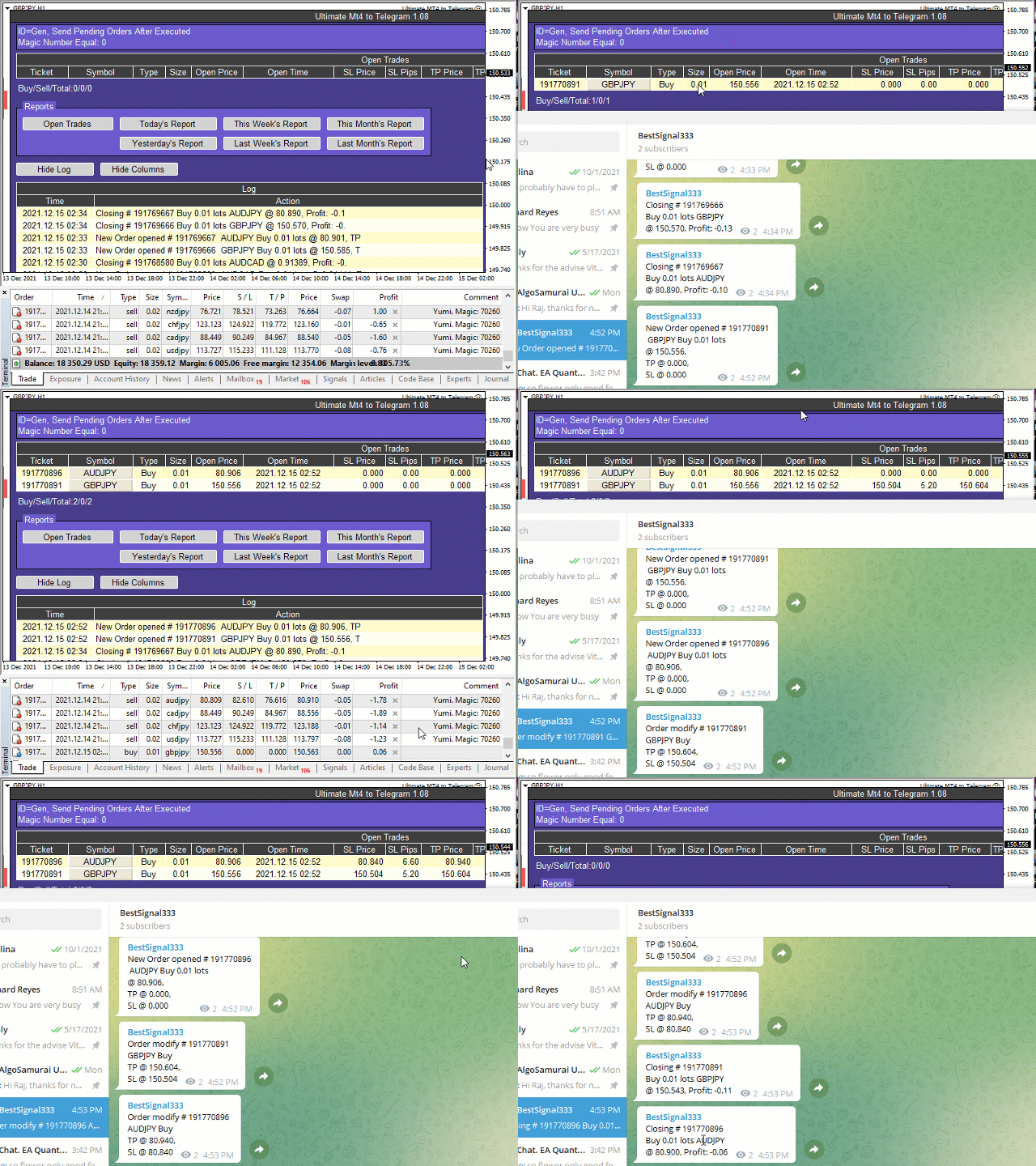
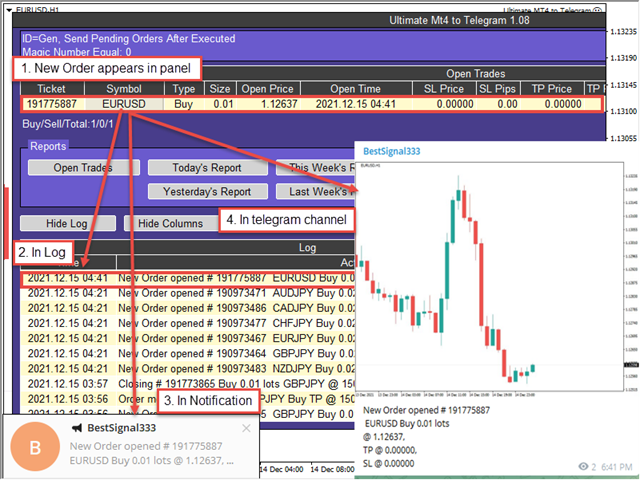
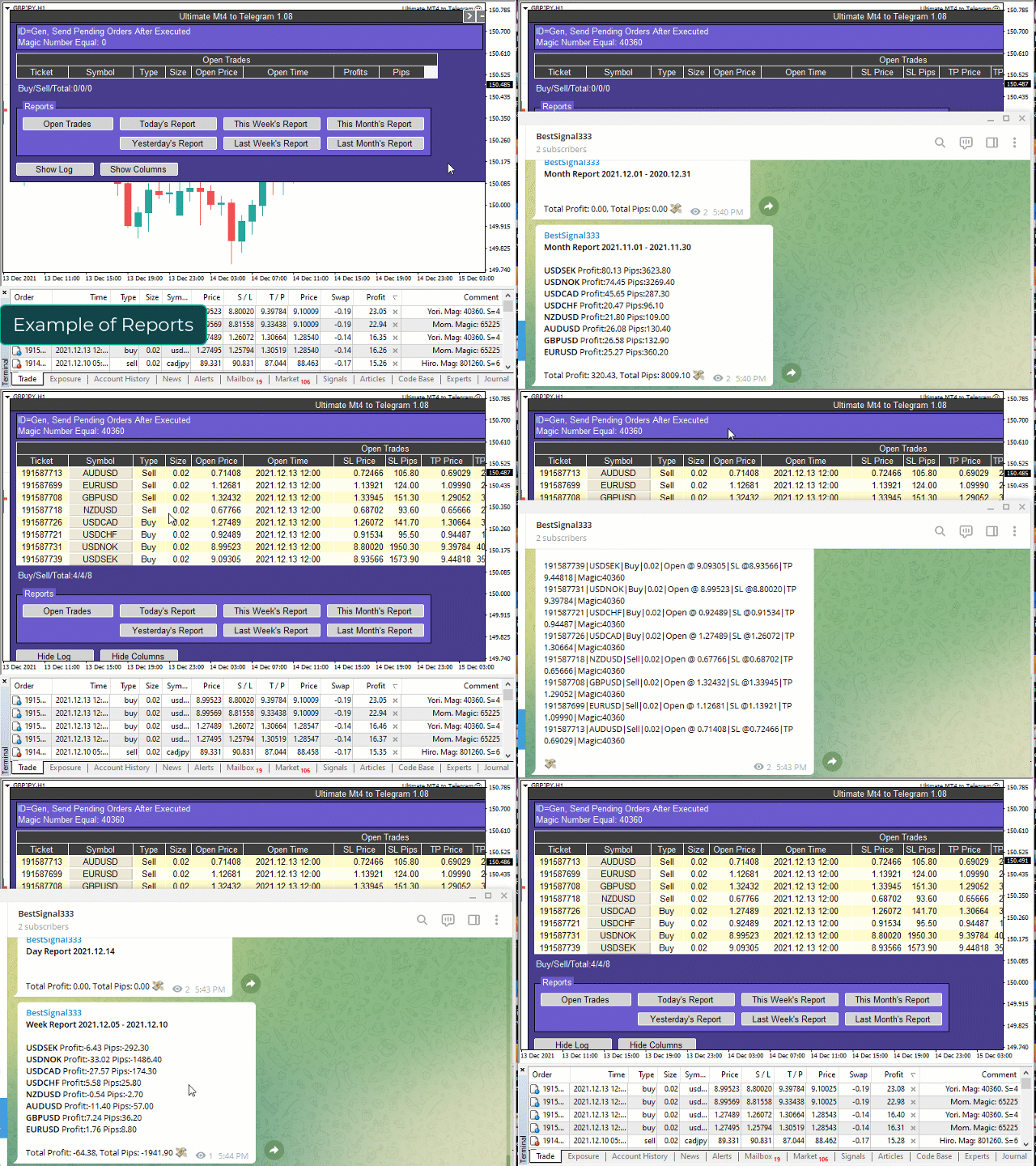
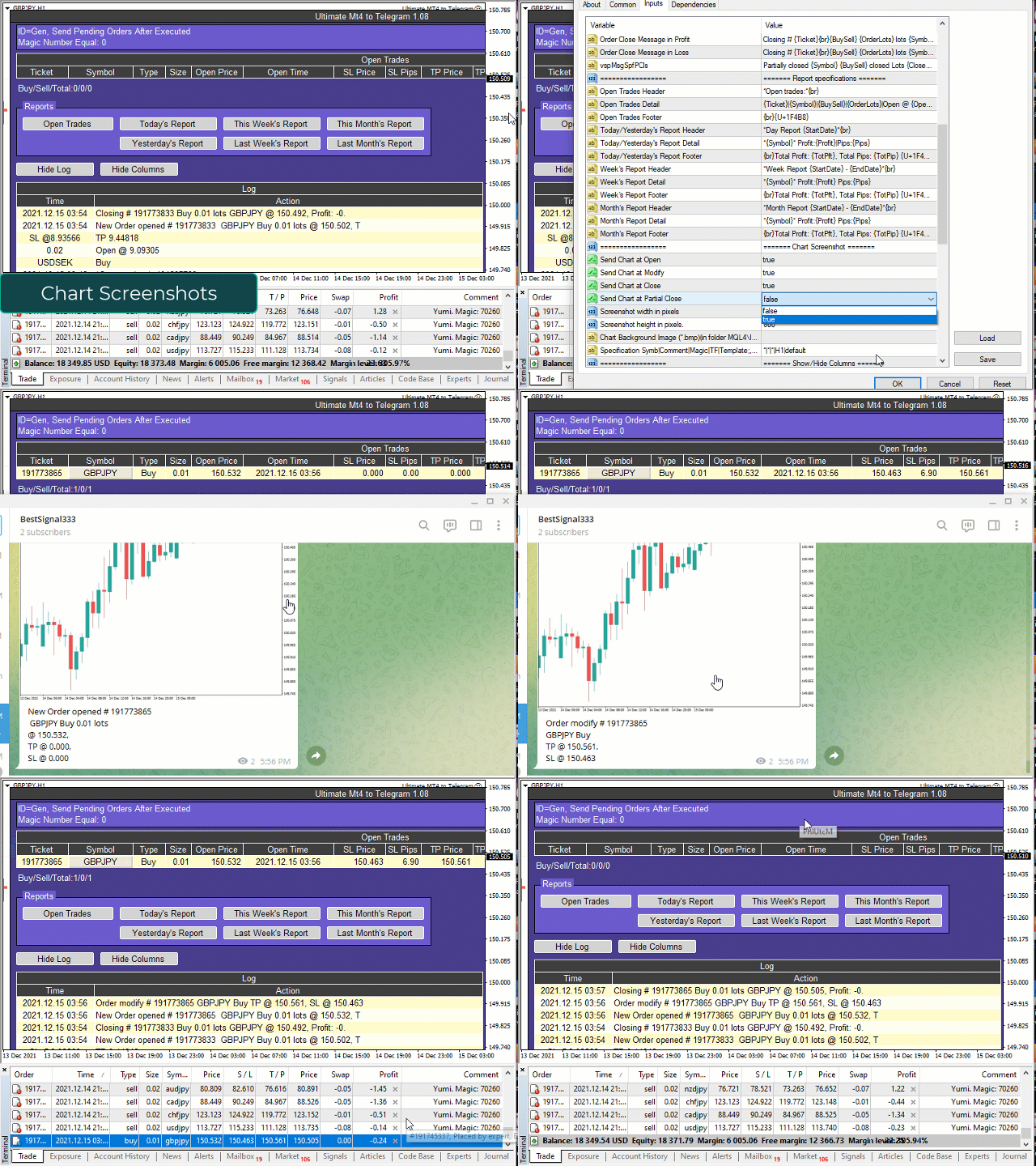
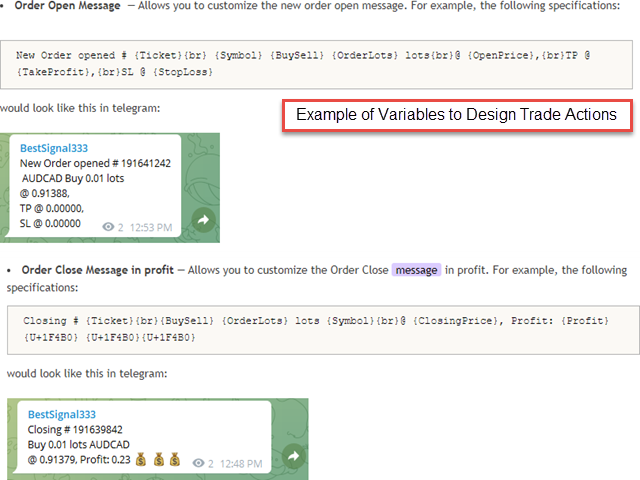
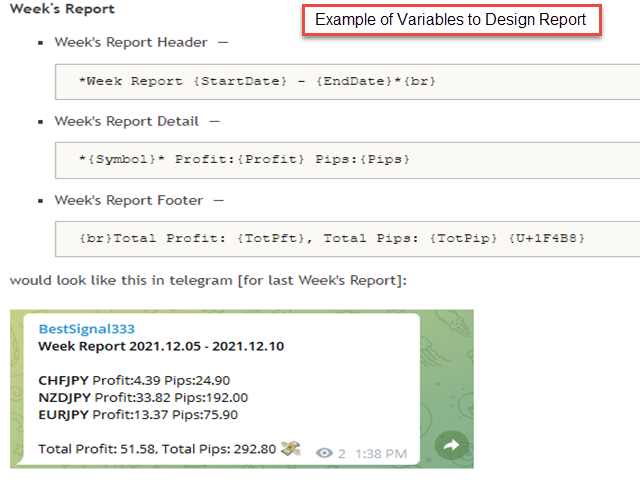
Ultimate MT4 to Telegram (UMT) sends controlled trades (via symbol, magic, comment) to your telegram channel. It sends open and closed trades, including pending orders and TP/SL modifications, along with chart screenshots, to any telegram channel. Additionally, you can send trade reports of open trades and summary profit/pip reports for day, week, or month. You can customize the design of the trade actions or reports with variables and emoticons. 

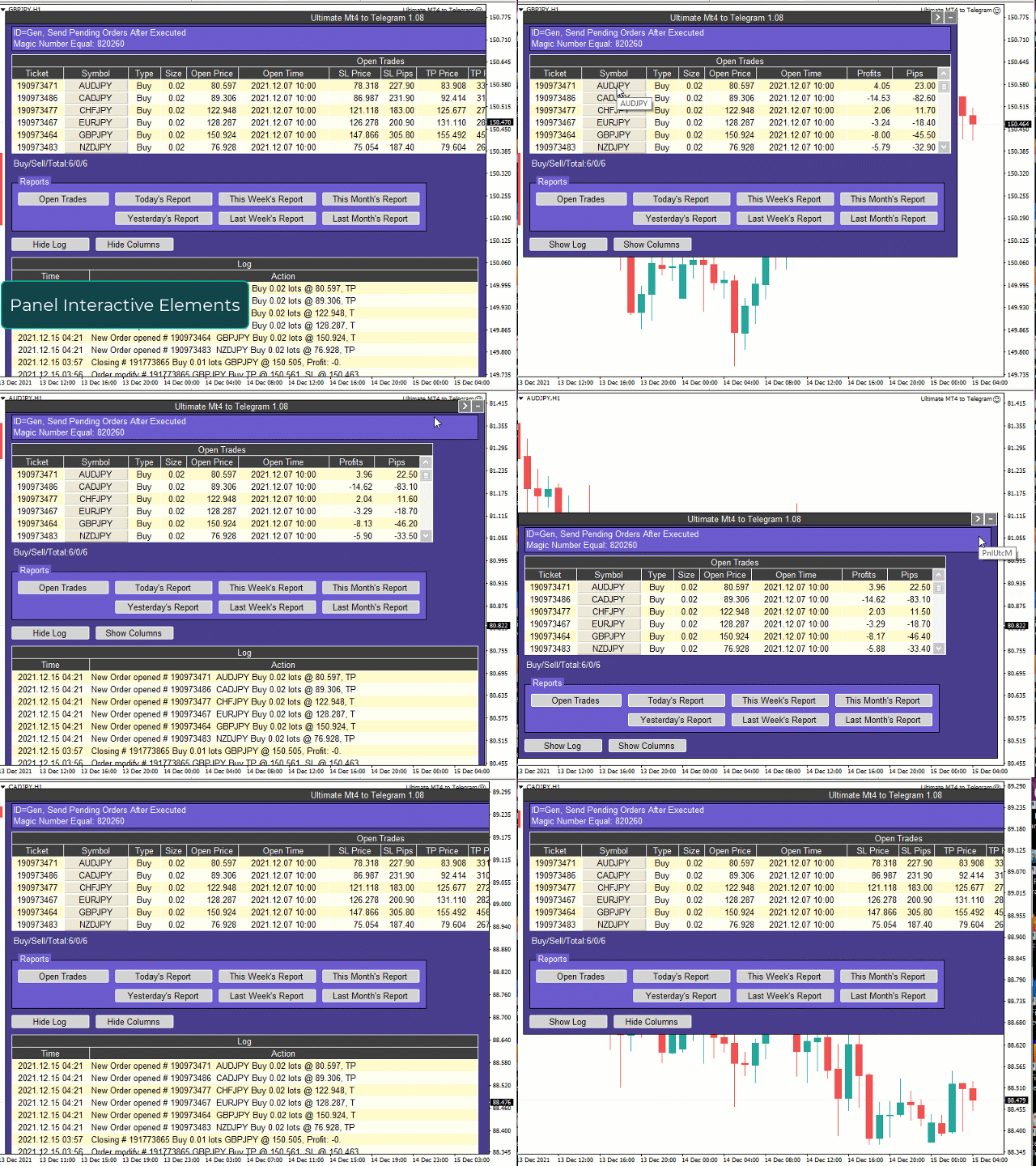
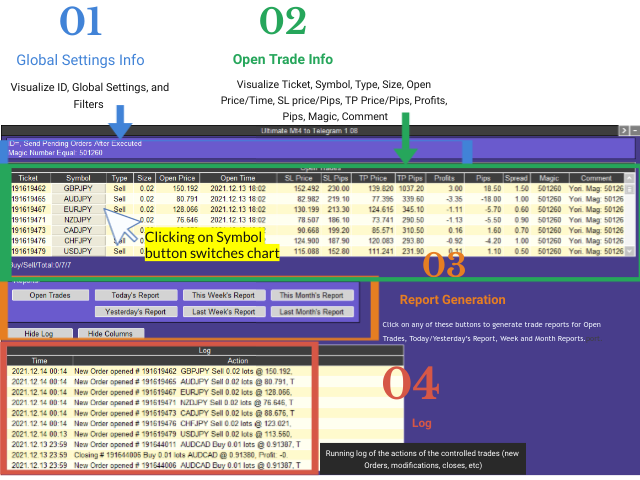
A beautiful panel allows you to visualize all the controlled open trades in useful trade information columns, along with a complete log, and ability to generate any type of report. 

MT5 version here. To test our public channel version, which doesn't need any telegram setup instructions so you can quickly see what the program can do, click here

For more detailed instructions, inputs and variables, click here

Setup Instructions: 

  1. Open your Telegram APP and search for "BotFather"
  2. Type /start and click/type /newbot to create a new bot
  3. Give your bot a nickname and username (e.g., nickname: Bestsignal and username: Bestsignalbot <-- username has to be ended by 'bot').
    Congratulations! You have created your Telegram bot
  4. Save your bot API token (e.g. 787517015:AAFnbcZYxx_iXAdRGrZD1W8bsSF5Xr_FmQ0) to your notepad. You will need it for step 8. 
  5. If you don't have it already, create the channel or group to where you will send your signals and reports
  6. Open the channel/group Info, then Manage, Add Administrators, type the bot username, and click Save
  7. In MT4, go to options/"Expert Advisors" and add the URL: https://api.telegram.org
  8. Add the EA to chart & At configuration paste the Telegram API Token, copied from step 4. After pasting number, make sure you press OK on the screen before continuing onto step 9. 
  9. Go to telegram channel and write "/ID" and send; if everything is ok, you should receive an answer with the Chat ID (a number). Copy that number.  
  10. In MT4, click on smiley face of EA, and paste the ID in the EA parameter, "List of Telegram Channel ID".  Press OK. 

Parameters: 

General Options:
  • Telegram API Token (bot) - for token ID (step 5 above)
  • List of Telegram Channel ID - for channel ID (step 14 above)
  • Telegram User (optional) - telegram username without @ (e.g., Bestsignal333bot).  If set, the EA answers only to commands by this user. 
  • Id - Allows multiple instances of UMT to run on different charts
  • Send Pending Order After Executed (true/false) - self-explanatory
Symbol Name Options:
  • Ability to remove prefix or suffix characters and match symbols
SL/TP Options:
  • Ability to indicate default SL or TP in pips, if needed
Lot Options:
  • Lot Calculation - (dropdown: Original, Fixed, Multiplier)
  • Lot Fixed - if Fixed, then put in custom lot size here (e.g., 0.01)
  • Lot Multiplier - if Multiplier, then put in multiplier here (e.g., 1 is the original lot size, 2 is double, etc)  
Message Specifications: 
  • Allows you to indicate all the custom message specifications & variables* for the Order Open, Modify, Close in profit (lose) and partial close.
Report Specifications: 
  • Allows you to indicate all the custom report specifications & variables* for Open Trades, Today/Yesterday’s Report, Week and Month Report.

Chart Screenshot: 

  • Allows you to indicate if screenshots will be sent at open, modify, or close; at what width and height in pixels; what chart background image will be included; and what symbols, comments, magic, timeframe, and template will be tagged with these screenshots.

Show/Hide Columns: 

  • Allows you to Show Always/Hide the various info columns of the controlled open trades panel. There are many useful columns, but this option allows you to hide any of them to narrow the panel. 
Filters:
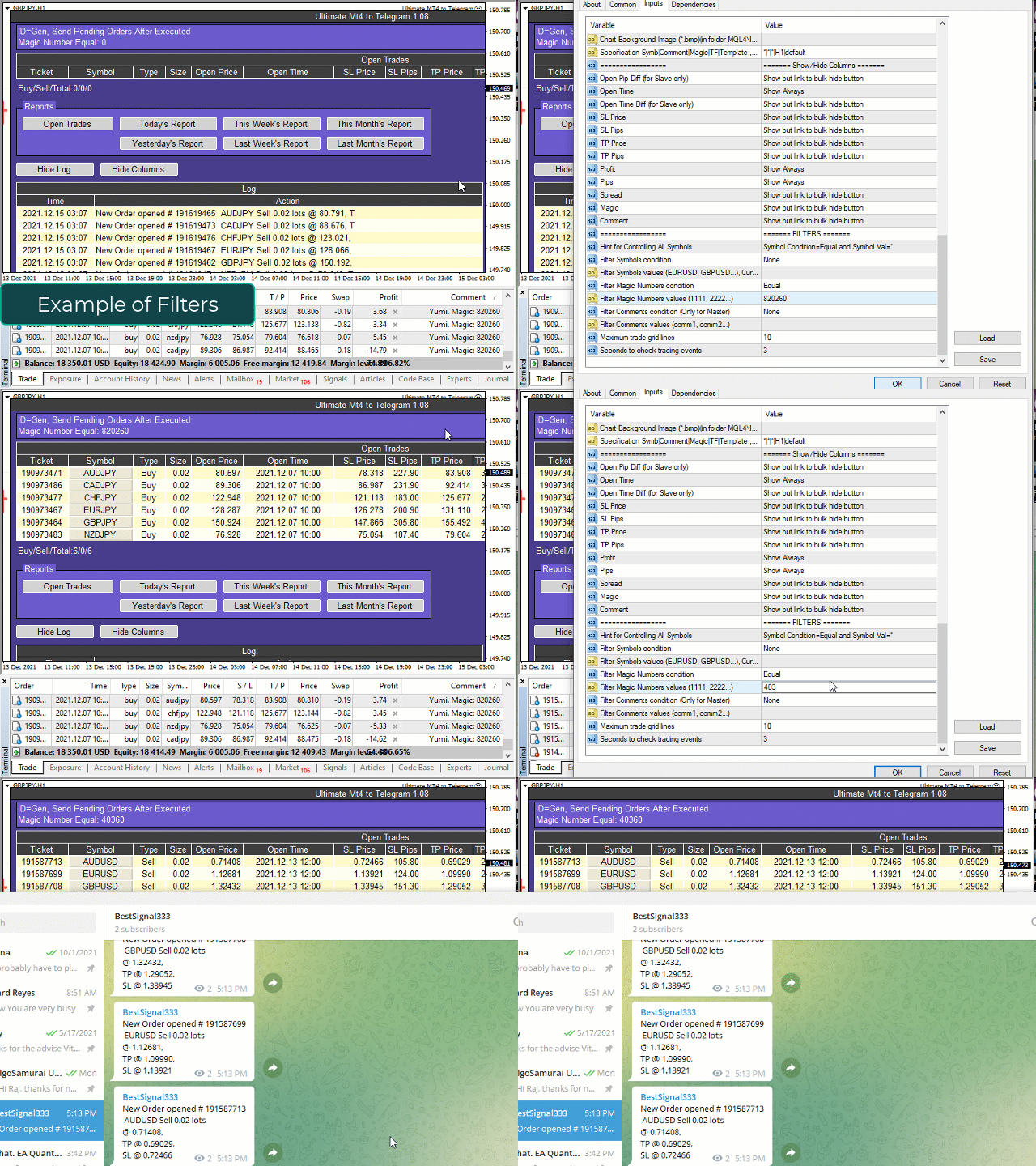
  • Filter (Symbol, Magic Number, Comment) — With dropdown menu: None, Equal, Not Equal, Contain, Not Contain. These filters allow you to include (exclude) specific symbols, magic numbers, comments, or parts of them. For example, if Symbol contains USD, you will control all USD based symbols. If Magic Number equals 80260, 40260, you will manage only these magic numbers.
For more detailed instructions, inputs and variables, click here


Рекомендуем также
This Expert provides a panel to manage all positions you have on different pairs or any instruments. not only you can close your positions just by clicking the amount of profit or loss shown on the related cell, but also you can customize whatever you see on the panel from font size  to lines and background colors. Remember ,  auto trading on MT4 panel must be active, but in our Expert we have provided a key on the panel to activate or deactivate the panel to avoid closing by accident. Any qu
MARKET MAKER EXPERT is an customizable advanced, fully automated Grid Trading Expert Advisor developed to trade on MULTIPAIR MODE ( EURUSD,USDJPY,USDCHF,USDCAD,EURCHF ), by spreading out risks. Expanding Grid is its speciality. It focuses on opening a large number of orders. The currency pairs have been chosen carefully to run this system. Once it analyze the market, it does a hedge order immediately, (so margin levels are not affected on the initial trade) Starts grid when the price move aga
One Click Trader - это инструмент для MetaTrader 4, который позволяет поднять вашу торговлю на новый уровень. Он позволяет открывать, управлять и закрывать сделки простым эффективным способом за один щелчок мыши. Стрелка вверх сворачивает панель OCT Стрелка вниз разворачивает панель OCT Стрелка вправо отображает следующую панель с дополнительными функциями Стрелка влево скрывает панель с дополнительными функциями Красная кнопка SELL позволяет открывать короткие рыночные ордера Красная кнопка SEL
NEWS Telegram is an Utility can get NEWS from Website "calendar fxstreet" and send to yours Telegram Chanel Only attach to Chart then do this step as bellow: In the terminal, open Tools ---> Options ---> Expert Advisors ---> add "calendar fxstreet" to the "Allow WebRequest for listed URL list" field. - SETTING UP THE UTILITY: Tools -> Settings -> Advisers -> Allow WebRequest for the following URLs Create your own bot in Telegram at @BotFather. Remember Token, it looks something like this - 1325
UTralVirtual
Viktor Shpakovskiy
Утилита для управления открытыми позициями и отложенными ордерами. Встроенный трейлинг стоп имеет пять режимов и семь инструментов. Есть виртуальный стоп лосс и виртуальный тейк профит, которые можно свободно передвигать по графику. С помощью встроенного симулятора торговли, вы можете проверить, как работает советник в тестере стратегий. Подробное руководство к советнику UTralVirtual можно найти в разделе "Обсуждение". Преимущества 5 режимов трейлинг стопа: виртуальный, обычный, общий, по проце
Send periodic (Health Check) notification from your MT4 terminal to your mobile phone to be sure that your MT4 terminal is still running. When you did not receive the notification, it means that your terminal is unavailable. Optional information like Account Equity and Trading Pairs are also available. Notification Period - 1 Hour, 2 Hours, 4 Hours, 8 Hours, 12 Hours, 24 Hours Attach EA to any H1 chart
MT4 has no bulk operations,such as :“Close All Positions”、“Close Profitable Positions”、“Close Losing Positions”。so, i wrote this EA.  Add steps: 1、you need to put it in the EA folder (Path Like this:C:\Users\admin\AppData\Roaming\MetaQuotes\Terminal\xxxxxxx\MQL4\Experts), 2、and then Refresh the Expert Advisors Menu on MT4,it will show “OneKeyClose” 3、select it and attach it to a Chart. then you have 3 bulk opeartions buttons on current Chart。
Общие сведения Скрипт показывает информацию о торговом счете и текущем финансовом инструменте. Информация о торговом счете: Account - номер счета и тип (Real или Demo); Name - имя владельца счета; Company - название компании, предоставляющей доступ для торговли; Server - название торгового сервера; Connection State - состояние соединения; Trade Allowed - разрешена ли торговля на счете в данный момент; Balance - баланс счета; Equity - собственные средства; Credit - кредит; Profit - прибыль; Free
Утилита для автоматического закрытия сделок по уровням трейлинг-стоп. Позволяет взять максимум с прибыли. Создан профессиональным трейдером для трейдеров.   Утилита   работает с любыми рыночными ордерами, открытыми трейдером вручную или при помощи советников. Может фильтровать сделки по магическому номеру. Одновременно утилита может работать с любым количеством ордеров.  MT5 version  https://www.mql5.com/ru/market/product/56488 ЧТО МОЖЕТ УТИЛИТА: устанавливать виртульные уровни  трейлинг-стоп от
Копировщик сделок через Telegram   канал.  Поможет моментально публиковать Вашу торговлю в Телеграм канал или копировать сделки из Telegram   канала. Утилита может работать в двух направлениях на примем сигналов в МТ4 и передачу сигналов в Телеграм . Больше никаких пропущенных сделок  Нет больше паники Управление капиталом Простота использования DEMO  https://www.mql5.com/ru/market/product/54082 Вы можете найти ей применение для: копирования собственных сделок через Telegram   канал (через Интер
AW Metatrader to Telegram
AW Trading Software Limited
Автоматизированная система для отправки уведомлений, чтобы ни один из ваших подписчиков не пропустил события о вашей торговле из вашего торгового терминала. Утилита, которая отправляет уведомления в мессенджер Telegram о любых торговых операциях на вашем счете.   Пошаговая инструкция по подключению утилиты к каналу в Телеграм ->   ЗДЕСЬ  / MT5 ->   ЗДЕСЬ Преимущества: Легкая настройка и подробная инструкция,  Возможность отправки регулируемых скриншотов, Настраиваемый текст уведомлений с исполь
Dark Trader
Volodymyr Hrybachov
Советник работает на резких ценовых движениях, может применять локирование открытых позиций и пирамидинг. Используются виртуальные стопы (тейк-профит, трейлинг-стоп), для ограничения убытков используется локирование ордеров и стоп-лосс в % от баланса. Одновременно может быть открыто несколько десятков ордеров и советнику потребуются свободные средства чтобы выйти из замков и закрыть все позиции по общей прибыли, это стоит учитывать при выборе количества инструментов для торговли. Работа советни
SFire Gold EA
Jacques Scholtz Fourie
This EA is a grid-based trading system. It incorporates several advanced features to manage trades dynamically and adapt to market conditions. Here's a summary of its functionality: I am happy to provide my settings file. Recomendation would be to run on a 20 000 cent account. Key Features: 1. Grid Trading Strategy:    - The EA uses a grid-based approach to open buy and sell trades at predefined price intervals.    - It dynamically adjusts the grid levels based on market conditions and risk se
Predetermination
Abraham Correa
5 (1)
Trail every trade position twice, automatically,  in Average True Range! All manual trades are given a predetermined Risk-Reward closing point, ruled by a calculated motive that'll adjusts to volatility! The ATR, or average true range, is a technical indicator that measures the volatility, also known as " Volume , " of a financial instrument by taking into account the price range over a specific period of time.    There is an inevitable change in the ATR value during price action. The Average
FREE
Grid Trading Manager EA
Ibrahim Mohamed Ibrahim Mohamed Elsahafy
Professional grid management EA with 3-tab GUI, progressive placement, 5 take profit levels (TP1-TP5), basket breakeven protection, and advanced trailing stop. Automatically manages manual trades with intelligent limit order distribution. --- ### KEY FEATURES **3-Tab Interactive GUI** - STATUS: Real-time monitoring, profit tracking, trailing targets - SETTINGS: Runtime configuration without EA restart - TAKE PROFIT: Configure 5 sequential TP levels **Progressive Order Placement** - Wave-
FREE
Утилита (советник) Global Breakeven and Trailingstop предназначена для: Автоматической установки стоплосса и тейкпрофита для позиций, открываемых вручную или другими советниками Переноса стоплосса в безубыток Дальнейшего трейлингстопа Утилиту можно установить на любой открытый график, и она будет управлять всеми рыночными ордерами по всем валютным парам, либо управлять ордерами по выборочным валютным парам из списка.  Также утилиту можно установить на каждый валютный график индивидуально, примен
This EA utility opens trade when price touches trend line on your chart. How to use in 2 steps? Attached this utility on your chart with your desired parameters  and risk management settings set. Draw a line using " Horizontal line tool " or  " Trend line tool " on your chart. Rules: You can draw a minimum of 1 line and a maximum of 2 lines  in the chart. It will only trade once on a symbol when it touches the line. You need to have a  fundamental knowledge about trend line trading. Parameters:
BreakEven ProSync EA – Инструмент для управления сделками и контроля рисков Обзор BreakEven ProSync EA — это советник для   MetaTrader 4 , который помогает трейдерам эффективно управлять открытыми позициями за счет автоматической настройки стоп-лосса и синхронизации уровней SL/TP. Этот инструмент предназначен для трейдеров, которые хотят стандартизировать уровни   Stop Loss   и   Take Profit   для нескольких сделок, а также использовать функцию безубыточности. Советник рассчитывает   среднюю це
本エキスパートアドバイザ(EA)は、以下の条件をすべて満たした注文が決済された場合に、自動的に同一内容の注文を再設定します。 対象となるのは指値注文または逆指値注文で、必ずテイクプロフィット(TP)とストップロス(SL)が設定されているものです。 そして、その注文がTPまたはSLによって決済された際、同じロット数・価格・TP・SL・有効期限などの条件を引き継いだ注文を自動で再発注します。 これにより、一度設定した戦略を継続的に適用でき、裁量判断なしに取引を繰り返すことが可能となります。 ただし、ブローカーによっては再注文時にスリッページが発生する場合がありますので、必ずご利用環境をご確認の上、自己責任でお使いください。
A   rocket   (from   Italian :   rocchetto ,   lit. 'bobbin/spool') [nb 1] [1]   is a   projectile   that   spacecraft ,   aircraft   or other   vehicles   use to obtain   thrust   from a   rocket engine . Rocket engine exhaust is formed entirely from   propellant   carried within the rocket. [2]   Rocket engines work by   action and reaction   and push rockets forward simply by expelling their exhaust in the opposite direction at high speed, and can therefore work in the   vacuum   of space. In
RedFox Copier Pro
Rui Manh Tien
4.7 (10)
Time saving and fast execution Whether you’re traveling or sleeping, always know that Telegram To Mt4 performs the trades for you. In other words, Our   Telegram MT4 Signal Trader  will analyze the trading signals you receive on your selected Telegram channels and execute them to your Telegram to MT4 account. Reduce The Risk Telegram To Mt4   defines the whole experience of copying signals from   Telegram signal copier to mt4 platforms. Users not only can follow all instructions from the signa
Скрипт BuyLimit_SellLimit_Grid открывает отложенные ордера BuyLimit и SellLimit. Просто перетащите скрипт на график нужной пары.  Перед установкой всех отложенных ордеров открывается окно ввода входных параметров: LongPos - при TRUE открывается ордер BuyStop. ShortPos - при TRUE открывается ордер SellStop. InitLot - начальный лот. LotCoeff - при 1 все отложенные ордера имеют одинаковый размер лота. InitStep - разница между двумя следующими друг за другом ордерами в пунктах. StepCoeff - коэффицие
This utility sends notification to trader’s MT4 (for MT5 version, checkout this link ) mobile app, to remind traders about their open positions. Super useful for part time traders to keep track and not forget any positions. To turn on notification, please visit this link (https://www.metatrader4.com/en/trading-platform/help/setup/settings_notifications) Features Keep track on open orders (pending orders, running orders) Customize time to send notification Customize notification interval (send ev
HotKeys MT4
Alexey Valeev
3 (1)
Утилита для ручной торговли с помощью "горячих клавиш". Позволяет моментально реагировать на текущую ситуацию на рынке. "Горячие клавиши" можно назначить на открытие позиций по типу, закрытие позиций по типу или всех позиций на текущем графике, удаление всех ордеров на текущем графике. Также можно задать "горячие клавиши" на пять предопределённых торговых объёмов и переключаться между ними в зависимости от ситуации без необходимости периодически менять объём вручную. Так же возможно задать автом
Close Asistent
Catur Sulistiyanto A Md Tem
metatrader 4 close asisstent install ea in any pair and run it.. Congratulations on using the ea close assistant you can get free ea by registering FBS broker through my link https://fbs.partners?ibl=621087&ibp=24536958 Button Function : Close Open Order        = function to close all open orders Close Sell                    = function to close all open sell orders Close Buy                    = function to close all open buy orders Close Profit                 = function to close all profita
Averaging Helper
Sergey Batudayev
5 (2)
Averaging Helper - Это некий разруливатель поможет вам усреднить открытые вами ранее убыточные позиции с помощью двух техник: стандартного усреднения хеджирования с последующим открытием позиций по тренду Утилита имеет возможность разрулить сразу несколько позиций открытых в разных направлениях как на бай так и на селл. К примеру вы открыли 1 позицию на селл и вторую на бай, и они обе в минусе, или одна в минусе а одна в плюсе но недостаточном и вы бы хотели усреднить две эти позиции что-бы зак
Virtual Collider Manual   – торговый робот-помощник со встроенной панелью для ручной торговли, осуществляющий автоматический вывод открываемой трейдером позиции в профит, используя инновационный адаптивный сеточный алгоритм усреднения и адаптивный пирамидинг. Ноу-хау используемого сеточного алгоритма усреднения и пирамидинга торгового робота   Virtual Collider Manual   базируется на полной автоматической адаптации всех характеристик динамически выстраиваемой сетки и пирамиды ордеров под актуальн
Trade Manager EA for MT4
Odaine Ramon Mcmillan
3 (6)
50% Off Today Only! Price Goes Back Up at 11 PM (EST) Marketkeys Trade Manager EA for MT5: Your Pathway to Forex Trading Mastery What Traders Are Saying: " I just bought the product and I like it ..." – AntonioBorrero " Very good EA I would 100% recommend.. ." – Vijohn  Efficiency and precision are paramount in Forex trading. Marketkeys Trade Manager EA for MT5 offers just that - a seamless interface combined with robust risk management tools. It's designed to be your essential trading compan
Super Copier G&G  Super Copier G&G FREE Here Expert Advisor copies orders to several trading accounts (regardless of a broker) if their respective MetaTrader 4 terminals are opened on a single PC/VPS. The EA may copy from multiple (unlimited) initial accounts to a single target one or from a single initial account to multiple (unlimited) target ones. The work of other EAs and manual trading on initial and target accounts are not affected by the copier. Support for four methods of managing the c
С этим продуктом покупают
ManHedger MT4
Peter Mueller
5 (1)
THIS EA IS A SEMI-AUTO EA, IT NEEDS USER INPUT. Manual & Test Version Please TEST this product before   BUYING  and watch my video about it. Contact me for user support or bug reports, or if you want the MT5 version! MT5 Version I do not guarantee any profits or financial success using this EA. With this Expert Advisor, you can: Implement your own   Zone Recovery   strategy to capitalize on trending markets. Create   Grid   trading strategies, to profit from ranging markets. Place orders easil
The product will copy all telegram signal to MT4   ( which you are member  ) , also it can work as remote copier.  Easy to set up, copy order instant, can work with almost signal formats, image signal, s upport to translate other language to English Work with all type of channel or group, even channel have "Restrict Saving Content", work with  multi channel, multi MT5 Work as remote copier: with signal have ticket number, it will copy exactly via ticket number. Support to backtest signal. How to
Crystal Trade Manager PRO – Продвинутая система контроля рисков и управления сделками для MT4 Бесплатная версия: https://www.mql5.com/en/market/product/150632 Обзор Crystal Trade Manager PRO (CTM) — это полнофункциональная утилита для MetaTrader 4, предназначенная для профессионального управления рисками, автоматизации сделок и обеспечения строгой торговой дисциплины. Система защищает капитал, контролирует дневную просадку, автоматически устанавливает SL/TP, обеспечивает быстрые команды управле
The product will copy all  Discord  signal   to MT4   ( which you are member  ) , also it can work as remote copier.  Easy to set up. Work with almost signal formats, support to translate other language to English Work with multi channel, multi MT4. Work with Image signal. Copy order instant, auto detect symbol. Work as remote copier: with signal have ticket number, it will copy exactly via ticket number. How to setup and guide: Let read all details about setup and download Discord To MetaTrader
Live Forex Signals предназначен для торговли по сигналам сайта   https://live-forex-signals.com/en  и  https://foresignal.com/en . Live Forex Signals для MetaTrader 5  https://www.mql5.com/ru/market/product/81448 Параметры Username и Password если у вас имеется подписка на сайты  live-forex-signals.com / foresignal.com , тогда вам следует заполнить эти параметры своими учетными данными; если подписки нет, тогда оставьте поля пустыми; Komment комментарий к открываемым сделкам Risk риск в процен
Smart Channel M4
Vahidreza Heidar Gholami
The trend in the market can be predicted using trend lines but the problem is you don’t know where exactly the price is going to touch the trend line where you can put your pending orders on. Smart Channel Expert Advisor makes it possible to put an advanced channel around the price data, which can be configured to handle placing orders, opening and closing positions, managing risk per trade, spread, slippage, and trailing stop-loss and take-profit automatically. Features Money Management (Calcul
Ultimate Extractor - Professional Trading Analytics for MT4 Ultimate Extractor transforms your MetaTrader 4 trading history into actionable insights with comprehensive analytics, interactive charts, and real-time performance tracking. Ability to combine multiple accounts and MT4 and MT5 into a single dashboard. What It Does Automatically analyzes your MT4 trading history across all Expert Advisors and generates detailed HTML reports with interactive visualizations. Tracks live performance metric
Custom Alerts AIO: Универсальный сканер рынка — Без настройки Обзор Custom Alerts AIO — это самый быстрый и простой способ отслеживать рыночные сигналы в реальном времени на множестве инструментов без дополнительной настройки и без необходимости покупать другие продукты. В состав входят все необходимые индикаторы от Stein Investments, что делает этот инструмент идеальным решением «всё в одном» для трейдеров, ценящих простоту и эффективность. Просто установите на график и сразу получайте сигнал
With this Expert Advisor, you can seamlessly integrate various channel, arrow, and reversal indicators. It offers the flexibility to use all popular channel trading strategies, while also providing powerful tools to customize your trading conditions and risk management system.   The Expert Advisor opens orders when the price crosses the channel boundaries. Multiple crossing conditions are available for customization: Price touches boundary on re-entry into the channel Price touches boundary on


Unlimited Trade Copier Pro - это мощный инструмент для удаленного копирования сделок между несколькими счетами MetaTrader 4/MetaTrader 5, расположенными удаленно друг от друга, по сети интернет. Это идеальное решение для провайдеров сигналов, которые хотят поделиться своей торговлей с другими трейдерами по всему миру. Один поставщик может копировать сделки на неограниченное количество счетов-получателей, а один получатель также может копировать сделки неограниченного количества провайдеров. Пост

--------------Welcome to use [MQL5 Signal Analyze Master]------------------  Function: Draw order tracks of MQL5 MT4 and MT5 signal on MT4 chart. [Using guide] 1.Use it as Experts. 2.Download history record from MQL5 signal(MT4 signal or MT5 signal).  3.Paste history record file below "MQL4/Files/" 4.Load [Signal Analyze Master] on the symbol chart what you want to analyze. 5.Paste the history record file name to parameter 'FileName' 6.Select  SignalType  match the history you download on MT4
EASY Insight AIO – Всё-в-одном для умного и простого трейдинга Обзор Представьте, что вы можете просканировать весь рынок — Форекс, золото, криптовалюты, индексы и даже акции — всего за несколько секунд, без ручного просмотра графиков, сложной установки или настройки индикаторов. EASY Insight AIO — это ваш идеальный инструмент экспорта для трейдинга с поддержкой искусственного интеллекта. Он предоставляет полный снимок рынка в одном аккуратном CSV-файле — готовом к мгновенному анализу в ChatGP
Strategy Builder offers an incredible amount of functionality. It combines a trade panel with configurable automation (covert indicators into an EA), real-time statistics (profit & draw down) plus automatic optimization of SL, TP/exit, trading hours, indicator inputs. Multiple indicators can be combined into an single alert/trade signal and can include custom indicators, even if just have ex4 file or purchased from Market. The system is easily configured via a CONFIG button and associated pop-up
Remote Trade Copier   is an advanced tool designed for efficiently copying trades between accounts in both   local   and   remote   modes. It allows for lightning-fast order replication from a master account to a slave account. In local mode, trades are copied instantly, while in remote mode, the copying process takes a second.  In new version, in remote mode , the copy operation can be performed with a delay of milliseconds or zero . After purchase, ask how to activate it MT4 Version (Only Loc
Trade Copier Pro
Vu Trung Kien
4.57 (14)
Trade Copier Pro - это мощный инструмент для удаленного копирования сделок между несколькими счетами MetaTrader 4/MetaTrader 5, расположенными в разных местах, по сети интернет. Это идеальное решение для провайдеров сигналов, которые хотят поделиться своей торговлей с другими трейдерами по всему миру. Один поставщик может копировать сделки на множество счетов-получателей, а один получатель может копировать торговлю множества провайдеров. Поставщик может указать срока завершения подписки для кажд
Telegram To MT4 Receiver
Levi Dane Benjamin
3.67 (6)
Копируйте сигналы из любого канала, участником которого вы являетесь (в том числе частного и ограниченного), прямо на свой MT4. Этот инструмент был разработан с учетом потребностей пользователей и предлагает множество функций, необходимых для управления и мониторинга сделок. Этот продукт представлен в простом в использовании и визуально привлекательном графическом интерфейсе. Настройте свои параметры и начните использовать продукт в течение нескольких минут! Руководство пользователя + Демо  |
Данный советник можно использовать для ручной торговли в качестве фонового советника, либо сочетать с другим советником для открытия сделок. Loss Recovery Trading - это вариант для управления убыточными позициями вместо использования стоп-лосса, устанавливая зону восстановления и целевые уровни для выхода из последовательности шагов. Как он работает? Если цена движется в противоположном направлении от первой позиции на определенное количество пунктов убытка, советник откроет противоположно напр
Trade Copier for MT4   Supports multiple master and slave terminals   Local operation without DLL usage   Optional slow monitoring mode   Compatible with prop firm and personal accounts Trade Copier MT4 To MT4 Advanced Multi-Account Trade Copier for MT4/MT5 – Master & Slave Synchronization This Expert Advisor is a fully automated multi-account trade copying system designed for professional traders who require fast, stable, and flexible synchronization between MT4/MT5 accounts. It supports
This means now you can trade on multiple MetaTrader 4 accounts simultaneously, mirror the trades of any trading bot to your friends and family accounts (even if it is locked to your MT4 account number), create investment portfolios of many MT4 accounts, remove risk of unregulated Forex brokers, turn losing trading strategy into a winner and become an independent account manager immediately without the need to sign any contracts or opening expensive PAMM accounts with the broker. Reverse Trading
Панель FFx Hidden Manager предназначена для управления ордерами прямо на графике. Особенности: Уровни тейк-профит, стоп-лосс и трейлинг-стоп скрыты Для каждого ордера на графике есть отдельная линия Перетащите необходимую линию, чтобы изменить уровни тейк-профит/стоп-лосс Функция автоматического перетаскивания уровня стоп-лосс в безубыток, когда достигнут йровень тейк-профит 1 Возможность выбора типа тейк-профита/стоп-лосса (в пунктах или по цене) Возможность выбора типа трейлинг-стопа (в пунк
Панель FFx Risk Calculator поможет вам легко рассчитать размер ваших трейдов, стоп-лоссов или риска прямо на графике. Особенности продукта: Параметры для расчета: Risk (риск), Stop Loss (стоп-лосс) или Lot Size (размер лота) Панель показывает, допустимо ли использовать данный размер лота при текущем значении свободной маржи на счете Кнопка для свертывания/развертывания панели Возможность перетащить панель в любое место на графике Применение Выберите параметр для расчета. Расчет будет основан на
News Trader Pro
Vu Trung Kien
4.38 (16)
News Trader Pro - это уникальный робот, который позволяет торговать по новостям. Он загружает все новости с нескольких популярных сайтов Forex. Вы можете выбрать любую новость и заранее задать стратегию торговли. News Trader Pro начнет торговать в соответствии с выбранной стратегией автоматически, как только выйдет новость. Выход новости дает возможность заработать, поскольку изменения в цене в этот момент могут быть значительными. С появлением данного инструмента торговать по новостям стало про
FFx Watcher PRO - панель для отображения на одном графике текущего направления стандартных индикаторов (до 15 одновременно) на нескольких таймфреймах (до 9). Панель работает в двух режимах: 1. Режим Watcher: Мульти-индикаторный Пользователь может выбрать до 15 индикаторов для отображения Пользователь может выбрать до 9 таймфреймов для отображения 2. Watcher mode: Мультивалютный Пользователь может выбрать любое количество символов Пользователь может выбрать до 9 таймфреймов для отображения В это
Копирует сделки между терминалами МТ4. Возможности: быстрый запуск копирования минимальные нагрузки на процессор прямое и обратное (реверсное) копирование. копирование уровней Take Profit и Stop Loss копирование отложенных и их изменений копирование сделок  один ко многим копирование сделок  многие к одному только локальное копирование Внимание: Продукт предназначен для копирования сделок только внутри одного ПК или VPS с доступом к рабочему столу. На встроенном в терминал виртуальном хостинге п
Эта гибко настраиваемая панель для торговли вручную также позволяет автоматизировать некоторые торговые действия, такие как оповещения, открытие, закрытие и частичное закрытие сделок, доливки, установка отложенных ордеров, настройки стоп-лосса, тейк-профита и многое другое. Предусмотрены интерактивные элементы управления на графике, такие как поля для галочек и кнопки. Советник включает функции управления капиталом, новостных событий, скрытый стоп-лосс, тейк-профит и отложенные ордера, трейлинг-
Программа Binary Options Copier Remote позволяет копировать сделки по бинарным опционам между разными счетами MetaTrader 4, установленных на разных компьютерах. Это идеальное решение для провайдеров сигналов, которые хотят поделиться своей торговлей с другими трейдерами по всему миру. Провайдер может выдать до 10 бесплатных лицензий на получение сигналов. Это означает, что 10 пользователей могут копировать сигналы провайдера, используя бесплатный продукт Binary Options Receiver Free . Начиная с
Price Action Dashboard - это инновационная утилита для помощи трейдерам в контролировании большого числа финансовых инструментов. Эта утилита предназначена автоматически предлагать сигналы и ценовые условия. Dashboard анализирует все основные таймфреймы, предлагая условия ценовых действий с помощью графических элементов. Dashboard может подсказать вам силу тренда, определяющего направление движения, это незаменимый инструмент для тех, кто хочет самостоятельно открывать позиции, используя индикат
Elliott Wave Counter — это панель для быстрой и удобной ручной разметки волн Эллиотта. Можно выбрать цвет и уровень оценок. Также есть функции для удаления последней разметки и всей разметки, сделанной инструментом. Разметка производится в один клик. Нажмите пять раз - будет пять волн! Счетчик волн Эллиотта станет отличным инструментом как для начинающих, так и для профессиональных аналитиков волн Эллиотта. Руководство по установке и вводу волнового счетчика Эллиотта если ты хочешь получить    
Если вы хотите рисовать линии Поддержки и Сопротивления, просматривать: дневные уровни открытия рынка, классические уровни разворота, уровни разворота Фибоначчи, трендовые линии, уровни Фибоначчи, время до закрытия свечи, а также текущий спред. Если вы хотите выставлять ваши ордера с точным лотом, который отвечает вашему желаемому риску стоп-лосса. Если вы хотите делать все это и много другое всего одним кликом, тогда это идеальный инструмент для вас. Этот инструмент позволит вам чувствовать себ
Partial Close Expert   — это инструмент, объединяющий множество функций в одну автоматизированную систему. Этот советник поможет трейдерам эффективнее управлять позициями, предлагая различные варианты управления рисками и максимизации потенциальной прибыли. С помощью Partial Close Expert трейдеры могут установить       частичное закрытие       уровень для фиксации прибыли,       трейлинг-стоп       уровень для защиты прибыли и ограничения убытков,       точка безубыточности       уровень, гаран
Другие продукты этого автора
Ultimate Trailing Stop EA MT5
BLAKE STEVEN RODGER
4.13 (8)
This EA Utility allows you to manage (with advanced filtering) unlimited open orders (manual or EA) with 16 trailing stop methods: fixed, percent, ATR Exit, Chandelier Exit, Moving Average, Candle High Low Exit, Bollinger Bands, Parabolic, Envelope, Fractal, Ichimoku Kijun-Sen, Alligator, Exit After X Minutes or Bars, RSI and Stochastic. The trailing stop can be either real or virtual, and you can exit fully or with a partial close percent on touch or bar close.  Moreover, you can add (override
Zone Guardian is an advanced Expert Advisor (EA) designed to automate trade management. This EA manages trades within specified risk parameters using automatic lot calculation and multi-layered trade activation. It supports up to 5 layers within the entry zone, each with customizable risk percentages. Visual aids on the chart display entry zones, stop loss (SL), and take profits (TP), ensuring easy level adjustments. The EA adapts to market conditions by closing trades at each TP and moving SLs
EA Schedule Launcher MT5
BLAKE STEVEN RODGER
1 (1)
It may be true that “Time waits for no one [human],” but at least now you can control the marching time of all your robots. EA Schedule Launcher (ESL) can launch and close any number of your EAs and/or indicators at custom beginning and ending times. You save your EA and/or indicator to a template and input when to open and close them. The power to control your EAs trading time window can improve both strategy performance and terminal/computer performance. Note: EA cannot be run with the visual
Developed by Chuck LeBeau, the Chandelier Exit indicator uses the highest high / lowest low -/+ a multiple of the ATR value to draw trailing stop lines (orange under buys, magenta over sells) that advance with the trend until the trend changes direction.The value of this trailing stop is that it rapidly moves upward in response to the market action. LeBeau chose the chandelier name because "just as a chandelier hangs down from the ceiling of a room, the chandelier exit hangs down from the high
FREE
ATR Exit MT5
BLAKE STEVEN RODGER
4.75 (4)
The ATR Exit indicator uses the candle close + ATR value to draw trailing stop lines (orange under buys, magenta over sells) that advance with the trend until the trend changes direction. It uses a multiple of the Average True Range (ATR), subtracting it’s value from the close on buy, adding its value to the close on sell. Moreover, the trailing stop lines are generated to support the order’s trend direction (long or short):  In an upward trend, the long trailing stop line (orange line under bu
FREE
Ultimate Partial Profit EA
BLAKE STEVEN RODGER
4.67 (3)
This EA Utility delivers a robust solution for managing an unlimited array of open orders, both manual and automated. It enables customizable partial profit levels utilizing metrics such as pips, ratios, ATR (Average True Range), and profit amounts for precise trade management. The utility features an advanced on-screen display, offering clear visualization of all orders and their profit levels to enhance strategic decision-making and control. To evaluate its performance and interface, the EA s
This trade copy utility allows you to instantly and seamlessly replicate and synchronize unlimited orders from multiple master accounts to multiple slave accounts on your local machine. You can create custom channels (or portfolios) with advanced filtering capabilities to copy from multiple master accounts to multiple slave accounts. Moreover, you can tailor these channels with a range of lot sizing and trade condition options to ensure that copied trades outperform the original source. You can
Ultimate Trailing Stop EA
BLAKE STEVEN RODGER
4.33 (15)
This EA Utility allows you to manage (with advanced filtering) unlimited open orders (manual or EA) with 16 trailing stop methods: fixed, percent, ATR Exit, Chandelier Exit, Moving Average, Candle High Low Exit, Bollinger Bands, Parabolic, Envelope, Fractal, Ichimoku Kijun-Sen, Alligator, Exit After X Minutes or Bars, RSI and Stochastic. The trailing stop can be either real or virtual, and you can exit fully or with a partial close percent on touch or bar close.  Moreover, you can add (overrid
EA Schedule Launcher
BLAKE STEVEN RODGER
5 (1)
It may be true that “Time waits for no one [human],” but at least now you can control the marching time of all your robots. EA Schedule Launcher (ESL) can launch and close any number of your EAs and/or indicators at custom beginning and ending times. You save your EA and/or indicator to a template and input when to open and close them. The power to control your EAs trading time window can improve both strategy performance and terminal/computer performance. Note: EA cannot be run with the visual
Ultimate MT5 to Telegram Public Channel sends controlled trades (via symbol, magic, comment) to a public telegram channel. It sends open and closed trades, including pending orders and TP/SL modifications, along with chart screenshots, to this public telegram channel. Additionally, you can send trade reports of open trades and summary profit/pip reports for day, week, or month. You can customize the design of the trade actions or reports with variables and emoticons.  A beautiful panel allows
FREE
The Candle High Low Exit indicator uses the highest high and the lowest low of a range to draw trailing stop lines (orange under buys, magenta over sells) that advance with the trend until the trend changes direction.  Moreover, the trailing stop lines are generated to support the order’s trend direction (long or short):  In an upward trend, the long trailing stop line (orange line under buy) appears and advances upward until the close crosses under the line.  In a downward trend, the short trai
FREE
ATR Exit
BLAKE STEVEN RODGER
4.63 (8)
The ATR Exit indicator uses the candle close + ATR value to draw trailing stop lines (orange under buys, magenta over sells) that advance with the trend until the trend changes direction. It uses a multiple of the Average True Range (ATR), subtracting it’s value from the close on buy, adding its value to the close on sell. Moreover, the trailing stop lines are generated to support the order’s trend direction (long or short):  In an upward trend, the long trailing stop line (orange line under bu
FREE
Chandelier Exit
BLAKE STEVEN RODGER
4 (4)
Developed by Chuck LeBeau, the Chandelier Exit indicator uses the highest high / lowest low -/+ a multiple of the ATR value to draw trailing stop lines (orange under buys, magenta over sells) that advance with the trend until the trend changes direction.The value of this trailing stop is that it rapidly moves upward in response to the market action. LeBeau chose the chandelier name because "just as a chandelier hangs down from the ceiling of a room, the chandelier exit hangs down from the high
FREE
Ultimate MT4 to Telegram Public Channel sends controlled trades (via symbol, magic, comment) to a public telegram channel. It sends open and closed trades, including pending orders and TP/SL modifications, along with chart screenshots, to this public telegram channel. Additionally, you can send trade reports of open trades and summary profit/pip reports for day, week, or month. You can customize the design of the trade actions or reports with variables and emoticons.  A beautiful panel allows
FREE
The Candle High Low Exit indicator uses the highest high and the lowest low of a range to draw trailing stop lines (orange under buys, magenta over sells) that advance with the trend until the trend changes direction.  Moreover, the trailing stop lines are generated to support the order’s trend direction (long or short):  In an upward trend, the long trailing stop line (orange line under buy) appears and advances upward until the close crosses under the line.  In a downward trend, the short trai
FREE
Visual Order Tracking
BLAKE STEVEN RODGER
5 (1)
The Visual Order Tracking (VOT) indicator makes trade history and performance metrics visible on the chart in three ways: 1) Draw History of closed and open trades with arrows, lines and trade result numbers (pips, $ profit, % profit, % change); 2) Summary Trade Panel to show open and closed trade summaries by symbol, lots, pips, profit and advanced stats; and 3)  Open Trades Panel to show open trades by Symbol Ticket, Type, Lots, Profit, pips, SL pips, StopLoss, TakeProfit, Spread, Magic, Comme
Visual Order Tracking EA
BLAKE STEVEN RODGER
5 (1)
The Visual Order Tracking (VOT) EA makes trade history and performance metrics visible on the chart in four ways: 1) Draw History of closed and open trades with arrows, lines and trade result numbers (pips, $ profit, % profit, % change); 2) Trade Manager to show Open, SL and TP levels as vivid horizontal lines with dynamic specs and partial closing options; 3)  Summary Trade Panel to show sortable table of open and closed trade summaries by symbol, lots, pips, profit and advanced stats; and 4) 
Ultimate Trade Copier
BLAKE STEVEN RODGER
5 (2)
This trade copy utility allows you to instantly and seamlessly replicate and synchronize unlimited orders from multiple master accounts to multiple slave accounts on your local machine. You can create custom channels (or portfolios) with advanced filtering capabilities to copy from multiple master accounts to multiple slave accounts. Moreover, you can tailor these channels with a range of lot sizing and trade condition options to ensure that copied trades outperform the original source. You can
Cutting-edge solution for Trend Trading with statistically robust signals! Kana Trend’s smart algorithm detects the trend on any instrument, any timeframe, and gives powerful entry signals with exit levels.  Its advanced statistics gives you deep insight as to success and profitability of its signals -- while being fully transparent on any potential for loss.  Because this is an indicator, not an EA, you cannot see it in action in visual tester if you download the Free Demo. Instead, please down
Promo price: $199 for the first 5 buyers.  Kana Trend EA is a short term, always-in-market trend trading system that shows great results on multiple symbols.  You can place this EA on any instrument without worry about missing out on a trend, for if there is one, it is bound to get it. It is always-in-market, trending and reversing into new trends, on small timeframes like H1, a difficult to accomplish feat in a noisy environment. You can place this EA on your account without worry about cat
Zone Guardian
BLAKE STEVEN RODGER
Zone Guardian is an advanced Expert Advisor (EA) designed to automate trade management. This EA manages trades within specified risk parameters using automatic lot calculation and multi-layered trade activation. It supports up to 5 layers within the entry zone, each with customizable risk percentages. Visual aids on the chart display entry zones, stop loss (SL), and take profits (TP), ensuring easy level adjustments. The EA adapts to market conditions by closing trades at each TP and moving SLs
Ultimate MT5 to Telegram (UMT) sends controlled trades (via symbol, magic, comment) to your telegram channel. It sends open and closed trades, including pending orders and TP/SL modifications, along with chart screenshots, to any telegram channel. Additionally, you can send trade reports of open trades and summary profit/pip reports for day, week, or month. You can customize the design of the trade actions or reports with variables and emoticons.  A beautiful panel allows you to visualize all t
Фильтр:
Нет отзывов
Ответ на отзыв