DBZ Trading Assistant

DBZ Trading Assistant

A trading panel for MetaTrader 5. You plan the trade, and the panel places it, manages it and records the results.

ABOUT THIS PRODUCT

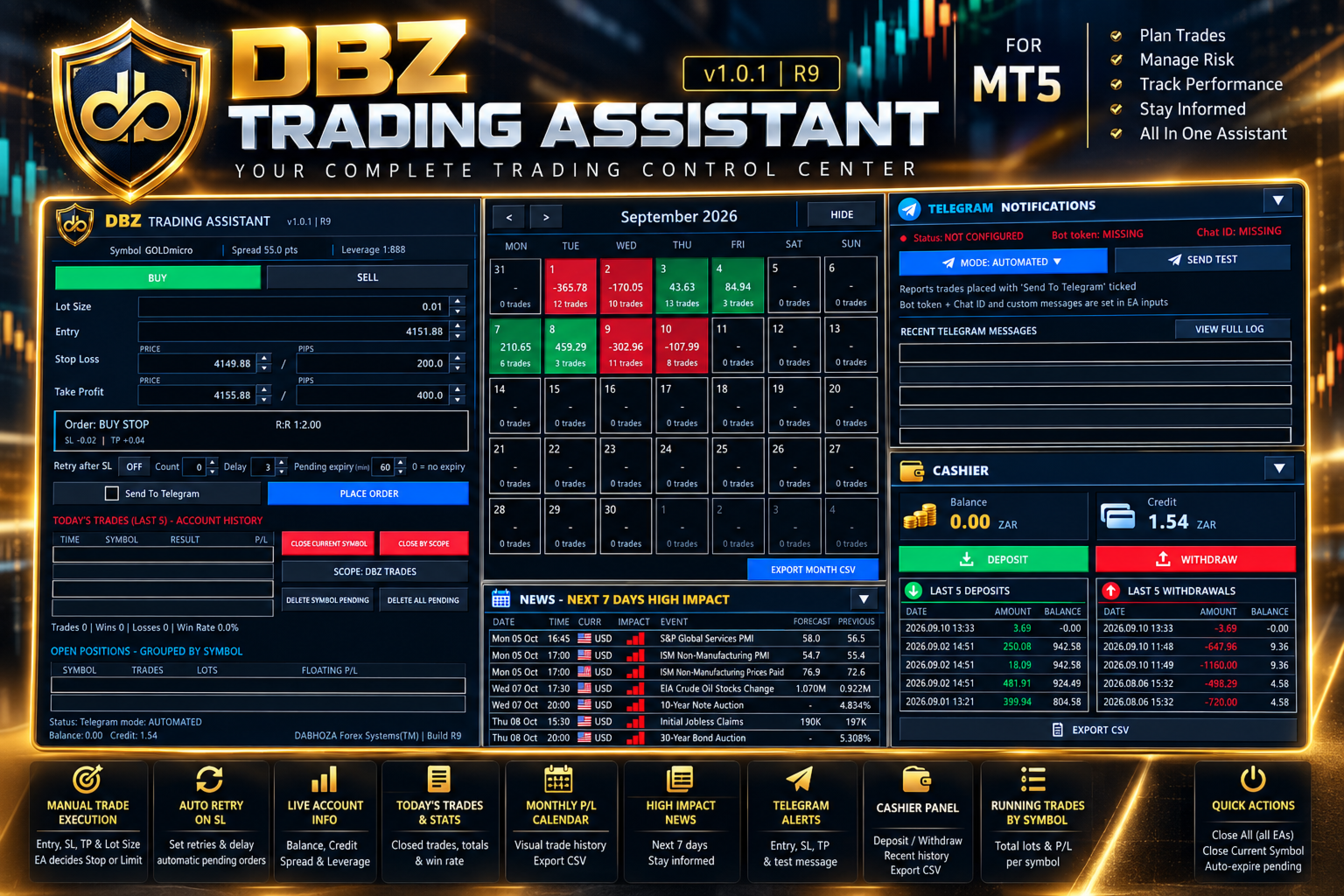
DBZ Trading Assistant is an Expert Advisor for manual traders. It does not give trading signals and does not decide when to buy or sell. You do your own analysis and choose the direction, lot size, entry price, Stop Loss and Take Profit. The assistant then helps with placing the order, managing it, and reviewing your account history.

Everything is shown in panels on your chart.

TRADE ENTRY

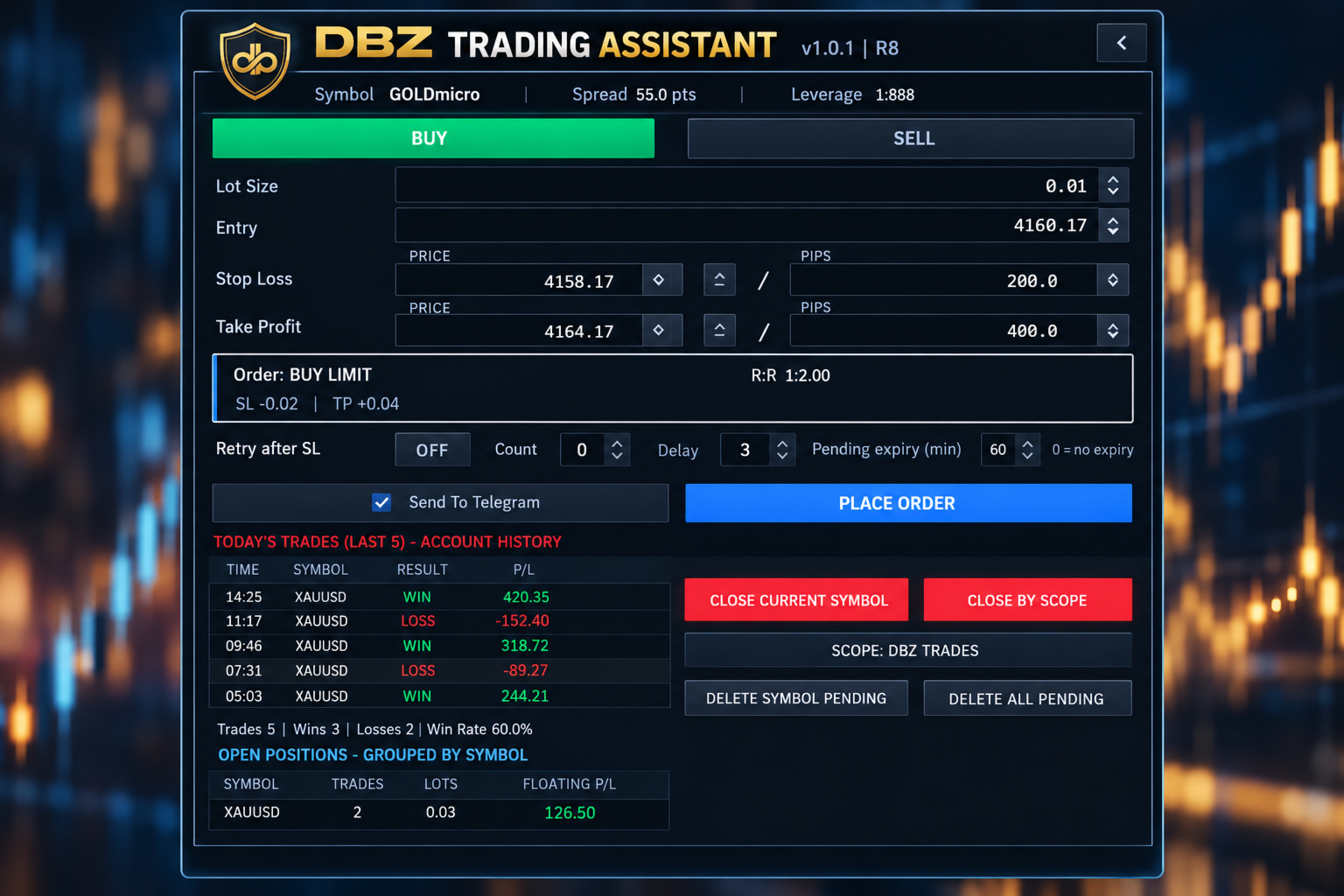
Choose Buy or Sell, then enter the lot size, the entry price, the Stop Loss and the Take Profit.

The assistant compares your entry price with the current market price. It then selects the order type for you: Buy Limit, Buy Stop, Sell Limit, Sell Stop or Market Order.

Before you place the order, the panel shows the order type it selected and the risk-to-reward ratio.

PRICE OR PIP INPUT

You can enter the Stop Loss and Take Profit as a price or as a distance in pips. The two fields stay linked. If you change one, the other updates, always measured from the entry price.

Up and down buttons next to each field let you adjust the values in small steps.

TRADE DISPLAY ON THE CHART

After an order is placed, the assistant can draw the trade on your chart. The display includes:
- The entry level, Stop Loss level and Take Profit level
- A risk area and a reward area
- The risk-to-reward ratio
- The distance to the Stop Loss and to the Take Profit
- The estimated amount at risk and the estimated reward, in your account currency

RETRY AFTER STOP LOSS (OPTIONAL)

Some traders prefer to enter again after a trade is stopped out. This option is switched off by default. When you switch it on, you can set the number of attempts and the delay between them. If a trade placed with the assistant is stopped out, the assistant places a new order using the stored setup.

PENDING ORDER EXPIRY (OPTIONAL)

You can set how long a pending order may stay in the market. For example, with a setting of 60 minutes, a pending order that has not been triggered is removed after 60 minutes. A setting of 0 means the order does not expire.

TODAY'S TRADES

The panel reads your MetaTrader 5 account history. It lists your latest closed trades with the time, symbol, result and profit or loss. It also shows the number of trades, the number of wins and losses, and the win rate for the day.

These figures come from the account history, so they include trades that were not placed with this panel.

MONTHLY CALENDAR

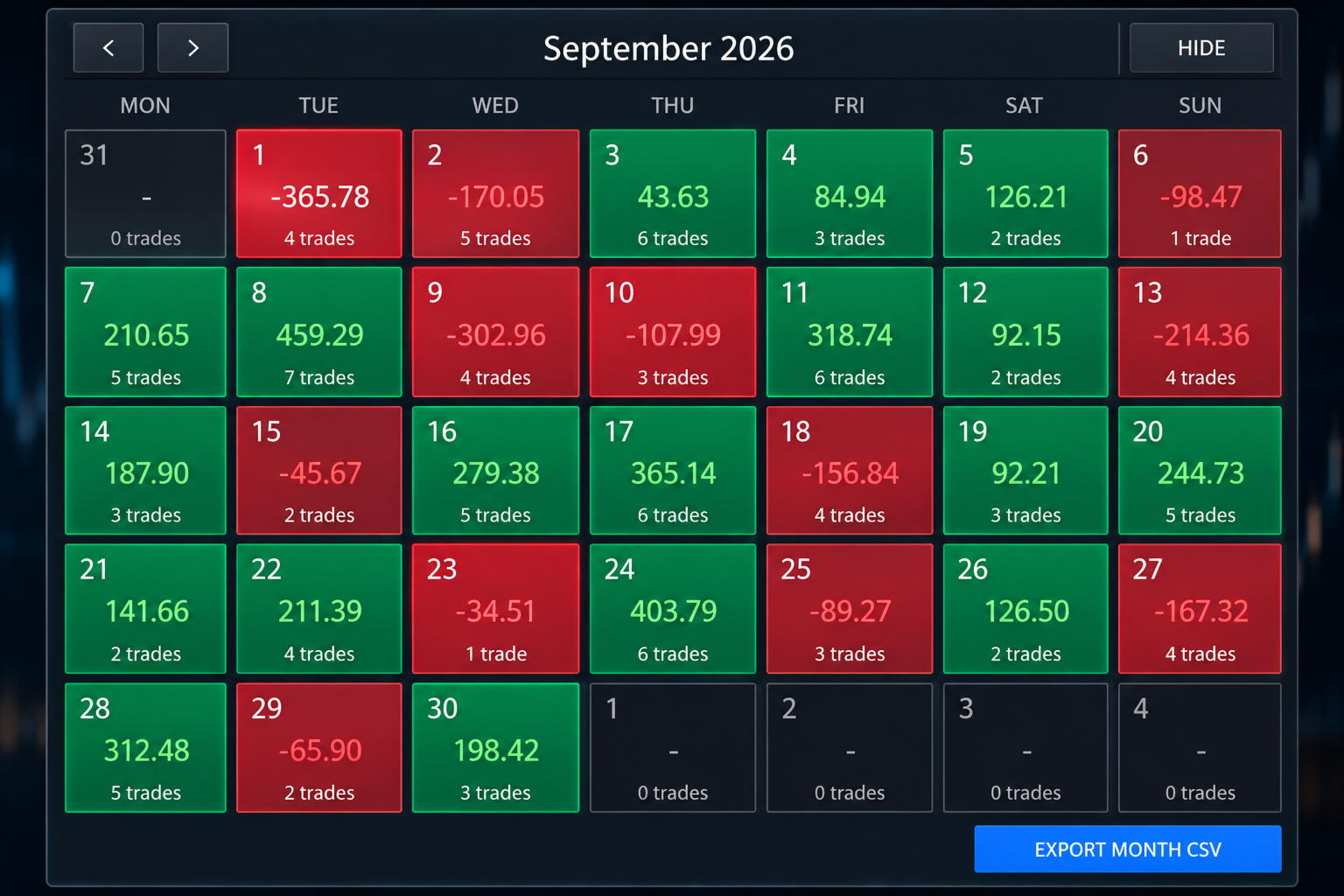
The calendar shows one month of your account history. Each trading day is coloured:
- Green for a day with a net profit
- Red for a day with a net loss
- Dark for a day without trades

Each day shows its net result and the number of trades. Click a day to see its trades. Use the arrows to move to earlier months.

MONTHLY FILE EXPORT

You can save the selected month as a CSV file, which opens in spreadsheet programs such as Microsoft Excel. The file contains the date, time, symbol, deal type, volume, profit, swap, commission, fees and net result of each closed trade. The file is saved in the MQL5/Files folder of your terminal data folder.

OPEN POSITIONS

Open positions are grouped by symbol. For each symbol the panel shows the number of trades, the total lots and the floating profit or loss. For example, several gold positions appear on one line.

TRADE MANAGEMENT BUTTONS

- Close Current Symbol closes the positions of the symbol on the chart.
- Close By Scope closes positions according to the scope you select. The selected scope is always shown on the button.
- Delete Symbol Pending removes the pending orders of the symbol on the chart.
- Delete All Pending removes the pending orders handled by the assistant.

ECONOMIC NEWS

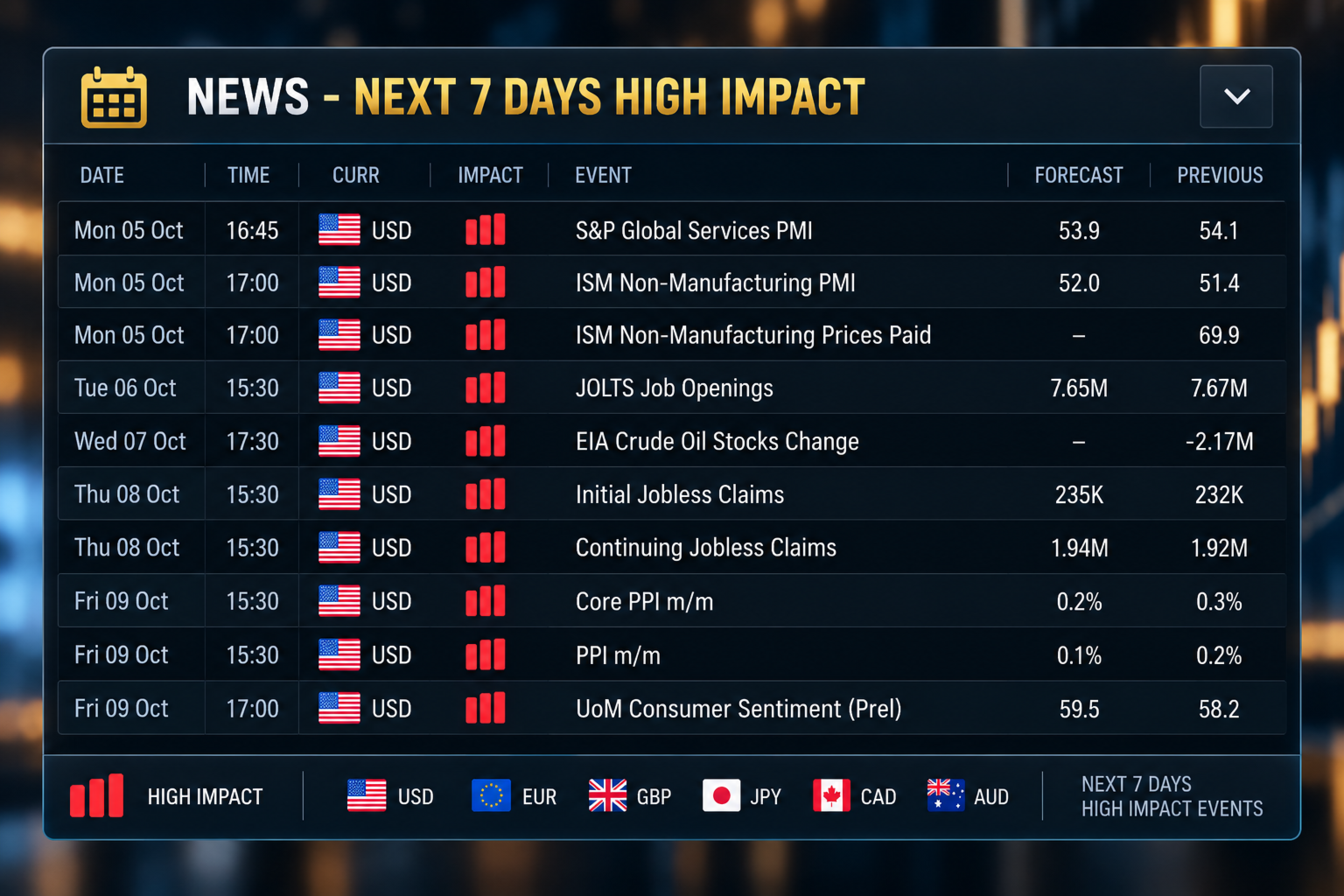
A news panel lists the high-impact economic events of the next seven days. For each event it shows the date, time, currency, impact, event name, forecast value and previous value. The data comes from the MetaTrader 5 economic calendar. A short warning is also shown on the main panel on days with high-impact events.

TELEGRAM NOTIFICATIONS

The assistant can send trade messages to Telegram. The panel offers two modes:
- Automated mode sends a message when a trade placed with the Send To Telegram option ticked is placed, triggered, closed, or reaches its Stop Loss or Take Profit.
- Manual mode lets you type and send your own message.

The panel shows the connection status and has a Send Test button. It also lists the last eight messages that were sent. The complete message history is saved in a file.

Messages for Stop Loss, Take Profit and closed trades include the result in pips and in your account currency. You can add your own text to each type of message in the inputs.

To use Telegram you need a bot token and a chat identifier from Telegram. You also need to allow the Telegram address in the WebRequest list of MetaTrader 5 (Tools, Options, Expert Advisors). The bot token is entered in the inputs and is never shown on the panel.

MOBILE NOTIFICATIONS

The assistant can also send notifications to the MetaTrader mobile application. Notifications must first be set up in the terminal.

CASHIER PANEL

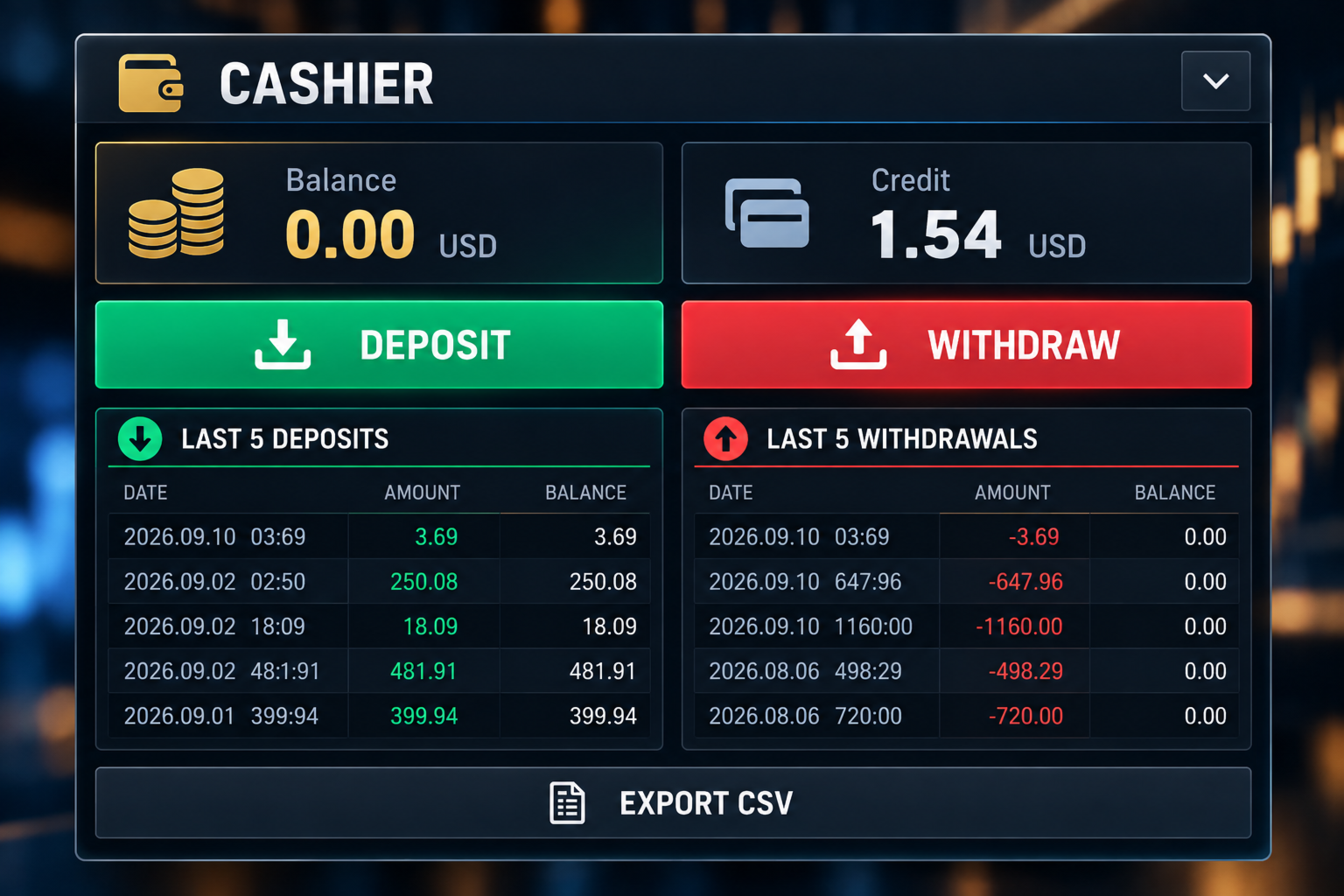
The Cashier panel shows your balance and credit. It lists your last five deposits and last five withdrawals, with the date, amount and the balance after each one. You can save the funding history as a CSV file.

The Deposit and Withdraw buttons show your broker's cashier link, which you can copy into your web browser. You can enter the links in the inputs. For some brokers the link is detected automatically. On demo accounts these buttons are disabled.

ACCOUNT INFORMATION

The main panel shows the symbol, the spread, the leverage, the balance and the credit, together with your trade values, the selected order type, the risk-to-reward ratio and the Telegram mode.

LAYOUT

The panels are the trading panel, the calendar, the Telegram panel, the Cashier panel and the news panel. You can collapse the panels you do not need to free space on the chart.

FEATURES

- Manual Buy and Sell planning
- Lot size, entry, Stop Loss and Take Profit fields
- Stop Loss and Take Profit as price or pips
- Automatic selection of the order type
- Risk-to-reward ratio
- Trade drawn on the chart
- Estimated risk and reward in account currency
- Pending order expiry
- Optional retry after Stop Loss
- Today's trades with wins, losses and win rate
- Open positions grouped by symbol
- Close and delete buttons
- Monthly calendar with daily results
- Monthly CSV export
- Economic news for the next seven days
- Telegram notifications with message list
- Mobile notifications
- Balance and credit display
- Cashier panel with deposit and withdrawal history

WHO IT IS FOR

The assistant is made for traders who place their own orders. It may suit you if you:
- Do your own analysis
- Use pending orders
- Set a Stop Loss and Take Profit for each trade
- Want to see the risk-to-reward ratio before placing an order
- Want to review your results by day and by month
- Want trade messages sent to Telegram

IMPORTANT

This is not a signal product. It does not analyse the market and does not tell you when to buy or sell. It does not promise profit and does not predict price movements. Trading carries risk of loss. You decide the direction, entry, lot size, Stop Loss and Take Profit.

BEFORE USING A LIVE ACCOUNT

Please test the assistant on a demo account first. Check how it handles order placement, lot sizes, Stop Loss and Take Profit, pending order expiry, retry after Stop Loss, the close buttons, Telegram messages and file exports.

Brokers differ in minimum stop distance, tick size, contract size, trading permissions and symbol names. Make sure the assistant works as you expect with your broker before you trade with real money.

This version does not use DLL files. A separate version that opens the broker website directly is available from the author.

DaBhoza Forex Systems
Рекомендуем также
Volatility Regime Monitor is a professional MetaTrader 5 dashboard for classifying current volatility with transparent, measurable context. It combines ATR, recent bar-range statistics and historical percentiles to show whether the market is compressed, normal or expanding without generating entry signals. MAIN FEATURES • ATR and recent range context • Historical volatility percentile state • Compression, normal and expansion classification • Historical regime table • Transparent thresholds and
MT5 Trading Deck
Manuel Michiels
5 (2)
One button. One trade. MT5 Trading Deck is a hotkey trading panel for MetaTrader 5 that turns the platform into a keyboard-driven execution cockpit. Stop loss, take profit and lot size are pre-calculated for every key; the moment you press, a market order is live on the broker. A complete technical user manual is attached in the product Comments section. It documents every input parameter, the full hotkey map, the recommended Stream Deck XL layout, and the advanced workflows for Pre-Limit orders
Trading Rules Enforcer is a deterministic account-discipline monitor for trade-count, loss, time and exposure rules. Key functions: - Clear rule status dashboard - Trading-session restrictions - Overtrading controls - Symbol and Magic Number scope - Daily loss and exposure monitoring - Clear blocking reasons - Operational event history The utility enforces rules configured by the user. It does not generate entry signals, predict market direction or guarantee trading results. Test all rule comb
Big Figure Indicator MT5
Vonjinirina Alfred Randrianiaina
Мультитаймфреймовый индикатор психологических уровней Автоматически определяйте самые важные психологические уровни рынка Мультитаймфреймовый индикатор психологических уровней — это современный торговый инструмент, который автоматически определяет и отображает ключевые психологические ценовые уровни на нескольких таймфреймах одновременно. Эти уровни являются важными зонами, где цена часто разворачивается, консолидируется или совершает сильные пробои, выступая в качестве значимых уровней поддержк
C Evolution MT5
Antonis Michos
5 (1)
Join the Out of the Box Telegram Group search for "Out of the Box" on Telegram or contact me This is not just a simple copier program that ONLY allows you to locally copy transactions between different MetaTrader 4 a accounts in any direction and quantity as quickly and easily as possible .Of course it does that. This copier DOES MUCH MUCH MORE!!! PLEASE READ BELOW AND SEE SCREENSHOTS. Many of us have martingale EAs or none martingale that are good but some point you wish to had opened the
Currency Strength Monitor is a professional multi-currency strength indicator for MetaTrader 5 that analyzes and displays the relative strength of 8 major currencies (USD, EUR, GBP, AUD, NZD, JPY, CHF, CAD) in real-time. The indicator calculates strength values by aggregating price movements across 28 currency pairs and normalizing them using ATR, providing traders with a clear visual representation of which currencies are strengthening or weakening. Key Features: Multi-Currency Analysis — Monit
GOLD BAND EA Trade with Structure. Recover with Precision. Gold Band EA is an automated trading system designed for traders who want a structured approach to trading Gold (XAUUSD) while reducing the need for constant manual monitoring. Built around automated entries and systematic trade management, Gold Band EA is designed to identify trading opportunities, manage positions, and handle recovery sequences according to predefined parameters. KEY FEATURES Automated Trading Let Gold Band mo
Noetrix Sentinel
Julien Jeremy Rodrigue Gazagnaire
Noetrix Sentinel 1.10 Noetrix Sentinel is a native, read-only MetaTrader 5 operational supervision utility. It monitors terminal connectivity, latency, trading permissions, chart and EA presence, watched market feeds, optional Magic mappings, alerts and diagnostic evidence from a single chart. ## Safety and distribution - MetaEditor result: `0 errors, 0 warnings`. - Entry point: `MQL5/Experts/NoetrixSentinel/NoetrixSentinel.mq5`. - No trading library, order submission, position close, order
FREE
Telegram Group: Find the link in my profile   4 days to pass MyForexFunds phase 1 evaluation.( see screenshot below )   HERE is a FREE file  for use in a LIVE DEMO account. Welcome. Virtual Trendline Scalper is a scalping machine (trades quite often) that uses virtual trades in virtual trendlines before it opens a real one in decent to perfect places. IMPORTANT:Due to huge amount of variables that are used in the code of the EA and the many drawings in the chart,the EA's code became ver
Самостоятельный алго, который работает от снятия Хая Предыдущего Дня (PDH) и/или от снятия Лоя Предыдущего Дня (PDL). Настраивается: - риск на сделку в % от депозита - минимальная задержка между открытиями - степерь агрессивности - ожидаемое* количество трейдов и просадка (*) Ожидаемое не будет совпадать с реальностью почти никогда. Создавался для работы на SP500 и NAS100  НИКАКИХ ГАРАНТИЙ ДОХОДНОСТИ ИЛИ ПРИБЫЛЬНОСТИ НЕ ДАЮ! РАССЧИТЫВАЙТЕ НА УБЫТКИ! Лайвтест тут
Советник Mosaic Portfolio | 13 стратегий. Один портфель. Советник Mosaic Portfolio EA объединяет 13 независимых торговых стратегий в одном многосимвольном советнике для MetaTrader 5. Управляйте своим портфелем с помощью единого графика, выбирайте предпочтительную стратегию и настраивайте уровень риска — и все это без загрузки отдельных файлов с настройками. Текущий сигнал: https://www.mql5.com/en/signals/2385993 Один советник. Множество способов торговли. Выберите один из четырех режимов управле
MT5 Telegram Notifier — Real-Time Account Monitoring Stay informed and in control of your trading account from anywhere. This utility Expert Advisor sends instant notifications and detailed reports directly to your Telegram chat. Key Benefits Real-Time Alerts : Receive notifications when positions open, close, or pending orders change. Risk Management : Margin level alerts help you act before critical thresholds. Hedging Support : Displays every position individually using ticket-based logic. O
This tool is used to generate a K - line reflection chart of a currency pair for foreign exchange transactions. For example, if the currency pair is EURUSD, a custom currency pair named EURUSD_ref is generated and a chart for that currency pair is opened. The price of a custom pair of currency is the inverse of the price of the original pair, which is the equivalent of a new pair of currency, the USDEUR. The usage is simple, put it on any chart, the new chart will open, and then draw the corr
QBrain Strategy Auditor helps users identify incomplete or weak evidence before drawing conclusions from closed MetaTrader 5 outcomes. The utility is designed for strategy review. It does not open, modify, or close trades. It does not predict returns and does not certify a strategy. Main functions - Reads closed terminal account history in a selected date range or a normalized CSV placed in the MT5 file sandbox. - Checks whether the available evidence is sufficient for analysis. - Displays k
SmartTrade EA is a manual trading panel that docks on the chart. It brings order entry, position management, risk limits, statistics, the economic calendar and price alerts into one interface, so you can open, protect and close a trade without leaving the chart or opening a dialog. It is a tool, not a strategy. It does not place trades on its own and does not generate signals. Every entry is yours. What it handles is the work after the click: moving stops, closing in parts, and keeping you ins
Risk Manager Rocket – MT5 Daily Loss Limit & Drawdown Protection EA Take full control of your trading risk with Risk Manager Rocket , a professional-grade MetaTrader 5 Expert Advisor designed to protect your account from excessive losses and enforce strict risk discipline. Whether you are trading manually or using automated strategies, this EA acts as a risk firewall , ensuring you never exceed your predefined daily loss limit. Core Features Daily Loss Limit (Hard Protection) Automatically track
FREE
Position Prime
Mariana Cordeiro Neves Fernandes
Скачайте бесплатную демо-версию прямо сейчас и протестируйте все функции управления рисками в вашем Strategy Tester, прежде чем совершить покупку! Position Prime — это визуальный помощник по исполнению ордеров и риск-менеджер институционального уровня для MetaTrader 5. Разработанный для трейдеров, которым важны скорость и точность, он избавляет от необходимости ручного расчета лота и превращает ваш график в настоящий торговый терминал. Планируйте, исполняйте и защищайте свои сделки за доли сек
Будьте на шаг впереди рыночного импульса с помощью Pip Movement Alert MT5 — универсального мультивалютного индикатора, предназначенного для отслеживания и оповещения трейдеров о точных движениях в пунктах по нескольким символам, идеально подходящего для торговли на рынках форекс, акций, криптовалют и сырьевых товаров. Высоко ценится в торговых сообществах, таких как Forex Factory и Reddit’s r/Forex, и отмечен в обсуждениях на Investopedia и TradingView за способность выявлять внезапные рыночные
FREE
Pair correlation divergence. Define your pair in indicator setting with this format : SYMBOL1:SYMBOL2,SYMBOL3:SYMBOL4 Already Defined Symbols : EURUSD:GBPUSD,AUDUSD:NZDUSD,USDCHF:EURUSD,USDCAD:Crude,XAUUSD:AUDUSD Symbol name should match the exact case as you see it in left panel where all symbols are listed. CAUTION  : If you drag any symbol on screen and indicator doesn't paint(live mode, not strategy tester) then just  Right click-> indicators list-> select divergence indicator-> edit-> ok-
Скрипт показывает статистику торговли за указанный период. Например, если вы хотите получить статистику торгов победителя ATC2010 ( bobsley ): Войдите на его счет под инвесторским паролем (MetaTrader5); Откройте график рабочего символа советника (EURUSD); Запустите скрипт на графике; В поле "date from" введите "2010.10.1", и вы увидите статистику его торговли.
AI QUANT SYSTEM EA — Institutional Neural Engine (v52.0) Fully Automatic Trading EA Please Note:- First that this is an EXPERT ADVISOR, not a Utility. However, due to certain restrictions, I have to publish this  EXPERT ADVISOR  under the Utilities category.  We are  Provided  including a FREE OpenAI API key with this product, so you do not need to purchase AI API KEYS one separately, With Lifetime FREE Upgardes in Future. The AI Quant System EA is a next-generation, high-frequency quantitative
Our offer also includes a free panel — Indicator Panel — which allows you to show or hide indicators created by BOToBRACIA ->  MT4  /   MT5 Our offer also includes a version for MetaTrader 4 ->  https://www.mql5.com/en/market/product/190450?source=Site+Market+My+Products+Page Trading Panel is an advanced tool for manual and semi-automated trade execution and position management. It allows traders to open positions instantly while simultaneously setting Stop Loss and Take Profit levels. With bu
Dual View HTF Patterns Pro — это профессиональный аналитический инструмент для трейдеров, использующих методику Price Action. Он позволяет видеть полную картину рынка со старшего таймфрейма (HTF), не переключаясь между вкладками терминала. Это решает критическую проблему «туннельного зрения», помогая трейдеру всегда оставаться в контексте глобального тренда. MT4-version:   https://www.mql5.com/en/market/product/166824 Основные функции Отображение истории HTF: Индикатор рисует границы и тела свеч
Обзор советника KS Multiple Independent Strategies Auto Trading 1.9 Это профессиональный советник (EA) на языке MQL5, разработанный преимущественно для торговли золотом (XAUUSD) на платформе MetaTrader 5. Он поддерживает одновременное использование нескольких независимых торговых стратегий, обладает расширенными функциями управления рисками и включает различные фильтры для оптимизации торговых результатов. Основной акцент в советнике сделан на автоматизации процессов, защите полученной прибыли
CapitalSol Forex MTF Scanner Мультитаймфреймовый Forex-сканер тренда для MetaTrader 5 CapitalSol Forex MTF Scanner — это мультисимвольный и мультитаймфреймовый аналитический индикатор, предназначенный для структурированного отображения направления нескольких валютных рынков непосредственно в MetaTrader 5. Вместо необходимости отдельно открывать и анализировать множество валютных графиков сканер отображает выбранные Forex-пары на одной компактной панели и одновременно анализирует их состояние
PriceZoneAlerte
Kocou Faustin Agohoundje
PriceZoneAlert v2.0   is the essential tool for traders who want to monitor their price zones with customized alerts, directly on their phone or tablet. This innovative indicator for MetaTrader 5 allows you to add alerts on predefined price zones, with instant push notifications to stay informed in real time, wherever you are. Whether you're trading according to SMC concepts, support/resistance, or a custom strategy,   PriceZoneAlert v2.0   helps you   stay focused, responsive, and discipli
PlanGuard MT5
Hendrik Jacobus Joubert
Purpose PlanGuard MT5 is a trading-discipline utility for traders who want their manual positions checked against a predefined plan. The utility monitors newly opened positions, reports rule violations and can request the closure of a non-compliant position. It also tracks account-wide daily profit and loss, entry count, losing positions and intraday profit giveback. PlanGuard does not generate signals and does not open trades. Position checks The following rules can be enabled independentl
Meridian Channel
Phillip Van Coller
5 (1)
Detailed video:  https://www.youtube.com/watch?v=GXWzL4s_20E Study the stretch. Test the setup. Plan the basket. Meridian Channel is a mean-reversion indicator for MetaTrader 5 that brings channel analysis, historical testing, parameter optimization and position-sizing tools onto your chart. See where price sits relative to its moving mean, explore how your entry rules have behaved, and assess the exposure of a planned basket before placing a trade. See the setup See where price has stretched
Этот инструмент поможет вам закрыть все открытые ордера одним щелчком мыши, просто нажмите «Закрыть все». Если вы хотите закрыть только прибыльные ордера, нажмите кнопку «Закрыть прибыльные», после нажатия все плавающие ордера будут закрыты; Если вы хотите закрыть только ордера с плавающими убытками, нажмите кнопку «Закрыть убыточные», после нажатия все ордера с плавающими убытками будут закрыты.
InfoRisk
Andrej Nikitin
Информационная панель помогает оценить текущие риски по открытым позициям и ордерам. Есть возможность отдельного анализа рисков по позициям/отложенным ордерам, а также в режимах USD/Percentage. Раскладывает маржинальную нагрузку и долю участия в прибыли по отдельным позициям. Info tool helps to estimate the current risks of open positions and orders. It allows to analyze open positions or/and pending orders, also there are USD/Percentage modes. Expands the margin load and the share of profit par
С этим продуктом покупают
================================================================================ POC BREAKOUT - V20.72. Full Professional Grade Toolkit ================================================================================ POC Breakout is a full MetaTrader 5 trading dashboard for discretionary traders who want breakout signals, Point of Control (POC) context, volume profiles, order flow, market structure, news, alerts, and advanced trade planning in one professional workspace. Attached directly to you
Telegram to MT5 Multi-Channel Copier   автоматически копирует торговые сигналы из ваших Telegram-каналов прямо в MetaTrader 5. Без ботов, без браузерных расширений, без ручного копирования. Сигнал приходит в Telegram — и советник открывает сделку в вашем терминале за считанные секунды. А перед тем как копировать канал, встроенный бэктестер покажет, что этот канал сделал бы на вашем счёте. Продукт состоит из двух компонентов: приложения для Windows, которое слушает ваши Telegram-каналы, и этого с
Power Candles Strategy Scanner — самооптимизирующийся инструмент для поиска настроек по нескольким инструментам Power Candles Strategy Scanner использует тот же самооптимизирующийся движок, что и индикатор Power Candles — для всех символов в вашем Market Watch, одновременно. На одной панели отображается информация о том, какие символы в данный момент являются статистически торгуемыми, какая стратегия выигрывает на каждом из них, оптимальная пара Stop Loss / Take Profit, а также отправляется увед
Footprint Chart Pro — Professional OrderFlow EA for MetaTrader 5 Version 6.34 | Professional tool for real traders | Institutional-Grade Visualization DEMO USERS - PLEASE SELECT EVERY TICK / REAL TICK WHEN TESTING AND YOU HAVE DOWNLOADED HISTORICAL DATA. IF YOU SEE A WAITING SCREEN AND IT IS NOT DOWNLOADING, IT MEANS YOU HAVE LOW HISTORICAL DATA. TRY 1 MIN AND 5 MIN FIRST ON 1 DAY DATA. ONE DAY DATA SHOULD BE THE NEWEST AND MOST CURRENT DATE. PLEASE WAIT UNTIL THE MARKET HAS ROLLED OVER PERIOD.
Farmed Hedge Yield Farming | All Markets (Manual - Hybrid - Semi/Automated EA) VERIFIED TRADING RESULTS - Farmed Hedge Yield Axi Copy:  https://www.mql5.com/en/signals/2356376 - Farmed Hedge Yield Exn Copy:   https://www.mql5.com/en/signals/2356404 - Farmed Hedge Yield V Copy:  https://www.mql5.com/en/signals/2357156 IMPORTANT NOTICE: FarmedHedge is a MANUAL-FOCUSED TRADING UTILITY ,not a fully automated EA. Results shown on this Signal include manual trades and overall strategic management.
Copy your MT5 trades to Interactive Brokers You keep using MT5. Every order you open or close is sent to your IB account. In real time. No coding. No changes to your strategy or EA. Try it first Rent 1 month: $30. Test on a live or paper account. What it does Real-time copying: same direction, reverse, or one side only. Map any MT5 symbol to any IB symbol. Set a lot ratio for each. Forex, Futures, Stocks, CFDs, Metals and Crypto. Position sync: both accounts checked, any difference fixed. Optio
Trading Chaos Expert
Hennadii Stanilevych
5 (11)
Этот программный продукт не имеет аналогов в мире, поскольку он является универсальным "пультом управления" торговых операций, начиная от получения торговых сигналов, автоматизации входа в позиции, установки стоп-лоссов и тейк-профитов, а также трейлинга прибыли одновременно по множеству сделок в одном открытом окне. Интуитивно понятное управление экспертом в "три клика" на экране монитора позволяет полноценно использовать все его функции на разного рода компьютерах, включая планшетные. Взаимоде
Сохраните индикатор, которому доверяете. Автоматизируйте работу с его сигналами. У вас уже есть индикатор MT5, которому вы доверяете, но всё ещё приходится следить за графиком, ждать сигнала, рассчитывать лот, открывать сделки и управлять каждой позицией вручную? Stratiora Signal Engine MT5 создан, чтобы объединить эти действия. Он превращает совместимые сигналы буферов Buy и Sell в автоматизированный процесс: вход, расчёт объёма, Stop Loss, Take Profit, фильтры, управление позициями и защиту с
EA Overfitter
Stephen J Martret
5 (1)
Бэктест выглядит отлично. Но будет ли советник зарабатывать завтра, через неделю, через месяц? EA Overfitter прогоняет вашего советника по 100 историям цены, которых он никогда не видел. Одна оценка показывает, реально ли преимущество. Бэктест показывает, что советник сделал на одной истории цены — на той, которая случайно произошла. Из него невозможно понять, какая часть результата была заслугой стратегии, а какая — конкретного пути цены. EA Overfitter отвечает на этот вопрос. Он строит до 10
Quant Panel
Kevin Craig E Gittins
Количественная Панель Pro Идеальная Мульти-ЭА Панель Мониторинга для Квантовых Трейдеров Хватит переключаться между графиками и внешними инструментами для отслеживания алгоритмических стратегий! Quant Panel Pro предоставляет профессиональный мониторинг портфеля в одном стильном и удобном интерфейсе. Ключевые Возможности Количественная Аналитика Под Рукой Агрегирование прибыли и убытков (P&L) в реальном времени для всех советников Статистический анализ процента выигрышных сделок и частоты торговл
YuClusters
Yury Kulikov
4.93 (43)
Внимание: Ознакомиться с работой программы можно с помощью бесплатной версии  YuClusters DEMO . YuClusters это профессиональная система анализа рынка. Для трейдера открываются уникальные возможности анализа потока ордеров, объемов торговли, движения цены используя различные графики, профили, индикаторы, графические объекты. YuClusters оперирует данными на основе ленты сделок или тиковой информации, в зависимости от того, что доступно в котировках финансового инструмента.  YuClusters позволяет с
Mentfx Mmanage mt5
Anton Jere Calmes
4.25 (8)
The added video will showcase all functionality, effectiveness, and uses of the trade manager. Drag and Drop Trade Manager. Draw your entry and have the tool calculate the rest. Advanced targeting and close portions of a trade directly available in tool (manage trades while you sleep). Market order or limit order on either side with factored spread. Just draw the entry, the tool does the rest. Hotkey setup to make it simple. Draw where you want to enter, and the stop loss, the tool calculates al
Timeless Charts
Samuel Manoel De Souza
5 (8)
Timeless Charts is an all-in-one trading utility for professional traders. It combines custom chart types such as Seconds Charts and Renko with advanced order flow analysis using Footprints , Clusters , Volume Profiles , VWAP studies, and anchored analysis tools for deeper market insight. Trading and position management are handled directly from the chart through an integrated trade management panel , while Market Replay and Virtual Accounts provide environments for practicing trading skills and
The product will copy all telegram signal to MT5 ( which you are member) , also it can work as remote copier.  Easy to set up, copy order instant, can work with almost signal formats, image signal,  s upport to translate other language to English Work with all type of channel or group, even channel have "Restrict Saving Content", work with  multi channel, multi MT5 Work as remote copier: with signal have ticket number, it will copy exactly via ticket number. Support to backtest signal. How to s
EasyInsight AIO MT5
Alain Verleyen
4.92 (12)
EASY Insight AIO – Всё-в-одном для умного и простого трейдинга Обзор Представьте, что вы можете просканировать весь рынок — Форекс, золото, криптовалюты, индексы и даже акции — всего за несколько секунд, без ручного просмотра графиков, сложной установки или настройки индикаторов. EASY Insight AIO — это ваш идеальный инструмент экспорта для трейдинга с поддержкой искусственного интеллекта. Он предоставляет полный снимок рынка в одном аккуратном CSV-файле — готовом к мгновенному анализу в ChatGP
VERON LINK MASTER MT5 — Real-time Multi-Account Dashboard & Sync Controller Veron Link Master is a high-performance, centralized monitoring and synchronization control center designed for MetaTrader 5. Built specifically for traders managing multiple accounts, prop firm portfolios, grid/martingale EAs, or client networks, Veron Link Master provides a seamless, ultra-modern dark-themed GUI dashboard directly on your MT5 terminal. Pricing Structure: Take advantage of our early-bird pricing before
FUTURES ORDERFLOW FOOTPRINT CHART Professional OrderFlow EA for MetaTrader 5 Version 1.01| Professional tool for real traders | Institutional-Grade Visualization STRATEGY TESTER USERS - PLEASE SELECT EVERY REAL TICK WHEN TESTING AND YOU HAVE DOWNLOADED HISTORICAL DATA. IF YOU SEE A WAITING SCREEN AND IT IS NOT DOWNLOADING, IT MEANS YOU HAVE LOW HISTORICAL DATA. TRY 1 MIN AND 5 MIN FIRST ON 1 DAY DATA. ONE DAY DATA SHOULD BE THE NEWEST AND MOST CURRENT DATE. PLEASE WAIT UNTIL THE MARKET HAS ROL
EA Slipstream
Stephen J Martret
5 (1)
EA Slipstream — описание для MQL5 Маркета (русский) Ваш бэктест исполнил каждый ордер по той цене, которую запросил. Ваш счёт — нет. EA Slipstream измеряет, во что обходится исполнение вашему советнику, используя ваши собственные исполнения, проскальзывания и спреды, и показывает реальную результативность советника. В бэктесте каждая сделка рассчитывается по цене, которую назвал советник. В реальной торговле отложенный ордер исполняется по той цене, которая доступна в момент срабатывания, стоп з
Veron Link Slave – Synchronized Grid, Martingale & Breakout Management Short Description Advanced synchronization tool designed to manage Grid, Martingale, and Breakout EAs. Automatically sends close-basket signals to the Master account upon profit target completion, minimizing slippage across different brokers. Full Description Veron Link Slave is a specialized utility developed to enhance the execution efficiency and risk management of multi-account or multi-broker trading setups. It is desig
Представляем последнюю версию Dynamic Fibonacci Grid Dashboard для MT5. Теперь с множеством новых функций, этот обновлённый дашборд полностью меняет ваш торговый опыт и позволяет увидеть рынок и ценовое движение с совершенно иной перспективы. Откройте новые возможности благодаря одновременному анализу нескольких таймфреймов и множества инструментов. Удобный интерфейс для ручной торговли и управления позициями, а также расширенные возможности применения предопределённых автоматических стратегий.
Quant AI Agents
Ho Tuan Thang
5 (1)
Quant AI Agents are independent trading Expert Advisors. Instead of trading using a fixed strategy like other conventional EAs, Quant AI Agents   is a   multi-agent AI trading framework   that turns natural-language strategy prompts into live.  WANT THE SAME RESULTS AS MY LIVE SIGNAL?   Use the exact same brokers I do:   IC MARKETS , IC TRADING   .  Unlike the centralized stock market, Forex has no single, unified price feed.  Every broker sources liquidity from different providers, creating un
EA Auditor
Stephen J Martret
5 (5)
EA Auditor is an independent analysis tool for traders evaluating Expert Advisors and trading signals on MetaTrader 5. It audits backtest reports, reviews posted developer signals, and cross-verifies the two against each other to help traders assess strategies before committing capital. The MQL5 market offers a wide range of Expert Advisors from many developers, with varying approaches, quality, and transparency. EA Auditor provides a consistent, data-driven framework for reviewing them, answer
This Expert Advisor waits a position to be opened, no matter if you open manually or with the EA buttons or eventually via mobile: it creates a Grid in Anti Martingale with pending stop orders in the same direction of the first position. You can specify the number of orders, the size and the distance between the orders. You can also adjust the Monetary Target of the Grid, the monetary Stop Loss, the Intermediate Target (when reached the EA insert an order with opposite direction of the total pos
Суть: используя юзер-интерфейс вы настраиваете параметры, которым должен соответствовать график до входа в позицию(позиции), настраиваете какие входные модели использовать, настраиваете правила по которым надо завершать торговлю и планирование. А всю рутину по наблюдению за графиком и исполнению Lazy Trader берет на себя. полное описание  :: 3 ключевых видео [1] -> [2] -> [3]  :: [ ДЕМО-ВЕРСИЯ ] Что он умеет? - Понимает структуру рынка по Ларри Вильямсу - Понимает Swing-структуру рынка по Майк
VirtualTradePad PRO SE MT5 — профессиональный торговый центр управления для MetaTrader 5 VirtualTradePad PRO SE — это премиальная торговая панель и рабочая среда управления сделками на графике для MetaTrader 5 . Она создана для трейдеров, которым нужны более быстрое исполнение, более понятный контроль позиций, структурированное управление сделками, визуальное планирование уровней и профессиональный рабочий процесс прямо с графика. Это не просто панель BUY / SELL. PRO SE объединяет ручную торговл
Advanced Daily Trading Limiter PRO
AL MOOSAWI ABDULLAH JAFFER BAQER
Advanced Daily Trading Limiter PRO Professional Risk Management. Uncompromising Trading Discipline. One undisciplined trading session can erase weeks of consistent profits. Whether it's overtrading, revenge trading, or exceeding a prop firm's daily risk limits, emotional decisions often become a trader's biggest obstacle—not the market itself. Advanced Daily Trading Limiter PRO is a comprehensive risk management and discipline enforcement utility for MetaTrader 5, designed to help traders stay
Ultimate Extractor - Professional Trading Analytics for MT5 *****this is the local HTML version of Ultimate Extractor. !!!!!it is not compatible with Cloud!!!! For the online version please reach out to me directly****** Ultimate EA manager also now available when you use cloud pro and above for free!! Ultimate Extractor transforms your MetaTrader 5 trading history into actionable insights with comprehensive analytics, interactive charts, and real-time performance tracking. What It Does Automa
Features   With MT5 to Interactive Brokers(IB) Trader, you can: 1. Load chart data from IB to MT5, and Analyze with all standard or customer Indicators. 2. Place Orders to IB Account Directly in MT5. 3. Make your Own EAs upon IB Securities by only making minus changes of the trading function. Usage 1) Installation Copy the "Mt5ToIBTraderEn.ex4" and sample files to [MT5 Data Folder]->MQL5->Experts.  2)  MT5 Settings Add the IP Address to the MT5 Allowed URLs in 'Tools->Options->Expert Adviso
Daily Trading Limiter
AL MOOSAWI ABDULLAH JAFFER BAQER
5 (8)
• Please test the product in the Strategy Tester before purchasing to understand how it works. • If you face any issues, contact me via private message—I’m always available to help. • After purchase, send me a screenshot of your order to receive a FREE EA as a gift. Daily Trading Limiter — the rule you cannot break Every trader knows the number. Three trades. Two percent. One bad day and stop. And every trader has watched themselves take the fourth trade anyway. The problem was never knowing th
TradePad
Ruslan Khasanov
5 (1)
TradePad - это инструмент как для ручной, так и алгоритмической торговли.  Представляем вам простое решение для быстрых торговых операций и контроля позиций на нескольких торговых инструментах. Внимание, приложение не работает в тестере стратегий! Пробная версия приложения для демо-счета и описание всех инструментов Интерфейс приложения адаптирован для мониторов с высоким разрешением, прост и интуитивно понятен. Для комфортной работы, трейдеру предлагается следующий набор инструментов: менеджер
Другие продукты этого автора
Перестаньте гадать о своих результатах. Отслеживайте свои выигрыши и проигрыши мгновенно, прямо на графиках! Для трейдеров точное отслеживание психологической и исполнительной эффективности в режиме реального времени является ключом к дисциплине. DaBhoza Win Rate Tracker — это легкая, интуитивно понятная и хорошо видимая на графике утилита, разработанная для того, чтобы помочь вам вручную регистрировать и отслеживать результаты ваших сделок одним щелчком мыши. Независимо от того, тестируете ли
FREE
Фильтр:
Нет отзывов
Ответ на отзыв