DBZ Trading Assistant

DBZ Trading Assistant

A trading panel for MetaTrader 5. You plan the trade, and the panel places it, manages it and records the results.

ABOUT THIS PRODUCT

DBZ Trading Assistant is an Expert Advisor for manual traders. It does not give trading signals and does not decide when to buy or sell. You do your own analysis and choose the direction, lot size, entry price, Stop Loss and Take Profit. The assistant then helps with placing the order, managing it, and reviewing your account history.

Everything is shown in panels on your chart.

TRADE ENTRY

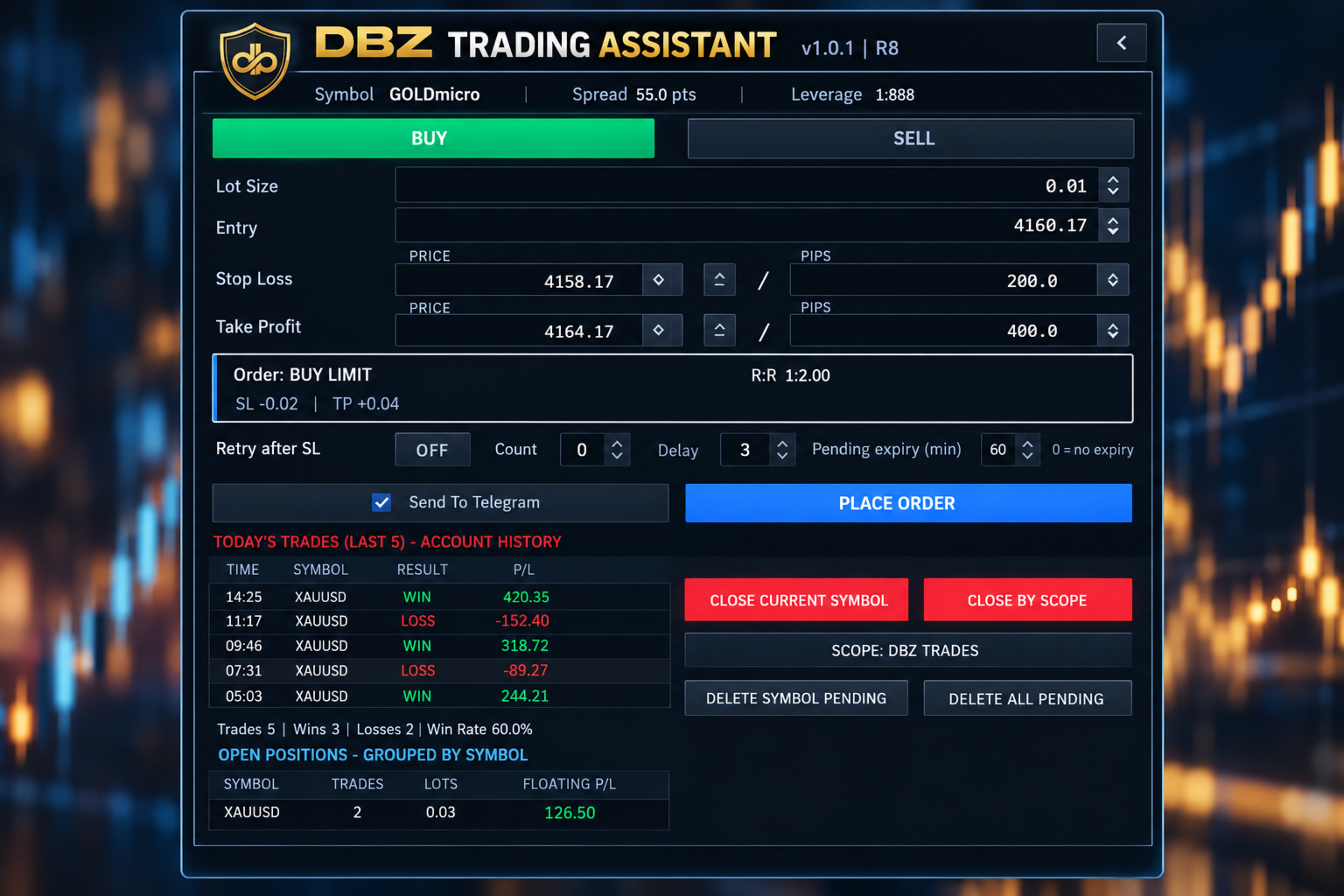
Choose Buy or Sell, then enter the lot size, the entry price, the Stop Loss and the Take Profit.

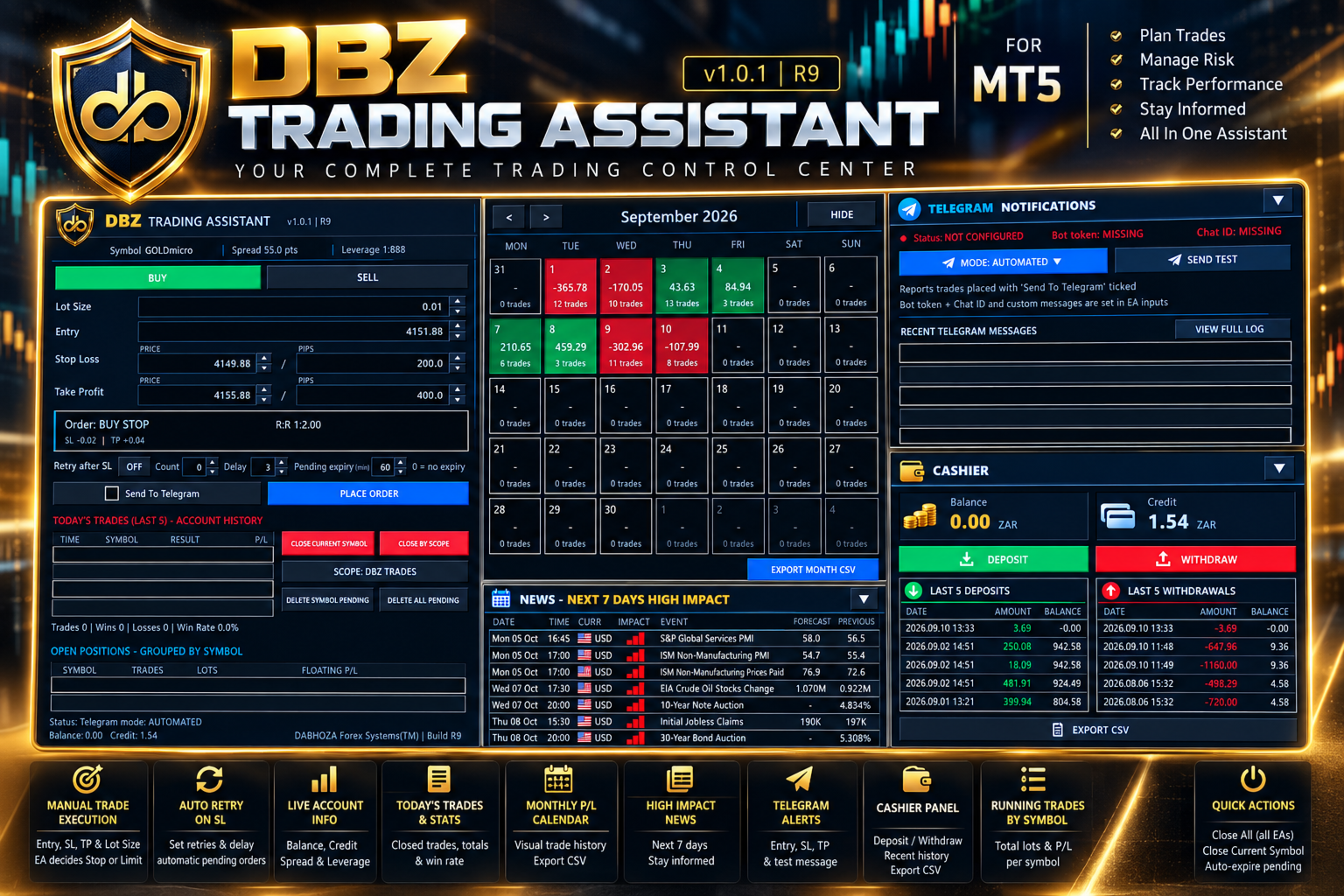
The assistant compares your entry price with the current market price. It then selects the order type for you: Buy Limit, Buy Stop, Sell Limit, Sell Stop or Market Order.

Before you place the order, the panel shows the order type it selected and the risk-to-reward ratio.

PRICE OR PIP INPUT

You can enter the Stop Loss and Take Profit as a price or as a distance in pips. The two fields stay linked. If you change one, the other updates, always measured from the entry price.

Up and down buttons next to each field let you adjust the values in small steps.

TRADE DISPLAY ON THE CHART

After an order is placed, the assistant can draw the trade on your chart. The display includes:
- The entry level, Stop Loss level and Take Profit level
- A risk area and a reward area
- The risk-to-reward ratio
- The distance to the Stop Loss and to the Take Profit
- The estimated amount at risk and the estimated reward, in your account currency

RETRY AFTER STOP LOSS (OPTIONAL)

Some traders prefer to enter again after a trade is stopped out. This option is switched off by default. When you switch it on, you can set the number of attempts and the delay between them. If a trade placed with the assistant is stopped out, the assistant places a new order using the stored setup.

PENDING ORDER EXPIRY (OPTIONAL)

You can set how long a pending order may stay in the market. For example, with a setting of 60 minutes, a pending order that has not been triggered is removed after 60 minutes. A setting of 0 means the order does not expire.

TODAY'S TRADES

The panel reads your MetaTrader 5 account history. It lists your latest closed trades with the time, symbol, result and profit or loss. It also shows the number of trades, the number of wins and losses, and the win rate for the day.

These figures come from the account history, so they include trades that were not placed with this panel.

MONTHLY CALENDAR

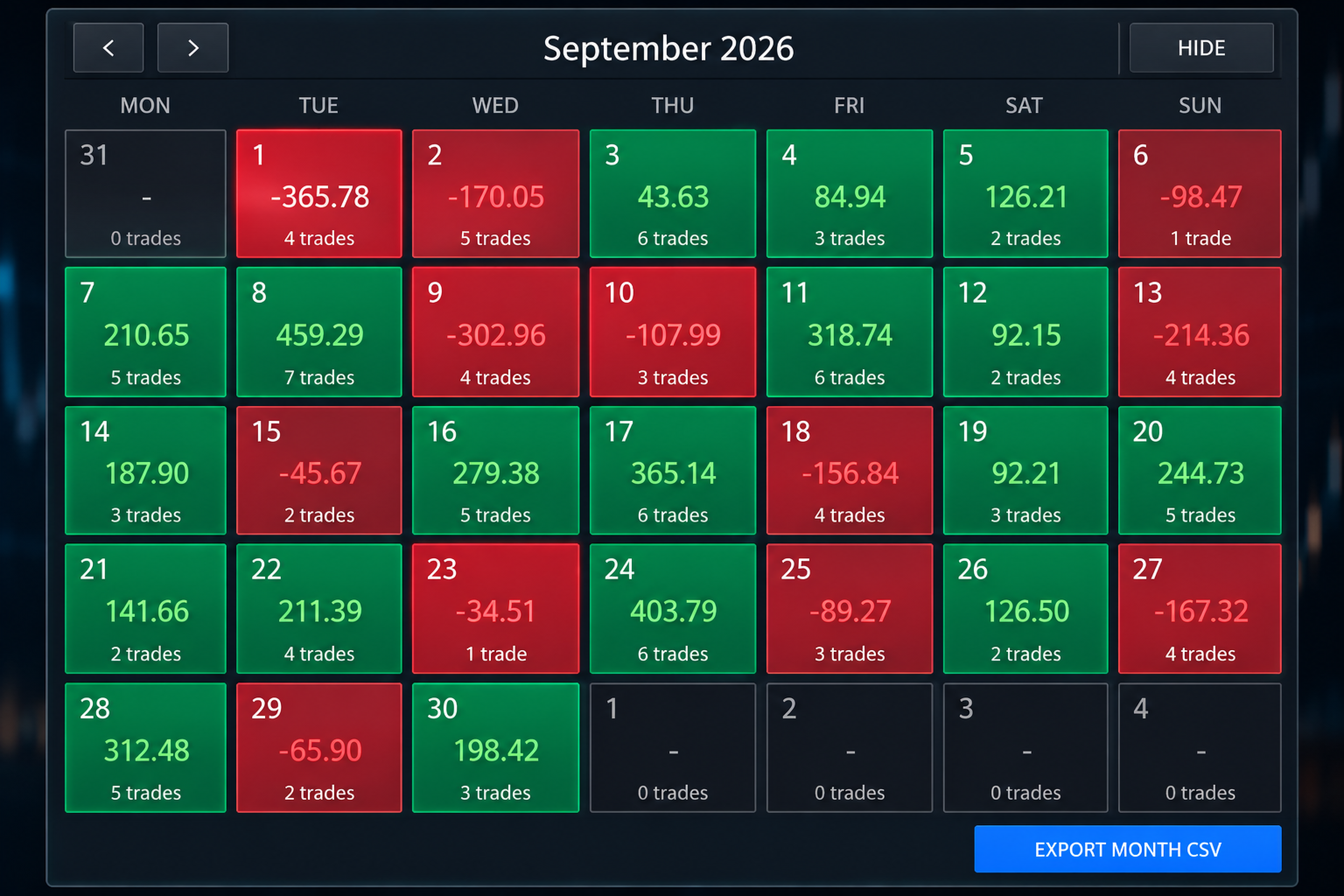
The calendar shows one month of your account history. Each trading day is coloured:
- Green for a day with a net profit
- Red for a day with a net loss
- Dark for a day without trades

Each day shows its net result and the number of trades. Click a day to see its trades. Use the arrows to move to earlier months.

MONTHLY FILE EXPORT

You can save the selected month as a CSV file, which opens in spreadsheet programs such as Microsoft Excel. The file contains the date, time, symbol, deal type, volume, profit, swap, commission, fees and net result of each closed trade. The file is saved in the MQL5/Files folder of your terminal data folder.

OPEN POSITIONS

Open positions are grouped by symbol. For each symbol the panel shows the number of trades, the total lots and the floating profit or loss. For example, several gold positions appear on one line.

TRADE MANAGEMENT BUTTONS

- Close Current Symbol closes the positions of the symbol on the chart.
- Close By Scope closes positions according to the scope you select. The selected scope is always shown on the button.
- Delete Symbol Pending removes the pending orders of the symbol on the chart.
- Delete All Pending removes the pending orders handled by the assistant.

ECONOMIC NEWS

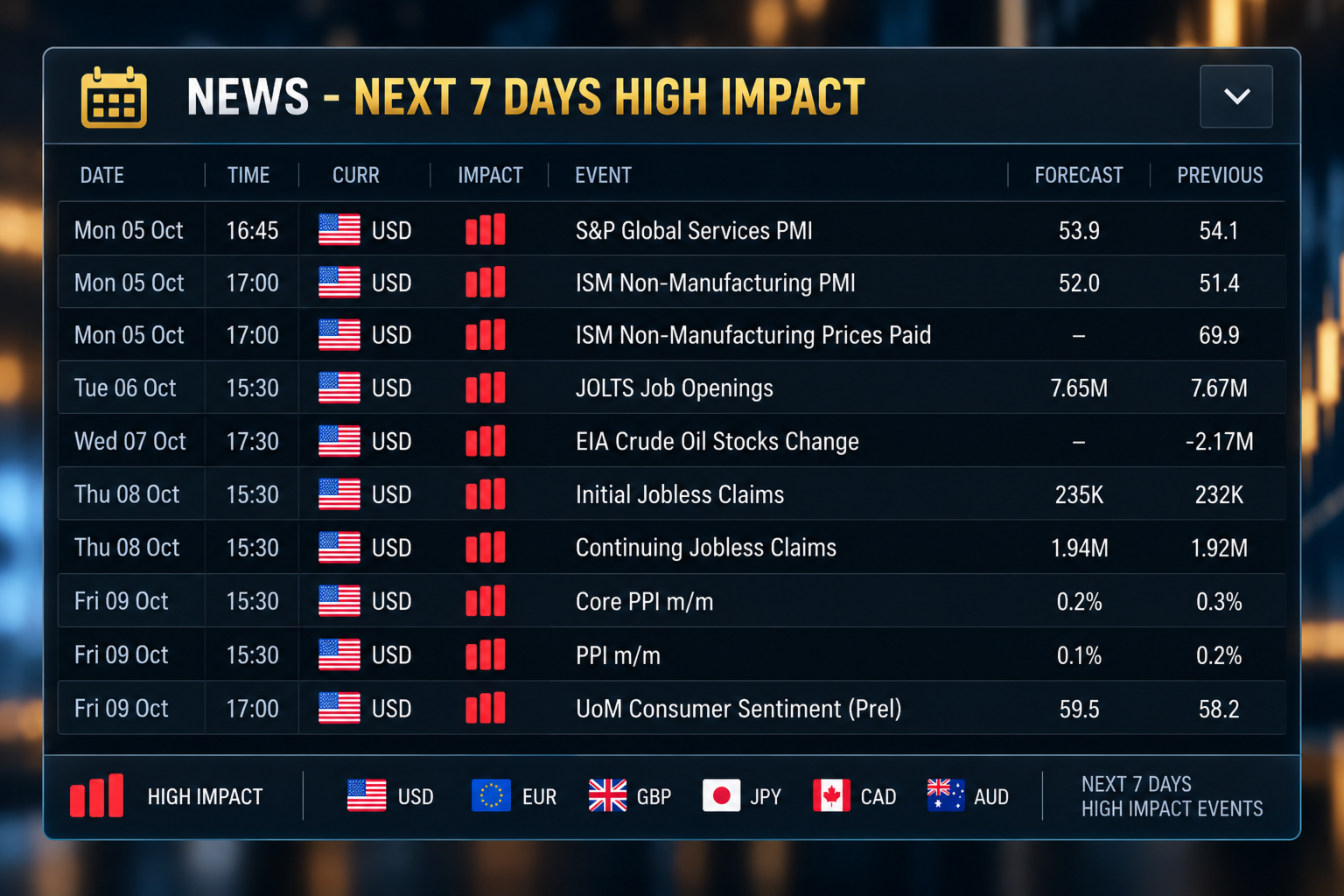
A news panel lists the high-impact economic events of the next seven days. For each event it shows the date, time, currency, impact, event name, forecast value and previous value. The data comes from the MetaTrader 5 economic calendar. A short warning is also shown on the main panel on days with high-impact events.

TELEGRAM NOTIFICATIONS

The assistant can send trade messages to Telegram. The panel offers two modes:
- Automated mode sends a message when a trade placed with the Send To Telegram option ticked is placed, triggered, closed, or reaches its Stop Loss or Take Profit.
- Manual mode lets you type and send your own message.

The panel shows the connection status and has a Send Test button. It also lists the last eight messages that were sent. The complete message history is saved in a file.

Messages for Stop Loss, Take Profit and closed trades include the result in pips and in your account currency. You can add your own text to each type of message in the inputs.

To use Telegram you need a bot token and a chat identifier from Telegram. You also need to allow the Telegram address in the WebRequest list of MetaTrader 5 (Tools, Options, Expert Advisors). The bot token is entered in the inputs and is never shown on the panel.

MOBILE NOTIFICATIONS

The assistant can also send notifications to the MetaTrader mobile application. Notifications must first be set up in the terminal.

CASHIER PANEL

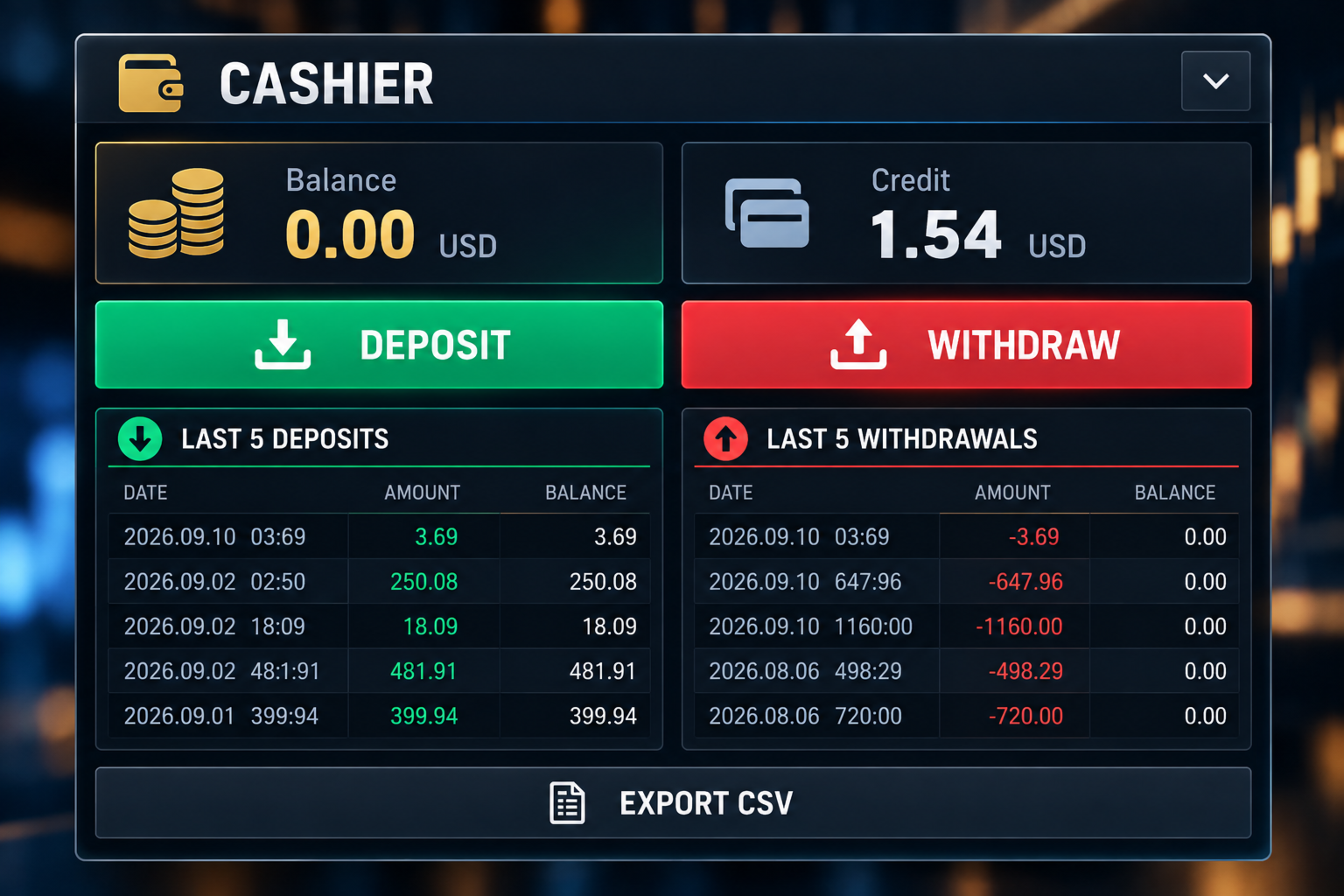
The Cashier panel shows your balance and credit. It lists your last five deposits and last five withdrawals, with the date, amount and the balance after each one. You can save the funding history as a CSV file.

The Deposit and Withdraw buttons show your broker's cashier link, which you can copy into your web browser. You can enter the links in the inputs. For some brokers the link is detected automatically. On demo accounts these buttons are disabled.

ACCOUNT INFORMATION

The main panel shows the symbol, the spread, the leverage, the balance and the credit, together with your trade values, the selected order type, the risk-to-reward ratio and the Telegram mode.

LAYOUT

The panels are the trading panel, the calendar, the Telegram panel, the Cashier panel and the news panel. You can collapse the panels you do not need to free space on the chart.

FEATURES

- Manual Buy and Sell planning
- Lot size, entry, Stop Loss and Take Profit fields
- Stop Loss and Take Profit as price or pips
- Automatic selection of the order type
- Risk-to-reward ratio
- Trade drawn on the chart
- Estimated risk and reward in account currency
- Pending order expiry
- Optional retry after Stop Loss
- Today's trades with wins, losses and win rate
- Open positions grouped by symbol
- Close and delete buttons
- Monthly calendar with daily results
- Monthly CSV export
- Economic news for the next seven days
- Telegram notifications with message list
- Mobile notifications
- Balance and credit display
- Cashier panel with deposit and withdrawal history

WHO IT IS FOR

The assistant is made for traders who place their own orders. It may suit you if you:
- Do your own analysis
- Use pending orders
- Set a Stop Loss and Take Profit for each trade
- Want to see the risk-to-reward ratio before placing an order
- Want to review your results by day and by month
- Want trade messages sent to Telegram

IMPORTANT

This is not a signal product. It does not analyse the market and does not tell you when to buy or sell. It does not promise profit and does not predict price movements. Trading carries risk of loss. You decide the direction, entry, lot size, Stop Loss and Take Profit.

BEFORE USING A LIVE ACCOUNT

Please test the assistant on a demo account first. Check how it handles order placement, lot sizes, Stop Loss and Take Profit, pending order expiry, retry after Stop Loss, the close buttons, Telegram messages and file exports.

Brokers differ in minimum stop distance, tick size, contract size, trading permissions and symbol names. Make sure the assistant works as you expect with your broker before you trade with real money.

This version does not use DLL files. A separate version that opens the broker website directly is available from the author.

DaBhoza Forex Systems
Produtos recomendados
IC Trade Manager
Tholinhlanhla Thanda Makhoba
IC Risk Manager: Risk Calculator and Trade Manager for MT5 IC Risk Manager lets you plan a trade on the chart before you place it. You drag a colored box to set your stop loss and take profit, and the lot size is calculated for you from your risk. Nothing is sent to the broker until you press EXECUTE. How it works Set your risk. Enter a risk percentage of your balance, or switch to a money amount by clicking the “Risk %” button. You can also type a fixed lot size and the panel will show the risk
MT5 Trading Deck
Manuel Michiels
5 (2)
One button. One trade. MT5 Trading Deck is a hotkey trading panel for MetaTrader 5 that turns the platform into a keyboard-driven execution cockpit. Stop loss, take profit and lot size are pre-calculated for every key; the moment you press, a market order is live on the broker. A complete technical user manual is attached in the product Comments section. It documents every input parameter, the full hotkey map, the recommended Stream Deck XL layout, and the advanced workflows for Pre-Limit orders
One question: after an economic release, did the first move hold or fade? AfterRelease takes the most recent high-impact releases on your broker's calendar and prices and shows how many times the first move held and how many times it faded a few bars later, always with the number of cases. - TODAY'S CASE: one button loads today's release that already has an actual value, and the market it moves. - Choose the market and timeframe in the inputs; the panel always says which market it analysed. -
Big Figure Indicator MT5
Vonjinirina Alfred Randrianiaina
"BIG FIGURE INDICATOR" identifica automaticamente e desenha linhas horizontais em gráficos de preços em níveis específicos, como números inteiros ou meio-números (por exemplo, 1.0000 ou 1.5000 em negociações de moedas). Esses níveis são considerados psicologicamente significativos porque representam números redondos nos quais grandes traders e investidores podem se concentrar, levando a potenciais níveis de suporte ou resistência. O indicador de grande figura pode ajudar os traders a identifica
C Evolution MT5
Antonis Michos
5 (1)
Join the Out of the Box Telegram Group search for "Out of the Box" on Telegram or contact me This is not just a simple copier program that ONLY allows you to locally copy transactions between different MetaTrader 4 a accounts in any direction and quantity as quickly and easily as possible .Of course it does that. This copier DOES MUCH MUCH MORE!!! PLEASE READ BELOW AND SEE SCREENSHOTS. Many of us have martingale EAs or none martingale that are good but some point you wish to had opened the
Currency Strength Monitor is a professional multi-currency strength indicator for MetaTrader 5 that analyzes and displays the relative strength of 8 major currencies (USD, EUR, GBP, AUD, NZD, JPY, CHF, CAD) in real-time. The indicator calculates strength values by aggregating price movements across 28 currency pairs and normalizing them using ATR, providing traders with a clear visual representation of which currencies are strengthening or weakening. Key Features: Multi-Currency Analysis — Monit
JT360 DNA PBO Template V2.7 Public – Análise gráfica multimodo para MetaTrader 5 Descrição do produto O JT360 DNA PBO Template é uma ferramenta versátil de análise gráfica para MetaTrader 5. Combina diferentes modos de visualização de candles, seis médias móveis configuráveis, VWAP diário/semanal/mensal e um indicador visual do estado PBO em um único indicador. O objetivo é oferecer um ambiente gráfico flexível que possa ser adaptado a diferentes estilos de trading e métodos de análise, desde op
Risk & Exposure Dashboard is a read-only chart panel for MetaTrader 5 that shows how much risk your open positions actually carry, and how close you are to your daily and overall drawdown limits. It does not place, modify or close orders. It only reads account and position data and draws a panel on the chart. WHAT IT SHOWS - Open risk: the money at risk if every open position hits its stop loss, converted to your account currency, and shown as a percentage of equity. - Positions without stop los
Gold Band Machine
Sifiso Pai Madonsela
GOLD BAND EA Trade with Structure. Recover with Precision. Gold Band EA is an automated trading system designed for traders who want a structured approach to trading Gold (XAUUSD) while reducing the need for constant manual monitoring. Built around automated entries and systematic trade management, Gold Band EA is designed to identify trading opportunities, manage positions, and handle recovery sequences according to predefined parameters. KEY FEATURES Automated Trading Let Gold Band mo
Noetrix Sentinel
Julien Jeremy Rodrigue Gazagnaire
Noetrix Sentinel 1.10 Noetrix Sentinel is a native, read-only MetaTrader 5 operational supervision utility. It monitors terminal connectivity, latency, trading permissions, chart and EA presence, watched market feeds, optional Magic mappings, alerts and diagnostic evidence from a single chart. ## Safety and distribution - MetaEditor result: `0 errors, 0 warnings`. - Entry point: `MQL5/Experts/NoetrixSentinel/NoetrixSentinel.mq5`. - No trading library, order submission, position close, order
FREE
Telegram Group: Find the link in my profile   4 days to pass MyForexFunds phase 1 evaluation.( see screenshot below )   HERE is a FREE file  for use in a LIVE DEMO account. Welcome. Virtual Trendline Scalper is a scalping machine (trades quite often) that uses virtual trades in virtual trendlines before it opens a real one in decent to perfect places. IMPORTANT:Due to huge amount of variables that are used in the code of the EA and the many drawings in the chart,the EA's code became ver
How the Chart Cleaner Script Works The Chart Cleaner is a one-click tool designed to instantly wipe your chart clean. When you drag and drop the script onto a chart, it scans for and removes all visual objects—including trend lines, horizontal lines, text labels, shapes, and any other drawings you have placed. The result is a completely clean, uncluttered chart, giving you a fresh workspace for your analysis. It's the fastest way to reset your chart to its default state.
$45, one-time. Message me after purchase and I'll help you set it up for your exact symbol/broker. Drag a line. Watch every chart update. Never break your risk plan by accident. Most risk panels stop at "drag SL, see lot size." This one goes further: move your Stop Loss and Take Profit follows automatically to hold your exact R:R — move your Entry and SL/TP travel with it, so your risk never silently drifts. And every level you plan appears live on every other open chart of the same symbol, n
A standalone algorithm that operates on the removal of the Previous Day's High (PDH) and/or the removal of the Previous Day's Low (PDL). Configurable: - risk per trade as a % of the deposit - minimum delay between trades - aggressiveness level - expected* number of trades and drawdown (*) Expected values ​​will almost never match reality. Designed for use on the SP500 and NAS100 I DO NOT GUARANTEES ANY RETURN OR PROFIT! EXPECT TO LOSS! Livetest here
Informe uma única vez os limites de perda diária e de drawdown da sua mesa. O Multi-Account Risk Sync Panel verifica a sua conta em relação a eles durante todo o dia e, no momento em que um limite é atingido, fecha as suas posições abertas, exclui as suas ordens pendentes e para por conta própria. Criado para desafios de prop firms, contas financiadas e qualquer conta com um limite de perda rígido. Ele não abre operações, não copia operações e não mexe em nenhuma outra conta. Todas as capturas d
MT5 Telegram Notifier — Real-Time Account Monitoring Stay informed and in control of your trading account from anywhere. This utility Expert Advisor sends instant notifications and detailed reports directly to your Telegram chat. Key Benefits Real-Time Alerts : Receive notifications when positions open, close, or pending orders change. Risk Management : Margin level alerts help you act before critical thresholds. Hedging Support : Displays every position individually using ticket-based logic. O
This tool is used to generate a K - line reflection chart of a currency pair for foreign exchange transactions. For example, if the currency pair is EURUSD, a custom currency pair named EURUSD_ref is generated and a chart for that currency pair is opened. The price of a custom pair of currency is the inverse of the price of the original pair, which is the equivalent of a new pair of currency, the USDEUR. The usage is simple, put it on any chart, the new chart will open, and then draw the corr
QBrain Strategy Auditor helps users identify incomplete or weak evidence before drawing conclusions from closed MetaTrader 5 outcomes. The utility is designed for strategy review. It does not open, modify, or close trades. It does not predict returns and does not certify a strategy. Main functions - Reads closed terminal account history in a selected date range or a normalized CSV placed in the MT5 file sandbox. - Checks whether the available evidence is sufficient for analysis. - Displays k
SmartTrade EA is a manual trading panel that docks on the chart. It brings order entry, position management, risk limits, statistics, the economic calendar and price alerts into one interface, so you can open, protect and close a trade without leaving the chart or opening a dialog. It is a tool, not a strategy. It does not place trades on its own and does not generate signals. Every entry is yours. What it handles is the work after the click: moving stops, closing in parts, and keeping you ins
Risk Manager Rocket
Rick in t Veld
5 (1)
Risk Manager Rocket – MT5 Daily Loss Limit & Drawdown Protection EA Take full control of your trading risk with Risk Manager Rocket , a professional-grade MetaTrader 5 Expert Advisor designed to protect your account from excessive losses and enforce strict risk discipline. Whether you are trading manually or using automated strategies, this EA acts as a risk firewall , ensuring you never exceed your predefined daily loss limit. Core Features Daily Loss Limit (Hard Protection) Automatically track
FREE
Position Prime
Mariana Cordeiro Neves Fernandes
Baixe a versão Demo gratuita agora mesmo e teste toda a gestão de risco dentro do seu Testador de Estratégias antes de comprar! O Position Prime é um assistente de execução visual e um gerenciador de risco de nível institucional para o MetaTrader 5. Desenvolvido para traders que exigem agilidade e precisão, ele elimina a necessidade de cálculos manuais de lote e transforma o seu gráfico em uma verdadeira mesa de operações. Planeje, execute e proteja os seus trades em frações de segundo. ️ G
Fique à frente do impulso do mercado com o Pip Movement Alert MT5, um indicador versátil de múltiplas moedas projetado para rastrear e alertar traders sobre movimentos precisos em pips em vários símbolos, ideal para trading de forex, ações, criptomoedas e commodities. Elogiado em comunidades de trading como Forex Factory e Reddit’s r/Forex, e destacado em discussões no Investopedia e TradingView por sua capacidade de detectar mudanças repentinas no mercado, este indicador é indispensável para tr
FREE
Pair correlation divergence. Define your pair in indicator setting with this format : SYMBOL1:SYMBOL2,SYMBOL3:SYMBOL4 Already Defined Symbols : EURUSD:GBPUSD,AUDUSD:NZDUSD,USDCHF:EURUSD,USDCAD:Crude,XAUUSD:AUDUSD Symbol name should match the exact case as you see it in left panel where all symbols are listed. CAUTION  : If you drag any symbol on screen and indicator doesn't paint(live mode, not strategy tester) then just  Right click-> indicators list-> select divergence indicator-> edit-> ok-
Position Manager Breakeven Partial Trailing takes care of positions that are already open: trades you opened by hand, from your phone, or by any other Expert Advisor. It does not open trades on your account. It only moves stop losses, closes part of a position once, and (if you want) closes everything at a set time. Main features Break-even with lock offset. When the trade has moved far enough in your favour, the stop loss is moved to the open price plus a small offset (for example +10 points),
OneClick Risk Manager — Manual Trading Assistant OneClick Risk Manager is a manual trading panel for MetaTrader 5. It does not trade on its own — you stay in control and open, close and manage every position with one click. Its job is to do the math for you: position size, risk, partial take-profits, break-even and trailing, so you can trade fast and precisely without manual calculations. Works on any symbol — XAUUSD (gold), US100/NAS100, US30/DJ30, FX pairs and more. The panel is fully scalable
The script shows statistics of trades for the specified period. For example, if you want to know the details of trades of the ATC2010 Winner ( bobsley ): Login with his account using the investor (read-only) password (MetaTrader5); Open the chart of his trading symbol (EURUSD); Run this script on the chart; Specify 2010.10.1 in "date from", and the diagram will be shown.
Our offer also includes a free panel — Indicator Panel — which allows you to show or hide indicators created by BOToBRACIA ->  MT4  /   MT5 Our offer also includes a version for MetaTrader 4 ->  https://www.mql5.com/en/market/product/190450?source=Site+Market+My+Products+Page Trading Panel is an advanced tool for manual and semi-automated trade execution and position management. It allows traders to open positions instantly while simultaneously setting Stop Loss and Take Profit levels. With bu
Dual View HTF Patterns Pro é uma ferramenta analítica de alto nível desenvolvida para traders manuais que operam com base em Price Action e análise multitemporal. Ele resolve de forma eficaz o problema da "visão de túnel", permitindo monitorar a estrutura de mercado e os padrões de velas de tempos gráficos superiores (HTF) diretamente no seu gráfico de execução habitual. MT4-version:   https://www.mql5.com/en/market/product/166824 Por que você precisa deste indicador? Operar em tempos gráficos m
Visão geral do KS Multiple Independent Strategies Auto Trading 1.9 EA Este é um Expert Advisor (EA) MQL5 de nível profissional, concebido principalmente para a negociação de ouro (XAUUSD) no MetaTrader 5. Suporta múltiplas estratégias de negociação independentes, gestão avançada de risco e diversos filtros para otimizar o desempenho. O EA prioriza a automatização, a proteção de lucros e a integração com ferramentas externas como o Telegram e o Discord. Opera em qualquer período gráfico, mas é c
CapitalSol Forex MTF Scanner Scanner de Tendência Forex Multi-Timeframe para MetaTrader 5 CapitalSol Forex MTF Scanner é um indicador de análise multi-símbolo e multi-timeframe desenvolvido para fornecer uma visão estruturada da direção de vários mercados Forex diretamente no MetaTrader 5. Em vez de abrir e verificar vários gráficos individualmente, o scanner apresenta os pares Forex selecionados em um painel compacto e analisa simultaneamente sua condição direcional em diferentes períodos g
Os compradores deste produto também adquirem
Farmed Hedge Yield Farming | All Markets (Manual - Hybrid - Semi/Automated EA) VERIFIED TRADING RESULTS - Farmed Hedge Yield Axi Copy:  https://www.mql5.com/en/signals/2356376 - Farmed Hedge Yield Exn Copy:   https://www.mql5.com/en/signals/2356404 - Farmed Hedge Yield V Copy:  https://www.mql5.com/en/signals/2357156 IMPORTANT NOTICE: FarmedHedge is a MANUAL-FOCUSED TRADING UTILITY ,not a fully automated EA. Results shown on this Signal include manual trades and overall strategic management.
O Telegram to MT5 Multi-Channel Copier copia automaticamente os sinais de trading dos seus canais de Telegram e Discord diretamente para o MetaTrader 5. Sem bots, sem extensões de navegador, sem copiar à mão. O sinal chega ao Telegram ou ao Discord e o EA abre a operação no seu terminal em poucos segundos. E antes de copiar um canal, o backtester integrado mostra o que esse canal teria feito na sua conta. O produto inclui dois componentes: um aplicativo de Windows que escuta os seus canais de Te
EA Overfitter
Stephen J Martret
5 (4)
That backtest looks great. But will it still be making money tomorrow, next week, next month? EA Overfitter re-runs your EA on 100 price histories it has never seen. One score tells you if the edge is real. A backtest tells you what an EA did on one price history — the one that happened to occur. What you cannot tell from it is how much of that result was the strategy and how much was the particular path. EA Overfitter answers that. It builds up to 100 synthetic price histories your EA has n
News Trade EA MT5
Konstantin Kulikov
4.55 (11)
Apresento um robô útil que eu mesmo uso há vários anos. Pode ser usado nos modos semiautomático e totalmente automático. >>> Chat <<< O programa contém configurações flexíveis para negociação nas notícias do calendário econômico. Não pode ser verificado no testador de estratégia. Somente trabalho real. Descarregue o ficheiro mais recente de definições: https://www.mql5.com/en/blogs/post/747929 Monitorização de sinais: https://www.mql5.com/en/signals/author/test-standart Ao criar suas próprias
Power Candles Strategy Scanner: localizador de setups multissímbolo que se otimiza sozinho Um scanner que apita a cada tremida ensina você a ignorá-lo. Um fechamento de vela agitado, alerta atrás de alerta, e o único setup que você realmente opera se afoga no ruído. Power Candles Strategy Scanner roda o motor auto-otimizável do Power Candles em cada símbolo da sua Market Watch e só alerta sobre o que passa pelos seus próprios filtros: a força da última vela fechada, a relação retorno/risco do se
================================================================================ POC BREAKOUT - V20.72. Full Professional Grade Toolkit ================================================================================ POC Breakout is a full MetaTrader 5 trading dashboard for discretionary traders who want breakout signals, Point of Control (POC) context, volume profiles, order flow, market structure, news, alerts, and advanced trade planning in one professional workspace. Attached directly to you
The product will copy all telegram signal to MT5 ( which you are member) , also it can work as remote copier.  Easy to set up, copy order instant, can work with almost signal formats, image signal,  s upport to translate other language to English Work with all type of channel or group, even channel have "Restrict Saving Content", work with  multi channel, multi MT5 Work as remote copier: with signal have ticket number, it will copy exactly via ticket number. Support to backtest signal. How to s
Unlimited Trade Copier Pro MT5 is a tool to copy trade remotely to multiple MT4, MT5 and cTrader accounts at different computers/locations over internet. This is an ideal solution for you if you are a signal provider and want to copy your trades to other receivers globally on your own rules. One provider can copy trades to multiple receivers and one receiver can get trade from multiple providers as well. The provider can even set the subscription expiry for each receiver, so that receiver will n
Strategy Builder offers an incredible amount of functionality. It combines a trade panel with configurable automation (covert indicators into an EA), real-time statistics (profit & draw down) plus automatic optimization of SL, TP/exit, trading hours, indicator inputs. Multiple indicators can be combined into an single alert/trade signal and can include custom indicators, even if just have ex4 file or purchased from Market. The system is easily configured via a CONFIG button and associated pop-u
EA Auditor
Stephen J Martret
5 (7)
EA Auditor is an independent analysis tool for traders evaluating Expert Advisors and trading signals on MetaTrader 5. It audits backtest reports, reviews posted developer signals, and cross-verifies the two against each other to help traders assess strategies before committing capital. The MQL5 market offers a wide range of Expert Advisors from many developers, with varying approaches, quality, and transparency. EA Auditor provides a consistent, data-driven framework for reviewing them, answer
REVDEN AI Desk: Conduza Seu Trading a Partir de Uma Conversa com Sua Própria IA, sobre o Contexto de Mercado do REVDEN Imagine conduzir seu trading a partir de uma única conversa. O REVDEN AI Desk traz isso para o MetaTrader 5: você pergunta à sua própria IA como ela lê o mercado, e ela responde a partir do contexto completo do REVDEN sobre os símbolos que você opera, com o estado de cada um, o quadro de risco e as divulgações que vêm pela frente. As propostas dela chegam com entrada, stop, alvo
RETAILBERG FOOTPRINT CHART PRO — Order-Flow Workspace for MetaTrader 5 Version 7.00  |  Professional System  |  31 tools  |  One chart A full 150-page illustrated User Manual is included. Please read the full manual to understand this feature packed footprint chart elements and ui. https://www.mql5.com/en/blogs/post/777982 DEMO / STRATEGY TESTER — PLEASE READ FIRST
The product will copy all  Discord  signal   to MT5   ( which you are member  ) , also it can work as remote copier.  Easy to set up. Work with almost signal formats, support to translate other language to English Work with multi channel, multi MT5. Work with Image signal. Copy order instant, auto detect symbol. Work as remote copier: with signal have ticket number, it will copy exactly via ticket number. How to setup and guide: Let read all details about setup and download Discord To MetaTrader
YuClusters
Yury Kulikov
4.93 (43)
Atenção: A versão demo para revisão e teste está aqui . YuClusters é um sistema profissional de análise de mercado. O trader tem oportunidades únicas para analisar o fluxo de pedidos, volumes de negociação, movimentos de preços usando vários gráficos, perfis, indicadores e objetos gráficos. O YuClusters opera com base em dados de Tempos e Negócios ou informações de ticks, dependendo do que está disponível nas cotações de um instrumento financeiro. O YuClusters permite que você crie gráficos com
The Patch
Mian Rameez Ali
The Patch It never opens a trade. It walks behind the ones that did. Every open position, every pending order — checked twice a second for the one thing that's easy to forget: a stop, a target. Found bare, it doesn't ask. It writes the missing number in, measured in points from wherever the position began, and moves on to the next. No strategy, no opinion on direction. Just the quiet assumption that nothing should ever sit on the market unprotected — not because someone decided it shouldn't,
Floor Watch
Syed Tauqeer Hussain Shah
Floor Watch One number, watched every thirty seconds: how far equity has fallen since the day began — or since its highest point, if it's told to trail the peak instead of the open. Cross the line and it doesn't argue. Every open position closes, every pending order vanishes, and anything that slips through afterward gets shut the moment it appears. Not asked. Removed. The floor holds until the clock turns 5 AM Pakistan time — then, and only then, does the day start over. One rule. No except
FUTURES ORDERFLOW FOOTPRINT CHART Professional OrderFlow EA for MetaTrader 5 Version 1.01| Professional tool for real traders | Institutional-Grade Visualization STRATEGY TESTER USERS - PLEASE SELECT EVERY REAL TICK WHEN TESTING AND YOU HAVE DOWNLOADED HISTORICAL DATA. IF YOU SEE A WAITING SCREEN AND IT IS NOT DOWNLOADING, IT MEANS YOU HAVE LOW HISTORICAL DATA. TRY 1 MIN AND 5 MIN FIRST ON 1 DAY DATA. ONE DAY DATA SHOULD BE THE NEWEST AND MOST CURRENT DATE. PLEASE WAIT UNTIL THE MARKET HAS ROL
EasyInsight AIO MT5
Alain Verleyen
4.92 (12)
EASY Insight AIO – A solução tudo-em-um para trading inteligente e sem esforço Visão geral Imagine analisar todo o mercado — Forex, Ouro, Cripto, Índices e até Ações — em segundos, sem precisar examinar gráficos manualmente, instalar indicadores ou lidar com configurações complicadas. EASY Insight AIO é sua ferramenta definitiva de exportação para trading com IA, pronta para usar. Ela oferece um panorama completo do mercado em um único arquivo CSV limpo — pronto para análise imediata no ChatGP
Uma única compra. Todos os meus indicadores para MT4 e MT5, atuais e futuros, sem custo adicional. Após a compra, entre em contato comigo para saber como recebê-los. Está previsto aumentar o preço em 50$ a cada 10 compras, até 999$. Vale o preço do Market no momento do pagamento. Mantenha o indicador em que você confia. Automatize o trabalho ao redor dele. Seu sinal. Suas regras. Sua execução. Você já tem um indicador MT5 em que confia, mas ainda precisa acompanhar o gráfico, esperar sinais, ca
Ultimate Extractor
Clifton Creath
5 (7)
Ultimate Extractor - Professional Trading Analytics for MT5 *****this is the local HTML version of Ultimate Extractor. !!!!!it is not compatible with Cloud!!!! For the online version please reach out to me directly****** Ultimate EA manager also now available when you use cloud pro and above for free!! Ultimate Extractor transforms your MetaTrader 5 trading history into actionable insights with comprehensive analytics, interactive charts, and real-time performance tracking. What It Does Automa
Master Your Trading Discipline   Stop losing your hard-earned gains to overtrading and emotional decisions. The Discipline Tool is your ultimate trading assistant, ensuring strict risk management in real-time. Key Protection Features: Advanced Drawdown Defense : Automatically halts trading if your daily drawdown exceeds a preset threshold (percentage or dollar amount). Real-Time Equity Lock : Safeguard profits by referencing peak equity, ensuring drawdown stays within control. Hard Profit Target
Titan Machinist - Your Professional Management System for MetaTrader                                                                                                                                 Transform Your Trading with Automated Position Management Tired of having to manually manage every single trade? Titan Machinist is the ultimate solution to automate your trade management, allowing you to trade like a true professional. Suitable for any trading technique: one s
Trading Chaos Expert
Hennadii Stanilevych
5 (11)
Não existe software igual no mundo e que represente um "console" universal de negociação informando sinais para operar, entrada automatizada do mercado, configurando o Stop Loss e o Take Profit, assim como o Trailling Profit para diversas negociações em apenas uma janela aberta. O controle intuitivo do Expert Advisor em "três cliques" garante um uso abrangente de todas as suas funções em diferentes computadores, incluindo tablets. Interagindo com indicadores de sinal adicionais que marcam o gráf
Dealer's Panel No signal decides anything here — a hand does. One click, and the panel calculates what's underneath: lot size from risk, target from a 30-step balance ladder that remembers exactly how far an account has climbed. Toggle between market and pending without touching an input field. Set a stop, and the take-profit can write itself — a fixed share of the balance, translated into price with no arithmetic left for the trader to get wrong. One trade live at a time; it won't let a seco
Copy your MT5 trades to Interactive Brokers You keep using MT5. Every order you open or close is sent to your IB account. In real time. No coding. No changes to your strategy or EA. Try it first Rent 1 month: $30. Test on a live or paper account. What it does Real-time copying: same direction, reverse, or one side only. Map any MT5 symbol to any IB symbol. Set a lot ratio for each. Forex, Futures, Stocks, CFDs, Metals and Crypto. Position sync: both accounts checked, any difference fixed. Optio
Quant AI Agents
Ho Tuan Thang
5 (1)
Quant AI Agents are independent trading Expert Advisors. Instead of trading using a fixed strategy like other conventional EAs, Quant AI Agents   is a   multi-agent AI trading framework   that turns natural-language strategy prompts into live.  WANT THE SAME RESULTS AS MY LIVE SIGNAL?   Use the exact same brokers I do:   IC MARKETS , IC TRADING   .  Unlike the centralized stock market, Forex has no single, unified price feed.  Every broker sources liquidity from different providers, creating un
EA Slipstream
Stephen J Martret
5 (1)
Your backtest filled every order at the price it asked for. Your account does not. EA Slipstream measures what execution costs your EA, using your own fills, slippages and spreads to show you the true performance of your EA. A backtest prices every trade at the level the EA named. In live trading a pending order fills at whatever price is available when it triggers, a stop closes wherever the market is when it is hit, and the spread at that moment is whatever the account was quoting. The differ
Global Investing FX Terminal
Santiago Nicolas Pla Casuriaga
5 (1)
O Global Investing FX Terminal é um dashboard de FX completo para o MetaTrader 5 — taxas de política monetária, posicionamento COT do CFTC, rankings de carry, surpresas econômicas, skew de opções, sentimento de varejo e correlações, treze painéis ao todo — renderizado sobre um único overlay canvas sem flicker, com atualização a cada 10 segundos a partir de um único EA. Nenhum software externo é necessário. A análise profissional de câmbio exige acesso simultâneo a dados que normalmente ficam esp
Custom Alerts AIO: Monitoramento inteligente de múltiplos mercados – pronto para uso, sem configuração Visão geral Custom Alerts AIO é uma ferramenta avançada de varredura de mercado que funciona imediatamente após a instalação — sem necessidade de configurar indicadores adicionais. Inclui internamente todos os principais indicadores da Stein Investments (FX Power, FX Volume, FX Dynamic, FX Levels e IX Power), permitindo que você monitore facilmente todas as principais classes de ativos: Forex
Adam FTMO MT5
Vyacheslav Izvarin
5 (2)
ADAM EA Special Version for FTMO Please use ShowInfo= false for backtesting ! Our 1st EA created using ChatGPT technology Trade only GOOD and checked PROP FIRMS  Default parameters for Challenge $100,000 Tested on EURUSD and GBPUSD only  Use 15MIN Time Frame Close all deals and Auto-trading  before Weekend at 12:00 GMT+3  Friday For Prop Firms MUST use special Protector  https://www.mql5.com/en/market/product/94362 --------------------------------------------------------------------------------
Mais do autor
Win Rate Tracker MT5
Thokozani Harry Mkize
Stop guessing your performance. Track your wins and losses instantly, directly on your charts! As traders, keeping an accurate, real-time pulse on our psychological and execution performance is key to staying disciplined. DaBhoza Win Rate Tracker is a lightweight, intuitive, and highly visible on-chart utility designed to help you log and monitor your trade outcomes manually with a single click. Whether you are testing a new manual strategy, practicing on a demo account, or keeping track of your
FREE
Filtro:
Sem comentários
Responder ao comentário