DBZ Trading Assistant

DBZ Trading Assistant

A trading panel for MetaTrader 5. You plan the trade, and the panel places it, manages it and records the results.

ABOUT THIS PRODUCT

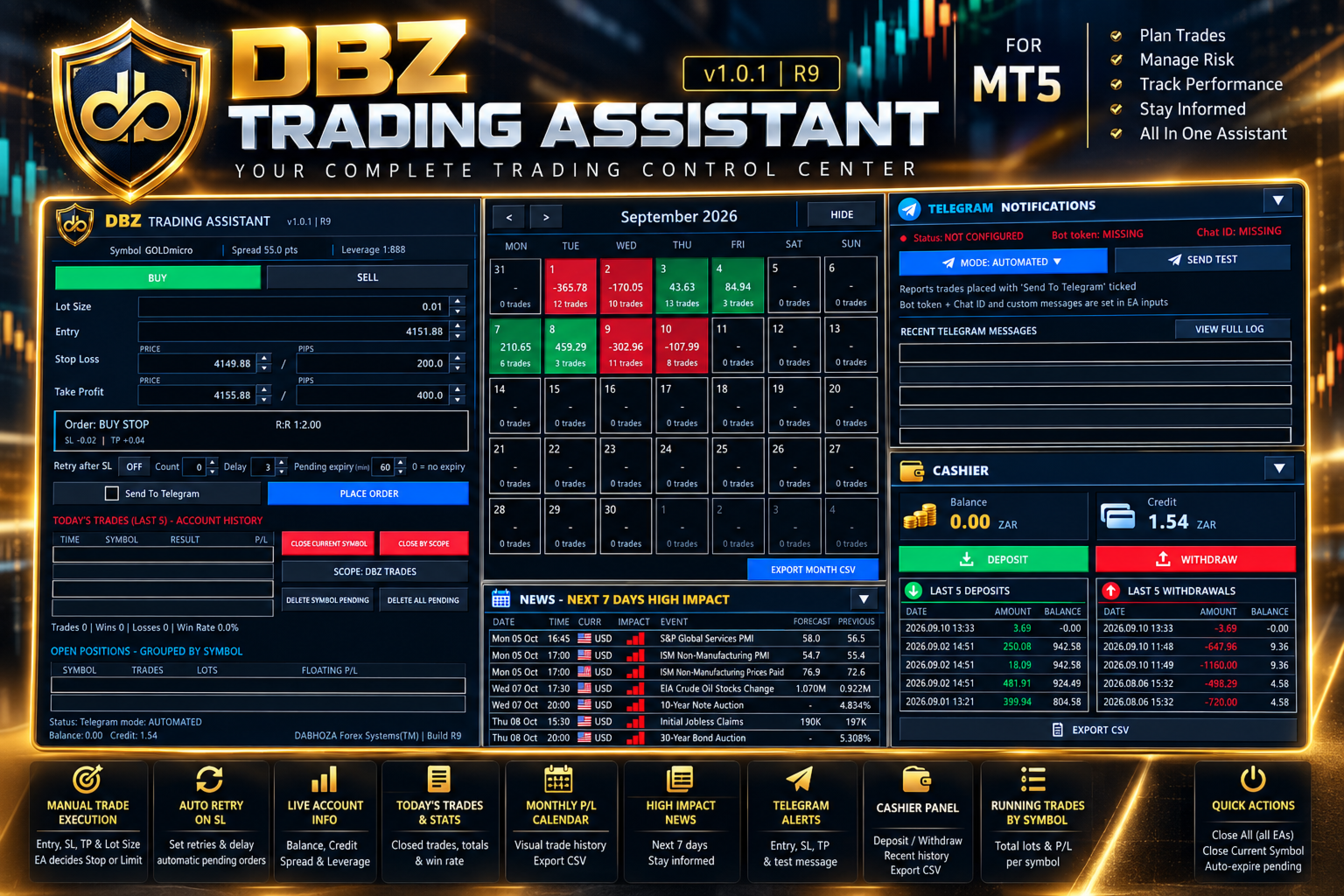
DBZ Trading Assistant is an Expert Advisor for manual traders. It does not give trading signals and does not decide when to buy or sell. You do your own analysis and choose the direction, lot size, entry price, Stop Loss and Take Profit. The assistant then helps with placing the order, managing it, and reviewing your account history.

Everything is shown in panels on your chart.

TRADE ENTRY

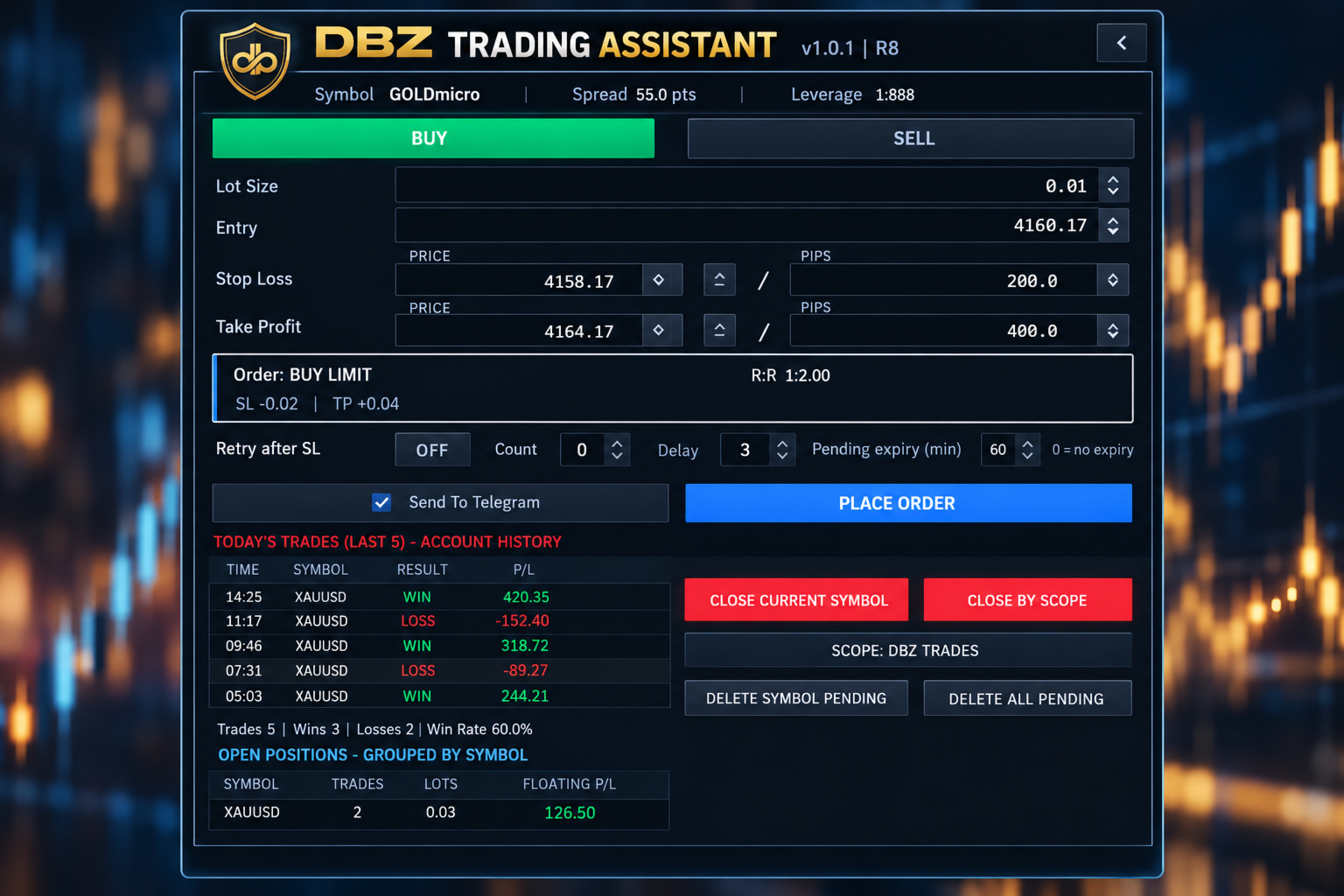
Choose Buy or Sell, then enter the lot size, the entry price, the Stop Loss and the Take Profit.

The assistant compares your entry price with the current market price. It then selects the order type for you: Buy Limit, Buy Stop, Sell Limit, Sell Stop or Market Order.

Before you place the order, the panel shows the order type it selected and the risk-to-reward ratio.

PRICE OR PIP INPUT

You can enter the Stop Loss and Take Profit as a price or as a distance in pips. The two fields stay linked. If you change one, the other updates, always measured from the entry price.

Up and down buttons next to each field let you adjust the values in small steps.

TRADE DISPLAY ON THE CHART

After an order is placed, the assistant can draw the trade on your chart. The display includes:
- The entry level, Stop Loss level and Take Profit level
- A risk area and a reward area
- The risk-to-reward ratio
- The distance to the Stop Loss and to the Take Profit
- The estimated amount at risk and the estimated reward, in your account currency

RETRY AFTER STOP LOSS (OPTIONAL)

Some traders prefer to enter again after a trade is stopped out. This option is switched off by default. When you switch it on, you can set the number of attempts and the delay between them. If a trade placed with the assistant is stopped out, the assistant places a new order using the stored setup.

PENDING ORDER EXPIRY (OPTIONAL)

You can set how long a pending order may stay in the market. For example, with a setting of 60 minutes, a pending order that has not been triggered is removed after 60 minutes. A setting of 0 means the order does not expire.

TODAY'S TRADES

The panel reads your MetaTrader 5 account history. It lists your latest closed trades with the time, symbol, result and profit or loss. It also shows the number of trades, the number of wins and losses, and the win rate for the day.

These figures come from the account history, so they include trades that were not placed with this panel.

MONTHLY CALENDAR

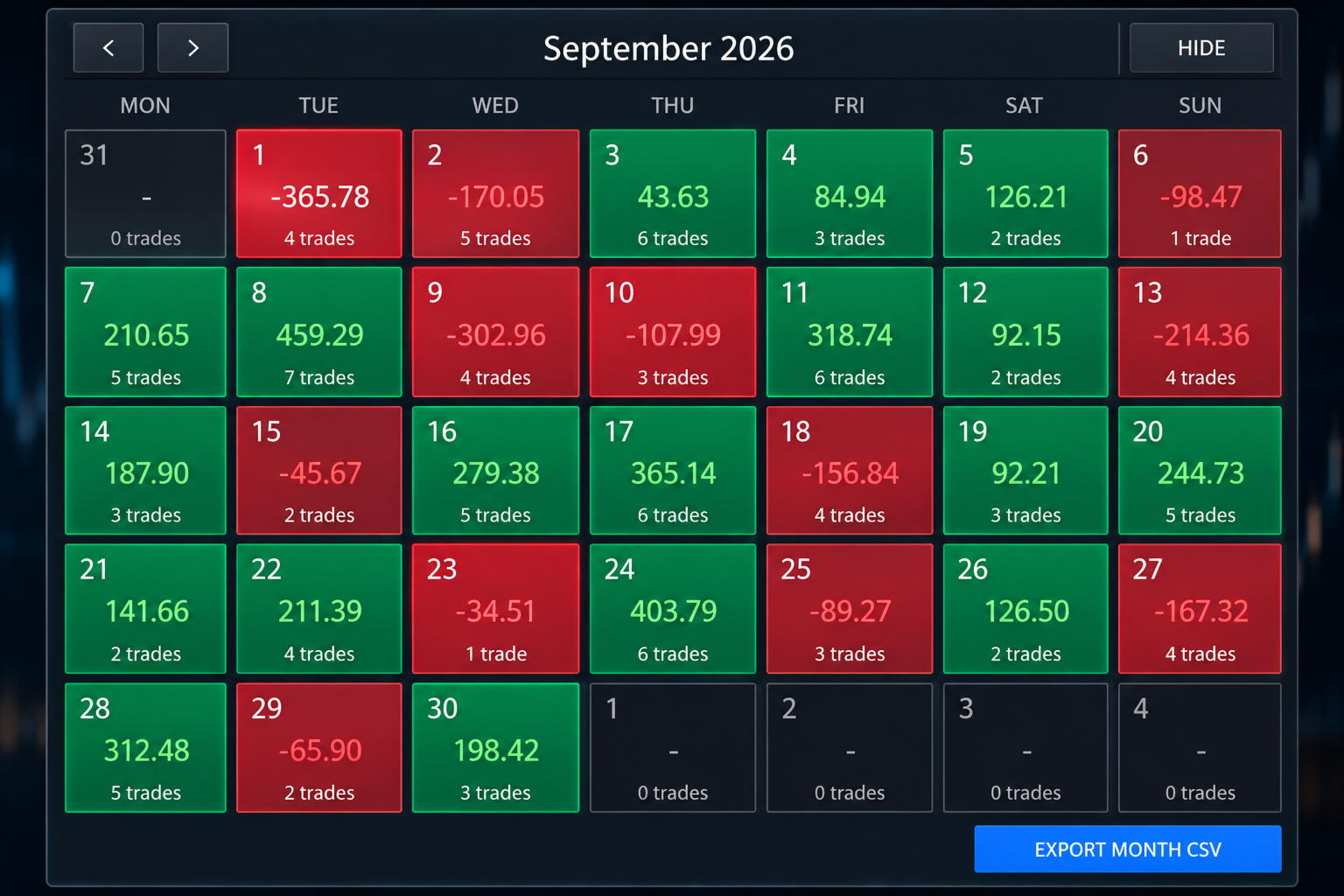
The calendar shows one month of your account history. Each trading day is coloured:
- Green for a day with a net profit
- Red for a day with a net loss
- Dark for a day without trades

Each day shows its net result and the number of trades. Click a day to see its trades. Use the arrows to move to earlier months.

MONTHLY FILE EXPORT

You can save the selected month as a CSV file, which opens in spreadsheet programs such as Microsoft Excel. The file contains the date, time, symbol, deal type, volume, profit, swap, commission, fees and net result of each closed trade. The file is saved in the MQL5/Files folder of your terminal data folder.

OPEN POSITIONS

Open positions are grouped by symbol. For each symbol the panel shows the number of trades, the total lots and the floating profit or loss. For example, several gold positions appear on one line.

TRADE MANAGEMENT BUTTONS

- Close Current Symbol closes the positions of the symbol on the chart.
- Close By Scope closes positions according to the scope you select. The selected scope is always shown on the button.
- Delete Symbol Pending removes the pending orders of the symbol on the chart.
- Delete All Pending removes the pending orders handled by the assistant.

ECONOMIC NEWS

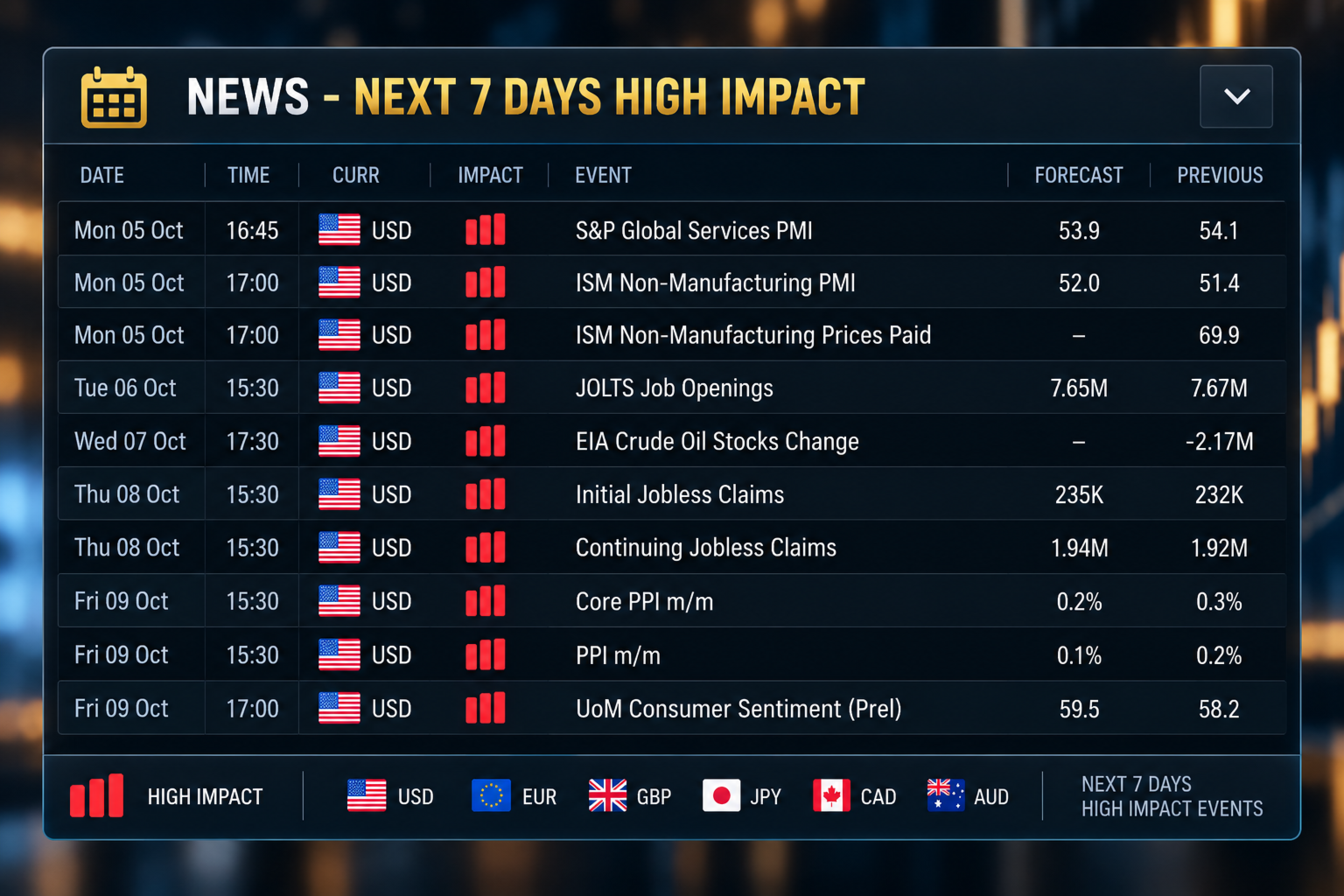
A news panel lists the high-impact economic events of the next seven days. For each event it shows the date, time, currency, impact, event name, forecast value and previous value. The data comes from the MetaTrader 5 economic calendar. A short warning is also shown on the main panel on days with high-impact events.

TELEGRAM NOTIFICATIONS

The assistant can send trade messages to Telegram. The panel offers two modes:
- Automated mode sends a message when a trade placed with the Send To Telegram option ticked is placed, triggered, closed, or reaches its Stop Loss or Take Profit.
- Manual mode lets you type and send your own message.

The panel shows the connection status and has a Send Test button. It also lists the last eight messages that were sent. The complete message history is saved in a file.

Messages for Stop Loss, Take Profit and closed trades include the result in pips and in your account currency. You can add your own text to each type of message in the inputs.

To use Telegram you need a bot token and a chat identifier from Telegram. You also need to allow the Telegram address in the WebRequest list of MetaTrader 5 (Tools, Options, Expert Advisors). The bot token is entered in the inputs and is never shown on the panel.

MOBILE NOTIFICATIONS

The assistant can also send notifications to the MetaTrader mobile application. Notifications must first be set up in the terminal.

CASHIER PANEL

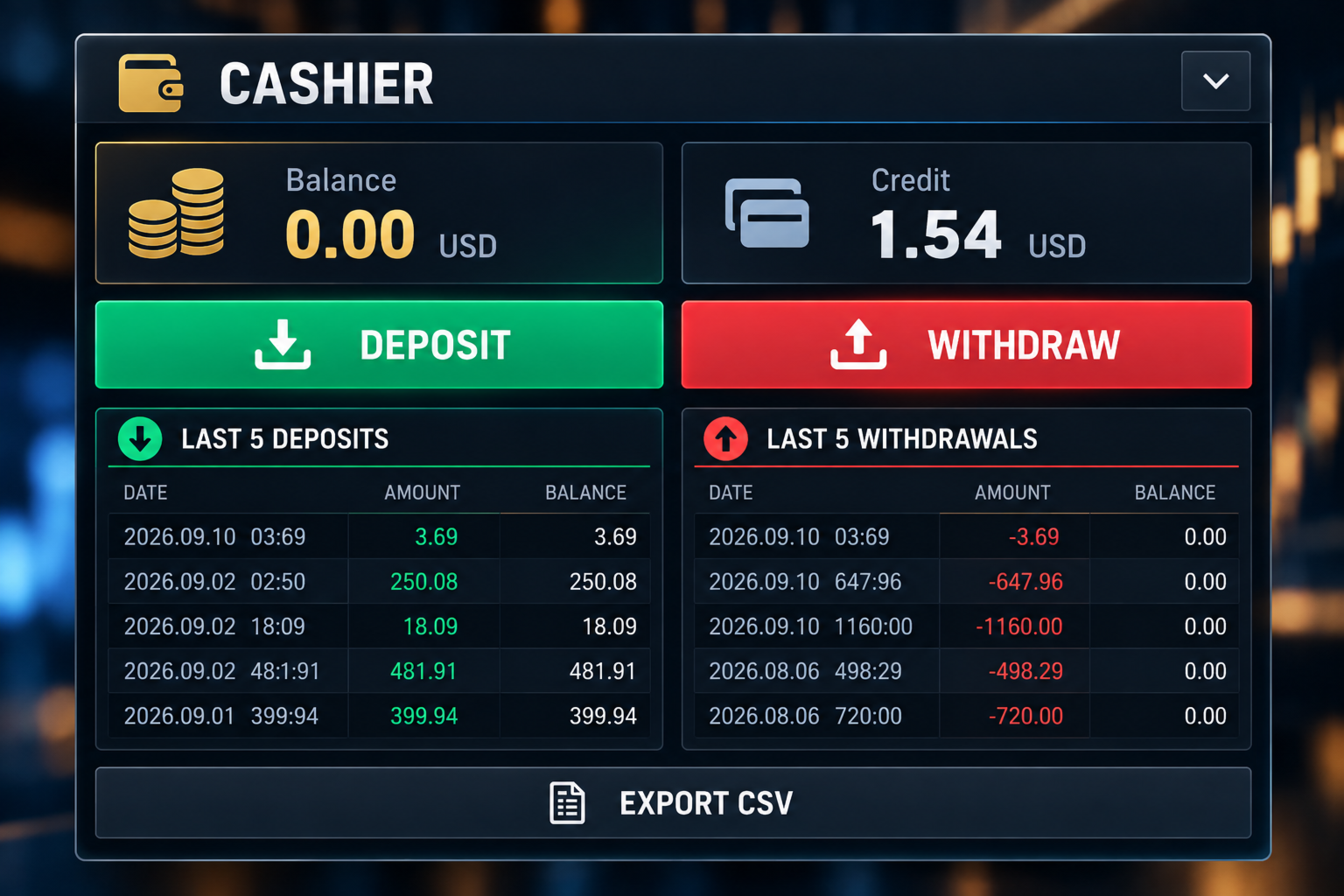
The Cashier panel shows your balance and credit. It lists your last five deposits and last five withdrawals, with the date, amount and the balance after each one. You can save the funding history as a CSV file.

The Deposit and Withdraw buttons show your broker's cashier link, which you can copy into your web browser. You can enter the links in the inputs. For some brokers the link is detected automatically. On demo accounts these buttons are disabled.

ACCOUNT INFORMATION

The main panel shows the symbol, the spread, the leverage, the balance and the credit, together with your trade values, the selected order type, the risk-to-reward ratio and the Telegram mode.

LAYOUT

The panels are the trading panel, the calendar, the Telegram panel, the Cashier panel and the news panel. You can collapse the panels you do not need to free space on the chart.

FEATURES

- Manual Buy and Sell planning
- Lot size, entry, Stop Loss and Take Profit fields
- Stop Loss and Take Profit as price or pips
- Automatic selection of the order type
- Risk-to-reward ratio
- Trade drawn on the chart
- Estimated risk and reward in account currency
- Pending order expiry
- Optional retry after Stop Loss
- Today's trades with wins, losses and win rate
- Open positions grouped by symbol
- Close and delete buttons
- Monthly calendar with daily results
- Monthly CSV export
- Economic news for the next seven days
- Telegram notifications with message list
- Mobile notifications
- Balance and credit display
- Cashier panel with deposit and withdrawal history

WHO IT IS FOR

The assistant is made for traders who place their own orders. It may suit you if you:
- Do your own analysis
- Use pending orders
- Set a Stop Loss and Take Profit for each trade
- Want to see the risk-to-reward ratio before placing an order
- Want to review your results by day and by month
- Want trade messages sent to Telegram

IMPORTANT

This is not a signal product. It does not analyse the market and does not tell you when to buy or sell. It does not promise profit and does not predict price movements. Trading carries risk of loss. You decide the direction, entry, lot size, Stop Loss and Take Profit.

BEFORE USING A LIVE ACCOUNT

Please test the assistant on a demo account first. Check how it handles order placement, lot sizes, Stop Loss and Take Profit, pending order expiry, retry after Stop Loss, the close buttons, Telegram messages and file exports.

Brokers differ in minimum stop distance, tick size, contract size, trading permissions and symbol names. Make sure the assistant works as you expect with your broker before you trade with real money.

This version does not use DLL files. A separate version that opens the broker website directly is available from the author.

DaBhoza Forex Systems
Prodotti consigliati
Volatility Regime Monitor is a professional MetaTrader 5 dashboard for classifying current volatility with transparent, measurable context. It combines ATR, recent bar-range statistics and historical percentiles to show whether the market is compressed, normal or expanding without generating entry signals. MAIN FEATURES • ATR and recent range context • Historical volatility percentile state • Compression, normal and expansion classification • Historical regime table • Transparent thresholds and
MT5 Trading Deck
Manuel Michiels
5 (2)
One button. One trade. MT5 Trading Deck is a hotkey trading panel for MetaTrader 5 that turns the platform into a keyboard-driven execution cockpit. Stop loss, take profit and lot size are pre-calculated for every key; the moment you press, a market order is live on the broker. A complete technical user manual is attached in the product Comments section. It documents every input parameter, the full hotkey map, the recommended Stream Deck XL layout, and the advanced workflows for Pre-Limit orders
Trading Rules Enforcer is a deterministic account-discipline monitor for trade-count, loss, time and exposure rules. Key functions: - Clear rule status dashboard - Trading-session restrictions - Overtrading controls - Symbol and Magic Number scope - Daily loss and exposure monitoring - Clear blocking reasons - Operational event history The utility enforces rules configured by the user. It does not generate entry signals, predict market direction or guarantee trading results. Test all rule comb
Big Figure Indicator MT5
Vonjinirina Alfred Randrianiaina
Il "BIG FIGURE INDICATOR" identifica automaticamente e traccia linee orizzontali sui grafici di prezzo a livelli specifici, come numeri interi o numeri decimali (ad esempio 1.0000 o 1.5000 nel trading di valute). Questi livelli sono considerati psicologicamente significativi perché rappresentano numeri rotondi su cui i grandi trader e gli investitori possono concentrarsi, portando a potenziali livelli di supporto o resistenza. L'indicatore della grande cifra può aiutare i trader a identificare i
C Evolution MT5
Antonis Michos
5 (1)
Join the Out of the Box Telegram Group search for "Out of the Box" on Telegram or contact me This is not just a simple copier program that ONLY allows you to locally copy transactions between different MetaTrader 4 a accounts in any direction and quantity as quickly and easily as possible .Of course it does that. This copier DOES MUCH MUCH MORE!!! PLEASE READ BELOW AND SEE SCREENSHOTS. Many of us have martingale EAs or none martingale that are good but some point you wish to had opened the
Currency Strength Monitor is a professional multi-currency strength indicator for MetaTrader 5 that analyzes and displays the relative strength of 8 major currencies (USD, EUR, GBP, AUD, NZD, JPY, CHF, CAD) in real-time. The indicator calculates strength values by aggregating price movements across 28 currency pairs and normalizing them using ATR, providing traders with a clear visual representation of which currencies are strengthening or weakening. Key Features: Multi-Currency Analysis — Monit
Gold Band Machine
Sifiso Pai Madonsela
GOLD BAND EA Trade with Structure. Recover with Precision. Gold Band EA is an automated trading system designed for traders who want a structured approach to trading Gold (XAUUSD) while reducing the need for constant manual monitoring. Built around automated entries and systematic trade management, Gold Band EA is designed to identify trading opportunities, manage positions, and handle recovery sequences according to predefined parameters. KEY FEATURES Automated Trading Let Gold Band mo
Noetrix Sentinel
Julien Jeremy Rodrigue Gazagnaire
Noetrix Sentinel 1.10 Noetrix Sentinel is a native, read-only MetaTrader 5 operational supervision utility. It monitors terminal connectivity, latency, trading permissions, chart and EA presence, watched market feeds, optional Magic mappings, alerts and diagnostic evidence from a single chart. ## Safety and distribution - MetaEditor result: `0 errors, 0 warnings`. - Entry point: `MQL5/Experts/NoetrixSentinel/NoetrixSentinel.mq5`. - No trading library, order submission, position close, order
FREE
Telegram Group: Find the link in my profile   4 days to pass MyForexFunds phase 1 evaluation.( see screenshot below )   HERE is a FREE file  for use in a LIVE DEMO account. Welcome. Virtual Trendline Scalper is a scalping machine (trades quite often) that uses virtual trades in virtual trendlines before it opens a real one in decent to perfect places. IMPORTANT:Due to huge amount of variables that are used in the code of the EA and the many drawings in the chart,the EA's code became ver
A standalone algorithm that operates on the removal of the Previous Day's High (PDH) and/or the removal of the Previous Day's Low (PDL). Configurable: - risk per trade as a % of the deposit - minimum delay between trades - aggressiveness level - expected* number of trades and drawdown (*) Expected values ​​will almost never match reality. Designed for use on the SP500 and NAS100 I DO NOT GUARANTEES ANY RETURN OR PROFIT! EXPECT TO LOSS! Livetest here
Expert Advisor Mosaic Portfolio | 13 Strategie. Un unico portafoglio. Mosaic Portfolio EA combina 13 strategie di trading indipendenti in un unico Expert Advisor multi-simbolo per MetaTrader 5. Gestisci il tuo portafoglio da un unico grafico, scegli la strategia che preferisci e configura il tuo rischio, il tutto senza dover caricare file di configurazione separati. Segnale in diretta: https://www.mql5.com/en/signals/2385993 Un unico Expert Advisor. Molteplici modalità di trading. Scegli tra qua
MT5 Telegram Notifier — Real-Time Account Monitoring Stay informed and in control of your trading account from anywhere. This utility Expert Advisor sends instant notifications and detailed reports directly to your Telegram chat. Key Benefits Real-Time Alerts : Receive notifications when positions open, close, or pending orders change. Risk Management : Margin level alerts help you act before critical thresholds. Hedging Support : Displays every position individually using ticket-based logic. O
This tool is used to generate a K - line reflection chart of a currency pair for foreign exchange transactions. For example, if the currency pair is EURUSD, a custom currency pair named EURUSD_ref is generated and a chart for that currency pair is opened. The price of a custom pair of currency is the inverse of the price of the original pair, which is the equivalent of a new pair of currency, the USDEUR. The usage is simple, put it on any chart, the new chart will open, and then draw the corr
QBrain Strategy Auditor
Nesrine Emilie Darragi
QBrain Strategy Auditor helps users identify incomplete or weak evidence before drawing conclusions from closed MetaTrader 5 outcomes. The utility is designed for strategy review. It does not open, modify, or close trades. It does not predict returns and does not certify a strategy. Main functions - Reads closed terminal account history in a selected date range or a normalized CSV placed in the MT5 file sandbox. - Checks whether the available evidence is sufficient for analysis. - Displays k
SmartTrade EA is a manual trading panel that docks on the chart. It brings order entry, position management, risk limits, statistics, the economic calendar and price alerts into one interface, so you can open, protect and close a trade without leaving the chart or opening a dialog. It is a tool, not a strategy. It does not place trades on its own and does not generate signals. Every entry is yours. What it handles is the work after the click: moving stops, closing in parts, and keeping you ins
Risk Manager Rocket
Rick in t Veld
5 (1)
Risk Manager Rocket – MT5 Daily Loss Limit & Drawdown Protection EA Take full control of your trading risk with Risk Manager Rocket , a professional-grade MetaTrader 5 Expert Advisor designed to protect your account from excessive losses and enforce strict risk discipline. Whether you are trading manually or using automated strategies, this EA acts as a risk firewall , ensuring you never exceed your predefined daily loss limit. Core Features Daily Loss Limit (Hard Protection) Automatically track
FREE
Position Prime
Mariana Cordeiro Neves Fernandes
Scarica subito la versione demo gratuita e testa tutte le funzionalità di gestione del rischio all'interno del tuo Strategy Tester prima dell'acquisto! Position Prime è un assistente di esecuzione visiva e un gestore del rischio di livello istituzionale per MetaTrader 5. Progettato per i trader che esigono velocità e precisione, elimina la necessità di calcoli manuali dei lotti e trasforma il tuo grafico in una vera e propria postazione di trading. Pianifica, esegui e proteggi i tuoi trade in f
Rimani al passo con il momentum del mercato con il Pip Movement Alert MT5, un indicatore versatile a più valute progettato per tracciare e avvisare i trader sui movimenti precisi in pip su più simboli, ideale per il trading di forex, azioni, criptovalute e materie prime. Elogiato nelle comunità di trading come Forex Factory e Reddit’s r/Forex, e evidenziato nelle discussioni su Investopedia e TradingView per la sua capacità di rilevare cambiamenti improvvisi del mercato, questo indicatore è indi
FREE
Pair correlation divergence. Define your pair in indicator setting with this format : SYMBOL1:SYMBOL2,SYMBOL3:SYMBOL4 Already Defined Symbols : EURUSD:GBPUSD,AUDUSD:NZDUSD,USDCHF:EURUSD,USDCAD:Crude,XAUUSD:AUDUSD Symbol name should match the exact case as you see it in left panel where all symbols are listed. CAUTION  : If you drag any symbol on screen and indicator doesn't paint(live mode, not strategy tester) then just  Right click-> indicators list-> select divergence indicator-> edit-> ok-
The script shows statistics of trades for the specified period. For example, if you want to know the details of trades of the ATC2010 Winner ( bobsley ): Login with his account using the investor (read-only) password (MetaTrader5); Open the chart of his trading symbol (EURUSD); Run this script on the chart; Specify 2010.10.1 in "date from", and the diagram will be shown.
AI QUANT SYSTEM EA — Institutional Neural Engine (v52.0) Fully Automatic Trading EA Please Note:- First that this is an EXPERT ADVISOR, not a Utility. However, due to certain restrictions, I have to publish this  EXPERT ADVISOR  under the Utilities category.  We are  Provided  including a FREE OpenAI API key with this product, so you do not need to purchase AI API KEYS one separately, With Lifetime FREE Upgardes in Future. The AI Quant System EA is a next-generation, high-frequency quantitative
Our offer also includes a free panel — Indicator Panel — which allows you to show or hide indicators created by BOToBRACIA ->  MT4  /   MT5 Our offer also includes a version for MetaTrader 4 ->  https://www.mql5.com/en/market/product/190450?source=Site+Market+My+Products+Page Trading Panel is an advanced tool for manual and semi-automated trade execution and position management. It allows traders to open positions instantly while simultaneously setting Stop Loss and Take Profit levels. With bu
Dual View HTF Patterns Pro è uno strumento analitico di alto livello progettato per i trader manuali che si affidano alla Price Action e all'analisi multi-temporale. Risolve efficacemente il problema della "visione a tunnel", consentendo di monitorare la struttura del mercato e i modelli di candele dei timeframe superiori (HTF) direttamente sul grafico operativo abituale. MT4-version:   https://www.mql5.com/en/market/product/166824 Perché hai bisogno di questo indicatore? Il trading su timeframe
Panoramica dell'EA KS Multiple Independent Strategies Auto Trading 1.9 Si tratta di un Expert Advisor (EA) MQL5 di livello professionale, progettato principalmente per il trading sull'oro (XAUUSD) sulla piattaforma MetaTrader 5. Supporta molteplici strategie di trading indipendenti, una gestione avanzata del rischio e vari filtri volti a ottimizzare le prestazioni. L'EA pone l'accento sull'automazione, sulla protezione dei profitti e sull'integrazione con strumenti esterni come Telegram e Disco
CapitalSol Forex MTF Scanner Multi-Timeframe Forex Trend Scanner for MetaTrader 5 CapitalSol Forex MTF Scanner is a multi-symbol and multi-timeframe market analysis indicator designed to provide a structured overview of Forex market direction directly inside MetaTrader 5. Instead of opening and checking multiple currency charts individually, the scanner displays the selected Forex pairs in one compact dashboard and evaluates their directional state across several timeframes simultaneously.
PriceZoneAlerte
Kocou Faustin Agohoundje
PriceZoneAlert v2.0   is the essential tool for traders who want to monitor their price zones with customized alerts, directly on their phone or tablet. This innovative indicator for MetaTrader 5 allows you to add alerts on predefined price zones, with instant push notifications to stay informed in real time, wherever you are. Whether you're trading according to SMC concepts, support/resistance, or a custom strategy,   PriceZoneAlert v2.0   helps you   stay focused, responsive, and discipli
PlanGuard MT5
Hendrik Jacobus Joubert
Purpose PlanGuard MT5 is a trading-discipline utility for traders who want their manual positions checked against a predefined plan. The utility monitors newly opened positions, reports rule violations and can request the closure of a non-compliant position. It also tracks account-wide daily profit and loss, entry count, losing positions and intraday profit giveback. PlanGuard does not generate signals and does not open trades. Position checks The following rules can be enabled independentl
Meridian Channel
Phillip Van Coller
5 (1)
Detailed video:  https://www.youtube.com/watch?v=GXWzL4s_20E Study the stretch. Test the setup. Plan the basket. Meridian Channel is a mean-reversion indicator for MetaTrader 5 that brings channel analysis, historical testing, parameter optimization and position-sizing tools onto your chart. See where price sits relative to its moving mean, explore how your entry rules have behaved, and assess the exposure of a planned basket before placing a trade. See the setup See where price has stretched
Questo strumento può aiutarti a chiudere tutti gli ordini aperti con un clic, basta fare clic su "Chiudi tutto". Se desideri chiudere solo gli ordini redditizi, fai clic sul pulsante "Chiudi redditizi" Dopo aver cliccato, tutti gli ordini fluttuanti verranno chiusi; Se desideri chiudere solo gli ordini con perdite fluttuanti, fai clic sul pulsante "Chiudi perdibili" Dopo aver cliccato, tutti gli ordini con perdite fluttuanti verranno chiusi. Questo strumento è stato testato per un anno. La funzi
InfoRisk
Andrej Nikitin
Info tool helps to estimate the current risks of open positions and orders. It allows to analyze open positions or/and pending orders, also there are USD/Percentage modes. Expands the margin load and the share of profit participation for individual positions. Информационная панель помогает оценить текущие риски по открытым позициям и ордерам. Есть возможность отдельного анализа рисков по позициям/отложенным ордерам, а также в режимах USD/Percentage. Раскладывает маржинальную нагрузку и долю учас
Gli utenti di questo prodotto hanno anche acquistato
================================================================================ POC BREAKOUT - V20.72. Full Professional Grade Toolkit ================================================================================ POC Breakout is a full MetaTrader 5 trading dashboard for discretionary traders who want breakout signals, Point of Control (POC) context, volume profiles, order flow, market structure, news, alerts, and advanced trade planning in one professional workspace. Attached directly to you
Telegram to MT5 MultiChannel Copier
Sergio Marquez Uroz
4.61 (18)
Telegram to MT5 Multi-Channel Copier   copia automaticamente i segnali di trading dai tuoi canali Telegram direttamente su MetaTrader 5. Niente bot, niente estensioni del browser, niente copia manuale. Il segnale arriva su Telegram e l'EA apre l'operazione nel tuo terminale in pochi secondi. E prima di copiare un canale, il backtester integrato ti mostra cosa avrebbe fatto quel canale sul tuo conto. Il prodotto include due componenti: un'applicazione Windows che ascolta i tuoi canali Telegram, e
Power Candles Strategy Scanner - Strumento di ricerca configurazioni multi-simbolo con ottimizzazione automatica Power Candles Strategy Scanner utilizza lo stesso motore di auto-ottimizzazione che alimenta l'indicatore Power Candles, applicandolo a tutti i simboli presenti nel tuo Market Watch, uno accanto all'altro. Un unico pannello ti indica quali simboli sono statisticamente negoziabili in questo momento, quale strategia è vincente su ciascuno di essi, la coppia ottimale di Stop Loss / Take
Footprint Chart Pro — Professional OrderFlow EA for MetaTrader 5 Version 6.34 | Professional tool for real traders | Institutional-Grade Visualization DEMO USERS - PLEASE SELECT EVERY TICK / REAL TICK WHEN TESTING AND YOU HAVE DOWNLOADED HISTORICAL DATA. IF YOU SEE A WAITING SCREEN AND IT IS NOT DOWNLOADING, IT MEANS YOU HAVE LOW HISTORICAL DATA. TRY 1 MIN AND 5 MIN FIRST ON 1 DAY DATA. ONE DAY DATA SHOULD BE THE NEWEST AND MOST CURRENT DATE. PLEASE WAIT UNTIL THE MARKET HAS ROLLED OVER PERIOD.
FarmedHedge Pair Trading Dashboard
Tanapisit Tepawarapruek
5 (5)
Farmed Hedge Yield Farming | All Markets (Manual - Hybrid - Semi/Automated EA) VERIFIED TRADING RESULTS - Farmed Hedge Yield Axi Copy:  https://www.mql5.com/en/signals/2356376 - Farmed Hedge Yield Exn Copy:   https://www.mql5.com/en/signals/2356404 - Farmed Hedge Yield V Copy:  https://www.mql5.com/en/signals/2357156 IMPORTANT NOTICE: FarmedHedge is a MANUAL-FOCUSED TRADING UTILITY ,not a fully automated EA. Results shown on this Signal include manual trades and overall strategic management.
Copy your MT5 trades to Interactive Brokers You keep using MT5. Every order you open or close is sent to your IB account. In real time. No coding. No changes to your strategy or EA. Try it first Rent 1 month: $30. Test on a live or paper account. What it does Real-time copying: same direction, reverse, or one side only. Map any MT5 symbol to any IB symbol. Set a lot ratio for each. Forex, Futures, Stocks, CFDs, Metals and Crypto. Position sync: both accounts checked, any difference fixed. Optio
Trading Chaos Expert
Hennadii Stanilevych
5 (11)
This software has no equals in the world and represents a universal trade "console" covering trading signals, automated market entry, setting of Stop Loss and Take Profit, as well as Trailing Profit for multiple trades at the same time in a single open window. Intuitive control of the Expert Advisor in "three clicks" ensures a comprehensive use of all its functions on different computers, including tablets PCs. Interacting with additional signal indicators that mark the chart to give a real mark
Continua a usare l'indicatore di cui ti fidi. Automatizza il lavoro che gli sta intorno. Hai già un indicatore MT5 di cui ti fidi, ma devi ancora controllare il grafico, attendere un segnale, calcolare i lotti, inviare l'ordine e gestire manualmente ogni posizione? Stratiora Signal Engine MT5 collega queste attività. Può trasformare i segnali Buy e Sell dei buffer compatibili in un flusso automatizzato completo: ingresso, calcolo del volume, Stop Loss, Take Profit, filtri, gestione delle posizi
EA Overfitter
Stephen J Martret
5 (1)
That backtest looks great. But will it still be making money tomorrow, next week, next month? EA Overfitter re-runs your EA on 100 price histories it has never seen. One score tells you if the edge is real. A backtest tells you what an EA did on one price history — the one that happened to occur. What you cannot tell from it is how much of that result was the strategy and how much was the particular path. EA Overfitter answers that. It builds up to 100 synthetic price histories your EA has n
Quant Panel
Kevin Craig E Gittins
QUANT PANEL Independent per-algo analytics, protected MT5 history and professional PDF reporting Quant Panel is built for traders who run several Expert Advisors or strategies on one MT5 account and need to know how each algo is actually performing. Instead of treating the terminal as one combined portfolio, Quant Panel groups closed positions by EA comment or magic number and calculates every strategy independently. It gives you one clear dashboard for comparing algos, finding weak systems and
YuClusters
Yury Kulikov
4.93 (43)
Attention: You can view the program operation in the free version  YuClusters DEMO .  YuClusters is a professional market analysis system. The trader has unique opportunities to analyze the flow of orders, trade volumes, price movements using various charts, profiles, indicators, and graphical objects. YuClusters operates on data based on Time&Sales or ticks information, depending on what is available in the quotes of a financial instrument. YuClusters allows you to build graphs by combining da
Mentfx Mmanage mt5
Anton Jere Calmes
4.25 (8)
The added video will showcase all functionality, effectiveness, and uses of the trade manager. Drag and Drop Trade Manager. Draw your entry and have the tool calculate the rest. Advanced targeting and close portions of a trade directly available in tool (manage trades while you sleep). Market order or limit order on either side with factored spread. Just draw the entry, the tool does the rest. Hotkey setup to make it simple. Draw where you want to enter, and the stop loss, the tool calculates al
Timeless Charts
Samuel Manoel De Souza
5 (8)
Timeless Charts è un'utilità di trading completa progettata per trader professionisti. Combina tipi di grafici personalizzati come Grafici a Secondi e Renko con analisi avanzata del flusso ordini tramite Footprints , Clusters , Profili di Volume , studi VWAP e strumenti di analisi ancorata per una visione più approfondita del mercato. Il trading e la gestione delle posizioni vengono eseguiti direttamente dal grafico tramite un pannello integrato di gestione delle operazioni , mentre Market Repla
The product will copy all telegram signal to MT5 ( which you are member) , also it can work as remote copier.  Easy to set up, copy order instant, can work with almost signal formats, image signal,  s upport to translate other language to English Work with all type of channel or group, even channel have "Restrict Saving Content", work with  multi channel, multi MT5 Work as remote copier: with signal have ticket number, it will copy exactly via ticket number. Support to backtest signal. How to s
EasyInsight AIO MT5
Alain Verleyen
4.92 (12)
EASY Insight AIO – La soluzione all-in-one per un trading intelligente e senza sforzo Panoramica Immagina di poter analizzare l’intero mercato — Forex, Oro, Cripto, Indici e persino Azioni — in pochi secondi, senza dover controllare manualmente i grafici, installare indicatori o affrontare configurazioni complicate. EASY Insight AIO è il tuo strumento definitivo di esportazione per il trading alimentato dall’IA, pronto all’uso. Offre una panoramica completa del mercato in un unico file CSV pul
VERON LINK MASTER MT5 — Real-time Multi-Account Dashboard & Sync Controller Veron Link Master is a high-performance, centralized monitoring and synchronization control center designed for MetaTrader 5. Built specifically for traders managing multiple accounts, prop firm portfolios, grid/martingale EAs, or client networks, Veron Link Master provides a seamless, ultra-modern dark-themed GUI dashboard directly on your MT5 terminal. Pricing Structure: Take advantage of our early-bird pricing before
FUTURES ORDERFLOW FOOTPRINT CHART Professional OrderFlow EA for MetaTrader 5 Version 1.01| Professional tool for real traders | Institutional-Grade Visualization STRATEGY TESTER USERS - PLEASE SELECT EVERY REAL TICK WHEN TESTING AND YOU HAVE DOWNLOADED HISTORICAL DATA. IF YOU SEE A WAITING SCREEN AND IT IS NOT DOWNLOADING, IT MEANS YOU HAVE LOW HISTORICAL DATA. TRY 1 MIN AND 5 MIN FIRST ON 1 DAY DATA. ONE DAY DATA SHOULD BE THE NEWEST AND MOST CURRENT DATE. PLEASE WAIT UNTIL THE MARKET HAS ROL
EA Slipstream
Stephen J Martret
5 (1)
Your backtest filled every order at the price it asked for. Your account does not. EA Slipstream measures what execution costs your EA, using your own fills, slippages and spreads to show you the true performance of your EA. A backtest prices every trade at the level the EA named. In live trading a pending order fills at whatever price is available when it triggers, a stop closes wherever the market is when it is hit, and the spread at that moment is whatever the account was quoting. The differ
Veron Link Slave – Synchronized Grid, Martingale & Breakout Management Short Description Advanced synchronization tool designed to manage Grid, Martingale, and Breakout EAs. Automatically sends close-basket signals to the Master account upon profit target completion, minimizing slippage across different brokers. Full Description Veron Link Slave is a specialized utility developed to enhance the execution efficiency and risk management of multi-account or multi-broker trading setups. It is desig
Dynamic Fibonacci Grid
Tsvetan Tsvetanov
5 (1)
Presentazione dell’ultima versione del Dynamic Fibonacci Grid Dashboard per MT5. Ora dotato di molte nuove funzionalità, questo nuovo dashboard trasforma la tua esperienza di trading e ti permette di osservare il mercato e l’azione dei prezzi da una prospettiva completamente nuova. Scopri nuove possibilità grazie all’analisi simultanea di più timeframe e simboli. Interfaccia user-friendly per il trading manuale e la gestione delle posizioni, con capacità ampliata di applicare strategie automati
Quant AI Agents
Ho Tuan Thang
5 (1)
Quant AI Agents are independent trading Expert Advisors. Instead of trading using a fixed strategy like other conventional EAs, Quant AI Agents   is a   multi-agent AI trading framework   that turns natural-language strategy prompts into live.  WANT THE SAME RESULTS AS MY LIVE SIGNAL?   Use the exact same brokers I do:   IC MARKETS , IC TRADING   .  Unlike the centralized stock market, Forex has no single, unified price feed.  Every broker sources liquidity from different providers, creating un
EA Auditor
Stephen J Martret
5 (5)
EA Auditor is an independent analysis tool for traders evaluating Expert Advisors and trading signals on MetaTrader 5. It audits backtest reports, reviews posted developer signals, and cross-verifies the two against each other to help traders assess strategies before committing capital. The MQL5 market offers a wide range of Expert Advisors from many developers, with varying approaches, quality, and transparency. EA Auditor provides a consistent, data-driven framework for reviewing them, answer
Questo Expert Advisor aspetta che venga aperta una posizione (può essere aperta manualmente, tramite i pulsanti dell'EA o anche tramite mobile) e crea una Griglia di ordini pendenti in stop nella stessa direzione della prima posizione. I parametri di Input vengono usati solo per il primo uso o per l'utilizzo con il Tester Stategia , in seguito vengono salvati in un file in modo da essere mantenuti anche se si dovesse togliere l'EA dallo strumento e poi riutilizzarlo. Attenzione in modalità Teste
HINN Lazy Trader
ALGOFLOW OÜ
5 (1)
The core idea: using the user interface, you configure the parameters the chart must meet before entering a position (or positions), choose which entry models to use, and set the rules for when trading and planning should end. Lazy Trader  handles the rest: it  takes over all the routine chart watching and execution! full description  :: 3 key videos [1] ->  [2]   ->  [3] What can it do? - Understands Larry Williams market structure - Understands swing market structure by Michael Huddleston
Exp5 VirtualTradePad PRO SE for MT5
Vladislav Andruschenko
5 (1)
VirtualTradePad PRO SE MT5 — centro di controllo professionale per il trading su MetaTrader 5 VirtualTradePad PRO SE è un pannello di trading premium basato sul grafico e un ambiente di gestione delle operazioni per MetaTrader 5 . È progettato per i trader che desiderano esecuzione più rapida, controllo più chiaro delle posizioni, gestione strutturata delle operazioni, pianificazione visiva dei livelli e un workflow professionale direttamente dal grafico. Non è soltanto un semplice pannello BUY
Advanced Daily Trading Limiter PRO
AL MOOSAWI ABDULLAH JAFFER BAQER
Advanced Daily Trading Limiter PRO Professional Risk Management. Uncompromising Trading Discipline. One undisciplined trading session can erase weeks of consistent profits. Whether it's overtrading, revenge trading, or exceeding a prop firm's daily risk limits, emotional decisions often become a trader's biggest obstacle—not the market itself. Advanced Daily Trading Limiter PRO is a comprehensive risk management and discipline enforcement utility for MetaTrader 5, designed to help traders stay
Ultimate Extractor
Clifton Creath
5 (7)
Ultimate Extractor - Professional Trading Analytics for MT5 *****this is the local HTML version of Ultimate Extractor. !!!!!it is not compatible with Cloud!!!! For the online version please reach out to me directly****** Ultimate EA manager also now available when you use cloud pro and above for free!! Ultimate Extractor transforms your MetaTrader 5 trading history into actionable insights with comprehensive analytics, interactive charts, and real-time performance tracking. What It Does Automa
Features   With MT5 to Interactive Brokers(IB) Trader, you can: 1. Load chart data from IB to MT5, and Analyze with all standard or customer Indicators. 2. Place Orders to IB Account Directly in MT5. 3. Make your Own EAs upon IB Securities by only making minus changes of the trading function. Usage 1) Installation Copy the "Mt5ToIBTraderEn.ex4" and sample files to [MT5 Data Folder]->MQL5->Experts.  2)  MT5 Settings Add the IP Address to the MT5 Allowed URLs in 'Tools->Options->Expert Adviso
Daily Trading Limiter
AL MOOSAWI ABDULLAH JAFFER BAQER
5 (8)
• Please test the product in the Strategy Tester before purchasing to understand how it works. • If you face any issues, contact me via private message—I’m always available to help. • After purchase, send me a screenshot of your order to receive a FREE EA as a gift. Daily Trading Limiter — the rule you cannot break Every trader knows the number. Three trades. Two percent. One bad day and stop. And every trader has watched themselves take the fourth trade anyway. The problem was never knowing th
TradePad
Ruslan Khasanov
5 (1)
TradePad è uno strumento per il trading sia manuale che algoritmico. Ti presentiamo una soluzione semplice per operazioni di trading rapide e controllo delle posizioni su diversi strumenti di trading. Attenzione, l'applicazione non funziona nel tester di strategia! Versione di prova dell'applicazione per un conto demo e una descrizione di tutti gli strumenti L'interfaccia dell'applicazione è adattata per monitor ad alta risoluzione, semplice e intuitiva. Per un lavoro confortevole, al trader vie
Altri dall’autore
Win Rate Tracker MT5
Thokozani Harry Mkize
Stop guessing your performance. Track your wins and losses instantly, directly on your charts! As traders, keeping an accurate, real-time pulse on our psychological and execution performance is key to staying disciplined. DaBhoza Win Rate Tracker is a lightweight, intuitive, and highly visible on-chart utility designed to help you log and monitor your trade outcomes manually with a single click. Whether you are testing a new manual strategy, practicing on a demo account, or keeping track of your
FREE
Filtro:
Nessuna recensione
Rispondi alla recensione