Smart Trade Assistant Virtual

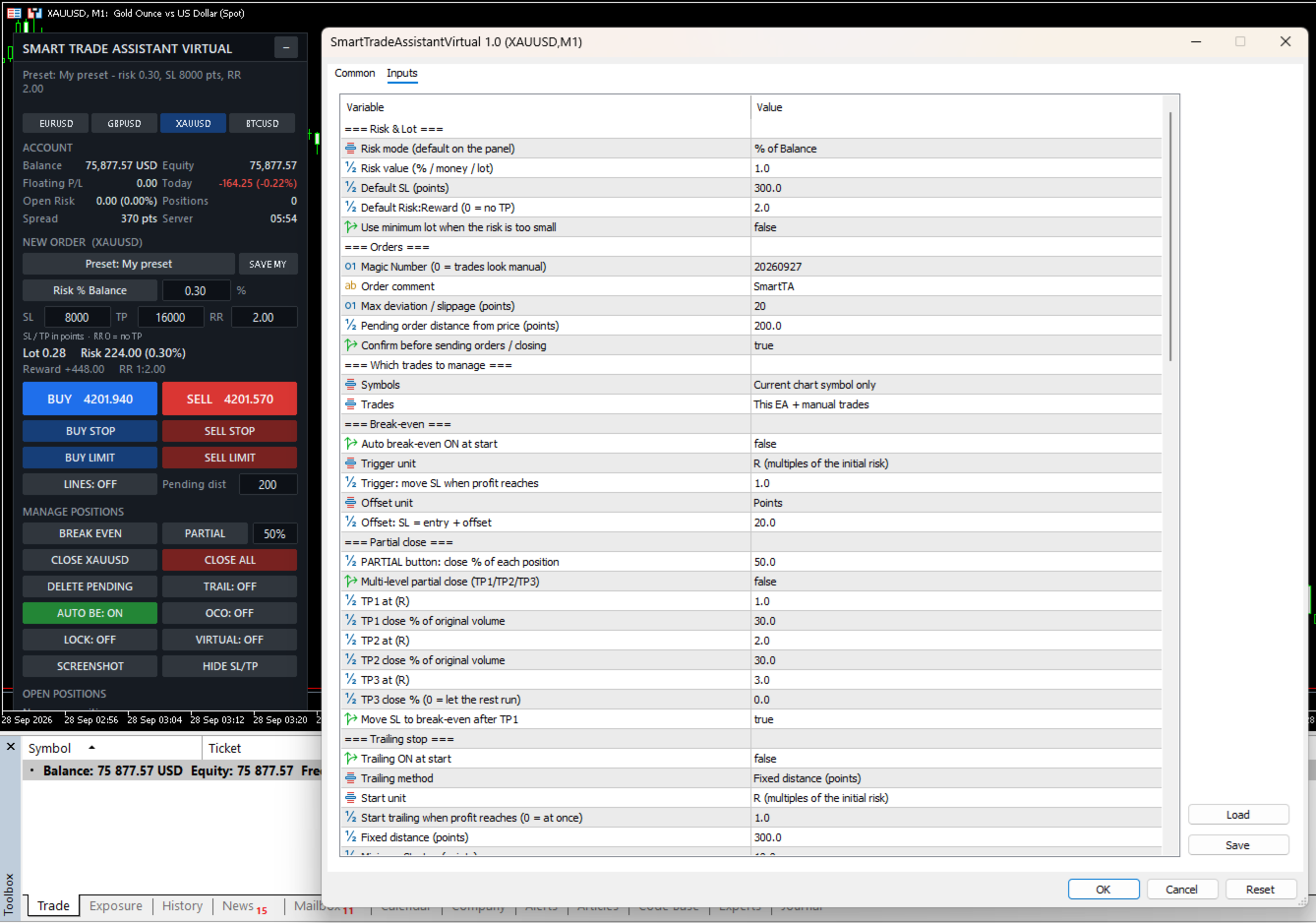
Smart Trade Assistant Virtual is a trading panel for manual traders. It calculates the lot size from your risk, places market and pending orders with one click, and manages your open trades: break-even, partial close, trailing stop, profit lock and OCO. SL/TP and pending orders can also be virtual, which means they are kept by the panel and hidden from the broker.

The panel never opens a trade by itself. You decide when to trade, and the panel handles the parts that are easy to get wrong.

The full user guide is at the end of this description.

Risk and lot size

  • Lot size calculated from your risk. Modes: % of balance, % of equity, % of free margin, fixed money, or fixed lot.
  • Works on any symbol: Forex, gold, indices, crypto, stocks and CFDs. The value of the SL is calculated by the terminal itself, including contract size and currency conversion.
  • The lot is always rounded down, so the real risk never exceeds your setting.
  • Live display of lot, money at risk, reward and Risk:Reward before you send the order.
  • Clear messages when the lot is below the broker minimum, the SL is too close (stops level + spread), or margin is not enough.

Placing orders

  • BUY / SELL and BUY STOP, SELL STOP, BUY LIMIT, SELL LIMIT.
  • Drag and drop ENTRY, SL and TP lines on the chart. The lot and RR update while you drag.
  • Optional confirmation window before every order.
  • Checks the stops level, freeze level, trade mode, filling mode and margin before sending.

Trade management

  • Break-even with one click, or automatic at a trigger (points, pips or R).
  • Partial close with one click, and multi-level partial close (TP1 / TP2 / TP3) with optional break-even after TP1.
  • 6 trailing stop methods: fixed distance, ATR, moving average, fractal, previous candle, high/low of N candles.
  • Profit lock: the SL moves in steps, for example at +1R lock +0.2R, at +2R lock +1R.
  • BE, ½ and X buttons on each open position, plus Close symbol, Close all and Delete pending.
  • OCO: when one pending order is filled, the others on the same symbol are deleted.

Virtual SL/TP and virtual pending orders

  • SL and TP are not sent to the broker. They are shown as dotted lines on the chart, and the position is closed when the price reaches them.
  • Drag the lines to move the levels. Delete a line to remove that level.
  • HIDE SL/TP button moves the SL/TP of open positions into virtual mode.
  • Virtual pending orders are saved to a file and survive a restart of the terminal.
  • Optional real "safety SL" placed further away, in case the terminal stops.

Account protection

  • Trading hours and trading days (broker server time), and close all at a set time.
  • Daily profit target and daily loss limit: block new trades until tomorrow, or close all and block.
  • Close all when floating profit or loss reaches an amount or a % of the balance.
  • Maximum open positions, maximum pending orders, maximum risk per trade, maximum total open risk.
  • Maximum spread filter.
  • When trading is blocked, the order buttons turn grey and the reason is shown on the panel.

More tools

  • Account dashboard: balance, equity, floating P/L, today's result, open risk if every SL is hit, spread, server time.
  • Presets: Scalping, Day Trading, Swing, Gold, Forex, Prop Firm, and your own saved preset.
  • Symbol switch buttons.
  • Screenshots by button, or automatically when a trade opens, closes or reaches break-even.
  • Alerts when the price crosses your own horizontal lines.
  • The panel remembers your values and switches after a restart of the terminal.
  • Hotkeys (Shift + key) and popup, sound, push and e-mail notifications.

Which trades are managed

  • Current chart symbol only, or all symbols.
  • This EA only, manual trades only, this EA + manual trades, or all trades.

Main inputs

  • Risk mode / value, default SL, default RR – starting values of the panel.
  • Magic number, order comment, max deviation, pending distance, confirmation.
  • Symbols / Trades – which trades the panel manages.
  • Break-even – automatic BE, trigger and offset (points, pips or R).
  • Partial close – PARTIAL %, multi-level TP1/TP2/TP3 with R levels and %.
  • Trailing stop – method, start, distance, step, timeframe and indicator settings.
  • Profit lock – unit and steps.
  • Virtual – virtual mode at start and safety SL.
  • Trading time and Account protection – all limits (0 = off).
  • Screenshots, line alerts, notifications.
  • Panel – position, scale, width, sections to show, symbol list, hotkeys, line colors, remember panel values.

Important

  • Automatic management and virtual SL/TP work only while MetaTrader 5 is running and connected. Use a VPS, or the safety SL, if you use virtual levels.
  • Supports hedging and netting accounts.
  • Test the panel on a demo account first. Trading involves risk.

User guide

1. Installation

  1. Buy or rent the product in the Market tab of MetaTrader 5 (or on the MQL5 website), then click Install. It appears in the Navigator under Expert Advisors → Market.
  2. Drag Smart Trade Assistant Virtual onto the chart of the symbol you want to trade.
  3. On the Common tab, tick Allow Algo Trading. Adjust the Inputs if needed, then click OK.
  4. Make sure the Algo Trading button on the MT5 toolbar is green. The panel appears in the top-left corner of the chart.

Tip: the panel remembers your values and switches after a restart of MT5. If you change a value in the Inputs window, the new input value is used.

Strategy Tester: you can try the panel in visual mode of the Strategy Tester. The confirmation window is skipped in the tester.

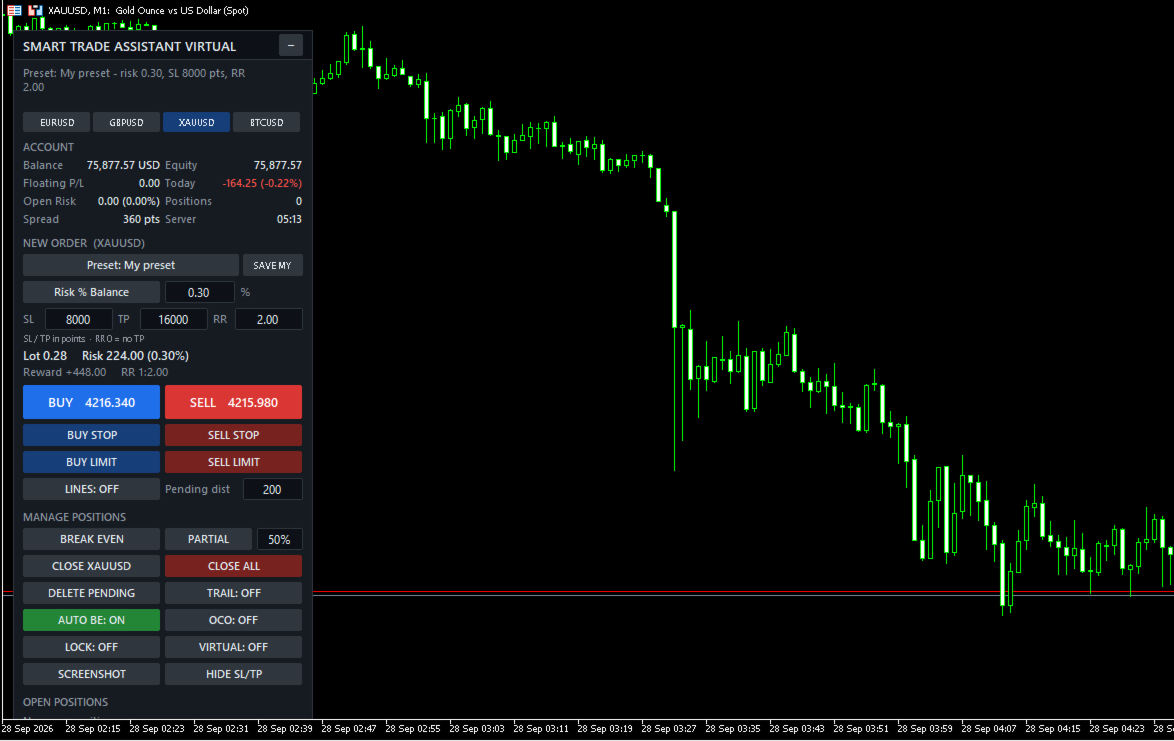
2. The panel

  • Top line: the result of your last action or an error message. If trading is blocked, the reason is shown in orange below it, for example "Blocked: Spread 45 > max 30 points".
  • Symbol buttons: switch the chart symbol (list set in the inputs).
  • Account: balance, equity, floating P/L, today's result, open risk (money lost if every SL is hit), number of positions, spread and server time. Can be hidden with Show account = false.
  • New order: preset, risk mode and value, SL / TP in points, Risk:Reward. Type a value and press Enter.
  • Calculation: lot, money at risk, reward and RR, updated live. Problems (SL too close, not enough margin…) are shown here.
  • Order buttons: BUY, SELL, BUY STOP, SELL STOP, BUY LIMIT, SELL LIMIT, LINES and pending distance.
  • Manage positions: BREAK EVEN, PARTIAL + %, CLOSE [symbol], CLOSE ALL, DELETE PENDING, switches TRAIL / AUTO BE / OCO / LOCK / VIRTUAL (green = ON), SCREENSHOT and HIDE SL/TP.
  • Open positions: each managed position with its profit and three buttons: BE, ½ and X. "(V)" = virtual SL/TP, "no SL" = position without stop loss.

If the bottom of the panel is cut off by a small chart window, set Show account = false or reduce Panel scale % (for example 85).

3. Risk and lot size

Click the risk mode button to switch between modes:

  • Risk % Balance / % Equity / % Free Margin: the % you lose if the SL is hit.
  • Risk Money: a fixed amount in the account currency.
  • Fixed Lot: the lot itself. The risk is still shown when there is an SL.

SL and TP are in points. 1 point is the smallest price step. EURUSD (5 digits): 300 points = 30 pips. XAUUSD with 2 digits: 300 points = 3.00 USD; with 3 digits: 3000 points = 3.00 USD. Check the digits of your symbol.

  • Change the SL: the lot is recalculated; if RR > 0 the TP becomes SL × RR.
  • Change the TP: RR = TP ÷ SL.
  • Change the RR: the TP is recalculated. RR 0 = no TP.

How the lot is calculated: money at risk = balance × % → the terminal calculates the loss of 1 lot at the SL (contract size, tick value and currency conversion included) → lot = money at risk ÷ loss per lot, rounded down to the broker's lot step. The real risk is never above your setting.

Example: balance 10,000, risk 1% = 100. XAUUSD SL 3.00 × 100 oz = 300 per lot → 100 ÷ 300 = 0.333 → 0.33 lot, real risk 99.00.

If the lot is below the broker minimum, the panel shows "Risk too small: minimum lot…". Enable Use minimum lot when the risk is too small to use the minimum lot instead.

4. Placing orders

  • BUY / SELL: at the current price, with the calculated lot and SL/TP.
  • BUY STOP = Ask + Pending dist, SELL STOP = Bid − Pending dist, BUY LIMIT = Ask − Pending dist, SELL LIMIT = Bid + Pending dist. SL/TP are measured from the pending price.
  • With Confirm before sending ON (default), a window shows symbol, lot, SL, TP, risk and reward before sending.

Before every order the panel checks: algo trading allowed, symbol trade mode, SL/TP on the correct side and beyond the broker's stops level (for market orders the spread is included), pending price on the correct side, margin, and the account protection rules. If the SL is too close, the panel tells you the minimum, for example "use SL >= 7150".

5. Drag and drop lines

Click LINES (or Shift+L). Three lines appear: ENTRY (dashed), SL and TP, each with a label.

  • Drag the SL: the lot is recalculated so the risk stays the same.
  • Drag the TP: RR and reward change, the lot does not.
  • Drag the ENTRY: SL and TP move with it (used for pending orders).
  • SL below ENTRY = BUY, SL above ENTRY = SELL.
  • BUY/SELL use the SL/TP lines; pending buttons use the ENTRY line. After the order is placed, the lines are removed.

6. Managing positions

What is "R"? R is the initial risk of a trade: the distance from the open price to its first SL. A trade with a 300-point SL is +1R when it is 300 points in profit. The panel remembers R for each position, even after a restart. R-based features need the position to have an SL when the panel first sees it.

  • BREAK EVEN: moves the SL to entry + offset (default 20 points) on every managed position that is far enough in profit. Positions in loss are not touched.
  • AUTO BE: does the same automatically when the profit reaches the trigger (default 1R).
  • PARTIAL + %: closes that % of every managed position (rounded down to the lot step). If the rest would be below the minimum lot, the whole position is closed.
  • Multi TP (inputs): TP1 / TP2 / TP3 at R levels each close a % of the original volume, for example 1R → 30%, 2R → 30%, and the SL can move to break-even after TP1.
  • CLOSE [symbol], CLOSE ALL, DELETE PENDING.
  • BE / ½ / X on a row: break-even, partial close or close for that single position.
  • OCO: when a pending order is filled, the other managed pending orders on the same symbol are deleted (also for virtual pending orders).

Trailing stop methods (new SL for a BUY; mirrored for a SELL):

  • Fixed distance: Bid − distance.
  • ATR: Bid − ATR(period) × multiplier.
  • Moving Average: MA − offset.
  • Fractal: latest confirmed lower fractal − offset.
  • Previous candle: low of the previous candle − offset.
  • High / Low: lowest low of the last N candles − offset.

Trailing starts when the profit reaches Start trailing (default 1R, 0 = at once). The SL only moves forward, by at least Minimum SL step, and respects the stops and freeze levels.

7. Virtual SL/TP and virtual pending orders

Switch VIRTUAL: ON (or Shift+V). New market orders are sent without SL/TP. The panel keeps the levels, draws them as dotted lines and closes the position when the price reaches one.

  • Drag a dotted line to move the level. A level that would close the position at once is refused.
  • Select a dotted line and press Delete to remove that level.
  • Break-even, trailing, profit lock and multi TP work with virtual levels.
  • HIDE SL/TP: moves the real SL/TP of open positions into virtual mode.
  • Safety SL (input): a real SL placed a number of points beyond the virtual SL.
  • Virtual levels are not limited by the broker's stops level.

With VIRTUAL ON the pending buttons create virtual pending orders (dash-dot line "V-BUY STOP …"). When the price reaches the line, the panel opens a market order with virtual SL/TP. Drag the line to move it (SL/TP move with it) or delete it to cancel. Virtual pending orders are saved to a file and come back after a restart.

Important: virtual levels work only while MT5 is running and connected. If the terminal, computer or VPS stops, the position is not closed at the virtual SL. Use the safety SL or a VPS.

8. Profit lock, presets and other tools

Profit lock (LOCK: ON): the SL moves in steps set in Steps, for example "1:0.2, 2:1, 3:2" = at +1R lock +0.2R, at +2R lock +1R, at +3R lock +2R. Unit: R, points or pips.

Presets (click the Preset button to cycle):

  • Inputs: values from the EA settings.
  • Scalping: risk 0.5%, SL 100, RR 1.5, auto BE, trailing.
  • Day Trading: risk 1%, SL 300, RR 2, auto BE.
  • Swing: risk 1%, SL 1000, RR 3, auto BE, ATR trailing, profit lock.
  • Gold: risk 0.5%, SL 500, RR 2, auto BE, ATR trailing.
  • Forex: risk 1%, SL 200, RR 2, auto BE.
  • Prop Firm: risk 0.25%, SL 300, RR 2, auto BE, profit lock, max risk per trade 0.5%, max total risk 1.5%, max 3 positions, daily loss 2%.
  • My preset: click SAVE MY to save the current panel values.

SL values are in points; adjust them to your symbol.

Screenshots: SCREENSHOT button, or automatic when a trade opens, closes or reaches break-even. Files: File → Open Data Folder → MQL5\Files\SmartTA\Screenshots.

Line alerts: draw a normal horizontal line; when the price crosses it you get an alert (and push/e-mail if enabled). Put a name in the line's Description to see it in the alert. Moving the line does not trigger an alert.

9. Account protection

All limits are in the inputs; 0 = off.

  • Trading hours / days (server time) and close all at a set time.
  • Close all when floating profit or loss reaches an amount or a % of the balance.
  • Daily profit target / daily loss limit (% of the balance at the start of the server day): block new trades until tomorrow, or close all and block. To unlock the same day, set the daily limits to 0.
  • Max open positions / max pending orders.
  • Max risk per trade and max total open risk (% of balance).
  • Max spread.

When something blocks trading, the order buttons turn grey and the reason is shown in orange. Management of open positions continues.

Prop firm example: risk 0.25% · max risk per trade 0.5% · max total risk 1.5% · max positions 3 · daily loss limit 2% → close all + block.

10. Which trades are managed

  • Symbols: current chart symbol only (default) or all symbols.
  • Trades: this EA only, manual trades only, this EA + manual trades (default), or all trades.
  • Magic number: set on every order from the panel. If another EA runs on the same account, keep Trades at "This EA + manual trades" or "This EA only".

11. Hotkeys and notifications

Hold Shift and press a key while the chart is active:

  • Shift+B / Shift+S: BUY / SELL
  • Shift+C: close positions on this symbol
  • Shift+E: break-even · Shift+P: partial close
  • Shift+T: trailing ON/OFF · Shift+V: virtual ON/OFF
  • Shift+D: delete pending · Shift+L: lines ON/OFF

Notifications (popup, sound, push, e-mail) are sent when an order opens, a position closes or partly closes, break-even is set, a TP level is reached or a protection rule triggers. Push needs your MetaQuotes ID in Tools → Options → Notifications.

12. Troubleshooting

  • "Algo Trading is disabled": click the Algo Trading button on the toolbar.
  • "Allow Algo Trading is off in the EA settings": F7 → Common → tick Allow Algo Trading.
  • "Risk too small: minimum lot…": increase the risk, reduce the SL, or enable Use minimum lot.
  • "SL too close … use SL >= X": set the SL to at least X points.
  • "Not enough free margin": the calculated lot is shown in orange; reduce the risk or widen the SL.
  • Buttons are grey: read the orange "Blocked: …" line.
  • Auto BE / multi TP / trailing does not start: the position needs an SL when the panel first sees it; check the switch and the Symbols / Trades inputs.
  • Trades on other symbols are not managed: set Symbols = All symbols, or attach the panel to those charts.

Always test on a demo account first. Trading involves risk.
Рекомендуем также
FiT Panel Pro
Thonglak Janyakorn
Overview FiT Panel Pro is a professional-grade trade management panel designed for MetaTrader 5 traders who demand speed, precision, and full control over their trades. Built with a modern dark-theme UI, it combines one-click execution with advanced risk management, visual SL/TP drag lines, automatic Fibonacci-based levels, and comprehensive order management — all in a single, compact panel. Whether you are a scalper, day trader, or swing trader, FiT Panel Pro gives you the edge you need to exec
FREE
Risk Manager – Account Protection Tool Risk Manager is an Expert Advisor for MetaTrader 5 designed to protect your trading account by applying automatic risk management rules. This tool does not open trades . It continuously monitors your account and enforces predefined limits to help prevent excessive losses and maintain disciplined trading. Risk Manager works in the background and can manage positions opened by manual trading or other Expert Advisors. It is particularly useful for: • Manual tr
FREE
Click Trading
Jawad Tauheed
5 (2)
One Click Trading – Auto TP SL Developer TraderLinkz Version 1.00 Category Utility What it does Adds missing TP and SL to your manual trades and pending orders Sets them once per ticket Lets you move TP and SL afterward Works on hedging and netting accounts Scans on every tick and reacts on trade events Why you want it You place faster entries You get consistent risk and exit targets You reduce fat finger errors You keep full manual control Quick start Attach the EA to any chart Keep TP and SL e
FREE
ABQ Visual Risk Sizer
Cristian David Castillo Arrieta
ABQ Visual Risk Sizer - Институциональный риск и исполнение сделок Категория: Утилиты / Управление рисками Ручной расчет лота стоит времени и денег. В современном трейдинге, особенно при работе с проп-компаниями (Prop Firms), ошибка в расчете лота или задержка в 5 секунд при открытии ордера может привести к нарушению правила дневной просадки (Daily Drawdown) или потере идеальной цены входа. ABQ Visual Risk Sizer — это инструмент институционального уровня, разработанный для окончательного решения
Capital Management EA – Smart Risk Management & Profit Optimization for MT5 Take control of your trading capital with smart, automated strategies — fully optimized for MetaTrader 5 (MT5). Looking to protect your capital and maximize profits through automated money management strategies ? Capital Management EA is the all-in-one Expert Advisor for MetaTrader 5 (MT5) that helps you trade smarter, not harder. Core Features: 5-in-1 Capital Management Strategies – Built-in versatility Gr
Quickly Helper is a tool to help us deal with multiple orders quickly. It has five function keys. They are: The "清空" button to quickly level out all orders;  Quick flat out the long position "平多单" button;  Quick flat out the short position "平空单" button;  The "买多" button to quickly buy at the current price;  The "买空" button to sell quickly at the current price;  It has seven display information items. They are: bp: the total income of multiple orders; (  profit of  buy/long position ) avgb: avera
Apex Point is a trend-following indicator for MetaTrader 5, transforming complex market data into signals for traders. It displays blue dots for uptrends, red dots for downtrends, and yellow crosses at potential reversals, helping users identify momentum shifts quickly. Key features include a confirmation system requiring multiple bars (default: 3) to validate changes, reducing false signals; dynamic ATR-based offsets for adaptive trailing, with instant ratcheting in the trend direction and smo
FREE
Imagine flying a real aircraft without ever stepping into a flight simulator. That's what trading is like. You have to simulate your strategy before you can take it to a live market. It is good if you can simulate things speedily before even stepping into any live market, or before coming up with an automated system.  People don't have all day to stare at a higher timeframe chart until the entry signal finally arrives. That's why I built this so that you can simulate your strategy with speed. Th
FREE
Painel de Trading Pro
Dedial Pereira Da Silva
TradePanel Pro - Manual Trading Panel with Grid, Trailing, and Targets  "Complete manual trading panel for MT5: grid, trailing stop, smart breakeven, daily targets and risk management in one click." TradePanel Pro is a professional manual trading panel for MetaTrader 5, built for traders who want speed, organization and automatic position protection — without juggling multiple tools or complex setups. Everything you need lives in a single panel: one-click buy/sell, point-based stops and targe
Prop Calculator Assistant  Хватит сливать счета из-за ошибок в расчетах. Доверьте управление рисками вашему Ассистенту. Prop Calculator Assistant — это профессиональная панель управления сделками, созданная специально для трейдеров, проходящих челленджи (FTMO, и др.) или уже работающих на оплаченных счетах. Забудьте о расчетах в уме и ручном перетаскивании ордеров — наш визуальный интерфейс обеспечит строгое соблюдение ваших правил. Это не автоматический торговый робот, который «угадывает» рынок
GDS RiskLab TradeDesk Free Manual Trading Desk and Risk-Control Utility for MetaTrader 5 GDS RiskLab TradeDesk is a free chart-based utility for traders who want a cleaner manual trading workspace in MetaTrader 5. It is designed as a simple execution-support and risk-control panel. The goal is to keep the trading process more organized: review the chart, plan the trade, keep risk visible and execute manually with more structure. This tool does not generate buy or sell signals. It does not predic
FREE
GOM Trade Manager
Wannapach Chinnaprapa
GOM Trade Manager helps you execute trades the way you want it. Works on all instruments Forex, Commodities, & Crypto. It helps you with lot calculations, spread addition and balance calculations so you can just focus on actual trading. For full automatic planned management, stackable triggers and spread widening protection >> check out GOM Trade Manager Pro . ------------------------------------------NOTABLE FEATURES------------------------------------------ You set everything based on bid
FREE
SmartRAL
Jemy Yeferson Dimu Ludji
SmartRAL (Smart Risk Auto-Lot EA) SmartRAL: The Ultimate Risk & Lot Management Expert Advisor (EA) SmartRAL is an essential tool for traders who demand precise risk management and automated position sizing in MetaTrader 5. Stop guessing your lot size and let the algorithm handle the calculations. This EA allows you to trade with confidence by guaranteeing your risk exposure on every single trade, while offering absolute flexibility in setting your Stop Loss (SL). Key Features & Benefits Guarante
Order Book, известный также как Market Book, глубина рынка, стакан цен, Level 2, - это предоставляемая брокером динамически обновляемая таблица с данными по текущим объемам торговых заявок на покупку и продажу для различных уровней цен вблизи Bid и Ask конкретного финансового инструмента. MetaTrader 5 предоставляет возможность трансляции стакана цен , но только в реальном времени. Данный индикатор OrderBook Cumulative Indicator позволяет аккумулировать данные стакана онлайн и визуализировать их
Это, пожалуй, самый полный индикатор автоматического распознавания гармонического ценообразования, который вы можете найти для платформы MetaTrader. Он обнаруживает 19 различных паттернов, воспринимает проекции Фибоначчи так же серьезно, как и вы, отображает зону потенциального разворота (PRZ) и находит подходящие уровни стоп-лосс и тейк-профит. [ Руководство по установке | Руководство по обновлению | Устранение неполадок | FAQ | Все продукты ] Он обнаруживает 19 различных гармонических ценов
Trade Copilot - полуавтоматическая панель управления рисками для золота (XAUUSD) и любого инструмента Trade Copilot - это полуавтоматическая торговая панель для трейдеров, которые хотят дисциплину советника, не теряя контроль над собственными входами в рынок. Вы выбираете направление и уровень - панель автоматически рассчитывает размер риска, устанавливает стоп-лосс, управляет тейк-профитом и защищает сделку. ОСНОВНЫЕ ФУНКЦИИ - Расчёт лота по риску - выберите Risk %, Risk $ или фиксированный
CosmiCLab SMC FIBO CosmiCLab SMC FIBO — это профессиональный торговый индикатор, основанный на концепциях Smart Money Concepts (SMC), анализе структуры рынка и уровнях Fibonacci. Индикатор автоматически определяет свинги рынка и строит уровни Fibonacci по последнему импульсному движению. Также индикатор определяет ключевые изменения структуры рынка: BOS — Break Of Structure CHOCH — Change Of Character Дополнительно отображаются сигнальные стрелки BUY / SELL при пробое структуры. Индикатор подход
Protect your funded accounts and personal capital with military-grade precision. This utility continuously monitors your floating equity against your daily starting balance. The moment your custom drawdown threshold is breached, it instantly liquidates all open positions, deletes pending orders, and completely unloads from the chart. Stop revenge trading and never fail a prop firm evaluation due to a margin breach again.
FREE
GDS Renko Pip ST Chart - Pip-Based Renko Chart Indicator for MetaTrader 5 GDS Renko Pip ST Chart is a pip-based Renko chart indicator for MetaTrader 5. It helps traders build and study cleaner Renko price movement using a practical fixed pip or point-based brick structure. This tool is designed as a Renko chart foundation for manual analysis. It does not predict the market, does not generate buy or sell signals and does not decide whether a trade should be opened. Renko EDGE EA Golden Delta | A
Account Monitor Pro — Ваш личный финансовый диспетчер Account Monitor Pro — это профессиональный информационный индикатор, разработанный для трейдеров, которые одновременно используют торговых роботов (EA) и ручную торговлю. Индикатор в реальном времени разделяет статистику по вашему Magic Number, позволяя четко видеть, кто приносит прибыль: алгоритм или вы. Основные возможности: Раздельный мониторинг: Мгновенное разделение позиций на "Роботизированные" (по Magic Number) и "Ручные". Мультиязычно
FREE
Price Magnet — Индикатор зон плотности цены и уровней притяжения Price Magnet — это профессиональный аналитический инструмент, который определяет ключевые уровни поддержки и сопротивления на основе статистической плотности распределения цены (Price Density). Индикатор анализирует заданный исторический период и находит ценовые значения, на которых рынок находился дольше всего. Эти зоны выступают в роли «магнитов» — они притягивают цену или служат фундаментом для разворота. В отличие от стандартны
Overview Harmonic Patterns MT5 is a technical analysis indicator designed for the MetaTrader 5 platform. It identifies and displays harmonic price patterns, such as Butterfly, Cypher, Crab, Bat, Shark, and Gartley, in both bullish and bearish directions. The indicator calculates key price levels, including entry, stop loss, and three take-profit levels, to assist traders in analyzing market movements. Visual elements and customizable alerts enhance usability on the chart. Features Detects six ha
Overview Mirror Signals EA is a powerful monitoring Expert Advisor that automatically sends real-time Telegram notifications for all important trade events on your MetaTrader 5 account. It is engineered specifically for signal providers , trade-copier operators , auditors , educators , and professional trading services that require immediate, detailed, and reliable reporting. Everything from entries, exits, SL/TP changes, comment changes, trailing stop activations, pending order modifications
Индикатор определяет и отображает на графике паттерн М. Гартли "Бабочка". Выделение паттерна производится по вершинам индикатора ZigZag (включен в ресурсы, не требует допопнительной установки). В момент распознавания паттерна выводится сообщение во всплывающем окне, отправляются оповещения на мобильное устройство и электронный почтовый ящик. Схема паттерна и параметры волн приведены на скриншоте. Параметры, заданные в индикаторе по умолчанию, являются демонстрационными для увеличения количества
EZ Trading Assistant is an MT5 Expert Advisor that adds an on-chart control panel for preparing, opening, and managing trades - including Auto Lot sizing, Break Even, Trailing Stop Loss, and Partial Closes - across up to 5 independent trades at once. It applies a concept of preparing your buy or sell order before executing to prevent accidentally pressing the wrong button and opening a trade in the wrong direction. 1. Getting Started Attach EZTradingAssistant to a chart for the symbol you want t
Bastion is a monitor-and-close-only risk manager for prop-firm traders. It watches your account against your firm's daily-loss and maximum-drawdown limits in real time and force-closes your open positions BEFORE you cross a line. It never opens a trade of its own, so it stays fully within the tools allowed by FTMO, FundedNext, The5ers, FTUK and FXIFY. Why traders fail challenges A large share of failed evaluations end on a single daily-loss breach: a moment of inattention, a news spike, one tra
Представляем NAS100 Auto SL и TP Maker для MT5: Никогда больше не пропустите установку StopLoss и TakeProfit с нашим NAS100 Auto SL и TP Maker, незаменимым помощником для трейдеров, работающих на рынке Nasdaq 100 в MetaTrader 5. Этот инструмент предназначен для тех, кто ищет беспроблемное решение для автоматизации управления уровнями StopLoss и TakeProfit. Ключевые особенности: Эффективная автоматизация: Автоматически отслеживает сделки Nasdaq 100 без StopLoss и/или TakeProfit. Динамически ре
FREE
SwiftEdge Scalper Профессиональный EA для тик-скальпинга с полным ручным контролем Скальпинг требует мгновенных решений, точного управления рисками и безупречного исполнения ордеров. Управление расчётами безубытка, трейлинг-стопами и несколькими позициями одновременно с наблюдением за ценой — сложная задача без правильных инструментов. SwiftEdge Scalper — ваш профессиональный торговый помощник, созданный для активных скальперов и дейтрейдеров. Исполняйте сделки одним кликом или горячей клавишей,
Pro Order Lot Size Calculator Pro Order Lot Size Calculator is a simple and practical tool designed to help you calculate the appropriate lot size based on the amount of risk you want to take . With this tool, you can easily calculate your trading risk directly from the panel according to the amount of money available in your account. Easy Risk & Lot Calculation The panel is designed to be very simple and easy to use. You can choose how you want to define your risk: Enter your desired risk amoun
DDKiller Pro
Njaratahiry Michael Randrianiaina
Stop Blowing Your Account. Once and For All. DDKiller Pro is the MT5 risk guardian that runs silently on your chart and shuts down trading the moment you hit a limit — whether you're grinding a prop firm challenge or managing your own CFD account. The problem every trader knows: You set your rules. You break them anyway. One revenge trade. One overleveraged position. One session that erases a month of gains. DDKiller Pro removes that decision from your hands entirely. What it does: The second yo
С этим продуктом покупают
Trade Assistant MT5
Evgeniy Kravchenko
4.43 (216)
Помогает рассчитать риск на сделку, простая установка нового ордера с помощью линий, управление ордерами с функциями частичного закрытия, 7 типов трейлинг-стопа и другие полезные функции. Дополнительные материалы и инструкции Инструкция по установке - Инструкция к приложению - Пробная версия приложения для демо счета Функция Линии   - отображает на графике линию открытия, стоп-лосс, тейк-профит. С помощью этой функции легко установить новый ордер и увидеть его дополнительные характеристики пе
Добро пожаловать в Trade Manager EA — лучший инструмент для управления рисками, предназначенный для упрощения, точности и эффективности торговли. Это не просто инструмент для размещения ордеров; это комплексное решение для удобного планирования торгов, управления позициями и усиленного контроля над рисками. Независимо от того, начинающий вы трейдер, опытный специалист или скальпер, нуждающийся в быстром исполнении, Trade Manager EA адаптируется к вашим потребностям и работает с любыми активами:
Telegram to MT5 Multi-Channel Copier   автоматически копирует торговые сигналы из ваших Telegram-каналов прямо в MetaTrader 5. Без ботов, без браузерных расширений, без ручного копирования. Сигнал приходит в Telegram — и советник открывает сделку в вашем терминале за считанные секунды. А перед тем как копировать канал, встроенный бэктестер покажет, что этот канал сделал бы на вашем счёте. Продукт состоит из двух компонентов: приложения для Windows, которое слушает ваши Telegram-каналы, и этого с
TradePanel MT5
Alfiya Fazylova
4.88 (169)
Trade Panel — это многофункциональный торговый помощник. Приложение содержит более 50 торговых функций для ручной торговли и позволяет автоматизировать большинство торговых операций. Инструкция к приложению + видео-инструкции: https://www.mql5.com/ru/blogs/post/771695 Пробная версия приложения для демо-счета: https://www.mql5.com/ru/blogs/post/750864 Как установить приложение: https://www.mql5.com/ru/blogs/post/750096 Как тестировать приложение в визуальном режиме: https://www.mql5.com/ru/blogs/
================================================================================ POC BREAKOUT - V20.72. Full Professional Grade Toolkit ================================================================================ POC Breakout is a full MetaTrader 5 trading dashboard for discretionary traders who want breakout signals, Point of Control (POC) context, volume profiles, order flow, market structure, news, alerts, and advanced trade planning in one professional workspace. Attached directly to you
Копируйте сигналы из Telegram по своим торговым правилам Telegram to MT5 Signal Trader автоматически копирует текстовые торговые сигналы из открытых и закрытых каналов и групп Telegram в MetaTrader 5. Управляйте несколькими поставщиками сигналов и счетами MT5 из одного приложения для компьютера, задавая индивидуальные параметры риска и торговли для каждого поставщика . Для копирования не нужны бот Telegram и настройка API. Просто войдите в свой аккаунт Telegram по номеру телефона или QR-коду и в
Farmed Hedge Yield Farming | All Markets (Manual - Hybrid - Semi/Automated EA) VERIFIED TRADING RESULTS - Farmed Hedge Yield Axi Copy:  https://www.mql5.com/en/signals/2356376 - Farmed Hedge Yield Exn Copy:   https://www.mql5.com/en/signals/2356404 - Farmed Hedge Yield V Copy:  https://www.mql5.com/en/signals/2357156 IMPORTANT NOTICE: FarmedHedge is a MANUAL-FOCUSED TRADING UTILITY ,not a fully automated EA. Results shown on this Signal include manual trades and overall strategic management.
Power Candles Strategy Scanner — самооптимизирующийся инструмент для поиска настроек по нескольким инструментам Power Candles Strategy Scanner использует тот же самооптимизирующийся движок, что и индикатор Power Candles — для всех символов в вашем Market Watch, одновременно. На одной панели отображается информация о том, какие символы в данный момент являются статистически торгуемыми, какая стратегия выигрывает на каждом из них, оптимальная пара Stop Loss / Take Profit, а также отправляется увед
Exp COPYLOT CLIENT for MT5
Vladislav Andruschenko
3.97 (35)
Профессиональный копировщик сделок для MetaTrader 5 Быстрый, профессиональный и надежный копировщик сделок для MetaTrader . COPYLOT позволяет копировать сделки Forex между терминалами MT4 и MT5 с поддержкой счетов Hedge и Netting . Версия COPYLOT для MT5 поддерживает: - MT5 Hedge → MT5 Hedge - MT5 Hedge → MT5 Netting - MT5 Netting → MT5 Hedge - MT5 Netting → MT5 Netting - MT4 → MT5 Hedge - MT4 → MT5 Netting Версия MT4 Полное описание + DEMO + PDF Как купить Как установить Как получить файлы жур
Signal TradingView to MT5 Pro Automator Мгновенное профессиональное исполнение между TradingView и MetaTrader 5 Автоматизируйте свою торговую стратегию с помощью самого надежного моста связи между алертами TradingView и реальным исполнением в MT5. Разработанный для трейдеров, которым требуются скорость, гибкость и безупречное управление рисками, этот советник (Expert Advisor) превращает любое сообщение с алертом в точный рыночный или лимитный ордер. ПРЕИМУЩЕСТВА И СИЛЬНЫЕ СТОРОНЫ Универсальный д
Premium Trade Manager - Торговая панель со встроенным коучем Premium Trade Manager помещает торгового коуча прямо в ваш график, а под ним работает полноценный движок исполнения. Настройте сделку так, как вы всегда это делаете, затем позвольте Max, вашему ИИ-наставнику по трейдингу, прочитать именно эту настройку с учётом вашего живого счёта и дать чёткое заключение до того, как вы входите: соответствует ли стоп дисциплинированному подходу, разумен ли риск, не выходит ли высоковолатильный релиз ч
MT5 to Telegram Signal Provider — это простой в использовании полностью настраиваемый инструмент, который позволяет отправлять определённые сигналы в чат, канал или группу Telegram, превращая вашу учётную запись в провайдера сигналов . В отличие от большинства конкурирующих продуктов, он не использует импорт DLL. [ Демо ]   [ Руководство ] [ Версия MT4 ] [ Версия для Discord ] [ Канал в Telegram ]  New: [ Telegram To MT5 ] Настройка Доступно пошаговое руководство пользователя . Никаких знаний A
HINN MAGIC ENTRY - лучший инструмент для входа и менеджмента позиций! ПРОСТО. БЫСТРО. ИНТУИТИВНО. МАКСИМАЛЬНО АВТОМАТИЗИРОВАНО. Выставляет ордера через выбор уровня на графике! полное описание    ::    demo-версия    ::   60-sec-video-description Основные функции: - Рыночные, лимитные и отложенные ордера -  Автоматический подсчет лоттажа  -  Автоматический учет спреда и комиссий -  Неограниченное количество промежуточных тейков для позиций - Перевод в безубыток и трейл стоп-лосса и тейк-проф
MT5 Trading Deck
Manuel Michiels
5 (2)
One button. One trade. MT5 Trading Deck is a hotkey trading panel for MetaTrader 5 that turns the platform into a keyboard-driven execution cockpit. Stop loss, take profit and lot size are pre-calculated for every key; the moment you press, a market order is live on the broker. A complete technical user manual is attached in the product Comments section. It documents every input parameter, the full hotkey map, the recommended Stream Deck XL layout, and the advanced workflows for Pre-Limit orders
EA Slipstream
Stephen J Martret
5 (1)
EA Slipstream — описание для MQL5 Маркета (русский) Ваш бэктест исполнил каждый ордер по той цене, которую запросил. Ваш счёт — нет. EA Slipstream измеряет, во что обходится исполнение вашему советнику, используя ваши собственные исполнения, проскальзывания и спреды, и показывает реальную результативность советника. В бэктесте каждая сделка рассчитывается по цене, которую назвал советник. В реальной торговле отложенный ордер исполняется по той цене, которая доступна в момент срабатывания, стоп з
Grid Manual MT5
Alfiya Fazylova
4.73 (22)
Grid Manual — это торговая панель для работы с сеточными стратегиями. Утилита универсальная, имеет гибкие настройки и понятный интерфейс. Работает с сеткой ордеров не только в сторону усреднения убытков, но и в сторону наращивания прибыли. Трейдеру не нужно создавать и сопровождать сетку ордеров, это сделает утилита. Достаточно открыть ордер и Grid manual автоматически создаст ему сетку ордеров и будет сопровождать его до самого закрытия. Полная инструкция и демо-версия здесь . Основные особенно
EA Overfitter
Stephen J Martret
5 (1)
Бэктест выглядит отлично. Но будет ли советник зарабатывать завтра, через неделю, через месяц? EA Overfitter прогоняет вашего советника по 100 историям цены, которых он никогда не видел. Одна оценка показывает, реально ли преимущество. Бэктест показывает, что советник сделал на одной истории цены — на той, которая случайно произошла. Из него невозможно понять, какая часть результата была заслугой стратегии, а какая — конкретного пути цены. EA Overfitter отвечает на этот вопрос. Он строит до 10
Trade Manager DaneTrades
Levi Dane Benjamin
4.23 (30)
Trade Manager, который поможет вам быстро входить и выходить из сделок, автоматически рассчитывая риск. Включает функции, которые помогут предотвратить чрезмерную торговлю, торговлю из мести и эмоциональную торговлю. Сделками можно управлять автоматически, а показатели эффективности счета можно визуализировать в виде графика. Эти функции делают эту панель идеальной для всех трейдеров, занимающихся ручной торговлей, и помогают улучшить платформу MetaTrader 5. Многоязычная поддержка. Версия для МТ
Trade Dashboard MT5
Fatemeh Ameri
4.94 (134)
Trade Dashboard simplifies how you open, manage, and control your trades, with built-in lot size calculation. It allows you to execute trades, manage risk, and control positions directly on the chart, with tools such as partial close, breakeven, and trailing stop. Designed to reduce manual work and help you stay focused on your trading decisions. A demo version is available for testing. Detailed explanations of features are provided within the MQL5 platform. Installation instructions are include
Представляем последнюю версию Dynamic Fibonacci Grid Dashboard для MT5. Теперь с множеством новых функций, этот обновлённый дашборд полностью меняет ваш торговый опыт и позволяет увидеть рынок и ценовое движение с совершенно иной перспективы. Откройте новые возможности благодаря одновременному анализу нескольких таймфреймов и множества инструментов. Удобный интерфейс для ручной торговли и управления позициями, а также расширенные возможности применения предопределённых автоматических стратегий.
Welcome to ENTRY IN THE ZONE AND SMC MULTI TIMEFRAME Entry In The Zone and SMC Multi Timeframe is a real-time market analysis tool based on Smart Money Concepts (SMC), designed to analyze market structure, price direction, and key trading zones. It supports both Single-Timeframe Analysis and Multi-Timeframe Analysis, providing a clearer view of the overall market structure across multiple timeframes, with real-time BUY / SELL signals that do not repaint. It is designed to help filter trading opp
The product will copy all telegram signal to MT5 ( which you are member) , also it can work as remote copier.  Easy to set up, copy order instant, can work with almost signal formats, image signal,  s upport to translate other language to English Work with all type of channel or group, even channel have "Restrict Saving Content", work with  multi channel, multi MT5 Work as remote copier: with signal have ticket number, it will copy exactly via ticket number. Support to backtest signal. How to s
Anchor Trade Manager
Kalinskie Gilliam
5 (9)
Your EAs cannot see each other, but Anchor can. Anchor gives you one place to coordinate your EAs, manage risk, and decide when trading is allowed. It works alongside the trading bots you already use without any changes to them. The Problem One EA opens a trade. Then another starts trading. The next thing you know, you wake up to multiple grids built across your account. Each EA may be doing exactly what it was designed to do, but together they can place far more risk on your account than you in
Footprint Chart Pro — Professional OrderFlow EA for MetaTrader 5 Version 6.34 | Professional tool for real traders | Institutional-Grade Visualization DEMO USERS - PLEASE SELECT EVERY TICK / REAL TICK WHEN TESTING AND YOU HAVE DOWNLOADED HISTORICAL DATA. IF YOU SEE A WAITING SCREEN AND IT IS NOT DOWNLOADING, IT MEANS YOU HAVE LOW HISTORICAL DATA. TRY 1 MIN AND 5 MIN FIRST ON 1 DAY DATA. ONE DAY DATA SHOULD BE THE NEWEST AND MOST CURRENT DATE. PLEASE WAIT UNTIL THE MARKET HAS ROLLED OVER PERIOD.
YuClusters
Yury Kulikov
4.93 (43)
Внимание: Ознакомиться с работой программы можно с помощью бесплатной версии  YuClusters DEMO . YuClusters это профессиональная система анализа рынка. Для трейдера открываются уникальные возможности анализа потока ордеров, объемов торговли, движения цены используя различные графики, профили, индикаторы, графические объекты. YuClusters оперирует данными на основе ленты сделок или тиковой информации, в зависимости от того, что доступно в котировках финансового инструмента.  YuClusters позволяет с
Торговая панель для MetaTrader 5 — профессиональная торговля в один клик с графика и клавиатуры Мощная торговая панель для активного ручного трейдинга, которая позволяет открывать, сопровождать и закрывать сделки значительно быстрее и удобнее, чем стандартными средствами MetaTrader. Панель создана для тех, кто хочет получить полный контроль над позициями, ордерами, прибылью и торговыми сценариями в одном рабочем пространстве. Это не просто вспомогательная утилита. Это полноценный торговый интер
FUTURES ORDERFLOW FOOTPRINT CHART Professional OrderFlow EA for MetaTrader 5 Version 1.01| Professional tool for real traders | Institutional-Grade Visualization STRATEGY TESTER USERS - PLEASE SELECT EVERY REAL TICK WHEN TESTING AND YOU HAVE DOWNLOADED HISTORICAL DATA. IF YOU SEE A WAITING SCREEN AND IT IS NOT DOWNLOADING, IT MEANS YOU HAVE LOW HISTORICAL DATA. TRY 1 MIN AND 5 MIN FIRST ON 1 DAY DATA. ONE DAY DATA SHOULD BE THE NEWEST AND MOST CURRENT DATE. PLEASE WAIT UNTIL THE MARKET HAS ROL
Timeless Charts
Samuel Manoel De Souza
5 (8)
Timeless Charts is an all-in-one trading utility for professional traders. It combines custom chart types such as Seconds Charts and Renko with advanced order flow analysis using Footprints , Clusters , Volume Profiles , VWAP studies, and anchored analysis tools for deeper market insight. Trading and position management are handled directly from the chart through an integrated trade management panel , while Market Replay and Virtual Accounts provide environments for practicing trading skills and
Trade Copier Ultimate
Janitha Sandaruwan Amaradasa Wickramasingha Arachchilage
5 (5)
Trade Copier Ultimate - Telegram to MT5 Signal Copier Trade Copier Ultimate automatically copies Telegram trading signals into MetaTrader 5. The EA can read signal messages, detect the symbol, order type, entry price, Stop Loss, Take Profit levels and selected update commands, then execute or manage the trade in MT5 using your lot and risk settings. It is more than a basic Telegram to MT5 copier. TCU also supports Bot API and user-account Bridge workflows, Discord signal routing, local MT5 to MT
The Expert Advisor will help you forward all alert from  MetaTrader 5 to Telegram channel/ group.  All alert must save to folder <Data folder>MQL5\Files\Alerts\ , text file with format *.txt and screenshot with format *.gif or *.png. Parameters: - Telegram Bot Token: - create bot on Telegram and get token. - Telegram Chat ID:  - input your Telegram user ID,  group / channel ID - Forward Alert: - default true, to forward alert. - Send message as caption of Screenshot: - default false, set true t
Другие продукты этого автора
Smart Reversal Arrows Non-repainting Buy/Sell reversal signals with built-in alerts. Smart Reversal Arrows is a clean, lightweight MT5 indicator that plots simple Buy/Sell arrows directly on your chart, warning you when price shows real signs of a reversal or a trend pullback. No clutter, no extra lines on the chart - just clear arrows and instant alerts when it matters. Timeframe This indicator works on all timeframes, but signal frequency depends on the timeframe you choose. Lower timeframes (
Smart Entry MT4
Thanat Thitithammaphong
Smart Entry MT4 Clean & High-Probability Trading Signal Tool Overview Smart Entry is a professional trading signal tool designed to help traders identify high-quality market entries with clarity and confidence. It removes guesswork from trading by providing clear buy and sell signals directly on the chart, allowing traders to focus on execution rather than analysis confusion. Built for traders who prefer a simple, clean, and rule-based approach to the market. Trading Signals The tool p
Confluence Arrow Pro Trade only when Trend, Momentum, Volume and Volatility all agree. Confluence Arrow Pro is a non-repainting Buy/Sell arrow indicator that filters out weak, low-probability setups. Instead of relying on a single indicator, it waits until four independent market forces line up before printing a signal – helping you avoid false signals from choppy, low-quality price action. How It Works A signal only appears when all of the following conditions are true at the same time: Trend –
Smart Entry MT5
Thanat Thitithammaphong
Smart Entry — Precision Entry Signal Indicator Stop guessing your entries. Get clear, filtered Buy/Sell arrows only when it matters. What It Does Smart Entry is a MetaTrader 5 indicator that spots high-probability trend reversal points and marks them with simple green (Buy) and red (Sell) arrows directly on your chart. Every signal passes through a 3-layer filter before it appears: Reversal Detection — identifies the moment short-term price direction shifts Trend Confirmation — only signals that
Hi Trader
Thanat Thitithammaphong
Hi Trade EA is an EA facilitating hand trading. Hi Trader EA is a trading assistant EA, not an automatic order placing EA. Features of EAs Fix Lot will open positions based on the lot size specified by the user. Risk will calculate the lot size based on the percentage of the account balance, considering the distance from the open price to the Stop Loss. Therefore, a Stop Loss value greater than zero is required. TS = Trailing stop with separate stop loss, individual orders. AVR TS = Trailing sto
Fibo pending EA
Thanat Thitithammaphong
Fibo Pending EA turns any Fibonacci Retracement you draw on the chart into a fully managed grid of pending orders — with one click. Draw your Fibo, set the levels you want to trade, and press Place Pending . The EA reads the retracement directly from the chart, calculates Buy Limit or Sell Limit prices for each level you've enabled, and sends the orders. Stop Loss and Take Profit are then applied automatically based on the Fibo levels you choose — no manual order entry, no manual SL/TP dragging.
HiTrader MT5
Thanat Thitithammaphong
Hi Trade EA is an EA facilitating hand trading. Hi Trader EA is a trading assistant EA, not an automatic order placing EA. If you want to Backtest the functionality, please download the MT4 version for testing. Features of EAs Fix Lot will open positions based on the lot size specified by the user. Risk will calculate the lot size based on the percentage of the account balance, considering the distance from the open price to the Stop Loss. Therefore, a Stop Loss value greater than zero is requir
Smart Grid Multi-Symbol EA Fully Automated Trading with Dynamic Lot Scaling & Risk Control Overview Smart Grid Multi-Symbol EA is a powerful automated trading system designed to trade multiple currency pairs and gold simultaneously using a dynamic grid strategy with intelligent lot scaling . Built for traders who want: Consistent execution Hands-free trading Flexible risk control Portfolio diversification ️ Core Strategy This EA uses a Grid + Position Scaling system : Opens positions base
VBC Indicator
Thanat Thitithammaphong
VBC Indicator — Volatile Breakout Confirmation for Gold (XAU/USD) Version: 1.8 Stop guessing reversals. Let strong-candle exhaustion tell you where Gold is likely to turn. VBC Indicator is a price-action tool for MetaTrader 5 , built around Gold's sharp, fast, exhaustion-then-reversal price behavior. It automatically detects exhausted directional moves — runs of strong, same-color candles that have pushed far enough, fast enough — and marks the point where a reversal setup is forming. Alongside
Reversal Wick Zones Non-repainting reversal zones built from confirmed Engulfing candles. Reversal Wick Zones is a clean, lightweight MT5 indicator that highlights potential reaction areas on your chart, based on Engulfing candlestick patterns that occur at market swing (turning) points. How it works The indicator scans price for swing highs and swing lows — the turning points in price. Around each swing point, it looks for an Engulfing candle pair — a candle whose body fully engulfs the previou
Gold Box Breakout
Thanat Thitithammaphong
Gold Box Breakout is an automated H1/M15 breakout strategy that now combines TWO independent breakout conditions in a single EA. Each condition builds its own daily "box" from H1 candle data and, when an M15 candle closes beyond its own box, opens its own trade. Each condition takes at most 1 trade per day , so the EA can open up to 2 trades per day in total — either, both, or neither may fire on a given day, entirely independently of each other. Key Features Two independent breakout strategies
Apex Reversal Signals — Non-Repainting Arrow Indicator for High-Probability Reversal Zones Apex Reversal Signals scans price action for the exact moments where the market tests a key level, gets rejected, and confirms that rejection with a genuine shift in short-term structure before it ever plots an arrow. The result is a clean, uncluttered chart with signals that only appear when multiple independent conditions line up — not on every minor wiggle in price. How It Works Key Zone Mapping — autom
Фильтр:
Нет отзывов
Ответ на отзыв