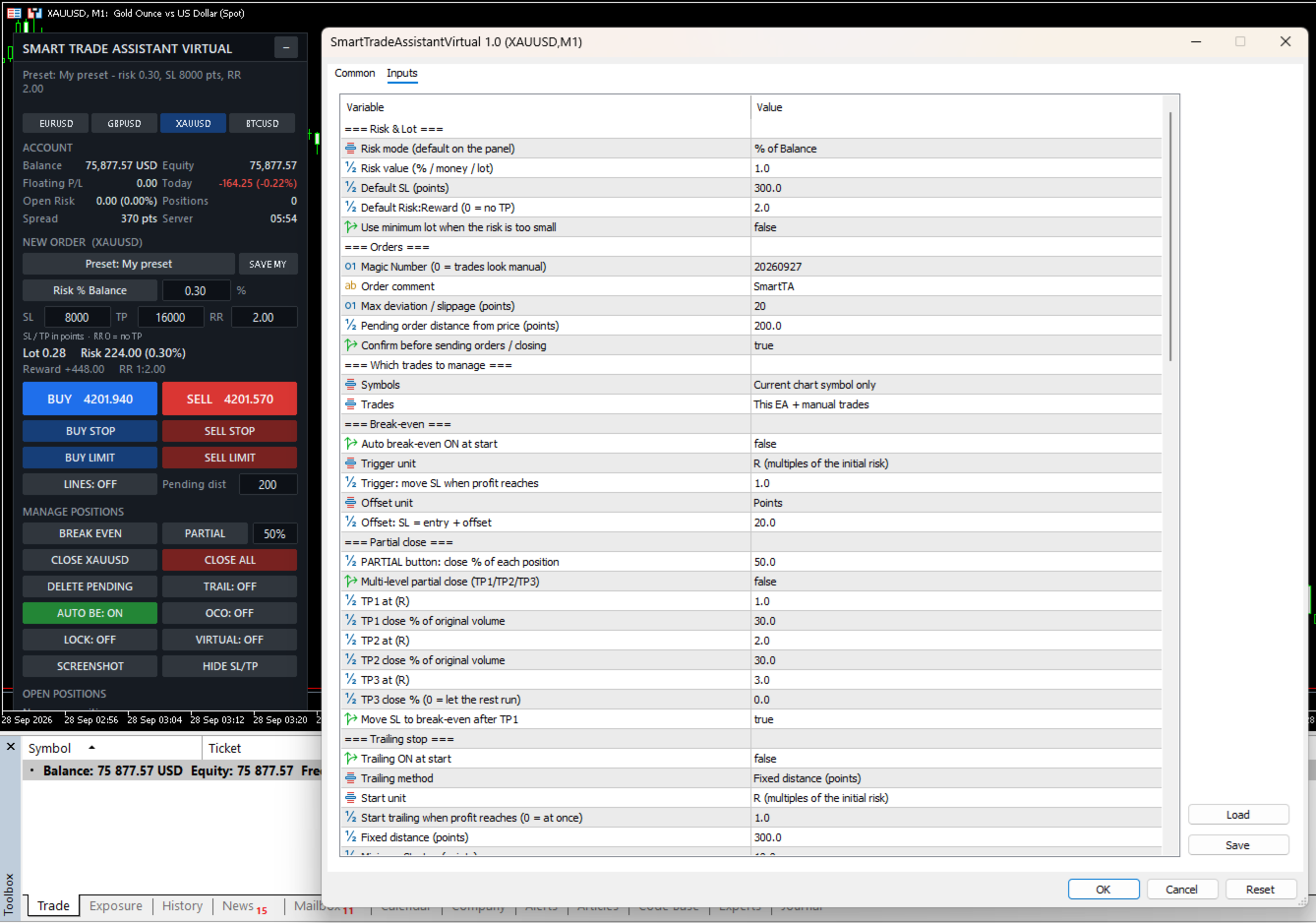
Smart Trade Assistant Virtual

Smart Trade Assistant Virtual is a trading panel for manual traders. It calculates the lot size from your risk, places market and pending orders with one click, and manages your open trades: break-even, partial close, trailing stop, profit lock and OCO. SL/TP and pending orders can also be virtual, which means they are kept by the panel and hidden from the broker.

The panel never opens a trade by itself. You decide when to trade, and the panel handles the parts that are easy to get wrong.

The full user guide is at the end of this description.

Risk and lot size

  • Lot size calculated from your risk. Modes: % of balance, % of equity, % of free margin, fixed money, or fixed lot.
  • Works on any symbol: Forex, gold, indices, crypto, stocks and CFDs. The value of the SL is calculated by the terminal itself, including contract size and currency conversion.
  • The lot is always rounded down, so the real risk never exceeds your setting.
  • Live display of lot, money at risk, reward and Risk:Reward before you send the order.
  • Clear messages when the lot is below the broker minimum, the SL is too close (stops level + spread), or margin is not enough.

Placing orders

  • BUY / SELL and BUY STOP, SELL STOP, BUY LIMIT, SELL LIMIT.
  • Drag and drop ENTRY, SL and TP lines on the chart. The lot and RR update while you drag.
  • Optional confirmation window before every order.
  • Checks the stops level, freeze level, trade mode, filling mode and margin before sending.

Trade management

  • Break-even with one click, or automatic at a trigger (points, pips or R).
  • Partial close with one click, and multi-level partial close (TP1 / TP2 / TP3) with optional break-even after TP1.
  • 6 trailing stop methods: fixed distance, ATR, moving average, fractal, previous candle, high/low of N candles.
  • Profit lock: the SL moves in steps, for example at +1R lock +0.2R, at +2R lock +1R.
  • BE, ½ and X buttons on each open position, plus Close symbol, Close all and Delete pending.
  • OCO: when one pending order is filled, the others on the same symbol are deleted.

Virtual SL/TP and virtual pending orders

  • SL and TP are not sent to the broker. They are shown as dotted lines on the chart, and the position is closed when the price reaches them.
  • Drag the lines to move the levels. Delete a line to remove that level.
  • HIDE SL/TP button moves the SL/TP of open positions into virtual mode.
  • Virtual pending orders are saved to a file and survive a restart of the terminal.
  • Optional real "safety SL" placed further away, in case the terminal stops.

Account protection

  • Trading hours and trading days (broker server time), and close all at a set time.
  • Daily profit target and daily loss limit: block new trades until tomorrow, or close all and block.
  • Close all when floating profit or loss reaches an amount or a % of the balance.
  • Maximum open positions, maximum pending orders, maximum risk per trade, maximum total open risk.
  • Maximum spread filter.
  • When trading is blocked, the order buttons turn grey and the reason is shown on the panel.

More tools

  • Account dashboard: balance, equity, floating P/L, today's result, open risk if every SL is hit, spread, server time.
  • Presets: Scalping, Day Trading, Swing, Gold, Forex, Prop Firm, and your own saved preset.
  • Symbol switch buttons.
  • Screenshots by button, or automatically when a trade opens, closes or reaches break-even.
  • Alerts when the price crosses your own horizontal lines.
  • The panel remembers your values and switches after a restart of the terminal.
  • Hotkeys (Shift + key) and popup, sound, push and e-mail notifications.

Which trades are managed

  • Current chart symbol only, or all symbols.
  • This EA only, manual trades only, this EA + manual trades, or all trades.

Main inputs

  • Risk mode / value, default SL, default RR – starting values of the panel.
  • Magic number, order comment, max deviation, pending distance, confirmation.
  • Symbols / Trades – which trades the panel manages.
  • Break-even – automatic BE, trigger and offset (points, pips or R).
  • Partial close – PARTIAL %, multi-level TP1/TP2/TP3 with R levels and %.
  • Trailing stop – method, start, distance, step, timeframe and indicator settings.
  • Profit lock – unit and steps.
  • Virtual – virtual mode at start and safety SL.
  • Trading time and Account protection – all limits (0 = off).
  • Screenshots, line alerts, notifications.
  • Panel – position, scale, width, sections to show, symbol list, hotkeys, line colors, remember panel values.

Important

  • Automatic management and virtual SL/TP work only while MetaTrader 5 is running and connected. Use a VPS, or the safety SL, if you use virtual levels.
  • Supports hedging and netting accounts.
  • Test the panel on a demo account first. Trading involves risk.

User guide

1. Installation

  1. Buy or rent the product in the Market tab of MetaTrader 5 (or on the MQL5 website), then click Install. It appears in the Navigator under Expert Advisors → Market.
  2. Drag Smart Trade Assistant Virtual onto the chart of the symbol you want to trade.
  3. On the Common tab, tick Allow Algo Trading. Adjust the Inputs if needed, then click OK.
  4. Make sure the Algo Trading button on the MT5 toolbar is green. The panel appears in the top-left corner of the chart.

Tip: the panel remembers your values and switches after a restart of MT5. If you change a value in the Inputs window, the new input value is used.

Strategy Tester: you can try the panel in visual mode of the Strategy Tester. The confirmation window is skipped in the tester.

2. The panel

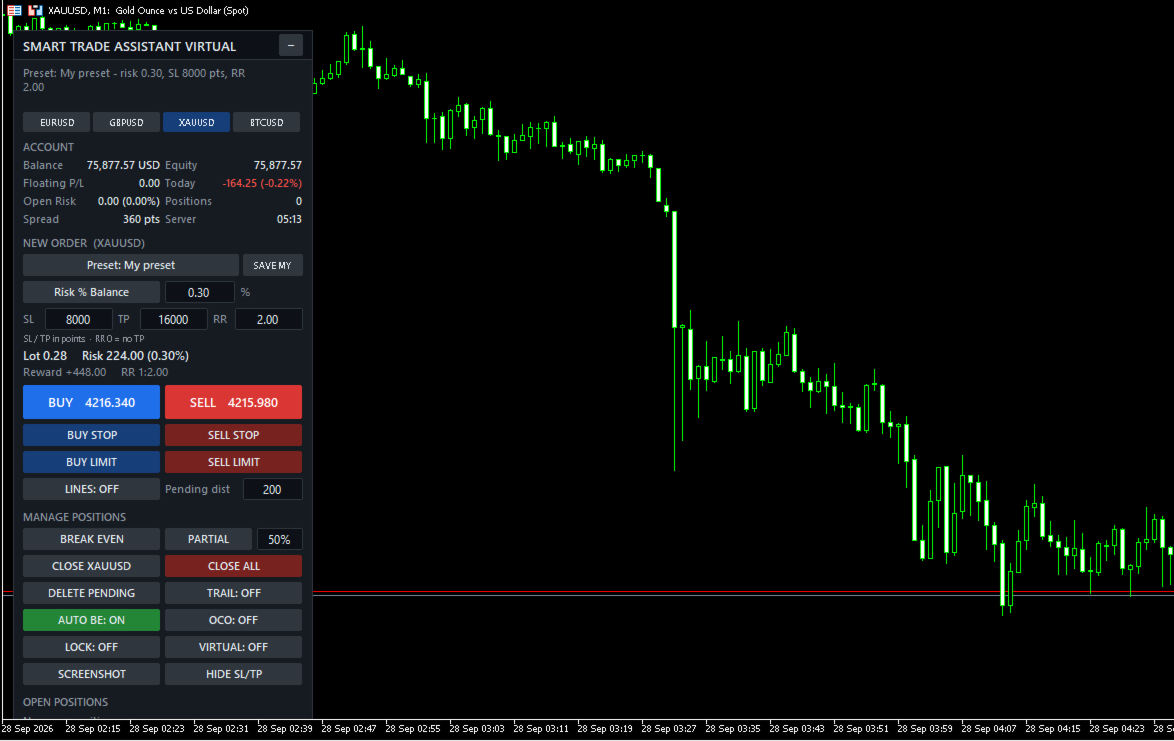
  • Top line: the result of your last action or an error message. If trading is blocked, the reason is shown in orange below it, for example "Blocked: Spread 45 > max 30 points".
  • Symbol buttons: switch the chart symbol (list set in the inputs).
  • Account: balance, equity, floating P/L, today's result, open risk (money lost if every SL is hit), number of positions, spread and server time. Can be hidden with Show account = false.
  • New order: preset, risk mode and value, SL / TP in points, Risk:Reward. Type a value and press Enter.
  • Calculation: lot, money at risk, reward and RR, updated live. Problems (SL too close, not enough margin…) are shown here.
  • Order buttons: BUY, SELL, BUY STOP, SELL STOP, BUY LIMIT, SELL LIMIT, LINES and pending distance.
  • Manage positions: BREAK EVEN, PARTIAL + %, CLOSE [symbol], CLOSE ALL, DELETE PENDING, switches TRAIL / AUTO BE / OCO / LOCK / VIRTUAL (green = ON), SCREENSHOT and HIDE SL/TP.
  • Open positions: each managed position with its profit and three buttons: BE, ½ and X. "(V)" = virtual SL/TP, "no SL" = position without stop loss.

If the bottom of the panel is cut off by a small chart window, set Show account = false or reduce Panel scale % (for example 85).

3. Risk and lot size

Click the risk mode button to switch between modes:

  • Risk % Balance / % Equity / % Free Margin: the % you lose if the SL is hit.
  • Risk Money: a fixed amount in the account currency.
  • Fixed Lot: the lot itself. The risk is still shown when there is an SL.

SL and TP are in points. 1 point is the smallest price step. EURUSD (5 digits): 300 points = 30 pips. XAUUSD with 2 digits: 300 points = 3.00 USD; with 3 digits: 3000 points = 3.00 USD. Check the digits of your symbol.

  • Change the SL: the lot is recalculated; if RR > 0 the TP becomes SL × RR.
  • Change the TP: RR = TP ÷ SL.
  • Change the RR: the TP is recalculated. RR 0 = no TP.

How the lot is calculated: money at risk = balance × % → the terminal calculates the loss of 1 lot at the SL (contract size, tick value and currency conversion included) → lot = money at risk ÷ loss per lot, rounded down to the broker's lot step. The real risk is never above your setting.

Example: balance 10,000, risk 1% = 100. XAUUSD SL 3.00 × 100 oz = 300 per lot → 100 ÷ 300 = 0.333 → 0.33 lot, real risk 99.00.

If the lot is below the broker minimum, the panel shows "Risk too small: minimum lot…". Enable Use minimum lot when the risk is too small to use the minimum lot instead.

4. Placing orders

  • BUY / SELL: at the current price, with the calculated lot and SL/TP.
  • BUY STOP = Ask + Pending dist, SELL STOP = Bid − Pending dist, BUY LIMIT = Ask − Pending dist, SELL LIMIT = Bid + Pending dist. SL/TP are measured from the pending price.
  • With Confirm before sending ON (default), a window shows symbol, lot, SL, TP, risk and reward before sending.

Before every order the panel checks: algo trading allowed, symbol trade mode, SL/TP on the correct side and beyond the broker's stops level (for market orders the spread is included), pending price on the correct side, margin, and the account protection rules. If the SL is too close, the panel tells you the minimum, for example "use SL >= 7150".

5. Drag and drop lines

Click LINES (or Shift+L). Three lines appear: ENTRY (dashed), SL and TP, each with a label.

  • Drag the SL: the lot is recalculated so the risk stays the same.
  • Drag the TP: RR and reward change, the lot does not.
  • Drag the ENTRY: SL and TP move with it (used for pending orders).
  • SL below ENTRY = BUY, SL above ENTRY = SELL.
  • BUY/SELL use the SL/TP lines; pending buttons use the ENTRY line. After the order is placed, the lines are removed.

6. Managing positions

What is "R"? R is the initial risk of a trade: the distance from the open price to its first SL. A trade with a 300-point SL is +1R when it is 300 points in profit. The panel remembers R for each position, even after a restart. R-based features need the position to have an SL when the panel first sees it.

  • BREAK EVEN: moves the SL to entry + offset (default 20 points) on every managed position that is far enough in profit. Positions in loss are not touched.
  • AUTO BE: does the same automatically when the profit reaches the trigger (default 1R).
  • PARTIAL + %: closes that % of every managed position (rounded down to the lot step). If the rest would be below the minimum lot, the whole position is closed.
  • Multi TP (inputs): TP1 / TP2 / TP3 at R levels each close a % of the original volume, for example 1R → 30%, 2R → 30%, and the SL can move to break-even after TP1.
  • CLOSE [symbol], CLOSE ALL, DELETE PENDING.
  • BE / ½ / X on a row: break-even, partial close or close for that single position.
  • OCO: when a pending order is filled, the other managed pending orders on the same symbol are deleted (also for virtual pending orders).

Trailing stop methods (new SL for a BUY; mirrored for a SELL):

  • Fixed distance: Bid − distance.
  • ATR: Bid − ATR(period) × multiplier.
  • Moving Average: MA − offset.
  • Fractal: latest confirmed lower fractal − offset.
  • Previous candle: low of the previous candle − offset.
  • High / Low: lowest low of the last N candles − offset.

Trailing starts when the profit reaches Start trailing (default 1R, 0 = at once). The SL only moves forward, by at least Minimum SL step, and respects the stops and freeze levels.

7. Virtual SL/TP and virtual pending orders

Switch VIRTUAL: ON (or Shift+V). New market orders are sent without SL/TP. The panel keeps the levels, draws them as dotted lines and closes the position when the price reaches one.

  • Drag a dotted line to move the level. A level that would close the position at once is refused.
  • Select a dotted line and press Delete to remove that level.
  • Break-even, trailing, profit lock and multi TP work with virtual levels.
  • HIDE SL/TP: moves the real SL/TP of open positions into virtual mode.
  • Safety SL (input): a real SL placed a number of points beyond the virtual SL.
  • Virtual levels are not limited by the broker's stops level.

With VIRTUAL ON the pending buttons create virtual pending orders (dash-dot line "V-BUY STOP …"). When the price reaches the line, the panel opens a market order with virtual SL/TP. Drag the line to move it (SL/TP move with it) or delete it to cancel. Virtual pending orders are saved to a file and come back after a restart.

Important: virtual levels work only while MT5 is running and connected. If the terminal, computer or VPS stops, the position is not closed at the virtual SL. Use the safety SL or a VPS.

8. Profit lock, presets and other tools

Profit lock (LOCK: ON): the SL moves in steps set in Steps, for example "1:0.2, 2:1, 3:2" = at +1R lock +0.2R, at +2R lock +1R, at +3R lock +2R. Unit: R, points or pips.

Presets (click the Preset button to cycle):

  • Inputs: values from the EA settings.
  • Scalping: risk 0.5%, SL 100, RR 1.5, auto BE, trailing.
  • Day Trading: risk 1%, SL 300, RR 2, auto BE.
  • Swing: risk 1%, SL 1000, RR 3, auto BE, ATR trailing, profit lock.
  • Gold: risk 0.5%, SL 500, RR 2, auto BE, ATR trailing.
  • Forex: risk 1%, SL 200, RR 2, auto BE.
  • Prop Firm: risk 0.25%, SL 300, RR 2, auto BE, profit lock, max risk per trade 0.5%, max total risk 1.5%, max 3 positions, daily loss 2%.
  • My preset: click SAVE MY to save the current panel values.

SL values are in points; adjust them to your symbol.

Screenshots: SCREENSHOT button, or automatic when a trade opens, closes or reaches break-even. Files: File → Open Data Folder → MQL5\Files\SmartTA\Screenshots.

Line alerts: draw a normal horizontal line; when the price crosses it you get an alert (and push/e-mail if enabled). Put a name in the line's Description to see it in the alert. Moving the line does not trigger an alert.

9. Account protection

All limits are in the inputs; 0 = off.

  • Trading hours / days (server time) and close all at a set time.
  • Close all when floating profit or loss reaches an amount or a % of the balance.
  • Daily profit target / daily loss limit (% of the balance at the start of the server day): block new trades until tomorrow, or close all and block. To unlock the same day, set the daily limits to 0.
  • Max open positions / max pending orders.
  • Max risk per trade and max total open risk (% of balance).
  • Max spread.

When something blocks trading, the order buttons turn grey and the reason is shown in orange. Management of open positions continues.

Prop firm example: risk 0.25% · max risk per trade 0.5% · max total risk 1.5% · max positions 3 · daily loss limit 2% → close all + block.

10. Which trades are managed

  • Symbols: current chart symbol only (default) or all symbols.
  • Trades: this EA only, manual trades only, this EA + manual trades (default), or all trades.
  • Magic number: set on every order from the panel. If another EA runs on the same account, keep Trades at "This EA + manual trades" or "This EA only".

11. Hotkeys and notifications

Hold Shift and press a key while the chart is active:

  • Shift+B / Shift+S: BUY / SELL
  • Shift+C: close positions on this symbol
  • Shift+E: break-even · Shift+P: partial close
  • Shift+T: trailing ON/OFF · Shift+V: virtual ON/OFF
  • Shift+D: delete pending · Shift+L: lines ON/OFF

Notifications (popup, sound, push, e-mail) are sent when an order opens, a position closes or partly closes, break-even is set, a TP level is reached or a protection rule triggers. Push needs your MetaQuotes ID in Tools → Options → Notifications.

12. Troubleshooting

  • "Algo Trading is disabled": click the Algo Trading button on the toolbar.
  • "Allow Algo Trading is off in the EA settings": F7 → Common → tick Allow Algo Trading.
  • "Risk too small: minimum lot…": increase the risk, reduce the SL, or enable Use minimum lot.
  • "SL too close … use SL >= X": set the SL to at least X points.
  • "Not enough free margin": the calculated lot is shown in orange; reduce the risk or widen the SL.
  • Buttons are grey: read the orange "Blocked: …" line.
  • Auto BE / multi TP / trailing does not start: the position needs an SL when the panel first sees it; check the switch and the Symbols / Trades inputs.
  • Trades on other symbols are not managed: set Symbols = All symbols, or attach the panel to those charts.

Always test on a demo account first. Trading involves risk.
Produits recommandés
FiT Panel Pro
Thonglak Janyakorn
Overview FiT Panel Pro is a professional-grade trade management panel designed for MetaTrader 5 traders who demand speed, precision, and full control over their trades. Built with a modern dark-theme UI, it combines one-click execution with advanced risk management, visual SL/TP drag lines, automatic Fibonacci-based levels, and comprehensive order management — all in a single, compact panel. Whether you are a scalper, day trader, or swing trader, FiT Panel Pro gives you the edge you need to exec
FREE
Risk Manager – Account Protection Tool Risk Manager is an Expert Advisor for MetaTrader 5 designed to protect your trading account by applying automatic risk management rules. This tool does not open trades . It continuously monitors your account and enforces predefined limits to help prevent excessive losses and maintain disciplined trading. Risk Manager works in the background and can manage positions opened by manual trading or other Expert Advisors. It is particularly useful for: • Manual tr
FREE
Click Trading
Jawad Tauheed
5 (2)
One Click Trading – Auto TP SL Developer TraderLinkz Version 1.00 Category Utility What it does Adds missing TP and SL to your manual trades and pending orders Sets them once per ticket Lets you move TP and SL afterward Works on hedging and netting accounts Scans on every tick and reacts on trade events Why you want it You place faster entries You get consistent risk and exit targets You reduce fat finger errors You keep full manual control Quick start Attach the EA to any chart Keep TP and SL e
FREE
ABQ Visual Risk Sizer
Cristian David Castillo Arrieta
ABQ Visual Risk Sizer - Risque Institutionnel et Exécution de Transaction Catégorie : Utilitaires / Gestion du Risque Le calcul manuel des lots coûte du temps et de l'argent. Dans le trading moderne, particulièrement lors de la gestion de comptes financés (Prop Firms), une erreur de calcul de lotissage ou un délai de 5 secondes lors de la saisie d'un ordre peut signifier la violation de la règle de Drawdown quotidien ou la perte du prix d'entrée parfait. ABQ Visual Risk Sizer est un outil de qua
Capital Management EA – Smart Risk Management & Profit Optimization for MT5 Take control of your trading capital with smart, automated strategies — fully optimized for MetaTrader 5 (MT5). Looking to protect your capital and maximize profits through automated money management strategies ? Capital Management EA is the all-in-one Expert Advisor for MetaTrader 5 (MT5) that helps you trade smarter, not harder. Core Features: 5-in-1 Capital Management Strategies – Built-in versatility Gr
Quickly Helper is a tool to help us deal with multiple orders quickly. It has five function keys. They are: The "清空" button to quickly level out all orders;  Quick flat out the long position "平多单" button;  Quick flat out the short position "平空单" button;  The "买多" button to quickly buy at the current price;  The "买空" button to sell quickly at the current price;  It has seven display information items. They are: bp: the total income of multiple orders; (  profit of  buy/long position ) avgb: avera
Apex Point
Marco Engstermann
Apex Point is a trend-following indicator for MetaTrader 5, transforming complex market data into signals for traders. It displays blue dots for uptrends, red dots for downtrends, and yellow crosses at potential reversals, helping users identify momentum shifts quickly. Key features include a confirmation system requiring multiple bars (default: 3) to validate changes, reducing false signals; dynamic ATR-based offsets for adaptive trailing, with instant ratcheting in the trend direction and smo
FREE
Imagine flying a real aircraft without ever stepping into a flight simulator. That's what trading is like. You have to simulate your strategy before you can take it to a live market. It is good if you can simulate things speedily before even stepping into any live market, or before coming up with an automated system.  People don't have all day to stare at a higher timeframe chart until the entry signal finally arrives. That's why I built this so that you can simulate your strategy with speed. Th
FREE
Painel de Trading Pro
Dedial Pereira Da Silva
TradePanel Pro - Manual Trading Panel with Grid, Trailing, and Targets  "Complete manual trading panel for MT5: grid, trailing stop, smart breakeven, daily targets and risk management in one click." TradePanel Pro is a professional manual trading panel for MetaTrader 5, built for traders who want speed, organization and automatic position protection — without juggling multiple tools or complex setups. Everything you need lives in a single panel: one-click buy/sell, point-based stops and targe
Prop Calculator Assistant Ne cramez plus vos comptes de Prop Firm à cause d'erreurs de calcul. Laissez l'Assistant gérer le risque pour vous. Prop Calculator Assistant est le panneau de gestion de transactions ultime, conçu spécifiquement pour les traders passant des challenges (FTMO, etc.) ou gérant des capitaux financés. Il remplace le calcul mental et le déplacement manuel des ordres par une interface visuelle de précision qui vous maintient strictement dans vos règles. Ceci n'est pas un bot
GDS RiskLab TradeDesk Free Manual Trading Desk and Risk-Control Utility for MetaTrader 5 GDS RiskLab TradeDesk is a free chart-based utility for traders who want a cleaner manual trading workspace in MetaTrader 5. It is designed as a simple execution-support and risk-control panel. The goal is to keep the trading process more organized: review the chart, plan the trade, keep risk visible and execute manually with more structure. This tool does not generate buy or sell signals. It does not predic
FREE
GOM Trade Manager
Wannapach Chinnaprapa
GOM Trade Manager helps you execute trades the way you want it. Works on all instruments Forex, Commodities, & Crypto. It helps you with lot calculations, spread addition and balance calculations so you can just focus on actual trading. For full automatic planned management, stackable triggers and spread widening protection >> check out GOM Trade Manager Pro . ------------------------------------------NOTABLE FEATURES------------------------------------------ You set everything based on bid
FREE
SmartRAL
Jemy Yeferson Dimu Ludji
SmartRAL (Smart Risk Auto-Lot EA) SmartRAL: The Ultimate Risk & Lot Management Expert Advisor (EA) SmartRAL is an essential tool for traders who demand precise risk management and automated position sizing in MetaTrader 5. Stop guessing your lot size and let the algorithm handle the calculations. This EA allows you to trade with confidence by guaranteeing your risk exposure on every single trade, while offering absolute flexibility in setting your Stop Loss (SL). Key Features & Benefits Guarante
Order Book, known also as Market Book, market depth, Level 2, - is a dynamically updated table with current volumes of orders to buy and to sell specific financial instument at price levels near Bid and Ask. MetaTrader 5 provides the means for receiving market book from your broker, but in real time only, without access to its history. The indicator OrderBook Cumulative Indicator accumulates market book data online and visualizes them on the chart. In addition, the indicator can show the market
Trade smarter, not harder: Empower your trading with Harmonacci Patterns This is arguably the most complete harmonic price formation auto-recognition indicator you can find for the MetaTrader Platform. It detects 19 different patterns, takes fibonacci projections as seriously as you do, displays the Potential Reversal Zone (PRZ) and finds suitable stop-loss and take-profit levels. [ Installation Guide | Update Guide | Troubleshooting | FAQ | All Products  ] It detects 19 different harmonic pric
Trade Copilot - Panneau semi-automatique de gestion du risque pour l'Or (XAUUSD) et tout instrument Trade Copilot est un panneau de trading semi-automatique conçu pour les traders manuels qui souhaitent la discipline d'un EA sans renoncer au contrôle de leurs propres entrées. Vous décidez de la direction et du niveau ; le panneau calcule automatiquement la taille du risque, place le stop-loss, gère le take-profit et protège la position. FONCTIONNALITÉS PRINCIPALES - Calcul du lot basé sur le
CosmiCLab SMC FIBO CosmiCLab SMC FIBO is a professional trading indicator designed for traders who use Smart Money Concepts (SMC), market structure analysis and Fibonacci retracement levels. The indicator automatically detects market swings and builds Fibonacci levels based on the latest impulse movement. It also identifies market structure changes such as BOS (Break of Structure) and CHOCH (Change of Character), helping traders understand the current market direction. CosmiCLab SMC FIBO also pr
Protect your funded accounts and personal capital with military-grade precision. This utility continuously monitors your floating equity against your daily starting balance. The moment your custom drawdown threshold is breached, it instantly liquidates all open positions, deletes pending orders, and completely unloads from the chart. Stop revenge trading and never fail a prop firm evaluation due to a margin breach again.
FREE
GDS Renko Pip ST Chart - Pip-Based Renko Chart Indicator for MetaTrader 5 GDS Renko Pip ST Chart is a pip-based Renko chart indicator for MetaTrader 5. It helps traders build and study cleaner Renko price movement using a practical fixed pip or point-based brick structure. This tool is designed as a Renko chart foundation for manual analysis. It does not predict the market, does not generate buy or sell signals and does not decide whether a trade should be opened. Renko EDGE EA Golden Delta | A
Account Monitor Pro — Your Ultimate Trade Statistics Hub Account Monitor Pro is a professional information dashboard designed for traders who combine Expert Advisors (EAs) and manual trading. The indicator separates statistics in real-time based on your Magic Number, allowing you to clearly see who is driving the profit: the algorithm or yourself. Key Features: Split Monitoring: Instant separation of "Robot" positions (by Magic Number) and "Manual" trades. Multi-language Support: 11 languages in
FREE
Price Magnet — Price Density and Attraction Levels Indicator Price Magnet is a professional analytical tool designed to identify key support and resistance levels based on statistical Price Density. The indicator analyzes a specified historical period and detects price levels where the market spent the most time. These zones act as “magnets,” attracting price action or forming a structural base for potential reversals. Unlike traditional Volume Profile tools, Price Magnet focuses on price-time d
Overview Harmonic Patterns MT5 is a technical analysis indicator designed for the MetaTrader 5 platform. It identifies and displays harmonic price patterns, such as Butterfly, Cypher, Crab, Bat, Shark, and Gartley, in both bullish and bearish directions. The indicator calculates key price levels, including entry, stop loss, and three take-profit levels, to assist traders in analyzing market movements. Visual elements and customizable alerts enhance usability on the chart. Features Detects six ha
Overview Mirror Signals EA is a powerful monitoring Expert Advisor that automatically sends real-time Telegram notifications for all important trade events on your MetaTrader 5 account. It is engineered specifically for signal providers , trade-copier operators , auditors , educators , and professional trading services that require immediate, detailed, and reliable reporting. Everything from entries, exits, SL/TP changes, comment changes, trailing stop activations, pending order modifications
The indicator detects and displays М. Gartley's Butterfly pattern. The pattern is plotted by the extreme values of the ZigZag indicator (included in the resources, no need to install). After detecting the pattern, the indicator notifies of that by the pop-up window, a mobile notification and an email. The pattern and wave parameters are displayed on the screenshots. The default parameters are used for demonstration purposes only in order to increase the amount of detected patterns. Parameters z
EZ Trading Assistant is an MT5 Expert Advisor that adds an on-chart control panel for preparing, opening, and managing trades - including Auto Lot sizing, Break Even, Trailing Stop Loss, and Partial Closes - across up to 5 independent trades at once. It applies a concept of preparing your buy or sell order before executing to prevent accidentally pressing the wrong button and opening a trade in the wrong direction. 1. Getting Started Attach EZTradingAssistant to a chart for the symbol you want t
Bastion is a monitor-and-close-only risk manager for prop-firm traders. It watches your account against your firm's daily-loss and maximum-drawdown limits in real time and force-closes your open positions BEFORE you cross a line. It never opens a trade of its own, so it stays fully within the tools allowed by FTMO, FundedNext, The5ers, FTUK and FXIFY. Why traders fail challenges A large share of failed evaluations end on a single daily-loss breach: a moment of inattention, a news spike, one tra
Voici NAS100 Auto SL and TP Maker pour MT5 : Ne manquez plus jamais le réglage du StopLoss et du TakeProfit avec notre NAS100 Auto SL and TP Maker, un assistant indispensable pour les traders qui naviguent sur le marché du Nasdaq 100 sur MetaTrader 5. Cet outil est conçu pour ceux qui recherchent une solution transparente pour automatiser la gestion des niveaux de StopLoss et TakeProfit. Caractéristiques principales : Automatisation sans effort : Surveille automatiquement les transactions sur
FREE
SwiftEdge Scalper EA Professionnel de Scalping avec Contrôle Manuel Complet Le scalping exige des décisions en une fraction de seconde, une gestion précise des risques et une exécution parfaite des ordres. Gérer les calculs de breakeven, les trailing stops et plusieurs positions tout en surveillant l'action des prix est accablant sans les bons outils. SwiftEdge Scalper est votre assistant de trading professionnel conçu pour les scalpers actifs et les day traders. Exécutez des trades en un clic o
Pro Order Lot Size Calculator Pro Order Lot Size Calculator is a simple and practical tool designed to help you calculate the appropriate lot size based on the amount of risk you want to take . With this tool, you can easily calculate your trading risk directly from the panel according to the amount of money available in your account. Easy Risk & Lot Calculation The panel is designed to be very simple and easy to use. You can choose how you want to define your risk: Enter your desired risk amoun
DDKiller Pro
Njaratahiry Michael Randrianiaina
Arrête de faire sauter ton compte. Une bonne fois pour toutes. DDKiller Pro est le gardien du risque MT5 qui tourne silencieusement sur ton graphique et coupe le trading dès qu'une limite est atteinte — que tu passes un challenge prop firm ou que tu gères ton propre compte CFD. Le problème que tout trader connaît : Tu fixes tes règles. Tu les enfreins quand même. Un trade de vengeance. Une position surleviéragée. Une session qui efface un mois de gains. DDKiller Pro retire cette décision de tes
Les acheteurs de ce produit ont également acheté
Trade Assistant MT5
Evgeniy Kravchenko
4.43 (216)
It helps to calculate the risk per trade, the easy installation of a new order, order management with partial closing functions, trailing stop of 7 types and other useful functions. Additional materials and instructions Installation instructions - Application instructions - Trial version of the application for a demo account Line function -   shows on the chart the Opening line, Stop Loss, Take Profit. With this function it is easy to set a new order and see its additional characteristics bef
Bienvenue sur Trade Manager EA, l’outil ultime de gestion des risques conçu pour rendre le trading plus intuitif, précis et efficace. Ce n’est pas seulement un outil d’exécution d’ordres ; c’est une solution complète pour la planification des trades, la gestion des positions et le contrôle des risques. Que vous soyez débutant, trader expérimenté ou scalpeur ayant besoin d’une exécution rapide, Trade Manager EA s’adapte à vos besoins, offrant une flexibilité sur tous les marchés, des devises et i
Telegram to MT5 Multi-Channel Copier   copie automatiquement les signaux de trading de vos canaux Telegram directement vers MetaTrader 5. Pas de bots, pas d'extensions de navigateur, pas de copie manuelle. Un signal arrive sur Telegram et l'EA ouvre le trade dans votre terminal en quelques secondes. Et avant de copier un canal, le backtester intégré vous montre ce que ce canal aurait fait sur votre compte. Le produit comprend deux composants : une application Windows qui écoute vos canaux Telegr
TradePanel MT5
Alfiya Fazylova
4.88 (169)
Trade Panel est un assistant commercial multifonction. L'application contient plus de 50 fonctions de trading pour le trading manuel et permet d'automatiser la plupart des tâches commerciales. Instructions d'utilisation + tutoriel vidéo : https://www.mql5.com/fr/blogs/post/772371 Version d'essai de l'application pour un compte démo : https://www.mql5.com/fr/blogs/post/762644 Comment installer l'application : https://www.mql5.com/fr/blogs/post/762645 Comment tester l'application en mode visuel :
================================================================================ POC BREAKOUT - V20.72. Full Professional Grade Toolkit ================================================================================ POC Breakout is a full MetaTrader 5 trading dashboard for discretionary traders who want breakout signals, Point of Control (POC) context, volume profiles, order flow, market structure, news, alerts, and advanced trade planning in one professional workspace. Attached directly to you
Copiez les signaux Telegram avec vos propres règles de trading Telegram to MT5 Signal Trader copie automatiquement les signaux de trading au format texte provenant de canaux et de groupes Telegram publics et privés vers MetaTrader 5. Gérez plusieurs fournisseurs et comptes MT5 depuis une seule application de bureau, avec des paramètres de risque et de trading propres à chaque fournisseur . Aucun bot Telegram ni configuration d'API n'est nécessaire pour copier les signaux. Connectez-vous simpleme
Farmed Hedge Yield Farming | All Markets (Manual - Hybrid - Semi/Automated EA) VERIFIED TRADING RESULTS - Farmed Hedge Yield Axi Copy:  https://www.mql5.com/en/signals/2356376 - Farmed Hedge Yield Exn Copy:   https://www.mql5.com/en/signals/2356404 - Farmed Hedge Yield V Copy:  https://www.mql5.com/en/signals/2357156 IMPORTANT NOTICE: FarmedHedge is a MANUAL-FOCUSED TRADING UTILITY ,not a fully automated EA. Results shown on this Signal include manual trades and overall strategic management.
Power Candles Strategy Scanner - Outil de recherche de configurations multi-symboles à optimisation automatique Le Power Candles Strategy Scanner utilise le même moteur d'auto-optimisation que celui qui alimente l'indicateur Power Candles, pour chaque symbole de votre Market Watch, en parallèle. Un panneau vous indique quels symboles sont statistiquement négociables à l'instant, quelle stratégie est la plus performante pour chacun, la paire Stop Loss / Take Profit optimale, et vous alerte dès qu
Exp COPYLOT CLIENT for MT5
Vladislav Andruschenko
3.97 (35)
Copieur professionnel de trades pour MetaTrader 5 Un copieur de trades rapide, professionnel et fiable pour MetaTrader . COPYLOT permet de copier des trades Forex entre les terminaux MT4 et MT5 avec prise en charge des comptes Hedge et Netting . La version MT5 de COPYLOT prend en charge : - MT5 Hedge → MT5 Hedge - MT5 Hedge → MT5 Netting - MT5 Netting → MT5 Hedge - MT5 Netting → MT5 Netting - MT4 → MT5 Hedge - MT4 → MT5 Netting Version MT4 Description complète + DEMO + PDF Comment acheter Comme
Signal Trading View to MT5 Pro
Mirel Daniel Gheonu
4.5 (2)
Signal TradingView to MT5 Pro Automator Exécution professionnelle instantanée entre TradingView et MetaTrader 5 Automatisez votre stratégie de trading avec le pont de communication le plus robuste entre les alertes TradingView et l'exécution réelle sur MT5. Conçu pour les traders qui exigent vitesse, flexibilité et une gestion des risques impeccable, cet Expert Advisor transforme tout message d'alerte en un ordre au marché ou à cours limité précis. POINTS FORTS ET AVANTAGES Moteur d'analyse univ
Premium Trade Manager - Le panneau de trading avec un coach intégré Premium Trade Manager intègre un coach de trading directement dans votre graphique, avec un moteur d'exécution complet en dessous. Configurez le trade comme vous le faites toujours, puis laissez Max, votre coach de trading IA, analyser ce setup exact par rapport à votre compte en direct et vous donner un verdict clair avant de vous engager : le stop est-il discipliné, le risque est-il raisonnable, une publication à fort impact e
MT5 to Telegram Signal Provider est un utilitaire facile à utiliser et entièrement personnalisable qui permet l'envoi de signaux spécifiés vers un chat, un canal ou un groupe Telegram, transformant ainsi votre compte en fournisseur de signaux. Contrairement à la plupart des produits concurrents, il n'utilise pas d'importations DLL. [ Démonstration ] [ Manuel ] [ Version MT4 ] [ Version Discord ] [ Canal Telegram ]  New: [ Telegram To MT5 ] Configuration Un guide utilisateur étape par étape est
HINN MagicEntry Extra
ALGOFLOW OÜ
4.74 (19)
HINN MAGIC ENTRY – the ultimate tool for entry and position management! SIMPLE. FASTEST. INTUITIVE. MAX AUTOMATED. Place orders by selecting a level directly on the chart! full description   ::  demo-version  :: 60-sec-video-description Key features: - Market, limit, and pending orders - Automatic lot size calculation - Automatic spread and commission accounting - Unlimited partitial take-profits  - Breakeven and trailing stop-loss and take-profit  functions - Invalidation leves - Intuitive, a
MT5 Trading Deck
Manuel Michiels
5 (2)
One button. One trade. MT5 Trading Deck is a hotkey trading panel for MetaTrader 5 that turns the platform into a keyboard-driven execution cockpit. Stop loss, take profit and lot size are pre-calculated for every key; the moment you press, a market order is live on the broker. A complete technical user manual is attached in the product Comments section. It documents every input parameter, the full hotkey map, the recommended Stream Deck XL layout, and the advanced workflows for Pre-Limit orders
EA Slipstream
Stephen J Martret
5 (1)
Your backtest filled every order at the price it asked for. Your account does not. EA Slipstream measures what execution costs your EA, using your own fills, slippages and spreads to show you the true performance of your EA. A backtest prices every trade at the level the EA named. In live trading a pending order fills at whatever price is available when it triggers, a stop closes wherever the market is when it is hit, and the spread at that moment is whatever the account was quoting. The differ
Grid Manual MT5
Alfiya Fazylova
4.73 (22)
Grid Manual est un panneau de trading permettant de travailler avec une grille d'ordres. L'utilitaire est universel, possède des paramètres flexibles et une interface intuitive. Il fonctionne avec une grille d'ordres non seulement dans le sens des pertes, mais aussi dans le sens de l'augmentation des profits. Le commerçant n'a pas besoin de créer et de maintenir une grille d'ordres, l'utilitaire le fera. Il suffit d'ouvrir une ordre et "Grid Manual" créera automatiquement une grille de ordres po
EA Overfitter
Stephen J Martret
5 (1)
That backtest looks great. But will it still be making money tomorrow, next week, next month? EA Overfitter re-runs your EA on 100 price histories it has never seen. One score tells you if the edge is real. A backtest tells you what an EA did on one price history — the one that happened to occur. What you cannot tell from it is how much of that result was the strategy and how much was the particular path. EA Overfitter answers that. It builds up to 100 synthetic price histories your EA has n
Trade Manager DaneTrades
Levi Dane Benjamin
4.23 (30)
Trade Manager pour vous aider à entrer et sortir rapidement des transactions tout en calculant automatiquement votre risque. Y compris des fonctionnalités pour vous aider à éviter le sur-trading, le trading de vengeance et le trading émotionnel. Les transactions peuvent être gérées automatiquement et les mesures de performances du compte peuvent être visualisées dans un graphique. Ces fonctionnalités rendent ce panneau idéal pour tous les traders manuels et contribuent à améliorer la plateforme
Trade Dashboard MT5
Fatemeh Ameri
4.94 (134)
Trade Dashboard simplifies how you open, manage, and control your trades, with built-in lot size calculation. It allows you to execute trades, manage risk, and control positions directly on the chart, with tools such as partial close, breakeven, and trailing stop. Designed to reduce manual work and help you stay focused on your trading decisions. A demo version is available for testing. Detailed explanations of features are provided within the MQL5 platform. Installation instructions are include
Dynamic Fibonacci Grid
Tsvetan Tsvetanov
5 (1)
Présentation de la dernière version du Dynamic Fibonacci Grid Dashboard pour MT5. Désormais doté de nombreuses nouvelles fonctionnalités, ce tableau de bord transforme votre expérience de trading et vous permet de visualiser le marché et l’action des prix sous un angle totalement différent. Découvrez de nouvelles possibilités grâce à l’analyse simultanée de plusieurs périodes et de plusieurs symboles. Interface conviviale pour le trading manuel et la gestion des positions, avec une capacité éte
Welcome to ENTRY IN THE ZONE AND SMC MULTI TIMEFRAME Entry In The Zone and SMC Multi Timeframe is a real-time market analysis tool based on Smart Money Concepts (SMC), designed to analyze market structure, price direction, and key trading zones. It supports both Single-Timeframe Analysis and Multi-Timeframe Analysis, providing a clearer view of the overall market structure across multiple timeframes, with real-time BUY / SELL signals that do not repaint. It is designed to help filter trading opp
The product will copy all telegram signal to MT5 ( which you are member) , also it can work as remote copier.  Easy to set up, copy order instant, can work with almost signal formats, image signal,  s upport to translate other language to English Work with all type of channel or group, even channel have "Restrict Saving Content", work with  multi channel, multi MT5 Work as remote copier: with signal have ticket number, it will copy exactly via ticket number. Support to backtest signal. How to s
Anchor Trade Manager
Kalinskie Gilliam
5 (9)
Your EAs cannot see each other, but Anchor can. Anchor gives you one place to coordinate your EAs, manage risk, and decide when trading is allowed. It works alongside the trading bots you already use without any changes to them. The Problem One EA opens a trade. Then another starts trading. The next thing you know, you wake up to multiple grids built across your account. Each EA may be doing exactly what it was designed to do, but together they can place far more risk on your account than you in
Footprint Chart Pro — Professional OrderFlow EA for MetaTrader 5 Version 6.34 | Professional tool for real traders | Institutional-Grade Visualization DEMO USERS - PLEASE SELECT EVERY TICK / REAL TICK WHEN TESTING AND YOU HAVE DOWNLOADED HISTORICAL DATA. IF YOU SEE A WAITING SCREEN AND IT IS NOT DOWNLOADING, IT MEANS YOU HAVE LOW HISTORICAL DATA. TRY 1 MIN AND 5 MIN FIRST ON 1 DAY DATA. ONE DAY DATA SHOULD BE THE NEWEST AND MOST CURRENT DATE. PLEASE WAIT UNTIL THE MARKET HAS ROLLED OVER PERIOD.
YuClusters
Yury Kulikov
4.93 (43)
Attention: You can view the program operation in the free version  YuClusters DEMO .  YuClusters is a professional market analysis system. The trader has unique opportunities to analyze the flow of orders, trade volumes, price movements using various charts, profiles, indicators, and graphical objects. YuClusters operates on data based on Time&Sales or ticks information, depending on what is available in the quotes of a financial instrument. YuClusters allows you to build graphs by combining da
Panneau de trading pour MetaTrader 5 — contrôle professionnel du trading en un clic depuis le graphique et le clavier Un panneau de trading avancé conçu pour les traders actifs, afin d’ouvrir, gérer et clôturer des positions bien plus rapidement qu’avec l’interface standard de MetaTrader. Cette solution s’adresse à ceux qui veulent contrôler positions, ordres en attente, profit global et exécution depuis un seul espace de travail professionnel. Il ne s’agit pas d’un simple utilitaire. C’est un
FUTURES ORDERFLOW FOOTPRINT CHART Professional OrderFlow EA for MetaTrader 5 Version 1.01| Professional tool for real traders | Institutional-Grade Visualization STRATEGY TESTER USERS - PLEASE SELECT EVERY REAL TICK WHEN TESTING AND YOU HAVE DOWNLOADED HISTORICAL DATA. IF YOU SEE A WAITING SCREEN AND IT IS NOT DOWNLOADING, IT MEANS YOU HAVE LOW HISTORICAL DATA. TRY 1 MIN AND 5 MIN FIRST ON 1 DAY DATA. ONE DAY DATA SHOULD BE THE NEWEST AND MOST CURRENT DATE. PLEASE WAIT UNTIL THE MARKET HAS ROL
Timeless Charts
Samuel Manoel De Souza
5 (8)
Timeless Charts est un utilitaire de trading tout-en-un destiné aux traders professionnels. Il combine des types de graphiques personnalisés tels que les graphiques en secondes et Renko avec une analyse avancée du flux d’ordre s utilisant Footprints , Clusters , Profils de Volume , études VWAP et outils d’analyse ancrés pour une compréhension plus approfondie du marché. Le trading et la gestion des positions sont effectués directement depuis le graphique via un panneau intégré de gestion des ord
Trade Copier Ultimate
Janitha Sandaruwan Amaradasa Wickramasingha Arachchilage
5 (5)
Trade Copier Ultimate - Telegram to MT5 Signal Copier Trade Copier Ultimate automatically copies Telegram trading signals into MetaTrader 5. The EA can read signal messages, detect the symbol, order type, entry price, Stop Loss, Take Profit levels and selected update commands, then execute or manage the trade in MT5 using your lot and risk settings. It is more than a basic Telegram to MT5 copier. TCU also supports Bot API and user-account Bridge workflows, Discord signal routing, local MT5 to MT
The Expert Advisor will help you forward all alert from  MetaTrader 5 to Telegram channel/ group.  All alert must save to folder <Data folder>MQL5\Files\Alerts\ , text file with format *.txt and screenshot with format *.gif or *.png. Parameters: - Telegram Bot Token: - create bot on Telegram and get token. - Telegram Chat ID:  - input your Telegram user ID,  group / channel ID - Forward Alert: - default true, to forward alert. - Send message as caption of Screenshot: - default false, set true t
Plus de l'auteur
Smart Reversal Arrows
Thanat Thitithammaphong
Smart Reversal Arrows Non-repainting Buy/Sell reversal signals with built-in alerts. Smart Reversal Arrows is a clean, lightweight MT5 indicator that plots simple Buy/Sell arrows directly on your chart, warning you when price shows real signs of a reversal or a trend pullback. No clutter, no extra lines on the chart - just clear arrows and instant alerts when it matters. Timeframe This indicator works on all timeframes, but signal frequency depends on the timeframe you choose. Lower timeframes (
Smart Entry MT4
Thanat Thitithammaphong
Smart Entry MT4 Clean & High-Probability Trading Signal Tool Overview Smart Entry is a professional trading signal tool designed to help traders identify high-quality market entries with clarity and confidence. It removes guesswork from trading by providing clear buy and sell signals directly on the chart, allowing traders to focus on execution rather than analysis confusion. Built for traders who prefer a simple, clean, and rule-based approach to the market. Trading Signals The tool p
Confluence Arrow Pro
Thanat Thitithammaphong
Confluence Arrow Pro Trade only when Trend, Momentum, Volume and Volatility all agree. Confluence Arrow Pro is a non-repainting Buy/Sell arrow indicator that filters out weak, low-probability setups. Instead of relying on a single indicator, it waits until four independent market forces line up before printing a signal – helping you avoid false signals from choppy, low-quality price action. How It Works A signal only appears when all of the following conditions are true at the same time: Trend –
Smart Entry MT5
Thanat Thitithammaphong
Smart Entry — Precision Entry Signal Indicator Stop guessing your entries. Get clear, filtered Buy/Sell arrows only when it matters. What It Does Smart Entry is a MetaTrader 5 indicator that spots high-probability trend reversal points and marks them with simple green (Buy) and red (Sell) arrows directly on your chart. Every signal passes through a 3-layer filter before it appears: Reversal Detection — identifies the moment short-term price direction shifts Trend Confirmation — only signals that
Hi Trader
Thanat Thitithammaphong
Hi Trade EA is an EA facilitating hand trading. Hi Trader EA is a trading assistant EA, not an automatic order placing EA. Features of EAs Fix Lot will open positions based on the lot size specified by the user. Risk will calculate the lot size based on the percentage of the account balance, considering the distance from the open price to the Stop Loss. Therefore, a Stop Loss value greater than zero is required. TS = Trailing stop with separate stop loss, individual orders. AVR TS = Trailing sto
Fibo pending EA
Thanat Thitithammaphong
Fibo Pending EA turns any Fibonacci Retracement you draw on the chart into a fully managed grid of pending orders — with one click. Draw your Fibo, set the levels you want to trade, and press Place Pending . The EA reads the retracement directly from the chart, calculates Buy Limit or Sell Limit prices for each level you've enabled, and sends the orders. Stop Loss and Take Profit are then applied automatically based on the Fibo levels you choose — no manual order entry, no manual SL/TP dragging.
HiTrader MT5
Thanat Thitithammaphong
Hi Trade EA is an EA facilitating hand trading. Hi Trader EA is a trading assistant EA, not an automatic order placing EA. If you want to Backtest the functionality, please download the MT4 version for testing. Features of EAs Fix Lot will open positions based on the lot size specified by the user. Risk will calculate the lot size based on the percentage of the account balance, considering the distance from the open price to the Stop Loss. Therefore, a Stop Loss value greater than zero is requir
Smart Grid Multi-Symbol EA Fully Automated Trading with Dynamic Lot Scaling & Risk Control Overview Smart Grid Multi-Symbol EA is a powerful automated trading system designed to trade multiple currency pairs and gold simultaneously using a dynamic grid strategy with intelligent lot scaling . Built for traders who want: Consistent execution Hands-free trading Flexible risk control Portfolio diversification ️ Core Strategy This EA uses a Grid + Position Scaling system : Opens positions base
VBC Indicator
Thanat Thitithammaphong
VBC Indicator — Volatile Breakout Confirmation for Gold (XAU/USD) Version: 1.8 Stop guessing reversals. Let strong-candle exhaustion tell you where Gold is likely to turn. VBC Indicator is a price-action tool for MetaTrader 5 , built around Gold's sharp, fast, exhaustion-then-reversal price behavior. It automatically detects exhausted directional moves — runs of strong, same-color candles that have pushed far enough, fast enough — and marks the point where a reversal setup is forming. Alongside
Reversal Wick Zones
Thanat Thitithammaphong
Reversal Wick Zones Non-repainting reversal zones built from confirmed Engulfing candles. Reversal Wick Zones is a clean, lightweight MT5 indicator that highlights potential reaction areas on your chart, based on Engulfing candlestick patterns that occur at market swing (turning) points. How it works The indicator scans price for swing highs and swing lows — the turning points in price. Around each swing point, it looks for an Engulfing candle pair — a candle whose body fully engulfs the previou
Gold Box Breakout
Thanat Thitithammaphong
Gold Box Breakout is an automated H1/M15 breakout strategy that now combines TWO independent breakout conditions in a single EA. Each condition builds its own daily "box" from H1 candle data and, when an M15 candle closes beyond its own box, opens its own trade. Each condition takes at most 1 trade per day , so the EA can open up to 2 trades per day in total — either, both, or neither may fire on a given day, entirely independently of each other. Key Features Two independent breakout strategies
Apex Reversal Signals
Thanat Thitithammaphong
Apex Reversal Signals — Non-Repainting Arrow Indicator for High-Probability Reversal Zones Apex Reversal Signals scans price action for the exact moments where the market tests a key level, gets rejected, and confirms that rejection with a genuine shift in short-term structure before it ever plots an arrow. The result is a clean, uncluttered chart with signals that only appear when multiple independent conditions line up — not on every minor wiggle in price. How It Works Key Zone Mapping — autom
Filtrer:
Aucun avis
Répondre à l'avis