Smart Trade Assistant Virtual

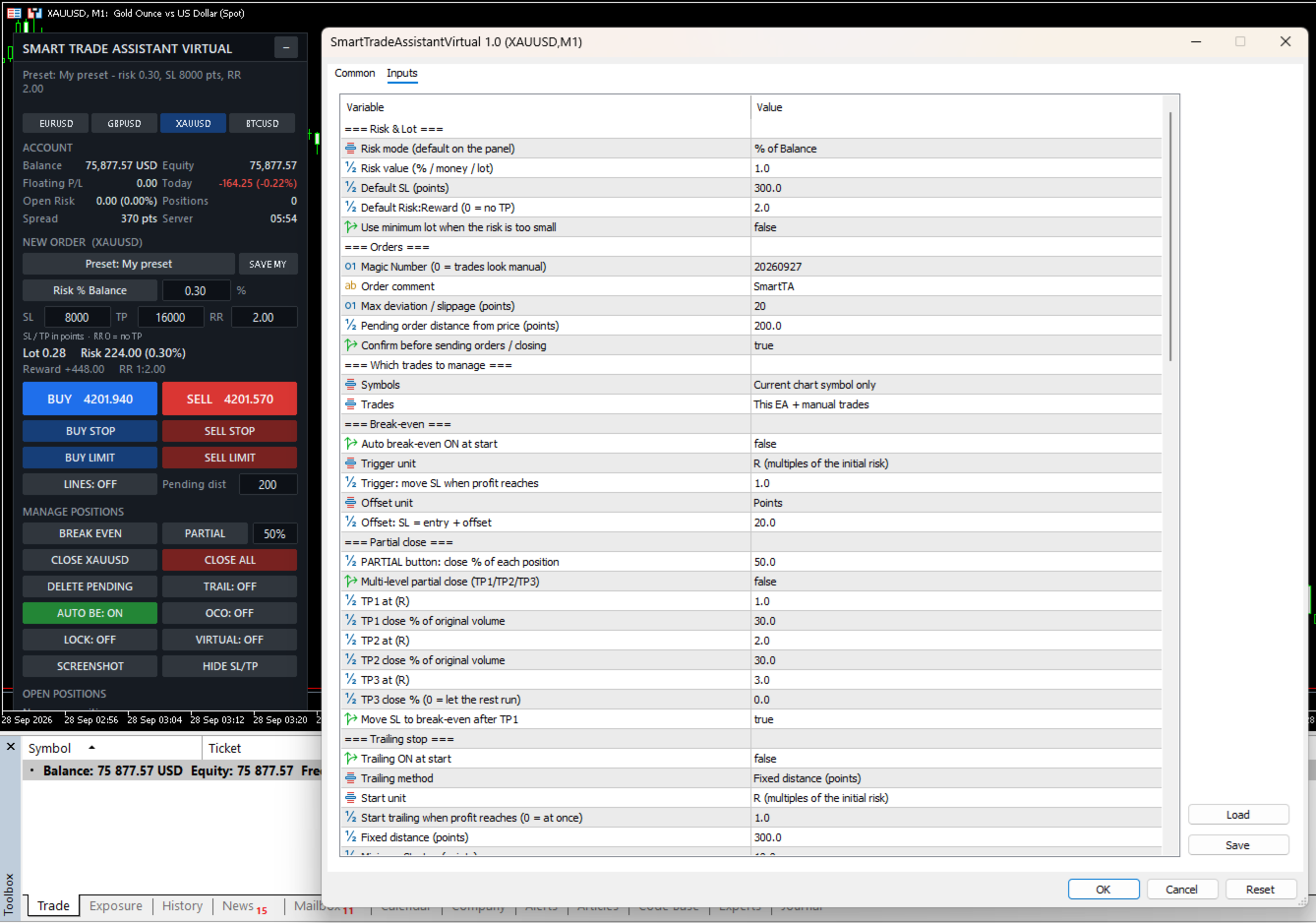
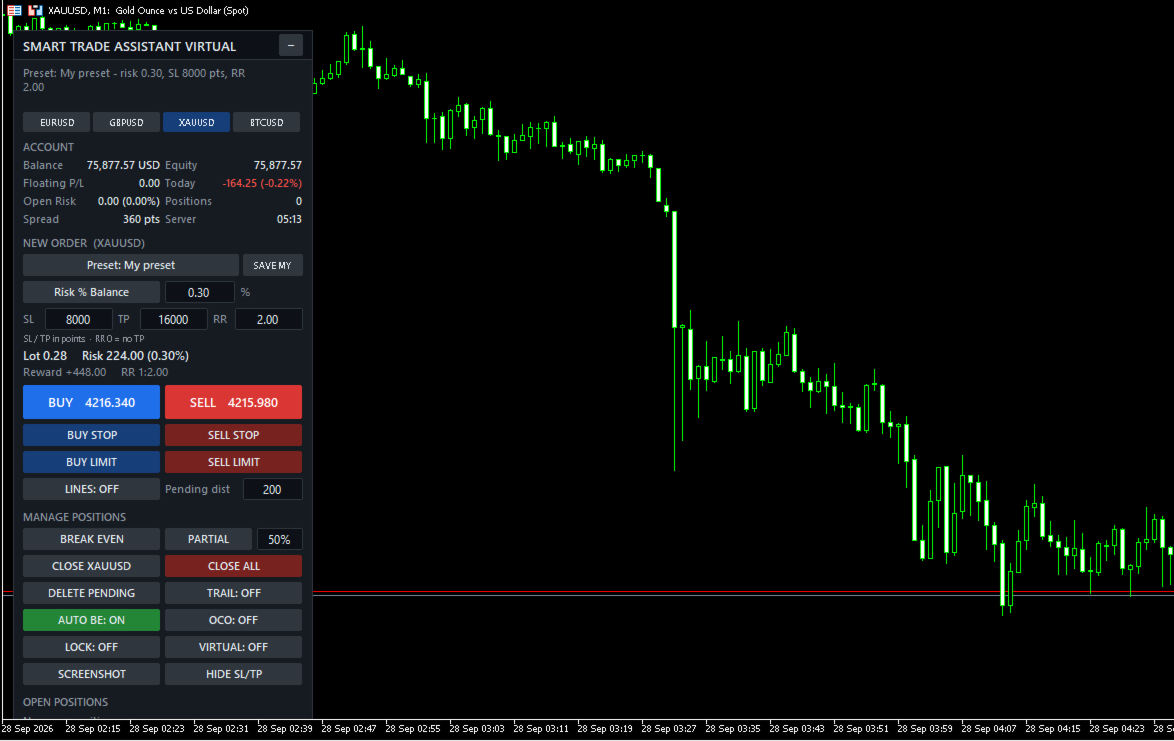
Smart Trade Assistant Virtual is a trading panel for manual traders. It calculates the lot size from your risk, places market and pending orders with one click, and manages your open trades: break-even, partial close, trailing stop, profit lock and OCO. SL/TP and pending orders can also be virtual, which means they are kept by the panel and hidden from the broker.

The panel never opens a trade by itself. You decide when to trade, and the panel handles the parts that are easy to get wrong.

The full user guide is at the end of this description.

Risk and lot size

  • Lot size calculated from your risk. Modes: % of balance, % of equity, % of free margin, fixed money, or fixed lot.
  • Works on any symbol: Forex, gold, indices, crypto, stocks and CFDs. The value of the SL is calculated by the terminal itself, including contract size and currency conversion.
  • The lot is always rounded down, so the real risk never exceeds your setting.
  • Live display of lot, money at risk, reward and Risk:Reward before you send the order.
  • Clear messages when the lot is below the broker minimum, the SL is too close (stops level + spread), or margin is not enough.

Placing orders

  • BUY / SELL and BUY STOP, SELL STOP, BUY LIMIT, SELL LIMIT.
  • Drag and drop ENTRY, SL and TP lines on the chart. The lot and RR update while you drag.
  • Optional confirmation window before every order.
  • Checks the stops level, freeze level, trade mode, filling mode and margin before sending.

Trade management

  • Break-even with one click, or automatic at a trigger (points, pips or R).
  • Partial close with one click, and multi-level partial close (TP1 / TP2 / TP3) with optional break-even after TP1.
  • 6 trailing stop methods: fixed distance, ATR, moving average, fractal, previous candle, high/low of N candles.
  • Profit lock: the SL moves in steps, for example at +1R lock +0.2R, at +2R lock +1R.
  • BE, ½ and X buttons on each open position, plus Close symbol, Close all and Delete pending.
  • OCO: when one pending order is filled, the others on the same symbol are deleted.

Virtual SL/TP and virtual pending orders

  • SL and TP are not sent to the broker. They are shown as dotted lines on the chart, and the position is closed when the price reaches them.
  • Drag the lines to move the levels. Delete a line to remove that level.
  • HIDE SL/TP button moves the SL/TP of open positions into virtual mode.
  • Virtual pending orders are saved to a file and survive a restart of the terminal.
  • Optional real "safety SL" placed further away, in case the terminal stops.

Account protection

  • Trading hours and trading days (broker server time), and close all at a set time.
  • Daily profit target and daily loss limit: block new trades until tomorrow, or close all and block.
  • Close all when floating profit or loss reaches an amount or a % of the balance.
  • Maximum open positions, maximum pending orders, maximum risk per trade, maximum total open risk.
  • Maximum spread filter.
  • When trading is blocked, the order buttons turn grey and the reason is shown on the panel.

More tools

  • Account dashboard: balance, equity, floating P/L, today's result, open risk if every SL is hit, spread, server time.
  • Presets: Scalping, Day Trading, Swing, Gold, Forex, Prop Firm, and your own saved preset.
  • Symbol switch buttons.
  • Screenshots by button, or automatically when a trade opens, closes or reaches break-even.
  • Alerts when the price crosses your own horizontal lines.
  • The panel remembers your values and switches after a restart of the terminal.
  • Hotkeys (Shift + key) and popup, sound, push and e-mail notifications.

Which trades are managed

  • Current chart symbol only, or all symbols.
  • This EA only, manual trades only, this EA + manual trades, or all trades.

Main inputs

  • Risk mode / value, default SL, default RR – starting values of the panel.
  • Magic number, order comment, max deviation, pending distance, confirmation.
  • Symbols / Trades – which trades the panel manages.
  • Break-even – automatic BE, trigger and offset (points, pips or R).
  • Partial close – PARTIAL %, multi-level TP1/TP2/TP3 with R levels and %.
  • Trailing stop – method, start, distance, step, timeframe and indicator settings.
  • Profit lock – unit and steps.
  • Virtual – virtual mode at start and safety SL.
  • Trading time and Account protection – all limits (0 = off).
  • Screenshots, line alerts, notifications.
  • Panel – position, scale, width, sections to show, symbol list, hotkeys, line colors, remember panel values.

Important

  • Automatic management and virtual SL/TP work only while MetaTrader 5 is running and connected. Use a VPS, or the safety SL, if you use virtual levels.
  • Supports hedging and netting accounts.
  • Test the panel on a demo account first. Trading involves risk.

User guide

1. Installation

  1. Buy or rent the product in the Market tab of MetaTrader 5 (or on the MQL5 website), then click Install. It appears in the Navigator under Expert Advisors → Market.
  2. Drag Smart Trade Assistant Virtual onto the chart of the symbol you want to trade.
  3. On the Common tab, tick Allow Algo Trading. Adjust the Inputs if needed, then click OK.
  4. Make sure the Algo Trading button on the MT5 toolbar is green. The panel appears in the top-left corner of the chart.

Tip: the panel remembers your values and switches after a restart of MT5. If you change a value in the Inputs window, the new input value is used.

Strategy Tester: you can try the panel in visual mode of the Strategy Tester. The confirmation window is skipped in the tester.

2. The panel

  • Top line: the result of your last action or an error message. If trading is blocked, the reason is shown in orange below it, for example "Blocked: Spread 45 > max 30 points".
  • Symbol buttons: switch the chart symbol (list set in the inputs).
  • Account: balance, equity, floating P/L, today's result, open risk (money lost if every SL is hit), number of positions, spread and server time. Can be hidden with Show account = false.
  • New order: preset, risk mode and value, SL / TP in points, Risk:Reward. Type a value and press Enter.
  • Calculation: lot, money at risk, reward and RR, updated live. Problems (SL too close, not enough margin…) are shown here.
  • Order buttons: BUY, SELL, BUY STOP, SELL STOP, BUY LIMIT, SELL LIMIT, LINES and pending distance.
  • Manage positions: BREAK EVEN, PARTIAL + %, CLOSE [symbol], CLOSE ALL, DELETE PENDING, switches TRAIL / AUTO BE / OCO / LOCK / VIRTUAL (green = ON), SCREENSHOT and HIDE SL/TP.
  • Open positions: each managed position with its profit and three buttons: BE, ½ and X. "(V)" = virtual SL/TP, "no SL" = position without stop loss.

If the bottom of the panel is cut off by a small chart window, set Show account = false or reduce Panel scale % (for example 85).

3. Risk and lot size

Click the risk mode button to switch between modes:

  • Risk % Balance / % Equity / % Free Margin: the % you lose if the SL is hit.
  • Risk Money: a fixed amount in the account currency.
  • Fixed Lot: the lot itself. The risk is still shown when there is an SL.

SL and TP are in points. 1 point is the smallest price step. EURUSD (5 digits): 300 points = 30 pips. XAUUSD with 2 digits: 300 points = 3.00 USD; with 3 digits: 3000 points = 3.00 USD. Check the digits of your symbol.

  • Change the SL: the lot is recalculated; if RR > 0 the TP becomes SL × RR.
  • Change the TP: RR = TP ÷ SL.
  • Change the RR: the TP is recalculated. RR 0 = no TP.

How the lot is calculated: money at risk = balance × % → the terminal calculates the loss of 1 lot at the SL (contract size, tick value and currency conversion included) → lot = money at risk ÷ loss per lot, rounded down to the broker's lot step. The real risk is never above your setting.

Example: balance 10,000, risk 1% = 100. XAUUSD SL 3.00 × 100 oz = 300 per lot → 100 ÷ 300 = 0.333 → 0.33 lot, real risk 99.00.

If the lot is below the broker minimum, the panel shows "Risk too small: minimum lot…". Enable Use minimum lot when the risk is too small to use the minimum lot instead.

4. Placing orders

  • BUY / SELL: at the current price, with the calculated lot and SL/TP.
  • BUY STOP = Ask + Pending dist, SELL STOP = Bid − Pending dist, BUY LIMIT = Ask − Pending dist, SELL LIMIT = Bid + Pending dist. SL/TP are measured from the pending price.
  • With Confirm before sending ON (default), a window shows symbol, lot, SL, TP, risk and reward before sending.

Before every order the panel checks: algo trading allowed, symbol trade mode, SL/TP on the correct side and beyond the broker's stops level (for market orders the spread is included), pending price on the correct side, margin, and the account protection rules. If the SL is too close, the panel tells you the minimum, for example "use SL >= 7150".

5. Drag and drop lines

Click LINES (or Shift+L). Three lines appear: ENTRY (dashed), SL and TP, each with a label.

  • Drag the SL: the lot is recalculated so the risk stays the same.
  • Drag the TP: RR and reward change, the lot does not.
  • Drag the ENTRY: SL and TP move with it (used for pending orders).
  • SL below ENTRY = BUY, SL above ENTRY = SELL.
  • BUY/SELL use the SL/TP lines; pending buttons use the ENTRY line. After the order is placed, the lines are removed.

6. Managing positions

What is "R"? R is the initial risk of a trade: the distance from the open price to its first SL. A trade with a 300-point SL is +1R when it is 300 points in profit. The panel remembers R for each position, even after a restart. R-based features need the position to have an SL when the panel first sees it.

  • BREAK EVEN: moves the SL to entry + offset (default 20 points) on every managed position that is far enough in profit. Positions in loss are not touched.
  • AUTO BE: does the same automatically when the profit reaches the trigger (default 1R).
  • PARTIAL + %: closes that % of every managed position (rounded down to the lot step). If the rest would be below the minimum lot, the whole position is closed.
  • Multi TP (inputs): TP1 / TP2 / TP3 at R levels each close a % of the original volume, for example 1R → 30%, 2R → 30%, and the SL can move to break-even after TP1.
  • CLOSE [symbol], CLOSE ALL, DELETE PENDING.
  • BE / ½ / X on a row: break-even, partial close or close for that single position.
  • OCO: when a pending order is filled, the other managed pending orders on the same symbol are deleted (also for virtual pending orders).

Trailing stop methods (new SL for a BUY; mirrored for a SELL):

  • Fixed distance: Bid − distance.
  • ATR: Bid − ATR(period) × multiplier.
  • Moving Average: MA − offset.
  • Fractal: latest confirmed lower fractal − offset.
  • Previous candle: low of the previous candle − offset.
  • High / Low: lowest low of the last N candles − offset.

Trailing starts when the profit reaches Start trailing (default 1R, 0 = at once). The SL only moves forward, by at least Minimum SL step, and respects the stops and freeze levels.

7. Virtual SL/TP and virtual pending orders

Switch VIRTUAL: ON (or Shift+V). New market orders are sent without SL/TP. The panel keeps the levels, draws them as dotted lines and closes the position when the price reaches one.

  • Drag a dotted line to move the level. A level that would close the position at once is refused.
  • Select a dotted line and press Delete to remove that level.
  • Break-even, trailing, profit lock and multi TP work with virtual levels.
  • HIDE SL/TP: moves the real SL/TP of open positions into virtual mode.
  • Safety SL (input): a real SL placed a number of points beyond the virtual SL.
  • Virtual levels are not limited by the broker's stops level.

With VIRTUAL ON the pending buttons create virtual pending orders (dash-dot line "V-BUY STOP …"). When the price reaches the line, the panel opens a market order with virtual SL/TP. Drag the line to move it (SL/TP move with it) or delete it to cancel. Virtual pending orders are saved to a file and come back after a restart.

Important: virtual levels work only while MT5 is running and connected. If the terminal, computer or VPS stops, the position is not closed at the virtual SL. Use the safety SL or a VPS.

8. Profit lock, presets and other tools

Profit lock (LOCK: ON): the SL moves in steps set in Steps, for example "1:0.2, 2:1, 3:2" = at +1R lock +0.2R, at +2R lock +1R, at +3R lock +2R. Unit: R, points or pips.

Presets (click the Preset button to cycle):

  • Inputs: values from the EA settings.
  • Scalping: risk 0.5%, SL 100, RR 1.5, auto BE, trailing.
  • Day Trading: risk 1%, SL 300, RR 2, auto BE.
  • Swing: risk 1%, SL 1000, RR 3, auto BE, ATR trailing, profit lock.
  • Gold: risk 0.5%, SL 500, RR 2, auto BE, ATR trailing.
  • Forex: risk 1%, SL 200, RR 2, auto BE.
  • Prop Firm: risk 0.25%, SL 300, RR 2, auto BE, profit lock, max risk per trade 0.5%, max total risk 1.5%, max 3 positions, daily loss 2%.
  • My preset: click SAVE MY to save the current panel values.

SL values are in points; adjust them to your symbol.

Screenshots: SCREENSHOT button, or automatic when a trade opens, closes or reaches break-even. Files: File → Open Data Folder → MQL5\Files\SmartTA\Screenshots.

Line alerts: draw a normal horizontal line; when the price crosses it you get an alert (and push/e-mail if enabled). Put a name in the line's Description to see it in the alert. Moving the line does not trigger an alert.

9. Account protection

All limits are in the inputs; 0 = off.

  • Trading hours / days (server time) and close all at a set time.
  • Close all when floating profit or loss reaches an amount or a % of the balance.
  • Daily profit target / daily loss limit (% of the balance at the start of the server day): block new trades until tomorrow, or close all and block. To unlock the same day, set the daily limits to 0.
  • Max open positions / max pending orders.
  • Max risk per trade and max total open risk (% of balance).
  • Max spread.

When something blocks trading, the order buttons turn grey and the reason is shown in orange. Management of open positions continues.

Prop firm example: risk 0.25% · max risk per trade 0.5% · max total risk 1.5% · max positions 3 · daily loss limit 2% → close all + block.

10. Which trades are managed

  • Symbols: current chart symbol only (default) or all symbols.
  • Trades: this EA only, manual trades only, this EA + manual trades (default), or all trades.
  • Magic number: set on every order from the panel. If another EA runs on the same account, keep Trades at "This EA + manual trades" or "This EA only".

11. Hotkeys and notifications

Hold Shift and press a key while the chart is active:

  • Shift+B / Shift+S: BUY / SELL
  • Shift+C: close positions on this symbol
  • Shift+E: break-even · Shift+P: partial close
  • Shift+T: trailing ON/OFF · Shift+V: virtual ON/OFF
  • Shift+D: delete pending · Shift+L: lines ON/OFF

Notifications (popup, sound, push, e-mail) are sent when an order opens, a position closes or partly closes, break-even is set, a TP level is reached or a protection rule triggers. Push needs your MetaQuotes ID in Tools → Options → Notifications.

12. Troubleshooting

  • "Algo Trading is disabled": click the Algo Trading button on the toolbar.
  • "Allow Algo Trading is off in the EA settings": F7 → Common → tick Allow Algo Trading.
  • "Risk too small: minimum lot…": increase the risk, reduce the SL, or enable Use minimum lot.
  • "SL too close … use SL >= X": set the SL to at least X points.
  • "Not enough free margin": the calculated lot is shown in orange; reduce the risk or widen the SL.
  • Buttons are grey: read the orange "Blocked: …" line.
  • Auto BE / multi TP / trailing does not start: the position needs an SL when the panel first sees it; check the switch and the Symbols / Trades inputs.
  • Trades on other symbols are not managed: set Symbols = All symbols, or attach the panel to those charts.

Always test on a demo account first. Trading involves risk.
Produtos recomendados
FiT Panel Pro
Thonglak Janyakorn
Overview FiT Panel Pro is a professional-grade trade management panel designed for MetaTrader 5 traders who demand speed, precision, and full control over their trades. Built with a modern dark-theme UI, it combines one-click execution with advanced risk management, visual SL/TP drag lines, automatic Fibonacci-based levels, and comprehensive order management — all in a single, compact panel. Whether you are a scalper, day trader, or swing trader, FiT Panel Pro gives you the edge you need to exec
FREE
Risk Manager – Account Protection Tool Risk Manager is an Expert Advisor for MetaTrader 5 designed to protect your trading account by applying automatic risk management rules. This tool does not open trades . It continuously monitors your account and enforces predefined limits to help prevent excessive losses and maintain disciplined trading. Risk Manager works in the background and can manage positions opened by manual trading or other Expert Advisors. It is particularly useful for: • Manual tr
FREE
Click Trading
Jawad Tauheed
5 (2)
One Click Trading – Auto TP SL Developer TraderLinkz Version 1.00 Category Utility What it does Adds missing TP and SL to your manual trades and pending orders Sets them once per ticket Lets you move TP and SL afterward Works on hedging and netting accounts Scans on every tick and reacts on trade events Why you want it You place faster entries You get consistent risk and exit targets You reduce fat finger errors You keep full manual control Quick start Attach the EA to any chart Keep TP and SL e
FREE
ABQ Visual Risk Sizer
Cristian David Castillo Arrieta
ABQ Visual Risk Sizer - Institutional Risk & Trade Execution Categoria: Utilitários / Gestão de Risco O cálculo manual de lotes custa tempo e dinheiro. No trading moderno, especialmente ao operar com contas financiadas (Prop Firms), um erro de cálculo de lote ou um atraso de 5 segundos ao inserir uma ordem pode significar violar a regra de Drawdown Diário ou perder o preço de entrada perfeito. ABQ Visual Risk Sizer é uma ferramenta de nível institucional projetada para resolver este problema def
Capital Management EA – Smart Risk Management & Profit Optimization for MT5 Take control of your trading capital with smart, automated strategies — fully optimized for MetaTrader 5 (MT5). Looking to protect your capital and maximize profits through automated money management strategies ? Capital Management EA is the all-in-one Expert Advisor for MetaTrader 5 (MT5) that helps you trade smarter, not harder. Core Features: 5-in-1 Capital Management Strategies – Built-in versatility Gr
Quickly Helper is a tool to help us deal with multiple orders quickly. It has five function keys. They are: The "清空" button to quickly level out all orders;  Quick flat out the long position "平多单" button;  Quick flat out the short position "平空单" button;  The "买多" button to quickly buy at the current price;  The "买空" button to sell quickly at the current price;  It has seven display information items. They are: bp: the total income of multiple orders; (  profit of  buy/long position ) avgb: avera
Apex Point
Marco Engstermann
Apex Point is a trend-following indicator for MetaTrader 5, transforming complex market data into signals for traders. It displays blue dots for uptrends, red dots for downtrends, and yellow crosses at potential reversals, helping users identify momentum shifts quickly. Key features include a confirmation system requiring multiple bars (default: 3) to validate changes, reducing false signals; dynamic ATR-based offsets for adaptive trailing, with instant ratcheting in the trend direction and smo
FREE
Imagine flying a real aircraft without ever stepping into a flight simulator. That's what trading is like. You have to simulate your strategy before you can take it to a live market. It is good if you can simulate things speedily before even stepping into any live market, or before coming up with an automated system.  People don't have all day to stare at a higher timeframe chart until the entry signal finally arrives. That's why I built this so that you can simulate your strategy with speed. Th
FREE
Painel de Trading Pro
Dedial Pereira Da Silva
TradePanel Pro - Painel de Trading Manual com Grid, Trailing e Metas "Painel de trading manual completo para MT5: grid, trailing stop, breakeven inteligente, meta diária e gestão de risco em um clique." O TradePanel Pro é um painel profissional de trading manual para MetaTrader 5, criado para traders que buscam agilidade, organização e proteção automática de posições — sem depender de múltiplos indicadores ou configurações complexas. Tudo o que você precisa está em um único painel: abrir co
Aqui está a tradução para o português (Brasil), utilizando a terminologia padrão do mercado financeiro e de Prop Firms para garantir que o texto soe natural para um trader brasileiro. Prop Calculator Assistant Pare de quebrar contas de Prop Firm por erros de cálculo. Deixe que o Assistente cuide do risco para você. O Prop Calculator Assistant é o painel de gestão de ordens definitivo, projetado especificamente para traders que buscam aprovação em desafios (FTMO, etc.) ou que já gerenciam capital
GDS RiskLab TradeDesk Free Manual Trading Desk and Risk-Control Utility for MetaTrader 5 GDS RiskLab TradeDesk is a free chart-based utility for traders who want a cleaner manual trading workspace in MetaTrader 5. It is designed as a simple execution-support and risk-control panel. The goal is to keep the trading process more organized: review the chart, plan the trade, keep risk visible and execute manually with more structure. This tool does not generate buy or sell signals. It does not predic
FREE
GOM Trade Manager
Wannapach Chinnaprapa
GOM Trade Manager helps you execute trades the way you want it. Works on all instruments Forex, Commodities, & Crypto. It helps you with lot calculations, spread addition and balance calculations so you can just focus on actual trading. For full automatic planned management, stackable triggers and spread widening protection >> check out GOM Trade Manager Pro . ------------------------------------------NOTABLE FEATURES------------------------------------------ You set everything based on bid
FREE
SmartRAL
Jemy Yeferson Dimu Ludji
SmartRAL (Smart Risk Auto-Lot EA) SmartRAL: The Ultimate Risk & Lot Management Expert Advisor (EA) SmartRAL is an essential tool for traders who demand precise risk management and automated position sizing in MetaTrader 5. Stop guessing your lot size and let the algorithm handle the calculations. This EA allows you to trade with confidence by guaranteeing your risk exposure on every single trade, while offering absolute flexibility in setting your Stop Loss (SL). Key Features & Benefits Guarante
Order Book, known also as Market Book, market depth, Level 2, - is a dynamically updated table with current volumes of orders to buy and to sell specific financial instument at price levels near Bid and Ask. MetaTrader 5 provides the means for receiving market book from your broker, but in real time only, without access to its history. The indicator OrderBook Cumulative Indicator accumulates market book data online and visualizes them on the chart. In addition, the indicator can show the market
Este é sem dúvida o indicador de reconhecimento automático de formação de preço harmônico mais completo que você pode encontrar para a MetaTrader Platform. Ele detecta 19 padrões diferentes, leva as projeções de Fibonacci tão a sério quanto você, exibe a Zona de Reversão Potencial (PRZ) e encontra níveis adequados de stop loss e take-profit. [ Guia de instalação | Guia de atualização | Solução de problemas | FAQ | Todos os produtos ] Detecta 19 formações harmônicas de preços diferentes Traça
Trade Copilot - Painel semiautomático de gestão de risco para Ouro (XAUUSD) e qualquer instrumento Trade Copilot é um painel de negociação semiautomático criado para traders manuais que desejam a disciplina de um EA sem abrir mão do controle sobre suas próprias entradas. Você decide a direção e o nível; o painel calcula automaticamente o tamanho do risco, posiciona o stop-loss, gerencia o take-profit e protege a operação. PRINCIPAIS RECURSOS - Cálculo de lote baseado em risco - escolha Risco
CosmiCLab SMC FIBO CosmiCLab SMC FIBO is a professional trading indicator designed for traders who use Smart Money Concepts (SMC), market structure analysis and Fibonacci retracement levels. The indicator automatically detects market swings and builds Fibonacci levels based on the latest impulse movement. It also identifies market structure changes such as BOS (Break of Structure) and CHOCH (Change of Character), helping traders understand the current market direction. CosmiCLab SMC FIBO also pr
Protect your funded accounts and personal capital with military-grade precision. This utility continuously monitors your floating equity against your daily starting balance. The moment your custom drawdown threshold is breached, it instantly liquidates all open positions, deletes pending orders, and completely unloads from the chart. Stop revenge trading and never fail a prop firm evaluation due to a margin breach again.
FREE
GDS Renko Pip ST Chart - Pip-Based Renko Chart Indicator for MetaTrader 5 GDS Renko Pip ST Chart is a pip-based Renko chart indicator for MetaTrader 5. It helps traders build and study cleaner Renko price movement using a practical fixed pip or point-based brick structure. This tool is designed as a Renko chart foundation for manual analysis. It does not predict the market, does not generate buy or sell signals and does not decide whether a trade should be opened. Renko EDGE EA Golden Delta | A
Account Monitor Pro — Your Ultimate Trade Statistics Hub Account Monitor Pro is a professional information dashboard designed for traders who combine Expert Advisors (EAs) and manual trading. The indicator separates statistics in real-time based on your Magic Number, allowing you to clearly see who is driving the profit: the algorithm or yourself. Key Features: Split Monitoring: Instant separation of "Robot" positions (by Magic Number) and "Manual" trades. Multi-language Support: 11 languages in
FREE
Price Magnet — Price Density and Attraction Levels Indicator Price Magnet is a professional analytical tool designed to identify key support and resistance levels based on statistical Price Density. The indicator analyzes a specified historical period and detects price levels where the market spent the most time. These zones act as “magnets,” attracting price action or forming a structural base for potential reversals. Unlike traditional Volume Profile tools, Price Magnet focuses on price-time d
Overview Harmonic Patterns MT5 is a technical analysis indicator designed for the MetaTrader 5 platform. It identifies and displays harmonic price patterns, such as Butterfly, Cypher, Crab, Bat, Shark, and Gartley, in both bullish and bearish directions. The indicator calculates key price levels, including entry, stop loss, and three take-profit levels, to assist traders in analyzing market movements. Visual elements and customizable alerts enhance usability on the chart. Features Detects six ha
Overview Mirror Signals EA is a powerful monitoring Expert Advisor that automatically sends real-time Telegram notifications for all important trade events on your MetaTrader 5 account. It is engineered specifically for signal providers , trade-copier operators , auditors , educators , and professional trading services that require immediate, detailed, and reliable reporting. Everything from entries, exits, SL/TP changes, comment changes, trailing stop activations, pending order modifications
The indicator detects and displays М. Gartley's Butterfly pattern. The pattern is plotted by the extreme values of the ZigZag indicator (included in the resources, no need to install). After detecting the pattern, the indicator notifies of that by the pop-up window, a mobile notification and an email. The pattern and wave parameters are displayed on the screenshots. The default parameters are used for demonstration purposes only in order to increase the amount of detected patterns. Parameters z
EZ Trading Assistant is an MT5 Expert Advisor that adds an on-chart control panel for preparing, opening, and managing trades - including Auto Lot sizing, Break Even, Trailing Stop Loss, and Partial Closes - across up to 5 independent trades at once. It applies a concept of preparing your buy or sell order before executing to prevent accidentally pressing the wrong button and opening a trade in the wrong direction. 1. Getting Started Attach EZTradingAssistant to a chart for the symbol you want t
Bastion is a monitor-and-close-only risk manager for prop-firm traders. It watches your account against your firm's daily-loss and maximum-drawdown limits in real time and force-closes your open positions BEFORE you cross a line. It never opens a trade of its own, so it stays fully within the tools allowed by FTMO, FundedNext, The5ers, FTUK and FXIFY. Why traders fail challenges A large share of failed evaluations end on a single daily-loss breach: a moment of inattention, a news spike, one tra
Apresentamos o NAS100 Auto SL e TP Maker para MT5: Nunca mais perca a definição de StopLoss e TakeProfit com o nosso NAS100 Auto SL e TP Maker, um assistente indispensável para os traders que navegam no mercado Nasdaq 100 no MetaTrader 5. Esta ferramenta foi concebida para aqueles que procuram uma solução perfeita para automatizar a gestão dos níveis de StopLoss e TakeProfit. Caraterísticas principais: Automação sem esforço: Monitoriza automaticamente as transacções Nasdaq 100 sem StopLoss e/o
FREE
SwiftEdge Scalper EA Profissional de Scalping com Controle Manual Completo O scalping exige decisões em frações de segundo, gestão precisa de risco e execução perfeita de ordens. Gerenciar cálculos de breakeven, trailing stops e múltiplas posições enquanto observa a ação do preço é avassalador sem as ferramentas certas. SwiftEdge Scalper é seu assistente de trading profissional projetado para scalpers ativos e day traders. Execute operações com um clique ou atalho de teclado, enquanto o EA geren
Pro Order Lot Size Calculator Pro Order Lot Size Calculator is a simple and practical tool designed to help you calculate the appropriate lot size based on the amount of risk you want to take . With this tool, you can easily calculate your trading risk directly from the panel according to the amount of money available in your account. Easy Risk & Lot Calculation The panel is designed to be very simple and easy to use. You can choose how you want to define your risk: Enter your desired risk amoun
DDKiller Pro
Njaratahiry Michael Randrianiaina
Stop Blowing Your Account. Once and For All. DDKiller Pro is the MT5 risk guardian that runs silently on your chart and shuts down trading the moment you hit a limit — whether you're grinding a prop firm challenge or managing your own CFD account. The problem every trader knows: You set your rules. You break them anyway. One revenge trade. One overleveraged position. One session that erases a month of gains. DDKiller Pro removes that decision from your hands entirely. What it does: The second yo
Os compradores deste produto também adquirem
Trade Assistant MT5
Evgeniy Kravchenko
4.43 (216)
Ajuda a calcular o risco por comércio, a fácil instalação de uma nova encomenda, gestão de encomendas com funções de fecho parcial, trailing stop de 7 tipos e outras funções úteis. Materiais e instruções adicionais Instruções de instalação   -   Instruções para a aplicação   -   Versão de teste da aplicação para uma conta de demonstração Função de linha Mostra no gráfico a linha de Abertura, Stop Loss, Take Profit. Com esta função é fácil definir uma nova ordem e ver as suas características ad
Bem-vindo ao Trade Manager EA—uma ferramenta de gestão de risco criada para tornar o trading mais intuitivo, preciso e eficiente. Não é apenas uma ferramenta para executar ordens, mas uma solução abrangente para planejamento de operações, gerenciamento de posições e controle de risco. Seja você um iniciante, trader avançado ou scalper que precisa de execução rápida, o Trade Manager EA adapta-se às suas necessidades, oferecendo flexibilidade em todos os mercados, desde forex e índices até commodi
O Telegram to MT5 Multi-Channel Copier copia automaticamente os sinais de trading dos seus canais de Telegram diretamente para o MetaTrader 5. Sem bots, sem extensões de navegador, sem copiar à mão. O sinal chega ao Telegram e o EA abre a operação no seu terminal em poucos segundos. E antes de copiar um canal, o backtester integrado mostra o que esse canal teria feito na sua conta. O produto inclui dois componentes: um aplicativo de Windows que escuta os seus canais de Telegram, e este Expert Ad
TradePanel MT5
Alfiya Fazylova
4.88 (169)
Trade Panel é um assistente de negociação multifuncional. O aplicativo contém mais de 50 funções de negociação para trading manual e permite automatizar a maioria das tarefas de negociação. Instruções para o aplicativo + vídeo-instruções: https://www.mql5.com/pt/blogs/post/772421 Versão de teste do aplicativo para conta demo: https://www.mql5.com/pt/blogs/post/762547 Como instalar o aplicativo: https://www.mql5.com/pt/blogs/post/762548 Como testar o aplicativo no modo visual: https://www.mql5.co
================================================================================ POC BREAKOUT - V20.72. Full Professional Grade Toolkit ================================================================================ POC Breakout is a full MetaTrader 5 trading dashboard for discretionary traders who want breakout signals, Point of Control (POC) context, volume profiles, order flow, market structure, news, alerts, and advanced trade planning in one professional workspace. Attached directly to you
Copie sinais do Telegram com suas próprias regras de negociação Telegram to MT5 Signal Trader copia automaticamente sinais de negociação em texto de canais e grupos públicos e privados do Telegram para o MetaTrader 5. Gerencie vários provedores e contas MT5 em um único aplicativo para desktop, com configurações individuais de risco e de negociação para cada provedor . Você não precisa de um bot do Telegram nem configurar uma API para copiar sinais. Basta entrar com sua própria conta do Telegram
Farmed Hedge Yield Farming | All Markets (Manual - Hybrid - Semi/Automated EA) VERIFIED TRADING RESULTS - Farmed Hedge Yield Axi Copy:  https://www.mql5.com/en/signals/2356376 - Farmed Hedge Yield Exn Copy:   https://www.mql5.com/en/signals/2356404 - Farmed Hedge Yield V Copy:  https://www.mql5.com/en/signals/2357156 IMPORTANT NOTICE: FarmedHedge is a MANUAL-FOCUSED TRADING UTILITY ,not a fully automated EA. Results shown on this Signal include manual trades and overall strategic management.
Power Candles Strategy Scanner - Localizador de configurações multissímbolo com auto-otimização O Power Candles Strategy Scanner utiliza o mesmo motor de auto-otimização que alimenta o indicador Power Candles — em todos os símbolos da sua lista de observação, lado a lado. Um painel indica-lhe quais os símbolos que são estatisticamente negociáveis neste momento, qual a estratégia vencedora para cada um, o par ideal de Stop Loss / Take Profit, e avisa-o assim que um novo sinal é emitido. Esta ferr
Exp COPYLOT CLIENT for MT5
Vladislav Andruschenko
3.97 (35)
Copiador profissional de operações para MetaTrader 5 Um copiador de operações rápido, profissional e confiável para MetaTrader . COPYLOT permite copiar operações de Forex entre terminais MT4 e MT5 com suporte para contas Hedge e Netting . A versão MT5 do COPYLOT oferece suporte a: - MT5 Hedge → MT5 Hedge - MT5 Hedge → MT5 Netting - MT5 Netting → MT5 Hedge - MT5 Netting → MT5 Netting - MT4 → MT5 Hedge - MT4 → MT5 Netting Versão MT4 Descrição completa + DEMO + PDF Como comprar Como instalar Como
Signal TradingView to MT5 Pro Automator Execução profissional instantânea entre TradingView e MetaTrader 5 Automatize a sua estratégia de trading com a ponte de comunicação mais robusta entre os alertas do TradingView e a execução real no MT5. Concebido para traders que exigem velocidade, flexibilidade e uma gestão de risco impecável, este Expert Advisor transforma qualquer mensagem de alerta numa ordem de mercado ou de limite precisa. PONTOS FORTES E VANTAGENS Motor de Parsing Universal (Propri
Premium Trade Manager - O Painel de Operações com um Coach Integrado Premium Trade Manager coloca um coach de trading dentro do seu gráfico, com um motor de execução completo por baixo. Configure a operação da forma que sempre faz e deixe o Max, seu coach de trading com IA, ler exatamente esse setup em relação à sua conta ao vivo e dar um veredicto direto antes de confirmar: se o stop é disciplinado, se o risco faz sentido, se há um evento de alto impacto a minutos de distância, se você está pró
MT5 to Telegram Signal Provider é uma utilidade fácil de usar e totalmente personalizável que permite o envio de sinais especificados para o chat, canal ou grupo do Telegram, tornando sua conta um fornecedor de sinais . Ao contrário da maioria dos produtos concorrentes, ele não usa importações de DLL. [ Demonstração ] [ Manual ] [ Versão MT4 ] [ Versão Discord ] [ Canal do Telegram ]  New: [ Telegram To MT5 ] Configuração Um guia do usuário passo a passo está disponível. Não é necessário conhec
HINN MagicEntry Extra
ALGOFLOW OÜ
4.74 (19)
HINN MAGIC ENTRY – the ultimate tool for entry and position management! SIMPLE. FASTEST. INTUITIVE. MAX AUTOMATED. Place orders by selecting a level directly on the chart! full description   ::  demo-version  :: 60-sec-video-description Key features: - Market, limit, and pending orders - Automatic lot size calculation - Automatic spread and commission accounting - Unlimited partitial take-profits  - Breakeven and trailing stop-loss and take-profit  functions - Invalidation leves - Intuitive, a
MT5 Trading Deck
Manuel Michiels
5 (2)
One button. One trade. MT5 Trading Deck is a hotkey trading panel for MetaTrader 5 that turns the platform into a keyboard-driven execution cockpit. Stop loss, take profit and lot size are pre-calculated for every key; the moment you press, a market order is live on the broker. A complete technical user manual is attached in the product Comments section. It documents every input parameter, the full hotkey map, the recommended Stream Deck XL layout, and the advanced workflows for Pre-Limit orders
EA Slipstream
Stephen J Martret
5 (1)
Your backtest filled every order at the price it asked for. Your account does not. EA Slipstream measures what execution costs your EA, using your own fills, slippages and spreads to show you the true performance of your EA. A backtest prices every trade at the level the EA named. In live trading a pending order fills at whatever price is available when it triggers, a stop closes wherever the market is when it is hit, and the spread at that moment is whatever the account was quoting. The differ
Grid Manual MT5
Alfiya Fazylova
4.73 (22)
"Grid Manual" é um painel comercial para trabalhar com uma grade de ordens. O utilitário é universal, possui configurações flexíveis e uma interface intuitiva. Ele trabalha com uma grade de ordens não apenas na direção da média das perdas, mas também na direção do aumento dos lucros. O trader não precisa criar e manter uma grade de ordens, tudo será feito pelo ""Grid Manual". Basta abrir um orden e o "Grid manual" criará automaticamente uma grade de ordens para ele e trabalhará com ele até que s
EA Overfitter
Stephen J Martret
5 (1)
That backtest looks great. But will it still be making money tomorrow, next week, next month? EA Overfitter re-runs your EA on 100 price histories it has never seen. One score tells you if the edge is real. A backtest tells you what an EA did on one price history — the one that happened to occur. What you cannot tell from it is how much of that result was the strategy and how much was the particular path. EA Overfitter answers that. It builds up to 100 synthetic price histories your EA has n
Trade Manager DaneTrades
Levi Dane Benjamin
4.23 (30)
Trade Manager para ajudá-lo a entrar e sair rapidamente de negociações enquanto calcula automaticamente seu risco. Incluindo recursos para ajudar a evitar negociações excessivas, negociações de vingança e negociações emocionais. As negociações podem ser gerenciadas automaticamente e as métricas de desempenho da conta podem ser visualizadas em um gráfico. Esses recursos tornam este painel ideal para todos os traders manuais e ajudam a aprimorar a plataforma MetaTrader 5. Suporte multilíngue. Vers
Trade Dashboard MT5
Fatemeh Ameri
4.94 (134)
Trade Dashboard simplifies how you open, manage, and control your trades, with built-in lot size calculation. It allows you to execute trades, manage risk, and control positions directly on the chart, with tools such as partial close, breakeven, and trailing stop. Designed to reduce manual work and help you stay focused on your trading decisions. A demo version is available for testing. Detailed explanations of features are provided within the MQL5 platform. Installation instructions are include
Dynamic Fibonacci Grid
Tsvetan Tsvetanov
5 (1)
Apresentando a versão mais recente do Dynamic Fibonacci Grid Dashboard para MT5. Agora repleto de muitos novos recursos, este novo painel transforma sua experiência de trading e permite que você veja o mercado e a ação do preço de uma perspectiva completamente diferente. Descubra novas possibilidades com a análise simultânea de múltiplos timeframes e múltiplos símbolos. Interface amigável para trading manual e gerenciamento de posições, além de uma capacidade ampliada para aplicar estratégias a
Welcome to ENTRY IN THE ZONE AND SMC MULTI TIMEFRAME Entry In The Zone and SMC Multi Timeframe is a real-time market analysis tool based on Smart Money Concepts (SMC), designed to analyze market structure, price direction, and key trading zones. It supports both Single-Timeframe Analysis and Multi-Timeframe Analysis, providing a clearer view of the overall market structure across multiple timeframes, with real-time BUY / SELL signals that do not repaint. It is designed to help filter trading opp
The product will copy all telegram signal to MT5 ( which you are member) , also it can work as remote copier.  Easy to set up, copy order instant, can work with almost signal formats, image signal,  s upport to translate other language to English Work with all type of channel or group, even channel have "Restrict Saving Content", work with  multi channel, multi MT5 Work as remote copier: with signal have ticket number, it will copy exactly via ticket number. Support to backtest signal. How to s
Anchor Trade Manager
Kalinskie Gilliam
5 (9)
Your EAs cannot see each other, but Anchor can. Anchor gives you one place to coordinate your EAs, manage risk, and decide when trading is allowed. It works alongside the trading bots you already use without any changes to them. The Problem One EA opens a trade. Then another starts trading. The next thing you know, you wake up to multiple grids built across your account. Each EA may be doing exactly what it was designed to do, but together they can place far more risk on your account than you in
Footprint Chart Pro — Professional OrderFlow EA for MetaTrader 5 Version 6.34 | Professional tool for real traders | Institutional-Grade Visualization DEMO USERS - PLEASE SELECT EVERY TICK / REAL TICK WHEN TESTING AND YOU HAVE DOWNLOADED HISTORICAL DATA. IF YOU SEE A WAITING SCREEN AND IT IS NOT DOWNLOADING, IT MEANS YOU HAVE LOW HISTORICAL DATA. TRY 1 MIN AND 5 MIN FIRST ON 1 DAY DATA. ONE DAY DATA SHOULD BE THE NEWEST AND MOST CURRENT DATE. PLEASE WAIT UNTIL THE MARKET HAS ROLLED OVER PERIOD.
YuClusters
Yury Kulikov
4.93 (43)
Atenção: A versão demo para revisão e teste está aqui . YuClusters é um sistema profissional de análise de mercado. O trader tem oportunidades únicas para analisar o fluxo de pedidos, volumes de negociação, movimentos de preços usando vários gráficos, perfis, indicadores e objetos gráficos. O YuClusters opera com base em dados de Tempos e Negócios ou informações de ticks, dependendo do que está disponível nas cotações de um instrumento financeiro. O YuClusters permite que você crie gráficos com
Painel de Trading para MetaTrader 5 — controle profissional de trading em um clique a partir do gráfico e do teclado Um painel de trading avançado para traders ativos, criado para abrir, gerenciar e fechar operações muito mais rápido do que com a interface padrão do MetaTrader. Esta solução foi desenvolvida para quem deseja controlar posições, ordens pendentes, lucro total e execução em um único espaço de trabalho profissional. Não se trata apenas de mais um utilitário. É um verdadeiro cockpit
FUTURES ORDERFLOW FOOTPRINT CHART Professional OrderFlow EA for MetaTrader 5 Version 1.01| Professional tool for real traders | Institutional-Grade Visualization STRATEGY TESTER USERS - PLEASE SELECT EVERY REAL TICK WHEN TESTING AND YOU HAVE DOWNLOADED HISTORICAL DATA. IF YOU SEE A WAITING SCREEN AND IT IS NOT DOWNLOADING, IT MEANS YOU HAVE LOW HISTORICAL DATA. TRY 1 MIN AND 5 MIN FIRST ON 1 DAY DATA. ONE DAY DATA SHOULD BE THE NEWEST AND MOST CURRENT DATE. PLEASE WAIT UNTIL THE MARKET HAS ROL
Timeless Charts
Samuel Manoel De Souza
5 (8)
Timeless Charts é um utilitário de trading tudo-em-um para traders profissionais. Ele combina tipos de gráficos personalizados, como Gráficos por Segundos e Renko , com análise avançada de fluxo de ordens utilizando Footprints , Clusters , Perfis de Volume , estudos VWAP e ferramentas de análise ancorada para uma visão mais profunda do mercado. O gerenciamento de ordens e posições é realizado diretamente no gráfico por meio de um painel integrado de gerenciamento de operações , enquanto o Market
Trade Copier Ultimate
Janitha Sandaruwan Amaradasa Wickramasingha Arachchilage
5 (5)
Trade Copier Ultimate - Telegram to MT5 Signal Copier Trade Copier Ultimate automatically copies Telegram trading signals into MetaTrader 5. The EA can read signal messages, detect the symbol, order type, entry price, Stop Loss, Take Profit levels and selected update commands, then execute or manage the trade in MT5 using your lot and risk settings. It is more than a basic Telegram to MT5 copier. TCU also supports Bot API and user-account Bridge workflows, Discord signal routing, local MT5 to MT
The Expert Advisor will help you forward all alert from  MetaTrader 5 to Telegram channel/ group.  All alert must save to folder <Data folder>MQL5\Files\Alerts\ , text file with format *.txt and screenshot with format *.gif or *.png. Parameters: - Telegram Bot Token: - create bot on Telegram and get token. - Telegram Chat ID:  - input your Telegram user ID,  group / channel ID - Forward Alert: - default true, to forward alert. - Send message as caption of Screenshot: - default false, set true t
Mais do autor
Smart Reversal Arrows
Thanat Thitithammaphong
Smart Reversal Arrows Non-repainting Buy/Sell reversal signals with built-in alerts. Smart Reversal Arrows is a clean, lightweight MT5 indicator that plots simple Buy/Sell arrows directly on your chart, warning you when price shows real signs of a reversal or a trend pullback. No clutter, no extra lines on the chart - just clear arrows and instant alerts when it matters. Timeframe This indicator works on all timeframes, but signal frequency depends on the timeframe you choose. Lower timeframes (
Smart Entry MT4
Thanat Thitithammaphong
Smart Entry MT4 Clean & High-Probability Trading Signal Tool Overview Smart Entry is a professional trading signal tool designed to help traders identify high-quality market entries with clarity and confidence. It removes guesswork from trading by providing clear buy and sell signals directly on the chart, allowing traders to focus on execution rather than analysis confusion. Built for traders who prefer a simple, clean, and rule-based approach to the market. Trading Signals The tool p
Confluence Arrow Pro
Thanat Thitithammaphong
Confluence Arrow Pro Trade only when Trend, Momentum, Volume and Volatility all agree. Confluence Arrow Pro is a non-repainting Buy/Sell arrow indicator that filters out weak, low-probability setups. Instead of relying on a single indicator, it waits until four independent market forces line up before printing a signal – helping you avoid false signals from choppy, low-quality price action. How It Works A signal only appears when all of the following conditions are true at the same time: Trend –
Smart Entry MT5
Thanat Thitithammaphong
Smart Entry — Precision Entry Signal Indicator Stop guessing your entries. Get clear, filtered Buy/Sell arrows only when it matters. What It Does Smart Entry is a MetaTrader 5 indicator that spots high-probability trend reversal points and marks them with simple green (Buy) and red (Sell) arrows directly on your chart. Every signal passes through a 3-layer filter before it appears: Reversal Detection — identifies the moment short-term price direction shifts Trend Confirmation — only signals that
Hi Trader
Thanat Thitithammaphong
Hi Trade EA is an EA facilitating hand trading. Hi Trader EA is a trading assistant EA, not an automatic order placing EA. Features of EAs Fix Lot will open positions based on the lot size specified by the user. Risk will calculate the lot size based on the percentage of the account balance, considering the distance from the open price to the Stop Loss. Therefore, a Stop Loss value greater than zero is required. TS = Trailing stop with separate stop loss, individual orders. AVR TS = Trailing sto
Fibo pending EA
Thanat Thitithammaphong
Fibo Pending EA turns any Fibonacci Retracement you draw on the chart into a fully managed grid of pending orders — with one click. Draw your Fibo, set the levels you want to trade, and press Place Pending . The EA reads the retracement directly from the chart, calculates Buy Limit or Sell Limit prices for each level you've enabled, and sends the orders. Stop Loss and Take Profit are then applied automatically based on the Fibo levels you choose — no manual order entry, no manual SL/TP dragging.
HiTrader MT5
Thanat Thitithammaphong
Hi Trade EA is an EA facilitating hand trading. Hi Trader EA is a trading assistant EA, not an automatic order placing EA. If you want to Backtest the functionality, please download the MT4 version for testing. Features of EAs Fix Lot will open positions based on the lot size specified by the user. Risk will calculate the lot size based on the percentage of the account balance, considering the distance from the open price to the Stop Loss. Therefore, a Stop Loss value greater than zero is requir
Smart Grid Multi-Symbol EA Fully Automated Trading with Dynamic Lot Scaling & Risk Control Overview Smart Grid Multi-Symbol EA is a powerful automated trading system designed to trade multiple currency pairs and gold simultaneously using a dynamic grid strategy with intelligent lot scaling . Built for traders who want: Consistent execution Hands-free trading Flexible risk control Portfolio diversification ️ Core Strategy This EA uses a Grid + Position Scaling system : Opens positions base
VBC Indicator
Thanat Thitithammaphong
VBC Indicator — Volatile Breakout Confirmation for Gold (XAU/USD) Version: 1.8 Stop guessing reversals. Let strong-candle exhaustion tell you where Gold is likely to turn. VBC Indicator is a price-action tool for MetaTrader 5 , built around Gold's sharp, fast, exhaustion-then-reversal price behavior. It automatically detects exhausted directional moves — runs of strong, same-color candles that have pushed far enough, fast enough — and marks the point where a reversal setup is forming. Alongside
Reversal Wick Zones
Thanat Thitithammaphong
Reversal Wick Zones Non-repainting reversal zones built from confirmed Engulfing candles. Reversal Wick Zones is a clean, lightweight MT5 indicator that highlights potential reaction areas on your chart, based on Engulfing candlestick patterns that occur at market swing (turning) points. How it works The indicator scans price for swing highs and swing lows — the turning points in price. Around each swing point, it looks for an Engulfing candle pair — a candle whose body fully engulfs the previou
Gold Box Breakout
Thanat Thitithammaphong
Gold Box Breakout is an automated H1/M15 breakout strategy that now combines TWO independent breakout conditions in a single EA. Each condition builds its own daily "box" from H1 candle data and, when an M15 candle closes beyond its own box, opens its own trade. Each condition takes at most 1 trade per day , so the EA can open up to 2 trades per day in total — either, both, or neither may fire on a given day, entirely independently of each other. Key Features Two independent breakout strategies
Apex Reversal Signals
Thanat Thitithammaphong
Apex Reversal Signals — Non-Repainting Arrow Indicator for High-Probability Reversal Zones Apex Reversal Signals scans price action for the exact moments where the market tests a key level, gets rejected, and confirms that rejection with a genuine shift in short-term structure before it ever plots an arrow. The result is a clean, uncluttered chart with signals that only appear when multiple independent conditions line up — not on every minor wiggle in price. How It Works Key Zone Mapping — autom
Filtro:
Sem comentários
Responder ao comentário