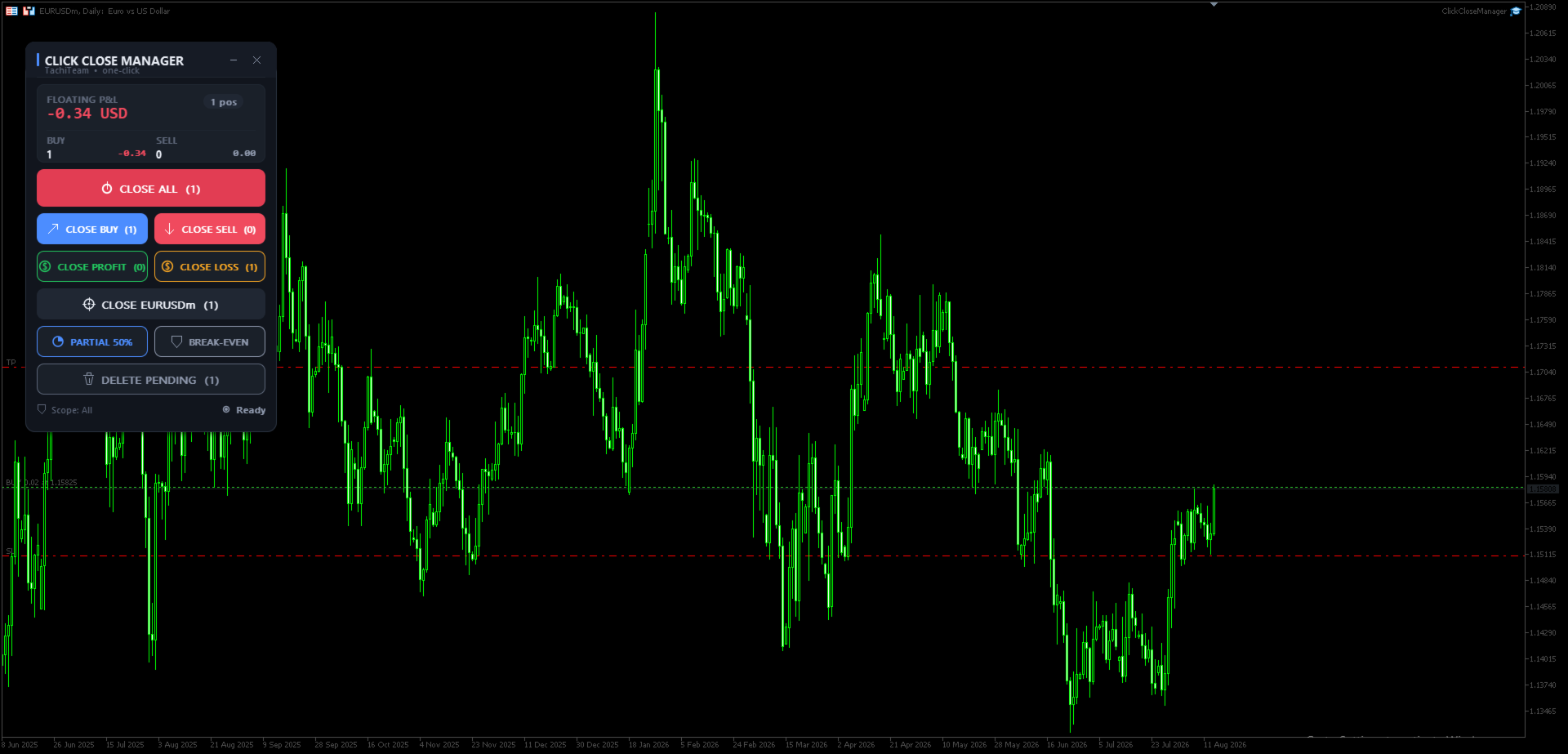
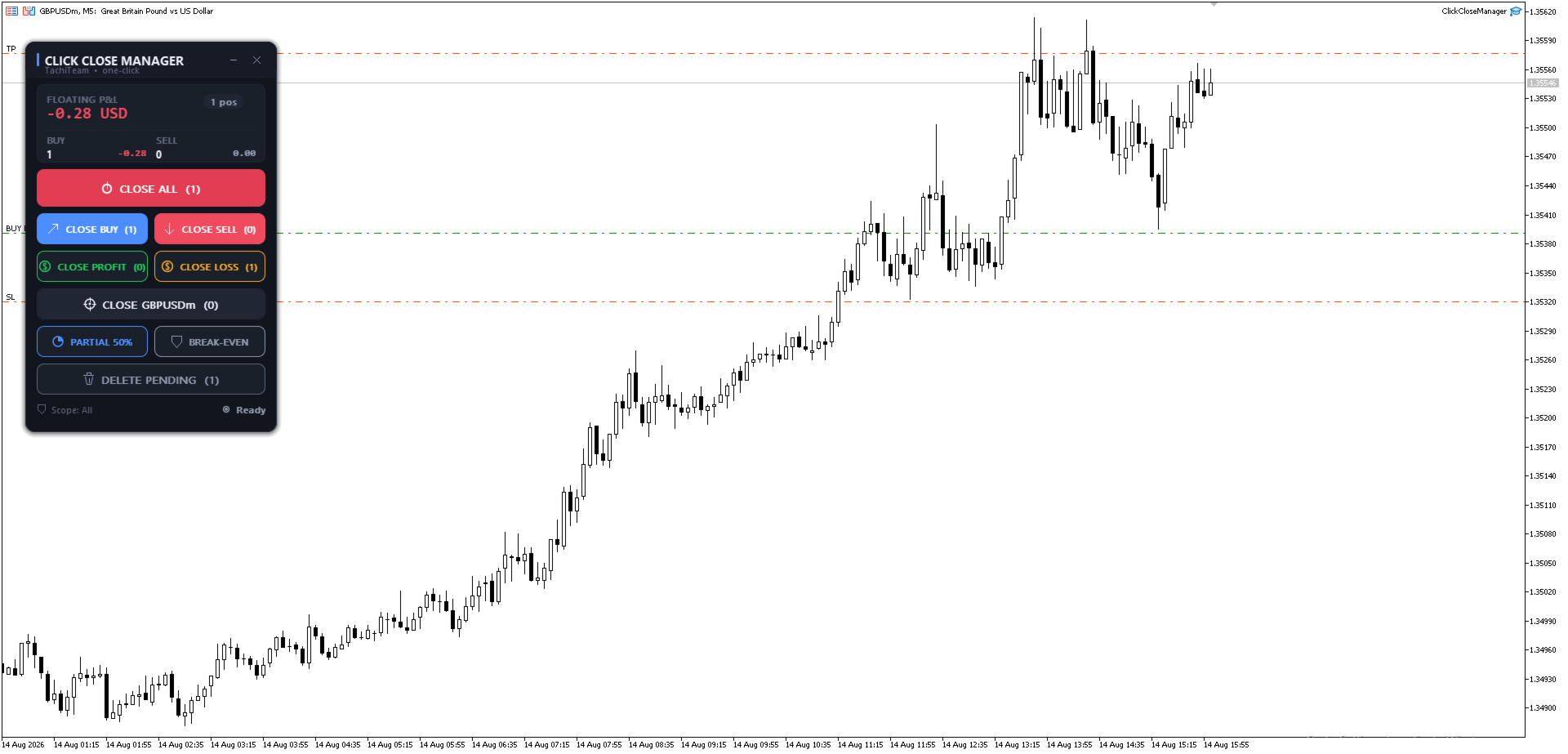
Click Close Manager

Click Close Manager — One-Click Close All Trades Panel for MT5


(Close All / Buy / Sell / Profit / Loss / Symbol • Partial Close • Break-Even • Delete Pending)


================================================================
OVERVIEW
================================================================
Click Close Manager is a lightweight on-chart trade panel that lets you close and manage your positions with a single click. When the market spikes, news hits, or you simply need to flatten the account fast, right-clicking every position one by one costs precious seconds. This panel turns every exit action into one click plus one confirmation.

Built on a modern, DPI-aware canvas interface — sharp on 4K screens, dark and light themes, draggable and collapsible — it stays out of your way until you need it.

No martingale, no grid, no hidden trading logic. It is a pure execution tool: it only does what you press.

================================================================
KEY FEATURES
================================================================
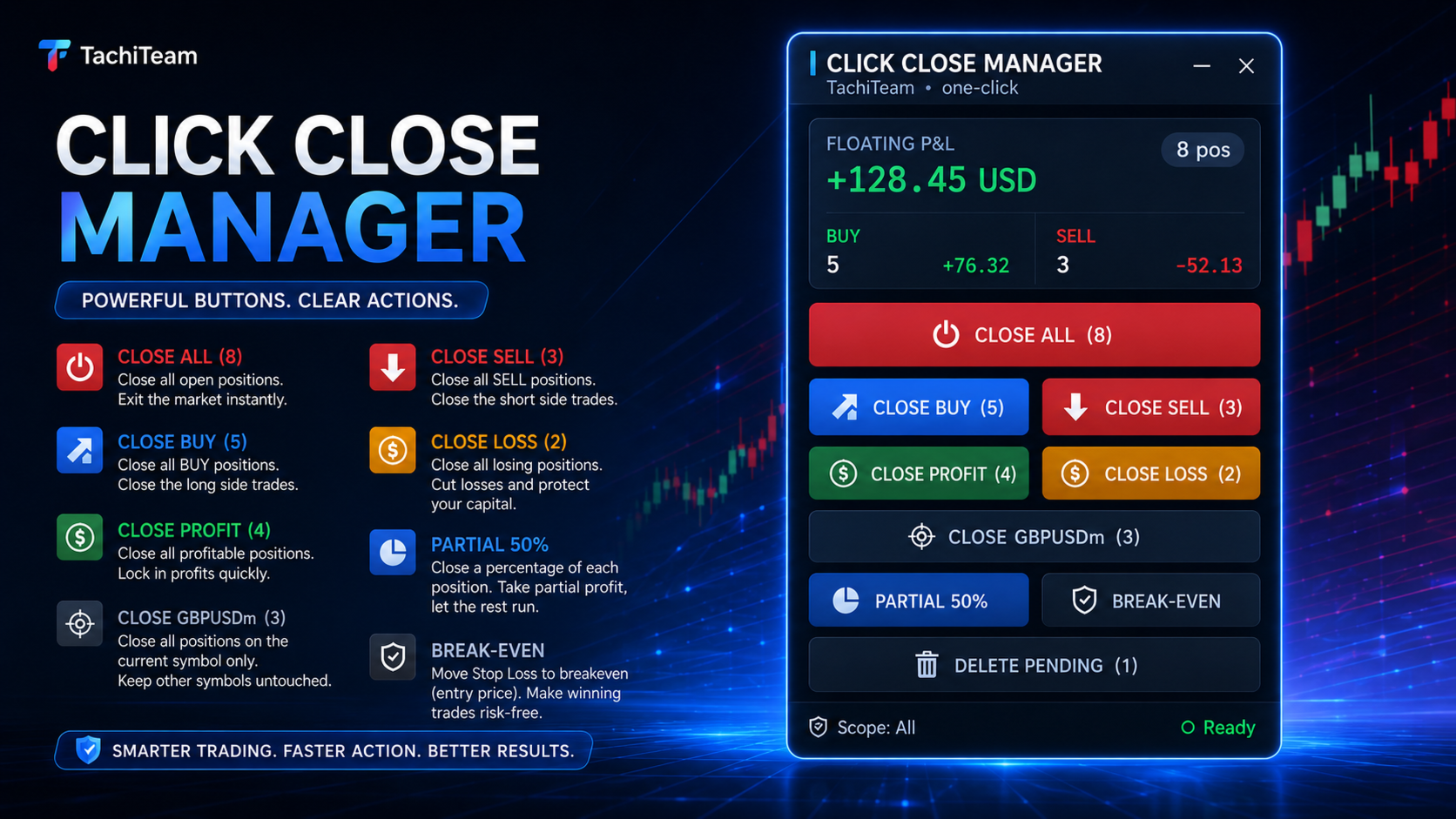
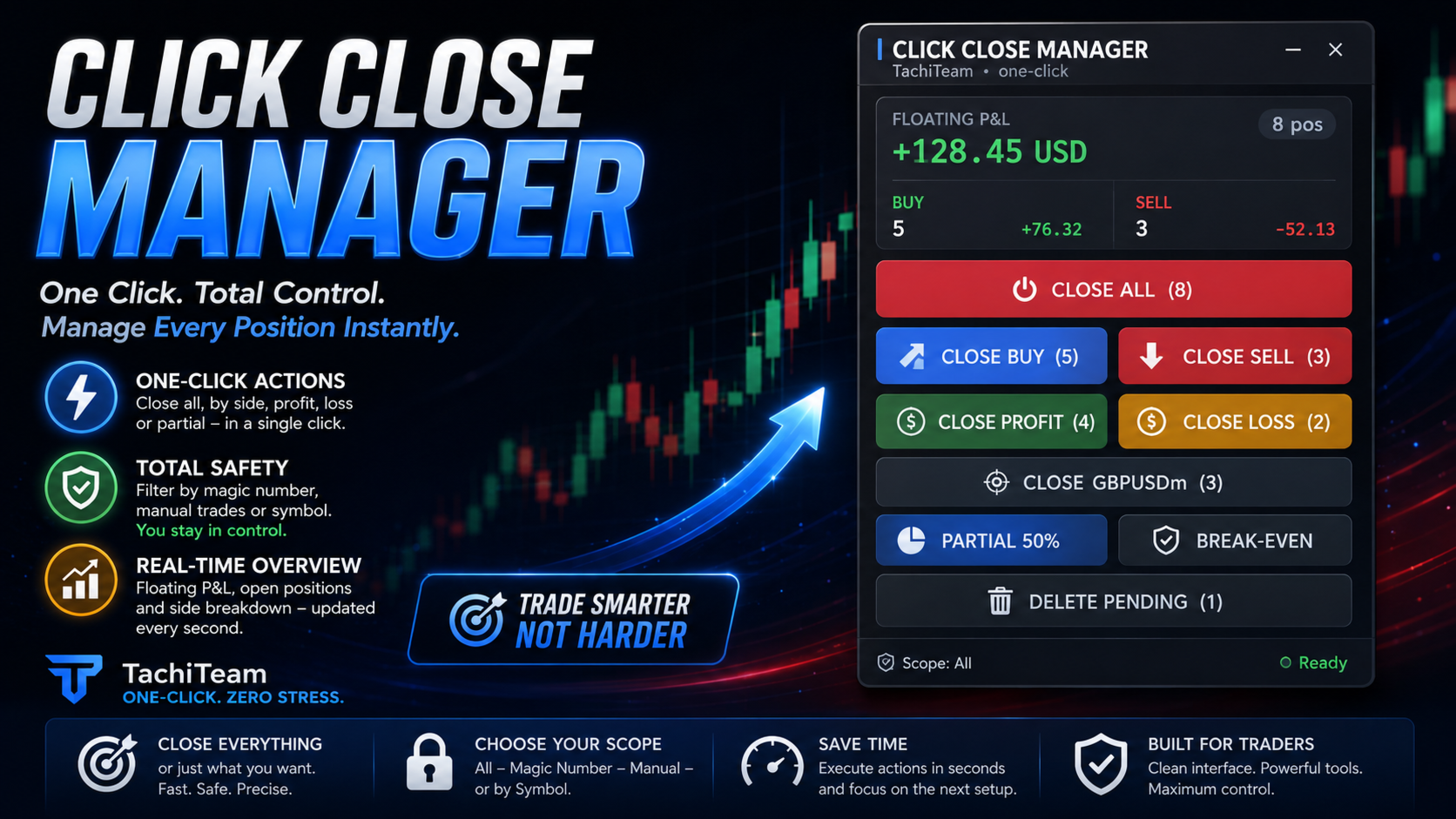
• One-click CLOSE ALL — flatten every open position instantly.
• Close by direction — close all BUY or all SELL trades separately.
• Close by result — close all trades in PROFIT, or cut all trades in LOSS.
• Close current symbol — clear the chart symbol without touching other pairs.
• Partial close — close a fixed % of every position (default 50%, adjustable).
• Break-even — move the stop-loss of profitable trades to entry in one click.
• Delete pending — cancel all pending orders at once.
• Live account panel — floating P&L, position count, and Buy/Sell breakdown, updated every second even in a quiet market.
• In-panel confirmation — every action shows the count and P&L and asks Confirm/Cancel (no more blocking Windows pop-ups). Can be turned off.

================================================================
BUILT-IN SAFETY: MAGIC & SYMBOL FILTER
================================================================
Most "close all" tools blindly close everything on the account. Click Close Manager lets you choose exactly what it is allowed to touch:

• All positions, or
• Only a specific Magic number (manage just one EA's trades), or
• Only manual trades (magic = 0).

You can also restrict EVERY action to the current chart symbol. Run it safely alongside other Expert Advisors — it will never close what you told it to leave alone.

================================================================
PROFESSIONAL, DPI-AWARE PANEL
================================================================
• Crisp canvas-rendered interface with anti-aliased buttons and hover states.
• Dark and Light themes.
• Automatic UI scaling from your screen DPI (or set it manually).
• Drag the header to reposition; minimize to a compact title bar.
• Chart scrolling is locked while you drag the panel, so nothing shifts underneath.

================================================================
INPUTS
================================================================
Appearance
  • Theme — Dark / Light
  • Anchor corner — where the panel is pinned
  • UI scale — 0 = auto from screen DPI
  • Panel X / Y — pixel offset

Scope
  • Which positions to manage — All / Only this magic / Manual
  • Magic number — used with "Only this magic"
  • Restrict every action to the chart symbol — on / off

Behaviour
  • Ask before executing (in-panel confirmation) — on / off
  • Partial-close size, % of each position (default 50)
  • Break-even offset, points (locked profit)
  • Max slippage, points
  • "Close All" also deletes pending orders — on / off

================================================================
HOW TO USE
================================================================
1. Attach Click Close Manager to any chart (one instance is enough).
2. Make sure AutoTrading is enabled.
3. Set the Scope (All / Magic / Manual) to match how you trade.
4. Click an action, review the confirmation, and press Confirm.

Works on all symbols: Forex, Metals, Indices, Crypto, Commodities.

================================================================
NOTES
================================================================
• This is a trade-management utility, not a signal or auto-trading system. It does not open trades on its own.
• Test on a demo account first to get familiar with the panel.
• Requires AutoTrading to be enabled to close or modify orders.

WARNING: No warranty. The product is offered "as is". Trading involves risk; use at your own risk.

================================================================
Search tags: close all, close all trades, one click close, close panel,
trade manager, position manager, partial close, break even, close by profit,
close by loss, delete pending orders, trade assistant, MT5 utility, panel.
Рекомендуем также
Click Trading
Jawad Tauheed
5 (3)
One Click Trading – Auto TP SL Developer TraderLinkz Version 1.00 Category Utility What it does Adds missing TP and SL to your manual trades and pending orders Sets them once per ticket Lets you move TP and SL afterward Works on hedging and netting accounts Scans on every tick and reacts on trade events Why you want it You place faster entries You get consistent risk and exit targets You reduce fat finger errors You keep full manual control Quick start Attach the EA to any chart Keep TP and SL e
FREE
SwiftEdge Scalper Профессиональный EA для тик-скальпинга с полным ручным контролем Скальпинг требует мгновенных решений, точного управления рисками и безупречного исполнения ордеров. Управление расчётами безубытка, трейлинг-стопами и несколькими позициями одновременно с наблюдением за ценой — сложная задача без правильных инструментов. SwiftEdge Scalper — ваш профессиональный торговый помощник, созданный для активных скальперов и дейтрейдеров. Исполняйте сделки одним кликом или горячей клавишей,
Open Risk Budget Cap enforces a total open stop-loss risk budget across your account. It does not choose direction and does not open discretionary trades on a live chart. Attach it to one chart; the symbol and timeframe do not matter. What it measures Every open position and every pending order is priced to its stop-loss in account currency using OrderCalcProfit. Positions or orders without a stop-loss are counted and shown on the panel as "without stop-loss". They are excluded from the budget
Trade Analyzer Panel is a real-time dashboard utility for MetaTrader 5. It brings position monitoring, risk analysis, profit/loss simulation, target planning, break-even visualization and quick-close controls into a single scrollable on-chart panel. Features Position scanner: lists every open position with symbol, direction, lot size, open price and live profit/loss. Account summary: balance, equity, used and free margin, and margin level updated in real time. Break-even visualization: draws a l
Garner Trade Pad EA is an MT5 Expert Advisor that brings trade planning and position sizing directly onto your chart. Position your Stop Loss and Take Profit, choose the amount you want to risk, and view the calculated lot size before placing an order.TP1 buy The dark navy panel with blue accents provides a clear view of your proposed trade. It is a manually operated calculator and order-entry tool: you choose the direction, levels and timing of every trade. ## Movable chart panel - Drag t
Sketch Trade Panel is a manual trading tool for MetaTrader 5. It puts order entry, position sizing, on-chart trade planning and order management into one set of panels on your chart. It does not open trades by itself. ORDER PANEL - Market, Limit, Stop and Stop Limit orders from one panel - Set Stop Loss and Take Profit as a price, in points, in money or as % of balance. Change one field and the others are recalculated - Risk:Reward mode: enter the SL and the TP is calculated from your ratio, o
Advanced 1-Click Risk Panel is a precise and lightning-fast risk management utility for MetaTrader 5. It automatically calculates your exact position size based on chart drag-and-drop Stop Loss line and account risk percentage. Key Features Dynamic SL Line & Dynamic Lot: Simply drag the horizontal SL line on your chart—the panel dynamically calculates your exact lot size instantly. 1-Click Execution: Place instant BUY/SELL orders with automated Stop Loss and Take Profit based on your predefin
Veron Link Slave – Synchronized Grid, Martingale & Breakout Management Short Description Advanced synchronization tool designed to manage Grid, Martingale, and Breakout EAs. Automatically sends close-basket signals to the Master account upon profit target completion, minimizing slippage across different brokers. Full Description Veron Link Slave is a specialized utility developed to enhance the execution efficiency and risk management of multi-account or multi-broker trading setups. It is desig
RiskCopilot
Carlos Adrian Feged Zapata
RiskCopilot Utility - Descripciones Multiidioma РУССКИЙ RiskCopilot Utility - Ваш Интеллектуальный Торговый Помощник "Видьте Свой Риск. Овладейте Торговлей." RiskCopilot Utility - это комплексное решение для управления рисками и расчета размера позиций в MetaTrader 5. Этот всеобъемлющий торговый помощник предоставляет вычисления в реальном времени, продвинутые инструменты оценки рисков и профессиональную торговую аналитику, не контролируя ваши торговые решения. Идеально подходит как для но
LotCalculatorPro
Reynaldo Jr Audencial Pascual
LotCalculatorPro + Smart Trading Panel LotCalculatorPro — это мощный универсальный торговый помощник, разработанный для упрощения управления рисками, расчёта размера лота и выполнения сделок прямо с графика. Этот инструмент помогает трейдерам контролировать риск, рассчитывать точный размер лота и автоматически управлять сделками благодаря таким интеллектуальным функциям, как Break-Even, частичное закрытие позиций и защита дневной прибыли/убытков . Идеально подходит для форекс-трейдеров, проп-тре
TradeArchitect Grid Manager  is a chart-based manual trading utility for MetaTrader 5. It combines visual trade planning, risk-based position sizing, market and pending order execution, position management, and optional martingale or anti-martingale progression. The utility does not generate trading signals and does not decide when to buy or sell. The trader chooses the direction, Entry, Stop Loss and Take Profit. GridPlan Trade Manager performs the calculations, checks the plan and manages th
Local Copy Trader Utility - Professional Copy Trading System Overview Local Copy Trader Utility is the complete solution for mirroring trades between MetaTrader 5 accounts. With both Master and Slave functionality in one powerful Expert Advisor, it delivers reliable, lightning-fast trade copying with zero external dependencies. Perfect for managing multiple accounts, following trading signals, or transferring trades between brokers, this system ensures your positions stay perfectly synchronized
CYGNIX RISK GLADIATOR — Professional Trade Manager & Risk Guardian for MT5 Guard every position. Manage every trade. Sleep at night. Cygnix Risk Gladiator is a professional-grade position management Expert Advisor that watches every open trade on your account and automatically applies institutional-level risk controls in real time. It does not generate signals — it protects, manages, and exits trades opened by you, your strategies, or any other EA. Built for IC Markets and fully compatible w
SmartLot MT5
Nikita Chernyshov
Бесплатная версия  для демо-счетов  | Версия MT4 SmartLot MT5  -   это интерактивная и простая панель для быстрого расчет лота, выставления отложенных и рыночных ордеров прямо с графика. Не работает в тестере стратегий . Чтобы протестировать утилиту, скачайте бесплатную версию для демо-счетов. Инструкция и файл находятся в шапке описания. Функционал: Графический интерфейс:   интерактивные линии Entry, SL, TP с цветовой маркировкой зон прибыли и убытка. Калькуляция в реальном времени:   пр
Ultimate Trailing Stop EA MT5
BLAKE STEVEN RODGER
4.13 (8)
This EA Utility allows you to manage (with advanced filtering) unlimited open orders (manual or EA) with 16 trailing stop methods: fixed, percent, ATR Exit, Chandelier Exit, Moving Average, Candle High Low Exit, Bollinger Bands, Parabolic, Envelope, Fractal, Ichimoku Kijun-Sen, Alligator, Exit After X Minutes or Bars, RSI and Stochastic. The trailing stop can be either real or virtual, and you can exit fully or with a partial close percent on touch or bar close.  Moreover, you can add (override
GridZone Alpha: The Ultimate Semi-Automated Grid & Zone Manager GridZone Alpha is an advanced, interactive trading panel designed for the modern manual trader. Stop staring at the charts waiting for the perfect entry, and stop relying on rigid, fully automated bots that cannot read market context. With GridZone Alpha, you provide the human analysis by identifying your support, resistance, or supply/demand zones. Once confirmed, the Limit Order Engine takes over, instantly deploying a precision,
Ultra Prokit Tool
Francis Muchai Waweru
ULTRA PRO TOOLKIT EA Draw it. Size it. Execute it. Most charts are buried under tools that refuse to talk to each other. You mark a level in one place, work out your lot size somewhere else, then hand-type an order and hope you remembered the stop. Ultra Pro Toolkit EA puts the entire workflow on one panel: sketch your market structure, tell it how many dollars you are willing to lose, and let it handle the arithmetic and the order routing. ️ This is a manual trading cockpit, not a signal
NRP Risk Manager Pro Institutional-Grade Trade Management & Prop Firm Protection Get the MetaTrader 4 Version Here: https://www.mql5.com/en/market/product/179888 Get the MetaTrader 5 Version Here: https://www.mql5.com/en/market/product/179885 Trading isn't just about finding the right entry; it is about flawlessly executing your edge while fiercely protecting your capital. NRP Risk Manager Pro is not an automated trading robot—it is a comprehensive, institutional-grade trade terminal d
Expert TP SL v04 - Профессиональный торговый помощник с ИИ-системой мотивации Продвинутый инструмент для ручной торговли с автоматическим управлением рисками, защитой от переторговли и интеллектуальной психологической поддержкой для дисциплинированной торговли. ОБЗОР ПРОДУКТА Expert TP SL v04 - это комплексный торговый помощник, разработанный для трейдеров, которые предпочитают ручную торговлю, но хотят сохранить эмоциональную дисциплину и автоматизировать расчет рисков. Это не просто инструм
Automatic TP and SL
Dushshantha Rajkumar Jayaraman
TradeGuard    by Chart Walker TradeGuard is a MT5 Expert Advisor (EA) designed to enhance your trading experience by automating key aspects of trade management. This EA excels in efficiently managing Take Profit (TP) and Stop Loss (SL) levels, offering a seamless and intelligent approach to trailing stops. One of TradeGuard's standout features is its Smart Trailing Stop, which dynamically adjusts the trailing distance based on market conditions. This adaptive approach helps maximize profits dur
TradeControl Pro – Расширенный менеджер сделок для MetaTrader TradeControl Pro — это инструмент управления сделками для MetaTrader, обеспечивающий структурированное и эффективное управление торговыми позициями непосредственно на графике. Приложение сочетает в себе понятный интерфейс, автоматические расчёты и гибкие настройки для различных торговых подходов. Встроенная панель на графике имеет табличную структуру и разделена на три основных вкладки: Execution , Close и Info . Интерфейс ориентирова
Equity Sculper EA
Christopher Calmerin
Put your trading profits to work. Equity Sculptor EA is an MT5 trade-management tool that uses new closed profits to gradually reduce losing positions across your account. Account-wide management: All symbols and magic numbers, including manual trades. Two funding modes: Rescue Wallet or Legacy Balance. Flexible settings: Customize profit allocation, trim size and trade selection. Clear dashboard: View your funds, performance and configurations. Persistent tracking: Saved accounting continues af
Lot calculator tool MT5
Ernestas Kvedaras
3.67 (3)
More stable MetaTrader 4 version is available here:  Lot Calculator Tool . This tool helps you to automatically calculate and manage risk, conveniently place orders visually, schedule orders, trail stops, move them to break-even and more. Features Place market or pending orders using draggable lines Schedule orders Calculate and limit risk using various methods See current spread See time till next candle Set custom order comments Trail stops Move stops to break-even See order profit/loss in p
Tick Volume Chart - уникальный инструмент для создания графиков на основе тиковых объёмов в MetaTrader 5 . С помощью Tick Volume Chart вы можете строить графики, где каждая свеча формируется не по времени, а по заданному количеству тиков. Это дает вам идеальную точность анализа рыночной активности, недоступную на стандартных временных графиках. Вы можете использовать любые индикаторы и советники с поддержкой пользовательских символов. Работать с полученными графиками так же удобно, как и со стан
Trade Manager DaneTrades
Levi Dane Benjamin
4.13 (31)
Trade Manager, который поможет вам быстро входить и выходить из сделок, автоматически рассчитывая риск. Включает функции, которые помогут предотвратить чрезмерную торговлю, торговлю из мести и эмоциональную торговлю. Сделками можно управлять автоматически, а показатели эффективности счета можно визуализировать в виде графика. Эти функции делают эту панель идеальной для всех трейдеров, занимающихся ручной торговлей, и помогают улучшить платформу MetaTrader 5. Многоязычная поддержка. Версия для МТ
Стоп уже стоит на графике MT5, а вы прикидываете, какой взять лот, не превышая свой риск: панель сразу показывает лот, убыток на стопе, сумму на тейке и маржу. После входа вы сами задаёте правила: когда перевести позицию в безубыток, закрыть половину и запустить трейлинг-стоп. Панель выполнит каждое действие по заданному вами правилу. Откройте панель на своём графике MT5 и пройдите путь от расчёта лота до выхода из позиции за несколько кликов. Рассчитайте параметры сделки и установите выход по
ADVANCE TRADE MANAGER A complete, tabbed trade-management dashboard for MetaTrader 5 that puts every routine trade operation on one compact panel. No more hunting through menus — open, protect, scale and manage positions from a single interface. The panel is a pure GUI overlay . It never touches your existing chart objects, indicators, arrows or manual lines. All chart objects it creates use the dedicated EGF_Z_ (zones) prefix, and trigger lines use the panel's own object names — so nothing else
Trade Manager G2 MT5
Ida Bagus Putu Mahardika
TRADE MANAGER G2 – PRODUCT DESCRIPTION By Ida Bagus Putu Mahardika Trade Manager G2 – All-in-One Trading Panel for Professional Execution & Risk Management Trade Manager G2 is a next-generation trading panel designed to give you full control over order execution, position management, and profit optimization in real time on MetaTrader 5. With a modern card-based user interface and individual TP actions per level, this panel elevates your trading experience to the next level. KEY ADVANTAGES OF
Short Description A professional MT5 trade management dashboard for managing open trades, risk, trailing stop, break-even, partial close, daily loss guard and trade history directly from the chart. Full Description Smart Trade Manager Dashboard MT5 is a professional trade management panel built for traders who want faster control, clearer account visibility and stronger risk discipline directly from the chart. It is not a signal system and it does not open trades automatically. The dashboard foc
Trading tool combining a sophisticated equity stop-loss, dynamic take-profit management (Breakeven & Trailing), and symbol-group-based closing logic. It is a complete risk management and trade supervision tool. Features: All features of `Equity Master Stop v1` (floating profit/loss limits, exit protection, skip hours). Take-Profit Override: Can force a TP on any order to lock in a `MAX_FLOATING_PROFIT`. Step Breakeven: Locks in increasing amounts of profit as a trade moves favorably (e.g., aft
С этим продуктом покупают
Trade Assistant MT5
Evgeniy Kravchenko
4.43 (216)
Помогает рассчитать риск на сделку, простая установка нового ордера с помощью линий, управление ордерами с функциями частичного закрытия, 7 типов трейлинг-стопа и другие полезные функции. Дополнительные материалы и инструкции Инструкция по установке - Инструкция к приложению Функция Линии   - отображает на графике линию открытия, стоп-лосс, тейк-профит. С помощью этой функции легко установить новый ордер и увидеть его дополнительные характеристики перед открытием. Управление риском   -   функ
Добро пожаловать в Trade Manager EA — лучший инструмент для управления рисками, предназначенный для упрощения, точности и эффективности торговли. Это не просто инструмент для размещения ордеров; это комплексное решение для удобного планирования торгов, управления позициями и усиленного контроля над рисками. Независимо от того, начинающий вы трейдер, опытный специалист или скальпер, нуждающийся в быстром исполнении, Trade Manager EA адаптируется к вашим потребностям и работает с любыми активами:
Farmed Hedge Yield Farming | All Markets (Manual - Hybrid - Semi/Automated EA) VERIFIED TRADING RESULTS - Farmed Hedge Yield Axi Copy:  https://www.mql5.com/en/signals/2356376 - Farmed Hedge Yield Exn Copy:   https://www.mql5.com/en/signals/2356404 - Farmed Hedge Yield V Copy:  https://www.mql5.com/en/signals/2357156 IMPORTANT NOTICE: FarmedHedge is a MANUAL-FOCUSED TRADING UTILITY ,not a fully automated EA. Results shown on this Signal include manual trades and overall strategic management.
Telegram to MT5 Multi-Channel Copier   автоматически копирует торговые сигналы из ваших Telegram- и Discord -каналов прямо в MetaTrader 5. Без ботов, без браузерных расширений, без ручного копирования. Сигнал приходит в Telegram или Discord — и советник открывает сделку в вашем терминале за считанные секунды. А перед тем как копировать канал, встроенный бэктестер покажет, что этот канал сделал бы на вашем счёте. Продукт состоит из двух компонентов: приложения для Windows, которое слушает ваши Te
Local Trade Copier EA MT5
Juvenille Emperor Limited
4.94 (150)
Local Trade Copier EA MT5 — это быстрый и гибкий копировщик сделок для копирования и управления сделками между несколькими счетами MetaTrader 5 на одном компьютере с Windows или Windows VPS. Он сочетает локальную синхронизацию сделок с настройками на стороне Receiver для управления размером лота, рисками, фильтрацией сделок, сопоставлением символов, управлением сделками и защитой счета. Настройте терминалы Transmitter и Receiver примерно за 1 минуту и копируйте ручные сделки или сделки, открыты
TradePanel MT5
Alfiya Fazylova
4.88 (173)
Trade Panel — это многофункциональный торговый помощник. Приложение содержит более 50 торговых функций для ручной торговли и позволяет автоматизировать большинство торговых операций. Инструкция к приложению: https://www.mql5.com/ru/blogs/post/756476 Пробная версия приложения для демо-счета: https://www.mql5.com/ru/blogs/post/750864 Как установить приложение: https://www.mql5.com/ru/blogs/post/750096 Как тестировать приложение в визуальном режиме: https://www.mql5.com/ru/blogs/post/770274 Как уст
Копируйте сигналы из Telegram по своим торговым правилам Telegram to MT5 Signal Trader автоматически копирует текстовые торговые сигналы из открытых и закрытых каналов и групп Telegram в MetaTrader 5. Управляйте несколькими поставщиками сигналов и счетами MT5 из одного приложения для компьютера, задавая индивидуальные параметры риска и торговли для каждого поставщика . Для копирования не нужны бот Telegram и настройка API. Просто войдите в свой аккаунт Telegram по номеру телефона или QR-коду и в
EA Overfitter
Stephen J Martret
5 (4)
Бэктест выглядит отлично. Но будет ли советник зарабатывать завтра, через неделю, через месяц? EA Overfitter прогоняет вашего советника по 100 историям цены, которых он никогда не видел. Одна оценка показывает, реально ли преимущество. Бэктест показывает, что советник сделал на одной истории цены — на той, которая случайно произошла. Из него невозможно понять, какая часть результата была заслугой стратегии, а какая — конкретного пути цены. EA Overfitter отвечает на этот вопрос. Он строит до 10
Exp COPYLOT CLIENT for MT5
Vladislav Andruschenko
3.97 (35)
Профессиональный копировщик сделок для MetaTrader 5 Быстрый, профессиональный и надежный копировщик сделок для MetaTrader . COPYLOT позволяет копировать сделки Forex между терминалами MT4 и MT5 с поддержкой счетов Hedge и Netting . Версия COPYLOT для MT5 поддерживает: - MT5 Hedge → MT5 Hedge - MT5 Hedge → MT5 Netting - MT5 Netting → MT5 Hedge - MT5 Netting → MT5 Netting - MT4 → MT5 Hedge - MT4 → MT5 Netting Версия MT4 Полное описание + DEMO + PDF Как купить Как установить Как получить файлы жур
The product will copy all telegram signal to MT5 ( which you are member) , also it can work as remote copier.  Easy to set up, copy order instant, can work with almost signal formats, image signal,  s upport to translate other language to English Work with all type of channel or group, even channel have "Restrict Saving Content", work with  multi channel, multi MT5 Work as remote copier: with signal have ticket number, it will copy exactly via ticket number. Support to backtest signal. How to s
News Trade EA MT5
Konstantin Kulikov
4.55 (11)
Представляю полезного робота, которым пользуюсь сам уже несколько лет. Может использоваться как в полуавтоматическом, так и в полностью автоматическом режиме. >>> Chat <<< Программа содержит гибкие настройки торговли на новостях экономического календаря. В тестере стратегий проверить нельзя. Только реальная работа. Скачайте последний архив настроек: https://www.mql5.com/en/blogs/post/747929 Мониторинг сигналов: https://www.mql5.com/ru/signals/author/test-standart При создании своих собственных
================================================================================ POC BREAKOUT - V20.72. Full Professional Grade Toolkit ================================================================================ POC Breakout is a full MetaTrader 5 trading dashboard for discretionary traders who want breakout signals, Point of Control (POC) context, volume profiles, order flow, market structure, news, alerts, and advanced trade planning in one professional workspace. Attached directly to you
Следующее обновление — версия 2.52 уже скоро! [НОВОЕ] Приготовьтесь к 4 новым важным функциям, призванным улучшить ваш анализ рынка и торговый процесс. Мы выводим анализ рынка на новый уровень с помощью 4 новых функций, разработанных с учётом ваших потребностей в трейдинге. Представляем: 1. TRADE OVERVIEW DASHBOARD 2. CONFLUENCE AT ZONE 3. STRONG & WEAK HIGH/LOW 4. OTE 1. TRADE OVERVIEW DASHBOARD Панель, которая помогает легче понимать общую картину рынка, предоставляя рекомендации для поддержк
EA Auditor
Stephen J Martret
5 (7)
EA Auditor is an independent analysis tool for traders evaluating Expert Advisors and trading signals on MetaTrader 5. It audits backtest reports, reviews posted developer signals, and cross-verifies the two against each other to help traders assess strategies before committing capital. The MQL5 market offers a wide range of Expert Advisors from many developers, with varying approaches, quality, and transparency. EA Auditor provides a consistent, data-driven framework for reviewing them, answer
Telegram To MT5 Ultra
Mirel Daniel Gheonu
5 (5)
Telegram To MT5 — копировщик сигналов Превратите торговые сигналы из ваших Telegram-каналов в реальные ордера MT5 — автоматически, на любом количестве счетов, с полным контролем над риском и правилами. Telegram To MT5 связывает VIP / сигнальные каналы, на которые вы уже подписаны в Telegram, с вашим терминалом MetaTrader 5. Бесплатное приложение-компаньон для ПК читает сообщения (даже из каналов, которые не допускают ботов), а этот советник исполняет их на вашем счёте — применяя ваши настройки р
Telegram to MT5 Coppy
Sergey Batudayev
5 (10)
Telegram to MT5: Идеальное решение для копирования сигналов Упростите свою торговлю с Telegram to MT5 — современным инструментом, который копирует торговые сигналы прямо из каналов и чатов Telegram на вашу платформу MetaTrader 5, без необходимости использования DLL. Это мощное решение обеспечивает точное исполнение сигналов, широкие возможности настройки, экономит время и повышает вашу эффективность. [ Instructions and DEMO ] [ FAQ ] [ How atach logs properly ] [ Settings descrition ] Ключевые
AW Shepherd Safety MT5
AW Trading Software Limited
5 (5)
AW Shepherd Safety EA - советник для сопровождения открытых позиций. Первый ордер открывает трейдер с панели, дальше советник ведёт корзину сам: доливает ордера восстановления с фильтром тренда, закрывает сторону по TakeProfit, трейлингу или стопу и показывает уровни закрытия на графике. Покупки и продажи ведутся отдельно, обе стороны могут быть открыты одновременно. Ордер восстановления открывается не просто по шагу цены, а после разворота в сторону позиции по Parabolic SAR, двум MA или цвету с
News Filter EA
Rashed Samir
5 (2)
News Filter EA: Advanced Algo Trading Assistant News Filter EA is an advanced algo trading assistant designed to enhance your trading experience. By using the News Filter EA , you can integrate a Forex economic news filter into your existing expert advisor, even if you do not have access to its source code. In addition to the news filter, you can also specify trading days and hours for your expert. The News Filter EA also includes risk management  and equity protection features. MT4 Version Ma
MT5 to Telegram Signal Provider — это простой в использовании полностью настраиваемый инструмент, который позволяет отправлять определённые сигналы в чат, канал или группу Telegram, превращая вашу учётную запись в провайдера сигналов . В отличие от большинства конкурирующих продуктов, он не использует импорт DLL. [ Демо ]   [ Руководство ] [ Версия MT4 ] [ Версия для Discord ] [ Канал в Telegram ]  New: [ Telegram To MT5 ] Настройка Доступно пошаговое руководство пользователя . Никаких знаний A
RETAILBERG FOOTPRINT CHART PRO — Order-Flow Workspace for MetaTrader 5 Version 7.00  |  Professional System  |  31 tools  |  One chart A full 150-page illustrated User Manual is included. Please read the full manual to understand this feature packed footprint chart elements and ui. https://www.mql5.com/en/blogs/post/777982 DEMO / STRATEGY TESTER — PLEASE READ FIRST
Timeless Charts
Samuel Manoel De Souza
5 (9)
Timeless Charts is an all-in-one trading utility for professional traders. It combines custom chart types such as Seconds Charts and Renko with advanced order flow analysis using Footprints , Clusters , Volume Profiles , VWAP studies, and anchored analysis tools for deeper market insight. Trading and position management are handled directly from the chart through an integrated trade management panel , while Market Replay and Virtual Accounts provide environments for practicing trading skills and
VirtualTradePad PRO SE MT5 — профессиональный торговый центр управления для MetaTrader 5 VirtualTradePad PRO SE — это премиальная торговая панель и рабочая среда управления сделками на графике для MetaTrader 5 . Она создана для трейдеров, которым нужны более быстрое исполнение, более понятный контроль позиций, структурированное управление сделками, визуальное планирование уровней и профессиональный рабочий процесс прямо с графика. Это не просто панель BUY / SELL. PRO SE объединяет ручную торговл
Trader Evolution
Siarhei Vashchylka
5 (7)
"Trader Evolution" - Утилита, предназначенная для трейдеров, которые используют в своей работе волновой и технический анализ. Одна вкладка утилиты способна управлять капиталом и открывать ордера, а другая - помогать в построении волн Эллиотта, уровней поддержки и сопротивления, а также линий тренда. Инструкция/Мануал ( Обязательно читайте перед приобретением ) | Версия для МТ4 Преимущества 1. Торговля в несколько кликов. В панели доступны немедленные и отложенные ордера 2. Управление капиталом
AW Trade Manager
AW Trading Software Limited
AW Trade Manager - торговая панель для MetaTrader 5 с инструментом риск/прибыль на графике. Сделка планируется линиями Entry, Stop Loss и Take Profit, которые тянут мышью: плашки показывают цену, расстояние и деньги, зоны показывают прибыль и убыток, а объём считается от риска. Перед отправкой окно подтверждения показывает сделку целиком: риск, маржу и правила позиции. Инструкция и описание -> ЗДЕСЬ / Бесплатное LIVE-демо -> ЗДЕСЬ Для ведения позиции после входа в панели есть безубыток, трейлинг
Торговая панель для MetaTrader 5 — профессиональная торговля в один клик с графика и клавиатуры Мощная торговая панель для активного ручного трейдинга, которая позволяет открывать, сопровождать и закрывать сделки значительно быстрее и удобнее, чем стандартными средствами MetaTrader. Панель создана для тех, кто хочет получить полный контроль над позициями, ордерами, прибылью и торговыми сценариями в одном рабочем пространстве. Это не просто вспомогательная утилита. Это полноценный торговый интер
Торговый ассистент на графике и панель управления рисками Полнофункциональная утилита на графике с многорежимными SL и TP (ATR, R:R, пункты, валюта счета), живой аналитикой и экономическим календарем Ergotick Trade Manager — это профессиональная торговая панель «все в одном», разработанная для дискреционных трейдеров, участников проп-челленджей и скальперов. Она сочетает в себе мгновенный автоматический расчет размера лота, многорежимную настройку Stop Loss и Take Profit, продвинутое управление
RS Trade Copier - сверхбыстрый локальный копировщик сделок с полноценным графическим интерфейсом. Хватит вбивать номера счетов вручную. Никаких 200+ непонятных параметров в настройках. Надёжный и гибкий инструмент для копирования торговых операций между несколькими терминалами MT5 и MT4. Подходит как опытным трейдерам и сигнал-сервисам, так и частным инвесторам. Позволяет синхронизировать торговлю от одного или нескольких источников к одному или нескольким приёмникам с высокой точностью и минима
Master Your Trading Discipline   Stop losing your hard-earned gains to overtrading and emotional decisions. The Discipline Tool is your ultimate trading assistant, ensuring strict risk management in real-time. Key Protection Features: Advanced Drawdown Defense : Automatically halts trading if your daily drawdown exceeds a preset threshold (percentage or dollar amount). Real-Time Equity Lock : Safeguard profits by referencing peak equity, ensuring drawdown stays within control. Hard Profit Target
Trade Dashboard MT5
Fatemeh Ameri
4.94 (135)
Trade Dashboard simplifies how you open, manage, and control your trades, with built-in lot size calculation. It allows you to execute trades, manage risk, and control positions directly on the chart, with tools such as partial close, breakeven, and trailing stop. Designed to reduce manual work and help you stay focused on your trading decisions. A demo version is available for testing. Detailed explanations of features are provided within the MQL5 platform. Installation instructions are include
Dealer's Panel No signal decides anything here — a hand does. One click, and the panel calculates what's underneath: lot size from risk, target from a 30-step balance ladder that remembers exactly how far an account has climbed. Toggle between market and pending without touching an input field. Set a stop, and the take-profit can write itself — a fixed share of the balance, translated into price with no arithmetic left for the trader to get wrong. One trade live at a time; it won't let a seco
Другие продукты этого автора
Institutional Blueprint   (MT4) — Market Structure, Order Blocks & Risk/Reward Zones Institutional Blueprint reads the chart the way professional price-action traders do. On every closed bar it maps live market structure, marks the Order Block behind each move, and turns the most relevant block into a ready-to-read trade plan with a clear Entry, Stop Loss and three Take-Profit targets — drawn as a green reward zone and a red risk zone, so the trade geometry is obvious at a glance. Based on Sm
Trail Architect MT5
Do Thi Phuong Anh
5 (1)
Trailing Stop and Breakeven Manager - Trail Architect Auto Trailing Stop and Breakeven Manager for MT5. Protect profit with automatic break even, then trail your stop loss using Classic, Step, ATR or Candle trailing - all from one professional panel. Every trader knows the pain: a winning trade turns into a loss because the stop loss was never moved. Watching the chart all day just to move your stop to break even and trail the stop loss by hand is exhausting - and one missed move can wipe out a

Lot Architect — Trade Panel and Position Size Calculator for MT4 Lot Architect is a trade panel and risk-based position size calculator for MetaTrader 4. It helps calculate lot size from the selected risk, displays trade parameters before entry, and supports Market, Limit and Stop orders from the chart. The utility is designed for traders who want a structured workflow for position sizing, stop-loss placement, take-profit planning and order execution. Purpose Before opening a trade, a trader nee
Trailing Stop and Breakeven Manager - Trail Architect MT4 Auto Trailing Stop and Breakeven Manager for MT4. Protect profit with automatic break even, then trail your stop loss using Classic, Step, ATR or Candle trailing - all from one professional panel. Every trader knows the pain: a winning trade turns into a loss because the stop loss was never moved. Watching the chart all day just to move your stop to break even and trail the stop loss by hand is exhausting - and one missed move can wipe o
Passband Filter Pro Passband Filter Pro is a trend and cycle oscillator for MetaTrader 4. It is built on the Ehlers Super Passband Filter, a band pass filter that removes long term trend drift and short term noise so that only the dominant market cycle remains. The result is a clean oscillator with a color cloud that shows overbought and oversold conditions, cycle turns, and momentum on forex, gold, indices, stocks and crypto. Most traders enter too early or too late. Simple moving averages l
Waddah Attar Explosion Pro MT4 A momentum and volatility indicator for MetaTrader that shows trend strength and volatility expansion in one clean, color-coded histogram. Waddah Attar Explosion Pro MT4 is a momentum and volatility indicator for MetaTrader 4. It combines a MACD based momentum histogram with Bollinger Bands volatility and a Dead Zone filter, so you can read trend strength and volatility expansion at a glance. It is a modern, redesigned version of the classic Waddah Attar Explosio
Standard Deviation Channel -  SDC Pro MT4 Linear regression channel with standard deviation bands. Multi-timeframe, shaded deviation zones, price labels and an information panel for MetaTrader 4. SDC Pro draws a linear regression channel with standard deviation bands on the price chart. It is a visual tool for reading trend direction, price structure, and how far price is stretched from its regression mean. The indicator works on any symbol and any timeframe. The center line is a least-squares
ADX MA: The Ultimate Trend Strength Guide In forex trading, the Average Directional Index (ADX) is a vital indicator for gauging trend strength. Here's a streamlined approach to using ADX for effective trading: 1. Add ADX to your forex chart. 2. Interpret ADX values: <20 is weak, >40 is strong. 3. Identify trend direction: +DI above -DI indicates an upward trend, and vice versa. 4. Execute trades based on ADX and trend: Strong up trend, consider buying; strong down trend, consider selling; we
Dot Histogram Trend for Buy Sell (or) Squeeze Momentum Pro — TTM Squeeze Momentum Indicator for MT4 Squeeze Momentum Pro is a professional Squeeze Momentum indicator for MT4 that combines a volatility squeeze detector with a color‑coded momentum oscillator in a single window. Built on the well‑known TTM Squeeze concept (Bollinger Bands inside Keltner Channels), this MT4 momentum indicator helps forex, indices, metals and crypto traders spot low‑volatility compression before a potential breakout
M1 GoldSniper Pro:  The sniper-precision scalping system built for Gold traders. Most M1 indicators flood your chart with false signals. M1 GoldSniper Pro is different — it uses a Triple Confirmation System that requires three independent filters to agree before printing a single arrow. The result: fewer signals, higher quality, and the confidence to actually pull the trigger. Signals are calculated on closed candles only. They never repaint. Never move. Never disappear. MetaTrader 5 ve rsion: 
TrendPulse Pro MT4 identifies trend direction and reversals on any symbol and timeframe. It colors each candle by trend, marks reversal bars with clear arrow signals, and instantly draws ATR-based Stop Loss and Take Profit levels — so you always know where to enter, where to protect capital, and where to take profits, without any manual calculation. Every signal is based on closed bars and does not repaint.  MT5:  https://www.mql5.com/en/market/product/179548 How It Works Each closed bar is scor
ICT Kill Zones   marks the four main intraday sessions on your chart and the high and low of each session. It is an analytical tool for traders who follow the ICT and Smart Money approach. It does not place orders and does not give automatic buy or sell signals. It shows when the active sessions occur and where session liquidity rests, so you can make your own trading decisions.  Session high and low levels and sweep events are confirmed on closed candles only. Past levels are not redrawn. The M
Order Block Pro — Institutional Order Blocks with Entry, SL & 3 Take-Profits (ICT / SMC) See where smart money entered and trade the retest with a complete Entry, Stop-Loss and TP1/TP2/TP3 plan — automatically, on closed candles only. Non-repaint. FULL DESCRIPTION Order Block Pro maps the institutional Order Blocks that drive price in the ICT / Smart Money Concepts framework and turns every valid one into a clean, ready-to-trade plan. No more guessing where to draw your zones: it finds the last
Edge Radar Pro MT4 — every pair, scored by edge. Edge Radar Pro scans your entire Market Watch and, for every symbol, auto-optimizes three price-action strategies — Momentum, Reversal and Breakout — across a grid of signal strengths and ATR-based SL/TP pairs. Each combination is backtested on closed bars only (non-repaint), and the winner is ranked by a single honest number: the Edge Score. Most scanners rank by raw Profit Factor — which flatters tiny samples. The Edge Score is a confidence-adju
Click Close Manager — One-Click Close All Trades Panel for MT4 (Close All / Buy / Sell / Profit / Loss / Symbol • Partial Close • Break-Even • Delete Pending) ================================================================ OVERVIEW ================================================================ Click Close Manager is a lightweight on-chart trade panel that lets you close and manage your positions with a single click. When the market spikes, news hits, or you simply need to flatten the accou
Think of this EA as an "order management assistant" rather than a robot that automatically finds entry points. The EA helps you automatically set or hide Stop Loss (SL) and Take Profit (TP) levels, move the stop-loss to break-even, lock in profits, and apply trailing stops to open orders. =============== Simple Explanation You open a Buy or Sell order first. Then, the EA manages that order based on your configured settings. Example: - StopLossPoints = 250: Exit or set SL if the loss reaches 250
Passband Filter Pro Passband Filter Pro is a trend and cycle oscillator for MetaTrader 5. It is built on the Ehlers Super Passband Filter, a band pass filter that removes long term trend drift and short term noise so that only the dominant market cycle remains. The result is a clean oscillator with a color cloud that shows overbought and oversold conditions, cycle turns, and momentum on forex, gold, indices, stocks and crypto. Most traders enter too early or too late. Simple moving averages la
RSI Experiment Extended Pro RSI Experiment Extended Pro is an adaptive RSI indicator for MT4 and MT5 that combines a smoothed RSI oscillator with self-adjusting overbought and oversold levels, non-repaint buy and sell signals, multi-timeframe analysis, on-screen alerts, and an information dashboard. This RSI indicator works on any symbol and any timeframe, including forex, indices, metals, stocks, and crypto, and is built for both intraday and swing trading. The problem this RSI indicator sol
Smoothed Repulse Pro — Momentum Oscillator with Multi-Timeframe Dashboard & Divergence A self-normalizing bull/bear momentum oscillator for MetaTrader 5 with an adaptive floating-level zone, a multi-timeframe confluence dashboard, and automatic divergence detection. Non-repaint on closed bars. --------------------------- Smoothed Repulse Pro is a momentum oscillator and trend indicator for MetaTrader 5. It measures the buying pressure against the selling pressure behind each candle, smooths the
Supply and Demand Zones Indicator for MT5 Supply Demand Zone Confirm Pro is a supply and demand indicator for MetaTrader 5 that automatically detects and draws support and resistance zones on your chart. Instead of marking demand zones and supply zones by hand, you get objective supply and demand zones that are graded by strength, so you can focus on the levels that price actually respects. The Problem Drawing supply and demand zones manually is slow and subjective. Two traders mark the same
M1 GoldSniper Pro - MetaTrader 5 Triple Confirmation Scalping System for XAUUSD M1  M1 GoldSniper Pro generates non-repaint BUY and SELL signals on XAUUSD M1 using three independent filters that must all agree before any arrow appears on the chart. The result is a low-noise, high-clarity signal system designed for scalpers who need precision on the 1-minute chart.  All signals are locked to closed candle data. They do not repaint, move, or disappear.  MetaTrader 4 version:  https://www.mql5
TrendPulse Pro MT5    identifies trend direction and reversals on any symbol and timeframe. It colors each candle by trend, marks reversal bars with clear arrow signals, and instantly draws ATR-based Stop Loss and Take Profit levels — so you always know where to enter, where to protect capital, and where to take profits, without any manual calculation. Every signal is based on closed bars and does not repaint. How It Works Each closed bar is scored by three independent conditions: •          Fas
Product: Currency Strength Compass MT5 (CSM_Pro) Currency Strength Compass shows, at a glance, which currency is being bought and which is being sold. It measures the relative strength of the eight major currencies and Gold from a basket of 28 pairs and presents it two ways: a ranked list, or a multi-timeframe grid that places M15, H1, H4 and D1 side by side. Every reading is calculated on closed bars only, so the lines and the panel are non-repainting. A value never changes after its bar has cl
Institutional Blueprint (MT5) — Market Structure, Order Blocks & Risk/Reward Zones Institutional Blueprint reads the chart the way professional price-action traders do. On every closed bar it maps live market structure, marks the Order Block behind each move, and turns the most relevant block into a ready-to-read trade plan with a clear Entry, Stop Loss and three Take-Profit targets — drawn as a green reward zone and a red risk zone, so the trade geometry is obvious at a glance. Based on Smar
ICT Kill Zones marks the four main intraday sessions on your chart and the high and low of each session. It is an analytical tool for traders who follow the ICT and Smart Money approach. It does not place orders and does not give automatic buy or sell signals. It shows when the active sessions occur and where session liquidity rests, so you can make your own trading decisions.  Session high and low levels and sweep events are confirmed on closed candles only. Past levels are not redrawn.  The MT
Order Block Pro — Institutional Order Blocks with Entry, SL & 3 Take-Profits (ICT / SMC) See where smart money entered and trade the retest with a complete Entry, Stop-Loss and TP1/TP2/TP3 plan — automatically, on closed candles only. Non-repaint. FULL DESCRIPTION Order Block Pro maps the institutional Order Blocks that drive price in the ICT / Smart Money Concepts framework and turns every valid one into a clean, ready-to-trade plan. No more guessing where to draw your zones: it finds the last
ConfluX Pro - Multi-Filter Trend Confluence Indicator ConfluX Pro is a multi-filter confluence indicator built to help traders identify higher-quality entries by requiring several independent market factors to agree before a signal is shown. Every signal is calculated on closed candles only - the indicator never repaints and never reads future price data. HOW IT WORKS Specifically optimized for XAUUSD, BTCUSD - this indicator adapts to changing market conditions through ATR-based volatility l
Volatility Apex Pro Know the trend. Time the turn. Trade with confidence. Volatility Apex Pro turns raw price volatility into clear, actionable decisions. Built on an adaptive ATR trailing-stop engine and confirmed by a higher-timeframe trend filter, it tells you where the trend is, where your stop belongs, and exactly when momentum flips - all on the closed bar, with no repainting. Stop staring at messy charts. Get one clean trend line, precise entry arrows, and a live dashboard that answers
Trend Precision — Entry System with HTF Filter & Auto SL/TP TrendPrecision  turns the classic Trend strategy into a complete, decision-ready trading tool. Instead of just drawing a line and leaving you to guess, it tells you where the trend is, when to enter, where to place your stop, and where to take profit — all confirmed on the closed bar so signals do not repaint. It is built for traders who want a clean chart and a clear plan: one glance at the arrow, the coloured trend line, and the on-ch

Volatility Pulse Pro - MT5 Indicator One number. Every market. Always the same meaning. Every market moves at its own speed. A 30-pip move is huge on one pair and barely noticeable on another. Gold can move more in one London hour than it does all night in Asia. So when your RSI says 70 — what does that actually mean? It depends on the pair. It depends on the hour. That is why the same settings never seem to work everywhere. Volatility Pulse Pro fixes that. It measures how strong a move is   com
Фильтр:
Нет отзывов
Ответ на отзыв