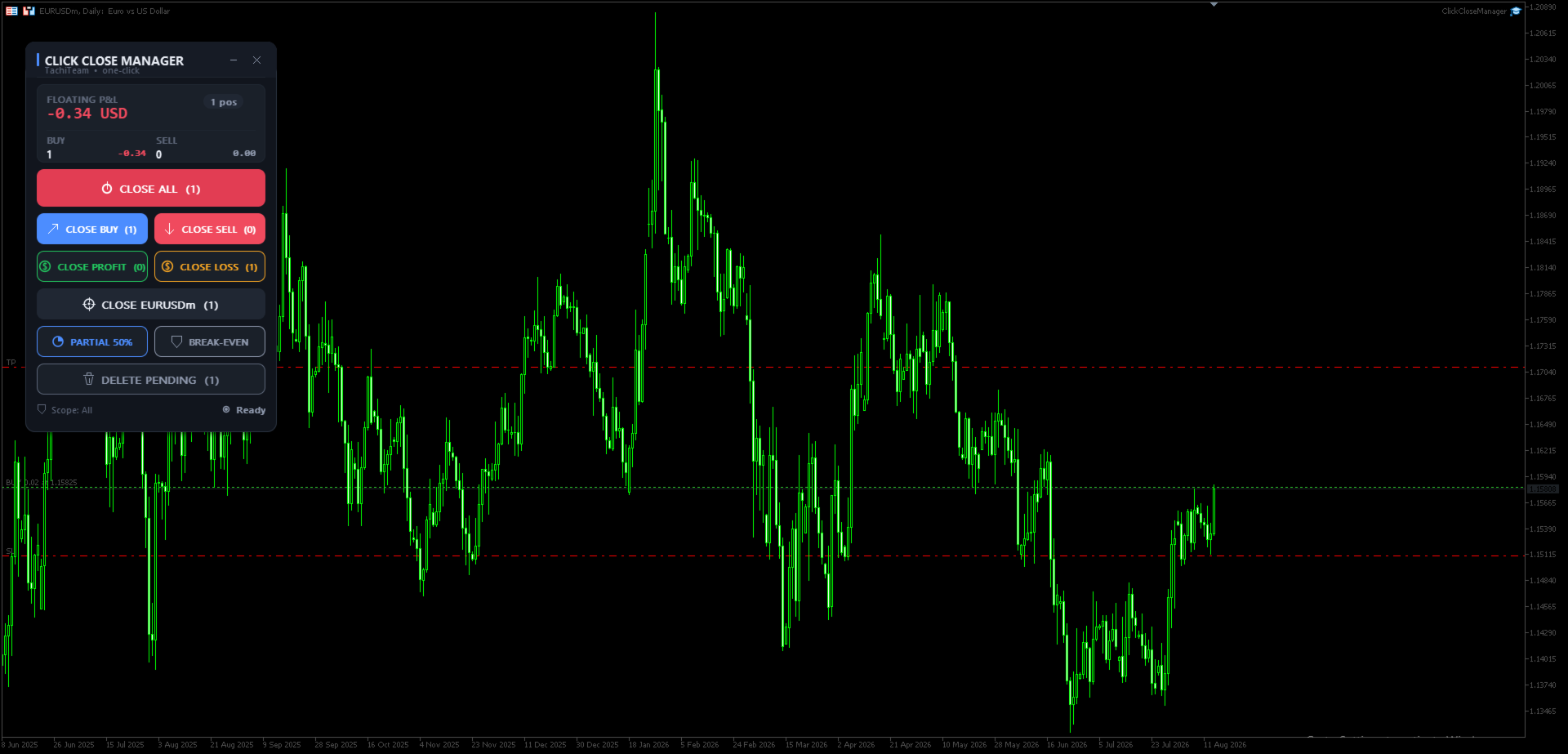
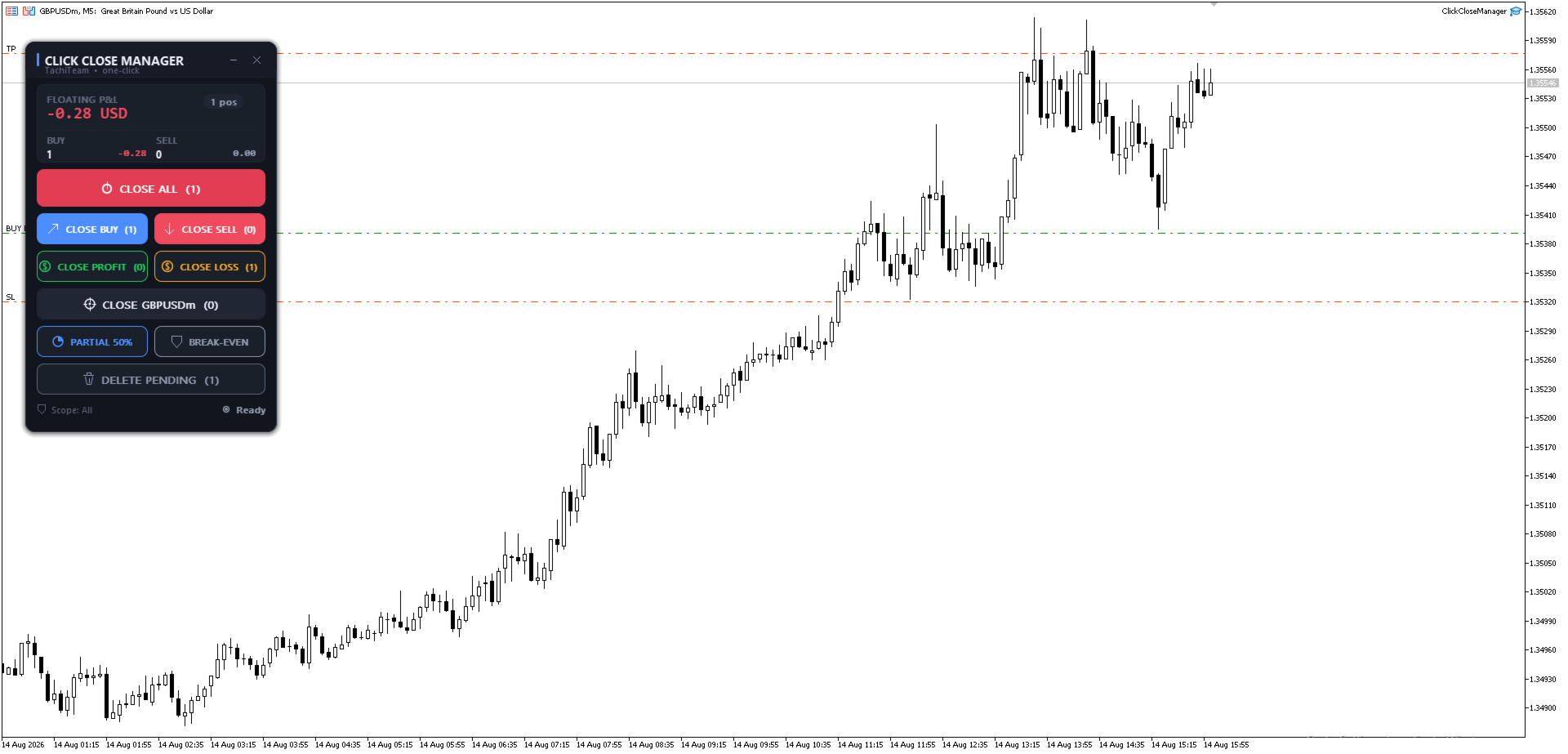
Click Close Manager

Click Close Manager — One-Click Close All Trades Panel for MT5


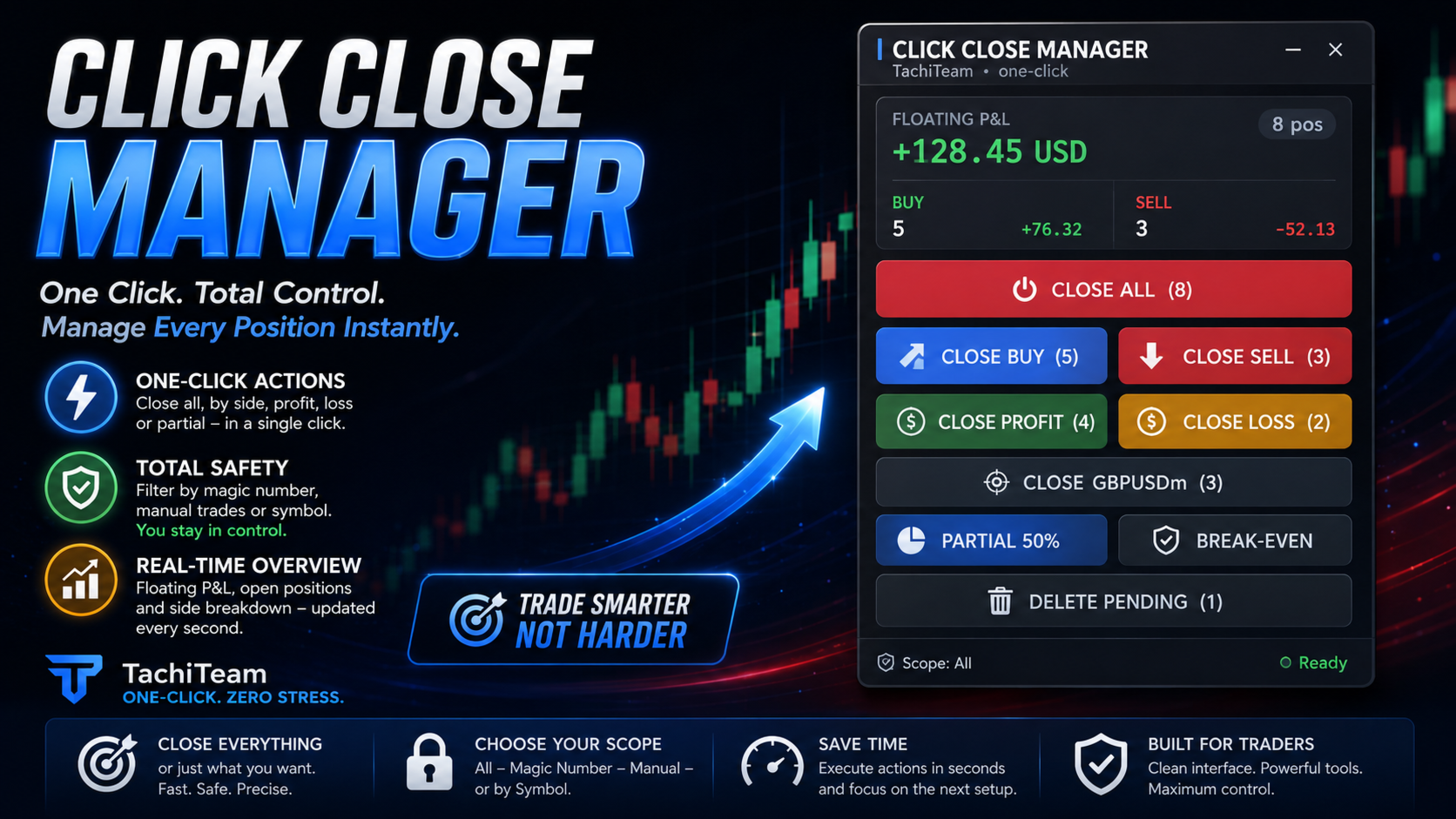
(Close All / Buy / Sell / Profit / Loss / Symbol • Partial Close • Break-Even • Delete Pending)


================================================================
OVERVIEW
================================================================
Click Close Manager is a lightweight on-chart trade panel that lets you close and manage your positions with a single click. When the market spikes, news hits, or you simply need to flatten the account fast, right-clicking every position one by one costs precious seconds. This panel turns every exit action into one click plus one confirmation.

Built on a modern, DPI-aware canvas interface — sharp on 4K screens, dark and light themes, draggable and collapsible — it stays out of your way until you need it.

No martingale, no grid, no hidden trading logic. It is a pure execution tool: it only does what you press.

================================================================
KEY FEATURES
================================================================
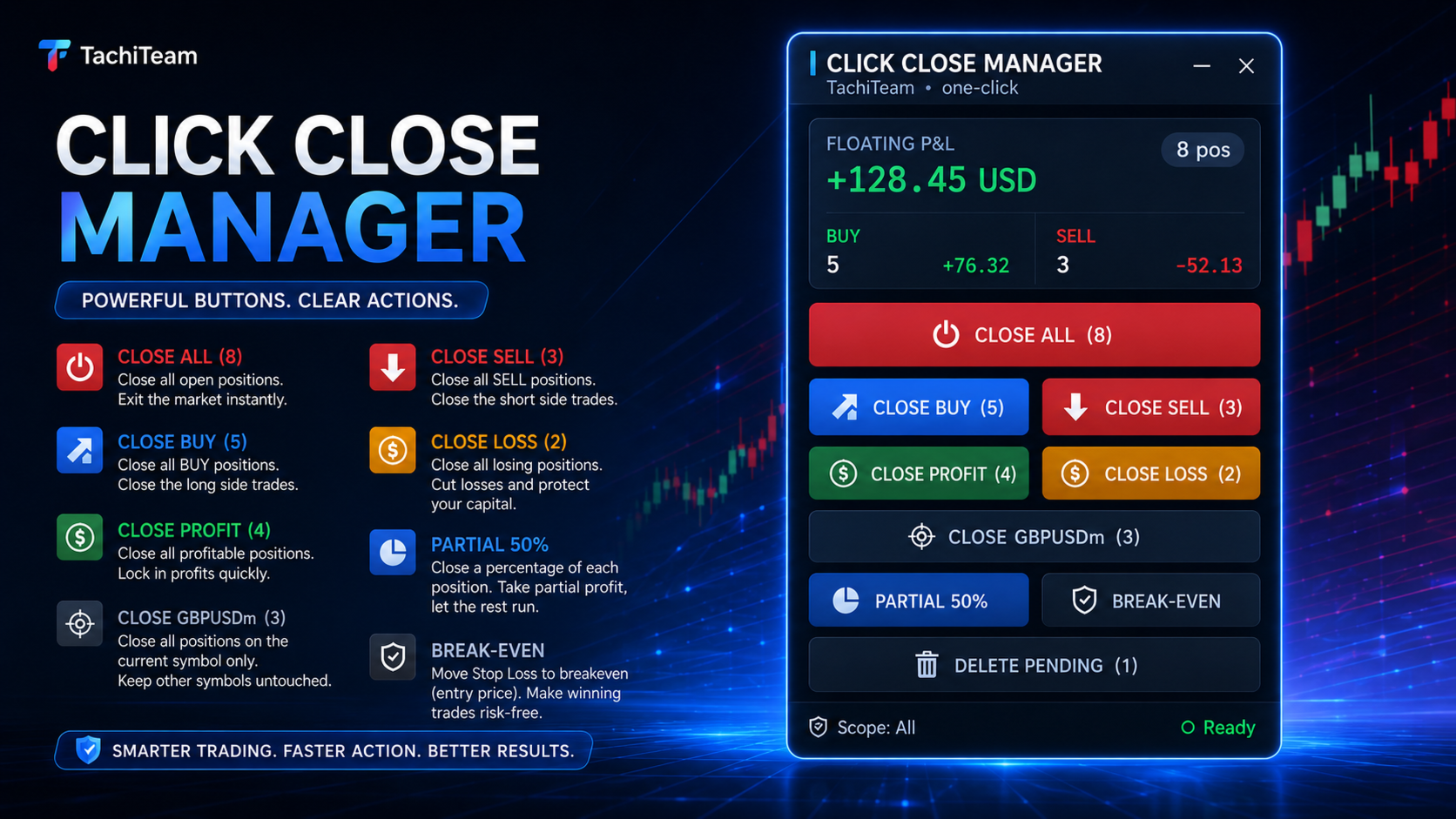
• One-click CLOSE ALL — flatten every open position instantly.
• Close by direction — close all BUY or all SELL trades separately.
• Close by result — close all trades in PROFIT, or cut all trades in LOSS.
• Close current symbol — clear the chart symbol without touching other pairs.
• Partial close — close a fixed % of every position (default 50%, adjustable).
• Break-even — move the stop-loss of profitable trades to entry in one click.
• Delete pending — cancel all pending orders at once.
• Live account panel — floating P&L, position count, and Buy/Sell breakdown, updated every second even in a quiet market.
• In-panel confirmation — every action shows the count and P&L and asks Confirm/Cancel (no more blocking Windows pop-ups). Can be turned off.

================================================================
BUILT-IN SAFETY: MAGIC & SYMBOL FILTER
================================================================
Most "close all" tools blindly close everything on the account. Click Close Manager lets you choose exactly what it is allowed to touch:

• All positions, or
• Only a specific Magic number (manage just one EA's trades), or
• Only manual trades (magic = 0).

You can also restrict EVERY action to the current chart symbol. Run it safely alongside other Expert Advisors — it will never close what you told it to leave alone.

================================================================
PROFESSIONAL, DPI-AWARE PANEL
================================================================
• Crisp canvas-rendered interface with anti-aliased buttons and hover states.
• Dark and Light themes.
• Automatic UI scaling from your screen DPI (or set it manually).
• Drag the header to reposition; minimize to a compact title bar.
• Chart scrolling is locked while you drag the panel, so nothing shifts underneath.

================================================================
INPUTS
================================================================
Appearance
  • Theme — Dark / Light
  • Anchor corner — where the panel is pinned
  • UI scale — 0 = auto from screen DPI
  • Panel X / Y — pixel offset

Scope
  • Which positions to manage — All / Only this magic / Manual
  • Magic number — used with "Only this magic"
  • Restrict every action to the chart symbol — on / off

Behaviour
  • Ask before executing (in-panel confirmation) — on / off
  • Partial-close size, % of each position (default 50)
  • Break-even offset, points (locked profit)
  • Max slippage, points
  • "Close All" also deletes pending orders — on / off

================================================================
HOW TO USE
================================================================
1. Attach Click Close Manager to any chart (one instance is enough).
2. Make sure AutoTrading is enabled.
3. Set the Scope (All / Magic / Manual) to match how you trade.
4. Click an action, review the confirmation, and press Confirm.

Works on all symbols: Forex, Metals, Indices, Crypto, Commodities.

================================================================
NOTES
================================================================
• This is a trade-management utility, not a signal or auto-trading system. It does not open trades on its own.
• Test on a demo account first to get familiar with the panel.
• Requires AutoTrading to be enabled to close or modify orders.

WARNING: No warranty. The product is offered "as is". Trading involves risk; use at your own risk.

================================================================
Search tags: close all, close all trades, one click close, close panel,
trade manager, position manager, partial close, break even, close by profit,
close by loss, delete pending orders, trade assistant, MT5 utility, panel.
Produtos recomendados
Click Trading
Jawad Tauheed
5 (3)
One Click Trading – Auto TP SL Developer TraderLinkz Version 1.00 Category Utility What it does Adds missing TP and SL to your manual trades and pending orders Sets them once per ticket Lets you move TP and SL afterward Works on hedging and netting accounts Scans on every tick and reacts on trade events Why you want it You place faster entries You get consistent risk and exit targets You reduce fat finger errors You keep full manual control Quick start Attach the EA to any chart Keep TP and SL e
FREE
SwiftEdge Scalper EA Profissional de Scalping com Controle Manual Completo O scalping exige decisões em frações de segundo, gestão precisa de risco e execução perfeita de ordens. Gerenciar cálculos de breakeven, trailing stops e múltiplas posições enquanto observa a ação do preço é avassalador sem as ferramentas certas. SwiftEdge Scalper é seu assistente de trading profissional projetado para scalpers ativos e day traders. Execute operações com um clique ou atalho de teclado, enquanto o EA geren
Open Risk Budget Cap enforces a total open stop-loss risk budget across your account. It does not choose direction and does not open discretionary trades on a live chart. Attach it to one chart; the symbol and timeframe do not matter. What it measures Every open position and every pending order is priced to its stop-loss in account currency using OrderCalcProfit. Positions or orders without a stop-loss are counted and shown on the panel as "without stop-loss". They are excluded from the budget
Trade Analyzer Panel is a real-time dashboard utility for MetaTrader 5. It brings position monitoring, risk analysis, profit/loss simulation, target planning, break-even visualization and quick-close controls into a single scrollable on-chart panel. Features Position scanner: lists every open position with symbol, direction, lot size, open price and live profit/loss. Account summary: balance, equity, used and free margin, and margin level updated in real time. Break-even visualization: draws a l
Garner Trade Pad EA
Garner Edward Bennie
Garner Trade Pad EA is an MT5 Expert Advisor that brings trade planning and position sizing directly onto your chart. Position your Stop Loss and Take Profit, choose the amount you want to risk, and view the calculated lot size before placing an order.TP1 buy The dark navy panel with blue accents provides a clear view of your proposed trade. It is a manually operated calculator and order-entry tool: you choose the direction, levels and timing of every trade. ## Movable chart panel - Drag t
Sketch Trade Panel is a manual trading tool for MetaTrader 5. It puts order entry, position sizing, on-chart trade planning and order management into one set of panels on your chart. It does not open trades by itself. ORDER PANEL - Market, Limit, Stop and Stop Limit orders from one panel - Set Stop Loss and Take Profit as a price, in points, in money or as % of balance. Change one field and the others are recalculated - Risk:Reward mode: enter the SL and the TP is calculated from your ratio, o
Advanced 1-Click Risk Panel is a precise and lightning-fast risk management utility for MetaTrader 5. It automatically calculates your exact position size based on chart drag-and-drop Stop Loss line and account risk percentage. Key Features Dynamic SL Line & Dynamic Lot: Simply drag the horizontal SL line on your chart—the panel dynamically calculates your exact lot size instantly. 1-Click Execution: Place instant BUY/SELL orders with automated Stop Loss and Take Profit based on your predefin
Veron Link Slave – Synchronized Grid, Martingale & Breakout Management Short Description Advanced synchronization tool designed to manage Grid, Martingale, and Breakout EAs. Automatically sends close-basket signals to the Master account upon profit target completion, minimizing slippage across different brokers. Full Description Veron Link Slave is a specialized utility developed to enhance the execution efficiency and risk management of multi-account or multi-broker trading setups. It is desig
RiskCopilot
Carlos Adrian Feged Zapata
PORTUGUÊS RiskCopilot Utility - Seu Assistente Inteligente de Trading "Veja Seu Risco. Domine Sua Negociação." RiskCopilot Utility é a solução definitiva para gestão de riscos e dimensionamento de posições no MetaTrader 5. Este assistente abrangente de trading fornece cálculos em tempo real, ferramentas avançadas de avaliação de risco e análise profissional sem controlar suas decisões de negociação. Perfeito tanto para traders iniciantes quanto profissionais que buscam gestão precisa de ri
LotCalculatorPro
Reynaldo Jr Audencial Pascual
LotCalculatorPro + Smart Trading Panel LotCalculatorPro é um poderoso assistente de trading tudo-em-um, projetado para simplificar a gestão de risco, o cálculo do tamanho do lote e a execução de operações diretamente no gráfico. Esta ferramenta ajuda os traders a controlar o risco, calcular tamanhos de lote precisos e gerenciar operações automaticamente com recursos inteligentes como Break-Even, fechamento parcial e proteção diária de lucro/perda . É ideal para traders de Forex, traders de prop
TradeArchitect Grid Manager  is a chart-based manual trading utility for MetaTrader 5. It combines visual trade planning, risk-based position sizing, market and pending order execution, position management, and optional martingale or anti-martingale progression. The utility does not generate trading signals and does not decide when to buy or sell. The trader chooses the direction, Entry, Stop Loss and Take Profit. GridPlan Trade Manager performs the calculations, checks the plan and manages th
Local Copy Trader Utility - Professional Copy Trading System Overview Local Copy Trader Utility is the complete solution for mirroring trades between MetaTrader 5 accounts. With both Master and Slave functionality in one powerful Expert Advisor, it delivers reliable, lightning-fast trade copying with zero external dependencies. Perfect for managing multiple accounts, following trading signals, or transferring trades between brokers, this system ensures your positions stay perfectly synchronized
CYGNIX RISK GLADIATOR — Professional Trade Manager & Risk Guardian for MT5 Guard every position. Manage every trade. Sleep at night. Cygnix Risk Gladiator is a professional-grade position management Expert Advisor that watches every open trade on your account and automatically applies institutional-level risk controls in real time. It does not generate signals — it protects, manages, and exits trades opened by you, your strategies, or any other EA. Built for IC Markets and fully compatible w
SmartLot MT5
Nikita Chernyshov
Versão gratuita para contas demo | Versão MT4 SmartLot   MT5  é um painel interativo e simples para cálculo rápido de lote, colocação de ordens pendentes e de mercado diretamente do gráfico. Não funciona no Testador de Estratégias.   Para testar a utilidade, baixe a versão gratuita para contas demo. As instruções e o arquivo estão no cabeçalho da descrição. Funcionalidades: Interface Gráfica:   Linhas interativas de Entrada, SL, TP com zonas de lucro e perda codificadas por cores. Cálculo
Ultimate Trailing Stop EA MT5
BLAKE STEVEN RODGER
4.13 (8)
This EA Utility allows you to manage (with advanced filtering) unlimited open orders (manual or EA) with 16 trailing stop methods: fixed, percent, ATR Exit, Chandelier Exit, Moving Average, Candle High Low Exit, Bollinger Bands, Parabolic, Envelope, Fractal, Ichimoku Kijun-Sen, Alligator, Exit After X Minutes or Bars, RSI and Stochastic. The trailing stop can be either real or virtual, and you can exit fully or with a partial close percent on touch or bar close.  Moreover, you can add (override
GridZone Alpha: The Ultimate Semi-Automated Grid & Zone Manager GridZone Alpha is an advanced, interactive trading panel designed for the modern manual trader. Stop staring at the charts waiting for the perfect entry, and stop relying on rigid, fully automated bots that cannot read market context. With GridZone Alpha, you provide the human analysis by identifying your support, resistance, or supply/demand zones. Once confirmed, the Limit Order Engine takes over, instantly deploying a precision,
Ultra Prokit Tool
Francis Muchai Waweru
ULTRA PRO TOOLKIT EA Draw it. Size it. Execute it. Most charts are buried under tools that refuse to talk to each other. You mark a level in one place, work out your lot size somewhere else, then hand-type an order and hope you remembered the stop. Ultra Pro Toolkit EA puts the entire workflow on one panel: sketch your market structure, tell it how many dollars you are willing to lose, and let it handle the arithmetic and the order routing. ️ This is a manual trading cockpit, not a signal
NRP Risk Manager Pro Institutional-Grade Trade Management & Prop Firm Protection Get the MetaTrader 4 Version Here: https://www.mql5.com/en/market/product/179888 Get the MetaTrader 5 Version Here: https://www.mql5.com/en/market/product/179885 Trading isn't just about finding the right entry; it is about flawlessly executing your edge while fiercely protecting your capital. NRP Risk Manager Pro is not an automated trading robot—it is a comprehensive, institutional-grade trade terminal d
Expert TP SL v04 - Professional Trading Assistant with AI Motivation System Advanced manual trading tool with automatic risk management, overtrading protection, and intelligent psychological support for disciplined trading. PRODUCT OVERVIEW Expert TP SL v04 is a comprehensive trading assistant designed for manual traders who want to maintain emotional discipline while automating risk calculations. This isn't just another order placement tool - it's a complete trading psychology system that pr
Automatic TP and SL
Dushshantha Rajkumar Jayaraman
TradeGuard    by Chart Walker TradeGuard is a MT5 Expert Advisor (EA) designed to enhance your trading experience by automating key aspects of trade management. This EA excels in efficiently managing Take Profit (TP) and Stop Loss (SL) levels, offering a seamless and intelligent approach to trailing stops. One of TradeGuard's standout features is its Smart Trailing Stop, which dynamically adjusts the trailing distance based on market conditions. This adaptive approach helps maximize profits dur
TradeControl Pro – Gerenciador de Trades Avançado para MetaTrader TradeControl Pro é uma ferramenta de gestão de trades para MetaTrader que permite a administração estruturada e eficiente de posições diretamente no gráfico. A aplicação combina uma interface clara com cálculos automatizados e opções flexíveis de controlo para diferentes abordagens de trading. O painel integrado no gráfico (On-Chart) possui uma estrutura em formato de tabela e está dividido em três áreas principais (abas): Executi
Equity Sculper EA
Christopher Calmerin
Put your trading profits to work. Equity Sculptor EA is an MT5 trade-management tool that uses new closed profits to gradually reduce losing positions across your account. Account-wide management: All symbols and magic numbers, including manual trades. Two funding modes: Rescue Wallet or Legacy Balance. Flexible settings: Customize profit allocation, trim size and trade selection. Clear dashboard: View your funds, performance and configurations. Persistent tracking: Saved accounting continues af
Lot calculator tool MT5
Ernestas Kvedaras
3.67 (3)
More stable MetaTrader 4 version is available here:  Lot Calculator Tool . This tool helps you to automatically calculate and manage risk, conveniently place orders visually, schedule orders, trail stops, move them to break-even and more. Features Place market or pending orders using draggable lines Schedule orders Calculate and limit risk using various methods See current spread See time till next candle Set custom order comments Trail stops Move stops to break-even See order profit/loss in p
Tick Volume Chart - uma ferramenta exclusiva para criar gráficos baseados no volume de ticks no MetaTrader 5 . Com o Tick Volume Chart , você pode construir gráficos onde cada candle é formado não por tempo, mas por uma quantidade definida de ticks. Isso oferece uma precisão ideal na análise da atividade do mercado, indisponível nos gráficos de tempo convencionais. Você pode utilizar quaisquer indicadores e robôs de negociação compatíveis com símbolos personalizados. Trabalhar com os gráficos ge
Trade Manager DaneTrades
Levi Dane Benjamin
4.13 (31)
Trade Manager para ajudá-lo a entrar e sair rapidamente de negociações enquanto calcula automaticamente seu risco. Incluindo recursos para ajudar a evitar negociações excessivas, negociações de vingança e negociações emocionais. As negociações podem ser gerenciadas automaticamente e as métricas de desempenho da conta podem ser visualizadas em um gráfico. Esses recursos tornam este painel ideal para todos os traders manuais e ajudam a aprimorar a plataforma MetaTrader 5. Suporte multilíngue. Vers
Easy Trade Executor é uma ferramenta para cálculo rápido do tamanho da posição, execução de operações e gerenciamento de trades no MT5. Posicione os níveis de Open Price, Stop Loss e Take Profit diretamente no gráfico, obtenha cálculos automáticos do tamanho da posição e abra operações com risco controlado em apenas alguns cliques. Por que escolher o Easy Trade Executor? O Easy Trade Executor foi desenvolvido para traders que desejam mais do que apenas calcular riscos — eles querem gerenciar op
ADVANCE TRADE MANAGER A complete, tabbed trade-management dashboard for MetaTrader 5 that puts every routine trade operation on one compact panel. No more hunting through menus — open, protect, scale and manage positions from a single interface. The panel is a pure GUI overlay . It never touches your existing chart objects, indicators, arrows or manual lines. All chart objects it creates use the dedicated EGF_Z_ (zones) prefix, and trigger lines use the panel's own object names — so nothing else
Trade Manager G2 MT5
Ida Bagus Putu Mahardika
TRADE MANAGER G2 – PRODUCT DESCRIPTION By Ida Bagus Putu Mahardika Trade Manager G2 – All-in-One Trading Panel for Professional Execution & Risk Management Trade Manager G2 is a next-generation trading panel designed to give you full control over order execution, position management, and profit optimization in real time on MetaTrader 5. With a modern card-based user interface and individual TP actions per level, this panel elevates your trading experience to the next level. KEY ADVANTAGES OF
Short Description A professional MT5 trade management dashboard for managing open trades, risk, trailing stop, break-even, partial close, daily loss guard and trade history directly from the chart. Full Description Smart Trade Manager Dashboard MT5 is a professional trade management panel built for traders who want faster control, clearer account visibility and stronger risk discipline directly from the chart. It is not a signal system and it does not open trades automatically. The dashboard foc
Equity Master Stop v2 MT5
Frank William Jr Colbert
Trading tool combining a sophisticated equity stop-loss, dynamic take-profit management (Breakeven & Trailing), and symbol-group-based closing logic. It is a complete risk management and trade supervision tool. Features: All features of `Equity Master Stop v1` (floating profit/loss limits, exit protection, skip hours). Take-Profit Override: Can force a TP on any order to lock in a `MAX_FLOATING_PROFIT`. Step Breakeven: Locks in increasing amounts of profit as a trade moves favorably (e.g., aft
Os compradores deste produto também adquirem
Trade Assistant MT5
Evgeniy Kravchenko
4.43 (216)
Ajuda a calcular o risco por comércio, a fácil instalação de uma nova encomenda, gestão de encomendas com funções de fecho parcial, trailing stop de 7 tipos e outras funções úteis. Materiais e instruções adicionais Instruções de instalação   -   Instruções para a aplicação   Função de linha Mostra no gráfico a linha de Abertura, Stop Loss, Take Profit. Com esta função é fácil definir uma nova ordem e ver as suas características adicionais antes da abertura.   Gestão de risco A função de cálcul
Bem-vindo ao Trade Manager EA—uma ferramenta de gestão de risco criada para tornar o trading mais intuitivo, preciso e eficiente. Não é apenas uma ferramenta para executar ordens, mas uma solução abrangente para planejamento de operações, gerenciamento de posições e controle de risco. Seja você um iniciante, trader avançado ou scalper que precisa de execução rápida, o Trade Manager EA adapta-se às suas necessidades, oferecendo flexibilidade em todos os mercados, desde forex e índices até commodi
Farmed Hedge Yield Farming | All Markets (Manual - Hybrid - Semi/Automated EA) VERIFIED TRADING RESULTS - Farmed Hedge Yield Axi Copy:  https://www.mql5.com/en/signals/2356376 - Farmed Hedge Yield Exn Copy:   https://www.mql5.com/en/signals/2356404 - Farmed Hedge Yield V Copy:  https://www.mql5.com/en/signals/2357156 IMPORTANT NOTICE: FarmedHedge is a MANUAL-FOCUSED TRADING UTILITY ,not a fully automated EA. Results shown on this Signal include manual trades and overall strategic management.
O Telegram to MT5 Multi-Channel Copier copia automaticamente os sinais de trading dos seus canais de Telegram e Discord diretamente para o MetaTrader 5. Sem bots, sem extensões de navegador, sem copiar à mão. O sinal chega ao Telegram ou ao Discord e o EA abre a operação no seu terminal em poucos segundos. E antes de copiar um canal, o backtester integrado mostra o que esse canal teria feito na sua conta. O produto inclui dois componentes: um aplicativo de Windows que escuta os seus canais de Te
Local Trade Copier EA MT5
Juvenille Emperor Limited
4.94 (150)
Local Trade Copier EA MT5 é um copiador de operações rápido e flexível para copiar e gerenciar operações entre várias contas MetaTrader 5 no mesmo computador Windows ou Windows VPS. Ele combina a sincronização local de operações com controles no lado do Receiver para tamanho de lote, gerenciamento de risco, filtragem de operações, mapeamento de símbolos, gerenciamento de operações e proteção da conta. Configure seus terminais Transmitter e Receiver em aproximadamente 1 minuto e copie operações
TradePanel MT5
Alfiya Fazylova
4.88 (173)
Trade Panel é um assistente de negociação multifuncional. O aplicativo contém mais de 50 funções de negociação para trading manual e permite automatizar a maioria das tarefas de negociação. Instruções para o aplicativo: https://www.mql5.com/pt/blogs/post/762435 Versão de teste do aplicativo para conta demo: https://www.mql5.com/pt/blogs/post/762547 Como instalar o aplicativo: https://www.mql5.com/pt/blogs/post/762548 Como testar o aplicativo no modo visual: https://www.mql5.com/pt/blogs/post/770
Copie sinais do Telegram com suas próprias regras de negociação Telegram to MT5 Signal Trader copia automaticamente sinais de negociação em texto de canais e grupos públicos e privados do Telegram para o MetaTrader 5. Gerencie vários provedores e contas MT5 em um único aplicativo para desktop, com configurações individuais de risco e de negociação para cada provedor . Você não precisa de um bot do Telegram nem configurar uma API para copiar sinais. Basta entrar com sua própria conta do Telegram
EA Overfitter
Stephen J Martret
5 (4)
That backtest looks great. But will it still be making money tomorrow, next week, next month? EA Overfitter re-runs your EA on 100 price histories it has never seen. One score tells you if the edge is real. A backtest tells you what an EA did on one price history — the one that happened to occur. What you cannot tell from it is how much of that result was the strategy and how much was the particular path. EA Overfitter answers that. It builds up to 100 synthetic price histories your EA has n
Exp COPYLOT CLIENT for MT5
Vladislav Andruschenko
3.97 (35)
Copiador profissional de operações para MetaTrader 5 Um copiador de operações rápido, profissional e confiável para MetaTrader . COPYLOT permite copiar operações de Forex entre terminais MT4 e MT5 com suporte para contas Hedge e Netting . A versão MT5 do COPYLOT oferece suporte a: - MT5 Hedge → MT5 Hedge - MT5 Hedge → MT5 Netting - MT5 Netting → MT5 Hedge - MT5 Netting → MT5 Netting - MT4 → MT5 Hedge - MT4 → MT5 Netting Versão MT4 Descrição completa + DEMO + PDF Como comprar Como instalar Como
The product will copy all telegram signal to MT5 ( which you are member) , also it can work as remote copier.  Easy to set up, copy order instant, can work with almost signal formats, image signal,  s upport to translate other language to English Work with all type of channel or group, even channel have "Restrict Saving Content", work with  multi channel, multi MT5 Work as remote copier: with signal have ticket number, it will copy exactly via ticket number. Support to backtest signal. How to s
News Trade EA MT5
Konstantin Kulikov
4.55 (11)
Apresento um robô útil que eu mesmo uso há vários anos. Pode ser usado nos modos semiautomático e totalmente automático. >>> Chat <<< O programa contém configurações flexíveis para negociação nas notícias do calendário econômico. Não pode ser verificado no testador de estratégia. Somente trabalho real. Descarregue o ficheiro mais recente de definições: https://www.mql5.com/en/blogs/post/747929 Monitorização de sinais: https://www.mql5.com/en/signals/author/test-standart Ao criar suas próprias
================================================================================ POC BREAKOUT - V20.72. Full Professional Grade Toolkit ================================================================================ POC Breakout is a full MetaTrader 5 trading dashboard for discretionary traders who want breakout signals, Point of Control (POC) context, volume profiles, order flow, market structure, news, alerts, and advanced trade planning in one professional workspace. Attached directly to you
Próxima Atualização — Versão 2.52 em Breve! [NOVO] Prepare-se para 4 Grandes Novos Recursos Projetados para Aprimorar sua Análise de Mercado e seu Fluxo de Trabalho de Trading Estamos levando a análise de mercado a um novo nível com 4 novos recursos desenvolvidos para atender às suas necessidades de trading. Apresentamos: 1. TRADE OVERVIEW DASHBOARD 2. CONFLUENCE AT ZONE 3. STRONG & WEAK HIGH/LOW 4. OTE 1. TRADE OVERVIEW DASHBOARD Um painel que ajuda você a compreender mais facilmente o panoram
EA Auditor
Stephen J Martret
5 (7)
EA Auditor is an independent analysis tool for traders evaluating Expert Advisors and trading signals on MetaTrader 5. It audits backtest reports, reviews posted developer signals, and cross-verifies the two against each other to help traders assess strategies before committing capital. The MQL5 market offers a wide range of Expert Advisors from many developers, with varying approaches, quality, and transparency. EA Auditor provides a consistent, data-driven framework for reviewing them, answer
Telegram To MT5 Ultra
Mirel Daniel Gheonu
5 (5)
Telegram To MT5 — Copiador de sinais Transforme as chamadas de trading dos seus canais do Telegram em ordens reais no MT5 — automaticamente, em quantas contas quiser, com o risco e as regras totalmente sob o seu controlo. O Telegram To MT5 liga os canais VIP / de sinais que já segue no Telegram ao seu terminal MetaTrader 5. Um aplicativo de desktop complementar gratuito lê as mensagens (mesmo de canais que bloqueiam bots), e este Expert Advisor executa-as na sua conta — aplicando as suas própria
Telegram to MT5 Coppy
Sergey Batudayev
5 (10)
Telegram para MT5:   A solução definitiva para cópia de sinais Simplifique suas negociações com o Telegram para MT5, a ferramenta moderna que copia sinais de negociação diretamente dos canais e chats do Telegram para a sua plataforma MetaTrader 5, sem a necessidade de DLLs. Esta solução poderosa garante execução precisa dos sinais, amplas opções de personalização, economiza tempo e aumenta sua eficiência. [ Instructions and DEMO ] Principais características Integração direta da API do Telegram A
AW Shepherd Safety MT5
AW Trading Software Limited
5 (5)
AW Shepherd Safety EA es un asesor experto para gestionar posiciones abiertas. El trader abre la primera orden desde el panel y a partir de ahí el EA gestiona la cesta por su cuenta: añade órdenes de recuperación con filtro de tendencia, cierra el lado por TakeProfit, trailing o stop y muestra los niveles de cierre en el gráfico. Las compras y las ventas se gestionan por separado, y ambos lados pueden estar abiertos a la vez. La orden de recuperación no se abre solo por el paso de precio, sino d
News Filter EA
Rashed Samir
5 (2)
News Filter EA: Advanced Algo Trading Assistant News Filter EA is an advanced algo trading assistant designed to enhance your trading experience. By using the News Filter EA , you can integrate a Forex economic news filter into your existing expert advisor, even if you do not have access to its source code. In addition to the news filter, you can also specify trading days and hours for your expert. The News Filter EA also includes risk management  and equity protection features. MT4 Version Ma
MT5 to Telegram Signal Provider é uma utilidade fácil de usar e totalmente personalizável que permite o envio de sinais especificados para o chat, canal ou grupo do Telegram, tornando sua conta um fornecedor de sinais . Ao contrário da maioria dos produtos concorrentes, ele não usa importações de DLL. [ Demonstração ] [ Manual ] [ Versão MT4 ] [ Versão Discord ] [ Canal do Telegram ]  New: [ Telegram To MT5 ] Configuração Um guia do usuário passo a passo está disponível. Não é necessário conhec
RETAILBERG FOOTPRINT CHART PRO — Order-Flow Workspace for MetaTrader 5 Version 7.00  |  Professional System  |  31 tools  |  One chart A full 150-page illustrated User Manual is included. Please read the full manual to understand this feature packed footprint chart elements and ui. https://www.mql5.com/en/blogs/post/777982 DEMO / STRATEGY TESTER — PLEASE READ FIRST
Timeless Charts
Samuel Manoel De Souza
5 (9)
Timeless Charts é um utilitário de trading tudo-em-um para traders profissionais. Ele combina tipos de gráficos personalizados, como Gráficos por Segundos e Renko , com análise avançada de fluxo de ordens utilizando Footprints , Clusters , Perfis de Volume , estudos VWAP e ferramentas de análise ancorada para uma visão mais profunda do mercado. O gerenciamento de ordens e posições é realizado diretamente no gráfico por meio de um painel integrado de gerenciamento de operações , enquanto o Market
VirtualTradePad PRO SE MT5 — centro profissional de controle de trading para MetaTrader 5 VirtualTradePad PRO SE é um painel de trading premium baseado no gráfico e um ambiente de gerenciamento de operações para MetaTrader 5 . Ele foi desenvolvido para traders que desejam execução mais rápida, controle de posições mais claro, gerenciamento de trades estruturado, planejamento visual de níveis e um fluxo de trabalho profissional diretamente no gráfico. Não é apenas um painel de COMPRA / VENDA. O P
Trader Evolution
Siarhei Vashchylka
5 (7)
" Trader Evolution " - A utility designed for traders who use wave and technical analysis in their work. One tab of the utility is capable of money management and opening orders, and the other can help in making Elliott wave and technical analysis. Manual (Be sure to read before purchasing) | Version for MT4 Advantages 1. Trading in a few clicks. Immediate and pending orders are available in the panel 2. Money management. The program automatically selects the appropriate lot size 3. Simplifies
AW Trade Manager
AW Trading Software Limited
AW Trade Manager é um painel de negociação para MetaTrader 5 com uma ferramenta de risco/retorno no gráfico. A operação é planejada com as linhas Entry, Stop Loss e Take Profit, arrastadas com o mouse: as etiquetas mostram preço, distância e valor em dinheiro, as zonas mostram lucro e prejuízo, e o volume é calculado a partir do risco. Antes do envio, a janela de confirmação mostra a operação completa, com risco, margem e as regras da posição. Manual e instrução -> AQUI / Demo LIVE gratuita -> A
Painel de Trading para MetaTrader 5 — controle profissional de trading em um clique a partir do gráfico e do teclado Um painel de trading avançado para traders ativos, criado para abrir, gerenciar e fechar operações muito mais rápido do que com a interface padrão do MetaTrader. Esta solução foi desenvolvida para quem deseja controlar posições, ordens pendentes, lucro total e execução em um único espaço de trabalho profissional. Não se trata apenas de mais um utilitário. É um verdadeiro cockpit
Assistente de Trading no Gráfico e Painel de Gestão de Risco Ferramenta completa no gráfico com Stop Loss (SL) e Take Profit (TP) multimodo (ATR, R:R, pontos, moeda da conta), análises em tempo real e calendário econômico O Ergotick Trade Manager é um painel de trading profissional tudo-em-um, desenvolvido para traders discricionários, traders em avaliação de mesa proprietária (prop firms) e scalpers. Ele combina cálculos automáticos e instantâneos de tamanho de lote, configurações multimodo de
RS Trade Copier - o local trade copier ultrarrápido com uma interface gráfica verdadeira . Pare de digitar números de conta manualmente. Chega daquela lista enorme de 200+ parâmetros de entrada incompreensíveis. Uma ferramenta confiável e flexível para cópia de operações comerciais entre múltiplos terminais MT5 e MT4. Atende tanto traders experientes e serviços de sinais quanto investidores individuais. Permite sincronizar negociações de um ou múltiplos Provedores para um ou múltiplos Clientes c
Master Your Trading Discipline   Stop losing your hard-earned gains to overtrading and emotional decisions. The Discipline Tool is your ultimate trading assistant, ensuring strict risk management in real-time. Key Protection Features: Advanced Drawdown Defense : Automatically halts trading if your daily drawdown exceeds a preset threshold (percentage or dollar amount). Real-Time Equity Lock : Safeguard profits by referencing peak equity, ensuring drawdown stays within control. Hard Profit Target
Trade Dashboard MT5
Fatemeh Ameri
4.94 (135)
Trade Dashboard simplifies how you open, manage, and control your trades, with built-in lot size calculation. It allows you to execute trades, manage risk, and control positions directly on the chart, with tools such as partial close, breakeven, and trailing stop. Designed to reduce manual work and help you stay focused on your trading decisions. A demo version is available for testing. Detailed explanations of features are provided within the MQL5 platform. Installation instructions are include
Dealer's Panel No signal decides anything here — a hand does. One click, and the panel calculates what's underneath: lot size from risk, target from a 30-step balance ladder that remembers exactly how far an account has climbed. Toggle between market and pending without touching an input field. Set a stop, and the take-profit can write itself — a fixed share of the balance, translated into price with no arithmetic left for the trader to get wrong. One trade live at a time; it won't let a seco
Mais do autor
Institutional Blueprint   (MT4) — Market Structure, Order Blocks & Risk/Reward Zones Institutional Blueprint reads the chart the way professional price-action traders do. On every closed bar it maps live market structure, marks the Order Block behind each move, and turns the most relevant block into a ready-to-read trade plan with a clear Entry, Stop Loss and three Take-Profit targets — drawn as a green reward zone and a red risk zone, so the trade geometry is obvious at a glance. Based on Sm
Trail Architect MT5
Do Thi Phuong Anh
5 (1)
Trailing Stop and Breakeven Manager - Trail Architect Auto Trailing Stop and Breakeven Manager for MT5. Protect profit with automatic break even, then trail your stop loss using Classic, Step, ATR or Candle trailing - all from one professional panel. Every trader knows the pain: a winning trade turns into a loss because the stop loss was never moved. Watching the chart all day just to move your stop to break even and trail the stop loss by hand is exhausting - and one missed move can wipe out a

Lot Architect — Trade Panel and Position Size Calculator for MT4 Lot Architect is a trade panel and risk-based position size calculator for MetaTrader 4. It helps calculate lot size from the selected risk, displays trade parameters before entry, and supports Market, Limit and Stop orders from the chart. The utility is designed for traders who want a structured workflow for position sizing, stop-loss placement, take-profit planning and order execution. Purpose Before opening a trade, a trader nee
Trailing Stop and Breakeven Manager - Trail Architect MT4 Auto Trailing Stop and Breakeven Manager for MT4. Protect profit with automatic break even, then trail your stop loss using Classic, Step, ATR or Candle trailing - all from one professional panel. Every trader knows the pain: a winning trade turns into a loss because the stop loss was never moved. Watching the chart all day just to move your stop to break even and trail the stop loss by hand is exhausting - and one missed move can wipe o
Passband Filter Pro Passband Filter Pro is a trend and cycle oscillator for MetaTrader 4. It is built on the Ehlers Super Passband Filter, a band pass filter that removes long term trend drift and short term noise so that only the dominant market cycle remains. The result is a clean oscillator with a color cloud that shows overbought and oversold conditions, cycle turns, and momentum on forex, gold, indices, stocks and crypto. Most traders enter too early or too late. Simple moving averages l
Waddah Attar Explosion Pro MT4 A momentum and volatility indicator for MetaTrader that shows trend strength and volatility expansion in one clean, color-coded histogram. Waddah Attar Explosion Pro MT4 is a momentum and volatility indicator for MetaTrader 4. It combines a MACD based momentum histogram with Bollinger Bands volatility and a Dead Zone filter, so you can read trend strength and volatility expansion at a glance. It is a modern, redesigned version of the classic Waddah Attar Explosio
Standard Deviation Channel -  SDC Pro MT4 Linear regression channel with standard deviation bands. Multi-timeframe, shaded deviation zones, price labels and an information panel for MetaTrader 4. SDC Pro draws a linear regression channel with standard deviation bands on the price chart. It is a visual tool for reading trend direction, price structure, and how far price is stretched from its regression mean. The indicator works on any symbol and any timeframe. The center line is a least-squares
ADX MA: The Ultimate Trend Strength Guide In forex trading, the Average Directional Index (ADX) is a vital indicator for gauging trend strength. Here's a streamlined approach to using ADX for effective trading: 1. Add ADX to your forex chart. 2. Interpret ADX values: <20 is weak, >40 is strong. 3. Identify trend direction: +DI above -DI indicates an upward trend, and vice versa. 4. Execute trades based on ADX and trend: Strong up trend, consider buying; strong down trend, consider selling; we
Dot Histogram Trend for Buy Sell (or) Squeeze Momentum Pro — TTM Squeeze Momentum Indicator for MT4 Squeeze Momentum Pro is a professional Squeeze Momentum indicator for MT4 that combines a volatility squeeze detector with a color‑coded momentum oscillator in a single window. Built on the well‑known TTM Squeeze concept (Bollinger Bands inside Keltner Channels), this MT4 momentum indicator helps forex, indices, metals and crypto traders spot low‑volatility compression before a potential breakout
M1 GoldSniper Pro:  The sniper-precision scalping system built for Gold traders. Most M1 indicators flood your chart with false signals. M1 GoldSniper Pro is different — it uses a Triple Confirmation System that requires three independent filters to agree before printing a single arrow. The result: fewer signals, higher quality, and the confidence to actually pull the trigger. Signals are calculated on closed candles only. They never repaint. Never move. Never disappear. MetaTrader 5 ve rsion: 
TrendPulse Pro MT4 identifies trend direction and reversals on any symbol and timeframe. It colors each candle by trend, marks reversal bars with clear arrow signals, and instantly draws ATR-based Stop Loss and Take Profit levels — so you always know where to enter, where to protect capital, and where to take profits, without any manual calculation. Every signal is based on closed bars and does not repaint.  MT5:  https://www.mql5.com/en/market/product/179548 How It Works Each closed bar is scor
ICT Kill Zones   marks the four main intraday sessions on your chart and the high and low of each session. It is an analytical tool for traders who follow the ICT and Smart Money approach. It does not place orders and does not give automatic buy or sell signals. It shows when the active sessions occur and where session liquidity rests, so you can make your own trading decisions.  Session high and low levels and sweep events are confirmed on closed candles only. Past levels are not redrawn. The M
Order Block Pro — Institutional Order Blocks with Entry, SL & 3 Take-Profits (ICT / SMC) See where smart money entered and trade the retest with a complete Entry, Stop-Loss and TP1/TP2/TP3 plan — automatically, on closed candles only. Non-repaint. FULL DESCRIPTION Order Block Pro maps the institutional Order Blocks that drive price in the ICT / Smart Money Concepts framework and turns every valid one into a clean, ready-to-trade plan. No more guessing where to draw your zones: it finds the last
Edge Radar Pro MT4 — every pair, scored by edge. Edge Radar Pro scans your entire Market Watch and, for every symbol, auto-optimizes three price-action strategies — Momentum, Reversal and Breakout — across a grid of signal strengths and ATR-based SL/TP pairs. Each combination is backtested on closed bars only (non-repaint), and the winner is ranked by a single honest number: the Edge Score. Most scanners rank by raw Profit Factor — which flatters tiny samples. The Edge Score is a confidence-adju
Click Close Manager — One-Click Close All Trades Panel for MT4 (Close All / Buy / Sell / Profit / Loss / Symbol • Partial Close • Break-Even • Delete Pending) ================================================================ OVERVIEW ================================================================ Click Close Manager is a lightweight on-chart trade panel that lets you close and manage your positions with a single click. When the market spikes, news hits, or you simply need to flatten the accou
Think of this EA as an "order management assistant" rather than a robot that automatically finds entry points. The EA helps you automatically set or hide Stop Loss (SL) and Take Profit (TP) levels, move the stop-loss to break-even, lock in profits, and apply trailing stops to open orders. =============== Simple Explanation You open a Buy or Sell order first. Then, the EA manages that order based on your configured settings. Example: - StopLossPoints = 250: Exit or set SL if the loss reaches 250
Passband Filter Pro Passband Filter Pro is a trend and cycle oscillator for MetaTrader 5. It is built on the Ehlers Super Passband Filter, a band pass filter that removes long term trend drift and short term noise so that only the dominant market cycle remains. The result is a clean oscillator with a color cloud that shows overbought and oversold conditions, cycle turns, and momentum on forex, gold, indices, stocks and crypto. Most traders enter too early or too late. Simple moving averages la
RSI Experiment Extended Pro RSI Experiment Extended Pro is an adaptive RSI indicator for MT4 and MT5 that combines a smoothed RSI oscillator with self-adjusting overbought and oversold levels, non-repaint buy and sell signals, multi-timeframe analysis, on-screen alerts, and an information dashboard. This RSI indicator works on any symbol and any timeframe, including forex, indices, metals, stocks, and crypto, and is built for both intraday and swing trading. The problem this RSI indicator sol
Smoothed Repulse Pro — Momentum Oscillator with Multi-Timeframe Dashboard & Divergence A self-normalizing bull/bear momentum oscillator for MetaTrader 5 with an adaptive floating-level zone, a multi-timeframe confluence dashboard, and automatic divergence detection. Non-repaint on closed bars. --------------------------- Smoothed Repulse Pro is a momentum oscillator and trend indicator for MetaTrader 5. It measures the buying pressure against the selling pressure behind each candle, smooths the
Supply and Demand Zones Indicator for MT5 Supply Demand Zone Confirm Pro is a supply and demand indicator for MetaTrader 5 that automatically detects and draws support and resistance zones on your chart. Instead of marking demand zones and supply zones by hand, you get objective supply and demand zones that are graded by strength, so you can focus on the levels that price actually respects. The Problem Drawing supply and demand zones manually is slow and subjective. Two traders mark the same
M1 GoldSniper Pro MT5
Do Thi Phuong Anh
5 (1)
M1 GoldSniper Pro - MetaTrader 5 Triple Confirmation Scalping System for XAUUSD M1  M1 GoldSniper Pro generates non-repaint BUY and SELL signals on XAUUSD M1 using three independent filters that must all agree before any arrow appears on the chart. The result is a low-noise, high-clarity signal system designed for scalpers who need precision on the 1-minute chart.  All signals are locked to closed candle data. They do not repaint, move, or disappear.  MetaTrader 4 version:  https://www.mql5
TrendPulse Pro MT5    identifies trend direction and reversals on any symbol and timeframe. It colors each candle by trend, marks reversal bars with clear arrow signals, and instantly draws ATR-based Stop Loss and Take Profit levels — so you always know where to enter, where to protect capital, and where to take profits, without any manual calculation. Every signal is based on closed bars and does not repaint. How It Works Each closed bar is scored by three independent conditions: •          Fas
Product: Currency Strength Compass MT5 (CSM_Pro) Currency Strength Compass shows, at a glance, which currency is being bought and which is being sold. It measures the relative strength of the eight major currencies and Gold from a basket of 28 pairs and presents it two ways: a ranked list, or a multi-timeframe grid that places M15, H1, H4 and D1 side by side. Every reading is calculated on closed bars only, so the lines and the panel are non-repainting. A value never changes after its bar has cl
Institutional Blueprint (MT5) — Market Structure, Order Blocks & Risk/Reward Zones Institutional Blueprint reads the chart the way professional price-action traders do. On every closed bar it maps live market structure, marks the Order Block behind each move, and turns the most relevant block into a ready-to-read trade plan with a clear Entry, Stop Loss and three Take-Profit targets — drawn as a green reward zone and a red risk zone, so the trade geometry is obvious at a glance. Based on Smar
ICT Kill Zones marks the four main intraday sessions on your chart and the high and low of each session. It is an analytical tool for traders who follow the ICT and Smart Money approach. It does not place orders and does not give automatic buy or sell signals. It shows when the active sessions occur and where session liquidity rests, so you can make your own trading decisions.  Session high and low levels and sweep events are confirmed on closed candles only. Past levels are not redrawn.  The MT
Order Block Pro — Institutional Order Blocks with Entry, SL & 3 Take-Profits (ICT / SMC) See where smart money entered and trade the retest with a complete Entry, Stop-Loss and TP1/TP2/TP3 plan — automatically, on closed candles only. Non-repaint. FULL DESCRIPTION Order Block Pro maps the institutional Order Blocks that drive price in the ICT / Smart Money Concepts framework and turns every valid one into a clean, ready-to-trade plan. No more guessing where to draw your zones: it finds the last
ConfluX Pro
Do Thi Phuong Anh
ConfluX Pro - Multi-Filter Trend Confluence Indicator ConfluX Pro is a multi-filter confluence indicator built to help traders identify higher-quality entries by requiring several independent market factors to agree before a signal is shown. Every signal is calculated on closed candles only - the indicator never repaints and never reads future price data. HOW IT WORKS Specifically optimized for XAUUSD, BTCUSD - this indicator adapts to changing market conditions through ATR-based volatility l
Volatility Apex Pro Know the trend. Time the turn. Trade with confidence. Volatility Apex Pro turns raw price volatility into clear, actionable decisions. Built on an adaptive ATR trailing-stop engine and confirmed by a higher-timeframe trend filter, it tells you where the trend is, where your stop belongs, and exactly when momentum flips - all on the closed bar, with no repainting. Stop staring at messy charts. Get one clean trend line, precise entry arrows, and a live dashboard that answers
Trend Precision
Do Thi Phuong Anh
Trend Precision — Entry System with HTF Filter & Auto SL/TP TrendPrecision  turns the classic Trend strategy into a complete, decision-ready trading tool. Instead of just drawing a line and leaving you to guess, it tells you where the trend is, when to enter, where to place your stop, and where to take profit — all confirmed on the closed bar so signals do not repaint. It is built for traders who want a clean chart and a clear plan: one glance at the arrow, the coloured trend line, and the on-ch

Volatility Pulse Pro - MT5 Indicator One number. Every market. Always the same meaning. Every market moves at its own speed. A 30-pip move is huge on one pair and barely noticeable on another. Gold can move more in one London hour than it does all night in Asia. So when your RSI says 70 — what does that actually mean? It depends on the pair. It depends on the hour. That is why the same settings never seem to work everywhere. Volatility Pulse Pro fixes that. It measures how strong a move is   com
Filtro:
Sem comentários
Responder ao comentário