Trend Precision

Trend Sniper — SuperTrend Entry System with HTF Filter & Auto SL/TP

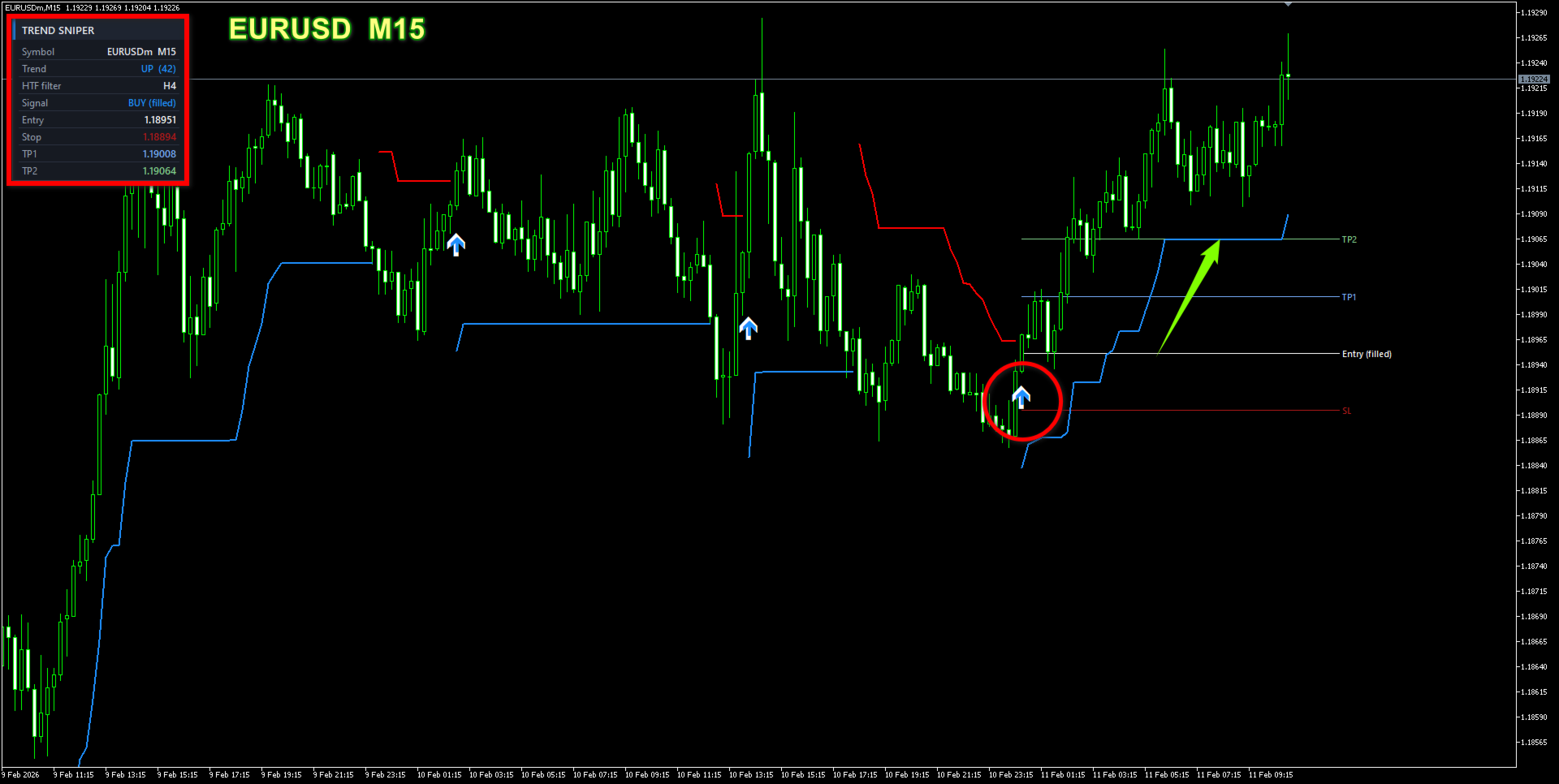
Trend Sniper turns the classic SuperTrend into a complete, decision-ready trading tool. Instead of just drawing a line and leaving you to guess, it tells you where the trend is, when to enter, where to place your stop, and where to take profit — all confirmed on the closed bar so signals do not repaint.

It is built for traders who want a clean chart and a clear plan: one glance at the arrow, the coloured trend line, and the on-chart Entry / SL / TP levels is enough to act with confidence.

What it does

  • Detects trend direction with an adaptive ATR SuperTrend engine.
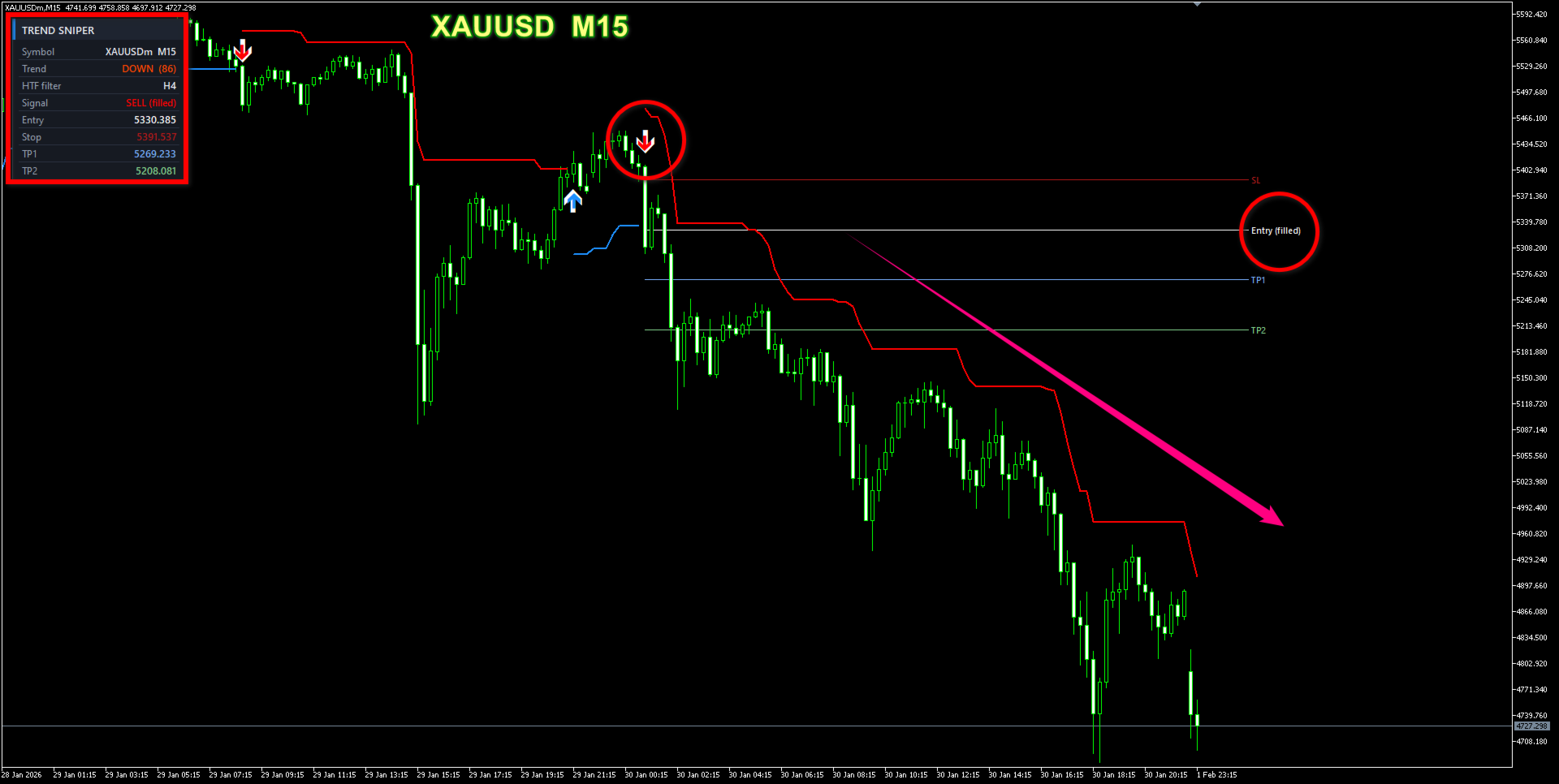
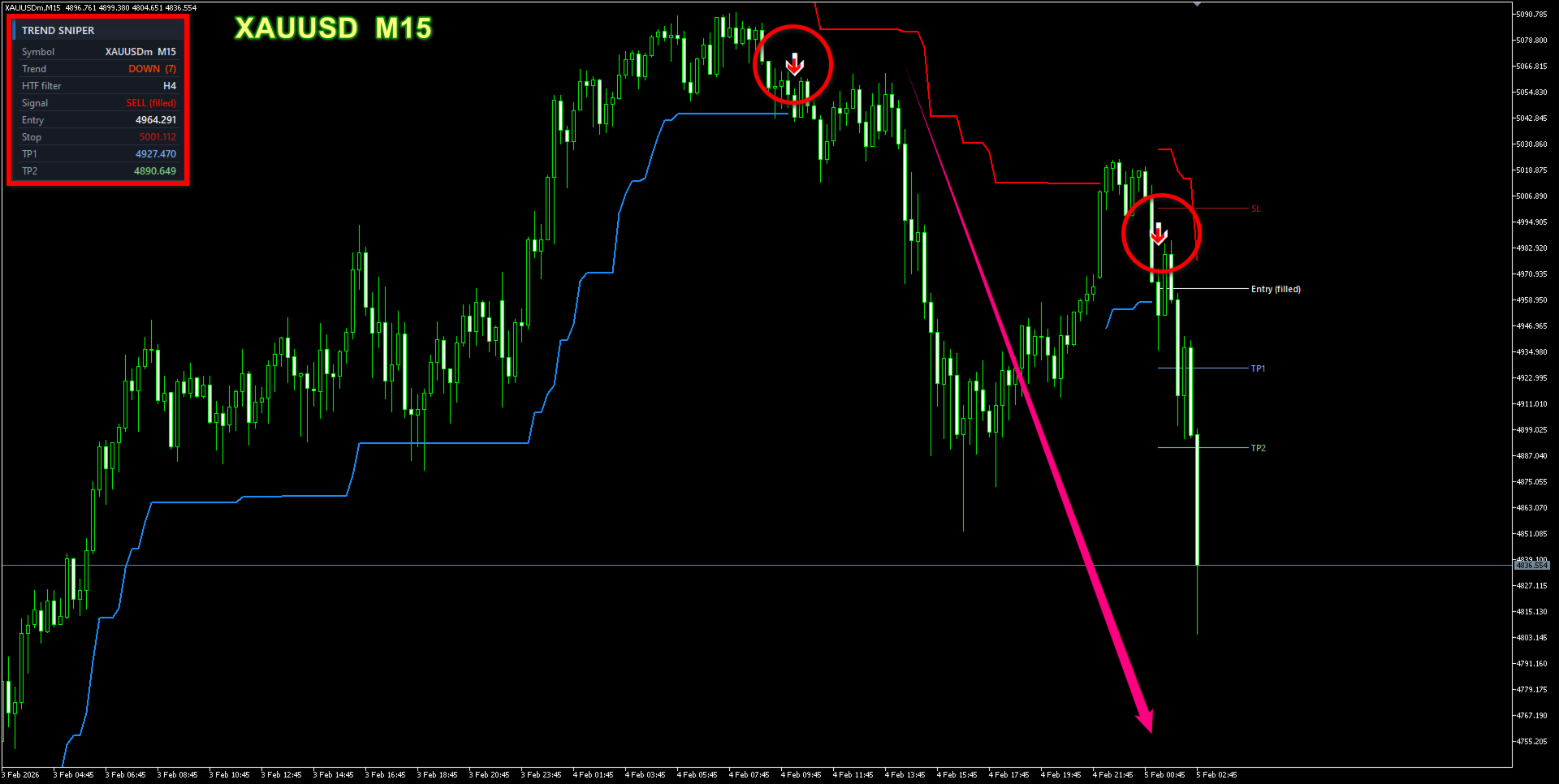
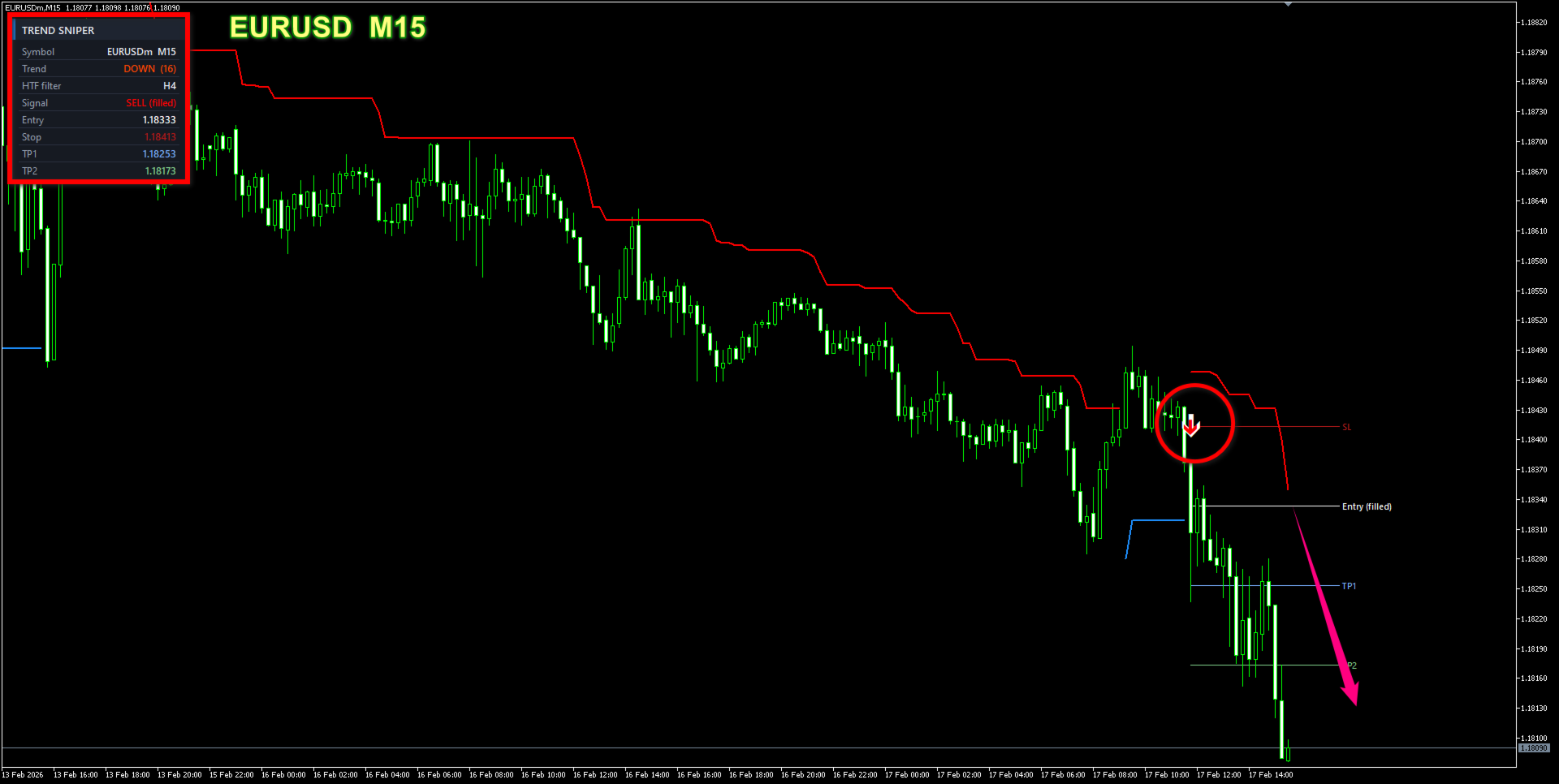
  • Prints a Buy/Sell arrow (with a bright glow outline) the moment the trend flips.
  • Confirms every signal against a higher timeframe, so you only trade with the bigger trend.
  • Suggests a pullback entry for a better price instead of chasing the candle.
  • Draws Entry, Stop-Loss, TP1 and TP2 automatically from ATR and your risk:reward settings.
  • Shows a compact dark info panel and sends multi-channel alerts (popup, push, email, sound).

Non-repaint by design

All signals, arrows and levels are evaluated on fully closed bars only. The higher-timeframe check uses the last closed HTF bar relative to the signal time — no future data, so what you see in the tester matches live trading.

Important settings to understand

These are the parameters that shape how the tool behaves — please read before use:

  • HTF (Higher-Timeframe Filter)
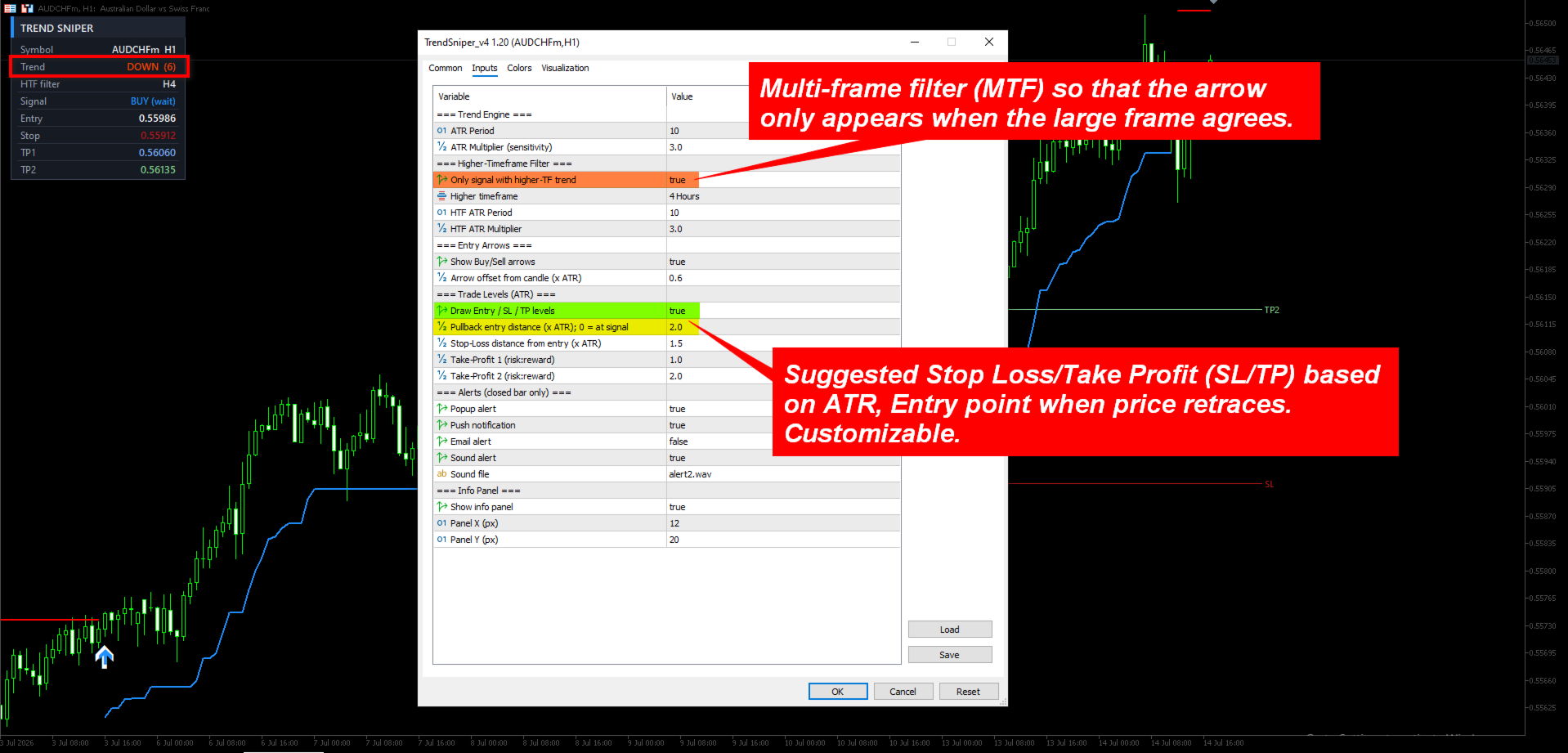
    A second SuperTrend runs on a higher timeframe (default H4). Arrows and alerts appear only when the entry direction agrees with the HTF trend. Turn  UseMTF  off to see every raw signal, or raise the HTF (e.g. H4→D1) to trade only with the dominant trend.
  • Pullback Entry  (default 2.0).
    The Entry is not placed at the signal candle. It is set a distance of  PullbackATR × ATR  back into the move, so you can enter on the retracement at a better price with a limit order. Set  PullbackATR = 0  to enter immediately at the signal. The Entry label shows (wait) until price returns to the level, then (filled).
  • Auto SL / TP.
    Stop-Loss sits  SL_ATR × ATR  from the Entry; TP1 and TP2 are projected by your chosen risk:reward ratios (default 1.0 and 2.0). Risk is always measured from the actual pullback entry, so the R:R stays accurate.
  • Sensitivity.
    Lower  Multiplier  (1.5–2.0) = more signals, tighter stops, good for scalping; higher (3.0–4.0) = fewer, stronger trend signals for swing trading.
  • Customization — arrow offset ( ArrowGapATR ), full alert channels on/off, and a movable info panel ( PanelX ,  PanelY ). Trend line, arrow and level colours can be changed in the indicator's Colors tab.

Recommended use

  • Markets: trending instruments — XAUUSD (Gold), major FX pairs (GBPUSD, EURUSD), and indices (US30, NAS100).
  • Timeframes: entry on M30–H4, HTF filter one or two steps higher (e.g. H1 entry + H4 filter). For scalping: M15 entry + H1 filter.
  • Workflow: wait for the arrow → place a limit order at the white Entry line → stop at the SL line → scale out at TP1, move stop to breakeven, let the rest run to TP2 or trail with the SuperTrend line.

Alerts

Popup, mobile push, email and sound — each fired once per confirmed signal, including the Entry, SL and TP prices in the message.

Risk note: No indicator can predict the market. Trend Sniper is a technical analysis tool to support your own decisions. Always use proper risk management and test on a demo account first.

Additional details:

Detail Value
Product type Indicator — Trend / Signals
Platform MetaTrader 5
Signal timing Closed bar, non-repaint
Higher-timeframe filter Yes — fully configurable
Entry style Pullback (ATR) or at-signal
Risk levels Auto Stop-Loss + TP1 / TP2 (ATR & R:R)
Alerts Popup, Push, Email, Sound
Recommended timeframes M15 – H4


Другие продукты этого автора
M1 GoldSniper Pro - MetaTrader 5 Triple Confirmation Scalping System for XAUUSD M1  M1 GoldSniper Pro generates non-repaint BUY and SELL signals on XAUUSD M1 using three independent filters that must all agree before any arrow appears on the chart. The result is a low-noise, high-clarity signal system designed for scalpers who need precision on the 1-minute chart.  All signals are locked to closed candle data. They do not repaint, move, or disappear.  MetaTrader 4 version:  https://www.mql5
Institutional Blueprint (MT5) — Market Structure, Order Blocks & Risk/Reward Zones Institutional Blueprint reads the chart the way professional price-action traders do. On every closed bar it maps live market structure, marks the Order Block behind each move, and turns the most relevant block into a ready-to-read trade plan with a clear Entry, Stop Loss and three Take-Profit targets — drawn as a green reward zone and a red risk zone, so the trade geometry is obvious at a glance. Based on Smar
M1 GoldSniper Pro:  The sniper-precision scalping system built for Gold traders. Most M1 indicators flood your chart with false signals. M1 GoldSniper Pro is different — it uses a Triple Confirmation System that requires three independent filters to agree before printing a single arrow. The result: fewer signals, higher quality, and the confidence to actually pull the trigger. Signals are calculated on closed candles only. They never repaint. Never move. Never disappear. MetaTrader 5 ve rsion: 
Forex traders often observe increased market activity near Supply and Demand zones, which are levels formed based on zones where strong price movements have previously occurred. The Supply Demand Strong Weak Confirm Indicator utilizes fractals and the ATR indicator to identify and plot support and resistance zones on the price chart. These zones are categorized as follows: - Weak: significant high and low points in the trend. - Untested: crucial turning points in the price chart that the pric
This pass-band oscillator reduces lag in market data by filtering out high and low frequencies. It uses two EMAs (Exponential Moving Averages) with periods of 40 and 60. Trigger points are added using an RMS cyclic envelope over the Signal line. The pass-band waveform output is calculated by summing its square over the last 50 bars and taking the square root to create trigger levels. Buy when the pass-band crosses above its -RMS line and short when it crosses below the RMS line. The indicator
The Waddah Attar Explosion (WAE) indicator is a potent tool in Forex trading, offering buy, sell, exit buy, and exit sell signals. It assesses trends as trend power and momentum as explosion power. Trend Direction: - Green bars indicate a bullish trend. - Red bars indicate a bearish trend. Signal Line: - A line serves as a threshold for momentum. Buy Trade Setup: **Entry:** Go long when a green bar crosses above the threshold. Place a stop loss below the entry candle. **Exit:** Close the tra
The MT4 Channel Standard Deviation Indicator automatically plots support and resistance channels on the price chart using price standard deviation. It indicates BULLISH and BEARISH market conditions and is suitable for both new and advanced forex traders. This indicator offers support, resistance, entry, and exit levels, along with stop-loss and take-profit points. It accurately identifies BULLISH and BEARISH market trends, making it effective for both intraday and long-term trading across var
ADX MA: The Ultimate Trend Strength Guide In forex trading, the Average Directional Index (ADX) is a vital indicator for gauging trend strength. Here's a streamlined approach to using ADX for effective trading: 1. Add ADX to your forex chart. 2. Interpret ADX values: <20 is weak, >40 is strong. 3. Identify trend direction: +DI above -DI indicates an upward trend, and vice versa. 4. Execute trades based on ADX and trend: Strong up trend, consider buying; strong down trend, consider selling; we
The Dot on Histogram Trend indicator is a straightforward tool in forex trading. When used in conjunction with other indicators, it can be highly rewarding. The indicator consists of a blue and red histogram, representing positive and negative territories, respectively. Buy opportunities arise when the histogram is positive, while sell opportunities emerge when it's negative. Signal Steps: 1. Dot at Zero Level:    - Green Dot: Indicates a clear uptrend; take action.    - Red Dot: Do nothing;
Institutional Blueprint   (MT4) — Market Structure, Order Blocks & Risk/Reward Zones Institutional Blueprint reads the chart the way professional price-action traders do. On every closed bar it maps live market structure, marks the Order Block behind each move, and turns the most relevant block into a ready-to-read trade plan with a clear Entry, Stop Loss and three Take-Profit targets — drawn as a green reward zone and a red risk zone, so the trade geometry is obvious at a glance. Based on Sm
ICT Kill Zones   marks the four main intraday sessions on your chart and the high and low of each session. It is an analytical tool for traders who follow the ICT and Smart Money approach. It does not place orders and does not give automatic buy or sell signals. It shows when the active sessions occur and where session liquidity rests, so you can make your own trading decisions.  Session high and low levels and sweep events are confirmed on closed candles only. Past levels are not redrawn. The M
Order Block Pro — Institutional Order Blocks with Entry, SL & 3 Take-Profits (ICT / SMC) See where smart money entered and trade the retest with a complete Entry, Stop-Loss and TP1/TP2/TP3 plan — automatically, on closed candles only. Non-repaint. FULL DESCRIPTION Order Block Pro maps the institutional Order Blocks that drive price in the ICT / Smart Money Concepts framework and turns every valid one into a clean, ready-to-trade plan. No more guessing where to draw your zones: it finds the last
FVG Hunter is a context and entry-refinement tool based on ICT / Smart Money Concepts. It detects three-candle Fair Value Gaps (price imbalances) and their inversions, then displays them as clean zones on the chart. It does not place trades and does not give buy/sell promises; it is built to help you read where price is likely to react. WHAT IT MARKS - Fair Value Gap (FVG): the imbalance left when price moves away quickly, often acting as a magnet and a later reaction zone. - Inversion FVG (IF
Volatility Apex Pro Know the trend. Time the turn. Trade with confidence. Volatility Apex Pro turns raw price volatility into clear, actionable decisions. Built on an adaptive ATR trailing-stop engine and confirmed by a higher-timeframe trend filter, it tells you where the trend is, where your stop belongs, and exactly when momentum flips - all on the closed bar, with no repainting. Stop staring at messy charts. Get one clean trend line, precise entry arrows, and a live dashboard that answers
This pass-band oscillator seeks to pass-band out both high and low frequencies from market data to eliminate wiggles from the resultant signal thus significantly reducing lag. This pass-band indicator achieves this by using 2 differenced EMA's of varying periods. (40 and 60). Trigger points for the pass-band oscillator are added with a RMS cyclic envelope over the Signal line. Output of the pass-band waveform is calculated by summing its square over the last 50 bars and taking the square root of
The SDL Trend Signals MT5 indicator shows the market direction with a colored moving average line. It has three inputs: Period (calculation period), Method (calculation method), and Applied price (price used for calculations). The indicator has three buffers: Uptrend, Downtrend, and ExtMapBuffer (for indicator values). The Bullish slope is in BLUE, and the Bearish slope is in RED. For example, an upward slope indicates a Bullish market (Blue), and a downward slope indicates a Bearish market (R
MT5 RSI Experiment: This indicator leverages the Relative Strength Index (RSI) and floating levels to pinpoint potential buy and sell signals. The code uses enums for prices and RSI calculation methods. These enums define indicator parameters. Input variables include RSI period, price type for RSI calculation, smoothing method, and look-back period with levels for floating levels. Index buffers store RSI fill, RSI up line, RSI middle line, RSI down line, and trend line data. For each bar, i
Smoothed Repulse Alert MT5 Indicator The Smoothed Repulse Alert for MT5 is a powerful tool that visualizes market pressure through a filled area chart and two lines in a separate window. This indicator is based on the repulse indicator, assessing buying and selling pressure using high, low, open, and close prices over a specified period. Key Features: - Customizable parameters include repulse period, moving average type, moving average multiplier, level period, upper and lower levels. - Color
TrendPulse Pro MT5    identifies trend direction and reversals on any symbol and timeframe. It colors each candle by trend, marks reversal bars with clear arrow signals, and instantly draws ATR-based Stop Loss and Take Profit levels — so you always know where to enter, where to protect capital, and where to take profits, without any manual calculation. Every signal is based on closed bars and does not repaint. How It Works Each closed bar is scored by three independent conditions: •          Fas
Product: Currency Strength Compass MT5 (CSM_Pro) Currency Strength Compass shows, at a glance, which currency is being bought and which is being sold. It measures the relative strength of the eight major currencies and Gold from a basket of 28 pairs and presents it two ways: a ranked list, or a multi-timeframe grid that places M15, H1, H4 and D1 side by side. Every reading is calculated on closed bars only, so the lines and the panel are non-repainting. A value never changes after its bar has cl
ICT Kill Zones marks the four main intraday sessions on your chart and the high and low of each session. It is an analytical tool for traders who follow the ICT and Smart Money approach. It does not place orders and does not give automatic buy or sell signals. It shows when the active sessions occur and where session liquidity rests, so you can make your own trading decisions.  Session high and low levels and sweep events are confirmed on closed candles only. Past levels are not redrawn.  The MT
Order Block Pro — Institutional Order Blocks with Entry, SL & 3 Take-Profits (ICT / SMC) See where smart money entered and trade the retest with a complete Entry, Stop-Loss and TP1/TP2/TP3 plan — automatically, on closed candles only. Non-repaint. FULL DESCRIPTION Order Block Pro maps the institutional Order Blocks that drive price in the ICT / Smart Money Concepts framework and turns every valid one into a clean, ready-to-trade plan. No more guessing where to draw your zones: it finds the last
FVG Hunter is a context and entry-refinement tool based on ICT / Smart Money Concepts. It detects three-candle Fair Value Gaps (price imbalances) and their inversions, then displays them as clean zones on the chart. It does not place trades and does not give buy/sell promises; it is built to help you read where price is likely to react. WHAT IT MARKS - Fair Value Gap (FVG): the imbalance left when price moves away quickly, often acting as a magnet and a later reaction zone. - Inversion FVG (IF
ConfluX Pro - Multi-Filter Trend Confluence Indicator ConfluX Pro is a multi-filter confluence indicator built to help traders identify higher-quality entries by requiring several independent market factors to agree before a signal is shown. Every signal is calculated on closed candles only - the indicator never repaints and never reads future price data. HOW IT WORKS Specifically optimized for XAUUSD, BTCUSD - this indicator adapts to changing market conditions through ATR-based volatility l
Gann Trend Navigator Gann Trend Navigator is a decision-focused trend indicator built around the classic Gann HiLo Activator, redesigned for traders who want a clear read on market direction and a ready-to-use order plan on every confirmed signal — without staring at a blank chart wondering where to enter. Instead of leaving you with a line to interpret, the indicator translates Gann swing logic into a complete, structured setup: a BUY or SELL arrow, an Entry level, a protective Stop Loss, and t
Heiken Ashi Trend Engine Heiken Ashi shows you where the trend is. It does not show you the moment the trend turns, and it does not tell you whether the bigger picture agrees. That is where traders lose money on a tool they otherwise trust. Heiken Ashi Trend Engine closes both gaps. ===================================== It marks the turn, not just the trend. Every confirmed Heiken Ashi trend flip prints an arrow: BUY when the trend turns bullish, SELL when it turns bearish. No interpretation, n
Volatility Apex Pro Know the trend. Time the turn. Trade with confidence. Volatility Apex Pro turns raw price volatility into clear, actionable decisions. Built on an adaptive ATR trailing-stop engine and confirmed by a higher-timeframe trend filter, it tells you where the trend is, where your stop belongs, and exactly when momentum flips - all on the closed bar, with no repainting. Stop staring at messy charts. Get one clean trend line, precise entry arrows, and a live dashboard that answers
Фильтр:
Нет отзывов
Ответ на отзыв