Trade Assistant and Trade Manager for Prop Firms

Trade Assistant MT5 — Trade Manager for Prop Firms


Trade Manager for MT5 that calculates position size, manages risk, visualises your trade setup in real time and protects your account with built-in daily loss and trade limits — everything you need to trade with consistency and pass your prop firm challenge.


> Trade Tab — Position Sizing & Execution


**Automatic lot calculation**

Enter your risk as a percentage of account balance or as a fixed dollar amount and the panel instantly calculates the correct lot size based on your stop loss distance. No more manual calculations or spreadsheets.

**Fixed Lots mode**

Prefer to trade a fixed position size? Enable Fixed Lots and type your lot size directly. The panel will still display the real dollar risk and percentage exposure for that lot size, keeping you fully informed.

**Quick risk presets**

One-click buttons for 0.5%, 1% and 2% risk let you switch your risk level instantly. The active preset is highlighted so you always know where you stand.

**Entry Level control — Market Price or Limit Price**

Toggle between Market Price mode, where the entry field tracks the live Ask price in real time, and Limit Price mode, where you manually set a specific entry level for pending orders. Both modes feed directly into the lot size calculation.

**Stop Loss and Take Profit fields**

Set your SL and TP by exact price level or by points distance. Both update each other automatically so you can work in whichever unit feels natural for the instrument you are trading.

**Risk to Reward display**

The panel calculates and shows your Risk:Reward ratio live as you adjust your levels, so you always know the quality of the setup before you place it.

**Order Expiry**

Set an expiration time in hours and minutes for pending limit orders. The panel sends the expiry timestamp automatically with the order.

**Buy Order / Sell Order execution**

The active direction button is highlighted in blue for buys or red for sells. One click places the order with all calculated parameters attached — lot size, SL, TP and expiry — with zero manual input at the moment of execution.

**Cancel All Orders / Cancel Last Order**

Instantly cancel all pending orders or just the most recently placed one, directly from the Trade tab.


> Position Tool — Visual Trade Planning on the Chart

The built-in Position Tool on the price chart, letting you plan your trade visually before committing.


**Drag-to-place Entry, SL and TP bars**

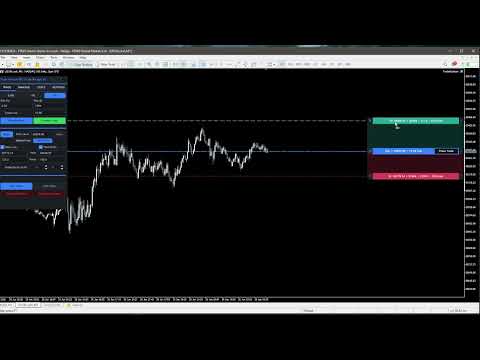
Three horizontal bars — Entry (blue for buy, red for sell), Stop Loss (red) and Take Profit (green) — are displayed as draggable bars on the chart. Drag any bar to the exact price level you want and the panel fields update in real time.

**Live P&L and risk information on each bar**

Each bar shows the relevant data at a glance: the TP bar displays the target price, the expected profit in dollars and the Risk:Reward ratio; the Entry bar shows direction, entry price and lot size; the SL bar shows the stop price, dollar risk and risk percentage.

**Buy/Sell direction toggle**

The left side button on the Entry bar displays B for Buy or S for Sell. Clicking it flips the trade direction and automatically mirrors the SL and TP distances around the entry price, so your risk layout stays correct without any manual adjustment.

**Place Trade button**

A dedicated Place Trade button sits directly on the Entry bar. Clicking it opens a confirmation dialog showing all order details — direction, entry price, lots, dollar risk, risk percentage, SL and TP — before the order is sent. This prevents accidental execution.

**Guidance lines**

Optional dashed horizontal lines are drawn on the chart at the Entry, SL and TP price levels for a clear visual reference. Can be toggled on or off in Settings.

**Fully customisable colours**

TP bar, TP zone, SL bar, SL zone, Buy entry and Sell entry colours can all be changed independently via the Settings tab using preset cycles.


> Manage Tab — Trade Management & Risk Control


**Manual Breakeven**

One button moves your stop loss to breakeven with a 2-point buffer on all open positions instantly.

**Auto Breakeven**

Enable automatic breakeven and the panel monitors your open positions on every timer tick. When the configured trigger condition is met, the stop loss is moved to breakeven automatically without any action required from you.


Two trigger modes are available:

- **Default (1:1 R:R)** — breakeven triggers when the position has moved a distance equal to the initial risk.

- **Points** — breakeven triggers after a specific number of points in profit that you define.


A sound alert can optionally be played when Auto Breakeven fires, configurable in the Settings tab.


> Risk Management — Built for Prop Firms

This section is specifically designed to keep you within the strict daily risk rules enforced by prop firm evaluations and funded accounts.


**Max Loss per Day**

Set a maximum daily loss percentage. The moment your account equity drops by that percentage from the day's opening balance, the panel blocks all further trade execution and displays a prominent warning banner. Trading is automatically re-enabled at midnight when the new trading day begins.

**Max Trades per Day**

Set a maximum number of trades allowed per day. Once that limit is reached, the panel blocks further execution for the remainder of the day. This helps you stick to your strategy rules and avoid overtrading — one of the most common reasons traders fail prop evaluations.

**Today's performance display**

The Risk Management section shows your current day's P&L percentage and trade count in real time, so you always know exactly where you stand relative to your limits before placing the next trade.

**Trading Blocked warning**

When either daily limit is triggered, a red warning banner reading "TRADING BLOCKED UNTIL MIDNIGHT" is displayed prominently in the panel so there is no ambiguity about your trading status.

Both limits are saved to global variables and persist across MT5 restarts, ensuring your protection is never lost even if the platform is restarted mid-session.


> Stats Tab — Performance Analytics

A built-in statistics panel pulls from your full account trading history and presents key performance metrics at a glance, updated live.


**Account** — Current balance and equity.

**Performance** — Total trades, net profit, number of winning and losing trades with win rate percentage, best win streak and worst loss streak.

**Period** — Today's trade count and profit, this week's profit and this month's profit.

**Risk** — Average risk per trade over the last 7 days, maximum overall drawdown in dollars and percentage, and maximum daily drawdown in dollars and percentage. The daily drawdown figure is particularly relevant for prop firm traders who need to monitor their worst single-day loss against evaluation rules.


> Settings Tab


**Sound Alerts**

Toggle alert sounds independently for Auto Breakeven triggers and for risk limit events.

**Position Tool & Colors**

Toggle the guidance chart lines on or off. Independently change the colour of the TP bar, TP zone fill, SL bar, SL zone fill, Buy entry bar and Sell entry bar by cycling through preset colour options with a single click.


> General Features


- **Draggable panel** — Click and drag the title bar to reposition the panel anywhere on the chart.

- **Minimise button** — Collapse the panel to a compact title bar with one click to free up chart space, and restore it just as quickly.

- **Persistent settings** — Risk management limits and other settings are saved to global variables and survive platform restarts.

- **Live price updates** — In Market Price mode, the entry field updates on every timer tick to reflect the current Ask price.

- **Works on any instrument** — Indices, forex pairs, commodities, metals. Lot size and risk calculations use the instrument's actual tick size and tick value for accurate results across all asset classes.


### Why Trade Assistant MT5 is the Ideal Tool for Prop Firm Traders!


Prop firm evaluations impose strict rules that punish undisciplined trading. A single day of overtrading or a loss that exceeds the daily drawdown limit can end your challenge immediately. Trade Assistant MT5 addresses the two most common reasons traders fail:


**1. Incorrect position sizing.** The panel calculates your exact lot size automatically based on your defined risk percentage and stop loss distance. There is no room for manual calculation errors that can result in taking far more risk than intended.

**2. Breaching daily limits.** The Max Loss per Day and Max Trades per Day limits work as a hard stop enforced by the panel itself. When a limit is reached, the Buy and Sell buttons become inactive and the warning is displayed. You cannot place another trade by accident, even in a moment of frustration or revenge trading.


Together, these features act as a second layer of discipline on top of your own strategy, keeping you firmly within the rules of any prop firm evaluation from the first day to the last.

Рекомендуем также
Trade Desk
Mostafa Saad Saeed Shawara
Trade Desk — это торговая панель и менеджер сделок для MetaTrader. Спланируйте вход на графике, рассчитайте объём калькулятором лота и управляйте открытыми позициями с одной панели: стоп-лосс, несколько целей, безубыток и трейлинг-стоп. Дополнительные инструкции: Пробная версия для демо-счетов — Trade Desk для MetaTrader 4 Большинство инструментов на графике помогают только открыть сделку. После исполнения нужен менеджер позиций. Trade Desk совмещает обе задачи на одном графике. Соберите уровни
"Manage multiple positions as a single unit with hidden targets." The Virtual Basket TP SL Manager is a professional MetaTrader 5 utility designed to automate the closing of positions based on the total profit or loss of a group of orders (a "basket"). By utilizing Virtual Levels , all Take Profit (TP) and Stop Loss (SL) targets are stored locally within the EA's memory and are not sent to the broker's server, keeping your strategy safe from stop-hunting and price manipulation. Key Features Virt
FREE
Описание Easy Trader Assistant — это панель ручного исполнения для MetaTrader 5, созданная для более быстрой торговли с чётким контролем риска. Всё управляется прямо с графика: вход, выход и корректировки, без потери времени на переключение между окнами. Она объединяет расчёт объёма позиции, управление SL/TP и наглядную визуализацию риска перед открытием сделки. Идея проста: сократить ошибки и сделать исполнение более точным. Подход Используется в реальной торговле для дискреционных стратегий, г
FREE
**Forex Trade Manager Pro MT5** **Trade Manager MT5** — это многофункциональная утилита для управления торговлей в MetaTrader 5, которая предоставляет вам полный контроль над каждым аспектом вашей позиции: от момента планирования сделки до её закрытия. Она создана для трейдеров, которые серьезно относятся к риску, — от новичков, вырабатывающих дисциплину, до профессионалов-скальперов, которым нужно мгновенное исполнение по множеству позиций. Инструмент прикрепляется к любому графику и отображ
ProBridger
Marius Ovidiu Sunzuiana
How Traders and Analysts Can Use the Data Export Bridge to Improve Their Analytics The MQL Data Export Bridge unlocks a new level of analytical power by transforming MetaTrader into a real‑time data provider for any external research environment. Here are the most impactful ways different users can apply the bridge to enhance their trading performance. Build Predictive Models with Machine Learning Who benefits: Quantitative traders, data scientists, algorithm developers How it helps: Export t
EAs Manager
Abdeljalil El Kedmiri
5 (2)
Are you running multiple EAs on the same MT5 account and losing sleep over stacked risk? EAs Manager Pro is the central risk-control layer for your entire MT5 account. Attach it to one chart, and it automatically detects every EA you're running by  Magic Number — no source code changes, no per-EA setup. It then monitors every  position, automated or manual, and enforces the risk rules you set across your whole account, not just one strategy at a time. Built for traders running scalpers, breakout
XBOOT BOLETA PRO Professional Manual Trading Panel for MetaTrader 5 XBOOT Boleta Pro is a complete trading panel designed for traders who execute manual trades and want greater speed, organization, and control during every trading session. More than a standard Buy and Sell panel, XBOOT Boleta Pro combines powerful trading tools into a single interface, helping traders analyze the market, manage risk, execute orders, and monitor trading performance without leaving the chart. Its purpose is to sim
TradeConditions Pro – Know When NOT to Trade Most traders lose money not because of strategy…   but because of bad trading conditions. This tool shows you what your broker is really doing — in real time. --- ### WHAT IT DOES TradeConditions Pro analyzes your trading environment and gives you a clear decision: SAFE – Good conditions   ️ CAUTION – Be careful   BAD – Avoid trading   --- ### FEATURES Real-time spread monitoring   Average / min / max spread tracking   Sprea
Trade Assistant JJC Academy
Jhonathan Alexis Jaramillo Cortez
JJC Academy Trade Assistant — Калькулятор риска и панель управления позицией Хватит считать лот вручную. Хватит нарушать просадку из-за ошибки в расчёте. JJC Academy Trade Assistant — торговая панель, которую я создал и использую сам для управления портфелем зафондированных счетов (funded accounts). Она разработана так, чтобы каждый вход в сделку точно соответствовал заданному риску — независимо от инструмента, брокера или прайм-компании (prop firm), с которой вы работаете. Калькулятор риска
FREE
DESCRIPTION: Position Size Calculator — On-Chart Risk Management Tool Never risk too much on a single trade again. This calculator displays real-time position sizing for 3 risk levels simultaneously, calculated from your live account balance and current ATR-based stop loss distance. DISPLAYS 3 RISK SCENARIOS AT ONCE: Risk Level 1 (1%): Risk amount in dollars + Lot size Risk Level 2 (2%): Risk amount in dollars + Lot size Risk Level 3 (3%): Risk amount in dollars + Lot size All lot sizes are dyna
FREE
RiskFrame Trade Manager для MetaTrader 5 Разместите торговый план так, чтобы он подстраивался под график. Рассчитайте объём от риска, проверьте план перед отправкой и сопровождайте позицию из того же рабочего пространства. RiskFrame — это утилита для ручного планирования, исполнения и сопровождения сделок в MetaTrader 5. В основе её рабочего процесса лежит гибкий визуальный торговый план: его можно перемещать, изменять по горизонтали и вертикали, разворачивать и размещать вокруг анализируемой о
Protect your funded accounts and personal capital with military-grade precision. This utility continuously monitors your floating equity against your daily starting balance. The moment your custom drawdown threshold is breached, it instantly liquidates all open positions, deletes pending orders, and completely unloads from the chart. Stop revenge trading and never fail a prop firm evaluation due to a margin breach again.
FREE
Smart Trade Assistant Pro MT5 Smart Trade Assistant Pro MT5 is a professional manual trading and position management utility designed to help traders manage risk, execute trades, and control open positions directly from the chart. The utility does not predict market direction and does not generate guaranteed trading signals. The trader remains in control of BUY and SELL decisions, while Smart Trade Assistant Pro helps with position sizing, risk management, execution, and trade management. Main F
Breakeven Trailing SL Manager
Hafiz Muhammad Usama Sadique
Breakeven Trailing SL Manager; This utility Manager is a simple utility that protects your manual trades automatically. Attach it to any chart and it watches all manual positions on your account, on every symbol. It does not open trades and it ignores trades opened by other Expert Advisors. How it works When a trade moves in profit by the Breakeven Price, the Stop Loss is moved to the exact entry price. When the price moves the same distance again, the Stop Loss is moved to entry plus that dist
FREE
no Trade operation, Robot Set auto SL to every manually Trade from a Phone Automatic Phone TradeManager Need just Set on 1 Symbol Auto BE Trigger is added that immediately sets a stop-loss for every () But does NOT calculate position size based on risk, allows the fixed  SL to   adjusted dynamically drag on Chart or Menu. It protects capital around the clock, reduces emotional mistakes, and ensures consistent risk management.
FREE
Overview : The Advanced News Trading Panel is a versatile tool designed for traders who rely on news-based trading strategies. This Expert Advisor (EA) provides an intuitive graphical interface that allows users to quickly set up pending orders and manage risk with ease. With the ability to automatically place Buy/Sell Stop orders based on your pre-set stop order distance from the bid/ask price, stop-loss and take-profit levels, the EA allows for precision trading during high-volatility news eve
Протестируйте его на реальном рынке перед покупкой :  Этот продукт включает БЕСПЛАТНУЮ пробную версию   , которую вы можете скачать напрямую и использовать на демо-счёте . Протестируйте все функции в реальных рыночных условиях перед покупкой. Ссылки для скачивания находятся в первом комментарии к этому продукту. Prop Firm Trade Assistant — это профессиональная панель для графика, созданная для трейдеров, которые хотят пройти отбор и защитить счета проп-компаний с чёткими правилами, контролируем
Quick Order Closer
Danny Giovanni Romero Lozano
Demo Version Here : https://www.mql5.com/en/market/product/170598 The fastest on the entire platform, try it with 50 open trades or more This Expert Advisor provides a fast and intuitive way to manage and close open trading positions directly from the chart using a clean button-based interface. With a single click, traders can instantly close positions based on different conditions, improving execution speed and overall trade management efficiency. Key Features Close all open positions instant
A powerful and intuitive trade management tool designed for scalpers and intraday traders. Created to complement the Nampim Samba Scalper strategy , it allows traders to open, manage, and close positions quickly without leaving the chart.  Key Features: Customizable trading panel – choose position (left, right, center, top, bottom). One-click trading buttons – instantly open Buy/Sell trades with pre-set lot sizes. Close management – close last 1/2/3 trades or all Buy/Sell positions with one clic
TradeByTime Manager is a tool to trade based on time. It is semi auto trading. Trader define entry and exit time and EA will manage the rest. Helpful for trader who is usually trading with time range such as trading signal with entry and exit based on time or trading with news event time. Or trader who is familiar with trading binary option, this is another 'sense' of it. Only this is for trading on regular chart. 1. TakeProfit and Stoploss 2. Double time based :  Local and Server 3. Time counte

Grid Trading - полуавтоматический советник для торговли по сетке в один клик на хеджевых счетах. Также доступна версия для MetaTrader 4 . *Данный советник предназначен только для счетов с хеджинговой системой учета позиций Обычный режим Вы нажимаете на кнопку Sell или Buy на графике, затем эксперт добавит уровни стоп-лосс, тейк-профит для сделки, а функции трейлинг-стопа и безубытка позаботятся о сделке, если она не сможет достичь цели профита. Хеджирование При выборе торговли с использованием
Smart Risk Manager
Abderrahmane Benali
5 (1)
Smart Risk Manager – Master Your Trades with Precision and Confidence Take complete control of your manual trading with Smart Risk Manager , a professional all-in-one trade and risk management Expert Advisor for MetaTrader 5 . Designed for traders who value speed, precision, and capital protection, it simplifies every step of trade execution while ensuring your risk remains under control. Whether you trade Forex, Gold, Indices, or Cryptocurrencies , Smart Risk Manager helps you execute trades w
PropShield Guardian MT5 – Максимальная защита от просадки и контроль сделок Защитите свой счет. Соблюдайте дисциплину. Уверенно проходите испытания проп-фирм. Хватит сливать депозиты. Начните торговать как профессионал. PropShield Guardian MT5 — это мощный утилитарный советник (Expert Advisor), разработанный для защиты вашего торгового счета, строгого соблюдения правил риск-менеджмента и предотвращения ошибок, вызванных эмоциями. Это НЕ торговый бот. Это ваш автоматический риск-менеджер и систем
This EA helps to Close all Positions opened. It saves you the time of closing multiple positions manually. Parameters: Buy:  Close Buy Positions Only Sell:  Close Sell Positions Only Buy & Sell: Close Buy & Sell Positions Pending: Close Pending Orders More Advanced MT5 version available at:  https://www.mql5.com/en/market/product/93301?source=Unknown%3Ahttps%3A%2F%2Fwww.mql5.com%2Fen%2Fmarket%2Fmy More Advanced MT4 version available at:   https://www.mql5.com/en/market/product/93468?source=Unk
Why execution quality matters more than you think You can have the best trading strategy, perfect entry points, and proper risk management. But if your broker consistently executes orders at worse prices, you lose money before the market even moves. A slippage of 0.01% seems insignificant. But over 100 trades per month, it becomes a noticeable amount. Over 1000 trades, it becomes a serious problem. Scalpers and algorithmic traders understand this well: execution quality directly affects your bot
News Guard Manager watches every robot on your account and protects them around high impact economic news.   -- THE PROBLEM --   You run several Expert Advisors. Each one manages its own trades, but none of them knows what the others are doing, and none of them knows that NFP is in twelve minutes. One news spike can undo a week of careful work across all of them at once.   -- WHAT THIS UTILITY DOES --   ONE PANEL FOR THE WHOLE ACCOUNT Every robot running on the account is listed with its magic n
FREE
Risk Properly with FXPosition Size Calculator which calculated the optimal Lot sSize based on your desired Risk Percentage and Stop-Loss, ensuring precise Risk Management. Enter your account balance, risk percentage, and Stop-Loss(either in points or price levels), and the calculator instantly determines the required lot size so that you don't risk too much. Protect your capital and trade with confidence with Accurate Position Sizing and Simplicity.
AbacuQuant Equity Guardian is an essential, 100% free institutional risk management utility designed for both Prop-Firm challenges (FTMO, FundedNext, The5ers) and Live personal accounts. Tired of losing your prop challenge or wiping weeks of profits in a single revenge-trading tilt? Equity Guardian stands watch 24/7 on your MetaTrader 5 chart and enforces strict, disciplined risk limits before emotions destroy your account. KEY FEATURES: Daily Loss Limit Guard: Tracks equity vs. broker day-
FREE
Rehoboth TradeGate Manager — MT5 Execution Validation & Trade Management TradeGate Manager places a validation layer between your trading decision and the market. TradeGate Manager is available for both MetaTrader 5 and MetaTrader 4 versions. Before an order is sent, TradeGate checks the instrument, spread, stop protection and market conditions against limits you define. If a required condition fails, the order is refused and the panel tells you   what failed and why . Once a position is open,
Signals Executor for Telegram is a Utility that allows you to execute and manage positions from messages sent in Telegram Chats. Chat messages are processed to check for the existence of commands, and the command will be executed if its parameters are valid. You need the Telegram Bot Token and Chat Id to configure the input parameters. It is possible to restrict the sending of commands through the User Id, which must be configured in the input parameters. Valid Commands: Buy and Sell: Market or
С этим продуктом покупают
Trade Assistant MT5
Evgeniy Kravchenko
4.43 (216)
Помогает рассчитать риск на сделку, простая установка нового ордера с помощью линий, управление ордерами с функциями частичного закрытия, 7 типов трейлинг-стопа и другие полезные функции. Дополнительные материалы и инструкции Инструкция по установке - Инструкция к приложению Функция Линии   - отображает на графике линию открытия, стоп-лосс, тейк-профит. С помощью этой функции легко установить новый ордер и увидеть его дополнительные характеристики перед открытием. Управление риском   -   функ
Farmed Hedge Yield Farming | All Markets (Manual - Hybrid - Semi/Automated EA) VERIFIED TRADING RESULTS - Farmed Hedge Yield Axi Copy:  https://www.mql5.com/en/signals/2356376 - Farmed Hedge Yield Exn Copy:   https://www.mql5.com/en/signals/2356404 - Farmed Hedge Yield V Copy:  https://www.mql5.com/en/signals/2357156 IMPORTANT NOTICE: FarmedHedge is a MANUAL-FOCUSED TRADING UTILITY ,not a fully automated EA. Results shown on this Signal include manual trades and overall strategic management.
Добро пожаловать в Trade Manager EA — лучший инструмент для управления рисками, предназначенный для упрощения, точности и эффективности торговли. Это не просто инструмент для размещения ордеров; это комплексное решение для удобного планирования торгов, управления позициями и усиленного контроля над рисками. Независимо от того, начинающий вы трейдер, опытный специалист или скальпер, нуждающийся в быстром исполнении, Trade Manager EA адаптируется к вашим потребностям и работает с любыми активами:
Telegram to MT5 Multi-Channel Copier   автоматически копирует торговые сигналы из ваших Telegram- и Discord -каналов прямо в MetaTrader 5. Без ботов, без браузерных расширений, без ручного копирования. Сигнал приходит в Telegram или Discord — и советник открывает сделку в вашем терминале за считанные секунды. А перед тем как копировать канал, встроенный бэктестер покажет, что этот канал сделал бы на вашем счёте. Продукт состоит из двух компонентов: приложения для Windows, которое слушает ваши Te
Local Trade Copier EA MT5
Juvenille Emperor Limited
4.94 (150)
Local Trade Copier EA MT5 — это быстрый и гибкий копировщик сделок для копирования и управления сделками между несколькими счетами MetaTrader 5 на одном компьютере с Windows или Windows VPS. Он сочетает локальную синхронизацию сделок с настройками на стороне Receiver для управления размером лота, рисками, фильтрацией сделок, сопоставлением символов, управлением сделками и защитой счета. Настройте терминалы Transmitter и Receiver примерно за 1 минуту и копируйте ручные сделки или сделки, открыты
TradePanel MT5
Alfiya Fazylova
4.88 (173)
Trade Panel — это многофункциональный торговый помощник. Приложение содержит более 50 торговых функций для ручной торговли и позволяет автоматизировать большинство торговых операций. Инструкция к приложению: https://www.mql5.com/ru/blogs/post/756476 Пробная версия приложения для демо-счета: https://www.mql5.com/ru/blogs/post/750864 Как установить приложение: https://www.mql5.com/ru/blogs/post/750096 Как тестировать приложение в визуальном режиме: https://www.mql5.com/ru/blogs/post/770274 Как уст
News Trade EA MT5
Konstantin Kulikov
4.55 (11)
Представляю полезного робота, которым пользуюсь сам уже несколько лет. Может использоваться как в полуавтоматическом, так и в полностью автоматическом режиме. >>> Chat <<< Программа содержит гибкие настройки торговли на новостях экономического календаря. В тестере стратегий проверить нельзя. Только реальная работа. Скачайте последний архив настроек: https://www.mql5.com/en/blogs/post/747929 Мониторинг сигналов: https://www.mql5.com/ru/signals/author/test-standart При создании своих собственных
Копируйте сигналы из Telegram по своим торговым правилам Telegram to MT5 Signal Trader автоматически копирует текстовые торговые сигналы из открытых и закрытых каналов и групп Telegram в MetaTrader 5. Управляйте несколькими поставщиками сигналов и счетами MT5 из одного приложения для компьютера, задавая индивидуальные параметры риска и торговли для каждого поставщика . Для копирования не нужны бот Telegram и настройка API. Просто войдите в свой аккаунт Telegram по номеру телефона или QR-коду и в
Exp COPYLOT CLIENT for MT5
Vladislav Andruschenko
3.97 (35)
Профессиональный копировщик сделок для MetaTrader 5 Быстрый, профессиональный и надежный копировщик сделок для MetaTrader . COPYLOT позволяет копировать сделки Forex между терминалами MT4 и MT5 с поддержкой счетов Hedge и Netting . Версия COPYLOT для MT5 поддерживает: - MT5 Hedge → MT5 Hedge - MT5 Hedge → MT5 Netting - MT5 Netting → MT5 Hedge - MT5 Netting → MT5 Netting - MT4 → MT5 Hedge - MT4 → MT5 Netting Версия MT4 Полное описание + DEMO + PDF Как купить Как установить Как получить файлы жур
Strategy Ledger Pro
Abdullah Uygar Tuna
5 (14)
Теперь доступно на русском языке. Strategy Ledger Pro — панель анализа счёта для MetaTrader 5, работающая только на чтение. Она разделяет результаты счёта по советникам, стратегиям, символам и magic-номерам, чтобы было видно, что на самом деле вносит каждый из них. Панель доступна на 11 языках: English, Français, Deutsch, Español, Italiano, Português, Русский, Türkçe, 中文, 日本語 и 한국어. Перед загрузкой демоверсии. Маркет запускает демоверсию любого платного продукта только в тестере стратегий. Эта
EA Overfitter
Stephen J Martret
5 (3)
Бэктест выглядит отлично. Но будет ли советник зарабатывать завтра, через неделю, через месяц? EA Overfitter прогоняет вашего советника по 100 историям цены, которых он никогда не видел. Одна оценка показывает, реально ли преимущество. Бэктест показывает, что советник сделал на одной истории цены — на той, которая случайно произошла. Из него невозможно понять, какая часть результата была заслугой стратегии, а какая — конкретного пути цены. EA Overfitter отвечает на этот вопрос. Он строит до 10
================================================================================ POC BREAKOUT - V20.72. Full Professional Grade Toolkit ================================================================================ POC Breakout is a full MetaTrader 5 trading dashboard for discretionary traders who want breakout signals, Point of Control (POC) context, volume profiles, order flow, market structure, news, alerts, and advanced trade planning in one professional workspace. Attached directly to you
The product will copy all telegram signal to MT5 ( which you are member) , also it can work as remote copier.  Easy to set up, copy order instant, can work with almost signal formats, image signal,  s upport to translate other language to English Work with all type of channel or group, even channel have "Restrict Saving Content", work with  multi channel, multi MT5 Work as remote copier: with signal have ticket number, it will copy exactly via ticket number. Support to backtest signal. How to s
Power Candles Strategy Scanner: самооптимизирующийся поиск сетапов по множеству символов Сканер, который пищит на каждое шевеление, приучает вас его игнорировать. Одно оживлённое закрытие свечи, оповещение за оповещением, и тот единственный сетап, который вы действительно торгуете, тонет в шуме. Power Candles Strategy Scanner запускает самооптимизирующийся движок Power Candles на каждом символе вашего Market Watch и оповещает только о том, что прошло ваши собственные фильтры: силу последней закр
Telegram to MT5 Coppy
Sergey Batudayev
5 (10)
Telegram to MT5: Идеальное решение для копирования сигналов Упростите свою торговлю с Telegram to MT5 — современным инструментом, который копирует торговые сигналы прямо из каналов и чатов Telegram на вашу платформу MetaTrader 5, без необходимости использования DLL. Это мощное решение обеспечивает точное исполнение сигналов, широкие возможности настройки, экономит время и повышает вашу эффективность. [ Instructions and DEMO ] [ FAQ ] [ How atach logs properly ] [ Settings descrition ] Ключевые
Timeless Charts
Samuel Manoel De Souza
5 (9)
Timeless Charts is an all-in-one trading utility for professional traders. It combines custom chart types such as Seconds Charts and Renko with advanced order flow analysis using Footprints , Clusters , Volume Profiles , VWAP studies, and anchored analysis tools for deeper market insight. Trading and position management are handled directly from the chart through an integrated trade management panel , while Market Replay and Virtual Accounts provide environments for practicing trading skills and
Следующее обновление — версия 2.52 уже скоро! [НОВОЕ] Приготовьтесь к 4 новым важным функциям, призванным улучшить ваш анализ рынка и торговый процесс. Мы выводим анализ рынка на новый уровень с помощью 4 новых функций, разработанных с учётом ваших потребностей в трейдинге. Представляем: 1. TRADE OVERVIEW DASHBOARD 2. CONFLUENCE AT ZONE 3. STRONG & WEAK HIGH/LOW 4. OTE 1. TRADE OVERVIEW DASHBOARD Панель, которая помогает легче понимать общую картину рынка, предоставляя рекомендации для поддержк
Telegram To MT5 Ultra
Mirel Daniel Gheonu
5 (5)
Telegram To MT5 — копировщик сигналов Превратите торговые сигналы из ваших Telegram-каналов в реальные ордера MT5 — автоматически, на любом количестве счетов, с полным контролем над риском и правилами. Telegram To MT5 связывает VIP / сигнальные каналы, на которые вы уже подписаны в Telegram, с вашим терминалом MetaTrader 5. Бесплатное приложение-компаньон для ПК читает сообщения (даже из каналов, которые не допускают ботов), а этот советник исполняет их на вашем счёте — применяя ваши настройки р
Anchor Trade Manager
Kalinskie Gilliam
5 (8)
Your EAs cannot see each other, but Anchor can. Anchor gives you one place to coordinate your EAs, manage risk, and decide when trading is allowed. It works alongside the trading bots you already use without any changes to them. The Problem One EA opens a trade. Then another starts trading. The next thing you know, you wake up to multiple grids built across your account. Each EA may be doing exactly what it was designed to do, but together they can place far more risk on your account than you in
EA Auditor
Stephen J Martret
5 (7)
EA Auditor is an independent analysis tool for traders evaluating Expert Advisors and trading signals on MetaTrader 5. It audits backtest reports, reviews posted developer signals, and cross-verifies the two against each other to help traders assess strategies before committing capital. The MQL5 market offers a wide range of Expert Advisors from many developers, with varying approaches, quality, and transparency. EA Auditor provides a consistent, data-driven framework for reviewing them, answer
Trade Dashboard MT5
Fatemeh Ameri
4.94 (135)
Trade Dashboard simplifies how you open, manage, and control your trades, with built-in lot size calculation. It allows you to execute trades, manage risk, and control positions directly on the chart, with tools such as partial close, breakeven, and trailing stop. Designed to reduce manual work and help you stay focused on your trading decisions. A demo version is available for testing. Detailed explanations of features are provided within the MQL5 platform. Installation instructions are include
MT5 to Telegram Signal Provider — это простой в использовании полностью настраиваемый инструмент, который позволяет отправлять определённые сигналы в чат, канал или группу Telegram, превращая вашу учётную запись в провайдера сигналов . В отличие от большинства конкурирующих продуктов, он не использует импорт DLL. [ Демо ]   [ Руководство ] [ Версия MT4 ] [ Версия для Discord ] [ Канал в Telegram ]  New: [ Telegram To MT5 ] Настройка Доступно пошаговое руководство пользователя . Никаких знаний A
RETAILBERG FOOTPRINT CHART PRO — Order-Flow Workspace for MetaTrader 5 Version 7.00  |  Professional System  |  31 tools  |  One chart A full 150-page illustrated User Manual is included. Please read the full manual to understand this feature packed footprint chart elements and ui. https://www.mql5.com/en/blogs/post/777982 DEMO / STRATEGY TESTER — PLEASE READ FIRST
VirtualTradePad PRO SE MT5 — профессиональный торговый центр управления для MetaTrader 5 VirtualTradePad PRO SE — это премиальная торговая панель и рабочая среда управления сделками на графике для MetaTrader 5 . Она создана для трейдеров, которым нужны более быстрое исполнение, более понятный контроль позиций, структурированное управление сделками, визуальное планирование уровней и профессиональный рабочий процесс прямо с графика. Это не просто панель BUY / SELL. PRO SE объединяет ручную торговл
Trader Evolution
Siarhei Vashchylka
5 (7)
"Trader Evolution" - Утилита, предназначенная для трейдеров, которые используют в своей работе волновой и технический анализ. Одна вкладка утилиты способна управлять капиталом и открывать ордера, а другая - помогать в построении волн Эллиотта, уровней поддержки и сопротивления, а также линий тренда. Инструкция/Мануал ( Обязательно читайте перед приобретением ) | Версия для МТ4 Преимущества 1. Торговля в несколько кликов. В панели доступны немедленные и отложенные ордера 2. Управление капиталом
Trade copier MT5
Alfiya Fazylova
4.61 (57)
Trade Copier — это профессиональная утилита, предназначенная для копирования и синхронизации сделок между торговыми счетами. Копирование происходит от счета/терминала поставщика к счету/терминалу получателя, которые установлены на одном компьютере или vps. Перед покупкой вы можете протестировать демо-версию на демо-счете. Демо-версия здесь . Полная инструкция здесь . Основной функционал и преимущества: Русифицированный интерфейс, поддержка на русском языке. Поддерживает копирование МТ5 > МТ5, МТ
AW Trade Manager
AW Trading Software Limited
AW Trade Manager - торговая панель для MetaTrader 5 с инструментом риск/прибыль на графике. Сделка планируется линиями Entry, Stop Loss и Take Profit, которые тянут мышью: плашки показывают цену, расстояние и деньги, зоны показывают прибыль и убыток, а объём считается от риска. Перед отправкой окно подтверждения показывает сделку целиком: риск, маржу и правила позиции. Инструкция и описание -> ЗДЕСЬ / Бесплатное LIVE-демо -> ЗДЕСЬ Для ведения позиции после входа в панели есть безубыток, трейлинг
Торговая панель для MetaTrader 5 — профессиональная торговля в один клик с графика и клавиатуры Мощная торговая панель для активного ручного трейдинга, которая позволяет открывать, сопровождать и закрывать сделки значительно быстрее и удобнее, чем стандартными средствами MetaTrader. Панель создана для тех, кто хочет получить полный контроль над позициями, ордерами, прибылью и торговыми сценариями в одном рабочем пространстве. Это не просто вспомогательная утилита. Это полноценный торговый интер
COPYLATOR – MT5 Trade Copier Key Highlights Multi-Sender / Multi-Receiver Trade Replication – supports one-to-many, many-to-one, and many-to-many configurations, with complete real-time copying of market orders, pending orders, SL, and TP. Advanced drawdown protection – closing, blocking, pending-order deletion, manual and automatic reset mechanisms. Automatic symbol mapping – finds correct symbols, alerts if missing, allows manual override. Hedging & Netting support – auto-detected, no manual s
Торговый ассистент на графике и панель управления рисками Полнофункциональная утилита на графике с многорежимными SL и TP (ATR, R:R, пункты, валюта счета), живой аналитикой и экономическим календарем Ergotick Trade Manager — это профессиональная торговая панель «все в одном», разработанная для дискреционных трейдеров, участников проп-челленджей и скальперов. Она сочетает в себе мгновенный автоматический расчет размера лота, многорежимную настройку Stop Loss и Take Profit, продвинутое управление
Фильтр:
Нет отзывов
Ответ на отзыв