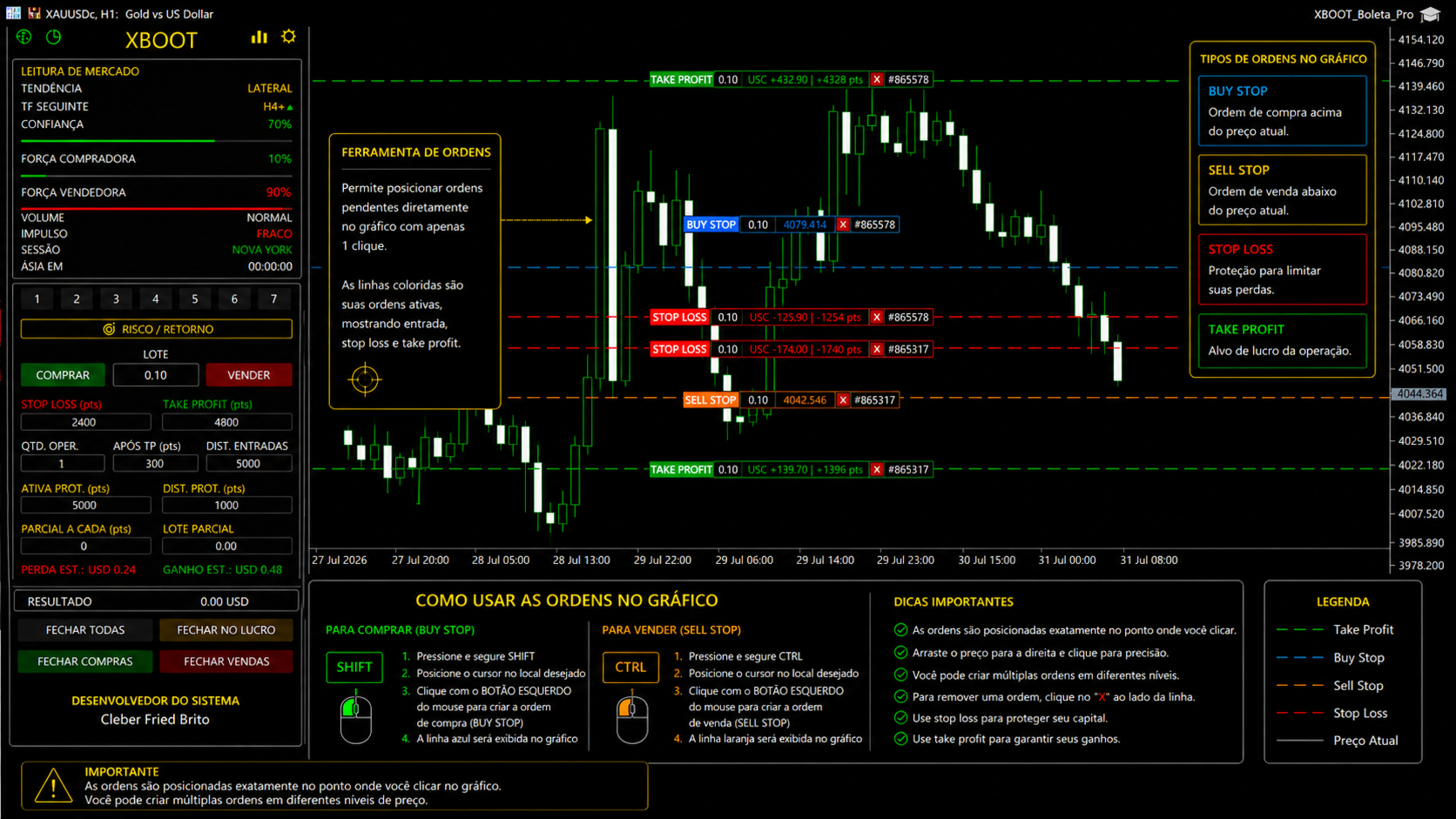
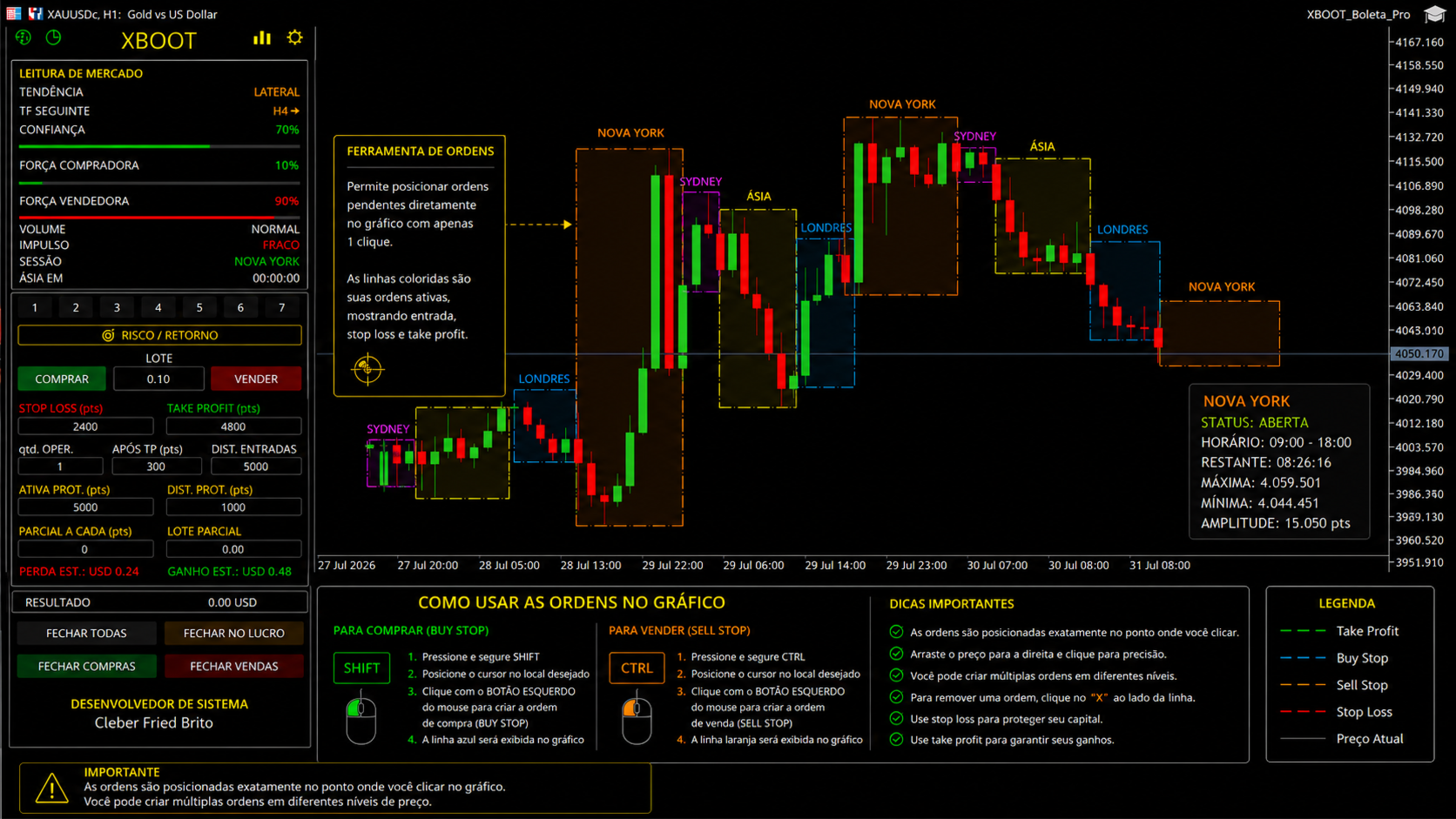
XBOOT Trading Panel for MT5

XBOOT BOLETA PRO

Professional Manual Trading Panel for MetaTrader 5

XBOOT Boleta Pro is a complete trading panel designed for traders who execute manual trades and want greater speed, organization, and control during every trading session.

More than a standard Buy and Sell panel, XBOOT Boleta Pro combines powerful trading tools into a single interface, helping traders analyze the market, manage risk, execute orders, and monitor trading performance without leaving the chart.

Its purpose is to simplify manual trading by bringing together all essential information in one professional workspace.

Trading Panel Features

Buy & Sell Execution

Open Buy and Sell orders directly from the trading panel with fast execution.

Perfect for traders who require speed during volatile market conditions.

Lot Size Control

Quickly adjust trading volume without opening the standard MetaTrader order window.

Stop Loss

Set the Stop Loss distance (points) before entering a trade.

Take Profit

Configure the Take Profit distance directly from the trading panel.

Multiple Orders

Define how many orders will be opened simultaneously.

Ideal for traders using scaling or multiple-entry strategies.

Entry Distance

Set the distance in points between consecutive entries.

Useful for grid-based or sequential trading strategies.

Protection Activation

Configure the distance required to activate trade protection automatically.

Protection Distance

Define the protection distance applied after activation.

Partial Close

Automatically close part of the position after a predefined number of points.

Partial Lot Size

Specify how much volume will be closed during partial profit taking.

Estimated Results

Before opening a trade, the panel calculates:

  • Estimated Profit
  • Estimated Loss
  • Risk-to-Reward Ratio

Helping traders make informed decisions before entering the market.

Intelligent Market Analysis

The integrated Market Analysis panel provides real-time information, including:

  • Market Trend
  • Confirmation Timeframe
  • Confidence Level
  • Buying Strength
  • Selling Strength
  • Volume
  • Market Momentum
  • Trading Session
  • Session Countdown Timer

All values are updated automatically as market conditions change.

Automatic Indicators

XBOOT Boleta Pro includes several built-in indicators that can be enabled or disabled individually through the Settings Panel.

Available indicators include:

  • Automatic Fibonacci
  • Pivot Points
  • Moving Averages
  • VWAP
  • Support & Resistance
  • Swing Highs & Swing Lows
  • Exclusive XBOOT Indicators

All indicators update automatically as price action evolves.

Settings Panel

The Settings Panel provides complete control over the platform.

Available options include:

  • Enable or disable indicators
  • Fibonacci settings
  • Pivot Point settings
  • Moving Average settings
  • VWAP settings
  • Risk Management settings
  • Trading profiles
  • Indicator customization
  • Automatic features configuration

Everything is designed for quick access and easy customization.

Trading Performance

The integrated Trading Performance module provides detailed statistics about your trading activity.

Overview

Monitor important performance metrics such as:

  • Net Profit
  • Gross Profit
  • Gross Loss
  • Profit Factor
  • Win Rate
  • Drawdown
  • Number of Trades
  • Average Trade Duration
  • Best Trade
  • Worst Trade

Trade History

Review every executed trade with detailed information:

  • Ticket Number
  • Symbol
  • Magic Number
  • Open Time
  • Close Time
  • Trade Duration

Performance Charts

Analyze your results using interactive charts, including:

  • Bar Charts
  • Pie Charts
  • Trade Distribution
  • Result Distribution
  • Financial Summary
Risk & Reward Panel

One of the main features of XBOOT Boleta Pro is the integrated Risk & Reward system.

Before opening a trade, the panel automatically evaluates the relationship between the configured Stop Loss and Take Profit, allowing traders to verify whether the setup matches their trading plan.

This helps maintain consistency, improve discipline, and visualize the potential profit and estimated loss before executing any order.

Modern Interface

The interface has been designed to maximize productivity.

All essential trading tools are organized into a clean, intuitive layout, reducing the need to switch between multiple MetaTrader windows.

Compatibility
  • MetaTrader 5
  • Hedging Accounts
  • Netting Accounts
  • Forex
  • Gold
  • Indices
  • Cryptocurrencies
  • CFDs
  • All MT5-compatible symbols
Main Advantages
  • Professional manual trading panel
  • Intelligent market analysis
  • Automatic indicators with individual enable/disable options
  • Integrated Risk & Reward management
  • Complete Trading Performance module
  • Advanced trading statistics
  • Detailed trade history
  • Modern and intuitive interface
  • Centralized Settings Panel
  • Fast trade execution directly from the chart
  • Fully customizable trading environment
  • Designed to improve organization, efficiency, and control during manual trading on MetaTrader 5

Рекомендуем также
TrendSync AutoSL Guardian  Trade and manage manual positions at the speed of a keystroke — every order protected the instant it opens. TrendSync AutoSL Guardian turns manual trading on MetaTrader 5 into a fast, disciplined workflow. Open, protect, scale and close positions straight from the chart or the keyboard — no order dialogs, no hunting for tickets. It is a trade-management and execution tool, not a signal EA : you make the decisions, it makes them instant and safe. Perfect for discretion
**Forex Trade Manager Pro MT5** **Trade Manager MT5** — это многофункциональная утилита для управления торговлей в MetaTrader 5, которая предоставляет вам полный контроль над каждым аспектом вашей позиции: от момента планирования сделки до её закрытия. Она создана для трейдеров, которые серьезно относятся к риску, — от новичков, вырабатывающих дисциплину, до профессионалов-скальперов, которым нужно мгновенное исполнение по множеству позиций. Инструмент прикрепляется к любому графику и отображ
Quick Trade Panel Pro
Nicolas Olivier Menetrey
5 (1)
Панель торговли в один клик с автоматическим управлением лотом и риском Quick Trade Panel Pro — это интуитивно понятная торговая панель, разработанная для трейдеров, которые хотят быстро исполнять ордера, сохраняя полный контроль над рисками. Основные функции Автоматический расчёт размера лота на основе процента от доступной маржи Настраиваемый Stop Loss в пунктах, автоматически применяемый к каждой сделке Размер лота фиксируется во время серии сделок для обеспечения постоянного размера позиции
FREE
VIBAVINA SmartVolume Copier When Individual Trades Are Too Small to Copy A common challenge in trade copying appears when the Master opens many small or minimum-volume positions, while the Slave account has significantly smaller capital. If every trade is reduced individually, the calculated Slave volume may fall below the broker's minimum lot size. For example: Master: 12 BUY positions x 0.01 lot Total BUY volume = 0.12 lot Lot Ratio = 0.25 A trade-by-trade copier would need: 0.01 x 0.
DDKiller Pro
Njaratahiry Michael Randrianiaina
Stop Blowing Your Account. Once and For All. DDKiller Pro is the MT5 risk guardian that runs silently on your chart and shuts down trading the moment you hit a limit — whether you're grinding a prop firm challenge or managing your own CFD account. The problem every trader knows: You set your rules. You break them anyway. One revenge trade. One overleveraged position. One session that erases a month of gains. DDKiller Pro removes that decision from your hands entirely. What it does: The second yo
This tool will perform Trailing stop loss and Break even management for orders. Helps you limit or reduce the time spend watching orders on the screen, especially when you need to go to sleep. Just add this EA to 1 chart, you can manage all pairs. You can filter orders by comment, magic number, symbol and order ticket number. When Breakeven it can add shift/offset pips (to cover the commission...). You can try in strategy tester before purchase. The EA will add Buy and Sell alternately, so you
Flexible receiver with lot scaling, symbol mapping and filters. Ideal receiver for MT4 → MT5 trade copying. Receive trades automatically from MT4 or MT5 master accounts. Designed for fast, flexible and reliable multi-account copying. Main Features • MT4 Master → MT5 Slave • MT5 Master → MT5 Slave • Lot size management: Same Lot Fixed Lot Multiply Lot Balance Based Lot • Symbol Mapping Example: XAUUSD = GOLD EURUSD = EURUSD.a • Include Symbols filter • Include Magics filter • Reverse Trades mode
Grid Trading - полуавтоматический советник для торговли по сетке в один клик на хеджевых счетах. Также доступна версия для MetaTrader 4 . *Данный советник предназначен только для счетов с хеджинговой системой учета позиций Обычный режим Вы нажимаете на кнопку Sell или Buy на графике, затем эксперт добавит уровни стоп-лосс, тейк-профит для сделки, а функции трейлинг-стопа и безубытка позаботятся о сделке, если она не сможет достичь цели профита. Хеджирование При выборе торговли с использованием
Core function Intelligent transaction management one-click opening and closing operation, which supports user-defined lots to set multiple closing modes: all closing, closing by direction and closing by profit and loss status. Professional risk control, real-time risk monitoring and spread control to avoid high-cost trading environment. Visual control panel has an intuitive graphical interface, and all functions can be operated with one button to display position information, profit and loss sta
FREE
no Trade operation, Robot Set auto SL to every manually Trade from a Phone Automatic Phone TradeManager Need just Set on 1 Symbol Auto BE Trigger is added that immediately sets a stop-loss for every () But does NOT calculate position size based on risk, allows the fixed  SL to   adjusted dynamically drag on Chart or Menu. It protects capital around the clock, reduces emotional mistakes, and ensures consistent risk management.
FREE
Trade Manager JM
Jonathan Ferreira De Magalhaes
Efficient Manual Trading Panel for Professional Traders === TRADING SESSIONS DISPLAY & BAR TIMER INCLUDED === Trade Manager JM is a comprehensive, intuitive utility designed to revolutionize manual order execution and management on MetaTrader 5. Built for speed and precision, this panel consolidates everything a serious manual trader needs into a single, sleek interface. Stop wasting precious seconds calculating lot sizes or manually setting SL/TP levels. Trade Manager JM allows you to focus pur
Summary of the Advanced Account Monitoring for MT5 The Advanced Account Monitoring for MT5 is a powerful tool designed for advanced account monitoring, offering traders detailed insights into their trading performance. This indicator provides a comprehensive dashboard to track drawdowns, profits, and trading volumes across different timeframes. Below is an overview of its key functions: Account and Robot Monitoring The indicator allows users to monitor either the entire account or a specific Ex
Stormer RSI 2
Ricardo Rodrigues Lucca
This strategy was learned from Stormer to be used on B3. Basically, 15 minutes before closing the market, it will check RSI and decided if it will open an position. This strategy do not define a stop loss. If the take profit reach the entry price it will close at market the position. The same happens if the maximal number of days is reached. It is created to brazilian people, so all configuration are in portuguese. Sorry Activations allowed have been set to 50.
Key Benefits at a Glance: Lorentzian ML signal generation Majority voting across 3 timeframes Automatic market regime detection Smart equity recovery with group profit targets 1% risk‑based adaptive lot sizing ATR‑based dynamic SL/TP & trailing Emergency drawdown cut Live on‑chart info panel Hybrid Lorentzian Gold ML EA v2.0 – Intelligent Adaptive Trading for XAUUSD Next‑Gen Machine Learning Core A Lorentzian KNN classifier analyzes 5 normalized features (RSI, WaveTren
FREE
Protect your funded accounts and personal capital with military-grade precision. This utility continuously monitors your floating equity against your daily starting balance. The moment your custom drawdown threshold is breached, it instantly liquidates all open positions, deletes pending orders, and completely unloads from the chart. Stop revenge trading and never fail a prop firm evaluation due to a margin breach again.
FREE
️ Trade Manager oneclick  ( Reverse Trade,  Partial Close,  Breakeven, Close All Running Trade )   control – Smart Manual Trade Control for MT5 Trade Manager oneclick control is a powerful yet lightweight trade management utility built for manual traders who want precise control over their open positions — directly from the MT5 chart. This EA does not open or close trades automatically based on any strategy. It simply provides one-click management tools to handle your running trades efficient
FREE
SPECIAL LAUNCH OFFER: $30 (1-Month Rent) Limited time offer to build our community and gather feedback! AmbM GOLD Institutional Scalper A high-precision M5 algorithm for XAUUSD (Gold) , engineered to trade exclusively at Institutional Liquidity Levels ($5/$10 psychological marks). PERFORMANCE DATA (BUY ONLY) • Win Rate: 87.09%. • Safe Growth: +$4,113 profit on $10k (13.75% Max Drawdown). • Extreme Stress Test: Successfully generated +$22,997 in a 5-year stress test (2020-2026), proving
Ultimate Pro Trading Panel — All-In-One Manual & Grid Trading Dashboard Pro Trading Panel   is an all-in-one on-chart control panel that gives discretionary and semi-automated traders a complete toolkit for entries, exits, risk management, and grid trading — without leaving the chart. Every function is visual, draggable, and updates in real time. If you want to test this utility feel free to download the basic preview version of this tool here:  https://www.mql5.com/en/market/product/181435 Who
AlgoDevMT5 Trade Manager Pro AlgoDevMT5 Trade Manager Pro is a professional trade management and risk control utility for MetaTrader 5. Designed for discretionary traders and funded account traders, this utility helps traders plan trades visually, calculate position size instantly, and manage risk with precision. Trade Manager Pro does not generate trading signals, open trades automatically, or provide investment advice. It is a trader-assistance utility designed to improve consistency and risk
# Zikiman Risk Panel Pro — риск-менеджер MT5, калькулятор лота и Trade Manager Zikiman Risk Panel Pro — советник для управления риском в MT5, созданный для ручной торговли. Он объединяет в одном интерфейсе на графике риск-менеджер для MT5, калькулятор лота, калькулятор размера позиции, калькулятор риска, торговую панель, менеджер сделок и менеджер позиций. Направление, риск и ценовые уровни выбираете вы. Панель рассчитывает объём позиции, показывает планируемый риск и потенциальную прибыль, о
Click Trading
Jawad Tauheed
5 (2)
One Click Trading – Auto TP SL Developer TraderLinkz Version 1.00 Category Utility What it does Adds missing TP and SL to your manual trades and pending orders Sets them once per ticket Lets you move TP and SL afterward Works on hedging and netting accounts Scans on every tick and reacts on trade events Why you want it You place faster entries You get consistent risk and exit targets You reduce fat finger errors You keep full manual control Quick start Attach the EA to any chart Keep TP and SL e
FREE
RADAH Dashboard is an advanced performance analytics utility for MetaTrader 5, designed to transform your account history into a clear, organized and interactive trading performance overview. It does not open, modify or close trades. Its purpose is exclusively analytical, allowing you to review the performance of the entire account, a specific symbol, or a strategy identified by its Magic Number. Chart View Visualize your trading performance through an integrated balance/equity performance c
FREE
Risk Calculator Veqrix
Jose Luis Heredia Padilla
Risk Calculator Veqrix  Risk Calculator Veqrix is a risk calculation, visual trade planning, and manual order execution tool for MetaTrader 5. The EA automatically calculates the trade volume using the configured risk, entry price, and distance to the Stop Loss. It also displays the planned trade directly on the chart and distributes the total volume across up to three Take Profit targets. This tool does not generate trading signals . The user selects the direction, configures the levels, and
FREE
Менеджер символов или Сеточный менеджер, разработан для группировки ордеров в одну позицию (по символу и по направлению). Эта утилита будет полезна сеточникам и мультивалютникам, тем у кого может быть открыто множество ордеров по нескольким парам. Вы сможете видеть общее количество лотов, общую прибыль, и устанавливать виртуальные стоплосс и тейкпрфит. Для установки реального ТП (или СЛ) необходимо сначала задать виртуальное значение, а затем ввести в этой ячейке команду: "set". Если вы хотите
Trading panel for manual trading. Has a fairly wide functionality. Allows you to automatically calculate the order size, open both market and pending orders. It has a wide range of options for closing orders, it is possible to partially close orders, close orders after reaching a certain profit or loss, separately close profitable and unprofitable, buy and sell, as well as pending orders. The panel also contains a simple implementation of a grid of pending orders, reverse and lock functions, tr
Capital Management EA – Smart Risk Management & Profit Optimization for MT5 Take control of your trading capital with smart, automated strategies — fully optimized for MetaTrader 5 (MT5). Looking to protect your capital and maximize profits through automated money management strategies ? Capital Management EA is the all-in-one Expert Advisor for MetaTrader 5 (MT5) that helps you trade smarter, not harder. Core Features: 5-in-1 Capital Management Strategies – Built-in versatility Gr
King ElChart Manual Trade Panel
Mohammed Maher Al-sayed Mohammed Ahmed Saleh
King ElChart Manual Trade Panel v5 – Trade Fast. Risk Exactly. A complete manual trading panel for MetaTrader 5 that sizes every lot from your stop, places a smart stop beyond the market noise, and protects the trades you open from your phone. Type the percentage you are willing to risk, check the stop and target on the chart, and open the exact lot with one click. Smart Stop (ATR + Swing) Two stop modes, switchable directly on the panel: Smart ATR or Fixed pips . Smart ATR places the stop at th
GOM Trade Manager
Wannapach Chinnaprapa
GOM Trade Manager helps you execute trades the way you want it. Works on all instruments Forex, Commodities, & Crypto. It helps you with lot calculations, spread addition and balance calculations so you can just focus on actual trading. For full automatic planned management, stackable triggers and spread widening protection >> check out GOM Trade Manager Pro . ------------------------------------------NOTABLE FEATURES------------------------------------------ You set everything based on bid
FREE
Overtrading Stopper MT5 1. Overview Overtrading Stopper MT5 is a MetaTrader 5 utility EA that helps discretionary traders follow their own trading rules. You can set rules in advance, such as: how many times you may trade today, how many consecutive losses should make you stop, how many minutes to pause after a loss, and how to avoid entering several trades in rapid succession. When a configured limit or condition is reached, the EA displays the reason for the protection state on the chart. Depe

FREE
Imagine flying a real aircraft without ever stepping into a flight simulator. That's what trading is like. You have to simulate your strategy before you can take it to a live market. It is good if you can simulate things speedily before even stepping into any live market, or before coming up with an automated system.  People don't have all day to stare at a higher timeframe chart until the entry signal finally arrives. That's why I built this so that you can simulate your strategy with speed. Th
FREE
С этим продуктом покупают
Trade Assistant MT5
Evgeniy Kravchenko
4.43 (216)
Помогает рассчитать риск на сделку, простая установка нового ордера с помощью линий, управление ордерами с функциями частичного закрытия, 7 типов трейлинг-стопа и другие полезные функции. Дополнительные материалы и инструкции Инструкция по установке - Инструкция к приложению - Пробная версия приложения для демо счета Функция Линии   - отображает на графике линию открытия, стоп-лосс, тейк-профит. С помощью этой функции легко установить новый ордер и увидеть его дополнительные характеристики пе
Добро пожаловать в Trade Manager EA — лучший инструмент для управления рисками, предназначенный для упрощения, точности и эффективности торговли. Это не просто инструмент для размещения ордеров; это комплексное решение для удобного планирования торгов, управления позициями и усиленного контроля над рисками. Независимо от того, начинающий вы трейдер, опытный специалист или скальпер, нуждающийся в быстром исполнении, Trade Manager EA адаптируется к вашим потребностям и работает с любыми активами:
================================================================================ POC BREAKOUT - V20.72. Full Professional Grade Toolkit ================================================================================ POC Breakout is a full MetaTrader 5 trading dashboard for discretionary traders who want breakout signals, Point of Control (POC) context, volume profiles, order flow, market structure, news, alerts, and advanced trade planning in one professional workspace. Attached directly to you
TradePanel MT5
Alfiya Fazylova
4.88 (168)
Trade Panel — это многофункциональный торговый помощник. Приложение содержит более 50 торговых функций для ручной торговли и позволяет автоматизировать большинство торговых операций. Инструкция к приложению + видео-инструкции: https://www.mql5.com/ru/blogs/post/771695 Пробная версия приложения для демо-счета: https://www.mql5.com/ru/blogs/post/750864 Как установить приложение: https://www.mql5.com/ru/blogs/post/750096 Как тестировать приложение в визуальном режиме: https://www.mql5.com/ru/blogs/
Копируйте сигналы из Telegram по своим торговым правилам Telegram to MT5 Signal Trader автоматически копирует текстовые торговые сигналы из открытых и закрытых каналов и групп Telegram в MetaTrader 5. Управляйте несколькими поставщиками сигналов и счетами MT5 из одного приложения для компьютера, задавая индивидуальные параметры риска и торговли для каждого поставщика . Для копирования не нужны бот Telegram и настройка API. Просто войдите в свой аккаунт Telegram по номеру телефона или QR-коду и в
Farmed Hedge Yield Farming | All Markets (Manual - Hybrid - Semi/Automated EA) VERIFIED TRADING RESULTS - Farmed Hedge Yield Axi Copy:  https://www.mql5.com/en/signals/2356376 - Farmed Hedge Yield Exn Copy:   https://www.mql5.com/en/signals/2356404 - Farmed Hedge Yield V Copy:  https://www.mql5.com/en/signals/2357156 IMPORTANT NOTICE: FarmedHedge is a MANUAL-FOCUSED TRADING UTILITY ,not a fully automated EA. Results shown on this Signal include manual trades and overall strategic management.
Telegram to MT5 Multi-Channel Copier   автоматически копирует торговые сигналы из ваших Telegram-каналов прямо в MetaTrader 5. Без ботов, без браузерных расширений, без ручного копирования. Сигнал приходит в Telegram — и советник открывает сделку в вашем терминале за считанные секунды. А перед тем как копировать канал, встроенный бэктестер покажет, что этот канал сделал бы на вашем счёте. Продукт состоит из двух компонентов: приложения для Windows, которое слушает ваши Telegram-каналы, и этого с
Premium Trade Manager - Торговая панель со встроенным коучем Premium Trade Manager помещает торгового коуча прямо в ваш график, а под ним работает полноценный движок исполнения. Настройте сделку так, как вы всегда это делаете, затем позвольте Max, вашему ИИ-наставнику по трейдингу, прочитать именно эту настройку с учётом вашего живого счёта и дать чёткое заключение до того, как вы входите: соответствует ли стоп дисциплинированному подходу, разумен ли риск, не выходит ли высоковолатильный релиз ч
EA Overfitter
Stephen J Martret
5 (1)
Бэктест выглядит отлично. Но будет ли советник зарабатывать завтра, через неделю, через месяц? EA Overfitter прогоняет вашего советника по 100 историям цены, которых он никогда не видел. Одна оценка показывает, реально ли преимущество. Бэктест показывает, что советник сделал на одной истории цены — на той, которая случайно произошла. Из него невозможно понять, какая часть результата была заслугой стратегии, а какая — конкретного пути цены. EA Overfitter отвечает на этот вопрос. Он строит до 10
Trade Copier Ultimate
Janitha Sandaruwan Amaradasa Wickramasingha Arachchilage
5 (5)
Trade Copier Ultimate - Telegram to MT5 Signal Copier Trade Copier Ultimate automatically copies Telegram trading signals into MetaTrader 5. The EA can read signal messages, detect the symbol, order type, entry price, Stop Loss, Take Profit levels and selected update commands, then execute or manage the trade in MT5 using your lot and risk settings. It is more than a basic Telegram to MT5 copier. TCU also supports Bot API and user-account Bridge workflows, Discord signal routing, local MT5 to MT
Astro Trade MT5
Indra Maulana
5 (7)
25% discount on the release of the tool: only for the next 3 buyers Send a message to receive a demo version. AstroTrade Trading Assistant AstroTrade is a comprehensive multi-functional trading utility developed for the MetaTrader 5 platform. It integrates essential tools for trade execution, risk management, and technical monitoring into a single unified interface. The application is designed to assist traders in managing their daily operations through a visual and structured environment. Vi
Exp COPYLOT CLIENT for MT5
Vladislav Andruschenko
3.97 (35)
Профессиональный копировщик сделок для MetaTrader 5 Быстрый, профессиональный и надежный копировщик сделок для MetaTrader . COPYLOT позволяет копировать сделки Forex между терминалами MT4 и MT5 с поддержкой счетов Hedge и Netting . Версия COPYLOT для MT5 поддерживает: - MT5 Hedge → MT5 Hedge - MT5 Hedge → MT5 Netting - MT5 Netting → MT5 Hedge - MT5 Netting → MT5 Netting - MT4 → MT5 Hedge - MT4 → MT5 Netting Версия MT4 Полное описание + DEMO + PDF Как купить Как установить Как получить файлы жур
Trade Manager DashPlus
Henry Lyubomir Wallace
4.85 (13)
DashPlus – это продвинутое средство для управления торговлей, разработанное для повышения эффективности и результативности торговли на платформе MetaTrader 5. Оно предлагает широкий набор функций, включая расчет рисков, управление ордерами, продвинутые системы сеток, инструменты на основе графиков и аналитику производительности. Основные функции Восстановительная Сетка Внедряет систему усреднения и гибкую сетку для управления сделками в неблагоприятных рыночных условиях. Позволяет стратегически
HINN MAGIC ENTRY - лучший инструмент для входа и менеджмента позиций! ПРОСТО. БЫСТРО. ИНТУИТИВНО. МАКСИМАЛЬНО АВТОМАТИЗИРОВАНО. Выставляет ордера через выбор уровня на графике! полное описание    ::    demo-версия    ::   60-sec-video-description Основные функции: - Рыночные, лимитные и отложенные ордера -  Автоматический подсчет лоттажа  -  Автоматический учет спреда и комиссий -  Неограниченное количество промежуточных тейков для позиций - Перевод в безубыток и трейл стоп-лосса и тейк-проф
FUTURES ORDERFLOW FOOTPRINT CHART Professional OrderFlow EA for MetaTrader 5 Version 1.01| Professional tool for real traders | Institutional-Grade Visualization STRATEGY TESTER USERS - PLEASE SELECT EVERY REAL TICK WHEN TESTING AND YOU HAVE DOWNLOADED HISTORICAL DATA. IF YOU SEE A WAITING SCREEN AND IT IS NOT DOWNLOADING, IT MEANS YOU HAVE LOW HISTORICAL DATA. TRY 1 MIN AND 5 MIN FIRST ON 1 DAY DATA. ONE DAY DATA SHOULD BE THE NEWEST AND MOST CURRENT DATE. PLEASE WAIT UNTIL THE MARKET HAS ROL
The product will copy all telegram signal to MT5 ( which you are member) , also it can work as remote copier.  Easy to set up, copy order instant, can work with almost signal formats, image signal,  s upport to translate other language to English Work with all type of channel or group, even channel have "Restrict Saving Content", work with  multi channel, multi MT5 Work as remote copier: with signal have ticket number, it will copy exactly via ticket number. Support to backtest signal. How to s
Timeless Charts
Samuel Manoel De Souza
5 (8)
Timeless Charts is an all-in-one trading utility for professional traders. It combines custom chart types such as Seconds Charts and Renko with advanced order flow analysis using Footprints , Clusters , Volume Profiles , VWAP studies, and anchored analysis tools for deeper market insight. Trading and position management are handled directly from the chart through an integrated trade management panel , while Market Replay and Virtual Accounts provide environments for practicing trading skills and
Trade Dashboard MT5
Fatemeh Ameri
4.94 (133)
Trade Dashboard simplifies how you open, manage, and control your trades, with built-in lot size calculation. It allows you to execute trades, manage risk, and control positions directly on the chart, with tools such as partial close, breakeven, and trailing stop. Designed to reduce manual work and help you stay focused on your trading decisions. A demo version is available for testing. Detailed explanations of features are provided within the MQL5 platform. Installation instructions are include
Footprint Chart Pro — Professional OrderFlow EA for MetaTrader 5 Version 6.34 | Professional tool for real traders | Institutional-Grade Visualization DEMO USERS - PLEASE SELECT EVERY TICK / REAL TICK WHEN TESTING AND YOU HAVE DOWNLOADED HISTORICAL DATA. IF YOU SEE A WAITING SCREEN AND IT IS NOT DOWNLOADING, IT MEANS YOU HAVE LOW HISTORICAL DATA. TRY 1 MIN AND 5 MIN FIRST ON 1 DAY DATA. ONE DAY DATA SHOULD BE THE NEWEST AND MOST CURRENT DATE. PLEASE WAIT UNTIL THE MARKET HAS ROLLED OVER PERIOD.

Welcome to ENTRY IN THE ZONE WITH SMC MULTI TIMEFRAME Entry In The Zone and SMC Multi Timeframe is a real-time market analysis tool based on Smart Money Concepts (SMC), designed to analyze market structure, price direction, and key trading zones. It supports both Single-Timeframe Analysis and Multi-Timeframe Analysis, providing a clearer view of the overall market structure across multiple timeframes, with real-time BUY / SELL signals that do not repaint. It is designed to help filter trading op
Grid Manual MT5
Alfiya Fazylova
4.73 (22)
Grid Manual — это торговая панель для работы с сеточными стратегиями. Утилита универсальная, имеет гибкие настройки и понятный интерфейс. Работает с сеткой ордеров не только в сторону усреднения убытков, но и в сторону наращивания прибыли. Трейдеру не нужно создавать и сопровождать сетку ордеров, это сделает утилита. Достаточно открыть ордер и Grid manual автоматически создаст ему сетку ордеров и будет сопровождать его до самого закрытия. Полная инструкция и демо-версия здесь . Основные особенно
Trade Indicator Assistant   is a powerful MT5 utility designed to turn indicators into automated trading systems. Its main feature is the ability to automatically detect an indicator’s   BUY and SELL signal buffers , without requiring you to know the buffer numbers, search through indicator settings, or modify the indicator source code. Bonus Indicator:   After purchasing Trade Indicator Assistant, contact me to receive   Trade Signal Pro   completely free as a bonus indicator. [Download Demo V
Anchor Trade Manager
Kalinskie Gilliam
5 (9)
Your EAs cannot see each other, but Anchor can. Anchor gives you one place to coordinate your EAs, manage risk, and decide when trading is allowed. It works alongside the trading bots you already use without any changes to them. The Problem One EA opens a trade. Then another starts trading. The next thing you know, you wake up to multiple grids built across your account. Each EA may be doing exactly what it was designed to do, but together they can place far more risk on your account than you in
Signal TradingView to MT5 Pro Automator Мгновенное профессиональное исполнение между TradingView и MetaTrader 5 Автоматизируйте свою торговую стратегию с помощью самого надежного моста связи между алертами TradingView и реальным исполнением в MT5. Разработанный для трейдеров, которым требуются скорость, гибкость и безупречное управление рисками, этот советник (Expert Advisor) превращает любое сообщение с алертом в точный рыночный или лимитный ордер. ПРЕИМУЩЕСТВА И СИЛЬНЫЕ СТОРОНЫ Универсальный д

Power Candles Strategy Scanner — самооптимизирующийся инструмент для поиска настроек по нескольким инструментам Power Candles Strategy Scanner использует тот же самооптимизирующийся движок, что и индикатор Power Candles — для всех символов в вашем Market Watch, одновременно. На одной панели отображается информация о том, какие символы в данный момент являются статистически торгуемыми, какая стратегия выигрывает на каждом из них, оптимальная пара Stop Loss / Take Profit, а также отправляется увед
This Expert Advisor waits a position to be opened, no matter if you open manually or with the EA buttons or eventually via mobile: it creates a Grid in Anti Martingale with pending stop orders in the same direction of the first position. You can specify the number of orders, the size and the distance between the orders. You can also adjust the Monetary Target of the Grid, the monetary Stop Loss, the Intermediate Target (when reached the EA insert an order with opposite direction of the total pos
Risk Manager Pro MT5 - это советник для защиты торгового счета и контроля рисков в MetaTrader 5. Утилита отслеживает equity, дневной и недельный результат, просадку, открытые позиции, количество сделок, серии убыточных сделок и разрешенное торговое время. Когда заданный лимит достигнут, Risk Manager Pro MT5 может автоматически закрыть позиции, удалить отложенные ордера, остановить другие советники, отправить уведомление или закрыть терминал. Вместо того чтобы полагаться только на дисциплину во в
Trade Assistant 38 in 1
Makarii Gubaydullin
4.91 (23)
Многофункциональная утилита: калькулятор лота, сеточные ордера, индикатор Price Action, менеджер ордеров, рассчёт R/R, и многое другое Демо-веpсия  |   Инструкция  |   Версия для MT4 Утилита не работает в тестере стратегий: вы можете скачать демо-версию ЗДЕСЬ , чтобы протестировать продукт перед покупкой. Напишите мне  если есть вопросы / идеи по улучшению / в случае найденного бага Упроситите и сделайте вашу торговлю быстрее, при этом расширяя стандартные возможности терминала. 1. Открытие но
YuClusters
Yury Kulikov
4.93 (43)
Внимание: Ознакомиться с работой программы можно с помощью бесплатной версии  YuClusters DEMO . YuClusters это профессиональная система анализа рынка. Для трейдера открываются уникальные возможности анализа потока ордеров, объемов торговли, движения цены используя различные графики, профили, индикаторы, графические объекты. YuClusters оперирует данными на основе ленты сделок или тиковой информации, в зависимости от того, что доступно в котировках финансового инструмента.  YuClusters позволяет с
Торговая панель для MetaTrader 5 — профессиональная торговля в один клик с графика и клавиатуры Мощная торговая панель для активного ручного трейдинга, которая позволяет открывать, сопровождать и закрывать сделки значительно быстрее и удобнее, чем стандартными средствами MetaTrader. Панель создана для тех, кто хочет получить полный контроль над позициями, ордерами, прибылью и торговыми сценариями в одном рабочем пространстве. Это не просто вспомогательная утилита. Это полноценный торговый интер
Фильтр:
Нет отзывов
Ответ на отзыв