Trade Assistant and Trade Manager for Prop Firms
- Utilità
-
Remus-octavian Mireanu
 Day Trader and Builder of Trade Assistance for Prop Firms on MT5 and TVBridge.App (A bridge between your TradingView chart and your MT5 account)
 - Versione: 2.26
- Attivazioni: 15
Trade Assistant MT5 — Trade Manager for Prop Firms
Trade Manager for MT5 that calculates position size, manages risk, visualises your trade setup in real time and protects your account with built-in daily loss and trade limits — everything you need to trade with consistency and pass your prop firm challenge.
> Trade Tab — Position Sizing & Execution
**Automatic lot calculation**
Enter your risk as a percentage of account balance or as a fixed dollar amount and the panel instantly calculates the correct lot size based on your stop loss distance. No more manual calculations or spreadsheets.
**Fixed Lots mode**
Prefer to trade a fixed position size? Enable Fixed Lots and type your lot size directly. The panel will still display the real dollar risk and percentage exposure for that lot size, keeping you fully informed.
**Quick risk presets**
One-click buttons for 0.5%, 1% and 2% risk let you switch your risk level instantly. The active preset is highlighted so you always know where you stand.
**Entry Level control — Market Price or Limit Price**
Toggle between Market Price mode, where the entry field tracks the live Ask price in real time, and Limit Price mode, where you manually set a specific entry level for pending orders. Both modes feed directly into the lot size calculation.
**Stop Loss and Take Profit fields**
Set your SL and TP by exact price level or by points distance. Both update each other automatically so you can work in whichever unit feels natural for the instrument you are trading.
**Risk to Reward display**
The panel calculates and shows your Risk:Reward ratio live as you adjust your levels, so you always know the quality of the setup before you place it.
**Order Expiry**
Set an expiration time in hours and minutes for pending limit orders. The panel sends the expiry timestamp automatically with the order.
**Buy Order / Sell Order execution**
The active direction button is highlighted in blue for buys or red for sells. One click places the order with all calculated parameters attached — lot size, SL, TP and expiry — with zero manual input at the moment of execution.
**Cancel All Orders / Cancel Last Order**
Instantly cancel all pending orders or just the most recently placed one, directly from the Trade tab.
> Position Tool — Visual Trade Planning on the Chart
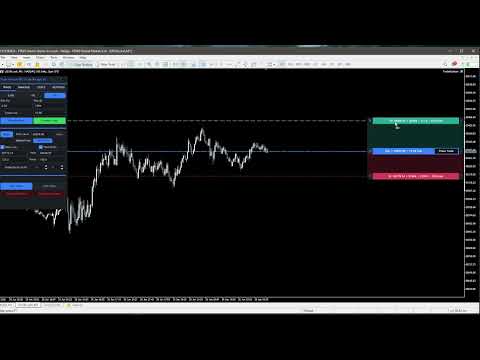
The built-in Position Tool on the price chart, letting you plan your trade visually before committing.
**Drag-to-place Entry, SL and TP bars**
Three horizontal bars — Entry (blue for buy, red for sell), Stop Loss (red) and Take Profit (green) — are displayed as draggable bars on the chart. Drag any bar to the exact price level you want and the panel fields update in real time.
**Live P&L and risk information on each bar**
Each bar shows the relevant data at a glance: the TP bar displays the target price, the expected profit in dollars and the Risk:Reward ratio; the Entry bar shows direction, entry price and lot size; the SL bar shows the stop price, dollar risk and risk percentage.
**Buy/Sell direction toggle**
The left side button on the Entry bar displays B for Buy or S for Sell. Clicking it flips the trade direction and automatically mirrors the SL and TP distances around the entry price, so your risk layout stays correct without any manual adjustment.
**Place Trade button**
A dedicated Place Trade button sits directly on the Entry bar. Clicking it opens a confirmation dialog showing all order details — direction, entry price, lots, dollar risk, risk percentage, SL and TP — before the order is sent. This prevents accidental execution.
**Guidance lines**
Optional dashed horizontal lines are drawn on the chart at the Entry, SL and TP price levels for a clear visual reference. Can be toggled on or off in Settings.
**Fully customisable colours**
TP bar, TP zone, SL bar, SL zone, Buy entry and Sell entry colours can all be changed independently via the Settings tab using preset cycles.
> Manage Tab — Trade Management & Risk Control
**Manual Breakeven**
One button moves your stop loss to breakeven with a 2-point buffer on all open positions instantly.
**Auto Breakeven**
Enable automatic breakeven and the panel monitors your open positions on every timer tick. When the configured trigger condition is met, the stop loss is moved to breakeven automatically without any action required from you.
Two trigger modes are available:
- **Default (1:1 R:R)** — breakeven triggers when the position has moved a distance equal to the initial risk.
- **Points** — breakeven triggers after a specific number of points in profit that you define.
A sound alert can optionally be played when Auto Breakeven fires, configurable in the Settings tab.
> Risk Management — Built for Prop Firms
This section is specifically designed to keep you within the strict daily risk rules enforced by prop firm evaluations and funded accounts.
**Max Loss per Day**
Set a maximum daily loss percentage. The moment your account equity drops by that percentage from the day's opening balance, the panel blocks all further trade execution and displays a prominent warning banner. Trading is automatically re-enabled at midnight when the new trading day begins.
**Max Trades per Day**
Set a maximum number of trades allowed per day. Once that limit is reached, the panel blocks further execution for the remainder of the day. This helps you stick to your strategy rules and avoid overtrading — one of the most common reasons traders fail prop evaluations.
**Today's performance display**
The Risk Management section shows your current day's P&L percentage and trade count in real time, so you always know exactly where you stand relative to your limits before placing the next trade.
**Trading Blocked warning**
When either daily limit is triggered, a red warning banner reading "TRADING BLOCKED UNTIL MIDNIGHT" is displayed prominently in the panel so there is no ambiguity about your trading status.
Both limits are saved to global variables and persist across MT5 restarts, ensuring your protection is never lost even if the platform is restarted mid-session.
> Stats Tab — Performance Analytics
A built-in statistics panel pulls from your full account trading history and presents key performance metrics at a glance, updated live.
**Account** — Current balance and equity.
**Performance** — Total trades, net profit, number of winning and losing trades with win rate percentage, best win streak and worst loss streak.
**Period** — Today's trade count and profit, this week's profit and this month's profit.
**Risk** — Average risk per trade over the last 7 days, maximum overall drawdown in dollars and percentage, and maximum daily drawdown in dollars and percentage. The daily drawdown figure is particularly relevant for prop firm traders who need to monitor their worst single-day loss against evaluation rules.
> Settings Tab
**Sound Alerts**
Toggle alert sounds independently for Auto Breakeven triggers and for risk limit events.
**Position Tool & Colors**
Toggle the guidance chart lines on or off. Independently change the colour of the TP bar, TP zone fill, SL bar, SL zone fill, Buy entry bar and Sell entry bar by cycling through preset colour options with a single click.
> General Features
- **Draggable panel** — Click and drag the title bar to reposition the panel anywhere on the chart.
- **Minimise button** — Collapse the panel to a compact title bar with one click to free up chart space, and restore it just as quickly.
- **Persistent settings** — Risk management limits and other settings are saved to global variables and survive platform restarts.
- **Live price updates** — In Market Price mode, the entry field updates on every timer tick to reflect the current Ask price.
- **Works on any instrument** — Indices, forex pairs, commodities, metals. Lot size and risk calculations use the instrument's actual tick size and tick value for accurate results across all asset classes.
### Why Trade Assistant MT5 is the Ideal Tool for Prop Firm Traders!
Prop firm evaluations impose strict rules that punish undisciplined trading. A single day of overtrading or a loss that exceeds the daily drawdown limit can end your challenge immediately. Trade Assistant MT5 addresses the two most common reasons traders fail:
**1. Incorrect position sizing.** The panel calculates your exact lot size automatically based on your defined risk percentage and stop loss distance. There is no room for manual calculation errors that can result in taking far more risk than intended.
**2. Breaching daily limits.** The Max Loss per Day and Max Trades per Day limits work as a hard stop enforced by the panel itself. When a limit is reached, the Buy and Sell buttons become inactive and the warning is displayed. You cannot place another trade by accident, even in a moment of frustration or revenge trading.
Together, these features act as a second layer of discipline on top of your own strategy, keeping you firmly within the rules of any prop firm evaluation from the first day to the last.