Trade Assistant and Trade Manager for Prop Firms

Trade Assistant MT5 — Trade Manager for Prop Firms


Trade Manager for MT5 that calculates position size, manages risk, visualises your trade setup in real time and protects your account with built-in daily loss and trade limits — everything you need to trade with consistency and pass your prop firm challenge.


> Trade Tab — Position Sizing & Execution


**Automatic lot calculation**

Enter your risk as a percentage of account balance or as a fixed dollar amount and the panel instantly calculates the correct lot size based on your stop loss distance. No more manual calculations or spreadsheets.

**Fixed Lots mode**

Prefer to trade a fixed position size? Enable Fixed Lots and type your lot size directly. The panel will still display the real dollar risk and percentage exposure for that lot size, keeping you fully informed.

**Quick risk presets**

One-click buttons for 0.5%, 1% and 2% risk let you switch your risk level instantly. The active preset is highlighted so you always know where you stand.

**Entry Level control — Market Price or Limit Price**

Toggle between Market Price mode, where the entry field tracks the live Ask price in real time, and Limit Price mode, where you manually set a specific entry level for pending orders. Both modes feed directly into the lot size calculation.

**Stop Loss and Take Profit fields**

Set your SL and TP by exact price level or by points distance. Both update each other automatically so you can work in whichever unit feels natural for the instrument you are trading.

**Risk to Reward display**

The panel calculates and shows your Risk:Reward ratio live as you adjust your levels, so you always know the quality of the setup before you place it.

**Order Expiry**

Set an expiration time in hours and minutes for pending limit orders. The panel sends the expiry timestamp automatically with the order.

**Buy Order / Sell Order execution**

The active direction button is highlighted in blue for buys or red for sells. One click places the order with all calculated parameters attached — lot size, SL, TP and expiry — with zero manual input at the moment of execution.

**Cancel All Orders / Cancel Last Order**

Instantly cancel all pending orders or just the most recently placed one, directly from the Trade tab.


> Position Tool — Visual Trade Planning on the Chart

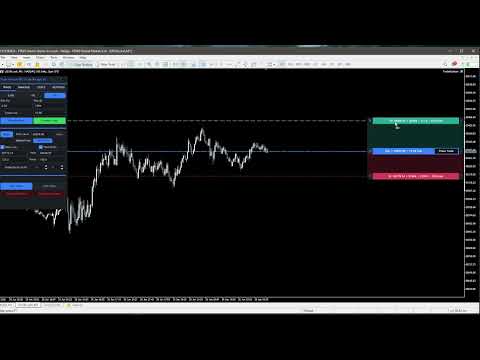
The built-in Position Tool on the price chart, letting you plan your trade visually before committing.


**Drag-to-place Entry, SL and TP bars**

Three horizontal bars — Entry (blue for buy, red for sell), Stop Loss (red) and Take Profit (green) — are displayed as draggable bars on the chart. Drag any bar to the exact price level you want and the panel fields update in real time.

**Live P&L and risk information on each bar**

Each bar shows the relevant data at a glance: the TP bar displays the target price, the expected profit in dollars and the Risk:Reward ratio; the Entry bar shows direction, entry price and lot size; the SL bar shows the stop price, dollar risk and risk percentage.

**Buy/Sell direction toggle**

The left side button on the Entry bar displays B for Buy or S for Sell. Clicking it flips the trade direction and automatically mirrors the SL and TP distances around the entry price, so your risk layout stays correct without any manual adjustment.

**Place Trade button**

A dedicated Place Trade button sits directly on the Entry bar. Clicking it opens a confirmation dialog showing all order details — direction, entry price, lots, dollar risk, risk percentage, SL and TP — before the order is sent. This prevents accidental execution.

**Guidance lines**

Optional dashed horizontal lines are drawn on the chart at the Entry, SL and TP price levels for a clear visual reference. Can be toggled on or off in Settings.

**Fully customisable colours**

TP bar, TP zone, SL bar, SL zone, Buy entry and Sell entry colours can all be changed independently via the Settings tab using preset cycles.


> Manage Tab — Trade Management & Risk Control


**Manual Breakeven**

One button moves your stop loss to breakeven with a 2-point buffer on all open positions instantly.

**Auto Breakeven**

Enable automatic breakeven and the panel monitors your open positions on every timer tick. When the configured trigger condition is met, the stop loss is moved to breakeven automatically without any action required from you.


Two trigger modes are available:

- **Default (1:1 R:R)** — breakeven triggers when the position has moved a distance equal to the initial risk.

- **Points** — breakeven triggers after a specific number of points in profit that you define.


A sound alert can optionally be played when Auto Breakeven fires, configurable in the Settings tab.


> Risk Management — Built for Prop Firms

This section is specifically designed to keep you within the strict daily risk rules enforced by prop firm evaluations and funded accounts.


**Max Loss per Day**

Set a maximum daily loss percentage. The moment your account equity drops by that percentage from the day's opening balance, the panel blocks all further trade execution and displays a prominent warning banner. Trading is automatically re-enabled at midnight when the new trading day begins.

**Max Trades per Day**

Set a maximum number of trades allowed per day. Once that limit is reached, the panel blocks further execution for the remainder of the day. This helps you stick to your strategy rules and avoid overtrading — one of the most common reasons traders fail prop evaluations.

**Today's performance display**

The Risk Management section shows your current day's P&L percentage and trade count in real time, so you always know exactly where you stand relative to your limits before placing the next trade.

**Trading Blocked warning**

When either daily limit is triggered, a red warning banner reading "TRADING BLOCKED UNTIL MIDNIGHT" is displayed prominently in the panel so there is no ambiguity about your trading status.

Both limits are saved to global variables and persist across MT5 restarts, ensuring your protection is never lost even if the platform is restarted mid-session.


> Stats Tab — Performance Analytics

A built-in statistics panel pulls from your full account trading history and presents key performance metrics at a glance, updated live.


**Account** — Current balance and equity.

**Performance** — Total trades, net profit, number of winning and losing trades with win rate percentage, best win streak and worst loss streak.

**Period** — Today's trade count and profit, this week's profit and this month's profit.

**Risk** — Average risk per trade over the last 7 days, maximum overall drawdown in dollars and percentage, and maximum daily drawdown in dollars and percentage. The daily drawdown figure is particularly relevant for prop firm traders who need to monitor their worst single-day loss against evaluation rules.


> Settings Tab


**Sound Alerts**

Toggle alert sounds independently for Auto Breakeven triggers and for risk limit events.

**Position Tool & Colors**

Toggle the guidance chart lines on or off. Independently change the colour of the TP bar, TP zone fill, SL bar, SL zone fill, Buy entry bar and Sell entry bar by cycling through preset colour options with a single click.


> General Features


- **Draggable panel** — Click and drag the title bar to reposition the panel anywhere on the chart.

- **Minimise button** — Collapse the panel to a compact title bar with one click to free up chart space, and restore it just as quickly.

- **Persistent settings** — Risk management limits and other settings are saved to global variables and survive platform restarts.

- **Live price updates** — In Market Price mode, the entry field updates on every timer tick to reflect the current Ask price.

- **Works on any instrument** — Indices, forex pairs, commodities, metals. Lot size and risk calculations use the instrument's actual tick size and tick value for accurate results across all asset classes.


### Why Trade Assistant MT5 is the Ideal Tool for Prop Firm Traders!


Prop firm evaluations impose strict rules that punish undisciplined trading. A single day of overtrading or a loss that exceeds the daily drawdown limit can end your challenge immediately. Trade Assistant MT5 addresses the two most common reasons traders fail:


**1. Incorrect position sizing.** The panel calculates your exact lot size automatically based on your defined risk percentage and stop loss distance. There is no room for manual calculation errors that can result in taking far more risk than intended.

**2. Breaching daily limits.** The Max Loss per Day and Max Trades per Day limits work as a hard stop enforced by the panel itself. When a limit is reached, the Buy and Sell buttons become inactive and the warning is displayed. You cannot place another trade by accident, even in a moment of frustration or revenge trading.


Together, these features act as a second layer of discipline on top of your own strategy, keeping you firmly within the rules of any prop firm evaluation from the first day to the last.

Produits recommandés
Smart Trade Manager Pro is the ultimate all-in-one trading panel designed to give you complete control over your manual trading. Built for both professional traders and prop-firm challenges (like FTMO), it brings TradingView-style visual planning directly into your MetaTrader 5 charts. KEY FEATURES: 1. Visual Chart Planning (TradingView Style) Plan your trades visually before execution! The EA draws interactive Profit/Loss boxes directly on the chart. Drag the edges of the boxes to seamlessly
"Manage multiple positions as a single unit with hidden targets." The Virtual Basket TP SL Manager is a professional MetaTrader 5 utility designed to automate the closing of positions based on the total profit or loss of a group of orders (a "basket"). By utilizing Virtual Levels , all Take Profit (TP) and Stop Loss (SL) targets are stored locally within the EA's memory and are not sent to the broker's server, keeping your strategy safe from stop-hunting and price manipulation. Key Features Virt
FREE
**Forex Trade Manager Pro MT5** **Trade Manager MT5** est un utilitaire complet de gestion de transactions pour MetaTrader 5 qui vous donne un contrôle total sur chaque aspect de votre position, du moment où vous planifiez une transaction au moment où vous la clôturez. Il est conçu pour les traders qui prennent le risque au sérieux, du débutant qui construit sa discipline au scalpeur professionnel qui a besoin d'une exécution instantanée sur plusieurs positions. L'outil s'attache à n'importe
ProBridger
Marius Ovidiu Sunzuiana
How Traders and Analysts Can Use the Data Export Bridge to Improve Their Analytics The MQL Data Export Bridge unlocks a new level of analytical power by transforming MetaTrader into a real‑time data provider for any external research environment. Here are the most impactful ways different users can apply the bridge to enhance their trading performance. Build Predictive Models with Machine Learning Who benefits: Quantitative traders, data scientists, algorithm developers How it helps: Export t
EAs Manager
Abdeljalil El Kedmiri
5 (2)
Are you running multiple EAs on the same MT5 account and losing sleep over stacked risk? EAs Manager Pro is the central risk-control layer for your entire MT5 account. Attach it to one chart, and it automatically detects every EA you're running by  Magic Number — no source code changes, no per-EA setup. It then monitors every  position, automated or manual, and enforces the risk rules you set across your whole account, not just one strategy at a time. Built for traders running scalpers, breakout
XBOOT BOLETA PRO Professional Manual Trading Panel for MetaTrader 5 XBOOT Boleta Pro is a complete trading panel designed for traders who execute manual trades and want greater speed, organization, and control during every trading session. More than a standard Buy and Sell panel, XBOOT Boleta Pro combines powerful trading tools into a single interface, helping traders analyze the market, manage risk, execute orders, and monitor trading performance without leaving the chart. Its purpose is to sim
TradeConditions Pro – Know When NOT to Trade Most traders lose money not because of strategy…   but because of bad trading conditions. This tool shows you what your broker is really doing — in real time. --- ### WHAT IT DOES TradeConditions Pro analyzes your trading environment and gives you a clear decision: SAFE – Good conditions   ️ CAUTION – Be careful   BAD – Avoid trading   --- ### FEATURES Real-time spread monitoring   Average / min / max spread tracking   Sprea
Trade Assistant JJC Academy
Jhonathan Alexis Jaramillo Cortez
JJC Academy Trade Assistant — Calculateur de Risque et Panneau de Gestion de Position Arrêtez de calculer votre taille de lot à la main. Arrêtez de dépasser votre drawdown à cause d'une erreur de calcul. JJC Academy Trade Assistant est le panneau de trading que j'ai développé et que j'utilise moi-même pour gérer un portefeuille de comptes financés (funded accounts) — conçu pour que chaque entrée respecte exactement le risque que vous avez défini, quel que soit l'instrument, le broker, ou la prop
FREE
DESCRIPTION: Position Size Calculator — On-Chart Risk Management Tool Never risk too much on a single trade again. This calculator displays real-time position sizing for 3 risk levels simultaneously, calculated from your live account balance and current ATR-based stop loss distance. DISPLAYS 3 RISK SCENARIOS AT ONCE: Risk Level 1 (1%): Risk amount in dollars + Lot size Risk Level 2 (2%): Risk amount in dollars + Lot size Risk Level 3 (3%): Risk amount in dollars + Lot size All lot sizes are dyna
FREE
Auto Stop Loss MT5
Nabil Oukhouma
5 (1)
Le Gestionnaire de Risque "Set & Forget" pour le Trading Multi-Actifs ️ Ne laissez jamais un trade sans protection. Auto Stop Loss (MT5 Manager) est l'utilitaire d'arrière-plan ultime pour les traders qui privilégient la sécurité. Contrairement aux panneaux standard, cet outil travaille sans relâche en coulisse pour sécuriser instantanément chaque trade que vous placez. Que vous ouvriez des trades manuellement ou via un autre EA, ce gestionnaire s'assure que chaque position dispose immédiateme
RiskFrame Trade Manager for MetaTrader 5 Shape the trade plan around the chart. Size it from risk, check it before sending, and manage the resulting position from the same workspace. RiskFrame is a manual trade-planning, execution and position-management utility for discretionary MetaTrader 5 traders. Its central workflow is a flexible Visual Trade Plan that can be positioned, resized and flipped around the area you are analysing instead of forcing the chart to fit around the panel. Entry, St
Protect your funded accounts and personal capital with military-grade precision. This utility continuously monitors your floating equity against your daily starting balance. The moment your custom drawdown threshold is breached, it instantly liquidates all open positions, deletes pending orders, and completely unloads from the chart. Stop revenge trading and never fail a prop firm evaluation due to a margin breach again.
FREE
no Trade operation, Robot Set auto SL to every manually Trade from a Phone Automatic Phone TradeManager Need just Set on 1 Symbol Auto BE Trigger is added that immediately sets a stop-loss for every () But does NOT calculate position size based on risk, allows the fixed  SL to   adjusted dynamically drag on Chart or Menu. It protects capital around the clock, reduces emotional mistakes, and ensures consistent risk management.
FREE
Overview : The Advanced News Trading Panel is a versatile tool designed for traders who rely on news-based trading strategies. This Expert Advisor (EA) provides an intuitive graphical interface that allows users to quickly set up pending orders and manage risk with ease. With the ability to automatically place Buy/Sell Stop orders based on your pre-set stop order distance from the bid/ask price, stop-loss and take-profit levels, the EA allows for precision trading during high-volatility news eve
Testez-le sur le marché réel avant d’acheter :  Ce produit comprend une version d’essai GRATUITE   que vous pouvez télécharger directement et utiliser sur un compte démo . Testez toutes les fonctionnalités dans des conditions réelles de marché avant l’achat. Vous trouverez les liens de téléchargement dans le premier commentaire de ce produit. Prop Firm Trade Assistant est un panneau graphique professionnel conçu pour les traders qui souhaitent réussir et protéger leurs comptes de prop firms grâ
Quick Order Closer
Danny Giovanni Romero Lozano
Demo Version Here : https://www.mql5.com/en/market/product/170598 The fastest on the entire platform, try it with 50 open trades or more This Expert Advisor provides a fast and intuitive way to manage and close open trading positions directly from the chart using a clean button-based interface. With a single click, traders can instantly close positions based on different conditions, improving execution speed and overall trade management efficiency. Key Features Close all open positions instant
TradeByTime Manager is a tool to trade based on time. It is semi auto trading. Trader define entry and exit time and EA will manage the rest. Helpful for trader who is usually trading with time range such as trading signal with entry and exit based on time or trading with news event time. Or trader who is familiar with trading binary option, this is another 'sense' of it. Only this is for trading on regular chart. 1. TakeProfit and Stoploss 2. Double time based :  Local and Server 3. Time counte
Grid Trading EA is a semi-automated one-click trading EA for both Normal Trading and Grid/Martingale Trading . Normal Trading Simply click Buy or Sell directly from the chart. The EA will automatically manage trades by: Setting Stop Loss and Take Profit Managing Trailing Stop Grid / Martingale Trading (For Hedging Account Type Only) When Grid Trading mode is enabled, the EA will automatically open additional grid orders at specified distances while increasing the lot size based on your settings.
Smart Risk Manager
Abderrahmane Benali
5 (1)
Smart Risk Manager – Master Your Trades with Precision and Confidence Take complete control of your manual trading with Smart Risk Manager , a professional all-in-one trade and risk management Expert Advisor for MetaTrader 5 . Designed for traders who value speed, precision, and capital protection, it simplifies every step of trade execution while ensuring your risk remains under control. Whether you trade Forex, Gold, Indices, or Cryptocurrencies , Smart Risk Manager helps you execute trades w
PropShield Guardian MT5 – Ultimate Drawdown Protection & Trade Control EA Vous protégez votre compte. Vous appliquez la discipline. Vous surpassez les défis de la prop firm avec confiance. Votre compte ne débordera jamais. Commencez à trader comme un professionnel. PropShield Guardian MT5 est un utilitaire Expert Advisor conçu pour protéger votre compte, imposer des règles de risque et empêcher les erreurs de trading émotionnel. Fonctionnalités principales : Système de protection contre dra
This EA helps to Close all Positions opened. It saves you the time of closing multiple positions manually. Parameters: Buy:  Close Buy Positions Only Sell:  Close Sell Positions Only Buy & Sell: Close Buy & Sell Positions Pending: Close Pending Orders More Advanced MT5 version available at:  https://www.mql5.com/en/market/product/93301?source=Unknown%3Ahttps%3A%2F%2Fwww.mql5.com%2Fen%2Fmarket%2Fmy More Advanced MT4 version available at:   https://www.mql5.com/en/market/product/93468?source=Unk
Why execution quality matters more than you think You can have the best trading strategy, perfect entry points, and proper risk management. But if your broker consistently executes orders at worse prices, you lose money before the market even moves. A slippage of 0.01% seems insignificant. But over 100 trades per month, it becomes a noticeable amount. Over 1000 trades, it becomes a serious problem. Scalpers and algorithmic traders understand this well: execution quality directly affects your bot
News Guard Manager watches every robot on your account and protects them around high impact economic news.   -- THE PROBLEM --   You run several Expert Advisors. Each one manages its own trades, but none of them knows what the others are doing, and none of them knows that NFP is in twelve minutes. One news spike can undo a week of careful work across all of them at once.   -- WHAT THIS UTILITY DOES --   ONE PANEL FOR THE WHOLE ACCOUNT Every robot running on the account is listed with its magic n
FREE
Risk Properly with FXPosition Size Calculator which calculated the optimal Lot sSize based on your desired Risk Percentage and Stop-Loss, ensuring precise Risk Management. Enter your account balance, risk percentage, and Stop-Loss(either in points or price levels), and the calculator instantly determines the required lot size so that you don't risk too much. Protect your capital and trade with confidence with Accurate Position Sizing and Simplicity.
Rehoboth TradeGate Manager — MT5 Execution Validation & Trade Management TradeGate Manager places a validation layer between your trading decision and the market. TradeGate Manager is available for both MetaTrader 5 and MetaTrader 4 versions. Before an order is sent, TradeGate checks the instrument, spread, stop protection and market conditions against limits you define. If a required condition fails, the order is refused and the panel tells you   what failed and why . Once a position is open,
Signals Executor for Telegram is a Utility that allows you to execute and manage positions from messages sent in Telegram Chats. Chat messages are processed to check for the existence of commands, and the command will be executed if its parameters are valid. You need the Telegram Bot Token and Chat Id to configure the input parameters. It is possible to restrict the sending of commands through the User Id, which must be configured in the input parameters. Valid Commands: Buy and Sell: Market or
Advanced Risk Return Tool
Felipe Monteiro Rodrigues
Advanced Risk Return Tool est un utilitaire visuel de planification et de gestion du Risque/Rendement pour MetaTrader 5. L'outil permet de créer et de gérer des structures d'Achat et de Vente directement sur le graphique, en positionnant visuellement les niveaux d'Entrée, d'Objectif et de Stop , tout en affichant le ratio Risque/Rendement, les distances en pips, le volume et les valeurs financières. Les structures sont interactives et peuvent être ajustées directement à la souris. Principales Fo
RiskCalculator turns manual position sizing into a single click. Type your Stop Loss and your risk tolerance — RiskCalculator instantly calculates the exact lot size for your account, then lets you send the order (Market, Limit or Stop, either direction) straight from the chart panel, with Take Profit and Risk:Reward calculated automatically. Every number comes from your broker's real symbol specification — tick value, tick size, contract size, volume step, stop level, margin — never hard-cod
TP SL Bot MT5
Ruslan Brezovskiy
5 (1)
TP SL Bot - un utilitaire qui définit automatiquement les Stop Loss et Take Profit pour les nouveaux ordres ouverts de différentes manières selon vos indications. Il dispose également d'une fonction de calcul du volume nécessaire pour ouvrir un trade afin d'atteindre le montant souhaité avec la taille de Stop Loss/Take Profit spécifiée.   Il existe plusieurs façons de calculer la taille et de définir les paramètres : 1. Réglages basés sur le montant spécifié par l'utilisateur en pourcentage du s
Pro Trader Assistant 1.1 - The Ultimate Trading Companion NB: DOES NOT WORK ON STRATEGY TESTER. FOR TESTING, DM ME   Trade Simple, Smarter, Safer, and More Efficiently Are you ready to transform your trading with institutional-grade risk management? Pro Trader Assistant 1.1  is your complete solution for mastering trading psychology, risk control, and execution efficiency. Built for both prop firm challenges and retail trading. Why Choose Pro Trader Assistant 1.1 Perfect for retail trading
Les acheteurs de ce produit ont également acheté
Trade Assistant MT5
Evgeniy Kravchenko
4.43 (216)
It helps to calculate the risk per trade, the easy installation of a new order, order management with partial closing functions, trailing stop of 7 types and other useful functions. Additional materials and instructions Installation instructions - Application instructions - Trial version of the application for a demo account Line function -   shows on the chart the Opening line, Stop Loss, Take Profit. With this function it is easy to set a new order and see its additional characteristics bef
Bienvenue sur Trade Manager EA, l’outil ultime de gestion des risques conçu pour rendre le trading plus intuitif, précis et efficace. Ce n’est pas seulement un outil d’exécution d’ordres ; c’est une solution complète pour la planification des trades, la gestion des positions et le contrôle des risques. Que vous soyez débutant, trader expérimenté ou scalpeur ayant besoin d’une exécution rapide, Trade Manager EA s’adapte à vos besoins, offrant une flexibilité sur tous les marchés, des devises et i
Local Trade Copier EA MT5
Juvenille Emperor Limited
4.94 (149)
Local Trade Copier EA MT5 est un copieur de trades rapide et flexible permettant de copier et de gérer des trades entre plusieurs comptes MetaTrader 5 sur le même ordinateur Windows ou Windows VPS. Il combine la synchronisation locale des trades avec des contrôles côté Receiver pour la taille des lots, la gestion du risque, le filtrage des trades, le mappage des symboles, la gestion des trades et la protection du compte. Configurez vos terminaux Transmitter et Receiver en environ 1 minute et co
Telegram to MT5 Multi-Channel Copier   copie automatiquement les signaux de trading de vos canaux Telegram directement vers MetaTrader 5. Pas de bots, pas d'extensions de navigateur, pas de copie manuelle. Un signal arrive sur Telegram et l'EA ouvre le trade dans votre terminal en quelques secondes. Et avant de copier un canal, le backtester intégré vous montre ce que ce canal aurait fait sur votre compte. Le produit comprend deux composants : une application Windows qui écoute vos canaux Telegr
Strategy Ledger Pro
Abdullah Uygar Tuna
5 (7)
Désormais disponible en français. Strategy Ledger Pro est un panneau d'analyse de compte en lecture seule pour MetaTrader 5. Il sépare les résultats du compte par Expert Advisor, stratégie, symbole et numéro magic, pour que vous voyiez ce que chacun apporte réellement. Le panneau est disponible en 11 langues : English, Français, Deutsch, Español, Italiano, Português, Русский, Türkçe, 中文, 日本語 et 한국어. Avant de télécharger la démo. Le Market exécute la démo de tout produit payant uniquement dans l
================================================================================ POC BREAKOUT - V20.72. Full Professional Grade Toolkit ================================================================================ POC Breakout is a full MetaTrader 5 trading dashboard for discretionary traders who want breakout signals, Point of Control (POC) context, volume profiles, order flow, market structure, news, alerts, and advanced trade planning in one professional workspace. Attached directly to you
TradePanel MT5
Alfiya Fazylova
4.88 (170)
Trade Panel est un assistant commercial multifonction. L'application contient plus de 50 fonctions de trading pour le trading manuel et permet d'automatiser la plupart des tâches commerciales. Instructions d'utilisation : https://www.mql5.com/fr/blogs/post/762589 Version d'essai de l'application pour un compte démo : https://www.mql5.com/fr/blogs/post/762644 Comment installer l'application : https://www.mql5.com/fr/blogs/post/762645 Comment tester l'application en mode visuel : https://www.mql5.
Copiez les signaux Telegram avec vos propres règles de trading Telegram to MT5 Signal Trader copie automatiquement les signaux de trading au format texte provenant de canaux et de groupes Telegram publics et privés vers MetaTrader 5. Gérez plusieurs fournisseurs et comptes MT5 depuis une seule application de bureau, avec des paramètres de risque et de trading propres à chaque fournisseur . Aucun bot Telegram ni configuration d'API n'est nécessaire pour copier les signaux. Connectez-vous simpleme
Power Candles Strategy Scanner - Outil de recherche de configurations multi-symboles à optimisation automatique Le Power Candles Strategy Scanner utilise le même moteur d'auto-optimisation que celui qui alimente l'indicateur Power Candles, pour chaque symbole de votre Market Watch, en parallèle. Un panneau vous indique quels symboles sont statistiquement négociables à l'instant, quelle stratégie est la plus performante pour chacun, la paire Stop Loss / Take Profit optimale, et vous alerte dès qu
Farmed Hedge Yield Farming | All Markets (Manual - Hybrid - Semi/Automated EA) VERIFIED TRADING RESULTS - Farmed Hedge Yield Axi Copy:  https://www.mql5.com/en/signals/2356376 - Farmed Hedge Yield Exn Copy:   https://www.mql5.com/en/signals/2356404 - Farmed Hedge Yield V Copy:  https://www.mql5.com/en/signals/2357156 IMPORTANT NOTICE: FarmedHedge is a MANUAL-FOCUSED TRADING UTILITY ,not a fully automated EA. Results shown on this Signal include manual trades and overall strategic management.
Exp COPYLOT CLIENT for MT5
Vladislav Andruschenko
3.97 (35)
Copieur professionnel de trades pour MetaTrader 5 Un copieur de trades rapide, professionnel et fiable pour MetaTrader . COPYLOT permet de copier des trades Forex entre les terminaux MT4 et MT5 avec prise en charge des comptes Hedge et Netting . La version MT5 de COPYLOT prend en charge : - MT5 Hedge → MT5 Hedge - MT5 Hedge → MT5 Netting - MT5 Netting → MT5 Hedge - MT5 Netting → MT5 Netting - MT4 → MT5 Hedge - MT4 → MT5 Netting Version MT4 Description complète + DEMO + PDF Comment acheter Comme
Trade copier MT5
Alfiya Fazylova
4.61 (56)
Trade Copier est un utilitaire professionnel conçu pour copier et synchroniser les commandesentre les comptes de trading. Les commandes sont copiées du compte/terminal du fournisseur vers le compte/terminal du destinataire, qui sont installés sur le même ordinateur ou vps. Avant d'acheter, vous pouvez tester la version démo sur un compte démo. Version démo ici . Instructions complètes ici . Principales fonctionnalités et avantages: Prend en charge la copie des commandes MT5> MT5, MT4> MT5, MT5>
Grid Manual MT5
Alfiya Fazylova
4.73 (22)
Grid Manual est un panneau de trading permettant de travailler avec une grille d'ordres. L'utilitaire est universel, possède des paramètres flexibles et une interface intuitive. Il fonctionne avec une grille d'ordres non seulement dans le sens des pertes, mais aussi dans le sens de l'augmentation des profits. Le commerçant n'a pas besoin de créer et de maintenir une grille d'ordres, l'utilitaire le fera. Il suffit d'ouvrir une ordre et "Grid Manual" créera automatiquement une grille de ordres po
Footprint Chart Pro — Professional OrderFlow EA for MetaTrader 5 Version 6.34 | Professional tool for real traders | Institutional-Grade Visualization DEMO USERS - PLEASE SELECT EVERY TICK / REAL TICK WHEN TESTING AND YOU HAVE DOWNLOADED HISTORICAL DATA. IF YOU SEE A WAITING SCREEN AND IT IS NOT DOWNLOADING, IT MEANS YOU HAVE LOW HISTORICAL DATA. TRY 1 MIN AND 5 MIN FIRST ON 1 DAY DATA. ONE DAY DATA SHOULD BE THE NEWEST AND MOST CURRENT DATE. PLEASE WAIT UNTIL THE MARKET HAS ROLLED OVER PERIOD.
HINN MagicEntry Extra
ALGOFLOW OÜ
4.74 (19)
HINN MAGIC ENTRY – the ultimate tool for entry and position management! SIMPLE. FASTEST. INTUITIVE. MAX AUTOMATED. Place orders by selecting a level directly on the chart! full description   ::  demo-version  :: 60-sec-video-description Key features: - Market, limit, and pending orders - Automatic lot size calculation - Automatic spread and commission accounting - Unlimited partitial take-profits  - Breakeven and trailing stop-loss and take-profit  functions - Invalidation leves - Intuitive, a
Welcome to ENTRY IN THE ZONE AND SMC MULTI TIMEFRAME /  Official Website :   https://www.fableedge.net Entry In The Zone and SMC Multi Timeframe is a real-time market analysis tool based on Smart Money Concepts (SMC), designed to analyze market structure, price direction, and key trading zones. It supports both Single-Timeframe Analysis and Multi-Timeframe Analysis, providing a clearer view of the overall market structure across multiple timeframes, with real-time BUY / SELL signals that do not
Signal Trading View to MT5 Pro
Mirel Daniel Gheonu
4.5 (2)
Signal TradingView to MT5 Pro Automator Exécution professionnelle instantanée entre TradingView et MetaTrader 5 Automatisez votre stratégie de trading avec le pont de communication le plus robuste entre les alertes TradingView et l'exécution réelle sur MT5. Conçu pour les traders qui exigent vitesse, flexibilité et une gestion des risques impeccable, cet Expert Advisor transforme tout message d'alerte en un ordre au marché ou à cours limité précis. POINTS FORTS ET AVANTAGES Moteur d'analyse univ
MT5 to Telegram Signal Provider est un utilitaire facile à utiliser et entièrement personnalisable qui permet l'envoi de signaux spécifiés vers un chat, un canal ou un groupe Telegram, transformant ainsi votre compte en fournisseur de signaux. Contrairement à la plupart des produits concurrents, il n'utilise pas d'importations DLL. [ Démonstration ] [ Manuel ] [ Version MT4 ] [ Version Discord ] [ Canal Telegram ]  New: [ Telegram To MT5 ] Configuration Un guide utilisateur étape par étape est
Premium Trade Manager - Le panneau de trading avec un coach intégré Premium Trade Manager intègre un coach de trading directement dans votre graphique, avec un moteur d'exécution complet en dessous. Configurez le trade comme vous le faites toujours, puis laissez Max, votre coach de trading IA, analyser ce setup exact par rapport à votre compte en direct et vous donner un verdict clair avant de vous engager : le stop est-il discipliné, le risque est-il raisonnable, une publication à fort impact e
Anchor Trade Manager
Kalinskie Gilliam
5 (9)
Your EAs cannot see each other, but Anchor can. Anchor gives you one place to coordinate your EAs, manage risk, and decide when trading is allowed. It works alongside the trading bots you already use without any changes to them. The Problem One EA opens a trade. Then another starts trading. The next thing you know, you wake up to multiple grids built across your account. Each EA may be doing exactly what it was designed to do, but together they can place far more risk on your account than you in
Trade Indicator Assistant   is a powerful MT5 utility designed to turn indicators into automated trading systems. Its main feature is the ability to automatically detect an indicator’s   BUY and SELL signal buffers , without requiring you to know the buffer numbers, search through indicator settings, or modify the indicator source code. Bonus Indicator:   After purchasing Trade Indicator Assistant, contact me to receive   Trade Signal Pro   completely free as a bonus indicator. [Download Demo V
Telegram To MT5 Ultra
Mirel Daniel Gheonu
5 (5)
Telegram To MT5 — Copieur de signaux Transformez les appels de trading de vos canaux Telegram en véritables ordres MT5 — automatiquement, sur autant de comptes que vous le souhaitez, avec le risque et les règles entièrement sous votre contrôle. Telegram To MT5 relie les canaux VIP / de signaux que vous suivez déjà sur Telegram à votre terminal MetaTrader 5. Une application de bureau compagnon gratuite lit les messages (même des canaux qui bloquent les bots), et cet Expert Advisor les exécute sur
Trade Manager Panel Pro MT5
VividMind Digital Solutions
5 (6)
Envoyez-moi un message après l’achat pour recevoir le kit complet du manuel + un essai de 3 jours de l’API OpenAI pour tester les fonctionnalités d’IA + un autre cadeau bonus Le prix actuel est un tarif promotionnel limité pour la mise à jour du relancement d’août — sécurisez votre édition maintenant avant l’augmentation du prix. Prochain prix : $340 C’est complètement différent de tous les panneaux de trading que vous avez pu essayer ou voir sur le marché. C’est l’un des panneaux de trading al
Quant Panel
Kevin Craig E Gittins
QUANT PANEL Independent per-algo analytics, protected MT5 history and professional PDF reporting Quant Panel is built for traders who run several Expert Advisors or strategies on one MT5 account and need to know how each algo is actually performing. Instead of treating the terminal as one combined portfolio, Quant Panel groups closed positions by EA comment or magic number and calculates every strategy independently. It gives you one clear dashboard for comparing algos, finding weak systems and
Telegram to MT5 Coppy
Sergey Batudayev
5 (10)
Télégramme vers MT5 :   la solution ultime pour copier des signaux Simplifiez votre trading avec Telegram vers MT5, l'outil moderne qui copie les signaux de trading directement des canaux et chats Telegram vers votre plateforme MetaTrader 5, sans DLL. Cette solution puissante garantit une exécution précise des signaux, de nombreuses options de personnalisation, un gain de temps et une efficacité accrue. [ Instructions and DEMO ] Caractéristiques principales Intégration directe de l'API Telegram
YuClusters
Yury Kulikov
4.93 (43)
Attention: You can view the program operation in the free version  YuClusters DEMO .  YuClusters is a professional market analysis system. The trader has unique opportunities to analyze the flow of orders, trade volumes, price movements using various charts, profiles, indicators, and graphical objects. YuClusters operates on data based on Time&Sales or ticks information, depending on what is available in the quotes of a financial instrument. YuClusters allows you to build graphs by combining da
Trade Manager DaneTrades
Levi Dane Benjamin
4.23 (30)
Trade Manager pour vous aider à entrer et sortir rapidement des transactions tout en calculant automatiquement votre risque. Y compris des fonctionnalités pour vous aider à éviter le sur-trading, le trading de vengeance et le trading émotionnel. Les transactions peuvent être gérées automatiquement et les mesures de performances du compte peuvent être visualisées dans un graphique. Ces fonctionnalités rendent ce panneau idéal pour tous les traders manuels et contribuent à améliorer la plateforme
DrawDown Limiter
Haidar Lionel Haj Ali
5 (23)
DrawDown Limiter v5.0 — Contrôleur avancé de protection de compte DrawDown Limiter v5.0 est un contrôleur de protection de compte côté client conçu pour surveiller votre compte de trading et réagir automatiquement lorsque les limites configurées de risque, de profit, d’actualités, de planification, de rollover ou de nombre de positions sont atteintes. Il peut surveiller les opérations manuelles, les stratégies automatisées, plusieurs Expert Advisors, les ordres en attente et les positions ouvert
The News Filter MT5
Leolouiski Gan
4.78 (23)
Ce produit filtre tous les conseillers experts et les graphiques manuels pendant les heures de publication des actualités, de sorte que vous n'avez pas à vous soucier des pics de prix soudains qui pourraient détruire vos configurations de trading manuelles ou les transactions entrées par d'autres conseillers experts. Ce produit est également livré avec un système de gestion des ordres complet qui peut gérer vos positions ouvertes et vos ordres en attente avant la publication de toute actualité.
Panneau de trading pour MetaTrader 5 — contrôle professionnel du trading en un clic depuis le graphique et le clavier Un panneau de trading avancé conçu pour les traders actifs, afin d’ouvrir, gérer et clôturer des positions bien plus rapidement qu’avec l’interface standard de MetaTrader. Cette solution s’adresse à ceux qui veulent contrôler positions, ordres en attente, profit global et exécution depuis un seul espace de travail professionnel. Il ne s’agit pas d’un simple utilitaire. C’est un
Filtrer:
Aucun avis
Répondre à l'avis