Trade Assistant and Trade Manager for Prop Firms

Trade Assistant MT5 — Trade Manager for Prop Firms


Trade Manager for MT5 that calculates position size, manages risk, visualises your trade setup in real time and protects your account with built-in daily loss and trade limits — everything you need to trade with consistency and pass your prop firm challenge.


> Trade Tab — Position Sizing & Execution


**Automatic lot calculation**

Enter your risk as a percentage of account balance or as a fixed dollar amount and the panel instantly calculates the correct lot size based on your stop loss distance. No more manual calculations or spreadsheets.

**Fixed Lots mode**

Prefer to trade a fixed position size? Enable Fixed Lots and type your lot size directly. The panel will still display the real dollar risk and percentage exposure for that lot size, keeping you fully informed.

**Quick risk presets**

One-click buttons for 0.5%, 1% and 2% risk let you switch your risk level instantly. The active preset is highlighted so you always know where you stand.

**Entry Level control — Market Price or Limit Price**

Toggle between Market Price mode, where the entry field tracks the live Ask price in real time, and Limit Price mode, where you manually set a specific entry level for pending orders. Both modes feed directly into the lot size calculation.

**Stop Loss and Take Profit fields**

Set your SL and TP by exact price level or by points distance. Both update each other automatically so you can work in whichever unit feels natural for the instrument you are trading.

**Risk to Reward display**

The panel calculates and shows your Risk:Reward ratio live as you adjust your levels, so you always know the quality of the setup before you place it.

**Order Expiry**

Set an expiration time in hours and minutes for pending limit orders. The panel sends the expiry timestamp automatically with the order.

**Buy Order / Sell Order execution**

The active direction button is highlighted in blue for buys or red for sells. One click places the order with all calculated parameters attached — lot size, SL, TP and expiry — with zero manual input at the moment of execution.

**Cancel All Orders / Cancel Last Order**

Instantly cancel all pending orders or just the most recently placed one, directly from the Trade tab.


> Position Tool — Visual Trade Planning on the Chart

The built-in Position Tool on the price chart, letting you plan your trade visually before committing.


**Drag-to-place Entry, SL and TP bars**

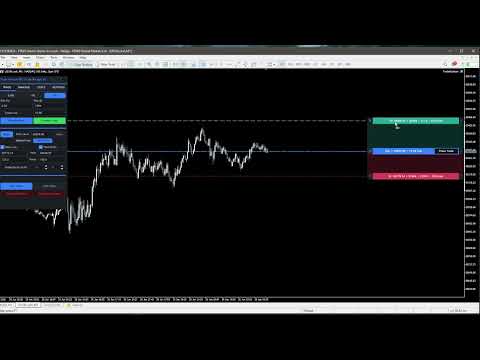
Three horizontal bars — Entry (blue for buy, red for sell), Stop Loss (red) and Take Profit (green) — are displayed as draggable bars on the chart. Drag any bar to the exact price level you want and the panel fields update in real time.

**Live P&L and risk information on each bar**

Each bar shows the relevant data at a glance: the TP bar displays the target price, the expected profit in dollars and the Risk:Reward ratio; the Entry bar shows direction, entry price and lot size; the SL bar shows the stop price, dollar risk and risk percentage.

**Buy/Sell direction toggle**

The left side button on the Entry bar displays B for Buy or S for Sell. Clicking it flips the trade direction and automatically mirrors the SL and TP distances around the entry price, so your risk layout stays correct without any manual adjustment.

**Place Trade button**

A dedicated Place Trade button sits directly on the Entry bar. Clicking it opens a confirmation dialog showing all order details — direction, entry price, lots, dollar risk, risk percentage, SL and TP — before the order is sent. This prevents accidental execution.

**Guidance lines**

Optional dashed horizontal lines are drawn on the chart at the Entry, SL and TP price levels for a clear visual reference. Can be toggled on or off in Settings.

**Fully customisable colours**

TP bar, TP zone, SL bar, SL zone, Buy entry and Sell entry colours can all be changed independently via the Settings tab using preset cycles.


> Manage Tab — Trade Management & Risk Control


**Manual Breakeven**

One button moves your stop loss to breakeven with a 2-point buffer on all open positions instantly.

**Auto Breakeven**

Enable automatic breakeven and the panel monitors your open positions on every timer tick. When the configured trigger condition is met, the stop loss is moved to breakeven automatically without any action required from you.


Two trigger modes are available:

- **Default (1:1 R:R)** — breakeven triggers when the position has moved a distance equal to the initial risk.

- **Points** — breakeven triggers after a specific number of points in profit that you define.


A sound alert can optionally be played when Auto Breakeven fires, configurable in the Settings tab.


> Risk Management — Built for Prop Firms

This section is specifically designed to keep you within the strict daily risk rules enforced by prop firm evaluations and funded accounts.


**Max Loss per Day**

Set a maximum daily loss percentage. The moment your account equity drops by that percentage from the day's opening balance, the panel blocks all further trade execution and displays a prominent warning banner. Trading is automatically re-enabled at midnight when the new trading day begins.

**Max Trades per Day**

Set a maximum number of trades allowed per day. Once that limit is reached, the panel blocks further execution for the remainder of the day. This helps you stick to your strategy rules and avoid overtrading — one of the most common reasons traders fail prop evaluations.

**Today's performance display**

The Risk Management section shows your current day's P&L percentage and trade count in real time, so you always know exactly where you stand relative to your limits before placing the next trade.

**Trading Blocked warning**

When either daily limit is triggered, a red warning banner reading "TRADING BLOCKED UNTIL MIDNIGHT" is displayed prominently in the panel so there is no ambiguity about your trading status.

Both limits are saved to global variables and persist across MT5 restarts, ensuring your protection is never lost even if the platform is restarted mid-session.


> Stats Tab — Performance Analytics

A built-in statistics panel pulls from your full account trading history and presents key performance metrics at a glance, updated live.


**Account** — Current balance and equity.

**Performance** — Total trades, net profit, number of winning and losing trades with win rate percentage, best win streak and worst loss streak.

**Period** — Today's trade count and profit, this week's profit and this month's profit.

**Risk** — Average risk per trade over the last 7 days, maximum overall drawdown in dollars and percentage, and maximum daily drawdown in dollars and percentage. The daily drawdown figure is particularly relevant for prop firm traders who need to monitor their worst single-day loss against evaluation rules.


> Settings Tab


**Sound Alerts**

Toggle alert sounds independently for Auto Breakeven triggers and for risk limit events.

**Position Tool & Colors**

Toggle the guidance chart lines on or off. Independently change the colour of the TP bar, TP zone fill, SL bar, SL zone fill, Buy entry bar and Sell entry bar by cycling through preset colour options with a single click.


> General Features


- **Draggable panel** — Click and drag the title bar to reposition the panel anywhere on the chart.

- **Minimise button** — Collapse the panel to a compact title bar with one click to free up chart space, and restore it just as quickly.

- **Persistent settings** — Risk management limits and other settings are saved to global variables and survive platform restarts.

- **Live price updates** — In Market Price mode, the entry field updates on every timer tick to reflect the current Ask price.

- **Works on any instrument** — Indices, forex pairs, commodities, metals. Lot size and risk calculations use the instrument's actual tick size and tick value for accurate results across all asset classes.


### Why Trade Assistant MT5 is the Ideal Tool for Prop Firm Traders!


Prop firm evaluations impose strict rules that punish undisciplined trading. A single day of overtrading or a loss that exceeds the daily drawdown limit can end your challenge immediately. Trade Assistant MT5 addresses the two most common reasons traders fail:


**1. Incorrect position sizing.** The panel calculates your exact lot size automatically based on your defined risk percentage and stop loss distance. There is no room for manual calculation errors that can result in taking far more risk than intended.

**2. Breaching daily limits.** The Max Loss per Day and Max Trades per Day limits work as a hard stop enforced by the panel itself. When a limit is reached, the Buy and Sell buttons become inactive and the warning is displayed. You cannot place another trade by accident, even in a moment of frustration or revenge trading.


Together, these features act as a second layer of discipline on top of your own strategy, keeping you firmly within the rules of any prop firm evaluation from the first day to the last.

Önerilen ürünler
Trade Desk
Mostafa Saad Saeed Shawara
Trade Desk , MetaTrader için bir işlem paneli ve işlem yöneticisidir. Girişi grafikte planlayın, lot hesaplayıcı ile büyüklüğü belirleyin, ardından açık pozisyonları aynı panelden yönetin: stop loss , birden fazla hedef, başabaş ve sürüklenen stop. Ek talimatlar: Demo hesaplar için deneme sürümü — MetaTrader 4 için Trade Desk Grafik araçlarının çoğu yalnızca işlemi açmaya yardım eder. Gerçekleşmeden sonra hâlâ bir pozisyon yöneticisi gerekir. Trade Desk iki işi de aynı grafikte tutar. Seviyeleri
"Manage multiple positions as a single unit with hidden targets." The Virtual Basket TP SL Manager is a professional MetaTrader 5 utility designed to automate the closing of positions based on the total profit or loss of a group of orders (a "basket"). By utilizing Virtual Levels , all Take Profit (TP) and Stop Loss (SL) targets are stored locally within the EA's memory and are not sent to the broker's server, keeping your strategy safe from stop-hunting and price manipulation. Key Features Virt
FREE
Açıklama Easy Trader Assistant, net risk kontrolü ile daha hızlı işlem yapmak için tasarlanmış, MetaTrader 5 için manuel bir uygulama panelidir. Her şey grafik üzerinden yönetilir: giriş, çıkış ve ayarlamalar, pencereler arasında geçiş yaparak zaman kaybetmeden. Pozisyon boyutlandırma, SL/TP yönetimi ve işlem açmadan önce doğrudan risk görselleştirmesini entegre eder. Fikir basittir: hataları azaltmak ve uygulamayı daha hassas hale getirmek. Yaklaşım Her girişin manuel olarak belirlendiği ancak
FREE
**Forex Trade Manager Pro MT5** **Trade Manager MT5** , MetaTrader 5 için kapsamlı bir işlem yönetim yardımcı programıdır ve bir işlemi planladığınız andan kapattığınız ana kadar pozisyonunuzun her yönü üzerinde size tam kontrol sağlar. Riski ciddiye alan yatırımcılar için tasarlanmıştır; disiplin oluşturan acemiden, birden çok pozisyonda anında işlem yapması gereken profesyonel skalpera kadar herkes için uygundur. Araç herhangi bir grafiğe eklenir ve temiz, kompakt bir panel sunar. Grafik üz
ProBridger
Marius Ovidiu Sunzuiana
How Traders and Analysts Can Use the Data Export Bridge to Improve Their Analytics The MQL Data Export Bridge unlocks a new level of analytical power by transforming MetaTrader into a real‑time data provider for any external research environment. Here are the most impactful ways different users can apply the bridge to enhance their trading performance. Build Predictive Models with Machine Learning Who benefits: Quantitative traders, data scientists, algorithm developers How it helps: Export t
EAs Manager
Abdeljalil El Kedmiri
5 (2)
Are you running multiple EAs on the same MT5 account and losing sleep over stacked risk? EAs Manager Pro is the central risk-control layer for your entire MT5 account. Attach it to one chart, and it automatically detects every EA you're running by  Magic Number — no source code changes, no per-EA setup. It then monitors every  position, automated or manual, and enforces the risk rules you set across your whole account, not just one strategy at a time. Built for traders running scalpers, breakout
XBOOT BOLETA PRO Professional Manual Trading Panel for MetaTrader 5 XBOOT Boleta Pro is a complete trading panel designed for traders who execute manual trades and want greater speed, organization, and control during every trading session. More than a standard Buy and Sell panel, XBOOT Boleta Pro combines powerful trading tools into a single interface, helping traders analyze the market, manage risk, execute orders, and monitor trading performance without leaving the chart. Its purpose is to sim
TradeConditions Pro – Know When NOT to Trade Most traders lose money not because of strategy…   but because of bad trading conditions. This tool shows you what your broker is really doing — in real time. --- ### WHAT IT DOES TradeConditions Pro analyzes your trading environment and gives you a clear decision: SAFE – Good conditions   ️ CAUTION – Be careful   BAD – Avoid trading   --- ### FEATURES Real-time spread monitoring   Average / min / max spread tracking   Sprea
Trade Assistant JJC Academy
Jhonathan Alexis Jaramillo Cortez
JJC Academy Trade Assistant — Risk Hesaplayıcı ve Pozisyon Yönetim Paneli Artık lot büyüklüğünü elle hesaplamayı bırakın. Hesaplama hatası yüzünden drawdown limitinizi aşmayı bırakın. JJC Academy Trade Assistant, fonlanmış hesaplardan (funded accounts) oluşan bir portföyü yönetmek için bizzat geliştirdiğim ve kullandığım bir trading panelidir — hangi enstrümanla, hangi brokerla veya hangi prop firm ile çalışırsanız çalışın, her girişin tam olarak belirlediğiniz riske uymasını sağlamak için tasar
FREE
DESCRIPTION: Position Size Calculator — On-Chart Risk Management Tool Never risk too much on a single trade again. This calculator displays real-time position sizing for 3 risk levels simultaneously, calculated from your live account balance and current ATR-based stop loss distance. DISPLAYS 3 RISK SCENARIOS AT ONCE: Risk Level 1 (1%): Risk amount in dollars + Lot size Risk Level 2 (2%): Risk amount in dollars + Lot size Risk Level 3 (3%): Risk amount in dollars + Lot size All lot sizes are dyna
FREE
RiskFrame Trade Manager for MetaTrader 5 Shape the trade plan around the chart. Size it from risk, check it before sending, and manage the resulting position from the same workspace. RiskFrame is a manual trade-planning, execution and position-management utility for discretionary MetaTrader 5 traders. Its central workflow is a flexible Visual Trade Plan that can be positioned, resized and flipped around the area you are analysing instead of forcing the chart to fit around the panel. Entry, St
Protect your funded accounts and personal capital with military-grade precision. This utility continuously monitors your floating equity against your daily starting balance. The moment your custom drawdown threshold is breached, it instantly liquidates all open positions, deletes pending orders, and completely unloads from the chart. Stop revenge trading and never fail a prop firm evaluation due to a margin breach again.
FREE
Smart Trade Assistant Pro MT5 Smart Trade Assistant Pro MT5 is a professional manual trading and position management utility designed to help traders manage risk, execute trades, and control open positions directly from the chart. The utility does not predict market direction and does not generate guaranteed trading signals. The trader remains in control of BUY and SELL decisions, while Smart Trade Assistant Pro helps with position sizing, risk management, execution, and trade management. Main F
Breakeven Trailing SL Manager; This utility Manager is a simple utility that protects your manual trades automatically. Attach it to any chart and it watches all manual positions on your account, on every symbol. It does not open trades and it ignores trades opened by other Expert Advisors. How it works When a trade moves in profit by the Breakeven Price, the Stop Loss is moved to the exact entry price. When the price moves the same distance again, the Stop Loss is moved to entry plus that dist
FREE
no Trade operation, Robot Set auto SL to every manually Trade from a Phone Automatic Phone TradeManager Need just Set on 1 Symbol Auto BE Trigger is added that immediately sets a stop-loss for every () But does NOT calculate position size based on risk, allows the fixed  SL to   adjusted dynamically drag on Chart or Menu. It protects capital around the clock, reduces emotional mistakes, and ensures consistent risk management.
FREE
Overview : The Advanced News Trading Panel is a versatile tool designed for traders who rely on news-based trading strategies. This Expert Advisor (EA) provides an intuitive graphical interface that allows users to quickly set up pending orders and manage risk with ease. With the ability to automatically place Buy/Sell Stop orders based on your pre-set stop order distance from the bid/ask price, stop-loss and take-profit levels, the EA allows for precision trading during high-volatility news eve
Satın almadan önce gerçek piyasada test edin :  Bu ürün, doğrudan indirebileceğiniz ve bir Demo hesap üzerinde kullanabileceğiniz ÜCRETSİZ deneme sürümünü   içerir. Satın almadan önce tüm özellikleri gerçek piyasa koşullarında test edin. İndirme bağlantılarını bu ürünün ilk yorumunda bulabilirsiniz. Prop Firm Trade Assistant , net kurallar, kontrollü risk ve disiplinli işlem gerçekleştirme ile prop firm hesaplarını geçmek ve korumak isteyen traderlar için tasarlanmış profesyonel bir grafik pane
Quick Order Closer
Danny Giovanni Romero Lozano
Demo Version Here : https://www.mql5.com/en/market/product/170598 The fastest on the entire platform, try it with 50 open trades or more This Expert Advisor provides a fast and intuitive way to manage and close open trading positions directly from the chart using a clean button-based interface. With a single click, traders can instantly close positions based on different conditions, improving execution speed and overall trade management efficiency. Key Features Close all open positions instant
A powerful and intuitive trade management tool designed for scalpers and intraday traders. Created to complement the Nampim Samba Scalper strategy , it allows traders to open, manage, and close positions quickly without leaving the chart.  Key Features: Customizable trading panel – choose position (left, right, center, top, bottom). One-click trading buttons – instantly open Buy/Sell trades with pre-set lot sizes. Close management – close last 1/2/3 trades or all Buy/Sell positions with one clic
TradeByTime Manager is a tool to trade based on time. It is semi auto trading. Trader define entry and exit time and EA will manage the rest. Helpful for trader who is usually trading with time range such as trading signal with entry and exit based on time or trading with news event time. Or trader who is familiar with trading binary option, this is another 'sense' of it. Only this is for trading on regular chart. 1. TakeProfit and Stoploss 2. Double time based :  Local and Server 3. Time counte

Grid Trading EA is a semi-automated one-click trading EA for both Normal Trading and Grid/Martingale Trading . Normal Trading Simply click Buy or Sell directly from the chart. The EA will automatically manage trades by: Setting Stop Loss and Take Profit Managing Trailing Stop Grid / Martingale Trading (For Hedging Account Type Only) When Grid Trading mode is enabled, the EA will automatically open additional grid orders at specified distances while increasing the lot size based on your settings.
Smart Risk Manager – Master Your Trades with Precision and Confidence Take complete control of your manual trading with Smart Risk Manager , a professional all-in-one trade and risk management Expert Advisor for MetaTrader 5 . Designed for traders who value speed, precision, and capital protection, it simplifies every step of trade execution while ensuring your risk remains under control. Whether you trade Forex, Gold, Indices, or Cryptocurrencies , Smart Risk Manager helps you execute trades w
PropShield Guardian MT5 – Ultimate Drawdown Protection & Trade Control EA Kayıtını korur, şemsizlik kurallarını uygular, prop firm izleviyle güvenle başarıyı çıkarırsınız. Kayıtınız kaybolmazsa da. Uzun vadeli bir profesyonel olarak başlarınız. PropShield Guardian MT5, riski koruması ve işlem deneyimi kontrolü için tasarlanan güçlü bir Uygulama Asistanı (EA)dır. Ana Özellikler: Çıkış koruma sistemi – Günlük ve toplam çıkışı izler. Tüm işlemlerin otomatik olarak kapatılır ve sınırlar aşıldığ
This EA helps to Close all Positions opened. It saves you the time of closing multiple positions manually. Parameters: Buy:  Close Buy Positions Only Sell:  Close Sell Positions Only Buy & Sell: Close Buy & Sell Positions Pending: Close Pending Orders More Advanced MT5 version available at:  https://www.mql5.com/en/market/product/93301?source=Unknown%3Ahttps%3A%2F%2Fwww.mql5.com%2Fen%2Fmarket%2Fmy More Advanced MT4 version available at:   https://www.mql5.com/en/market/product/93468?source=Unk
Why execution quality matters more than you think You can have the best trading strategy, perfect entry points, and proper risk management. But if your broker consistently executes orders at worse prices, you lose money before the market even moves. A slippage of 0.01% seems insignificant. But over 100 trades per month, it becomes a noticeable amount. Over 1000 trades, it becomes a serious problem. Scalpers and algorithmic traders understand this well: execution quality directly affects your bot
News Guard Manager watches every robot on your account and protects them around high impact economic news.   -- THE PROBLEM --   You run several Expert Advisors. Each one manages its own trades, but none of them knows what the others are doing, and none of them knows that NFP is in twelve minutes. One news spike can undo a week of careful work across all of them at once.   -- WHAT THIS UTILITY DOES --   ONE PANEL FOR THE WHOLE ACCOUNT Every robot running on the account is listed with its magic n
FREE
Risk Properly with FXPosition Size Calculator which calculated the optimal Lot sSize based on your desired Risk Percentage and Stop-Loss, ensuring precise Risk Management. Enter your account balance, risk percentage, and Stop-Loss(either in points or price levels), and the calculator instantly determines the required lot size so that you don't risk too much. Protect your capital and trade with confidence with Accurate Position Sizing and Simplicity.
AbacuQuant Equity Guardian is an essential, 100% free institutional risk management utility designed for both Prop-Firm challenges (FTMO, FundedNext, The5ers) and Live personal accounts. Tired of losing your prop challenge or wiping weeks of profits in a single revenge-trading tilt? Equity Guardian stands watch 24/7 on your MetaTrader 5 chart and enforces strict, disciplined risk limits before emotions destroy your account. KEY FEATURES: Daily Loss Limit Guard: Tracks equity vs. broker day-
FREE
Rehoboth TradeGate Manager — MT5 Execution Validation & Trade Management TradeGate Manager places a validation layer between your trading decision and the market. TradeGate Manager is available for both MetaTrader 5 and MetaTrader 4 versions. Before an order is sent, TradeGate checks the instrument, spread, stop protection and market conditions against limits you define. If a required condition fails, the order is refused and the panel tells you   what failed and why . Once a position is open,
Signals Executor for Telegram is a Utility that allows you to execute and manage positions from messages sent in Telegram Chats. Chat messages are processed to check for the existence of commands, and the command will be executed if its parameters are valid. You need the Telegram Bot Token and Chat Id to configure the input parameters. It is possible to restrict the sending of commands through the User Id, which must be configured in the input parameters. Valid Commands: Buy and Sell: Market or
Bu ürünün alıcıları ayrıca şunları da satın alıyor
Trade Assistant MT5
Evgeniy Kravchenko
4.43 (216)
It helps to calculate the risk per trade, the easy installation of a new order, order management with partial closing functions, trailing stop of 7 types and other useful functions. Additional materials and instructions Installation instructions - Application instructions Line function -   shows on the chart the Opening line, Stop Loss, Take Profit. With this function it is easy to set a new order and see its additional characteristics before opening.   Risk management  - The risk calculation
Farmed Hedge Yield Farming | All Markets (Manual - Hybrid - Semi/Automated EA) VERIFIED TRADING RESULTS - Farmed Hedge Yield Axi Copy:  https://www.mql5.com/en/signals/2356376 - Farmed Hedge Yield Exn Copy:   https://www.mql5.com/en/signals/2356404 - Farmed Hedge Yield V Copy:  https://www.mql5.com/en/signals/2357156 IMPORTANT NOTICE: FarmedHedge is a MANUAL-FOCUSED TRADING UTILITY ,not a fully automated EA. Results shown on this Signal include manual trades and overall strategic management.
Trade Manager EA’ye hoş geldiniz! Ticaretin daha sezgisel, hassas ve verimli hale gelmesi için tasarlanmış nihai risk yönetim aracı ile tanışın. Bu sadece bir emir verme aracı değil; ticaret planlaması, pozisyon yönetimi ve risk kontrolü için kapsamlı bir çözüm. İster yeni başlayan bir yatırımcı olun, ister deneyimli bir trader ya da hızlı emir gerektiren bir scalper, Trade Manager EA ihtiyaçlarınıza uyum sağlar ve forex, endeksler, emtialar ve kripto paralar dahil tüm piyasalarda esneklik sunar
Telegram to MT5 Multi-Channel Copier   , Telegram ve Discord kanallarınızdaki alım-satım sinyallerini doğrudan MetaTrader 5'e otomatik kopyalar. Bot yok, tarayıcı uzantısı yok, elle kopyalama yok. Sinyal Telegram'a veya Discord'a düşer ve EA birkaç saniye içinde terminalinizde işlemi açar. Ve bir kanalı kopyalamadan önce, yerleşik backtester o kanalın hesabınızda ne yapmış olacağını gösterir. Ürün iki bileşenden oluşur: Telegram kanallarınızı dinleyen bir Windows uygulaması ve sinyalleri MT5 ter
TradePanel MT5
Alfiya Fazylova
4.88 (172)
Trade Panel, çok işlevli bir ticaret asistanıdır. Uygulama, manuel ticaret için 50'den fazla ticaret fonksiyonu içerir ve çoğu ticaret görevini otomatikleştirmeyi mümkün kılar. Uygulama talimatları: https://www.mql5.com/en/blogs/post/756482 Demo hesabı için uygulamanın deneme sürümü: https://www.mql5.com/en/blogs/post/750865 Uygulamayı nasıl kurulur: https://www.mql5.com/en/blogs/post/756239 Uygulamayı görsel modda nasıl test edilir: https://www.mql5.com/en/blogs/post/770277 Uygulamayı VPS MetaT
Local Trade Copier EA MT5
Juvenille Emperor Limited
4.94 (150)
Local Trade Copier EA MT5, aynı Windows bilgisayarı veya Windows VPS üzerinde çalışan birden fazla MetaTrader 5 hesabı arasında işlemleri kopyalamak ve yönetmek için hızlı ve esnek bir işlem kopyalayıcıdır. Yerel işlem senkronizasyonunu, Receiver tarafında lot büyüklüğü, risk yönetimi, işlem filtreleme, sembol eşleştirme, işlem yönetimi ve hesap koruması kontrolleriyle birleştirir. Transmitter ve Receiver terminallerinizi yaklaşık 1 dakika içinde ayarlayın ve aynı veya farklı brokerlardaki hesa
News Trade EA MT5
Konstantin Kulikov
4.55 (11)
Birkaç yıldır kullandığım çok yararlı bir robotu tanıtıyorum. Hem yarı otomatik hem de tam otomatik modlarda kullanılabilir. >>> Chat <<< Program, ekonomik takvim haberlerinde esnek ticaret ayarlarını içeriyor. Stratejiler test cihazında kontrol edilemez. Sadece gerçek bir iş. Ayarların en son arşivini indirin: https://www.mql5.com/en/blogs/post/747929 Sinyal izleme: https://www.mql5.com/en/signals/author/test-standart Bu bilirkişi için kendi ayarlar setinizi oluştururken, blogdaki tüm paramet
Exp COPYLOT CLIENT for MT5
Vladislav Andruschenko
3.97 (35)
MetaTrader 5 için profesyonel işlem kopyalayıcı MetaTrader için hızlı, profesyonel ve güvenilir bir işlem kopyalayıcı . COPYLOT , MT4 ve MT5 terminalleri arasında Forex işlemlerini kopyalamanıza olanak tanır ve Hedge ile Netting hesaplarını destekler. COPYLOT MT5 sürümü şunları destekler: - MT5 Hedge → MT5 Hedge - MT5 Hedge → MT5 Netting - MT5 Netting → MT5 Hedge - MT5 Netting → MT5 Netting - MT4 → MT5 Hedge - MT4 → MT5 Netting MT4 sürümü Tam açıklama + DEMO + PDF Nasıl satın alınır Nasıl kurul
Telegram sinyallerini kendi işlem kurallarınızla kopyalayın Telegram to MT5 Signal Trader , herkese açık ve özel Telegram kanallarındaki ve gruplarındaki metin tabanlı işlem sinyallerini otomatik olarak MetaTrader 5'e kopyalar. Tek bir masaüstü uygulamasından birden fazla sinyal sağlayıcısını ve MT5 hesabını yönetin; her sağlayıcı için ayrı risk ve işlem ayarları belirleyin. Sinyal kopyalamak için Telegram botu veya API kurulumu gerekmez. Kendi Telegram hesabınızla telefon numarası veya QR kod k
The product will copy all telegram signal to MT5 ( which you are member) , also it can work as remote copier.  Easy to set up, copy order instant, can work with almost signal formats, image signal,  s upport to translate other language to English Work with all type of channel or group, even channel have "Restrict Saving Content", work with  multi channel, multi MT5 Work as remote copier: with signal have ticket number, it will copy exactly via ticket number. Support to backtest signal. How to s
Strategy Ledger Pro
Abdullah Uygar Tuna
5 (14)
Şimdi Türkçe dil desteği ile. Strategy Ledger Pro , MetaTrader 5 için salt okunur bir hesap analiz panelidir. Hesap sonuçlarını Uzman Danışman (EA), strateji, sembol ve magic numaraya göre ayırır; böylece her birinin gerçekte ne kattığını görürsünüz. Panel 11 dilde kullanılabilir: English, Français, Deutsch, Español, Italiano, Português, Русский, Türkçe, 中文, 日本語 ve 한국어. Demoyu indirmeden önce. Market, her ücretli ürünün demosunu yalnızca Strateji Test Cihazında çalıştırır. Bu panel kendi hesabı
================================================================================ POC BREAKOUT - V20.72. Full Professional Grade Toolkit ================================================================================ POC Breakout is a full MetaTrader 5 trading dashboard for discretionary traders who want breakout signals, Point of Control (POC) context, volume profiles, order flow, market structure, news, alerts, and advanced trade planning in one professional workspace. Attached directly to you
EA Overfitter
Stephen J Martret
5 (3)
That backtest looks great. But will it still be making money tomorrow, next week, next month? EA Overfitter re-runs your EA on 100 price histories it has never seen. One score tells you if the edge is real. A backtest tells you what an EA did on one price history — the one that happened to occur. What you cannot tell from it is how much of that result was the strategy and how much was the particular path. EA Overfitter answers that. It builds up to 100 synthetic price histories your EA has n
Power Candles Strateji Tarayıcısı - Kendi Kendini Optimize Eden Çoklu Sembol Kurulum Bulucu Power Candles Strateji Tarayıcısı , Power Candles göstergesini çalıştıran aynı kendinden optimize edici motoru, Piyasa İzleyicinizdeki her sembol üzerinde yan yana çalıştırır. Tek bir panel, şu anda istatistiksel olarak hangi sembollerin işlem yapılabilir olduğunu, her birinde hangi stratejinin kazandığını, en uygun Stop Loss / Take Profit çiftini gösterir ve yeni bir sinyal geldiği anda size bildirim gön
Timeless Charts
Samuel Manoel De Souza
5 (9)
Timeless Charts, profesyonel yatırımcılar için hepsi bir arada bir trading aracıdır. Saniye Grafikleri ve Renko gibi özel grafik türlerini, Footprints , Clusters , Hacim Profilleri , VWAP çalışmaları ve gelişmiş piyasa analizi sağlayan sabitlenmiş analiz araçlarıyla gelişmiş emir akışı analiziyle birleştirir. İşlem ve pozisyon yönetimi, entegre işlem yönetim paneli aracılığıyla doğrudan grafik üzerinden gerçekleştirilirken, Market Replay ve Sanal Hesaplar trading becerileri ve stratejileri üzeri
Telegram'dan MT5'e:   Nihai Sinyal Kopyalama Çözümü Telegram'dan MT5'e işlemlerinizi basitleştirin, DLL'lere ihtiyaç duymadan işlem sinyallerini doğrudan Telegram kanallarından ve sohbetlerinden MetaTrader 5 platformunuza kopyalayan modern araç. Bu güçlü çözüm hassas sinyal yürütme, kapsamlı özelleştirme seçenekleri sağlar, zamandan tasarruf sağlar ve verimliliğinizi artırır. [ Instructions and DEMO ] Temel Özellikler Doğrudan Telegram API Entegrasyonu Telefon numarası ve güvenli kod ile kimlik
MetaTrader 5 için Trading Panel — grafik ve klavyeden profesyonel tek tıkla işlem kontrolü Aktif traderlar için geliştirilmiş güçlü bir Trading Panel; işlemleri standart MetaTrader arayüzüne göre çok daha hızlı açmanıza, yönetmenize ve kapatmanıza yardımcı olur. Bu çözüm; pozisyonları, bekleyen emirleri, toplam kârı ve işlem yürütmesini tek bir profesyonel çalışma alanında kontrol etmek isteyen kullanıcılar için tasarlanmıştır. Bu sadece sıradan bir yardımcı araç değildir. MetaTrader 5 için ger
Sonraki Güncelleme — Sürüm 2.52 Çok Yakında! [YENİ] Piyasa Analizinizi ve İşlem Sürecinizi Geliştirmek İçin Tasarlanmış 4 Büyük Yeni Özelliğe Hazır Olun İşlem ihtiyaçlarınızı karşılamak üzere tasarlanmış 4 yeni özellikle piyasa analizini bir üst seviyeye taşıyoruz. İşte yeni özellikler: TRADE OVERVIEW DASHBOARD CONFLUENCE AT ZONE STRONG & WEAK HIGH/LOW OTE 1. TRADE OVERVIEW DASHBOARD Piyasanın genel görünümünü daha kolay anlamanıza yardımcı olan, işlem kararlarınızı desteklemek için rehberlik s
Telegram To MT5 — Sinyal Kopyalayıcı Telegram kanallarınızdaki işlem çağrılarını gerçek MT5 emirlerine dönüştürün — otomatik olarak, istediğiniz kadar hesapta ve risk ile kurallar tamamen sizin kontrolünüzde. Telegram To MT5, Telegram'da zaten takip ettiğiniz VIP / sinyal kanallarını MetaTrader 5 terminalinize bağlar. Ücretsiz bir eşlik eden masaüstü uygulaması mesajları okur (botlara izin vermeyen kanallardan bile), ve bu Expert Advisor bunları hesabınızda yürütür — kendi risk ayarlarınızı, sem
Your EAs cannot see each other, but Anchor can. Anchor gives you one place to coordinate your EAs, manage risk, and decide when trading is allowed. It works alongside the trading bots you already use without any changes to them. The Problem One EA opens a trade. Then another starts trading. The next thing you know, you wake up to multiple grids built across your account. Each EA may be doing exactly what it was designed to do, but together they can place far more risk on your account than you in
Trade Indicator Assistant   is a powerful MT5 utility designed to turn indicators into automated trading systems. Its main feature is the ability to automatically detect an indicator’s   BUY and SELL signal buffers , without requiring you to know the buffer numbers, search through indicator settings, or modify the indicator source code. Bonus Indicator:   After purchasing Trade Indicator Assistant, contact me to receive   Trade Signal Pro   completely free as a bonus indicator. [Download Demo V
EA Auditor
Stephen J Martret
5 (7)
EA Auditor is an independent analysis tool for traders evaluating Expert Advisors and trading signals on MetaTrader 5. It audits backtest reports, reviews posted developer signals, and cross-verifies the two against each other to help traders assess strategies before committing capital. The MQL5 market offers a wide range of Expert Advisors from many developers, with varying approaches, quality, and transparency. EA Auditor provides a consistent, data-driven framework for reviewing them, answer
Riskinizi otomatik olarak hesaplarken işlemlere hızlı bir şekilde girip çıkmanıza yardımcı olacak Ticaret Yöneticisi. Aşırı Ticaret, İntikam Ticareti ve Duygusal Ticaretten korunmanıza yardımcı olacak özellikler içerir. İşlemler otomatik olarak yönetilebilir ve hesap performans ölçümleri bir grafikte görselleştirilebilir. Bu özellikler, bu paneli tüm manuel yatırımcılar için ideal kılar ve MetaTrader 5 platformunun geliştirilmesine yardımcı olur. Çoklu Dil desteği. MT4 Sürümü  |  Kullanım Kılavu
MT5 to Telegram Signal Provider , hesabınızı bir sinyal sağlayıcı haline getirerek belirtilen sinyalleri Telegram'ın sohbetine, kanalına veya grubuna göndermeyi sağlayan kullanımı kolay, tamamen özelleştirilebilir bir araçtır. Rakip ürünlerin çoğunun aksine, DLL içe aktarması yapmaz. [ Demo ] [ Kılavuz ] [ MT4 Versiyonu ] [ Discord Versiyonu ] [ Telegram Kanalı ]  New: [ Telegram To MT5 ] Kurulum Adım adım bir kullanıcı kılavuzu mevcuttur. Telegram API'si hakkında bilgi gerekmemektedir; ihtiyac
RETAILBERG FOOTPRINT CHART PRO — Order-Flow Workspace for MetaTrader 5 Version 7.00  |  Professional System  |  31 tools  |  One chart A full 150-page illustrated User Manual is included. Please read the full manual to understand this feature packed footprint chart elements and ui. https://www.mql5.com/en/blogs/post/777982 DEMO / STRATEGY TESTER — PLEASE READ FIRST
DrawDown Limiter
Haidar Lionel Haj Ali
5 (23)
DrawDown Limiter v5.0 — Gelişmiş Hesap Koruma Kontrolcüsü DrawDown Limiter v5.0, trading hesabınızı izlemek ve yapılandırılmış risk, kâr, haber, zamanlama, rollover veya pozisyon sayısı limitlerine ulaşıldığında otomatik olarak tepki vermek üzere tasarlanmış istemci taraflı bir hesap koruma kontrolcüsüdür. Tek bir özel grafik üzerinden manuel işlemleri, otomatik stratejileri, birden fazla Expert Advisor'ı, bekleyen emirleri ve açık pozisyonları izleyebilir. Tüm hesabı koruyabilir veya Magic Numb
VirtualTradePad PRO SE MT5 — MetaTrader 5 için profesyonel işlem kontrol merkezi VirtualTradePad PRO SE , MetaTrader 5 için grafik tabanlı premium bir işlem paneli ve trade yönetim çalışma alanıdır. Daha hızlı emir yürütme, daha net pozisyon kontrolü, yapılandırılmış trade yönetimi, görsel seviye planlama ve doğrudan grafik üzerinden profesyonel bir çalışma akışı isteyen traderlar için tasarlanmıştır. Bu yalnızca basit bir BUY / SELL paneli değildir. PRO SE; manuel işlem, bekleyen emirler, pozis
Trader Evolution
Siarhei Vashchylka
5 (7)
" Trader Evolution " - A utility designed for traders who use wave and technical analysis in their work. One tab of the utility is capable of money management and opening orders, and the other can help in making Elliott wave and technical analysis. Manual (Be sure to read before purchasing) | Version for MT4 Advantages 1. Trading in a few clicks. Immediate and pending orders are available in the panel 2. Money management. The program automatically selects the appropriate lot size 3. Simplifies
Trade copier MT5
Alfiya Fazylova
4.61 (57)
Trade Copier, ticaret hesapları arasındaki işlemleri kopyalamak ve senkronize etmek için tasarlanmış profesyonel bir yardımcı programdır. Kopyalama, tedarikçinin hesabından/terminalinden alıcının aynı bilgisayarda veya vps'de kurulu olan hesabına/terminaline gerçekleşir. Satın almadan önce demo sürümünü bir demo hesabında test edebilirsiniz. Demo versiyonu burada . Tüm talimatlar burada . Ana işlevler ve avantajlar: Emirlerin kopyalanmasını destekler: МТ5> МТ5, МТ4> МТ5, МТ5> МТ4. Emirlerin kopy
AW Trade Manager
AW Trading Software Limited
AW Trade Manager, grafikte risk/ödül aracı bulunan bir MetaTrader 5 işlem panelidir. İşlem, fareyle sürüklenen Entry, Stop Loss ve Take Profit çizgileriyle planlanır: etiketler fiyatı, mesafeyi ve para tutarını, bölgeler kârı ve zararı gösterir, hacim ise riske göre hesaplanır. Gönderimden önce onay penceresi işlemin tamamını risk, teminat ve pozisyon kurallarıyla birlikte gösterir. Kılavuz ve talimat -> BURADA / Ücretsiz LIVE demo -> BURADA Girişten sonra pozisyonu yönetmek için panelde başabaş
Filtrele:
Değerlendirme yok
Değerlendirmeye yanıt