QuantView MTF Sniper Dashboard
- Эксперты
- Версия: 1.20

Title: QuantView MTF Sniper Dashboard
Quick Overall Summary The QuantView MTF Sniper Dashboard is a professional-grade, trend-following Multi-Timeframe (MTF) trading engine designed exclusively for MetaTrader 5 Hedging accounts. Engineered for sophisticated portfolio managers, it utilizes a proprietary 6-point scoring system across a confluence of momentum and volatility indicators to calculate precise market bias. Whether you are trading Forex, Commodities like Gold (XAUUSD), or Cryptocurrencies, this EA delivers institutional-grade analytics directly to your chart. It is built to ride macro trends while executing on micro sniper entries, offering both fully autonomous algorithmic execution and a comprehensive real-time market monitoring mode for manual traders.
Two Powerful Modes of Operation
-
Autonomous Algorithmic Execution: Let the EA execute, manage, and exit trades based on strict MTF confluence rules. It utilizes dynamic ATR trailing stops, prioritizing moving activation and distance points to ride trends to their maximum potential.
-
Market Monitoring and Manual Bias Validation: Transform the EA into an advanced heads-up display (HUD). The dashboard provides a unified view of signal strengths, timeframe alignments, and institutional VWAP levels, drawing dynamic real-time price movement lines directly on your chart so you can visually monitor the market without executing a single automated trade.
Detailed Feature Breakdown
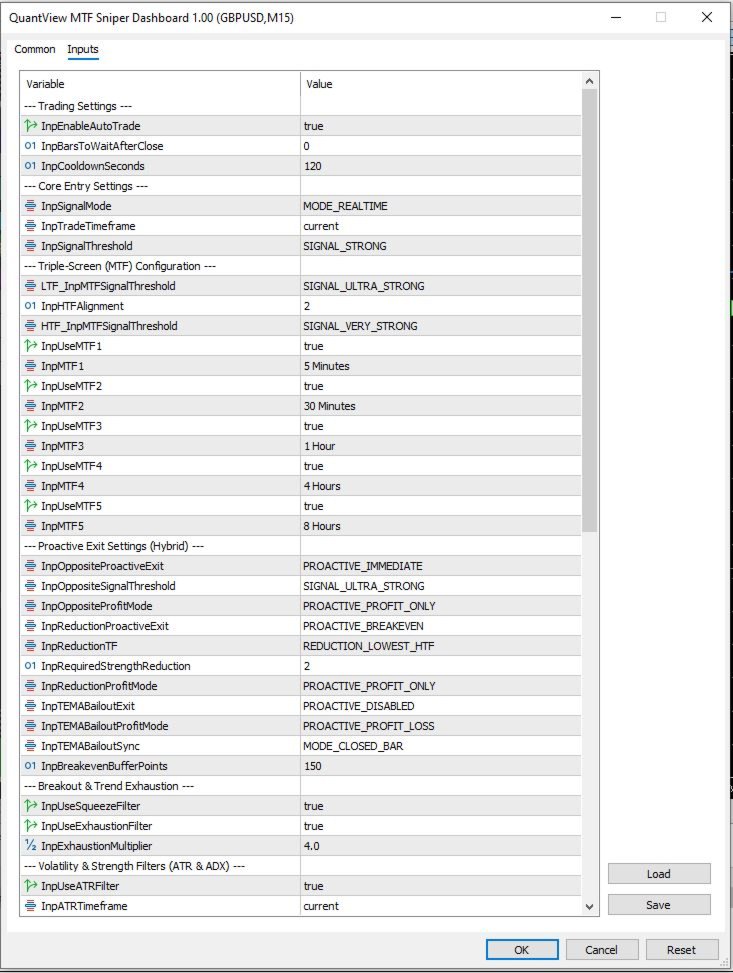
1. Flexible Omni-Timeframe Architecture (Up to 5 Timeframes) The core philosophy of this EA is strict trend-following across multiple dimensions. Unlike rigid systems restricted to two or three predefined timeframes, QuantView offers ultimate flexibility, allowing the user to select a total matrix of up to five distinct multi-timeframes for simultaneous analysis. The EA possesses the intelligence to automatically identify and categorize these selected inputs as either Higher Timeframes (HTF) or Lower Timeframes (LTF) relative to your active chart. It then dynamically applies the appropriate proprietary strength filters and directional bias rules across this entire matrix. A trade is only validated when user-defined confluence is met across the entire structure, ensuring you never trade against the dominant market momentum.
2. Dynamic Execution Precision (Tick vs. Bar Close) This EA provides granular control over how signals are processed. Users can configure the entry logic to operate in two distinct modes:
-
Real-Time Tick Execution: The EA calculates signal confluence on every single tick. This is optimal for capturing immediate breakouts, especially in high-volatility environments like XAUUSD or Cryptos.
-
Confirmed Bar Close Execution: The EA waits for the candle on the chosen entry timeframe to close before finalizing the 6-point score. This is essential for strategies that require signal confirmation, as it reduces false signals caused by temporary mid-candle spikes (whipsaws).
3. Proprietary 6-Point Signal Scoring System Instead of binary triggers, the engine evaluates six concurrent technical conditions to calculate a raw signal score from 0 to 6. Points are awarded for:
-
TEMA (Triple Exponential Moving Average) directional slope matching the trade bias.
-
Williams %R momentum breaking the -50 threshold.
-
Price actively closing outside the Keltner Channels.
-
OBV (On-Balance Volume) trending above its Moving Average to confirm institutional volume.
-
MACD Histogram shifting into positive/negative territory.
-
CCI (Commodity Channel Index) breaking extreme momentum levels (+100/-100).
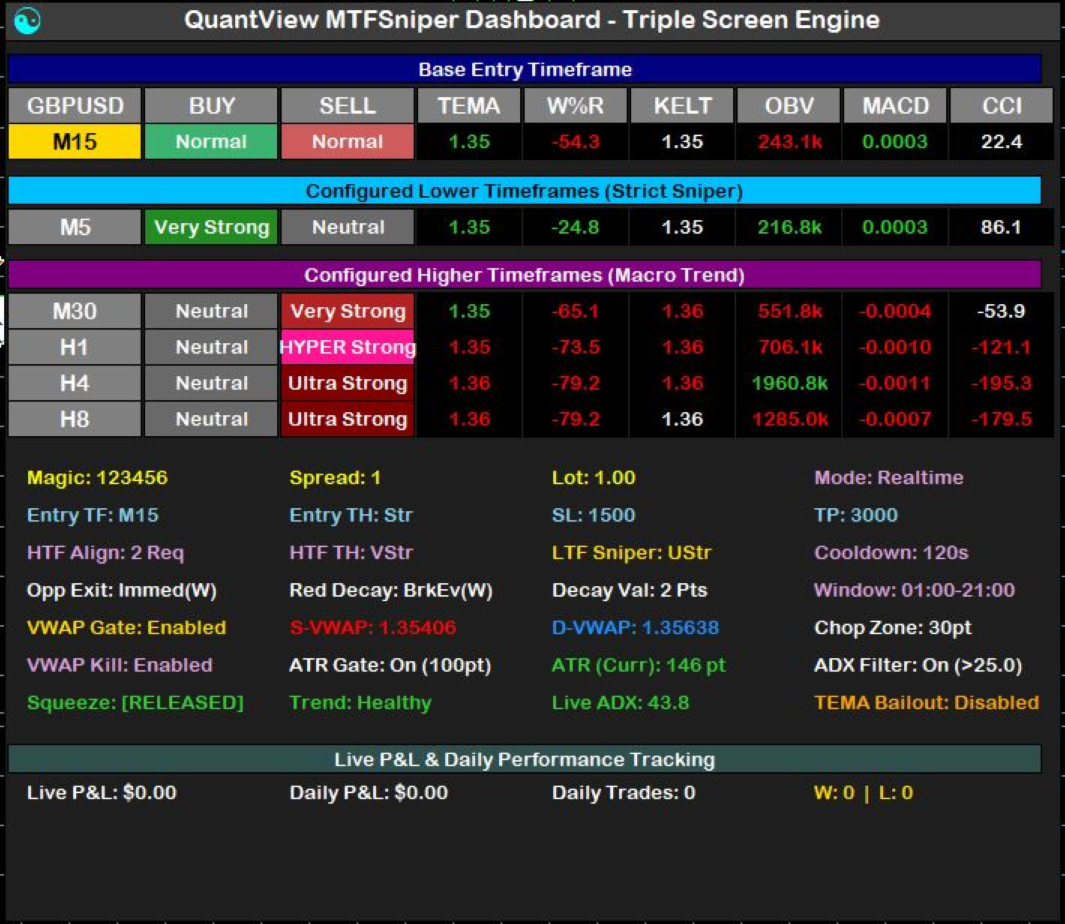
The EA automatically categorizes the resulting score into actionable tiers: Normal (2 points), Strong (3 points), Very Strong (4 points), Ultra Strong (5 points), and Hyper Strong (6 points). You can restrict the EA to only execute on your preferred strength tier, filtering out weak setups.
4. Multi-Asset Portfolio Scaling and Magic Number Management Designed for terminal-wide operation, the EA features strict Magic Number management. This allows you to run multiple independent copies of the EA on the same account. You can deploy completely different strategies, risk profiles, or timeframe configurations across various asset classes (Forex pairs, Crypto, Indices, or Metals) within a single MetaTrader 5 terminal without any order interference.
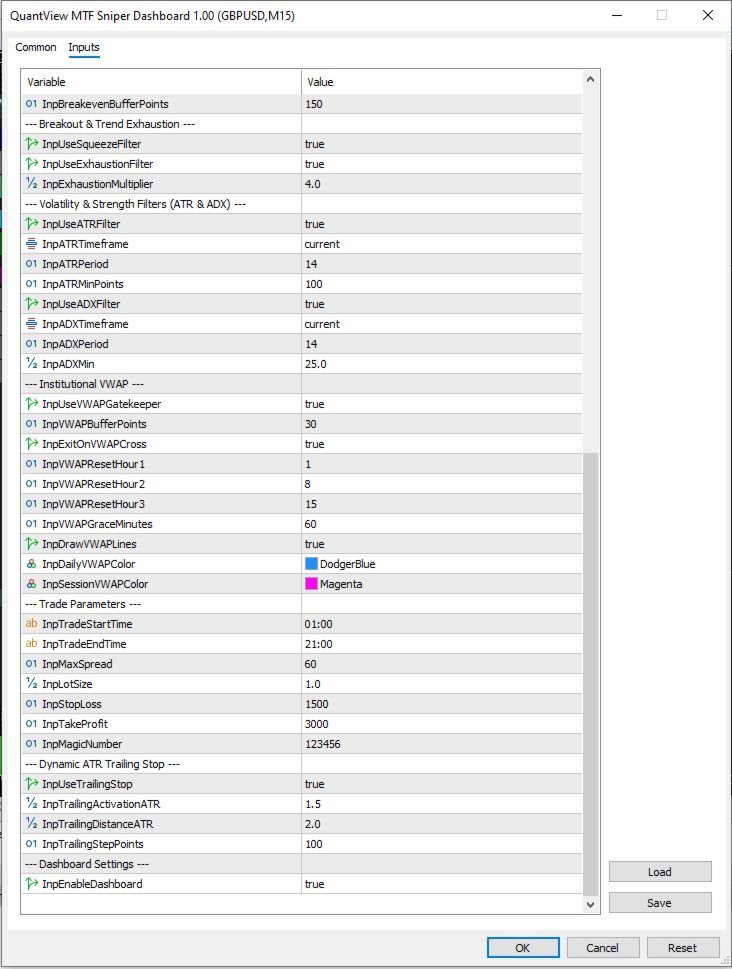
5. Institutional VWAP Gatekeeper with Broker Time Synchronization Built for professional flow analysis, the EA includes a advanced Volume Weighted Average Price (VWAP) engine, providing both Daily and Custom Session anchors. Critically, the Session VWAP anchor time is fully user-definable, allowing you to precisely adjust the anchoring moment (e.g., London, New York, or Asia Open) based entirely on your broker's specific server time for pinpoint accuracy in volume-weighted analysis. It actively draws dynamic VWAP trend lines directly on your chart, features a configurable Chop Zone buffer, and a unique maturity grace period to prevent false signals during the volatile market open.
6. Volatility and Momentum Profiling
-
ADX Momentum Scoring: Integrates ADX values to determine true signal strength and trend momentum, ensuring trades are only taken when the market has established clear directional intent.
-
ATR Volatility Gatekeeper: Prevents entries during dead market conditions by demanding a minimum point-based ATR threshold before trading.
-
Bollinger-Keltner Squeeze Filter: Detects extreme market compression, keeping you out of unpredictable chop and preparing you for the explosive breakout.
-
Trend Exhaustion Filter: Analyzes price distance from the EMA using a custom exhaustion multiplier to prevent buying the top or selling the bottom of a mature, overextended trend.
7. Proactive and Hybrid Position Management
-
Dynamic ATR Trailing Stop: Rides the trend automatically using ATR-based activation distances and step points.
-
Decoupled Exit Logic: Features unique hybrid exit parameters, including TEMA Bailout Exits, Opposite Signal Exits, and Strength Reduction Exits based on higher-timeframe decay.
-
Smart Profit Modes: Choose whether proactive exits trigger only when the position is in profit, or allow them to cut losses early if the macro bias shifts.
8. Comprehensive Market Bias Dashboard The on-chart UI provides real-time visual bias tracking. It displays the active states of all timeframes, current live P&L, daily win/loss statistics, live spread, and the exact operational status of all environmental filters (Squeeze, Exhaustion, ATR, and ADX).
User Note Regarding Updates Purchasing the QuantView MTF Sniper Dashboard entitles you to all future updates, optimizations, and feature enhancements at no additional cost. We are committed to constantly refining the underlying algorithmic logic and adding new quantitative capabilities to maintain the EA’s high-performance edge in evolving market conditions.
Risk Disclaimer Trading in financial markets involves significant risk, and there is always a potential for loss. While the QuantView MTF Sniper Dashboard is designed to identify high-probability setups using complex technical and quantitative analysis, it cannot guarantee profits. Prior performance, whether generated in backtesting or live trading, is not indicative of future results. All trading decisions made using this tool are the sole responsibility of the user. We are not financial advisors, and this tool is meant for educational and analytical purposes only. Please manage your risk carefully and never trade with capital you cannot afford to lose.