Trend Signal Navigator
- Индикаторы
- Версия: 1.0
- Активации: 5

Trend Signal Navigator – trend, signals, targets and honest statistics in one indicator
Trend Signal Navigator is an all-in-one trend signal system for MetaTrader 5. It shows the trend direction and regime, gives confirmed non-repainting BUY/SELL signals with an adaptive stop loss and three take-profit targets, marks reversal zones and key levels, and measures how its own signals performed on your chart in a live statistics panel. No hidden rules: every number in the panel can be re-counted from the result tags drawn on the chart.
A companion EA is available for free on the Market: Trend Signal Navigator EA. You can download it right away. You don't need to send a private message and wait.
Trend direction and regime
- Adaptive trend line: an efficiency-ratio adaptive average with an ATR band that trails like a stop. It moves fast in clean trends and slowly in noise.
- Regime colouring: green = bullish trend, red = bearish trend, grey = the market is ranging (trend strength below the preset threshold).
- Higher-timeframe bias: the trend of a higher timeframe (automatic, e.g. H1 → H4, or chosen by you), always taken from closed higher-timeframe bars.
- Trend strength in % and the number of bars since the last trend change.
Confirmed, non-repainting signals
- BUY/SELL arrows are decided only when a bar closes. Once drawn, an arrow never moves or disappears.
- Signals come at the start of a new trend (within a few bars of the flip, as soon as all filters agree) and, optionally, as continuation signals after a pullback to the trend line.
- Confluence filters, each can be left on the preset default or forced on/off:
- Regime – a trend must be present (no signals while the line is grey)
- Momentum – RSI on the trend side and not over-extended
- Volatility – ATR above a share of its average (no signals in dead markets)
- Structure – close beyond the recent swing high/low
- Session – trading-hours window in server time
- Higher-timeframe bias – signal only in the direction of the higher timeframe
- Presets: Scalp (M1–M15), Intraday (M15–H1), Swing (H4–D1). A trend band multiplier lets you make the trend line slower or faster.
Adaptive stop loss and three targets
- Stop loss behind the recent swing plus an ATR buffer, limited to a minimum and maximum ATR distance.
- TP1, TP2, TP3 as multiples of the risk (R). Defaults 1R / 2R / 3R (Swing 3.5R), all adjustable.
- The latest signals show entry, SL and targets as lines with price labels, plus a shaded risk and reward box.
- Every past signal gets a small result tag (SL, TP1, TP2, TP3, or the R result of a reversal exit).
Live statistics panel – what makes it different
Most signal indicators ask you to trust screenshots. Trend Signal Navigator counts its own history on the chart you are looking at:
- Number of signals, signals per trading day
- TP1, TP2 and TP3 hit rates and the share of signals that hit the stop before TP1
- Average R per signal, total R, profit factor in R and winning-trade rate
The rules are fixed and documented: only closed bars are used; if one bar touches both the stop and a target, the stop counts first (worst case); the measured trade closes 1/3 at each target, moves the stop to entry after TP1 and closes the rest when the trend line flips – the same management the companion EA uses by default. Change the symbol, timeframe or settings and the statistics update immediately, so you can see which markets suit the system before you trade it.
Reversal zones and key levels
- Reversal zones: the nearest unbroken swing highs above price and swing lows below price, drawn as zones.
- Key levels: previous day high/low and previous week high/low.
Dashboard
- Signal tab: trend and strength, regime, higher-timeframe bias, the last signal with entry, SL, TP1–TP3 (distance in pips, or price distance for gold, indices and crypto), live status and R, and the current state of every filter.
- Stats tab: the live statistics described above.
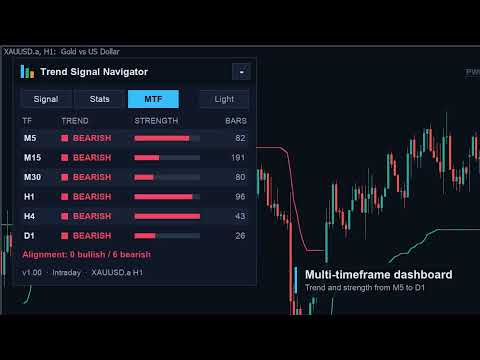
- MTF tab: trend, strength and bars since the change on M5, M15, M30, H1, H4 and D1, plus an alignment summary.
- Dark and light themes (automatic from the chart background, or switch with one click), sharp on high-DPI screens (layout scales with the Windows display scaling), movable by dragging the header and minimisable to a small title bar. Position, tab and theme are remembered per chart.
Alerts
- Popup, sound, push notification and e-mail on every new signal, with entry, SL and all three targets in the message.
- Optional alerts when the latest signal reaches TP1/TP2/TP3, the stop, break-even or a reversal exit.
- Telegram messages are sent by the free companion EA (MQL5 rules do not allow indicators to use web requests).
Free companion EA
"Trend Signal Navigator EA" trades the indicator's signals: risk-% position size (or fixed lots), partial closes at TP1 and TP2, TP3 as the final target, break-even after TP1, optional ATR trailing, exit on trend flip, daily-loss guard, spread guard, maximum positions, Telegram and push notifications. On a live chart it reads this indicator; in the Strategy Tester it uses the identical built-in engine, so you can backtest every setting for free.
Backtests of the indicator + EA
We backtested the companion EA on 10 markets (forex, gold, indices, BTC) with several timeframes and presets, choosing settings on 2022–2024 and checking them on 2025–2026 that were not used for the choice. The honest result: trend following depends on the market regime, and no setting wins everywhere.
- XAUUSD H4, Swing preset (all other inputs default) was profitable in both test periods: profit factor 2.45 in 2022–2024 and 3.09 in 2025–2026. From January 2022 to October 2026 with real ticks: +24.8 % at 4.3 % maximum equity drawdown, risk 1 % per signal.
- The same settings on XAGUSD H4: profit factor 2.21 (2022–2026). USDJPY H4, Intraday preset: profit factor 1.41 (2022–2026, real ticks).
- In 2018–2021, when gold mostly moved sideways, the same gold setup lost (profit factor 0.85). Most forex pairs and indices were not profitable in 2025–2026, and the M15 Scalp preset lost on most symbols because of spread costs.
So use the live statistics panel and the free EA in the Strategy Tester to check a market before you trade it. Backtests are historical and do not guarantee future results.
For EA developers
Buffers for iCustom: 6 = signal (+1 buy, −1 sell, closed bars only), 7 = entry, 8 = stop loss, 9–11 = TP1–TP3, 12 = trend (+1/−1), 13 = trend strength (0–1). The input "Calculation only" turns off all drawing and alerts.
Inputs (main)
- Preset, higher timeframe, trend band multiplier
- Filters: momentum, volatility, structure, session (start/end hour), higher-timeframe bias, continuation signals – each "Preset default / On / Off"
- TP1/TP2/TP3 in R, maximum stop in ATR
- Bars to calculate (statistics window), panel on/off, theme, SL/TP lines, result tags, reversal zones, key levels, colours
- Alerts: popup, sound, push, e-mail, target/stop alerts
Notes
- Works on any symbol and timeframe (forex, metals, indices, crypto). In our tests H4 gave steadier results than lower timeframes; low timeframes pay relatively more spread.
- All statistics and backtests are historical results. They do not guarantee future results. Always test on a demo account first.