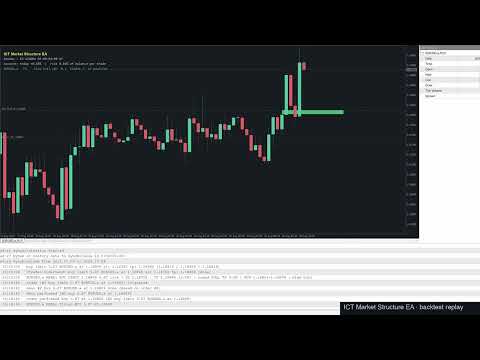
ICT Market Structure EA
- Эксперты
- Версия: 1.1
- Обновлено: 15 октября 2026
- Активации: 10

ICT Market Structure EA
ICT Market Structure EA trades fair value gaps in the direction of market structure, only inside the ICT Silver Bullet hours, and only when the H4 and D1 structure agree. One EA on one chart trades a whole portfolio — by default EURUSD, XAUUSD, USTEC and US500. Its higher-timeframe context uses the same detection code as the indicator ICT Market Structure Pro (swings, BOS / CHoCH, order blocks, FVGs, premium / discount).
The default portfolio and settings were checked with split-period and real-tick backtests (see Backtest below).
How it trades
- Direction: D1 structure bias and H4 BOS / CHoCH trend must point the same way as the M15 structure.
- Time: only inside the Silver Bullet windows — London 03:00–04:00, NY AM 10:00–11:00, NY PM 14:00–15:00 (New York time, daylight saving handled automatically).
- Entry: a fresh M15 fair value gap in the trade direction; a limit order is placed at the gap. Unfilled orders are cancelled when the window ends.
- Exit: stop beyond the FVG candles, target 3R, and any open position is closed at 16:00 New York time (Friday 12:00).
- One position per symbol at a time, one filled trade per symbol and window.
Portfolio from one chart
- Symbols input: any comma-separated list, default EURUSD,XAUUSD,USTEC,US500; leave it empty to trade only the chart symbol. Attach the EA to any single chart.
- Broker names are found automatically: suffixes such as .a, m, .cash, # and common aliases (NAS100 / US100 for USTEC, SPX500 / SP500 for US500, GOLD for XAUUSD, GER40 for DE40, ...). Every mapping is written to the Experts log; unknown symbols are skipped.
- Each symbol keeps its own D1 bias, HTF context, news state and daily statistics.
- FX, metals and stock indices have their own stop range, spread, SL buffer and FVG size inputs, so one setup fits all asset classes.
- Optional cap on open positions and pending orders across the whole portfolio.
Entry models
- Trend FVG (default) — structure-aligned FVG entries as described above.
- Liquidity sweep + MSS + FVG — the classic Silver Bullet sequence: sweep of PDH/PDL, Asia, London or pre-window highs/lows, market structure shift, then the FVG left by the displacement.
- Limit order at the FVG edge or its midpoint (CE), or market order when the FVG prints.
- Optional displacement filter (FVG candle body ≥ x × ATR) and minimum FVG size.
Trading windows
- Silver Bullet hours (default), ICT kill zones (London 02–05, NY AM 07–11, NY PM 13:30–16) or Custom windows.
- Custom windows: three HH:MM-HH:MM ranges on New York time or broker server time; windows may cross midnight.
- Each window can be switched on or off; broker GMT offset is detected automatically (manual override available).
Higher-timeframe context
- HTF structure trend filter (default H4) from the ICT Market Structure engine.
- Optional premium / discount filter (shorts in premium, longs in discount of the latest swing leg).
- Optional POI filter: the setup must overlap an active HTF order block or FVG.
- D1 structure bias filter.
Risk and position sizing
- Lot size from risk: % of balance, % of equity, fixed money, or fixed lots; lot cap; margin and broker volume-limit checks before every order.
- Stop loss beyond the sweep / FVG, ATR multiple, or fixed pips; minimum and maximum stop distance filter.
- Take profit at a fixed risk:reward or at opposing liquidity (sweep model).
- Maximum spread filter.
Trade management
- Two partial take-profit levels in R.
- Breakeven at x R with offset.
- ATR or structure trailing stop.
- Daily close at a New York hour and an earlier Friday close.
- Trade requests wait while the market is closed (holidays, early closes).
Account protection
- Max daily loss %, daily profit target %, max total drawdown % (halts the EA) — measured on account equity, so they protect the whole portfolio.
- Max trades per day and pause after N consecutive losses (per symbol).
- Optional closing of open positions when a hard limit is reached — suitable for prop-firm rules.
- Trading-day filter (Monday–Friday).
News filter
- Built-in MetaTrader 5 economic calendar — no external URL needed.
- Blocks new entries N minutes before and after high-impact (optionally also medium-impact) news for the symbol's currencies; optional closing of positions before news.
Display and notifications
- On-chart status panel: next / current window, today's P/L and risk, plus one line per symbol with D1 bias, spread, trades today and state (waiting, pending order, in position, news, paused).
- FVG and swept-liquidity markers on the chart.
- Popup, push and Telegram notifications, each event type switchable: new signals / orders, fills, closes with P/L, cancelled or replaced orders, trade management, news windows, account guard, EA start and errors.
- Optional chart screenshot attached to Telegram signal, fill and close messages (the symbol's chart is opened automatically if needed).
- Dry-run mode (signals only, no orders).
Recommended setup
- Attach the EA to one M15 chart (any symbol) and keep the default Symbols list. The EA trades EURUSD, XAUUSD, USTEC and US500 from that chart.
- To trade a single market, set Symbols to that symbol only, e.g. XAUUSD.
- Adding many more markets is not recommended: with all 21 liquid FX, metal, index and oil markets the backtest profit factor fell to about 1.0. Backtest any symbol before adding it.
- Hedging or netting account; a VPS is recommended so the windows are never missed.
Backtest
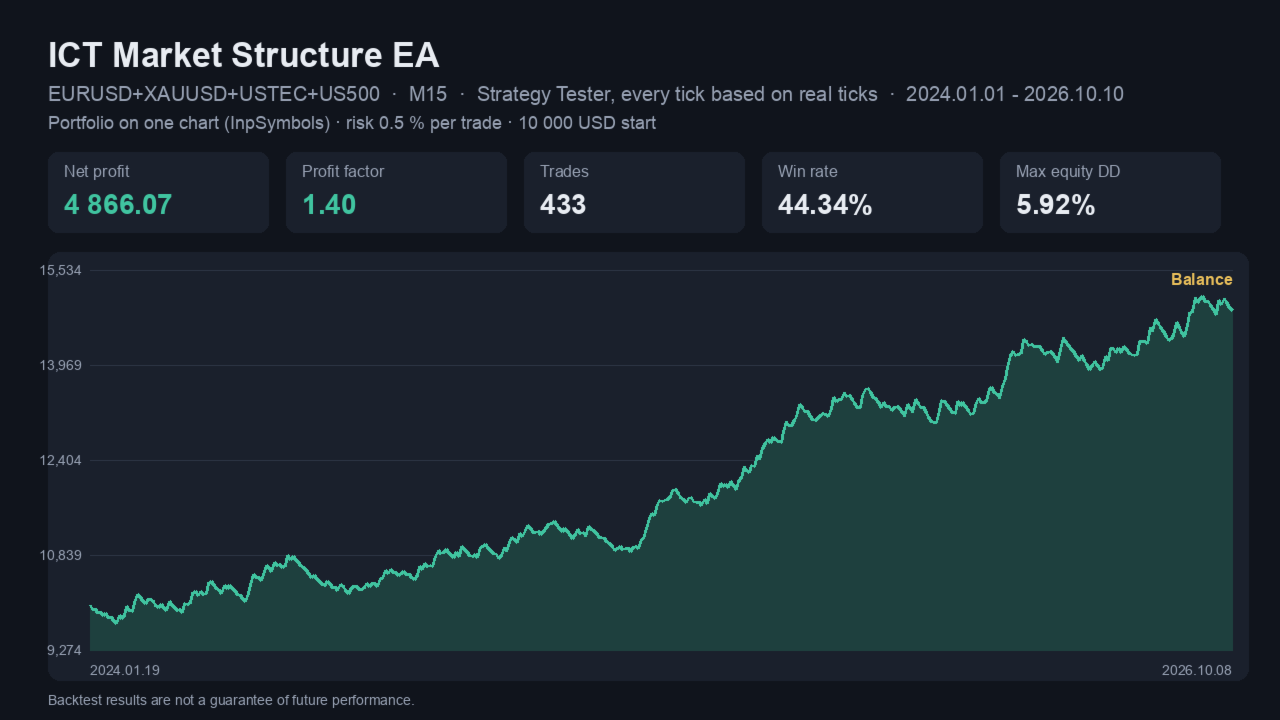
MetaTrader 5 Strategy Tester, every tick based on real ticks, January 2024 – October 2026, 10 000 USD, risk 0.5 % per trade, default settings:
- Portfolio EURUSD + XAUUSD + USTEC + US500: profit factor 1.40, 433 trades, max equity drawdown 5.9 %.
- Single symbols: EURUSD profit factor 1.31 (138 trades, DD 4.1 %), XAUUSD 1.30 (110 trades, DD 6.0 %), USTEC 1.50 (131 trades, DD 3.5 %).
The portfolio was also profitable in both halves of the period (Jan 2024 – Jun 2025: profit factor 1.32; Jul 2025 – Oct 2026: 1.37; 1-minute OHLC model). It trades about 13 times per month in total. Results depend on the broker's data and spreads — run your own backtest before going live. Only the Silver Bullet hours are validated; test kill-zone or custom windows on your own symbols.
Notes
- Trading hours are converted automatically. Windows and daily closes are defined in New York time; in live trading the EA detects the broker's server GMT offset from the platform clock and applies US daylight saving, so nothing has to be adjusted when the broker or New York changes between summer and winter time. The detected offset is printed in the Experts log at start-up, and the panel shows the current / next window.
- Backtesting at a broker that is not on New York close time: the Strategy Tester cannot report the real GMT offset, so the EA assumes the common New York close server time (GMT+2 in winter, GMT+3 in summer). If your broker uses a different server time zone (for example GMT+0), set Server GMT offset to that value for backtests. Live trading is not affected.
- Live time detection relies on the computer's clock — keep it synchronised (VPS or automatic time sync). Custom windows can also be entered directly in broker server time.
- Telegram: add https://api.telegram.org under Tools → Options → Expert Advisors → Allow WebRequest, then enter your bot token and chat id.
- The economic calendar is not available in the Strategy Tester, so the news filter only acts in live trading.
Risk warning: trading leveraged products carries a high risk of loss. Past performance and backtests do not guarantee future results. Test on a demo account first.