Prop Firm Risk Manager PRO EA

Professional account protection for prop-firm challenges and funded accounts. It monitors drawdown, open risk, news windows, trading sessions, manual trades, profit targets, and challenge progress in real time, then warns, locks, de-risks, deletes orders, or closes managed exposure according to your rules. Two draggable on-chart panels — Economic Calendar and Performance Stats — keep news planning and account analytics on the chart without leaving MT5.

Built for Prop-Firm Traders

This EA does not predict the market. It is a professional risk-enforcement layer designed to protect an account from avoidable rule breaches: daily drawdown violations, total drawdown violations, oversized trades, missing stop-losses, open-risk overload, trading during restricted news windows, and giving back a completed profit target.

  • Challenge Traders: Track Phase 1, Phase 2, and Funded status with built-in profile defaults and custom rule overrides.
  • Funded Account Holders: Lock the account after profit targets, drawdown events, or unsafe open-risk conditions.
  • Manual + EA Hybrid Traders: Protect dashboard trades, manual trades, pending orders, and strategy-EA exposure by symbol, magic, or account scope.
  • VPS / Multi-Chart Users: Master-instance lease and state recovery reduce duplicate execution risk after reconnects or chart reloads.

Core Protection Engine

  • Daily Drawdown Limit: Flexible baseline modes with optional prop-firm timezone day boundaries.
  • Total Drawdown Limit: Static or trailing account-level protection modes.
  • Equity Protector: Floating-loss money/percent threshold with optional lock and automatic close response.
  • Profit Target Lock: Locks trading after challenge or daily targets to prevent over-trading and giveback.
  • Peak / Weekly / Monthly DD: Optional peak-equity, weekly, monthly, and generic daily drawdown add-ons.
  • Trade Count Limits: Optional max trades per week/month with period rollover handling.
  • Daily Loss Cooldown: Pause new trading after heavy intraday loss usage.
  • Balance + Equity Checks: Drawdown is checked against both balance and equity where the firm requires it, so floating profit cannot hide a balance breach. Broker credit is excluded from balance and funding calculations.
  • Verified Baselines: Start-of-day balance and equity are tracked separately. If a baseline or trailing peak cannot be verified, new risk pauses while close and reduce actions stay available. Official values can be entered manually; an unverified baseline is never treated as zero risk.

Configurable Rule Responses

When professional action levels are enabled, daily DD, total DD, floating loss, profit target, open risk, and peak/period drawdown rules can each use: ALERT ONLY SOFT LOCK HARD LOCK

  • Alert Only: warn and record the event while trading remains allowed.
  • Soft Lock: block new trades and optionally delete pending orders while keeping positions open. Resolved soft locks can auto-unlock when conditions clear.
  • Hard Lock: delete managed orders, close managed exposure, and keep trading blocked.
  • Optional popup, push, and email notifications for alerts and critical events.

Professional Trade Gate

Smart Order infers BUY/SELL and Market/Limit/Stop from Entry/SL/TP and live quote, then validates each request through account state, time restrictions, order quality, and risk checks before execution. Lot size follows the Risk % shown on the panel and the stop distance by default; fixed-lot and fixed-money sizing are also available. The take-profit can follow a fixed reward ratio (R:R 1:0.5 to 1:20, set with +/- on the panel): the TP line moves with Entry and SL until you drag it yourself.

  • Account State: Active locks, daily loss cooldown, daily/overall/time-block overrides, and master-instance status.
  • Time Safety: News blocks, session filters, rollover block, overnight guard, weekend guard, and Friday close guard.
  • Order Quality: Spread filter, symbol trade mode, lot normalization, broker stop/freeze distance, and free margin checks.
  • Risk Limits: Required SL, single-trade risk, total open SL risk, remaining drawdown headroom, portfolio SL projection, risk-buffer money, and projected-loss buffer guard.
  • Exposure Limits: Max single position lots, max total lots, max open positions, max pending orders with pre-trade rejection, currency exposure cap, and configurable limit actions (alert, close violations, or close all managed).
  • Portfolio Projection: Open positions, pending orders and the new order are checked together, balance first. A missing stop-loss counts as unknown risk, never zero. Invalid lots, prices, SL/TP or symbol data fail closed, and symbols match exactly (EURUSD vs EURUSD.a).
  • Execution Retry: Retry only on safe retcodes; ambiguous outcomes are reconciled before another account mutation is allowed.

News Protection

Unified engine with MT5 Economic Calendar as default source, optional ForexFactory feed, manual schedule, and external feed.

  • Configurable impact levels and pre/post news block windows.
  • Currency and keyword filters for focused event blocking.
  • Failure policy per source: allow, alert, or fail-closed block.
  • Optional pending-order delete and close-during-window actions.
  • On-chart markers and block zones for fast visual planning.
  • Draft and applied calendar selections are kept separate; an empty news day is distinguished from a failed query; fractional GMT offsets (for example +5.5) are supported.

Session, Liquidity, and Time Filters

  • Server-time or local-time session filtering with weekday rules.
  • Cross-midnight range support such as 22:00-02:00.
  • Rollover, overnight, weekend, and Friday close guards.
  • Spread-spike blocking with optional cleanup actions.

Smart De-Risk

When risk is elevated, Smart De-Risk can partially or fully reduce exposure before a full hard close is required.

  • Supports partial close percentage and max actions per cycle.
  • Priority modes: largest risk, largest loss, largest volume, newest.
  • Stops when configured risk usage returns to target levels.

Trading Discipline and Portfolio Groups

Optional rules that stop the trading patterns that end most challenges: overtrading, revenge trading and stacked correlated risk.

  • Daily opening-order budget with pending-order reservations.
  • Loss-streak pause after N completed losing trades, including costs.
  • Post-loss money-risk cap for a configurable window after a loss.
  • Configuration cooling period after input changes (survives restart).
  • Exact-symbol portfolio groups with a gross stop-loss risk cap and optional automatic reduction.

Optional Position Manager

Opt-in R-based stop management for PFRM-magic positions by default.

  • Break-even, stepped trailing stop and stop-widening restoration.
  • Two persistent partial take-profit stages that never turn into an accidental full close.
  • Pauses inside scheduled news windows and suspends after scale-ins.
  • Rejected requests back off progressively to limit server requests.
  • Partial closes recheck the position and remaining volume before every retry, including on netting accounts; a manual reduction never turns a later stage into a full close unless the plan says 100%.
  • Account-level protective closes never wait for a pending stop change.

Prop Compliance and Alerts

  • Minimum holding time: EA discretionary closes wait for your firm’s minimum hold; early exits are reported.
  • Server-request budget: estimated daily request count with an 80% warning; at the limit new entries and automatic stop management pause.
  • Inactivity reminder before a firm’s inactivity rule closes the account.
  • Margin level guard: blocks entries that would push the projected margin level below your limit.
  • Alerts: pop-up, MT5 push, email and optional Telegram.
  • One-click actions: close all, delete orders, close profitable, close losing, close chart symbol, close half or move stops to break-even (entry plus a configurable offset; stops are never widened and positions not yet far enough in profit are skipped), each with confirmation.
  • Keyboard shortcuts: Shift+T order, R reset lines, L lines, A AUTO/MKT, B break-even, X close all, D delete orders, V view, C calendar, S stats. Account actions still open the confirmation dialog; can be turned off.
  • Guided setup: four-step account, rules, clock and permissions review with a live protection status.

Floating On-Chart Panels

Two draggable panels keep planning and analytics on chart.

  • Economic Calendar Panel: Weekly MT5 calendar with day, impact and currency filters, plus block-trading, close-positions and cancel-pending controls, an adjustable before/after window, and affected-pairs or all-pairs scope.
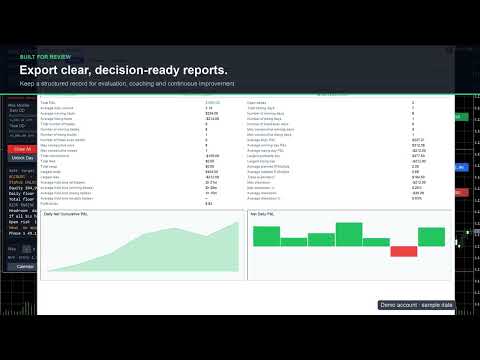
  • Performance Stats Panel: Overview KPIs, performance score, cumulative and daily P&L, a monthly P&L calendar with day details, trade charts on selectable timeframes, monthly reports and comparisons, and per-symbol statistics from account deal history.

Manual Trade Guard and Pending Order Gate

Protects manual and external-EA activity with independent checks for blocked-state trading, missing SL, and risk breaches.

  • Supports account, symbol, magic, or symbol+magic scope.
  • Re-checks pending orders for SL, lot, exposure, and margin health.
  • Can delete unsafe pending orders and close missing-SL positions.
  • Optional automatic stop-loss: a managed position opened without a stop (MT5 mobile, web terminal or another EA) gets one at a set distance from its open price, or from the current price if the market has already moved past that level, plus an optional take-profit at a set R:R. This runs before any open-risk rule, so the account is not locked for a trade the EA can still protect.

Management Scope and Symbol Filter

Risk enforcement can target the whole account, the current chart symbol, a specific magic number, or symbol+magic together. An optional symbol allow-list further limits which instruments are actively managed. Calendar “All Pairs” expands event matching only and never bypasses this management boundary.

Safety boundary: with the account-wide Master lease enabled, use Account or Magic scope so one view-only chart cannot leave another symbol unprotected. On MT5 Netting accounts, use Account or Current Symbol scope because a merged net position cannot be reliably divided by magic number. Unsafe combinations are rejected during initialization.

Challenge Progress Tracker

Tracks phase state and evaluation progress for common prop-firm workflows.

  • Built-in profiles: FTMO, FundingPips, The5ers, FundedNext, E8.
  • Manual phase advance with validation gates before transition.
  • Custom profile mode for user-defined rule sets.
  • FundingPips rule editions (including the current edition, reduced daily-loss and Swing add-on options) and overnight/weekend auto-flat for Master accounts without the Swing add-on.
  • E8 post-payout loss floor: after the first payout request the total-loss floor rises to the initial balance.
  • FundedNext Quick Strike tracking with a 20% alert and an evaluation gate; The5ers legacy and current target profiles.

Rule presets rechecked against official firm material on 9 October 2026. Built-in profiles are starting points; the trader's official account dashboard and contract remain authoritative.

Official rule references: FTMO, FundingPips 1-Step Flex, FundingPips 2-Step Standard, FundingPips 2-Step Pro, FundingPips 2-Step Flex, The5ers High Stakes, FundedNext Stellar 2-Step, and E8 Pro Forex.

Dashboard and Controls

Draggable, stateful dashboard with live risk metrics and action controls.

  • Full View: Risk monitor, trade gate, buttons, challenge state, diagnostics summary, calculator, export controls, and floating panel toggles.
  • Compact View: Reduced terminal-style layout for smaller charts while preserving key risk lines.
  • Diagnostics View: Configuration warnings, calendar status, retcodes, and recovery status.
  • Mini View: Minimal HUD for monitoring and emergency close access.
  • Smart Place order button with pre-trade gate validation; the preview shows risk, reward and R:R even while the gate blocks the order.
  • Calculator row with Risk %, SL distance and R:R controls.
  • Emergency Close All/Delete Orders with confirmation and optional PIN.
  • Phase advance and manual override controls.
  • Calendar and Stats panel shortcuts.
  • Export of rule presets and challenge summary snapshots.
  • Draggable Entry, SL and TP lines with on-chart handles that show price, pips and money at risk.
  • Colour-coded protection status at the top right with a Setup button and one-click actions; a confirmed Take Control button appears when a standby chart can safely take over.
  • Plain-language details: today, week and month P&L, daily and total floors, headroom, projected equity if every stop-loss is hit, open risk and challenge progress.
  • High-DPI support: every panel scales with Windows display scaling (150%, 200%, 4K) or a manual UI scale, and the dashboard opens in the largest view that fits the chart.

State Recovery and Execution Safety

  • State Recovery: Restores baseline, phase, lock state, overrides, cooldowns, dashboard position/mode, calculator state, risk-line state, and calendar panel state after reloads.
  • Single Active Instance: A short atomic owner+expiry lease allows only one PFRM chart to control an account at a time. A compatible chart can take over after the previous controller releases its lease or the lease expires. After a clean stop, a newly attached chart takes over with its own settings or StateName; the previous chart keeps priority while PFRM is still attached to it. After a crash, changed settings require review: a confirmed Take Control button (or the matching input) approves them once without clearing stored risk history. A valid other lease is never overridden, and standby diagnostics explain the actual reason control is unavailable. An account-wide in-flight fence still prevents duplicate execution while a synchronous broker call is unresolved.
  • Simulation Mode: Log-only mode for validating rules without sending orders, closes, or deletes.
  • Execution Reconciliation: Token-based reconciliation avoids duplicate account mutations after ambiguous broker outcomes or restart events.
  • Persistent One-Click Actions: Close All and Delete Orders keep unfinished work and resume after reconciliation or a compatible restart. Completion is reported only when every requested target is cleared. Protection stays active until order, deal and position data agree, including partial fills and broker-rewritten comments.
  • Diagnostics: Shows calendar refresh state, last trade retcode, close/delete failures, master owner, global-state health, and recovery status.

Reporting and Presets

Export CSV reports for audit, daily summary, challenge progress, and presets. Import/export helps replicate settings across accounts or VPS.

  • Audit trail for locks, alerts, trade actions, retries, and recovery.
  • Daily and challenge reports for drawdown and target tracking.
  • Preset import validation to prevent unsafe configuration commits.
  • Account cash-flow reporting: bonuses and corrections are included, broker credit is tracked separately, and CSV files carry account and server fields.

Quick Start

  1. Attach EA on one chart and confirm management scope.
  2. Select prop-firm profile or load your preset.
  3. Set daily/total drawdown, open-risk, and time/news filters.
  4. Enable Smart De-Risk and choose desired response levels.
  5. Optionally enable discipline, position-manager and compliance modules (all off by default except the inactivity reminder and news pause).
  6. Open Setup, review the four steps, verify dashboard status, then start trading.

Who Should Use It?

  • Prop-firm challenge traders who want strict drawdown discipline.
  • Funded account traders who want to protect payout periods and stop over-trading.
  • Manual traders who need an always-on safety layer around discretionary entries.
  • Strategy-EA users who want account-level guard rails independent of signal logic.
  • Traders managing multiple charts or VPS sessions who need state recovery and master-instance control.

Important Notes

Prop-firm rules change. Built-in profiles are convenience presets, not a guarantee that every account type, country-specific rule, payout rule, or newly updated firm policy is covered. Always compare the EA settings with your official firm dashboard and contract.

Risk disclaimer: This product does not guarantee challenge success, funded account retention, or loss prevention. Execution can be affected by slippage, spread spikes, broker restrictions, rejected orders, terminal connectivity, and market gaps. Forex, futures, indices, commodities, and CFDs involve substantial risk.

Optional trading automation (discipline, position manager, portfolio reduction) is off by default; review its inputs before enabling it. Trades from a phone or another EA can only be handled after they execute and while this terminal is running. Local locks and PINs do not stop someone removing the EA and are not a broker-side block. Break-even is a price level, not a promise of zero net loss after costs.

Update all PFRM charts together. For trailing profiles, confirm any UNKNOWN peak against your official dashboard (the official peak inputs accept day ID, end-of-day balance, equity peak and a fresh confirmation time) before resuming new risk.

For multi-chart operation, keep the default Account scope with the Master lease. If you intentionally disable the lease, every instance can mutate the account and must be configured and supervised separately.

If a broker replaces order comments and an ambiguous operation cannot be positively reconciled, inspect the account and history first, then use InpClearUnknownExecutionOnInit once as an explicit operator acknowledgement and return it to false immediately.

This product is not affiliated with or endorsed by FTMO, FundingPips, The5ers, FundedNext, E8, or any other prop firm named in the description.
Рекомендуем также
Topos e fundos com fibo
Paulo Henrique Sanches Bonanni
PHSB_Топ_Дно Более четкое понимание экстремумов и текущей структуры рынка PHSB_Топ_Дно — это индикатор, разработанный для MetaTrader 5 с целью облегчить визуализацию структуры цены внутри определенного рыночного диапазона , выделяя его основные экстремумы и промежуточные области. Помимо визуального определения Топа и Дна , индикатор объединяет другую важную информацию в одном интерфейсе, позволяя трейдеру одновременно наблюдать анализируемый ценовой диапазон, относительное положение рынка и неда
FREE
LineaResultadoyEjecucion
Juan Luis De Frutos Blanco
Result and Execution line, which shows the net global position, the expected profit at a given price level, and its percentage of the account balance. Additionally, with the line unselected, it executes position and/or order closing actions. You can move the line from one price to another by selecting it, to obtain information on the closing result of positions at different price levels. If you wish to close trades and/or orders, select this option in the EA parameters and then deselect the li
FREE
Candle Countdown Utility
AL MOOSAWI ABDULLAH JAFFER BAQER
Candle Countdown Know exactly when the next candle begins. Trade with perfect timing. Candle Countdown is a professional MetaTrader utility that displays a precise, real-time countdown timer for the current candle on any chart and timeframe. By showing exactly how much time remains before the current candle closes and the next one begins, the utility helps traders improve entry timing, manage exits more effectively, and avoid making decisions based on incomplete price action. Whether you're a sc
Elliott Wave Helper
Siarhei Vashchylka
4.92 (13)
Elliott Wave Helper - панель для построения волнового анализа.   Инструкция/Мануал ( Обязательно читайте перед приобретением ) | Версия для МТ4 Преимущества 1. Построение волнового анализа и волновой структуры в несколько кликов 2. Наличие всех паттернов волнового анализа, включая треугольник и комбинации 3. Все девять стилей отображения волн, включая специальный шрифт с кружочками 4. Изменение цветов и стилей отображения групп волны прямо с графика 5. Привязка всех элементов к установленному т
CSV News File Generator MT5 is a script specifically designed for the MQL5 platform. It enables the automated generation of CSV files containing economic calendar news, making it ideal for use in strategy simulators or as data for training artificial intelligence models. How Does It Work? The script gathers economic news directly from the MQL5 calendar, organizes the data into arrays, and converts it into CSV files for later use. Steps to Generate News Identify Event Codes: Find the event code
FREE
Martingale Osw MT5
William Oswaldo Mayorga Urduy
Руководство пользователя: Расширенная система управления ордерами Мартингейл и контроля рисков В этом профессиональном руководстве описывается работа, настройка и визуальный интерфейс расширенной системы управления ордерами Мартингейл, предназначенной для автоматизации восстановления позиций и управления рисками в MetaTrader. 1. Введение и назначение Этот инструмент действует как высокоточный менеджер ордеров, основная логика которого основана на усреднении стоимости. Его цель — защитить и вос
DRX DrawPad: инструмент рисования на графике и планировщик сделок Risk/Reward для MetaTrader 5 DRX DrawPad превращает MetaTrader 5 в полноценное рабочее место для визуального анализа. Рисуйте, измеряйте и планируйте сделки прямо на графике MT5, быстро и точно, без внешних программ. Рисование от руки, трендовые линии, стрелки, Фибоначчи, зоны, текст, линейка и планировщик позиций Long/Short с автоматическим расчётом лота, всё в одной компактной тёмной панели, которую можно закрепить у любого края
PropGuard OS — подушка безопасности для вашего проп-трейдинг счёта Risk Manager | Trade Panel | Prop Firm EA | FTMO & Funding Pips Ready Честно: как вы на самом деле провалили последнюю challenge? Это была стратегия? Скорее всего — нет. Это был один момент : момент, когда небольшой минус превратился в revenge-trade; момент, когда вы «всего на минутку» нарушили правила; момент, когда голова кричала «BUY», хотя план говорил «STOP». Вы бы не сели в машину без ремня безопасности. Почему тогда риску
No EA, no complex configuration – just run this script and see your professional trade setup instantly on the chart. The MTT   Breakout Trade Setup Pro   script is built for manual breakout traders who want   institutional‑grade risk management   without the overhead of an Expert Advisor. It uses a proprietary higher‑timeframe detection algorithm (calibrated for the 9:00 GMT+3 session) to identify the optimal breakout reference levels. Your Stop Loss distance is derived automatically from market
Replay para MT5
Renato Sanchez Moura
Replay Study — Train the Market as If It Were Live Replay Study is a tool designed for traders who want to accelerate their growth through realistic practice. With it, the trader can go back in time, choose a specific date and time, and follow the market candle by candle, simulating decisions as if they were trading live. Instead of simply looking at a static chart after the move has already happened, Replay Study allows you to study price behavior in motion, test entries, train market reading,
# Wave Trend Oscillator (WTO) User Guide ## Overview Wave Trend Oscillator is a powerful technical analysis tool used to analyze price momentum and trend direction. It visualizes market conditions using two main lines (WT1 and WT2) and a histogram. ## Components 1. **WT1 (Green Line)**: Main trend indicator 2. **WT2 (Red Line)**: Signal line 3. **Histogram (Blue)**: Shows the difference between WT1 and WT2 4. **Arrows**: Mark crossover points    - Green Arrow: WT1 crosses above WT2 (Buy signa
Это скринер позволяет выявлять активы которые больше чем обычно перекупленны (% рост) или перепроданны (% падение) в рамках выбранного отрезка времени (тайм фрейма). На рынке правит закон, купить дешевле, продать дороже , но без автоматического сканера вам будет весьма сложно выявлять валюты / акции которые перекупленные или перепроданные больше обычного скажем в рамках текущей недели, или текущего часа, или месяца. Инструментов может быть десятки или сотни, иногда просто физически можно не успе
ADAM for FTMO 5
Vyacheslav Izvarin
5 (1)
ADAM EA Special Version for FTMO Please find new Version here  https://www.mql5.com/en/market/product/113326 Our 1st EA created using ChatGPT technology Trade only GOOD and checked PROP FIRMS  Default parameters for Challenge $100,000 Tested on EURUSD and GBPUSD only  Use 15MIN Time Frame Close all deals and Auto-trading  before Weekend at 12:00 GMT+3  Friday For Prop Firms MUST use special Protector  https://www.mql5.com/en/market/product/94362 -------------------------------------------------
TDI MTF: Comprehensive Market Sentiment & Trend Framework The TDI MTF  is a multi-layered (captures Trend, Channels, Oscillates, levels, multi-timeframe) technical indicator designed to provide a clear view of market structure. By combining RSI momentum with volatility analysis, it helps traders identify where price is relative to its "mean" and whether current momentum is sustainable. This tool is good for traders who want an  all-in-one separate window to filter out market noise and focus on h
FREE
Пожалуйста, не забудьте оценить индикатор, чтобы помочь мне повысить его видимость. Индикатор DailyHighLow для MetaTrader 5 (MT5) — это мощный инструмент для отслеживания ежедневных ценовых движений. Разработанный для трейдеров, которым необходима чёткая и полезная информация о максимумах и минимумах на рынке, этот индикатор автоматически чертит линии тренда на основе самых высоких и самых низких цен за настраиваемый период. Основные особенности: Персонализация линий тренда:   Настройте цвета, с
FREE
OrderHelper script is super easy and trader friendly to use. It would boost your trading experience. Because it is designed to open one to multiple orders quickly with just one click. Besides using the OrderHelper script, traders can define various parameters for open orders such as the symbol, order type, lot size, stoploss, takeprofit and more. Basically, with this script traders can manage their open orders more efficiently and save their trading time. OrderHelper manages: Open the number of
SL Line Lot Calculator answers one question before every trade: what lot size risks exactly the amount I chose? Drag the red SL line on the chart and the panel shows the lot immediately. An optional green TP line shows the reward and the reward-to-risk ratio. How it works Attach the indicator. A SL line and a TP line appear around the current price. Drag the SL line to your stop. Below the price means a BUY setup, above the price means a SELL setup. Read the lot size, the real money at risk afte
FREE
Having trouble marking where the various forex sessions start and end? Or perhaps your strategy requires you trade only in a specific session, then this is for you. The session indicator shades the session you require in a certain color so that you can identify it easily. The sessions shown include: London session, New York session, Asian Session, Asian - London overlap and London - New York Overlap. Difference source give varying time ranges for the various session, mostly differing by not m
FREE
Introducing "PropFirm Consistency Analyst" — your dynamic companion for achieving consistency in proprietary trading. This innovative Expert Advisor operates seamlessly, continuously calculating consistency metrics between two specified dates, providing real-time insights throughout the trading month. Tailored specifically for prop traders, this tool serves as a dedicated ally in meeting the stringent consistency requirements set by some proprietary firms. By evaluating trading performance on
FREE
Volume Flow Binance
Thalles Nascimento De Carvalho
Volume Flow Binance! Хотели бы вы получить доступ к данным times and trades по своей любимой криптовалюте, с детальной информацией о потоках объемов и анализом движения цен, даже если ваш брокер не предоставляет доступ к полной истории торгов? С Volume Flow Binance это теперь возможно! Этот скрипт на MQL5 разработан для трейдеров криптовалют, которые стремятся к глубокому пониманию динамики рынка в реальном времени. Основные характеристики: Прямой доступ к данным times and trades
FREE
O Sinaleiro Trader é o robô de daytrade que usa multiníveis de acordo com a abertura do dia. Assim, a cada rompimento dos níveis, o robô emite ordens de compra ou venda, de acordo com a tendência. Os stops podem ser fixos ou dinâmicos de acordo com os níveis. É possível configurar a distância do sinaleiro, bem como horários de trades e dias da semana. Alterar o parâmetro BR1 para BR.
The Linear Regression Channel is a powerful technical analysis tool that helps visually identify the prevailing trend and potential price zones. Essentially, the indicator performs two main functions: It draws a trendline through the center of price action over a specified period. This line is calculated using the linear regression method, which results in the best possible "line of best fit" for the price data. From this center line, the indicator plots two parallel lines above and below, creat
FREE
Iron Entry — Real-Time Signal Engine with Trend Filter & Momentum Candles Why You Should Choose This Indicator Most signal tools redraw their arrows after the fact, by the time you notice a "signal," it's already changed or vanished. Iron Entry doesn't do that. This indicator locks in its pivots and signals the moment they close, and once printed, they never move, disappear, or repaint.  What you see live is exactly what stays on your chart tomorrow, next week, and next year. That means you c
MT5 Chart Replay
Hlomohang John Borotho
MT5 Chart Replay Rewind the Market. Replay Every Trade You Took. Review Every Decision . Have you ever wished you could rewind the candlesticks on your chart and the trades you took and watch the market unfold again ? Perhaps you wanted to see exactly where a trade started going wrong, identify the setup you missed, or revisit a period when your strategy was perfectly aligned with market structure. Introducing MT5 Chart Replay  — a professional MetaTrader 5 chart replay engine designed to help t
The EA works directly on the main chart of MetaTrader 5. Visual order execution system with: trade panel visual OCO sending floating mini charts entry/stop/take lines mouse interaction graphic position management Main panel: Containing: asset selection lot field stop loss take profit trailing stop BUY and SELL buttons OCO button cancel orders button close all button BE (break even) button reverse button Panel is movable on the chart. 2. MINI CHARTS Create a floating mini chart system. U
Trend Teller — Узнайте направление тренда за считанные секунды! Trend Teller   — это мощная и интуитивно понятная панель, созданная для того, чтобы дать вам полное представление о рыночных трендах по всем основным валютным парам и таймфреймам — от M1 до MN1. Созданный трейдерами для трейдеров, этот инструмент устраняет догадки при анализе тренда и помогает вам оставаться в курсе общей картины. Большинство начинающих трейдеров испытывают трудности при определении направления рынка — с этим иногд
FREE
Equity Shield 2
Algori Systems FZ-LLC
Equity Shield 2 for MT5 Equity Shield 2 monitors your account limits while you trade. Set daily drawdown, maximum drawdown, daily profit and account profit targets, then track your remaining room live from one on-chart panel. When an enabled limit is reached, Equity Shield 2 can close your open positions and alert you. Built for prop firm challenges and traders who want an additional layer of account protection. Account protection Monitor up to four account limits: Daily drawdown Maximum accoun
EA Claim Consistency Checker — это локальная утилита для MT5, которая проверяет, являются ли введённые вручную показатели со страницы продажи EA статистически согласованными между собой. Вы вводите ключевые значения со страницы продажи или из описания EA прямо в параметры скрипта: Profit Factor, процент прибыльных сделок, соотношение прибыль/риск или средняя прибыль/средний убыток, количество сделок, максимальная просадка, месячная доходность, заявленный период и начальный капитал. Утилита не
HedgingMonitor: Visual Control for Hedging Operations HedgingMonitor: Professional Order Visualization for MT5 HedgingMonitor is a professional indicator for MetaTrader 5 that displays detailed information about all your open and pending orders in an organized and customizable visual panel. Ideal for traders who use hedging strategies or manage multiple orders simultaneously. Key Features: Intuitive Visual Interface: View all your orders in a single panel, with color coding to quickly identify b
Trade Utility Pro
Sovannara Voan
3.87 (93)
Trade Utility Pro is a bot utility designed to help you manage trades more easily, quickly, and accurately. This utility features a control panel interface and supports MetaTrader 5 exclusively. This utility does not link to any account information or external sources, ensuring safety. Main Features: Open Trade Support: Lot size calculation Fixed Lot: Custom input lot required Money Risk Lot: Automatically calculated based on stop loss and money risk Account % Risk Lot: Automatically calculated
FREE
С этим продуктом покупают
Trade Assistant MT5
Evgeniy Kravchenko
4.43 (216)
Помогает рассчитать риск на сделку, простая установка нового ордера с помощью линий, управление ордерами с функциями частичного закрытия, 7 типов трейлинг-стопа и другие полезные функции. Дополнительные материалы и инструкции Инструкция по установке - Инструкция к приложению Функция Линии   - отображает на графике линию открытия, стоп-лосс, тейк-профит. С помощью этой функции легко установить новый ордер и увидеть его дополнительные характеристики перед открытием. Управление риском   -   функ
Добро пожаловать в Trade Manager EA — лучший инструмент для управления рисками, предназначенный для упрощения, точности и эффективности торговли. Это не просто инструмент для размещения ордеров; это комплексное решение для удобного планирования торгов, управления позициями и усиленного контроля над рисками. Независимо от того, начинающий вы трейдер, опытный специалист или скальпер, нуждающийся в быстром исполнении, Trade Manager EA адаптируется к вашим потребностям и работает с любыми активами:
Local Trade Copier EA MT5
Juvenille Emperor Limited
4.94 (149)
Local Trade Copier EA MT5 — это быстрый и гибкий копировщик сделок для копирования и управления сделками между несколькими счетами MetaTrader 5 на одном компьютере с Windows или Windows VPS. Он сочетает локальную синхронизацию сделок с настройками на стороне Receiver для управления размером лота, рисками, фильтрацией сделок, сопоставлением символов, управлением сделками и защитой счета. Настройте терминалы Transmitter и Receiver примерно за 1 минуту и копируйте ручные сделки или сделки, открыты
Telegram to MT5 Multi-Channel Copier   автоматически копирует торговые сигналы из ваших Telegram- и Discord -каналов прямо в MetaTrader 5. Без ботов, без браузерных расширений, без ручного копирования. Сигнал приходит в Telegram или Discord — и советник открывает сделку в вашем терминале за считанные секунды. А перед тем как копировать канал, встроенный бэктестер покажет, что этот канал сделал бы на вашем счёте. Продукт состоит из двух компонентов: приложения для Windows, которое слушает ваши Te
News Trade EA MT5
Konstantin Kulikov
4.55 (11)
Представляю полезного робота, которым пользуюсь сам уже несколько лет. Может использоваться как в полуавтоматическом, так и в полностью автоматическом режиме. >>> Chat <<< Программа содержит гибкие настройки торговли на новостях экономического календаря. В тестере стратегий проверить нельзя. Только реальная работа. В настройках терминала необходимо добавить новостной сайт в список разрешенных URL. Кликните Сервис > Настройки > Советники. Поставьте галочку в "Разрешить WebRequest для следующих U
TradePanel MT5
Alfiya Fazylova
4.88 (170)
Trade Panel — это многофункциональный торговый помощник. Приложение содержит более 50 торговых функций для ручной торговли и позволяет автоматизировать большинство торговых операций. Инструкция к приложению: https://www.mql5.com/ru/blogs/post/756476 Пробная версия приложения для демо-счета: https://www.mql5.com/ru/blogs/post/750864 Как установить приложение: https://www.mql5.com/ru/blogs/post/750096 Как тестировать приложение в визуальном режиме: https://www.mql5.com/ru/blogs/post/770274 Как уст
Копируйте сигналы из Telegram по своим торговым правилам Telegram to MT5 Signal Trader автоматически копирует текстовые торговые сигналы из открытых и закрытых каналов и групп Telegram в MetaTrader 5. Управляйте несколькими поставщиками сигналов и счетами MT5 из одного приложения для компьютера, задавая индивидуальные параметры риска и торговли для каждого поставщика . Для копирования не нужны бот Telegram и настройка API. Просто войдите в свой аккаунт Telegram по номеру телефона или QR-коду и в
Farmed Hedge Yield Farming | All Markets (Manual - Hybrid - Semi/Automated EA) VERIFIED TRADING RESULTS - Farmed Hedge Yield Axi Copy:  https://www.mql5.com/en/signals/2356376 - Farmed Hedge Yield Exn Copy:   https://www.mql5.com/en/signals/2356404 - Farmed Hedge Yield V Copy:  https://www.mql5.com/en/signals/2357156 IMPORTANT NOTICE: FarmedHedge is a MANUAL-FOCUSED TRADING UTILITY ,not a fully automated EA. Results shown on this Signal include manual trades and overall strategic management.
================================================================================ POC BREAKOUT - V20.72. Full Professional Grade Toolkit ================================================================================ POC Breakout is a full MetaTrader 5 trading dashboard for discretionary traders who want breakout signals, Point of Control (POC) context, volume profiles, order flow, market structure, news, alerts, and advanced trade planning in one professional workspace. Attached directly to you
Strategy Ledger Pro
Abdullah Uygar Tuna
5 (13)
Теперь доступно на русском языке. Strategy Ledger Pro — панель анализа счёта для MetaTrader 5, работающая только на чтение. Она разделяет результаты счёта по советникам, стратегиям, символам и magic-номерам, чтобы было видно, что на самом деле вносит каждый из них. Панель доступна на 11 языках: English, Français, Deutsch, Español, Italiano, Português, Русский, Türkçe, 中文, 日本語 и 한국어. Перед загрузкой демоверсии. Маркет запускает демоверсию любого платного продукта только в тестере стратегий. Эта
Dealer's Panel No signal decides anything here — a hand does. One click, and the panel calculates what's underneath: lot size from risk, target from a 30-step balance ladder that remembers exactly how far an account has climbed. Toggle between market and pending without touching an input field. Set a stop, and the take-profit can write itself — a fixed share of the balance, translated into price with no arithmetic left for the trader to get wrong. One trade live at a time; it won't let a seco
Exp COPYLOT CLIENT for MT5
Vladislav Andruschenko
3.97 (35)
Профессиональный копировщик сделок для MetaTrader 5 Быстрый, профессиональный и надежный копировщик сделок для MetaTrader . COPYLOT позволяет копировать сделки Forex между терминалами MT4 и MT5 с поддержкой счетов Hedge и Netting . Версия COPYLOT для MT5 поддерживает: - MT5 Hedge → MT5 Hedge - MT5 Hedge → MT5 Netting - MT5 Netting → MT5 Hedge - MT5 Netting → MT5 Netting - MT4 → MT5 Hedge - MT4 → MT5 Netting Версия MT4 Полное описание + DEMO + PDF Как купить Как установить Как получить файлы жур
Следующее обновление — версия 2.52 уже скоро! [НОВОЕ] Приготовьтесь к 4 новым важным функциям, призванным улучшить ваш анализ рынка и торговый процесс. Мы выводим анализ рынка на новый уровень с помощью 4 новых функций, разработанных с учётом ваших потребностей в трейдинге. Представляем: 1. TRADE OVERVIEW DASHBOARD 2. CONFLUENCE AT ZONE 3. STRONG & WEAK HIGH/LOW 4. OTE 1. TRADE OVERVIEW DASHBOARD Панель, которая помогает легче понимать общую картину рынка, предоставляя рекомендации для поддержк
Telegram To MT5 Ultra
Mirel Daniel Gheonu
5 (5)
Telegram To MT5 — копировщик сигналов Превратите торговые сигналы из ваших Telegram-каналов в реальные ордера MT5 — автоматически, на любом количестве счетов, с полным контролем над риском и правилами. Telegram To MT5 связывает VIP / сигнальные каналы, на которые вы уже подписаны в Telegram, с вашим терминалом MetaTrader 5. Бесплатное приложение-компаньон для ПК читает сообщения (даже из каналов, которые не допускают ботов), а этот советник исполняет их на вашем счёте — применяя ваши настройки р
The product will copy all telegram signal to MT5 ( which you are member) , also it can work as remote copier.  Easy to set up, copy order instant, can work with almost signal formats, image signal,  s upport to translate other language to English Work with all type of channel or group, even channel have "Restrict Saving Content", work with  multi channel, multi MT5 Work as remote copier: with signal have ticket number, it will copy exactly via ticket number. Support to backtest signal. How to s
Trade copier MT5
Alfiya Fazylova
4.61 (57)
Trade Copier — это профессиональная утилита, предназначенная для копирования и синхронизации сделок между торговыми счетами. Копирование происходит от счета/терминала поставщика к счету/терминалу получателя, которые установлены на одном компьютере или vps. Перед покупкой вы можете протестировать демо-версию на демо-счете. Демо-версия здесь . Полная инструкция здесь . Основной функционал и преимущества: Русифицированный интерфейс, поддержка на русском языке. Поддерживает копирование МТ5 > МТ5, МТ
RETAILBERG FOOTPRINT CHART PRO — Order-Flow Workspace for MetaTrader 5 Version 7.00  |  Professional System  |  31 tools  |  One chart A full 150-page illustrated User Manual is included. Please read the full manual to understand this feature packed footprint chart elements and ui. https://www.mql5.com/en/blogs/post/777982 DEMO / STRATEGY TESTER — PLEASE READ FIRST
Grid Manual MT5
Alfiya Fazylova
4.73 (22)
Grid Manual — это торговая панель для работы с сеточными стратегиями. Утилита универсальная, имеет гибкие настройки и понятный интерфейс. Работает с сеткой ордеров не только в сторону усреднения убытков, но и в сторону наращивания прибыли. Трейдеру не нужно создавать и сопровождать сетку ордеров, это сделает утилита. Достаточно открыть ордер и Grid manual автоматически создаст ему сетку ордеров и будет сопровождать его до самого закрытия. Полная инструкция и демо-версия здесь . Основные особенно
MT5 to Telegram Signal Provider — это простой в использовании полностью настраиваемый инструмент, который позволяет отправлять определённые сигналы в чат, канал или группу Telegram, превращая вашу учётную запись в провайдера сигналов . В отличие от большинства конкурирующих продуктов, он не использует импорт DLL. [ Демо ]   [ Руководство ] [ Версия MT4 ] [ Версия для Discord ] [ Канал в Telegram ]  New: [ Telegram To MT5 ] Настройка Доступно пошаговое руководство пользователя . Никаких знаний A
The Patch
Mian Rameez Ali
The Patch It never opens a trade. It walks behind the ones that did. Every open position, every pending order — checked twice a second for the one thing that's easy to forget: a stop, a target. Found bare, it doesn't ask. It writes the missing number in, measured in points from wherever the position began, and moves on to the next. No strategy, no opinion on direction. Just the quiet assumption that nothing should ever sit on the market unprotected — not because someone decided it shouldn't,
Signal TradingView to MT5 Pro Automator Мгновенное профессиональное исполнение между TradingView и MetaTrader 5 Автоматизируйте свою торговую стратегию с помощью самого надежного моста связи между алертами TradingView и реальным исполнением в MT5. Разработанный для трейдеров, которым требуются скорость, гибкость и безупречное управление рисками, этот советник (Expert Advisor) превращает любое сообщение с алертом в точный рыночный или лимитный ордер. ПРЕИМУЩЕСТВА И СИЛЬНЫЕ СТОРОНЫ Универсальный д
Power Candles Strategy Scanner — самооптимизирующийся инструмент для поиска настроек по нескольким инструментам Power Candles Strategy Scanner использует тот же самооптимизирующийся движок, что и индикатор Power Candles — для всех символов в вашем Market Watch, одновременно. На одной панели отображается информация о том, какие символы в данный момент являются статистически торгуемыми, какая стратегия выигрывает на каждом из них, оптимальная пара Stop Loss / Take Profit, а также отправляется увед
Anchor Trade Manager
Kalinskie Gilliam
5 (9)
Your EAs cannot see each other, but Anchor can. Anchor gives you one place to coordinate your EAs, manage risk, and decide when trading is allowed. It works alongside the trading bots you already use without any changes to them. The Problem One EA opens a trade. Then another starts trading. The next thing you know, you wake up to multiple grids built across your account. Each EA may be doing exactly what it was designed to do, but together they can place far more risk on your account than you in
VirtualTradePad PRO SE MT5 — профессиональный торговый центр управления для MetaTrader 5 VirtualTradePad PRO SE — это премиальная торговая панель и рабочая среда управления сделками на графике для MetaTrader 5 . Она создана для трейдеров, которым нужны более быстрое исполнение, более понятный контроль позиций, структурированное управление сделками, визуальное планирование уровней и профессиональный рабочий процесс прямо с графика. Это не просто панель BUY / SELL. PRO SE объединяет ручную торговл
Prop Guardian Risk Manager MT5 – Drawdown, Risk & Hedge Protection for Prop Firm and Managed Accounts Prop Guardian Risk Manager is a professional risk-control utility for MetaTrader 5, designed for prop firm traders, money managers and anyone who wants strict account-level risk protection. It does not generate trading signals, strategy entries or trading decisions. Instead, it runs in the background, monitors your account risk and can automatically block new exposure, close managed positions or
The News Filter MT5
Leolouiski Gan
4.79 (24)
Этот продукт фильтрует всех экспертных советников и ручные графики во время новостей, так что вам не нужно беспокоиться о внезапных скачках цены, которые могут разрушить ваши ручные торговые настройки или сделки, введенные другими экспертными советниками. Этот продукт также поставляется с полной системой управления ордерами, которая может обрабатывать ваши открытые позиции и ордера на ожидание перед выпуском новостей. После покупки   The News Filter   вам больше не придется полагаться на встроен
Floor Watch
Syed Tauqeer Hussain Shah
Floor Watch One number, watched every thirty seconds: how far equity has fallen since the day began — or since its highest point, if it's told to trail the peak instead of the open. Cross the line and it doesn't argue. Every open position closes, every pending order vanishes, and anything that slips through afterward gets shut the moment it appears. Not asked. Removed. The floor holds until the clock turns 5 AM Pakistan time — then, and only then, does the day start over. One rule. No except
Торговая панель для MetaTrader 5 — профессиональная торговля в один клик с графика и клавиатуры Мощная торговая панель для активного ручного трейдинга, которая позволяет открывать, сопровождать и закрывать сделки значительно быстрее и удобнее, чем стандартными средствами MetaTrader. Панель создана для тех, кто хочет получить полный контроль над позициями, ордерами, прибылью и торговыми сценариями в одном рабочем пространстве. Это не просто вспомогательная утилита. Это полноценный торговый интер
EA Auditor
Stephen J Martret
5 (6)
EA Auditor is an independent analysis tool for traders evaluating Expert Advisors and trading signals on MetaTrader 5. It audits backtest reports, reviews posted developer signals, and cross-verifies the two against each other to help traders assess strategies before committing capital. The MQL5 market offers a wide range of Expert Advisors from many developers, with varying approaches, quality, and transparency. EA Auditor provides a consistent, data-driven framework for reviewing them, answer
RS Trade Copier - сверхбыстрый локальный копировщик сделок с полноценным графическим интерфейсом. Хватит вбивать номера счетов вручную. Никаких 200+ непонятных параметров в настройках. Надёжный и гибкий инструмент для копирования торговых операций между несколькими терминалами MT5 и MT4. Подходит как опытным трейдерам и сигнал-сервисам, так и частным инвесторам. Позволяет синхронизировать торговлю от одного или нескольких источников к одному или нескольким приёмникам с высокой точностью и минима
Другие продукты этого автора
Trend Signal Navigator EA – free companion EA for the Trend Signal Navigator indicator This EA trades the confirmed, non-repainting signals of the Trend Signal Navigator indicator automatically, with professional risk and trade management. It is free: you don't need to send a private message or wait for a "bonus EA". How it works Live and demo charts : the EA reads the signals, stop loss and targets of the Trend Signal Navigator indicator through iCustom (default path Market\Trend Signal Navigat
FREE
Overview SR Confluence Pro is a professional MetaTrader 5 indicator for support & resistance and chart pattern analysis. It combines dual S&R engines (high-volume box engine + multi-timeframe pivot engine), automatic detection of 16+ classic chart patterns , and a confluence scoring system that rates how closely price structure and S&R levels align. Every zone is back-tested on the chart history — touches, bounces, breaks, false breaks and bounce rate are combined into a 0–100 strength score — a
A chart overlay indicator for traders who want a structured view of Smart Money Concepts, market structure shifts, order block patterns, fair value gaps, equal highs and lows, and key multi-timeframe price levels directly inside MetaTrader 5. BOS and CHoCH · Internal and Swing Structure · Order Block Finder · Input-Controlled FVG Colors · EQH and EQL · Premium and Discount Zones Product Overview SMC Price Action Patterns is designed to convert raw price action into a clear, visual market map. T
FREE
ICT Market Structure Pro ICT Market Structure Pro is a Smart Money Concepts / ICT trading tool designed to automatically draw the most important structural and liquidity elements directly on the chart. The indicator helps traders read price action through an institutional lens by mapping market structure shifts, liquidity pools, order blocks, imbalances, premium/discount zones, and key ICT session windows in one place. It supports both single-timeframe and multi-timeframe analysis modes, with a
MACD Divergence Radar Pro Multi-Symbol Divergence Scanner & Visual Dashboard for MetaTrader 5 Regular & Hidden Divergence 20+ Pairs Simultaneous Scan Entry / SL / TP Levels History Statistics One-Click Chart Opening Auto Oscillator Sub-Window Overview MACD Divergence Radar Pro is a professional-grade divergence detection indicator that continuously scans multiple currency pairs and timeframes in real time. It identifies both regular and hidden MACD divergences — bullish and bearish — and presen
VoidFlow IFVG Trade Assistant Pro is a manual-first MetaTrader 5 trading panel for Inverse Fair Value Gap (IFVG) setups. It finds fair value gaps, confirms when price closes through them, scores every setup from 0 to 100, draws a complete trade plan and lets you place the order with one click and one confirmation. Automatic entries are available as an option you switch on yourself. Video walk-through: see the video on this page. Free demo: download it and run it in the Strategy Tester (the demo
Trade Assistant Risk Calculator is an all-in-one floating trading panel (Expert Advisor) designed for professional manual traders on MetaTrader 5. It combines Visual Chart Trading , Automatic Risk Calculation , and Advanced Position Management into a single, compact interface. Stop calculating lot sizes manually. Stop guessing your Risk:Reward ratio. Simply drag lines on the chart, and the EA calculates the exact lot size to match your risk percentage, equity, or money target. Important Notes Th
Trade Assistant Risk Calculator is an all-in-one floating trading panel Expert Advisor for MetaTrader 5, built for professional manual traders. It combines visual chart trading , automatic risk calculation , and advanced position management in one compact interface. Stop calculating lot sizes manually. Stop guessing your Risk:Reward ratio. Drag the planning lines on the chart and the EA calculates the exact lot size for your selected risk percentage, equity, fixed-money risk, or fixed-lot workfl
MT5 Indicator · All Markets · Non-Repainting Signals · Entry / SL / TP1-TP3 · MTF + Scanner Momentum Pulse colors every candle by the real momentum behind it, not by price alone. Each bar is scored on five dimensions and placed in one of nine strength states . On top of that you get buy/sell signals with Entry, Stop Loss and three Take Profit levels , a multi-timeframe bias dashboard , a multi-symbol scanner , a forward test of every past signal with win rate and profit factor, and a risk-based
Supertrend core · 11 click-to-toggle confirmation filters · Multi-timeframe trend dashboard · Entry / SL / TP1-TP3 levels · Higher-timeframe filter · Trend cloud · 5,000-bar performance simulation with profit factor & drawdown TrendGuard Pro is a professional-grade MT5 scalping indicator that fortifies every entry signal with up to 11 independent confirmation filters . False breakouts are systematically eliminated before an arrow ever appears on the chart, letting you trade only the highest-pro
ICT Market Structure EA ICT Market Structure EA trades fair value gaps in the direction of market structure, only inside the ICT Silver Bullet hours, and only when the H4 and D1 structure agree. One EA on one chart trades a whole portfolio — by default EURUSD, XAUUSD, USTEC and US500 . Its higher-timeframe context uses the same detection code as the indicator ICT Market Structure Pro (swings, BOS / CHoCH, order blocks, FVGs, premium / discount). The default portfolio and settings were checked wi
Price Action 10 Setups EA Price Action 10 Setups EA automates ten classic bar-by-bar price-action setups — the patterns that discretionary price-action traders consider the most reliable: major trend reversals, final flags, breakouts, High 2 / Low 2 pullbacks, wedges, channels, measured moves, trading-range reversals, opening reversals and magnet (breakout) tests. Every setup is a fully coded rule set with a precise entry, stop and target, so the EA trades the patterns the same way every time. O
MACD Divergence Radar EA MACD Divergence Radar EA trades MACD divergences automatically. It uses the same signal engine as the indicator MACD Divergence Radar Pro — price pivots compared with the MACD histogram (OsMA) or the MACD main line, regular and hidden divergences, bullish and bearish — and turns every freshly confirmed divergence into a trade with a stop beyond the divergence pivot and a fixed reward-to-risk target. One EA on one chart can trade a whole portfolio; by default EURUSD, GBPU
TrendGuard Pro Auto EA is a fully automated trend-following Expert Advisor built on the TrendGuard Pro signal engine. It enters when the Supertrend flips and the confirmation filters agree, protects every trade with an ATR stop loss, can bank profits in steps at TP1 / TP2 / TP3, lets winners run with an ATR trailing stop, and exits on the opposite signal. It trades the chart symbol, or a whole portfolio of symbols from one chart, and is controlled from an interactive on-chart dashboard. Signal e
Price Action 10 Setups Indicator Price Action 10 Setups Indicator finds ten classic bar-by-bar price-action setups on your chart and turns every one of them into a complete trade plan: entry, stop loss and target , drawn on the chart, tracked bar by bar and summarised in a modern dashboard with per-setup statistics, a multi-symbol scanner and alerts. The detection is the same code as in Price Action 10 Setups EA (the automated version on the MQL5 Market): the indicator shows a signal exactly whe
Momentum Pulse EA trades the signals of the Momentum Pulse indicator automatically. The complete Momentum Pulse signal engine is built into the EA: every closed bar is coloured in one of nine momentum states, and a change of state becomes a buy or sell signal with its own Entry, Stop Loss and three take-profit levels. The EA takes those trades with risk-based position sizing, banks profit in steps at TP1 / TP2 / TP3 and manages the rest with breakeven and an ATR trailing stop. One chart can trad
Harmonic patterns with an honest track record. The indicator finds Gartley, Bat, Alt Bat, Butterfly, Crab, Deep Crab, Shark, Cypher, 5-0 and AB=CD patterns on your chart and on dozens of symbols and timeframes at once, draws the XABCD shape with its Potential Reversal Zone (PRZ) and Fibonacci ratios, gives entry, stop loss and three targets, and shows how often each pattern actually worked on each symbol: PRZ hold rate, TP1 and TP2 hit rate and average result in R , measured with exactly the sam
Currency Strength Matrix measures the strength of the 8 major currencies from all 28 pairs , plus gold and any indices you add, and shows it three ways on one chart: a multi-timeframe heatmap (M5 to D1), strength lines in a sub-window, and an automatic strongest-vs-weakest pair picker . Click any cell or pair and the chart switches to it. Closed bars never repaint, and the indicator shows you how its own picks behaved on the history you have loaded. How strength is measured Each currency is comp
Bitcoin Trend Rider EA Bitcoin Trend Rider EA is a trend-following and volatility-breakout Expert Advisor for BTCUSD , ETHUSD and other crypto CFDs. It stays out of sideways and dead markets, enters only when a trend is confirmed, puts a hard ATR stop on every order and lets winning trends run with a chandelier trailing stop. No grid, no martingale, no averaging down, no hedging tricks. Everything is visible: every input is in the Inputs window, the ready-made setups are listed below, and the lo
Gold Edge Portfolio EA trades XAUUSD with six independent, simple strategies at the same time . Each engine has its own on/off switch, its own magic number and its own risk per trade, and every trade is placed with a hard stop loss . There is no grid, no martingale, no averaging and no hedging — one position per engine at most. What makes it different is transparency : a dashboard on the chart shows the live state and the real statistics of every engine — trades, win rate, profit factor, net pro
Session Breakout Portfolio EA A session-range breakout portfolio for indices, gold and forex, traded from one chart. Every market has a quiet session and an active open. The EA builds the range in the quiet session (Asian range, pre-open or opening range), in the exchange's own time zone with automatic daylight saving, and trades the breakout at the active session open with OCO stop orders. One stop-protected trade per market per day. No grid, no martingale, no averaging. Default portfolio (5 m
Trend Signal Navigator – trend, signals, targets and honest statistics in one indicator Trend Signal Navigator is an all-in-one trend signal system for MetaTrader 5. It shows the trend direction and regime, gives confirmed non-repainting BUY/SELL signals with an adaptive stop loss and three take-profit targets , marks reversal zones and key levels, and measures how its own signals performed on your chart in a live statistics panel. No hidden rules: every number in the panel can be re-counted fro
Фильтр:
Нет отзывов
Ответ на отзыв