Tick Data Exporter

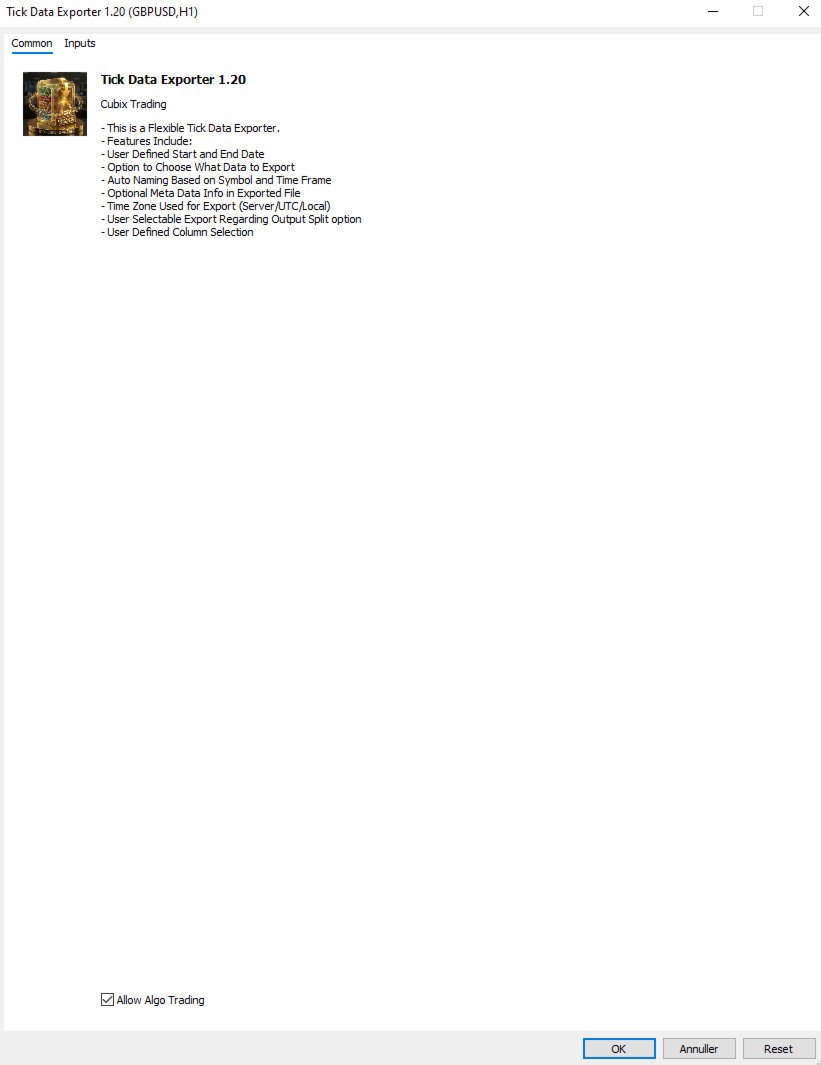
The primary function of this script, Tick Data Exporter, is to efficiently extract historical tick data.
Tick data represents the most granular level of market data, capturing every single price change.
The script downloads this data from a broker and formats it into CSV files for external quantitative analysis.

Five things tick data shows that bars permanently hide:
  1. Spread microstructure: Bars give you one spread number per period (typically the spread at bar close). Ticks show you the spread literally tick-by-tick. The widening seconds before high-impact news is invisible in bars; in ticks it's a billboard. Same for the "spread blink" some brokers do at session opens — they widen for 200ms and tighten back. Bar data smears it out.
  2. Quote frequency as a volatility proxy: When a market is "thinking," ticks come in slowly — maybe 1 to 2 per second. When it's reactive, you get 30 to 50 per second. Tick density itself, separate from price movement, is a real signal. Some professional traders watch quote frequency more than they watch price. A sudden burst of ticks without much price change can precede a directional move by tens of seconds.
  3. Bid/ask asymmetry: In tick exports you see flag patterns like a BID-only update followed milliseconds later by an ASK-only update. That pattern reveals which side of the market is leading. Sustained bid-leading versus ask-leading often precedes directional moves by several seconds. Bar data has no concept of this — bars only show you the resulting price, not the order in which the bids and asks moved.
  4. True touch quality: When you ask "did price touch this level?" using bar data, you check bar high or bar low. Tick data tells you not just whether, but how many times, for how long, and at what spread. Three completely different texture-of-touch readings for the same level.
  5. Sub-bar reversal mapping: A bar that opens at the low and closes at the high (a strong bull bar) tells you nothing about the *path*. Did price spike to the high in the first 30 seconds and chop sideways? Did it grind up steadily? Did it spike, retrace 90%, then break out? These three patterns produce nearly identical bars and very different next-bar behavior. Tick data reconstructs the path.

When NOT to use tick data:
Tick data has costs that bar data doesn't: file size, fetch time, and analytical complexity. The tool isn't right for every question. Use bar data instead when:
  • You're studying multi-day or multi-week trends. Bar data on the right TF is plenty.
  • You only care about open/high/low/close values. Bars deliver these directly; ticks would require aggregation.
  • You're correlating multiple symbols. The OHLC exporter's wide format is far better for this. Tick timestamps don't align across symbols.
  • You're working in Excel without much patience.

Settings:

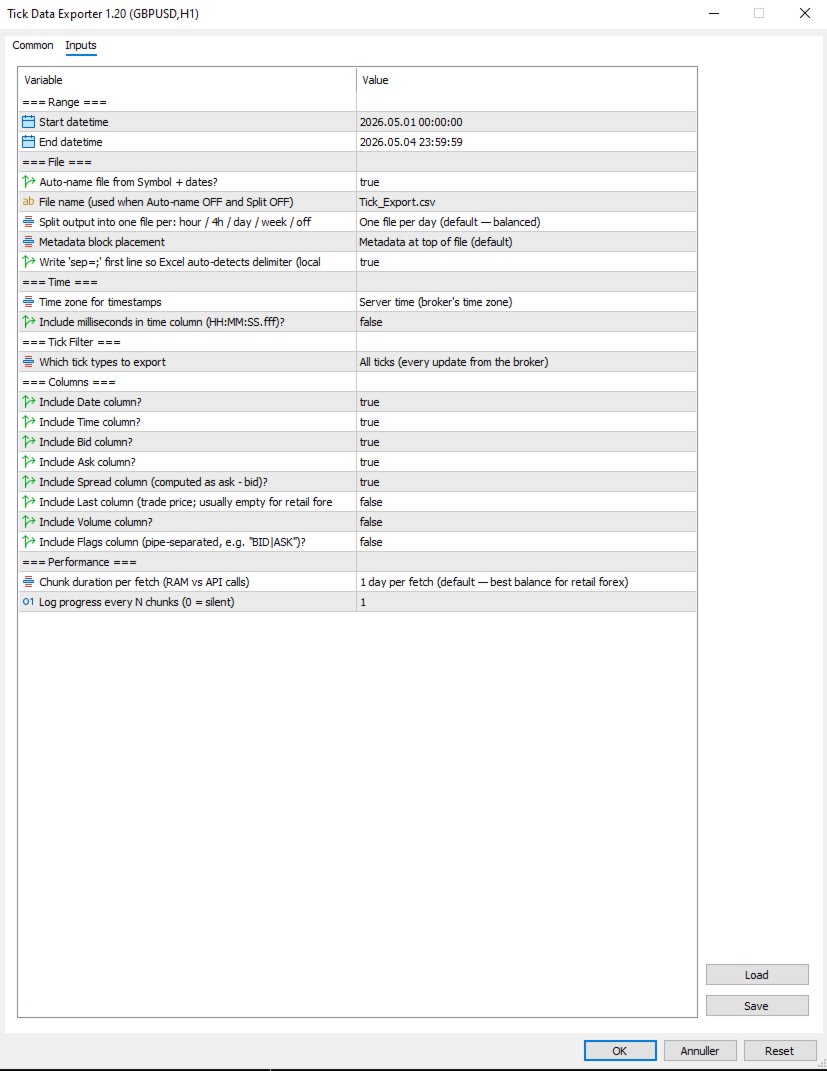
=== Range ===
  1. Start datetime: First moment to fetch ticks for, in server (broker) time. Inclusive.
  2. End datetime: Last moment to fetch ticks for, in server (broker) time. Exclusive of the very last second by convention. Must be after Start datetime. Always specify a date range.

=== File ===
  1. Auto-name file from Symbol + dates?: When true, output filenames are derived from symbol, date(s), and split granularity (e.g. EURUSD_TICKS_2026-05-04_13h.csv). When false, uses File name (used when Auto-name OFF and Split OFF), with date/hour suffixes appended for split-mode exports to avoid collisions.
  2. File name (used when Auto-name OFF and Split OFF): Manual filename (used only when Auto-name file from Symbol + dates? is false). For split exports, the relevant date or date_HHh suffix is inserted before the .csv extension automatically.
  3. Split output into one file per: hour / 4h / day / week / off: How to slice the export into separate files. Off = single file for whole range. 1H/4H = one file per hour or 4-hour window (good for news-window analysis). 1D = one per day (default, balanced). 1W = one file per week (long-range exports). Boundaries align to natural clock units.
  4. Metadata block placement: OFF, TOP, or BOTTOM. Top is default; choose BOTTOM if you plan to use Excel's freeze-top-row feature on the data.
  5. Write 'sep=;' first line so Excel auto-detects delimiter (locale-safe)?: When true, writes 'sep=;' as the very first line of the file. Excel reads this hint and automatically uses semicolon as the delimiter for that file regardless of the OS regional setting. Recommended on European locales (Danish, German, French) where Excel's default delimiter is comma.

=== Time ===
  1. Time zone for timestamps: Time zone for the Date and Time columns. Server = broker's time zone. UTC = GMT/no offset (best for cross-system data analysis). Local PC = your machine's time zone.
  2. Include milliseconds in time column (HH:MM:SS.fff)?: When true, the Time column shows HH:MM:SS.fff with millisecond precision. Important for high-frequency tick data where multiple ticks per second are common. Adds a few characters per row but doesn't significantly increase file size. Recommended ON for serious analysis.

=== Tick Filter ===
  1. Which tick types to export: Which tick types to export. ALL = everything the broker sent. BIDASK = only ticks that updated bid or ask (skips pure-volume ticks; reduces file size slightly). TRADES = only ticks marking actual trades (TICK_FLAG_LAST). Trades-only is rare-to-empty for retail forex but populated for indices, stocks, and centrally-cleared instruments.

=== Columns ===
Each column is independently toggleable. Disabling unused columns shrinks file size, sometimes meaningfully. For example, disabling Volume and Last on retail forex saves about 5% per row.

  1. Include Date column?: Include the Date column (ISO YYYY-MM-DD). Disable only if all your ticks are in one day and you don't need the date.
  2. Include Time column?: Include the Time column. Format depends on "Include milliseconds in time column (HH:MM:SS.fff)?".
  3. Include Bid column?: Include the bid price at the time of the tick.
  4. Include Ask column?: Include the ask price at the time of the tick.
  5. Include Spread column (computed as ask - bid)?: Include the spread (computed as ask - bid, rounded to symbol digits). Recommended ON; spread microstructure is one of the main reasons to use tick data.
  6. Include Last column (trade price; usually empty for retail forex)?: Include the last trade price. Empty for most retail forex (no actual trades reported); useful for indices/stocks. Default off because it's mostly empty.
  7. Include Volume column?: Include trade volume. Same caveat as Last — mostly zero for retail forex. Default off.
  8. Include Flags column (pipe-separated, e.g. "BID|ASK")?: Include the decoded tick flags column showing what changed in this tick (e.g. BID, ASK, BID|ASK, BID|ASK|LAST, BUY, SELL). Pipe-separated. Default off because most analyses don't need it; turn on for advanced microstructure work.

=== Performance ===
  1. Chunk duration per fetch (RAM vs API calls): Time window per API call. Smaller chunks use less RAM during fetch but require more API calls. Larger chunks use more RAM but finish faster. 1D is the right default for most retail forex use; bump to 1W if you have a beefy machine and large exports, drop to 4H or 1H if you're hitting memory issues.
  2. Log progress every N chunks (0 = silent): Log a progress line every N chunks. Set to 0 to silence intermediate progress (only the final 'mission accomplished' line will appear). Set to 5 or 10 to reduce spam on long exports.

Note that Chunk duration per fetch (RAM vs API calls) and Split output into one file per: hour / 4h / day / week / off are independent settings. Chunk size affects how the script *fetches* data internally; split granularity affects how the *output is sliced into files*. They can be set differently — for example, fetching in 1D chunks (efficient) but writing into 1H files (granular for analysis).


=== .CSV File Column reference ===
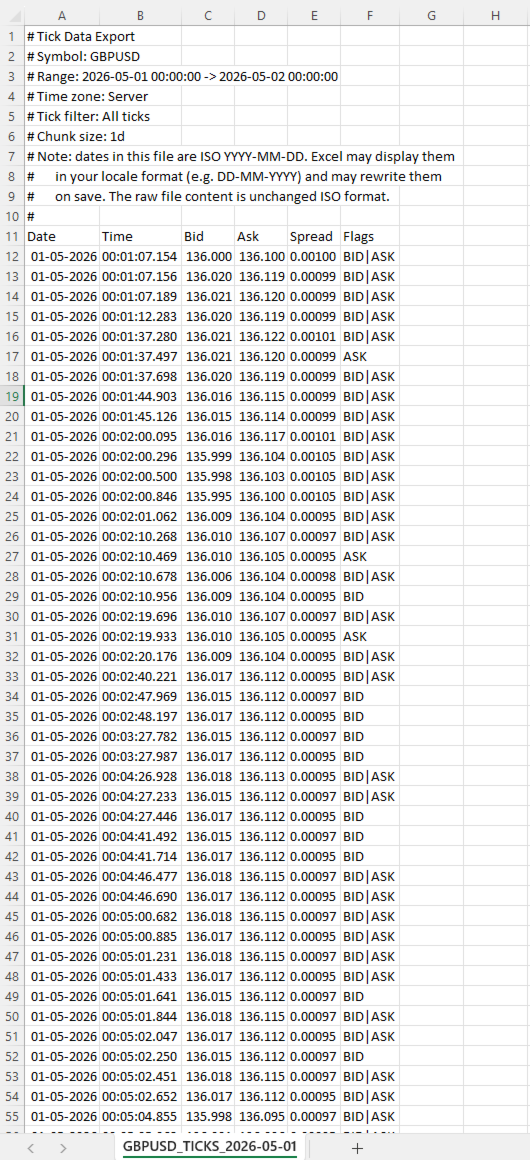
  • Date: ISO YYYY-MM-DD Date of the tick in the chosen time zone. ISO format ensures unambiguous interpretation regardless of locale.
  • Time: HH:MM:SS or HH:MM:SS.fff Time of the tick in the chosen time zone. Format depends on Include milliseconds in time column (HH:MM:SS.fff)?.
  • Bid: Bid price at the time of this tick, formatted to the symbol's digit count.
  • Ask: Ask price at the time of this tick.
  • Spread: Computed as ask - bid, rounded to the symbol's digit count. This is the actual spread at this tick, not a bar-aggregated value.
  • Last: Last trade price. Empty (or 0) when the broker didn't report a trade with this tick.
  • Volume: Trade volume. Empty for most retail forex.
  • Flags: Pipe-separated tokens Decoded tick flags. Tokens: BID (bid changed), ASK (ask changed), LAST (trade), VOL (volume update), BUY/SELL (trade direction). A single tick can have multiple flags, e.g. BID|ASK|LAST.


=== Important note about dates and Excel ===
Dates in the file are written in ISO YYYY-MM-DD format. Most tools (pandas, Python, R, plain text editors) read them exactly as written. Excel does not.
When you open a tick file in Excel, the Date column will be displayed in your locale's date format (DD-MM-YYYY in most of Europe, MM/DD/YYYY in the US). Excel auto-parses the ISO dates and re-displays them. If you save the file from Excel, Excel will also rewrite the dates to its locale format inside the file itself, mutating your original ISO data.
This is documented in the file's metadata block as a reminder. Two strategies to handle it:
Treat Excel as a viewer only, never save changes. Open, inspect, close without saving.
Read the file in pandas or Python instead of Excel. The ISO format works perfectly there.
If you specifically need Excel to leave dates alone, format the Date column as Text via the Data > From Text/CSV import wizard.


=== Tips & Examples ===
Choosing the right split granularity. The Split output into one file per: hour / 4h / day / week / off setting profoundly affects how the data is structured for analysis. Choosing the right value is about matching file granularity to your analysis question.
  • SPLIT OFF Single file When you want one continuous tick stream for an entire range and intend to use pandas or Python to filter. Avoid for ranges over 1 day — files get too large to navigate.
  • SPLIT 1H Hourly files Best for news-window analysis. FOMC, NFP, CPI: export the 4-6 hours around the event with SPLIT_1H, and you have one file per hour ready for separate analysis. Each hour-file is small enough to open in Excel.
  • SPLIT 4H Session-aligned files Best for session-based analysis. Files align to 00/04/08/12/16/20 boundaries which roughly correspond to Asian/early-European/London/lunch/NY/NY-late session windows. A week's worth is 42 files but each one is tractable.
  • SPLIT 1D Daily files (default) The general-purpose default. One day per file is a natural unit, files are 5-15 MB on retail forex, and pandas reads them quickly.
  • SPLIT 1W Weekly files Long-range exports where weekly granularity is enough. A month-long export becomes 4-5 files instead of 30.

Example 1: Studying the FOMC announcement
FOMC rate decisions land at 19:00 server time on a specific Wednesday. You want to study what the spread, tick density, and price action looked like in the 2 hours leading up and 2 hours following the announcement.
Settings:
  • Start datetime = D'2026.05.07 17:00:00' // 2 hours before FOMC
  • End datetime    = D'2026.05.07 21:00:00'    // 2 hours after
  • Auto-name file from Symbol + dates?  = true
  • Split output into one file per: hour / 4h / day / week / off    = SPLIT_1H                        // hourly files for granular analysis
  • Time zone for timestamps  = EXPORT_TIME_SERVER
  • Include milliseconds in time column (HH:MM:SS.fff)? = true                          // sub-second sequence matters around news
  • Which tick types to export = TICK_ALL
  • Include Flags column (pipe-separated, e.g. "BID|ASK")? = true                      // helps see bid-leading vs ask-leading patterns
  • Chunk duration per fetch (RAM vs API calls) = CHUNK_1D                      // single fetch fine for 4 hours
Results: four files named EURUSD_TICKS_2026-05-07_17h.csv through _20h.csv. Each file is small (1-5 MB even with the 19h announcement file probably being the largest). You can open the announcement-hour file in Excel directly to inspect, or load all four in pandas to analyze tick density vs. price change.
What to look for: spread typically widens 30-60 seconds before the announcement (broker preparing for volatility), spikes to 5-10x normal at the moment of release, then tightens back over the next 5-15 minutes. Tick density goes from 1-2 per second pre-news to 50-100 per second in the first 30 seconds post-release.

Example 2: Comparing session-open behavior across a week
You want to see whether the spread blink at the London 08:00 open behaves consistently across all five trading days of a week.
Settings:
  • Start datetime = D'2026.05.04 07:30:00'    // Monday, 30 min before London
  • End datetime    = D'2026.05.08 09:00:00'    // Friday, 1 hour after
  • Auto-name file from Symbol + dates?  = true
  • Split output into one file per: hour / 4h / day / week / off    = SPLIT_1D                  // one file per trading day
  • Time zone for timestamps  = EXPORT_TIME_UTC            // UTC since session times are commonly stated in UTC
  • Include milliseconds in time column (HH:MM:SS.fff)? = true
  • Which tick types to export = TICK_ALL
  • Chunk duration per fetch (RAM vs API calls) = CHUNK_1D
Results: five files, one per day. In each file, filter to roughly 06:30-08:00 UTC (London 07:00-09:00 wall clock). Compare spread evolution across the five days side by side.
What to look for: Mondays often have wider opens than midweek (weekend gap effects). Fridays often have tighter post-open spread (book is winding down).

Example 3: Detecting unusual tick density
You want to flag minutes where tick density was unusually high, as a signal that something interesting may have happened.
Settings:
  • Start datetime = D'2026.05.04 00:00:00'
  • End datetime    = D'2026.05.04 23:59:59'    // single full day
  • Auto-name file from Symbol + dates?  = true
  • Split output into one file per: hour / 4h / day / week / off    = SPLIT_OFF                  // single file for the whole day
  • Time zone for timestamps  = EXPORT_TIME_SERVER
  • Include milliseconds in time column (HH:MM:SS.fff)? = true
  • Which tick types to export = TICK_BIDASK              // exclude pure-volume noise
  • Include Flags column (pipe-separated, e.g. "BID|ASK")? = false                  // not needed for density analysis
  • Chunk duration per fetch (RAM vs API calls) = CHUNK_1D
Results: one file containing the full day. In pandas, group by minute and count rows. Sort descending by count. The top 10 minutes are your high-density periods. Cross-reference timestamps against your economic calendar.
This is a powerful diagnostic technique: tick density highs often precede price moves by tens of seconds, and they correlate with events that don't always make the calendar (large institutional orders, broker-side liquidity shifts, sympathetic moves from correlated markets).

Example 4: Spread cost analysis for a Backtest
You're running a Backtest at a tight stop-loss (5-8 pips) and worried that the bar-aggregated spread reading is hiding intra-bar widening that would have stopped you out. You want the actual spread at every tick during the period.
Settings:
  • Start datetime = D'2026.04.01 00:00:00'
  • End datetime    = D'2026.04.30 23:59:59'
  • Auto-name file from Symbol + dates?  = true
  • Split output into one file per: hour / 4h / day / week / off    = SPLIT_1D                  // one file per day, manageable chunks
  • Time zone for timestamps  = EXPORT_TIME_SERVER
  • Include milliseconds in time column (HH:MM:SS.fff)? = false                      // for cost analysis, second precision is fine
  • Which tick types to export = TICK_BIDASK
  • Include Bid column?    = false                  // you only need spread, not price
  • Include Ask column?    = false
  • Include Spread column (computed as ask - bid)? = true
  • Include Flags column (pipe-separated, e.g. "BID|ASK")?  = false
  • Chunk duration per fetch (RAM vs API calls) = CHUNK_1D
Results: 30 daily files, each containing only Date, Time, and Spread columns. Total volume ~50-150 MB for the month. In pandas, you can compute the empirical spread distribution: mean, p95, p99, max. Compare to the constant spread your Backtest assumed. Adjust your stop loss accordingly, or accept that some trades that worked in Backtest would have been stopped on actual spread spikes.

Example 5: Reconstructing a flash event
Something unusual happened on a chart at 14:32 — a sudden 15-pip spike followed by an immediate retrace. Bar data shows the move but not the path. You want millisecond-level detail of what actually happened.
Settings:
  • Start datetime = D'2026.05.04 14:30:00'    // 2 minutes before
  • End datetime    = D'2026.05.04 14:35:00'    // 3 minutes after
  • Auto-name file from Symbol + dates?  = true
  • Split output into one file per: hour / 4h / day / week / off    = SPLIT_OFF                  // 5 minutes is one tiny file
  • Time zone for timestamps  = EXPORT_TIME_SERVER
  • Include milliseconds in time column (HH:MM:SS.fff)? = true                      // critical for reconstructing path
  • Which tick types to export = TICK_ALL
  • Include Flags column (pipe-separated, e.g. "BID|ASK")? = true                    // see bid vs ask leading
  • Chunk duration per fetch (RAM vs API calls) = CHUNK_1H
Results: one small file with potentially 5,000-15,000 ticks depending on event severity. Open in Excel directly. Plot bid and ask over time. The exact sequence of the spike — how many ticks at the spike high, the spread when it spiked, whether bid moved first or ask moved first — tells you whether this was a stop-hunt, a fat-finger order, a news leak, or genuine liquidity event.
This kind of post-mortem is the single best use case for tick data. Bar data shows the wound; tick data shows how it was inflicted.
Produtos recomendados
CChart
Rong Bin Su
Overview In the fast-paced world of forex and financial markets, quick reactions and precise decision-making are crucial. However, the standard MetaTrader 5 terminal only supports a minimum of 1-minute charts, limiting traders' sensitivity to market fluctuations. To address this issue, we introduce the Second-Level Chart Candlestick Indicator , allowing you to effortlessly view and analyze market dynamics from 1 second to 30 seconds on a sub-chart. Key Features Support for Multiple Second-Level
SmartSetup Bot Is an advanced trading tool that combines the flexibility of manual configurations with the power of semi-automated features. It automatically generates graphical objects, displaying critical zones such as support and resistance levels, stop loss and take profit areas, and other essential indicators. SmartSetup Bot provides clear and precise visualization of your trading parameters, facilitating informed decision-making. This bot is designed for traders who value manual control bu
FREE
Donchian Breakout And Rsi
Mattia Impicciatore
4.5 (2)
Descrição geral Este indicador é uma versão aprimorada do Canal Donchian clássico, enriquecida com funções práticas para o trading real. Além das três linhas padrão (máxima, mínima e linha do meio), o sistema detecta breakouts e os mostra visualmente com setas no gráfico, exibindo apenas a linha oposta à direção da tendência atual para uma leitura mais limpa. O indicador inclui: Sinais visuais : setas coloridas nos breakouts Notificações automáticas : alerta pop-up, push e e-mail Filtro RSI : pa
FREE
It has never been so easy to manage the risk of your account until now, this tool will allow you to have full control of your capital and manage your entries in the synthetic index derivative markets, in an easy, practical and safe way. The available input and configuration parameters are as follows :  RISK MANAGEMENT 1. Value of your account: Here as its name says you will place the value corresponding to the size of your account, for example if your account is 150 dollars the corresponding val
Pin Bars MT5
Yury Emeliyanov
Main purpose:   "Pin Bars"   is designed to automatically detect pin bars on financial market charts. A pin bar is a candle with a characteristic body and a long tail, which can signal a trend reversal or correction. How it works:   The indicator analyzes each candle on the chart, determining the size of the body, tail and nose of the candle. When a pin bar corresponding to predefined parameters is detected, the indicator marks it on the chart with an up or down arrow, depending on the directi
FREE
The Simple Manual Trading Panel (v2.11) Is a professional trade management tool designed with a clean, movable UI to streamline manual execution and automated exit strategies. Core Features Dynamic Visual Interface: A movable GUI panel that provides real-time information including a bar countdown timer, live spread, and advanced volume analysis. Flexible Lot Size setting, with 2 decimals (If broker supports it). Multi-Stage Take Profit: Supports three distinct Take Profit (TP) levels in either
LT Ajuste Diario
Thiago Duarte
3.67 (3)
Esse é uma ferramenta em forma de script. Ela exibe no gráfico o ajuste do dia atual e/ou do dia anterior em forma de linha horizontal. O nome do ativo e sua expiração devem estar configurados de forma correta para o ativo vigente. A aparência das linhas são personalizáveis. É necessário autorizar a url da B3 nas configurações do MT5. Para isso vá em Ferramentas > Opções > Expert Advisors > e insira o endereço  www2.bmf.com.br na lista de URLs autorizadas.
FREE
MT5 to Telegram & Discord Notifier MT5 to Telegram & Discord Notifier is a lightweight and practical notification utility for MetaTrader 5 that automatically sends real-time trade updates to your Telegram and Discord channels. It is designed for traders who want to stay informed about trading activity without constantly watching the terminal. Once connected, the notifier delivers instant alerts whenever a position is opened or closed, helping you monitor live activity, improve communication, an
FREE
Gerenciador de Risco – Assistente de Negociação para MT5 Visão Geral O   Gerenciador de Risco – Assistente de Negociação   é uma ferramenta avançada projetada para aprimorar a execução de ordens, automatizar a gestão de risco e otimizar o desempenho no trading. Ele integra cálculos dinâmicos de lote, proteção contra stop loss visível, automação de ordens e um diário de operações em tempo real para dar vantagem aos traders no mercado. Com uma interface intuitiva e recursos automatizados, o Gere
Introduction: The RosMaFin Trading Panel is not just a standard order execution tool. It is a comprehensive, professional assistant designed for manual and price-action traders who want to save time, manage risk with mathematical precision, and maintain full market awareness. Say goodbye to manual lot size calculations and tedious Stop Loss adjustments. This panel streamlines your entire trading workflow from analysis to trade exit. KEY FEATURES & BENEFITS: Advanced Risk Management & Exec
FREE
Kronos is a multi-timer that displays local time, server time and the countdown of the current period. The programme is multilingual, with a choice of English, Italian and Spanish Language selectables in input. Available in four colours and with the choise of five types of font to be used. Like any other programme we have created, the graphic interface is developed to be non-invasive and intuitive. At start-up, the three windows that make up the graphic interface of Kronos are closed on the left
Smart FVG Stats
- Md Rashidul Hasan
5 (1)
The  Smart FVG Statistics Indicator  is a powerful MetaTrader 5 tool designed to automatically identify, track, and analyze Fair Value Gaps (FVGs) on your charts. Love it? Hate it? Let me know in a review! Feature requests and ideas for new tools are highly appreciated. :) Try "The AUDCAD Trader": https://www.mql5.com/en/market/product/151841 Key Features Advanced  Fair Value Gap  Detection Automatic Identification : Automatically scans for both bullish and bearish FVGs across specified histo
FREE
High Low Open Close
Alexandre Borela
4.98 (44)
Se você gosta deste projeto, deixe uma revisão de 5 estrelas. Este indicador desenha os preços abertos, altos, baixos e finais para o especificado período e pode ser ajustado para um fuso horário específico. Estes são níveis importantes olhados por muitos institucional e profissional comerciantes e pode ser útil para você saber os lugares onde eles podem ser mais activa. Os períodos disponíveis são: Dia anterior. Semana anterior. Mês anterior. Quarto anterior. Ano anterior. Ou: Dia atual. Seman
FREE
Telegram to MT5 Coppy
Sergey Batudayev
5 (8)
Telegram para MT5:   A solução definitiva para cópia de sinais Simplifique suas negociações com o Telegram para MT5, a ferramenta moderna que copia sinais de negociação diretamente dos canais e chats do Telegram para a sua plataforma MetaTrader 5, sem a necessidade de DLLs. Esta solução poderosa garante execução precisa dos sinais, amplas opções de personalização, economiza tempo e aumenta sua eficiência. [ Instructions and DEMO ] Principais características Integração direta da API do Telegram A
ORB Range Architect: Descrição Completa ORB Range Architect é um indicador profissional de intervalo de sessão (range) e expansão para traders que desejam uma estrutura mais limpa, zonas de ruptura (breakout) mais claras e um contexto mais inteligente a partir dos ciclos de preços de sessão, diários e semanais. O ORB Range Architect foi projetado para ajudar os traders a mapear os intervalos de abertura e referência mais importantes no gráfico, projetar níveis de expansão estruturados a partir
StealthTrade Commander é um painel de negociação visual avançado e um utilitário de gestão de risco projetado para traders manuais, scalpers e desafiantes de mesas proprietárias (Prop-Firms). Esta ferramenta ajuda você a executar negociações visualmente direto do gráfico, ocultar seus níveis de Stop Loss e Take Profit da corretora e controlar rigorosamente seu Drawdown diário — um recurso crucial para passar em testes e manter contas financiadas de Prop-Firms. PRINCIPAIS RECURSOS: Risk Guardian
FREE
Trade Manager DashPlus
Henry Lyubomir Wallace
5 (13)
DashPlus é uma ferramenta avançada de gerenciamento de operações projetada para melhorar a eficiência e a eficácia das suas transações na plataforma MetaTrader 5. Ela oferece um conjunto completo de funcionalidades, incluindo cálculo de risco, gestão de ordens, sistemas de grade avançados, ferramentas baseadas em gráficos e análise de desempenho. Principais Funcionalidades 1. Grade de Recuperação Implementa um sistema de grade flexível e de média para gerenciar operações em condições adversas de
Algo Scalper EA
Tshepo Michael Motaung
Algo Scalper EA is a confluence day trading robot using market orders and it trades during Trading Sessions. The EA exercise consistency and risk management, it has 2 entry signals produced from  Moving Averages(90 & 120) to harvest the most out of the trending market (on automatic mode). It is capable of allowing you to trade any symbol you want and during the time you want. Profits can only be secured by take profit level. Low spread is highly recommended for this EA, and you will see signific
CosmiCLab SMC FIBO CosmiCLab SMC FIBO is a professional trading indicator designed for traders who use Smart Money Concepts (SMC), market structure analysis and Fibonacci retracement levels. The indicator automatically detects market swings and builds Fibonacci levels based on the latest impulse movement. It also identifies market structure changes such as BOS (Break of Structure) and CHOCH (Change of Character), helping traders understand the current market direction. CosmiCLab SMC FIBO also pr
IMPORTANT NOTE: This is a professional Trade Management Utility and on-chart assistant. It is NOT an automated trading robot. It does not open trades on its own. The UltraFast Trade Manager MT5 is the ultimate execution and risk-management suite designed to give you absolute control over your manual and algorithmic trades. When managing multiple positions, calculating complex net break-even points, or constantly monitoring the economic calendar, hesitation can lead to costly mistakes. This utili
FREE
PropFolio Command Manager Pro PropFolio Command Manager Pro is an advanced, multi-symbol execution terminal designed to automate your custom arrow indicators. Simply enter the name of your arrow indicator into the settings, and the Command Manager will monitor up to 30 currency pairs, indices, or metals simultaneously from a single chart. When your indicator generates a signal, the EA verifies the trend using the built-in Higher Timeframe (HTF) algorithm, checks the live spread, and manages the
Friend of the trend : Seu Rastreador de Tendências Domine o mercado com o Friend of the trend , o indicador que simplifica a análise de tendências e te ajuda a identificar os melhores momentos para comprar, vender ou esperar. Com um design intuitivo e visualmente impactante, o Trend Analisa os movimentos de preço e entregar sinais através de um histograma colorido: Barras Verdes : Sinalizam uma tendência de alta, indicando oportunidades de compra. Barras Vermelhas : Alertam para uma tendência de
FREE
MeeKiew Easy Order Manager (MT5)   is a high-performance trading utility designed to streamline order execution and management on the MetaTrader 5 platform. Specifically optimized for use with the   MeeKiew Dynamic MTF Pivot (MT5)   indicator, this tool allows traders to react to market levels with speed and precision. While MT5 can sometimes feel slower in manual execution, this manager bridges the gap with a "One-Click" philosophy and advanced bulk management features. MeeKiew Dynamic MTF Pivo
FREE
Just $10 for six months!!!. This will draw Supply & Demand zones just by clicking on a candle. It can also draw a 50% line on the zone. https://youtu.be/XeO_x7cpx8g As a drawing tool, it is not active all the time after adding it to the chart. Activate by pressing 's' twice on the keyboard within a second. If activated but then decided not to draw, deactivate by pressing 's' once.  Box color depends if candle is above or below current price. Features: Draw the box up to the last current candl
QuantumAlert Stoch Navigator is a free indicator available for MT4/MT5 platforms, its work is to provide "alerts" when the market is inside "overbought and oversold" regions in the form of "buy or sell" signals. This indicator comes with many customization options mentioned in the parameter section below, user can customise these parameters as needful. Join our   MQL5 group , where we share important news and updates. You are also welcome to join our private channel as well, contact me for the p
FREE
Rainbow MT5
Jamal El Alama
4 (1)
Description : Rainbow MT5 is a technical indicator based on Moving Average with period 34 and very easy to use. When price crosses above MA and MA changes color to green, then this is a signal to buy. When price crosses below MA and MA changes color to red, then this is a signal to sell. The Expert advisor ( Rainbow EA MT5 ) based on Rainbow MT5 indicator is now available here . MT4 version is available here .
FREE
Object Synchronizer MT5 : Better focus/analysis of the price chart in many timeframes. Are you bored to save and load template many times for the same symbol for many chart timeframes? Here is the alternative. With this indicator, you enjoy creating objects across many charts, you can modify the same object in any chart, you can delete the same object in any chart. All objects you created/modified are always synchronized across all chart windows (with the same symbol). Save your time, you can fo
FlatBreakout MT5 (Free Version) Flat Range Detector and Breakout Panel for MT5 — GBPUSD Only FlatBreakout MT5   is the free version of the professional FlatBreakoutPro MT5 indicator, specially designed for flat (range) detection and breakout signals on the   GBPUSD   pair only. Perfect for traders who want to experience the unique fractal logic of FlatBreakout MT5 and test breakout signals on a live market without limitations. Who Is This Product For? For traders who prefer to trade breakout of
FREE
KT Forex Trade Manager EA MT5
KEENBASE SOFTWARE SOLUTIONS
O KT Trade Manager é uma ferramenta poderosa para melhorar a execução de ordens e a gestão de posições. Com uma interface fácil de usar, os traders podem supervisionar e controlar suas operações com praticidade. Esta solução completa abrange diversos aspectos do trading, incluindo a gestão de risco e de posições. Ao integrar esses elementos essenciais, permite que os traders tomem decisões mais informadas e otimizem suas estratégias no mercado financeiro. À medida que os mercados globais evolue
Forex 4up MT5
Volodymyr Hrybachov
Quer negociar e publicar seus sinais no canal de telegramas? Então este utilitário é para você. - Negocia em seu terminal - Publica ofertas em seu canal de telegrama Seus clientes ficarão contentes em: - de 5 sinais diários - belo design de sinais Costumização Serviço -> Configurações -> Consultores especialistas -> Permitir WebRequest para os seguintes URLs: https://api.telegram.org No Telegram, vá para @BotFather e crie um bot Copie o token do bot e insira-o nos parâmetros do advisor C
Os compradores deste produto também adquirem
Trade Assistant MT5
Evgeniy Kravchenko
4.42 (209)
Ajuda a calcular o risco por comércio, a fácil instalação de uma nova encomenda, gestão de encomendas com funções de fecho parcial, trailing stop de 7 tipos e outras funções úteis. Materiais e instruções adicionais Instruções de instalação   -   Instruções para a aplicação   -   Versão de teste da aplicação para uma conta de demonstração Função de linha Mostra no gráfico a linha de Abertura, Stop Loss, Take Profit. Com esta função é fácil definir uma nova ordem e ver as suas características ad
Bem-vindo ao Trade Manager EA—uma ferramenta de gestão de risco criada para tornar o trading mais intuitivo, preciso e eficiente. Não é apenas uma ferramenta para executar ordens, mas uma solução abrangente para planejamento de operações, gerenciamento de posições e controle de risco. Seja você um iniciante, trader avançado ou scalper que precisa de execução rápida, o Trade Manager EA adapta-se às suas necessidades, oferecendo flexibilidade em todos os mercados, desde forex e índices até commodi
Local Trade Copier EA MT5
Juvenille Emperor Limited
4.96 (136)
Experimente uma cópia de negociação excepcionalmente rápida com o Local Trade Copier EA MT5 . Com sua fácil configuração de 1 minuto, este copiador de negociações permite que você copie negociações entre vários terminais MetaTrader no mesmo computador Windows ou em um Windows VPS com velocidades de cópia ultra rápidas de menos de 0.5 segundos. Seja você um trader iniciante ou profissional, o   Local Trade Copier EA MT5   oferece uma ampla gama de opções para personalizá-lo de acordo com suas ne
Farmed Hedge Yield Farming | All Markets (Manual - Hybrid - Semi/Automated EA) MULTI-ASSET SUPPORT Trade any asset available on your broker - Forex: Major, Minor, Exotic pairs - Crypto: BTC, ETH, XRP, SOL, BNB - Stocks: Apple, Tesla, Amazon, Google, etc. - Commodities: Gold, Silver, Oil, Gas - Indices: US30, NAS100, SPX500, DAX40 - Any CFD your broker offers VERIFIED TRADING RESULTS - Farmed Hedge Yield Axi Copy:  https://www.mql5.com/en/signals/2356376 - Farmed Hedge Yield Exn Copy:   https:/
TradePanel MT5
Alfiya Fazylova
4.87 (153)
Trade Panel é um assistente de negociação multifuncional. O aplicativo contém mais de 50 funções de negociação para trading manual e permite automatizar a maioria das tarefas de negociação. Antes da compra, você pode testar a versão de demonstração em uma conta demo. Baixe a versão experimental do aplicativo para uma conta de demonstração: https://www.mql5.com/pt/blogs/post/762547 . Instruções completas aqui . Comércio. Permite realizar operações de negociação com um clique: Abrir ordens pendent
Versão Beta O Telegram to MT5 Signal Trader está quase no lançamento oficial da versão alfa. Alguns recursos ainda estão em desenvolvimento e você pode encontrar pequenos erros. Se tiver problemas, por favor reporte, seu feedback ajuda a melhorar o software para todos. Telegram to MT5 Signal Trader é uma ferramenta poderosa que copia automaticamente sinais de trading de canais ou grupos do Telegram diretamente para sua conta MetaTrader 5 . Suporta canais públicos e privados do Telegram, e você
Power Candles Strategy Scanner - Localizador de configurações multissímbolo com auto-otimização O Power Candles Strategy Scanner utiliza o mesmo motor de auto-otimização que alimenta o indicador Power Candles — em todos os símbolos da sua lista de observação, lado a lado. Um painel indica-lhe quais os símbolos que são estatisticamente negociáveis neste momento, qual a estratégia vencedora para cada um, o par ideal de Stop Loss / Take Profit, e avisa-o assim que um novo sinal é emitido. Esta ferr
Trade Dashboard MT5
Fatemeh Ameri
4.94 (123)
Trade Dashboard simplifies how you open, manage, and control your trades, with built-in lot size calculation. It allows you to execute trades, manage risk, and control positions directly on the chart, with tools such as partial close, breakeven, and trailing stop. Designed to reduce manual work and help you stay focused on your trading decisions. A demo version is available for testing. Detailed explanations of features are provided within the MQL5 platform. Installation instructions are include
Exp COPYLOT CLIENT for MT5
Vladislav Andruschenko
3.82 (34)
Copiador profissional de operações para MetaTrader 5 Um copiador de operações rápido, profissional e confiável para MetaTrader . COPYLOT permite copiar operações de Forex entre terminais MT4 e MT5 com suporte para contas Hedge e Netting . A versão MT5 do COPYLOT oferece suporte a: - MT5 Hedge → MT5 Hedge - MT5 Hedge → MT5 Netting - MT5 Netting → MT5 Hedge - MT5 Netting → MT5 Netting - MT4 → MT5 Hedge - MT4 → MT5 Netting Versão MT4 Descrição completa + DEMO + PDF Como comprar Como instalar Como
Trade copier MT5
Alfiya Fazylova
4.59 (41)
Trade Copier é um utilitário profissional projetado para copiar e sincronizar negociações entre contas de negociação. A cópia ocorre da conta / terminal do fornecedor para a conta / terminal do destinatário, instalada no mesmo computador ou vps. PROMOÇÃO - Se você já adquiriu o "Trade copier MT5", pode receber o "Trade copier MT4" gratuitamente (para cópia MT4 > MT5 e MT4 < MT5). Para obter informações mais detalhadas sobre os termos, por favor, entre em contato conosco através de mensagens priv
Timeless Charts
Samuel Manoel De Souza
5 (4)
Timeless Charts é uma solução avançada de gráficos desenvolvida para traders profissionais que buscam controle total sobre a construção e visualização de gráficos, além das limitações do sistema de gráficos nativo do MetaTrader 5. Diferente dos gráficos offline tradicionais ou indicadores personalizados simplistas, esta solução constrói barras totalmente personalizadas com precisão real de carimbo de tempo , até milissegundos, proporcionando uma experiência de trading poderosa e precisa. Este a
Footprint Chart Pro — Professional OrderFlow EA for MetaTrader 5 Version 6.34 | Professional tool for real traders | Institutional-Grade Visualization DEMO USERS - PLEASE SELECT EVERY TICK / REAL TICK WHEN TESTING AND YOU HAVE DOWNLOADED HISTORICAL DATA. IF YOU SEE A WAITING SCREEN AND IT IS NOT DOWNLOADING, IT MEANS YOU HAVE LOW HISTORICAL DATA. TRY 1 MIN AND 5 MIN FIRST ON 1 DAY DATA. ONE DAY DATA SHOULD BE THE NEWEST AND MOST CURRENT DATE. PLEASE WAIT UNTIL THE MARKET HAS ROLLED OVER PERIOD.
AntiOverfit PRO MT5
Enrique Enguix
5 (4)
Antes de comprar um EA, verifique se ele realmente se sustenta ou se apenas teve sorte num backtest. A maioria dos robôs é vendida com um backtest bonito. Curva ascendente. Bom profit factor. Poucas dúvidas. E, ainda assim, muitos desses EAs desmoronam assim que o mercado deixa de se mover como nesse histórico. Porquê? Porque um backtest só prova uma coisa: que essa estratégia funcionou num percurso específico do preço. Não prova que vá aguentar outros percursos. Não prova que seja robusta. E mu
MT5 to Telegram Signal Provider é uma utilidade fácil de usar e totalmente personalizável que permite o envio de sinais especificados para o chat, canal ou grupo do Telegram, tornando sua conta um fornecedor de sinais . Ao contrário da maioria dos produtos concorrentes, ele não usa importações de DLL. [ Demonstração ] [ Manual ] [ Versão MT4 ] [ Versão Discord ] [ Canal do Telegram ]  New: [ Telegram To MT5 ] Configuração Um guia do usuário passo a passo está disponível. Não é necessário conhec
Copy Cat More Trade Copier MT5 (Gato Copiador MT5) é um copiador de negociações local e uma estrutura completa de gestão de riscos e execução projetada para os desafios comerciais de hoje. Desde desafios de prop firms até gestão de portfólio pessoal, ele se adapta a cada situação com uma combinação de execução robusta, proteção de capital, configuração flexível e manuseio avançado de negociações. O copiador funciona tanto no modo Master (remetente) quanto Slave (receptor), com sincronização em t
HINN MagicEntry Extra
ALGOFLOW OÜ
4.71 (14)
HINN MAGIC ENTRY – the ultimate tool for entry and position management! Place orders by selecting a level directly on the chart! full description   ::  demo-version  :: 60-sec-video-description Key features: - Market, limit, and pending orders - Automatic lot size calculation - Automatic spread and commission accounting - Unlimited partitial take-profits  - Breakeven and trailing stop-loss and take-profit  functions - Invalidation leves - Intuitive, adaptive, and customizable interface - Works
Seconds Chart MT5
Boris Sedov
4.59 (17)
Seconds Chart - uma ferramenta exclusiva para criar gráficos de segundos no MetaTrader 5 . Com o Seconds Chart , você pode criar gráficos com períodos definidos em segundos, proporcionando flexibilidade e precisão ideais para análise, indisponíveis em gráficos padrão de minutos ou horas. Por exemplo, o período S15 indica um gráfico com velas de 15 segundos. Você pode usar qualquer indicador ou Expert Advisor com suporte a símbolos personalizados. Trabalhar com eles é tão conveniente quanto negoc
ABQ Visual Risk Sizer
Cristian David Castillo Arrieta
ABQ Visual Risk Sizer - Institutional Risk & Trade Execution Categoria: Utilitários / Gestão de Risco O cálculo manual de lotes custa tempo e dinheiro. No trading moderno, especialmente ao operar com contas financiadas (Prop Firms), um erro de cálculo de lote ou um atraso de 5 segundos ao inserir uma ordem pode significar violar a regra de Drawdown Diário ou perder o preço de entrada perfeito. ABQ Visual Risk Sizer é uma ferramenta de nível institucional projetada para resolver este problema def
Custom Alerts AIO: Monitoramento inteligente de múltiplos mercados – pronto para uso, sem configuração Visão geral Custom Alerts AIO é uma ferramenta avançada de varredura de mercado que funciona imediatamente após a instalação — sem necessidade de configurar indicadores adicionais. Inclui internamente todos os principais indicadores da Stein Investments (FX Power, FX Volume, FX Dynamic, FX Levels e IX Power), permitindo que você monitore facilmente todas as principais classes de ativos: Forex
Cerberus Equity Watcher
Samuel Bandi Roccatello
5 (3)
Cerberus the Equity Watcher é uma ferramenta de gerenciamento de risco que monitora constantemente o patrimônio da sua conta e evita grandes perdas, causadas por EAs defeituosos ou por seu comportamento emocional. É extremamente útil para traders sistemáticos que dependem de EAs que podem conter bugs ou que podem não ter um bom desempenho em condições de mercado inesperadas. Cerberus permite que você defina um valor mínimo de patrimônio e (opcionalmente) um valor máximo, se qualquer um deles for
Telegram To MT5 Receiver
Levi Dane Benjamin
4.31 (16)
Copie os sinais de qualquer canal do qual você seja membro (incluindo privados e restritos) diretamente para o seu MT5.  Esta ferramenta foi projetada com o usuário em mente, oferecendo muitos recursos que você precisa para gerenciar e monitorar as negociações. Este produto é apresentado em uma interface gráfica fácil de usar e visualmente atraente. Personalize suas configurações e comece a usar o produto em minutos! Guia do usuário + Demo  | Versão MT4 | Versão Discord Se deseja experimentar
Painel de Trading para MetaTrader 5 — controle profissional de trading em um clique a partir do gráfico e do teclado Um painel de trading avançado para traders ativos, criado para abrir, gerenciar e fechar operações muito mais rápido do que com a interface padrão do MetaTrader. Esta solução foi desenvolvida para quem deseja controlar posições, ordens pendentes, lucro total e execução em um único espaço de trabalho profissional. Não se trata apenas de mais um utilitário. É um verdadeiro cockpit
HINN Lazy Trader
ALGOFLOW OÜ
5 (2)
The core idea: using the user interface, you configure the parameters the chart must meet before entering a position (or positions), choose which entry models to use, and set the rules for when trading and planning should end. Lazy Trader  handles the rest: it  takes over all the routine chart watching and execution! full description  :: 3 key videos [1] ->  [2]   ->  [3] What can it do? - Understands Larry Williams market structure - Understands swing market structure by Michael Huddleston
Poc Breakout Signal: The Ultimate Institutional Order Flow & Price Action System Elevate your trading with Poc Breakout, a comprehensive technical analysis tool designed to bridge the gap between retail trading and institutional market understanding. This all-in-one system combines powerful Buy/Sell signals, advanced Volume Profile analysis, real-time Order Flow (Depth of Market), and critical macroeconomic data to give you a clear, unambiguous edge in the markets. Poc Breakout Signal decodes c
Bots Builder Pro MT5
Andrey Barinov
4.17 (6)
This is exactly what the name says. Visual strategy builder . One of a kind. Turn your trading strategies and ideas into Expert Advisors without writing single line of code. Generate mql source code files with a few clicks and get your fully functional Expert Advisors, which are ready for live execution, strategy tester and cloud optimization. There are very few options for those who have no programming skills and can not create their trading solutions in the MQL language. Now, with Bots Builde
The product will copy all telegram signal to MT5 ( which you are member) , also it can work as remote copier.  Easy to set up, copy order instant, can work with almost signal formats, image signal,  s upport to translate other language to English Work with all type of channel or group, even channel have "Restrict Saving Content", work with  multi channel, multi MT5 Work as remote copier: with signal have ticket number, it will copy exactly via ticket number. Support to backtest signal. How to s
FUTURES ORDERFLOW FOOTPRINT CHART Professional OrderFlow EA for MetaTrader 5 Version 1.01| Professional tool for real traders | Institutional-Grade Visualization STRATEGY TESTER USERS - PLEASE SELECT EVERY REAL TICK WHEN TESTING AND YOU HAVE DOWNLOADED HISTORICAL DATA. IF YOU SEE A WAITING SCREEN AND IT IS NOT DOWNLOADING, IT MEANS YOU HAVE LOW HISTORICAL DATA. TRY 1 MIN AND 5 MIN FIRST ON 1 DAY DATA. ONE DAY DATA SHOULD BE THE NEWEST AND MOST CURRENT DATE. PLEASE WAIT UNTIL THE MARKET HAS ROL
O Local Trade Copier EA é uma solução para traders individuais ou gerentes de contas que precisam executar sinais de negociação de fontes externas ou que precisam gerenciar várias contas ao mesmo tempo, sem a necessidade de uma conta MAM ou PAMM. Copia de até 8 contas mestras para contas escravas ilimitadas [ Guia de instalação | Guia de atualização | Solução de problemas | Perguntas frequentes | Todos os produtos ] 100% auto-hospedado Fácil de instalar e usar Nenhum instalador, arquivos de con
Ultimate Extractor
Clifton Creath
5 (9)
Ultimate Extractor - Professional Trading Analytics for MT5 *****this is the local HTML version of Ultimate Extractor. !!!!!it is not compatible with Cloud!!!! For the online version please reach out to me directly****** Ultimate Extractor transforms your MetaTrader 5 trading history into actionable insights with comprehensive analytics, interactive charts, and real-time performance tracking. What It Does Automatically analyzes your MT5 trading history across all Expert Advisors and generates
Trader Evolution
Siarhei Vashchylka
5 (7)
" Trader Evolution " - A utility designed for traders who use wave and technical analysis in their work. One tab of the utility is capable of money management and opening orders, and the other can help in making Elliott wave and technical analysis. Manual (Be sure to read before purchasing) | Version for MT4 Advantages 1. Trading in a few clicks. Immediate and pending orders are available in the panel 2. Money management. The program automatically selects the appropriate lot size 3. Simplifies
Mais do autor
The Simple Manual Trading Panel (v2.11) Is a professional trade management tool designed with a clean, movable UI to streamline manual execution and automated exit strategies. Core Features Dynamic Visual Interface: A movable GUI panel that provides real-time information including a bar countdown timer, live spread, and advanced volume analysis. Flexible Lot Size setting, with 2 decimals (If broker supports it). Multi-Stage Take Profit: Supports three distinct Take Profit (TP) levels in either
Trend Matrix Panel is a multi-timeframe technical indicator for MetaTrader 5 that compresses an entire trading session's structural picture into a single panel. Rather than flipping between charts to read M1, M15, H1, and D1 separately, the panel shows the trend state of three configurable moving averages across twelve timeframes simultaneously, with a heatmap that draws your eye to the genuinely strong signals and away from noise. The core idea is simple: every cell in the matrix tells you how
This script is an Intelligence Gathering Utility designed to give you full control over your data exports from MetaTrader 5. It allows you to synchronize up to three different symbols into a single file with precise timestamping. 1. Setting the Data Range (Range) You can define exactly which historical period you want to capture: Date Mode : If Last N bars (0 = use date range above) is set to 0 , the script will export all data between your chosen start and end dates. Bar Mode : By entering a nu
Filtro:
Sem comentários
Responder ao comentário