Take a Break

5

The most advanced news filter on MQL market - free demo available

Take a Break has transformed from a basic news filter into a comprehensive account protection solution. It seamlessly pauses any other Expert Advisors during news events or based on your custom filters, all while safeguarding your EA settings - restoring them automatically when trading resumes for complete peace of mind.

Typical use cases:

  • A single news filter for all your EAs.
  • Stop trading during news/high volatility (+ close all trades before).
  • Stop trading when a certain daily profit/loss is reached (useful also for funding programs such as FTMO).
  • Stop trading when Account Equity, Balance or Margin is low.
  • Only trade on specific dates or times, e.g. only during the US session.

The various, built-in filters finally give you full control over your EA's operations making Take a Break an indispensable tool for every automated trader. As such, Take a Break may be the only tool you need for

  • drawdown control
  • equity protection
  • news trading
  • advanced time filter options

As a tool by traders for traders, your feedback is appreciated. If you have a feature request, find a bug or simply need support, just contact me. I'll be happy to help.


How to set up

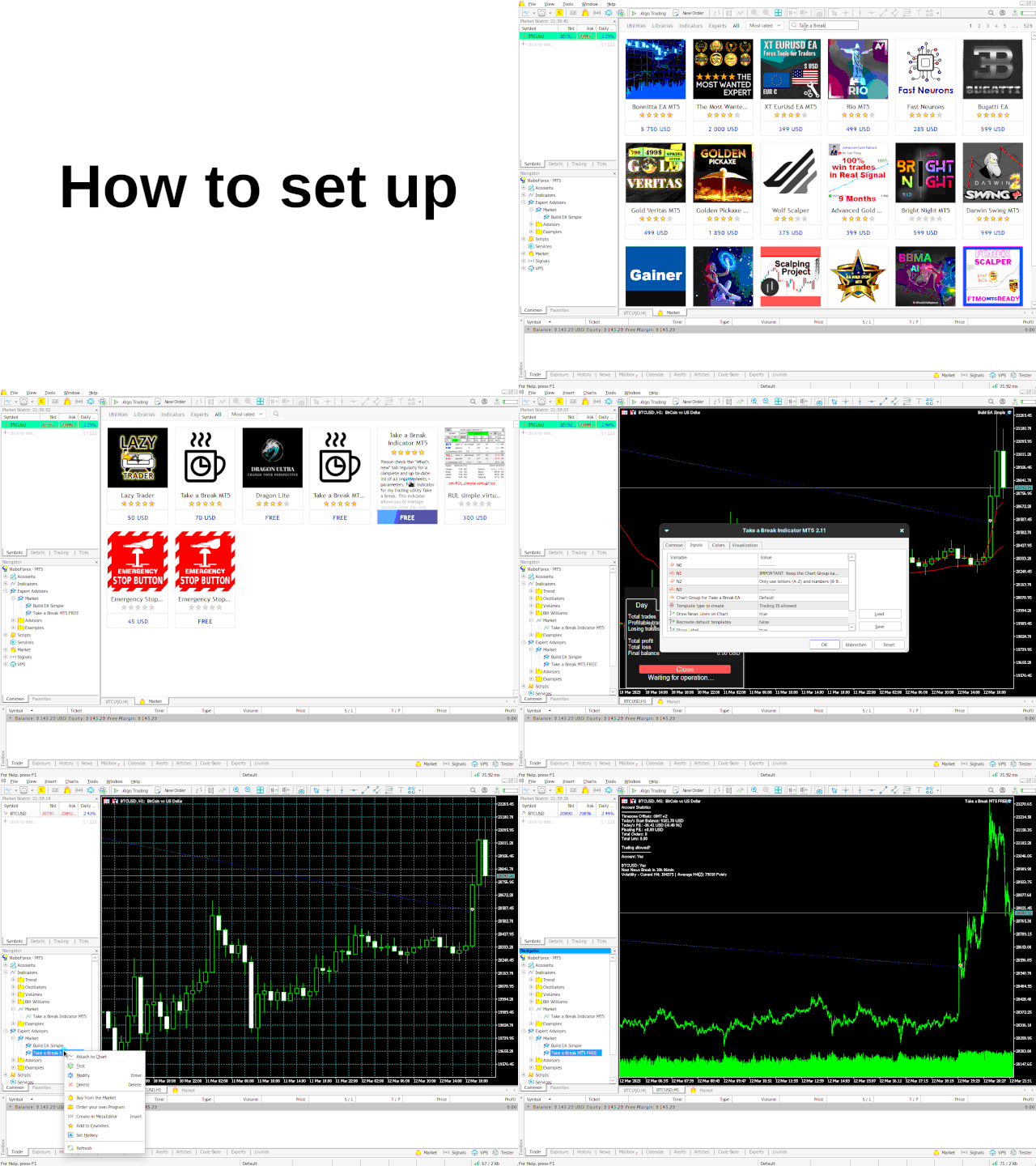
Take a Break manages selected (or all) charts in your terminal using an EA and an indicator. The indicator identifies which charts the EA will control, so you must add it to each chart you want managed. Without the indicator, Take a Break will not work. After adding the indicator, all settings are managed through the EA.
  1. Add the URL https://trading.custom-solutions.it to the list of allowed WebRequest URLs (press CTRL+O, tab "Expert Advisors")
  2. Download the FREE Take a Break Indicator and follow the setup example.


Documentation

Ask me :)

... or navigate to the "What's new" tab and use your browser's search function (usually CTRL + F) to search for a specific parameter. I usually added a comprehensive description to all of them.


Parameters (excerpt)

Please check the "What's new" tab regularly for a complete and up-to-date list of all parameters + improvements.

--- External EA Settings ---

  • Force stop trading: If set to "true", templates will be applied even if there are open trades of your other EA. Useful to prevent your other EA from opening new trades during news, increased spreads etc. But can possibly leave the open trades unprotected during these periods (if they have no S/L set). Use with caution.

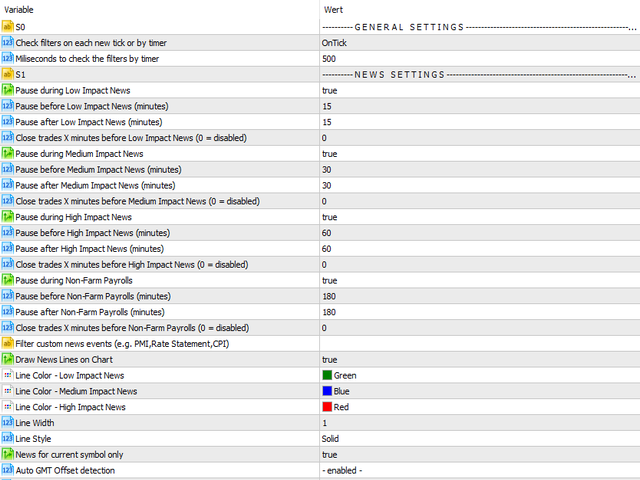
--- News Filters ---

  • Pause before NFP/High/Medium/Low Impact News (minutes)
  • Pause after NFP/High/Medium/Low Impact News (minutes)
  • Close trades X minutes before NFP/High/Medium/Low Impact News: Either all trades or only those with the specified "Magic Numbers" will be closed X minutes before the news.
  • Filter News Events: Only pause during specific events. Separate multiple event names by a comma like e.g. "PMI,Rate Statement,CPI".
  • Filter News Symbols: By default, Take a Break will determine the news for each symbol automatically. However, you can also specify your own set of symbols (e.g. "EUR,USD,GBP").

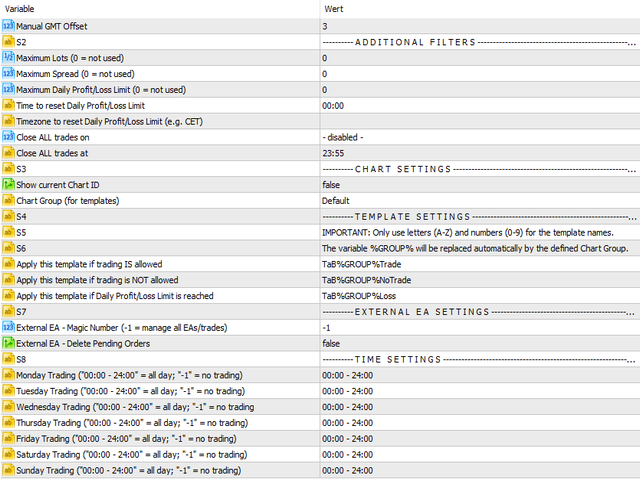
--- Additional Filters ---

  • Maximum Lots (0 = not used): Trading will be disabled when the sum of all orders' lots >= Maximum Lots. Set to "0" to disable it.
  • Maximum Spread (0 = not used): Spread filter for each symbol. Set to "0" to disable it.

--- Account Protection ---

  • Maximum Daily Profit Limit (0 = not used): Enter a daily profit limit in your account's base currency here. E.g. "100" means "stop trading when the daily profit reaches 100 EUR/USD/...". In this case, all trades will be closed and the chart template "Daily Profit/Loss Limit reached" applied.
  • Maximum Daily Loss Limit (0 = not used): Same as "Maximum Daily Profit Limit" but you specify a negative value here. E.g. "-100" means "stop trading when the daily loss reaches -100 EUR/USD/...".
  • Daily Profit/Loss Limit calculation mode: If set to "Equity", the profit/loss of open positions will also be taken into account when performing calculations. If set to "Balance", only the profit/loss of closed positions will be taken into account.
  • Timezone to reset Daily Profit/Loss Limit: By default, the limits are reset once every day at the specified "Time to reset Daily Profit/Loss Limit" broker server time. If you want the daily limits to be reset in another timezone, enter it here (e.g. "CET"). See List of Timezone Abbrevations.

--- Trading Times ---

  • Monday/Tuesday/Wednesday/Thursday/Friday/Saturday/Sunday Trading: Specify trading times as ranges and separate them by a comma. E.g. to trade from 04:00 to 05:00 and from 20:00 to 22:00 (broker server time), use one of the following formats:
    • 04:00 - 05:00,20:00 - 22:00 (extended)
    • 4,20-22 (simple)
  • Close trades on: In addition to the news filter, all trades can be closed either daily or on a specific weekday at the time specified under "Close trades at".


#equity protect #balance protect #drawdown limit #drawdown control #master control #trade manage #order manage #risk manage #prop firm

리뷰 33
dyakoo
238
dyakoo 2025.12.19 19:33 
 

A must have tool for every trader! I love it been looking for something like this for a long time

Quantxtech
433
Quantxtech 2025.01.28 10:34 
 

Excellent EA. I recommend it to everyone. It allows me to integrate risk management functions and stay away from situations of high expected (news) and unexpected volatility. The author is very professional and enthusiastic, responds immediately and is very available to give suggestions and accept advice.

Carl Christian Nyberg
1085
Carl Christian Nyberg 2024.12.15 19:54 
 

Fantastic little thing that adds up really good the the EA's that I'm currently running. So far it has managed to avoid bad trades just before major news happenings. Will keep on running it and trying to find the perfect setup regarding Drawdown Control and Minimum Profit/Maximum Loss before and during news.

추천 제품
QuantumGuard Pro - Intelligent Quantum Risk Management Trading System Core Features Five independent fund management groups for smart risk diversification Triple protection mechanism: profit target + drawdown protection + global risk control Professional trading panel for one-stop trade execution 24/7 real-time risk monitoring and protection Automatic display of average price lines for each group One-click close single group orders for precise control Order group highlighting for clear status o
Protect your account from Margin Call when the market is going opposite with your trades. Manage your risk when you're using Martingale, Grid, Average . They are not dangerous anymore, but manageable  Use this EA utilities to accompany your every MT4 installation This EA is a utility to protect your capital when your trading are unfavorable : Maximum loss in money, Maximum Draw-down/ equity loss in percentage, Your minimum equity reached Those are whichever reached first It's simple, straightfor
FREE
Golden City
Dmitriq Evgenoeviz Ko
The Golden City advisor truly shows promise thanks to its comprehensive approach to automating decision-making in the Forex market. However, it's important to consider a number of factors before using it: The full list is available for your convenience at https://www.mql5.com/ru/users/pants-dmi/seller Key Features of Golden City Automation : The advisor makes decisions independently, based on complex algorithms for analyzing the market situation. This allows to reduce the emotional burden on the
Recover My Trades Pro
Florian Riedrich
4 (1)
What is this EA about? This EA is right for you if you use martingale or grid systems without own recovery. Why? Using Martingale or grid systems are pretty good on one hand because the give steady little return. But if the trend goes against the used system, more and more trades are opened. It can burn your whole account. During a trend normally there are some pullbacks. This EA is taking advantage of these pullbacks. It takes the oldest and and all trades with profit to calculate the average p
Yihaa Shoot
Indra Lukmana
Yihaa Shoot applies a unique range calculation and time management to enter a trade. It has a unique money management system which calculates the risk before it takes a trade. Suggested pairs: GBPJPY and USDJPY Timeframe: H1 Suggested balance: $500 ($1000 is recomended) Risk in dollar suggested: 4 (0.5% from $1000) Parameters Signal Settings Margin Top (pip) >> margin top from range Margin Bottom (pip) >> margin bottom from range TP Buy deduct (pip) >> reduce the TP spot TP Sell deduct (pip) >
Product Description: Trading Vision – Automated Assistant for Forex Traders Introduction In today's financial markets, automating Forex trading is not just desirable but essential for success. The primary goal of automated trading systems like Trading Vision is to simplify the trading process by implementing advanced algorithms to analyze market trends. This allows traders to focus on strategic thinking while leaving routine operations to technology. What is Trading Vision? Trading Vision is a p
Midnight Queen MT4 — The Silent Queen of the Asian Session Midnight Queen MT4   is a professional   night scalping EA   designed to trade quietly and precisely during the   Asian session . It combines   high accuracy ,   risk control , and   consistent profit growth   — the perfect balance worthy of the “Queen of the Night”.   Key Features Pair:   EURGBP (optimized for M5 timeframe) Trading hours:   21:00–07:00 (broker time) Logic:   Bollinger Bands + RSI mean-reversion entries Built-in
Mr Beast Cross Distance
Luis Mariano Vazquez Marcos
MR BEAST 3 MA CROSS DISTANCE RECOMENDED EUR USD TIMEFRAME H1 Este robot de trading de Forex ha sido desarrollado por MRBEAST como una herramienta para facilitar el trading intradía. Tenga en cuenta que el uso de este robot implica ciertos riesgos y no garantiza ganancias consistentes en el mercado de divisas. El robot de trading se basa en algoritmos y estrategias que he diseñado, los cuales se han creado utilizando mi conocimiento y experiencia en el campo del trading. Sin embargo, el rendimien
EUR 1 of 8 MT4
Tomas Michalek
Plug & Play portfolio - series of high-quality EURUSD H1 strategies for maximized success. This EA alone can bring you great profits, but for the best results check also rest of the  EUR portfolio . Strategy is using CCI indicator for finding suitable trade and then sets the pending order according to daily extremes. No grid, no martingale, no tuned backtest, no fairytales, but   real results. This EA has passed 9 robustness tests, indicating good strategy quality. Benefits for you Plug & Play
In a trend trading system, find the right entry and exit points. In forex trading, a trading strategy is a fixed plan designed to make a decent return by going long or short the market. The main reason a properly researched trading strategy is helpful is because it is verifiable, quantifiable, consistent, and objective. For each trading strategy, you need to define the assets to be traded, the entry/exit points, and money management rules.
Sven AI Trading BOT EA is operating Grid, Martingale, Arbitrage Strategies by new moderne Artificial Intelligence Technologies ! Sven AI Trading BOT EA is using new moderne Artificial Intelligence Grid Technologies for very fast automatical High-Frequency trading of CFDs, Currencies, Forex (FX), Indices, Indexes, Stocks, Shares, ETFs, Gold, Commodities, Metals, ETCs, Futures and Options into MetaTrader 4 Platform ! Sven AI Trading BOT EA is using new High Quantity and High Quality Artificial Int
Rebate gnome
Vasilii Konovalov
Rebate robot. The money on the deposit rotates around zero, while a lot of transactions are made and the rebate is stuffed.It does not load the deposit, there is a stop loss and take profit.It is necessary to bet on several instruments at once, pairs can be any, but it is recommended to bet on those in which the trend is clearly traced on the daily chart. With prolonged reversals, the robot loses, but it happens very slowly and relatively safely, so it is recommended to track the trend at least
Duel MT4
Marta Gonzalez
YOU WANT TO WIN THE DUEL. Look the market in the eye, feel the trigger on your finger. Take a deep breath and shoot before anyone else. This system allows you to detect the right moment to attack the market. The whistles are already sounding in the air. Dare to win the duel at the market. This system is suitable for small accounts and can be used with only  $ 10 0 . You can download the demo and test it yourself.   Very stable growth curve as result of smart averaging techniques. "Safety
Trade Assistant Tool is an utility to support your trading. Just attach it in a chart and it can support/manage your trading even the order opened by phone. Here the function : - There are some important button like close all order, changing SL to be Breakeven for all order by single click, SL Plus, Delete SL, Change SL and TP for all order by single click. - Buy / Sell button can be used to open pending order or market execution. If P>> value is 0, when you click Buy / Sell button, an instant o
Details of each condition Type 1. Set no use Hedging Martingale, to open the order by yourself only through the push button. TP and SL follow setting. Set Setting_Hedging =false; Set Setting_TrailingStop =false; if not use. Type 2. Semi Auto Recovery Zone You have to open the order by yourself only through the push button. If in the wrong direction and Set true on Hedging Martingale, EA will fix the order with the zone system by use Hedging Martingale Set Setting_Hedging =true; Set Setting_Tra
Hunting Cat EA
Alexandra Sivill Muedra
Hunting Cat “Forex Grid Trading Strategy”   Maximize your profits while the in-built Grid system minimizes the risks regardless of how big a move the market makes.  It includes a safety feature for Draw Down reduction for safer profits. Divide the market into many levels and place  <<buy and sell<<  orders at each level at the same time taking profit of every movement of the Market.  How to use it?  Set up your Timeframe and Currency  The grid can be based on your trader preference.  Manage you
Corsair
Anatoliy Lukanin
Limit orders are used on signals. Fully automated, which does not use grid strategies, martingale, averaging positions, waiting out a loss, etc. All positions have a fixed Take Profit and Stop Loss. Take Profit is relative, since the expert himself decides when to close or trawl Take Profit positions. Two Stop Losses are set, virtual and real., Virtual is set so that the stop is not knocked down by the dynamic spread., A real one for closing a position on the broker's server in unforeseen ci
Telegram Broadcast
Volodymyr Hrybachov
4.67 (3)
TELEGRAM BROADCAST 유틸리티를 사용하면 거래를 Telegram 채널에 즉시 게시할 수 있습니다. FOREX 신호로 자신의 Telegram 채널을 오랫동안 만들고 싶었다면 이것이 필요한 것입니다. TELEGRAM BROADCAST는 다음과 같은 메시지를 보낼 수 있습니다. 거래 개시 및 종료 대기 중인 주문의 배치 및 삭제 손절매 수정 및 준비금(라스트 오더) 손실을 막고 증명을 발동합니다. 보류 중인 주문의 활성화 및 삭제: 거래 보고서 보내기 입금 및 출금에 대한 메시지 보내기 인출 또는 이익이 N 값에 도달하면 메시지를 보냅니다. 계정 모니터링 - N분마다 통계를 보냅니다. 각 메시지에 자신의 텍스트를 추가하고 몇 분 안에 지연을 게시할 수 있습니다. 모든 메시지는 유연합니다. 유틸리티는 하나의 차트에만 설치되지만 모든 기호에서 메시지를 보냅니다. 설정에서 기호를 숨길 수 있습니다. 유틸리티 구성: 서비스 -> 설정 -> 전문가 자문 -> 다음 URL에
Sonic MT4
Jalaluddin Raheemi
1 (1)
only 3 copies will be sold at the current price and then the price will increase to $399. Sonic EA is the result of studying and testing our best trading strategies and combining them with Artificial Intelligence technology. This EA is a perfect combination of quality, technology, intelligence, safety, and experience. This is just the start of this project, Every week our team works hard to improve this trading algorithm and add the best features to it.   Monitoring : Sonic MT5 1 Signal new (M
Super Turbo AI
Adeniyi Adedipe
Super Turbo AI is a Multi Currency Trading Robot which has been carefully designed and rigorously tested for successful and consistent long term trading activities with each trade been potentially profitable. The over twelve years Optimization and back testing stages have both been well completed and default setting is best suited to the EURUSD pair. Attached also is the same EURUSD setting which can continually be used for months and even years to come (please visit the Comments section to dow
Banev EA
Akram Azizi
This Expert uses multiple indicators and special algorithm to choose the entry points and provide the maximum Gain with the minimum Risk . Run the BackTest and check the efficienty of the product. Working Conditions : This EA works on all Pairs on 15M Timeframe. With 1000 $ Balance Input Parameters : Trading Mode : Choose between 3 modes. AutoManagement : The lot will increase with the increasing of the balance. Trading Lot : The Lot is set manually. Take Profit : Set it by points. Spread
This PRICE ACTION  trading EA is best for low risk steady growth. The EA has ability to smartly increase and decrease risk percent per trade  to maximize the gain. No INDICATORS are used of any kind. There is NO HEDGING or MARTINGALE. This Ea is fully set and forget based, but if you want you can also manually move your stop and profit target and can also close the trades whenever you want, it will not affect the EA algorithm. If You are new to robot trading, run with default settings. NOTE:
XAU Marti
BILLY ARANDUQUE ABCEDE
Get the EA for FREE Just sign up and use my broker. Broker Link :  https://fbs.partners?ibl=684451&ibp=26113188 Setfile Here :  https://drive.google.com/file/d/1IetLj8ZC-AehDXQLJCTYfWGn3GB4JgqU/view?usp=sharing MT5 Version Here :  https://www.mql5.com/en/market/product/136467 XAU Marti The Smart Choice for Gold & Forex Traders -  Profit Potential! Why This EA Stands Out: RSI-POWERED ENTRIES   - Combines the reliability of RSI indicators with advanced money management for high-probab
Smart Golden
Yi Hsiu Tsai
5 (2)
“Smart Golden”은 골드 시장을 위해 특별히 설계된 제품으로, 스캘핑 전략을 사용합니다. 마틴게일, 그리드, 헤징과 같은 관리 방법은 사용하지 않습니다. 우리는 AI 도구(기계 학습)를 사용하여 역사적인 금 데이터를 기반으로 강력한 특징을 추출한 후, 이를 직접 "Smart Golden"에 코딩합니다. 특정 역사적 데이터(과적합) 또는 ChatGPT 예측에 대해 지속적인 훈련을 하지 않기 때문에, 과적합의 가능성을 최대한 줄일 수 있습니다. 거래 신호 현재 가격은   199 USD 입니다. 다음 가격은   299 USD 이며, 남은 수량은  5개  뿐입니다. 특징: 스캘핑 전략 마틴게일, 그리드, 헤징 등 자금 관리 방법을 사용하지 않습니다. 백테스트 최대 드로우다운 < 5% 모든 거래에는 예상치 못한 손실을 방지하기 위해 손절매가 설정되어 있습니다. 설정: 거래 대상: XAUUSD 시간 프레임: M1 최소 예치금: $200 계좌 유형: ECN/Raw/Razor 레버
Friends, this tool does not work in backtesting and you must run it live. Chat Ai assistant a versatile and intelligent AI assistant Talk to the AI, get advice from it, give it orders Can be used in all charts, time frames, symbols, markets and... With a very simple interface This tool is an artificial intelligence assistant that you can chat with. You can give him different commands. for example: Tell him to open a buy order for you. Or tell him to close your sales deals Or tell it to change
The EA uses scalping strategy at night, trading consists of three algorithms and each algorithm works in its own time interval. The EA uses many smart filters to adapt to almost any economic situation. Pending orders are used for the least slippage when trading scalping. The adviser is safe and does not require any settings from the user, just install it on the chart and you are ready. The EA sets a protective stop order, so the trader does not have to worry that the robot will allow significant
1.Determine the trend size based on the chart cycle.   An uptrend near the highest price in a period of time.   A trend down near the lowest price in a period of time. 2.   short-term trends.   Oversold and long;   Overbought, short. 3. Unwind positions based on overbought and oversold and profit points. real-time signal: https://www.mql5.com/zh/signals/1538661?source=Site+Signals+My EA Settings: You need to load EA into the currency pair to trade (M15 time range). The best performing symbol : E
Golden Academy
Syarif Nur Arief
5 (2)
This EA can predict early trend on market, scan early trend from M5 to W1, This EA not martingale, not a hedging, not averaging and not grid. And this EA only open/close position once (only 1 opened order) every 8 hours. EA parameters   : Trade_Set_AUTO , Default is    ## AUTO Trade Setting ## ,   Mean Note for below parameter. LOT_SIZE_AUTO_TRADE , Default is    0.01 ,   Mean Lot Size to be traded is 0.01 Lot, Can be changed depend your account balance, (0.01 Lot Per 200 usd initial balance). A
VScale Live Expert
Igor Gerasimov
4 (1)
The indicator now includes vertical volumes. !!!! The indicator now includes a forecasting module !!!!. If you want to stop annoying messages use this expert together with the purchased paid indicator "V-Scale Live Trainer". Manual trading only. A simple expert makes traders lives easier. Note: To use it, just enable one-click trading. And don't forget to disable AUTO_TRADE. With each new start of the terminal, the metatrader 4, immediately, about two times, switch between all the timeframes i
FREE
Fibonacci VCL
Alexander Pekhterev
The Expert Advisor uses a trading strategy based on Fibonacci levels. On the levels of ~38.2,~50.0 and ~61.8, it sets virtual pending orders (Buy Limit, Sell Limit). A grid of virtual pending orders is built in trend direction. Trend is determined using the ZigZag indicator. Orders are closed at a total virtual take profit or a total virtual stop loss. The EA makes a decision at the opening of a new candlestick, so optimization can be performed using open prices. Settings and Input Parameters R
이 제품의 구매자들이 또한 구매함
Trade Manager EA에 오신 것을 환영합니다. 이 도구는 거래를 보다 직관적이고 정확하며 효율적으로 만들기 위해 설계된 궁극적인 리스크 관리 도구 입니다. 단순한 주문 실행 도구가 아닌, 원활한 거래 계획, 포지션 관리 및 리스크 제어를 위한 종합 솔루션입니다. 초보자부터 고급 트레이더, 빠른 실행이 필요한 스캘퍼에 이르기까지 Trade Manager EA는 외환, 지수, 상품, 암호화폐 등 다양한 시장에서 유연성을 제공합니다. Trade Manager EA를 사용하면 복잡한 계산은 이제 과거의 일이 됩니다. 시장을 분석하고 진입, 손절 및 익절 수준을 차트의 수평선으로 표시한 후 리스크를 설정하면, Trade Manager가 이상적인 포지션 크기를 즉시 계산하고 SL 및 TP 값을 실시간으로 표시합니다. 모든 거래가 간편하게 관리됩니다. 주요 기능: 포지션 크기 계산기 : 정의된 리스크에 따라 거래 크기를 즉시 결정합니다. 간단한 거래 계획 : 진입, 손절, 익절을 위한
TradePanel MT4
Alfiya Fazylova
4.84 (89)
Trade Panel은 다기능 거래 보조원입니다. 이 애플리케이션에는 수동 거래를 위한 50개 이상의 거래 기능이 포함되어 있으며 대부분의 거래 작업을 자동화할 수 있습니다. 전략 테스터에서는 애플리케이션이 작동하지 않습니다. 구매하기 전에 데모 계정에서 데모 버전을 테스트할 수 있습니다. 데모 버전 여기 . 전체 지침 여기 . 거래. 한 번의 클릭으로 거래 작업을 수행할 수 있습니다: 자동 위험 계산을 통해 지정가 주문 및 포지션을 엽니다. 한 번의 클릭으로 여러 주문과 포지션을 열 수 있습니다. 주문 그리드를 엽니다. 그룹별 대기 주문 및 포지션을 마감합니다. 포지션 반전(매수 청산 후 매도 개시 또는 매도 청산 후 매수 개시). 포지션 고정(매수 포지션과 매도 포지션의 양을 동일하게 하는 추가 포지션 개설). 한 번의 클릭으로 모든 포지션을 부분 청산합니다. 모든 포지션의 이익실현과 손절매를 동일한 가격 수준으로 설정합니다. 모든 포지션에 대한 손절매를 해당 포지션의 손익 분기
The product will copy all telegram signal to MT4   ( which you are member  ) , also it can work as remote copier.  Easy to set up, copy order instant, can work with almost signal formats, image signal, s upport to translate other language to English Work with all type of channel or group, even channel have "Restrict Saving Content", work with  multi channel, multi MT5 Work as remote copier: with signal have ticket number, it will copy exactly via ticket number. Support to backtest signal. How to
Ultimate Extractor - Professional Trading Analytics for MT4 Ultimate Extractor transforms your MetaTrader 4 trading history into actionable insights with comprehensive analytics, interactive charts, and real-time performance tracking. Ability to combine multiple accounts and MT4 and MT5 into a single dashboard. What It Does Automatically analyzes your MT4 trading history across all Expert Advisors and generates detailed HTML reports with interactive visualizations. Tracks live performance metric
Copy Cat More Trade Copier MT4 (복사 고양이 MT4) 는 단순한 로컬 트레이드 카피어가 아니라, 오늘날의 거래 환경을 위해 설계된 완전한 리스크 관리 및 실행 프레임워크입니다. Prop Firm 챌린지부터 개인 계좌 관리까지, 강력한 실행력, 자본 보호, 유연한 설정, 고급 거래 처리 기능을 통해 모든 상황에 적응합니다. 이 카피어는 Master(송신자) 와 Slave(수신자) 모드 모두에서 작동하며, 실시간으로 시장가/지정가 주문, 거래 수정, 부분 청산, Close By 작업을 동기화합니다. 데모 및 실계좌 모두 호환되며, 거래용 비밀번호 또는 투자자 비밀번호로도 사용할 수 있습니다. Persistent Trade Memory 기술을 통해 EA, 터미널, VPS가 재시작되더라도 거래가 복원됩니다. 여러 Master와 Slave를 동시에 관리할 수 있으며, 브로커 간 차이는 접두사/접미사 자동 감지 또는 심볼 매핑으로 처리됩니다. 매뉴얼/설정: Copy C
Effortlessly calculate lot sizes and manage trades to save time and avoid costly errors The Trade Pad Pro EA is a tool for the Metatrader Platform that aims to help traders manage their trades more efficiently and effectively. It has a user-friendly visual interface that allows users to easily place and manage an unlimited number of trades, helping to avoid human errors and enhance their trading activity. One of the key features of the Trade Pad Pro EA is its focus on risk and position manageme
MT4 to Telegram Signal Provider 는 사용하기 쉽고 완전히 사용자 정의가 가능한 도구로, 텔레그램으로 신호를 보내어 계정을 신호 제공자로 변환할 수 있습니다. 메시지 형식은 완전히 사용자 정의가 가능합니다! 그러나 간단한 사용을 위해 미리 정의된 템플릿을 선택하고 메시지의 특정 부분을 활성화하거나 비활성화할 수도 있습니다. [ 데모 ]  [ 매뉴얼 ] [ MT5 버전 ] [ 디스코드 버전 ] [ 텔레그램 채널 ]  New: [ Telegram To MT5 ] 설정 단계별 사용자 가이드 가 제공됩니다. 텔레그램 API에 대한 지식이 필요 없으며, 개발자가 필요한 모든 것을 제공합니다. 주요 기능 구독자에게 보낸 주문 세부 정보를 사용자 정의할 수 있는 기능 예를 들어 브론즈, 실버, 골드와 같은 계층 구독 모델을 만들 수 있습니다. 골드 구독은 모든 신호 등을 받게 됩니다. ID, 심볼 또는 코멘트별 주문 필터링 주문이 실행된 차트의 스크린샷을 포함 보낸
Draw Agent는 모든 차트 분석, 낙서, 메모 등을 만들고 관리할 수 있는 아름답고 혁신적인 방법으로 설계되었습니다. 이 도구는 차트 공간을 칠판으로 취급하고 손으로 그리는 자유 그리기 방법을 제공합니다. 이 자유형 그리기 도구를 사용하면 차트에서 이벤트를 표시하거나 강조 표시하기 위해 MT4/MT5 차트에 그릴 수 있습니다. Elliott 파동을 손으로 작성하거나, 차트에 선을 긋거나, 차트에 아이디어를 설명하려는 경우   유용한 도구입니다. 클라이언트를 위한 라이브 웨비나를 실행하거나 사람들에게 스크린샷 또는 차트 파일을 배포하는 경우 특히 유용합니다. 또한. Draw Agent 설치 및 입력 가이드 EA 추가 URL(   http://autofxhub.com   ) MT4/MT5 터미널(스크린샷 참조)   에 대한 알림을 받으려면   . MT4 버전   https://www.mql5.com/en/market/product/14929 MT5 버전   https://www.
TPSpro Trade PRO
Roman Podpora
4.67 (6)
주어진 손절매 수준에 따라 포지션 규모 또는 위험을 즉시 계산할 수 있는 도구는 전문 트레이더와 초보 트레이더 모두에게 필수적입니다. TRADE PRO 거래 유틸리티는 빠르고 정확한 계산을 제공하여 시간적 제약이 있고 변동성이 큰 시장 상황에서 의사 결정을 내리는 데 도움을 줍니다. MT5 버전        /   추가 설치 자재 주요 기능: 독창적이고, 간결하며, 효과적입니다. 메인 거래 패널을 여는 독특하고 편리한 방법: 차트 오른쪽에 마우스 커서를 올려놓고 원하는 방향을 클릭하여 선물 주문을 하세요. 시장가 주문을 빠르게 설정할 수 있습니다. TRADE PRO를 사용하여 잔액 또는 자본 대비 백분율로 위험 수준을 설정하거나 특정 위험 금액을 지정할 수 있습니다. 차트에서 손절매 수준을 시각적으로 정의하면 도구가 각 통화 쌍에 대한 최적의 포지션 크기를 자동으로 계산합니다. 또한 지정된 위험-보상 비율을 기반으로 목표 수익(익절)을 자동으로 설정할 수 있습니다. 총 위험을 분
DFGX Dashboard
Tsvetan Tsvetanov
5 (2)
Take your trading to the next level with DFGX - our second generation Dynamic Fibonacci Grid. This new, powerful and easy to use application is specially designed and optimized for contrarian intraday trading, scalping and news trading on the Forex market. This system is the ideal solution for active professional traders and scalpers who are looking for innovative ways to optimize their strategy. The system also provides excellent opportunity for new traders who want to learn to trade in a syste
Trade Manager MT4 DaneTrades
Levi Dane Benjamin
4.09 (11)
거래 관리자는 위험을 자동으로 계산하는 동시에 거래를 빠르게 시작하고 종료하는 데 도움을 줍니다. 과잉 거래, 복수 거래 및 감정 거래를 방지하는 데 도움이 되는 기능이 포함되어 있습니다. 거래를 자동으로 관리할 수 있으며 계정 성과 지표를 그래프로 시각화할 수 있습니다. 이러한 기능은 이 패널을 모든 수동 거래자에게 이상적으로 만들고 MetaTrader 4 플랫폼을 향상시키는 데 도움이 됩니다. 다중 언어 지원. MT5 버전  |  사용자 가이드 + 데모 트레이드 매니저는 전략 테스터에서 작동하지 않습니다. 데모를 보려면 사용자 가이드로 이동하세요. 위기 관리 % 또는 $를 기준으로 위험 자동 조정 고정 로트 크기 또는 거래량과 핍을 기반으로 한 자동 로트 크기 계산을 사용하는 옵션 RR, Pips 또는 Price를 사용한 손익분기점 손실 설정 추적 중지 손실 설정 목표 달성 시 모든 거래를 자동으로 마감하는 최대 일일 손실률(%)입니다. 과도한 손실로부터 계정을 보호하고 과도한
Averaging Helper
Sergey Batudayev
5 (2)
평균화 도우미 - 이러한 종류의 거래 도우미 도구는 두 가지 기술을 사용하여 이전에는 수익성이 없었던 포지션의 평균을 맞추는 데 도움이 됩니다. 표준 평균화 추세에 따라 포지션을 이후 오픈하여 헤지 이 유틸리티는 매수 및 매도 포지션 모두 여러 방향의 여러 미결제 포지션을 한 번에 정리할 수 있습니다   . 예를 들어, 하나는 매도 포지션이고 다른 하나는 매수 포지션인데, 두 포지션 모두 수익이 없거나, 하나는 수익이 없고 하나는 수익이지만 수익이 충분하지 않은 경우, 두 포지션의 평균을 계산하여 더 높은 수익률로 거래를 마감하려는 경우, 이 유틸리티는 평균화 도우미(Averaging Helper)를 사용하는 데 도움이 될 것입니다. 평균화 도우미 유틸리티를 사용하면 다음 포지션의 크기, 주문 가격, 포지션을 평균화하고 지정한 이익 실현 크기에 맞춰 포지션을 마감하는 방향을 자동으로 계산할 수 있습니다. 이 유틸리티는 매수 및 매도 버튼을 사용하여 포지션을 오픈할 수 있도록 지원합니
With this Expert Advisor, you can seamlessly integrate various channel, arrow, and reversal indicators. It offers the flexibility to use all popular channel trading strategies, while also providing powerful tools to customize your trading conditions and risk management system.   The Expert Advisor opens orders when the price crosses the channel boundaries. Multiple crossing conditions are available for customization: Price touches boundary on re-entry into the channel Price touches boundary on
Custom Alerts AIO: 다중 시장을 동시에 모니터링 – 설정 없이 즉시 사용 가능 개요 Custom Alerts AIO 는 복잡한 설정 없이 즉시 사용할 수 있는 통합 시장 모니터링 도구입니다. FX Power, FX Volume, FX Dynamic, FX Levels, IX Power 등 필요한 모든 지표가 내장되어 있어 별도의 설치나 구성 없이 알림 기능을 바로 사용할 수 있습니다. 차트 그래픽 없이 작동하며, Forex, 금속, 지수, 암호화폐 등 주요 자산군을 모두 지원합니다. 주식(Symbols)은 별도로 입력하여 추가할 수 있으나, MetaTrader에서는 일반적으로 제한적으로만 사용됩니다. 1. 왜 Custom Alerts AIO를 선택해야 하나요? 추가 라이선스가 필요 없습니다 • 모든 Stein Investments 지표가 내장되어 있어 별도 구매가 필요 없습니다. • 즉시 알림 기능을 시작할 수 있어 빠르고 간편합니다. 모든 시장을 하나의 도구로
거래하고자 하는 주요 영역을 파악한 후 자동으로 거래 지원 및 저항 또는 공급 및 수요 구역을 설정합니다. 이 EA를 사용하면 한 번의 클릭으로 매수 및 매도 구역을 그린 다음 가격이 바뀔 것으로 예상되는 정확한 위치에 배치할 수 있습니다. 그런 다음 EA는 해당 구역을 모니터링하고 구역에 대해 지정한 가격 액션에 따라 자동으로 거래를 수행합니다. 초기 거래가 수행되면 EA는 대상 구역이 되는 반대 구역에서 이익을 얻습니다. 그런 다음 거래를 종료하고 진입할 새 구역을 그리거나 이익을 얻고 즉시 반대 방향으로 거래를 역전하여 "항상 시장" 스타일 전략을 만드는 두 가지 선택이 있습니다. 입력 및 전략이 포함된 전체 매뉴얼은 여기에 있습니다: https://www.mql5.com/en/blogs/post/760256 이 EA는 시장에서 고정 또는 하드 스톱 로스를 사용하지 않는 포지션 트레이더 또는 달러 비용 평균 거래 전략을 위해 설계되었습니다. 대신, 다음에 가능한 지지 또는
Remote Trade Copier   is an advanced tool designed for efficiently copying trades between accounts in both   local   and   remote   modes. It allows for lightning-fast order replication from a master account to a slave account. In local mode, trades are copied instantly, while in remote mode, the copying process takes a second.  In new version, in remote mode , the copy operation can be performed with a delay of milliseconds or zero . After purchase, ask how to activate it MT4 Version (Only Loc
Trade Copier Pro
Vu Trung Kien
4.57 (14)
Trade Copier Pro is a tool to copy trade remotely to MT4, MT5 and cTrader accounts at different computers/locations over internet. This is an ideal solution for you if you are a signal provider and want to copy your trades to other receivers globally on your own rules. One provider can copy trades to multiple receivers and one receiver can get trade from multiple providers as well. The provider can even set the subscription expiry for each receiver, so that receiver will not be able to receive t
If you need an advisor on any arrow indicator signals - this utility will definitely help you.  You will be able, with the help of this utility to form an unlimited number of EAs on YOUR signals , with your set of settings, with your copyright and complete source code . You will be able to use the resulting EAs unlimitedly , including adding them to the Market and other resources. Free simple version of the generation script to help you understand how it works - here What does the utility do? 
Gann Model Forecast
Kirill Borovskii
5 (1)
I present to your attention a powerful utility for predicting the future movement of an asset based on W.D. Ganna’s law of vibration. This utility analyzes the selected market model and provides codes for future possible market movement patterns. If you enter the selected code into the appropriate box, you will receive a forecast of the potential market movement. The utility has the ability to display several potential forecast models. The forecast is not yet tied to time and price and gives th
ManHedger MT4
Peter Mueller
5 (1)
THIS EA IS A SEMI-AUTO EA, IT NEEDS USER INPUT. Manual & Test Version Please   DON'T BUY   this product before   TESTING  and watching my video about it. Contact me for user support or bug reports, or if you want the MT5 version! MT5 Version I do not guarantee any profits or financial success using this EA. With this Expert Advisor, you can: Implement your own   Zone Recovery   strategy to capitalize on trending markets. Create   Grid   trading strategies, to profit from ranging markets. Place
The Expert Advisor will help you forward all pop-up alert with screenshot from  MetaTrader 4 to Telegram channel/ group, also forward all notifications to Telegram. Parameters  -  Telegram Bot Token - create bot on Telegram and get token.  -  Telegram Chat ID  - input your Telegram user ID,  group / channel ID  -  Forward Alert - default true, to forward alert.  -  Send message as caption of Screenshot - default false, set true to send message below Screenshot  How to setup and guide  - Telegram
The Ultimate Drawdown Recovery & Trade Protection EA for MT4! Your Trades Deserve a Second Chance. Give Them This Soldier. Struggling with floating losses or sudden drawdowns that threaten your account? Stop watching your trades drown in red and let the Ultimate Drawdown Recovery EA (UDR) recover, protect, and empower your trading strategy automatically. What Is UDR? UDR is an ultra-smart, lightning-fast MT4 Expert Advisor designed to recover drawdowns, secure break-even exits, manage trades wi
EasyInsight AIO MT4
Alain Verleyen
4 (2)
EASY Insight AIO – 스마트하고 손쉬운 트레이딩을 위한 올인원 솔루션 개요 외환, 금, 암호화폐, 지수, 심지어 주식까지 — 전 시장을 몇 초 만에, 수동 차트 확인이나 복잡한 설치, 인디케이터 설정 없이 스캔할 수 있다고 상상해 보세요. EASY Insight AIO 는 AI 기반 트레이딩을 위한 궁극의 플러그 앤 플레이(Plug & Play) 데이터 내보내기 도구입니다. 단 하나의 깔끔한 CSV 파일로 전체 시장 스냅샷을 제공하며, ChatGPT, Claude, Gemini, Perplexity 등 다양한 AI 플랫폼에서 즉시 분석할 수 있습니다. 창 전환, 복잡함, 차트 오버레이는 더 이상 필요 없습니다. 자동으로 내보내지는 순수하고 구조화된 데이터 인사이트만으로, 반복적인 차트 감시 대신 데이터 기반의 스마트한 의사결정에 집중할 수 있습니다. 왜 EASY Insight AIO인가요? 진정한 올인원 • 별도의 설정, 인디케이터 설치, 차트 오버레이가 필요 없습
Everything for chart Technical Analysis indicator MT4 in one tool Draw your supply demand zone with rectangle and support resistance with trendline and get alerts to mobile phone or email alert -  Risk reward indicator Video tutorials, manuals, DEMO download   here .  Find contacts on my   profile . 1.   Extended rectangles and trendlines Object will be extended to the right edge of the chart when price will draw new candles on chart. This is rectangle extender or trendline extender. 2. Price to
This is an Expert Adviser use for manual trading as a background EA or combine with external EA to open orders. Loss Recovery Trading is one of your options to handle the lose positions instead of using stop loss by setting a zone recovery area and target to exit the turn rounds sequence. How It Work? If the market goes against your first positions direction at the specific of losing points, the EA will open an opposite direction position with calculated larger lot size and also keep the first
Advanced trading tool: One click smart orders that execute under your conditions Developed by trader for trading community:  position size calculator (lot size), open position after price action, strategy builder, set and forget trading, mobile notifications Risk Management -  Risk percentage position size calculator, gain percentage, target risk reward ratio, spread and commissions are included in calculations 7 Advanced order types   - Set and forget trading with price action automation (OCO,
Telegram To MT4 Receiver
Levi Dane Benjamin
3.67 (6)
당신이 멤버인 어떤 채널에서든(비공개 및 제한된 채널 포함) 신호를 직접 MT4로 복사하세요.  이 도구는 사용자를 고려하여 설계되었으며 거래를 관리하고 모니터하는 데 필요한 많은 기능을 제공합니다. 이 제품은 사용하기 쉽고 시각적으로 매력적인 그래픽 인터페이스로 제공됩니다. 설정을 사용자 정의하고 제품을 몇 분 안에 사용하십시오! 사용자 가이드 + 데모  | MT5 버전 | Discord 버전 데모를 시도하려면 사용자 가이드로 이동하십시오. Telegram To MT5 수신기는 전략 테스터에서 작동하지 않습니다! Telegram To MT4 특징 한 번에 여러 채널에서 신호를 복사합니다. 비공개 및 제한된 채널에서 신호를 복사합니다. Bot 토큰이나 채팅 ID가 필요하지 않습니다(필요한 경우 계속 사용할 수 있음). 위험 % 또는 고정된 로트를 사용하여 거래합니다. 특정 심볼을 제외합니다. 모든 신호를 복사할지 복사할 신호를 사용자 정의할지 선택합니다. 모든 신호를 인식하기
Ultimate Trailing Stop EA
BLAKE STEVEN RODGER
4.33 (15)
This EA Utility allows you to manage (with advanced filtering) unlimited open orders (manual or EA) with 16 trailing stop methods: fixed, percent, ATR Exit, Chandelier Exit, Moving Average, Candle High Low Exit, Bollinger Bands, Parabolic, Envelope, Fractal, Ichimoku Kijun-Sen, Alligator, Exit After X Minutes or Bars, RSI and Stochastic. The trailing stop can be either real or virtual, and you can exit fully or with a partial close percent on touch or bar close.  Moreover, you can add (overrid
The product will copy all  Discord  signal   to MT4   ( which you are member  ) , also it can work as remote copier.  Easy to set up. Work with almost signal formats, support to translate other language to English Work with multi channel, multi MT4. Work with Image signal. Copy order instant, auto detect symbol. Work as remote copier: with signal have ticket number, it will copy exactly via ticket number. How to setup and guide: Let read all details about setup and download Discord To MetaTrader
EchoTrade Telegram to MT4 Copier
Perpetual Chinemerem Vincent
5 (2)
EchoTrade Telegram to MT5 Copier Seamless, Instant, and Reliable Signal Copying - Direct from Telegram to MetaTrader 4! The product does not run in the strategy tester but you can get free trial version   here  for testing before purchase. Tired of manually executing trades from Telegram signals? EchoTrade automates the process, instantly copying trades from any Telegram channel or group directly into your MT5 account—accurately, efficiently, and without delay. Key Features: Universal Compatib
제작자의 제품 더 보기
Take a Break MT5
Eric Emmrich
4.83 (23)
The most advanced news filter on MQL market - free demo available Take a Break has transformed from a basic news filter into a comprehensive account protection solution. It seamlessly pauses any other Expert Advisors during news events or based on your custom filters, all while safeguarding your EA settings - restoring them automatically when trading resumes for complete peace of mind. Typical use cases: A single news filter for all your EAs. Stop trading during news/high volatility (+ close all
Please check the " What's new " tab regularly for a complete and up-to-date list of all improvements + parameters. FREE indicator for my trading utility Take a Break . This indicator allows you to manage multiple other EAs with just one Take a Break EA instance. Simply specify the corresponding Chart Group in the indicator(s) and Take a Break EA settings and you are good to go.  Setup examples (Indicator + EA) As a prerequisite, add the URL https://trading.custom-solutions.it to the list of al
FREE
This is the demo version of my Expert Advisor " Take a Break ". All EA operations are limited to 1 chart symbol only. The most advanced news filter on MQL market Take a Break has transformed from a basic news filter into a comprehensive account protection solution. It seamlessly pauses any other Expert Advisors during news events or based on your custom filters, all while safeguarding your EA settings - restoring them automatically when trading resumes for complete peace of mind. Typical use ca
FREE
Tax Buddy
Eric Emmrich
5 (3)
Tax Buddy creates a simple, sortable trading report which you can send to your local tax authorities alongside your annual declaration. I've been using this kind of report for the German Finanzamt in order to declare my capital gains ("Kapitalerträge") in a readily comprehensible manner. For testing purposes, the Demo version places random trades in the Strategy Tester on the symbol of your choice and creates a demo report for them. Conveniently, all reports are stored in the common path for al
Tax Buddy MT5
Eric Emmrich
5 (4)
Tax Buddy creates a simple, sortable trading report which you can send to your local tax authorities alongside your annual declaration. I've been using this kind of report for the German Finanzamt in order to declare my capital gains ("Kapitalerträge") in a readily comprehensible manner. For testing purposes, the Demo version places random trades in the Strategy Tester on the symbol of your choice and creates a demo report for them. Conveniently, all reports are stored in the common path for al
Take a Break Indicator
Eric Emmrich
4.83 (6)
Please check the " What's new " tab regularly for a complete and up-to-date list of all improvements + parameters. FREE indicator for my trading utility Take a Break . This indicator allows you to manage multiple other EAs with just one Take a Break EA instance. Simply specify the corresponding Chart Group in the indicator(s) and Take a Break EA settings and you are good to go.  Setup examples (Indicator + EA) As a prerequisite, add the URL https://trading.custom-solutions.it to the list of al
FREE
This is the demo version of my Expert Advisor " Take a Break ". All EA operations are limited to 1 chart symbol only. The most advanced news filter on MQL market Take a Break has transformed from a basic news filter into a comprehensive account protection solution. It seamlessly pauses any other Expert Advisors during news events or based on your custom filters, all while safeguarding your EA settings - restoring them automatically when trading resumes for complete peace of mind. Typical use ca
FREE
The Notifier
Eric Emmrich
Never miss a trading opportunity again and stay up-to-date with latest market developments even while on the go - welcome to The Notifier . No need to watch your charts all day: receive real-time alerts from all your favorite indicators - by push notifications and on-screen alerts. This tool notifies you on every every new (indicator) high/low, or also regularly with just  a summary of the total highs/lows within the last X minutes. It also comes with its own built-in notifications that can be
필터:
dyakoo
238
dyakoo 2025.12.19 19:33 
 

A must have tool for every trader! I love it been looking for something like this for a long time

Eric Emmrich
10057
개발자의 답변 Eric Emmrich 2025.12.20 21:17
Thank you very much for sharing your experience with TaB!
Quantxtech
433
Quantxtech 2025.01.28 10:34 
 

Excellent EA. I recommend it to everyone. It allows me to integrate risk management functions and stay away from situations of high expected (news) and unexpected volatility. The author is very professional and enthusiastic, responds immediately and is very available to give suggestions and accept advice.

Eric Emmrich
10057
개발자의 답변 Eric Emmrich 2025.01.28 11:42
Thank you very much for taking the time for a review - much appreciated! :)

Carl Christian Nyberg
1085
Carl Christian Nyberg 2024.12.15 19:54 
 

Fantastic little thing that adds up really good the the EA's that I'm currently running. So far it has managed to avoid bad trades just before major news happenings. Will keep on running it and trying to find the perfect setup regarding Drawdown Control and Minimum Profit/Maximum Loss before and during news.

Eric Emmrich
10057
개발자의 답변 Eric Emmrich 2024.12.16 11:20
Many thanks for sharing your positive experience with TaB! Very happy to read that it helps in your trading :)
Maik Siebel
801
Maik Siebel 2024.08.23 11:38 
 

Eric has answers and solutions for all questions :-) Thanks again for your help and your great tool.

Eric Emmrich
10057
개발자의 답변 Eric Emmrich 2024.08.23 14:30
Thank you very much!
Brandon Thames
238
Brandon Thames 2024.07.12 19:14 
 

I originally just bought this to use as a news filter, but this is so much more than just a news filter. While I have not used any of the many other features this utility provides I did reach out to the author to implement a suggestion. Eric was quick to respond and deploy a solution that works for what I needed. Thank you Eric, top tier news filter (and so much more).

Eric Emmrich
10057
개발자의 답변 Eric Emmrich 2024.07.12 19:35
Many thanks for taking the time for a review! Glad to hear that you are happy with TaB. If you miss any feature, feel free to reach out :)
MartinRuslan-MQL
255
MartinRuslan-MQL 2024.04.17 17:39 
 

THis is my first EA purchase at MQL5 that: 1. The product are really good 2. The author is very supportive and always give a straight answer and help. Kudos for the author, keep up the great support, and looking forward for the next great product.

Eric Emmrich
10057
개발자의 답변 Eric Emmrich 2024.04.18 10:33
Thank you so much for taking the time for a review & sharing your feedback! :)
Andre Nas
268
Andre Nas 2023.12.18 01:01 
 

So I've been using this for almost a year now with phenomenal results. The amount of equity protection features are unmatched by any other out there that I could find and it's especially useful for prop firm trading. The simple fact that you can set max daily profit/loss by specific magic numbers is just one example of the attention to detail the author has given to this product. There are also constant updates from the author on an as needed basis and if you request help from him, he gets back to you in only a few hours.

Eric Emmrich
10057
개발자의 답변 Eric Emmrich 2023.12.18 11:47
Delighted to read about your positive long-term experience with TaB, Andre - many thanks for sharing! :)
Lau Ka Shun
576
Lau Ka Shun 2023.10.16 16:33 
 

A "MUST" have tools for my Prop Firm Challenge and I've passed both 2 Steps challenge on FTMO with TaB. The Support from author is great as well! Thank you Eric!

Eric Emmrich
10057
개발자의 답변 Eric Emmrich 2023.10.16 17:12
Many thanks for sharing your experience with TaB! I'm really happy to read that TaB has helped you in passing the challenge & wish you good profits in the future as well :)
Mar E
403
Mar E 2023.09.27 03:12 
 

After exchanging several conversations with the author, TaB now completes my risk management for my portfolio. Eric has been really helpful with the workarounds and even acknowledges a bug and fixes it the day after through an update!

Eric Emmrich
10057
개발자의 답변 Eric Emmrich 2023.09.27 08:28
Thanks so much! Always happy about happy users :)
iSlyDz
225
iSlyDz 2023.04.12 22:52 
 

This EA is really incredible and complete, it allows you to protect your account well, there are so many parameters that it becomes a must-have. The author is really available for any question and for the installation I really recommend

Eric Emmrich
10057
개발자의 답변 Eric Emmrich 2023.04.13 09:11
Many thanks! :)
Alesamo
1513
Alesamo 2023.04.08 08:33 
 

I bought TaB last week because internal news filters of some EAs with a specific URL do not work any more and developpers of these EAs don't give a s**t about it and didn't fix it immediately. So far I am very happy, TaB does exactly what I need! Can recommend!

Eric Emmrich
10057
개발자의 답변 Eric Emmrich 2023.04.11 13:54
Thank you! :)
handler47
29
handler47 2023.02.15 02:43 
 

Testing it right now, will update the review after a few days of testing, in any case we can underline that the tool is very complete, I don't know any other similar tool, it has everything that IceFx NewsInfo does not have.

Greetings to the developer!

Jekil
750
Jekil 2023.01.21 13:09 
 

Very good protector for all EA. Is necessary.

Nemesio Jr Reyes
274
Nemesio Jr Reyes 2022.11.18 18:50 
 

Amazing product this is better than IceFX.NewsInfo. Is it true that this EA can close all trades before the high-impact news? Are there any setfiles for the setting all close trade before high impact? or is it already included in the default configuration?

Eric Emmrich
10057
개발자의 답변 Eric Emmrich 2022.11.20 12:13
Thank you for your great review! :) Yes, TaB can close trades before high impact news. To achieve this, you need to set the option "Take action X minutes before/after news" to the desired value in minutes. Given the dynamic nature of TaB, there are no specific .set files. You need to configure TaB according to your needs. If you need help with it, just contact me.
Usama Zulfiqar
23
Usama Zulfiqar 2022.11.02 15:02 
 

사용자가 평가에 대한 코멘트를 남기지 않았습니다

Eric Emmrich
10057
개발자의 답변 Eric Emmrich 2022.11.02 15:37
Many thanks for the great review :) There are already plans to make the current daily limits configurable with the amount of days. That should also cover your feature request then :)
Adoyzke1229
219
Adoyzke1229 2022.10.12 17:08 
 

사용자가 평가에 대한 코멘트를 남기지 않았습니다

Eric Emmrich
10057
개발자의 답변 Eric Emmrich 2022.10.12 18:05
Thank you for your great review - glad you like it :)
christofort
363
christofort 2022.02.07 14:13 
 

Very professionnal tool ! A must have for all manual and automatic trader :) Five stars !

portkinov
287
portkinov 2021.11.28 18:52 
 

THIS SELLER IS TAKING CUSTOMER ADVICE SERIOUSLY, I'M STARTING TO LOVE THIS GUY.. THANKS A LOT MAN &lt;

Eric Emmrich
10057
개발자의 답변 Eric Emmrich 2021.11.28 18:55
Thank you very much for your review!
(And sorry that integrating your requests took a bit longer than expected :))
Wolfgang Rockert
2345
Wolfgang Rockert 2021.11.27 16:01 
 

TaB is a very helpful tool, i use it with my Portfolio and works very good... Also good Service...

Eric Emmrich
10057
개발자의 답변 Eric Emmrich 2021.11.28 11:35
Thank you very much, Wolfgang! Much appreciated :)
Susan Anne Thompson
499
Susan Anne Thompson 2021.10.21 15:58 
 

This EA 'TaB' is so very very useful - and powerful. It takes some time to get to know how to use it - but it's worth investing your time. Most of my time was spent 'testing' ie I said "do this then, or because..." - and every time I was happy with the outcome The seller himself, Eric, is absolutely brilliant - I have every confidence to keep using the EA, and the indicator - and to keep watching what Eric may deliver next. TaB is worth every dollar - even within a few days of use, it's paid for itself - and I sleep much better, and dare I say "I'm much more relaxed too!"

Eric Emmrich
10057
개발자의 답변 Eric Emmrich 2021.10.21 19:58
Susan, thank you very much for sharing your positive experience and for the kind words. Much appreciated!
12
리뷰 답변