Prop Firm Risk Manager PRO EA
- Utilità
- Versione: 1.22
- Aggiornato: 19 ottobre 2026
- Attivazioni: 5

Professional account protection for prop-firm challenges and funded accounts. It monitors drawdown, open risk, news windows, trading sessions, manual trades, profit targets, and challenge progress in real time, then warns, locks, de-risks, deletes orders, or closes managed exposure according to your rules. Two draggable on-chart panels — Economic Calendar and Performance Stats — keep news planning and account analytics on the chart without leaving MT5.
Built for Prop-Firm Traders
This EA does not predict the market. It is a professional risk-enforcement layer designed to protect an account from avoidable rule breaches: daily drawdown violations, total drawdown violations, oversized trades, missing stop-losses, open-risk overload, trading during restricted news windows, and giving back a completed profit target.
- Challenge Traders: Track Phase 1, Phase 2, and Funded status with built-in profile defaults and custom rule overrides.
- Funded Account Holders: Lock the account after profit targets, drawdown events, or unsafe open-risk conditions.
- Manual + EA Hybrid Traders: Protect dashboard trades, manual trades, pending orders, and strategy-EA exposure by symbol, magic, or account scope.
- VPS / Multi-Chart Users: Master-instance lease and state recovery reduce duplicate execution risk after reconnects or chart reloads.
Core Protection Engine
- Daily Drawdown Limit: Flexible baseline modes with optional prop-firm timezone day boundaries.
- Total Drawdown Limit: Static or trailing account-level protection modes.
- Equity Protector: Floating-loss money/percent threshold with optional lock and automatic close response.
- Profit Target Lock: Locks trading after challenge or daily targets to prevent over-trading and giveback.
- Peak / Weekly / Monthly DD: Optional peak-equity, weekly, monthly, and generic daily drawdown add-ons.
- Trade Count Limits: Optional max trades per week/month with period rollover handling.
- Daily Loss Cooldown: Pause new trading after heavy intraday loss usage.
- Balance + Equity Checks: Drawdown is checked against both balance and equity where the firm requires it, so floating profit cannot hide a balance breach. Broker credit is excluded from balance and funding calculations.
- Verified Baselines: Start-of-day balance and equity are tracked separately. If a baseline or trailing peak cannot be verified, new risk pauses while close and reduce actions stay available. Official values can be entered manually; an unverified baseline is never treated as zero risk.
Configurable Rule Responses
When professional action levels are enabled, daily DD, total DD, floating loss, profit target, open risk, and peak/period drawdown rules can each use: ALERT ONLY SOFT LOCK HARD LOCK
- Alert Only: warn and record the event while trading remains allowed.
- Soft Lock: block new trades and optionally delete pending orders while keeping positions open. Resolved soft locks can auto-unlock when conditions clear.
- Hard Lock: delete managed orders, close managed exposure, and keep trading blocked.
- Optional popup, push, and email notifications for alerts and critical events.
Professional Trade Gate
Smart Order infers BUY/SELL and Market/Limit/Stop from Entry/SL/TP and live quote, then validates each request through account state, time restrictions, order quality, and risk checks before execution. Lot size follows the Risk % shown on the panel and the stop distance by default; fixed-lot and fixed-money sizing are also available. The take-profit can follow a fixed reward ratio (R:R 1:0.5 to 1:20, set with +/- on the panel): the TP line moves with Entry and SL until you drag it yourself.
- Account State: Active locks, daily loss cooldown, daily/overall/time-block overrides, and master-instance status.
- Time Safety: News blocks, session filters, rollover block, overnight guard, weekend guard, and Friday close guard.
- Order Quality: Spread filter, symbol trade mode, lot normalization, broker stop/freeze distance, and free margin checks.
- Risk Limits: Required SL, single-trade risk, total open SL risk, remaining drawdown headroom, portfolio SL projection, risk-buffer money, and projected-loss buffer guard.
- Exposure Limits: Max single position lots, max total lots, max open positions, max pending orders with pre-trade rejection, currency exposure cap, and configurable limit actions (alert, close violations, or close all managed).
- Portfolio Projection: Open positions, pending orders and the new order are checked together, balance first. A missing stop-loss counts as unknown risk, never zero. Invalid lots, prices, SL/TP or symbol data fail closed, and symbols match exactly (EURUSD vs EURUSD.a).
- Execution Retry: Retry only on safe retcodes; ambiguous outcomes are reconciled before another account mutation is allowed.
News Protection
Unified engine with MT5 Economic Calendar as default source, optional ForexFactory feed, manual schedule, and external feed.
- Configurable impact levels and pre/post news block windows.
- Currency and keyword filters for focused event blocking.
- Failure policy per source: allow, alert, or fail-closed block.
- Optional pending-order delete and close-during-window actions.
- On-chart markers and block zones for fast visual planning.
- Draft and applied calendar selections are kept separate; an empty news day is distinguished from a failed query; fractional GMT offsets (for example +5.5) are supported.
Session, Liquidity, and Time Filters
- Server-time or local-time session filtering with weekday rules.
- Cross-midnight range support such as 22:00-02:00.
- Rollover, overnight, weekend, and Friday close guards.
- Spread-spike blocking with optional cleanup actions.
Smart De-Risk
When risk is elevated, Smart De-Risk can partially or fully reduce exposure before a full hard close is required.
- Supports partial close percentage and max actions per cycle.
- Priority modes: largest risk, largest loss, largest volume, newest.
- Stops when configured risk usage returns to target levels.
Trading Discipline and Portfolio Groups
Optional rules that stop the trading patterns that end most challenges: overtrading, revenge trading and stacked correlated risk.
- Daily opening-order budget with pending-order reservations.
- Loss-streak pause after N completed losing trades, including costs.
- Post-loss money-risk cap for a configurable window after a loss.
- Configuration cooling period after input changes (survives restart).
- Exact-symbol portfolio groups with a gross stop-loss risk cap and optional automatic reduction.
Optional Position Manager
Opt-in R-based stop management for PFRM-magic positions by default.
- Break-even, stepped trailing stop and stop-widening restoration.
- Two persistent partial take-profit stages that never turn into an accidental full close.
- Pauses inside scheduled news windows and suspends after scale-ins.
- Rejected requests back off progressively to limit server requests.
- Partial closes recheck the position and remaining volume before every retry, including on netting accounts; a manual reduction never turns a later stage into a full close unless the plan says 100%.
- Account-level protective closes never wait for a pending stop change.
Prop Compliance and Alerts
- Minimum holding time: EA discretionary closes wait for your firm’s minimum hold; early exits are reported.
- Server-request budget: estimated daily request count with an 80% warning; at the limit new entries and automatic stop management pause.
- Inactivity reminder before a firm’s inactivity rule closes the account.
- Margin level guard: blocks entries that would push the projected margin level below your limit.
- Alerts: pop-up, MT5 push, email and optional Telegram.
- One-click actions: close all, delete orders, close profitable, close losing, close chart symbol, close half or move stops to break-even (entry plus a configurable offset; stops are never widened and positions not yet far enough in profit are skipped), each with confirmation.
- Keyboard shortcuts: Shift+T order, R reset lines, L lines, A AUTO/MKT, B break-even, X close all, D delete orders, V view, C calendar, S stats. Account actions still open the confirmation dialog; can be turned off.
- Guided setup: four-step account, rules, clock and permissions review with a live protection status.
Floating On-Chart Panels
Two draggable panels keep planning and analytics on chart.
- Economic Calendar Panel: Weekly MT5 calendar with day, impact and currency filters, plus block-trading, close-positions and cancel-pending controls, an adjustable before/after window, and affected-pairs or all-pairs scope.
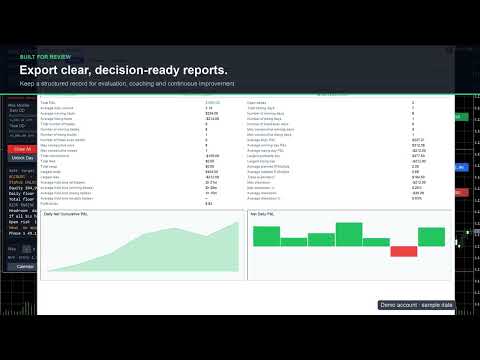
- Performance Stats Panel: Overview KPIs, performance score, cumulative and daily P&L, a monthly P&L calendar with day details, trade charts on selectable timeframes, monthly reports and comparisons, and per-symbol statistics from account deal history.
Manual Trade Guard and Pending Order Gate
Protects manual and external-EA activity with independent checks for blocked-state trading, missing SL, and risk breaches.
- Supports account, symbol, magic, or symbol+magic scope.
- Re-checks pending orders for SL, lot, exposure, and margin health.
- Can delete unsafe pending orders and close missing-SL positions.
- Optional automatic stop-loss: a managed position opened without a stop (MT5 mobile, web terminal or another EA) gets one at a set distance from its open price, or from the current price if the market has already moved past that level, plus an optional take-profit at a set R:R. This runs before any open-risk rule, so the account is not locked for a trade the EA can still protect.
Management Scope and Symbol Filter
Risk enforcement can target the whole account, the current chart symbol, a specific magic number, or symbol+magic together. An optional symbol allow-list further limits which instruments are actively managed. Calendar “All Pairs” expands event matching only and never bypasses this management boundary.
Safety boundary: with the account-wide Master lease enabled, use Account or Magic scope so one view-only chart cannot leave another symbol unprotected. On MT5 Netting accounts, use Account or Current Symbol scope because a merged net position cannot be reliably divided by magic number. Unsafe combinations are rejected during initialization.
Challenge Progress Tracker
Tracks phase state and evaluation progress for common prop-firm workflows.
- Built-in profiles: FTMO, FundingPips, The5ers, FundedNext, E8.
- Manual phase advance with validation gates before transition.
- Custom profile mode for user-defined rule sets.
- FundingPips rule editions (including the current edition, reduced daily-loss and Swing add-on options) and overnight/weekend auto-flat for Master accounts without the Swing add-on.
- E8 post-payout loss floor: after the first payout request the total-loss floor rises to the initial balance.
- FundedNext Quick Strike tracking with a 20% alert and an evaluation gate; The5ers legacy and current target profiles.
Rule presets rechecked against official firm material on 9 October 2026. Built-in profiles are starting points; the trader's official account dashboard and contract remain authoritative.
Official rule references: FTMO, FundingPips 1-Step Flex, FundingPips 2-Step Standard, FundingPips 2-Step Pro, FundingPips 2-Step Flex, The5ers High Stakes, FundedNext Stellar 2-Step, and E8 Pro Forex.
Dashboard and Controls
Draggable, stateful dashboard with live risk metrics and action controls.
- Full View: Risk monitor, trade gate, buttons, challenge state, diagnostics summary, calculator, export controls, and floating panel toggles.
- Compact View: Reduced terminal-style layout for smaller charts while preserving key risk lines.
- Diagnostics View: Configuration warnings, calendar status, retcodes, and recovery status.
- Mini View: Minimal HUD for monitoring and emergency close access.
- Smart Place order button with pre-trade gate validation; the preview shows risk, reward and R:R even while the gate blocks the order.
- Calculator row with Risk %, SL distance and R:R controls.
- Emergency Close All/Delete Orders with confirmation and optional PIN.
- Phase advance and manual override controls.
- Calendar and Stats panel shortcuts.
- Export of rule presets and challenge summary snapshots.
- Draggable Entry, SL and TP lines with on-chart handles that show price, pips and money at risk.
- Colour-coded protection status at the top right with a Setup button and one-click actions; a confirmed Take Control button appears when a standby chart can safely take over.
- Plain-language details: today, week and month P&L, daily and total floors, headroom, projected equity if every stop-loss is hit, open risk and challenge progress.
- High-DPI support: every panel scales with Windows display scaling (150%, 200%, 4K) or a manual UI scale, and the dashboard opens in the largest view that fits the chart.
State Recovery and Execution Safety
- State Recovery: Restores baseline, phase, lock state, overrides, cooldowns, dashboard position/mode, calculator state, risk-line state, and calendar panel state after reloads.
- Single Active Instance: A short atomic owner+expiry lease allows only one PFRM chart to control an account at a time. A compatible chart can take over after the previous controller releases its lease or the lease expires. After a clean stop, a newly attached chart takes over with its own settings or StateName; the previous chart keeps priority while PFRM is still attached to it. After a crash, changed settings require review: a confirmed Take Control button (or the matching input) approves them once without clearing stored risk history. A valid other lease is never overridden, and standby diagnostics explain the actual reason control is unavailable. An account-wide in-flight fence still prevents duplicate execution while a synchronous broker call is unresolved.
- Simulation Mode: Log-only mode for validating rules without sending orders, closes, or deletes.
- Execution Reconciliation: Token-based reconciliation avoids duplicate account mutations after ambiguous broker outcomes or restart events.
- Persistent One-Click Actions: Close All and Delete Orders keep unfinished work and resume after reconciliation or a compatible restart. Completion is reported only when every requested target is cleared. Protection stays active until order, deal and position data agree, including partial fills and broker-rewritten comments.
- Diagnostics: Shows calendar refresh state, last trade retcode, close/delete failures, master owner, global-state health, and recovery status.
Reporting and Presets
Export CSV reports for audit, daily summary, challenge progress, and presets. Import/export helps replicate settings across accounts or VPS.
- Audit trail for locks, alerts, trade actions, retries, and recovery.
- Daily and challenge reports for drawdown and target tracking.
- Preset import validation to prevent unsafe configuration commits.
- Account cash-flow reporting: bonuses and corrections are included, broker credit is tracked separately, and CSV files carry account and server fields.
Quick Start
- Attach EA on one chart and confirm management scope.
- Select prop-firm profile or load your preset.
- Set daily/total drawdown, open-risk, and time/news filters.
- Enable Smart De-Risk and choose desired response levels.
- Optionally enable discipline, position-manager and compliance modules (all off by default except the inactivity reminder and news pause).
- Open Setup, review the four steps, verify dashboard status, then start trading.
Who Should Use It?
- Prop-firm challenge traders who want strict drawdown discipline.
- Funded account traders who want to protect payout periods and stop over-trading.
- Manual traders who need an always-on safety layer around discretionary entries.
- Strategy-EA users who want account-level guard rails independent of signal logic.
- Traders managing multiple charts or VPS sessions who need state recovery and master-instance control.
Important Notes
Prop-firm rules change. Built-in profiles are convenience presets, not a guarantee that every account type, country-specific rule, payout rule, or newly updated firm policy is covered. Always compare the EA settings with your official firm dashboard and contract.
Risk disclaimer: This product does not guarantee challenge success, funded account retention, or loss prevention. Execution can be affected by slippage, spread spikes, broker restrictions, rejected orders, terminal connectivity, and market gaps. Forex, futures, indices, commodities, and CFDs involve substantial risk.
Optional trading automation (discipline, position manager, portfolio reduction) is off by default; review its inputs before enabling it. Trades from a phone or another EA can only be handled after they execute and while this terminal is running. Local locks and PINs do not stop someone removing the EA and are not a broker-side block. Break-even is a price level, not a promise of zero net loss after costs.
Update all PFRM charts together. For trailing profiles, confirm any UNKNOWN peak against your official dashboard (the official peak inputs accept day ID, end-of-day balance, equity peak and a fresh confirmation time) before resuming new risk.
For multi-chart operation, keep the default Account scope with the Master lease. If you intentionally disable the lease, every instance can mutate the account and must be configured and supervised separately.
If a broker replaces order comments and an ambiguous operation cannot be positively reconciled, inspect the account and history first, then use InpClearUnknownExecutionOnInit once as an explicit operator acknowledgement and return it to false immediately.
This product is not affiliated with or endorsed by FTMO, FundingPips, The5ers, FundedNext, E8, or any other prop firm named in the description.