Price Action 10 Setups Indicator
- Indicatori
- Versione: 1.0
- Attivazioni: 10

Price Action 10 Setups Indicator
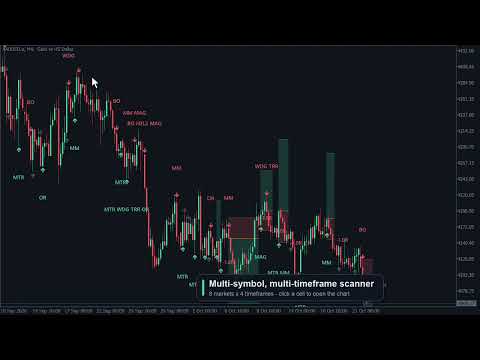
Price Action 10 Setups Indicator finds ten classic bar-by-bar price-action setups on your chart and turns every one of them into a complete trade plan: entry, stop loss and target, drawn on the chart, tracked bar by bar and summarised in a modern dashboard with per-setup statistics, a multi-symbol scanner and alerts.
The detection is the same code as in Price Action 10 Setups EA (the automated version on the MQL5 Market): the indicator shows a signal exactly where the EA would place its stop order. Use it to trade the setups by hand, to study them on any market and timeframe, or to feed your own EA through the indicator buffers.
The ten setups
- MTR — Major trend reversal: a trend, a counter-move that breaks the trend line (closes beyond the 20 EMA), then a test of the extreme (higher low / lower high or a small new extreme) → signal on the reversal bar.
- FF — Final flag: late in a trend, a small horizontal flag breaks out to a new extreme and fails → signal on the reversal back through the flag.
- BO — Breakout: a strong trend bar closes beyond the recent range → signal for follow-through, target = measured move of the range height.
- H2L2 — High 2 / Low 2: in a trend, a two-legged pullback to the EMA area → signal on the second-leg signal bar.
- WDG — Wedge (three pushes): three pushes against the trend with bounces in between → signal on the reversal after the third push.
- CH — Channel: a trend channel line through the last two swing points is tested again → signal on the reversal at the line.
- MM — Measured move: leg 1, a 30–70 % pullback, then a signal for leg 2 = leg 1 (target set to the projection).
- TRR — Trading-range reversal: flat EMA and two-sided trading; a test or failed breakout of the range extreme → signal toward the other side of the range.
- OR — Opening reversal: within 90 minutes after a session open, a fast move into a magnet (prior-day high/low, EMA, pre-open extreme) reverses. Session opens are adjustable (default 10:00 and 16:30 server time = London and New York for GMT+2/+3 brokers).
- MAG — Magnet / breakout test: after a breakout of a prior swing point or the prior-day high/low, price comes back to test the breakout level → signal for the continuation.
Long and short rules are exactly symmetric (the bear side runs the same code on mirrored prices). Every distance is measured in ATR, so one set of parameters works on forex, gold, silver, indices and oil, on every timeframe from M1 to D1 (W1 where the broker has at least 230 weekly bars).
Signals and trade plans
- Signals appear on the close of the signal bar and never repaint: an arrow under / above the bar and the setup code (several setups on one bar are listed together).
- Entry: a stop order one tick beyond the signal bar — the market must confirm the setup by trading through the bar. The order is valid for N bars (default 1).
- Stop loss: beyond the extreme of the setup (pullback low, test low, breakout bar, ...) plus a small ATR buffer.
- Target: the setup's own structural target where it has one (BO, MM, TRR), otherwise a fixed reward:risk (default 2R).
- Signal-bar quality and risk filters exactly as in the EA: close near the bar extreme, minimum body, maximum size, stop between 0.3 and 3 ATR, structural target at least 1R away, spread filter, trading hours (intraday charts).
- One signal per setup at a time (default, like the EA): while a setup's order or trade is still active, the same setup does not signal again — no stacked duplicates.
- The latest trade plans are drawn as risk (red) and reward (green) boxes with the entry line; the result is written at the end of each plan (+2.0R / −1.0R), still pending / open plans extend to the current bar. Hover any label or box for the full plan in a tooltip.
- Click any signal in the dashboard list: the chart jumps to it and draws its trade plan.
- Signals whose stop order was not triggered stay on the chart, dimmed.
Outcome tracking and statistics
- Every signal is followed bar by bar: pending → triggered → target or stop (or not triggered). On the live bar the path follows the ticks.
- For history the bar path follows the Strategy Tester's OHLC model; bars that touch more than one level are resolved with M1 data when available. Buys fill and sells exit on bid + spread (recorded spread, can be switched off). No commission or swap.
- The STATS tab shows for each setup: closed trades, win rate (with a meter), average R and net R over the scanned history (default 5 000 bars), a total for the shown setups and a cumulative-R curve.
- Use it to see which setups have behaved well on your market and timeframe — and which have not.
Dashboard
- One clean, dark panel with four tabs: SIGNALS (latest signal card with entry / stop / target, R multiple and status, plus the recent signals list — click a row to jump to that signal and see its plan), STATS, SCANNER and ALERTS.
- Switch each setup on or off with one click (chart, statistics, scanner and alerts follow); All / None in one click.
- Draggable by its header, collapsible to a single bar, sharp on high-DPI / 4K screens (automatic scale or 100–200 %).
- Position, tab and switches are remembered per chart, also across timeframe changes.
- Optional dark chart colour theme matching the panel; your original colours are restored when the indicator is removed.
Multi-symbol, multi-timeframe scanner
- Up to 12 symbols × 5 timeframes (default EURUSD, GBPUSD, USDJPY, AUDUSD, USDCAD, XAUUSD, US30, USTEC on M15, H1, H4, D1). Broker suffixes (.a, m, .pro, #) are found automatically.
- Each cell shows the latest signal of the last N closed bars (setup code, direction, bars ago); fresh signals are highlighted.
- Click a cell to open that symbol and timeframe on the chart.
- Cells are evaluated only on a new bar of their timeframe and spread over time, so the chart stays responsive.
Alerts
- Channels: popup with sound, push notification to the MetaTrader mobile app and e-mail — switchable in the ALERTS tab.
- Events: new signal (with entry, stop, target and R multiple), entry triggered, target hit, stop hit, not triggered — each one can be switched on or off.
- Choose the setups that alert (ALL or e.g. BO|MAG|H2L2); optional alerts for signals found by the scanner on other markets.
- Each event alerts once — also after a timeframe change or a terminal restart. History never triggers alerts.
For EA developers (iCustom)
- Buffer 0 / 2: buy / sell arrow price. Buffer 4: setup (+1..+10 buy, −1..−10 sell, MTR = 1 … MAG = 10). Buffers 5 / 6 / 7: entry, stop loss, target. Buffer 8: result in R (+R target, −1 stop, 0 not triggered, empty while pending / open). Buffer 9: bit mask of all setups on the bar (buys in bits 0–9, sells × 1024).
- Values are written on the signal bar when it closes (read shift 1) and do not change afterwards, except the result buffer once the trade is decided.
Main inputs
- Setups shown; EMA / ATR periods, swing depth, trend slope; signal-bar filters; order expiry, reward:risk, structural targets, stop buffer, risk range in ATR, spread filter, trading hours; pattern parameters (breakout lookback and size, range lookback and target, session opens and window).
- History bars, one signal per setup at a time, spread in statistics, M1 resolution.
- Chart theme, number of trade plans drawn, labels, results, colours; dashboard scale, position and font; scanner symbols / timeframes / bars; alert channels, events and setups.
Please note
The statistics are a simulation on historical bars; they do not include commission or swap and they are not a forecast. Tested over 21 markets, the raw setups are on average close to break-even after spread — an edge, where there is one, depends on the market, the setup and the timeframe. Check a setup's statistics on your own market and timeframe, and practise on a demo account before trading real money.
Trading involves substantial risk. Past results do not guarantee future performance. This product is not affiliated with or endorsed by any trading educator or course.