MACD Divergence Radar Pro
- Indicatori
- Versione: 1.0
- Attivazioni: 10

Multi-Symbol Divergence Scanner & Visual Dashboard for MetaTrader 5
Regular & Hidden Divergence 20+ Pairs Simultaneous Scan One-Click Chart Opening Auto MACD Sub-WindowOverview
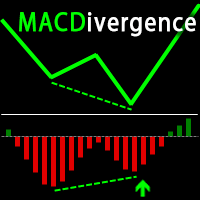
MACD Divergence Radar Pro is a professional-grade divergence detection indicator that continuously scans multiple currency pairs and timeframes in real time. It identifies both regular and hidden MACD divergences — bullish and bearish — and presents all findings in a sleek, draggable on-chart dashboard. Every signal is drawn directly on the price chart and the MACD oscillator window, giving you instant visual confirmation without switching between charts.
Why divergence matters: MACD divergence signals a weakening trend before price reverses. Catching divergence early can mean the difference between entering near the top/bottom and chasing the move. This indicator automates the tedious manual scanning so you never miss an opportunity.
Key Features
📡 Multi-Symbol Real-Time Scanner
Scan 20+ forex pairs simultaneously on any timeframe. Configurable symbol list and scan intervals. You monitor one chart — the radar watches them all.
📊 Auto MACD Sub-Window
Automatically adds the MACD indicator below the chart when loaded. Divergence lines are drawn on both the price chart and the MACD oscillator window for dual-view confirmation.
🔍 Regular & Hidden Divergence
Detects all four divergence types: Regular Bullish, Regular Bearish, Hidden Bullish, and Hidden Bearish. Each type is color-coded for instant recognition.
🖱️ Draggable Dashboard Panel
A compact, non-intrusive panel shows all active signals with timestamps. Drag it anywhere on the chart. It stays out of your way while keeping you informed.
📂 One-Click Chart Opening
Each scanner entry has an Open button. Click it to instantly open the symbol's chart with the MACD sub-window and divergence lines already drawn.
🔔 Multi-Channel Alerts
Get notified via popup, push notification, or email the moment a new divergence is detected. Never miss a signal — even away from your desk.
Divergence Types Detected
| Type | Price Action | MACD Action | Implication |
|---|---|---|---|
| Regular Bullish | Lower Low | Higher Low | Potential reversal UP |
| Regular Bearish | Higher High | Lower High | Potential reversal DOWN |
| Hidden Bullish | Higher Low | Lower Low | Trend continuation UP |
| Hidden Bearish | Lower High | Higher High | Trend continuation DOWN |
How It Works
- Attach to any chart — the indicator loads instantly. A MACD (12, 26, 9) sub-window is added automatically below price.
- The scanner begins — it monitors all configured symbols/timeframes, detecting pivot highs and lows on both price and the MACD oscillator.
- Divergence identified — trend lines are drawn on the price chart AND the MACD window. The dashboard updates and an alert fires.
- Click "Open" — open any symbol's chart directly from the dashboard with MACD and divergence lines pre-drawn.
Dual-View Divergence Visualization
Unlike most divergence indicators that only mark price, MACD Divergence Radar Pro draws synchronized trend lines on both the main price window and the MACD oscillator sub-window:
- Price chart: Trend line connecting the two pivot points + directional arrow + signal label
- MACD window: Corresponding oscillator-value trend line connecting the same pivots, making the divergence visually obvious
- Color-coded: ■ Bullish Regular ■ Bullish Hidden ■ Bearish Regular ■ Bearish Hidden
Input Parameters
Signal Engine
| Parameter | Default | Description |
|---|---|---|
| MACD Fast | 12 | Fast EMA period |
| MACD Slow | 26 | Slow EMA period |
| MACD Signal | 9 | Signal SMA period |
| Oscillator Source | Histogram | Main line or histogram (main − signal) |
| Pivot Span | 5 | Bars on each side to confirm a pivot |
| Lookback Bars | 300 | How far back to search for pivots |
| Min Price Delta (points) | 50 | Minimum price difference between pivots |
| Min Oscillator Delta | 0.00005 | Minimum MACD difference between pivots |
| Regular Divergence | On | Enable regular divergence detection |
| Hidden Divergence | On | Enable hidden divergence detection |
| Max Same-Direction Signals | 4 | Cap repeated signals in one direction |
| Scan On New Bar Only | On | Reduce CPU usage on the current chart |
Scanner / Dashboard
| Parameter | Default | Description |
|---|---|---|
| Enable Scanner | On | Toggle multi-symbol scanning |
| Scanner Symbols | 20 major & cross pairs | Comma-separated symbol list (auto-resolves broker suffixes) |
| Scanner Timeframes | H1 | Comma-separated: M5, M15, H1, H4, D1, etc. |
| Scanner Interval (sec) | 60 | How often to re-scan all symbols |
| Dashboard Rows | 12 | Maximum visible rows in the panel |
Alerts & Visuals
| Parameter | Default | Description |
|---|---|---|
| Alert Popup | On | Show MT5 alert popup |
| Alert Push | Off | Send push notification to mobile |
| Alert Email | Off | Send email notification |
| Show Signals | On | Draw trend lines & arrows on chart |
| Show Panel | On | Display the dashboard panel |
| Colors | — | Fully customizable: bull, bear, hidden bull, hidden bear, panel background, border, text |
Optimized Performance
- MACD handle caching — indicator handles are created once and reused, avoiding the overhead of creating/releasing handles on every scan cycle.
- Panel text caching — dashboard text is rebuilt only when signals change or every 5 seconds, not on every tick.
- Smart drag rendering — during panel drag, only position properties are updated (no full redraw), ensuring smooth 60fps-like responsiveness.
- New bar filtering — optional scan-on-new-bar-only mode reduces CPU usage to near zero between bars.
Broker Compatibility
The built-in smart symbol resolver automatically matches your input symbols (e.g., EURUSD ) to your broker's naming convention (e.g., EURUSD.i , EURUSDm , EURUSD.pro ). No manual suffix configuration needed — just type the base pair name and the indicator handles the rest.
Recommended Usage
- Swing trading / Intraday: Use H1 or H4 timeframes for high-quality divergence signals.
- Multi-timeframe confirmation: Set scanner timeframes to H1,H4 and look for divergence alignment across timeframes.
- Combine with S/R levels: Divergence at key support/resistance zones provides the highest probability entries.
- Risk management: Use the "Max Same Direction Signals" setting to avoid over-trading in choppy markets.
Requirements
- MetaTrader 5 (build 2500 or later recommended)
- Any broker with standard OHLC data
- Recommended: VPS or always-on PC for continuous scanner monitoring and push alerts
Version History
| Version | Changes |
|---|---|
| 1.00 | Initial release — full divergence detection engine, multi-symbol scanner, draggable dashboard, auto MACD sub-window, dual-view divergence drawing, one-click chart opening, multi-channel alerts, PC local time display, optimization reminder, performance-optimized architecture. |