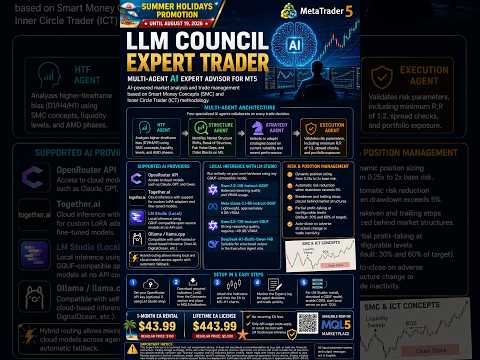
LLM Council Expert Trader
- Experts
- Versione: 10.67
- Aggiornato: 8 settembre 2026
- Attivazioni: 12

LLM Council Expert Trader – Multi-Agent AI Expert Advisor for MT5
LLM Council Expert Trader is an Expert Advisor that uses Large Language Models to analyze market structure and manage trades based on Smart Money Concepts (SMC) and Inner Circle Trader (ICT) methodology. Rather than relying on static indicator signals alone, the EA sends market context to AI models for structured reasoning before any trade is placed.
                                                               Join the exclusive community right now.
Get instant access to the Performance Showroom, see real results in action, and enjoy ultra-fast & completely free tech support on the official channel: channels/llmcouncilea
                                                               Stop struggling alone with your EA.
                    Here you’re supported, you progress faster, and you become part of a private circle of traders who share the same goals.
                                                           Limited spots available to keep the quality high.
                 Disclaimer: Results depend on market conditions, model selection, and EA settings. Past performance does not guarantee future results
| Before using the EA, please read the user manual available in the Comments section or tab. Required Indicator files to attach to the chart and configuration presets are also provided there. |
|---|
Backtests now take entries from a built-in SMC engine running on your broker's candles. No AI or network calls are made, and results are fully reproducible. The full live execution chain and Position Manager are used, and optimization offers 7 "Custom max" objectives.
NEW: Commission Awareness (only on MT5 platform)
The EA can now enforce your minimum risk-to-reward net of spread AND broker commissions, and factor those costs into position sizing — so your R:R reflects what you actually keep (on MT5 build 6060+). Off by default. Ideal for raw/ECN accounts.
Multi-Agent Architecture
The EA operates through four specialized AI agents that collaborate on each trading decision:
- HTF Agent: Analyzes higher-timeframe bias (D1/H4/H1) using SMC concepts, liquidity levels, and AMD phases.
- Structure Agent: Identifies Market Structure Shifts, Break of Structure, Fair Value Gaps, and Order Blocks on M5.
- Strategy Agent: Selects or adapts strategies based on current volatility and recent performance.
- Execution Agent: Validates risk parameters, including minimum R:R of 1:2, spread checks, and portfolio exposure.
Supported AI Providers
The EA supports multiple LLM providers with per-agent routing:
- OpenRouter API: Access to cloud models such as Claude, GPT, and Qwen.
- Together.ai: Cloud inference with support for custom LoRA adapters and fine-tuned models.
- LM Studio: Local inference using GGUF-compatible open-source models at no API cost.
- Ollama / llama.cpp: Compatible with self-hosted or cloud-based inference (Vast.AI, DigitalOcean, etc.).
Hybrid routing allows mixing local and cloud models across agents. The priority order (LM Studio, Together.ai, OpenRouter) is fully configurable with automatic fallback.
Local Inference with LM Studio
The EA can run entirely on your own hardware using any GGUF-compatible model. Suggested models for local use:
- Qwen2.5-14B-Instruct-GGUF: Balanced reasoning quality and VRAM usage.
- Meta-Llama-3.1-8B-Instruct-GGUF: Lightweight, approximately 8 GB VRAM.
- Qwen2.5-72B-Instruct-GGUF: Strong reasoning quality, requires approximately 48 GB VRAM.
- DeepSeek-R1-Distill-Qwen-14B: Suitable for structured output in the Execution Agent role.
Custom Model Support
Traders and developers can deploy their own LoRA adapters, fine-tuned models, or custom structure agents. Different models can be assigned per agent role (HTF, Structure, Strategy, Execution), using cloud or local inference.
Risk and Position Management
The EA includes built-in risk controls:
- Dynamic position sizing from 0.25x to 2x base risk.
- Automatic risk reduction when drawdown exceeds 5%.
- Breakeven and trailing stops placed behind market structures.
- Partial profit-taking at configurable levels (default: 30% and 60% of target).
- Auto-close on adverse structure change or trade inactivity.
Setup Instructions
- Set your OpenRouter API key (optional if using LM Studio only).
- Download the required indicators (.ex5) from the Comments section and place them in the MQL5\Indicators folder.
- Attach the indicators and then the EA to M5–H1 charts.
- Monitor the Experts log for agent decisions and trade activity.
For LM Studio setup: install LM Studio, download a GGUF model, enable CORS, and start the local server on port 1234. In MT5, add http://localhost:1234 to the WebRequest allowed list (Tools > Options > Expert Advisors). In EA inputs, set InpUseLMStudio to true.
Add these URLs to the WebRequest allowed list in MT5: https://openrouter.ai and https://api.together.xyz. Add http://localhost:1234 if using local inference.
Configuration presets for Forex and Crypto are available in the Comments section.
Back to the trading deck Promotion (until October 19, 2026)

1-Month EA Rental: $43.99 (regular price: $100). FLASH DISCOUNT $11.95 (until the 12th sale)
Lifetime EA License: $443.99 (regular price: $5,000). No recurring EA fees. Only API usage costs apply, or run at no cost with LM Studio local inference.
Important Notice
This Expert Advisor is a technical tool, not investment advice. It does not constitute a recommendation to buy, sell, or hold any financial instrument. Trading foreign exchange, CFDs, and other leveraged products involves significant risk of loss and is not suitable for all investors. You should carefully consider your financial situation and risk tolerance before trading. Never trade with money you cannot afford to lose. Results depend on market conditions, model selection, and EA settings. Past performance does not guarantee future results. Always validate new models or configurations on a demo account before live deployment. Estimated cloud API cost per analysis is approximately $0.01–$0.05; local inference has no API cost.
All input parameter names, and output messages are in English.