LLM Council Expert Trader
- Experts
- Version: 10.67
- Mise à jour: 8 septembre 2026
- Activations: 12

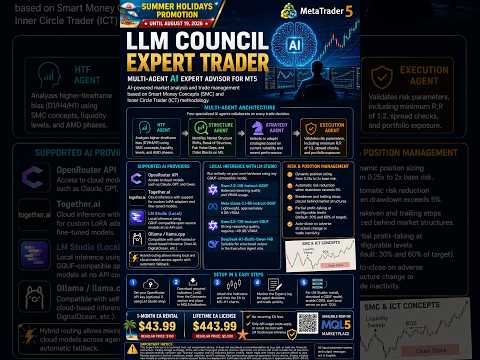
LLM Council Expert Trader – Expert Advisor Multi-Agent IA pour MT5
LLM Council Expert Trader est un Expert Advisor qui utilise des Large Language Models pour analyser la structure du marché et gérer les trades selon les concepts Smart Money Concepts (SMC) et la méthodologie Inner Circle Trader (ICT). Au lieu de se reposer uniquement sur des signaux d’indicateurs statiques, l’EA envoie le contexte de marché à des modèles d’IA pour un raisonnement structuré avant de placer tout trade.
                                                               Rejoignez la communauté exclusive dès maintenant.
Obtenez un accès instantané au Performance Showroom, voyez les vrais résultats en action, et profitez d’un support technique ultra-rapide et entièrement gratuit sur le canal officiel : channels/llmcouncilea
                                                               Arrêtez de galérer seul avec votre EA.
                    Ici vous êtes accompagné, vous progressez plus vite, et vous faites partie d’un cercle privé de traders qui partagent les mêmes objectifs.
                                                           Places limitées pour préserver la qualité.
                 Avertissement : Les résultats dépendent des conditions de marché, de la sélection du modèle et des paramètres de l’EA. Les performances passées ne garantissent pas les résultats futurs.
| Avant d’utiliser l’EA, veuillez lire le manuel utilisateur disponible dans la section Commentaires ou l’onglet. Les fichiers d’indicateurs requis à attacher au graphique et les presets de configuration y sont également fournis. |
|---|
NOUVEAU : Prise en compte des commissions (uniquement sur la plateforme MT5)
L’EA peut désormais imposer votre ratio risque/récompense minimum net de spread ET des commissions du broker, et intégrer ces coûts dans le dimensionnement des positions — afin que votre R:R reflète réellement ce que vous conservez (sur MT5 build 6060+). Désactivé par défaut. Idéal pour les comptes raw/ECN.
NOUVEAU : OpenRouter Auto Router
Laissez OpenRouter choisir le meilleur modèle pour chaque requête au lieu d’en fixer un par agent. Vous choisissez quels agents l’utilisent et définissez une préférence coût/qualité. Facturation au tarif du modèle sélectionné. S’applique uniquement aux agents routés via OpenRouter. Désactivé par défaut.
Architecture Multi-Agents
L’EA fonctionne grâce à quatre agents IA spécialisés qui collaborent sur chaque décision de trading :
- HTF Agent : Analyse le biais des timeframes supérieurs (D1/H4/H1) à l’aide des concepts SMC, des niveaux de liquidité et des phases AMD.
- Structure Agent : Identifie les Market Structure Shifts, Break of Structure, Fair Value Gaps et Order Blocks sur M5.
- Strategy Agent : Sélectionne ou adapte les stratégies en fonction de la volatilité actuelle et des performances récentes.
- Execution Agent : Valide les paramètres de risque, y compris un R:R minimum de 1:2, les contrôles de spread et l’exposition du portefeuille.
Fournisseurs d’IA pris en charge
L’EA prend en charge plusieurs fournisseurs LLM avec routage par agent :
- OpenRouter API : Accès aux modèles cloud tels que Claude, GPT et Qwen.
- Together.ai : Inférence cloud avec support des adaptateurs LoRA personnalisés et des modèles fine-tunés.
- LM Studio : Inférence locale utilisant des modèles open-source compatibles GGUF sans coût d’API.
- Ollama / llama.cpp : Compatible avec l’inférence auto-hébergée ou cloud (Vast.AI, DigitalOcean, etc.).
Le routage hybride permet de mélanger modèles locaux et cloud entre les agents. L’ordre de priorité (LM Studio, Together.ai, OpenRouter) est entièrement configurable avec basculement automatique.
Inférence locale avec LM Studio
L’EA peut fonctionner entièrement sur votre propre matériel avec n’importe quel modèle compatible GGUF. Modèles suggérés pour un usage local :
- Qwen2.5-14B-Instruct-GGUF : Qualité de raisonnement équilibrée et utilisation de VRAM.
- Meta-Llama-3.1-8B-Instruct-GGUF : Léger, environ 8 Go de VRAM.
- Qwen2.5-72B-Instruct-GGUF : Forte qualité de raisonnement, nécessite environ 48 Go de VRAM.
- DeepSeek-R1-Distill-Qwen-14B : Adapté pour une sortie structurée dans le rôle de l’Execution Agent.
Support des modèles personnalisés
Les traders et développeurs peuvent déployer leurs propres adaptateurs LoRA, modèles fine-tunés ou agents de structure personnalisés. Différents modèles peuvent être assignés par rôle d’agent (HTF, Structure, Strategy, Execution), en utilisant l’inférence cloud ou locale.
Gestion du risque et des positions
L’EA inclut des contrôles de risque intégrés :
- Dimensionnement dynamique des positions de 0,25x à 2x le risque de base.
- Réduction automatique du risque lorsque le drawdown dépasse 5 %.
- Breakeven et trailing stops placés derrière les structures de marché.
- Prise de profits partiels à des niveaux configurables (par défaut : 30 % et 60 % de l’objectif).
- Fermeture automatique en cas de changement de structure adverse ou d’inactivité du trade.
Instructions d’installation
- Définissez votre clé API OpenRouter (optionnel si vous utilisez uniquement LM Studio).
- Téléchargez les indicateurs requis (.ex5) depuis la section Commentaires et placez-les dans le dossier MQL5\Indicators.
- Attachez les indicateurs puis l’EA aux graphiques M5–H1.
- Surveillez le journal Experts pour les décisions des agents et l’activité des trades.
Pour la configuration de LM Studio : installez LM Studio, téléchargez un modèle GGUF, activez CORS et démarrez le serveur local sur le port 1234. Dans MT5, ajoutez http://localhost:1234 à la liste autorisée WebRequest (Outils > Options > Expert Advisors). Dans les paramètres de l’EA, définissez InpUseLMStudio sur true.
Ajoutez ces URL à la liste autorisée WebRequest dans MT5 : https://openrouter.ai et https://api.together.xyz. Ajoutez http://localhost:1234 si vous utilisez l’inférence locale.
Des presets de configuration pour le Forex et les Crypto sont disponibles dans la section Commentaires.
Retour au trading deck – Promotion (jusqu’au 19 octobre 2026)

Location de l’EA 1 mois : 43,99 $ (prix normal : 100 $).
Licence à vie de l’EA : 443,99 $ (prix normal : 5 000 $). Aucun frais récurrent pour l’EA. Seuls les coûts d’utilisation de l’API s’appliquent, ou fonctionnez sans coût avec l’inférence locale LM Studio.
Avertissement important
Cet Expert Advisor est un outil technique, et non un conseil en investissement. Il ne constitue pas une recommandation d’acheter, de vendre ou de détenir un instrument financier. Le trading de devises, de CFD et d’autres produits à effet de levier comporte un risque important de perte et n’est pas adapté à tous les investisseurs. Vous devez soigneusement évaluer votre situation financière et votre tolérance au risque avant de trader. Ne tradez jamais avec de l’argent que vous ne pouvez pas vous permettre de perdre. Les résultats dépendent des conditions de marché, de la sélection du modèle et des paramètres de l’EA. Les performances passées ne garantissent pas les résultats futurs. Validez toujours les nouveaux modèles ou configurations sur un compte démo avant un déploiement en réel. Le coût estimé de l’API cloud par analyse est d’environ 0,01–0,05 $ ; l’inférence locale n’a aucun coût d’API.
Tous les noms des paramètres d’entrée et les messages de sortie sont en anglais.