Smart Bulk SL Setter

Smart Bulk SL Setter

MT5 Script – Bulk Stop Loss Management

Overview

Smart Bulk SL Setter is a trade management script for MetaTrader 5 designed to modify the Stop Loss level of multiple existing open positions at once.

The script executes once per attachment and applies a user-defined Stop Loss price based on selected filters.
It does not run in the background, does not open trades, and does not generate signals.

Core Functionality

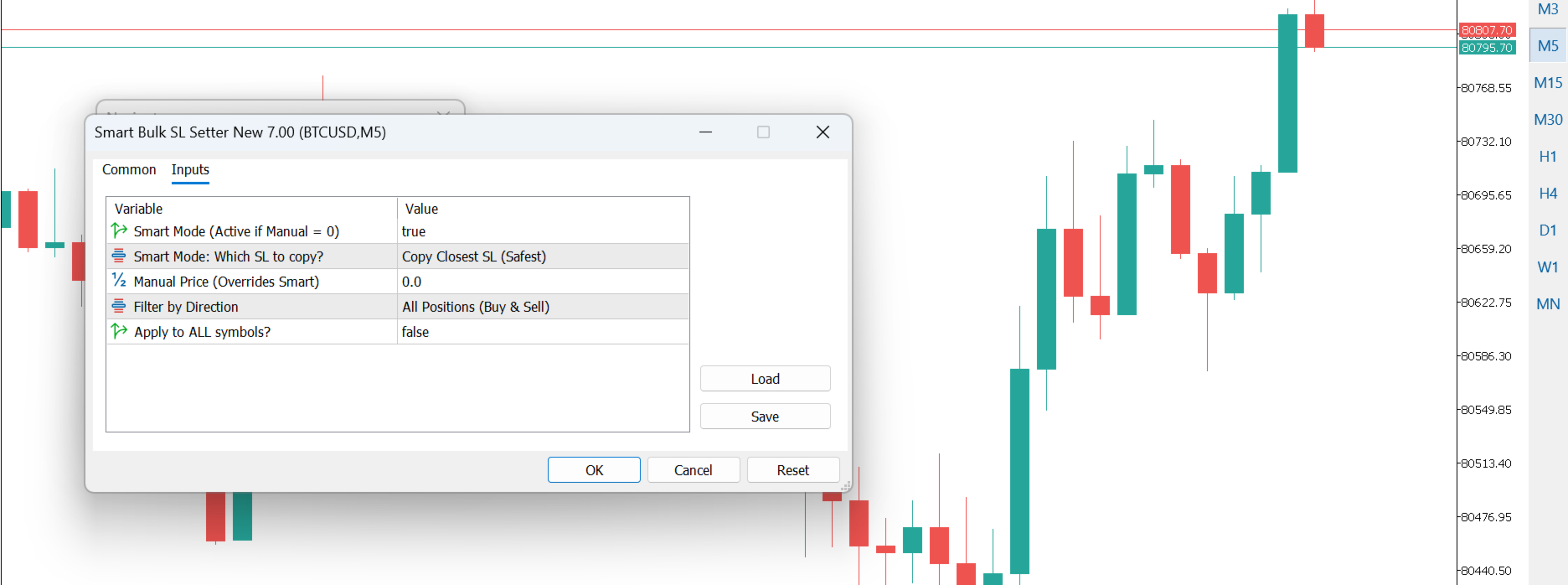
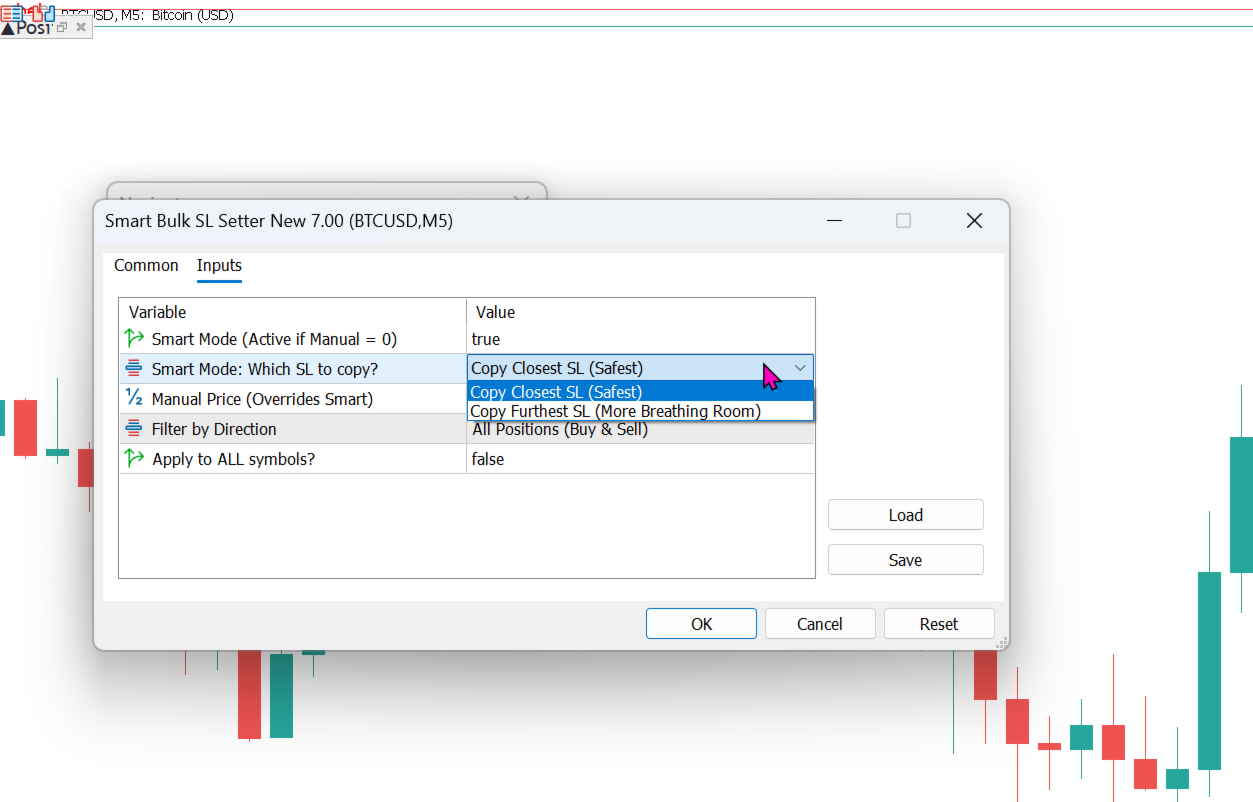
The script allows setting a unified Stop Loss level for multiple positions in a single execution.

Users can choose to apply the Stop Loss to Buy positions only, Sell positions only, or all open positions.
The action can be limited to the current chart symbol or extended to all symbols with open positions.

Only the Stop Loss level is modified.
Existing Take Profit levels remain unchanged.

Execution Behavior

Stop Loss modification requests are sent efficiently for all eligible positions.
The script tracks how many positions have been successfully updated during execution.

Each position is evaluated independently, and positions that do not meet the selected criteria are ignored.

Intended Use

This script is intended for manual traders who manage multiple open positions and require fast, consistent Stop Loss adjustments.

It is suitable for risk management scenarios where bulk Stop Loss control is required without automation.

Important Notes

This product is a script, not an Expert Advisor.
It works only on existing open positions.
It does not open trades, analyze market conditions, or generate trading signals.
All actions require explicit user configuration
Prodotti consigliati
PropGuard Prop Firm Risk Manager
Ibrahim Maher Mohamed Soliman
PropGuard is a risk-management utility. It opens no trades of its own. It watches your whole account — manual trading or any other EA — from a single chart, and steps in before a prop-firm rule ends your challenge. Why traders lose funded accounts: rarely one bad trade — usually one bad day. A revenge sequence, a missed stop-loss, a news spike. Your firm's dashboard tells you after the breach. PropGuard warns you as you approach a limit, and if you hit it, it flattens the account and keeps it
Trade Shell, upgraded: P1 Prime Trade Manager The same product you know, rebuilt from the ground up by Denis Sotnikov, who has written trading programs for MetaTrader since 2008. A developer who stays Denis built Euronis Scalper, the example product MetaQuotes shows in the "How It Works" guide inside every MetaTrader 5 terminal (Navigator, Market, How It Works). He answers here in the comments, and he will still be here next year. Built from what traders report We read thousands of user comments
Apex StopLoss Manager
Muhammad Hassan Muhammad Ahmad Atiyah
Apex StopLoss Manager MT5 Script – Stop Loss Control Utility Overview Apex StopLoss Manager is a trade management script for MetaTrader 5 designed to provide precise, rule-based control over Stop Loss behavior on existing open positions . The script focuses on manual execution and accuracy. It does not use automated trading logic, does not open trades, and runs once per attachment . Core Functionality The script provides two independent Stop Loss control functions, both enabled only through exp
Features: fast opening / closing deals automatic closing of trades by profit / loss shows the number of deals and the total profit for the Symbol Fast open deals: set the Lot volume set  StopLoss / TakeProfit in points (if you set "0", then it is not used) set slippage set Magic (if necessary) set comment (if necessary) Fast open features: fast open Buy fast open Sell fast close ALL open orders for the current Symbol Auto close deals by profit / loss (analogue of virtual StopLoss / TakeProfi
Dashboard Pro Trade Panel
Marc Francis Christian Yves Joseph Aime
Dashboard Pro Trade Panel est un panneau de trading manuel pour MetaTrader 5. Il permet de passer des ordres et de gérer les positions depuis le graphique, avec un aperçu des niveaux de stop-loss et de take-profit avant l'envoi de l'ordre. Il n'ouvre aucun trade de lui-même. Passage d'ordres Achat ou vente au marché, ou ordre en attente à un prix de votre choix. Taille de lot réglée avec les boutons -/+, ou bouton lot en mode risque : vous saisissez un pourcentage du solde du compte et le lot
Don't want to risk or loose your personal trading account or prop trading firm account because of a simple Margin Call or exceeded Loss Limit? Then this Utility Expert Advisor is the solution for you! This Expert Advisor monitors your account Equity or Balance or even both! If the Equity and/ or Balance fall under your defined stop limits, the EA closes all of your positions and keeps you so on track. Options and Variables: Monitored Values: Choose which values should get monitored Equity: if
Close All and Change Take Profit and Stop Loss All Orders. Main Features     Ability to Close All Orders the Symbol you put this EA.     Ability to Change Take Profit to All Order.     Ability to Change Stop Loss to All Order.     Show Order count.     Show Average price with info and Horizontal Line.     Show lot open.     Show Price diff from average to price now     Show broken price with info and Horizontal Line.     Easy to use . How to use Close All (Symbol) PC : you can click on CloseAl
Smart Bulk TP Setter
Muhammad Hassan Muhammad Ahmad Atiyah
Smart Bulk TP Setter MT5 Script – Bulk Take Profit Management Overview Smart Bulk TP Setter is a trade management script for MetaTrader 5 designed to modify the Take Profit level of multiple existing open positions at once. The script executes once per attachment and applies a user-defined Take Profit price based on selected filters. It does not run in the background, does not open trades, and does not generate signals. Core Functionality The script allows setting a unified Take Profit level fo
Instructions for Using Reverse Copier EA Attach EA to Charts Open MetaTrader and attach the EA to any chart on both accounts (master & slave). Make sure AutoTrading is enabled. Master Account (Signal Sender) Set Mode = Master in EA settings. This account will send trade signals. Slave Account (Signal Receiver) Set Mode = Slave in EA settings. This account will receive trades in reverse (opposite direction). Lot Multiplier In Slave EA settings, set Multiplier to control lot size. Example: 1.0
Risk Trade Panel
Aleksandr Bernes
Risk Trade Panel è un Expert utility MetaTrader 5 con pannello sul grafico per il trading manuale. Non genera segnali di ingresso e non usa griglia né martingala. Decidi tu quando comprare o vendere; il pannello aiuta con sizing, stop e gestione della posizione. Cosa fa - lotto fisso o per rischio % del balance (o equity) rispetto alla distanza dello SL; - BUY / SELL a mercato con SL e TP predefiniti (punti o prezzo assoluto); - pending: Buy Limit, Sell Limit, Buy Stop, Sell Stop; - break-even:
Visual Lot Size Calculator
Ahmed Ismail Muhammad Ismail Al Talhat
SignalX Original MetaTrader tools by Ahmed Ismail. This listing is part of the SignalX range. Visual trade planning and lot calculation utility for MetaTrader 5. Description: This utility allows traders to plan their entries visually directly on the chart. By using interactive graphical boxes, you can define your entry, stop loss, and take profit levels before opening a position. The software automatically calculates the required volume (lots) based on your account settings. It provides real-t
EA Health Monitor Pro
Allan Aparece Ninal
EA Health Monitor Pro is an indicator for MetaTrader 5 that watches every Expert Advisor on your account. It shows one row per EA, by magic number. Manual trades get their own row, and each EA gets a result curve. Alarms fire when floating loss or drawdown passes your limit, or when an EA goes quiet. It only reads the account history and open positions. It never opens, changes or closes a trade. Standalone: Everything is built in. You do not need to buy or install any other product named on this
Global Stop Loss and Take Profit Manager Drag Lines Auto Apply Already using my free Global Stop Loss and Take Profit Setter? This is the always on version. Instead of setting levels once, you drag two lines on the chart and every manual position on that symbol — plus every new one you open — instantly inherits the Stop Loss and Take Profit. No clicking into each order. No forgetting a stop. Global Stop Loss and Target Manager is a drag-and-drop risk tool for manual traders on MetaTrader 5. Pu
Daily Loss Limit and Equity Drawdown Protection for MT5 - Risk Manager for Prop Firm and Funded Accounts It enforces your daily loss limit, weekly loss limit and equity drawdown brake on every position, however it was opened. Account Guardian is a protection utility - it does not trade by itself  and it does not promise any profit. It watches your entire account and  steps in when your risk rules are broken, no matter whether the positions  were opened manually, from the mobile app, or by anothe

Salve commercianti! Sono il tuo assistente commerciale. Permettetemi di dirvi la mia competenza: 1. Sono bravo nella gestione delle tue posizioni, indipendentemente da quale estremità hai posto un ordine, posso aiutarti per la prima volta ad aggiungere una linea di stop loss ragionevole e lo stop loss mobile. 2. Posso aiutarti a evitare l’ascesa e la caduta e a sradicare le debolezze umane dalle radici dei principi. 3. Ti invierò un messaggio di notifica al tuo client MT5 mobile al miglior punt
Scoprite quanto guadagna davvero ogni Expert Advisor del vostro conto. Halberd Portfolio Monitor divide lo storico del conto per magic number e mostra per ogni strategia operazioni, percentuale di successo, fattore di profitto, risultato netto, drawdown, posizioni aperte e uno stato di salute. Legge soltanto i dati e non opera mai. Quando più Expert Advisor lavorano sullo stesso conto, MetaTrader mostra un unico saldo per tutti. Una strategia che perde in silenzio può nascondersi dietro una che
ATR-based dynamic buy-only grid EA for Gold (XAUUSD). Live account verified on Myfxbook. Dynamic ATR spacing, basket TP/SL, on-chart dashboard. No hedging. A buy-only grid Expert Advisor built specifically for Gold. Instead of using only a fixed grid step, the EA uses ATR-based dynamic grid spacing , automatically adjusting the distance between grid levels according to Gold's current volatility. When volatility increases, grid spacing expands; when volatility decreases, spacing adjusts accordin
Talents ATR Scalper Utility (MT5) The Talents ATR Scalper Utility is a professional-grade trade execution and management tool built for MetaTrader 5. Inspired by the Biblical Parable of the Talents , this utility is designed to help traders multiply their potential with precision risk control, one-click simplicity, and advanced automation. Whether you’re scalping forex, gold, or indices, this tool delivers speed, consistency, and confidence. Key Features One-Click Trade Preview Click below price
HotKeys MT5
Alexey Valeev
This utility provides the ability to use hot keys in manual trading instantly responding to the current market situation. You can assign hot keys to open/close positions by their type, open/close all positions on the current chart and remove all orders on the current chart. You can also assign hot keys for five predefined trade volumes and switch between them if necessary with no need to change the volume manually from time to time. It is also possible to set the auto calculation of a trade volu
Breakeven Quick SL
Makarii Gubaydullin
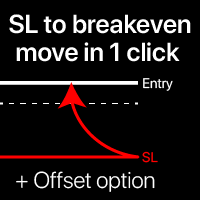
Livelli di breakeven: sposta SL con 1 clic. Evita di perdere profitti esistenti Con questo strumento, puoi proteggere rapidamente il tuo profitto con un solo clic. Particolarmente importante per il trading a breve termine. Disponibile anche l'opzione offset. Utility multifunzione : 66+ funzioni, incluso questo strumento | Contattami per qualsiasi domanda | Versione MT4 Come spostare i livelli SL: 1. Specifica un [Simbolo] particolare, o seleziona [TUTTI] i simboli. 2. Seleziona il tipo di trade
JustEnter The Trade
Simon Karl Jakovac
justEnter is a semi-automatic trade management utility for MetaTrader 5. You choose the entry; the utility calculates position size, places the stop loss, and manages the position through breakeven, partial closes and trailing until exit. For traders following signals If you take your entries from a signal service, a mentor, or your own alerts, the entry decision is already made by the time you open the terminal. What remains is execution: sizing the position correctly, placing the stop, moving
AlgoWay Telegram Reporter is a free MetaTrader 5 utility that sends clear and detailed trading notifications directly to Telegram. The utility does not open, modify, or close trades. It only monitors trading activity on the account. It works with: • Manual trades • Trades opened from mobile or web terminals • Trades opened by Expert Advisors • Trades opened through AlgoWay • Netting and hedging accounts Main features • Position opening notifications • Entry price, volume, Stop Loss and Take Prof
FREE
AllClosedMT5
Andrey Spiridonov
The AllClosedMT5 utility in the form of an expert. The utility is designed for closing all open positions simultaneously based on the total profit (in the deposit currency) of all open positions. The utility can be attached to any chart with any trading instrument. Parameters Profit - the total positive profit in the deposit currency, at which all open positions are closed (profit). Stop - the total negative profit in the deposit currency, at which all open positions are closed (loss). The valu
FREE
RRPP Script
Mikhail Ostashov
RRPP Script A script for placing a pending order prepared by the Risk Ratio Trade Panel indicator. Reads the entry price, Take Profit, Stop Loss and lot size directly from the indicator lines on the chart. Requirements The Risk Ratio Trade Panel indicator must be attached to the chart and the panel must be open before running the script. How it works Attach the Risk Ratio Trade Panel indicator to the chart, open the panel and set the Entry, TP and SL lines to the desired levels. Then run RRPP Sc
FREE
Ronin Shield - Daily Loss Limiter & Account Guard (MT5) When your loss limit is hit, your trading day is over. A utility built to stop the "just one more trade" moment during prop firm challenges. Attach it to just one chart and it protects the whole account: every symbol and every position, including manual trades and other EAs. No need to open a chart for each symbol. No external DLLs. No web requests. ============================== THREE PROTECTION LINES ============================== 1.
Bneu Trade Manager
Marvinson Salavia Caballero
Bneu Trade Manager is a professional trading utility Expert Advisor for MetaTrader 5 designed to help manual traders plan, execute, protect and manage trades directly from a visual chart dashboard. It combines drag-and-drop trade planning, risk-based position sizing, one-click execution, pending orders, automated trade management for both EA and manual trades, protection tools, templates, reporting and performance analytics in one organized panel. The latest version includes a reorganized dash
FREE
This Expert Advisor (EA) for MetaTrader 5 (MT5) has been designed to automatically manage Stop Loss (SL) and Take Profit (TP). Main Features Automatic Detection of Manual Positions : Monitors new manual positions without SL/TP and applies the configured rules Multiple Orders : Opening of multiple orders under the same conditions as the original position Hidden SL/TP : The hidden mode allows creating SL/TP invisible to your broker  Equity Protection": Allows defining a threshold for the accou
# Universal Smart Manual Trade Manager MT5 v1.00 ## What the EA does Universal Smart Manual Trade Manager MT5 is a protective and management Expert Advisor for manually opened trades. It does not open new entries by itself. It only adopts already open positions that pass the selected filters, and can add missing SL/TP, manage break-even, profit lock, ATR trailing, send Telegram notifications, and display status information on the chart. The default setup is intentionally safe: the EA manages
Trade Plan Desk MT5 è un pannello di pianificazione e controllo delle operazioni progettato per strutturare ogni decisione prima dell’esecuzione. Imposta direzione, Entry, Stop Loss, Take Profit e rischio. Lo strumento calcola automaticamente il volume appropriato, il rapporto rischio/rendimento pianificato ed esegue un controllo completo delle condizioni del broker prima dell’esecuzione. Funzioni principali: • Pianificazione Entry / Stop Loss / Take Profit • Rischio in percentuale o importo
CloseByLossOrProfit
Konstantin Chernov
CloseByLossOrProfit Expert Advisor closes all positions as their total profit or loss reaches a specified value (in deposit currency). In addition, it can delete pending orders. Allow AutoTrading before running the Expert Advisor. Usage: Run the Expert Advisor on a chart. Input Parameters:  Language of messages displayed (EN, RU, DE, FR, ES) - language of the output messages (English, Russian, German, French, Spanish); Profit in the currency  - profit in points; Loss in the currency  - loss in p
FREE
Gli utenti di questo prodotto hanno anche acquistato
Trade Assistant MT5
Evgeniy Kravchenko
4.43 (216)
It helps to calculate the risk per trade, the easy installation of a new order, order management with partial closing functions, trailing stop of 7 types and other useful functions. Additional materials and instructions Installation instructions - Application instructions Line function -   shows on the chart the Opening line, Stop Loss, Take Profit. With this function it is easy to set a new order and see its additional characteristics before opening.   Risk management  - The risk calculation
FarmedHedge Pair Trading Dashboard
Tanapisit Tepawarapruek
5 (7)
Farmed Hedge Yield Farming | All Markets (Manual - Hybrid - Semi/Automated EA) VERIFIED TRADING RESULTS - Farmed Hedge Yield Axi Copy:  https://www.mql5.com/en/signals/2356376 - Farmed Hedge Yield Exn Copy:   https://www.mql5.com/en/signals/2356404 - Farmed Hedge Yield V Copy:  https://www.mql5.com/en/signals/2357156 IMPORTANT NOTICE: FarmedHedge is a MANUAL-FOCUSED TRADING UTILITY ,not a fully automated EA. Results shown on this Signal include manual trades and overall strategic management.
Forex Trade Manager MT5
InvestSoft
4.98 (690)
Benvenuto a Trade Manager EA, lo strumento definitivo per la gestione del rischio , progettato per rendere il trading più intuitivo, preciso ed efficiente. Non è solo uno strumento per l'esecuzione degli ordini, ma una soluzione completa per la pianificazione delle operazioni, la gestione delle posizioni e il controllo del rischio. Che tu sia un principiante, un trader avanzato o uno scalper che necessita di esecuzioni rapide, Trade Manager EA si adatta alle tue esigenze, offrendo flessibilità s
Local Trade Copier EA MT5
Juvenille Emperor Limited
4.94 (150)
Local Trade Copier EA MT5 è un trade copier rapido e flessibile per copiare e gestire operazioni tra più conti MetaTrader 5 sullo stesso computer Windows o Windows VPS. Combina la sincronizzazione locale delle operazioni con controlli lato Receiver per dimensione del lotto, gestione del rischio, filtraggio delle operazioni, mappatura dei simboli, gestione delle operazioni e protezione del conto. Configura i terminali Transmitter e Receiver in circa 1 minuto e copia operazioni manuali o aperte d
Telegram to MT5 MultiChannel Copier
Sergio Marquez Uroz
4.7 (23)
Telegram to MT5 Multi-Channel Copier   copia automaticamente i segnali di trading dai tuoi canali Telegram e Discord direttamente su MetaTrader 5. Niente bot, niente estensioni del browser, niente copia manuale. Il segnale arriva su Telegram o Discord e l'EA apre l'operazione nel tuo terminale in pochi secondi. E prima di copiare un canale, il backtester integrato ti mostra cosa avrebbe fatto quel canale sul tuo conto. Il prodotto include due componenti: un'applicazione Windows che ascolta i tuo
EA Overfitter
Stephen J Martret
5 (4)
That backtest looks great. But will it still be making money tomorrow, next week, next month? EA Overfitter re-runs your EA on 100 price histories it has never seen. One score tells you if the edge is real. A backtest tells you what an EA did on one price history — the one that happened to occur. What you cannot tell from it is how much of that result was the strategy and how much was the particular path. EA Overfitter answers that. It builds up to 100 synthetic price histories your EA has n
TradePanel MT5
Alfiya Fazylova
4.89 (174)
Trade Panel è un assistente commerciale multifunzionale. L'applicazione contiene più di 50 funzioni di trading per il trading manuale e permette di automatizzare la maggior parte delle attività commerciali. Istruzioni per l'applicazione: https://www.mql5.com/it/blogs/post/762331 Versione di prova dell'applicazione per un conto demo: https://www.mql5.com/it/blogs/post/762419 Come installare l'applicazione: https://www.mql5.com/it/blogs/post/762362 Come testare l'applicazione in modalità visuale:
News Trade EA MT5
Konstantin Kulikov
4.55 (11)
Presento un utile robot che io stesso utilizzo da diversi anni. Questo robot può essere utilizzato sia in modalità semiautomatica che completamente automatica. >>> Chat <<< Il programma contiene le impostazioni flessibili per fare trading sulle notizie del calendario economico. Non può essere verificato nel tester delle strategie. Soltanto il vero lavoro. Scarica l'ultimo archivio di impostazioni: https://www.mql5.com/en/blogs/post/747929 Monitoraggio dei segnali: https://www.mql5.com/en/signa
Exp COPYLOT CLIENT for MT5
Vladislav Andruschenko
3.97 (35)
Copiatore professionale di trade per MetaTrader 5 Un copiatore di trade veloce, professionale e affidabile per MetaTrader . COPYLOT consente di copiare operazioni Forex tra terminali MT4 e MT5 con supporto per conti Hedge e Netting . La versione MT5 di COPYLOT supporta: - MT5 Hedge → MT5 Hedge - MT5 Hedge → MT5 Netting - MT5 Netting → MT5 Hedge - MT5 Netting → MT5 Netting - MT4 → MT5 Hedge - MT4 → MT5 Netting Versione MT4 Descrizione completa + DEMO + PDF Come acquistare Come installare Come ot
Strategy Ledger Pro
Abdullah Uygar Tuna
5 (17)
Ora disponibile in italiano. Strategy Ledger Pro è un pannello di analisi del conto in sola lettura per MetaTrader 5. Separa i risultati del conto per Expert Advisor, strategia, simbolo e numero magic, così puoi vedere quanto contribuisce davvero ciascuno. Il pannello è disponibile in 11 lingue: English, Français, Deutsch, Español, Italiano, Português, Русский, Türkçe, 中文, 日本語 e 한국어. Prima di scaricare la demo. Il Market esegue la demo di qualsiasi prodotto a pagamento solo nello Strategy Teste
Copia i segnali Telegram con le tue regole di trading Telegram to MT5 Signal Trader copia automaticamente i segnali di trading testuali dai canali e gruppi Telegram pubblici e privati in MetaTrader 5. Gestisci più fornitori e conti MT5 da un'unica applicazione desktop, con impostazioni di rischio e di trading specifiche per ogni fornitore . Per copiare i segnali non servono bot Telegram né configurazioni API. Accedi semplicemente con il tuo account Telegram tramite numero di telefono o codice QR
================================================================================ POC BREAKOUT - V20.72. Full Professional Grade Toolkit ================================================================================ POC Breakout is a full MetaTrader 5 trading dashboard for discretionary traders who want breakout signals, Point of Control (POC) context, volume profiles, order flow, market structure, news, alerts, and advanced trade planning in one professional workspace. Attached directly to you
The product will copy all telegram signal to MT5 ( which you are member) , also it can work as remote copier.  Easy to set up, copy order instant, can work with almost signal formats, image signal,  s upport to translate other language to English Work with all type of channel or group, even channel have "Restrict Saving Content", work with  multi channel, multi MT5 Work as remote copier: with signal have ticket number, it will copy exactly via ticket number. Support to backtest signal. How to s
Prossimo aggiornamento — Versione 2.52 in arrivo! [NOVITÀ] Preparati a 4 nuove funzionalità principali progettate per migliorare la tua analisi di mercato e il tuo flusso di lavoro nel trading Portiamo l’analisi di mercato a un livello superiore con 4 nuove funzionalità progettate per soddisfare le tue esigenze di trading. Ecco le novità: 1. TRADE OVERVIEW DASHBOARD 2. CONFLUENCE AT ZONE 3. STRONG & WEAK HIGH/LOW 4. OTE 1. TRADE OVERVIEW DASHBOARD Una dashboard che ti aiuta a comprendere più fa
EA Auditor
Stephen J Martret
5 (7)
EA Auditor is an independent analysis tool for traders evaluating Expert Advisors and trading signals on MetaTrader 5. It audits backtest reports, reviews posted developer signals, and cross-verifies the two against each other to help traders assess strategies before committing capital. The MQL5 market offers a wide range of Expert Advisors from many developers, with varying approaches, quality, and transparency. EA Auditor provides a consistent, data-driven framework for reviewing them, answer
Telegram to MT5 Coppy
Sergey Batudayev
5 (10)
Da Telegram a MT5:   la soluzione definitiva per la copia del segnale Semplifica il tuo trading con Telegram su MT5, il moderno strumento che copia i segnali di trading direttamente dai canali e dalle chat di Telegram sulla tua piattaforma MetaTrader 5, senza bisogno di DLL. Questa potente soluzione garantisce un'esecuzione precisa dei segnali, ampie opzioni di personalizzazione, fa risparmiare tempo e aumenta la tua efficienza. [ Instructions and DEMO ] Caratteristiche principali Integrazione d
Trade copier MT5
Alfiya Fazylova
4.61 (57)
Trade Copier è un'utilità professionale progettata per copiare e sincronizzare le transazioni tra conti di trading. La copiatura avviene dal conto/terminale del fornitore al conto/terminale del destinatario, che sono installati sullo stesso computer o vps. Prima di acquistare, puoi testare la versione demo su un account demo. Versione demo qui . Istruzioni complete qui . Funzionalità e vantaggi principali: Supporta la copia degli ordini: MT5> MT5, MT4> MT5, MT5> MT4, inclusi i conti di compensaz
Telegram To MT5 Ultra
Mirel Daniel Gheonu
5 (5)
Telegram To MT5 — Copiatore di segnali Trasforma le indicazioni di trading dei tuoi canali Telegram in veri ordini MT5 — automaticamente, su quanti account vuoi, con rischio e regole totalmente sotto il tuo controllo. Telegram To MT5 collega i canali VIP / di segnali che già segui su Telegram al tuo terminale MetaTrader 5. Un'app desktop companion gratuita legge i messaggi (anche dai canali che bloccano i bot), e questo Expert Advisor li esegue sul tuo conto — applicando le tue impostazioni di r
Trade Dashboard MT5
Fatemeh Ameri
4.94 (135)
Trade Dashboard simplifies how you open, manage, and control your trades, with built-in lot size calculation. It allows you to execute trades, manage risk, and control positions directly on the chart, with tools such as partial close, breakeven, and trailing stop. Designed to reduce manual work and help you stay focused on your trading decisions. A demo version is available for testing. Detailed explanations of features are provided within the MQL5 platform. Installation instructions are include
Kontrol01 Manager
Andrei Koval
5 (2)
EA Portfolio Control & Cloud Monitoring for MetaTrader 5 Your EAs manage trades. KONTROL_01 manages your EAs. A control system for traders running multiple Expert Advisors on the same account. Coordinate EA activity, manage trading risks and monitor your setup remotely. A detailed User Manual is available via DM after purchase. IN PRACTICE Multiple EAs. No coordination. Your EAs trade independently, unaware of each other's activity. KONTROL_01 coordinates them, limits simultaneous activity a
News Filter EA
Rashed Samir
5 (2)
News Filter EA: Advanced Algo Trading Assistant News Filter EA is an advanced algo trading assistant designed to enhance your trading experience. By using the News Filter EA , you can integrate a Forex economic news filter into your existing expert advisor, even if you do not have access to its source code. In addition to the news filter, you can also specify trading days and hours for your expert. The News Filter EA also includes risk management  and equity protection features. MT4 Version Ma
MT5 to Telegram Signal Provider è un'utilità facile da usare e completamente personalizzabile che consente l'invio di segnali specificati a una chat, canale o gruppo Telegram, rendendo il tuo account un fornitore di segnali. A differenza della maggior parte dei prodotti concorrenti, non utilizza importazioni DLL. [ Dimostrativo ] [ Manuale ] [ Versione MT4 ] [ Versione Discord ] [ Canale Telegram ]  New: [ Telegram To MT5 ] Configurazione Una guida utente passo-passo è disponibile. Nessuna cono
Seconds Chart MT5
Boris Sedov
4.61 (18)
Seconds Chart - uno strumento unico per creare grafici in secondi su MetaTrader 5 . Con Seconds Chart , puoi generare grafici con timeframe definiti in secondi, ottenendo una flessibilità e una precisione d'analisi ideali, non disponibili nei grafici standard in minuti o ore. Ad esempio, il timeframe S15 indica un grafico con candele di 15 secondi. Puoi utilizzare qualsiasi indicatore e Expert Advisor con supporto per simboli personalizzati. Lavorare con loro è comodo quanto operare sui grafici
Trader Evolution
Siarhei Vashchylka
5 (7)
" Trader Evolution " - A utility designed for traders who use wave and technical analysis in their work. One tab of the utility is capable of money management and opening orders, and the other can help in making Elliott wave and technical analysis. Manual (Be sure to read before purchasing) | Version for MT4 Advantages 1. Trading in a few clicks. Immediate and pending orders are available in the panel 2. Money management. The program automatically selects the appropriate lot size 3. Simplifies
Exp5 VirtualTradePad PRO SE for MT5
Vladislav Andruschenko
5 (1)
VirtualTradePad PRO SE MT5 — centro di controllo professionale per il trading su MetaTrader 5 VirtualTradePad PRO SE è un pannello di trading premium basato sul grafico e un ambiente di gestione delle operazioni per MetaTrader 5 . È progettato per i trader che desiderano esecuzione più rapida, controllo più chiaro delle posizioni, gestione strutturata delle operazioni, pianificazione visiva dei livelli e un workflow professionale direttamente dal grafico. Non è soltanto un semplice pannello BUY
AW Trade Manager
AW Trading Software Limited
AW Trade Manager è un pannello di trading per MetaTrader 5 con uno strumento rischio/rendimento sul grafico. Il trade si pianifica con le linee Entry, Stop Loss e Take Profit, che si trascinano con il mouse: le etichette mostrano prezzo, distanza e importo in denaro, le zone mostrano profitto e perdita, e il volume si calcola dal rischio. Prima dell'invio la finestra di conferma mostra l'intero trade con rischio, margine e regole della posizione. Manuale e istruzioni -> QUI / Demo LIVE gratuita
Il Local Trade Copier EA è una soluzione per i singoli trader o account manager che devono eseguire segnali commerciali da fonti esterne o che devono gestire più account contemporaneamente, senza la necessità di un account MAM o PAMM. Copia da un massimo di 8 account master su account slave illimitati [ Guida all'installazione | Guida all'aggiornamento | Risoluzione dei problemi | Domande frequenti | Tutti i prodotti ] 100% self-hosted Facile da installare e utilizzare Nessun programma di insta
RETAILBERG FOOTPRINT CHART PRO — Order-Flow Workspace for MetaTrader 5 Version 7.00  |  Professional System  |  31 tools  |  One chart A full 150-page illustrated User Manual is included. Please read the full manual to understand this feature packed footprint chart elements and ui. https://www.mql5.com/en/blogs/post/777982 DEMO / STRATEGY TESTER — PLEASE READ FIRST
Power Candles Strategy Scanner: ricerca di setup multi-simbolo che si ottimizza da sola Uno scanner che suona a ogni minimo movimento ti abitua a ignorarlo. Una chiusura di candela movimentata, un avviso dopo l'altro, e l'unico setup su cui operi davvero affoga nel rumore. Power Candles Strategy Scanner esegue il motore auto-ottimizzante di Power Candles su ogni simbolo del tuo Market Watch e ti avvisa solo di ciò che supera i tuoi filtri: la forza dell'ultima candela chiusa, il rapporto rendime
AW Shepherd Safety MT5
AW Trading Software Limited
5 (5)
AW Shepherd Safety EA è un Expert Advisor per la gestione delle posizioni aperte. Il primo ordine lo apre il trader dal pannello, poi l'EA gestisce il basket da solo: aggiunge ordini di recupero con filtro del trend, chiude il lato su TakeProfit, trailing o stop e mostra i livelli di chiusura sul grafico. Acquisti e vendite sono gestiti separatamente, entrambi i lati possono essere aperti contemporaneamente. L'ordine di recupero non si apre semplicemente al raggiungimento del passo di prezzo, ma
Altri dall’autore
Edge Matrix Trade Manager Panel
Muhammad Hassan Muhammad Ahmad Atiyah
Pianifica il trade, conosci il rischio, gestisci ogni uscita, da un unico pannello di controllo pulito direttamente sul grafico. Edge Matrix è un assistente di trading per MetaTrader 5. Trasforma la tua idea in un trade pianificato: dimensione del lotto basata sul tuo % di rischio, stop e target tracciati sul grafico prima di entrare, e strumenti chiari per gestire il trade dopo l'apertura. Mantieni il controllo; il pannello elimina i tentativi e i calcoli manuali. PERCHÉ I TRADER LO USANO Cono
FREE
SL Based TP Multiplier
Muhammad Hassan Muhammad Ahmad Atiyah
Smart TP by Risk Ratio MT5 Script – Take Profit Calculation Based on Stop Loss Overview Smart TP by Risk Ratio is a script for MetaTrader 5 that calculates Take Profit levels using the distance between the Open Price and Stop Loss, multiplied by a user-defined ratio (R-Multiple). The script can be applied once per execution to the current chart symbol or to all open positions. It does not open trades and requires a Stop Loss to be set for the calculation. Functionality TP Calculation: Take Prof
Lock and Peel Pro Advanced Risk Manager
Muhammad Hassan Muhammad Ahmad Atiyah
Advanced Breakeven & Partial Close Manager MT5 Script – One-Click Trade Management Overview Advanced Breakeven & Partial Close Manager is a trade management script for MetaTrader 5. It works only on existing open positions and applies actions strictly based on user-defined rules. The script runs once per attachment and performs only the actions explicitly enabled in the inputs. It does not run in the background, does not trade automatically, and does not generate signals. Core Functionality The
Smart Bulk TP Setter
Muhammad Hassan Muhammad Ahmad Atiyah
Smart Bulk TP Setter MT5 Script – Bulk Take Profit Management Overview Smart Bulk TP Setter is a trade management script for MetaTrader 5 designed to modify the Take Profit level of multiple existing open positions at once. The script executes once per attachment and applies a user-defined Take Profit price based on selected filters. It does not run in the background, does not open trades, and does not generate signals. Core Functionality The script allows setting a unified Take Profit level fo
Smart Bulk Order Closer
Muhammad Hassan Muhammad Ahmad Atiyah
Smart Bulk Order Closer MT5 Script – PnL-Based Trade Closer Overview Smart Bulk Order Closer is a script for MetaTrader 5 that closes open positions based on their current floating profit or loss in account currency. The script executes once per attachment and only closes trades that meet the user-defined PnL conditions. It does not run in the background, does not modify Stop Loss or Take Profit, and does not open trades. Core Functionality The script evaluates each position individually and ap
Apex StopLoss Manager
Muhammad Hassan Muhammad Ahmad Atiyah
Apex StopLoss Manager MT5 Script – Stop Loss Control Utility Overview Apex StopLoss Manager is a trade management script for MetaTrader 5 designed to provide precise, rule-based control over Stop Loss behavior on existing open positions . The script focuses on manual execution and accuracy. It does not use automated trading logic, does not open trades, and runs once per attachment . Core Functionality The script provides two independent Stop Loss control functions, both enabled only through exp
Active Trade Monitor
Muhammad Hassan Muhammad Ahmad Atiyah
Stop switching to the terminal tab while price is moving. Active Trade Monitor places a clean, real-time dashboard directly on your chart showing all open positions at once — symbol, direction, lot size, profit in dollars, profit in pips, and current R:R ratio. Everything you need to manage your trades is visible without leaving the chart. FEATURES: — Displays all open positions directly on the chart — Shows: symbol, type (BUY/SELL), lot size — Live profit in dollars and pips — Current R:R r
One Click Symbol Hub
Muhammad Hassan Muhammad Ahmad Atiyah
Twenty open chart tabs is not a workspace — it's noise. One-Click Symbol Hub replaces all of that with a single small button on your chart. Press it and a clean symbol panel appears, centered on your screen. Tap any pair and the chart switches instantly — preserving your current timeframe. Press the button again and everything disappears. FEATURES: — Switch between symbols with a single click — Preserves current timeframe on every switch — Clean pop-up panel — appears and disappears on deman
Session Clock Advanced
Muhammad Hassan Muhammad Ahmad Atiyah
Know exactly where you are in the trading day — at a glance. Session Clock Advanced displays two live clocks directly on your chart: your local time (auto-detected from your PC) and New York time. No manual offset needed. But it goes further than a simple clock. The indicator detects the active trading session in real time — Asia, London, New York, or any overlap — and changes color automatically so you always know the market context without reading the time. A live countdown shows exactly
Equity and Balance
Muhammad Hassan Muhammad Ahmad Atiyah
Your account health deserves a live dashboard — not a number buried in the terminal corner. Equity & Balance Monitor displays your real-time equity, balance, margin usage, drawdown, and growth metrics directly inside your chart window. No extra windows. No switching screens. FEATURES: — Live equity and balance display on chart — Real-time margin and free margin tracking — Drawdown monitoring — Historical growth indicators — Always visible — updates on every tick — Clean dashboard layout — Cus
FREE
Time and Spread
Muhammad Hassan Muhammad Ahmad Atiyah
Two numbers define whether your entry is clean or expensive: the spread, and the time left on the current candle. Candle Timer & Spread Monitor tracks both in real time, displayed as a single compact label directly on your chart. See the current spread widen during session transitions. Know when you're entering in the last seconds of a candle. Place it in any corner of your chart. FEATURES: — Live spread display (in points) — Countdown timer to next candle close (MM:SS) — Updates every secon
FREE
Ultimate Trade Manager Panel EA
Muhammad Hassan Muhammad Ahmad Atiyah
Stop managing trades manually under pressure. Ultimate Trade Manager (UTM) Pro is a professional trade-management panel for MetaTrader 5. Set your exit rules once, arm the trigger, and let the panel execute them the instant price reaches your level — partial closes, breakeven, profit booking, or full exits, with zero manual clicking and zero emotional decisions. HOW IT WORKS Attach the EA, configure your rules in the panel, and drop a trigger line on the chart (press X , or click "Create Lines"
Filtro:
Lilian_Lebanon
65
Lilian_Lebanon 2025.12.22 17:27 

L'utente non ha lasciato alcun commento sulla valutazione.

Mohamed Hassan
69
Mohamed Hassan 2025.12.22 15:27 

L'utente non ha lasciato alcun commento sulla valutazione.

Alex
66
Alex 2025.12.22 14:46 

L'utente non ha lasciato alcun commento sulla valutazione.

Ahmed_Esmaeel
65
Ahmed_Esmaeel 2025.12.22 12:35 

L'utente non ha lasciato alcun commento sulla valutazione.

Lionardo1122
64
Lionardo1122 2025.12.22 11:50 

L'utente non ha lasciato alcun commento sulla valutazione.

Rispondi alla recensione