Smart Bulk SL Setter

Smart Bulk SL Setter

MT5 Script – Bulk Stop Loss Management

Overview

Smart Bulk SL Setter is a trade management script for MetaTrader 5 designed to modify the Stop Loss level of multiple existing open positions at once.

The script executes once per attachment and applies a user-defined Stop Loss price based on selected filters.
It does not run in the background, does not open trades, and does not generate signals.

Core Functionality

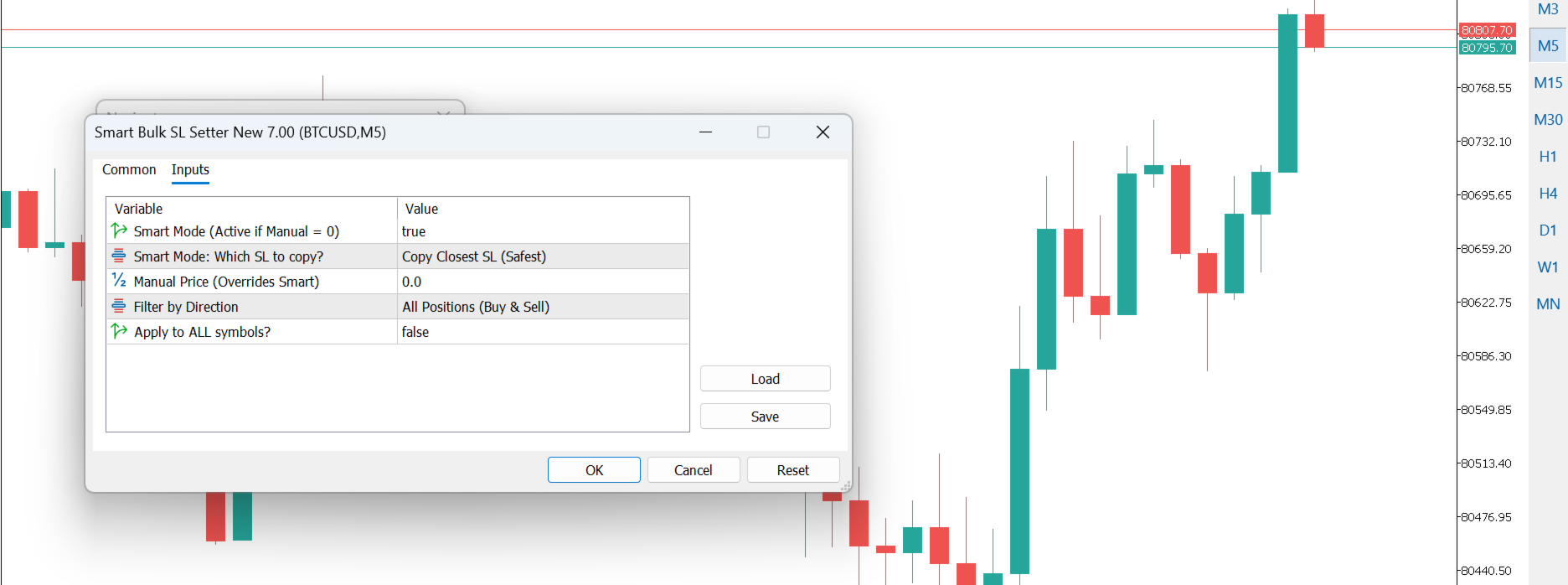
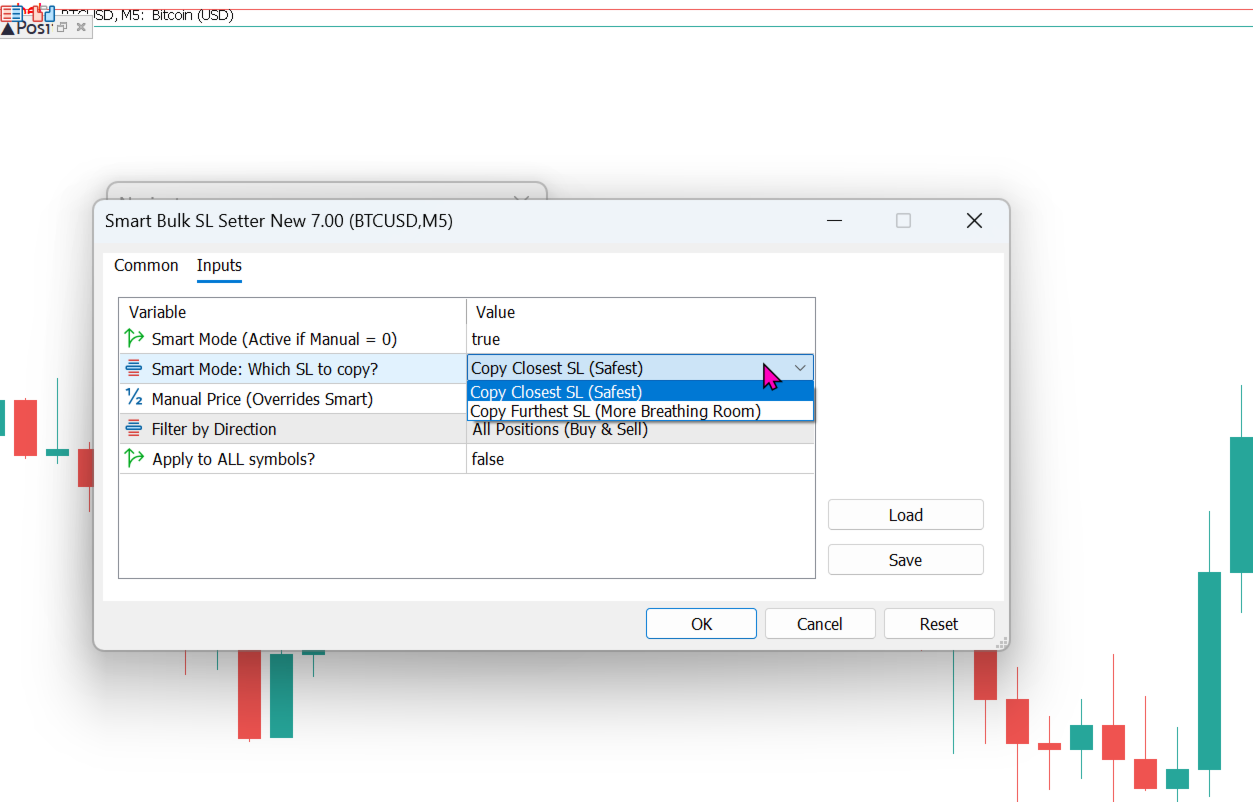
The script allows setting a unified Stop Loss level for multiple positions in a single execution.

Users can choose to apply the Stop Loss to Buy positions only, Sell positions only, or all open positions.
The action can be limited to the current chart symbol or extended to all symbols with open positions.

Only the Stop Loss level is modified.
Existing Take Profit levels remain unchanged.

Execution Behavior

Stop Loss modification requests are sent efficiently for all eligible positions.
The script tracks how many positions have been successfully updated during execution.

Each position is evaluated independently, and positions that do not meet the selected criteria are ignored.

Intended Use

This script is intended for manual traders who manage multiple open positions and require fast, consistent Stop Loss adjustments.

It is suitable for risk management scenarios where bulk Stop Loss control is required without automation.

Important Notes

This product is a script, not an Expert Advisor.
It works only on existing open positions.
It does not open trades, analyze market conditions, or generate trading signals.
All actions require explicit user configuration
Önerilen ürünler
Apex StopLoss Manager
Muhammad Hassan Muhammad Ahmad Atiyah
Apex StopLoss Manager MT5 Script – Stop Loss Control Utility Overview Apex StopLoss Manager is a trade management script for MetaTrader 5 designed to provide precise, rule-based control over Stop Loss behavior on existing open positions . The script focuses on manual execution and accuracy. It does not use automated trading logic, does not open trades, and runs once per attachment . Core Functionality The script provides two independent Stop Loss control functions, both enabled only through exp
Features: fast opening / closing deals automatic closing of trades by profit / loss shows the number of deals and the total profit for the Symbol Fast open deals: set the Lot volume set  StopLoss / TakeProfit in points (if you set "0", then it is not used) set slippage set Magic (if necessary) set comment (if necessary) Fast open features: fast open Buy fast open Sell fast close ALL open orders for the current Symbol Auto close deals by profit / loss (analogue of virtual StopLoss / TakeProfi
Don't want to risk or loose your personal trading account or prop trading firm account because of a simple Margin Call or exceeded Loss Limit? Then this Utility Expert Advisor is the solution for you! This Expert Advisor monitors your account Equity or Balance or even both! If the Equity and/ or Balance fall under your defined stop limits, the EA closes all of your positions and keeps you so on track. Options and Variables: Monitored Values: Choose which values should get monitored Equity: if
Close All and Change Take Profit and Stop Loss All Orders. Main Features     Ability to Close All Orders the Symbol you put this EA.     Ability to Change Take Profit to All Order.     Ability to Change Stop Loss to All Order.     Show Order count.     Show Average price with info and Horizontal Line.     Show lot open.     Show Price diff from average to price now     Show broken price with info and Horizontal Line.     Easy to use . How to use Close All (Symbol) PC : you can click on CloseAl
Smart Bulk TP Setter
Muhammad Hassan Muhammad Ahmad Atiyah
Smart Bulk TP Setter MT5 Script – Bulk Take Profit Management Overview Smart Bulk TP Setter is a trade management script for MetaTrader 5 designed to modify the Take Profit level of multiple existing open positions at once. The script executes once per attachment and applies a user-defined Take Profit price based on selected filters. It does not run in the background, does not open trades, and does not generate signals. Core Functionality The script allows setting a unified Take Profit level fo
Instructions for Using Reverse Copier EA Attach EA to Charts Open MetaTrader and attach the EA to any chart on both accounts (master & slave). Make sure AutoTrading is enabled. Master Account (Signal Sender) Set Mode = Master in EA settings. This account will send trade signals. Slave Account (Signal Receiver) Set Mode = Slave in EA settings. This account will receive trades in reverse (opposite direction). Lot Multiplier In Slave EA settings, set Multiplier to control lot size. Example: 1.0
Risk Trade Panel, manuel trading için grafik üzerinde paneli olan bir MetaTrader 5 yardımcı Expert’idir. Giriş sinyali üretmez; grid veya martingale çalıştırmaz. Alım/satım kararını siz verirsiniz; panel lot, stop ve pozisyon bakımında yardımcı olur. Ne yapar - sabit lot veya SL mesafesine göre bakiye (veya equity) risk %’si; - varsayılan SL/TP ile piyasa BUY / SELL (puan veya mutlak fiyat); - bekleyen emirler: Buy Limit, Sell Limit, Buy Stop, Sell Stop; - break-even: fiyat puan cinsinden tetikl
Merhaba tüccarlar! Ben sizin ticaret yardımcınız. Daha fazla konuşmayacağım, size uzmanlığımı söyleyeyim: 1. Pozisyonlarınızı yönetmede iyiyim, hangi ucunda sipariş verirseniz verin, ilk kez size makul bir stop hattı eklemek ve stop kaybını taşımak için yardımcı olabilirim. 2. Yükselme ve düşmekten kaçınmanıza yardımcı olabilirim ve ilkelerin köklerinden insan zayıflıklarını ortadan kaldırmanıza yardımcı olabilirim. 3. Mobil cihazınızdaki MT5 istemcisine en iyi noktada size bildirim mesajı gönd
Talents ATR Scalper Utility (MT5) The Talents ATR Scalper Utility is a professional-grade trade execution and management tool built for MetaTrader 5. Inspired by the Biblical Parable of the Talents , this utility is designed to help traders multiply their potential with precision risk control, one-click simplicity, and advanced automation. Whether you’re scalping forex, gold, or indices, this tool delivers speed, consistency, and confidence. Key Features One-Click Trade Preview Click below price
Trade Panel Pro — MetaTrader 5 için Profesyonel Risk Yönetimi ve Emir İcra Terminali Trade Panel Pro , MetaTrader 5 için aktif day trader'lar ve profesyoneller amacıyla tasarlanmış gelişmiş, hepsi bir arada bir ticaret ve risk yönetimi aracıdır. Hassas risk hesaplamasını şimşek hızında emir icrasıyla birleştirerek sermayenizi korumanıza ve çok hedefli işlemleri zahmetsizce yönetmenize yardımcı olur. Başlıca Avantajlar ve Temel Özellikler Otomatik Lot Hesaplaması: Manuel hacim hesaplamaların
This utility provides the ability to use hot keys in manual trading instantly responding to the current market situation. You can assign hot keys to open/close positions by their type, open/close all positions on the current chart and remove all orders on the current chart. You can also assign hot keys for five predefined trade volumes and switch between them if necessary with no need to change the volume manually from time to time. It is also possible to set the auto calculation of a trade volu
Başa baş seviyeleri: SL'yi tek tıkla hareket ettirin. Mevcut karı kaybetmekten kaçının Bu araçla, tek tıkla hızlıca karınızı koruyabilirsiniz. Kısa vadeli işlemler için özellikle önemlidir. Ofset seçeneği de mevcuttur. Çok fonksiyonlu araç : 66+ özellik, bu araç dahil | Sorularınız için bana ulaşın | MT4 versiyonu SL seviyelerini nasıl hareket ettirilir: 1. Belirli bir [Sembol] belirtin veya [TÜM] Sembolleri seçin. 2. Başa baş uygulamak istediğiniz işlem türünü seçin: [TÜM]: tüm aktif işlemler
justEnter is a semi-automatic trade management utility for MetaTrader 5. You choose the entry; the utility calculates position size, places the stop loss, and manages the position through breakeven, partial closes and trailing until exit. For traders following signals If you take your entries from a signal service, a mentor, or your own alerts, the entry decision is already made by the time you open the terminal. What remains is execution: sizing the position correctly, placing the stop, moving

AlgoWay Telegram Reporter is a free MetaTrader 5 utility that sends clear and detailed trading notifications directly to Telegram. The utility does not open, modify, or close trades. It only monitors trading activity on the account. It works with: • Manual trades • Trades opened from mobile or web terminals • Trades opened by Expert Advisors • Trades opened through AlgoWay • Netting and hedging accounts Main features • Position opening notifications • Entry price, volume, Stop Loss and Take Prof
FREE
The AllClosedMT5 utility in the form of an expert. The utility is designed for closing all open positions simultaneously based on the total profit (in the deposit currency) of all open positions. The utility can be attached to any chart with any trading instrument. Parameters Profit - the total positive profit in the deposit currency, at which all open positions are closed (profit). Stop - the total negative profit in the deposit currency, at which all open positions are closed (loss). The valu
FREE
RRPP Script A script for placing a pending order prepared by the Risk Ratio Trade Panel indicator. Reads the entry price, Take Profit, Stop Loss and lot size directly from the indicator lines on the chart. Requirements The Risk Ratio Trade Panel indicator must be attached to the chart and the panel must be open before running the script. How it works Attach the Risk Ratio Trade Panel indicator to the chart, open the panel and set the Entry, TP and SL lines to the desired levels. Then run RRPP Sc
FREE
Bneu Trade Manager
Marvinson Salavia Caballero
Bneu Trade Manager is a professional trading utility Expert Advisor for MetaTrader 5 designed to help manual traders plan, execute, protect and manage trades directly from a visual chart dashboard. It combines drag-and-drop trade planning, risk-based position sizing, one-click execution, pending orders, automated trade management for both EA and manual trades, protection tools, templates, reporting and performance analytics in one organized panel. The latest version includes a reorganized dash
FREE
This Expert Advisor (EA) for MetaTrader 5 (MT5) has been designed to automatically manage Stop Loss (SL) and Take Profit (TP). Main Features Automatic Detection of Manual Positions : Monitors new manual positions without SL/TP and applies the configured rules Multiple Orders : Opening of multiple orders under the same conditions as the original position Hidden SL/TP : The hidden mode allows creating SL/TP invisible to your broker  Equity Protection": Allows defining a threshold for the accou
User Manual Buy Trading Utility, Get 1 indicator FREE ! After purchase contact me for your " TWO indicators GIFT (Any one you want) ", adding you in group. Trading Utility MT5 The manual trader's cockpit. Size every trade by risk, place it from the chart, and manage it without ever opening the order dialog. Eight tabs, seven trailing engines, and every stop and target draggable with one click. One panel between you and the order window. Risk-sized entries, draggable stops, seven trailing modes,
# Universal Smart Manual Trade Manager MT5 v1.00 ## What the EA does Universal Smart Manual Trade Manager MT5 is a protective and management Expert Advisor for manually opened trades. It does not open new entries by itself. It only adopts already open positions that pass the selected filters, and can add missing SL/TP, manage break-even, profit lock, ATR trailing, send Telegram notifications, and display status information on the chart. The default setup is intentionally safe: the EA manages
CloseByLossOrProfit Expert Advisor closes all positions as their total profit or loss reaches a specified value (in deposit currency). In addition, it can delete pending orders. Allow AutoTrading before running the Expert Advisor. Usage: Run the Expert Advisor on a chart. Input Parameters:  Language of messages displayed (EN, RU, DE, FR, ES) - language of the output messages (English, Russian, German, French, Spanish); Profit in the currency  - profit in points; Loss in the currency  - loss in p
FREE
Risk calculator for MetaTrader 5. Precision Position Calculator is a MetaTrader 5 utility that helps calculate trade volume based on the risk configured by the user. The panel allows the user to work with Entry, Stop Loss and up to three Take Profit levels directly on the chart. Main description Precision Position Calculator is a utility for MetaTrader 5 designed to help calculate the volume of a trade before opening it. The panel allows the user to configure risk, select the order type, set th
EaInfoMaster
Dustin Ricardo Pierenz
EA Info Display Master Stop clicking through charts to find your EA configurations! Get a complete overview of all running Expert Advisors with their symbols and magic numbers in seconds. Managing multiple EAs across different symbols? Monitoring performance on FX Blue or other platforms? This tool instantly displays: All running EA names Their symbols and magic numbers Account details (number, broker, currency) Direct FX Blue statistics links (other provider will follow! Tell me what you need)
Account Guardian – Automated Equity Protection and Drawdown Guard for Prop Firm and Funded Accounts It enforces your daily loss limit, weekly loss limit and equity drawdown brake on every position, however it was opened. Account Guardian is a protection utility - it does not trade by itself  and it does not promise any profit. It watches your entire account and  steps in when your risk rules are broken, no matter whether the positions  were opened manually, from the mobile app, or by another Ex
The Trading Control Panel EA let you: - Calculated lot size based on the (% or $ risk) - Place multiple (Market/Limit/Stop) trades at same time - Manage all open trades (move SL to BE, take partial profit, close all trades) This is a handy tool for those who wont to open multiple orders without spending time on lot calculations. When opening multiple orders the first order has the first TP and all other orders get the second TP.
Money Management   will help you to Easy Trade with   One Click ,   instance and pending, set SL, and manage the number of your TP . You can use this expert for different   currency pairs, CFDs, cryptocurrency, and stocks . The basic formula for calculating   pip value and position size ,  which has been used in this expert, are: Pipette Value   = Position Size * (Exchange Rate (Base Currency) / Entry Price) * Contract Size * Digits Exp.  Account Currency: USD Currency Pair: GBPJPY Position Si
FREE
Introducing Neural Bitcoin Impulse - an innovative trading bot created using neural network training technology on voluminous market data sets. The built-in mathematical model of artificial intelligence searches for the potential impulse of each next market bar and uses the resulting patterns of divergence and convergence between the predictive indicators and the price to form high-precision reversal points for opening trading positions. The trading robot is based on the Neural Bar Impulse ind
1. Brief Description of Gina Panel Code Functionality for End User The "Gina Panel" is a customizable trading dashboard Expert Advisor (EA) for MetaTrader 5 (MT5). It provides a graphical user interface (GUI) overlay on your chart to simplify trading and account management. Key functionalities include: Account Monitoring : Displays real-time balance, equity, profit/loss, margin levels, and net positions in a compact panel. Trade Execution : Quick buttons for buying/selling at market, setting lot
Trading Keyboard (FastTrade Hotkeys) EA is an advanced tool designed for traders who want to execute trades quickly and efficiently using their keyboard. It allows users to place, modify, and close orders with customizable hotkeys, making trading as fast and intuitive as possible. Whether you're a scalper, day trader, or swing trader, this EA enhances your trading experience by reducing manual clicks and improving reaction time. Key Features: Hotkey-Based Trading – Execute trades, modify posit
If a complex grid with specified stop loss and take profit levels has been created in the wrong place by mistake, it is not necessary to remove it and start over again. The grid can be moved to a new place using the mouse. Drag the script to the chart and drop it where the grid should be moved. The grid will be moved, keeping the distance between orders, distances to stop loss and take profit. The script works exclusively with pending orders , market orders will be left unchanged. Input Paramet
Bu ürünün alıcıları ayrıca şunları da satın alıyor
Trade Assistant MT5
Evgeniy Kravchenko
4.41 (216)
It helps to calculate the risk per trade, the easy installation of a new order, order management with partial closing functions, trailing stop of 7 types and other useful functions. Additional materials and instructions Installation instructions - Application instructions - Trial version of the application for a demo account Line function -   shows on the chart the Opening line, Stop Loss, Take Profit. With this function it is easy to set a new order and see its additional characteristics bef
Trade Manager EA’ye hoş geldiniz! Ticaretin daha sezgisel, hassas ve verimli hale gelmesi için tasarlanmış nihai risk yönetim aracı ile tanışın. Bu sadece bir emir verme aracı değil; ticaret planlaması, pozisyon yönetimi ve risk kontrolü için kapsamlı bir çözüm. İster yeni başlayan bir yatırımcı olun, ister deneyimli bir trader ya da hızlı emir gerektiren bir scalper, Trade Manager EA ihtiyaçlarınıza uyum sağlar ve forex, endeksler, emtialar ve kripto paralar dahil tüm piyasalarda esneklik sunar
================================================================================ POC BREAKOUT - V20.72. Full Professional Grade Toolkit ================================================================================ POC Breakout is a full MetaTrader 5 trading dashboard for discretionary traders who want breakout signals, Point of Control (POC) context, volume profiles, order flow, market structure, news, alerts, and advanced trade planning in one professional workspace. Attached directly to you
TradePanel MT5
Alfiya Fazylova
4.88 (167)
Trade Panel, çok işlevli bir ticaret asistanıdır. Uygulama, manuel ticaret için 50'den fazla ticaret fonksiyonu içerir ve çoğu ticaret görevini otomatikleştirmeyi mümkün kılar. Uygulama talimatları + video talimatları: https://www.mql5.com/en/blogs/post/756482 Demo hesabı için uygulamanın deneme sürümü: https://www.mql5.com/en/blogs/post/750865 Uygulamayı nasıl kurulur: https://www.mql5.com/en/blogs/post/756239 Uygulamayı görsel modda nasıl test edilir: https://www.mql5.com/en/blogs/post/770277
Local Trade Copier EA MT5
Juvenille Emperor Limited
4.94 (148)
Local Trade Copier EA MT5   ile olağanüstü hızlı işlem kopyalama deneyimi yaşayın. Kolay 1 dakikalık kurulumuyla bu işlem kopyalayıcısı, aynı Windows bilgisayarda veya Windows VPS'te birden fazla MetaTrader terminali arasında işlemleri kopyalamanıza olanak tanır ve 0.5 saniyenin altındaki şimşek hızında kopyalama hızları sunar. Başlangıç seviyesinde veya profesyonel bir tüccar olsanız da,   Local Trade Copier EA MT5 , spesifik ihtiyaçlarınıza göre özelleştirmek için geniş bir seçenek yelpazesi s
Beta Sürümü Telegram to MT5 Signal Trader resmi alfa sürümüne neredeyse hazır. Bazı özellikler hâlâ geliştirilmekte olup küçük hatalarla karşılaşabilirsiniz. Sorun yaşarsanız lütfen bildirin, geri bildiriminiz yazılımın herkes için gelişmesine yardımcı olur. Telegram to MT5 Signal Trader , Telegram kanallarından veya gruplarından gelen işlem sinyallerini otomatik olarak MetaTrader 5 hesabınıza kopyalayan güçlü bir araçtır. Herkese açık ve özel kanalları destekler ve birden fazla sinyal sağlayıc
Telegram to MT5 Multi-Channel Copier , Telegram kanallarınızdaki alım-satım sinyallerini doğrudan MetaTrader 5'e otomatik kopyalar. Bot yok, tarayıcı uzantısı yok, elle kopyalama yok. Sinyal Telegram'a düşer ve EA birkaç saniye içinde terminalinizde işlemi açar. Ürün iki bileşenden oluşur: Telegram kanallarınızı dinleyen bir Windows uygulaması ve sinyalleri MT5 terminalinizde yürüten bu Expert Advisor. MT4 sürümü de mevcuttur   buradan . Kurulum kılavuzu ve uygulama indirme:   https://www.mql5.c
25% discount on the release of the tool: only for the next 3 buyers Send a message to receive a demo version. AstroTrade Trading Assistant AstroTrade is a comprehensive multi-functional trading utility developed for the MetaTrader 5 platform. It integrates essential tools for trade execution, risk management, and technical monitoring into a single unified interface. The application is designed to assist traders in managing their daily operations through a visual and structured environment. Vi
Telegram To MT5 — Sinyal Kopyalayıcı Telegram kanallarınızdaki işlem çağrılarını gerçek MT5 emirlerine dönüştürün — otomatik olarak, istediğiniz kadar hesapta ve risk ile kurallar tamamen sizin kontrolünüzde. Telegram To MT5, Telegram'da zaten takip ettiğiniz VIP / sinyal kanallarını MetaTrader 5 terminalinize bağlar. Ücretsiz bir eşlik eden masaüstü uygulaması mesajları okur (botlara izin vermeyen kanallardan bile), ve bu Expert Advisor bunları hesabınızda yürütür — kendi risk ayarlarınızı, sem
Exp COPYLOT CLIENT for MT5
Vladislav Andruschenko
3.97 (35)
MetaTrader 5 için profesyonel işlem kopyalayıcı MetaTrader için hızlı, profesyonel ve güvenilir bir işlem kopyalayıcı . COPYLOT , MT4 ve MT5 terminalleri arasında Forex işlemlerini kopyalamanıza olanak tanır ve Hedge ile Netting hesaplarını destekler. COPYLOT MT5 sürümü şunları destekler: - MT5 Hedge → MT5 Hedge - MT5 Hedge → MT5 Netting - MT5 Netting → MT5 Hedge - MT5 Netting → MT5 Netting - MT4 → MT5 Hedge - MT4 → MT5 Netting MT4 sürümü Tam açıklama + DEMO + PDF Nasıl satın alınır Nasıl kurul
Anchor: The EA Manager Your EAs manage their own trades. Anchor manages the account around them. Anchor gives you one place to control your EAs, manage risk and decide when trading is allowed. Any EA, any vendor, any broker or symbol. No source-code changes required. The Problem Most EAs only know what they are doing. They cannot see when another EA is already trading, when several EAs open and are stacking risk or when the account has reached your loss limit. Even using just one EA, it may not
HINN MAGIC ENTRY – the ultimate tool for entry and position management! SIMPLE. FASTEST. INTUITIVE. MAX AUTOMATED. Place orders by selecting a level directly on the chart! full description   ::  demo-version  :: 60-sec-video-description Key features: - Market, limit, and pending orders - Automatic lot size calculation - Automatic spread and commission accounting - Unlimited partitial take-profits  - Breakeven and trailing stop-loss and take-profit  functions - Invalidation leves - Intuitive, a
Trade copier MT5
Alfiya Fazylova
4.58 (52)
Trade Copier, ticaret hesapları arasındaki işlemleri kopyalamak ve senkronize etmek için tasarlanmış profesyonel bir yardımcı programdır. Kopyalama, tedarikçinin hesabından/terminalinden alıcının aynı bilgisayarda veya vps'de kurulu olan hesabına/terminaline gerçekleşir. KAMPANYA - Eğer zaten "Trade copier MT5" aldıysanız, "Trade copier MT4"ü ücretsiz olarak alabilirsiniz (MT4 > MT5 ve MT4 < MT5 kopyalamalar için). Koşullar hakkında daha fazla bilgi almak için lütfen bizimle özel mesaj yoluyla i
The product will copy all telegram signal to MT5 ( which you are member) , also it can work as remote copier.  Easy to set up, copy order instant, can work with almost signal formats, image signal,  s upport to translate other language to English Work with all type of channel or group, even channel have "Restrict Saving Content", work with  multi channel, multi MT5 Work as remote copier: with signal have ticket number, it will copy exactly via ticket number. Support to backtest signal. How to s
Ultimate Extractor - Professional Trading Analytics for MT5 *****this is the local HTML version of Ultimate Extractor. !!!!!it is not compatible with Cloud!!!! For the online version please reach out to me directly****** Ultimate EA manager also now available when you use cloud pro and above for free!! Ultimate Extractor transforms your MetaTrader 5 trading history into actionable insights with comprehensive analytics, interactive charts, and real-time performance tracking. What It Does Automa
Signal TradingView to MT5 Pro Automator TradingView ve MetaTrader 5 arasında anında profesyonel uygulama TradingView alarmları ile MT5'teki gerçek uygulama arasındaki en güçlü iletişim köprüsüyle ticaret stratejinizi otomatikleştirin. Hız, esneklik ve kusursuz risk yönetimi talep eden yatırımcılar için tasarlanan bu Uzman Danışman (Expert Advisor), herhangi bir alarm mesajını hassas bir piyasa (market) veya limit emrine dönüştürür. GÜÇLÜ YÖNLER VE AVANTAJLAR Evrensel Ayrıştırma Motoru (Tescilli)
Trade Dashboard simplifies how you open, manage, and control your trades, with built-in lot size calculation. It allows you to execute trades, manage risk, and control positions directly on the chart, with tools such as partial close, breakeven, and trailing stop. Designed to reduce manual work and help you stay focused on your trading decisions. A demo version is available for testing. Detailed explanations of features are provided within the MQL5 platform. Installation instructions are include
Power Candles Strateji Tarayıcısı - Kendi Kendini Optimize Eden Çoklu Sembol Kurulum Bulucu Power Candles Strateji Tarayıcısı , Power Candles göstergesini çalıştıran aynı kendinden optimize edici motoru, Piyasa İzleyicinizdeki her sembol üzerinde yan yana çalıştırır. Tek bir panel, şu anda istatistiksel olarak hangi sembollerin işlem yapılabilir olduğunu, her birinde hangi stratejinin kazandığını, en uygun Stop Loss / Take Profit çiftini gösterir ve yeni bir sinyal geldiği anda size bildirim gön
Farmed Hedge Yield Farming | All Markets (Manual - Hybrid - Semi/Automated EA) VERIFIED TRADING RESULTS - Farmed Hedge Yield Axi Copy:  https://www.mql5.com/en/signals/2356376 - Farmed Hedge Yield Exn Copy:   https://www.mql5.com/en/signals/2356404 - Farmed Hedge Yield V Copy:  https://www.mql5.com/en/signals/2357156 * Before purchasing, please feel free to send me a message if you have any questions about the product or setup. ** After purchase,  Contact me via private message to receive t
Timeless Charts
Samuel Manoel De Souza
5 (8)
Timeless Charts, profesyonel yatırımcılar için hepsi bir arada bir trading aracıdır. Saniye Grafikleri ve Renko gibi özel grafik türlerini, Footprints , Clusters , Hacim Profilleri , VWAP çalışmaları ve gelişmiş piyasa analizi sağlayan sabitlenmiş analiz araçlarıyla gelişmiş emir akışı analiziyle birleştirir. İşlem ve pozisyon yönetimi, entegre işlem yönetim paneli aracılığıyla doğrudan grafik üzerinden gerçekleştirilirken, Market Replay ve Sanal Hesaplar trading becerileri ve stratejileri üzeri
Premium Trade Manager - İçine Koç Yerleştirilmiş İşlem Paneli Premium Trade Manager , grafiğinizin içine bir trading koçu yerleştirir; altında tam bir yürütme motoru çalışır. İşlemi her zamanki gibi kurun, ardından yapay zeka trading koçunuz Max, o kurulumu tam olarak okusun ve canlı hesabınıza göre taahhüt etmeden önce size net bir değerlendirme sunsun: stop disiplinli bir yaklaşıma uyuyor mu, risk büyüklüğü makul mü, yüksek etkili bir haber dakikalar sonra mı geliyor, prop firm limitinize yakl
The Ultimate TradingView to MT5 Bridge Automation Manuel işlemleri ve gecikme sorunlarını durdurun. TradingView to MT5 Copier PRO , TradingView alarmlarınızı doğrudan MetaTrader 5 üzerinde yürütmek için en hızlı ve en güvenilir köprüdür (bridge). İster özel göstergeler, ister Strateji Test Komut Dosyaları veya manuel çizimler kullanın, bu Uzman Danışman (EA), Yüksek Hızlı WebSocket teknolojisini kullanarak işlemlerinizi anında gerçekleştirir. Basit kopyalayıcıların aksine, bu PRO sürüm Arena Sta
Seconds Chart - MetaTrader 5 için saniye bazlı grafikler oluşturmanıza olanak sağlayan eşsiz bir araçtır. Seconds Chart sayesinde saniye cinsinden zaman dilimleriyle grafik oluşturabilir, standart dakika veya saatlik grafiklerde mümkün olmayan esneklik ve analiz hassasiyetine ulaşabilirsiniz. Örneğin, S15 zaman dilimi 15 saniyelik mum çubuklarını ifade eder. Desteklenen özel sembollerle herhangi bir gösterge ve danışman kullanabilirsiniz. Onlarla çalışmak, standart grafiklerde işlem yapmak kadar
MetaTrader 5 için Trading Panel — grafik ve klavyeden profesyonel tek tıkla işlem kontrolü Aktif traderlar için geliştirilmiş güçlü bir Trading Panel; işlemleri standart MetaTrader arayüzüne göre çok daha hızlı açmanıza, yönetmenize ve kapatmanıza yardımcı olur. Bu çözüm; pozisyonları, bekleyen emirleri, toplam kârı ve işlem yürütmesini tek bir profesyonel çalışma alanında kontrol etmek isteyen kullanıcılar için tasarlanmıştır. Bu sadece sıradan bir yardımcı araç değildir. MetaTrader 5 için ger
Quant AI Agents are independent trading Expert Advisors. Instead of trading using a fixed strategy like other conventional EAs, Quant AI Agents   is a   multi-agent AI trading framework   that turns natural-language strategy prompts into live.  WANT THE SAME RESULTS AS MY LIVE SIGNAL?   Use the exact same brokers I do:   IC MARKETS , IC TRADING   .  Unlike the centralized stock market, Forex has no single, unified price feed.  Every broker sources liquidity from different providers, creating un
Trade Copier Ultimate
Janitha Sandaruwan Amaradasa Wickramasingha Arachchilage
5 (5)
Trade Copier Ultimate - Telegram to MT5 Signal Copier Trade Copier Ultimate automatically copies Telegram trading signals into MetaTrader 5. The EA can read signal messages, detect the symbol, order type, entry price, Stop Loss, Take Profit levels and selected update commands, then execute or manage the trade in MT5 using your lot and risk settings. It is more than a basic Telegram to MT5 copier. TCU also supports Bot API and user-account Bridge workflows, Discord signal routing, local MT5 to MT
News Filter EA: Advanced Algo Trading Assistant News Filter EA is an advanced algo trading assistant designed to enhance your trading experience. By using the News Filter EA , you can integrate a Forex economic news filter into your existing expert advisor, even if you do not have access to its source code. In addition to the news filter, you can also specify trading days and hours for your expert. The News Filter EA also includes risk management  and equity protection features. MT4 Version Ma
Footprint Chart Pro — Professional OrderFlow EA for MetaTrader 5 Version 6.34 | Professional tool for real traders | Institutional-Grade Visualization DEMO USERS - PLEASE SELECT EVERY TICK / REAL TICK WHEN TESTING AND YOU HAVE DOWNLOADED HISTORICAL DATA. IF YOU SEE A WAITING SCREEN AND IT IS NOT DOWNLOADING, IT MEANS YOU HAVE LOW HISTORICAL DATA. TRY 1 MIN AND 5 MIN FIRST ON 1 DAY DATA. ONE DAY DATA SHOULD BE THE NEWEST AND MOST CURRENT DATE. PLEASE WAIT UNTIL THE MARKET HAS ROLLED OVER PERIOD.
This is exactly what the name says. Visual strategy builder . One of a kind. Turn your trading strategies and ideas into Expert Advisors without writing single line of code. Generate mql source code files with a few clicks and get your fully functional Expert Advisors, which are ready for live execution, strategy tester and cloud optimization. There are very few options for those who have no programming skills and can not create their trading solutions in the MQL language. Now, with Bots Builde
Bu ürün, haber saatlerinde tüm uzman danışmanları ve manüel grafikleri filtreler, böylece manüel ticaret kurulumlarınızı veya diğer uzman danışmanlar tarafından girilen işlemleri yok edebilecek ani fiyat dalgalanmaları konusunda endişelenmenize gerek kalmaz. Bu ürün, herhangi bir haber yayınlanmadan önce açık pozisyonlarınızı ve bekleyen emirlerinizi yönetebilen tam bir sipariş yönetim sistemi ile birlikte gelir.   The News Filter'ı   satın aldığınızda, gelecekteki uzman danışmanlar için yerleşi
Yazarın diğer ürünleri
SL Based TP Multiplier
Muhammad Hassan Muhammad Ahmad Atiyah
Smart TP by Risk Ratio MT5 Script – Take Profit Calculation Based on Stop Loss Overview Smart TP by Risk Ratio is a script for MetaTrader 5 that calculates Take Profit levels using the distance between the Open Price and Stop Loss, multiplied by a user-defined ratio (R-Multiple). The script can be applied once per execution to the current chart symbol or to all open positions. It does not open trades and requires a Stop Loss to be set for the calculation. Functionality TP Calculation: Take Prof
Advanced Breakeven & Partial Close Manager MT5 Script – One-Click Trade Management Overview Advanced Breakeven & Partial Close Manager is a trade management script for MetaTrader 5. It works only on existing open positions and applies actions strictly based on user-defined rules. The script runs once per attachment and performs only the actions explicitly enabled in the inputs. It does not run in the background, does not trade automatically, and does not generate signals. Core Functionality The
Smart Bulk TP Setter
Muhammad Hassan Muhammad Ahmad Atiyah
Smart Bulk TP Setter MT5 Script – Bulk Take Profit Management Overview Smart Bulk TP Setter is a trade management script for MetaTrader 5 designed to modify the Take Profit level of multiple existing open positions at once. The script executes once per attachment and applies a user-defined Take Profit price based on selected filters. It does not run in the background, does not open trades, and does not generate signals. Core Functionality The script allows setting a unified Take Profit level fo
Smart Bulk Order Closer
Muhammad Hassan Muhammad Ahmad Atiyah
Smart Bulk Order Closer MT5 Script – PnL-Based Trade Closer Overview Smart Bulk Order Closer is a script for MetaTrader 5 that closes open positions based on their current floating profit or loss in account currency. The script executes once per attachment and only closes trades that meet the user-defined PnL conditions. It does not run in the background, does not modify Stop Loss or Take Profit, and does not open trades. Core Functionality The script evaluates each position individually and ap
Apex StopLoss Manager
Muhammad Hassan Muhammad Ahmad Atiyah
Apex StopLoss Manager MT5 Script – Stop Loss Control Utility Overview Apex StopLoss Manager is a trade management script for MetaTrader 5 designed to provide precise, rule-based control over Stop Loss behavior on existing open positions . The script focuses on manual execution and accuracy. It does not use automated trading logic, does not open trades, and runs once per attachment . Core Functionality The script provides two independent Stop Loss control functions, both enabled only through exp
Active Trade Monitor
Muhammad Hassan Muhammad Ahmad Atiyah
Stop switching to the terminal tab while price is moving. Active Trade Monitor places a clean, real-time dashboard directly on your chart showing all open positions at once — symbol, direction, lot size, profit in dollars, profit in pips, and current R:R ratio. Everything you need to manage your trades is visible without leaving the chart. FEATURES: — Displays all open positions directly on the chart — Shows: symbol, type (BUY/SELL), lot size — Live profit in dollars and pips — Current R:R r
One Click Symbol Hub
Muhammad Hassan Muhammad Ahmad Atiyah
Twenty open chart tabs is not a workspace — it's noise. One-Click Symbol Hub replaces all of that with a single small button on your chart. Press it and a clean symbol panel appears, centered on your screen. Tap any pair and the chart switches instantly — preserving your current timeframe. Press the button again and everything disappears. FEATURES: — Switch between symbols with a single click — Preserves current timeframe on every switch — Clean pop-up panel — appears and disappears on deman
Session Clock Advanced
Muhammad Hassan Muhammad Ahmad Atiyah
Know exactly where you are in the trading day — at a glance. Session Clock Advanced displays two live clocks directly on your chart: your local time (auto-detected from your PC) and New York time. No manual offset needed. But it goes further than a simple clock. The indicator detects the active trading session in real time — Asia, London, New York, or any overlap — and changes color automatically so you always know the market context without reading the time. A live countdown shows exactly
Equity and Balance
Muhammad Hassan Muhammad Ahmad Atiyah
Your account health deserves a live dashboard — not a number buried in the terminal corner. Equity & Balance Monitor displays your real-time equity, balance, margin usage, drawdown, and growth metrics directly inside your chart window. No extra windows. No switching screens. FEATURES: — Live equity and balance display on chart — Real-time margin and free margin tracking — Drawdown monitoring — Historical growth indicators — Always visible — updates on every tick — Clean dashboard layout — Cus
Time and Spread
Muhammad Hassan Muhammad Ahmad Atiyah
Two numbers define whether your entry is clean or expensive: the spread, and the time left on the current candle. Candle Timer & Spread Monitor tracks both in real time, displayed as a single compact label directly on your chart. See the current spread widen during session transitions. Know when you're entering in the last seconds of a candle. Place it in any corner of your chart. FEATURES: — Live spread display (in points) — Countdown timer to next candle close (MM:SS) — Updates every secon
Ultimate Trade Manager Panel EA
Muhammad Hassan Muhammad Ahmad Atiyah
Stop managing trades manually under pressure. Ultimate Trade Manager Panel is a professional trade management Expert Advisor that executes your exit strategy automatically — partial closes, breakeven, profit locking, and full exits — all with a single script run. You set your rules before the trade. The panel executes them without hesitation. HOW IT WORKS: Place the EA on your chart, configure your action, and run it. It scans all open positions, filters them by your criteria, sorts them by
Filtrele:
Lilian_Lebanon
65
Lilian_Lebanon 2025.12.22 17:27 
 

Kullanıcı değerlendirmeye herhangi bir yorum bırakmadı

Mohamed Hassan
69
Mohamed Hassan 2025.12.22 15:27 
 

Kullanıcı değerlendirmeye herhangi bir yorum bırakmadı

Alex
66
Alex 2025.12.22 14:46 
 

Kullanıcı değerlendirmeye herhangi bir yorum bırakmadı

Ahmed_Esmaeel
65
Ahmed_Esmaeel 2025.12.22 12:35 
 

Kullanıcı değerlendirmeye herhangi bir yorum bırakmadı

Lionardo1122
64
Lionardo1122 2025.12.22 11:50 
 

Kullanıcı değerlendirmeye herhangi bir yorum bırakmadı

Değerlendirmeye yanıt