Objects Styler
- Utilità
- Versione: 3.1
- Aggiornato: 17 agosto 2026

Objects Styler è un'utilità che fornisce un pannello contestuale per modificare le proprietà degli oggetti grafici standard direttamente sul grafico. La sua caratteristica principale è un potente sistema di modelli che consente agli utenti di salvare, gestire e applicare istantaneamente set complessi di stili agli oggetti.
Funzionalità principali
Interfaccia e interazione
-
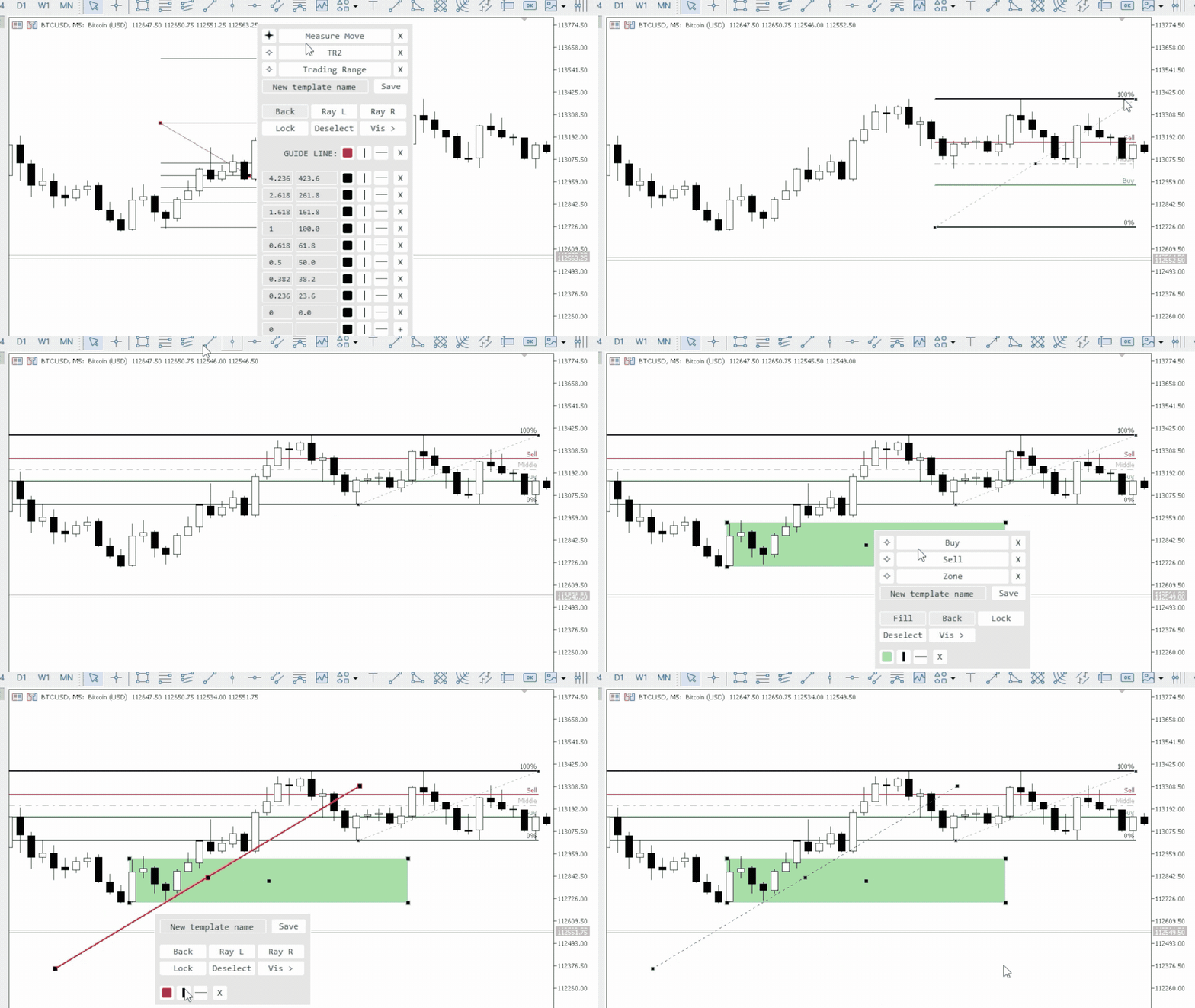
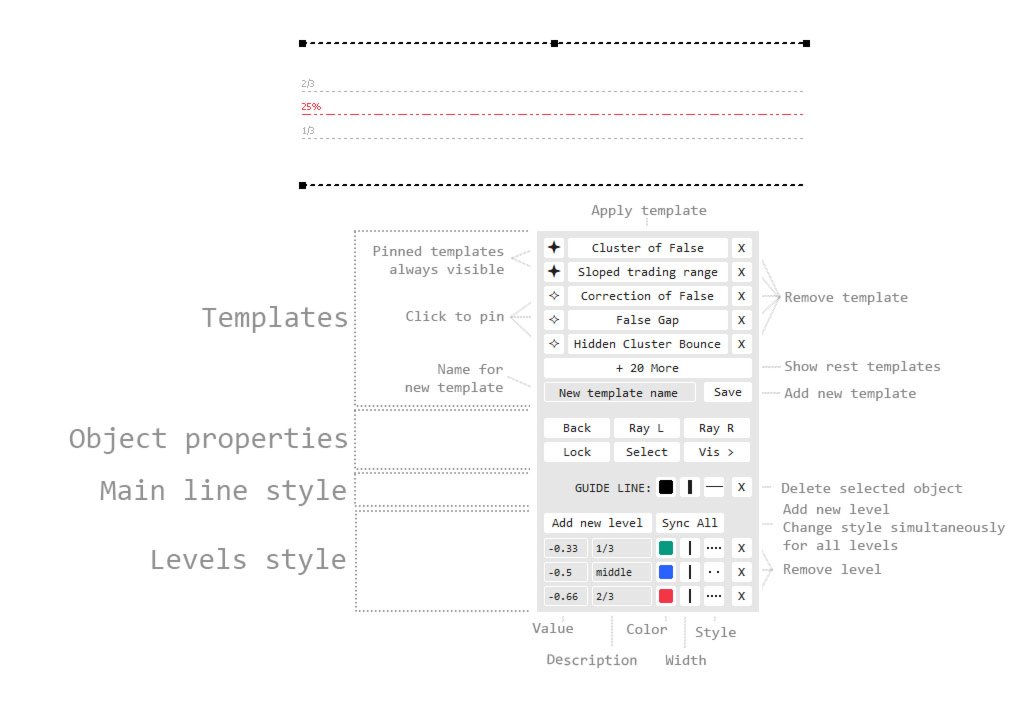
Attivazione contestuale: Il pannello viene richiamato facendo clic (o Shift + clic) su un oggetto grafico. Supporta tutti gli oggetti standard e la maggior parte delle loro proprietà.
-
Interfaccia trascinabile: Il pannello può essere spostato liberamente in qualsiasi area del grafico.
-
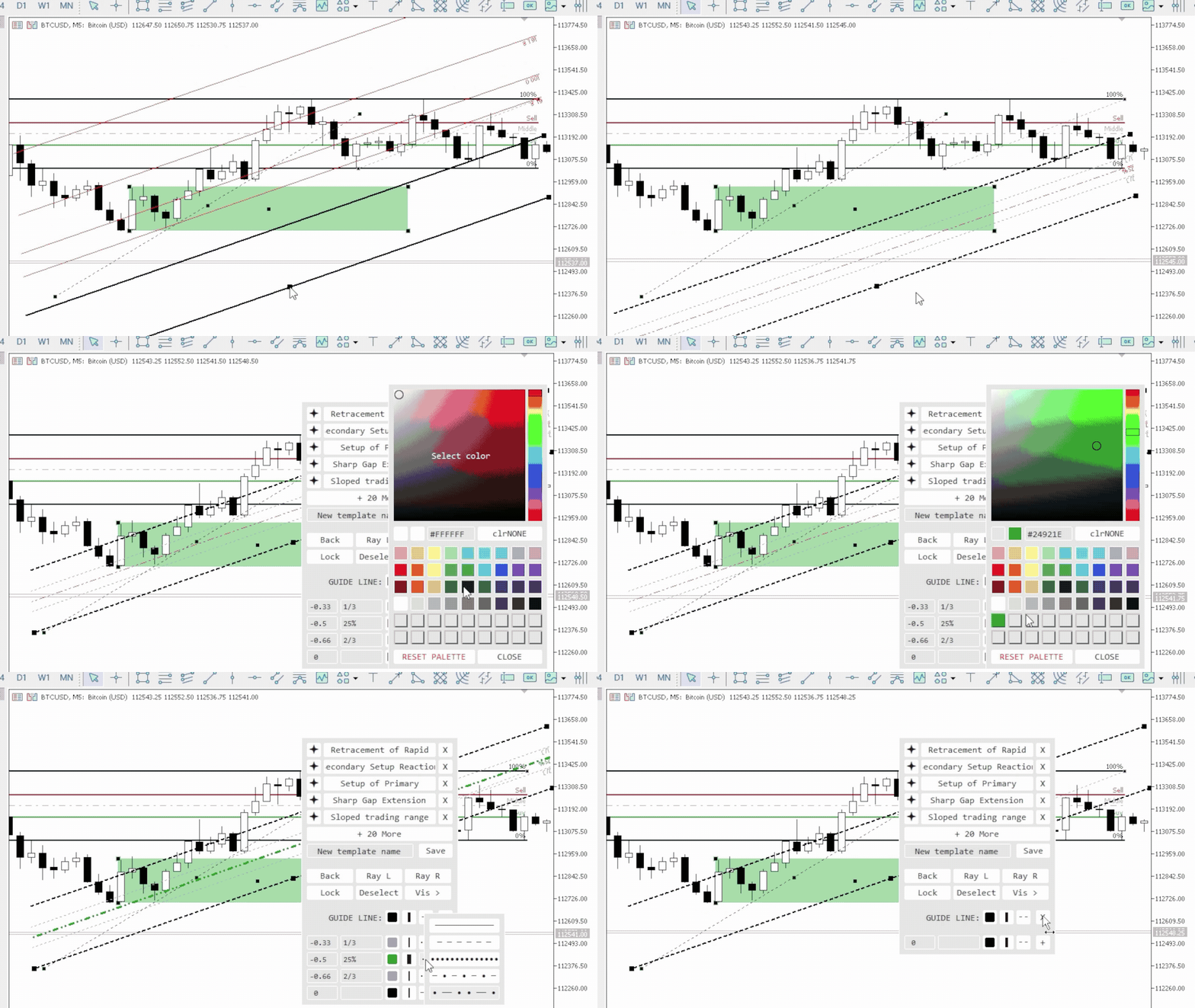
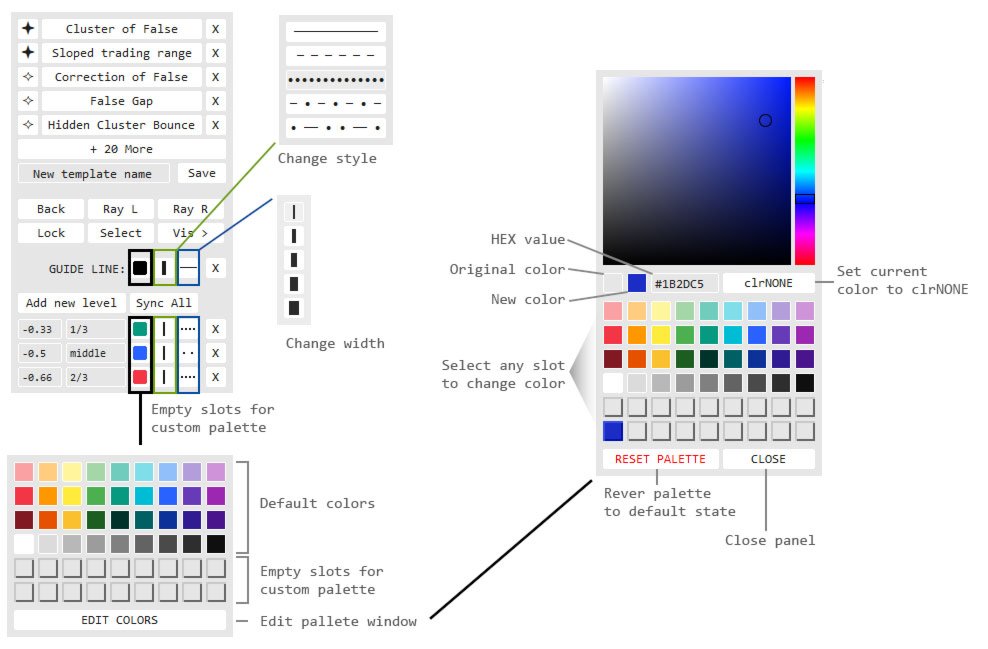
Finestre pop-up: Le opzioni aggiuntive, come la selezione dello stile, la tavolozza dei colori e l'elenco dei timeframe, si aprono in finestre pop-up compatte, mantenendo l'interfaccia principale ordinata.
Sistema di gestione dei modelli
-
Salva e applica stili: Salva un set completo di proprietà di un oggetto come modello con nome. I modelli vengono applicati con un solo clic.
-
Specifico per tipo di oggetto: I modelli vengono salvati per un tipo di oggetto specifico. Ad esempio, gli stili creati per una linea di tendenza saranno disponibili solo durante la modifica di altre linee di tendenza.
-
Preferiti (blocco): I modelli utilizzati frequentemente possono essere bloccati per un accesso rapido. Saranno sempre visibili, mentre gli altri sono nascosti in una finestra aggiuntiva.
-
Sincronizzazione e portabilità:
-
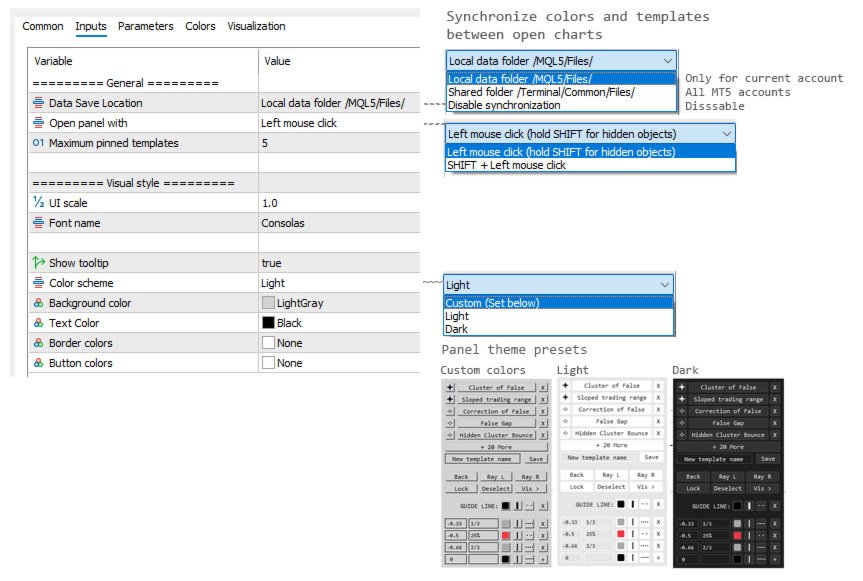
Le modifiche ai modelli e alla tavolozza dei colori possono essere sincronizzate automaticamente su tutte le istanze dell'indicatore in altri grafici.
-
I file delle impostazioni vengono salvati separatamente, consentendo un facile trasferimento ad altri computer o terminali diversi.
-
Controllo delle proprietà dell'oggetto
-
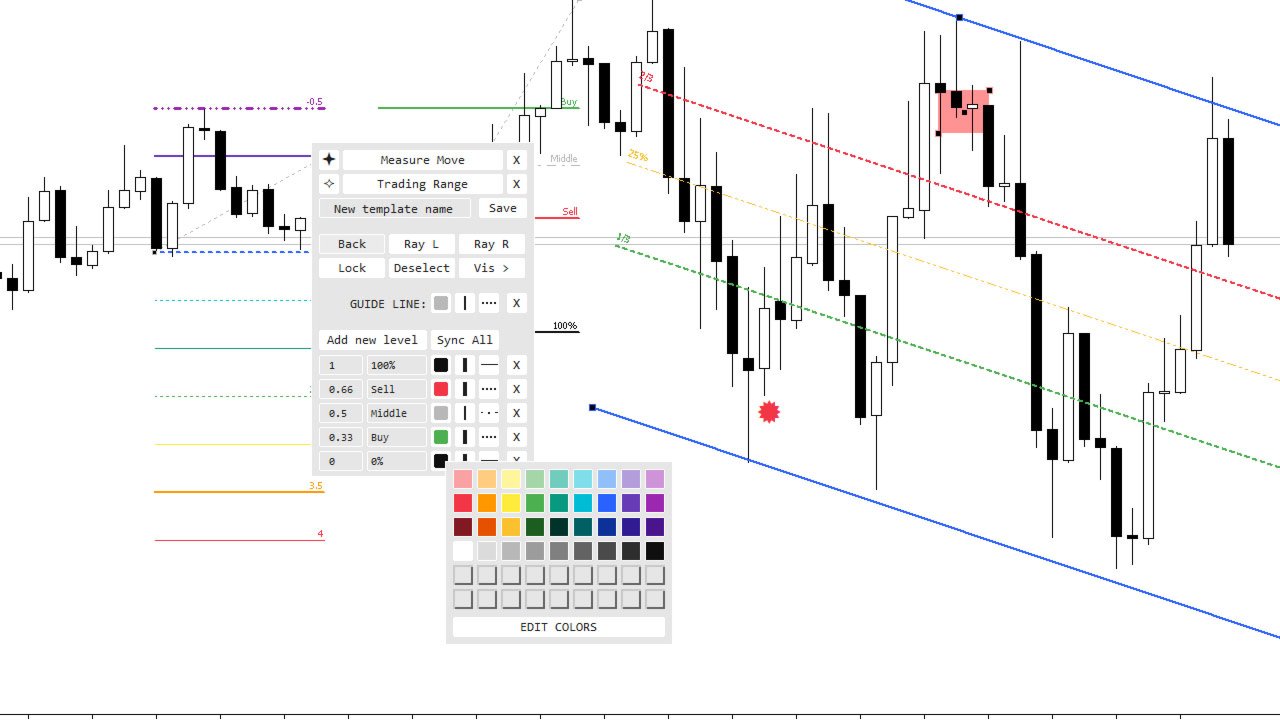
Proprietà generali: Accesso diretto per modificare colore, larghezza e stile della linea. Fornisce inoltre il controllo sulla maggior parte dei parametri standard: riempimento, disegno in background, raggi, icone, testo, ecc.
-
Modifica di oggetti a più livelli (per strumenti Fibonacci, canali, espansioni, ecc.):
-
Controllo individuale sul valore, la descrizione testuale, il colore, la larghezza e lo stile della linea per ogni livello.
-
Funzionalità per aggiungere e rimuovere livelli.
-
Tavolozza dei colori
-
54 slot per un accesso rapido ai colori.
-
Editor visivo (selettore HSV) per una regolazione precisa dei colori.
-
Possibilità di modificare e salvare qualsiasi colore nella tavolozza.
Impostazioni dell'indicatore
-
Ridimensionamento dell'interfaccia: Un parametro di input per adattare le dimensioni del pannello alla risoluzione dello schermo.
-
Metodo di attivazione: Scegli come richiamare il pannello nelle impostazioni (un semplice clic o Shift + clic).
-
Schemi di colore: Temi chiari e scuri preinstallati, più l'opzione per impostare colori completamente personalizzati.
-
Modalità di sincronizzazione: Opzione per scegliere dove archiviare i file delle impostazioni: localmente per ogni grafico o nella cartella comune del terminale per la sincronizzazione automatica.
In futuro, potranno essere aggiunte proprietà aggiuntive e supporto per nuovi oggetti in base alle richieste degli utenti.













































Это лучшее что я видел для mt5! Выражаю огромную благодарность!!! Автор ЛУЧШИЙ!!! P.S. Было бы прикольно если добавить в меню отрезка выравнивание по горизонтали отрезка. Мне ИИ написал в виде кнопки на графике: //+------------------------------------------------------------------+
//| Line_Leveler_Button.mq5 |
//| AI Code Generator |
//+------------------------------------------------------------------+
#property copyright "AI"
#property version "1.00"
#property indicator_chart_window
#property indicator_buffers 0
#property indicator_plots 0
//--- Входные параметры кнопки
input string InpButtonText = "Сделать горизонтальной"; // Текст на кнопке
input color InpButtonColor = clrWhite; // Цвет текста
input color InpBgColor = clrDarkSlateGray; // Цвет кнопки
input int InpFontSize = 10; // Размер шрифта
input int InpButtonWidth = 160; // Ширина кнопки
input int InpButtonHeight = 25; // Высота кнопки
//--- Имя объекта кнопки
string ButtonName = "Btn_Leveler_Line";
//+------------------------------------------------------------------+
//| Custom indicator initialization function |
//+------------------------------------------------------------------+
int OnInit()
{
// Создаем кнопку в левом верхнем углу графика
if(ObjectCreate(0, ButtonName, OBJ_BUTTON, 0, 0, 0))
{
ObjectSetInteger(0, ButtonName, OBJPROP_XDISTANCE, 15); // Отступ по оси X
ObjectSetInteger(0, ButtonName, OBJPROP_YDISTANCE, 120); // Отступ по оси Y (под имя инструмента)
ObjectSetInteger(0, ButtonName, OBJPROP_XSIZE, InpButtonWidth);
ObjectSetInteger(0, ButtonName, OBJPROP_YSIZE, InpButtonHeight);
ObjectSetInteger(0, ButtonName, OBJPROP_CORNER, CORNER_LEFT_UPPER); // Привязка к верхнему левому углу
ObjectSetString(0, ButtonName, OBJPROP_TEXT, InpButtonText);
ObjectSetString(0, ButtonName, OBJPROP_FONT, "Arial");
ObjectSetInteger(0, ButtonName, OBJPROP_FONTSIZE, InpFontSize);
ObjectSetInteger(0, ButtonName, OBJPROP_COLOR, InpButtonColor);
ObjectSetInteger(0, ButtonName, OBJPROP_BGCOLOR, InpBgColor);
ObjectSetInteger(0, ButtonName, OBJPROP_BORDER_COLOR, clrSilver);
ObjectSetInteger(0, ButtonName, OBJPROP_SELECTABLE, false);
ObjectSetInteger(0, ButtonName, OBJPROP_STATE, false); // Отжата по умолчанию
}
// Разрешаем индикатору ловить клики мыши по графику
ChartSetInteger(0, CHART_EVENT_OBJECT_CREATE, true);
return(INIT_SUCCEEDED);
}
//+------------------------------------------------------------------+
//| Custom indicator deinitialization function |
//+------------------------------------------------------------------+
void OnDeinit(const int reason)
{
// Удаляем кнопку при удалении индикатора
ObjectDelete(0, ButtonName);
ChartRedraw(0);
}
//+------------------------------------------------------------------+
//| OnCalculate (обязательная функция для индикаторов) |
//+------------------------------------------------------------------+
int OnCalculate(const int rates_total,
const int prev_calculated,
const datetime &time[],
const double &open[],
const double &high[],
const double &low[],
const double &close[],
const long &tick_volume[],
const long &volume[],
const int &spread[])
{
return(rates_total);
}
//+------------------------------------------------------------------+
//| ChartEvent function - перехват событий мыши и кликов |
//+------------------------------------------------------------------+
void OnChartEvent(const int id,
const long &lparam,
const double &dparam,
const string &sparam)
{
// Проверяем, произошел ли клик по графическому объекту
if(id == CHARTEVENT_OBJECT_CLICK)
{
// Проверяем, что кликнули именно по нашей кнопке
if(sparam == ButtonName)
{
bool leveled_any = false;
// Перебираем все графические объекты, которые сейчас есть на графике
int total_objects = ObjectsTotal(0, 0, -1);
for(int i = 0; i < total_objects; i++)
{
string obj_name = ObjectName(0, i, 0, -1);
// Нам нужны только те линии, которые выделил (выбрал двойным кликом) трейдер
if(ObjectGetInteger(0, obj_name, OBJPROP_SELECTED) == true)
{
// Проверяем тип объекта. Нам нужны обычные трендовые линии (OBJ_TREND)
if(ObjectGetInteger(0, obj_name, OBJPROP_TYPE) == OBJ_TREND)
{
// Берем цену первой точки линии
double price1 = ObjectGetDouble(0, obj_name, OBJPROP_PRICE, 0);
// Принудительно присваиваем второй точке точно такую же цену
ObjectSetDouble(0, obj_name, OBJPROP_PRICE, 1, price1);
leveled_any = true;
}
}
}
// Если выровняли линию, выводим сообщение в журнал
if(leveled_any)
{
Print("Успешно: Выделенные трендовые линии выровнены горизонтально.");
}
// Возвращаем кнопку в отжатое (активное) состояние для следующего раза
ObjectSetInteger(0, ButtonName, OBJPROP_STATE, false);
ChartRedraw(0);
}
}
}
Извини! Пользовался старой версией. После обновления увидел кнопку выравнивания. Спасибо тебе большое! Ты ЛУЧШИЙ!!! Успехов тебе и вдохновения!