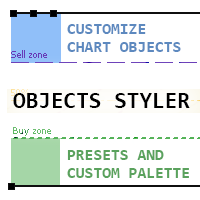
Objects Styler

5

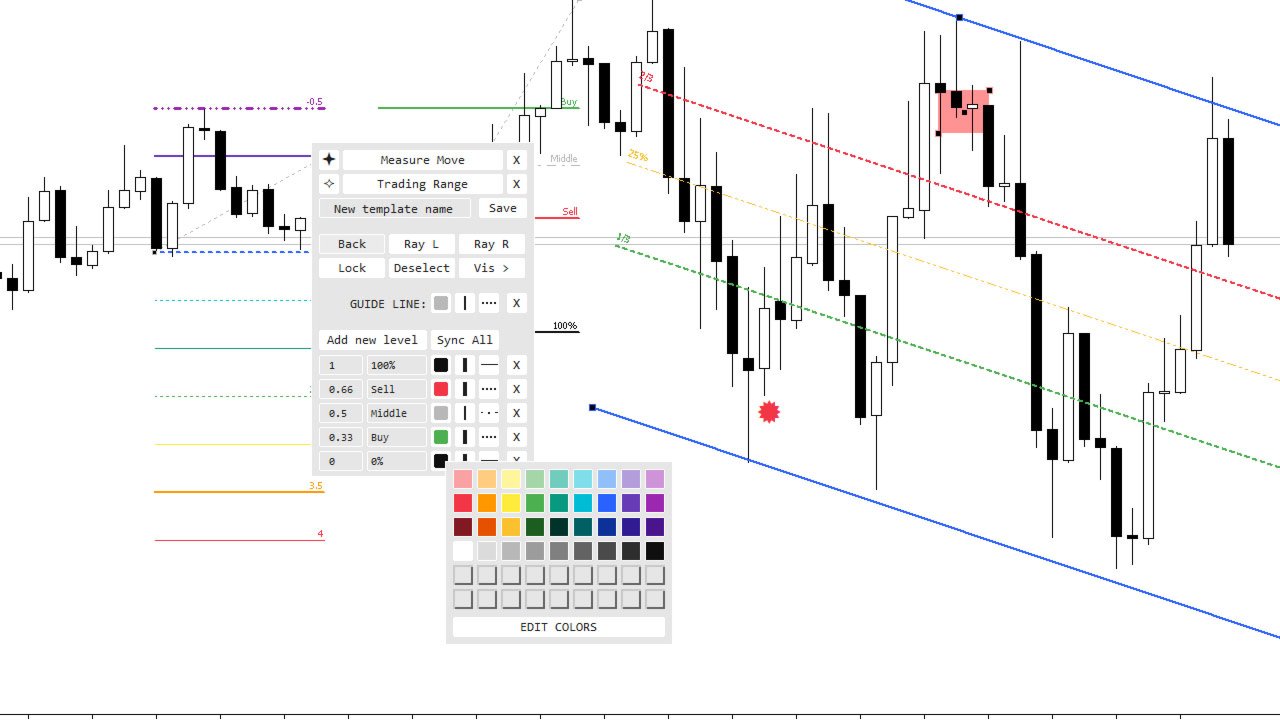
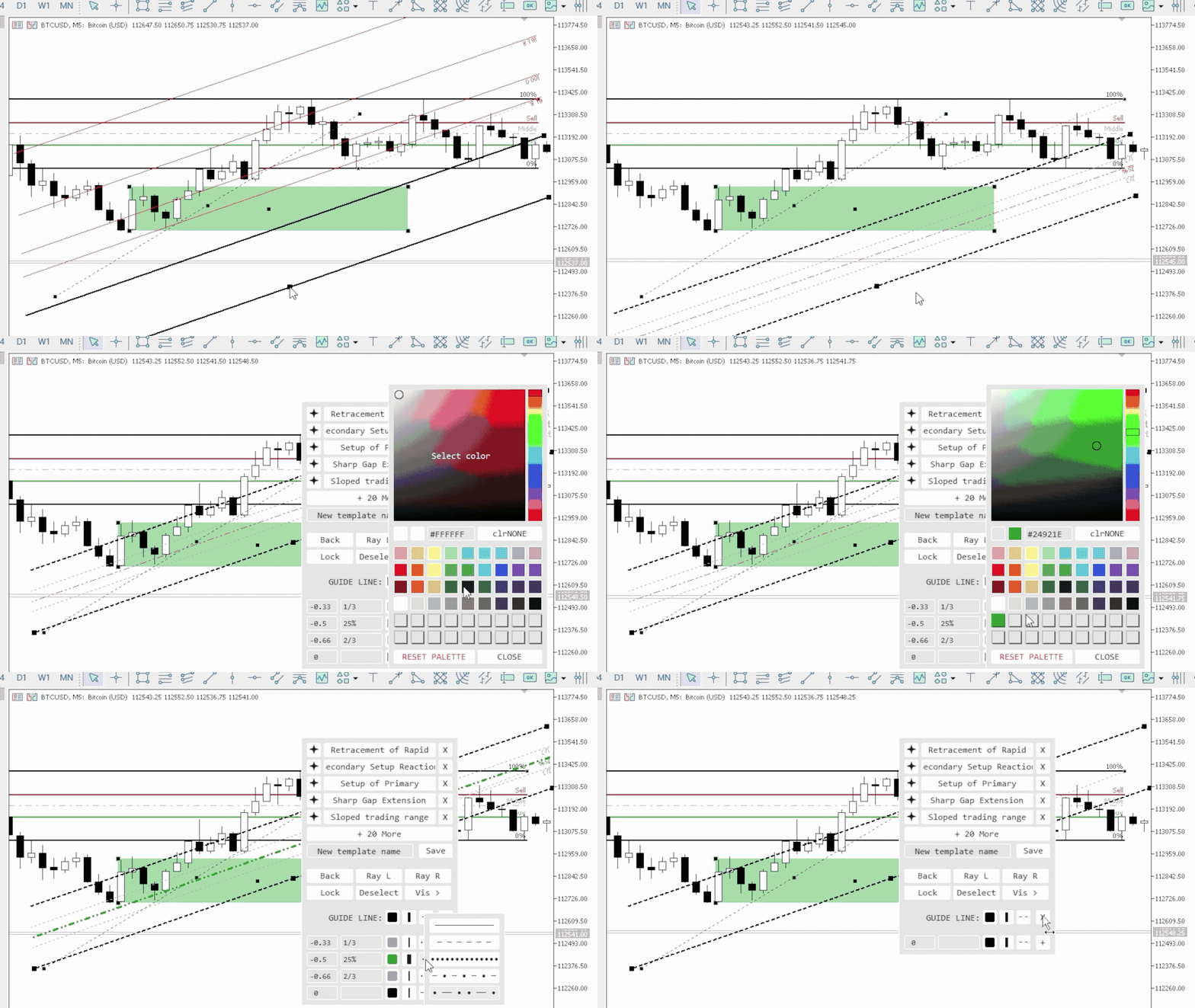
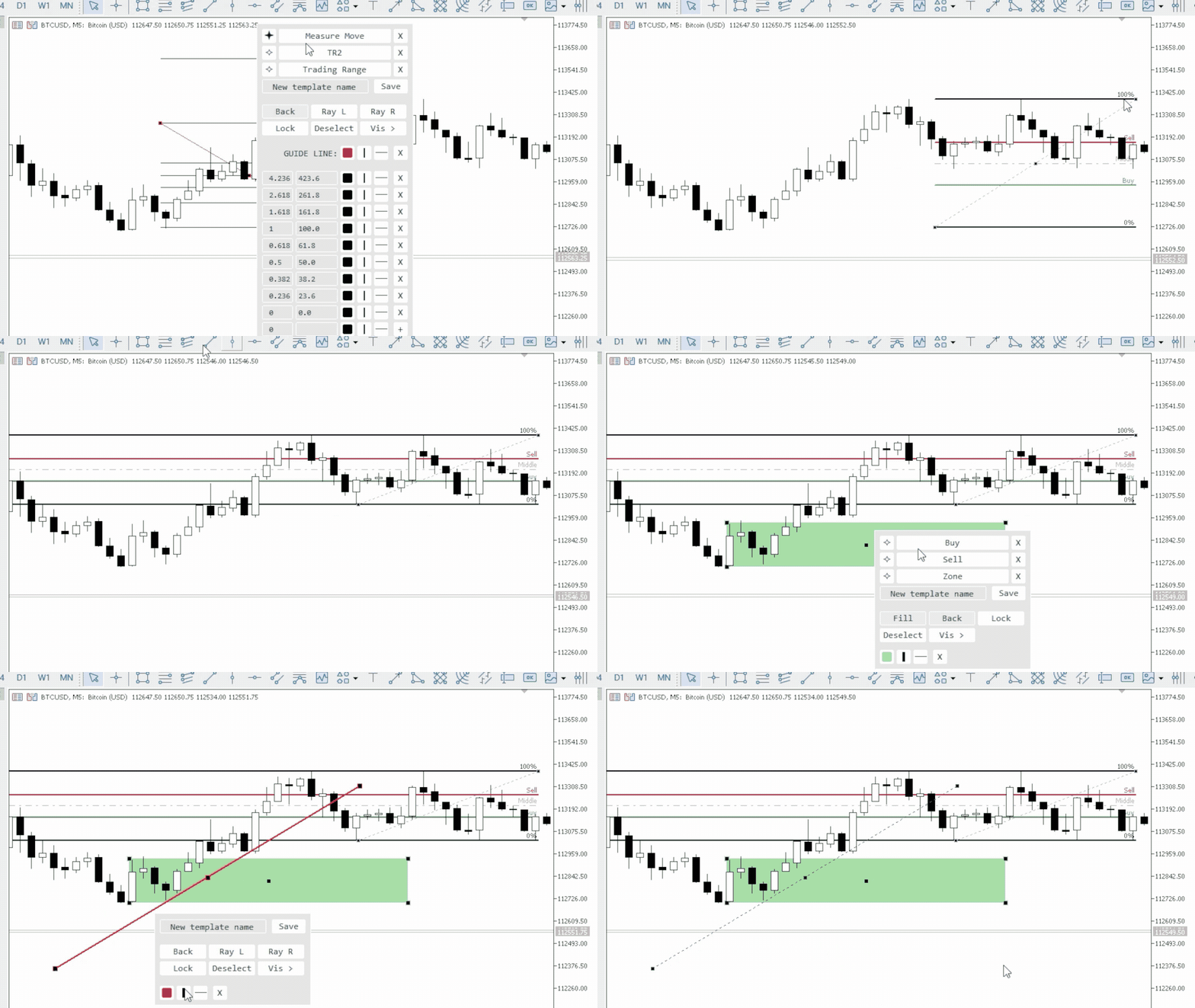
Objects Styler est un utilitaire qui fournit un  panneau contextuel pour modifier les propriétés des objets graphiques standard directement sur le graphique. Sa fonctionnalité clé est un puissant  système de modèles qui permet aux utilisateurs d'enregistrer, de gérer et d'appliquer instantanément des ensembles complexes de styles aux objets.

Fonctionnalités principales

Interface et interaction

  • Activation contextuelle : Le panneau est invoqué en cliquant (ou Shift + clic) sur un objet graphique. Il prend en charge tous les objets standard et la plupart de leurs propriétés.

  • Interface déplaçable : Le panneau peut être librement déplacé vers n'importe quelle zone du graphique.

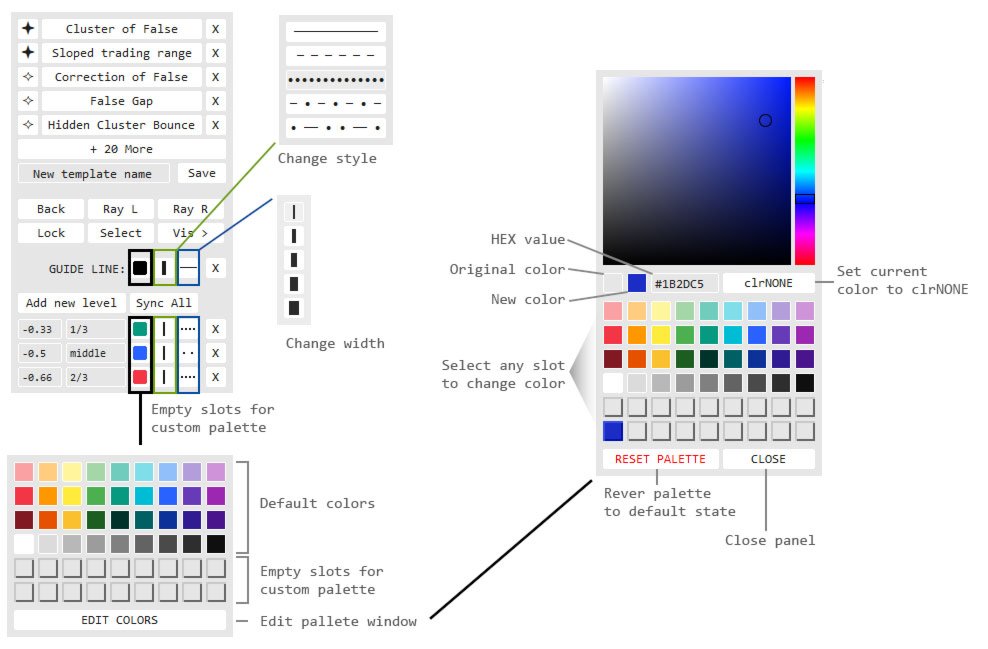
  • Fenêtres pop-up : Les options supplémentaires, telles que la sélection de style, la palette de couleurs et la liste des périodes, s'ouvrent dans des fenêtres pop-up compactes, gardant l'interface principale épurée.

Système de gestion des modèles

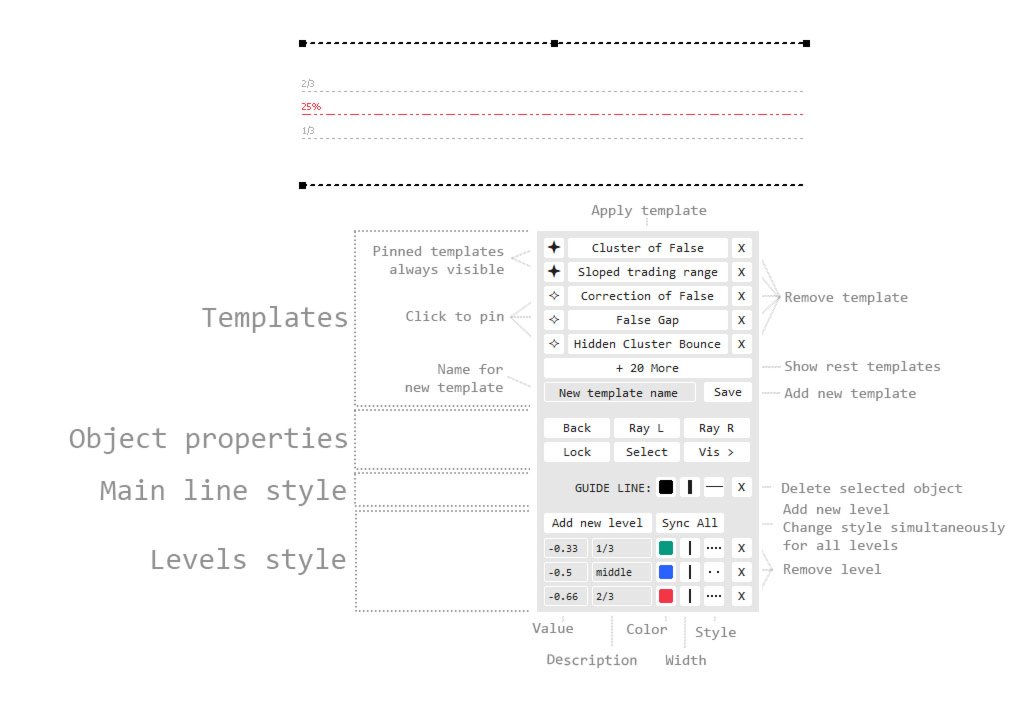
  • Enregistrer et appliquer des styles : Enregistrez un ensemble complet de propriétés d'un objet en tant que modèle nommé. Les modèles sont appliqués d'un seul clic.

  • Spécifique au type d'objet : Les modèles sont enregistrés pour un type d'objet spécifique. Par exemple, les styles créés pour une ligne de tendance ne seront disponibles que lors de la modification d'autres lignes de tendance.

  • Favoris (épinglage) : Les modèles fréquemment utilisés peuvent être épinglés pour un accès rapide. Ils seront toujours visibles, tandis que les autres sont masqués dans une fenêtre supplémentaire.

  • Synchronisation et portabilité :

    • Les modifications apportées aux modèles et à la palette de couleurs peuvent être automatiquement synchronisées sur toutes les instances de l'indicateur sur d'autres graphiques.

    • Les fichiers de paramètres sont enregistrés séparément, permettant un transfert facile vers d'autres ordinateurs ou différents terminaux.

Contrôle des propriétés des objets

  • Propriétés générales : Accès direct pour modifier la couleur, la largeur et le style de ligne. Fournit également le contrôle sur la plupart des paramètres standard : remplissage, dessiner en arrière-plan, rayons, icônes, texte, etc.

  • Édition d'objets à plusieurs niveaux (pour les outils Fibonacci, les canaux, les expansions, etc.) :

    • Contrôle individuel sur la valeur, la description textuelle, la couleur, la largeur et le style de ligne pour  chaque niveau.

    • Fonctionnalité d'ajout et de suppression de niveaux.

Palette de couleurs

  • 54 emplacements pour un accès rapide aux couleurs.

  • Éditeur visuel (sélecteur HSV) pour un réglage précis des couleurs.

  • Possibilité de modifier et d'enregistrer n'importe quelle couleur dans la palette.

Paramètres de l'indicateur

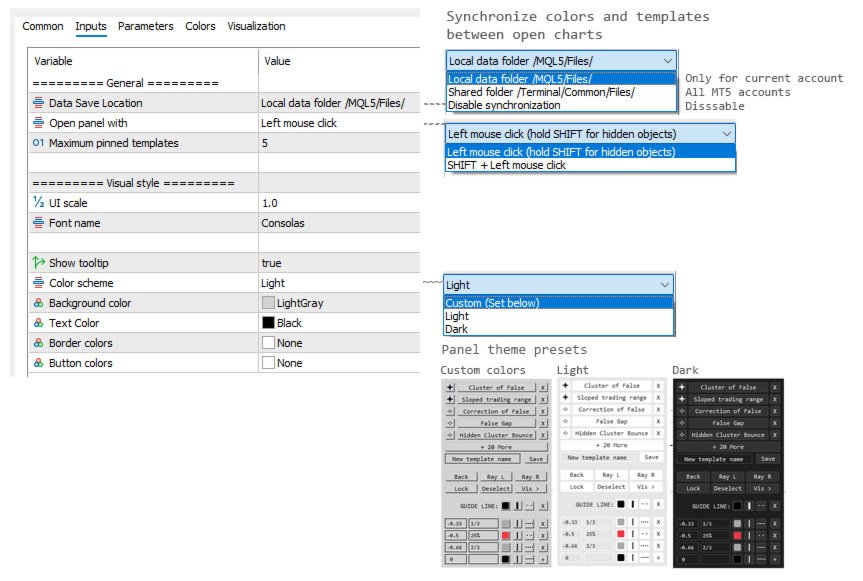
  • Mise à l'échelle de l'interface : Un paramètre d'entrée pour adapter la taille du panneau à la résolution de votre écran.

  • Méthode d'activation : Choisissez comment invoquer le panneau dans les paramètres (un simple clic ou Shift + clic).

  • Schémas de couleurs : Thèmes clairs et sombres préinstallés, ainsi que la possibilité de définir des couleurs entièrement personnalisées.

  • Mode de synchronisation : Option pour choisir où stocker les fichiers de paramètres : localement pour chaque graphique ou dans le dossier commun du terminal pour une synchronisation automatique.

À l'avenir, des propriétés supplémentaires et la prise en charge de nouveaux objets pourront être ajoutées en fonction des demandes des utilisateurs.
Avis 4
gottlieb
26
gottlieb 2026.09.16 10:44 

Это лучшее что я видел для mt5! Выражаю огромную благодарность!!! Автор ЛУЧШИЙ!!! P.S. Было бы прикольно если добавить в меню отрезка выравнивание по горизонтали отрезка. Мне ИИ написал в виде кнопки на графике: //+------------------------------------------------------------------+

//| Line_Leveler_Button.mq5 |

//| AI Code Generator |

//+------------------------------------------------------------------+

#property copyright "AI"

#property version "1.00"

#property indicator_chart_window

#property indicator_buffers 0

#property indicator_plots 0

//--- Входные параметры кнопки

input string InpButtonText = "Сделать горизонтальной"; // Текст на кнопке

input color InpButtonColor = clrWhite; // Цвет текста

input color InpBgColor = clrDarkSlateGray; // Цвет кнопки

input int InpFontSize = 10; // Размер шрифта

input int InpButtonWidth = 160; // Ширина кнопки

input int InpButtonHeight = 25; // Высота кнопки

//--- Имя объекта кнопки

string ButtonName = "Btn_Leveler_Line";

//+------------------------------------------------------------------+

//| Custom indicator initialization function |

//+------------------------------------------------------------------+

int OnInit()

{

// Создаем кнопку в левом верхнем углу графика

if(ObjectCreate(0, ButtonName, OBJ_BUTTON, 0, 0, 0))

{

ObjectSetInteger(0, ButtonName, OBJPROP_XDISTANCE, 15); // Отступ по оси X

ObjectSetInteger(0, ButtonName, OBJPROP_YDISTANCE, 120); // Отступ по оси Y (под имя инструмента)

ObjectSetInteger(0, ButtonName, OBJPROP_XSIZE, InpButtonWidth);

ObjectSetInteger(0, ButtonName, OBJPROP_YSIZE, InpButtonHeight);

ObjectSetInteger(0, ButtonName, OBJPROP_CORNER, CORNER_LEFT_UPPER); // Привязка к верхнему левому углу

ObjectSetString(0, ButtonName, OBJPROP_TEXT, InpButtonText);

ObjectSetString(0, ButtonName, OBJPROP_FONT, "Arial");

ObjectSetInteger(0, ButtonName, OBJPROP_FONTSIZE, InpFontSize);

ObjectSetInteger(0, ButtonName, OBJPROP_COLOR, InpButtonColor);

ObjectSetInteger(0, ButtonName, OBJPROP_BGCOLOR, InpBgColor);

ObjectSetInteger(0, ButtonName, OBJPROP_BORDER_COLOR, clrSilver);

ObjectSetInteger(0, ButtonName, OBJPROP_SELECTABLE, false);

ObjectSetInteger(0, ButtonName, OBJPROP_STATE, false); // Отжата по умолчанию

}

// Разрешаем индикатору ловить клики мыши по графику

ChartSetInteger(0, CHART_EVENT_OBJECT_CREATE, true);

return(INIT_SUCCEEDED);

}

//+------------------------------------------------------------------+

//| Custom indicator deinitialization function |

//+------------------------------------------------------------------+

void OnDeinit(const int reason)

{

// Удаляем кнопку при удалении индикатора

ObjectDelete(0, ButtonName);

ChartRedraw(0);

}

//+------------------------------------------------------------------+

//| OnCalculate (обязательная функция для индикаторов) |

//+------------------------------------------------------------------+

int OnCalculate(const int rates_total,

const int prev_calculated,

const datetime &time[],

const double &open[],

const double &high[],

const double &low[],

const double &close[],

const long &tick_volume[],

const long &volume[],

const int &spread[])

{

return(rates_total);

}

//+------------------------------------------------------------------+

//| ChartEvent function - перехват событий мыши и кликов |

//+------------------------------------------------------------------+

void OnChartEvent(const int id,

const long &lparam,

const double &dparam,

const string &sparam)

{

// Проверяем, произошел ли клик по графическому объекту

if(id == CHARTEVENT_OBJECT_CLICK)

{

// Проверяем, что кликнули именно по нашей кнопке

if(sparam == ButtonName)

{

bool leveled_any = false;

// Перебираем все графические объекты, которые сейчас есть на графике

int total_objects = ObjectsTotal(0, 0, -1);

for(int i = 0; i < total_objects; i++)

{

string obj_name = ObjectName(0, i, 0, -1);

// Нам нужны только те линии, которые выделил (выбрал двойным кликом) трейдер

if(ObjectGetInteger(0, obj_name, OBJPROP_SELECTED) == true)

{

// Проверяем тип объекта. Нам нужны обычные трендовые линии (OBJ_TREND)

if(ObjectGetInteger(0, obj_name, OBJPROP_TYPE) == OBJ_TREND)

{

// Берем цену первой точки линии

double price1 = ObjectGetDouble(0, obj_name, OBJPROP_PRICE, 0);

// Принудительно присваиваем второй точке точно такую же цену

ObjectSetDouble(0, obj_name, OBJPROP_PRICE, 1, price1);

leveled_any = true;

}

}

}

// Если выровняли линию, выводим сообщение в журнал

if(leveled_any)

{

Print("Успешно: Выделенные трендовые линии выровнены горизонтально.");

}

// Возвращаем кнопку в отжатое (активное) состояние для следующего раза

ObjectSetInteger(0, ButtonName, OBJPROP_STATE, false);

ChartRedraw(0);

}

}

}

Извини! Пользовался старой версией. После обновления увидел кнопку выравнивания. Спасибо тебе большое! Ты ЛУЧШИЙ!!! Успехов тебе и вдохновения!

nickvh1
74
nickvh1 2026.02.09 16:43 

Love this tool. Thanks to you!!

Produits recommandés
Win Rate Tracker MT5
Thokozani Harry Mkize
Stop guessing your performance. Track your wins and losses instantly, directly on your charts! As traders, keeping an accurate, real-time pulse on our psychological and execution performance is key to staying disciplined. DaBhoza Win Rate Tracker is a lightweight, intuitive, and highly visible on-chart utility designed to help you log and monitor your trade outcomes manually with a single click. Whether you are testing a new manual strategy, practicing on a demo account, or keeping track of your
FREE
Gold Session Levels Pro MT5 is a manual MetaTrader 5 indicator designed to display relevant intraday reference levels for XAUUSD. The indicator automatically calculates and draws the Asian range, its midpoint, the daily open, the London and New York opens, the previous trading day's high and low, and targets derived from the size of the Asian range. FEATURES - Dynamic Asian range while the configured session is active. - Range freezing after the configured Asian session close. - Asian range
FREE
Free automatic Fibonacci is an indicator that automatically plots a Fibonacci retracement based on the number of bars you select on the BarsToScan setting in the indicator. The Fibonacci is automatically updated in real time as new highest and lowest values appears amongst the selected bars. You can select which level values to be displayed in the indicator settings. You can also select the color of the levels thus enabling the trader to be able to attach the indicator several times with differe
FREE
Fibo Trader FREE MT5
Grzegorz Korycki
3 (3)
Fibo Trader is an expert advisor that allows you to create automated presets for oscillation patterns in reference to Fibonacci retracements values using fully automated and dynamically created grid. The process is achieved by first optimizing the EA, then running it on automated mode. EA allows you to switch between automatic and manual mode. When in manual mode the user will use a graphical panel that allows to manage the current trading conditions, or to take control in any moment to trade ma
FREE
The utility for setting a common stop loss for multiple orders. Beta version. After the test,  common take profit function will be added, orders close function will be added , and other necessary features will be added. Please do not give bad ratings to this free beta version. If you like it, give it a good rating and write to the author about any errors you find and what you would like to see in the utility. I made this utility for myself and use it daily. I am sharing it with you. A commercial
FREE
Automatic fibonacci with alerts is an indicator that automatically plots a fibonacci retracement based on the number of bars you select on the BarsToScan setting in the indicator. The fibonacci is automatically updated in real time as new highest and lowest values appear amongst the selected bars. You can select which level values to be displayed in the indicator settings. You can also select the color of the levels thus enabling the trader to be able to attach the indicator several times with d
FREE
This indicator is especially for the binary trading. Time frame is 1 minutes and exp time 5 or 3 minutes only. You must be use martingale 3 step. So you must put lots size is 10 % at most. You should use Mt2 trading platform to connect with my indicator to get more signal without human working. This indicator wining rate is over 80% but you may get 100% of profit by using martingale 3 step. You should use MT2 Trading Platform to connect meta trader platform and binary platform . You can get mt2
FREE
Script for Metatrader 5. One click to Delete the background grid and object, all objects on the chart such as Trend lines you have drawn or created by another program arrows text Fibonacci lines removes the background grid making a clearer clean chart horizontal and vertical lines Easy for clearing a chart or when opening new charts. Please leave a review on how its working.
FREE
PRODUCT TITLE: Mindgame  SHORT DESCRIPTION (Max 150 chars): All-in-One professional indicator: 5 SMAs, Non-Repainting MACD Crossover Arrows, NY Session Shading, and Live HUD Dashboard for MT5. CATEGORY: Market > MetaTrader 5 > Indicators > Trend / Oscillators PRICE RECOMMENDATION: $39 - $59 (or Free with premium upgrade / rental options) ================================================================================ FULL PRODUCT DESCRIPTION (Copy-paste directly into MQL5 Market description
FREE
Babel Assistant
Iurii Bazhanov
4.33 (9)
Babel assistant 1 Le robot de compensation (netting) MT5 "Babel_assistant_1" utilise l'indicateur ZigZag pour générer des niveaux de Fibonacci sur les unités de temps M1, M5, M15, H1, H4, D1 et W1, et calcule la force des tendances d'achat et de vente. Il ouvre une position en utilisant le paramètre "Lot for open a position" si le niveau de tendance spécifié de 4,925 est dépassé. Ensuite, Babel place des ordres en attente à certains niveaux de Fibonacci et définit les lignes de Stop Loss et de T
FREE
Développement de la version précédente de l'indicateur ZigZag WaveSize MT4 ZigZag WaveSize - indicateur standard ZigZag modifié avec ajout d'informations sur la longueur d'onde en points, niveaux et différentes logiques d'alertes Améliorations générales : Adaptation du code pour MetaTrader 5 Travail optimisé avec les objets graphiques Nouveautés : Niveaux horizontaux aux extrêmes Choix du type de niveaux : horizontal/rayons/segments Filtre de niveaux liquides (non percés par le prix) Tampon po
FREE
Indicator Description 4 Hull MA Color + Envelopes is a powerful trend-following indicator for MetaTrader 5 that combines four Hull Moving Averages (HMA) with Moving Average Envelopes to clearly identify market direction, trend strength, and potential reversal or pullback zones. This indicator is designed to reduce noise, react quickly to price movement, and provide a clean visual structure for professional trading.   Key Features   4 Hull Moving Averages (20, 50, 100, 200) Automatic color change
FREE
Nivelesfibonacci2
Sergio Piqueras Cuevas
NIVELESFIBONACCI2.12 — Órdenes Pendientes sobre Niveles Fibonacci Personalizados Este script para MetaTrader 5 permite colocar automáticamente órdenes pendientes de compra o venta utilizando como referencia los niveles Fibonacci horizontales previamente dibujados en el gráfico. El script está diseñado para funcionar conjuntamente con NIVELESFIBONACCI1.1 , aunque puede utilizar cualquier conjunto de líneas horizontales que siga la misma estructura de nombres mediante el prefijo configurado. La pr
FREE
Menora Indicator
Arnold Kurapa
4.5 (2)
Menora (All In One) Indicator. This is the advanced and premium indicator for the Magic Trend, a free indicator.  It has 3 output signals driven by different market conditions. This indicator has a double function of working as an indicator and utility at the same time. Specifications  1]  3 output signals a) Slow Moving Average with color change - The MA has a non-repaint color change, which makes it perfect for entry signals. b) Fast Moving Average (the original Magic Trend line) - Gives a
FREE
SnR Key Level by RWBTradeLab A clean, non-repainting Support & Resistance key level detector for MetaTrader 5, built for price action traders who want clear, fixed SnR reference levels with breakout upgrades, smart overlap-free labels and optional alerts — all from CLOSED candles only. What This Indicator Does The indicator automatically detects and draws 6 types of SnR key levels from 2-candle sequences: Base Key Levels - A Level: Green -> Red (Level = 1st Green candle Close) — Resistance
FREE
The jcoworld OTE EA is an automated trading bot for MetaTrader 5 built on Smart Money Concepts (SMC) . It accurately identifies market impulse moves and automatically enters trades within the Optimal Trade Entry (OTE) zone (61.8% – 79.0% Fibonacci) as soon as a confirmation candle closes. Optimized for: XAUEUR, XAUUSD, and Major Forex Pairs Features: Automatic risk management, dynamic lot sizing & automated Stop Loss/Take Profit. Try for free: This demo version is 100% free! Pricing Plans for Fu
FREE
HMA Color with Alerts MT5
Pavel Zamoshnikov
4.77 (61)
Hull Moving Average (HMA) is well-deservedly popular among traders because of the effective averaging of market noise and a relatively small delay. The current MetaTrader 5 version changes its color when the movement direction changes. Sound and text signals are available. It also supports sending email and push messages. It is possible to trigger a signal on the current incomplete bar, although such a signal may be canceled before completion if conditions are no longer appropriate. One of the p
FREE
AK Capital Backtest panel
AK Capital Markets Limited
5 (3)
backtester buttons for testing strategies in the MT5 strategy tester.  load up strategy tester then click on visual test and once visual tester opened apply any chart template you'd like. To update the chart pause the visual tester and apply templates, colors and such like the normal chart. On the settings you can choose lot size and take profit and stop loss.  Enjoy
FREE
LIMITED TIME OFFER to download for FREE for Unlimited use license ================================================================ QuantView Analytics Master Advanced On-Chart Portfolio Diagnostics & Equity Forensics for MetaTrader 5 Standard MT5 history reports simply show you how much money was made or lost. QuantView Analytics Master is designed to answer the "Why" and the "How." By segmenting your trading history across four distinct analytical dimensions, this institutional-grade terminal
FREE
Effacer Tous les Stop Loss et Take Profit — Une solution simple pour supprimer instantanément les niveaux SL/TP Supprimez tous les niveaux de Stop Loss et de Take Profit en un seul clic ! Effacer Tous les Stop Loss et Take Profit est un script pratique conçu pour les traders qui souhaitent supprimer rapidement et efficacement les niveaux de SL et TP sur toutes les positions ouvertes. Sa simplicité d'utilisation et son exécution instantanée en font un outil indispensable pour les conditions de ma
FREE
Trade ManagementG
Aaron Salcedo Sulit
A manual trading tool that places buy, sell, stop, and limit orders. Easily configure your settings for risk, take profit, stop loss, break-even, and trailing stops. It works in any timeframe and serves as a highly reliable tool for manual trading. Settings can be changed easily right on the panel—no more clicking the small Expert Advisor icon in the corner of the screen.
FREE
FibRetrace Zones Zones de retracement de Fibonacci du dernier mouvement FibRetrace Zones est le compagnon visuel gratuit de l'Expert Advisor FibRetrace. Il trace les niveaux de retracement de Fibonacci et met en évidence la zone de repli du dernier mouvement, pour que vous voyiez où se situent les entrées avant de trader. La zone est colorée selon la direction : vert pour les configurations haussières, rouge pour les baissières. Fonctionne sur tout symbole et toute unité de temps. FONCTIONNALITÉ
FREE
Minimalist Manager
Nestor Sanchez Gomez
Minimalist Manager is a manual trade-management panel for traders who place their own entries and want precise, fast control over risk, stops, and targets directly on the chart. It is a discretionary tool. You decide when to enter; Minimalist Manager handles the sizing, stop-loss, take-profit, break-even and trailing mechanics around your decision. Trading several accounts? Its Trade Copier places the same trade on all of them, each at its own risk. Key features Risk-based position sizing. Se
FREE
Auto BreakEven Lite is a simple and reliable Expert Advisor for MetaTrader 5 that automatically moves the Stop Loss to BreakEven when a trade reaches a defined profit level. This tool helps traders protect their positions and eliminate risk once the trade moves into profit. The EA works with all asset classes including Forex, indices, metals, crypto and CFDs. Once attached to a chart, the EA monitors open positions and automatically moves the Stop Loss to BreakEven plus an optional offset.
FREE
TradeGreat Bot
Mykyta Nikolaiev
TradeGreat Mean Reversion EA TradeGreat is an automated trading system built around statistical price behavior analysis relative to a Moving Average (MA) . The system evaluates price deviation from the average value using proprietary mathematical models rather than traditional indicator-based signals. The strategy relies on quantitative analysis of market behavior, where the Moving Average serves as a reference point, while entry and exit decisions are determined by internal mathematical calcul
FREE
Session High Low Boxes
Shanawaz Mohammed Nabi Rasool Pinjori
Session High Low draws the Asian, London and New York sessions on your chart as colored boxes, with the high and low of each session. Optional extension lines continue the session high and low after the session ends, which is useful for breakout and retest trading. Features Asian, London and New York boxes, each can be turned on or off Session high and low prices shown as labels Extension lines after the session end (hours adjustable, 0 = off) Ranges are built from M5 data, so the boxes are the
FREE
Ninja Master
Lasse Mathias Baagoe S Christensen
3 (2)
Ninja Master: Powering Traders & Investors Worldwide. Ninja Master is an advanced and adaptable Gold Expert Advisor developed exclusively for Gold on the 5-minute timeframe . It is a complete trading solution that performs a range of tasks, including following the trend , analyzing the chart , smart TP system , and smart filters . It does not use neural learning or AI — instead, it uses an adaptable smart algorithm designed for traders who prioritize capital protection and steady growth . Create
FREE
Introducing a powerful MetaTrader 5 Expert Advisor designed to enhance your trading strategy – the Auto Breakeven EA! This feature-rich EA is tailored to bring your stop-loss to breakeven, ensuring a risk-free trade once the market moves in your favor up to a specified price. Explore the full potential of the Auto Breakeven EA. Download it for free now, and find the download link at the bottom of our page. Elevate your trading experience and take control of your risk management strategy. Happy
FREE
AI Weekly Open Bias Trader
Fadi Hassan Khaled Ghanem
Utilise le prix d'ouverture hebdomadaire comme ligne de biais et trade les rejets de cette ligne dans le sens du biais hebdomadaire. Fonctionnement L'EA évalue ses règles une fois par barre clôturée de l'unité de temps du signal (H1 par défaut), de sorte que les signaux ne se redessinent pas et que la logique est identique dans le testeur et sur un graphique réel. Lorsque la configuration apparaît et qu'aucune position de cet EA n'est ouverte sur le symbole, il ouvre un ordre au marché avec un s
FREE
This indicator automatically identifies liquidity levels using swing fractals and tracks when price sweeps through them. Works on any symbol and timeframe with full multi-timeframe support. Features: — Detects swing highs and lows via a fractal method (configurable bars left & right) on a selected timeframe. Active levels are displayed as rays extending to the right; swept levels turn into dashed lines ending at the sweep candle. — Plots Previous Day (PDhigh / PDlow), Previous Week (PWhigh / PWl
FREE
Les acheteurs de ce produit ont également acheté
Trade Assistant MT5
Evgeniy Kravchenko
4.43 (216)
It helps to calculate the risk per trade, the easy installation of a new order, order management with partial closing functions, trailing stop of 7 types and other useful functions. Additional materials and instructions Installation instructions - Application instructions Line function -   shows on the chart the Opening line, Stop Loss, Take Profit. With this function it is easy to set a new order and see its additional characteristics before opening.   Risk management  - The risk calculation
Bienvenue sur Trade Manager EA, l’outil ultime de gestion des risques conçu pour rendre le trading plus intuitif, précis et efficace. Ce n’est pas seulement un outil d’exécution d’ordres ; c’est une solution complète pour la planification des trades, la gestion des positions et le contrôle des risques. Que vous soyez débutant, trader expérimenté ou scalpeur ayant besoin d’une exécution rapide, Trade Manager EA s’adapte à vos besoins, offrant une flexibilité sur tous les marchés, des devises et i
Local Trade Copier EA MT5
Juvenille Emperor Limited
4.94 (149)
Local Trade Copier EA MT5 est un copieur de trades rapide et flexible permettant de copier et de gérer des trades entre plusieurs comptes MetaTrader 5 sur le même ordinateur Windows ou Windows VPS. Il combine la synchronisation locale des trades avec des contrôles côté Receiver pour la taille des lots, la gestion du risque, le filtrage des trades, le mappage des symboles, la gestion des trades et la protection du compte. Configurez vos terminaux Transmitter et Receiver en environ 1 minute et co
Telegram to MT5 Multi-Channel Copier   copie automatiquement les signaux de trading de vos canaux Telegram et Discord directement vers MetaTrader 5. Pas de bots, pas d'extensions de navigateur, pas de copie manuelle. Un signal arrive sur Telegram ou Discord et l'EA ouvre le trade dans votre terminal en quelques secondes. Et avant de copier un canal, le backtester intégré vous montre ce que ce canal aurait fait sur votre compte. Le produit comprend deux composants : une application Windows qui éc
Farmed Hedge Yield Farming | All Markets (Manual - Hybrid - Semi/Automated EA) VERIFIED TRADING RESULTS - Farmed Hedge Yield Axi Copy:  https://www.mql5.com/en/signals/2356376 - Farmed Hedge Yield Exn Copy:   https://www.mql5.com/en/signals/2356404 - Farmed Hedge Yield V Copy:  https://www.mql5.com/en/signals/2357156 IMPORTANT NOTICE: FarmedHedge is a MANUAL-FOCUSED TRADING UTILITY ,not a fully automated EA. Results shown on this Signal include manual trades and overall strategic management.
Copiez les signaux Telegram avec vos propres règles de trading Telegram to MT5 Signal Trader copie automatiquement les signaux de trading au format texte provenant de canaux et de groupes Telegram publics et privés vers MetaTrader 5. Gérez plusieurs fournisseurs et comptes MT5 depuis une seule application de bureau, avec des paramètres de risque et de trading propres à chaque fournisseur . Aucun bot Telegram ni configuration d'API n'est nécessaire pour copier les signaux. Connectez-vous simpleme
News Trade EA MT5
Konstantin Kulikov
4.55 (11)
Je voudrais vous présenter un robot efficace que j'utilise depuis plusieurs années. Il peut être utilisé en mode semi-automatique, comme en mode totalement automatique. >>> Chat <<< Le programme comporte des paramètres souples pour le commerce sur les nouvelles du calendrier économique. Il est impossible de le vérifier dans le testeur des stratégies. Ce qu’il faut, c’est le travail réel. Il faut ajouter à la liste des URL autorisées, dans les paramètres du terminal, un site d'actualités. Cliqu
================================================================================ POC BREAKOUT - V20.72. Full Professional Grade Toolkit ================================================================================ POC Breakout is a full MetaTrader 5 trading dashboard for discretionary traders who want breakout signals, Point of Control (POC) context, volume profiles, order flow, market structure, news, alerts, and advanced trade planning in one professional workspace. Attached directly to you
TradePanel MT5
Alfiya Fazylova
4.88 (170)
Trade Panel est un assistant commercial multifonction. L'application contient plus de 50 fonctions de trading pour le trading manuel et permet d'automatiser la plupart des tâches commerciales. Instructions d'utilisation : https://www.mql5.com/fr/blogs/post/762589 Version d'essai de l'application pour un compte démo : https://www.mql5.com/fr/blogs/post/762644 Comment installer l'application : https://www.mql5.com/fr/blogs/post/762645 Comment tester l'application en mode visuel : https://www.mql5.
Strategy Ledger Pro
Abdullah Uygar Tuna
5 (12)
Désormais disponible en français. Strategy Ledger Pro est un panneau d'analyse de compte en lecture seule pour MetaTrader 5. Il sépare les résultats du compte par Expert Advisor, stratégie, symbole et numéro magic, pour que vous voyiez ce que chacun apporte réellement. Le panneau est disponible en 11 langues : English, Français, Deutsch, Español, Italiano, Português, Русский, Türkçe, 中文, 日本語 et 한국어. Avant de télécharger la démo. Le Market exécute la démo de tout produit payant uniquement dans l
Master Your Trading Discipline   Stop losing your hard-earned gains to overtrading and emotional decisions. The Discipline Tool is your ultimate trading assistant, ensuring strict risk management in real-time. Key Protection Features: Advanced Drawdown Defense : Automatically halts trading if your daily drawdown exceeds a preset threshold (percentage or dollar amount). Real-Time Equity Lock : Safeguard profits by referencing peak equity, ensuring drawdown stays within control. Hard Profit Target
Dealer Panel
Mian Rameez Ali
Dealer's Panel No signal decides anything here — a hand does. One click, and the panel calculates what's underneath: lot size from risk, target from a 30-step balance ladder that remembers exactly how far an account has climbed. Toggle between market and pending without touching an input field. Set a stop, and the take-profit can write itself — a fixed share of the balance, translated into price with no arithmetic left for the trader to get wrong. One trade live at a time; it won't let a seco
Exp COPYLOT CLIENT for MT5
Vladislav Andruschenko
3.97 (35)
Copieur professionnel de trades pour MetaTrader 5 Un copieur de trades rapide, professionnel et fiable pour MetaTrader . COPYLOT permet de copier des trades Forex entre les terminaux MT4 et MT5 avec prise en charge des comptes Hedge et Netting . La version MT5 de COPYLOT prend en charge : - MT5 Hedge → MT5 Hedge - MT5 Hedge → MT5 Netting - MT5 Netting → MT5 Hedge - MT5 Netting → MT5 Netting - MT4 → MT5 Hedge - MT4 → MT5 Netting Version MT4 Description complète + DEMO + PDF Comment acheter Comme
HINN MagicEntry Extra
ALGOFLOW OÜ
4.74 (19)
HINN MAGIC ENTRY – the ultimate tool for entry and position management! SIMPLE. FASTEST. INTUITIVE. MAX AUTOMATED. Place orders by selecting a level directly on the chart! full description   ::  demo-version  :: 60-sec-video-description Key features: - Market, limit, and pending orders - Automatic lot size calculation - Automatic spread and commission accounting - Unlimited partitial take-profits  - Breakeven and trailing stop-loss and take-profit  functions - Invalidation leves - Intuitive, a
The product will copy all telegram signal to MT5 ( which you are member) , also it can work as remote copier.  Easy to set up, copy order instant, can work with almost signal formats, image signal,  s upport to translate other language to English Work with all type of channel or group, even channel have "Restrict Saving Content", work with  multi channel, multi MT5 Work as remote copier: with signal have ticket number, it will copy exactly via ticket number. Support to backtest signal. How to s
RETAILBERG FOOTPRINT CHART PRO — Order-Flow Workspace for MetaTrader 5 Version 7.00  |  Professional System  |  31 tools  |  One chart A full 150-page illustrated User Manual is included. Please read the full manual to understand this feature packed footprint chart elements and ui. https://www.mql5.com/en/blogs/post/777982 DEMO / STRATEGY TESTER — PLEASE READ FIRST
Prochaine mise à jour — Version 2.52 bientôt disponible ! [NOUVEAU] Préparez-vous à découvrir 4 nouvelles fonctionnalités majeures conçues pour améliorer votre analyse du marché et votre flux de travail de trading Nous faisons passer l’analyse du marché au niveau supérieur avec 4 nouvelles fonctionnalités conçues pour répondre à vos besoins en trading. Découvrez : 1. TRADE OVERVIEW DASHBOARD 2. CONFLUENCE AT ZONE 3. STRONG & WEAK HIGH/LOW 4. OTE 1. TRADE OVERVIEW DASHBOARD Un tableau de bord qu
EasyInsight AIO MT5
Alain Verleyen
4.92 (12)
EASY Insight AIO – La solution tout-en-un pour un trading intelligent et sans effort Présentation Imaginez pouvoir analyser l’ensemble du marché — Forex, Or, Crypto, Indices et même Actions — en quelques secondes, sans aucune analyse manuelle de graphiques, sans installation complexe ni configuration d’indicateurs. EASY Insight AIO est votre outil d’exportation ultime, prêt à l’emploi, pour un trading alimenté par l’IA. Il fournit une vue d’ensemble du marché dans un fichier CSV propre — prêt
Telegram To MT5 Ultra
Mirel Daniel Gheonu
5 (5)
Telegram To MT5 — Copieur de signaux Transformez les appels de trading de vos canaux Telegram en véritables ordres MT5 — automatiquement, sur autant de comptes que vous le souhaitez, avec le risque et les règles entièrement sous votre contrôle. Telegram To MT5 relie les canaux VIP / de signaux que vous suivez déjà sur Telegram à votre terminal MetaTrader 5. Une application de bureau compagnon gratuite lit les messages (même des canaux qui bloquent les bots), et cet Expert Advisor les exécute sur
MT5 to Telegram Signal Provider est un utilitaire facile à utiliser et entièrement personnalisable qui permet l'envoi de signaux spécifiés vers un chat, un canal ou un groupe Telegram, transformant ainsi votre compte en fournisseur de signaux. Contrairement à la plupart des produits concurrents, il n'utilise pas d'importations DLL. [ Démonstration ] [ Manuel ] [ Version MT4 ] [ Version Discord ] [ Canal Telegram ]  New: [ Telegram To MT5 ] Configuration Un guide utilisateur étape par étape est
The Patch
Mian Rameez Ali
The Patch It never opens a trade. It walks behind the ones that did. Every open position, every pending order — checked twice a second for the one thing that's easy to forget: a stop, a target. Found bare, it doesn't ask. It writes the missing number in, measured in points from wherever the position began, and moves on to the next. No strategy, no opinion on direction. Just the quiet assumption that nothing should ever sit on the market unprotected — not because someone decided it shouldn't,
Trade copier MT5
Alfiya Fazylova
4.61 (57)
Trade Copier est un utilitaire professionnel conçu pour copier et synchroniser les commandesentre les comptes de trading. Les commandes sont copiées du compte/terminal du fournisseur vers le compte/terminal du destinataire, qui sont installés sur le même ordinateur ou vps. Avant d'acheter, vous pouvez tester la version démo sur un compte démo. Version démo ici . Instructions complètes ici . Principales fonctionnalités et avantages: Prend en charge la copie des commandes MT5> MT5, MT4> MT5, MT5>
Grid Manual MT5
Alfiya Fazylova
4.73 (22)
Grid Manual est un panneau de trading permettant de travailler avec une grille d'ordres. L'utilitaire est universel, possède des paramètres flexibles et une interface intuitive. Il fonctionne avec une grille d'ordres non seulement dans le sens des pertes, mais aussi dans le sens de l'augmentation des profits. Le commerçant n'a pas besoin de créer et de maintenir une grille d'ordres, l'utilitaire le fera. Il suffit d'ouvrir une ordre et "Grid Manual" créera automatiquement une grille de ordres po
Signal Trading View to MT5 Pro
Mirel Daniel Gheonu
4.5 (2)
Signal TradingView to MT5 Pro Automator Exécution professionnelle instantanée entre TradingView et MetaTrader 5 Automatisez votre stratégie de trading avec le pont de communication le plus robuste entre les alertes TradingView et l'exécution réelle sur MT5. Conçu pour les traders qui exigent vitesse, flexibilité et une gestion des risques impeccable, cet Expert Advisor transforme tout message d'alerte en un ordre au marché ou à cours limité précis. POINTS FORTS ET AVANTAGES Moteur d'analyse univ
Power Candles Strategy Scanner - Outil de recherche de configurations multi-symboles à optimisation automatique Le Power Candles Strategy Scanner utilise le même moteur d'auto-optimisation que celui qui alimente l'indicateur Power Candles, pour chaque symbole de votre Market Watch, en parallèle. Un panneau vous indique quels symboles sont statistiquement négociables à l'instant, quelle stratégie est la plus performante pour chacun, la paire Stop Loss / Take Profit optimale, et vous alerte dès qu
Anchor Trade Manager
Kalinskie Gilliam
5 (9)
Your EAs cannot see each other, but Anchor can. Anchor gives you one place to coordinate your EAs, manage risk, and decide when trading is allowed. It works alongside the trading bots you already use without any changes to them. The Problem One EA opens a trade. Then another starts trading. The next thing you know, you wake up to multiple grids built across your account. Each EA may be doing exactly what it was designed to do, but together they can place far more risk on your account than you in
VirtualTradePad PRO SE MT5 — centre de contrôle de trading professionnel pour MetaTrader 5 VirtualTradePad PRO SE est un panneau de trading premium basé sur le graphique et un espace de gestion des trades pour MetaTrader 5 . Il est conçu pour les traders qui souhaitent une exécution plus rapide, un contrôle plus clair des positions, une gestion structurée des trades, une planification visuelle des niveaux et un flux de travail professionnel directement depuis le graphique. Ce n’est pas seulement
The News Filter MT5
Leolouiski Gan
4.79 (24)
Ce produit filtre tous les conseillers experts et les graphiques manuels pendant les heures de publication des actualités, de sorte que vous n'avez pas à vous soucier des pics de prix soudains qui pourraient détruire vos configurations de trading manuelles ou les transactions entrées par d'autres conseillers experts. Ce produit est également livré avec un système de gestion des ordres complet qui peut gérer vos positions ouvertes et vos ordres en attente avant la publication de toute actualité.
Panneau de trading pour MetaTrader 5 — contrôle professionnel du trading en un clic depuis le graphique et le clavier Un panneau de trading avancé conçu pour les traders actifs, afin d’ouvrir, gérer et clôturer des positions bien plus rapidement qu’avec l’interface standard de MetaTrader. Cette solution s’adresse à ceux qui veulent contrôler positions, ordres en attente, profit global et exécution depuis un seul espace de travail professionnel. Il ne s’agit pas d’un simple utilitaire. C’est un
Floor Watch
Syed Tauqeer Hussain Shah
Floor Watch One number, watched every thirty seconds: how far equity has fallen since the day began — or since its highest point, if it's told to trail the peak instead of the open. Cross the line and it doesn't argue. Every open position closes, every pending order vanishes, and anything that slips through afterward gets shut the moment it appears. Not asked. Removed. The floor holds until the clock turns 5 AM Pakistan time — then, and only then, does the day start over. One rule. No except
Plus de l'auteur
Generates custom tick-based charts. Runs as a service. Key Features: Custom Tick Bars: Define the exact number of ticks per candle. Auto-Setup: Automatically creates the custom symbol in Market Watch and loads history. Session Control: Automatically closes the current bar at the end of the trading day. Real-Time: Updates seamlessly with live market data. Parameters: Source Symbol: Base asset (e.g., EURUSD). Required. Symbol suffix: Suffix for the new symbol (default: _TICK ). Ticks per bar: Tick

FREE
Un utilitaire MT5 qui crée des symboles personnalisés pour afficher uniquement des sessions de trading spécifiques, en filtrant les données nocturnes (Globex) et l'action des prix en dehors des heures. Il vous permet de construire des graphiques strictement basés sur les Regular Trading Hours (RTH) ou une période personnalisée. Fonctionnalités : Exécuter comme service :   Configurez-le une fois et oubliez-le. Les services démarrent automatiquement avec MT5, s'exécutant en arrière-plan. Pas besoi
FREE
Position Size Tool
Filipp Pavlov
5 (1)
Un utilitaire rapide, piloté par raccourcis clavier, pour calculer le risque, placer des ordres et gérer les positions directement sur votre graphique MT5. J'ai créé cet outil parce que j'en avais assez des panneaux de trading lourds et encombrants qui occupent la moitié de l'écran et qui ralentissent justement au moment où on en a le plus besoin. Je voulais un graphique propre et la possibilité d'exécuter et de gérer des trades manuels à la volée, uniquement avec le clavier et la souris. Il est
Filtrer:
gottlieb
26
gottlieb 2026.09.16 10:44 

Это лучшее что я видел для mt5! Выражаю огромную благодарность!!! Автор ЛУЧШИЙ!!! P.S. Было бы прикольно если добавить в меню отрезка выравнивание по горизонтали отрезка. Мне ИИ написал в виде кнопки на графике: //+------------------------------------------------------------------+

//| Line_Leveler_Button.mq5 |

//| AI Code Generator |

//+------------------------------------------------------------------+

#property copyright "AI"

#property version "1.00"

#property indicator_chart_window

#property indicator_buffers 0

#property indicator_plots 0

//--- Входные параметры кнопки

input string InpButtonText = "Сделать горизонтальной"; // Текст на кнопке

input color InpButtonColor = clrWhite; // Цвет текста

input color InpBgColor = clrDarkSlateGray; // Цвет кнопки

input int InpFontSize = 10; // Размер шрифта

input int InpButtonWidth = 160; // Ширина кнопки

input int InpButtonHeight = 25; // Высота кнопки

//--- Имя объекта кнопки

string ButtonName = "Btn_Leveler_Line";

//+------------------------------------------------------------------+

//| Custom indicator initialization function |

//+------------------------------------------------------------------+

int OnInit()

{

// Создаем кнопку в левом верхнем углу графика

if(ObjectCreate(0, ButtonName, OBJ_BUTTON, 0, 0, 0))

{

ObjectSetInteger(0, ButtonName, OBJPROP_XDISTANCE, 15); // Отступ по оси X

ObjectSetInteger(0, ButtonName, OBJPROP_YDISTANCE, 120); // Отступ по оси Y (под имя инструмента)

ObjectSetInteger(0, ButtonName, OBJPROP_XSIZE, InpButtonWidth);

ObjectSetInteger(0, ButtonName, OBJPROP_YSIZE, InpButtonHeight);

ObjectSetInteger(0, ButtonName, OBJPROP_CORNER, CORNER_LEFT_UPPER); // Привязка к верхнему левому углу

ObjectSetString(0, ButtonName, OBJPROP_TEXT, InpButtonText);

ObjectSetString(0, ButtonName, OBJPROP_FONT, "Arial");

ObjectSetInteger(0, ButtonName, OBJPROP_FONTSIZE, InpFontSize);

ObjectSetInteger(0, ButtonName, OBJPROP_COLOR, InpButtonColor);

ObjectSetInteger(0, ButtonName, OBJPROP_BGCOLOR, InpBgColor);

ObjectSetInteger(0, ButtonName, OBJPROP_BORDER_COLOR, clrSilver);

ObjectSetInteger(0, ButtonName, OBJPROP_SELECTABLE, false);

ObjectSetInteger(0, ButtonName, OBJPROP_STATE, false); // Отжата по умолчанию

}

// Разрешаем индикатору ловить клики мыши по графику

ChartSetInteger(0, CHART_EVENT_OBJECT_CREATE, true);

return(INIT_SUCCEEDED);

}

//+------------------------------------------------------------------+

//| Custom indicator deinitialization function |

//+------------------------------------------------------------------+

void OnDeinit(const int reason)

{

// Удаляем кнопку при удалении индикатора

ObjectDelete(0, ButtonName);

ChartRedraw(0);

}

//+------------------------------------------------------------------+

//| OnCalculate (обязательная функция для индикаторов) |

//+------------------------------------------------------------------+

int OnCalculate(const int rates_total,

const int prev_calculated,

const datetime &time[],

const double &open[],

const double &high[],

const double &low[],

const double &close[],

const long &tick_volume[],

const long &volume[],

const int &spread[])

{

return(rates_total);

}

//+------------------------------------------------------------------+

//| ChartEvent function - перехват событий мыши и кликов |

//+------------------------------------------------------------------+

void OnChartEvent(const int id,

const long &lparam,

const double &dparam,

const string &sparam)

{

// Проверяем, произошел ли клик по графическому объекту

if(id == CHARTEVENT_OBJECT_CLICK)

{

// Проверяем, что кликнули именно по нашей кнопке

if(sparam == ButtonName)

{

bool leveled_any = false;

// Перебираем все графические объекты, которые сейчас есть на графике

int total_objects = ObjectsTotal(0, 0, -1);

for(int i = 0; i &lt; total_objects; i++)

{

string obj_name = ObjectName(0, i, 0, -1);

// Нам нужны только те линии, которые выделил (выбрал двойным кликом) трейдер

if(ObjectGetInteger(0, obj_name, OBJPROP_SELECTED) == true)

{

// Проверяем тип объекта. Нам нужны обычные трендовые линии (OBJ_TREND)

if(ObjectGetInteger(0, obj_name, OBJPROP_TYPE) == OBJ_TREND)

{

// Берем цену первой точки линии

double price1 = ObjectGetDouble(0, obj_name, OBJPROP_PRICE, 0);

// Принудительно присваиваем второй точке точно такую же цену

ObjectSetDouble(0, obj_name, OBJPROP_PRICE, 1, price1);

leveled_any = true;

}

}

}

// Если выровняли линию, выводим сообщение в журнал

if(leveled_any)

{

Print("Успешно: Выделенные трендовые линии выровнены горизонтально.");

}

// Возвращаем кнопку в отжатое (активное) состояние для следующего раза

ObjectSetInteger(0, ButtonName, OBJPROP_STATE, false);

ChartRedraw(0);

}

}

}

Извини! Пользовался старой версией. После обновления увидел кнопку выравнивания. Спасибо тебе большое! Ты ЛУЧШИЙ!!! Успехов тебе и вдохновения!

Filipp Pavlov
836
Réponse du développeur Filipp Pavlov 2026.09.24 09:09
Так уже есть. Для тренд линий есть кнопка "Flatten" которая делает цены двух точек одинаковыми :)
mehgrdad.j
35
mehgrdad.j 2026.07.07 11:02 

L'utilisateur n'a laissé aucun commentaire sur la note

nickvh1
74
nickvh1 2026.02.09 16:43 

Love this tool. Thanks to you!!

Olga Kubakh
28
Olga Kubakh 2026.02.02 04:24 

L'utilisateur n'a laissé aucun commentaire sur la note

Répondre à l'avis