Objects Styler

5

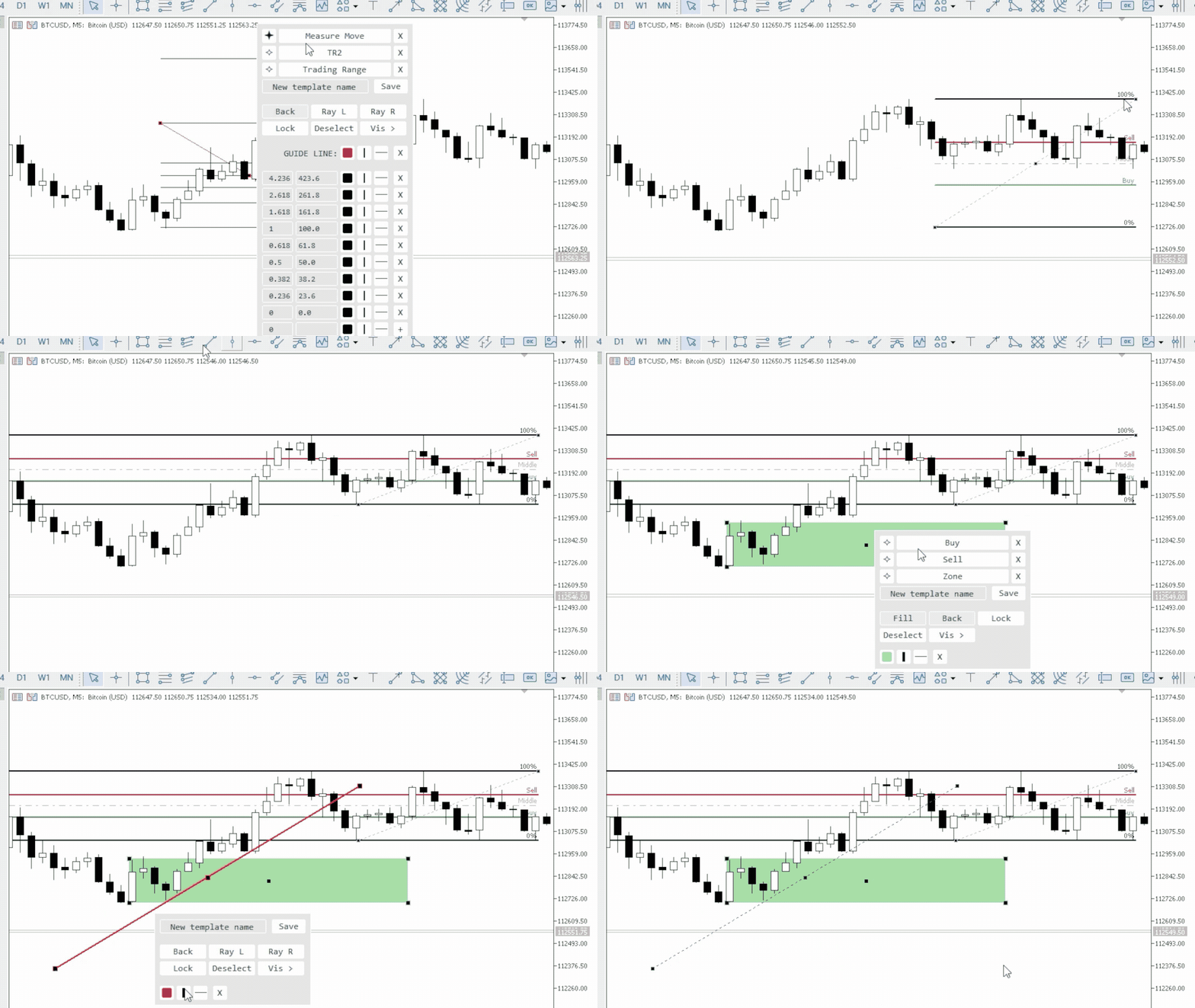
Objects Styler grafik üzerinde standart grafik nesnelerinin özelliklerini doğrudan düzenlemek için bir  bağlama duyarlı panel sağlayan bir yardımcı programdır. Temel özelliği, kullanıcıların nesnelere karmaşık stil kümelerini kaydetmesine, yönetmesine ve anında uygulamasına olanak tanıyan güçlü bir  şablon sistemidir.

Temel Özellikler

Arayüz ve Etkileşim

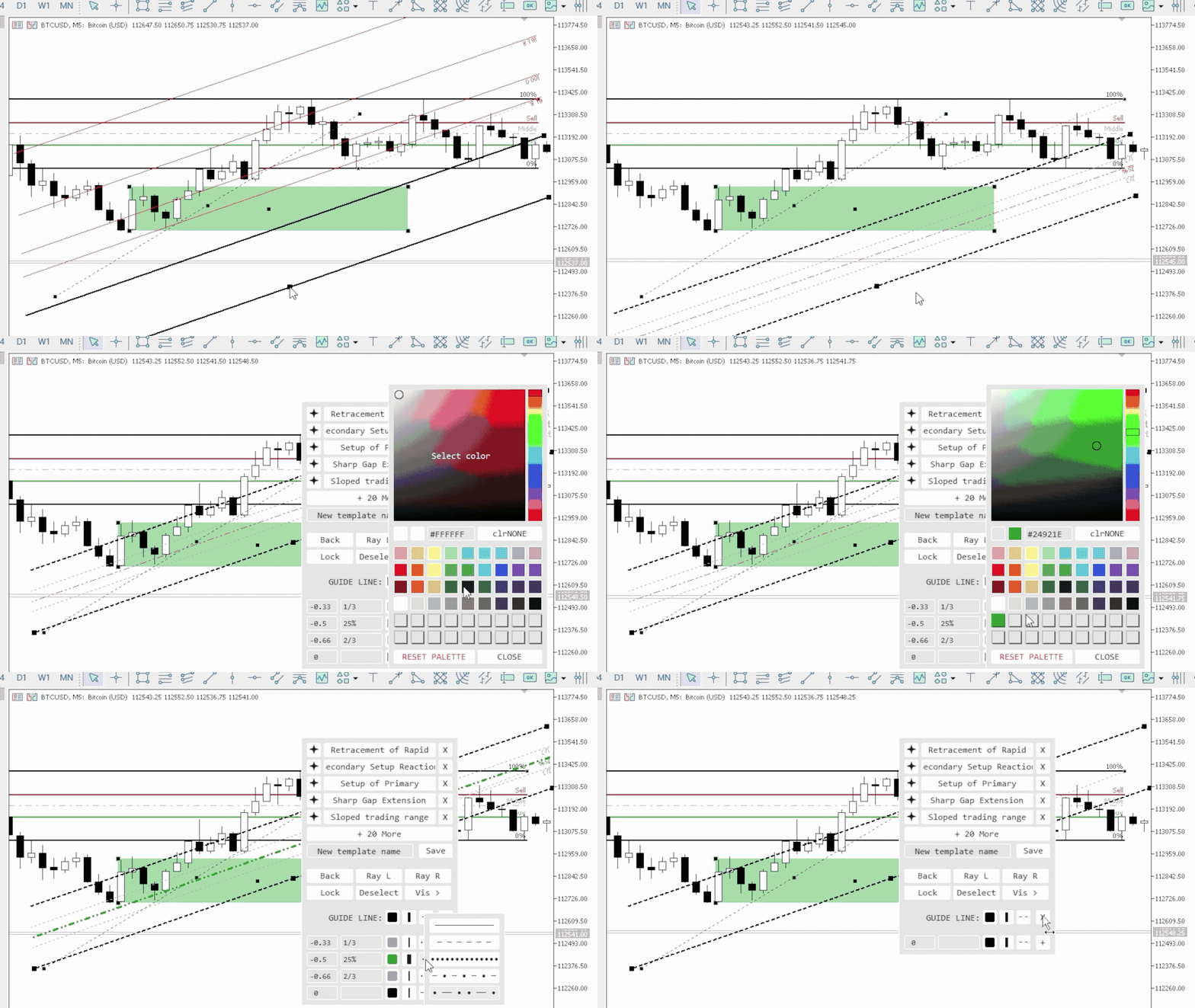
  • Bağlamsal Aktivasyon: Panel, bir grafik nesnesine tıklayarak (veya Shift + tıklayarak) çağrılır. Tüm standart nesneleri ve özelliklerinin çoğunu destekler.

  • Sürüklenebilir Arayüz: Panel, grafiğin herhangi bir alanına serbestçe taşınabilir.

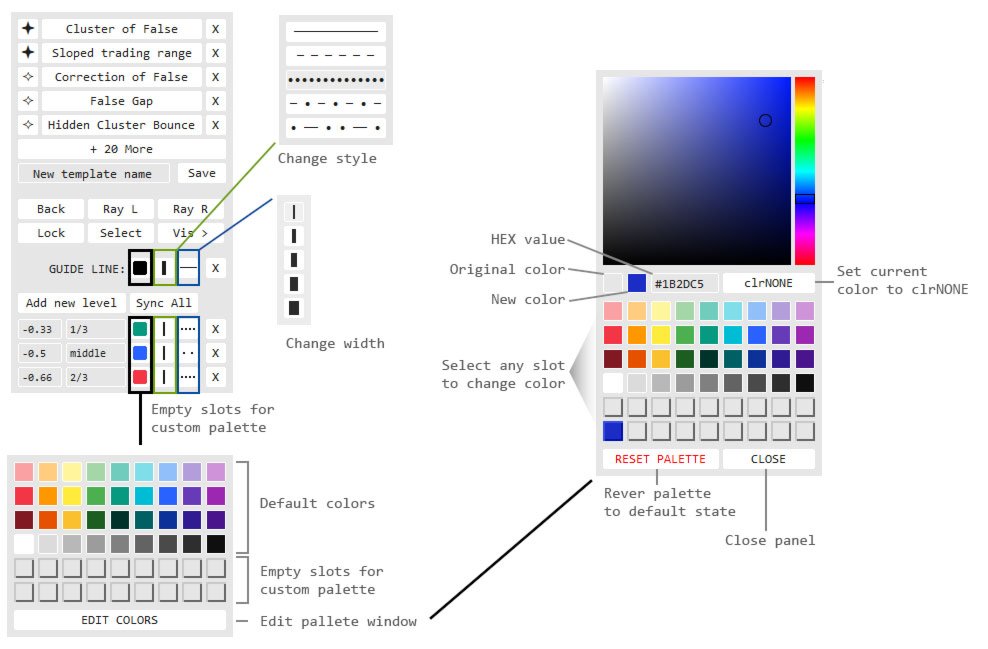
  • Açılır Pencereler: Stil seçimi, renk paleti ve zaman dilimi listesi gibi ek seçenekler kompakt açılır pencerelerde açılır, ana arayüzü düzenli tutar.

Şablon Yönetim Sistemi

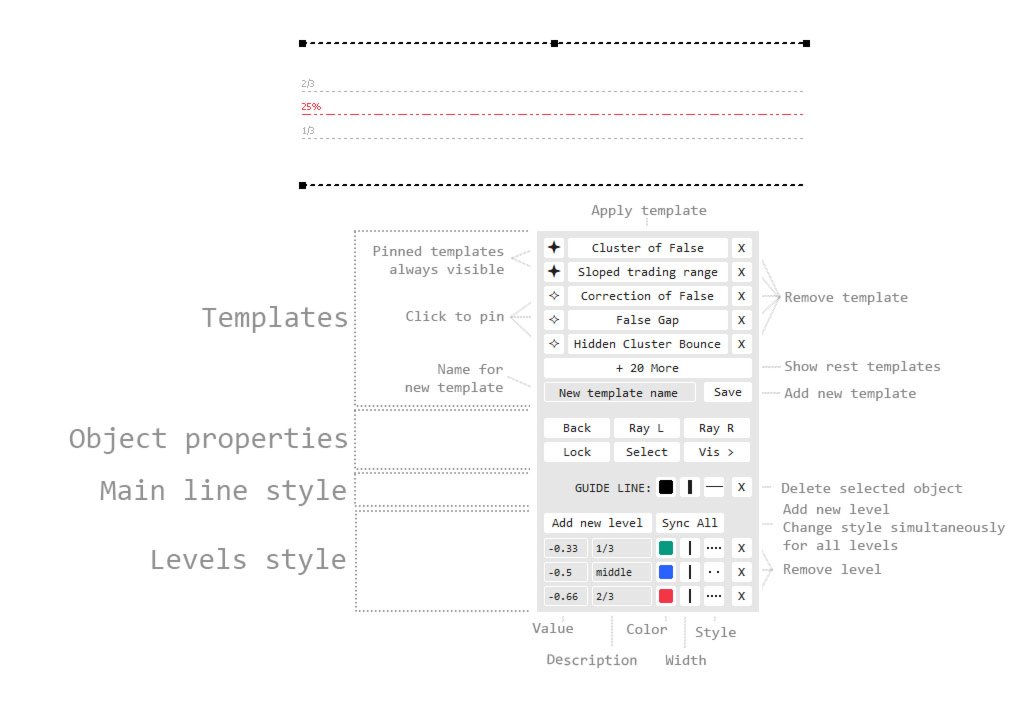
  • Stilleri Kaydet ve Uygula: Bir nesnenin özelliklerinin tam setini adlandırılmış şablon olarak kaydedin. Şablonlar tek tıklamayla uygulanır.

  • Nesne Türüne Özel: Şablonlar belirli bir nesne türü için kaydedilir. Örneğin, bir trend çizgisi için oluşturulan stiller yalnızca diğer trend çizgilerini düzenlerken kullanılabilir.

  • Favoriler (Sabitleme): Sık kullanılan şablonlar hızlı erişim için sabitlenebilir. Sabitlenmiş şablonlar her zaman görünür olurken, diğerleri ek bir pencerede gizlenir.

  • Senkronizasyon ve Taşınabilirlik:

    • Şablonlardaki ve renk paletindeki değişiklikler, diğer grafiklerdeki indikatörün tüm örneklerine otomatik olarak senkronize edilebilir.

    • Ayar dosyaları ayrı kaydedilir, bu da diğer bilgisayarlara veya farklı terminallere kolayca aktarılmasını sağlar.

Nesne Özelliği Kontrolü

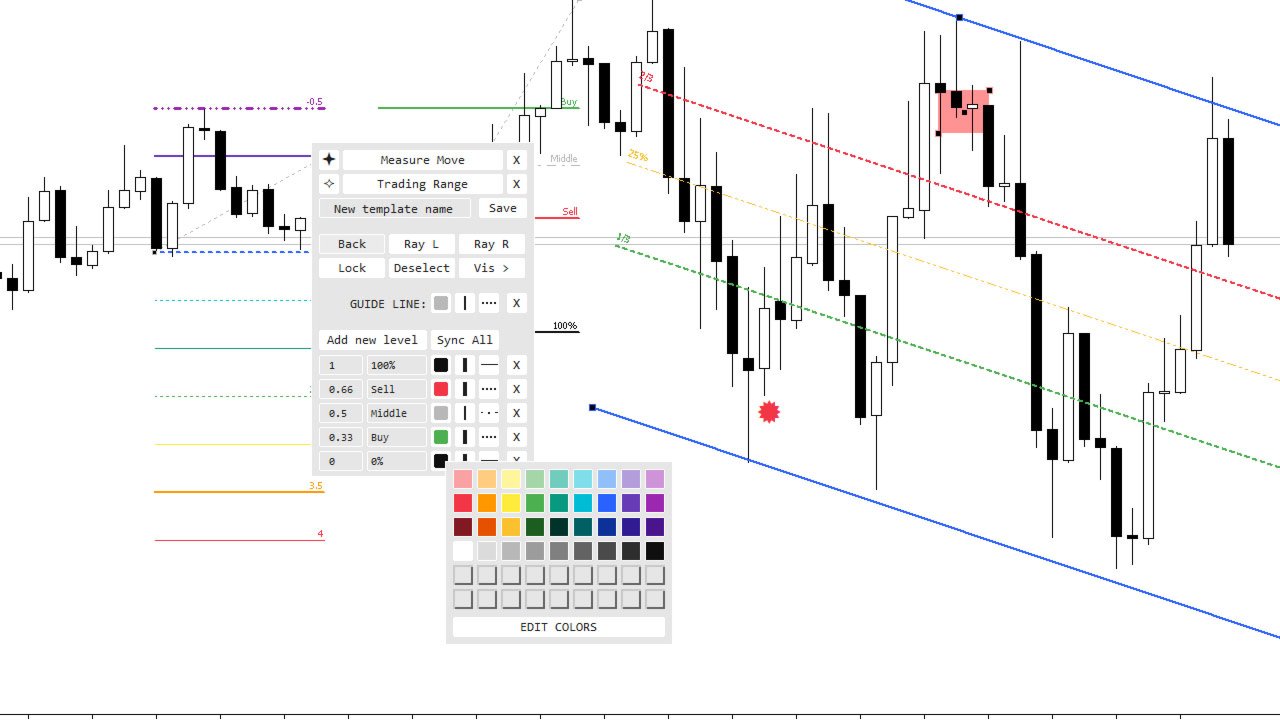
  • Genel Özellikler: Renk, genişlik ve çizgi stilini düzenlemek için doğrudan erişim. Ayrıca standart parametrelerin çoğunu kontrol etme imkânı sunar: dolgu, arka planda çizim, ışınlar, simgeler, metin vb.

  • Çok Düzeyli Nesne Düzenleme (Fibonacci araçları, kanallar, genişlemeler vb. için):

    •   her seviye için değer, metin açıklaması, renk, genişlik ve çizgi stili üzerinde bireysel kontrol.

    • Seviyeleri ekleme ve kaldırma işlevselliği.

Renk Paleti

  • 54 yuva ile renklere hızlı erişim.

  • Görsel Düzenleyici (HSV Seçici) ile hassas renk ayarı.

  • Paletteki herhangi bir rengi değiştirme ve kaydetme imkânı.

İndikatör Ayarları

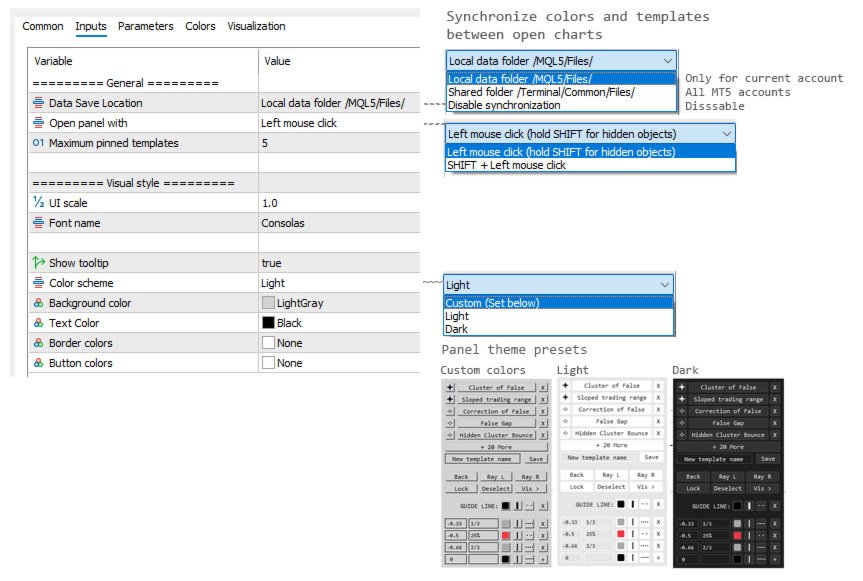
  • Arayüz Ölçeklendirme: Panelin boyutunu ekran çözünürlüğünüze uyarlamak için bir giriş parametresi.

  • Aktivasyon Yöntemi: Ayarlarda paneli nasıl çağıracağınızı seçin (basit tıklama veya Shift + tıklama).

  • Renk Şemaları: Önceden yüklenmiş açık ve koyu temalar ile tamamen özel renkler belirleme seçeneği.

  • Senkronizasyon Modu: Ayar dosyalarının nerede depolanacağını seçme seçeneği: her grafik için yerel olarak veya otomatik senkronizasyon için terminalin ortak klasöründe.

Gelecekte, kullanıcı taleplerine göre ek özellikler ve yeni nesneler için destek eklenebilir.
Değerlendirmeler 4
gottlieb
26
gottlieb 2026.09.16 10:44 

Это лучшее что я видел для mt5! Выражаю огромную благодарность!!! Автор ЛУЧШИЙ!!! P.S. Было бы прикольно если добавить в меню отрезка выравнивание по горизонтали отрезка. Мне ИИ написал в виде кнопки на графике: //+------------------------------------------------------------------+

//| Line_Leveler_Button.mq5 |

//| AI Code Generator |

//+------------------------------------------------------------------+

#property copyright "AI"

#property version "1.00"

#property indicator_chart_window

#property indicator_buffers 0

#property indicator_plots 0

//--- Входные параметры кнопки

input string InpButtonText = "Сделать горизонтальной"; // Текст на кнопке

input color InpButtonColor = clrWhite; // Цвет текста

input color InpBgColor = clrDarkSlateGray; // Цвет кнопки

input int InpFontSize = 10; // Размер шрифта

input int InpButtonWidth = 160; // Ширина кнопки

input int InpButtonHeight = 25; // Высота кнопки

//--- Имя объекта кнопки

string ButtonName = "Btn_Leveler_Line";

//+------------------------------------------------------------------+

//| Custom indicator initialization function |

//+------------------------------------------------------------------+

int OnInit()

{

// Создаем кнопку в левом верхнем углу графика

if(ObjectCreate(0, ButtonName, OBJ_BUTTON, 0, 0, 0))

{

ObjectSetInteger(0, ButtonName, OBJPROP_XDISTANCE, 15); // Отступ по оси X

ObjectSetInteger(0, ButtonName, OBJPROP_YDISTANCE, 120); // Отступ по оси Y (под имя инструмента)

ObjectSetInteger(0, ButtonName, OBJPROP_XSIZE, InpButtonWidth);

ObjectSetInteger(0, ButtonName, OBJPROP_YSIZE, InpButtonHeight);

ObjectSetInteger(0, ButtonName, OBJPROP_CORNER, CORNER_LEFT_UPPER); // Привязка к верхнему левому углу

ObjectSetString(0, ButtonName, OBJPROP_TEXT, InpButtonText);

ObjectSetString(0, ButtonName, OBJPROP_FONT, "Arial");

ObjectSetInteger(0, ButtonName, OBJPROP_FONTSIZE, InpFontSize);

ObjectSetInteger(0, ButtonName, OBJPROP_COLOR, InpButtonColor);

ObjectSetInteger(0, ButtonName, OBJPROP_BGCOLOR, InpBgColor);

ObjectSetInteger(0, ButtonName, OBJPROP_BORDER_COLOR, clrSilver);

ObjectSetInteger(0, ButtonName, OBJPROP_SELECTABLE, false);

ObjectSetInteger(0, ButtonName, OBJPROP_STATE, false); // Отжата по умолчанию

}

// Разрешаем индикатору ловить клики мыши по графику

ChartSetInteger(0, CHART_EVENT_OBJECT_CREATE, true);

return(INIT_SUCCEEDED);

}

//+------------------------------------------------------------------+

//| Custom indicator deinitialization function |

//+------------------------------------------------------------------+

void OnDeinit(const int reason)

{

// Удаляем кнопку при удалении индикатора

ObjectDelete(0, ButtonName);

ChartRedraw(0);

}

//+------------------------------------------------------------------+

//| OnCalculate (обязательная функция для индикаторов) |

//+------------------------------------------------------------------+

int OnCalculate(const int rates_total,

const int prev_calculated,

const datetime &time[],

const double &open[],

const double &high[],

const double &low[],

const double &close[],

const long &tick_volume[],

const long &volume[],

const int &spread[])

{

return(rates_total);

}

//+------------------------------------------------------------------+

//| ChartEvent function - перехват событий мыши и кликов |

//+------------------------------------------------------------------+

void OnChartEvent(const int id,

const long &lparam,

const double &dparam,

const string &sparam)

{

// Проверяем, произошел ли клик по графическому объекту

if(id == CHARTEVENT_OBJECT_CLICK)

{

// Проверяем, что кликнули именно по нашей кнопке

if(sparam == ButtonName)

{

bool leveled_any = false;

// Перебираем все графические объекты, которые сейчас есть на графике

int total_objects = ObjectsTotal(0, 0, -1);

for(int i = 0; i < total_objects; i++)

{

string obj_name = ObjectName(0, i, 0, -1);

// Нам нужны только те линии, которые выделил (выбрал двойным кликом) трейдер

if(ObjectGetInteger(0, obj_name, OBJPROP_SELECTED) == true)

{

// Проверяем тип объекта. Нам нужны обычные трендовые линии (OBJ_TREND)

if(ObjectGetInteger(0, obj_name, OBJPROP_TYPE) == OBJ_TREND)

{

// Берем цену первой точки линии

double price1 = ObjectGetDouble(0, obj_name, OBJPROP_PRICE, 0);

// Принудительно присваиваем второй точке точно такую же цену

ObjectSetDouble(0, obj_name, OBJPROP_PRICE, 1, price1);

leveled_any = true;

}

}

}

// Если выровняли линию, выводим сообщение в журнал

if(leveled_any)

{

Print("Успешно: Выделенные трендовые линии выровнены горизонтально.");

}

// Возвращаем кнопку в отжатое (активное) состояние для следующего раза

ObjectSetInteger(0, ButtonName, OBJPROP_STATE, false);

ChartRedraw(0);

}

}

}

Извини! Пользовался старой версией. После обновления увидел кнопку выравнивания. Спасибо тебе большое! Ты ЛУЧШИЙ!!! Успехов тебе и вдохновения!

nickvh1
74
nickvh1 2026.02.09 16:43 

Love this tool. Thanks to you!!

Önerilen ürünler
Stop guessing your performance. Track your wins and losses instantly, directly on your charts! As traders, keeping an accurate, real-time pulse on our psychological and execution performance is key to staying disciplined. DaBhoza Win Rate Tracker is a lightweight, intuitive, and highly visible on-chart utility designed to help you log and monitor your trade outcomes manually with a single click. Whether you are testing a new manual strategy, practicing on a demo account, or keeping track of your
FREE
Gold Session Levels Pro MT5 is a manual MetaTrader 5 indicator designed to display relevant intraday reference levels for XAUUSD. The indicator automatically calculates and draws the Asian range, its midpoint, the daily open, the London and New York opens, the previous trading day's high and low, and targets derived from the size of the Asian range. FEATURES - Dynamic Asian range while the configured session is active. - Range freezing after the configured Asian session close. - Asian range
FREE
Free automatic Fibonacci is an indicator that automatically plots a Fibonacci retracement based on the number of bars you select on the BarsToScan setting in the indicator. The Fibonacci is automatically updated in real time as new highest and lowest values appears amongst the selected bars. You can select which level values to be displayed in the indicator settings. You can also select the color of the levels thus enabling the trader to be able to attach the indicator several times with differe
FREE
Fibo Trader FREE MT5
Grzegorz Korycki
3 (3)
Fibo Trader is an expert advisor that allows you to create automated presets for oscillation patterns in reference to Fibonacci retracements values using fully automated and dynamically created grid. The process is achieved by first optimizing the EA, then running it on automated mode. EA allows you to switch between automatic and manual mode. When in manual mode the user will use a graphical panel that allows to manage the current trading conditions, or to take control in any moment to trade ma
FREE
The utility for setting a common stop loss for multiple orders. Beta version. After the test,  common take profit function will be added, orders close function will be added , and other necessary features will be added. Please do not give bad ratings to this free beta version. If you like it, give it a good rating and write to the author about any errors you find and what you would like to see in the utility. I made this utility for myself and use it daily. I am sharing it with you. A commercial
FREE
Automatic fibonacci with alerts is an indicator that automatically plots a fibonacci retracement based on the number of bars you select on the BarsToScan setting in the indicator. The fibonacci is automatically updated in real time as new highest and lowest values appear amongst the selected bars. You can select which level values to be displayed in the indicator settings. You can also select the color of the levels thus enabling the trader to be able to attach the indicator several times with d
FREE
This indicator is especially for the binary trading. Time frame is 1 minutes and exp time 5 or 3 minutes only. You must be use martingale 3 step. So you must put lots size is 10 % at most. You should use Mt2 trading platform to connect with my indicator to get more signal without human working. This indicator wining rate is over 80% but you may get 100% of profit by using martingale 3 step. You should use MT2 Trading Platform to connect meta trader platform and binary platform . You can get mt2
FREE
Script for Metatrader 5. One click to Delete the background grid and object, all objects on the chart such as Trend lines you have drawn or created by another program arrows text Fibonacci lines removes the background grid making a clearer clean chart horizontal and vertical lines Easy for clearing a chart or when opening new charts. Please leave a review on how its working.
FREE
PRODUCT TITLE: Mindgame  SHORT DESCRIPTION (Max 150 chars): All-in-One professional indicator: 5 SMAs, Non-Repainting MACD Crossover Arrows, NY Session Shading, and Live HUD Dashboard for MT5. CATEGORY: Market > MetaTrader 5 > Indicators > Trend / Oscillators PRICE RECOMMENDATION: $39 - $59 (or Free with premium upgrade / rental options) ================================================================================ FULL PRODUCT DESCRIPTION (Copy-paste directly into MQL5 Market description
FREE
Babel Assistant
Iurii Bazhanov
4.33 (9)
Babel assistant 1 MT5 netleştirme (netting) robotu "Babel_assistant_1", M1, M5, M15, H1, H4, D1 ve W1 zaman dilimlerinde Fibonacci seviyeleri oluşturmak için ZigZag göstergesini kullanır ve alım ile satım trendlerinin gücünü hesaplar. Belirtilen 4,925 trend seviyesi aşılırsa, "Lot for open a position" ayarını kullanarak bir pozisyon açar. Ardından Babel, belirli Fibonacci seviyelerinde bekleyen emirler (pending orders) yerleştirir ve belirtilen Stop Loss (Zarar Durdur) ile Take Profit (Kâr Al) ç
FREE
ZigZag WaveSize MT4'ün önceki sürümünün geliştirilmesi  ZigZag WaveSize MT4 ZigZag WaveSize -  noktalar cinsinden dalga uzunluğu bilgisi, seviyeler ve farklı uyarı mantığı eklenmiş değiştirilmiş standart ZigZag göstergesi Genel İyileştirmeler: MetaTrader 5 için kod uyarlaması Grafik nesneleriyle çalışmanın optimize edilmesi Yeni Özellikler: Ekstremumlarda yatay seviyeler Seviye tipi seçimi: yatay/ışınlar/bölümler Likid seviyeler filtresi (fiyat tarafından test edilmemiş) Kırılma için tampon: y
FREE
Indicator Description 4 Hull MA Color + Envelopes is a powerful trend-following indicator for MetaTrader 5 that combines four Hull Moving Averages (HMA) with Moving Average Envelopes to clearly identify market direction, trend strength, and potential reversal or pullback zones. This indicator is designed to reduce noise, react quickly to price movement, and provide a clean visual structure for professional trading.   Key Features   4 Hull Moving Averages (20, 50, 100, 200) Automatic color change
FREE
NIVELESFIBONACCI2.12 — Órdenes Pendientes sobre Niveles Fibonacci Personalizados Este script para MetaTrader 5 permite colocar automáticamente órdenes pendientes de compra o venta utilizando como referencia los niveles Fibonacci horizontales previamente dibujados en el gráfico. El script está diseñado para funcionar conjuntamente con NIVELESFIBONACCI1.1 , aunque puede utilizar cualquier conjunto de líneas horizontales que siga la misma estructura de nombres mediante el prefijo configurado. La pr
FREE
Menora Indicator
Arnold Kurapa
4.5 (2)
Menora (All In One) Indicator. This is the advanced and premium indicator for the Magic Trend, a free indicator.  It has 3 output signals driven by different market conditions. This indicator has a double function of working as an indicator and utility at the same time. Specifications  1]  3 output signals a) Slow Moving Average with color change - The MA has a non-repaint color change, which makes it perfect for entry signals. b) Fast Moving Average (the original Magic Trend line) - Gives a
FREE
SnR Key Level by RWBTradeLab A clean, non-repainting Support & Resistance key level detector for MetaTrader 5, built for price action traders who want clear, fixed SnR reference levels with breakout upgrades, smart overlap-free labels and optional alerts — all from CLOSED candles only. What This Indicator Does The indicator automatically detects and draws 6 types of SnR key levels from 2-candle sequences: Base Key Levels - A Level: Green -> Red (Level = 1st Green candle Close) — Resistance
FREE
The jcoworld OTE EA is an automated trading bot for MetaTrader 5 built on Smart Money Concepts (SMC) . It accurately identifies market impulse moves and automatically enters trades within the Optimal Trade Entry (OTE) zone (61.8% – 79.0% Fibonacci) as soon as a confirmation candle closes. Optimized for: XAUEUR, XAUUSD, and Major Forex Pairs Features: Automatic risk management, dynamic lot sizing & automated Stop Loss/Take Profit. Try for free: This demo version is 100% free! Pricing Plans for Fu
FREE
HMA Color with Alerts MT5
Pavel Zamoshnikov
4.77 (61)
Hull Moving Average (HMA) is well-deservedly popular among traders because of the effective averaging of market noise and a relatively small delay. The current MetaTrader 5 version changes its color when the movement direction changes. Sound and text signals are available. It also supports sending email and push messages. It is possible to trigger a signal on the current incomplete bar, although such a signal may be canceled before completion if conditions are no longer appropriate. One of the p
FREE
AK Capital Backtest panel
AK Capital Markets Limited
5 (3)
backtester buttons for testing strategies in the MT5 strategy tester.  load up strategy tester then click on visual test and once visual tester opened apply any chart template you'd like. To update the chart pause the visual tester and apply templates, colors and such like the normal chart. On the settings you can choose lot size and take profit and stop loss.  Enjoy
FREE
LIMITED TIME OFFER to download for FREE for Unlimited use license ================================================================ QuantView Analytics Master Advanced On-Chart Portfolio Diagnostics & Equity Forensics for MetaTrader 5 Standard MT5 history reports simply show you how much money was made or lost. QuantView Analytics Master is designed to answer the "Why" and the "How." By segmenting your trading history across four distinct analytical dimensions, this institutional-grade terminal
FREE
Tüm Zarar Durdur ve Kar Al Emirlerini Temizle — SL/TP seviyelerini anında kaldırmak için basit bir çözüm Tüm Zarar Durdur (SL) ve Kar Al (TP) seviyelerini tek bir tıklamayla kaldırın! Tüm Zarar Durdur ve Kar Al Emirlerini Temizle açık işlemlerdeki tüm SL ve TP seviyelerini hızlı ve verimli bir şekilde kaldırmak isteyen yatırımcılar için tasarlanmış kullanışlı bir skripttir. Basit kullanımı ve anında uygulanabilirliği, bu aracı dinamik piyasa koşulları için vazgeçilmez kılar. Ana Avantajlar: • Za
FREE
A manual trading tool that places buy, sell, stop, and limit orders. Easily configure your settings for risk, take profit, stop loss, break-even, and trailing stops. It works in any timeframe and serves as a highly reliable tool for manual trading. Settings can be changed easily right on the panel—no more clicking the small Expert Advisor icon in the corner of the screen.
FREE
FibRetrace Zones Son Salınımın Fibonacci Düzeltme Bölgeleri FibRetrace Zones, FibRetrace Uzman Danışmanının ücretsiz görsel yardımcısıdır. Fibonacci düzeltme seviyelerini çizer ve son salınımdaki geri çekilme bölgesini vurgular; böylece işlem yapmadan önce giriş noktalarının nerede olduğunu görürsünüz. Bölge yöne göre renklendirilir: yükseliş kurulumları için yeşil, düşüş kurulumları için kırmızı. Her sembolde ve her zaman diliminde çalışır. TEMEL ÖZELLİKLER Ayarlanabilir geriye bakış ile otomat
FREE
Minimalist Manager is a manual trade-management panel for traders who place their own entries and want precise, fast control over risk, stops, and targets directly on the chart. It is a discretionary tool. You decide when to enter; Minimalist Manager handles the sizing, stop-loss, take-profit, break-even and trailing mechanics around your decision. Trading several accounts? Its Trade Copier places the same trade on all of them, each at its own risk. Key features Risk-based position sizing. Se
FREE
Auto BreakEven Lite is a simple and reliable Expert Advisor for MetaTrader 5 that automatically moves the Stop Loss to BreakEven when a trade reaches a defined profit level. This tool helps traders protect their positions and eliminate risk once the trade moves into profit. The EA works with all asset classes including Forex, indices, metals, crypto and CFDs. Once attached to a chart, the EA monitors open positions and automatically moves the Stop Loss to BreakEven plus an optional offset.
FREE
TradeGreat Bot
Mykyta Nikolaiev
TradeGreat Mean Reversion EA TradeGreat is an automated trading system built around statistical price behavior analysis relative to a Moving Average (MA) . The system evaluates price deviation from the average value using proprietary mathematical models rather than traditional indicator-based signals. The strategy relies on quantitative analysis of market behavior, where the Moving Average serves as a reference point, while entry and exit decisions are determined by internal mathematical calcul
FREE
Session High Low Boxes
Shanawaz Mohammed Nabi Rasool Pinjori
Session High Low draws the Asian, London and New York sessions on your chart as colored boxes, with the high and low of each session. Optional extension lines continue the session high and low after the session ends, which is useful for breakout and retest trading. Features Asian, London and New York boxes, each can be turned on or off Session high and low prices shown as labels Extension lines after the session end (hours adjustable, 0 = off) Ranges are built from M5 data, so the boxes are the
FREE
Ninja Master
Lasse Mathias Baagoe S Christensen
3 (2)
Ninja Master: Powering Traders & Investors Worldwide. Ninja Master is an advanced and adaptable Gold Expert Advisor developed exclusively for Gold on the 5-minute timeframe . It is a complete trading solution that performs a range of tasks, including following the trend , analyzing the chart , smart TP system , and smart filters . It does not use neural learning or AI — instead, it uses an adaptable smart algorithm designed for traders who prioritize capital protection and steady growth . Create
FREE
Introducing a powerful MetaTrader 5 Expert Advisor designed to enhance your trading strategy – the Auto Breakeven EA! This feature-rich EA is tailored to bring your stop-loss to breakeven, ensuring a risk-free trade once the market moves in your favor up to a specified price. Explore the full potential of the Auto Breakeven EA. Download it for free now, and find the download link at the bottom of our page. Elevate your trading experience and take control of your risk management strategy. Happy
FREE
AI Weekly Open Bias Trader
Fadi Hassan Khaled Ghanem
Haftalık açılış fiyatını yön (bias) çizgisi olarak kullanır ve bu çizgiden gelen retlerde haftalık yön doğrultusunda işlem yapar. Nasıl çalışır EA, kurallarını sinyal zaman diliminin (varsayılan H1) her kapanan barında bir kez değerlendirir, bu nedenle sinyaller yeniden çizilmez ve mantık test cihazında ve canlı grafikte aynıdır. Kurulum oluştuğunda ve sembolde bu EA'ya ait açık pozisyon yoksa, stop loss ve hedef ile bir piyasa emri açar. Temel özellikler Bakiyenin yüzdesine göre risk bazlı lot
FREE
This indicator automatically identifies liquidity levels using swing fractals and tracks when price sweeps through them. Works on any symbol and timeframe with full multi-timeframe support. Features: — Detects swing highs and lows via a fractal method (configurable bars left & right) on a selected timeframe. Active levels are displayed as rays extending to the right; swept levels turn into dashed lines ending at the sweep candle. — Plots Previous Day (PDhigh / PDlow), Previous Week (PWhigh / PWl
FREE
Bu ürünün alıcıları ayrıca şunları da satın alıyor
Trade Assistant MT5
Evgeniy Kravchenko
4.43 (216)
It helps to calculate the risk per trade, the easy installation of a new order, order management with partial closing functions, trailing stop of 7 types and other useful functions. Additional materials and instructions Installation instructions - Application instructions Line function -   shows on the chart the Opening line, Stop Loss, Take Profit. With this function it is easy to set a new order and see its additional characteristics before opening.   Risk management  - The risk calculation
Trade Manager EA’ye hoş geldiniz! Ticaretin daha sezgisel, hassas ve verimli hale gelmesi için tasarlanmış nihai risk yönetim aracı ile tanışın. Bu sadece bir emir verme aracı değil; ticaret planlaması, pozisyon yönetimi ve risk kontrolü için kapsamlı bir çözüm. İster yeni başlayan bir yatırımcı olun, ister deneyimli bir trader ya da hızlı emir gerektiren bir scalper, Trade Manager EA ihtiyaçlarınıza uyum sağlar ve forex, endeksler, emtialar ve kripto paralar dahil tüm piyasalarda esneklik sunar
Local Trade Copier EA MT5
Juvenille Emperor Limited
4.94 (149)
Local Trade Copier EA MT5, aynı Windows bilgisayarı veya Windows VPS üzerinde çalışan birden fazla MetaTrader 5 hesabı arasında işlemleri kopyalamak ve yönetmek için hızlı ve esnek bir işlem kopyalayıcıdır. Yerel işlem senkronizasyonunu, Receiver tarafında lot büyüklüğü, risk yönetimi, işlem filtreleme, sembol eşleştirme, işlem yönetimi ve hesap koruması kontrolleriyle birleştirir. Transmitter ve Receiver terminallerinizi yaklaşık 1 dakika içinde ayarlayın ve aynı veya farklı brokerlardaki hesa
Telegram to MT5 Multi-Channel Copier   , Telegram ve Discord kanallarınızdaki alım-satım sinyallerini doğrudan MetaTrader 5'e otomatik kopyalar. Bot yok, tarayıcı uzantısı yok, elle kopyalama yok. Sinyal Telegram'a veya Discord'a düşer ve EA birkaç saniye içinde terminalinizde işlemi açar. Ve bir kanalı kopyalamadan önce, yerleşik backtester o kanalın hesabınızda ne yapmış olacağını gösterir. Ürün iki bileşenden oluşur: Telegram kanallarınızı dinleyen bir Windows uygulaması ve sinyalleri MT5 ter
Farmed Hedge Yield Farming | All Markets (Manual - Hybrid - Semi/Automated EA) VERIFIED TRADING RESULTS - Farmed Hedge Yield Axi Copy:  https://www.mql5.com/en/signals/2356376 - Farmed Hedge Yield Exn Copy:   https://www.mql5.com/en/signals/2356404 - Farmed Hedge Yield V Copy:  https://www.mql5.com/en/signals/2357156 IMPORTANT NOTICE: FarmedHedge is a MANUAL-FOCUSED TRADING UTILITY ,not a fully automated EA. Results shown on this Signal include manual trades and overall strategic management.
Telegram sinyallerini kendi işlem kurallarınızla kopyalayın Telegram to MT5 Signal Trader , herkese açık ve özel Telegram kanallarındaki ve gruplarındaki metin tabanlı işlem sinyallerini otomatik olarak MetaTrader 5'e kopyalar. Tek bir masaüstü uygulamasından birden fazla sinyal sağlayıcısını ve MT5 hesabını yönetin; her sağlayıcı için ayrı risk ve işlem ayarları belirleyin. Sinyal kopyalamak için Telegram botu veya API kurulumu gerekmez. Kendi Telegram hesabınızla telefon numarası veya QR kod k
News Trade EA MT5
Konstantin Kulikov
4.55 (11)
Birkaç yıldır kullandığım çok yararlı bir robotu tanıtıyorum. Hem yarı otomatik hem de tam otomatik modlarda kullanılabilir. >>> Chat <<< Program, ekonomik takvim haberlerinde esnek ticaret ayarlarını içeriyor. Stratejiler test cihazında kontrol edilemez. Sadece gerçek bir iş. Terminal ayarlarında, haberler sitesini izin verilen URL'ler listesine eklemeniz gerekir. Servisler > Araçlar > Danışmanlar'a tıklayın. "Aşağıdaki URL'ler için WebRequest'e İzin Ver:" kutucuğunu işaretle. Aşağıdakini ekl
================================================================================ POC BREAKOUT - V20.72. Full Professional Grade Toolkit ================================================================================ POC Breakout is a full MetaTrader 5 trading dashboard for discretionary traders who want breakout signals, Point of Control (POC) context, volume profiles, order flow, market structure, news, alerts, and advanced trade planning in one professional workspace. Attached directly to you
TradePanel MT5
Alfiya Fazylova
4.88 (170)
Trade Panel, çok işlevli bir ticaret asistanıdır. Uygulama, manuel ticaret için 50'den fazla ticaret fonksiyonu içerir ve çoğu ticaret görevini otomatikleştirmeyi mümkün kılar. Uygulama talimatları: https://www.mql5.com/en/blogs/post/756482 Demo hesabı için uygulamanın deneme sürümü: https://www.mql5.com/en/blogs/post/750865 Uygulamayı nasıl kurulur: https://www.mql5.com/en/blogs/post/756239 Uygulamayı görsel modda nasıl test edilir: https://www.mql5.com/en/blogs/post/770277 Uygulamayı VPS MetaT
Strategy Ledger Pro
Abdullah Uygar Tuna
5 (12)
Şimdi Türkçe dil desteği ile. Strategy Ledger Pro , MetaTrader 5 için salt okunur bir hesap analiz panelidir. Hesap sonuçlarını Uzman Danışman (EA), strateji, sembol ve magic numaraya göre ayırır; böylece her birinin gerçekte ne kattığını görürsünüz. Panel 11 dilde kullanılabilir: English, Français, Deutsch, Español, Italiano, Português, Русский, Türkçe, 中文, 日本語 ve 한국어. Demoyu indirmeden önce. Market, her ücretli ürünün demosunu yalnızca Strateji Test Cihazında çalıştırır. Bu panel kendi hesabı
Master Your Trading Discipline   Stop losing your hard-earned gains to overtrading and emotional decisions. The Discipline Tool is your ultimate trading assistant, ensuring strict risk management in real-time. Key Protection Features: Advanced Drawdown Defense : Automatically halts trading if your daily drawdown exceeds a preset threshold (percentage or dollar amount). Real-Time Equity Lock : Safeguard profits by referencing peak equity, ensuring drawdown stays within control. Hard Profit Target
Dealer's Panel No signal decides anything here — a hand does. One click, and the panel calculates what's underneath: lot size from risk, target from a 30-step balance ladder that remembers exactly how far an account has climbed. Toggle between market and pending without touching an input field. Set a stop, and the take-profit can write itself — a fixed share of the balance, translated into price with no arithmetic left for the trader to get wrong. One trade live at a time; it won't let a seco
Exp COPYLOT CLIENT for MT5
Vladislav Andruschenko
3.97 (35)
MetaTrader 5 için profesyonel işlem kopyalayıcı MetaTrader için hızlı, profesyonel ve güvenilir bir işlem kopyalayıcı . COPYLOT , MT4 ve MT5 terminalleri arasında Forex işlemlerini kopyalamanıza olanak tanır ve Hedge ile Netting hesaplarını destekler. COPYLOT MT5 sürümü şunları destekler: - MT5 Hedge → MT5 Hedge - MT5 Hedge → MT5 Netting - MT5 Netting → MT5 Hedge - MT5 Netting → MT5 Netting - MT4 → MT5 Hedge - MT4 → MT5 Netting MT4 sürümü Tam açıklama + DEMO + PDF Nasıl satın alınır Nasıl kurul
HINN MAGIC ENTRY – the ultimate tool for entry and position management! SIMPLE. FASTEST. INTUITIVE. MAX AUTOMATED. Place orders by selecting a level directly on the chart! full description   ::  demo-version  :: 60-sec-video-description Key features: - Market, limit, and pending orders - Automatic lot size calculation - Automatic spread and commission accounting - Unlimited partitial take-profits  - Breakeven and trailing stop-loss and take-profit  functions - Invalidation leves - Intuitive, a
The product will copy all telegram signal to MT5 ( which you are member) , also it can work as remote copier.  Easy to set up, copy order instant, can work with almost signal formats, image signal,  s upport to translate other language to English Work with all type of channel or group, even channel have "Restrict Saving Content", work with  multi channel, multi MT5 Work as remote copier: with signal have ticket number, it will copy exactly via ticket number. Support to backtest signal. How to s
RETAILBERG FOOTPRINT CHART PRO — Order-Flow Workspace for MetaTrader 5 Version 7.00  |  Professional System  |  31 tools  |  One chart A full 150-page illustrated User Manual is included. Please read the full manual to understand this feature packed footprint chart elements and ui. https://www.mql5.com/en/blogs/post/777982 DEMO / STRATEGY TESTER — PLEASE READ FIRST
Sonraki Güncelleme — Sürüm 2.52 Çok Yakında! [YENİ] Piyasa Analizinizi ve İşlem Sürecinizi Geliştirmek İçin Tasarlanmış 4 Büyük Yeni Özelliğe Hazır Olun İşlem ihtiyaçlarınızı karşılamak üzere tasarlanmış 4 yeni özellikle piyasa analizini bir üst seviyeye taşıyoruz. İşte yeni özellikler: TRADE OVERVIEW DASHBOARD CONFLUENCE AT ZONE STRONG & WEAK HIGH/LOW OTE 1. TRADE OVERVIEW DASHBOARD Piyasanın genel görünümünü daha kolay anlamanıza yardımcı olan, işlem kararlarınızı desteklemek için rehberlik s
EASY Insight AIO – Akıllı ve zahmetsiz yatırım için hepsi bir arada çözüm Genel Bakış Tüm piyasayı — Forex, Altın, Kripto, Endeksler ve hatta Hisseler — saniyeler içinde, manuel grafik incelemesi, gösterge kurulumu ya da karmaşık ayarlar olmadan analiz edebildiğinizi hayal edin. EASY Insight AIO , yapay zekâ destekli yatırım için nihai, kullanıma hazır dışa aktarma aracınızdır. Tüm piyasanın kapsamlı bir anlık görüntüsünü tek bir temiz CSV dosyasında sunar; bu dosya ChatGPT, Claude, Gemini, Pe
Telegram To MT5 — Sinyal Kopyalayıcı Telegram kanallarınızdaki işlem çağrılarını gerçek MT5 emirlerine dönüştürün — otomatik olarak, istediğiniz kadar hesapta ve risk ile kurallar tamamen sizin kontrolünüzde. Telegram To MT5, Telegram'da zaten takip ettiğiniz VIP / sinyal kanallarını MetaTrader 5 terminalinize bağlar. Ücretsiz bir eşlik eden masaüstü uygulaması mesajları okur (botlara izin vermeyen kanallardan bile), ve bu Expert Advisor bunları hesabınızda yürütür — kendi risk ayarlarınızı, sem
MT5 to Telegram Signal Provider , hesabınızı bir sinyal sağlayıcı haline getirerek belirtilen sinyalleri Telegram'ın sohbetine, kanalına veya grubuna göndermeyi sağlayan kullanımı kolay, tamamen özelleştirilebilir bir araçtır. Rakip ürünlerin çoğunun aksine, DLL içe aktarması yapmaz. [ Demo ] [ Kılavuz ] [ MT4 Versiyonu ] [ Discord Versiyonu ] [ Telegram Kanalı ]  New: [ Telegram To MT5 ] Kurulum Adım adım bir kullanıcı kılavuzu mevcuttur. Telegram API'si hakkında bilgi gerekmemektedir; ihtiyac
The Patch It never opens a trade. It walks behind the ones that did. Every open position, every pending order — checked twice a second for the one thing that's easy to forget: a stop, a target. Found bare, it doesn't ask. It writes the missing number in, measured in points from wherever the position began, and moves on to the next. No strategy, no opinion on direction. Just the quiet assumption that nothing should ever sit on the market unprotected — not because someone decided it shouldn't,
Trade copier MT5
Alfiya Fazylova
4.61 (57)
Trade Copier, ticaret hesapları arasındaki işlemleri kopyalamak ve senkronize etmek için tasarlanmış profesyonel bir yardımcı programdır. Kopyalama, tedarikçinin hesabından/terminalinden alıcının aynı bilgisayarda veya vps'de kurulu olan hesabına/terminaline gerçekleşir. Satın almadan önce demo sürümünü bir demo hesabında test edebilirsiniz. Demo versiyonu burada . Tüm talimatlar burada . Ana işlevler ve avantajlar: Emirlerin kopyalanmasını destekler: МТ5> МТ5, МТ4> МТ5, МТ5> МТ4. Emirlerin kopy
Grid Manual MT5
Alfiya Fazylova
4.73 (22)
Grid Manual, sipariş ızgarasıyla çalışmak için kullanılan bir ticaret yardımcı programıdır. Yardımcı program evrenseldir, esnek ayarlara ve sezgisel bir arayüze sahiptir. Sadece kayıpların ortalaması yönünde değil, aynı zamanda kazanç artışı yönünde de bir emir ızgarası ile çalışır. Tüccarın bir emir ızgarası oluşturmasına ve eşlik etmesine gerek yoktur, bu yardımcı programı yapacaktır. Emri açmanız yeterlidir ve Grid manual otomatik olarak ona bir emir ızgarası oluşturacak ve kapanana kadar ona
Signal TradingView to MT5 Pro Automator TradingView ve MetaTrader 5 arasında anında profesyonel uygulama TradingView alarmları ile MT5'teki gerçek uygulama arasındaki en güçlü iletişim köprüsüyle ticaret stratejinizi otomatikleştirin. Hız, esneklik ve kusursuz risk yönetimi talep eden yatırımcılar için tasarlanan bu Uzman Danışman (Expert Advisor), herhangi bir alarm mesajını hassas bir piyasa (market) veya limit emrine dönüştürür. GÜÇLÜ YÖNLER VE AVANTAJLAR Evrensel Ayrıştırma Motoru (Tescilli)
Power Candles Strateji Tarayıcısı - Kendi Kendini Optimize Eden Çoklu Sembol Kurulum Bulucu Power Candles Strateji Tarayıcısı , Power Candles göstergesini çalıştıran aynı kendinden optimize edici motoru, Piyasa İzleyicinizdeki her sembol üzerinde yan yana çalıştırır. Tek bir panel, şu anda istatistiksel olarak hangi sembollerin işlem yapılabilir olduğunu, her birinde hangi stratejinin kazandığını, en uygun Stop Loss / Take Profit çiftini gösterir ve yeni bir sinyal geldiği anda size bildirim gön
Your EAs cannot see each other, but Anchor can. Anchor gives you one place to coordinate your EAs, manage risk, and decide when trading is allowed. It works alongside the trading bots you already use without any changes to them. The Problem One EA opens a trade. Then another starts trading. The next thing you know, you wake up to multiple grids built across your account. Each EA may be doing exactly what it was designed to do, but together they can place far more risk on your account than you in
VirtualTradePad PRO SE MT5 — MetaTrader 5 için profesyonel işlem kontrol merkezi VirtualTradePad PRO SE , MetaTrader 5 için grafik tabanlı premium bir işlem paneli ve trade yönetim çalışma alanıdır. Daha hızlı emir yürütme, daha net pozisyon kontrolü, yapılandırılmış trade yönetimi, görsel seviye planlama ve doğrudan grafik üzerinden profesyonel bir çalışma akışı isteyen traderlar için tasarlanmıştır. Bu yalnızca basit bir BUY / SELL paneli değildir. PRO SE; manuel işlem, bekleyen emirler, pozis
Bu ürün, haber saatlerinde tüm uzman danışmanları ve manüel grafikleri filtreler, böylece manüel ticaret kurulumlarınızı veya diğer uzman danışmanlar tarafından girilen işlemleri yok edebilecek ani fiyat dalgalanmaları konusunda endişelenmenize gerek kalmaz. Bu ürün, herhangi bir haber yayınlanmadan önce açık pozisyonlarınızı ve bekleyen emirlerinizi yönetebilen tam bir sipariş yönetim sistemi ile birlikte gelir.   The News Filter'ı   satın aldığınızda, gelecekteki uzman danışmanlar için yerleşi
MetaTrader 5 için Trading Panel — grafik ve klavyeden profesyonel tek tıkla işlem kontrolü Aktif traderlar için geliştirilmiş güçlü bir Trading Panel; işlemleri standart MetaTrader arayüzüne göre çok daha hızlı açmanıza, yönetmenize ve kapatmanıza yardımcı olur. Bu çözüm; pozisyonları, bekleyen emirleri, toplam kârı ve işlem yürütmesini tek bir profesyonel çalışma alanında kontrol etmek isteyen kullanıcılar için tasarlanmıştır. Bu sadece sıradan bir yardımcı araç değildir. MetaTrader 5 için ger
Floor Watch
Syed Tauqeer Hussain Shah
Floor Watch One number, watched every thirty seconds: how far equity has fallen since the day began — or since its highest point, if it's told to trail the peak instead of the open. Cross the line and it doesn't argue. Every open position closes, every pending order vanishes, and anything that slips through afterward gets shut the moment it appears. Not asked. Removed. The floor holds until the clock turns 5 AM Pakistan time — then, and only then, does the day start over. One rule. No except

Yazarın diğer ürünleri
Generates custom tick-based charts. Runs as a service. Key Features: Custom Tick Bars: Define the exact number of ticks per candle. Auto-Setup: Automatically creates the custom symbol in Market Watch and loads history. Session Control: Automatically closes the current bar at the end of the trading day. Real-Time: Updates seamlessly with live market data. Parameters: Source Symbol: Base asset (e.g., EURUSD). Required. Symbol suffix: Suffix for the new symbol (default: _TICK ). Ticks per bar: Tick
FREE
Yalnızca belirli işlem seanslarını görüntülemek için özel semboller oluşturan, gece verilerini (Globex) ve mesai saatleri dışındaki fiyat hareketlerini filtreleyen bir MT5 yardımcı programı. Regular Trading Hours (RTH) veya özel zaman dilimlerine kesinlikle dayalı grafikler oluşturmanıza olanak tanır. Özellikler: Servis olarak çalıştır:   Bir kez kurun ve unutun. Servisler MT5 ile otomatik olarak başlar ve arka planda çalışır. Kaynak grafiği açık tutmanıza veya gösterge eklemenize gerek yoktur.
FREE
Riski hesaplamak, emir vermek ve pozisyonları doğrudan MT5 grafiğinizde yönetmek için hızlı, kısayol tuşlarıyla çalışan bir araç. Bu aracı, ekranın yarısını kaplayan ve tam da ihtiyaç duyulduğu anda yavaşlayan hantal, şişkin işlem panellerinden bıktığım için geliştirdim. Temiz bir grafik ve yalnızca klavye ile fare kullanarak manuel işlemleri anında gerçekleştirme ve yönetme imkânı istedim. Bu araç, işlem hızına, temiz grafiklere ve hassas risk yönetimine önem veren manuel yatırımcılar için — öz
Filtrele:
gottlieb
26
gottlieb 2026.09.16 10:44 

Это лучшее что я видел для mt5! Выражаю огромную благодарность!!! Автор ЛУЧШИЙ!!! P.S. Было бы прикольно если добавить в меню отрезка выравнивание по горизонтали отрезка. Мне ИИ написал в виде кнопки на графике: //+------------------------------------------------------------------+

//| Line_Leveler_Button.mq5 |

//| AI Code Generator |

//+------------------------------------------------------------------+

#property copyright "AI"

#property version "1.00"

#property indicator_chart_window

#property indicator_buffers 0

#property indicator_plots 0

//--- Входные параметры кнопки

input string InpButtonText = "Сделать горизонтальной"; // Текст на кнопке

input color InpButtonColor = clrWhite; // Цвет текста

input color InpBgColor = clrDarkSlateGray; // Цвет кнопки

input int InpFontSize = 10; // Размер шрифта

input int InpButtonWidth = 160; // Ширина кнопки

input int InpButtonHeight = 25; // Высота кнопки

//--- Имя объекта кнопки

string ButtonName = "Btn_Leveler_Line";

//+------------------------------------------------------------------+

//| Custom indicator initialization function |

//+------------------------------------------------------------------+

int OnInit()

{

// Создаем кнопку в левом верхнем углу графика

if(ObjectCreate(0, ButtonName, OBJ_BUTTON, 0, 0, 0))

{

ObjectSetInteger(0, ButtonName, OBJPROP_XDISTANCE, 15); // Отступ по оси X

ObjectSetInteger(0, ButtonName, OBJPROP_YDISTANCE, 120); // Отступ по оси Y (под имя инструмента)

ObjectSetInteger(0, ButtonName, OBJPROP_XSIZE, InpButtonWidth);

ObjectSetInteger(0, ButtonName, OBJPROP_YSIZE, InpButtonHeight);

ObjectSetInteger(0, ButtonName, OBJPROP_CORNER, CORNER_LEFT_UPPER); // Привязка к верхнему левому углу

ObjectSetString(0, ButtonName, OBJPROP_TEXT, InpButtonText);

ObjectSetString(0, ButtonName, OBJPROP_FONT, "Arial");

ObjectSetInteger(0, ButtonName, OBJPROP_FONTSIZE, InpFontSize);

ObjectSetInteger(0, ButtonName, OBJPROP_COLOR, InpButtonColor);

ObjectSetInteger(0, ButtonName, OBJPROP_BGCOLOR, InpBgColor);

ObjectSetInteger(0, ButtonName, OBJPROP_BORDER_COLOR, clrSilver);

ObjectSetInteger(0, ButtonName, OBJPROP_SELECTABLE, false);

ObjectSetInteger(0, ButtonName, OBJPROP_STATE, false); // Отжата по умолчанию

}

// Разрешаем индикатору ловить клики мыши по графику

ChartSetInteger(0, CHART_EVENT_OBJECT_CREATE, true);

return(INIT_SUCCEEDED);

}

//+------------------------------------------------------------------+

//| Custom indicator deinitialization function |

//+------------------------------------------------------------------+

void OnDeinit(const int reason)

{

// Удаляем кнопку при удалении индикатора

ObjectDelete(0, ButtonName);

ChartRedraw(0);

}

//+------------------------------------------------------------------+

//| OnCalculate (обязательная функция для индикаторов) |

//+------------------------------------------------------------------+

int OnCalculate(const int rates_total,

const int prev_calculated,

const datetime &time[],

const double &open[],

const double &high[],

const double &low[],

const double &close[],

const long &tick_volume[],

const long &volume[],

const int &spread[])

{

return(rates_total);

}

//+------------------------------------------------------------------+

//| ChartEvent function - перехват событий мыши и кликов |

//+------------------------------------------------------------------+

void OnChartEvent(const int id,

const long &lparam,

const double &dparam,

const string &sparam)

{

// Проверяем, произошел ли клик по графическому объекту

if(id == CHARTEVENT_OBJECT_CLICK)

{

// Проверяем, что кликнули именно по нашей кнопке

if(sparam == ButtonName)

{

bool leveled_any = false;

// Перебираем все графические объекты, которые сейчас есть на графике

int total_objects = ObjectsTotal(0, 0, -1);

for(int i = 0; i &lt; total_objects; i++)

{

string obj_name = ObjectName(0, i, 0, -1);

// Нам нужны только те линии, которые выделил (выбрал двойным кликом) трейдер

if(ObjectGetInteger(0, obj_name, OBJPROP_SELECTED) == true)

{

// Проверяем тип объекта. Нам нужны обычные трендовые линии (OBJ_TREND)

if(ObjectGetInteger(0, obj_name, OBJPROP_TYPE) == OBJ_TREND)

{

// Берем цену первой точки линии

double price1 = ObjectGetDouble(0, obj_name, OBJPROP_PRICE, 0);

// Принудительно присваиваем второй точке точно такую же цену

ObjectSetDouble(0, obj_name, OBJPROP_PRICE, 1, price1);

leveled_any = true;

}

}

}

// Если выровняли линию, выводим сообщение в журнал

if(leveled_any)

{

Print("Успешно: Выделенные трендовые линии выровнены горизонтально.");

}

// Возвращаем кнопку в отжатое (активное) состояние для следующего раза

ObjectSetInteger(0, ButtonName, OBJPROP_STATE, false);

ChartRedraw(0);

}

}

}

Извини! Пользовался старой версией. После обновления увидел кнопку выравнивания. Спасибо тебе большое! Ты ЛУЧШИЙ!!! Успехов тебе и вдохновения!

Filipp Pavlov
836
Geliştiriciden yanıt Filipp Pavlov 2026.09.24 09:09
Так уже есть. Для тренд линий есть кнопка "Flatten" которая делает цены двух точек одинаковыми :)
mehgrdad.j
35
mehgrdad.j 2026.07.07 11:02 

Kullanıcı değerlendirmeye herhangi bir yorum bırakmadı

nickvh1
74
nickvh1 2026.02.09 16:43 

Love this tool. Thanks to you!!

Olga Kubakh
28
Olga Kubakh 2026.02.02 04:24 

Kullanıcı değerlendirmeye herhangi bir yorum bırakmadı

Değerlendirmeye yanıt