QuantRail Level Grid Mt4
- Experts
- Version: 1.10
- Activations: 5

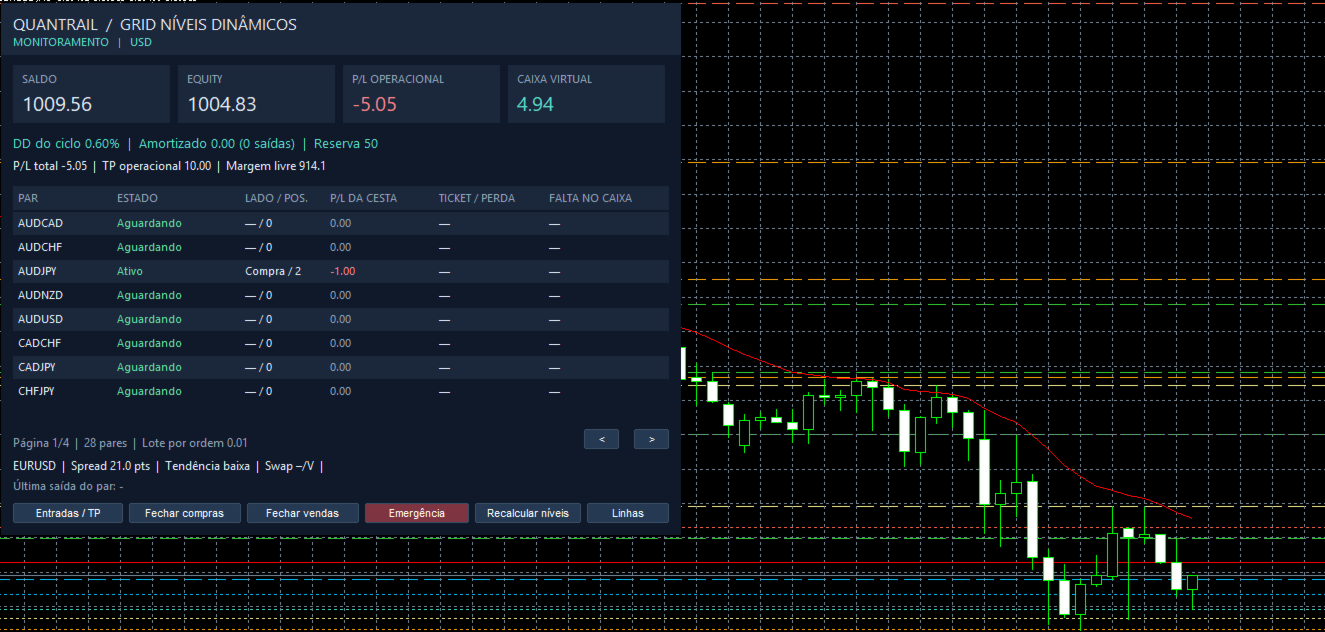
QuantRail Level Grid is a multi-symbol Expert Advisor for MetaTrader 4, featuring basket management and an optional mode for the gradual reduction of exposure during drawdowns. Gradual exposure reduction: In a grid system, a basket may accumulate multiple positions while in a loss. The recovery mode allows for the suspension of additional entries (reinforcements) for that specific basket and enables a step-by-step reduction of its exposure. A portion of the net realized profit from other baskets can be allocated to a "virtual amortization credit," which is then used to close individual positions within the basket undergoing recovery. The dashboard displays the available credit, the amount already amortized, and the baskets currently in recovery mode. Open positions remain reflected in the account equity and the portfolio's risk controls. This credit is an internal record maintained by the Expert Advisor. Closing a losing position reduces future exposure while realizing the corresponding loss. Key features: Multi-symbol operation from a single chart—monitors up to 32 configured symbols, managing one basket per symbol. Timeframe selection and filters—allows for the adjustment of analysis periods and filters based on trends, RSI, divergence, volatility, spreads, swaps, and news events. Volume based on account balance—lot sizes are scaled according to the account balance; the number of additional entries does not multiply the lot size. Supported pairs: AUDCAD, AUDCHF, AUDJPY, AUDNZD, AUDUSD, CADCHF, CADJPY, CHFJPY, EURAUD, EURCAD, EURCHF, EURGBP, EURJPY, EURNZD, EURUSD, GBPAUD, GBPCAD, GBPCHF, GBPJPY, GBPNZD, GBPUSD, NZDCAD, NZDCHF, NZDJPY, NZDUSD, USDCAD, USDCHF, USDJPY. Basket and portfolio management—includes targets and stops for each basket, a global target, and—in recovery mode—exposure controls, the blocking of additional entries, and a global equity-based stop. Includes an operational dashboard. Displays balance, equity, free margin, profit/loss by symbol, number of positions, status of position baskets, and amortization information. It also provides commands to pause entries, close positions, and trigger an emergency close. The data source is configurable; by default, the Expert Advisor (EA) calculates levels locally, with an option to use an external data source. Key parameters include "Pairs" and "ActiveTF," which define the symbols and timeframes being monitored. "EnableRecovery" activates recovery mode, while "IsolationLossPercent" and "ProfitToRecoveryPercent" configure the isolation threshold and the portion allocated to virtual credit. "MaxCurrencySidePositions," "FreezeGridDrawdown," and "StopEquityDrawdown" adjust exposure and drawdown controls during recovery mode. "GlobalTPPercent," "TPBase," "TP," "SLBase," and "SL" manage exit levels for the entire portfolio and for individual baskets. "OnlyPositiveSwap," "MaxSpreadPoints," "SlippagePoints," and "NewsFilter" configure execution filters and conditions. Compatibility: This version requires a hedging account in MetaTrader 5 to manage individual positions. Use the visual mode in the Strategy Tester to monitor the dashboard. Automatic closures require the terminal to be connected and authorized for trading. The recovery process reduces exposure as positions are closed. The actual drawdown depends on market conditions and execution.