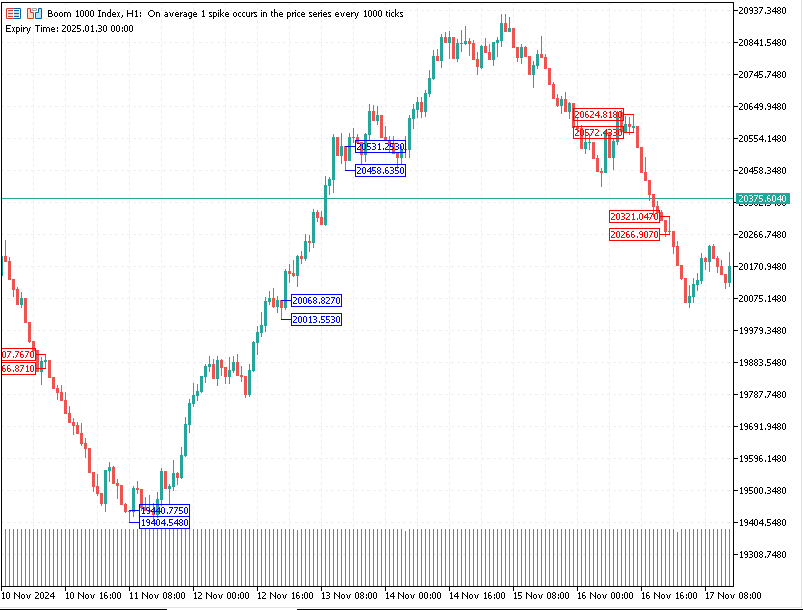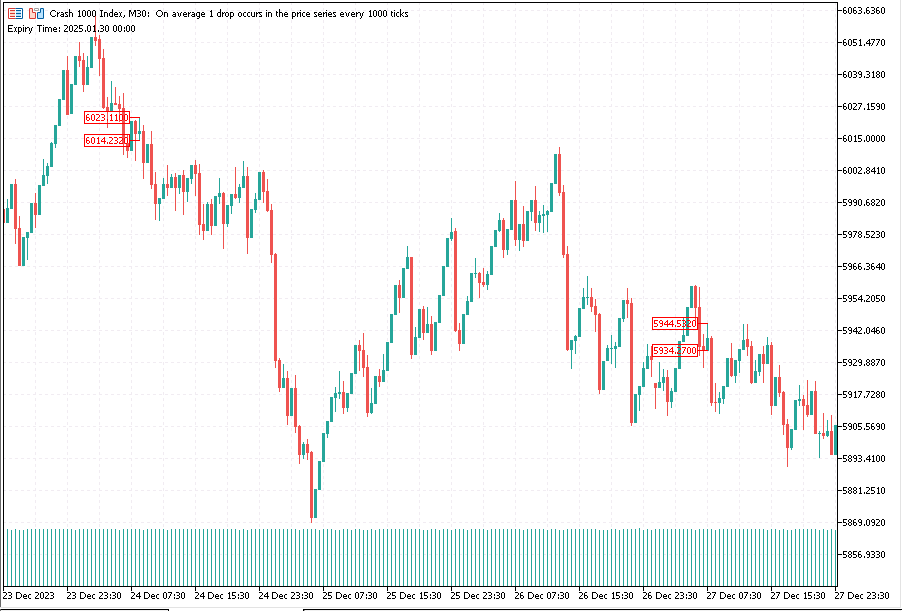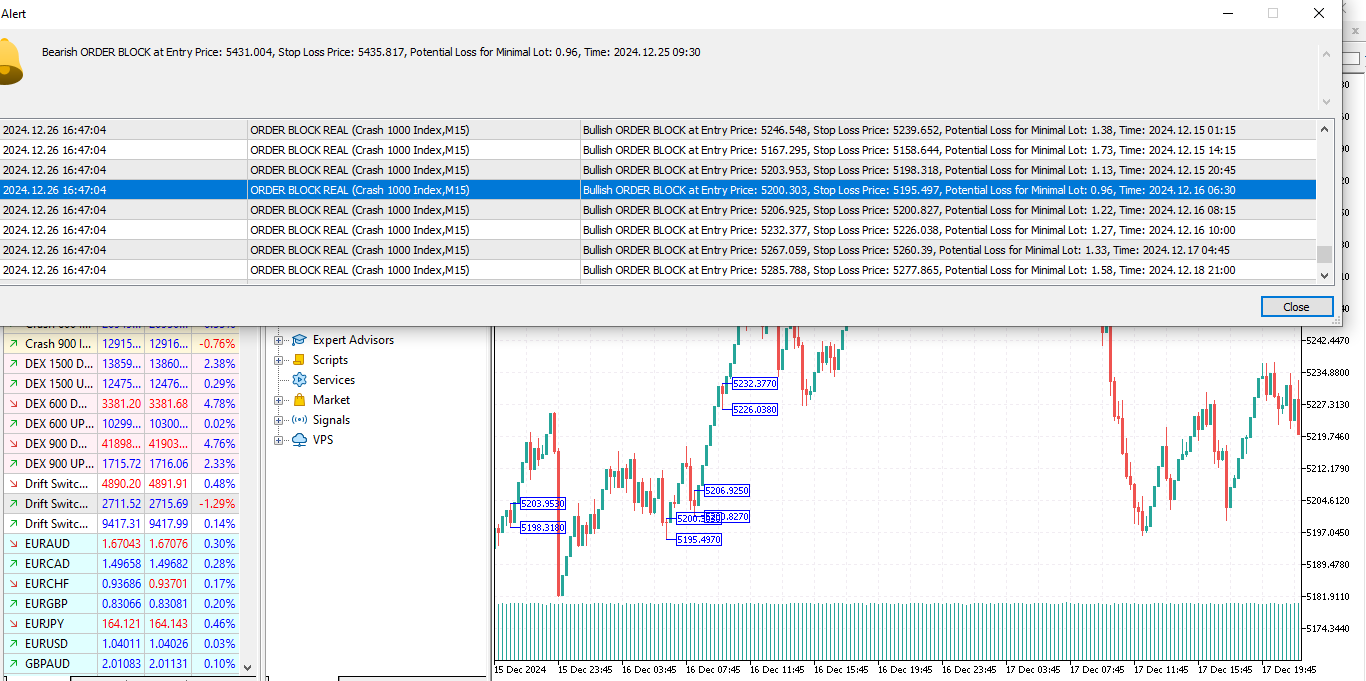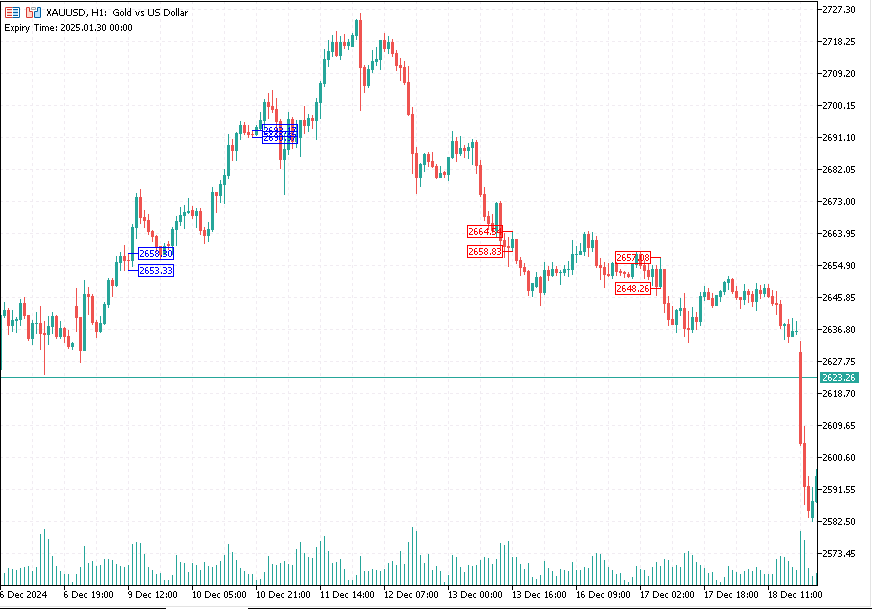
Order Block Real

1

Detailed Explanation of the Order Block Indicator

What is an Order Block?

An Order Block refers to a specific price zone where institutional traders (e.g., banks, hedge funds) have placed a large number of buy or sell orders. These zones are critical because they often mark areas of significant market reversals, continuations, or breakouts.

In simpler terms, it's a region on the chart where the "big players" have left their footprints. Traders use these zones to predict price behavior—whether the price will:

  1. Return to the zone (and potentially reverse or continue in the same direction).
  2. Breakout through the zone (indicating a strong trend in the opposite direction).

How This Indicator Works

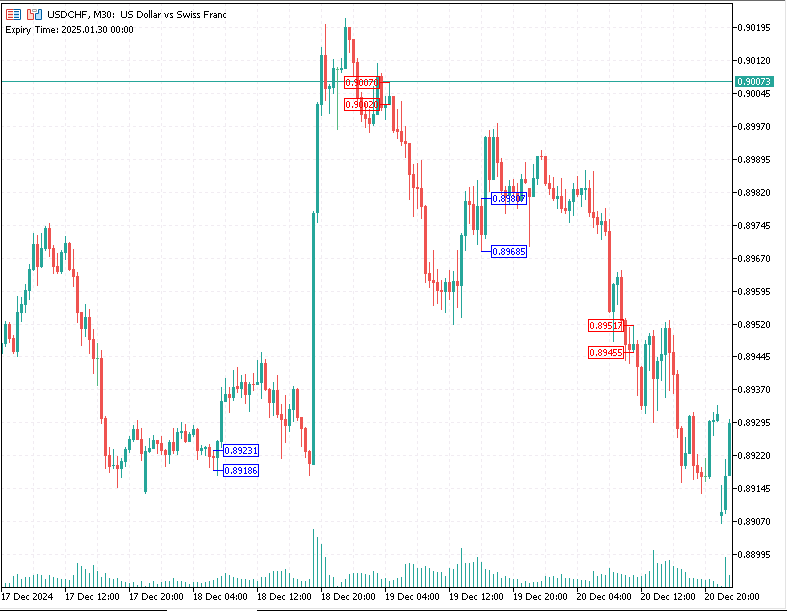
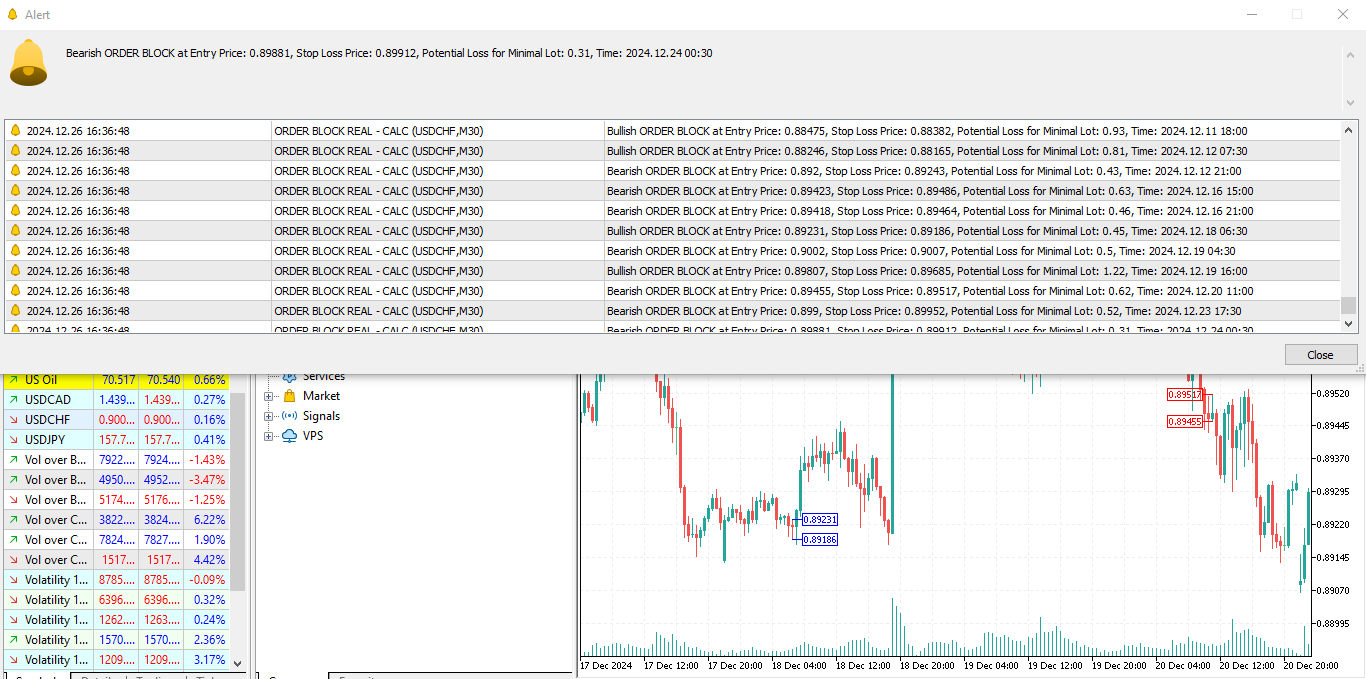
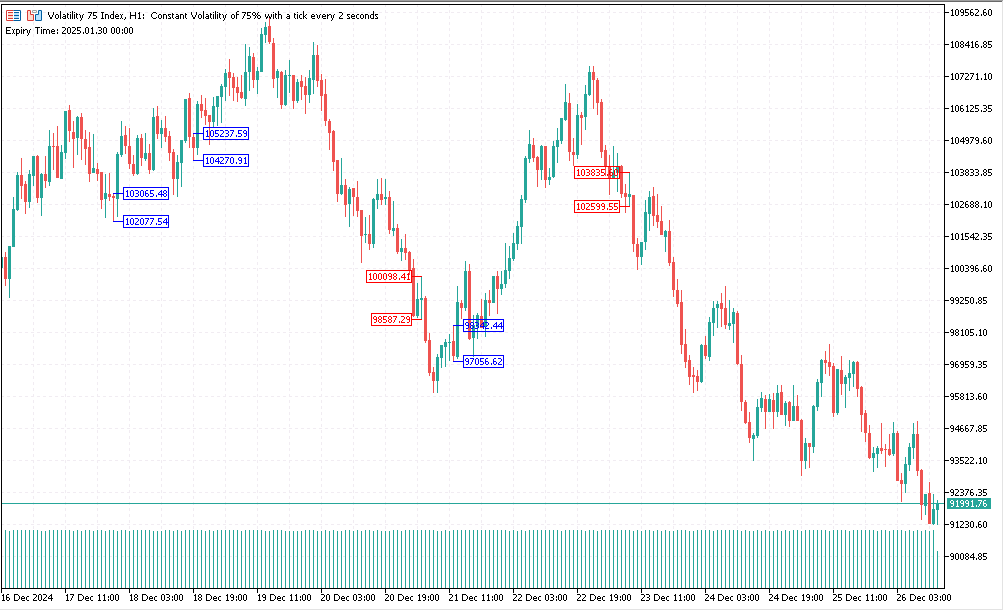
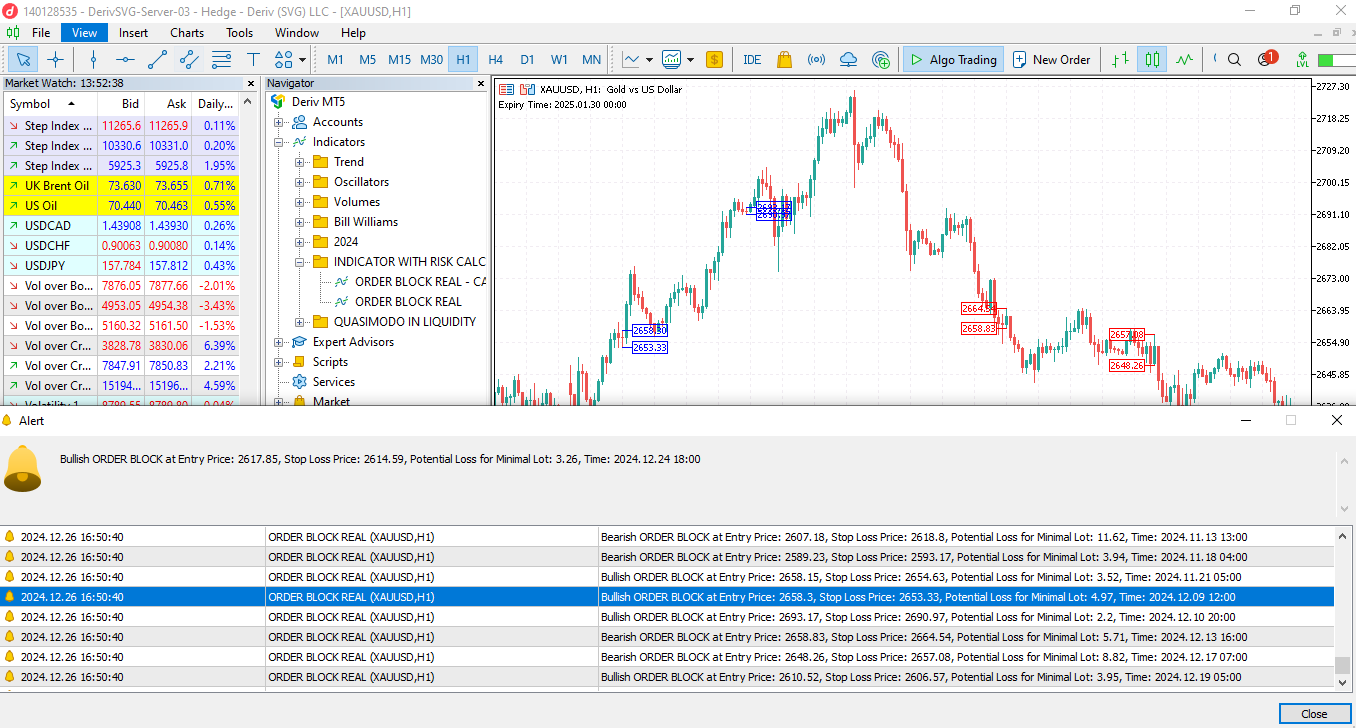
The Order Block Real indicator identifies and marks potential bullish and bearish order blocks on the chart. It also provides critical information about risk in monetary terms for the minimum lot size, helping traders manage their trades more effectively.

Here’s how it works step by step:

1. Bullish Order Block Identification

A Bullish Order Block is a zone where price is expected to:

  • Reverse upwards after a pullback.
  • Continue in an upward trend after testing the zone.

Conditions for Detection:

  • The current candle's low aligns with the zone.
  • The last three candles show a specific pattern:
    • The first (most recent) is bullish (closing higher than it opened).
    • The second (prior to the bullish) is bearish (closing lower than it opened).
    • The close of the bullish candle is higher than the high of the second (bearish) candle.
  • There is a bullish Fair Value Gap (FVG): The current low is above the second candle's high.
  • Certain prior lows and closes align, forming the structure of the order block.

What Happens:

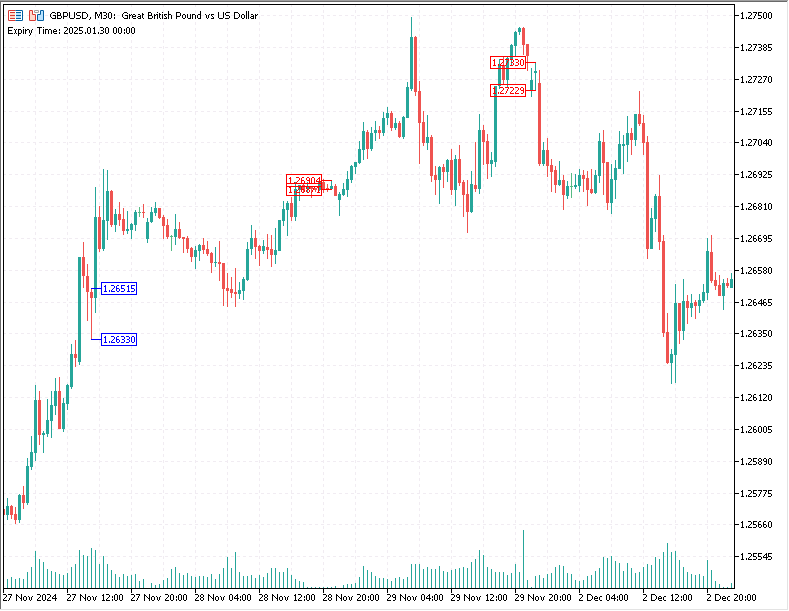
  • A blue arrow is plotted to mark the Entry Price (based on the high of the order block).
  • Another blue arrow marks the Stop Loss Price (based on the low of the order block).
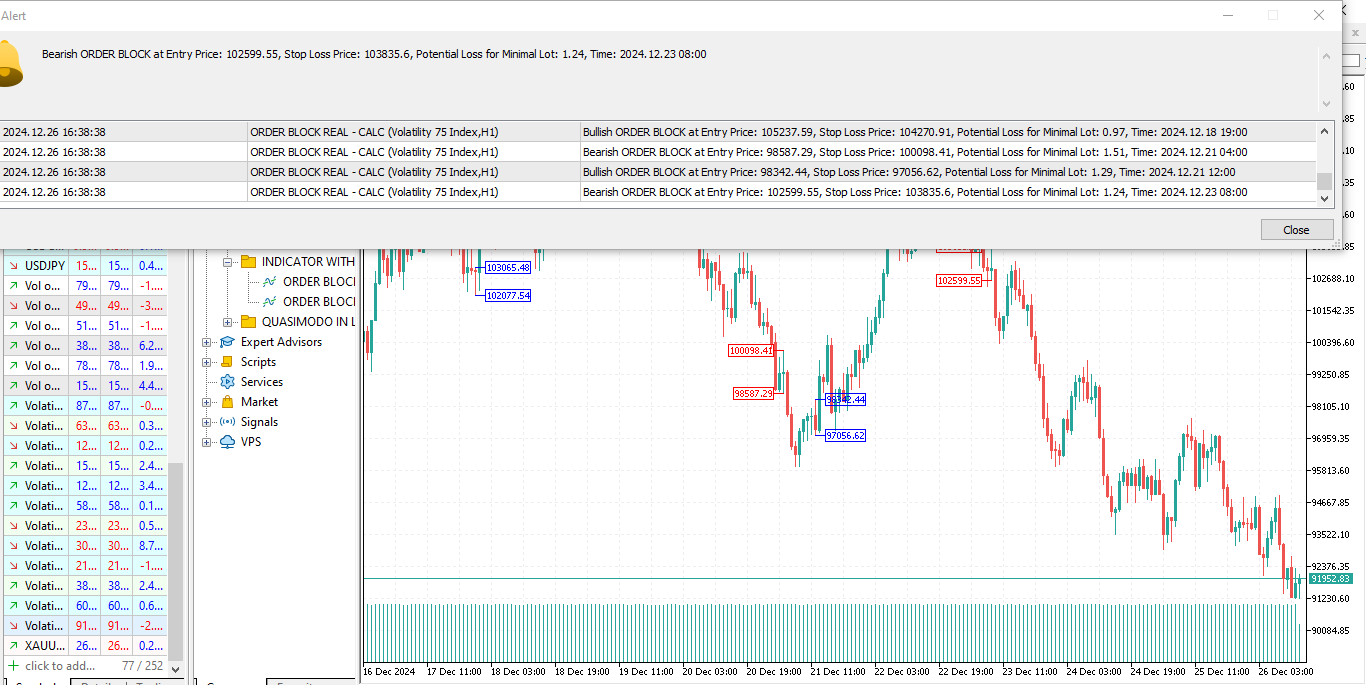
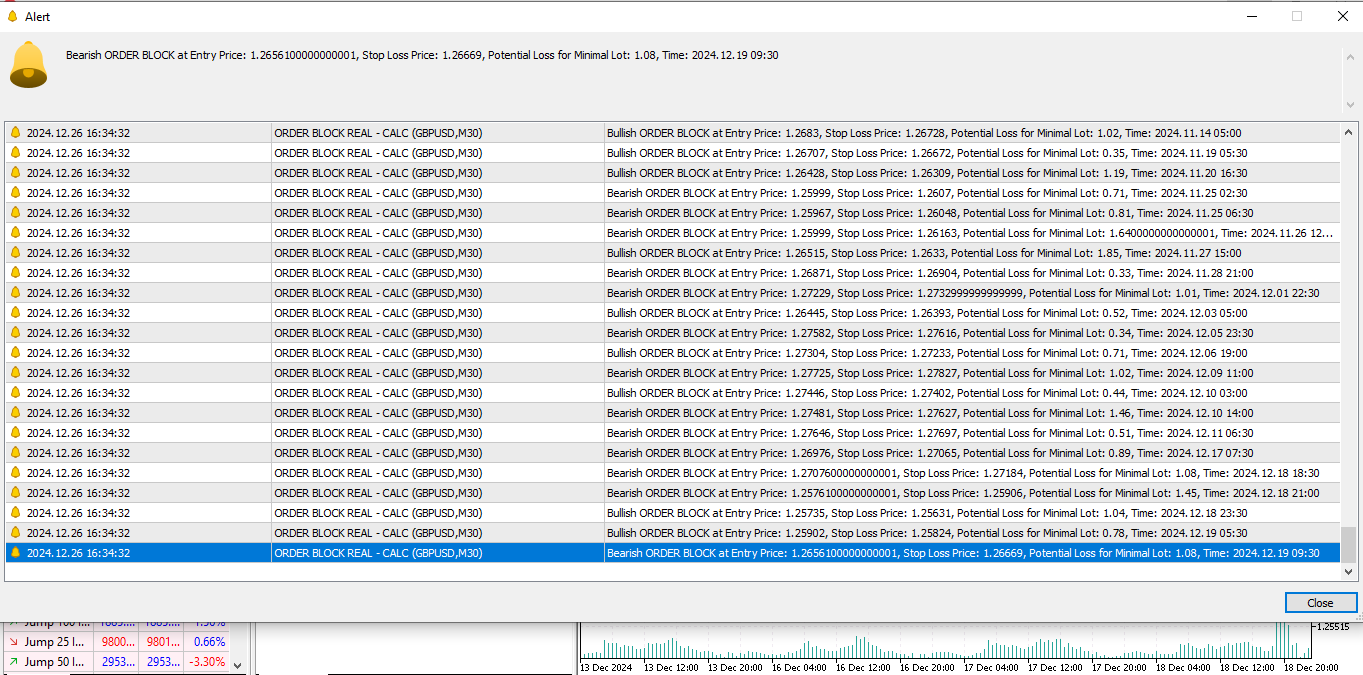
  • Alerts provide the entry price, stop loss, and the risk amount in dollars for the minimum lot size.

Risk Calculation: The risk amount is calculated as:

Risk = ( High of Order Block − Low of Order Block ) × Contract Size × Minimum Lot Size \text{Risk} = (\text{High of Order Block} - \text{Low of Order Block}) \times \text{Contract Size} \times \text{Minimum Lot Size}

Failed Bullish Order Blocks:

  • If a bullish order block fails (price drops below the stop loss significantly), it may act as a bearish breakout signal, indicating strong downward momentum.

2. Bearish Order Block Identification

A Bearish Order Block is a zone where price is expected to:

  • Reverse downwards after a pullback.
  • Continue in a downward trend after testing the zone.

Conditions for Detection:

  • The current candle's high aligns with the zone.
  • The last three candles show a specific pattern:
    • The first (most recent) is bearish (closing lower than it opened).
    • The second (prior to the bearish) is bullish (closing higher than it opened).
    • The close of the bearish candle is lower than the low of the second (bullish) candle.
  • There is a bearish Fair Value Gap (FVG): The current high is below the second candle's low.
  • Certain prior highs and closes align, forming the structure of the order block.

What Happens:

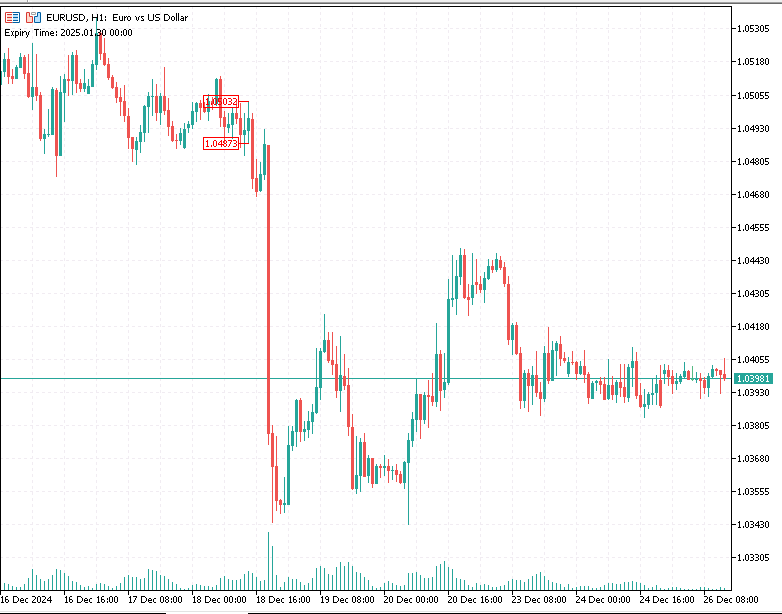
  • A red arrow is plotted to mark the Entry Price (based on the low of the order block).
  • Another red arrow marks the Stop Loss Price (based on the high of the order block).
  • Alerts provide the entry price, stop loss, and the risk amount in dollars for the minimum lot size.

Risk Calculation: The risk amount is calculated similarly to bullish blocks:

Risk = ( High of Order Block − Low of Order Block ) × Contract Size × Minimum Lot Size \text{Risk} = (\text{High of Order Block} - \text{Low of Order Block}) \times \text{Contract Size} \times \text{Minimum Lot Size}

Failed Bearish Order Blocks:

  • If a bearish order block fails (price rises above the stop loss significantly), it may act as a bullish breakout signal, indicating strong upward momentum.

3. Risk Management

  • The indicator automatically calculates the risk amount in dollars for the minimum lot size based on the distance between the entry and stop loss prices.
  • This helps traders quickly assess if the trade aligns with their risk tolerance before entering the position.

4. Breakout Behavior

  • Order Block Breakouts: When the price breaks through an order block, it signals a potential strong move in the direction of the breakout.

  • For example:

    • If a bullish order block is breached to the downside, this could signal a bearish breakout.
    • If a bearish order block is breached to the upside, this could signal a bullish breakout.
  • The indicator allows traders to use failed order blocks as contrarian signals for breakouts.

Example Scenario

  1. Bullish Order Block:

    • Price forms a bullish structure.
    • The indicator marks the entry price (e.g., $1,800) and stop loss (e.g., $1,790).
    • The risk for a minimum lot size (e.g., 0.01 lots) is calculated as $10.
    • Price tests the order block, then reverses upward, allowing the trader to profit.
  2. Failed Bullish Order Block:

    • Price breaches the bullish stop loss (e.g., $1,790).
    • This signals a potential bearish breakout.
    • Traders can use this information to go short, expecting further downward momentum.

Who Is This Indicator For?

  • Day Traders and Swing Traders who rely on technical analysis.
  • Beginner Traders who need clear signals and risk assessments.
  • Institutional and Retail Traders looking for zones of interest to enter or exit the market.

Summary:

  • Ease of Use: Simple visual cues (arrows) for entry and stop loss.
  • Risk Management: Automatic calculation of monetary risk for minimum lot size.
  • Versatility: Detects both bullish and bearish order blocks, including failed ones for breakout strategies.
  • Custom Alerts: Audible alerts for every detected order block with detailed information.


How to Install the Order Block Indicator in MT5 for PC

Installing the Order Block Indicator in Meta Trader 5 (MT5) on a PC is straightforward. Follow these steps:

Step 1: Download the Indicator

  • Obtain the indicator file (ORDER BLOCK REAL.ex5) from the MQL5 Market.
  • The file is compatible with MT5.

Step 2: Open MetaTrader 5

  1. Launch MT5 on your PC.
  2. Log in to your trading account.

Step 3: Locate the Data Folder

  1. In MT5, click File in the top-left menu.
  2. Select Open Data Folder.
    This will open the folder where all MT5 files are stored.

Step 4: Navigate to the Indicators Folder

  1. In the Data Folder, go to:

    MQL5 -> Indicators

  2. This is where all custom indicators are stored.

Step 5: Copy the Indicator File

  1. Copy the downloaded `ORDER BLOCK REAL.ex5` file.
  2. Paste it into the Indicators folder.

Step 6: Restart MetaTrader 5

  1. Close MT5 completely.
  2. Relaunch MT5 to ensure the indicator is loaded into the system.

Step 7: Add the Indicator to a Chart

  1. In MT5, open a chart for the instrument you want to analyze (e.g., EUR/USD, Gold, Volatility 75 etc.).
  2. Click Insert in the top menu, then navigate to:
            Indicators -> Custom
    
  3. Look for the Order Block Indicator in the list and select it.

Step 8: Customize Indicator Settings

  1. A settings window will pop up after you select the indicator.
  2. Click OK to apply the indicator to the chart.

Step 9: Check Installation

  • Verify that the indicator is displayed on the chart with:
    • Arrows marking entry points.
    • Highlighted zones for order blocks.
    • Alerts showing risk amounts and signals.

Troubleshooting Installation

  • Indicator not showing: Ensure the ORDER BLOCK REAL.ex5 file is in the correct folder and the platform was restarted.
  • Alerts not working: Revisit the settings and ensure notifications are enabled in MT5.

Now you’re ready to use the Order Block Indicator on MT5 to identify critical price zones and manage your trades effectively!
    Recommended products
    Discover the MSG Method: Master the Major Session Gap for Consistent Forex Profits Unlock the power of the MSG Method – our proprietary Major Session Gap strategy designed to capture high-probability trades during key market session transitions. Developed by the T1 FX Team, this innovative approach leverages algorithmic precision to identify and exploit price gaps between major trading sessions (London, New York, and Tokyo). Why Choose the MSG Method? High-Probability Setups : Focuses on session
    DD Guardian Bot — User Guide Requirements MetaTrader 5 (any broker) A Telegram account Step 1 — Create your Telegram Bot Open Telegram and search for @BotFather Send /newbot and follow the prompts to set a name and username BotFather will reply with a Bot Token — copy and save it Send any message to your new bot (e.g. /start ) so it can detect your Chat ID Open the following URL in a browser to find your Chat ID: https://api.telegram.org/bot&lt ;YOUR_TOKEN>/getUpdates Look for "chat":{"id": 12
    Introducing the "Auto Timed Close Operations", a useful utility for MetaTrader 5 traders! This utility has been developed to help traders of all levels automatically close their open positions at the exact moment they desire. With the "Auto Timed Close Operations", you gain the required control over your trades and can avoid unwanted surprises at the end of the day or at any other predefined time. We know how important it is to protect your profits and limit your losses, and that's exactly what
    Tim Trend
    Oleksii Ferbei
    Due to the fact that at each separate period of time, trading and exchange platforms from different parts of the planet are connected to the trading process, the Forex market operates around the clock. Depending on which continent trading activity takes place during a certain period, the entire daily routine is divided into several trading sessions. There are 4 main trading sessions: Pacific. European. American Asian This indicator allows you to see the session on the price chart. You can also
    TradePilot Dashboard
    Augusto Martins Lopes
    TradePilot Dashboard Summary Graphical panel for MT5 with order management buttons (Buy/Sell/Close/SL/TP), margin check, and log control. Easy to use and testable on demo accounts. No profit promises. Full Description TradePilot Dashboard is an Expert Advisor with a graphical interface (Controls) for manual and semi-automated order management in MetaTrader 5. It provides a visual panel with buttons, editable fields, and safety checks (free margin) to help traders operate directly from the chart
    Indicator Summary The indicator dashboard displays values and trading actions, as well as provides a summary of trading actions based on 11 built-in indicators. Built-in Indicators: RSI (Relative Strength Index)   - A crossover from the overbought zone downwards is a sell signal. A crossover from the oversold zone upwards is a buy signal. When fluctuating in the zone between overbought and oversold, the signal is formed depending on the value's position relative to 50. Above 50 indicates a buy,
    QuantBot Studio
    Sahib Ul Ahsan
    Quant_Bot Studio Professional Expert Advisor for MetaTrader 5 Quant_Bot Studio is a professional-grade Expert Advisor designed for traders who require structured execution, disciplined risk control, and scalable trading operations. Built on Smart Money Concepts (SMC), it automates high-probability trade execution across forex, commodities, and indices while maintaining strict risk management at every stage. The system eliminates emotional decision-making and enables continuous, rule-based tradi
    Danko DTC Panel
    Ricardo Almeida Branco
    Do not buy before seeing the Danko Trend Color product, as this panel is a way to view a summary of this indicator on various timeframes. The Danko DTC Panel utility allows you to look at the trend in up to 5 timeframes. When clicking on the timeframe texts, a new window will open with the indicator plotted on the screen so you can see the complete chart. The width of the panel, with the amount of candles you want to see, is customizable, see the images below. Ao clicar nos textos dos timeframe
    Volume Flow Binance
    Thalles Nascimento De Carvalho
    Volume Flow Binance! Have you ever imagined accessing the times and trades of your favorite cryptocurrency, with detailed insights into volume flow and price movement analysis, even if your broker doesn’t offer complete trading history access? With Volume Flow Binance , that’s now a reality! This MQL5 script is designed for cryptocurrency traders seeking a detailed view of real-time market dynamics. Key Features: Direct access to the times and trades of any cryptocurrency listed i

    FREE
    Lazy Replay The LazyReplay  is a specialized MQL5 indicator designed to facilitate manual backtesting by simulating a "live" market environment on historical data . It allows traders to practice price action strategies by hiding future bars and revealing them at a controlled pace. Key Features Dynamic Chart Masking : Uses a background-colored rectangle to hide all price action to the right of a chosen "anchor" bar, effectively removing hindsight bias during practice . Playback Controls : Include
    FREE
    Statistics Boom and Crash
    Marcelo Jose Patino Vargas
    SYSTEM DESCRIPTION Our MT5 EA uses an advanced statistical system to determine the optimal time to open sell positions on the BOOM 1000, BOOM 500, and BOOM 300 assets. Based on rigorous market data analysis, the EA identifies the moment when there is a 90% probability of a bearish candle, allowing our users to enter a sell position with maximum confidence in success. This data-driven approach is the key to achieving profitable and consistent trades in BOOM 1000, and our EA is designed to autom
    Position Size Tool
    Filipp Pavlov
    5 (1)
    Position Size Tool is an on-chart trading tool that lets you manage trades entirely with your mouse and hotkeys — switch between preset risk percentages, place orders with instant position sizing, see live SL/TP distances and risk/reward, and close positions partially with a click. Download Demo version  Demo is limited to EURUSD pair on demo account on 1 hour timeframe. Key Features: Market/pending orders by mouse & hotkeys with auto risk-based sizing. Change risk % with A/S hotkeys. Change aut
    Sync In Many Ways MT5
    Sa No Tsuyoshi Kokorozashi
    Description This is a Utility tool for MT5 which will make our chart analysis task quite more efficient and save large amount of time. As for chart analysis, some are watching out several symbol simultaneously with single timeframe and others are trading only one single pair with   multi timeframe analysis. For both, a common troublesome issue is “scroll chart to look back” or “draw chart objects” in multi charts at the same time.  Especially for those who are trading with multi timeframe soluti
    DeepInsight
    Gustavo Santos Pedrosa
    Title: DeepInsight: Flow and Market Context Analysis What is DeepInsight? DeepInsight is a technical analysis tool for MetaTrader 5, developed to assist in reading market dynamics. The indicator processes volume and price movement data to generate objective visual references, facilitating the identification of areas of interest on the chart. The tool functions as an auxiliary analysis dashboard, offering support for manual decision-making without performing automatic order execution. Operationa
    Multi Light MT5
    Volodymyr Zubov
    The multi-currency EA provides the ability to manage trading on 30 symbols from a single interface in MetaTrader 5. It is based on a comprehensive approach to market analysis. Forex pairs and metals such as XAUUSD and XAGUSD are supported. Automatic processing of symbol names is possible for users. The EA is equipped with a self-learning mechanism that dynamically adjusts the entry threshold depending on changes in market conditions and transaction statistics. Options allow you to choose betwee
    Neuro Trader EA is an expert advisor developed using artificial intelligence, designed for analysis and automated trading in financial markets. The advisor focuses on utilizing a neural network, allowing for more flexible and precise responses to market changes. The algorithm analyzes market behavior using weight coefficients and dynamically adapts to changing conditions, making it particularly effective for short-term trading. Features of the Advisor: Neural Network for Decision-Making: The adv
    Hybrid Assisted Trading Engine Manual Trading. Machine Discipline. The Hybrid Assisted Trading Engine is an institutional-grade manual trade management system designed to protect traders from emotional mistakes — without taking control away from them. You decide when to enter . The engine decides how the trade is managed . What It Does This system continuously monitors your manual trades and enforces professional-level trade management rules in real time: Smart Breakeven logic R-based trai
    Sinaleiro Trader
    Renato Takahashi
    O Sinaleiro Trader é o robô de daytrade que usa multiníveis de acordo com a abertura do dia. Assim, a cada rompimento dos níveis, o robô emite ordens de compra ou venda, de acordo com a tendência. Os stops podem ser fixos ou dinâmicos de acordo com os níveis. É possível configurar a distância do sinaleiro, bem como horários de trades e dias da semana. Alterar o parâmetro BR1 para BR.
    Aklamavo Market Sessions Monitor-EA (Expert Advisor) is a   Global Stock Exchange Market Hours Dashboard   for MetaTrader 5. It provides a comprehensive visual display of the opening status and trading hours of 7 major stock exchanges around the world. The EA creates a real-time dashboard that shows whether each stock exchange is currently: OPEN   (Green background) CLOSED   (Red background) PRE-MARKET   (Light Green background) POST-MARKET   (Light Pink background) Unique Features: Progress Ind
    SyntheticIndices
    Stanislav Korotky
    The indicator compares quotes of a given symbol and a synthetic quote calculated from two specified referential symbols. The indicator is useful for checking Forex symbol behavior via corresponding stock indices and detecting their convergence/divergence which can forecast future price movements. The main idea is that all stock indices are quoted in particular currencies and therefore demonstrate correlation with Forex pairs where these currencies are used. When market makers decide to "buy" one
    !! FLASH SALE !!   Over 80% off !!     For ONE week only. Now only $47 - normally $297! >>>      Ends on 30 June 2023 - Don't miss it! Buy and Sell Arrows On The Chart According To Price Action Sends Alerts On MT5 To Your Phone To You Email Does NOT repaint. Works on any pair, any timeframe.     10 Activations allowed so you are free from limitations. MT4 Version here . For spreads from a tiny 0.1 pips RAW/ECN Accounts,  click here . Check out my Waka Esque EA signal here: >>   High Risk Se
    This indicator helps you control several pairs in a small workspace, therefore, it is not necessary to open several charts on the platform to do so. The indicator shows sequentially up to 6 different pairs, besides that each of these pairs has a button with which you can stop the indicator to observe the selected pair. Place the indicator on a chart to monitor several pairs and the rest of your space use it on the chart of the pair you wish to observe in detail.   MT4 version       Parameters Ob
    Fixed Volume Profile
    Carlos Pascual Perez Maturano
    This indicator, titled "Fixed Volume Profile.mq5", is a custom tool for MetaTrader 5 (MQL5) designed to calculate and display a Volume Profile over a user-defined fixed time range. The Volume Profile shows the distribution of trading volume at different price levels during a specific period, helping to identify areas of high activity (such as Points of Control or POCs) and volume-based support/resistance areas. Main Functionality: Interactive Range: The indicator creates two vertical lines on
    FREE
    ️ Trade Manager oneclick  ( Reverse Trade,  Partial Close,  Breakeven, Close All Running Trade )   control – Smart Manual Trade Control for MT5 Trade Manager oneclick control is a powerful yet lightweight trade management utility built for manual traders who want precise control over their open positions — directly from the MT5 chart. This EA does not open or close trades automatically based on any strategy. It simply provides one-click management tools to handle your running trades efficient
    FREE
    News Clock
    Victor Klenov
    The professional browser of News and Trading Sessions is now available in MetaTrader 5. Now all the most important market information is collected on one dial! News located on the Time scale. Planning your working time has never been so easy and convenient ... The news scale can be switched a day, two, a week, a month forward or backward (see the details in the short video). All news updates in real time. Thanks to the built-in filters, you can configure the display of news by importance, cou
    Telegram to MT5 Coppy
    Sergey Batudayev
    5 (9)
    Telegram to MT5: The Ultimate Signal Copying Solution Simplify your trading with Telegram to MT5, the modern tool that copies trading signals directly from Telegram channels and chats to your MetaTrader 5 platform, without the need for DLLs. This powerful solution ensures precise signal execution, extensive customization options, saves time, and boosts your efficiency. [ Instructions and DEMO ] [ FAQ ] [ How atach logs properly ] [ Settings descrition ] Key Features Direct Telegram API Integrati
    Miranda Ice EA Mt5
    Taha Saber Ashour Kamel
    Miranada ICe Ea for mt5 is strong multi strategy trading bot it has many super options on parameters that will help you for perfect trades hitting targets and low drawdown control also it has symbol loop to help you open one chart and make that on and choose racon strategy but make number of trades on and make it as you like  3 and make your lot size and run ea also if you want any symbol you can apply on chart but if you like to trade many pairs same time as I did in screenshot open one chart a
    Buy vs Sell Force Real Time
    Hericlezia Andrade Assuncao
    Buy Sell Strength Realtime displays buying and selling pressure directly on each candle of the main chart, with no separate window needed. For each bar, the indicator calculates the proportion of buyers and sellers based on the close position within the bar range (high and low), multiplied by tick volume. Results appear as: Green number below the low — buying strength Red number above the high — selling strength Instantly identify which side is dominating bar by bar, without switching wind
    Exp Crassula
    Aleksey Luppey
    The Exp Crassula expert Advisor can start working with a minimum Deposit of $ 20. it is possible to enable automatic lot increase (calculated from the result of the last transaction.) The expert is working around the clock in fully automatic mode. The expert showed good results on the history of the EURUSD H1 pair. You can enable it on other timeframes and currency pairs by first testing and selecting the minimum size for the calculation in paragraphs parameter. it is recommended to use from 5
    Master the Flow of Price Action. The Ultimate Keyboard-Driven Toolkit for SMC Traders Stop fighting your MT5 interface. Start trading the markets at the speed of thought. The Problem with Standard MT5 If you trade Smart Money Concepts (SMC) or Price Action, precision and speed are your lifeline. But standard MT5 slows you down. Right-clicking to open properties, manually typing "BOS", or watching your 1-Minute chart get cluttered by 4-Hour drawings... these micro-delays pull you out of the "F
    Buyers of this product also purchase
    Neuro Poseidon MT5
    Daria Rezueva
    4.8 (54)
    Neuro Poseidon is a new indicator by Daria Rezueva. It combines precise trading signals with adaptive TP/SL levels - creating best possible trades as a result! Message me and get  Neuro Poseidon Assistant  as a gift to automize your trading process! What makes it stand out? 1. Proven profitability on all assets and timeframes 2. Only confirmed BUY and SELL signals present on the chart 3. Adaptive TP & SL levels generated by the software for each trade 4. Easy to understand - suitable for al
    M1 Quantum MT5
    Hamed Dehgani
    5 (8)
    Developer Note : Price will increase to 169$ by 13th july 2026 Live Trading Signals Using M1 Quantum : Signal  (Trade executed automatically by the Quantum Trade Assistant , included free with this product.) Price Plan: Current Price: $149 (Early Adopter Offer) Next Planned Price: $169 Planned Retail Price: $299 Developer Note:  After your purchase, please contact me to receive the latest  recommended settings (set file) , trading tips, and an invitation to our  VIP Support Group , where you ca
    Trend Sniper X
    Sarvarbek Abduvoxobov
    5 (4)
    Trend Sniper X is a multi-timeframe trend-following indicator for MetaTrader 5 that helps traders identify trend direction and potential reversal points with clarity and precision. Price Information: The current price is promotional and is subject to change as upcoming updates and new features are released. Code2Profit Channel Master the Market with Multi-Timeframe Analysis! Technical Specifications Platform MetaTrader 5 Indicator Type Multi-Timeframe Trend Indicator Operating Timeframe Any char
    Divergence Bomber
    Ihor Otkydach
    4.9 (92)
    Each buyer of this indicator also receives the following for free: The custom utility "Bomber Utility", which automatically manages every trade, sets Stop Loss and Take Profit levels, and closes trades according to the rules of this strategy Set files for configuring the indicator for various assets Set files for configuring Bomber Utility in the following modes: "Minimum Risk", "Balanced Risk", and "Wait-and-See Strategy" A step-by-step video manual to help you quickly install, configure, and s
    M1 Sniper MT5
    Oleg Rodin
    5 (1)
    M1 SNIPER   is an easy to use trading indicator system. It is an arrow indicator which is designed for M1 time frame. The indicator can be used as a standalone system for scalping on M1 time frame and it can be used as a part of your existing trading system. Though this trading system was designed specifically for trading on M1, it still can be used with other time frames too. Originally I designed this method for trading XAUUSD and BTCUSD. But I find this method helpful in trading other markets
    Zain v4 With artificial intelligence
    Haitham Gamal Abdelnaser Mohamed
    ### **Zain Gold V4 - AI-Powered Trading Dashboard** **Overview:** Zain Gold V4 is the ultimate evolution in our series of professional technical analysis indicators for the MetaTrader 5 platform. Engineered specifically to navigate the complexities of the XAUUSD (Gold) market and major currency pairs, this version introduces a sophisticated AI-powered dashboard. Our goal is to empower traders with precise, data-driven insights that translate market noise into clear, actionable trading opportun
    ARIPoint
    Temirlan Kdyrkhan
    1 (1)
    ARIPoint is a powerful trading companion designed to generate high-probability entry signals with dynamic TP/SL/DP levels based on volatility. Built-in performance tracking shows win/loss stats, PP1/PP2 hits, and success rates all updated live. Key Features: Buy/Sell signals with adaptive volatility bands Real-time TP/SL/DP levels based on ATR Built-in MA Filter with optional ATR/StdDev volatility Performance stats panel (Success, Profit/Loss, PP1/PP2) Alerts via popup, sound, push, or email Cu
    The Oracle Pro
    Ottaviano De Cicco
    5 (1)
    The Oracle Pro: Synthetic Multi-Timeframe Bias Engine for MT5 ️ Summer Launch Offer — Get The Oracle Pro for USD 199 (early buyers). Price rises with traction; final price USD 399. The Oracle Pro is a premium multi-timeframe bias engine for MetaTrader 5, built for demanding and professional traders. It answers one question with discipline: what is the directional bias on each timeframe right now, how strong is it, and how much do the timeframes agree? Everything is computed on closed bars only
    Introducing   Quantum Breakout PRO , the groundbreaking MQL5 Indicator that's transforming the way you trade Breakout Zones! Developed by a team of experienced traders with trading experience of over 13 years,   Quantum Breakout PRO   is designed to propel your trading journey to new heights with its innovative and dynamic breakout zone strategy. Quantum Breakout Indicator will give you signal arrows on breakout zones with 5 profit target zones and stop loss suggestion based on the breakout b
    MT5 Indicator See What the Market Is Really Doing, See the 3 Market Phases Live in front of you (Contraction, Expansion, Trend Phases) and have Better Entries at the Early Stage in the Trend Phase. Stop guessing . Start reading the market like the institutions, Smart Money do. Apex Market Structure Pro Indicator for MT5 is a precision smart-money analysis tool that strips away the noise and shows you the true structure beneath every candle, liquidity, structure shifts, accumulat
    ACB Breakout Arrows MT5
    KEENBASE SOFTWARE SOLUTIONS
    3.5 (2)
    The ACB Breakout Arrows indicator provides a crucial entry signal in the market by detecting a special breakout pattern. The indicator constantly scans the chart for a settling momentum in one direction and provide the accurate entry signal right before the major move. Get multi-symbol and multi-timeframe scanner from here - Scanner for ACB Breakout Arrows MT 5 Key features Stoploss   and Take Profit levels are provided by the indicator. Comes with a MTF Scanner dashboard which tracks the brea
    The  UZFX {SSS} Scalping Smart Signals v4.0 MT5  is a Non Repaint high-performance trading indicator designed for Scalpers, Day Traders, and Swing Traders  who demand accurate, real-time signals in fast-moving markets. Developed by  (UZFX-LABS) , this indicator combines price action analysis, trend confirmation, and smart filtering to generate high-probability  buy and sell signals, Warning Signals, and Trend Continuation Opportunities across all currency pairs and timeframes.  Stop second-guess
    The indicator highlights zones where interests are being declared then shows their accumulation zone. Transaction Speed works like an order book in big scale. This is the indicator for the biggest money. It's performance is exceptional. Whatever interest there is in the market you will see it. The Transaction Speed is a new concept indicator that shows where and when large orders accumulates on the market and benefits of this. It detects trend changes at very early stage. In Forex, volume is
    MTF Supply Demand Zones MT5
    Georgios Kalomoiropoulos
    5 (1)
    Next Generation Of Automated Supply And Demand Zones. New and Innovative Algorithm that Works At Any Chart. All Zones Are Being Created Dynamically According To Price Action Of The Market. AMAZING OFFER --> Activations from 5 to 20 for "MTF Supply Demand Zones" and "Automated Trendlines" TWO TYPES OF ALERTS -->  1) WHEN PRICE HITS A ZONE    2)WHEN A NEW ZONE IS FORMED  If you get the MTF Supply Demand Zones you can join the " Trade Like Me " Video Series. It contains 14 Live Sessions where 
    KURAMA GOLD SIGNAL PRO (MT5) — 7-Layer Filter, Auto TP/SL, Quality Score & Signal History Save | Complete XAUUSD Trading System No repaint in real time. The moment a signal appears, the arrow, entry, TP and SL are locked on the spot and never move afterward. What you trade is this real-time signal. And in v7.20, every signal that is actually sent is auto-saved and restored exactly after restart. BUYER BONUS Buy the lifetime license and receive AI Zone Radar (
    Manipolatio regis
    Simone Degl Innocenti
    Manipulatio Regis — Scanner di Simmetria Istituzionale Manipulatio Regis rileva le manipolazioni dei Market Maker leggendo i Trading Ranges e i progetti obiettivi simmetrici da Price Action istituzionale. Non prevede il Future: legge una manipolazione già avvenuta e progetti in cui Il prezzo tende a tornare a ribilanciarsi. Come funziona: • Evento significativo (SI): rileva un impulso anomalo ad alta efficienza (rapporto ATR). • Gamba e Candela #1: isola la gamba di ritracciamento controdirezion
    PZ Trend Trading MT5
    PZ TRADING SLU
    3.8 (5)
    Capture every opportunity: your go-to indicator for profitable trend trading Trend Trading is an indicator designed to profit as much as possible from trends taking place in the market, by timing pullbacks and breakouts. It finds trading opportunities by analyzing what the price is doing during established trends. [ Installation Guide | Update Guide | Troubleshooting | FAQ | All Products ] Trade financial markets with confidence and efficiency Profit from established trends without getting whips
    Gem SIGNAL
    Shengzu Zhong
    5 (1)
    GEM Signal Pro GEM Signal Pro is a trend-following indicator for MetaTrader 5, designed for traders who want clearer signals, more structured trade setups, and practical risk management directly on the chart. Instead of showing only a simple arrow, GEM Signal Pro helps present the full trade idea in a cleaner and more readable way. When conditions are confirmed, the indicator can display the entry price, stop loss, and take profit targets on the chart, helping traders review the setup more effic
    Currency Strength Wizard   is a very powerful indicator that provides you with all-in-one solution for successful trading. The indicator calculates the power of this or that forex pair using the data of all currencies on multiple time frames. This data is represented in a form of easy to use currency index and currency power lines which you can use to see the power of this or that currency. All you need is attach the indicator to the chart you want to trade and the indicator will show you real s
    Azimuth Pro
    Ottaviano De Cicco
    5 (7)
    Azimuth Pro V2: Synthetic Fractal Structure and Confirmed Entries for MT5 Overview Azimuth Pro is a multi-level swing structure indicator by Merkava Labs . Four nested swing layers, swing-anchored VWAP, ABC pattern detection, three-timeframe structural filtering, and closed-bar confirmed entries — one chart, one workflow from micro-swings to macro-cycles. This is not a blind signal product. It is a structure-first workflow for traders who care about location, context, and timing. ️ Summer Sale
    Quantum TrendPulse
    Bogdan Ion Puscasu
    5 (25)
    Introducing Quantum TrendPulse , the ultimate trading tool that combines the power of SuperTrend , RSI , and Stochastic into one comprehensive indicator to maximize your trading potential. Designed for traders who seek precision and efficiency, this indicator helps you identify market trends, momentum shifts, and optimal entry and exit points with confidence. Key Features: SuperTrend Integration: Easily follow the prevailing market trend and ride the wave of profitability. RSI Precision: Detect
    Btmm state engine pro
    Garry James Goodchild
    5 (4)
    BTMM State Engine Pro is a MetaTrader 5 indicator for traders who use the Beat The Market Maker approach: Asian session context, kill zone timing, level progression, peak formation detection, and a multi-pair scanner from a single chart. It combines cycle state logic with a built-in scanner dashboard so you do not need the same tool on many charts at once. What it does Draws the Asian session range; session times can follow broker server offset or be set in inputs. Tracks level progression (L
    A2SR for MT5 Automated Actual Support & Resistance + Trading Instruments. --   Guidance   : -- at   https://www.mql5.com/en/blogs/post/734748/page4#comment_16532516 -- and  https://www.mql5.com/en/users/yohana/blog    Powerful, Genuine, and Time-Saving For Smarter Trading Decision     +  EA-Compatible Objects . Key Advantages Leading Actual SR Levels (Not Lagging, Not Repainting) After years of proven reliability on MT4 since 2014 , - A2SR is now available for MetaTrader 5. It gives trader
    Trend Forecaster
    Alexey Minkov
    5 (8)
    Trend Forecaster is a MetaTrader 5 indicator that combines breakout signals, possible reversal area analysis, market range data and a visual statistics panel in one chart workspace. It shows Buy and Sell signals, tracks Average Range and Current Range, and can automatically adjust Sensitivity for the current symbol and timeframe. Manual Sensitivity control is also available. The indicator can be used on Forex pairs, metals, stocks, indices and cryptocurrencies. Different timeframes are supported
    Advanced Supply Demand MT5
    Bernhard Schweigert
    4.53 (15)
    Best Solution for any Newbie or Expert Trader! This indicator is a unique, high quality and affordable trading tool because we have incorporated a number of proprietary features and a new formula. With this update, you will be able to show double timeframe zones. You will not only be able to show a higher TF but to show both, the chart TF, PLUS the higher TF: SHOWING NESTED ZONES. All Supply Demand traders will love it. :) Important Information Revealed Maximize the potential of Advanced Supply
    PrimeScalping
    Temirlan Kdyrkhan
    PrimeScalping is a powerful trading companion designed to generate high-probability entry signals with dynamic TP/SL/DP levels based on volatility. Built-in performance tracking shows win/loss stats, PP1/PP2 hits, and success rates — all updated live. Key Features: Buy/Sell signals with adaptive volatility bands Real-time TP/SL/DP levels based on ATR Built-in MA Filter with optional ATR/StdDev volatility Performance stats panel (Success, Profit/Loss, PP1/PP2) Alerts via popup, sound, push, or e
    Grabber System MT5
    Ihor Otkydach
    4.83 (24)
    Let me introduce you to an excellent technical indicator – Grabber, which works as a ready-to-use "All-Inclusive" trading strategy. Within a single code, it integrates powerful tools for technical market analysis, trading signals (arrows), alert functions, and push notifications. Every buyer of this indicator also receives the following for free: Grabber Utility for automatic management of open orders Step-by-step video guide: how to install, configure, and trade with the indicator Custom set fi
    CGE Trading Suite
    Carl Gustav Johan Ekstrom
    5 (2)
    Institutional-Grade Analytics for MT5 The full analytical edge of a professional trading desk, built into your MT5 chart. CGE Trading Suite is an indicator system of 17 integrated modules covering market structure, timing, momentum, and capital flow — combined into a single chart-based workspace. Why CGE Trading Suite? The suite empowers traders with structure, confidence, and consistent performance across all markets and time frames. Hover over any signal or tool on the chart to instantly see
    Weltrade Spike Sentinel
    Batsirayi L Marango
    5 (1)
    Introducing Indicator for PainX and GainX Indices Traders on Weltrade Get ready to experience the power of trading with our indicator, specifically designed for Weltrade   broker's PainX and GainX Indices.  Advanced Strategies for Unbeatable Insights Our indicator employs sophisticated strategies to analyze market trends, pinpointing optimal entry and exit points.  Optimized for Maximum Performance To ensure optimal results, our indicator is carefully calibrated for 5-minute timeframe charts on
    Hi Trader, Most retail traders rely on lagging, web-based scripts. To trade with a true edge, you need institutional architecture. The Astro AI Indicator is not a standard chart overlay. It is a compiled, dual-agent neural network running directly on your terminal. Here is the exact technology driving the system: 1. Agent 1: The Analyst (Graph Neural Networks - GNN) Markets are not just isolated price bars; they are interconnected networks of data. The Function: Agent 1 utilizes a Graph Neural
    More from author
    Cypher invest
    Arnold Byarufu
    Introducing "CypherInvest," your trusted Expert Advisor in the dynamic world of financial markets.  With cutting-edge technology and advanced algorithms, CypherInvest analyzes market data, identifies patterns, and uncovers hidden opportunities to help you make informed investment decisions. Our innovative approach combines the power of cryptography and data analysis, unlocking the secrets of the market to maximize your returns. Powered by the Secret algorithm, CypherInvest leverages support an
    Turte Soup
    Arnold Byarufu
    This MetaTrader 5 indicator helps traders by identifying and marking two important levels on the chart: 1. Previous Day's High (PDH):    - The highest price reached in the market during the previous trading day. 2. Previous Day's Low (PDL):    - The lowest price reached in the market during the previous trading day. How it Works: 1. Initialization:    - When you attach the indicator to a chart, it initializes by calculating the PDH and PDL based on the highest and lowest prices of the previo
    "Introducing Dynamic Supply and demand Pro – Your Ultimate Supply and Demand Trading Companion! Unleash the power of precision with this advanced indicator designed for traders seeking unparalleled market insights. Dynamic Supply and demand Pro dynamically identifies key reversal zones, showcasing the delicate dance between supply and demand forces. This cutting-edge tool provides a comprehensive view of the market, highlighting potential turning points with pinpoint accuracy. Witness the ebb a
    "QuantumEdge FairValueGap Pro" - The Ultimate Trading Edge! Elevate your trading experience with the QuantumEdge FairValueGap Pro, your all-in-one solution for unparalleled market insights and precision trading. This cutting-edge indicator brings quantum-level analysis to your fingertips, empowering you with advanced tools to navigate the financial markets. Key Features: 1️⃣ FairValue Precision: Gain a quantum-edge perspective on market fairness, with a focus on pinpointing the most lucr
    Introducing AI Precision Trader: Unleash the Power of AI for Optimal Trading Performance! Embark on a revolutionary trading journey with AI Precision Trader, an Expert Advisor (EA) that stands at the forefront of innovation. Meticulously designed with cutting-edge Artificial Intelligence (AI) technologies, this EA redefines precision and profitability in algorithmic trading. Optimized Risk Management: Experience a new level of confidence with AI Precision Trader's advanced risk management
    " Base Market Signals " A powerful and innovative technical analysis indicator designed to revolutionize your trading experience. Engineered by Southern Star Trading, this indicator is your key to unlocking profitable market insights in the ever-changing world of financial markets. Key Features: 1. Dynamic Signal Detection: Base Market Signals employs sophisticated algorithms to dynamically identify potential trend reversal points, providing you with timely and accurate signals. 2. Versatile
    Unlock the Precision of Market Movements with OrderBlock Precision Trader Welcome to the future of trading, where precision meets profitability. OrderBlock Precision Trader is not just an expert advisor; it's your personal trading ally designed to elevate your strategies and optimize your results. Packed with advanced features and a comprehensive trading approach, this EA opens the door to a new era of trading excellence. Are you ready to elevate your trading game and gain an edge in the finan
    "GoldenSwing" is a comprehensive MetaTrader 5 indicator meticulously crafted by Southern Star Trading, designed to enhance your trading strategies with precision swing high and swing low identification. Harnessing the power of swing analysis, this indicator provides traders with invaluable insights into market reversals and trend continuations, enabling them to make informed trading decisions. With its advanced algorithm, GoldenSwing detects significant swing highs and swing lows in real-time,
    Mera Mera
    Arnold Byarufu
    Translator MeraMera Custom Indicator for MetaTrader 5 Overview: The MeraMera indicator is a powerful tool designed for MetaTrader 5, aimed at traders who prefer a decisive, high-risk-high-reward trading strategy. Its motto, "GO Full Margin or GO Home," encapsulates its aggressive approach to trading. This custom indicator analyzes market conditions to identify potential bullish and bearish signals, helping traders make informed decisions based on historical price patterns. Key Features: 1. Bu
    Filter:
    AzOregBenya
    29
    AzOregBenya 2025.05.04 16:29 
     

    FAKE!!!

    Arnold Byarufu
    732
    Reply from developer Arnold Byarufu 2025.05.05 06:18
    Thank you for your feedback. The issue you experienced was due to a small bug that has now been fixed in the latest update. Please make sure you are using the most recent version. If you have any further issues, feel free to reach out — We are here to help . . !
    Reply to review