Terminal:
Added new display mode of volumes "Amount" for forex instruments in the
Depth of Market. The new mode allows you to see requests in lots and in
the quoted currency.
Terminal: In the dialogs of properties of Bitmap and Bitmap Label, added tooltips to show long paths of image files.
MQL5:
Added new methods FrameAdd, FrameFirst, FrameNext and FrameInputs,
allowing testing agents to pass their own custom data frames to the
terminal and allowing the terminal to read them. With the new methods
you can implement distributed computing to produce results in any
convenient form, and not only in the form of one or more numeric values.
By connecting to the MQL5 Cloud Network, you can solve any distributed
tasks in MQL5, not necessarily, however, related to the financial
markets.
MQL5: Added new entry points OnTesterInit,
OnTesterDeinit and OnTesterPass. During the optimization of an Expert
Advisor with these entry points, a chart to attach the EA to is created
in the terminal. When a new data frame is received from testing agents,
OnTesterPass is called, in which the received data can be read and
analyzed. A detailed description is available in the documentation.
MQL5:
Added new method ResourceCreate, which allows to create a resource of
an image in the memory based on the array of the description of pixels.
The created resource can be assigned to graphical objects Bitmap and
Bitmap Label. A detailed description is available in the documentation.
MQL5:
Added new properties TERMINAL_MEMORY_PHYSICAL, TERMINAL_MEMORY_TOTAL,
TERMINAL_MEMORY_AVAILABLE, TERMINAL_MEMORY_USED, TERMINAL_X64,
TERMINAL_OPENCL_SUPPORT, TERMINAL_DISK_SPACE, TERMINAL_CPU for
TerminalInfoInteger. New features allow MQL5 programs to analyze the
environment in which they run, and based on this make decisions about
the use of various resources. These properties will be useful in complex
Expert Advisors that require large amounts of resources. Now, during
the optimization of such an Expert Advisor in the MQL5 Cloud Network,
you can implement checks of available memory of an agent in the EA's
OnInit, and in case of a potential shortage of memory not to start the
testing process. Also, to make access to new properties easier, added the CTerminalInfo class. A detailed description is available in the documentation.
MQL5: Fixed optimizer error, which could result in incorrect calculations with floating point.
MQL5:
Fixed the terminal crash error which occurred when using exceptions
inside its own DLL in Windows Server 2008 R2 and Windows Server 2008.
MQL5: Standard Library. Added a new class CTerminalInfo for accessing the new properties of the Expert Advisor environment.
MQL5: Standard Library. Fixed an error of self-deletion of an indicator in the CAppDialog::CreateIndicator method.
MQL5: Standard Library. The BackGround method has been renamed to Background in control objects.
MetaTester:
Changed the operation of the testing method "on open prices". As
before, OnTick of an Expert Advisor runs only at the opening of the bar,
but instead of M1 OHLC ticks, high, low and close states the tested bar
are used. Due to this, stops and pending orders may trigger at a price
different from the stated one. This has led to a multiple acceleration
of tests.
MetaTester: Increased the total speed of optimization.
MetaTester:
The algorithm of checking restrictions on the aggregate positions
volume now exactly matches that used on the server.
MetaTester: Enabled checks for large values of tick volumes during
generation. If the minute tick volume exceeds 2000, then tick simulation
step increases proportionately. The accuracy of price modeling remains
the same.
MetaEditor: In the log of changes of the MQL5 Storage you now can revert changes to a certain revision.
MetaEditor: Fixed an error in case-insensitive search in the Code Base and articles for the Russian language.
MetaEditor: In the Navigator, added the display of .h and .cpp files.
Fixed errors reported on the forum and in crash logs.
Updated documentation.
The update is available through the LiveUpdate system from March 23, 2012.
Terminal: Implemented skipping of graphical objects create by MQL5 programs when deleting objects using the Backspace key.
Through
the OBJPROP_HIDDEN property set only from MQL5 programs, graphical
objects are divided into manually created and automatically created
objects. By default, the list shows only the manually created objects to
keep the window well organized. To see all objects, click "List All".
Now objects created by programs are not deleted by the command "Delete last (Backspace)". This prevents accidental removal of interface objects. They can be deleted programmatically or through the List of Objects (Ctrl + B) window.
Terminal: Added display of the beginning and end of symbol trading in the symbol settings dialog:
Overloading
of operations allows to describe operations with the meaning equivalent
to those already existing in the language and apply them to the types
of data created by the programmer. For example, overloading of operator
"[]" allows you to implement a class with the behavior of an array.
Overloading arithmetic operators allows to implement classes for working
with complex numbers. In the above cases, overloading of operations
allows to use of familiar syntax and avoid creation of numerous
functions like ComplexPlusComplex, IntegerPlusComplex,
ComplexMinusFloat, etc.
In addition, support for operator
overloading in MQL5 provides compatibility with general-purpose
programming languages (particularly with C++), facilitating the
translation of previously written code (software libraries) into MQL5.
Static
fields and methods are the property of the class, so there is no need
to create class instances to access its static fields. Use of static
fields and methods in the language improves its flexibility and
expressiveness. For example, using these methods you can easily
implement control over the number of class instances (objects).
Like
with the support of operator overloading, support for operator
overloading in MQL5 provides compatibility with general-purpose
programming languages (particularly with C++), facilitating the
translation of previously written code (software libraries) into MQL5.
MQL5:
Added a new property of the "Edit" graphical object - OBJPROP_ALIGN
that denotes the alignment of text within the edit field. The property
is set and read by methods ObjectSetInteger\ObjectGetInteger.
MQL5: Fixed the behavior of the ArrayIsDynamic
function. When initializing a dynamic array with the initialization
list, the ArrayIsDynamic function defined the array as static.
MQL5: Fixed an error in an implicit conversion of double to bool, which could lead to the error "invalid ex5".
MQL5: Updated the Standard Library - implemented minor bug fixes and improvements.
MetaTester: Expanded the set of characteristics in testing results - added new features and diagrams:
MetaTester: Fixed loop of testing in the cases of absence of price history.
MetaTester: Fixed refusal to modify pending orders approaching the order expiration time. Previously,
if there were less than 5 minutes to the time of pending order
deletion, an incorrect error TRADE_RETCODE_INVALID_EXPIRATION was
returned at the attempt of correct order modification.
MetaTester: Fixed generation of a negative spread when tested on open prices.
MetaTester: Optimized transmission of testing results using the FrameAdd function.
When you run an Expert Advisor in the strategy tester, you can create your own data array based on the simple types or simple structures. This data set can be saved using the FrameAdd()
function in a special structure called a frame. During the optimization
of an Expert Advisor, each agent can send a series of frames to the
terminal. All the received frames are written in the file *.MQD in the
folder terminal_directory/MQL5/Files/Tester expert named as the Expert
Advisor. They are written in the order they are received from the
agents. Optimize passing of frames from the tester to the client
terminal and increased the speed of access to the frames received from
the Expert Advisor at the entry points OnTesterPass.
MetaTester: Fixed the context menu in the tabs of testing results.
MetaTester:
Fixed initialization of AccountInfo during optimization of strategies
(the code exactly corresponds with a single test). This error could lead
to the difference between the testing results and single tests with the
same parameters.
MetaEditor: Removed default highlighting
the current line. In the previous versions, during the initial
installation of MetaEditor highlighting of the current line was enabled
by default.
MetaEditor: In the MQL5 Wizard added support for the OnTester* entry points.
These entry points are handlers of events that are automatically generated by the strategy tester during testing (OnTester) and optimization (OnTesterInit, OnTesterPass, OnTesterDeinit) of Expert Advisors. Use of these functions in the EA allows to implement custom handling of testing and optimization results.
MetaEditor: Added snippets for the OnTester* entry points.
For
ease of writing code, MetaEditor provides the possibility to insert
snippets — small template fragments of source code describing a
particular construction of the MQL5 language. Insertion of a snippet is
initialized by typing the keyword. After you type the keyword the cursor
is changed to "Snippet available". To insert a snippet, you should
press "Tab". For more information about working with snippets please
read the MetaEditor Help.
MetaEditor: Enhanced the features of MetaAssist for supporting operator overloading.
For ease of programming, MetaEditor provides various tools from auto
substitutions of names and tips to the functions to anchors and hot keys
- MetaAssist. These tools allow you to speed up the process of code
writing, make navigation easier and help prevent errors.
MetaEditor: Added the window displaying the differences between a source text local file and a version stored in MQL5 Storage:
Fixed errors reported in crash logs.
Updated documentation.
The update is available through the LiveUpdate system from April 11, 2012.
Terminal: Added global search in the client terminal and at MQL5.com.
The
Search in the terminal allows you to quickly find information in all
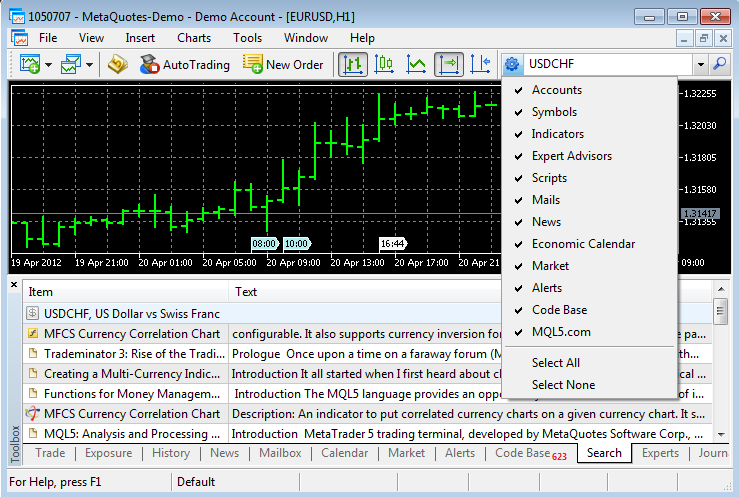
sections of the client terminal, Code Base and MQL5.com. It is a case-insensitive search for a substring. The search is performed in the sections selected in the search parameters:
The context menu of the search results tab contains additional commands, which depend on the type of results:
Terminal: Fixed display of order volumes in the Market Depth for partially filled orders.
Terminal: Fixed checking of the expiry price of a pending order in the pending order placing dialog.
MQL5: Added asynchronous sending of trade requests OrderSendAsync.
Using
this feature allows to speed up placing of trade requests, and
especially when placing mass request, since in this case there is no
need to wait for the results of the previous request when placing a new
one. Because of its asynchronous nature, this function is not suitable
for placing market orders for symbols with the Request execution mode.
The
function performs the initial verification of a request on the side of
the client terminal and enqueues it to send to the trade server without
waiting for the results of sending and receiving of confirmation from
the server.
If necessary, the operation of the function on the server is monitored by an Expert Advisor by handling the OnTrade event.
MQL5:
Added a trading symbol property SYMBOL_ISIN (getting through the
SymbolInfoString function) - the name of the trading symbol in the
international system of securities identification numbers.
ISIN, International Securities Identification Number is a 12-digit alphanumeric code that uniquely identifies a security.
The availability of this symbol property is defined on the trade server side.
MetaTester:
Extended report of testing results - added MFE-Profit Correlation,
MAE-Profit Correlation and MFE-Profits and MAE-Profits distribution
graphs.
Maximum Favorable Excursion (MFE) - is the maximum potential profit reached while holding a position.
MFE-Profit Correlation
- a correlation between the position returns and MFE. Each trade had
its maximal profit and maximal loss between opening and closing. MFE
shows profit in the favorable excursion of the price. Each trade is
corresponded with its return and with two parameters - MFE and MAE.
Thus, we can draw each trade on a plane where MFE is plotted along the
Х-axis, the return is plotted along the Y-axis. The closer is the return
to the MFE, the more complete was the favorable excursion of the price
was used. The straight on the graph shows approximation by function
Profit=A*MFE+B. The Correlation(Profits,MFE) allows to estimate relation
between the profits/losses and the MFE. The closer to 1 is this value,
the better will the trades fit into the approximation straight. The
closer to zero it is, the less considerable is this relation. MFE
characterizes the ability to realize potential profit.
Graph of MFE-Profits Distribution -
points plotted on the graph MAE (X-axis) - Profits (Y-axis) indicate
positions. Values of both axes are given in the deposit currency. Thus,
for each transaction we see not only the acquired profit value including
swaps along the Y-axis, but also maximally possible profit during the
position lifetime. It allows us to estimate the quality of protection of
the paper (unrealized) profit. Though the distribution of points along
the chart gives a satisfactory view of the trade system, a linear
regression, which is a least squares approximation, is given for an
objective assessment. Ideally, the line should make with the X-axis an
angle of 45 degree. Maximum Adverse Excursion (MAE) is the maximum potential loss reached while holding a position. MAE-Profit Correlation
- a correlation between the position results and MAE. MAE - Maximum
Adverse Excursion. Each trade reached its maximal profit and maximal
loss between opening and closing. MAE shows the loss during the adverse
excursion of the price. Each trade is corresponded with its return and
with two parameters - MFE and MAE. Thus, we can plot each trade on a
plane where MAE is plotted along the Х-axis, the return is plotted along
the Y-axis. The closer is the return to the MAE, the more complete was
the protection against the adverse excursion of the price. The straight
on the graph shows approximation by function Profit=A*MAE+B. The
Correlation(Profits,MAE) allows to estimate relation between the
profits/losses and the MAE. The closer to 1 is this value, the better
will the trades fit into the approximation straight. The closer to zero
it is, the less considerable is this relation. MAE characterizes the
drawdown obtained within the position lifetime and characterizes the use
of protective Stop Loss best of all. Graph of MAE-Profits Distribution
- Points plotted on the graph MAE (X-axis) - Profits (Y-axis) indicate
positions. Values of both axes are given in the deposit currency. Thus,
for each transaction we see not only the acquired profit value including
swaps along the Y-axis, but also the maximal drawdown within the
position lifetime. It allows us to estimate the transaction according to
drawdown waiting out. Though the distribution of points along the chart
gives a satisfactory view of the trade system, a linear regression,
which is a least squares approximation, is given for an objective
assessment. The less trades have negative values X (MAE), the better. It
also allows making a decision based on the graphical analysis about
maximally accepted losses, after which the possibility of taking profit
is very small (if the analysis is carried out on the same currency pair
and in points).
MetaTester: In the visual tester implemented automatic addition of the used indicators to the charts of other symbol-periods.
MetaTester:
Fixed a bug when stopping visual testing of multicurrency Expert
Advisors, which led to numerous messages "stopped by user" in the tester
Journal.
MetaTester: Fixed optimization crash when adding a new testing agent during optimization.
MetaEditor: Enhanced MQL5 Storage control functions.
Added new commands for managing the storage of source files that make the use of the MQL5 Storage even more convenient:
Update to revision -
selected files are supplemented with information from the files in the
specified revision. In files with identical names data are merged. If
files have been added to a revision, they will be added to the local
copy. If files have been deleted from a revision, they will be deleted
from the local copy.
Revert to revision - selected files are replaced by the files from the specified revision. All changes made to the selected files disappear.
Compare with the working copy - files of a selected revision are compared with their current state on the local computer.
Compare with previous revision - compare the current and the previous revision of the files.
Compare two revisions - compare file changes in two specified revisions.
Fixed errors reported in crash logs.
Updated documentation.
The update is available through the LiveUpdate system
The client terminal supports sending messages concerning various events to iOS and Android powered devices using push notifications. With this feature, traders are always aware of all events.
Push notifications are short messages consisting of not more than 255 symbols. Such notifications are delivered immediately and they cannot be lost along the way.
Push notifications can be sent in two ways from the client terminal:
Via MQL5 application
Special SendNotification function is available in MQL5 language allowing MQL5 application to send push notifications to MetaQuotes ID specified in the terminal settings.
Via signals function
The client terminal allows to create the signals used to notify about the market events. They are set at the "Alerts" tab of the "Toolbox" window. One type of alerting about the events is sending push notifications.
Push notifications can also be used to get information about MQL5.community website updates. To do this, enter your MetaQuotes ID at the "Contacts" tab of your user profile.
The number of sent messages is limited: not more than 1 message per 0.5 seconds and not more than 10 messages per minute.
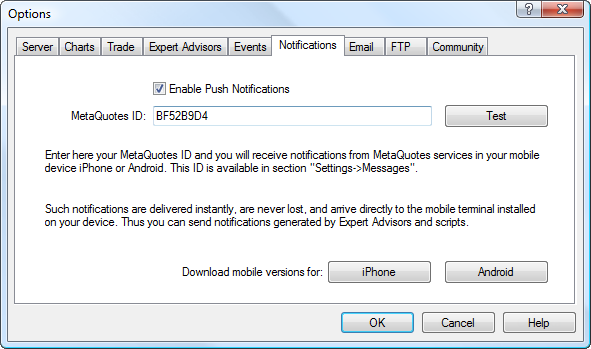
Check "Enable Push Notifications" box to allow the client terminal to send messages.
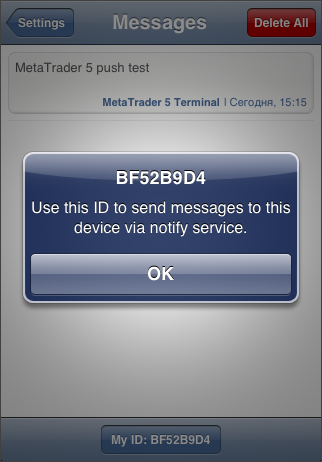
Then, specify one or several MetaQuotes IDs separated by commas. To find out your MetaQuotes ID, open the mobile version of the terminal and go to Settings -> Messages page. That is how that page looks in the mobile terminal for iPhone:
Press "Test" button to test messages sending. If sending is successful, you will see the appropriate message and the test notification will be delivered to your mobile device.
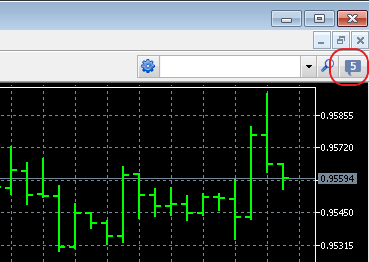
Terminal: Added the button link to MQL5.community website at the client terminal toolbar.
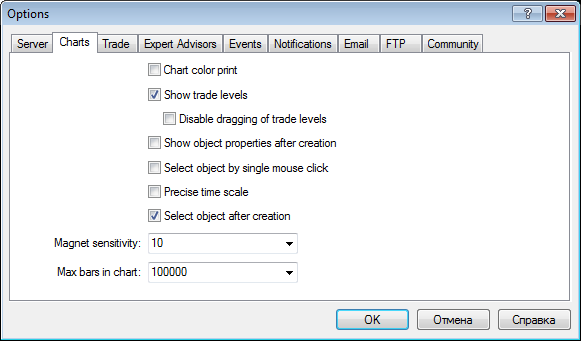
Terminal: "Charts" and "Objects" tabs are combined into one in the terminal settings.
Terminal: 32-bit version of the terminal has been compiled with the possibility to expand the available virtual address space. The volume of the available memory is expanded from 2 Gb:
to 4 Gb when using 64-bit operation system. No additional actions are required to enable this mode in 64-bit operation system.
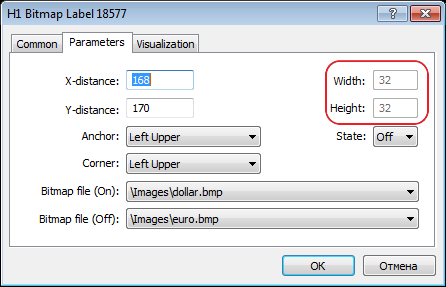
Terminal: Added display of "Label" and "Bitmap Label" graphical objects sizes in their properties dialog:
Terminal: Fixed the change of an object name after its creation in case "Show object properties after creation" option is enabled - the object could not be modified or deleted after changing its name without restarting the terminal.
Terminal: Added prohibition on changing the path to "Bitmap" type images created from MQL5 programs.
Terminal: Improved scanning for trading server access points - reduced scanning period and clarified the best point selection algorithm.
Terminal: Improved display of the "Edit" graphical object when using "Wingdings" font.
Terminal: Fixed moving the graphical objects with a mouse in case of the disabled date scale.
MQL5: Changed timer events processing algorithm. Timer events have been placed in the queue in any case, regardless of the presence of the events not processed by the timer. Now, new events are not added, if the queue has at least one timer event.
MQL5: Added ChartTimePriceToXY and ChartXYToTimePrice functions - modifications of a chart coordinates from time/price representation to X and Y axes coordinates and vice versa for a specified chart and its subwindow.
MQL5: Added ResourceCreate function - for loading a resource from a file or creating an image:
Creating the resource from the file:
bool ResourceCreate(
conststring resource_name, // resource nameconststring path // relative path to the file
);
Creating an image based on the pixels array:
bool ResourceCreate(
conststring resource_name, // resource nameconst color& data[], // data set as an array uint img_width, // created resource image widthuint img_height, // created resource image heightuint data_xoffset, // horizontal offset of the upper left corner of the created image to the rightuint data_yoffset, // vertical downward offset of the upper left corner of the created imageuint data_width, // image total width based on data set
ENUM_COLOR_FORMAT color_format // color handling method
);
The first case of the function allows to load images and sounds from files, the second case allows only to create images dynamically. Images must be in BMP format, color depth - 24 or 32 bits, sounds can only be in WAV format. A resource size must not exceed 16 Mb.
MQL5: Added ChartIndicatorGet function - getting an indicator handle on a specified chart and its subwindow by its short name.
MQL5: Added IndicatorParameters function - getting an indicator parameters type and array by its handle.
MQL5: Fixed behavior when accessing an index outside an array - position of the opening square bracket '[' before the index, which returns an error when accessing it, is specified when generating a message to be displayed in the Expert Advisors journal.
MQL5: Completed the works on adding profiling support in MQL5 language. MetaEditor profiling function is to be added in the next build.
MQL5: Fixed the client terminal connection status check when launching an Expert Advisor - avoided delays caused by that check when an Expert Advisor started its operation after the terminal launch.
MQL5: Added "event handling function not found" compilation error, in case there are no access points (OnStart, OnTick, etc.) in the application.
MQL5: Fixed compilation when calling the class static methods from another class.
Controls. Fixed the panels behavior in a separate indicator subwindow.
Controls. Fixed drag'n'drop controls behavior.
Controls. Added TextAlign text uniformity property to CEdit and CChartObjectEdit classes.
Controls. CRect class is transformed into the structure.
Added CCanvas class (Include\Canvas\Canvas.h) for creating own images resources.
Added asynchronous trading support to CTrade class.
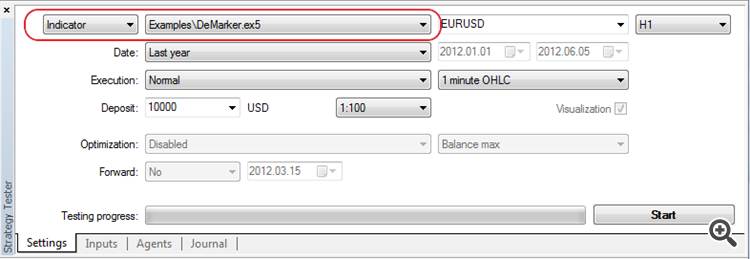
MetaTester: Added the ability to test the indicators including the ones downloaded from MQL5 Market:
Therefore, it is now possible to evaluate behavior of an indicator during the changes in history.
MetaTester: Added support for OpenCL programs application in tester agents.
OpenCL programs are used for performing computations on video cards that support OpenCL 1.1 or higher. Modern video cards contain hundreds of small specialized processors that can simultaneously perform simple mathematical operations with incoming data streams. The OpenCL language organizes parallel computing and provides greater speed for a certain class of tasks.
MetaTester: Corrections in test results reports:
fixed the charts
added holidays consideration in a position lifetime calculation.
MetaTester: Added export of the new report on results of tests in HTML and OpenXML formats.
MetaEditor: Added С++ files (*.cpp) compilation support in case Microsoft Visual Studio 2008/2010/Express is installed.
Thus, it is possible to debug and modify custom DLLs written in С++ right in MetaEditor.
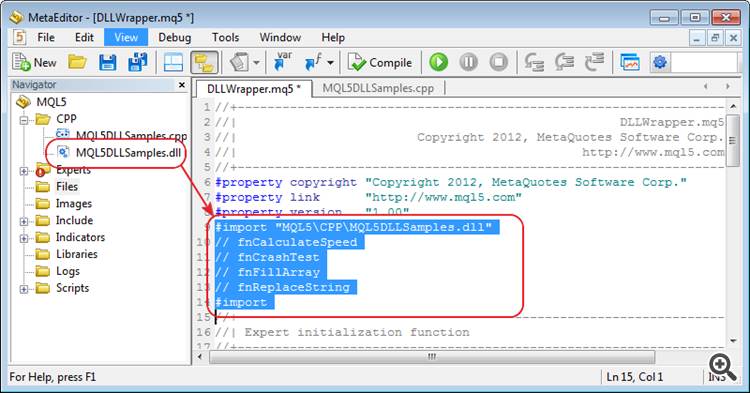
MetaEditor: Added the ability to automatically add exported DLL functions to MQL5 file by dragging DLL on an open MQL5 source code file:
MetaEditor: Fixed files modification verification in MQL5 Storage from an external editor (not from MetaEditor).
MetaEditor: Fixed Revert command behavior when working with MQL5 Storage.
MetaEditor: Fixed search in files in "Match whole word only" mode.
MetaEditor: Fixed transition between the function parameters during MetaAssist operation.
Fixed errors reported in crash logs.
Updated documentation.
The update is available through the LiveUpdate system.
Terminal: Added the ability to post screenshots of charts on
MQL5.com. When saving a screenshot, just select the appropriate option
and the screenshot will be automatically placed on www.mql5.com, while a
trader will get its address for posting on other websites and forums.
Terminal: Improved the algorithm of a trend line inclination angle calculation.
Terminal: Fixed display of available bars number in a chart tooltip.
Terminal: Fixed display of news with the same publication time.
Terminal: Added support for canceled deals display.
Terminal: Fixed display of close button when closing a deal with a volume less than the minimum allowed one.
Terminal: Fixed spread and tick volume calculation in charts generated by the terminal.
MQL5: Added OnTradeTransaction entry point - getting information about trade transactions performed for a trade account.
The entry point is called to transfer the data on the trade transactions performed for a trade account to MQL5 program:
adding, modifying, deleting open orders
adding, modifying, deleting orders in history
adding, modifying, deleting deals
modifying a position
execution of client's trade requests and getting the results.
The client terminal stores the history of transactions and
consistently transfers them to an Expert Advisor, if an entry point is
present. The history is limited to 1024 transactions and cleared during
the next connection.
Note that transactions processing in the
terminal is performed independent of transactions processing in MQL5
program. For example, while an Expert Advisor processes a transaction to
add a new order, the terminal can at the same time get a transaction to
delete the appropriate order and move it to history.
MQL5: Fixed making long screenshots of charts by MQL5 means (ChartScreenShot function).
MQL5: Fixed getting an empty last bar for the symbols built by Last prices.
MQL5: Added checking the presence of available history when
executing request functions in synchronous requests of the price
history.
MQL5: Added the function of ArrayFill numeric array filling. The
function is an equivalent of memset C function and allows to initialize a
memory area as efficiently as possible.
MQL5: Updated ENUM_SYMBOL_SWAP_MODE enumeration - swaps accrual
parameters for open positions - new values added and part of previous
ones renamed. Previous enumeration values are still supported for
compatibility.
MQL5: Enhanced ENUM_DEAL_TYPE "deal types" enumeration values set. The following values are added:
DEAL_TYPE_BONUS - depositing a bonus by a broker
DEAL_TYPE_COMMISSION - charging commission by a broker
DEAL_TYPE_COMMISSION_DAILY - charging commission by a broker according to trading day results
DEAL_TYPE_COMMISSION_MONTHLY - charging commission by a broker according to month results
DEAL_TYPE_AGENT_DAILY - depositing the agent's commission according to trading day results
DEAL_TYPE_AGENT_MONTHLY - depositing the agent's commission according to month results
DEAL_TYPE_INTERESTRATE - depositing accrued interest rate on free funds
DEAL_TYPE_BUY_CANCELED - canceled buy deal
DEAL_TYPE_SELL_CANCELED - canceled sell deal
MQL5: Standard Library. Added possibility to manage the list elements in CComboBox class.
MQL5: Standard Library. Added CCanvas class (MQL5\Include\Controls\Canvas.mqh).
CCanvas
class allows to implement various graphics on custom charts of "Bitmap"
and "Bitmap Label" types. In fact, these objects turn into a surface
for drawing any image. Thus, it is possible to create custom graphical
objects, apart from the ready-made terminal ones.
The class
implements the functions for drawing lines, circles, rectangles,
polygons, their filling and filling any area in a specified color.
Besides, the client terminal distribution kit now has the example of the
class application CanvasSample
(MQL5\Scripts\Examples\Canvas\CanvasSample.mq5).
MetaTester: Added saving the intermediate data of the genetic
optimization - the optimization process will start from where it was
stopped, not from the beginning.
MetaEditor: Added MQL5 programs profiler - the built-in tool for
gathering program parameters during its operation. Attention is paid to
such parameters as functions execution time, number of functions calls,
separate code fragments execution time. This tool allows programmers to
analyze their application, find its critical parts and write more
optimal code.
Profiling results are exported in HTML, CSV and OpenXML formats. To
move to a specific code line, just double-click on the appropriate
profiling report line.
MetaEditor: Fixed comparing files with the contents of MQL5 Storage.
Fixed errors reported in crash logs.
Updated documentation.
The update is available through the LiveUpdate system.
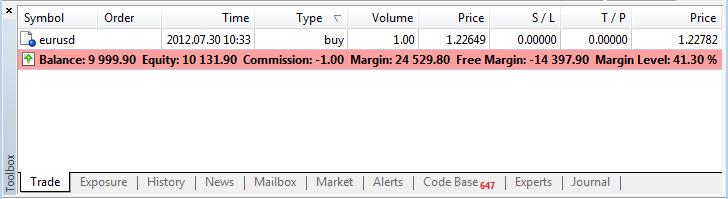
Terminal: Added highlighting the account status bar, if the account is in Margin Call or Stop Out states.
Terminal: Fixed drawing of the "Fibonacci Fan" object.
Terminal: Fixed calculation of a chart scale in "Scale points per bar" mode.
Terminal: Fixed terminal crash when working in Wine (for Linux, Mac).
Terminal: Fixed display of internal emails and news under Windows XP with Internet Explorer 6.0.
Terminal: Fixed search on MQL5.com website when working in older Windows XP versions.
Terminal: Updated translation of the client terminal into Bulgarian.
MQL5: Added request_id field in MqlTradeResult structure - a unique
identifier of the terminal trade request during a network session.
This field is filled by the client terminal when a trade request is
successfully sent to the server. Further on, this field is filled in
result parameter of OnTradeTransaction entry point. Therefore, the
opportunity of clear comparison of OrderSend and OrderSendAsync
functions calling with getting the trade request results at
OnTradeTransaction entry point is provided.
MQL5: Added compatibility of ex5 programs with DLLs created using .NET.
MQL5: Fixed optimization of the functions that return the structures.
MQL5: Added operation signs in the profiler mode:
IS_PROFILE_MODE - macros determining MQL5 program compilation in the profiling mode.
MQL5_PROFILER - new value of ENUM_MQL5_INFO_INTEGER
enumeration - determining the programs operation in the profiler mode.
MQL5InfoInteger function should be used to get the value.
MQL5: Disabled inlining of large volume functions leading to excessively large EX5 files.
MQL5: Standard Library. Added SetTransparentLevel transparency management method to CCanvas class.
MQL5: Added the new sinput (static input) key word preventing manual
input of values for searching an input parameter during optimization.
MQL5: Added ParameterSetRange(string name, bool enable, double value,
double start, double step, double stop) function, which allows
redefining the very possibility of searching the values, as well as the
range of searched values before launching the optimization. The function
can be called only from OnTesterInit handler. The function can also be
applied to the input parameters protected by sinput key word.
MQL5: Added ParameterGetRange(string name,bool& enable, double&
value, double& start, double& step, double &stop) function.
It can be called from OnTesterPass and OnTesterDeinit handlers.
MetaEditor: Fixed automatic saving of all open files before the compilation.
MetaEditor: Added the snippet for OnTradeTransaction entry point.
For
ease of writing code, MetaEditor provides the possibility to insert
snippets — small template fragments of source code describing a
particular construction of the MQL5 language. Insertion of a snippet is
initialized by typing the keyword. After you type the keyword the cursor
is changed to "Snippet available". To insert a snippet, you should
press "Tab". For more information about working with snippets please
read the MetaEditor Help.
The key word for OnTradeTransaction entry point is OnTradeTransaction.
MetaEditor: MQL5.Storage - fixed MQL5 Storage errors related to determining the presence of changes.
MetaEditor: Fixed results display for the "inline" code in the profiler.
MetaEditor: Fixed search on MQL5.com website when working in older Windows XP versions.
MetaTester: Removed the limit of 63 simultaneously optimized parameters.
All
input parameters can now be included for optimization (the number of
input parameters is limited by 1024). It means that the space that can
have the maximum value to be written in the integer 1024-bit value can
be used in the genetic search for the optimal parameters. The protocol
of data transfer between the terminal and tester agents has been changed
for big indices of the optimized variants.
Therefore, all
previous versions of tester agents will not be able to connect to the
cloud network and (or) the client terminal because of the protocol
change and will be updated automatically via LiveUpdate system.
MetaTester: Fixed an error leading to incorrect saving of genetic
optimization snapshot. The error occurred only on the "fast"
mathematical optimizations.
MetaTester: Fixed report on test results when determining losses and profits sequences.
MetaTester: Fixed crash of the client terminal when deactivating the tester agents.
Fixed errors reported in crash logs.
Updated documentation.
The update is available through the LiveUpdate system.
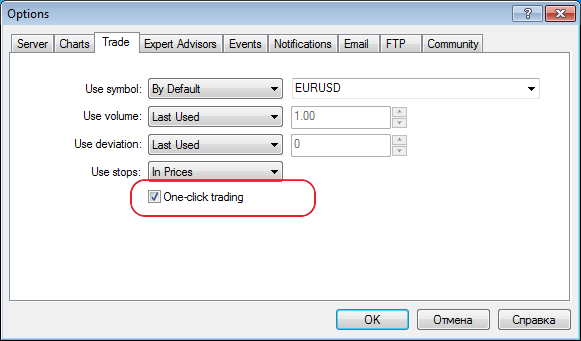
Terminal: Added quick position closing and orders deletion by a single mouse click.
Click the cross in "Profit" column of orders and positions list to close a position or remove a pending order.
If "One-click trading" option is enabled in the terminal settings,
position will be closed immediately at the current price (order will be
removed). If the option is disabled or quick closing is impossible (for
example, for trading symbols having Request Execution type), the
standard position closing (order removal) dialog will appear.
Terminal: Fixed displaying positions having "Futures" calculation type in "Exposure" window.
Terminal: Fixed working with Expert Advisors tree in "Navigator" window.
Terminal: Fixed possible failure of downloading products from MQL5.Market.
Terminal: Updated translation of the interface into Japanese.
MQL5: Changed the order of calling the constructor of an object returned by the function:
Formerly, the constructor has been called by default before the
function returning an object, while the copy operator has been called
inside the function for return.
Now, the appropriate constructor, copy constructor or default
constructor calling the copy operator are called in return operator for
an object returned from the function.
MQL5: Fixed a typo in one of the ENUM_SERIES_INFO_INTEGER enumeration values (SERIES_SYNCRONIZED -> SERIES_SYNCHRONIZED). Please make changes in the codes where the value is used.
MQL5: Fixed working with constant pointers.
MQL5: Fixed loading the libraries consisting only of resources.
MQL5: Standard Library. Fixed CDialog behavior during minimization.
MQL5: Standard Library. Added modification of stop-limit orders in CTrade::OrderModify method.
MQL5: Standard Library. Changed implementation of several methods for correct working with constant pointers to objects.
MetaTester: Improved the algorithm of assigning the tasks to the agents considering the memory consumption.
MetaTester: Fixed generating the volumes when testing by open prices for the timeframes larger than the main one.
MetaTester: Fixed possible incorrect generation of bars at large timeframes when testing using open prices.
MetaTester: Fixed applying a saved state of genetic optimization
that could lead to "freezing" of the relaunched optimization in some
cases.
MetaTester: Added optimization "by all symbols from Market Watch"
in the absence of an optimized Expert Advisor's input parameters.
MetaTester: Fixed possible incorrect display of the last price in
Market Watch during the first request of data on another symbol.
MetaTester: Added prohibition for the agents with physical memory less than 768 MB to connect MQL5.Cloud.
MetaTester: Added guaranteed transfer of the complete agent's log during the tests.
MetaEditor: Added support for projects in MQL5.com
Projects allow programmers to develop MQL5 applications in teams. Teamwork is performed via MQL5 Storage. It means that a user should have an active account on MQL5.community and connect to MQL5 Storage.
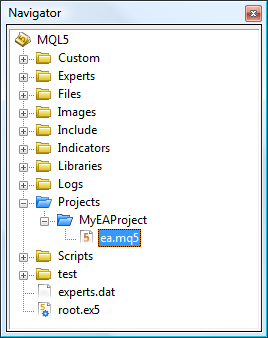
Projects folder in MQL5 directory has been implemented for common projects. It is shown in blue in Navigator.
Despite the fact that Projects folder is located inside MQL5, the
projects are located separately from the user's personal directory
(https://storage.mql5.com/svn/Personal/<MQL5.community
account>/MQL5).
All projects are stored in a separate section https://storage.mql5.com/svn/Projects/
The top-level directory in Projects folder is considered to be a
project. Therefore, a new folder should be created in Projects section
to create a project. Use "New Folder" option to create the new folder,
select it and click "Create Project" in the context menu.
The project will be created. Reports on successful project creation will be displayed in MetaEditor's journal.
Access to each project is set only by a project author (a user who created it).
To start a teamwork on a project, you should allow other users to
access it. Click "Add Permission" in the context menu of a created
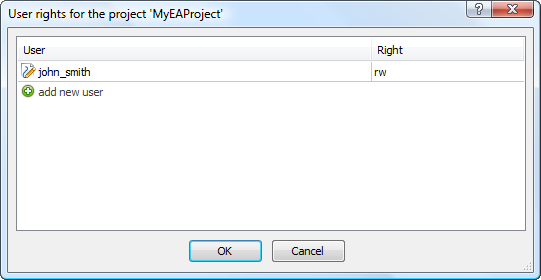
project folder and add a new user by specifying his or her MQL5.community login.
Click "Checkout" in "Projects" folder context menu to upload
available projects. The projects will be uploaded from the storage. All
further operations with them are similar to the ones with conventional
files assigned to MQL5 Storage.
MetaEditor: Fixed MetaStyler operation - considering interline alignment for the lines beginning from #.
MetaEditor: Fixed errors occurred when working with MQL5.Strorage.
MetaEditor: Fixed display of parameters of class methods in MetaAssist when addressing via this.
Updated documentation.
The update is available through the LiveUpdate system.
Terminal: The MetaTrader 5 Client Terminal has been integrated with the MQL5.Signals service. Now every MQL5 account holder can subscribe to
trading Signals Sources, including the Automated
Trading Championship 2012 participants. Moreover, the Client Terminal will copy trading signals with minimum delays according to the signal settings.
One
trading account on the broker's trade server can be subscribed to only
one Signals Source at a time. To change the Signals Source, the active
subscription has to be revoked.
Before the Signal is copied,
client's positions undergo the initial synchronization with the
positions of the Signals Source. There shall be no orders or positions
in the client account of the Subscriber that were opened by the client
or based on the Signal from another Signals Source. Moreover, the
initial synchronization is only possible in case the total floating
profit of the Signals Source is not positive, thus guaranteeing that the
Subscriber will enter the market at the price which is not worse than
that at which the Signals Source entered the market.
The
synchronization initiates the opening of the client's positions in the
same direction and trading instrument as the positions of the Signals
Source. The opening position volume is determined according to the money
management settings. The positions are opened using market orders with
slippage specified in the settings. SL and TP levels are also copied,
unlike pending orders that are not copied. Further copying of the
Signal is subject to successful synchronization the results of which are
recorded in the terminal log labeled "Signal".
Following the
successful initial synchronization, new transactions in the account of
the Signals Source are copied again by performing the same transactions
in the client account of the Subscriber using market orders. The order
volume and slippage are determined according to the settings. Changes in
the SL and TP levels for open positions are also copied. All actions
associated with the copying of the signal are recorded in the terminal
log labeled "Signal".
The copying of signals does not provide for
the possibility of concurrent trading either manually or using an
Expert Advisor. Any results of copying the signal are incalculable after
such interference.
If an error occurs when copying the signal -
connection failure, order placing error, etc. - the account will again
be synchronized with the Signals Source.
The signal settings
require the specification of the money management, i.e. the algorithm
for determining the volume of transactions with respect to the volume of
transactions of the Signals Source:
Automatic - the volume is determined in proportion to the Subscriber's and Signals Source's balance ratio.
Percentage based - the volume is determined as a specified percentage of the signal's volume in the Signals Source.
Trading operations are performed with a permissible slippage set by the "Slippage" parameter that is expressed in spreads of a trading instrument. The
copying of the signal will stop automatically if Equity falls below the
level specified in the settings. All previously opened positions will
in this case get closed.
Terminal: Fixed setting SL and TP values in the position modification dialog for instruments with a fixed tick size.
Terminal: Fixed handling commands for arranging chart windows horizontally and vertically
Terminal: Fixed the display of the purchased Product list in MQL5.Market.
MQL5: Fixed the TERMINAL_LANGUAGE value in the TerminalInfoString function, when using the default language.
MQL5: Fixed the copy constructor check.
MQL5: Fixed handling critical errors for х64.
MQL5:
Standard Library. Fixed passing the Expert Advisor's Magic number when performing trading operations in the CTrade class.
MQL5:
Standard Library. Fixed the calculation of risks using the CMoneyFixedRisk class.
MetaTester: Fixed the memory leak when clearing the list of utilized indicators.
MetaTester: Added the calculation of commissions when testing and optimizing.
MetaEditor: Redesigned and optimized the local editor database for working with MQL5.Storage.
Updated documentation.
The update is available through the LiveUpdate system.
Terminal: Signals. Added copying SL and TP from a signals source.
Terminal: Signals. Improved the algorithm of the deal volume
automatic calculation when entering the market. The ratio of the
deposit's size and currency is now considered, as well as the account
leverage. Obtained result is shown in percentage terms and rounded to
tens (10%, 20%, etc.).
Terminal: Signals. Added support of searching by signal base.
Terminal: Signals. Fixed drawing the charts on a signal data page in case of data insufficiency.
Terminal: Signals. Fixed display of minicharts in the list of available signals.
Terminal: Signals. Added protection from simultaneous SL\TP activation and close signal arrival.
Terminal: Signals. Enhanced logging on synchronization of an account with a signal source.
Terminal: Signals. Fixed display of signal data and crash of the navigation among signals when working in Wine.
MQL5: Fixed the type returned by ObjectDelete function - int is replaced by bool.
MetaTrader 5 Client Terminal build 619
With the new methods you can implement distributed computing to produce results in any convenient form, and not only in the form of one or more numeric values. By connecting to the MQL5 Cloud Network, you can solve any distributed tasks in MQL5, not necessarily, however, related to the financial markets.
A detailed description is available in the documentation.
New features allow MQL5 programs to analyze the environment in which they run, and based on this make decisions about the use of various resources. These properties will be useful in complex Expert Advisors that require large amounts of resources. Now, during the optimization of such an Expert Advisor in the MQL5 Cloud Network, you can implement checks of available memory of an agent in the EA's OnInit, and in case of a potential shortage of memory not to start the testing process. Also, to make access to new properties easier, added the CTerminalInfo class.
A detailed description is available in the documentation.
The update is available through the LiveUpdate system from March 23, 2012.
The MetaTrader 5 Client Terminal can be downloaded at https://download.mql5.com/cdn/web/metaquotes.software.corp/mt5/mt5setup.exe
MetaTrader 5 Client Terminal build 630
Through the OBJPROP_HIDDEN property set only from MQL5 programs, graphical objects are divided into manually created and automatically created objects. By default, the list shows only the manually created objects to keep the window well organized. To see all objects, click "List All".
Now objects created by programs are not deleted by the command "Delete last (Backspace)".
This prevents accidental removal of interface objects. They can be deleted programmatically or through the List of Objects (Ctrl + B) window.
Terminal: Added display of the beginning and end of symbol trading in the symbol settings dialog:
Overloading of operations allows to describe operations with the meaning equivalent to those already existing in the language and apply them to the types of data created by the programmer. For example, overloading of operator "[]" allows you to implement a class with the behavior of an array. Overloading arithmetic operators allows to implement classes for working with complex numbers. In the above cases, overloading of operations allows to use of familiar syntax and avoid creation of numerous functions like ComplexPlusComplex, IntegerPlusComplex, ComplexMinusFloat, etc.
In addition, support for operator overloading in MQL5 provides compatibility with general-purpose programming languages (particularly with C++), facilitating the translation of previously written code (software libraries) into MQL5.
Static fields and methods are the property of the class, so there is no need to create class instances to access its static fields. Use of static fields and methods in the language improves its flexibility and expressiveness. For example, using these methods you can easily implement control over the number of class instances (objects).
Like with the support of operator overloading, support for operator overloading in MQL5 provides compatibility with general-purpose programming languages (particularly with C++), facilitating the translation of previously written code (software libraries) into MQL5.
Previously, if there were less than 5 minutes to the time of pending order deletion, an incorrect error TRADE_RETCODE_INVALID_EXPIRATION was returned at the attempt of correct order modification.
When you run an Expert Advisor in the strategy tester, you can create your own data array based on the simple types or simple structures. This data set can be saved using the FrameAdd() function in a special structure called a frame. During the optimization of an Expert Advisor, each agent can send a series of frames to the terminal. All the received frames are written in the file *.MQD in the folder terminal_directory/MQL5/Files/Tester expert named as the Expert Advisor. They are written in the order they are received from the agents.
Optimize passing of frames from the tester to the client terminal and increased the speed of access to the frames received from the Expert Advisor at the entry points OnTesterPass.
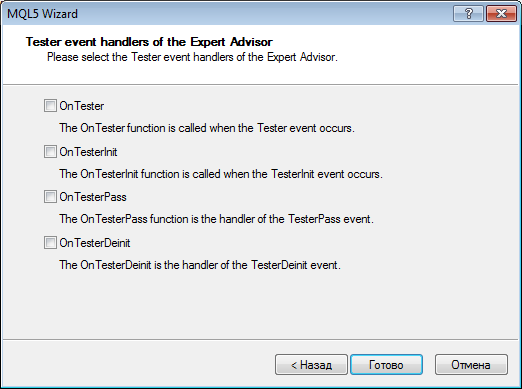
These entry points are handlers of events that are automatically generated by the strategy tester during testing (OnTester) and optimization (OnTesterInit, OnTesterPass, OnTesterDeinit) of Expert Advisors. Use of these functions in the EA allows to implement custom handling of testing and optimization results.For ease of writing code, MetaEditor provides the possibility to insert snippets — small template fragments of source code describing a particular construction of the MQL5 language. Insertion of a snippet is initialized by typing the keyword. After you type the keyword the cursor is changed to "Snippet available". To insert a snippet, you should press "Tab". For more information about working with snippets please read the MetaEditor Help.
The keywords for the entry points OnTester, OnTesterInit, OnTesterPass and OnTesterDeinit are OnTester, OnTesterInit, OnTesterPass and OnTesterDeinit.
For ease of programming, MetaEditor provides various tools from auto substitutions of names and tips to the functions to anchors and hot keys - MetaAssist. These tools allow you to speed up the process of code writing, make navigation easier and help prevent errors.
The update is available through the LiveUpdate system from April 11, 2012.
MetaTrader 5 Client Terminal build 642
The Search in the terminal allows you to quickly find information in all sections of the client terminal, Code Base and MQL5.com.
It is a case-insensitive search for a substring. The search is performed in the sections selected in the search parameters:
The context menu of the search results tab contains additional commands, which depend on the type of results:Using this feature allows to speed up placing of trade requests, and especially when placing mass request, since in this case there is no need to wait for the results of the previous request when placing a new one. Because of its asynchronous nature, this function is not suitable for placing market orders for symbols with the Request execution mode.
The function performs the initial verification of a request on the side of the client terminal and enqueues it to send to the trade server without waiting for the results of sending and receiving of confirmation from the server.
If necessary, the operation of the function on the server is monitored by an Expert Advisor by handling the OnTrade event.
ISIN, International Securities Identification Number is a 12-digit alphanumeric code that uniquely identifies a security.
The availability of this symbol property is defined on the trade server side.
Maximum Favorable Excursion (MFE) - is the maximum potential profit reached while holding a position.
MFE-Profit Correlation - a correlation between the position returns and MFE. Each trade had its maximal profit and maximal loss between opening and closing. MFE shows profit in the favorable excursion of the price. Each trade is corresponded with its return and with two parameters - MFE and MAE. Thus, we can draw each trade on a plane where MFE is plotted along the Х-axis, the return is plotted along the Y-axis. The closer is the return to the MFE, the more complete was the favorable excursion of the price was used. The straight on the graph shows approximation by function Profit=A*MFE+B. The Correlation(Profits,MFE) allows to estimate relation between the profits/losses and the MFE. The closer to 1 is this value, the better will the trades fit into the approximation straight. The closer to zero it is, the less considerable is this relation. MFE characterizes the ability to realize potential profit.
Graph of MFE-Profits Distribution - points plotted on the graph MAE (X-axis) - Profits (Y-axis) indicate positions. Values of both axes are given in the deposit currency. Thus, for each transaction we see not only the acquired profit value including swaps along the Y-axis, but also maximally possible profit during the position lifetime. It allows us to estimate the quality of protection of the paper (unrealized) profit. Though the distribution of points along the chart gives a satisfactory view of the trade system, a linear regression, which is a least squares approximation, is given for an objective assessment. Ideally, the line should make with the X-axis an angle of 45 degree.
Maximum Adverse Excursion (MAE) is the maximum potential loss reached while holding a position.
MAE-Profit Correlation - a correlation between the position results and MAE. MAE - Maximum Adverse Excursion. Each trade reached its maximal profit and maximal loss between opening and closing. MAE shows the loss during the adverse excursion of the price. Each trade is corresponded with its return and with two parameters - MFE and MAE. Thus, we can plot each trade on a plane where MAE is plotted along the Х-axis, the return is plotted along the Y-axis. The closer is the return to the MAE, the more complete was the protection against the adverse excursion of the price. The straight on the graph shows approximation by function Profit=A*MAE+B. The Correlation(Profits,MAE) allows to estimate relation between the profits/losses and the MAE. The closer to 1 is this value, the better will the trades fit into the approximation straight. The closer to zero it is, the less considerable is this relation. MAE characterizes the drawdown obtained within the position lifetime and characterizes the use of protective Stop Loss best of all.
Graph of MAE-Profits Distribution - Points plotted on the graph MAE (X-axis) - Profits (Y-axis) indicate positions. Values of both axes are given in the deposit currency. Thus, for each transaction we see not only the acquired profit value including swaps along the Y-axis, but also the maximal drawdown within the position lifetime. It allows us to estimate the transaction according to drawdown waiting out. Though the distribution of points along the chart gives a satisfactory view of the trade system, a linear regression, which is a least squares approximation, is given for an objective assessment. The less trades have negative values X (MAE), the better. It also allows making a decision based on the graphical analysis about maximally accepted losses, after which the possibility of taking profit is very small (if the analysis is carried out on the same currency pair and in points).
Added new commands for managing the storage of source files that make the use of the MQL5 Storage even more convenient:
The update is available through the LiveUpdate system
MetaTrader 5 Client Terminal build 655
- Push notifications can also be used to get information about MQL5.community website updates. To do this, enter your MetaQuotes ID at the "Contacts" tab of your user profile.
- The number of sent messages is limited: not more than 1 message per 0.5 seconds and not more than 10 messages per minute.
- Terminal: Added the button link to MQL5.community website at the client terminal toolbar.
- Terminal: "Charts" and "Objects" tabs are combined into one in the terminal settings.
- Terminal: 32-bit version of the terminal has been compiled with the possibility to expand the available virtual address space. The volume of the available memory is expanded from 2 Gb:
- to 3 Gb when using 32-bit operation system. Special keys for downloading the operation system are necessary to enable this mode in 32-bit operation system;
- to 4 Gb when using 64-bit operation system. No additional actions are required to enable this mode in 64-bit operation system.
- Terminal: Added display of "Label" and "Bitmap Label" graphical objects sizes in their properties dialog:
- Terminal: Fixed the change of an object name after its creation in case "Show object properties after creation" option is enabled - the object could not be modified or deleted after changing its name without restarting the terminal.
- Terminal: Added prohibition on changing the path to "Bitmap" type images created from MQL5 programs.
- Terminal: Improved scanning for trading server access points - reduced scanning period and clarified the best point selection algorithm.
- Terminal: Improved display of the "Edit" graphical object when using "Wingdings" font.
- Terminal: Fixed moving the graphical objects with a mouse in case of the disabled date scale.
- MQL5: Changed timer events processing algorithm. Timer events have been placed in the queue in any case, regardless of the presence of the events not processed by the timer. Now, new events are not added, if the queue has at least one timer event.
- MQL5: Added ChartTimePriceToXY and ChartXYToTimePrice functions - modifications of a chart coordinates from time/price representation to X and Y axes coordinates and vice versa for a specified chart and its subwindow.
- MQL5: Added ResourceCreate function - for loading a resource from a file or creating an image:
- MQL5: Added ChartIndicatorGet function - getting an indicator handle on a specified chart and its subwindow by its short name.
- MQL5: Added IndicatorParameters function - getting an indicator parameters type and array by its handle.
- MQL5: Fixed behavior when accessing an index outside an array - position of the opening square bracket '[' before the index, which returns an error when accessing it, is specified when generating a message to be displayed in the Expert Advisors journal.
- MQL5: Completed the works on adding profiling support in MQL5 language. MetaEditor profiling function is to be added in the next build.
- MQL5: Fixed the client terminal connection status check when launching an Expert Advisor - avoided delays caused by that check when an Expert Advisor started its operation after the terminal launch.
- MQL5: Added "event handling function not found" compilation error, in case there are no access points (OnStart, OnTick, etc.) in the application.
- MQL5: Fixed compilation when calling the class static methods from another class.
- MQL5: Fixed errors in '?' statement.
- MQL5: Renamed ENUM_ORDER_TYPE_FILLING enumeration elements:
- ORDER_FILLING_AON renamed as ORDER_FILLING_FOK
- ORDER_FILLING_CANCEL renamed as ORDER_FILLING_IOC
- MQL5: Standard Library.
- Controls. Fixed the panels behavior in a separate indicator subwindow.
- Controls. Fixed drag'n'drop controls behavior.
- Controls. Added TextAlign text uniformity property to CEdit and CChartObjectEdit classes.
- Controls. CRect class is transformed into the structure.
- Added CCanvas class (Include\Canvas\Canvas.h) for creating own images resources.
- Added asynchronous trading support to CTrade class.
- MetaTester: Added the ability to test the indicators including the ones downloaded from MQL5 Market:
- MetaTester: Added support for OpenCL programs application in tester agents.
- MetaTester: Corrections in test results reports:
- fixed the charts
- added holidays consideration in a position lifetime calculation.
- MetaTester: Added export of the new report on results of tests in HTML and OpenXML formats.
- MetaEditor: Added С++ files (*.cpp) compilation support in case Microsoft Visual Studio 2008/2010/Express is installed.
- MetaEditor: Added the ability to automatically add exported DLL functions to MQL5 file by dragging DLL on an open MQL5 source code file:
- MetaEditor: Fixed files modification verification in MQL5 Storage from an external editor (not from MetaEditor).
- MetaEditor: Fixed Revert command behavior when working with MQL5 Storage.
- MetaEditor: Fixed search in files in "Match whole word only" mode.
- MetaEditor: Fixed transition between the function parameters during MetaAssist operation.
- Fixed errors reported in crash logs.
- Updated documentation.
The update is available through the LiveUpdate system.The client terminal supports sending messages concerning various events to iOS and Android powered devices using push notifications. With this feature, traders are always aware of all events.
Push notifications are short messages consisting of not more than 255 symbols. Such notifications are delivered immediately and they cannot be lost along the way.
Push notifications can be sent in two ways from the client terminal:
Via MQL5 application
Special SendNotification function is available in MQL5 language allowing MQL5 application to send push notifications to MetaQuotes ID specified in the terminal settings.
Via signals function
The client terminal allows to create the signals used to notify about the market events. They are set at the "Alerts" tab of the "Toolbox" window. One type of alerting about the events is sending push notifications.
Check "Enable Push Notifications" box to allow the client terminal to send messages.
Then, specify one or several MetaQuotes IDs separated by commas. To find out your MetaQuotes ID, open the mobile version of the terminal and go to Settings -> Messages page. That is how that page looks in the mobile terminal for iPhone:
Press "Test" button to test messages sending. If sending is successful, you will see the appropriate message and the test notification will be delivered to your mobile device.
Creating the resource from the file:
Creating an image based on the pixels array:
The first case of the function allows to load images and sounds from files, the second case allows only to create images dynamically. Images must be in BMP format, color depth - 24 or 32 bits, sounds can only be in WAV format. A resource size must not exceed 16 Mb.
Therefore, it is now possible to evaluate behavior of an indicator during the changes in history.
OpenCL programs are used for performing computations on video cards that support OpenCL 1.1 or higher. Modern video cards contain hundreds of small specialized processors that can simultaneously perform simple mathematical operations with incoming data streams. The OpenCL language organizes parallel computing and provides greater speed for a certain class of tasks.
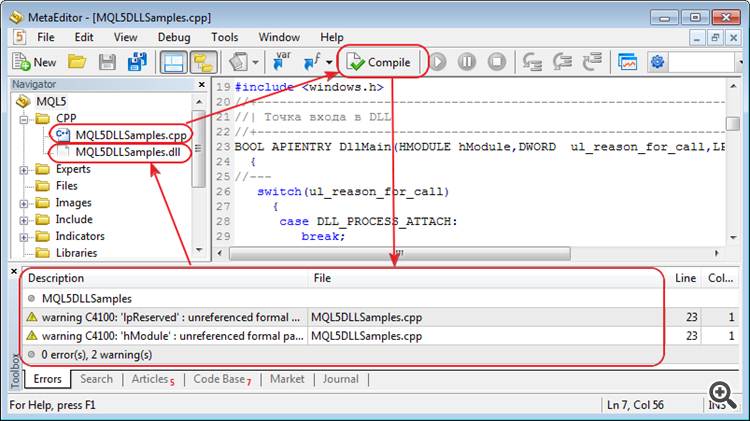
Thus, it is possible to debug and modify custom DLLs written in С++ right in MetaEditor.The entry point is called to transfer the data on the trade transactions performed for a trade account to MQL5 program:
The client terminal stores the history of transactions and consistently transfers them to an Expert Advisor, if an entry point is present. The history is limited to 1024 transactions and cleared during the next connection.
Note that transactions processing in the terminal is performed independent of transactions processing in MQL5 program. For example, while an Expert Advisor processes a transaction to add a new order, the terminal can at the same time get a transaction to delete the appropriate order and move it to history.
CCanvas class allows to implement various graphics on custom charts of "Bitmap" and "Bitmap Label" types. In fact, these objects turn into a surface for drawing any image. Thus, it is possible to create custom graphical objects, apart from the ready-made terminal ones.
The class implements the functions for drawing lines, circles, rectangles, polygons, their filling and filling any area in a specified color. Besides, the client terminal distribution kit now has the example of the class application CanvasSample (MQL5\Scripts\Examples\Canvas\CanvasSample.mq5).
Profiling results are exported in HTML, CSV and OpenXML formats. To move to a specific code line, just double-click on the appropriate profiling report line.
The update is available through the LiveUpdate system.
MetaTrader 5 Client Terminal build 684
- Terminal: Added highlighting the account status bar, if the account is in Margin Call or Stop Out states.
- Terminal: Fixed drawing of the "Fibonacci Fan" object.
- Terminal: Fixed calculation of a chart scale in "Scale points per bar" mode.
- Terminal: Fixed terminal crash when working in Wine (for Linux, Mac).
- Terminal: Fixed display of internal emails and news under Windows XP with Internet Explorer 6.0.
- Terminal: Fixed search on MQL5.com website when working in older Windows XP versions.
- Terminal: Updated translation of the client terminal into Bulgarian.
- MQL5: Added request_id field in MqlTradeResult structure - a unique
identifier of the terminal trade request during a network session.
- MQL5: Added compatibility of ex5 programs with DLLs created using .NET.
- MQL5: Fixed optimization of the functions that return the structures.
- MQL5: Added operation signs in the profiler mode:
- IS_PROFILE_MODE - macros determining MQL5 program compilation in the profiling mode.
- MQL5_PROFILER - new value of ENUM_MQL5_INFO_INTEGER
enumeration - determining the programs operation in the profiler mode.
MQL5InfoInteger function should be used to get the value.
- MQL5: Disabled inlining of large volume functions leading to excessively large EX5 files.
- MQL5: Standard Library. Added SetTransparentLevel transparency management method to CCanvas class.
- MQL5: Added the new sinput (static input) key word preventing manual
input of values for searching an input parameter during optimization.
- MQL5: Added ParameterSetRange(string name, bool enable, double value,
double start, double step, double stop) function, which allows
redefining the very possibility of searching the values, as well as the
range of searched values before launching the optimization. The function
can be called only from OnTesterInit handler. The function can also be
applied to the input parameters protected by sinput key word.
- MQL5: Added ParameterGetRange(string name,bool& enable, double&
value, double& start, double& step, double &stop) function.
It can be called from OnTesterPass and OnTesterDeinit handlers.
- MetaEditor: Fixed automatic saving of all open files before the compilation.
- MetaEditor: Added the snippet for OnTradeTransaction entry point.
- MetaEditor: MQL5.Storage - fixed MQL5 Storage errors related to determining the presence of changes.
- MetaEditor: Fixed results display for the "inline" code in the profiler.
- MetaEditor: Fixed search on MQL5.com website when working in older Windows XP versions.
- MetaTester: Removed the limit of 63 simultaneously optimized parameters.
- MetaTester: Fixed an error leading to incorrect saving of genetic
optimization snapshot. The error occurred only on the "fast"
mathematical optimizations.
- MetaTester: Fixed report on test results when determining losses and profits sequences.
- MetaTester: Fixed crash of the client terminal when deactivating the tester agents.
- Fixed errors reported in crash logs.
- Updated documentation.
The update is available through the LiveUpdate system.This field is filled by the client terminal when a trade request is successfully sent to the server. Further on, this field is filled in result parameter of OnTradeTransaction entry point. Therefore, the opportunity of clear comparison of OrderSend and OrderSendAsync functions calling with getting the trade request results at OnTradeTransaction entry point is provided.
For ease of writing code, MetaEditor provides the possibility to insert snippets — small template fragments of source code describing a particular construction of the MQL5 language. Insertion of a snippet is initialized by typing the keyword. After you type the keyword the cursor is changed to "Snippet available". To insert a snippet, you should press "Tab". For more information about working with snippets please read the MetaEditor Help.
The key word for OnTradeTransaction entry point is OnTradeTransaction.
All input parameters can now be included for optimization (the number of input parameters is limited by 1024). It means that the space that can have the maximum value to be written in the integer 1024-bit value can be used in the genetic search for the optimal parameters. The protocol of data transfer between the terminal and tester agents has been changed for big indices of the optimized variants.
Therefore, all previous versions of tester agents will not be able to connect to the cloud network and (or) the client terminal because of the protocol change and will be updated automatically via LiveUpdate system.
MetaTrader 5 Client Terminal build 687
- Terminal: Fixed errors when making purchases in MQL5.Market.
- Terminal: Fixed errors when working with MQL5.Market having UAC enabled.
- Terminal: Fixed specifying a symbol in the new order placing dialog
when using the chart context menu and the list of open positions and
orders.
- MetaEditor: Fixed errors in changes display dialog when working with MQL5.Storage.
- MetaEditor: Fixed errors when renaming and deleting files stored in MQL5.Storage.
- MetaEditor: Fixed the error when using windows placement commands: Cascade\Tile Windows\Tile Horizontally\Tile Vertically.
- MetaTester: Fixed crashes when stopping the visual tester.
- MetaTester: Fixed disabling the agents in the client terminal during a test.
- MetaTester: Fixed calculation of the estimated number of genetic optimization passes.
- Fixed errors reported in crash logs.
- Updated documentation.
The update is available through the LiveUpdate system.MetaTrader 5 Client Terminal build 695
- Terminal: Added quick position closing and orders deletion by a single mouse click.
- Terminal: Fixed displaying positions having "Futures" calculation type in "Exposure" window.
- Terminal: Fixed working with Expert Advisors tree in "Navigator" window.
- Terminal: Fixed possible failure of downloading products from MQL5.Market.
- Terminal: Updated translation of the interface into Japanese.
- MQL5: Changed the order of calling the constructor of an object returned by the function:
- MQL5: Fixed a typo in one of the ENUM_SERIES_INFO_INTEGER enumeration values (SERIES_SYNCRONIZED -> SERIES_SYNCHRONIZED). Please make changes in the codes where the value is used.
- MQL5: Fixed working with constant pointers.
- MQL5: Fixed loading the libraries consisting only of resources.
- MQL5: Standard Library. Fixed CDialog behavior during minimization.
- MQL5: Standard Library. Added modification of stop-limit orders in CTrade::OrderModify method.
- MQL5: Standard Library. Changed implementation of several methods for correct working with constant pointers to objects.
- MetaTester: Improved the algorithm of assigning the tasks to the agents considering the memory consumption.
- MetaTester: Fixed generating the volumes when testing by open prices for the timeframes larger than the main one.
- MetaTester: Fixed possible incorrect generation of bars at large timeframes when testing using open prices.
- MetaTester: Fixed applying a saved state of genetic optimization
that could lead to "freezing" of the relaunched optimization in some
cases.
- MetaTester: Added optimization "by all symbols from Market Watch"
in the absence of an optimized Expert Advisor's input parameters.
- MetaTester: Fixed possible incorrect display of the last price in
Market Watch during the first request of data on another symbol.
- MetaTester: Added prohibition for the agents with physical memory less than 768 MB to connect MQL5.Cloud.
- MetaTester: Added guaranteed transfer of the complete agent's log during the tests.
- MetaEditor: Added support for projects in MQL5.com
- MetaEditor: Fixed MetaStyler operation - considering interline alignment for the lines beginning from #.
- MetaEditor: Fixed errors occurred when working with MQL5.Strorage.
- MetaEditor: Fixed display of parameters of class methods in MetaAssist when addressing via this.
- Updated documentation.
The update is available through the LiveUpdate system.Click the cross in "Profit" column of orders and positions list to close a position or remove a pending order.
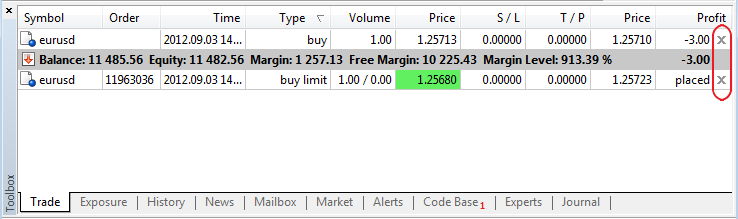
If "One-click trading" option is enabled in the terminal settings, position will be closed immediately at the current price (order will be removed). If the option is disabled or quick closing is impossible (for example, for trading symbols having Request Execution type), the standard position closing (order removal) dialog will appear.Formerly, the constructor has been called by default before the function returning an object, while the copy operator has been called inside the function for return.
Now, the appropriate constructor, copy constructor or default constructor calling the copy operator are called in return operator for an object returned from the function.
Projects allow programmers to develop MQL5 applications in teams. Teamwork is performed via MQL5 Storage. It means that a user should have an active account on MQL5.community and connect to MQL5 Storage.
Projects folder in MQL5 directory has been implemented for common projects. It is shown in blue in Navigator.
Despite the fact that Projects folder is located inside MQL5, the projects are located separately from the user's personal directory (https://storage.mql5.com/svn/Personal/<MQL5.community account>/MQL5).
All projects are stored in a separate section https://storage.mql5.com/svn/Projects/
The top-level directory in Projects folder is considered to be a project. Therefore, a new folder should be created in Projects section to create a project. Use "New Folder" option to create the new folder, select it and click "Create Project" in the context menu.
The project will be created. Reports on successful project creation will be displayed in MetaEditor's journal.
Access to each project is set only by a project author (a user who created it).
To start a teamwork on a project, you should allow other users to access it. Click "Add Permission" in the context menu of a created project folder and add a new user by specifying his or her MQL5.community login.
Click "Checkout" in "Projects" folder context menu to upload available projects. The projects will be uploaded from the storage. All further operations with them are similar to the ones with conventional files assigned to MQL5 Storage.
MetaTrader 5 Client Terminal build 705
- Terminal: The MetaTrader 5 Client Terminal has been integrated with the MQL5.Signals service. Now every MQL5 account holder can subscribe to
trading Signals Sources, including the Automated
Trading Championship 2012 participants.
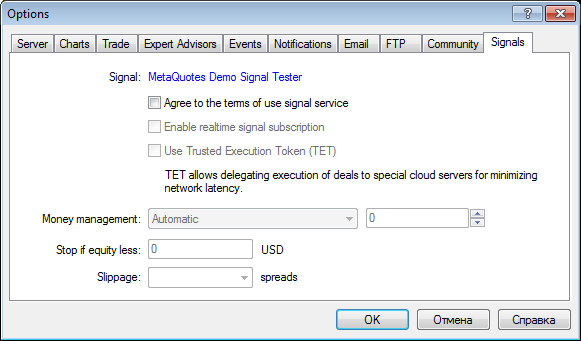
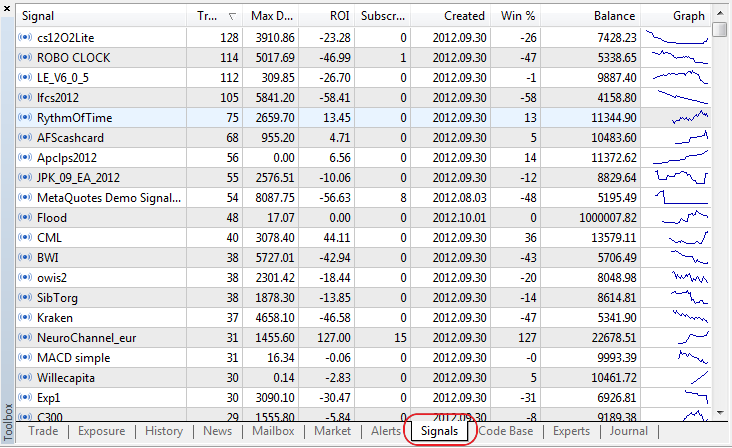
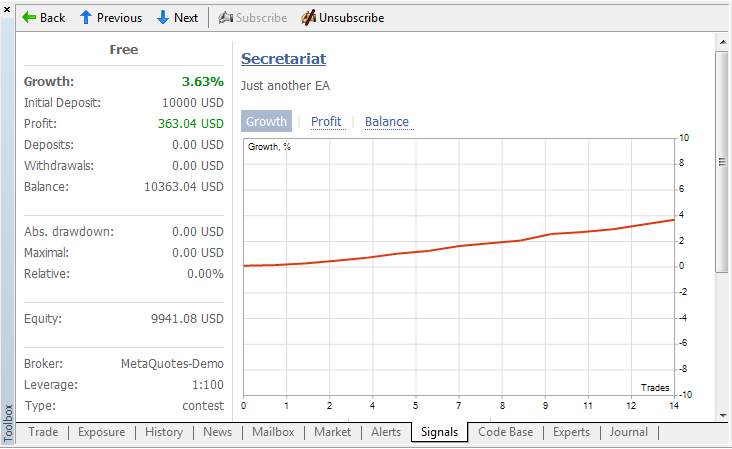
- Automatic - the volume is determined in proportion to the Subscriber's and Signals Source's balance ratio.
- Percentage based - the volume is determined as a specified percentage of the signal's volume in the Signals Source.
- Terminal: Fixed setting SL and TP values in the position modification dialog for instruments with a fixed tick size.
- Terminal: Fixed handling commands for arranging chart windows horizontally and vertically
- Terminal: Fixed the display of the purchased Product list in MQL5.Market.
- MQL5: Fixed the TERMINAL_LANGUAGE value in the TerminalInfoString function, when using the default language.
- MQL5: Fixed the copy constructor check.
- MQL5: Fixed handling critical errors for х64.
- MQL5:
Standard Library. Fixed passing the Expert Advisor's Magic number when performing trading operations in the CTrade class.
- MQL5:
Standard Library. Fixed the calculation of risks using the CMoneyFixedRisk class.
- MetaTester: Fixed the memory leak when clearing the list of utilized indicators.
- MetaTester: Added the calculation of commissions when testing and optimizing.
- MetaEditor: Redesigned and optimized the local editor database for working with MQL5.Storage.
- Updated documentation.
The update is available through the LiveUpdate system.Moreover, the Client Terminal will copy trading signals with minimum delays according to the signal settings.
One trading account on the broker's trade server can be subscribed to only one Signals Source at a time. To change the Signals Source, the active subscription has to be revoked.
Before the Signal is copied, client's positions undergo the initial synchronization with the positions of the Signals Source. There shall be no orders or positions in the client account of the Subscriber that were opened by the client or based on the Signal from another Signals Source. Moreover, the initial synchronization is only possible in case the total floating profit of the Signals Source is not positive, thus guaranteeing that the Subscriber will enter the market at the price which is not worse than that at which the Signals Source entered the market.
The synchronization initiates the opening of the client's positions in the same direction and trading instrument as the positions of the Signals Source. The opening position volume is determined according to the money management settings. The positions are opened using market orders with slippage specified in the settings. SL and TP levels are also copied, unlike pending orders that are not copied.
Further copying of the Signal is subject to successful synchronization the results of which are recorded in the terminal log labeled "Signal".
Following the successful initial synchronization, new transactions in the account of the Signals Source are copied again by performing the same transactions in the client account of the Subscriber using market orders. The order volume and slippage are determined according to the settings. Changes in the SL and TP levels for open positions are also copied. All actions associated with the copying of the signal are recorded in the terminal log labeled "Signal".
The copying of signals does not provide for the possibility of concurrent trading either manually or using an Expert Advisor. Any results of copying the signal are incalculable after such interference.
If an error occurs when copying the signal - connection failure, order placing error, etc. - the account will again be synchronized with the Signals Source.
The signal settings require the specification of the money management, i.e. the algorithm for determining the volume of transactions with respect to the volume of transactions of the Signals Source:
Trading operations are performed with a permissible slippage set by the "Slippage" parameter that is expressed in spreads of a trading instrument.
The copying of the signal will stop automatically if Equity falls below the level specified in the settings. All previously opened positions will in this case get closed.
MetaTrader 5 Client Terminal build 712
- Terminal: Signals. Added copying SL and TP from a signals source.
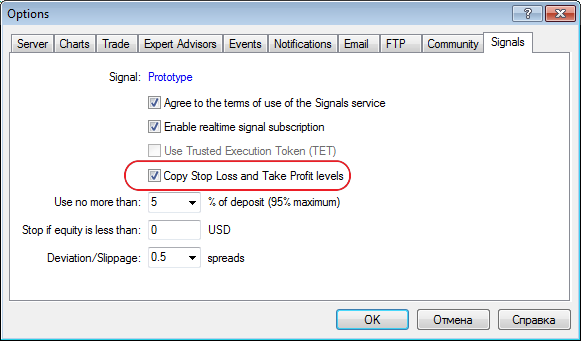
- Terminal: Signals. Improved the algorithm of the deal volume
automatic calculation when entering the market. The ratio of the
deposit's size and currency is now considered, as well as the account
leverage. Obtained result is shown in percentage terms and rounded to
tens (10%, 20%, etc.).
- Terminal: Signals. Added support of searching by signal base.
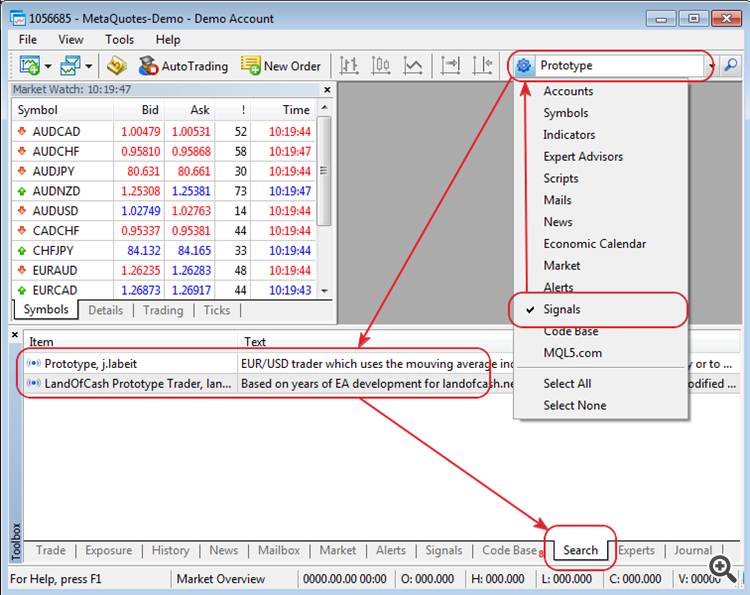
- Terminal: Signals. Fixed drawing the charts on a signal data page in case of data insufficiency.
- Terminal: Signals. Fixed display of minicharts in the list of available signals.
- Terminal: Signals. Added protection from simultaneous SL\TP activation and close signal arrival.
- Terminal: Signals. Enhanced logging on synchronization of an account with a signal source.
- Terminal: Signals. Fixed display of signal data and crash of the navigation among signals when working in Wine.
- MQL5: Fixed the type returned by ObjectDelete function - int is replaced by bool.
- MQL5: Added CHART_FIXED_POSITION chart property for ChartGetDouble\ChartSetDouble functions - managing the chart fixation point.
- MQL5: Added support for Named Pipes including CFilePipe standard library class.
- MetaTester: Fixed specifying a saved file snapshot of genetic optimization state.
- MetaTester: Fixed the shift of a test starting date if there is not enough price history.
- MetaTester: Fixed the tester crash after testing an Expert Advisor working with a custom indicator using any other indicator.
- Updated documentation.
The update is available through the LiveUpdate system.