Your news filter is an hour off: broker server time and the DST gap weeks

Your EA has a news filter, NFP comes out at 08:30 New York, and the filter blocks the wrong hour. Or it works all year and misses one release in March. Almost always, the cause is the same: the filter converts New York time to the wrong server clock. This guide explains the clocks MetaTrader brokers run, the gap weeks when the US and Europe change clocks on different dates, and how to set the DuoFX News Filter Library (also for MT4) so every window lands on the right bars. Full reference: the user guide.
US releases are fixed in New York time
- NFP, CPI, PPI, retail sales, GDP and PCE come out at 08:30 New York. FOMC statements at 14:00 New York.
- New York follows US daylight saving: summer time from the second Sunday in March to the first Sunday in November.
- So 08:30 New York is 12:30 UTC in US summer and 13:30 UTC in US winter. A filter that stores releases in UTC, or as one fixed server hour, is wrong for part of the year.
The three kinds of broker clock
NY+7 (GMT+2/+3 with US DST). The most common forex and gold server clock. The server runs New York time plus 7 hours all year, so the daily candle starts at 17:00 New York and there are 5 daily candles a week. NFP is at 15:30 server time all year. FOMC is at 21:00.
EU DST (for example GMT+2/+3 with European DST). The server changes clocks on European dates: the last Sunday in March and the last Sunday in October. Most of the year it matches NY+7, but not in the gap weeks.
Fixed offset (for example GMT+2, or GMT+0). No daylight saving at all. A fixed GMT+2 server sees NFP at 14:30 in US summer and 15:30 in US winter, so the server hour of every release moves twice a year.
The gap weeks: where filters go wrong
The US changes clocks before Europe in March, and after Europe in the autumn. In those weeks the two kinds of server are an hour apart.
- March 2026: the US moved to summer time on 8 March, Europe on 29 March. CPI on 11 March 2026 at 08:30 New York was 12:30 UTC. On a NY+7 server (GMT+3 that week) it was 15:30. On an EU DST server still on GMT+2 it was 14:30.
- Autumn 2026: Europe moved back on 25 October, the US on 1 November. The FOMC statement on 28 October 2026 at 14:00 New York was 18:00 UTC: 21:00 on a NY+7 server and 20:00 on an EU DST server back on GMT+2. GDP advance and PCE the next morning: 15:30 and 14:30.
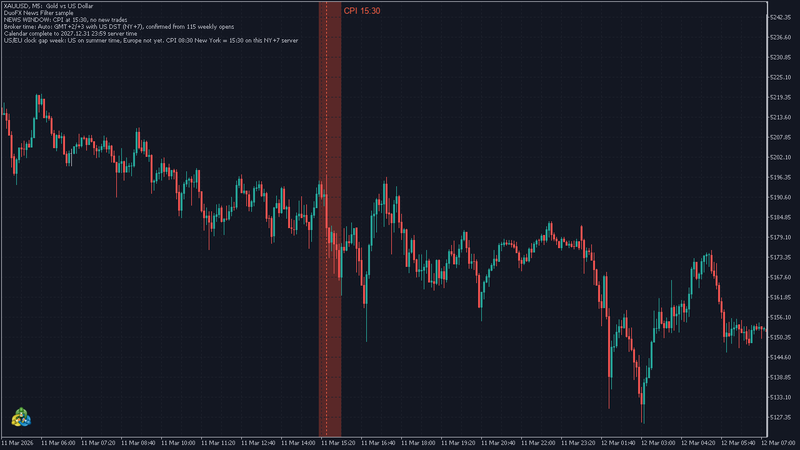
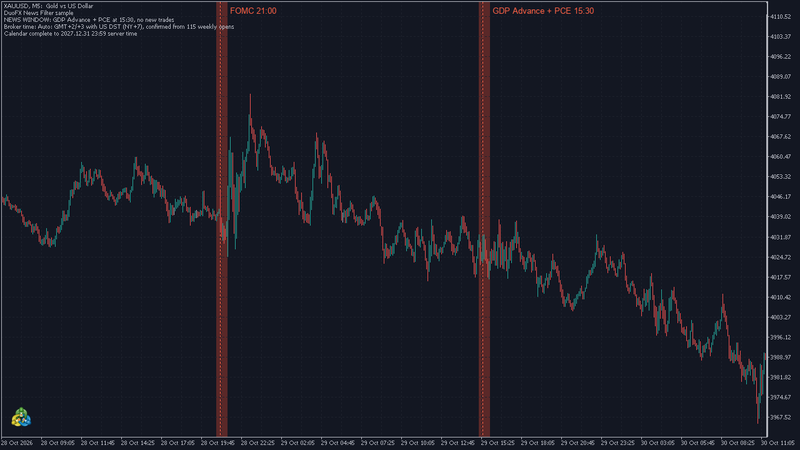
The library handles both: each release is stored in New York time and converted with the US and EU rules for every year from 2020 to 2027. You only have to tell it which clock your broker runs.
How to tell which clock your broker runs
- 1. Look at the daily candles. Five a week and a new day at 17:00 New York points to NY+7 or EU DST at GMT+2/+3. Six a week (a short Sunday candle) points to a lower offset.
- 2. Check a gap week. Find an NFP or CPI in one of the gap weeks above on an M1 chart. The spike at 15:30 server time means NY+7. At 14:30 it means EU DST at GMT+2/+3.
- 3. Run Auto live once. In Auto mode the library reads the server's GMT offset, then matches the weekly market opens in the chart's H1 history against the US DST, EU DST and no-DST rules. Its log line, also returned by DuoNewsTimeModeText(), names the rule it found, for example Auto: GMT+2/+3 with US DST (NY+7), confirmed from 115 weekly opens. With too little history, or on a symbol that trades all weekend, it says "ambiguous" and assumes NY+7.
Set the mode in your EA
// NY+7: GMT+2/+3 with US DST (offset ignored)
DuoNewsInit(DUONEWS_TIER1,2,5,DUONEWS_TIME_NY_PLUS_7,0);

// EU DST: GMT+2 in winter, GMT+3 in European summer
DuoNewsInit(DUONEWS_TIER1,2,5,DUONEWS_TIME_EU_DST,120);

// Fixed GMT+0, no daylight saving
DuoNewsInit(DUONEWS_TIER1,2,5,DUONEWS_TIME_FIXED,0);
- The last argument is the winter GMT offset in minutes (120 = GMT+2), used by EU DST, US DST and fixed.
- DUONEWS_TIME_US_DST covers servers that follow US summer time at an offset other than NY+7.
- In the Strategy Tester always set the mode yourself. The tester has no real GMT clock, so Auto uses NY+7 there and warns once. Make the time mode an input of your EA so you can set it per broker.
Quick check after setting it
- Print DuoNewsTimeModeText() in OnInit and read it in the journal.
- Run the sample EA from the user guide in visual mode on M1 over a gap week. The shaded window should sit on the release spike.
- If the window sits an hour before or after the spike, you have the wrong clock family. See How to backtest your EA with a news filter for the full tester workflow.
Prop firm news rules
Prop firms usually state their news rule as minutes around the release. Your broker's server clock decides which bars those minutes are on. Set the time mode correctly and set the window to your firm's rule. Each firm has its own rule (window, events, whether open trades count), the library covers the US releases it lists, and it cannot guarantee that a trade complies with any firm's rules.
Trading is risky, and news releases are among the most volatile minutes of the month. A news filter reduces exposure to scheduled releases; it does not remove risk. Not financial advice. Test any EA on a demo account first. More on duofxlabs.com.