How to backtest your EA with a news filter in the MT5 Strategy Tester

Most news filters for MetaTrader only work live. Your EA skips NFP on a demo, then you run the Strategy Tester and every backtest trades straight through FOMC, CPI and Nonfarm Payrolls as if the filter did not exist. This guide shows why that happens and how to backtest your EA with a news filter that behaves the same in the tester, in visual mode and in every optimizer pass, using the DuoFX News Filter Library for MT5 (also for MT4). Full reference: the user guide.
Why your news filter does nothing in the Strategy Tester
- MT5's built-in economic calendar is not available in the Strategy Tester. The CalendarValueHistory family of functions works live, so a filter built on it only filters live trading.
- MT4 has no built-in calendar at all. MT4 news filters usually download a feed with WebRequest, which the tester does not run either.
- The result: your backtest and your live account trade different strategies. The backtest includes the most volatile minutes of the month, the live EA skips them, and you compare numbers that do not belong together.
The fix is a calendar that does not depend on the terminal or the internet. The DuoFX News Filter Library compiles the high impact US calendar into the library itself: FOMC, CPI and NFP by default, plus PPI, retail sales, GDP advance and PCE, 574 releases from January 2020 to 31 December 2027. The tester sees exactly the same releases as your live terminal.
Step 1: add the news filter to your EA
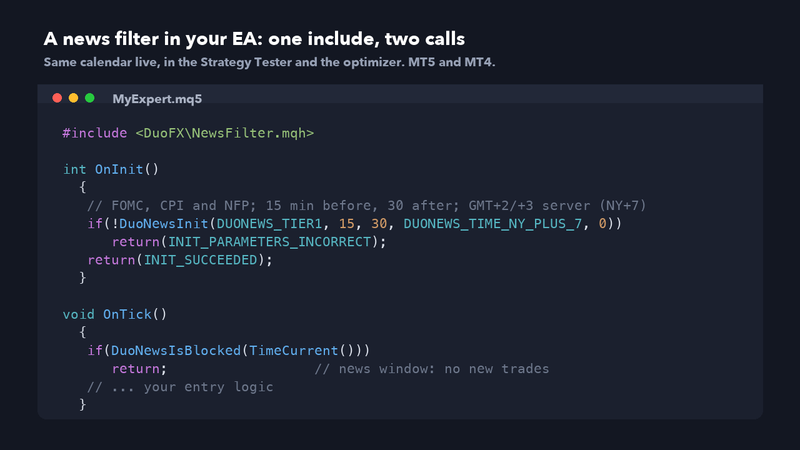
Install the library and save the include header as described in the user guide. Then two calls are enough:
#include <DuoFX\NewsFilter.mqh>

input bool InpUseNewsFilter=true;   // Use the news filter
input int  InpNewsBefore=2;         // Minutes before
input int  InpNewsAfter=5;          // Minutes after

int OnInit()
  {
   if(!DuoNewsInit(DUONEWS_TIER1,InpNewsBefore,InpNewsAfter,DUONEWS_TIME_NY_PLUS_7,0))
      return(INIT_PARAMETERS_INCORRECT);
   return(INIT_SUCCEEDED);
  }

void OnTick()
  {
   if(InpUseNewsFilter && DuoNewsIsBlocked(TimeCurrent()))
      return;                      // news window: no new trades
   // ... your entry logic
} - DUONEWS_TIER1 is FOMC, CPI and NFP. Add |DUONEWS_PPI or |DUONEWS_ALL for more.
- TimeCurrent() in the tester is the simulated server time, so the same line works live and in the backtest.
- The InpUseNewsFilter switch is what lets you compare the two versions in Step 3.
Step 2: set your broker's time mode
This is the one setting that matters for backtests. The calendar is stored in New York time and converted to your broker's server time. Live, Auto mode can read the server clock, but the Strategy Tester has no real GMT clock, so Auto uses NY+7 there and prints a warning once.
- If your broker shows GMT+2 in winter and GMT+3 in summer and the daily candle starts at 17:00 New York, use DUONEWS_TIME_NY_PLUS_7. That is the most common forex and gold server clock.
- Otherwise pick EU DST, US DST or a fixed offset. The second how-to, Your news filter is an hour off, explains how to tell them apart.
Step 3: run the backtest with and without the filter
- 1. Strategy Tester: your EA, XAUUSD (or the symbol you trade), "Every tick based on real ticks" if your broker provides them.
- 2. Run once with "Use the news filter" off. Note net profit, profit factor, max drawdown and the number of trades.
- 3. Run again with it on. Same dates, same settings.
- 4. Compare. The difference is what the release minutes did to your strategy on that history.
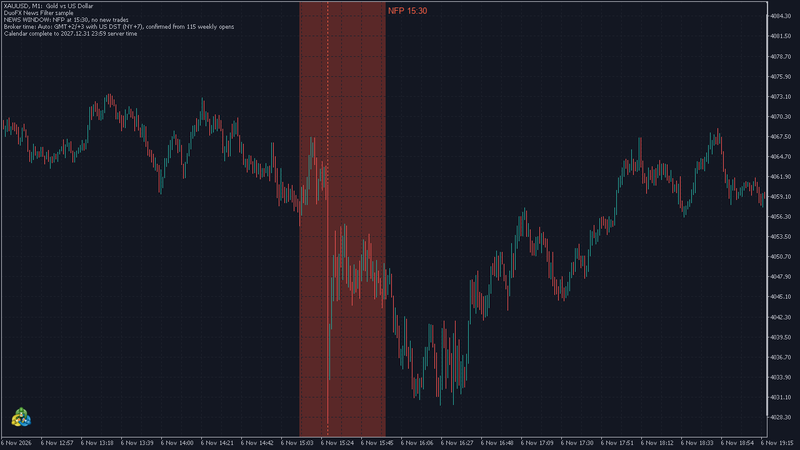
You can see the filter work in visual mode with the free sample EA from the user guide. On XAUUSD M1, 6 November 2026, with the wide preset of 15 minutes before and 30 after, the window covers 15:15 to 15:45 server time around NFP at 15:30, and no trade opens inside it.
Read the comparison honestly:
- The filter helped: your strategy loses on the release spikes. Keep it on live, and keep it on in every future backtest so the numbers match.
- The filter hurt: some of the edge came from the release minutes. That is a fragile edge. Spreads at the release can be several times normal, and stops can slip far past their level, which tick data often understates.
- No difference: the strategy rarely trades near releases. The filter is cheap insurance against the next one.
Step 4: use it in the optimizer, carefully
- The library is fast, so thousands of optimizer passes are fine, and the init log line is suppressed during optimization to keep the journal quiet.
- You can make the minutes before and after inputs part of the optimization. Keep the grid coarse, for example 2/5, 5/15 and 15/30. A window tuned to the exact minute is a classic way to overfit.
- Run the same with and without comparison on data the optimizer has not seen.
Close or protect open trades too
Blocking new entries is the minimum. Many EAs also close or tighten trades before a release:
int m=DuoNewsMinutesToNext(TimeCurrent());
if(m>=0 && m<=InpNewsBefore)
  {
   // close this EA's trades, or move their stops
} - DuoNewsMinutesToNext returns whole minutes to the next enabled release, 0 at the release and -1 when there is none.
- The library never touches your orders. Your EA decides.
Checklist
- Filter switch as an input, so you can compare.
- Time mode set to your broker's clock, never Auto, for backtests.
- Same window live and in the tester.
- Check DuoNewsCoverageEnd() once and warn after 31 December 2027.
Trading is risky, and news releases are among the most volatile minutes of the month. A news filter reduces exposure to scheduled releases; it does not remove risk, and a backtest is not a promise of future results. Not financial advice. Test any EA on a demo account first. More on duofxlabs.com.